display FORD SUPER DUTY 2015 3.G Owner's Manual
[x] Cancel search | Manufacturer: FORD, Model Year: 2015, Model line: SUPER DUTY, Model: FORD SUPER DUTY 2015 3.GPages: 470, PDF Size: 18.24 MB
Page 87 of 470
SETUP (cont’d)
On or OffREMOTE WINDOWOPEN
CREATE MYKEY / MYKEY SETUP / CLEAR MYKEY
On or Offpress the RESETbuttonRESET FOR REMOTE START
5, 10, 15 minutes
Electric or EOHTBC MODE
LOW, MED or HIGHTBC EFFORT
On or OffTRAILER SWAY
English / Spanish / FrenchLANGUAGE = ENGLISH / SPANISH /FRENCH
PRESS RESET FOR SYSTEM CHECK
The information display will begin to cyclethrough the vehicle systems and providea status of the item if needed.
Note:Some systems show a message onlyif a condition is present
OIL LIFE
Displays the remaining oil life. An oilchange is required whenever indicated bythe information display and according tothe recommended maintenance schedule.USE ONLY RECOMMENDED ENGINE OILS.
To reset the oil monitoring system to 100%after each oil change, perform thefollowing:
1.Press and release the SETUP buttonto display OIL LIFE XXX% HOLD RESET= NEW.
2.Press and hold the RESET button fortwo seconds and release to reset theoil life to 100%.
Note:To change oil life 100% value (ifequipped with this feature) to another value,proceed to Step 3.
3.Once OIL LIFE SET TO XXX% isdisplayed, release and press the RESETbutton to change the Oil Life StartValue. Each release and press willreduce the value by 10%.
UNITS
Displays the current units English or Metric
AUTOLAMP (SEC)
This feature keeps your headlights on forup to three minutes after the ignition isswitched off.
AUTOLOCK
This feature automatically locks all vehicledoors when the vehicle is shifted into anygear, putting the vehicle in motion.
AUTOUNLOCK
This feature automatically unlocks allvehicle doors when the driver’s door isopened within 10 minutes of the ignitionbeing turned off.
84Super Duty (), enUSAInformation Displays
Page 88 of 470
COURTESY WIPE
This feature allows for an extra swipe ofthe wipers after a wipe/wash cycle.
CREATE MYKEY / MYKEY SETUP /CLEAR MYKEY
For more information, See Creating aMyKey (page 50).
RESET FOR REMOTE START (ifequipped)
REAR PARK AID
This feature sounds a warning tone to warnthe driver of obstacles near the rearbumper, and functions only when R(Reverse) gear is selected.
TBC MODE (if equipped)
Allows you to choose the trailer brakemode.
TBC EFFORT (if equipped)
Allows you to choose the level of initialbraking.
TRAILER SWAY (if equipped)
This feature uses the electronic stabilitycontrol to mitigate trailer sway.
LANGUAGE = ENGLISH / SPANISH /FRENCH
Allows you to choose which language themessage center will display in.
Waiting four seconds or pressing theRESET button cycles the message centerthrough each of the language choices.
Press the RESET button to set thelanguage choice.
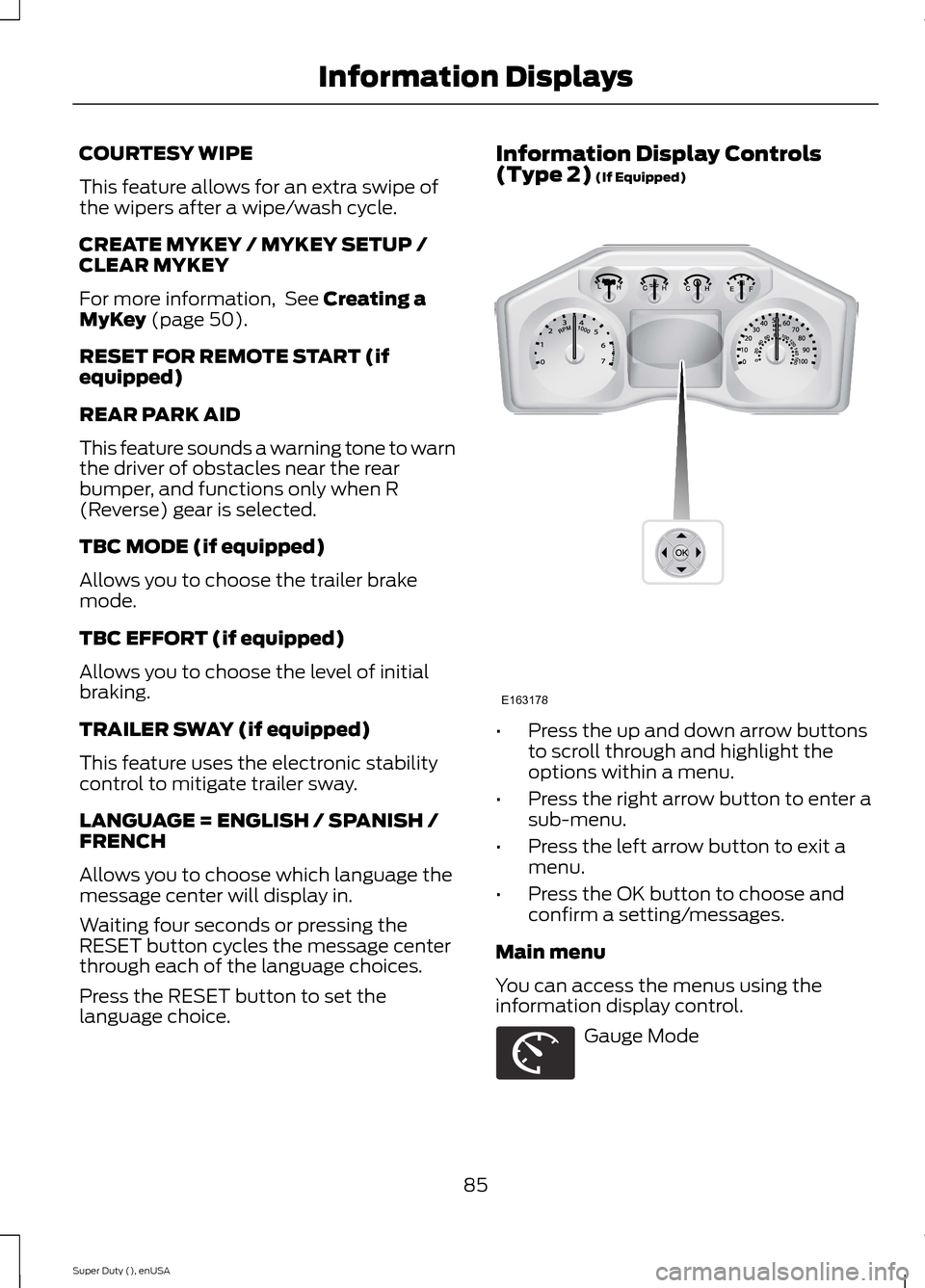
Information Display Controls(Type 2) (If Equipped)
•Press the up and down arrow buttonsto scroll through and highlight theoptions within a menu.
•Press the right arrow button to enter asub-menu.
•Press the left arrow button to exit amenu.
•Press the OK button to choose andconfirm a setting/messages.
Main menu
You can access the menus using theinformation display control.
Gauge Mode
85Super Duty (), enUSAInformation DisplaysE163178 E163179
Page 89 of 470
Trip A / B
Fuel Economy
Truck Apps (If Equipped)
Settings
Information
Display Mode
Use the arrow buttons to choosebetween the following gaugeoptions.
Gauge Mode
Engine Oil Temperature (Diesel only)Gauges Detail
Transmission Temperature
The compass orientationcan be changed betweenfixed north or rotating north.To change the modes, pressOK when the compassdisplay is shown. Use theright arrow to choose themode. Press and hold OK toset the mode.
Compass
Exhaust Filter (diesel only). Refer to your diesel supple-ment for more information.
Blank
Trip A / B
Use the arrow buttons to choosebetween the following tripoptions.
86Super Duty (), enUSAInformation DisplaysE138660 E163180 E163181 E144641 E144642 E163179 E138660
Page 90 of 470
Trip A / B
Trip time
Trip distance
Fuel used
Avg MPG (L/100km)
Odometer
Press OK to pause the Trip A or B screen,press again to un-pause.
Press and hold OK to reset the currentlydisplayed trip information.
Trip time
This shows the elapsed trip time. The timerwill stop when your vehicle is turned offand will restart when your vehicle isrestarted.
Trip distance
Registers the mileage of individualjourneys.
Fuel used
Shows the amount of fuel used for a giventrip.
Average MPG
Shows the average distance traveled perunit of fuel used for a given trip.
Fuel Economy
Use the arrow buttons to choosethe desired fuel economydisplay.
Fuel Economy
Instant MPG (L/100km)Fuel Econ.
Miles (kilometers) to Empty
AVG MPG (L/100km)
5, 10, 30 Minutes or Last 5 ResetsFuel Hist.
Instant MPG
Shows your instantaneous fuel usage.
Miles to empty
Shows the approximate distance yourvehicle can travel before running out offuel.
Average MPG
Shows the average fuel usage based ontime. Press and hold OK to reset this value.
87Super Duty (), enUSAInformation DisplaysE163180
Page 91 of 470
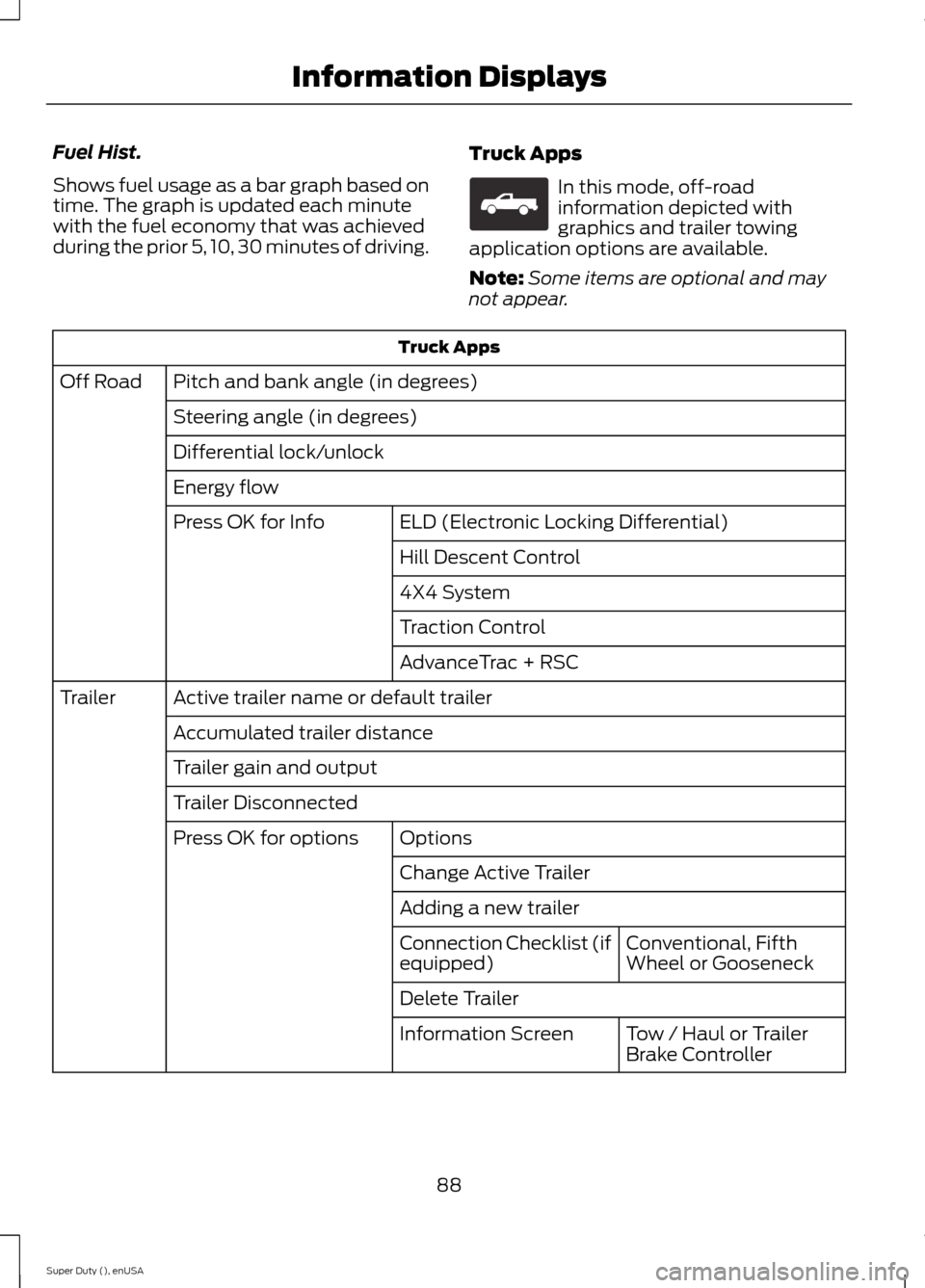
Fuel Hist.
Shows fuel usage as a bar graph based ontime. The graph is updated each minutewith the fuel economy that was achievedduring the prior 5, 10, 30 minutes of driving.
Truck Apps
In this mode, off-roadinformation depicted withgraphics and trailer towingapplication options are available.
Note:Some items are optional and maynot appear.
Truck Apps
Pitch and bank angle (in degrees)Off Road
Steering angle (in degrees)
Differential lock/unlock
Energy flow
ELD (Electronic Locking Differential)Press OK for Info
Hill Descent Control
4X4 System
Traction Control
AdvanceTrac + RSC
Active trailer name or default trailerTrailer
Accumulated trailer distance
Trailer gain and output
Trailer Disconnected
OptionsPress OK for options
Change Active Trailer
Adding a new trailer
Conventional, FifthWheel or GooseneckConnection Checklist (ifequipped)
Delete Trailer
Tow / Haul or TrailerBrake ControllerInformation Screen
88Super Duty (), enUSAInformation DisplaysE163181
Page 92 of 470
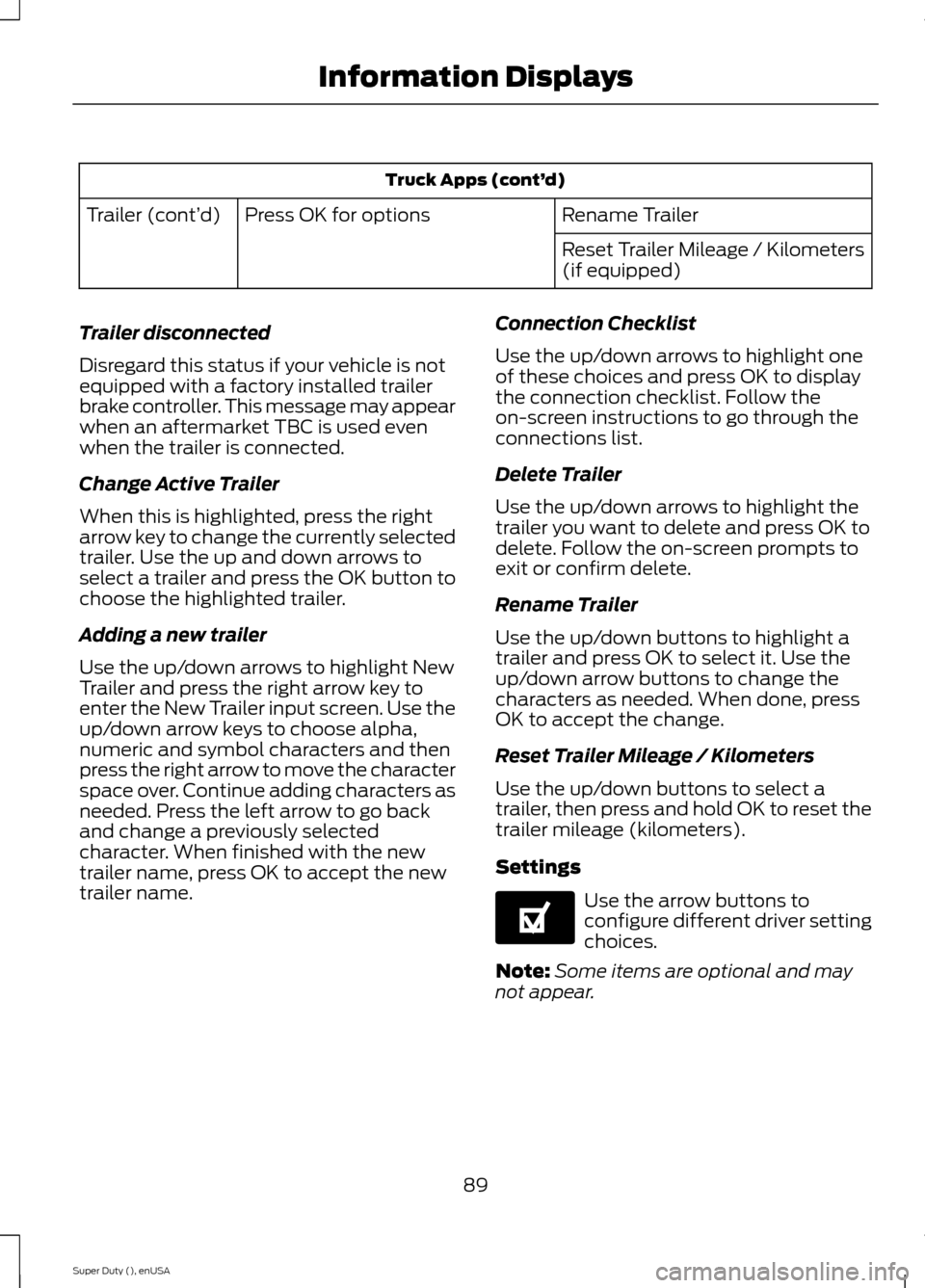
Truck Apps (cont’d)
Rename TrailerPress OK for optionsTrailer (cont’d)
Reset Trailer Mileage / Kilometers(if equipped)
Trailer disconnected
Disregard this status if your vehicle is notequipped with a factory installed trailerbrake controller. This message may appearwhen an aftermarket TBC is used evenwhen the trailer is connected.
Change Active Trailer
When this is highlighted, press the rightarrow key to change the currently selectedtrailer. Use the up and down arrows toselect a trailer and press the OK button tochoose the highlighted trailer.
Adding a new trailer
Use the up/down arrows to highlight NewTrailer and press the right arrow key toenter the New Trailer input screen. Use theup/down arrow keys to choose alpha,numeric and symbol characters and thenpress the right arrow to move the characterspace over. Continue adding characters asneeded. Press the left arrow to go backand change a previously selectedcharacter. When finished with the newtrailer name, press OK to accept the newtrailer name.
Connection Checklist
Use the up/down arrows to highlight oneof these choices and press OK to displaythe connection checklist. Follow theon-screen instructions to go through theconnections list.
Delete Trailer
Use the up/down arrows to highlight thetrailer you want to delete and press OK todelete. Follow the on-screen prompts toexit or confirm delete.
Rename Trailer
Use the up/down buttons to highlight atrailer and press OK to select it. Use theup/down arrow buttons to change thecharacters as needed. When done, pressOK to accept the change.
Reset Trailer Mileage / Kilometers
Use the up/down buttons to select atrailer, then press and hold OK to reset thetrailer mileage (kilometers).
Settings
Use the arrow buttons toconfigure different driver settingchoices.
Note:Some items are optional and maynot appear.
89Super Duty (), enUSAInformation DisplaysE144641
Page 93 of 470
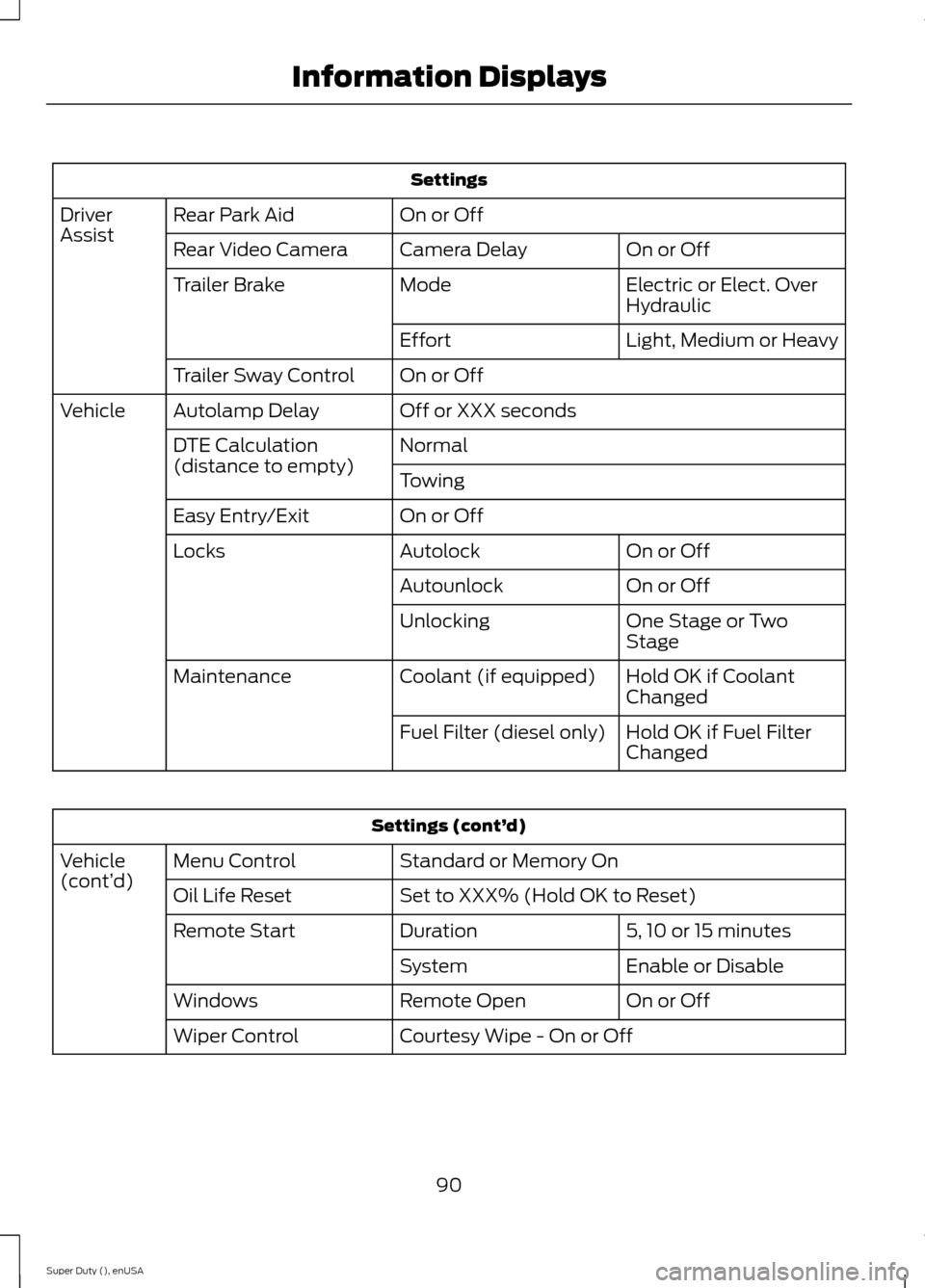
Settings
On or OffRear Park AidDriverAssistOn or OffCamera DelayRear Video Camera
Electric or Elect. OverHydraulicModeTrailer Brake
Light, Medium or HeavyEffort
On or OffTrailer Sway Control
Off or XXX secondsAutolamp DelayVehicle
NormalDTE Calculation(distance to empty)Towing
On or OffEasy Entry/Exit
On or OffAutolockLocks
On or OffAutounlock
One Stage or TwoStageUnlocking
Hold OK if CoolantChangedCoolant (if equipped)Maintenance
Hold OK if Fuel FilterChangedFuel Filter (diesel only)
Settings (cont’d)
Standard or Memory OnMenu ControlVehicle(cont’d)Set to XXX% (Hold OK to Reset)Oil Life Reset
5, 10 or 15 minutesDurationRemote Start
Enable or DisableSystem
On or OffRemote OpenWindows
Courtesy Wipe - On or OffWiper Control
90Super Duty (), enUSAInformation Displays
Page 94 of 470
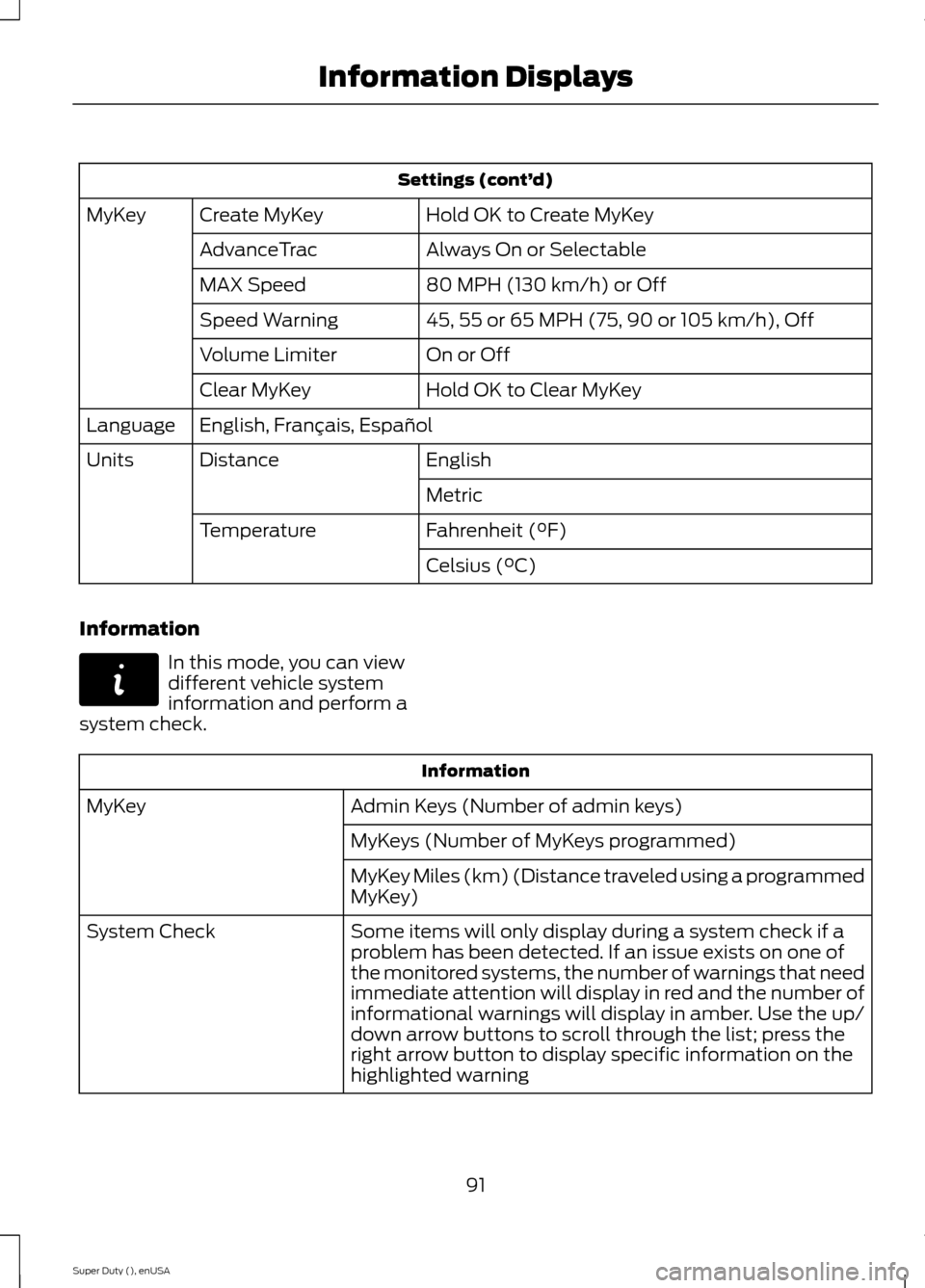
Settings (cont’d)
Hold OK to Create MyKeyCreate MyKeyMyKey
Always On or SelectableAdvanceTrac
80 MPH (130 km/h) or OffMAX Speed
45, 55 or 65 MPH (75, 90 or 105 km/h), OffSpeed Warning
On or OffVolume Limiter
Hold OK to Clear MyKeyClear MyKey
English, Français, EspañolLanguage
EnglishDistanceUnits
Metric
Fahrenheit (°F)Temperature
Celsius (°C)
Information
In this mode, you can viewdifferent vehicle systeminformation and perform asystem check.
Information
Admin Keys (Number of admin keys)MyKey
MyKeys (Number of MyKeys programmed)
MyKey Miles (km) (Distance traveled using a programmedMyKey)
Some items will only display during a system check if aproblem has been detected. If an issue exists on one ofthe monitored systems, the number of warnings that needimmediate attention will display in red and the number ofinformational warnings will display in amber. Use the up/down arrow buttons to scroll through the list; press theright arrow button to display specific information on thehighlighted warning
System Check
91Super Duty (), enUSAInformation DisplaysE144642
Page 95 of 470
Compass/Transmission indicatordisplay (if equipped)
The compass heading will display in theupper right corner of the informationdisplay; the transmission gear indicatordisplays in the right side of the informationdisplay when using the SelectShiftAutomatic™ transmission feature. Thesedisplays will not be shown in all screenmodes. For example: when programmingcertain vehicle features or in certaininformation menus.
INFORMATION MESSAGES
Note:Depending on your vehicle optionsand instrument cluster type, not all of themessages will display or be available.Additionally, the information display mayabbreviate or shorten certain messages.
Press the RESET button for Type 1 displaysor the OK button for Type 2 displays toacknowledge and remove some messagesfrom the information display. Theinformation display will automaticallyremove other messages after a short time.
You need to confirm certain messagesbefore you can access the menus.
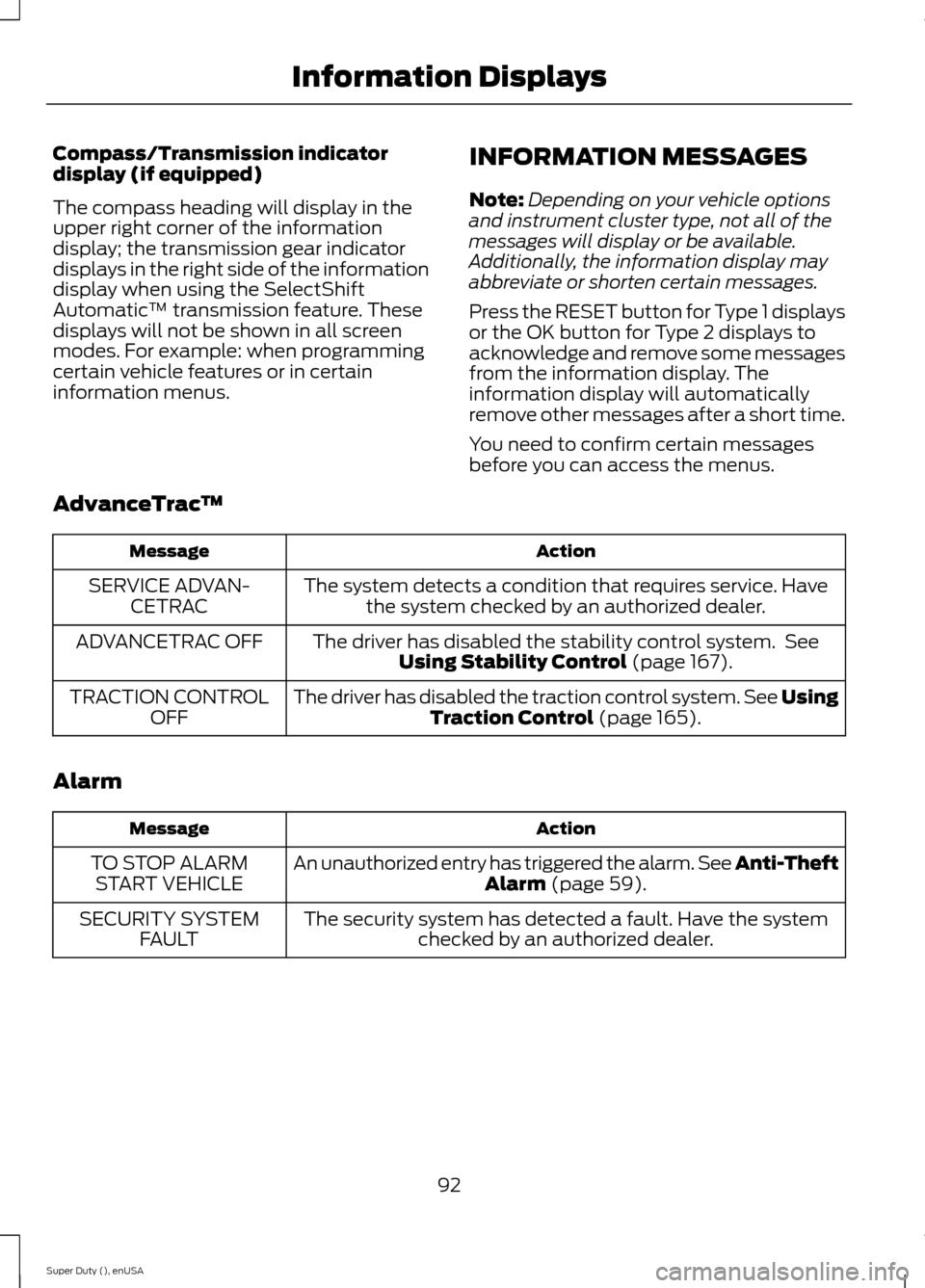
AdvanceTrac™
ActionMessage
The system detects a condition that requires service. Havethe system checked by an authorized dealer.SERVICE ADVAN-CETRAC
The driver has disabled the stability control system. SeeUsing Stability Control (page 167).ADVANCETRAC OFF
The driver has disabled the traction control system. See UsingTraction Control (page 165).TRACTION CONTROLOFF
Alarm
ActionMessage
An unauthorized entry has triggered the alarm. See Anti-TheftAlarm (page 59).TO STOP ALARMSTART VEHICLE
The security system has detected a fault. Have the systemchecked by an authorized dealer.SECURITY SYSTEMFAULT
92Super Duty (), enUSAInformation Displays
Page 96 of 470
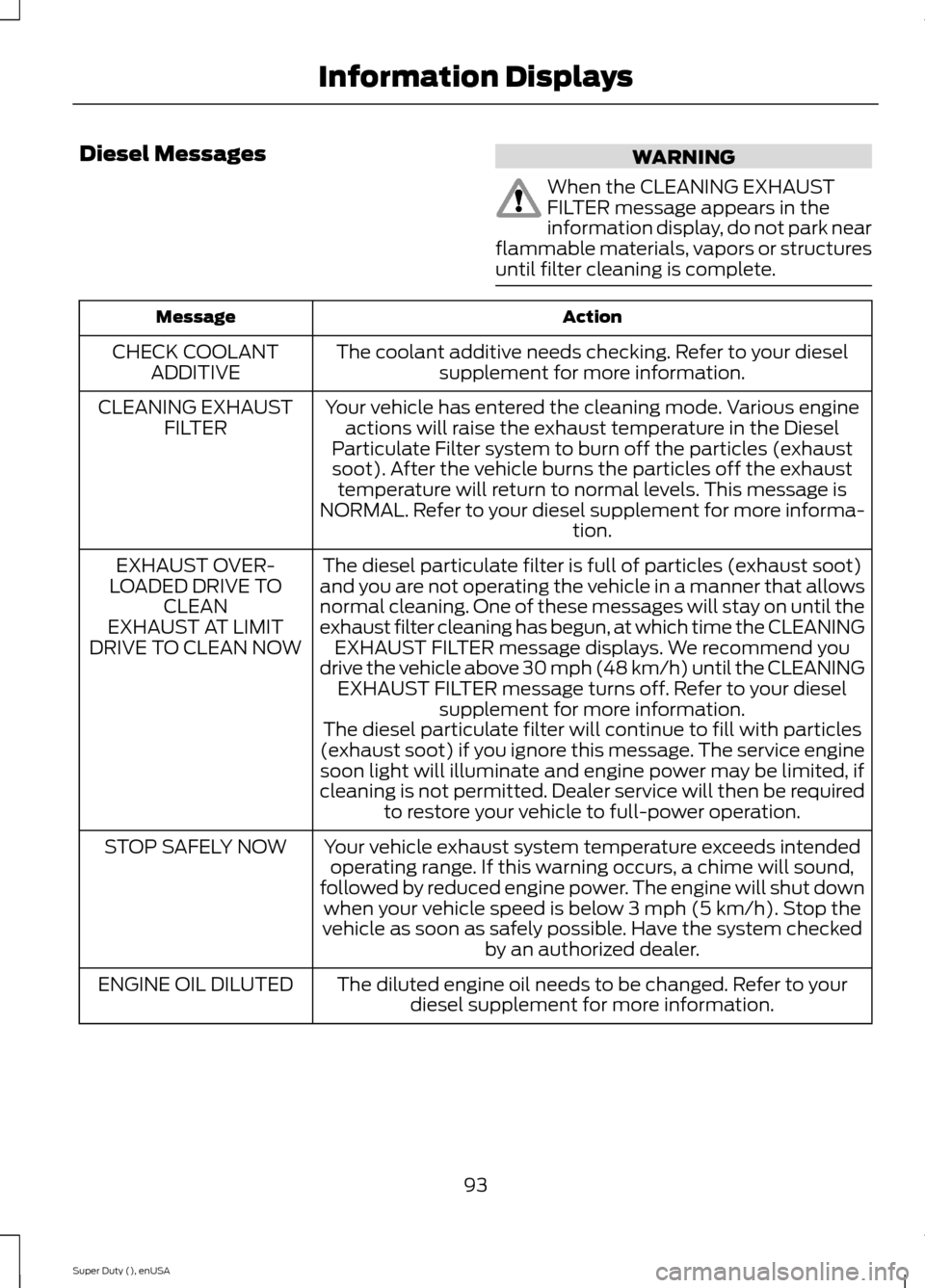
Diesel MessagesWARNING
When the CLEANING EXHAUSTFILTER message appears in theinformation display, do not park nearflammable materials, vapors or structuresuntil filter cleaning is complete.
ActionMessage
The coolant additive needs checking. Refer to your dieselsupplement for more information.CHECK COOLANTADDITIVE
Your vehicle has entered the cleaning mode. Various engineactions will raise the exhaust temperature in the DieselParticulate Filter system to burn off the particles (exhaustsoot). After the vehicle burns the particles off the exhausttemperature will return to normal levels. This message isNORMAL. Refer to your diesel supplement for more informa-tion.
CLEANING EXHAUSTFILTER
The diesel particulate filter is full of particles (exhaust soot)and you are not operating the vehicle in a manner that allowsnormal cleaning. One of these messages will stay on until theexhaust filter cleaning has begun, at which time the CLEANINGEXHAUST FILTER message displays. We recommend youdrive the vehicle above 30 mph (48 km/h) until the CLEANINGEXHAUST FILTER message turns off. Refer to your dieselsupplement for more information.
EXHAUST OVER-LOADED DRIVE TOCLEANEXHAUST AT LIMITDRIVE TO CLEAN NOW
The diesel particulate filter will continue to fill with particles(exhaust soot) if you ignore this message. The service enginesoon light will illuminate and engine power may be limited, ifcleaning is not permitted. Dealer service will then be requiredto restore your vehicle to full-power operation.
Your vehicle exhaust system temperature exceeds intendedoperating range. If this warning occurs, a chime will sound,followed by reduced engine power. The engine will shut downwhen your vehicle speed is below 3 mph (5 km/h). Stop thevehicle as soon as safely possible. Have the system checkedby an authorized dealer.
STOP SAFELY NOW
The diluted engine oil needs to be changed. Refer to yourdiesel supplement for more information.ENGINE OIL DILUTED
93Super Duty (), enUSAInformation Displays