phone FORD SUPER DUTY 2015 3.G User Guide
[x] Cancel search | Manufacturer: FORD, Model Year: 2015, Model line: SUPER DUTY, Model: FORD SUPER DUTY 2015 3.GPages: 470, PDF Size: 18.24 MB
Page 224 of 470
FORD MOTOR COMPANYCustomer Relationship Center1555 Fairlane DriveFairlane Business Park #3Allen Park, Michigan 48101U.S.A.Telephone: +971 4 3326084Toll-Free Number of the Kingdom of SaudiArabia: 800 8971409Local Telephone Number of Kuwait:24810575FAX: +971 4 3327299Email: [email protected]
If you buy your vehicle in North Americaand then relocate to any of the abovelocations, register your vehicleidentification number (VIN) and newaddress with Ford Motor Company ExportOperations & Global Growth Initiatives byemailing [email protected].
If you are in another foreign country,contact the nearest authorized dealer. Inthe event your inquiry is unresolved,communicate your concern with thedealership’s Sales Manager, ServiceManager or Customer Relations Manager.If you require additional assistance orclarification, please contact the respectiveCustomer Relationship Center aspreviously listed.
Customers in the U.S. should call1-800-392-3673.
ORDERING ADDITIONAL
OWNER'S LITERATURE
To order the publications in this portfolio,contact Helm, Incorporated at:
HELM, INCORPORATED47911 Halyard DrivePlymouth, Michigan 48170Attention: Customer Service
Or to order a free publication catalog, calltoll free: 1-800-782-4356
Monday-Friday 8:00 a.m. - 6:00 p.m. EST
Helm, Incorporated can also be reachedby their website:
www.helminc.com
(Items in this catalog may be purchasedby credit card, check or money order.)
Obtaining a French Owner’sManual
French Owner’s Manual can be obtainedfrom your authorized dealer or bycontacting Helm, Incorporated using thecontact information listed previously in thissection.
REPORTING SAFETY DEFECTS
(U.S. ONLY)
If you believe that your vehicle hasa defect which could cause acrash or could cause injury ordeath, you should immediatelyinform the National HighwayTraffic Safety Administration(NHTSA) in addition to notifyingFord Motor Company.
If NHTSA receives similarcomplaints, it may open aninvestigation, and if it finds that asafety defect exists in a group ofvehicles, it may order a recall andremedy campaign. However,NHTSA cannot become involvedin individual problems betweenyou, your dealer, or Ford Motor
Company.
221Super Duty (), enUSACustomer AssistanceE142557
Page 225 of 470
To contact NHTSA, you may callthe Vehicle Safety Hotlinetoll-free at 1-888-327-4236 (TTY:1-800-424-9153); go tohttp://www.safercar.gov; or writeto:
Administrator
1200 New Jersey Avenue,Southeast
Washington, D.C. 20590
You can also obtain otherinformation about motor vehiclesafety fromhttp://www.safercar.gov.
REPORTING SAFETY DEFECTS
(CANADA ONLY)
If you believe that your vehicle has
a defect which could cause a
crash or could cause injury or
death, you should immediately
inform Transport Canada.
Transport Canada Contact Information
http://www.tc.gc.ca/eng/roadsafety/menu.htmWebsite
1–800–333–0510Phone
222Super Duty (), enUSACustomer Assistance
Page 263 of 470
•alcohol solutions
•solvents or cleaners intendedspecifically for rubber, vinyl andplastics.
WITH THE KING RANCH EDITION
Your vehicle is equipped with seatingcovered in premium, top-grain leatherwhich is extremely durable, but stillrequires special care and maintenance inorder to preserve longevity and comfort.
Regular cleaning and conditioning willmaintain the appearance of the leather.
Cleaning
For dirt, use a vacuum cleaner then use aclean, damp cloth or soft brush.
For routine cleaning, wipe the surface witha soft, damp cloth. For more thoroughcleaning, wipe the surface with a mild soapand water solution.
•Clean spills as quickly as possible.
•Test any cleaner or stain remover onan inconspicuous part of the leather ascleaners may darken the leather.
•Do not spill coffee, ketchup, mustard,orange juice or oil-based products onthe leather as they may permanentlystain the leather.
•Do not use household cleaningproducts, alcohol solutions, solventsor cleaners intended for rubber, vinylor plastics.
Scratches
Natural Markings - Because the leather inthe seat comes from genuine steer hides,there will be evidence of naturallyoccurring markings, such as small scars.These markings give character to theseating covers and considered to be proofof a genuine leather product.
In order to lessen the appearance ofcertain scratches and other wear marks,apply conditioner on the affected areafollowing the same instructions as in theConditioning section.
Conditioning
Bottles of King Ranch Leather Conditionerare available at the King Ranch SaddleShop. Visit the website atwww.krsaddleshop.com, or telephone (inthe United States) 1–800–282–KING(5464). If you are unable to obtain KingRanch Leather Conditioner, use anotherpremium leather conditioner.
•Clean the surfaces using the stepsoutlined in the Cleaning section.
•Make sure the leather is dry then applya nickel-sized amount of conditionerto a clean, dry cloth.
•Rub the conditioner into the leatheruntil it disappears. Allow theconditioner to dry, then repeat theprocess for the entire interior. If a filmappears, wipe it off with a dry, cleancloth.
REPAIRING MINOR PAINT
DAMAGE
Your authorized dealer has touch-up paintto match your vehicle’s color. Take yourcolor code (printed on a sticker in thedriver’s door jamb) to your authorizeddealer to ensure you get the correct color.
•Remove particles such as birddroppings, tree sap, insect deposits, tarspots, road salt and industrial falloutbefore repairing paint chips.
•Always read the instructions beforeusing the products.
260Super Duty (), enUSAVehicle Care
Page 316 of 470
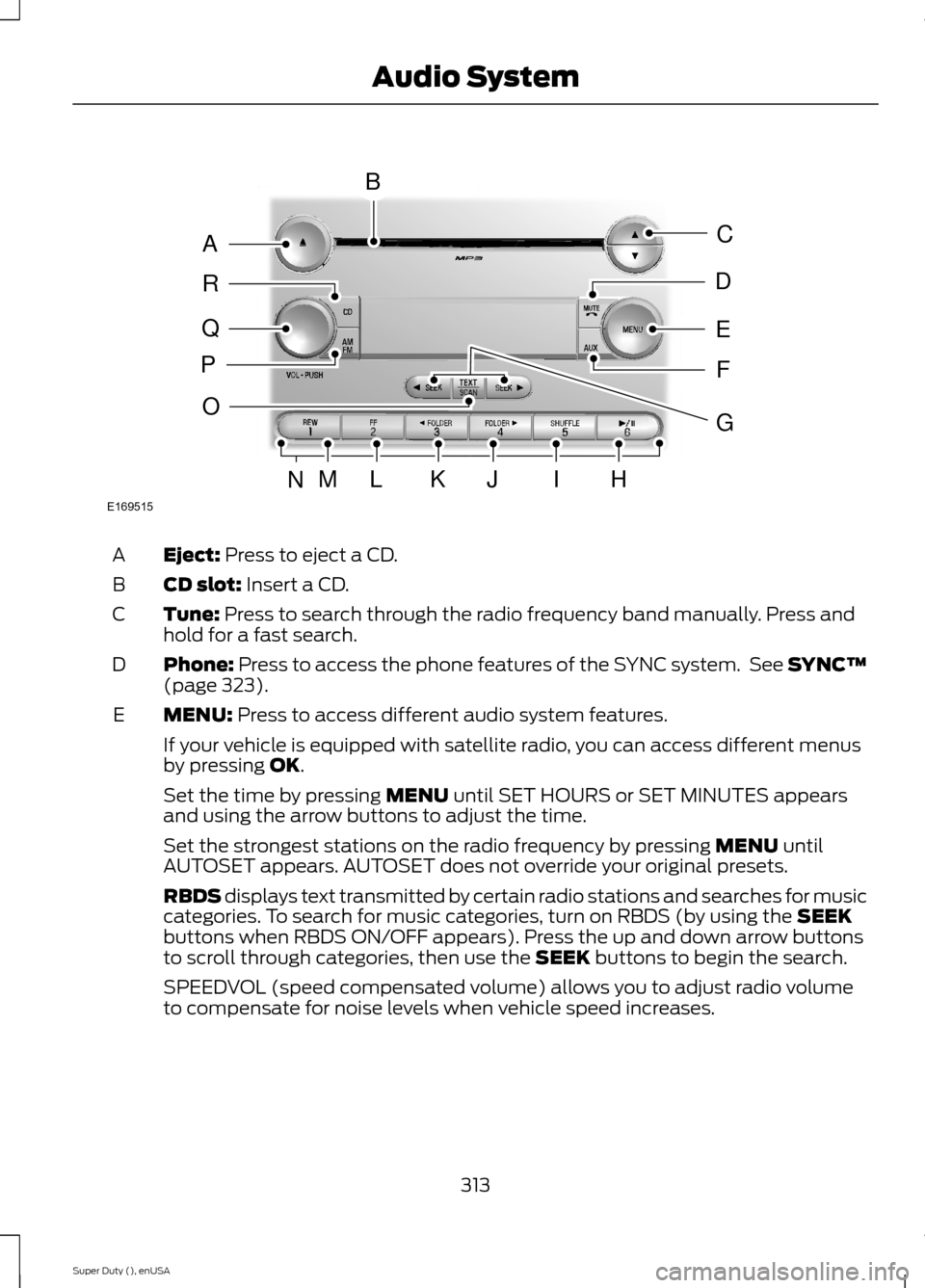
Eject: Press to eject a CD.A
CD slot: Insert a CD.B
Tune: Press to search through the radio frequency band manually. Press andhold for a fast search.C
Phone: Press to access the phone features of the SYNC system. See SYNC™(page 323).D
MENU: Press to access different audio system features.E
If your vehicle is equipped with satellite radio, you can access different menusby pressing OK.
Set the time by pressing MENU until SET HOURS or SET MINUTES appearsand using the arrow buttons to adjust the time.
Set the strongest stations on the radio frequency by pressing MENU untilAUTOSET appears. AUTOSET does not override your original presets.
RBDS displays text transmitted by certain radio stations and searches for musiccategories. To search for music categories, turn on RBDS (by using the SEEKbuttons when RBDS ON/OFF appears). Press the up and down arrow buttonsto scroll through categories, then use the SEEK buttons to begin the search.
SPEEDVOL (speed compensated volume) allows you to adjust radio volumeto compensate for noise levels when vehicle speed increases.
313Super Duty (), enUSAAudio SystemE169515BAQRPCEDFOMLKJIHNG
Page 317 of 470
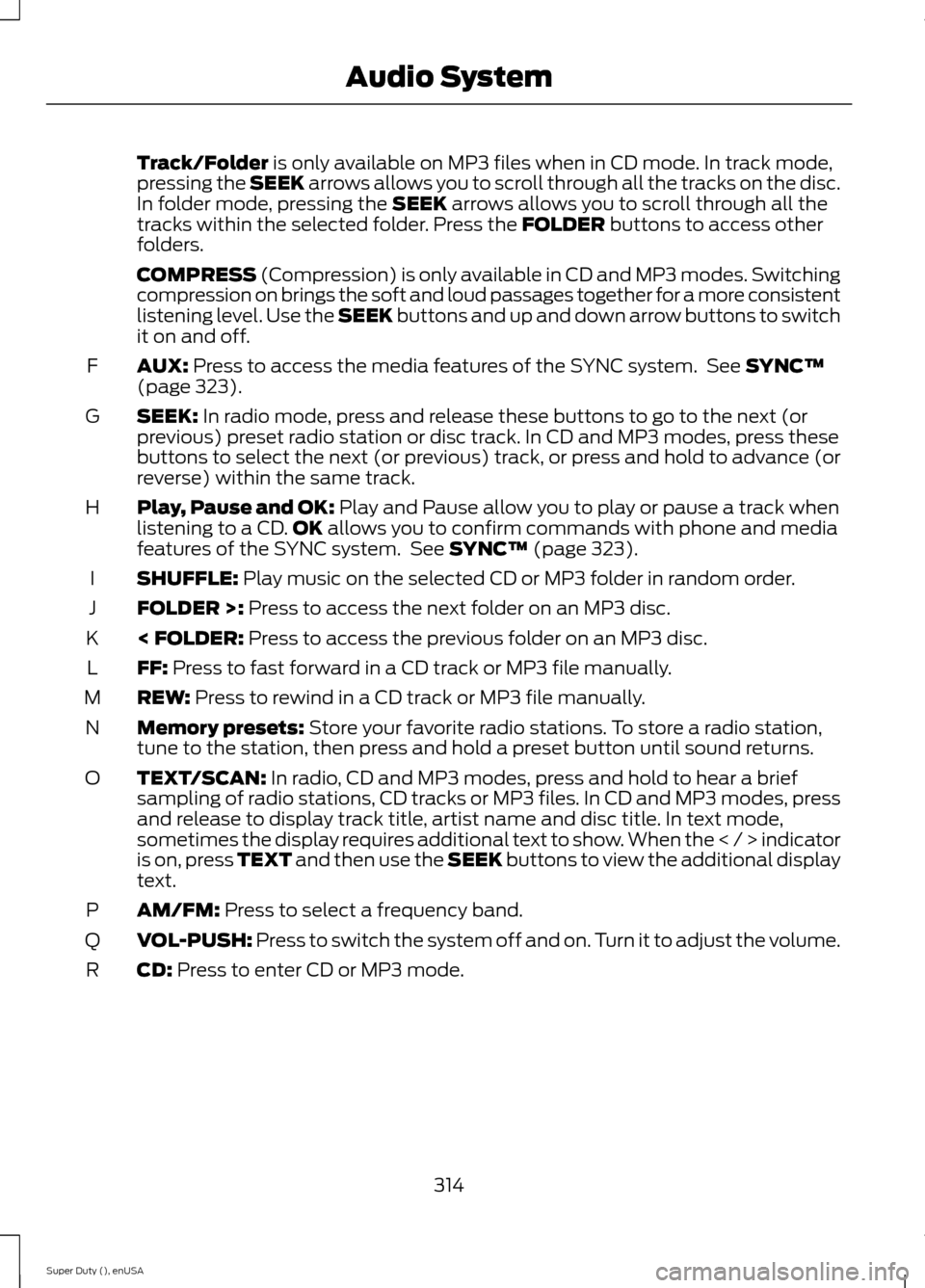
Track/Folder is only available on MP3 files when in CD mode. In track mode,pressing the SEEK arrows allows you to scroll through all the tracks on the disc.In folder mode, pressing the SEEK arrows allows you to scroll through all thetracks within the selected folder. Press the FOLDER buttons to access otherfolders.
COMPRESS (Compression) is only available in CD and MP3 modes. Switchingcompression on brings the soft and loud passages together for a more consistentlistening level. Use the SEEK buttons and up and down arrow buttons to switchit on and off.
AUX: Press to access the media features of the SYNC system. See SYNC™(page 323).F
SEEK: In radio mode, press and release these buttons to go to the next (orprevious) preset radio station or disc track. In CD and MP3 modes, press thesebuttons to select the next (or previous) track, or press and hold to advance (orreverse) within the same track.
G
Play, Pause and OK: Play and Pause allow you to play or pause a track whenlistening to a CD.OK allows you to confirm commands with phone and mediafeatures of the SYNC system. See SYNC™ (page 323).
H
SHUFFLE: Play music on the selected CD or MP3 folder in random order.I
FOLDER >: Press to access the next folder on an MP3 disc.J
< FOLDER: Press to access the previous folder on an MP3 disc.K
FF: Press to fast forward in a CD track or MP3 file manually.L
REW: Press to rewind in a CD track or MP3 file manually.M
Memory presets: Store your favorite radio stations. To store a radio station,tune to the station, then press and hold a preset button until sound returns.N
TEXT/SCAN: In radio, CD and MP3 modes, press and hold to hear a briefsampling of radio stations, CD tracks or MP3 files. In CD and MP3 modes, pressand release to display track title, artist name and disc title. In text mode,sometimes the display requires additional text to show. When the < / > indicatoris on, press TEXT and then use the SEEK buttons to view the additional displaytext.
O
AM/FM: Press to select a frequency band.P
VOL-PUSH: Press to switch the system off and on. Turn it to adjust the volume.Q
CD: Press to enter CD or MP3 mode.R
314Super Duty (), enUSAAudio System
Page 324 of 470
AUDIO INPUT JACK
WARNINGS
Driving while distracted can result inloss of vehicle control, crash andinjury. We strongly recommend thatyou use extreme caution when using anydevice that may take your focus off theroad. Your primary responsibility is the safeoperation of your vehicle. We recommendagainst the use of any hand-held devicewhile driving and encourage the use ofvoice-operated systems when possible.Make sure you are aware of all applicablelocal laws that may affect the use ofelectronic devices while driving.
For safety reasons, do not connector adjust the settings on yourportable music player while yourvehicle is moving.
Store the portable music player in asecure location, such as the centerconsole or the glove box, when yourvehicle is moving. Hard objects maybecome projectiles in a collision or suddenstop, which may increase the risk of seriousinjury. The audio extension cable must belong enough to allow the portable musicplayer to be safely stored while yourvehicle is moving.
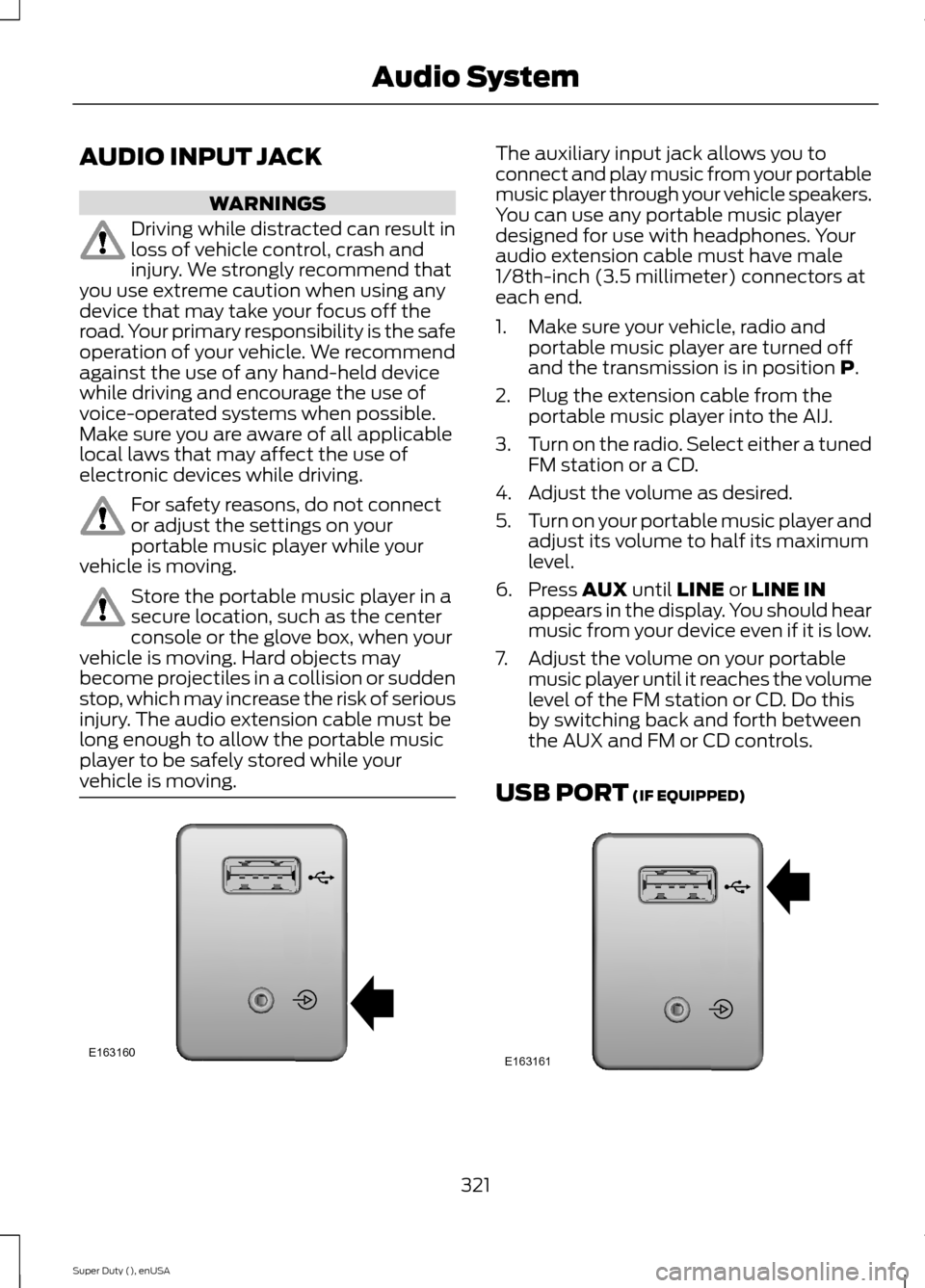
The auxiliary input jack allows you toconnect and play music from your portablemusic player through your vehicle speakers.You can use any portable music playerdesigned for use with headphones. Youraudio extension cable must have male1/8th-inch (3.5 millimeter) connectors ateach end.
1.Make sure your vehicle, radio andportable music player are turned offand the transmission is in position P.
2.Plug the extension cable from theportable music player into the AIJ.
3.Turn on the radio. Select either a tunedFM station or a CD.
4.Adjust the volume as desired.
5.Turn on your portable music player andadjust its volume to half its maximumlevel.
6.Press AUX until LINE or LINE INappears in the display. You should hearmusic from your device even if it is low.
7.Adjust the volume on your portablemusic player until it reaches the volumelevel of the FM station or CD. Do thisby switching back and forth betweenthe AUX and FM or CD controls.
USB PORT (IF EQUIPPED)
321Super Duty (), enUSAAudio SystemE163160 E163161
Page 326 of 470
GENERAL INFORMATION
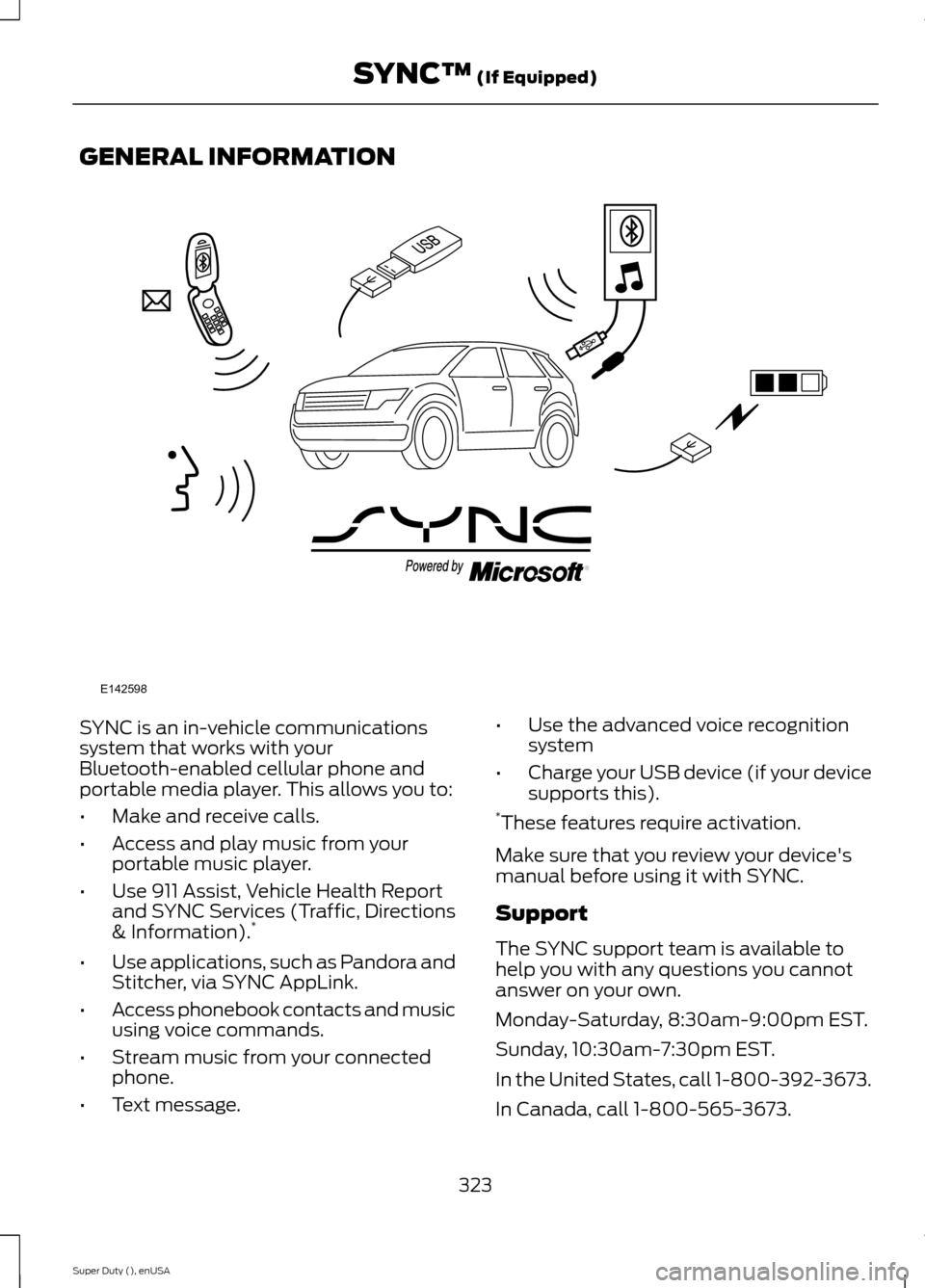
SYNC is an in-vehicle communicationssystem that works with yourBluetooth-enabled cellular phone andportable media player. This allows you to:
•Make and receive calls.
•Access and play music from yourportable music player.
•Use 911 Assist, Vehicle Health Reportand SYNC Services (Traffic, Directions& Information).*
•Use applications, such as Pandora andStitcher, via SYNC AppLink.
•Access phonebook contacts and musicusing voice commands.
•Stream music from your connectedphone.
•Text message.
•Use the advanced voice recognitionsystem
•Charge your USB device (if your devicesupports this).*These features require activation.
Make sure that you review your device'smanual before using it with SYNC.
Support
The SYNC support team is available tohelp you with any questions you cannotanswer on your own.
Monday-Saturday, 8:30am-9:00pm EST.
Sunday, 10:30am-7:30pm EST.
In the United States, call 1-800-392-3673.
In Canada, call 1-800-565-3673.
323Super Duty (), enUSASYNC™ (If Equipped)E142598
Page 327 of 470
Times are subject to change due toholidays.
SYNC Owner Account
Why do I need a SYNC owner account?
•Required to activate Vehicle HealthReport and to view the reports online.
•Required to activate thesubscription-based SYNC Services andto personalize your Saved Points andFavorites.
•Essential for keeping up with the latestsoftware downloads available forSYNC.
•Access to customer support for anyquestions you may have.
Driving Restrictions
For your safety, certain features arespeed-dependent and restricted when yourvehicle is traveling over 3 mph (5 km/h).
Safety Information
WARNING
Driving while distracted can result inloss of vehicle control, crash andinjury. We strongly recommend thatyou use extreme caution when using anydevice that may take your focus off theroad. Your primary responsibility is the safeoperation of your vehicle. We recommendagainst the use of any hand-held devicewhile driving and encourage the use ofvoice-operated systems when possible.Make sure you are aware of all applicablelocal laws that may affect the use ofelectronic devices while driving.
When using SYNC:
•Do not operate playing devices if thepower cords or cables are broken, splitor damaged. Place cords and cablesout of the way, so they do not interferewith the operation of pedals, seats,compartments or safe driving abilities.
•Do not leave playing devices in yourvehicle during extreme conditions as itcould cause them damage. See yourdevice's manual for further information.
•Do not attempt to service or repair thesystem. See an authorized dealer.
Privacy Information
When a cellular phone is connected toSYNC, the system creates a profile withinyour vehicle that is linked to that cellularphone. This profile is created in order tooffer you more cellular features and tooperate more efficiently. Among otherthings, this profile may contain data aboutyour cellular phone book, text messages(read and unread), and call history,including history of calls when your cellularphone was not connected to the system.In addition, if you connect a media device,the system creates and retains an index ofsupported media content. The system alsorecords a short development log ofapproximately 10 minutes of all recentsystem activity. The log profile and othersystem data may be used to improve thesystem and help diagnose any problemsthat may occur.
The cellular profile, media device index,and development log will remain in thevehicle unless you delete them and aregenerally accessible only in the vehiclewhen the cellular phone or media playeris connected. If you no longer plan to usethe system or the vehicle, we recommendyou perform a Master Reset to erase allstored information.
324Super Duty (), enUSASYNC™ (If Equipped)
Page 328 of 470
System data cannot be accessed withoutspecial equipment and access to thevehicle's SYNC module. Ford MotorCompany and Ford of Canada will notaccess the system data for any purposeother than as described absent consent, acourt order, or where required by lawenforcement, other governmentauthorities, or other third parties actingwith lawful authority. Other parties mayseek to access the informationindependently of Ford Motor Company andFord of Canada. For further privacyinformation, see the sections on 911 Assist,Vehicle Health Report, and Traffic,Directions and Information.
USING VOICE RECOGNITION
This system helps you control manyfeatures using voice commands. Thisallows you to keep your hands on thewheel and focus on what is in front of you.
Initiating a Voice Session
Push the voice icon. A tonesounds and Listening appears inthe display. Say any of thefollowing:
If You Want ToSay
Stream audio from your phone."Bluetooth audio"
Cancel the requested action."Cancel"
Access the device connected to the auxiliary input jack."Line in"
Access mobile applications."Mobile apps" *
Make calls."Phone"
Access the SYNC Services portal."Services" *
Return to the main menu."SYNC"
Access the device connected to your USB port."USB"
Run a vehicle health report."Vehicle health report" *
Adjust the level of voice interaction and feedback."Voice settings"
Hear a list of voice commands available in the currentmode."Help"
* This is an optional feature and available in the United States only.
325Super Duty (), enUSASYNC™ (If Equipped)E142599
Page 329 of 470
System Interaction and Feedback
The system provides feedback throughaudible tones, prompts, questions andspoken confirmations depending on thesituation and the chosen level ofinteraction (voice settings). You cancustomize the voice recognition system toprovide more or less instruction andfeedback.
The default setting is to a higher level ofinteraction in order to help you learn to usethe system. You can change these settingsat any time.
Adjusting the Interaction Level
Push the voice icon. Say "Voicesettings" when prompted, thenany of the following:
The system:When you say:
Provides more detailed interaction andguidance."Interaction mode standard"
Provides less audible interaction and moretone prompts."Interaction mode advanced"
The system defaults to the standard interaction mode.
Confirmation prompts are short questionsthe system asks when it is not sure of yourrequest or when there are multiple possibleresponses to your request. For example,the system may ask "Phone, is thatcorrect?". If turned off, the system simplymakes a best guess as to what yourequested and may ask you to confirmsettings.
The system:When you say:
Makes a best guess from the command;you may still occasionally be asked toconfirm settings.
"Confirmation prompts off"
Clarifies your voice command with a shortquestion."Confirmation prompts on"
The system creates candidate lists whenit has the same confidence level of severaloptions based on your voice command.When turned on, it may prompt you withas many as four possibilities forclarification.
For example, say "Say 1 after the tone tocall John Doe at home. Say 2 after the toneto call Johnny Doe on mobile. Say 3 afterthe tone to call Jane Doe at home." Youcould also say "Say 1 after the tone to playJohn Doe, Say 2 after the tone to playJohnny Doe."
326Super Duty (), enUSASYNC™ (If Equipped)E142599