phone FORD SUPER DUTY 2015 3.G Service Manual
[x] Cancel search | Manufacturer: FORD, Model Year: 2015, Model line: SUPER DUTY, Model: FORD SUPER DUTY 2015 3.GPages: 470, PDF Size: 18.24 MB
Page 355 of 470
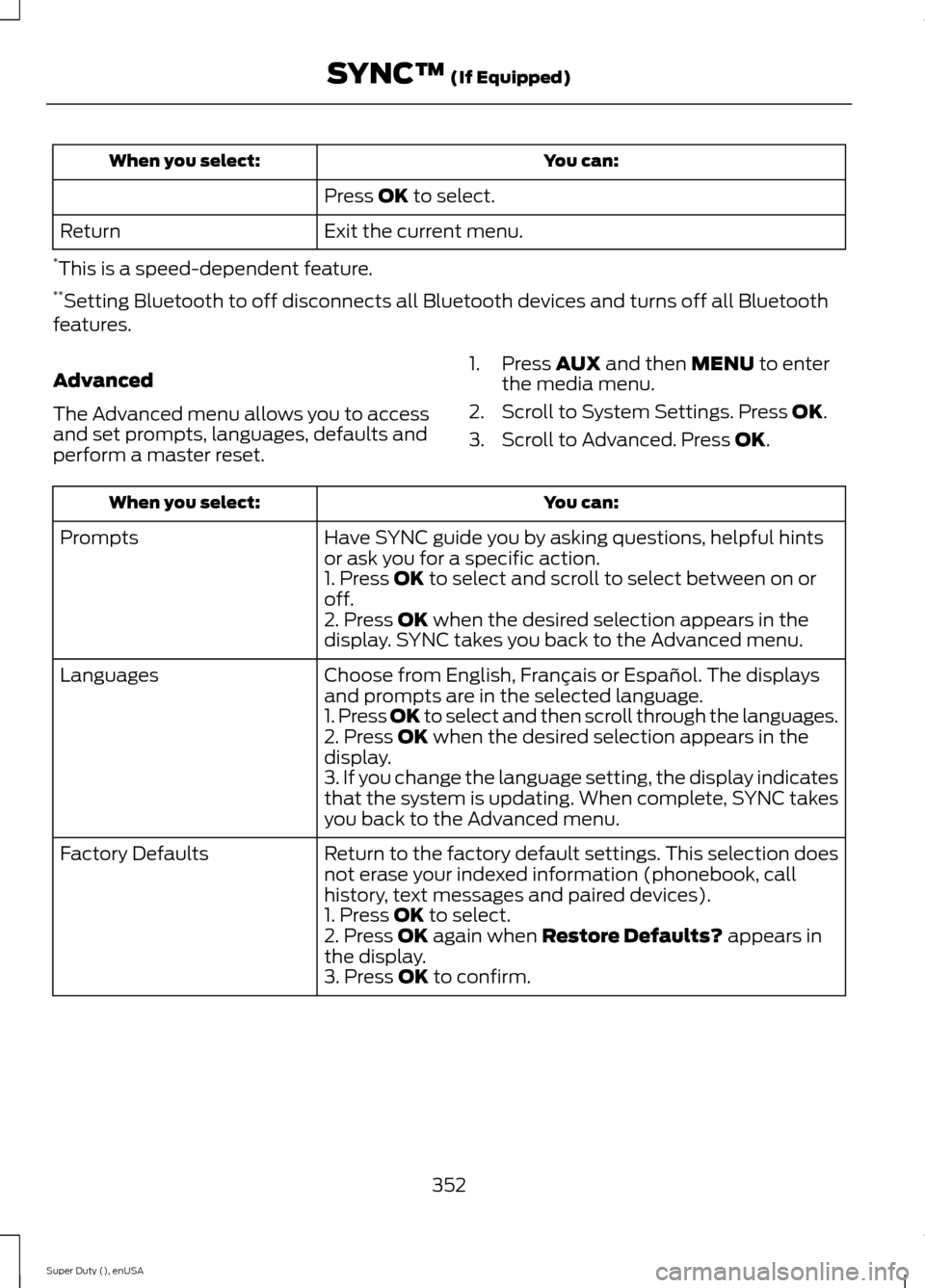
You can:When you select:
Press OK to select.
Exit the current menu.Return
*This is a speed-dependent feature.**Setting Bluetooth to off disconnects all Bluetooth devices and turns off all Bluetoothfeatures.
Advanced
The Advanced menu allows you to accessand set prompts, languages, defaults andperform a master reset.
1.Press AUX and then MENU to enterthe media menu.
2.Scroll to System Settings. Press OK.
3.Scroll to Advanced. Press OK.
You can:When you select:
Have SYNC guide you by asking questions, helpful hintsor ask you for a specific action.Prompts
1. Press OK to select and scroll to select between on oroff.2. Press OK when the desired selection appears in thedisplay. SYNC takes you back to the Advanced menu.
Choose from English, Français or Español. The displaysand prompts are in the selected language.Languages
1. Press OK to select and then scroll through the languages.2. Press OK when the desired selection appears in thedisplay.3. If you change the language setting, the display indicatesthat the system is updating. When complete, SYNC takesyou back to the Advanced menu.
Return to the factory default settings. This selection doesnot erase your indexed information (phonebook, callhistory, text messages and paired devices).
Factory Defaults
1. Press OK to select.2. Press OK again when Restore Defaults? appears inthe display.3. Press OK to confirm.
352Super Duty (), enUSASYNC™ (If Equipped)
Page 356 of 470
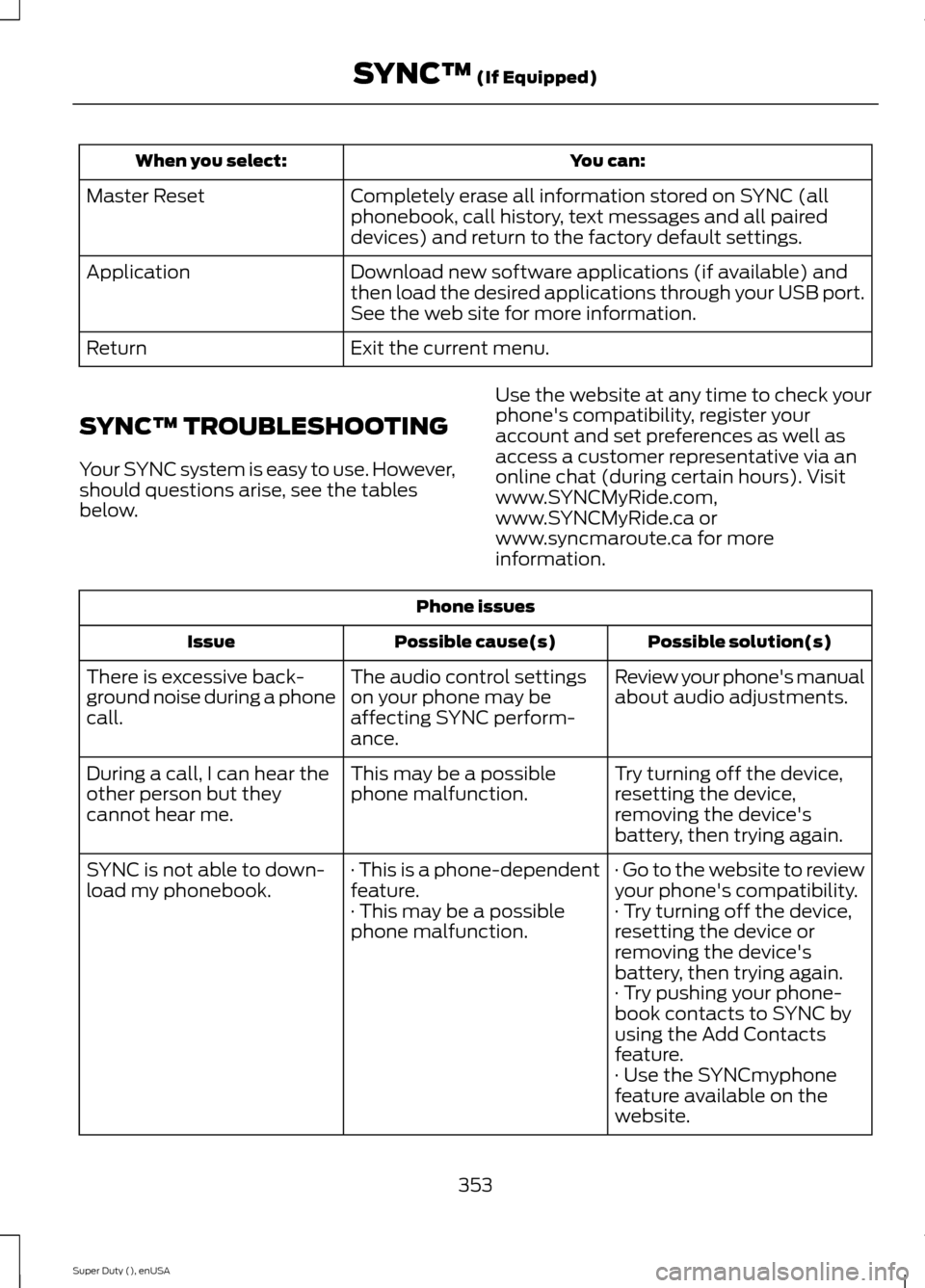
You can:When you select:
Completely erase all information stored on SYNC (allphonebook, call history, text messages and all paireddevices) and return to the factory default settings.
Master Reset
Download new software applications (if available) andthen load the desired applications through your USB port.See the web site for more information.
Application
Exit the current menu.Return
SYNC™ TROUBLESHOOTING
Your SYNC system is easy to use. However,should questions arise, see the tablesbelow.
Use the website at any time to check yourphone's compatibility, register youraccount and set preferences as well asaccess a customer representative via anonline chat (during certain hours). Visitwww.SYNCMyRide.com,www.SYNCMyRide.ca orwww.syncmaroute.ca for moreinformation.
Phone issues
Possible solution(s)Possible cause(s)Issue
Review your phone's manualabout audio adjustments.The audio control settingson your phone may beaffecting SYNC perform-ance.
There is excessive back-ground noise during a phonecall.
Try turning off the device,resetting the device,removing the device'sbattery, then trying again.
This may be a possiblephone malfunction.During a call, I can hear theother person but theycannot hear me.
· Go to the website to reviewyour phone's compatibility.· This is a phone-dependentfeature.SYNC is not able to down-load my phonebook.· Try turning off the device,resetting the device orremoving the device'sbattery, then trying again.
· This may be a possiblephone malfunction.
· Try pushing your phone-book contacts to SYNC byusing the Add Contactsfeature.· Use the SYNCmyphonefeature available on thewebsite.
353Super Duty (), enUSASYNC™ (If Equipped)
Page 357 of 470
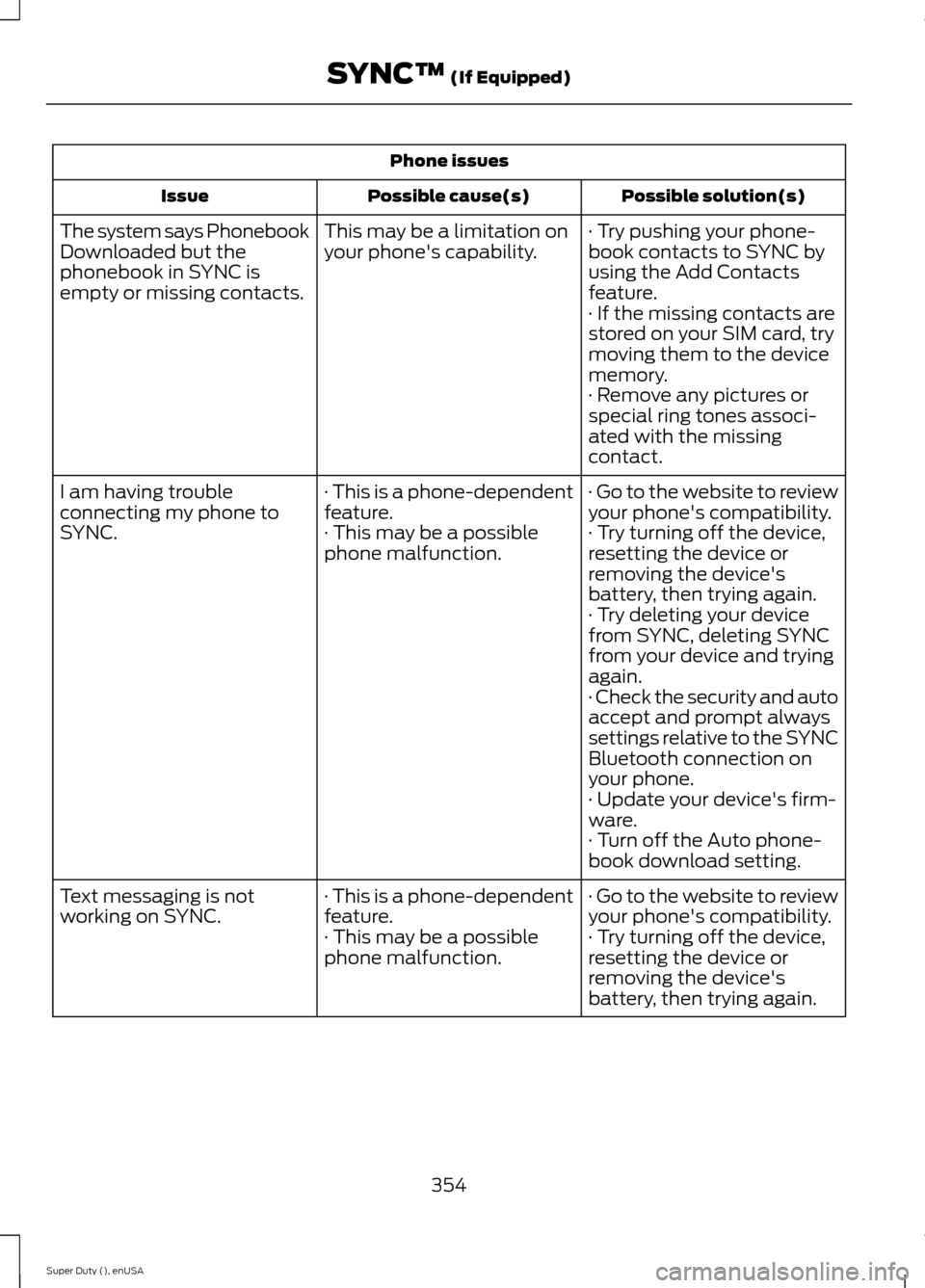
Phone issues
Possible solution(s)Possible cause(s)Issue
· Try pushing your phone-book contacts to SYNC byusing the Add Contactsfeature.
This may be a limitation onyour phone's capability.The system says PhonebookDownloaded but thephonebook in SYNC isempty or missing contacts.· If the missing contacts arestored on your SIM card, trymoving them to the devicememory.· Remove any pictures orspecial ring tones associ-ated with the missingcontact.
· Go to the website to reviewyour phone's compatibility.· This is a phone-dependentfeature.I am having troubleconnecting my phone toSYNC.· Try turning off the device,resetting the device orremoving the device'sbattery, then trying again.
· This may be a possiblephone malfunction.
· Try deleting your devicefrom SYNC, deleting SYNCfrom your device and tryingagain.· Check the security and autoaccept and prompt alwayssettings relative to the SYNCBluetooth connection onyour phone.· Update your device's firm-ware.· Turn off the Auto phone-book download setting.
· Go to the website to reviewyour phone's compatibility.· This is a phone-dependentfeature.Text messaging is notworking on SYNC.· Try turning off the device,resetting the device orremoving the device'sbattery, then trying again.
· This may be a possiblephone malfunction.
354Super Duty (), enUSASYNC™ (If Equipped)
Page 358 of 470
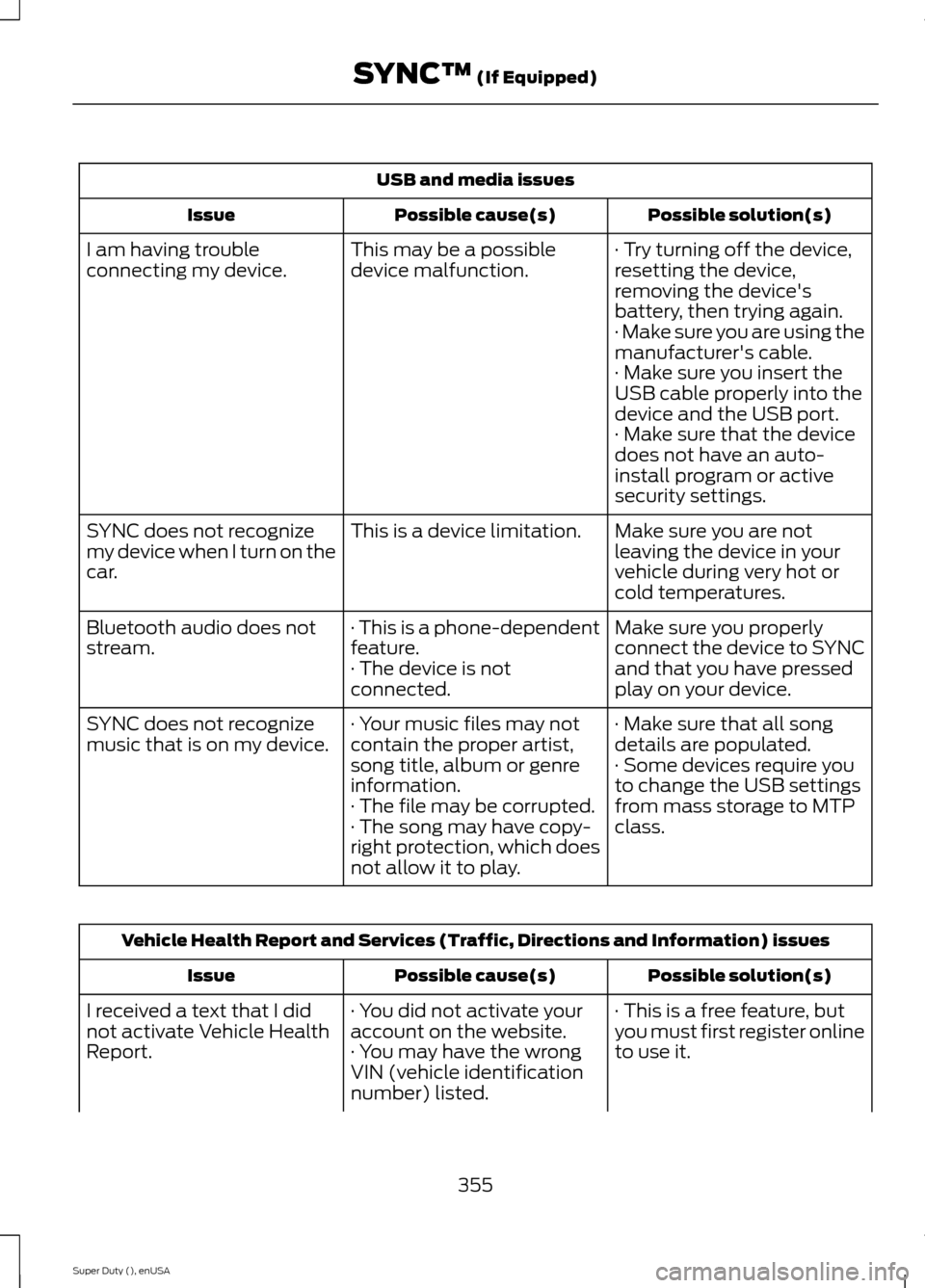
USB and media issues
Possible solution(s)Possible cause(s)Issue
· Try turning off the device,resetting the device,removing the device'sbattery, then trying again.
This may be a possibledevice malfunction.I am having troubleconnecting my device.
· Make sure you are using themanufacturer's cable.· Make sure you insert theUSB cable properly into thedevice and the USB port.· Make sure that the devicedoes not have an auto-install program or activesecurity settings.
Make sure you are notleaving the device in yourvehicle during very hot orcold temperatures.
This is a device limitation.SYNC does not recognizemy device when I turn on thecar.
Make sure you properlyconnect the device to SYNCand that you have pressedplay on your device.
· This is a phone-dependentfeature.· The device is notconnected.
Bluetooth audio does notstream.
· Make sure that all songdetails are populated.· Your music files may notcontain the proper artist,song title, album or genreinformation.
SYNC does not recognizemusic that is on my device.· Some devices require youto change the USB settingsfrom mass storage to MTPclass.· The file may be corrupted.· The song may have copy-right protection, which doesnot allow it to play.
Vehicle Health Report and Services (Traffic, Directions and Information) issues
Possible solution(s)Possible cause(s)Issue
· This is a free feature, butyou must first register onlineto use it.
· You did not activate youraccount on the website.· You may have the wrongVIN (vehicle identificationnumber) listed.
I received a text that I didnot activate Vehicle HealthReport.
355Super Duty (), enUSASYNC™ (If Equipped)
Page 359 of 470
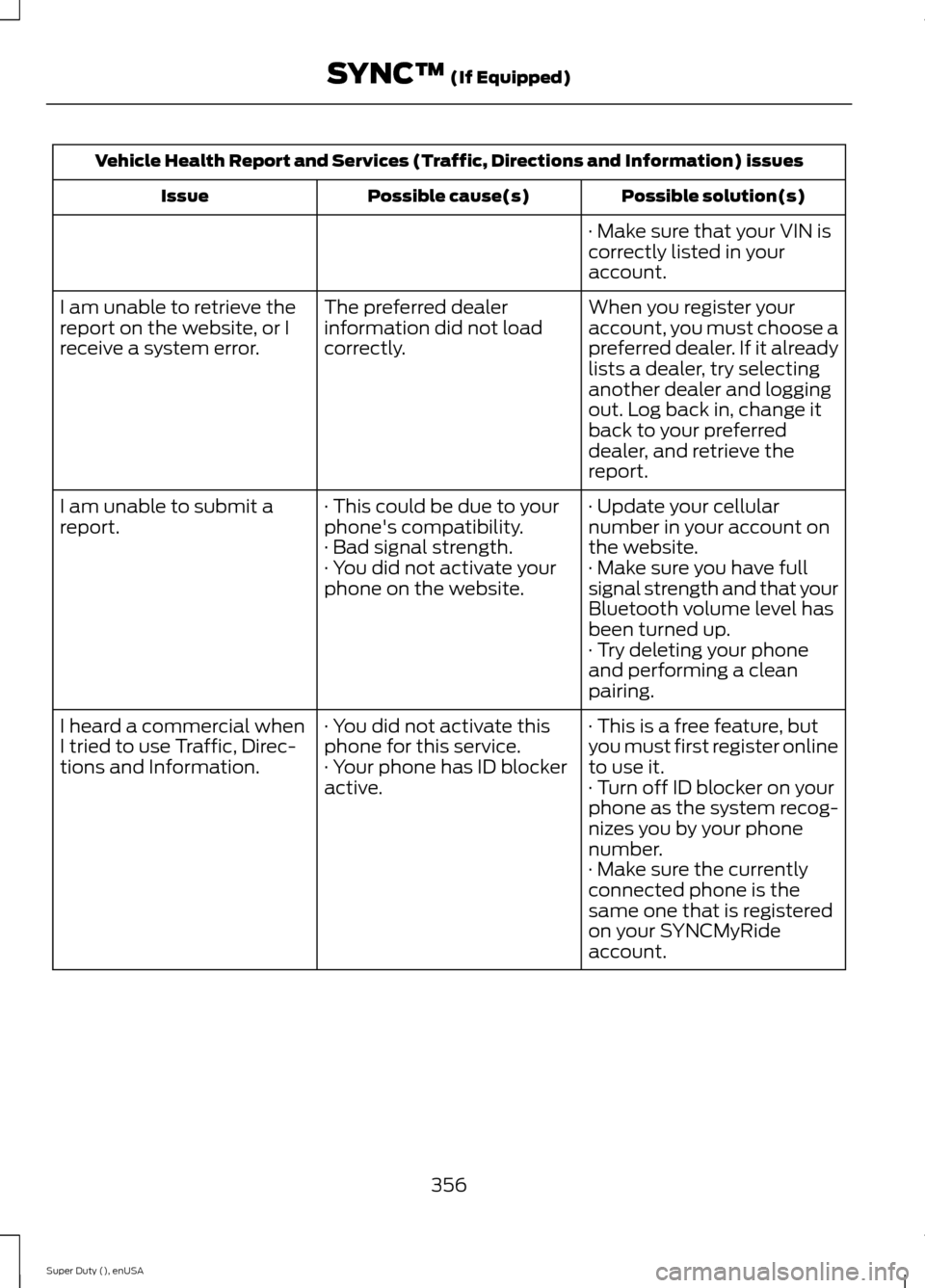
Vehicle Health Report and Services (Traffic, Directions and Information) issues
Possible solution(s)Possible cause(s)Issue
· Make sure that your VIN iscorrectly listed in youraccount.
When you register youraccount, you must choose apreferred dealer. If it alreadylists a dealer, try selectinganother dealer and loggingout. Log back in, change itback to your preferreddealer, and retrieve thereport.
The preferred dealerinformation did not loadcorrectly.
I am unable to retrieve thereport on the website, or Ireceive a system error.
· Update your cellularnumber in your account onthe website.
· This could be due to yourphone's compatibility.· Bad signal strength.
I am unable to submit areport.
· Make sure you have fullsignal strength and that yourBluetooth volume level hasbeen turned up.
· You did not activate yourphone on the website.
· Try deleting your phoneand performing a cleanpairing.
· This is a free feature, butyou must first register onlineto use it.
· You did not activate thisphone for this service.· Your phone has ID blockeractive.
I heard a commercial whenI tried to use Traffic, Direc-tions and Information.· Turn off ID blocker on yourphone as the system recog-nizes you by your phonenumber.· Make sure the currentlyconnected phone is thesame one that is registeredon your SYNCMyRideaccount.
356Super Duty (), enUSASYNC™ (If Equipped)
Page 360 of 470
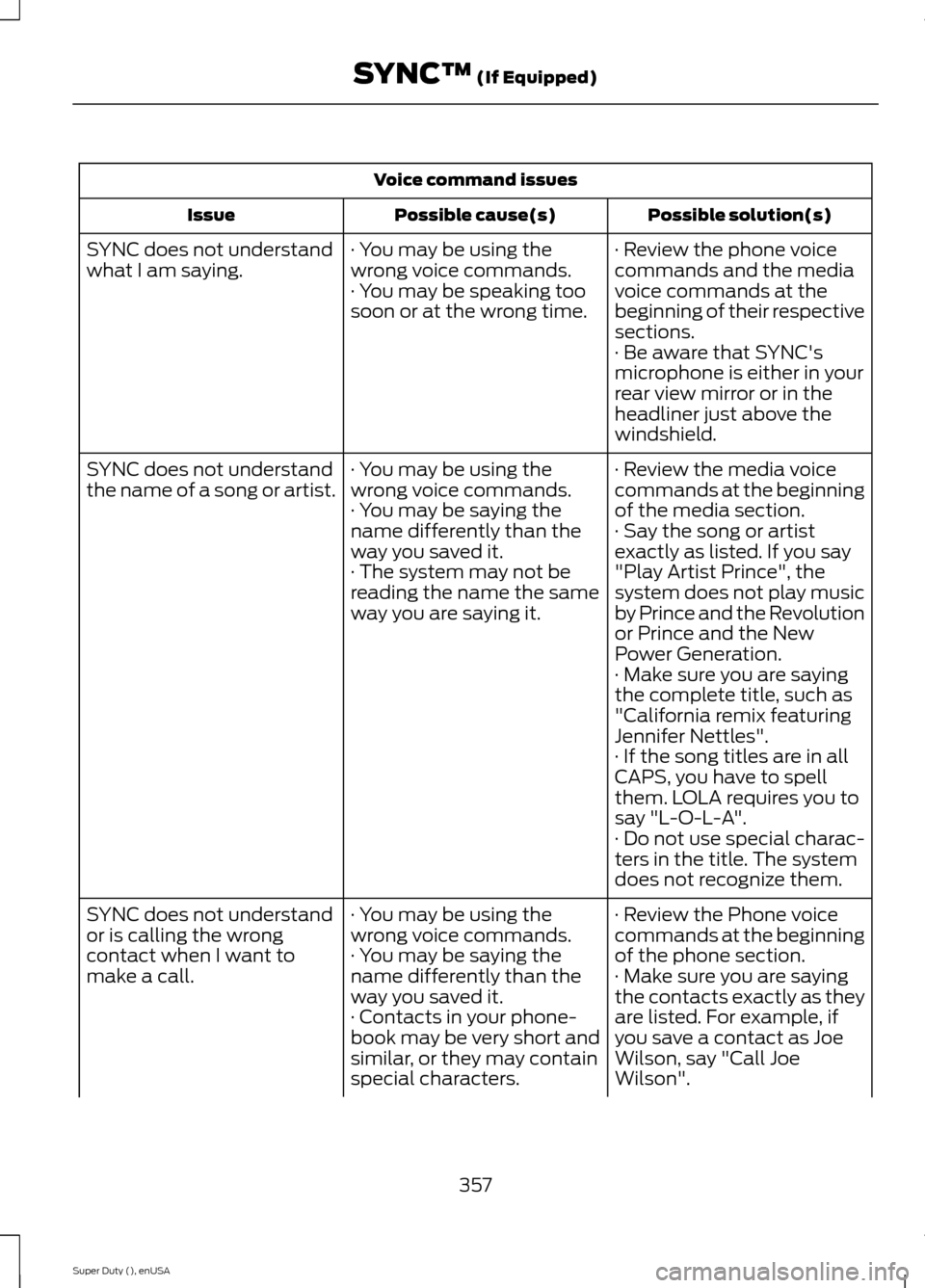
Voice command issues
Possible solution(s)Possible cause(s)Issue
· Review the phone voicecommands and the mediavoice commands at thebeginning of their respectivesections.
· You may be using thewrong voice commands.· You may be speaking toosoon or at the wrong time.
SYNC does not understandwhat I am saying.
· Be aware that SYNC'smicrophone is either in yourrear view mirror or in theheadliner just above thewindshield.
· Review the media voicecommands at the beginningof the media section.
· You may be using thewrong voice commands.· You may be saying thename differently than theway you saved it.
SYNC does not understandthe name of a song or artist.
· Say the song or artistexactly as listed. If you say"Play Artist Prince", thesystem does not play musicby Prince and the Revolutionor Prince and the NewPower Generation.
· The system may not bereading the name the sameway you are saying it.
· Make sure you are sayingthe complete title, such as"California remix featuringJennifer Nettles".· If the song titles are in allCAPS, you have to spellthem. LOLA requires you tosay "L-O-L-A".· Do not use special charac-ters in the title. The systemdoes not recognize them.
· Review the Phone voicecommands at the beginningof the phone section.
· You may be using thewrong voice commands.· You may be saying thename differently than theway you saved it.
SYNC does not understandor is calling the wrongcontact when I want tomake a call.· Make sure you are sayingthe contacts exactly as theyare listed. For example, ifyou save a contact as JoeWilson, say "Call JoeWilson".
· Contacts in your phone-book may be very short andsimilar, or they may containspecial characters.
357Super Duty (), enUSASYNC™ (If Equipped)
Page 361 of 470
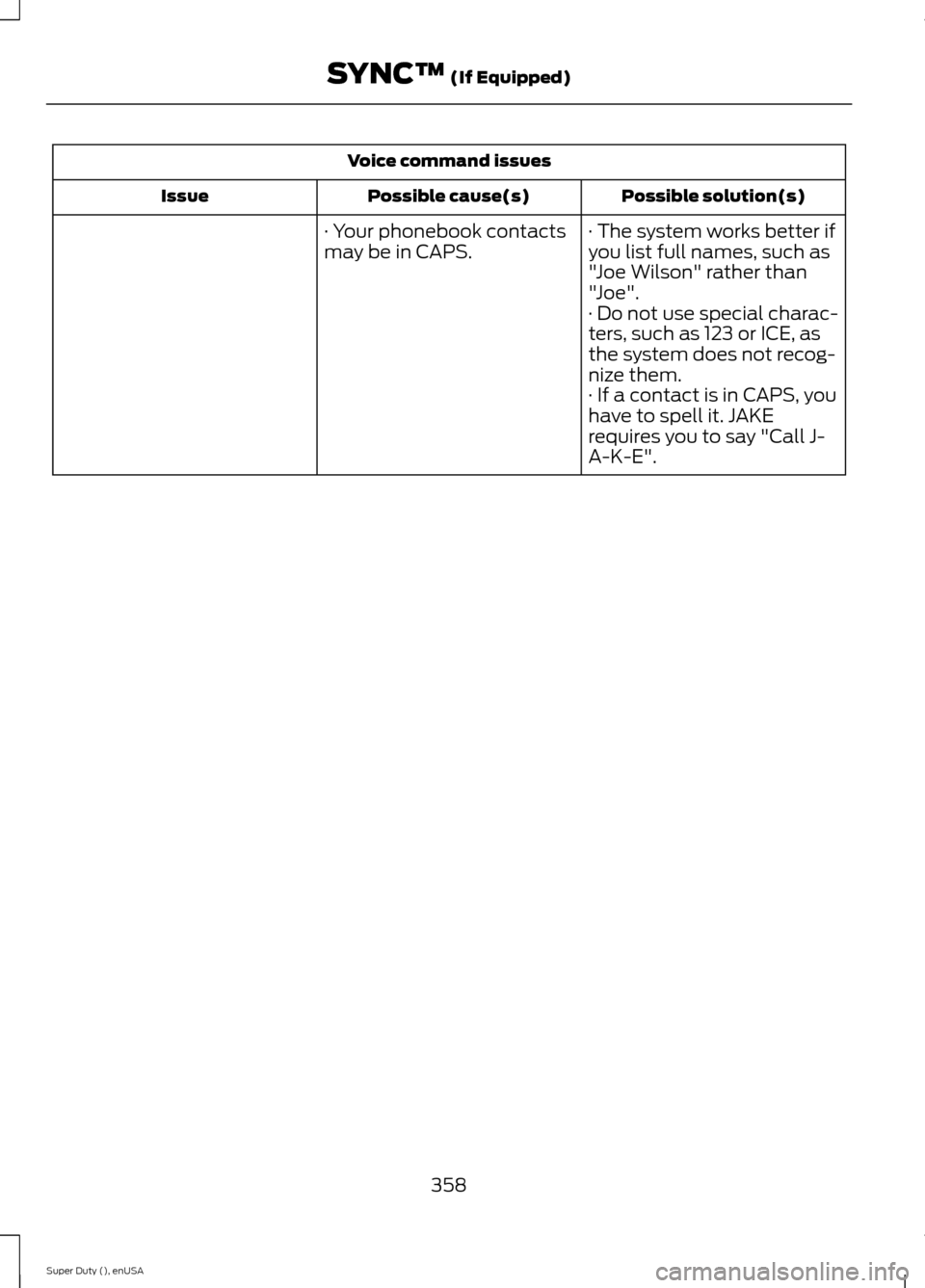
Voice command issues
Possible solution(s)Possible cause(s)Issue
· The system works better ifyou list full names, such as"Joe Wilson" rather than"Joe".
· Your phonebook contactsmay be in CAPS.
· Do not use special charac-ters, such as 123 or ICE, asthe system does not recog-nize them.· If a contact is in CAPS, youhave to spell it. JAKErequires you to say "Call J-A-K-E".
358Super Duty (), enUSASYNC™ (If Equipped)
Page 362 of 470
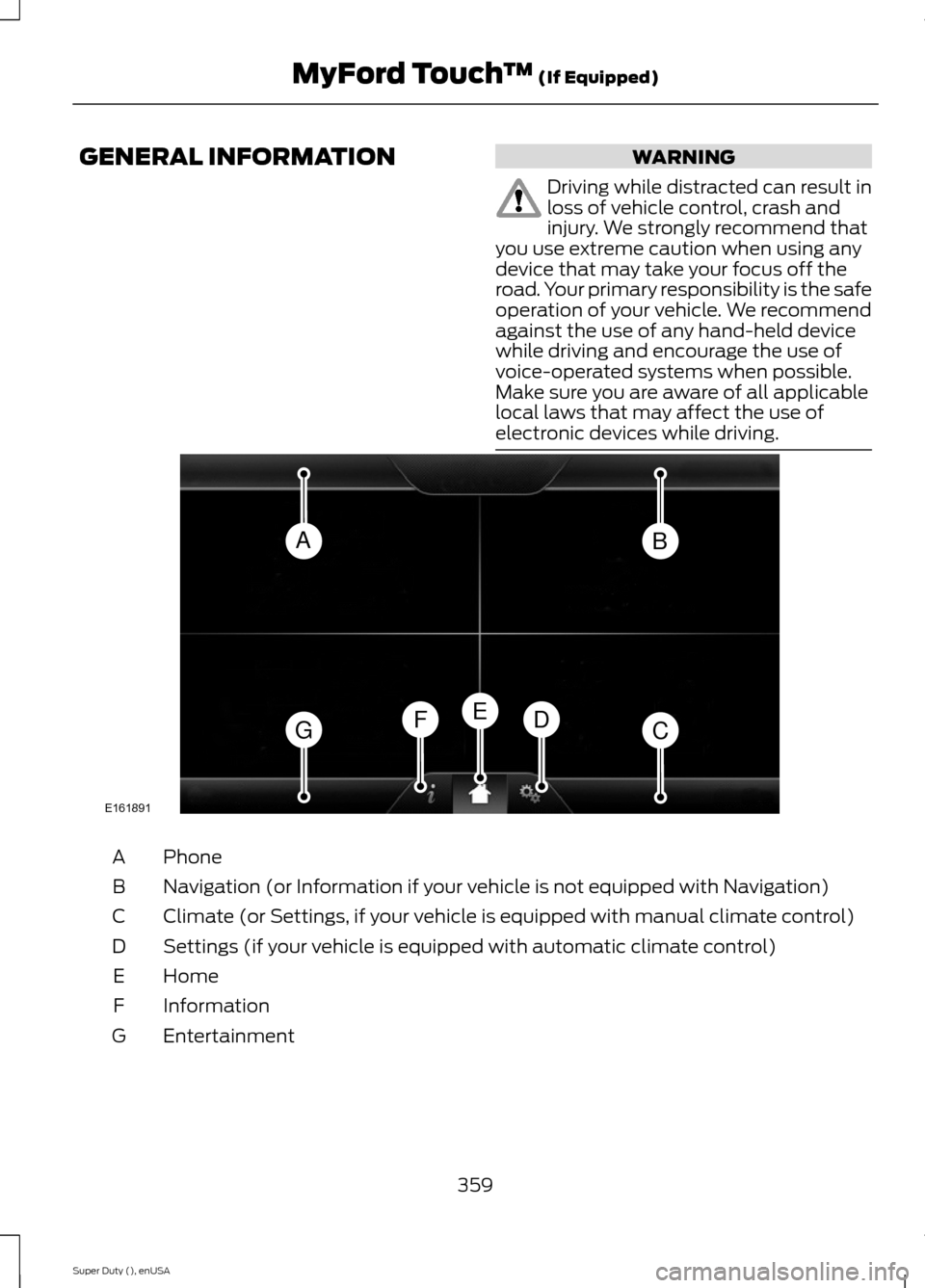
GENERAL INFORMATIONWARNING
Driving while distracted can result inloss of vehicle control, crash andinjury. We strongly recommend thatyou use extreme caution when using anydevice that may take your focus off theroad. Your primary responsibility is the safeoperation of your vehicle. We recommendagainst the use of any hand-held devicewhile driving and encourage the use ofvoice-operated systems when possible.Make sure you are aware of all applicablelocal laws that may affect the use ofelectronic devices while driving.
PhoneA
Navigation (or Information if your vehicle is not equipped with Navigation)B
Climate (or Settings, if your vehicle is equipped with manual climate control)C
Settings (if your vehicle is equipped with automatic climate control)D
HomeE
InformationF
EntertainmentG
359Super Duty (), enUSAMyFord Touch™ (If Equipped)ABGCDFEE161891
Page 363 of 470
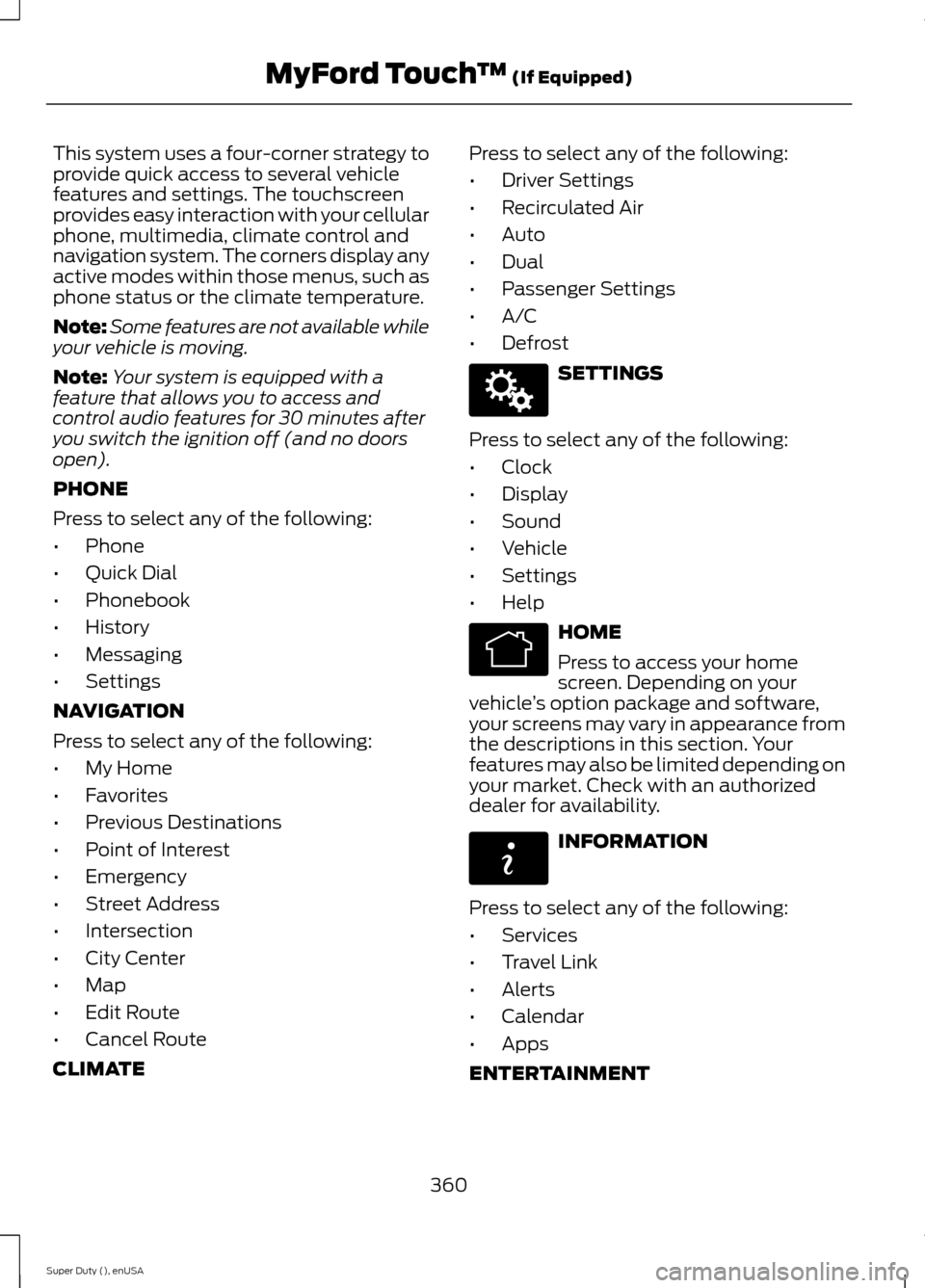
This system uses a four-corner strategy toprovide quick access to several vehiclefeatures and settings. The touchscreenprovides easy interaction with your cellularphone, multimedia, climate control andnavigation system. The corners display anyactive modes within those menus, such asphone status or the climate temperature.
Note:Some features are not available whileyour vehicle is moving.
Note:Your system is equipped with afeature that allows you to access andcontrol audio features for 30 minutes afteryou switch the ignition off (and no doorsopen).
PHONE
Press to select any of the following:
•Phone
•Quick Dial
•Phonebook
•History
•Messaging
•Settings
NAVIGATION
Press to select any of the following:
•My Home
•Favorites
•Previous Destinations
•Point of Interest
•Emergency
•Street Address
•Intersection
•City Center
•Map
•Edit Route
•Cancel Route
CLIMATE
Press to select any of the following:
•Driver Settings
•Recirculated Air
•Auto
•Dual
•Passenger Settings
•A/C
•Defrost
SETTINGS
Press to select any of the following:
•Clock
•Display
•Sound
•Vehicle
•Settings
•Help
HOME
Press to access your homescreen. Depending on yourvehicle’s option package and software,your screens may vary in appearance fromthe descriptions in this section. Yourfeatures may also be limited depending onyour market. Check with an authorizeddealer for availability.
INFORMATION
Press to select any of the following:
•Services
•Travel Link
•Alerts
•Calendar
•Apps
ENTERTAINMENT
360Super Duty (), enUSAMyFord Touch™ (If Equipped)E142607 E142613 E142608
Page 365 of 470
Monday-Saturday, 8:30am-9:00pm EST.
Sunday, 10:30am-7:30pm EST.
In the United States, call: 1-800-392-3673.
In Canada, call: 1-800-565-3673.
Times are subject to change due toholidays.
Safety Information
WARNING
Driving while distracted can result inloss of vehicle control, crash andinjury. We strongly recommend thatyou use extreme caution when using anydevice that may take your focus off theroad. Your primary responsibility is the safeoperation of your vehicle. We recommendagainst the use of any hand-held devicewhile driving and encourage the use ofvoice-operated systems when possible.Make sure you are aware of all applicablelocal laws that may affect the use ofelectronic devices while driving.
•Do not attempt to service or repair thesystem. See an authorized dealer.
•Do not operate playing devices if thepower cords or cables are broken, splitor damaged. Place cords and cablesout of the way, so they do not interferewith the operation of pedals, seats,compartments or safe driving abilities.
•Do not leave playing devices in yourvehicle during extreme conditions as itcould cause them damage. See yourdevice's user guide for furtherinformation.
•For your safety, some SYNC functionsare speed-dependent. Their use islimited to when your vehicle is travelingat speeds under 3 mph (5 km/h).
Make sure that you review your device'smanual before using it with SYNC.
Speed-restricted Features
Some features of this system may be toodifficult to use while your vehicle is movingso they are restricted from use unless yourvehicle is stationary.
•Screens crowded with information,such as Point of Interest reviews andratings, SIRIUS Travel Link sportsscores, movie times or ski conditions.
•Any action that requires you to use akeyboard is restricted, such as enteringa navigation destination or editinginformation.
•All lists are limited so the user can viewfewer entries (such as phone contactsor recent phone call entries).
See the following chart for more specificexamples.
Restricted features
Pairing a Bluetooth phoneCellular Phone
Adding phonebook contacts or uploading phonebookcontacts (from a USB)
List entries are limited for phone contacts and recentphone call entries
Editing the keypad codeSystem Functionality
Enabling Valet Mode
362Super Duty (), enUSAMyFord Touch™ (If Equipped)