buttons FORD SUPER DUTY 2015 3.G Owner's Guide
[x] Cancel search | Manufacturer: FORD, Model Year: 2015, Model line: SUPER DUTY, Model: FORD SUPER DUTY 2015 3.GPages: 470, PDF Size: 18.24 MB
Page 338 of 470
You can:When you select:
If your phone supports in-band ringing, your phone's ringtone plays when you choose Phone Ringer.
Have the option of hearing an audible tone to notify youwhen a text message arrives.Message Notification
1. Press OK to select and scroll between Message Notific-ation On and Message Notification Off.2. Press OK to select.
Modify the contents of your phonebook (such as add,delete or download). Press OK to choose between:Modify Phonebook
Add Contacts: Press OK to add more contacts from yourphone book. Push the desired contact(s) on your phone.See your phone's manual on how to push contacts.
Delete Phonebook: Press OK to delete the current phonebook and call history. When Delete Phonebook appears,press OK to confirm. SYNC takes you back to the PhoneSettings menu.
Download Phonebook: Press OK to select, then and pressOK again when Confirm Download? appears.
Automatically download your phone book each time your
phone connects to SYNC.*Auto Download
Press OK to select. When Auto Download On? appears,press OK to have your phonebook automatically down-
loaded each time.**
Select Off if you do not want to download your phonebookevery time your phone connects to SYNC. Your phonebook,call history and text messages can only be accessed whenyour specific phone is connected to SYNC.
Exit the current menu.Return
*Downloading times are phone-dependent and quantity-dependent.**When Auto Download is on, it automatically deletes any changes, additions or deletionssaved since your last download.
System Settings
This menu provides access to yourBluetooth Devices and Advanced menufeatures. Use the arrow buttons to scrollthrough the menu options.
Bluetooth Devices
The Bluetooth Devices menu allows youto add, connect and delete devices, set aphone as primary as well as turn yourBluetooth feature on and off.
335Super Duty (), enUSASYNC™ (If Equipped)
Page 364 of 470
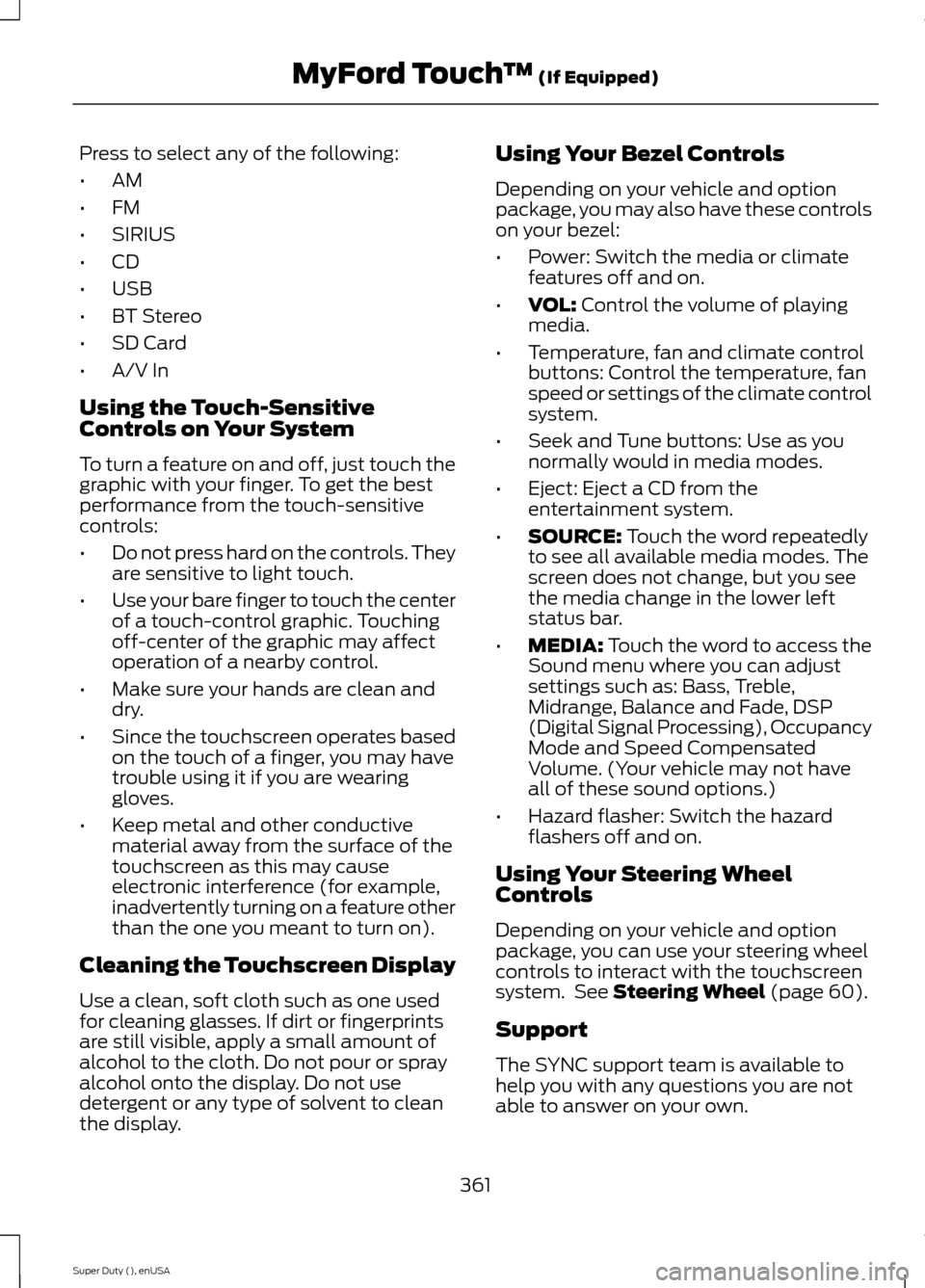
Press to select any of the following:
•AM
•FM
•SIRIUS
•CD
•USB
•BT Stereo
•SD Card
•A/V In
Using the Touch-SensitiveControls on Your System
To turn a feature on and off, just touch thegraphic with your finger. To get the bestperformance from the touch-sensitivecontrols:
•Do not press hard on the controls. Theyare sensitive to light touch.
•Use your bare finger to touch the centerof a touch-control graphic. Touchingoff-center of the graphic may affectoperation of a nearby control.
•Make sure your hands are clean anddry.
•Since the touchscreen operates basedon the touch of a finger, you may havetrouble using it if you are wearinggloves.
•Keep metal and other conductivematerial away from the surface of thetouchscreen as this may causeelectronic interference (for example,inadvertently turning on a feature otherthan the one you meant to turn on).
Cleaning the Touchscreen Display
Use a clean, soft cloth such as one usedfor cleaning glasses. If dirt or fingerprintsare still visible, apply a small amount ofalcohol to the cloth. Do not pour or sprayalcohol onto the display. Do not usedetergent or any type of solvent to cleanthe display.
Using Your Bezel Controls
Depending on your vehicle and optionpackage, you may also have these controlson your bezel:
•Power: Switch the media or climatefeatures off and on.
•VOL: Control the volume of playingmedia.
•Temperature, fan and climate controlbuttons: Control the temperature, fanspeed or settings of the climate controlsystem.
•Seek and Tune buttons: Use as younormally would in media modes.
•Eject: Eject a CD from theentertainment system.
•SOURCE: Touch the word repeatedlyto see all available media modes. Thescreen does not change, but you seethe media change in the lower leftstatus bar.
•MEDIA: Touch the word to access theSound menu where you can adjustsettings such as: Bass, Treble,Midrange, Balance and Fade, DSP(Digital Signal Processing), OccupancyMode and Speed CompensatedVolume. (Your vehicle may not haveall of these sound options.)
•Hazard flasher: Switch the hazardflashers off and on.
Using Your Steering WheelControls
Depending on your vehicle and optionpackage, you can use your steering wheelcontrols to interact with the touchscreensystem. See Steering Wheel (page 60).
Support
The SYNC support team is available tohelp you with any questions you are notable to answer on your own.
361Super Duty (), enUSAMyFord Touch™ (If Equipped)
Page 378 of 470
TheWi-FiCERTIFIED Logo is a certification mark ofthe Wi-Fi Alliance.
Help
Press the Settings icon > Help,then select from the following:
Help
View your vehicle's current location, if your vehicle isequipped with navigation. If your vehicle is not equippedwith navigation, you do not see this button.
Where Am I?
Touchscreen system serial numberSystem Information
Your vehicle identification number (VIN)
Touchscreen system software version
Navigation system version
Map database version
Sirius satellite radio ESN
Gracenote Database Information and Library version
View the licenses for any software and applicationsinstalled on your system.Software Licenses
Certain features are not accessible when your vehicle ismoving.Driving Restrictions
Turn on and turn off the 911 Assist feature. See Informa-tion (page 399).911 Assist
In Case of Emergency (ICE) Quick Dial: allows you tosave up to two numbers as ICE contacts for quick accessif there is an emergency. Select Edit to access yourphonebook and then select the desired contacts. Thenumbers then appear as options on this screen for the ICE1 and ICE 2 buttons. The ICE contacts you select appearat the end of the 911 Assist call process.
View categorized lists of voice commands.Voice Command List
375Super Duty (), enUSAMyFord Touch™ (If Equipped)E142626 E142607
Page 379 of 470
To access Help using the voice commands,press the voice button, then, after the tone,say "Help". The system provides allowablevoice commands for the current mode.
ENTERTAINMENT
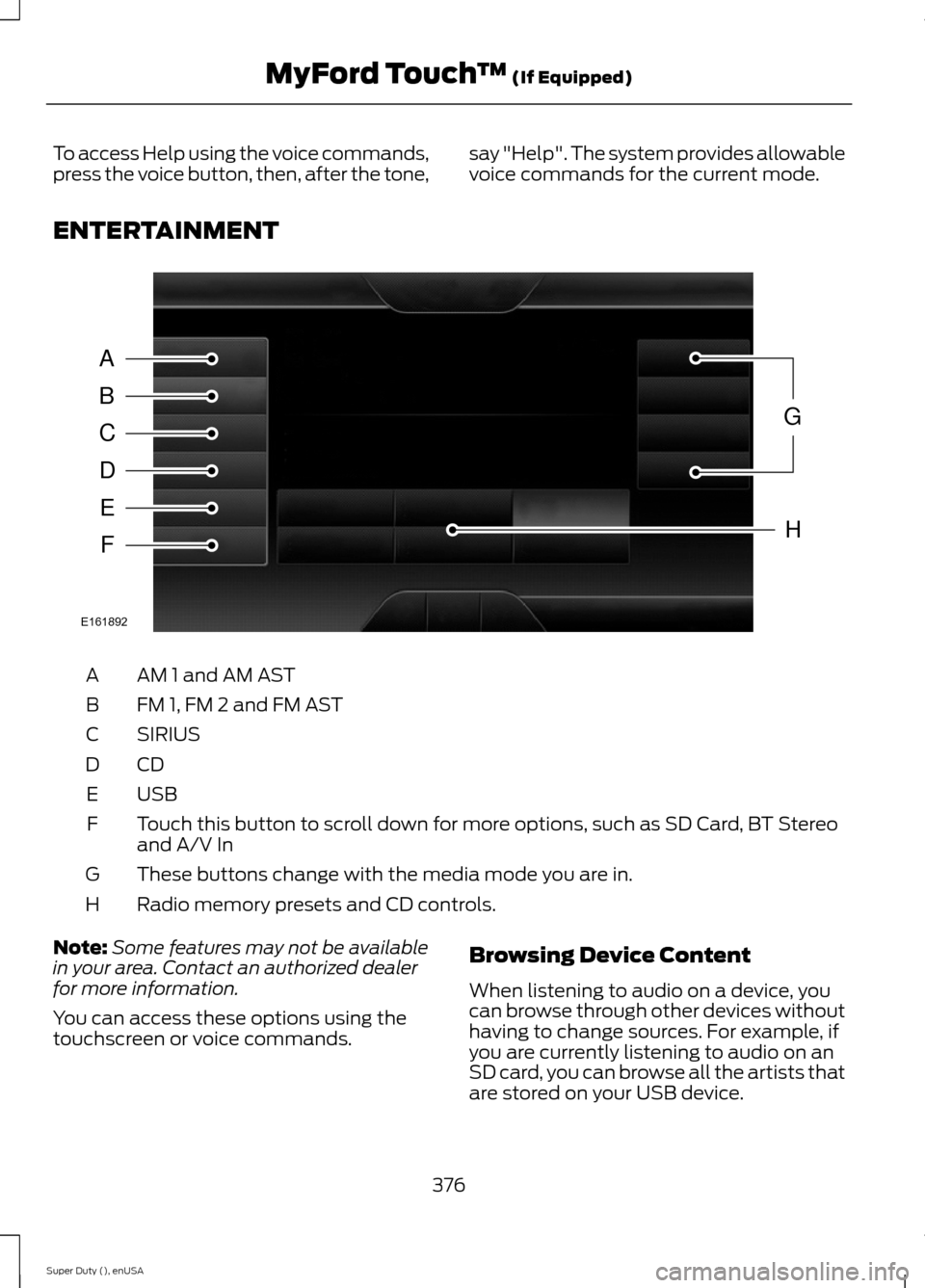
AM 1 and AM ASTA
FM 1, FM 2 and FM ASTB
SIRIUSC
CDD
USBE
Touch this button to scroll down for more options, such as SD Card, BT Stereoand A/V InF
These buttons change with the media mode you are in.G
Radio memory presets and CD controls.H
Note:Some features may not be availablein your area. Contact an authorized dealerfor more information.
You can access these options using thetouchscreen or voice commands.
Browsing Device Content
When listening to audio on a device, youcan browse through other devices withouthaving to change sources. For example, ifyou are currently listening to audio on anSD card, you can browse all the artists thatare stored on your USB device.
376Super Duty (), enUSAMyFord Touch™ (If Equipped)ABCDEFGHE161892
Page 386 of 470
"TUNE"
"HD <#>"*
"Preset <#>"
"Help"
* If available.
SIRIUS® Satellite Radio (IfActivated)
Press the lower left corner of thetouchscreen, and then select theSIRIUS tab.
Memory Presets
Save a channel by pressing and holdingone of the memory preset areas. There isa brief mute while the radio saves thechannel. Sound returns when finished.
ALERT
Save the current song, artist, or team as afavorite. The system alerts you when itplays again on any channel.
Replay
Replay audio on the current channel. Youcan replay approximately 45 minutes ofaudio as long as you have remained tunedto the current station. Changing stationserases the previous audio.
While in replay mode:
•Press and release the seek buttons tohear the previous or next song.
•Press and hold the seek buttons toreverse or fast forward in the currenttrack.
•Press play or pause to play or pausethe audio.
•Press Replay to return to live audio ifyou have been using the feature toreplay audio.
Scan
Touch this button to hear a brief samplingof channels.
Options
Touch this button to view and adjustvarious media settings.
Sound Settings
Touch this button to adjust settings for:
•Bass
•Midrange
•Treble
•Balance and Fade
•DSP (Digital Signal processing)
•Occupancy Mode
•Speed Compensated Volume.
Note:Your vehicle may not have all thesesound settings.
Set Category for Seek/Scan
This allows you to select a category ofmusic you would like to search for. You canthen choose to either seek or scan for thestations playing that category.
Parental Lockout
This allows you to lock and unlockchannels, change or reset your PIN orunlock all channels. To use this feature,you need your initial PIN, which is 1234.
Artist/Title/Team Alerts
This feature allows you to select Artists,Titles and Teams that you would like thesystem to alert you to when they areplaying on other channels. Press Edit Alertsto delete or turn off alerts. You can alsoset all alerts to on or off. When an alertappears on the screen, you can choose to
383Super Duty (), enUSAMyFord Touch™ (If Equipped)E142611
Page 406 of 470
Note:In order to use Sirius Travel Link, yourvehicle must be equipped with navigationand your navigation SD card must be in theSD card slot.
Note:A paid subscription is required toaccess and use these features. Go towww.siriusxm.com/travellink for moreinformation.
Note:Visit www.siriusxm.com/traffic# andclick on Coverage map and details for acomplete listing of all traffic areas coveredby Sirius Travel Link.
Note:Neither Sirius nor Ford is responsiblefor any errors or inaccuracies in the SiriusTravel Link services or its use in vehicles.
When you subscribe to Sirius Travel Link,it can help you locate the best gas prices,find movie listings, get current traffic alerts,view the current weather map, getaccurate ski conditions and see scores tocurrent sports games.
If your vehicle is equipped withNavigation, touch the i(Information) button to accessthese features. If your vehicle is notequipped with Navigation, touch the cornerof the touchscreen with the green tab.
Traffic On Route and Traffic Nearby
Touch these buttons to identify trafficincidents on your route, nearby yourvehicle’s current location or near any ofyour favorite places, if programmed.
Fuel Prices
Touch this button to view fuel prices atstations close to your vehicle’s location oron an active navigation route.
Movie Listings
Touch this button to view nearby movietheaters and their show times, if available.
Weather
Touch this button to view the nearbyweather, current weather, or the five dayforecast for the chosen area. Select Mapto see the weather map, which can showstorms, radar information, charts andwinds. Select Area to select from a listingof weather locations.
Sports Info
Touch this button to view scores andschedules from a variety of sports. You canalso save up to 10 favorite teams for easieraccess. The score automatically refresheswhen a game is in progress.
Ski Conditions
Touch this button to view ski conditionsfor a specific area.
Sirius Travel Link Voice Commands
Press the voice button on thesteering wheel controls. Whenprompted, say any of thefollowing commands:
"SIRIUS TRAVEL LINK"
"5-day weather forecast"
"Fuel prices"
"Movie listings"
"Sports headlines"*
"Sports schedules"*
"Sports scores"*
"Traffic"
"Weather"
403Super Duty (), enUSAMyFord Touch™ (If Equipped)E142608 E142599
Page 412 of 470
Touch DUAL to turn separate passenger side temperature controls off and on.When you turn off DUAL, the passenger side temperature changes to matchthe driver side temperature.
Note: The passenger side temperature and the DUAL indicator automaticallyturn on when the passenger is adjusting their temperature control.
Fan speed: Touch + or - to increase or decrease the volume of air circulatedin your vehicle.C
Recirculated air: Touch the button to switch between outside air andrecirculated air. When you select recirculated air, the air currently in thepassenger compartment recirculates. This may reduce the time needed to coolthe interior (when used with A/C) and may reduce unwanted odors fromentering your vehicle.
D
Note: Recirculated air may turn off automatically (or be prevented from turningon) in all airflow modes except MAX A/C to reduce risk of fogging.
MAX A/C: Touch the button to maximize cooling. Recirculated air flows throughthe instrument panel vents, air conditioning automatically turns on, and the fanautomatically adjusts to the highest speed.
E
A/C: Touch the button to turn air conditioning compressor on or off. Use airconditioning with recirculated air to improve cooling performance and efficiency.F
Note: In certain conditions, the air conditioning compressor may continue tooperate even after you switch off the air conditioning with the A/C button.
AUTO: Touch the button to turn on automatic operation. Select the desiredtemperature using the temperature control. The system adjusts fan speed, airdistribution, air conditioning operation, and selects outside air or recirculatedair to heat or cool the vehicle in order to maintain the desired temperature. Youcan also use the AUTO button to turn off dual zone operation by touching andholding the button for more than two seconds.
G
Heated rear window: Turns the heated rear window on and off. See HeatedWindows and Mirrors (page 108).H
Defrost: Press the button to distribute air to the windshield vents and de-mister.Air distribution to instrument panel and footwell vents turn off. You can usethis setting to defog and clear the windshield of a thin covering of ice.
I
Air distribution control: Touch these buttons to turn airflow from thewindshield, instrument panel, or footwell vents on or off. The system candistribute air through any combination of these vents.
J
Driver settings:K
Touch the + or – to increase or decrease the air temperature on the passengerside of the vehicle.
Touch the heated seat icon to turn the heated seat off and on (if equipped).
409Super Duty (), enUSAMyFord Touch™ (If Equipped)
Page 419 of 470
Press the speaker button on themap to mute route guidance.When the light on the buttonilluminates, the feature is on. The speakerbutton appears on the map only whenroute guidance is active.
Re-center the map by pressingthis icon whenever you scroll themap away from your vehicle’scurrent location.
Auto Zoom
Press the green bar to access map mode,then select the + or - zoom button to bringup the zoom level and Auto buttons on thetouchscreen. When you press Auto, AutoZoom turns on and Auto displays in thebottom left corner of the screen in the mapscale. The map zoom level thensynchronizes with vehicle speed. Theslower your vehicle is traveling, the fartherin the map zooms in; the faster your vehicleis traveling, the farther the map zooms out.To turn the feature off, just press the + or- button again.
In 3D mode, rotate the map view byswiping your finger across the shaded barwith the arrows.
The ETA box under the zoom buttonsappears when a route is active anddisplays the distance and time to yourdestination. If the button is pressed, a popup appears with the destination listed (andwaypoint if applicable) along with mileageand time to destination. You may alsoselect to have either the estimated timeto reach your destination or your estimatedarrival time.
Map Icons
Vehicle mark shows the currentlocation of your vehicle. It staysin the center of the map display,except when in scroll mode.
Scroll cursor allows you to scrollthe map; the fixed icon is in thecenter of the screen. The mapposition closest to the cursor is ina window on the top center part of thescreen.
Address book entry defaulticon(s) indicates the location onthe map of an address book entry.This is the default symbol shownafter the entry has been stored to theAddress Book by any method other thanthe map. You can select from any of the22 icons available. You can use each iconmore than once.
Home indicates the location onthe map currently stored as thehome position. You can only saveone address from the AddressBook as your Home entry. You cannotchange this icon.
POI (Point Of Interest) iconsindicate locations of any point ofinterest categories you choose todisplay on the map. You canchoose to display three point of interestcategories on the map at one time.
Starting point indicates thestarting point of a planned route.
Waypoint indicates the locationof a waypoint on the map. Thenumber inside the circle is differentfor each waypoint and representsthe position of the waypoint in the routelist.
Destination symbol indicates theending point of a planned route.
Next maneuver point indicatesthe location of the next turn on theplanned route.
416Super Duty (), enUSAMyFord Touch™ (If Equipped)E174017 E146188 E142646 E142647 E142648 E142649 E142650 E142651 E142652 E142653 E142654
Page 420 of 470
No GPS symbol indicates thatinsufficient GPS satellite signalsare available for accurate mappositioning. This icon may displayunder normal operation in an area withpoor GPS access.
Quick-touch Buttons
When in map mode, touch anywhere onthe map display to access the followingoptions:
Set as Dest
Touch this button to select a scrolledlocation on the map as your destination.You may scroll the map by pressing yourindex finger on the map display. When youreach the desired location, simply let goand then touch Set as Dest.
Set as Waypoint
Touch this button to set the currentlocation as a waypoint.
Save to Favorites
Touch this button to save the currentlocation to your favorites.
POI Icons
Touch this button to select icons to displayon the map. You can select up to threeicons to display on the map at the sametime. Turn these ON or OFF.
Cancel Route
Touch this button to cancel the activeroute.
View/Edit Route
Access these features when a route isactive:
•View Route
•Edit Destination/Waypoints
•Edit Turn List
•Detour
•Edit Route Preferences
•Edit Traffic Preferences
•Cancel Route.
Nokia is the digital map provider for thenavigation application. If you find map dataerrors, you may report them directly toNokia by going tohttp://mapreporter.navteq.com. Nokiaevaluates all reported map errors andresponds with the result of theirinvestigation by e-mail.
Navigation Map Updates
Annual navigation map updates areavailable for purchase through yourdealership, by calling 1-800-NAVMAPS (inMexico, call 01-800-557-5539) or goingto www.navigation.com/sync. You needto specify the make and model of yourvehicle to determine if there is an updateavailable.
Navigation Voice Commands
When in navigation mode, pressthe voice button on the steeringwheel controls. After the tone,say any of the following commands:
Navigation system voice commands
"Cancel next waypoint" 1
"Cancel route"1
"Destination"2
"Destination
"Destination
"Destination favorites"
"Destination home"
417Super Duty (), enUSAMyFord Touch™ (If Equipped)E142655 E142599
Page 465 of 470
Manual Seats..................................................112Manual Lumbar ...................................................113Moving the Seat Backward andForward...............................................................112Recline Adjustment.............................................112Media Hub......................................................322Memory Function...........................................113Easy Entry and Exit Feature.............................114Message CenterSee: Information Displays..................................81MirrorsSee: Heated Windows and Mirrors..............108See: Windows and Mirrors................................69Mobile Communications Equipment.......13Moonroof...........................................................73Bounce-Back..........................................................74Opening and Closing the Moonroof..............73Venting the Moonroof.........................................74Motorcraft Parts..........................................302MyFord Touch™...........................................359General Information.........................................359MyKey Troubleshooting...............................53MyKey™............................................................50Principle of Operation........................................50
N
Navigation........................................................411cityseekr.................................................................413Map Mode.............................................................415Navigation Map Updates.................................417Navigation Voice Commands.........................417Point of Interest (POI) Categories................412Quick-touch Buttons.........................................417Setting a Destination.........................................411Setting Your Navigation Preferences..........414Normal Scheduled Maintenance..........4436.2L and 6.8L Gasoline Engines...................4436.7L Diesel Engine.............................................444
O
Oil CheckSee: Engine Oil Check......................................235Opening and Closing the Hood..............232Ordering Additional Owner'sLiterature.......................................................221Obtaining a French Owner’s Manual...........221
Overhead Console.........................................131
P
Parking Aid.......................................................172Rear Sensing System.........................................172Parking Aids.....................................................172Parking Brake.................................................163Passive Anti-Theft System........................58SecuriLock™..........................................................58PATSSee: Passive Anti-Theft System.....................58Pedals.................................................................63Perchlorate.........................................................11Phone...............................................................393Making Calls........................................................395Pairing Subsequent Phones..........................395Pairing Your Phone for the FirstTime...................................................................394Phone Menu Options.......................................395Phone Settings...................................................397Phone Voice Commands...............................398Receiving Calls...................................................395Text Messaging..................................................396Post-Crash Alert System...........................216Power Door LocksSee: Locking and Unlocking.............................54Power Seats.....................................................113Power Lumbar.......................................................113Power Recline........................................................113Power Steering Fluid Check.....................243Power Take-Off.............................................150Power Windows.............................................69Accessory Delay....................................................70Bounce-Back.........................................................69One-Touch Up or Down....................................69Power Sliding Back Window............................70Window Lock.........................................................70
R
Rear Axle.........................................................160Rear Seat Armrest........................................120
462Super Duty (), enUSAIndex