key FORD SUPER DUTY 2015 3.G Workshop Manual
[x] Cancel search | Manufacturer: FORD, Model Year: 2015, Model line: SUPER DUTY, Model: FORD SUPER DUTY 2015 3.GPages: 470, PDF Size: 18.24 MB
Page 294 of 470
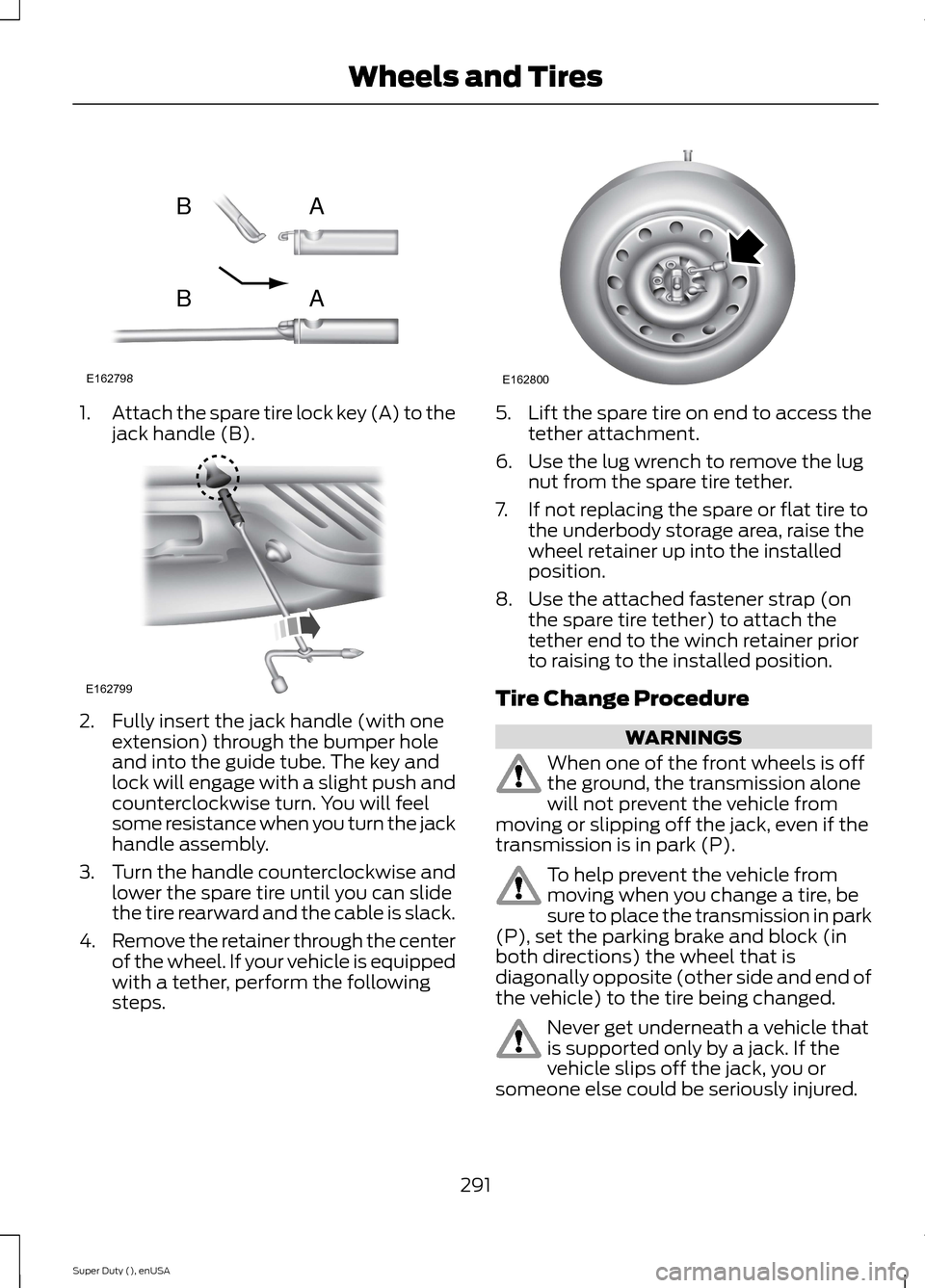
1.Attach the spare tire lock key (A) to thejack handle (B).
2.Fully insert the jack handle (with oneextension) through the bumper holeand into the guide tube. The key andlock will engage with a slight push andcounterclockwise turn. You will feelsome resistance when you turn the jackhandle assembly.
3.Turn the handle counterclockwise andlower the spare tire until you can slidethe tire rearward and the cable is slack.
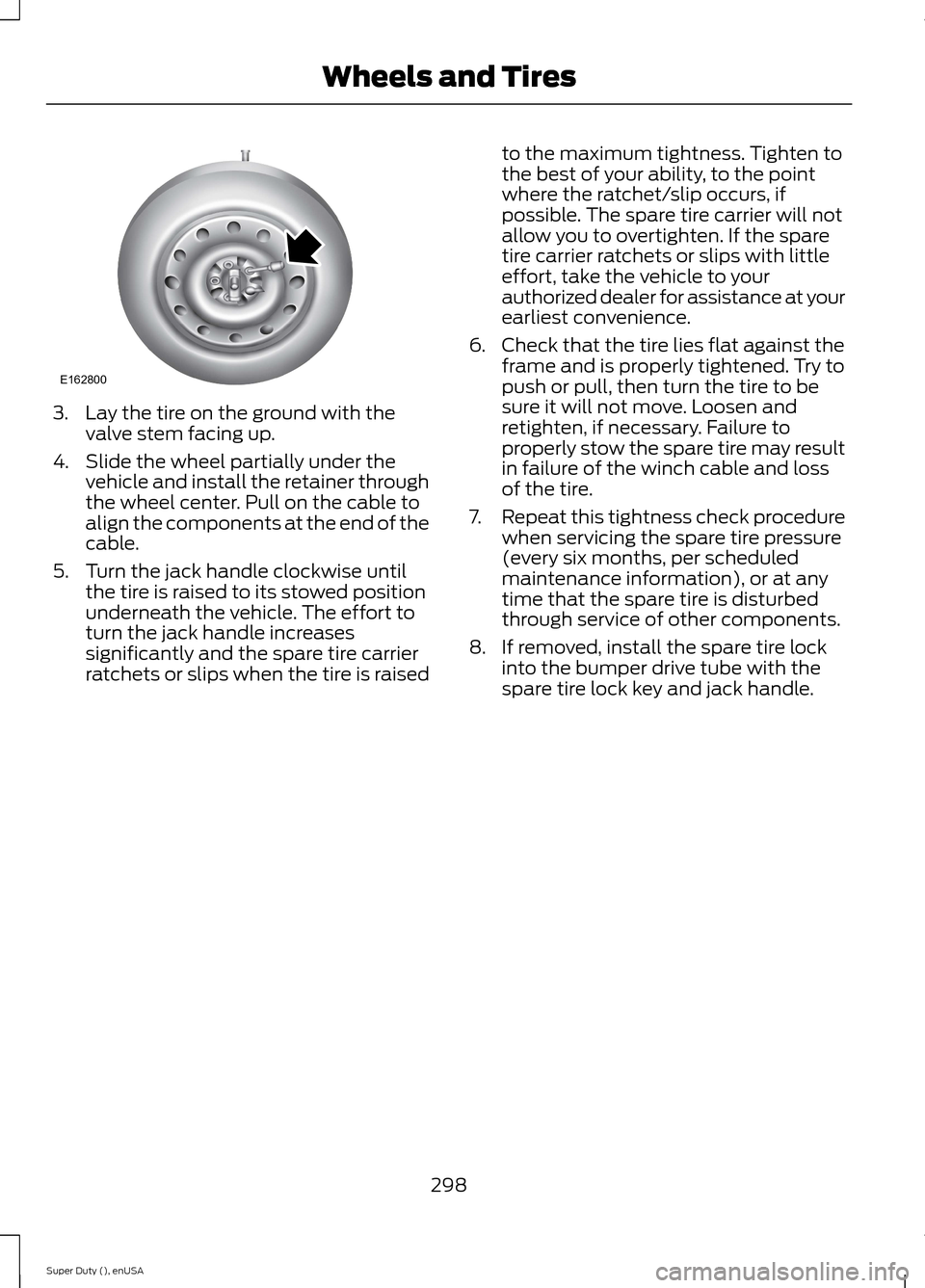
4.Remove the retainer through the centerof the wheel. If your vehicle is equippedwith a tether, perform the followingsteps.
5.Lift the spare tire on end to access thetether attachment.
6.Use the lug wrench to remove the lugnut from the spare tire tether.
7.If not replacing the spare or flat tire tothe underbody storage area, raise thewheel retainer up into the installedposition.
8.Use the attached fastener strap (onthe spare tire tether) to attach thetether end to the winch retainer priorto raising to the installed position.
Tire Change Procedure
WARNINGS
When one of the front wheels is offthe ground, the transmission alonewill not prevent the vehicle frommoving or slipping off the jack, even if thetransmission is in park (P).
To help prevent the vehicle frommoving when you change a tire, besure to place the transmission in park(P), set the parking brake and block (inboth directions) the wheel that isdiagonally opposite (other side and end ofthe vehicle) to the tire being changed.
Never get underneath a vehicle thatis supported only by a jack. If thevehicle slips off the jack, you orsomeone else could be seriously injured.
291Super Duty (), enUSAWheels and TiresE162798ABAB E162799 E162800
Page 301 of 470
3.Lay the tire on the ground with thevalve stem facing up.
4.Slide the wheel partially under thevehicle and install the retainer throughthe wheel center. Pull on the cable toalign the components at the end of thecable.
5.Turn the jack handle clockwise untilthe tire is raised to its stowed positionunderneath the vehicle. The effort toturn the jack handle increasessignificantly and the spare tire carrierratchets or slips when the tire is raised
to the maximum tightness. Tighten tothe best of your ability, to the pointwhere the ratchet/slip occurs, ifpossible. The spare tire carrier will notallow you to overtighten. If the sparetire carrier ratchets or slips with littleeffort, take the vehicle to yourauthorized dealer for assistance at yourearliest convenience.
6.Check that the tire lies flat against theframe and is properly tightened. Try topush or pull, then turn the tire to besure it will not move. Loosen andretighten, if necessary. Failure toproperly stow the spare tire may resultin failure of the winch cable and lossof the tire.
7.Repeat this tightness check procedurewhen servicing the spare tire pressure(every six months, per scheduledmaintenance information), or at anytime that the spare tire is disturbedthrough service of other components.
8.If removed, install the spare tire lockinto the bumper drive tube with thespare tire lock key and jack handle.
298Super Duty (), enUSAWheels and TiresE162800
Page 323 of 470
Troubleshooting
Possible actionConditionRadio display
No action required. Thismessage should disappearshortly.
Radio requires more thantwo seconds to produceaudio for the selectedchannel.
Acquiring
If this message does notclear shortly, or with an igni-tion key cycle, your receivermay have a fault. See anauthorized dealer for service.
There is an internal moduleor system failure present.Sat Fault/SIRIUS systemfailure
Tune to another channel orchoose another preset.The channel is no longeravailable.Invalid Channel
Contact SIRIUS at 1-888-539-7474 to subscribe tothe channel, or tune toanother channel.
Your subscription does notinclude this channel.Unsubscribed Channel
The signal is blocked. Whenyou move into an open area,the signal should return.
The signal is lost from theSIRIUS satellite or SIRIUStower to your vehicleantenna.
No Signal
No action required. Theprocess may take up tothree minutes.
Update of channelprogramming in progress.Updating
Contact SIRIUS at 1-888-539-7474 to resolvesubscription issues.
Your satellite service is nolonger available.Call SIRIUS 1-888-539-7474
Use the channel guide toturn off the Lock or Skipfunction on that station.
All the channels in theselected category are eitherskipped or locked.
None found. Check ChannelGuide.
No action required.SIRIUS has updated thechannels available for yourvehicle.
Subscription Updated
320Super Duty (), enUSAAudio System
Page 344 of 470
1.Press the phone button to enter phonemenu.
2.Scroll to select Vehicle Health, andthen press OK.
3.Scroll to select from the followingoptions:
Vehicle health report options
Automatic Reports: Press OK to and select On or Off.Select On to have SYNC automatically prompt you to run
a health report at certain mileage intervals.*
User Preferences: Press OKto select and enter themenu. Scroll to select from:
Mileage Intervals: Press OK. Scroll to select between5000, 7500 or 10000-mile intervals and press OK to makeyour selection.
Return: Press OK to exit the menu.
Press OK for SYNC to run a health report of your vehicle'sdiagnostic systems and send the results to Ford where itcombines with scheduled maintenance information, openrecalls and other field service actions and vehicle inspec-tion items that still need servicing from an authorizeddealer.
Run Report?
*You must first turn this feature on before you can select the desired mileage interval.
Note:SYNC Services varies by trim leveland model year and may require asubscription. Traffic alerts and turn-by-turndirections available in select markets.Message and data rates may apply. FordMotor Company reserves the right to changeor discontinue this product service at anytime without prior notification or incurringany future obligation.
Vehicle Health Report Privacy Notice
When you create a Vehicle Health Report,Ford Motor Company may collect yourcellular phone number (to process yourreport request) and diagnostic informationabout your vehicle. Certain versions orupdates to Vehicle Health Report may alsocollect more vehicle information. Ford mayuse your vehicle information it collects forany purpose. If you do not want to discloseyour cellular phone number or vehicle
information, do not run the feature or setup your Vehicle Health Report profile atwww.SYNCMyRide.com. Seewww.SYNCMyRide.com (Vehicle HealthReport Terms and Conditions, and PrivacyStatement) for more information.
SYNC Services: Traffic, Directions& Information (TDI) (If Equipped,Unites States Only)
Note:SYNC Services varies by trim leveland model year and may require asubscription. Traffic alerts and turn-by-turndirections available in select markets.Message and data rates may apply. FordMotor Company reserves the right to changeor discontinue this product service at anytime without prior notification or incurringany future obligation.
341Super Duty (), enUSASYNC™ (If Equipped)
Page 365 of 470
Monday-Saturday, 8:30am-9:00pm EST.
Sunday, 10:30am-7:30pm EST.
In the United States, call: 1-800-392-3673.
In Canada, call: 1-800-565-3673.
Times are subject to change due toholidays.
Safety Information
WARNING
Driving while distracted can result inloss of vehicle control, crash andinjury. We strongly recommend thatyou use extreme caution when using anydevice that may take your focus off theroad. Your primary responsibility is the safeoperation of your vehicle. We recommendagainst the use of any hand-held devicewhile driving and encourage the use ofvoice-operated systems when possible.Make sure you are aware of all applicablelocal laws that may affect the use ofelectronic devices while driving.
•Do not attempt to service or repair thesystem. See an authorized dealer.
•Do not operate playing devices if thepower cords or cables are broken, splitor damaged. Place cords and cablesout of the way, so they do not interferewith the operation of pedals, seats,compartments or safe driving abilities.
•Do not leave playing devices in yourvehicle during extreme conditions as itcould cause them damage. See yourdevice's user guide for furtherinformation.
•For your safety, some SYNC functionsare speed-dependent. Their use islimited to when your vehicle is travelingat speeds under 3 mph (5 km/h).
Make sure that you review your device'smanual before using it with SYNC.
Speed-restricted Features
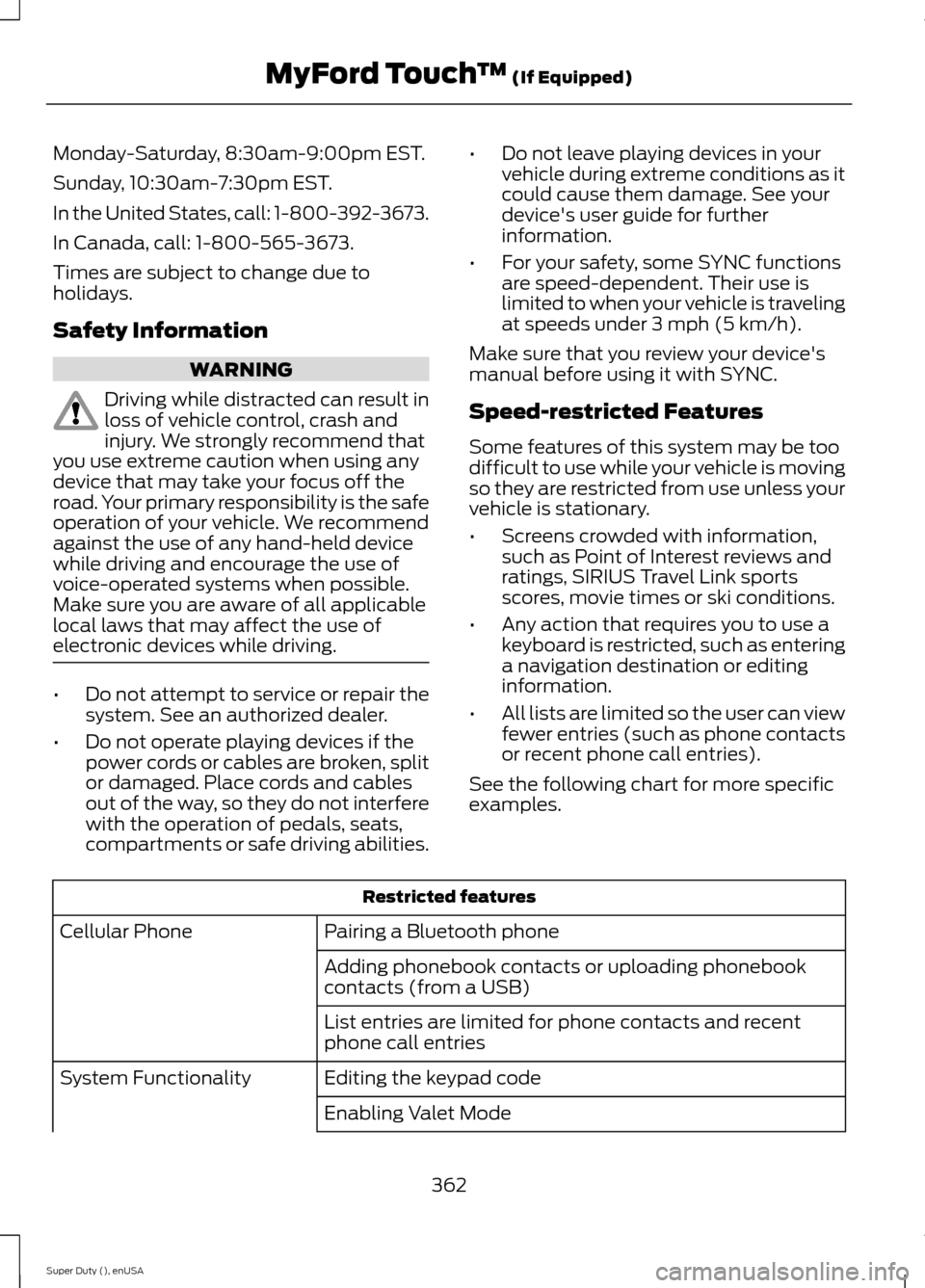
Some features of this system may be toodifficult to use while your vehicle is movingso they are restricted from use unless yourvehicle is stationary.
•Screens crowded with information,such as Point of Interest reviews andratings, SIRIUS Travel Link sportsscores, movie times or ski conditions.
•Any action that requires you to use akeyboard is restricted, such as enteringa navigation destination or editinginformation.
•All lists are limited so the user can viewfewer entries (such as phone contactsor recent phone call entries).
See the following chart for more specificexamples.
Restricted features
Pairing a Bluetooth phoneCellular Phone
Adding phonebook contacts or uploading phonebookcontacts (from a USB)
List entries are limited for phone contacts and recentphone call entries
Editing the keypad codeSystem Functionality
Enabling Valet Mode
362Super Duty (), enUSAMyFord Touch™ (If Equipped)
Page 366 of 470
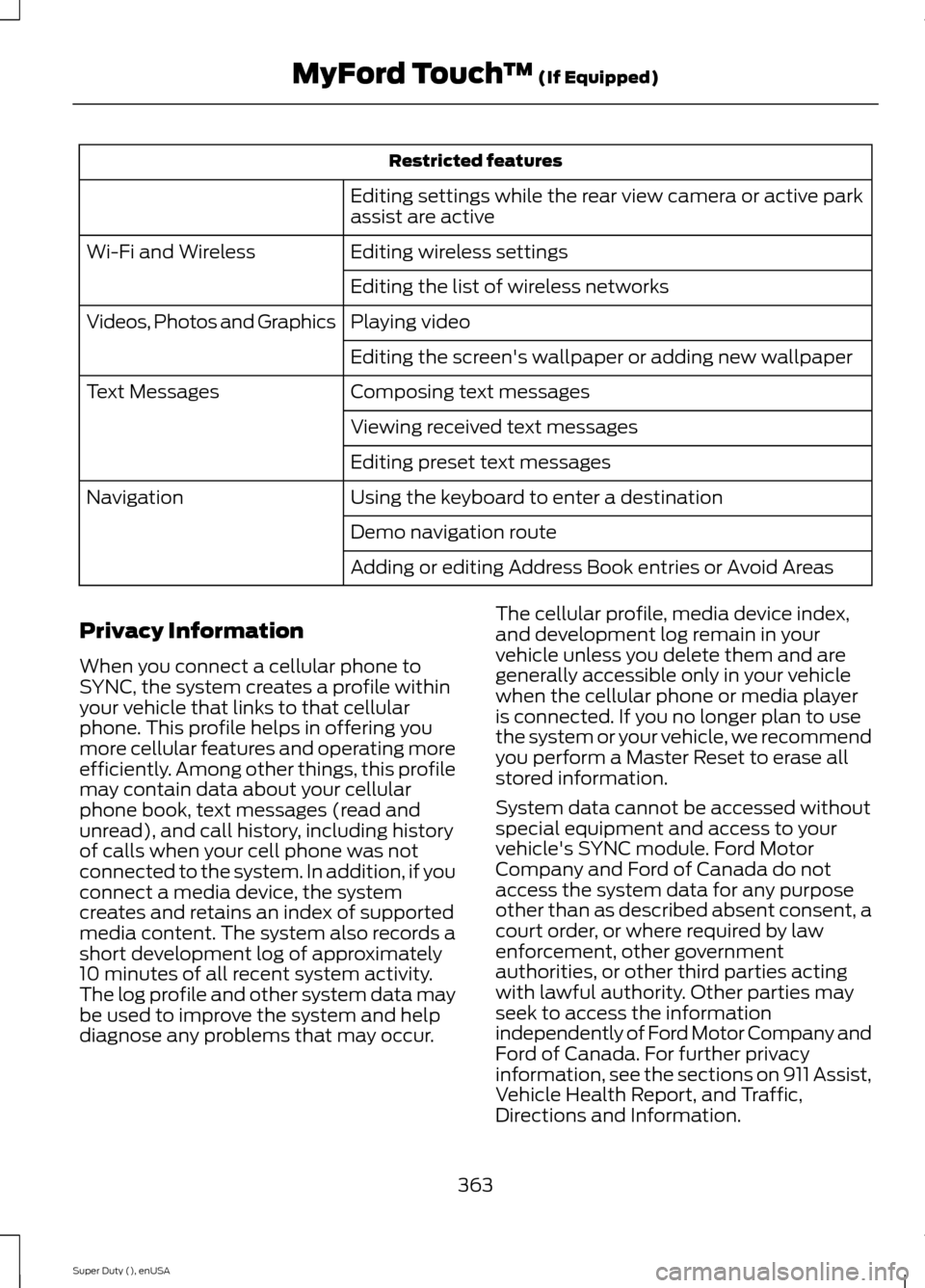
Restricted features
Editing settings while the rear view camera or active parkassist are active
Editing wireless settingsWi-Fi and Wireless
Editing the list of wireless networks
Playing videoVideos, Photos and Graphics
Editing the screen's wallpaper or adding new wallpaper
Composing text messagesText Messages
Viewing received text messages
Editing preset text messages
Using the keyboard to enter a destinationNavigation
Demo navigation route
Adding or editing Address Book entries or Avoid Areas
Privacy Information
When you connect a cellular phone toSYNC, the system creates a profile withinyour vehicle that links to that cellularphone. This profile helps in offering youmore cellular features and operating moreefficiently. Among other things, this profilemay contain data about your cellularphone book, text messages (read andunread), and call history, including historyof calls when your cell phone was notconnected to the system. In addition, if youconnect a media device, the systemcreates and retains an index of supportedmedia content. The system also records ashort development log of approximately10 minutes of all recent system activity.The log profile and other system data maybe used to improve the system and helpdiagnose any problems that may occur.
The cellular profile, media device index,and development log remain in yourvehicle unless you delete them and aregenerally accessible only in your vehiclewhen the cellular phone or media playeris connected. If you no longer plan to usethe system or your vehicle, we recommendyou perform a Master Reset to erase allstored information.
System data cannot be accessed withoutspecial equipment and access to yourvehicle's SYNC module. Ford MotorCompany and Ford of Canada do notaccess the system data for any purposeother than as described absent consent, acourt order, or where required by lawenforcement, other governmentauthorities, or other third parties actingwith lawful authority. Other parties mayseek to access the informationindependently of Ford Motor Company andFord of Canada. For further privacyinformation, see the sections on 911 Assist,Vehicle Health Report, and Traffic,Directions and Information.
363Super Duty (), enUSAMyFord Touch™ (If Equipped)
Page 372 of 470
Settings
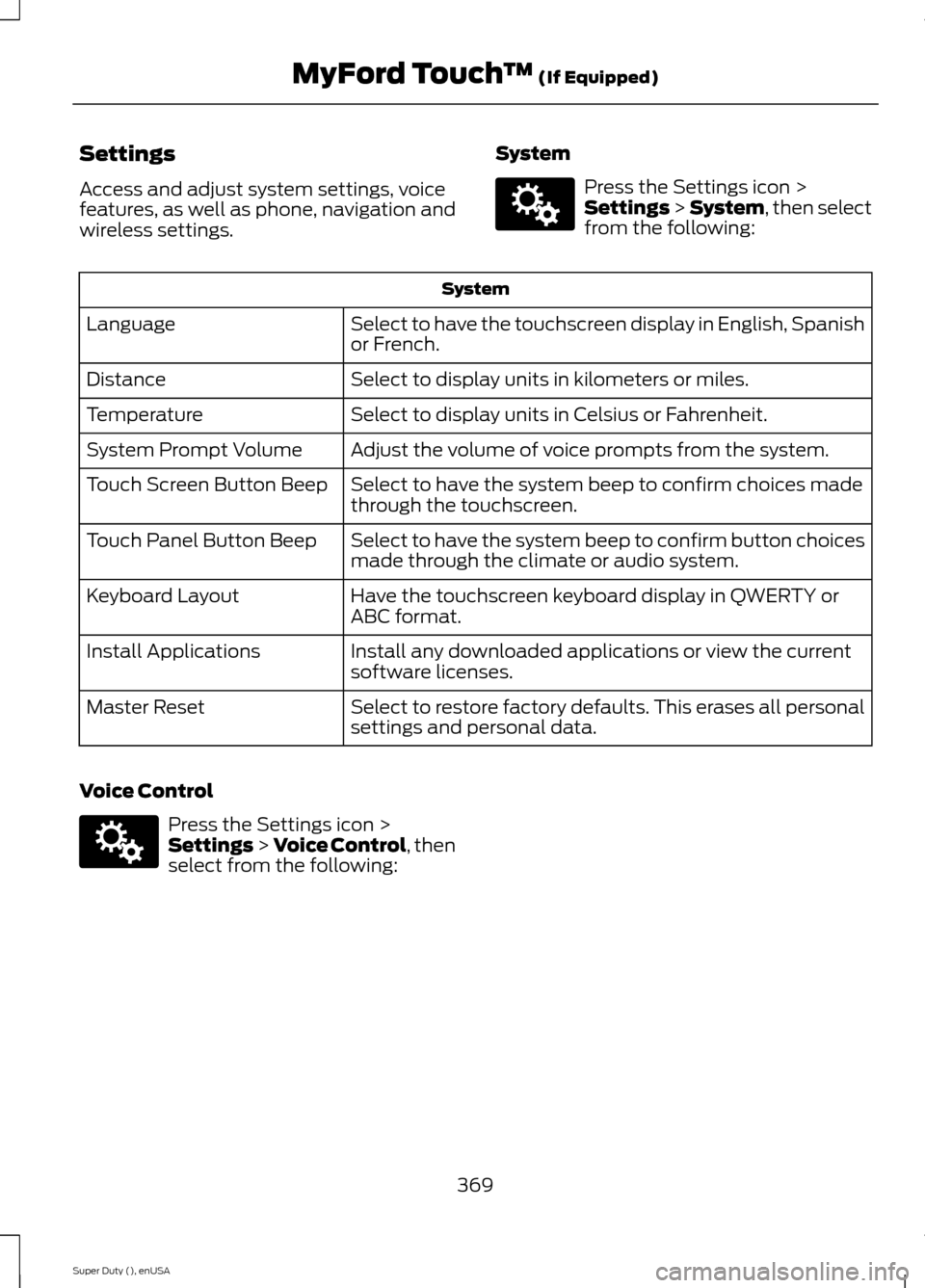
Access and adjust system settings, voicefeatures, as well as phone, navigation andwireless settings.
System
Press the Settings icon >Settings > System, then selectfrom the following:
System
Select to have the touchscreen display in English, Spanishor French.Language
Select to display units in kilometers or miles.Distance
Select to display units in Celsius or Fahrenheit.Temperature
Adjust the volume of voice prompts from the system.System Prompt Volume
Select to have the system beep to confirm choices madethrough the touchscreen.Touch Screen Button Beep
Select to have the system beep to confirm button choicesmade through the climate or audio system.Touch Panel Button Beep
Have the touchscreen keyboard display in QWERTY orABC format.Keyboard Layout
Install any downloaded applications or view the currentsoftware licenses.Install Applications
Select to restore factory defaults. This erases all personalsettings and personal data.Master Reset
Voice Control
Press the Settings icon >Settings > Voice Control, thenselect from the following:
369Super Duty (), enUSAMyFord Touch™ (If Equipped)E142607 E142607
Page 388 of 470
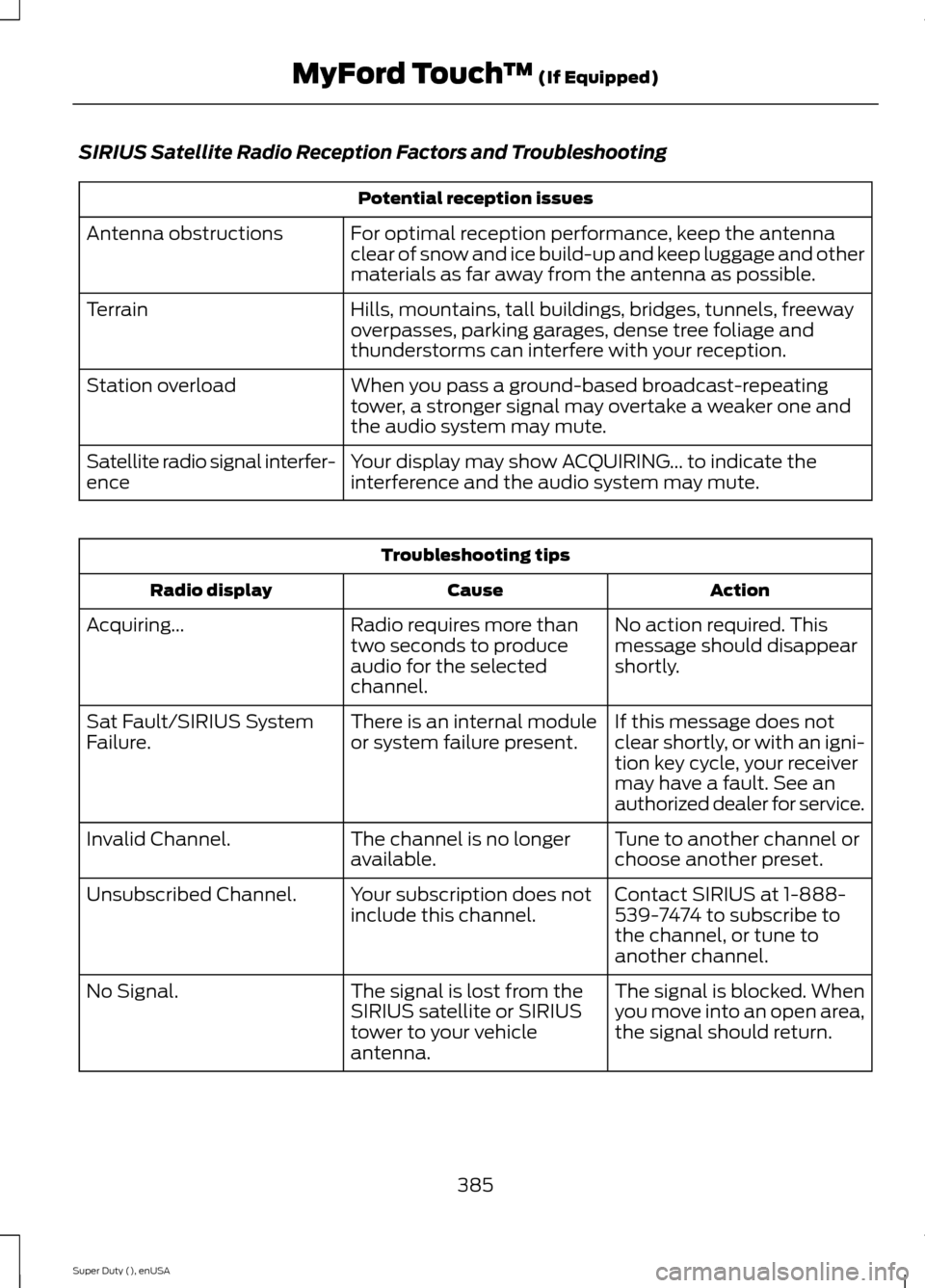
SIRIUS Satellite Radio Reception Factors and Troubleshooting
Potential reception issues
For optimal reception performance, keep the antennaclear of snow and ice build-up and keep luggage and othermaterials as far away from the antenna as possible.
Antenna obstructions
Hills, mountains, tall buildings, bridges, tunnels, freewayoverpasses, parking garages, dense tree foliage andthunderstorms can interfere with your reception.
Terrain
When you pass a ground-based broadcast-repeatingtower, a stronger signal may overtake a weaker one andthe audio system may mute.
Station overload
Your display may show ACQUIRING... to indicate theinterference and the audio system may mute.Satellite radio signal interfer-ence
Troubleshooting tips
ActionCauseRadio display
No action required. Thismessage should disappearshortly.
Radio requires more thantwo seconds to produceaudio for the selectedchannel.
Acquiring...
If this message does notclear shortly, or with an igni-tion key cycle, your receivermay have a fault. See anauthorized dealer for service.
There is an internal moduleor system failure present.Sat Fault/SIRIUS SystemFailure.
Tune to another channel orchoose another preset.The channel is no longeravailable.Invalid Channel.
Contact SIRIUS at 1-888-539-7474 to subscribe tothe channel, or tune toanother channel.
Your subscription does notinclude this channel.Unsubscribed Channel.
The signal is blocked. Whenyou move into an open area,the signal should return.
The signal is lost from theSIRIUS satellite or SIRIUStower to your vehicleantenna.
No Signal.
385Super Duty (), enUSAMyFord Touch™ (If Equipped)
Page 423 of 470
For a complete listing of the accessoriesthat are available for your vehicle, pleasecontact an authorized dealer or visit ouronline store atwww.Accessories.Ford.com (UnitedStates only).
Ford Motor Company will repair or replaceany properly authorized dealer-installedFord Genuine Accessories found to bedefective in factory-supplied materials orworkmanship during the warranty period,as well as any component damaged by thedefective accessories.
Ford Motor Company will warrant yourvehicle through the warranty that providesthe greatest benefit:
•24 months, unlimited mileage.
•The remainder of your new vehiclelimited warranty.
Contact an authorized dealer for detailsand a copy of the warranty.
Exterior style
•Bug shields.
•Exhaust tip.
•Deflectors.
•Running boards.
•Splash guards.
•Step bars.
•Fog lamps.
•Custom graphics*.
•Stainless-steel wheel covers*.
•Wheel well liners.
Interior style
•Floor mats.
•Cargo organizers.
•Custom seat covers*.
Lifestyle
•Ash cup / smoker's package.
•Bedliners and bedmats.
•Rear-seat entertainment*.
•Tonneau covers*.
•Trailer hitches, wiring harnesses andaccessories.
•Racks and carriers*.
•Truck bed camping tent*.
•Sportliner cargo liner*.
•Bed extender.
Peace of mind
•Keyless entry keypad.
•Back-up alarm*.
•Remote start and alarms.
•Wheel locks.
•Protective seat covers*.
•Bumper and hitch-mounted parkingsensors*.
•Cable lock*.
•Bed hooks*.
•Tool/Cargo boxes*.
•Speed/Cruise control.
*The accessory manufacturer designs,develops and therefore warrants FordLicensed Accessories, and does not designor test these accessories to Ford MotorCompany engineering requirements.Contact an authorized Ford dealer for themanufacturer’s limited warranty details,and request a copy of the Ford LicensedAccessories product limited warranty fromthe accessory manufacturer.
420Super Duty (), enUSAAccessories
Page 460 of 470
4
4WDSee: Four-Wheel Drive.......................................151
A
A/CSee: Climate Control.........................................103About This Manual...........................................7Protecting the Environment................................7ABSSee: Brakes............................................................162ABS driving hintsSee: Hints on Driving With Anti-LockBrakes.................................................................162Accessories....................................................420Exterior style........................................................420Interior style.........................................................420Lifestyle.................................................................420Peace of mind.....................................................420AccessoriesSee: Replacement PartsRecommendation............................................12Adjusting the Headlamps.........................247Horizontal Aim Adjustment...........................248Vertical Aim Adjustment.................................247Adjusting the Pedals.....................................63Adjusting the Steering Wheel...................60Airbag Disposal...............................................45Air ConditioningSee: Climate Control.........................................103AlarmSee: Anti-Theft Alarm........................................59Anti-Theft Alarm............................................59Arming the Alarm.................................................59Disarming the Alarm...........................................59Appendices....................................................423Audible Warnings and Indicators............80Headlamps On Warning Chime.....................80Key in Ignition Warning Chime........................80Parking Brake On Warning Chime.................80Audio Control..................................................60Media.........................................................................61Seek, Next or Previous.........................................61Audio Input Jack............................................321Audio System.................................................310General Information..........................................310
Audio unit - Vehicles With: AM/FM/CD/SYNC..............................................................312Audio unit - Vehicles With: AM/FM.........311Audio unit - Vehicles With: Sony AM/FM/CD....................................................................315Autolamps........................................................65Autolamps - Programmable ExitDelay....................................................................66Automatic Climate Control......................104Automatic Transmission...........................144Brake-Shift Interlock.........................................148If Your Vehicle Gets Stuck In Mud orSnow..................................................................150Understanding the Shift Positions of a6–Speed Automatic Transmission.........145Understanding the Shift Positions of the5–Speed Automatic Transmission.........144Understanding your SelectShiftAutomatic® transmission...........................147Automatic Transmission FluidCheck............................................................240Checking Automatic Transmission Fluid (IfEquipped).......................................................240Auxiliary Power Points................................129110 Volt AC Power Points.................................12912 Volt DC Power Point.....................................129Locations...............................................................129Auxiliary Switches........................................421
B
Bonnet LockSee: Opening and Closing the Hood...........232Booster Seats..................................................24Types of Booster Seats......................................25Brake Fluid Check........................................243Brakes...............................................................162General Information..........................................162Breaking-In....................................................208Bulb Specification Chart...........................252
C
California Proposition 65..............................11Capacities and Specifications.................301Technical Specifications.................................305Car WashSee: Cleaning the Exterior..............................256
457Super Duty (), enUSAIndex