key FORD SUPER DUTY 2015 3.G Owner's Manual
[x] Cancel search | Manufacturer: FORD, Model Year: 2015, Model line: SUPER DUTY, Model: FORD SUPER DUTY 2015 3.GPages: 470, PDF Size: 18.24 MB
Page 85 of 470
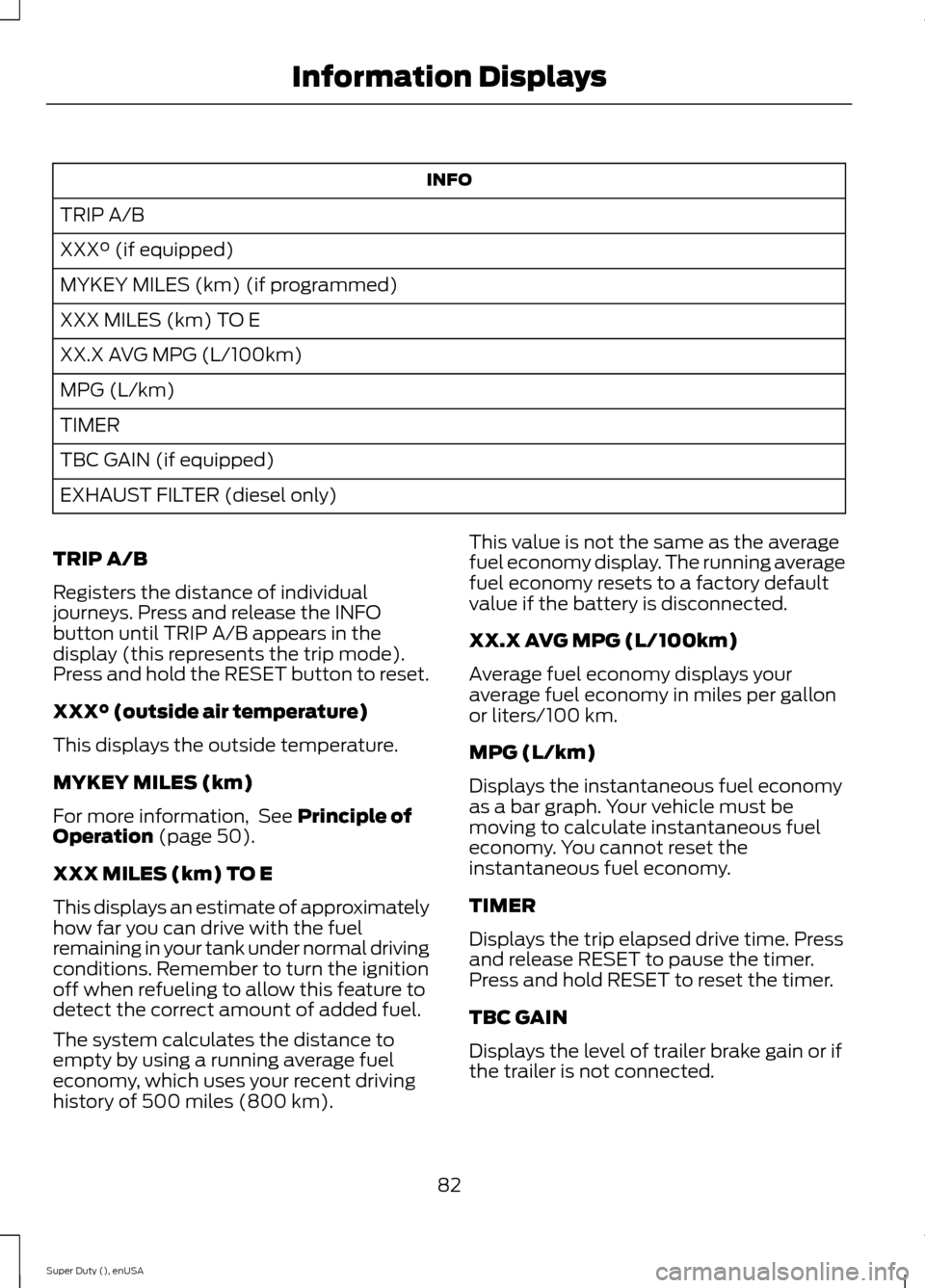
INFO
TRIP A/B
XXX° (if equipped)
MYKEY MILES (km) (if programmed)
XXX MILES (km) TO E
XX.X AVG MPG (L/100km)
MPG (L/km)
TIMER
TBC GAIN (if equipped)
EXHAUST FILTER (diesel only)
TRIP A/B
Registers the distance of individualjourneys. Press and release the INFObutton until TRIP A/B appears in thedisplay (this represents the trip mode).Press and hold the RESET button to reset.
XXX° (outside air temperature)
This displays the outside temperature.
MYKEY MILES (km)
For more information, See Principle ofOperation (page 50).
XXX MILES (km) TO E
This displays an estimate of approximatelyhow far you can drive with the fuelremaining in your tank under normal drivingconditions. Remember to turn the ignitionoff when refueling to allow this feature todetect the correct amount of added fuel.
The system calculates the distance toempty by using a running average fueleconomy, which uses your recent drivinghistory of 500 miles (800 km).
This value is not the same as the averagefuel economy display. The running averagefuel economy resets to a factory defaultvalue if the battery is disconnected.
XX.X AVG MPG (L/100km)
Average fuel economy displays youraverage fuel economy in miles per gallonor liters/100 km.
MPG (L/km)
Displays the instantaneous fuel economyas a bar graph. Your vehicle must bemoving to calculate instantaneous fueleconomy. You cannot reset theinstantaneous fuel economy.
TIMER
Displays the trip elapsed drive time. Pressand release RESET to pause the timer.Press and hold RESET to reset the timer.
TBC GAIN
Displays the level of trailer brake gain or ifthe trailer is not connected.
82Super Duty (), enUSAInformation Displays
Page 86 of 470
EXHAUST FILTER
For more information, refer to the Dieselsupplement.
System check and vehicle featurecustomization
Press the SETUP button repeatedly tocycle the information display through thefollowing features:
Note:Some options may appear slightlydifferent or not at all if the items areoptional.
Note:When returning to the SETUP menuand you selected a non-English language,HOLD RESET FOR ENGLISH will display tochange back to English. Press and hold theRESET button to change back to English.
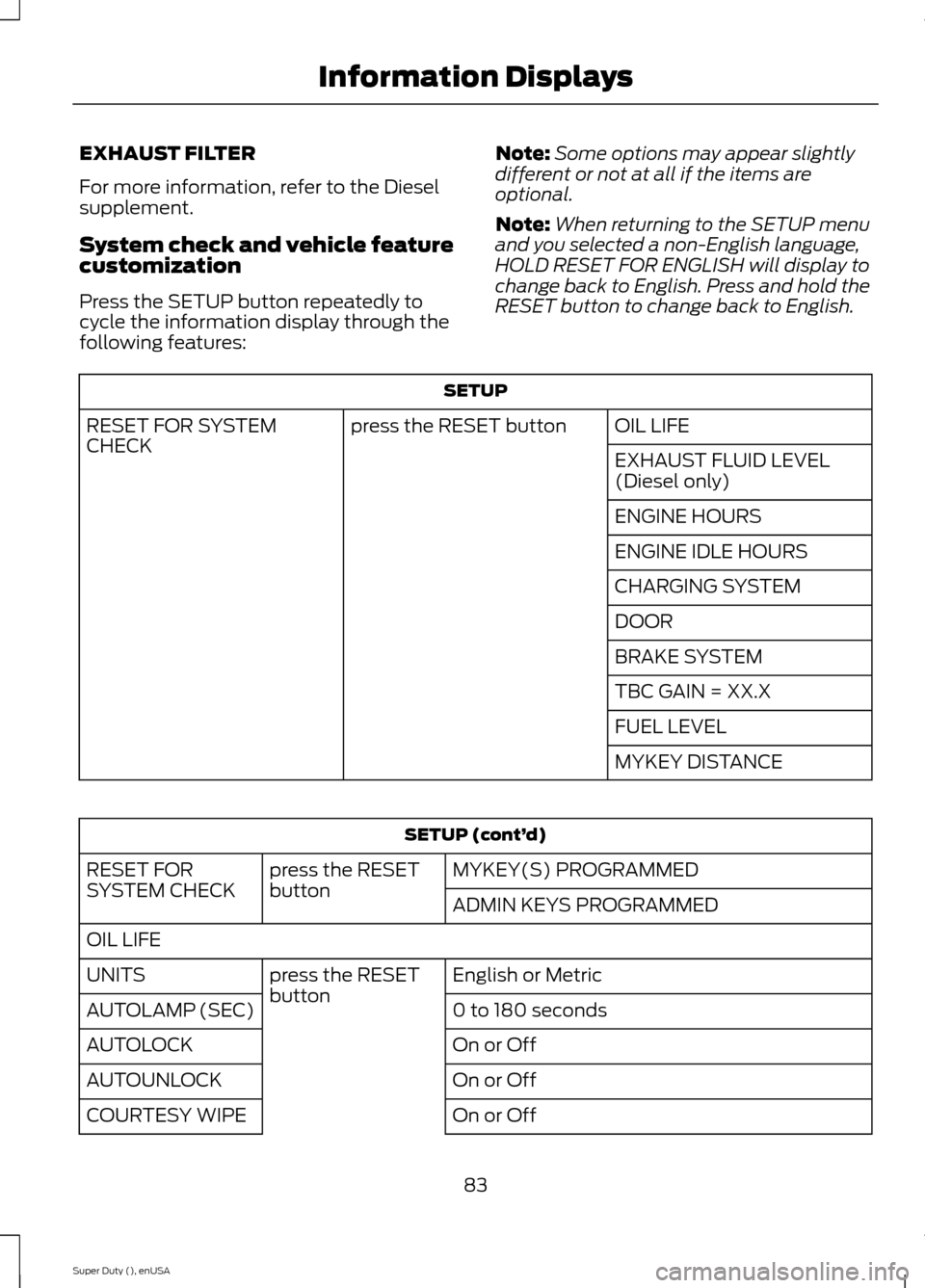
SETUP
OIL LIFEpress the RESET buttonRESET FOR SYSTEMCHECKEXHAUST FLUID LEVEL(Diesel only)
ENGINE HOURS
ENGINE IDLE HOURS
CHARGING SYSTEM
DOOR
BRAKE SYSTEM
TBC GAIN = XX.X
FUEL LEVEL
MYKEY DISTANCE
SETUP (cont’d)
MYKEY(S) PROGRAMMEDpress the RESETbuttonRESET FORSYSTEM CHECKADMIN KEYS PROGRAMMED
OIL LIFE
English or Metricpress the RESETbuttonUNITS
0 to 180 secondsAUTOLAMP (SEC)
On or OffAUTOLOCK
On or OffAUTOUNLOCK
On or OffCOURTESY WIPE
83Super Duty (), enUSAInformation Displays
Page 87 of 470
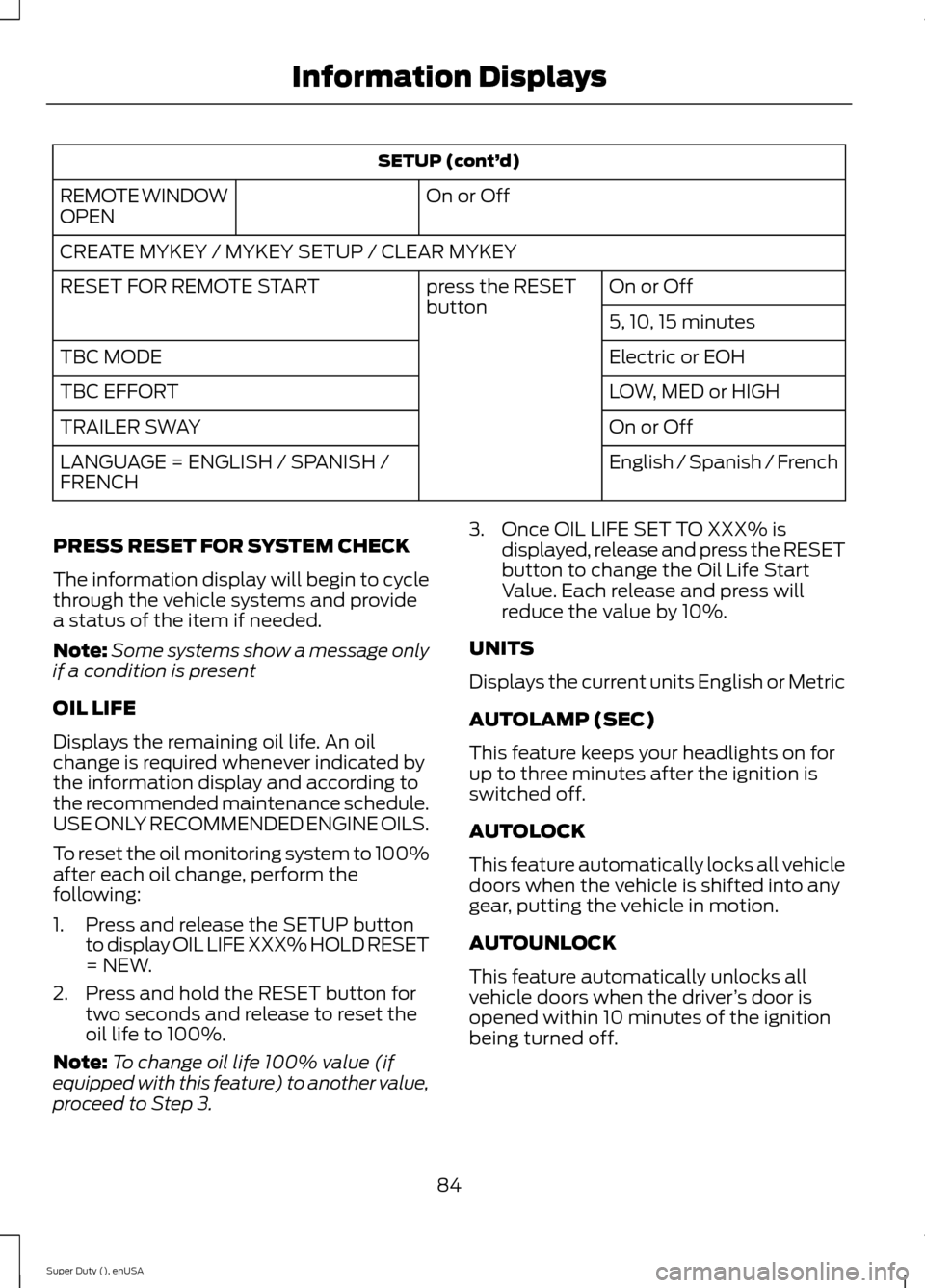
SETUP (cont’d)
On or OffREMOTE WINDOWOPEN
CREATE MYKEY / MYKEY SETUP / CLEAR MYKEY
On or Offpress the RESETbuttonRESET FOR REMOTE START
5, 10, 15 minutes
Electric or EOHTBC MODE
LOW, MED or HIGHTBC EFFORT
On or OffTRAILER SWAY
English / Spanish / FrenchLANGUAGE = ENGLISH / SPANISH /FRENCH
PRESS RESET FOR SYSTEM CHECK
The information display will begin to cyclethrough the vehicle systems and providea status of the item if needed.
Note:Some systems show a message onlyif a condition is present
OIL LIFE
Displays the remaining oil life. An oilchange is required whenever indicated bythe information display and according tothe recommended maintenance schedule.USE ONLY RECOMMENDED ENGINE OILS.
To reset the oil monitoring system to 100%after each oil change, perform thefollowing:
1.Press and release the SETUP buttonto display OIL LIFE XXX% HOLD RESET= NEW.
2.Press and hold the RESET button fortwo seconds and release to reset theoil life to 100%.
Note:To change oil life 100% value (ifequipped with this feature) to another value,proceed to Step 3.
3.Once OIL LIFE SET TO XXX% isdisplayed, release and press the RESETbutton to change the Oil Life StartValue. Each release and press willreduce the value by 10%.
UNITS
Displays the current units English or Metric
AUTOLAMP (SEC)
This feature keeps your headlights on forup to three minutes after the ignition isswitched off.
AUTOLOCK
This feature automatically locks all vehicledoors when the vehicle is shifted into anygear, putting the vehicle in motion.
AUTOUNLOCK
This feature automatically unlocks allvehicle doors when the driver’s door isopened within 10 minutes of the ignitionbeing turned off.
84Super Duty (), enUSAInformation Displays
Page 88 of 470
COURTESY WIPE
This feature allows for an extra swipe ofthe wipers after a wipe/wash cycle.
CREATE MYKEY / MYKEY SETUP /CLEAR MYKEY
For more information, See Creating aMyKey (page 50).
RESET FOR REMOTE START (ifequipped)
REAR PARK AID
This feature sounds a warning tone to warnthe driver of obstacles near the rearbumper, and functions only when R(Reverse) gear is selected.
TBC MODE (if equipped)
Allows you to choose the trailer brakemode.
TBC EFFORT (if equipped)
Allows you to choose the level of initialbraking.
TRAILER SWAY (if equipped)
This feature uses the electronic stabilitycontrol to mitigate trailer sway.
LANGUAGE = ENGLISH / SPANISH /FRENCH
Allows you to choose which language themessage center will display in.
Waiting four seconds or pressing theRESET button cycles the message centerthrough each of the language choices.
Press the RESET button to set thelanguage choice.
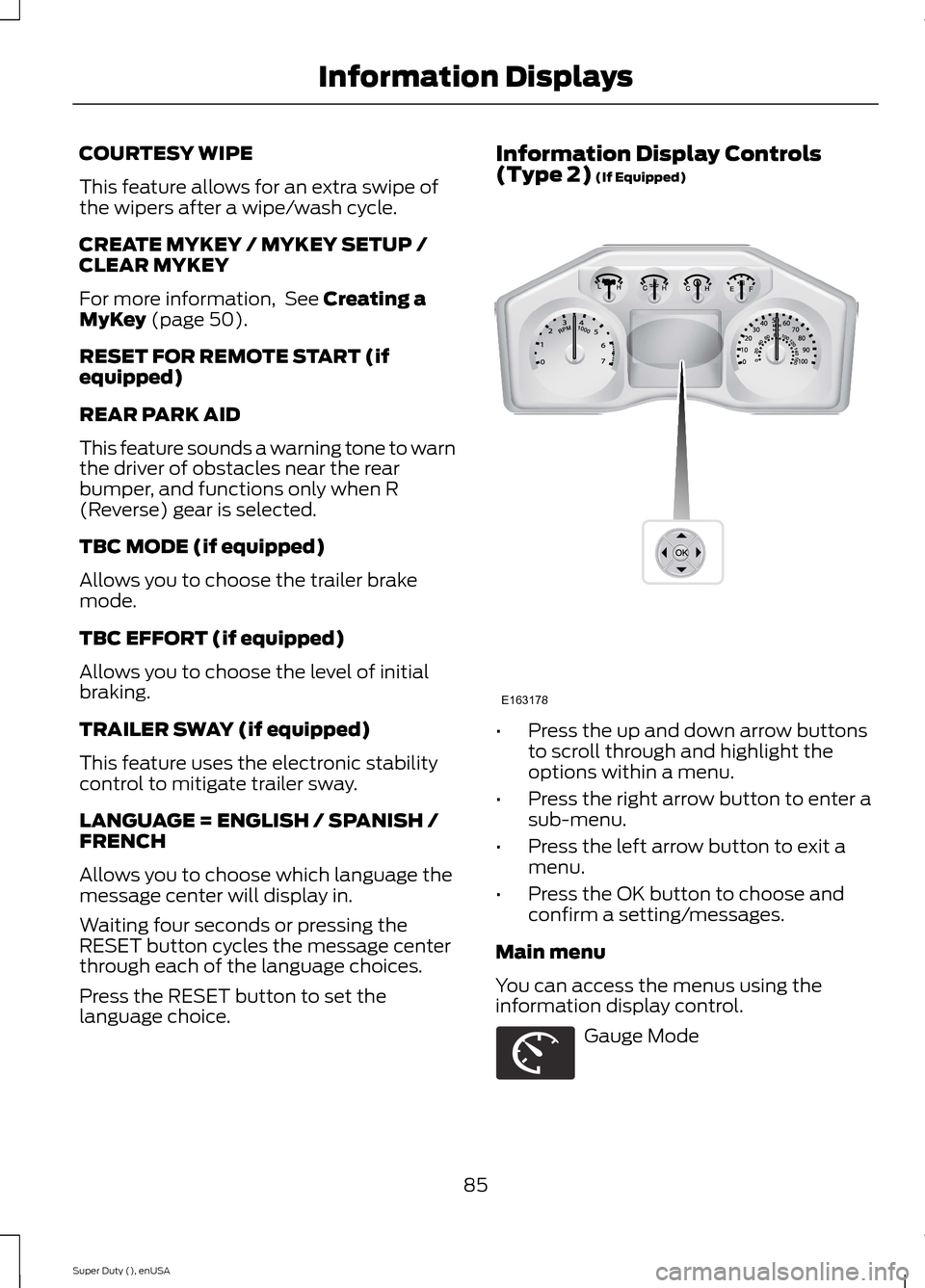
Information Display Controls(Type 2) (If Equipped)
•Press the up and down arrow buttonsto scroll through and highlight theoptions within a menu.
•Press the right arrow button to enter asub-menu.
•Press the left arrow button to exit amenu.
•Press the OK button to choose andconfirm a setting/messages.
Main menu
You can access the menus using theinformation display control.
Gauge Mode
85Super Duty (), enUSAInformation DisplaysE163178 E163179
Page 92 of 470
Truck Apps (cont’d)
Rename TrailerPress OK for optionsTrailer (cont’d)
Reset Trailer Mileage / Kilometers(if equipped)
Trailer disconnected
Disregard this status if your vehicle is notequipped with a factory installed trailerbrake controller. This message may appearwhen an aftermarket TBC is used evenwhen the trailer is connected.
Change Active Trailer
When this is highlighted, press the rightarrow key to change the currently selectedtrailer. Use the up and down arrows toselect a trailer and press the OK button tochoose the highlighted trailer.
Adding a new trailer
Use the up/down arrows to highlight NewTrailer and press the right arrow key toenter the New Trailer input screen. Use theup/down arrow keys to choose alpha,numeric and symbol characters and thenpress the right arrow to move the characterspace over. Continue adding characters asneeded. Press the left arrow to go backand change a previously selectedcharacter. When finished with the newtrailer name, press OK to accept the newtrailer name.
Connection Checklist
Use the up/down arrows to highlight oneof these choices and press OK to displaythe connection checklist. Follow theon-screen instructions to go through theconnections list.
Delete Trailer
Use the up/down arrows to highlight thetrailer you want to delete and press OK todelete. Follow the on-screen prompts toexit or confirm delete.
Rename Trailer
Use the up/down buttons to highlight atrailer and press OK to select it. Use theup/down arrow buttons to change thecharacters as needed. When done, pressOK to accept the change.
Reset Trailer Mileage / Kilometers
Use the up/down buttons to select atrailer, then press and hold OK to reset thetrailer mileage (kilometers).
Settings
Use the arrow buttons toconfigure different driver settingchoices.
Note:Some items are optional and maynot appear.
89Super Duty (), enUSAInformation DisplaysE144641
Page 94 of 470
Settings (cont’d)
Hold OK to Create MyKeyCreate MyKeyMyKey
Always On or SelectableAdvanceTrac
80 MPH (130 km/h) or OffMAX Speed
45, 55 or 65 MPH (75, 90 or 105 km/h), OffSpeed Warning
On or OffVolume Limiter
Hold OK to Clear MyKeyClear MyKey
English, Français, EspañolLanguage
EnglishDistanceUnits
Metric
Fahrenheit (°F)Temperature
Celsius (°C)
Information
In this mode, you can viewdifferent vehicle systeminformation and perform asystem check.
Information
Admin Keys (Number of admin keys)MyKey
MyKeys (Number of MyKeys programmed)
MyKey Miles (km) (Distance traveled using a programmedMyKey)
Some items will only display during a system check if aproblem has been detected. If an issue exists on one ofthe monitored systems, the number of warnings that needimmediate attention will display in red and the number ofinformational warnings will display in amber. Use the up/down arrow buttons to scroll through the list; press theright arrow button to display specific information on thehighlighted warning
System Check
91Super Duty (), enUSAInformation DisplaysE144642
Page 101 of 470
Key
ActionMessage
You have attempted to program a fifth integrated key. SeeReplacing a Lost Key or Remote Control (page 49).COULD NOT PROGRAMINTEGRATED KEY
The factory equipped remote start is active. Turn your key toon to drive.TO DRIVE: TURN KEYTO ON
Maintenance
ActionMessage
The engine oil life is nearing its end. See Engine OilCheck (page 235).ENGINE OIL CHANGE SOON
The oil life left reaches 0%. See Engine Oil Check(page 235).OIL CHANGE REQUIRED
The brake fluid level is low and the brake system needsinspection immediately. See Brake Fluid Check (page243).
BRAKE FLUID LEVEL LOW
The brake system needs servicing. If the warning stayson or continues to come on, have the system checkedby an authorized dealer as soon as possible.
CHECK BRAKE SYSTEM
MyKey®
ActionMessage
MyKey is active.MYKEY ACTIVE DRIVE SAFELY
A MyKey is in use and you cannot turn off the electronicstability control.ADVANCETRAC ALWAYS ON -MYKEY SETTING
A MyKey is in use, the MyKey speed limit is on and yourvehicle speed is approaching 80 mph (130 km/h).VEHICLE NEAR TOP SPEED
A MyKey is in use, the MyKey speed limit is on and yourvehicle speed is 80 mph (130 km/h).VEHICLE AT TOP SPEED -MYKEY SETTING
When starting your vehicle and MyKey is in use and theMyKey speed limit is on.SPEED LIMITED TO 80 MPH
When starting your vehicle and MyKey is in use and theMyKey speed limit is on.SPEED LIMITED TO 130 KM/H
98Super Duty (), enUSAInformation Displays
Page 102 of 470
ActionMessage
A MyKey is in use, the optional setting is on and yourvehicle exceeds a preselected speed.CHECK SPEED DRIVE SAFELY
A MyKey is in use and Belt-Minder® is active.BUCKLE UP TO UNMUTEAUDIO
An attempt failed to program a spare key using twoexisting MyKeys.MYKEY COULD NOT PROGRAM
Park Aid
ActionMessage
The transmission is in R (Reverse) and the park aid isdisabled.CHECK REAR PARK AID
The rear park aid is disabled.REAR PARK AID OFF
The rear park aid is enabled.REAR PARK AID ON
Park Brake
ActionMessage
The parking brake is set and your vehicle is in motion.PARK BRAKE ENGAGED
Power Steering
ActionMessage
The power steering system has detected a conditionthat requires service. Have the system checked by anauthorized dealer.
SERVICE POWER STEERING
The power steering system has detected a conditionwithin the power steering system that requires serviceimmediately. Have the system checked by an author-ized dealer.
SERVICE POWER STEERINGNOW
The power steering system has disabled powersteering assist due to a system error. Have the systemchecked by an authorized dealer.
POWER STEERING ASSISTFAULT
99Super Duty (), enUSAInformation Displays
Page 117 of 470
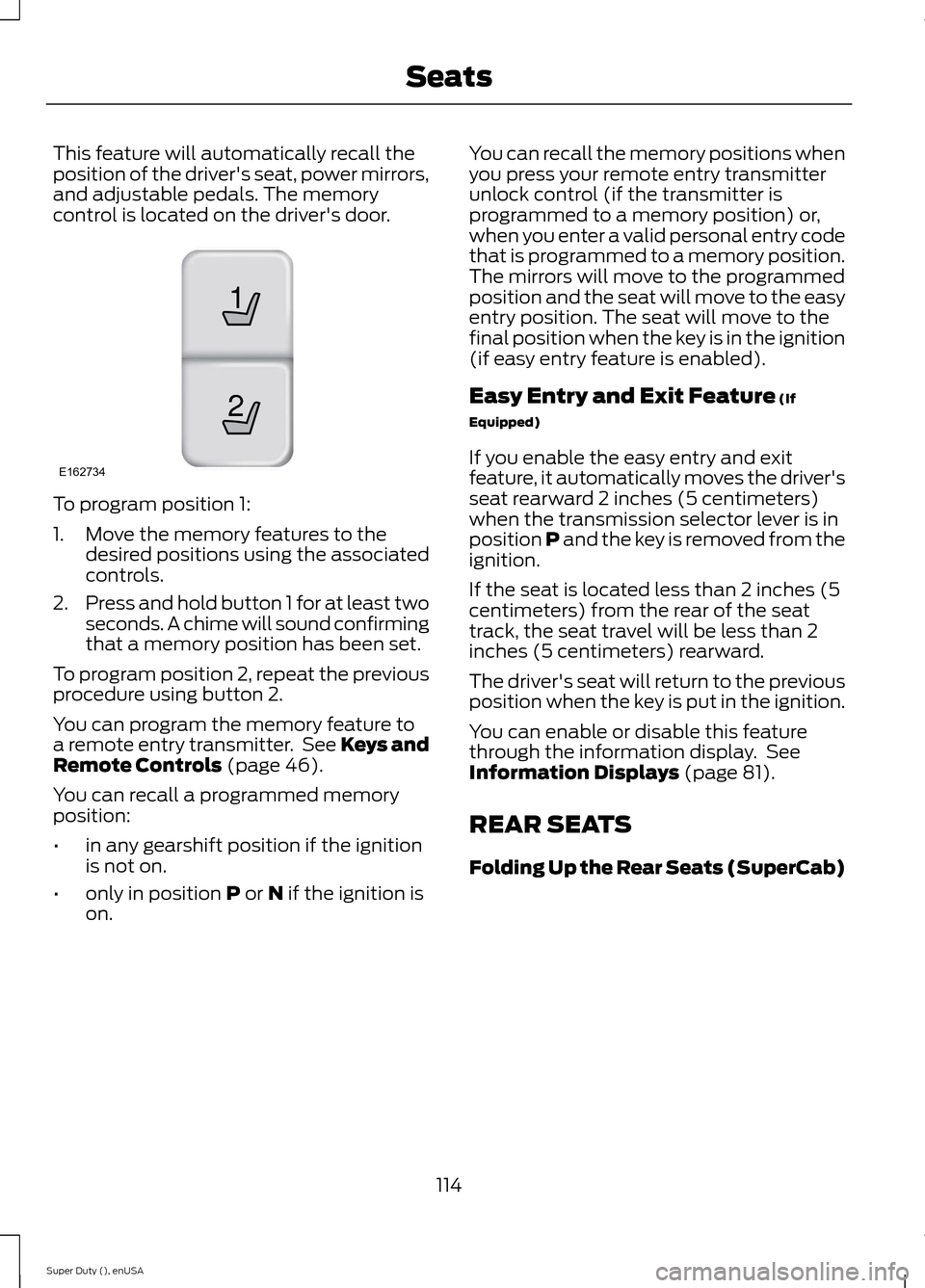
This feature will automatically recall theposition of the driver's seat, power mirrors,and adjustable pedals. The memorycontrol is located on the driver's door.
To program position 1:
1.Move the memory features to thedesired positions using the associatedcontrols.
2.Press and hold button 1 for at least twoseconds. A chime will sound confirmingthat a memory position has been set.
To program position 2, repeat the previousprocedure using button 2.
You can program the memory feature toa remote entry transmitter. See Keys andRemote Controls (page 46).
You can recall a programmed memoryposition:
•in any gearshift position if the ignitionis not on.
•only in position P or N if the ignition ison.
You can recall the memory positions whenyou press your remote entry transmitterunlock control (if the transmitter isprogrammed to a memory position) or,when you enter a valid personal entry codethat is programmed to a memory position.The mirrors will move to the programmedposition and the seat will move to the easyentry position. The seat will move to thefinal position when the key is in the ignition(if easy entry feature is enabled).
Easy Entry and Exit Feature (If
Equipped)
If you enable the easy entry and exitfeature, it automatically moves the driver'sseat rearward 2 inches (5 centimeters)when the transmission selector lever is inposition P and the key is removed from theignition.
If the seat is located less than 2 inches (5centimeters) from the rear of the seattrack, the seat travel will be less than 2inches (5 centimeters) rearward.
The driver's seat will return to the previousposition when the key is put in the ignition.
You can enable or disable this featurethrough the information display. SeeInformation Displays (page 81).
REAR SEATS
Folding Up the Rear Seats (SuperCab)
114Super Duty (), enUSASeats21E162734
Page 119 of 470
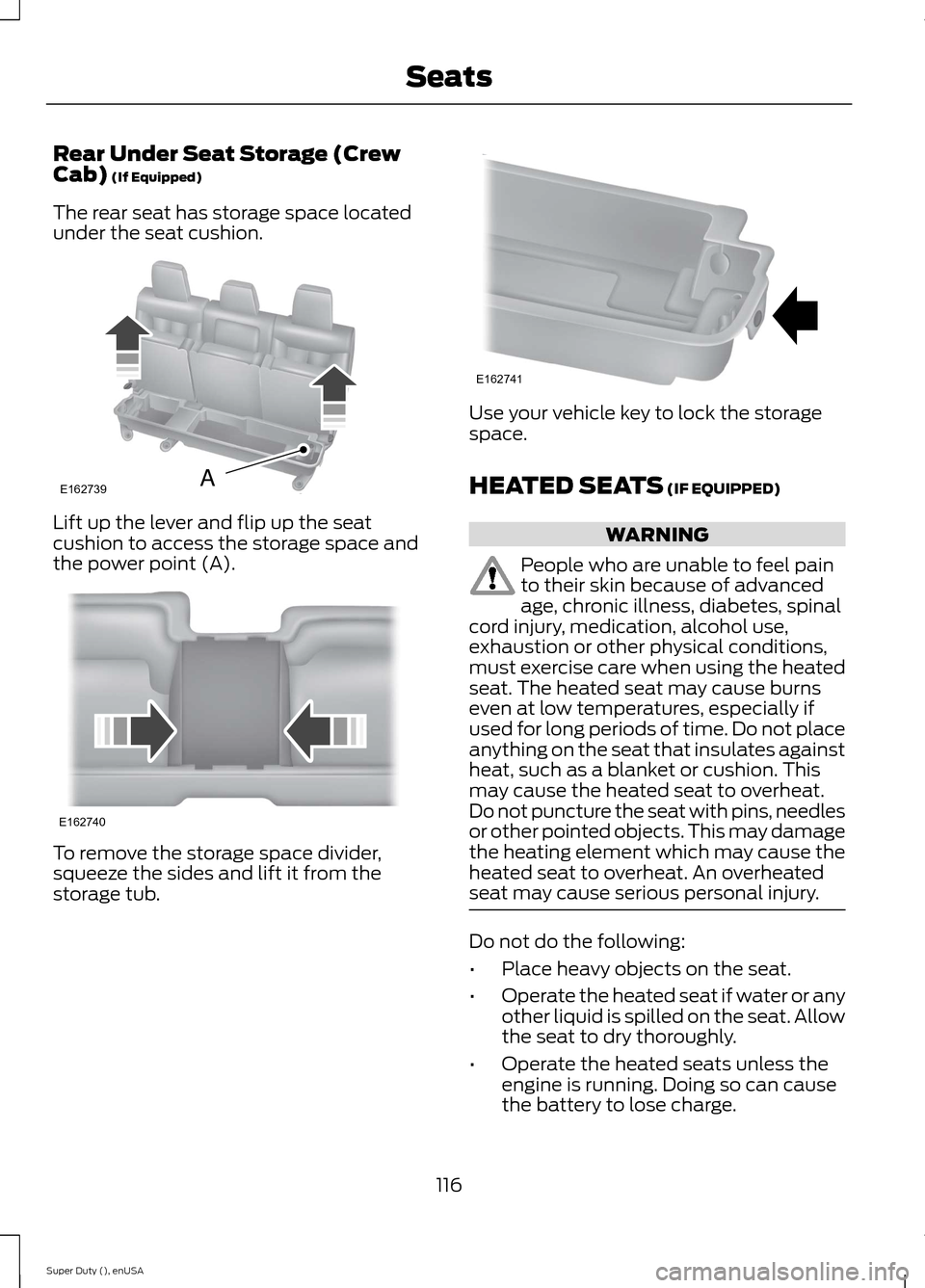
Rear Under Seat Storage (CrewCab) (If Equipped)
The rear seat has storage space locatedunder the seat cushion.
Lift up the lever and flip up the seatcushion to access the storage space andthe power point (A).
To remove the storage space divider,squeeze the sides and lift it from thestorage tub.
Use your vehicle key to lock the storagespace.
HEATED SEATS (IF EQUIPPED)
WARNING
People who are unable to feel painto their skin because of advancedage, chronic illness, diabetes, spinalcord injury, medication, alcohol use,exhaustion or other physical conditions,must exercise care when using the heatedseat. The heated seat may cause burnseven at low temperatures, especially ifused for long periods of time. Do not placeanything on the seat that insulates againstheat, such as a blanket or cushion. Thismay cause the heated seat to overheat.Do not puncture the seat with pins, needlesor other pointed objects. This may damagethe heating element which may cause theheated seat to overheat. An overheatedseat may cause serious personal injury.
Do not do the following:
•Place heavy objects on the seat.
•Operate the heated seat if water or anyother liquid is spilled on the seat. Allowthe seat to dry thoroughly.
•Operate the heated seats unless theengine is running. Doing so can causethe battery to lose charge.
116Super Duty (), enUSASeatsE162739A E162740 E162741