steering FORD SUPER DUTY 2015 3.G Repair Manual
[x] Cancel search | Manufacturer: FORD, Model Year: 2015, Model line: SUPER DUTY, Model: FORD SUPER DUTY 2015 3.GPages: 470, PDF Size: 18.24 MB
Page 405 of 470
Disconnecting from SYNC Services
1.Press and hold the hang-up phone
button on the steering wheel.
2.Say "Good-bye" from the SYNCServices main menu.
SYNC Services quick tips
You can personalize your Services feature to providequicker access to your most used or favorite information.You can save address points, such as work or home. Youcan also save favorite information like sports teams, suchas Detroit Lions, or a news category. You can learn moreabout personalization by logging ontowww.SYNCMyRide.com.
Personalizing
Press the voice button at any time (while connected toSYNC Services) to interrupt a voice prompt or an audioclip (such as a sports report) and say your voice command.
Push to interrupt
Your subscription is associated with your Bluetooth-enabled cellular phone number, not your VIN (VehicleIdentification Number). You can pair and connect yourphone to any vehicle equipped with SYNC Services andcontinue enjoying your personalized services.
Portable
SYNC Services Voice Commands
When a route has beendownloaded (non-navigationsystems), press the voice buttonon the steering wheel controls. Whenprompted, say any of the followingcommands:
"SERVICES"
"Cancel route"
"Navigation voice off"
"Navigation voice on"
"Next turn"
"Route status"
"Route summary"
"SERVICES"
"Services"
"Update route"
"Help"
Sirius Travel Link (If Equipped)
WARNING
Driving while distracted can result inloss of vehicle control, crash andinjury. We strongly recommend thatyou use extreme caution when using anydevice that may take your focus off theroad. Your primary responsibility is the safeoperation of your vehicle. We recommendagainst the use of any handheld devicewhile driving and encourage the use ofvoice-operated systems when possible.Make sure you are aware of all applicablelocal laws that may affect the use ofelectronic devices while driving.
402Super Duty (), enUSAMyFord Touch™ (If Equipped)E142599
Page 406 of 470
Note:In order to use Sirius Travel Link, yourvehicle must be equipped with navigationand your navigation SD card must be in theSD card slot.
Note:A paid subscription is required toaccess and use these features. Go towww.siriusxm.com/travellink for moreinformation.
Note:Visit www.siriusxm.com/traffic# andclick on Coverage map and details for acomplete listing of all traffic areas coveredby Sirius Travel Link.
Note:Neither Sirius nor Ford is responsiblefor any errors or inaccuracies in the SiriusTravel Link services or its use in vehicles.
When you subscribe to Sirius Travel Link,it can help you locate the best gas prices,find movie listings, get current traffic alerts,view the current weather map, getaccurate ski conditions and see scores tocurrent sports games.
If your vehicle is equipped withNavigation, touch the i(Information) button to accessthese features. If your vehicle is notequipped with Navigation, touch the cornerof the touchscreen with the green tab.
Traffic On Route and Traffic Nearby
Touch these buttons to identify trafficincidents on your route, nearby yourvehicle’s current location or near any ofyour favorite places, if programmed.
Fuel Prices
Touch this button to view fuel prices atstations close to your vehicle’s location oron an active navigation route.
Movie Listings
Touch this button to view nearby movietheaters and their show times, if available.
Weather
Touch this button to view the nearbyweather, current weather, or the five dayforecast for the chosen area. Select Mapto see the weather map, which can showstorms, radar information, charts andwinds. Select Area to select from a listingof weather locations.
Sports Info
Touch this button to view scores andschedules from a variety of sports. You canalso save up to 10 favorite teams for easieraccess. The score automatically refresheswhen a game is in progress.
Ski Conditions
Touch this button to view ski conditionsfor a specific area.
Sirius Travel Link Voice Commands
Press the voice button on thesteering wheel controls. Whenprompted, say any of thefollowing commands:
"SIRIUS TRAVEL LINK"
"5-day weather forecast"
"Fuel prices"
"Movie listings"
"Sports headlines"*
"Sports schedules"*
"Sports scores"*
"Traffic"
"Weather"
403Super Duty (), enUSAMyFord Touch™ (If Equipped)E142608 E142599
Page 409 of 470
![FORD SUPER DUTY 2015 3.G Repair Manual If a crash deploys an airbag (excludes kneeairbags and rear inflatable safety belts [ifequipped]) or activates the fuel pumpshut-off, your SYNC-equipped vehicle maybe able to contact emergency service](/img/11/5311/w960_5311-408.png "FORD SUPER DUTY 2015 3.G Repair Manual If a crash deploys an airbag (excludes kneeairbags and rear inflatable safety belts [ifequipped]) or activates the fuel pumpshut-off, your SYNC-equipped vehicle maybe able to contact emergency service")
If a crash deploys an airbag (excludes kneeairbags and rear inflatable safety belts [ifequipped]) or activates the fuel pumpshut-off, your SYNC-equipped vehicle maybe able to contact emergency services bydialing 911 through a paired and connectedBluetooth-enabled phone. You can learnmore about the 911 Assist feature, visitwww.SYNCMyRide.com,www.SYNCMyRide.ca orwww.syncmaroute.ca.
See Supplementary Restraints System(page 36). Important informationregarding airbag deployment is in thischapter.
See Roadside Emergencies (page 212).Important information regarding the fuelpump shut-off is in this chapter.
Setting 911 Assist On
If your vehicle is equipped withNavigation, touch the i(Information) button to accessthese features. If your vehicle is notequipped with Navigation, touch the cornerof the touchscreen with the green tab.
Touch Apps > 911 Assist, then select On.
You can also access 911 Assistby:
•Pressing the Settings icon > Settings> Phone > 911 Assist, or
•Pressing the Settings icon > Help > 911Assist.
To make sure that 911 Assist worksproperly:
•SYNC must be powered and workingproperly at the time of the incident andthroughout feature activation and use.
•The 911 Assist feature must be set onprior to the incident.
•You must pair and connect aBluetooth-enabled and compatiblephone to SYNC.
•A connected Bluetooth-enabled phonemust have the ability to make andmaintain an outgoing call at the timeof the incident.
•A connected Bluetooth-enabled phonemust have adequate network coverage,battery power and signal strength.
•The vehicle must have battery powerand be located in the United States,Canada or in a territory in which 911 isthe emergency number.
In the Event of a Crash
Not all crashes deploy an airbag or activatethe fuel pump shut-off (which wouldtrigger 911 Assist); however, SYNC tries tocontact emergency services if 911 Assisttriggers. If a connected phone sustainsdamage or loses connection to SYNC,SYNC searches for, and tries to connectto, any available previously paired phoneand tries to make the call to 911.
Before making the call:
•SYNC provides a short window of time(about 10 seconds) to cancel the call.If you fail to cancel the call, SYNCattempts to dial 911.
•SYNC says the following, or a similarmessage: "SYNC will attempt to call911, to cancel the call, press Cancel onyour screen or press and hold thephone button on your steering wheel."
If you do not cancel the call, and SYNCmakes a successful call, a pre-recordedmessage plays for the 911 operator, andthen the occupant(s) in your vehicle is ableto talk with the operator. Be prepared toprovide your name, phone number andlocation immediately, because not all 911systems are capable of receiving thisinformation electronically.
406Super Duty (), enUSAMyFord Touch™ (If Equipped)E142608 E142607
Page 411 of 470
To run a report by voicecommand, press the voicebutton on the steering wheeland, when prompted, say "Vehicle healthreport".
Vehicle Health Report Privacy Notice
When you create a Vehicle Health Report,Ford Motor Company may collect yourcellular phone number (to process yourreport request) and diagnostic informationabout your vehicle. Certain versions orupdates to Vehicle Health Report may alsocollect more vehicle information. Ford mayuse your vehicle information it collects forany purpose. If you do not want to discloseyour cellular phone number or vehicle
information, do not run the feature or setup your Vehicle Health Report profile atwww.SYNCMyRide.com. Seewww.SYNCMyRide.com (Vehicle HealthReport Terms and Conditions, and PrivacyStatement) for more information.
CLIMATE
Touch the lower right corner on thetouchscreen to access your climate controlfeatures. Depending on your vehicle lineand option package, your climate screenmay look different from this screen.
Note:You can switch temperature unitsbetween Fahrenheit and Celsius. SeeSettings (page 366).
Power: Touch the button to turn the system on and off. Switching off theclimate control system prevents outside air from entering the vehicle.A
Passenger settings:B
Touch the + or – to increase or decrease the air temperature on the passengerside of the vehicle.
Touch the heated seat icon to turn the heated seat off and on (if equipped).
Touch the climate-controlled seat icon to turn the climate-controlled seat offand on (if equipped).
408Super Duty (), enUSAMyFord Touch™ (If Equipped)E142599 E166138AKBJCIHGFED
Page 413 of 470
Touch the climate-controlled seat icon to turn the climate-controlled seat offand on (if equipped).
Touch MyTemp to select your preset temperature setpoint. Touch and holdMyTemp to save a new preset temperature setpoint.
Touch the heated steering wheel icon to turn the heated steering wheel on andoff (if equipped).
Note:If your vehicle is equipped with awood-trimmed steering wheel, it does notheat between the 10 o'clock and 2 o'clockpositions.
Climate Control Voice Commands
Press the voice button on thesteering wheel controls. Whenprompted, say any of thefollowing commands:
Climate control commands
"Climate automatic"
"Climate off"
"Climate on"
"Climate temperature <15.5-29.5>degrees"
"Climate temperature <60-85> degrees"
"Help"
There are additional climate controlcommands but in order to access them,you have to say "Climate" first. When thesystem is ready to listen, you may say anyof the following commands:
"CLIMATE"
"A/C off"
"A/C on"
"Automatic"
"CLIMATE"
"Defrost off"
"Defrost on"
"Dual off"
"Floor on"
"Fan decrease"
"Fan increase"
"Floor on"
"MAX A/C off"
"MAX A/C on"
"My temp"
"Off"
"On"
"Panel floor on"
"Panel off"
"Panel on"
"Recirc off"
"Recirc on"
"Temperature"*
"Temperature <15.5-29.5> degrees"
"Temperature <60-85> degrees"
"Temperature decrease"
"Temperature high"
410Super Duty (), enUSAMyFord Touch™ (If Equipped)E142599
Page 420 of 470
No GPS symbol indicates thatinsufficient GPS satellite signalsare available for accurate mappositioning. This icon may displayunder normal operation in an area withpoor GPS access.
Quick-touch Buttons
When in map mode, touch anywhere onthe map display to access the followingoptions:
Set as Dest
Touch this button to select a scrolledlocation on the map as your destination.You may scroll the map by pressing yourindex finger on the map display. When youreach the desired location, simply let goand then touch Set as Dest.
Set as Waypoint
Touch this button to set the currentlocation as a waypoint.
Save to Favorites
Touch this button to save the currentlocation to your favorites.
POI Icons
Touch this button to select icons to displayon the map. You can select up to threeicons to display on the map at the sametime. Turn these ON or OFF.
Cancel Route
Touch this button to cancel the activeroute.
View/Edit Route
Access these features when a route isactive:
•View Route
•Edit Destination/Waypoints
•Edit Turn List
•Detour
•Edit Route Preferences
•Edit Traffic Preferences
•Cancel Route.
Nokia is the digital map provider for thenavigation application. If you find map dataerrors, you may report them directly toNokia by going tohttp://mapreporter.navteq.com. Nokiaevaluates all reported map errors andresponds with the result of theirinvestigation by e-mail.
Navigation Map Updates
Annual navigation map updates areavailable for purchase through yourdealership, by calling 1-800-NAVMAPS (inMexico, call 01-800-557-5539) or goingto www.navigation.com/sync. You needto specify the make and model of yourvehicle to determine if there is an updateavailable.
Navigation Voice Commands
When in navigation mode, pressthe voice button on the steeringwheel controls. After the tone,say any of the following commands:
Navigation system voice commands
"Cancel next waypoint" 1
"Cancel route"1
"Destination"2
"Destination
"Destination
"Destination favorites"
"Destination home"
417Super Duty (), enUSAMyFord Touch™ (If Equipped)E142655 E142599
Page 445 of 470
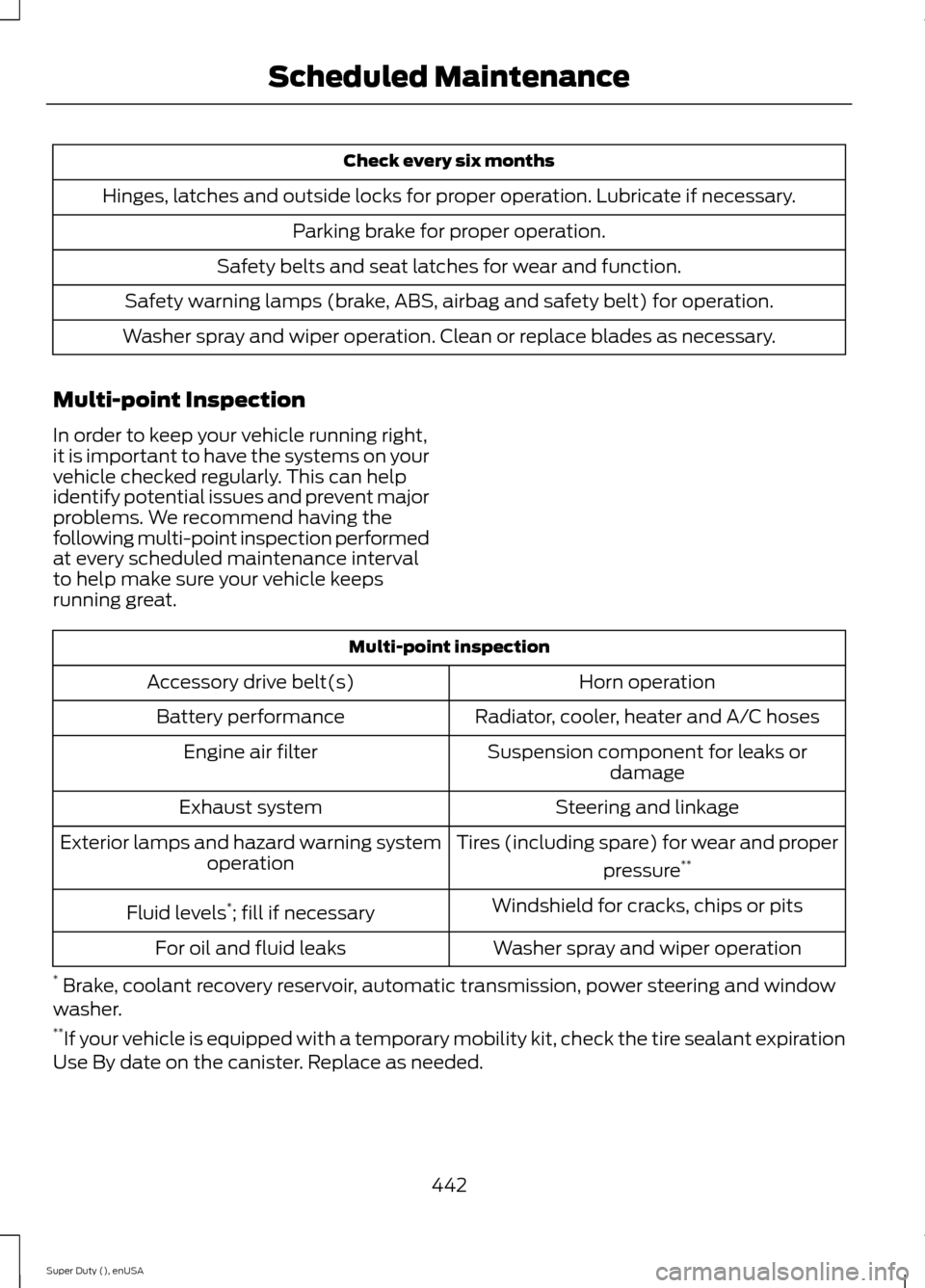
Check every six months
Hinges, latches and outside locks for proper operation. Lubricate if necessary.
Parking brake for proper operation.
Safety belts and seat latches for wear and function.
Safety warning lamps (brake, ABS, airbag and safety belt) for operation.
Washer spray and wiper operation. Clean or replace blades as necessary.
Multi-point Inspection
In order to keep your vehicle running right,it is important to have the systems on yourvehicle checked regularly. This can helpidentify potential issues and prevent majorproblems. We recommend having thefollowing multi-point inspection performedat every scheduled maintenance intervalto help make sure your vehicle keepsrunning great.
Multi-point inspection
Horn operationAccessory drive belt(s)
Radiator, cooler, heater and A/C hosesBattery performance
Suspension component for leaks ordamageEngine air filter
Steering and linkageExhaust system
Tires (including spare) for wear and proper
pressure**Exterior lamps and hazard warning systemoperation
Windshield for cracks, chips or pitsFluid levels*; fill if necessary
Washer spray and wiper operationFor oil and fluid leaks
* Brake, coolant recovery reservoir, automatic transmission, power steering and windowwasher.**If your vehicle is equipped with a temporary mobility kit, check the tire sealant expirationUse By date on the canister. Replace as needed.
442Super Duty (), enUSAScheduled Maintenance
Page 446 of 470
Be sure to ask your dealership serviceadvisor or technician about the multi-pointvehicle inspection. It is a comprehensiveway to perform a thorough inspection of
your vehicle. Your checklist gives youimmediate feedback on the overallcondition of your vehicle.
NORMAL SCHEDULED MAINTENANCE
6.2L and 6.8L Gasoline Engines
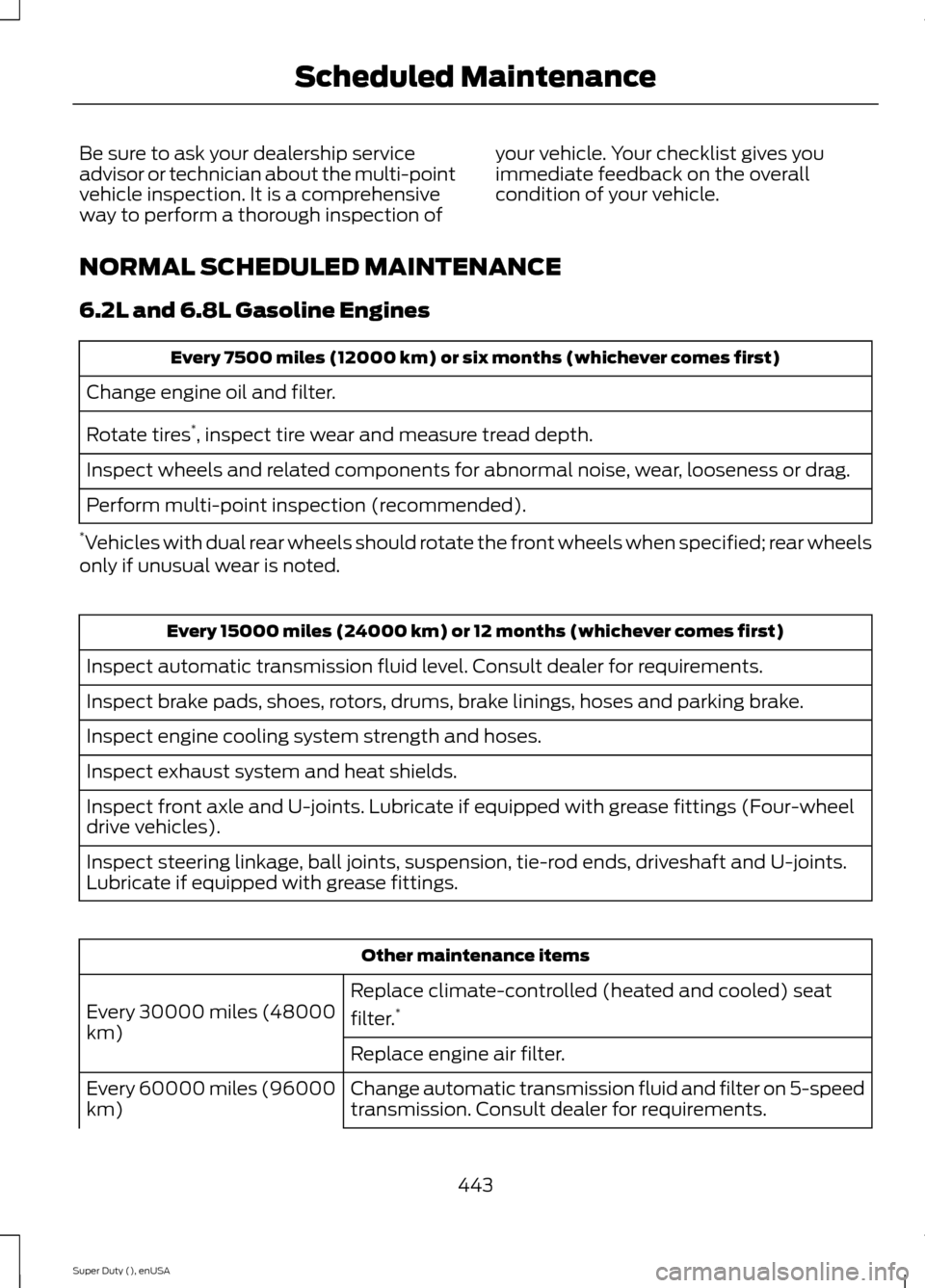
Every 7500 miles (12000 km) or six months (whichever comes first)
Change engine oil and filter.
Rotate tires*, inspect tire wear and measure tread depth.
Inspect wheels and related components for abnormal noise, wear, looseness or drag.
Perform multi-point inspection (recommended).
*Vehicles with dual rear wheels should rotate the front wheels when specified; rear wheelsonly if unusual wear is noted.
Every 15000 miles (24000 km) or 12 months (whichever comes first)
Inspect automatic transmission fluid level. Consult dealer for requirements.
Inspect brake pads, shoes, rotors, drums, brake linings, hoses and parking brake.
Inspect engine cooling system strength and hoses.
Inspect exhaust system and heat shields.
Inspect front axle and U-joints. Lubricate if equipped with grease fittings (Four-wheeldrive vehicles).
Inspect steering linkage, ball joints, suspension, tie-rod ends, driveshaft and U-joints.Lubricate if equipped with grease fittings.
Other maintenance items
Replace climate-controlled (heated and cooled) seat
filter.*Every 30000 miles (48000km)Replace engine air filter.
Change automatic transmission fluid and filter on 5-speedtransmission. Consult dealer for requirements.Every 60000 miles (96000km)
443Super Duty (), enUSAScheduled Maintenance
Page 448 of 470
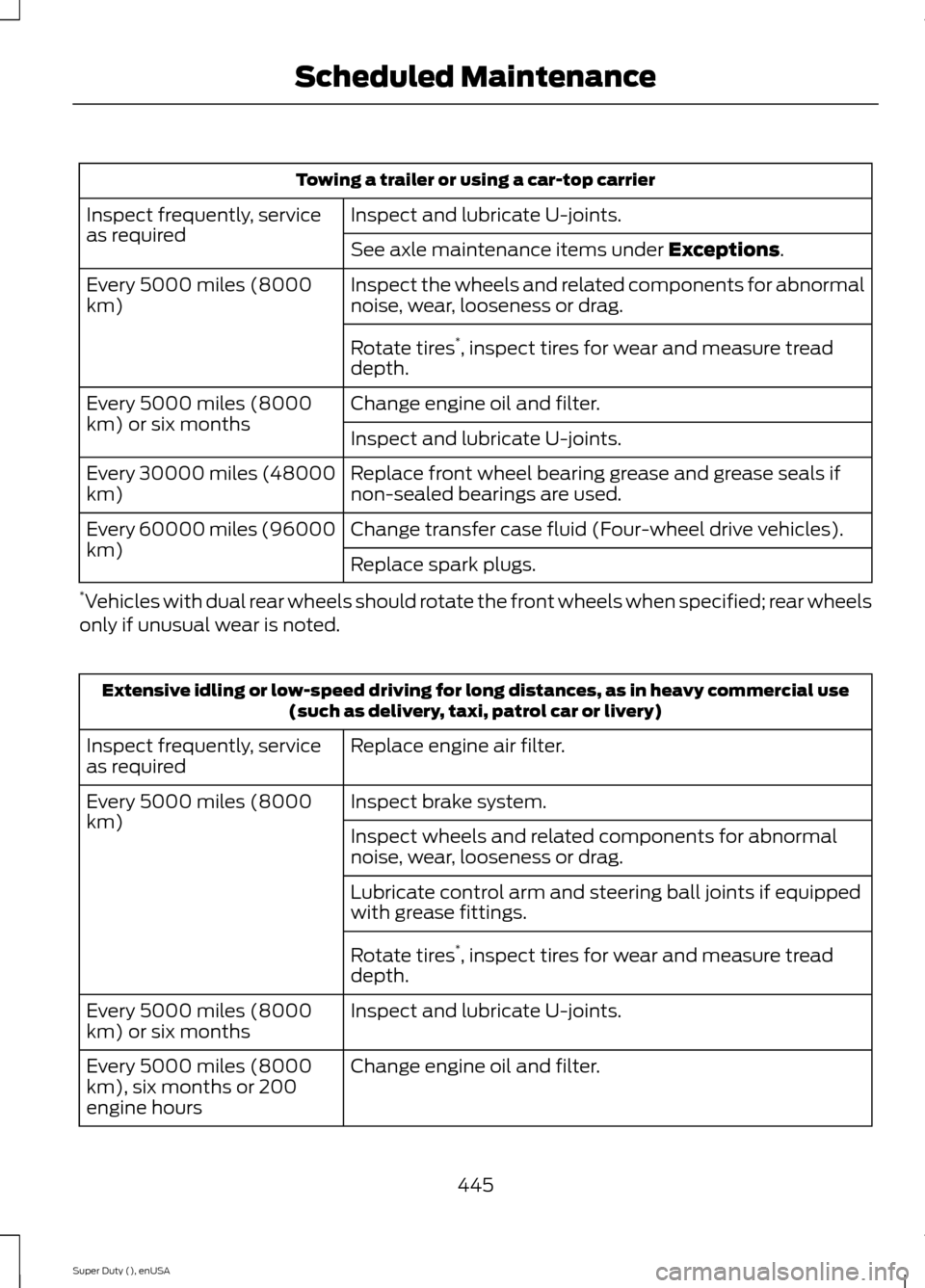
Towing a trailer or using a car-top carrier
Inspect and lubricate U-joints.Inspect frequently, serviceas requiredSee axle maintenance items under Exceptions.
Inspect the wheels and related components for abnormalnoise, wear, looseness or drag.Every 5000 miles (8000km)
Rotate tires*, inspect tires for wear and measure treaddepth.
Change engine oil and filter.Every 5000 miles (8000km) or six monthsInspect and lubricate U-joints.
Replace front wheel bearing grease and grease seals ifnon-sealed bearings are used.Every 30000 miles (48000km)
Change transfer case fluid (Four-wheel drive vehicles).Every 60000 miles (96000km)Replace spark plugs.
*Vehicles with dual rear wheels should rotate the front wheels when specified; rear wheelsonly if unusual wear is noted.
Extensive idling or low-speed driving for long distances, as in heavy commercial use(such as delivery, taxi, patrol car or livery)
Replace engine air filter.Inspect frequently, serviceas required
Inspect brake system.Every 5000 miles (8000km)Inspect wheels and related components for abnormalnoise, wear, looseness or drag.
Lubricate control arm and steering ball joints if equippedwith grease fittings.
Rotate tires*, inspect tires for wear and measure treaddepth.
Inspect and lubricate U-joints.Every 5000 miles (8000km) or six months
Change engine oil and filter.Every 5000 miles (8000km), six months or 200engine hours
445Super Duty (), enUSAScheduled Maintenance
Page 450 of 470
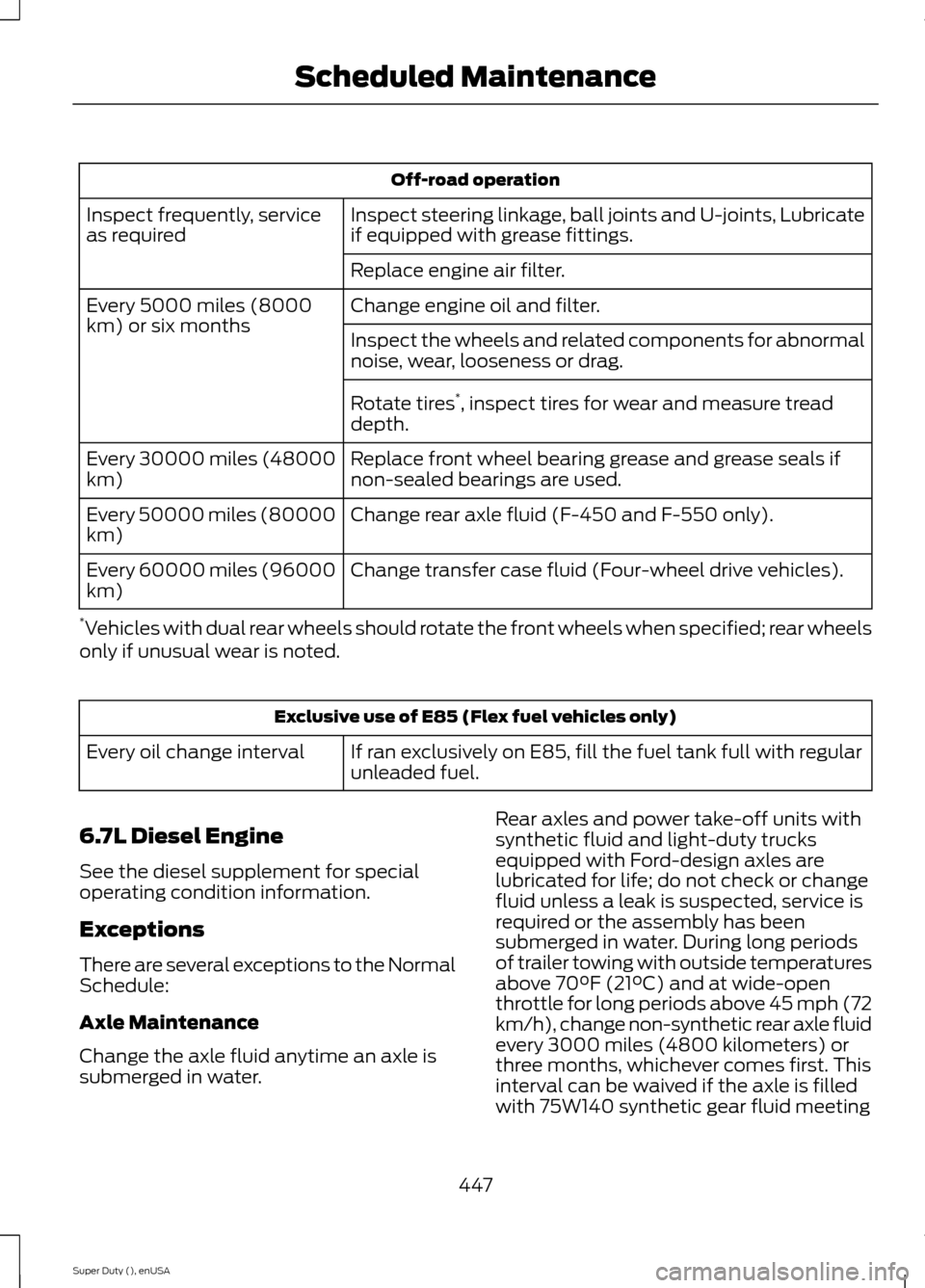
Off-road operation
Inspect steering linkage, ball joints and U-joints, Lubricateif equipped with grease fittings.Inspect frequently, serviceas required
Replace engine air filter.
Change engine oil and filter.Every 5000 miles (8000km) or six monthsInspect the wheels and related components for abnormalnoise, wear, looseness or drag.
Rotate tires*, inspect tires for wear and measure treaddepth.
Replace front wheel bearing grease and grease seals ifnon-sealed bearings are used.Every 30000 miles (48000km)
Change rear axle fluid (F-450 and F-550 only).Every 50000 miles (80000km)
Change transfer case fluid (Four-wheel drive vehicles).Every 60000 miles (96000km)
*Vehicles with dual rear wheels should rotate the front wheels when specified; rear wheelsonly if unusual wear is noted.
Exclusive use of E85 (Flex fuel vehicles only)
If ran exclusively on E85, fill the fuel tank full with regularunleaded fuel.Every oil change interval
6.7L Diesel Engine
See the diesel supplement for specialoperating condition information.
Exceptions
There are several exceptions to the NormalSchedule:
Axle Maintenance
Change the axle fluid anytime an axle issubmerged in water.
Rear axles and power take-off units withsynthetic fluid and light-duty trucksequipped with Ford-design axles arelubricated for life; do not check or changefluid unless a leak is suspected, service isrequired or the assembly has beensubmerged in water. During long periodsof trailer towing with outside temperaturesabove 70°F (21°C) and at wide-openthrottle for long periods above 45 mph (72km/h), change non-synthetic rear axle fluidevery 3000 miles (4800 kilometers) orthree months, whichever comes first. Thisinterval can be waived if the axle is filledwith 75W140 synthetic gear fluid meeting
447Super Duty (), enUSAScheduled Maintenance