brake FORD SUPER DUTY 2021 User Guide
[x] Cancel search | Manufacturer: FORD, Model Year: 2021, Model line: SUPER DUTY, Model: FORD SUPER DUTY 2021Pages: 666, PDF Size: 8.48 MB
Page 44 of 666
Seatbelt Locking Modes
WARNING: If your vehicle is
involved in a crash, have the seatbelts
and associated components inspected
as soon as possible. Failure to follow this
instruction could result in personal injury
or death.
All safety restraints in the vehicle are
combination lap and shoulder belts. The
driver seatbelt has the first type of locking
mode. The front outermost passenger and
rear seat seatbelts have both types of
locking modes described as follows:
Vehicle Sensitive Mode
This is the normal retractor mode, which
allows free shoulder belt length
adjustment to your movements and
locking in response to vehicle movement.
For example, if the driver brakes suddenly,
turns a corner sharply, or the vehicle
receives an impact of about
5 mph
(8 km/h) or more, the combination
seatbelts lock to help reduce forward
movement of the driver and passengers.
In addition, the retractor is designed to lock
if you pull the webbing out too quickly. If
the seatbelt retractor locks, slowly lower
the height adjuster to allow the seatbelt
to retract. If the retractor does not unlock,
pull the seatbelt out slowly then feed a
small length of webbing back toward the
stowed position. For rear seatbelts, recline
the rear seat backrest or push the seat
backrest cushion away from the seatbelt.
Feed a small length of webbing back
toward the stowed position. Automatic Locking Mode
In this mode, the shoulder belt
automatically pre-locks. The belt still
retracts to remove any slack in the
shoulder belt. The automatic locking mode
is not available on the driver seatbelt.
When to Use the Automatic Locking
Mode
Use this mode any time you install a child
restraint in a front outermost passenger
seating position in a Regular Cab,
SuperCab, SuperCrew or any rear seating
position of a SuperCab or SuperCrew. The
optional front center seatbelt has a cinch
mechanism. Properly restrain children 12
years old and under in a rear seat whenever
possible.
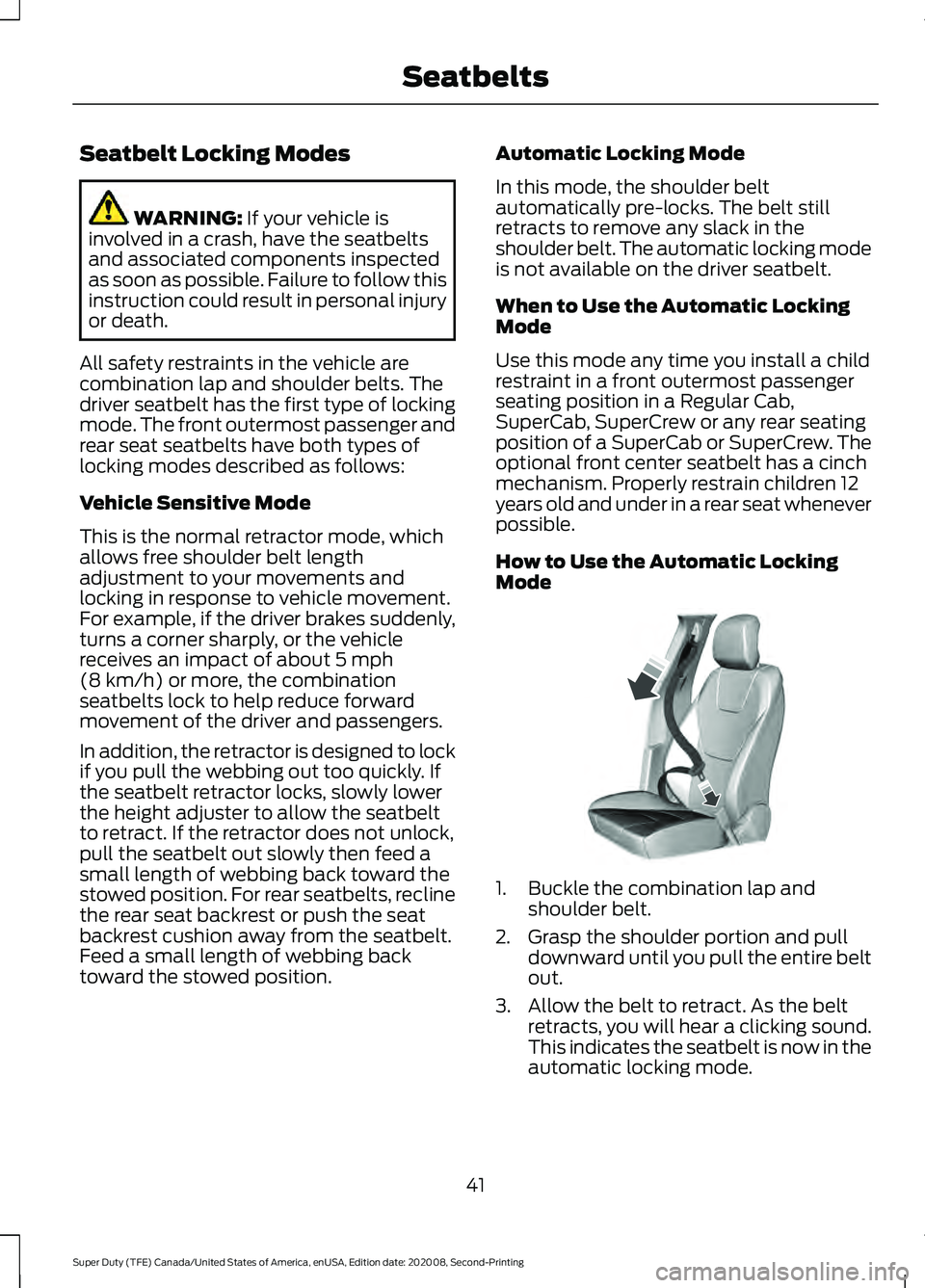
How to Use the Automatic Locking
Mode
1. Buckle the combination lap and
shoulder belt.
2. Grasp the shoulder portion and pull downward until you pull the entire belt
out.
3. Allow the belt to retract. As the belt retracts, you will hear a clicking sound.
This indicates the seatbelt is now in the
automatic locking mode.
41
Super Duty (TFE) Canada/United States of America, enUSA, Edition date: 202008, Second-Printing SeatbeltsE142591
Page 46 of 666
SEATBELT REMINDER
Belt-Minder™
This feature supplements the seatbelt
warning function. It provides additional
reminders by intermittently sounding a
tone and illuminating the seatbelt warning
light when you are in the driver seat and a
seatbelt is unbuckled. Then
If
The Belt-Minder feature will not activate.
You buckle your seatbelt before you switch
the ignition on or less than 1-2 minutes
elapse after you switch the ignition on...
The Belt-Minder feature activates - the
seatbelt warning light illuminates and a
warning tone sounds for six seconds every 25 seconds, repeating for about five
minutes or until you buckle your seatbelt.
You do not buckle your seatbelt before your
vehicle reaches at least 6 mph (9.7 km/h)
and 1-2 minutes elapse after you switch the ignition on...
The Belt-Minder feature activates - the
seatbelt warning light illuminates and the
warning tone sounds for six seconds every 25 seconds, repeating for about five
minutes or until you buckle your seatbelt.
The driver seatbelt is unbuckled for about
one minute while the vehicle is traveling at least
6 mph (9.7 km/h) and more than 1-2
minutes elapse after you switch the ignition on...
Deactivating and Activating the
Belt-Minder Feature (Driver only) WARNING:
While the system
allows you to deactivate it, this system
is designed to improve your chances of
being safely belted and surviving an
accident. We recommend you leave the
system activated for yourself and others
who may use the vehicle.
Note: If you are using MyKey, you cannot
disable the Belt-Minder. Also, if the
Belt-Minder has been previously disabled,
it will be re-enabled during the use of
MyKey. See
MyKey ™ (page 61).
Read Steps 1 - 4 thoroughly before
proceeding with the programming
procedure. Before following the procedure, make sure
that:
•
The parking brake is set.
• The transmission is in park (P).
• The ignition is off.
• All vehicle doors are closed.
• The driver seatbelt is unbuckled.
1. Switch the ignition on. Do not start the
engine.
2. Wait until the seatbelt warning light turns off (about one minute). You must
complete Step 3 within 30 seconds
after the seatbelt warning light turns
off.
3. Buckle then unbuckle the seatbelt three times at a moderate speed,
ending with the seatbelt in the
unbuckled state. After Step 3, the
seatbelt warning light turns on.
43
Super Duty (TFE) Canada/United States of America, enUSA, Edition date: 202008, Second-Printing Seatbelts
Page 87 of 666
ADJUSTING THE PEDALS
WARNING: Never use the pedal
adjustment controls when your feet are
on the accelerator or brake pedal when
the vehicle is moving.
Note: Adjust the pedals only when your
vehicle is in park (P).
Depending on your vehicle and equipment
level, the shape and location of your
power-adjustable pedal control can vary.
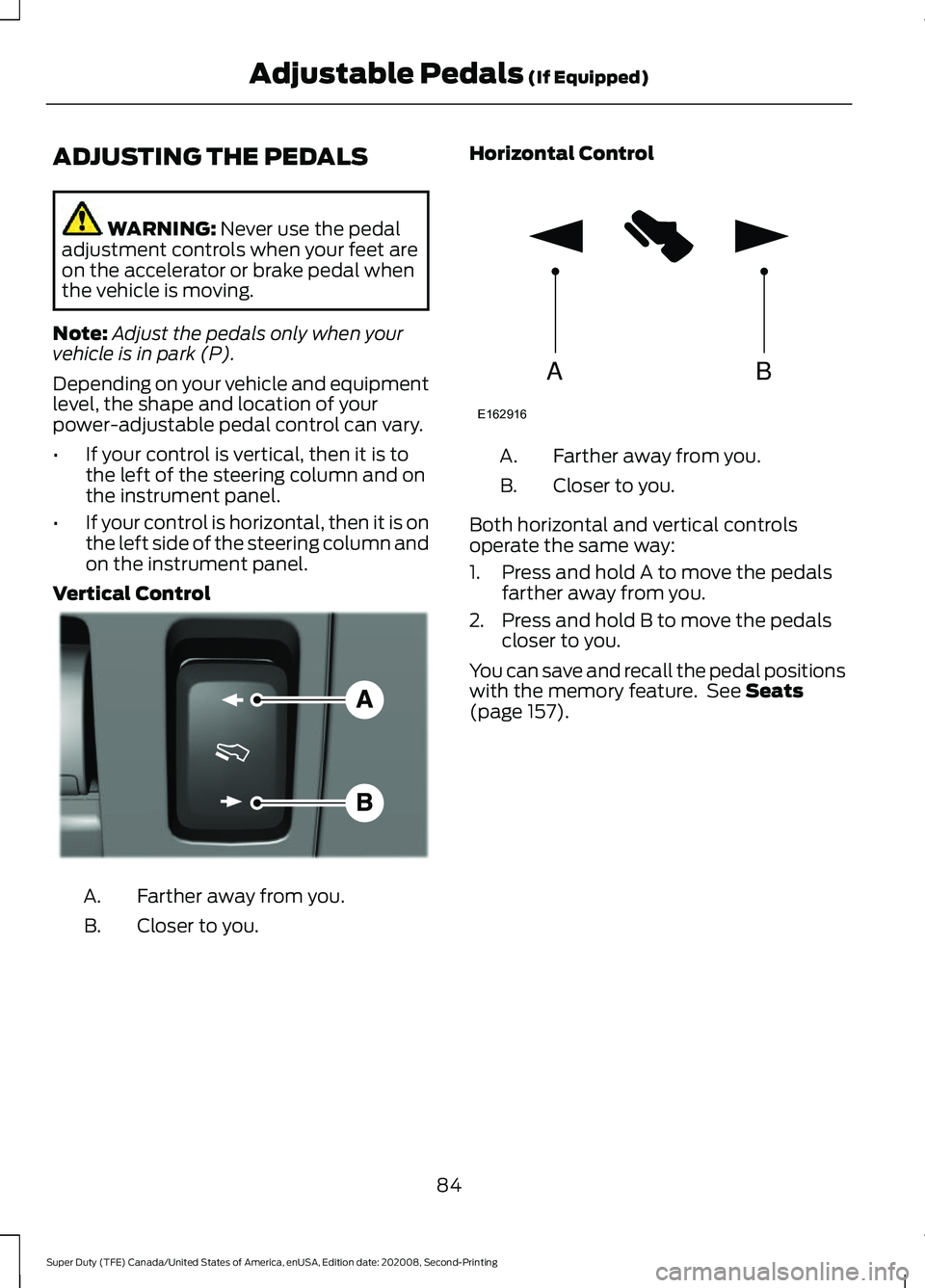
• If your control is vertical, then it is to
the left of the steering column and on
the instrument panel.
• If your control is horizontal, then it is on
the left side of the steering column and
on the instrument panel.
Vertical Control Farther away from you.
A.
Closer to you.
B. Horizontal Control Farther away from you.
A.
Closer to you.
B.
Both horizontal and vertical controls
operate the same way:
1. Press and hold A to move the pedals farther away from you.
2. Press and hold B to move the pedals closer to you.
You can save and recall the pedal positions
with the memory feature. See
Seats
(page 157).
84
Super Duty (TFE) Canada/United States of America, enUSA, Edition date: 202008, Second-Printing Adjustable Pedals
(If Equipped)E176213 AB
E162916
Page 92 of 666
Switch the daytime running lamps on or
off using the information display. See
General Information (page 110).
The daytime running lamps turn on when:
1. The lamps are on in the information display.
2. You switch the ignition on.
3. The transmission is not in park (P) for vehicles with automatic transmissions
or you release the parking brake for
vehicles with manual transmissions.
4. The lighting control is in the autolamps
position.
5. The headlamps are off.
The other lighting control switch positions
do not turn on the daytime running lamps.
If the daytime running lamps are off in the
information display, the lamps stay off in
all switch positions.
DAYTIME RUNNING LAMPS -
VEHICLES WITH: DAYTIME
RUNNING LAMPS (DRL) WARNING:
The daytime running
lamps system does not activate the rear
lamps and may not provide adequate
lighting during low visibility driving
conditions. Make sure you switch the
headlamps on, as appropriate, during all
low visibility conditions. Failure to do so
may result in a crash.
The system turns the lamps on in daylight
conditions.
To switch the system on, switch the
lighting control to any position except
headlamps. FRONT FOG LAMPS
(IF EQUIPPED)
Switching the Front Fog Lamps On
or Off
Only switch the front fog lamps on during
reduced visibility.
You can switch the front fog lamps on if
any of the following occur:
• You set the lighting control to the
parking lamps position.
• You set the lighting control to the
headlamps position.
• You set the lighting control to the
autolamps position and the headlamps
are on.
The front fog lamp button is on the lighting
control. Press the button to switch the
front fog lamps on or off.
Note: The brightness of the daytime running
lamps may decrease when the front fog
lamps are switched on.
Front Fog Lamp Indicator It illuminates when you switch
the front fog lamps on.
89
Super Duty (TFE) Canada/United States of America, enUSA, Edition date: 202008, Second-Printing Lighting
Page 108 of 666
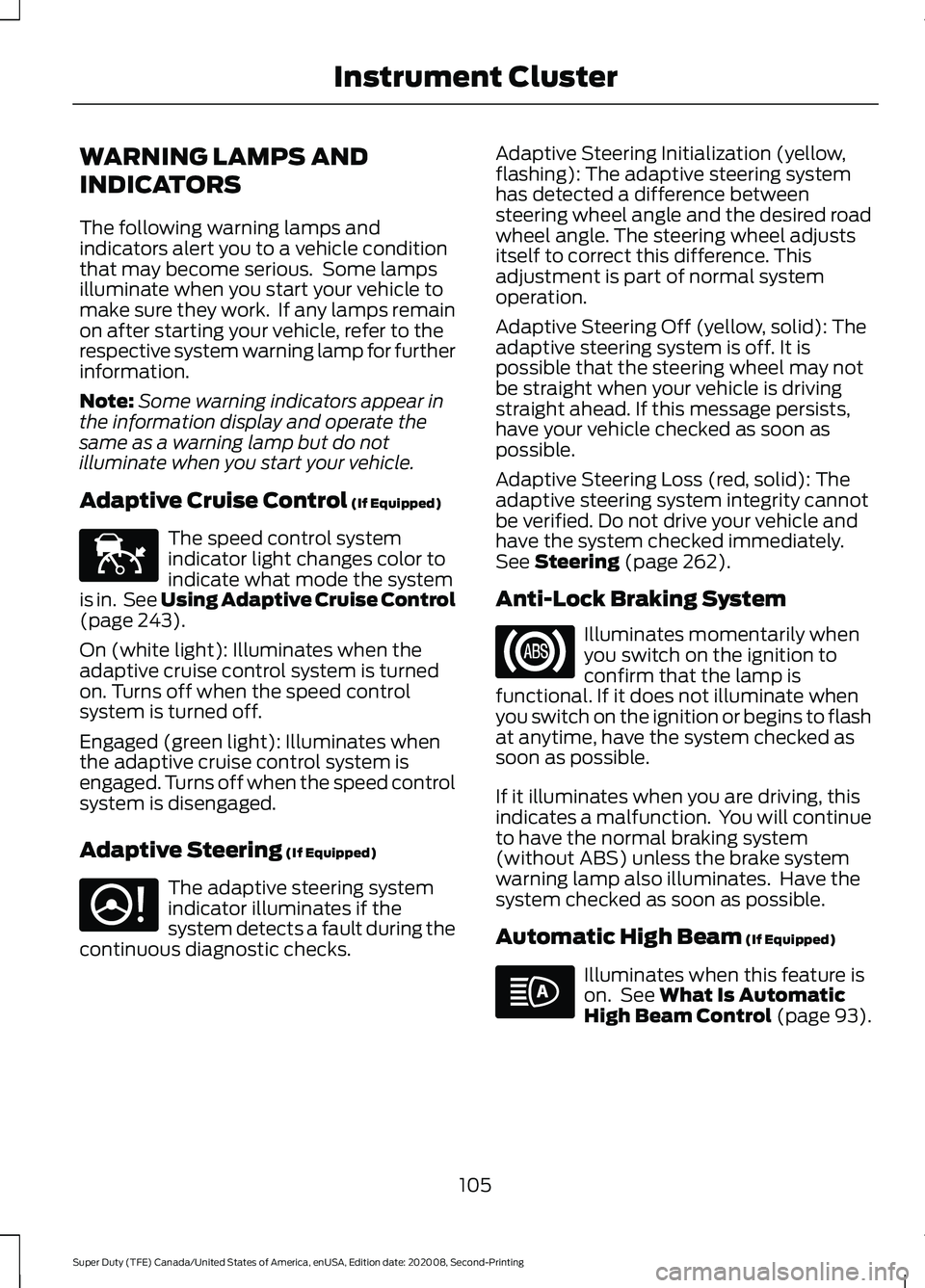
WARNING LAMPS AND
INDICATORS
The following warning lamps and
indicators alert you to a vehicle condition
that may become serious. Some lamps
illuminate when you start your vehicle to
make sure they work. If any lamps remain
on after starting your vehicle, refer to the
respective system warning lamp for further
information.
Note:
Some warning indicators appear in
the information display and operate the
same as a warning lamp but do not
illuminate when you start your vehicle.
Adaptive Cruise Control (If Equipped) The speed control system
indicator light changes color to
indicate what mode the system
is in. See Using Adaptive Cruise Control
(page
243).
On (white light): Illuminates when the
adaptive cruise control system is turned
on. Turns off when the speed control
system is turned off.
Engaged (green light): Illuminates when
the adaptive cruise control system is
engaged. Turns off when the speed control
system is disengaged.
Adaptive Steering
(If Equipped) The adaptive steering system
indicator illuminates if the
system detects a fault during the
continuous diagnostic checks. Adaptive Steering Initialization (yellow,
flashing): The adaptive steering system
has detected a difference between
steering wheel angle and the desired road
wheel angle. The steering wheel adjusts
itself to correct this difference. This
adjustment is part of normal system
operation.
Adaptive Steering Off (yellow, solid): The
adaptive steering system is off. It is
possible that the steering wheel may not
be straight when your vehicle is driving
straight ahead. If this message persists,
have your vehicle checked as soon as
possible.
Adaptive Steering Loss (red, solid): The
adaptive steering system integrity cannot
be verified. Do not drive your vehicle and
have the system checked immediately.
See
Steering (page 262).
Anti-Lock Braking System Illuminates momentarily when
you switch on the ignition to
confirm that the lamp is
functional. If it does not illuminate when
you switch on the ignition or begins to flash
at anytime, have the system checked as
soon as possible.
If it illuminates when you are driving, this
indicates a malfunction. You will continue
to have the normal braking system
(without ABS) unless the brake system
warning lamp also illuminates. Have the
system checked as soon as possible.
Automatic High Beam
(If Equipped) Illuminates when this feature is
on. See
What Is Automatic
High Beam Control (page 93).
105
Super Duty (TFE) Canada/United States of America, enUSA, Edition date: 202008, Second-Printing Instrument ClusterE144524 E223375
Page 109 of 666
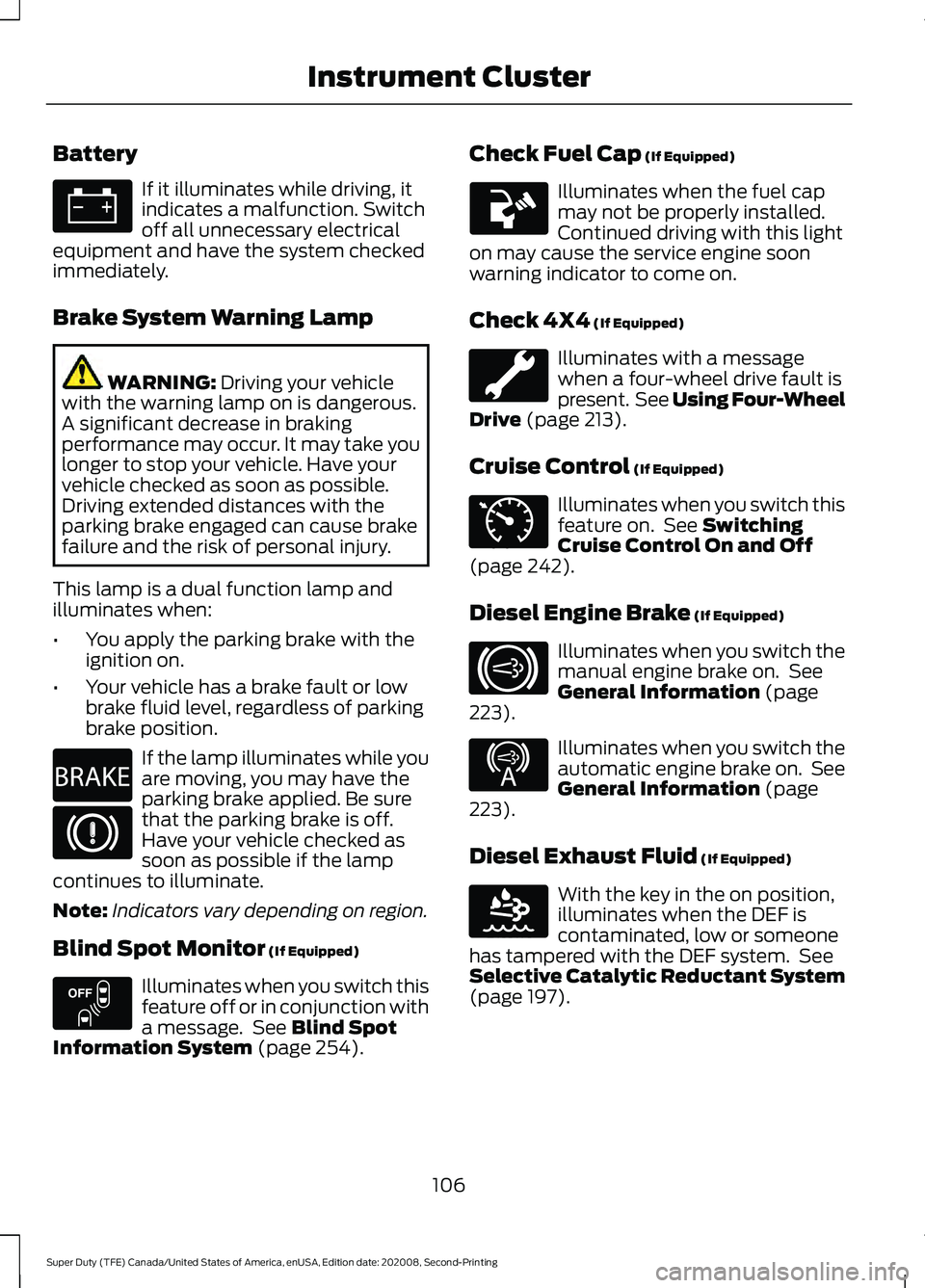
Battery
If it illuminates while driving, it
indicates a malfunction. Switch
off all unnecessary electrical
equipment and have the system checked
immediately.
Brake System Warning Lamp WARNING: Driving your vehicle
with the warning lamp on is dangerous.
A significant decrease in braking
performance may occur. It may take you
longer to stop your vehicle. Have your
vehicle checked as soon as possible.
Driving extended distances with the
parking brake engaged can cause brake
failure and the risk of personal injury.
This lamp is a dual function lamp and
illuminates when:
• You apply the parking brake with the
ignition on.
• Your vehicle has a brake fault or low
brake fluid level, regardless of parking
brake position. If the lamp illuminates while you
are moving, you may have the
parking brake applied. Be sure
that the parking brake is off.
Have your vehicle checked as
soon as possible if the lamp
continues to illuminate.
Note: Indicators vary depending on region.
Blind Spot Monitor
(If Equipped) Illuminates when you switch this
feature off or in conjunction with
a message. See
Blind Spot
Information System (page 254). Check Fuel Cap
(If Equipped) Illuminates when the fuel cap
may not be properly installed.
Continued driving with this light
on may cause the service engine soon
warning indicator to come on.
Check 4X4
(If Equipped) Illuminates with a message
when a four-wheel drive fault is
present. See Using Four-Wheel
Drive
(page 213).
Cruise Control
(If Equipped) Illuminates when you switch this
feature on. See
Switching
Cruise Control On and Off
(page
242).
Diesel Engine Brake
(If Equipped) Illuminates when you switch the
manual engine brake on. See
General Information
(page
223). Illuminates when you switch the
automatic engine brake on. See
General Information
(page
223).
Diesel Exhaust Fluid
(If Equipped) With the key in the on position,
illuminates when the DEF is
contaminated, low or someone
has tampered with the DEF system. See
Selective Catalytic Reductant System
(page
197).
106
Super Duty (TFE) Canada/United States of America, enUSA, Edition date: 202008, Second-Printing Instrument Cluster E270480 E151262 E71340 E171217 E234452 E163176
Page 112 of 666
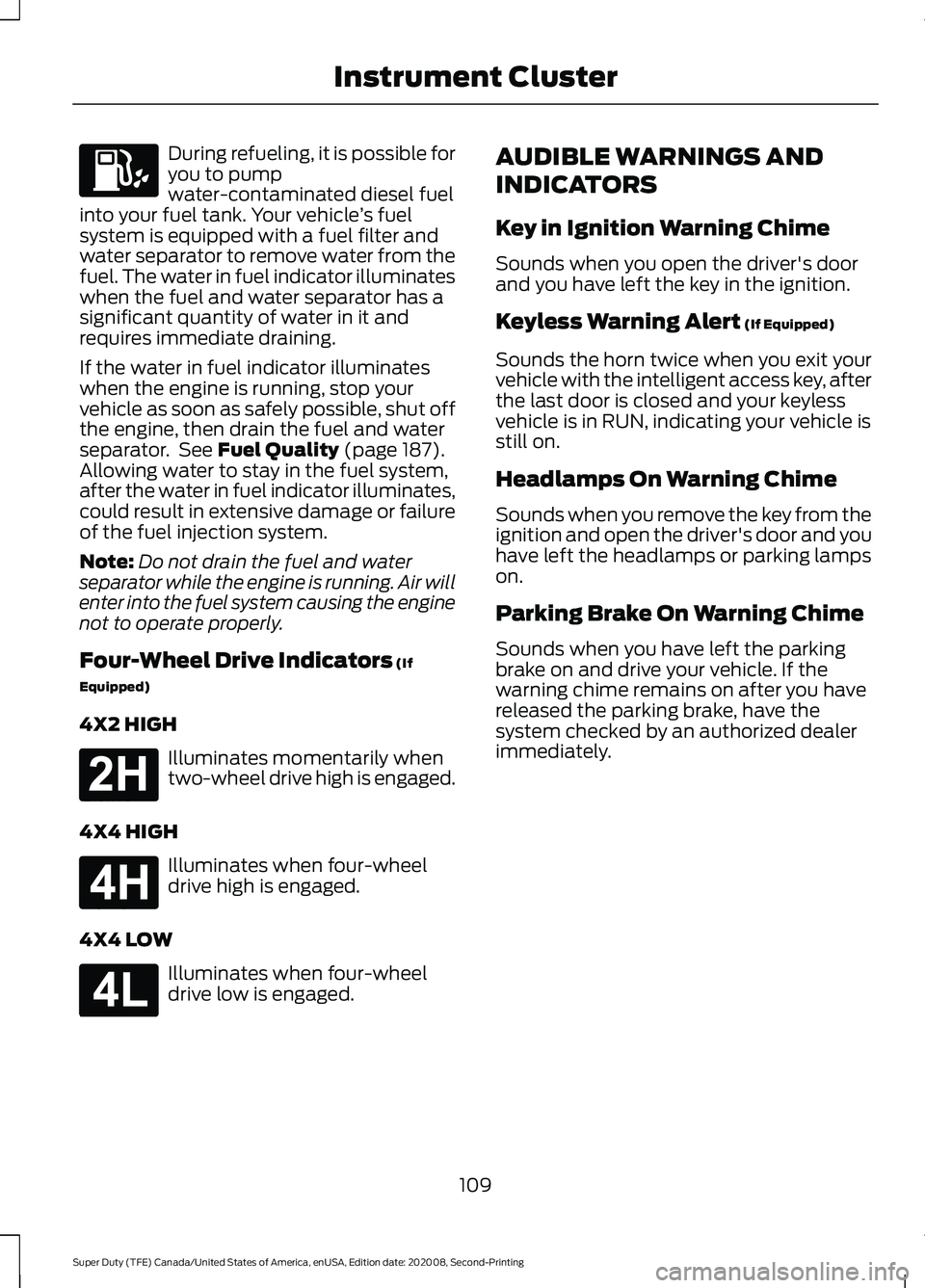
During refueling, it is possible for
you to pump
water-contaminated diesel fuel
into your fuel tank. Your vehicle ’s fuel
system is equipped with a fuel filter and
water separator to remove water from the
fuel. The water in fuel indicator illuminates
when the fuel and water separator has a
significant quantity of water in it and
requires immediate draining.
If the water in fuel indicator illuminates
when the engine is running, stop your
vehicle as soon as safely possible, shut off
the engine, then drain the fuel and water
separator. See Fuel Quality (page 187).
Allowing water to stay in the fuel system,
after the water in fuel indicator illuminates,
could result in extensive damage or failure
of the fuel injection system.
Note: Do not drain the fuel and water
separator while the engine is running. Air will
enter into the fuel system causing the engine
not to operate properly.
Four-Wheel Drive Indicators
(If
Equipped)
4X2 HIGH Illuminates momentarily when
two-wheel drive high is engaged.
4X4 HIGH Illuminates when four-wheel
drive high is engaged.
4X4 LOW Illuminates when four-wheel
drive low is engaged. AUDIBLE WARNINGS AND
INDICATORS
Key in Ignition Warning Chime
Sounds when you open the driver's door
and you have left the key in the ignition.
Keyless Warning Alert
(If Equipped)
Sounds the horn twice when you exit your
vehicle with the intelligent access key, after
the last door is closed and your keyless
vehicle is in RUN, indicating your vehicle is
still on.
Headlamps On Warning Chime
Sounds when you remove the key from the
ignition and open the driver's door and you
have left the headlamps or parking lamps
on.
Parking Brake On Warning Chime
Sounds when you have left the parking
brake on and drive your vehicle. If the
warning chime remains on after you have
released the parking brake, have the
system checked by an authorized dealer
immediately.
109
Super Duty (TFE) Canada/United States of America, enUSA, Edition date: 202008, Second-Printing Instrument Cluster E181778 E181779 E181780
Page 115 of 666
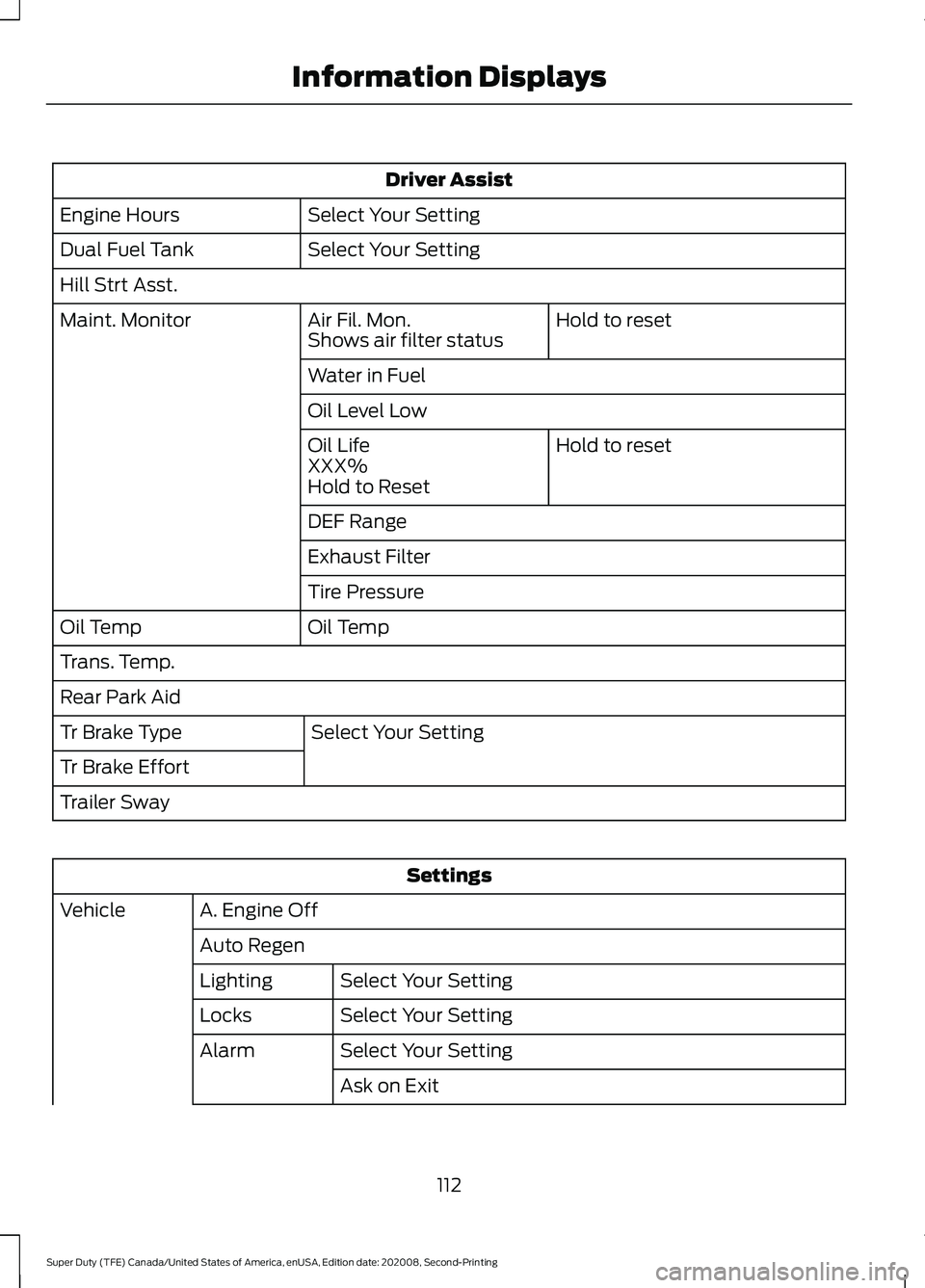
Driver Assist
Select Your Setting
Engine Hours
Select Your Setting
Dual Fuel Tank
Hill Strt Asst.
Hold to reset
Air Fil. Mon.
Maint. Monitor
Shows air filter status
Water in Fuel
Oil Level Low
Hold to reset
Oil Life
XXX%
Hold to Reset
DEF Range
Exhaust Filter
Tire Pressure
Oil Temp
Oil Temp
Trans. Temp.
Rear Park Aid
Select Your Setting
Tr Brake Type
Tr Brake Effort
Trailer Sway Settings
A. Engine Off
Vehicle
Auto RegenSelect Your Setting
Lighting
Select Your Setting
Locks
Select Your Setting
Alarm
Ask on Exit
112
Super Duty (TFE) Canada/United States of America, enUSA, Edition date: 202008, Second-Printing Information Displays
Page 118 of 666
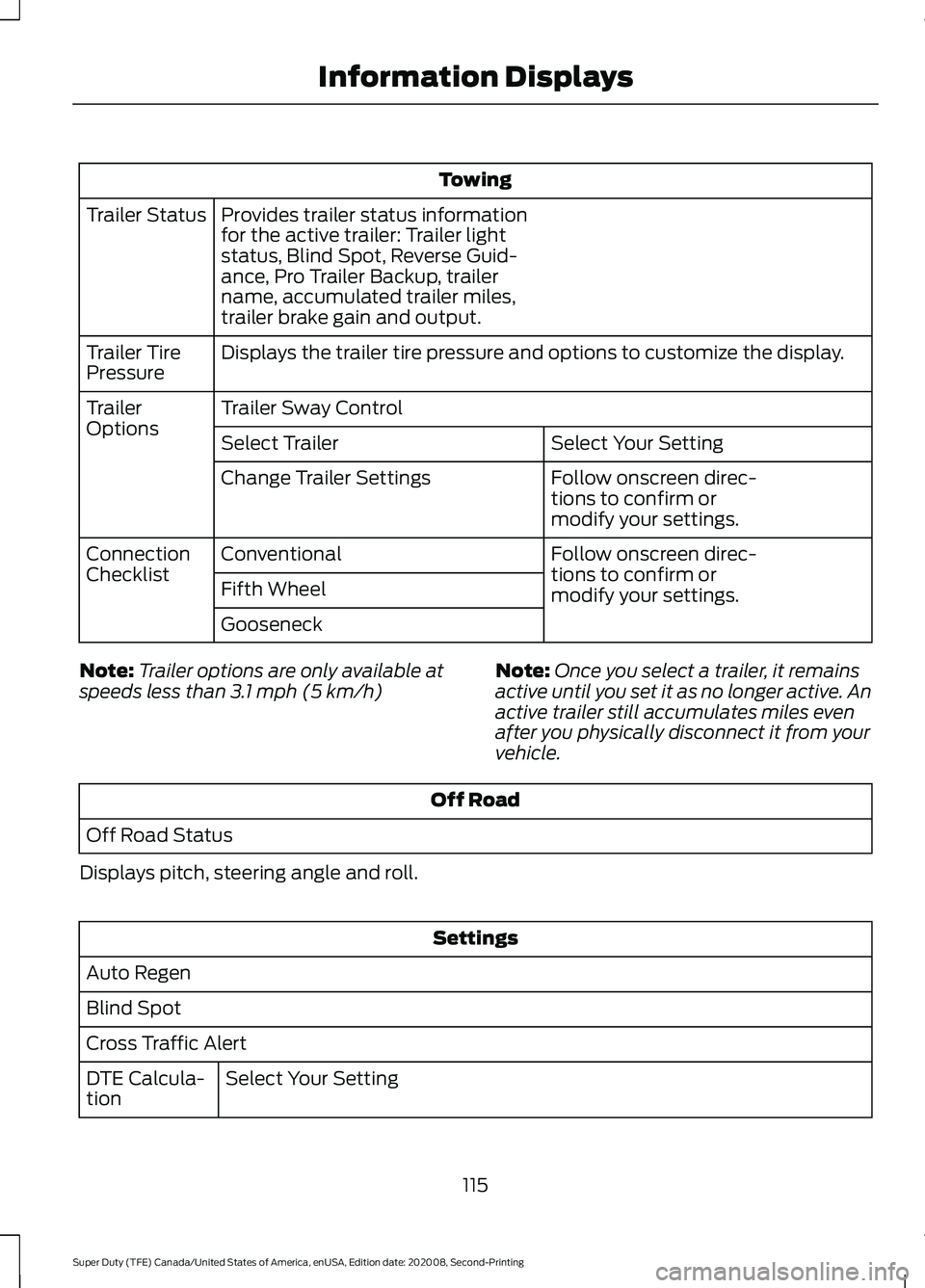
Towing
Provides trailer status information
for the active trailer: Trailer light
status, Blind Spot, Reverse Guid-
ance, Pro Trailer Backup, trailer
name, accumulated trailer miles,
trailer brake gain and output.
Trailer Status
Displays the trailer tire pressure and options to customize the display.
Trailer Tire
Pressure
Trailer Sway Control
Trailer
Options
Select Your Setting
Select Trailer
Follow onscreen direc-
tions to confirm or
modify your settings.
Change Trailer Settings
Follow onscreen direc-
tions to confirm or
modify your settings.
Conventional
Connection
Checklist
Fifth Wheel
Gooseneck
Note: Trailer options are only available at
speeds less than 3.1 mph (5 km/h) Note:
Once you select a trailer, it remains
active until you set it as no longer active. An
active trailer still accumulates miles even
after you physically disconnect it from your
vehicle. Off Road
Off Road Status
Displays pitch, steering angle and roll. Settings
Auto Regen
Blind Spot
Cross Traffic Alert Select Your Setting
DTE Calcula-
tion
115
Super Duty (TFE) Canada/United States of America, enUSA, Edition date: 202008, Second-Printing Information Displays
Page 122 of 666
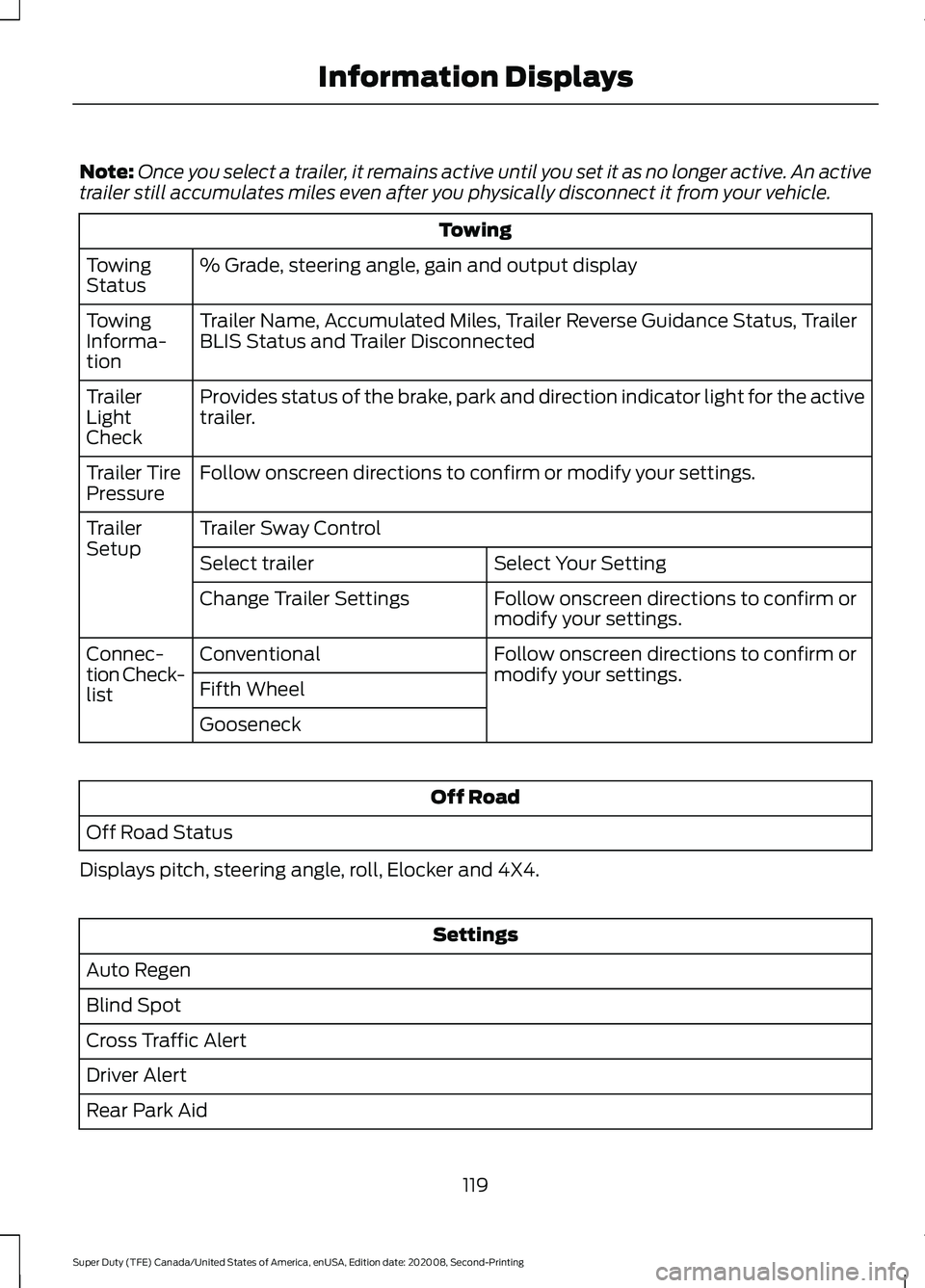
Note:
Once you select a trailer, it remains active until you set it as no longer active. An active
trailer still accumulates miles even after you physically disconnect it from your vehicle. Towing
% Grade, steering angle, gain and output display
Towing
Status
Trailer Name, Accumulated Miles, Trailer Reverse Guidance Status, Trailer
BLIS Status and Trailer Disconnected
Towing
Informa-
tion
Provides status of the brake, park and direction indicator light for the active
trailer.
Trailer
Light
Check
Follow onscreen directions to confirm or modify your settings.
Trailer Tire
Pressure
Trailer Sway Control
Trailer
Setup
Select Your Setting
Select trailer
Follow onscreen directions to confirm or
modify your settings.
Change Trailer Settings
Follow onscreen directions to confirm or
modify your settings.
Conventional
Connec-
tion Check-
list Fifth Wheel
Gooseneck Off Road
Off Road Status
Displays pitch, steering angle, roll, Elocker and 4X4. Settings
Auto Regen
Blind Spot
Cross Traffic Alert
Driver Alert
Rear Park Aid
119
Super Duty (TFE) Canada/United States of America, enUSA, Edition date: 202008, Second-Printing Information Displays