steering FORD SUPER DUTY 2023 Owners Manual
[x] Cancel search | Manufacturer: FORD, Model Year: 2023, Model line: SUPER DUTY, Model: FORD SUPER DUTY 2023Pages: 738, PDF Size: 18.49 MB
Page 413 of 738
TRAILER REVERSE GUIDANCE –FREQUENTLY ASKED QUESTIONS
Why does the trailer not reversestraight?
Verify the sensor is correctly installed.Other factors such as the hitchconnection, road camber, road slopeand trailer suspension could influencehow straight the system can reversethe trailer when the control knob is notturned. You can compensate for thetrailer drifting to the right or left byslowly turning the knob until the traileris following your desired path and thenholding the knob in that position.
Why does the system not detect asensor?
There could be an issue with theconnection, the wiring harness couldbe damaged, you could have multiplesensors connected or the sensor couldbe incorrectly installed. Check that the12-way connector is fully inserted intothe 12-way socket. The red rubber sealis not visible when the connector isfully inserted. Also check that thewiring harness sensor connection isfully inserted at the trailer sensor, andcheck for damaged wiring betweenthe 12-way connector and the trailersensor. Also, check that the sensor isinstalled on a vertical surface with thearrows pointing straight up.
What does it mean if the systemremains on one message for anextended time during calibration whensetting up the system with the sticker?
The camera could need to be cleaned,the sticker could be blocked, thedrawbar could be outside the allowedrange of 4–19 in (10–48 cm) or youcould need to move to a different areato change the lighting and background.Verify the sticker is in the properlocation. See Applying the TrailerReverse Aid Sticker (page 403). Youcan move to a different area or changethe direction you are driving or setupthe system at a different time of day.Some trailers are not compatible withthe sticker and camera system. If theissue persists with the sticker setup,you may choose to setup the trailerwith a sensor.
What does it mean if the system pausesduring calibration?
There could be steering input or trailermovement during the straight driveportion of the calibration process.
What does it mean if the systemremains on one message for anextended time during calibration whensetting up the system with the sensor?
The sensor could be incorrectlyinstalled, the trailer length could beoutside the allowed range or the roadsurface could be too rough or bumpy.
What does it mean if the systemdisplays hold steering steady duringturn?
Part of the calibration process for thesticker setup requires a steady turn. Ifyou are continually moving thesteering wheel during the turn, thisdelays the calibration process. Toenable the calibration process, holdthe steering wheel at the sameposition when turning.
409
2023 Super Duty (TFH) Canada/United States of America, enUSA, Edition date: 202211, DOMTrailer Reverse Guidance (If Equipped)
Page 414 of 738
What does it mean if the systemdisplays that it is not available?
There could be a sub-system that thesystem uses that is not correctlyoperating or there could be a batteryvoltage issue. If the system continuesto display it is not available, visit yourauthorized dealer to have your vehiclechecked.
What does it mean if the systemdisplays that driving is required toinitialize steering?
The steering system needs to learninternal parameters to fully turn on thefeature. Drive your vehicle straightforward above 25 mph (40 km/h) forapproximately 5 minutes. This couldalso occur when your vehicle is new,there is a battery voltage issue or if thesteering system has been serviced.
What does it mean if the system doesnot detect a trailer when configuredwith a sensor?
Verify that the sensor is properlyconnected. See Trailer SensorInstallation (page 403). Repeatcalibration on a different route if youhave verified sensor installation.
What does it mean if the systemrequires you to pull forward toinitialize?
This occurs when the vehicle has notmoved during the current key cycleafter you connect and select the trailerin the touchscreen or you operate thesystem at speeds below 1 mph(1 km/h) for an extended period oftime. Drive forward above 2 mph(3 km/h) and the system indicateswhen it initializes.
What does it mean if the trailer is at itsmaximum angle or the systemdeactivated by trailer angle?
You are at the maximum controllabletrailer angle for the system. Place yourvehicle in drive (D) and pull forward toget the truck and trailer back to anin-line position. If this messageconsistently displays, this couldindicate the sensor is incorrectlyinstalled, the trailer needs to berecalibrated or the drawbar or thetrailer dimensions are outside of thesupported range. The system isdesigned to work with drawbars thathave a license plate to hitch ball centermeasurement of 9–18 in (23–46 cm)when installed. The system is designedto work with trailers that have a hitchpoint to center of the axle or axlesmeasurement of 6–33 ft(1.85–10.05 m). Do not attempt to usedrawbars or trailers that have a lengthoutside of this range as the systemperformance degrades and couldcause improper system function.Check that the correct trailer isselected in the touchscreen. Verify thesensor is installed according to theinstructions included in the sensor kitand check that the drawbar and thetrailer dimensions are within theallowed range. Then, delete the trailerfrom the system and repeat the setupprocess to calibrate the trailer.
410
2023 Super Duty (TFH) Canada/United States of America, enUSA, Edition date: 202211, DOMTrailer Reverse Guidance (If Equipped)
Page 415 of 738
What does it mean when the systemtells you to take control of the steeringwheel?
The system is no longer steering thevehicle and you must take oversteering. There are four reasons thesystem could display this message.The first reason the system coulddisplay this message is that you havetouched the steering wheel when thesystem is steering. The second reasonthe system could display this messageis that you have exceeded themaximum speed for the feature. Thethird reason the system could displaythis message is that the trailer is notdetected. The final reason the systemcould display this message is that aninternal condition for system operationis not met that requires your vehicle toreturn to manual control of thesteering.
How do I use a sticker if I havepreviously setup a trailer with thesensor?
Disconnect the sensor wiring and adda new trailer to the system and followthe instructions for setup with asticker. See Applying the TrailerReverse Aid Sticker (page 403). Ifyour vehicle does not support thesticker option, the touchscreeninstructs you to install the sensoragain.
What if I want to use a sensor for thetrailer instead of a sticker?
Install the sensor and connect thesensor wiring before adding the newtrailer to the system. You mustconnect the sensor before you add thetrailer. If your vehicle did not come witha sensor, you can purchase one fromyour authorized dealer.
What does it mean if the system doesnot detect a trailer that is setup with asticker?
The system requires a clear view of thesticker placed on the trailer. You mustkeep the camera lens and sticker cleanfor the system to correctly operate. Ifthe system cannot initially detect thetrailer, it could be necessary for you tochange the lighting conditions bymoving your vehicle and trailer orwaiting until the conditions change.See Applying the Trailer ReverseAid Sticker (page 403). Some trailersare not compatible with the stickerand camera system. If the systemconsistently does not detect the trailerwith the sticker setup, you may chooseto setup the trailer with a sensor.
Note:The system is designed to be usedwith the same trailer connection every timeyou choose the trailer from the touchscreen.When using a different drawbar or adifferent pin hole on drawbars with morethan one, connecting the drawbar to yourvehicle affects the trailer position and youmay need to repeat the trailer setup andcalibration process.
411
2023 Super Duty (TFH) Canada/United States of America, enUSA, Edition date: 202211, DOMTrailer Reverse Guidance (If Equipped)
Page 416 of 738
OFF-ROAD DRIVING
WHAT IS OFF-ROAD DRIVING
Off-road driving is driving your vehicle onunsurfaced roads or trails, made from dirt,rocks, sand and mud.
BASIC OFF-ROAD DRIVINGTECHNIQUES
Off-road Driving Hints
Before taking your vehicle off-roading, abasic vehicle inspection should be done tomake sure that the vehicle is in top workingcondition. It is always recommended thatat least two vehicles are used whileoff-roading. The buddy system helps makesure that help is close at hand should avehicle become stuck or damaged. It is alsowise to take supplies such as a first aid kit,supply of water, tow strap, cell or satellitephone with you any time an off-roadexcursion is planned.
1.Grip the steering wheel with thumbson the outside of the rim. This willreduce the risk of injury due to abruptsteering wheel motions that occurwhen negotiating rough terrain.
2.Throttle, brake and steering inputsshould be made in a smooth andcontrolled manner. Sudden inputs tothe controls can cause loss of tractionor upset the vehicle, especially whileon loose terrain or while crossingobstacles such as rocks or logs.
3.Look ahead on your route notingupcoming obstacles, or any otherfactors which may indicate a changein available traction, and adjust thevehicle speed and route accordingly.
4.When driving off-road, if the front orrear suspension is bottoming outand/or excessive contact with theskid-plates is encountered, reducevehicle speed to avoid potentialdamage to the vehicle.
5.When with other vehicles, it isrecommended that communication isused, and the lead vehicle notify othervehicles of obstacles that could causepotential vehicle damage.
6.Always keep available groundclearance in mind and pick a route thatminimizes the risk of catching theunderside of the vehicle on an obstacle.
7.When negotiating low speed obstacles,applying light brake pressure inconjunction with the throttle will helpprevent the vehicle from jerking andwill allow you to negotiate the obstaclein a more controlled manner. Using 4Lwill also help with this.
8.Off-roading requires a high degree ofconcentration. Even if your local lawdoes not prohibit alcohol use whiledriving off-road, Ford stronglyrecommends against drinking if youplan to off-road.
Crossing Obstacles
•Review the path ahead beforeattempting to cross any obstacle. It isbest if the obstacle is reviewed fromoutside the vehicle so that there is agood understanding of terrain conditionboth in front of and behind theobstacle.
•Approach obstacles slowly.
412
2023 Super Duty (TFH) Canada/United States of America, enUSA, Edition date: 202211, DOMDriving Hints
Page 417 of 738
•If a large obstacle such as a rockcannot be avoided, choose a path thatplaces the rock directly under the tirerather than the undercarriage of thevehicle. This will help prevent damageto the vehicle.
•Ditches and washouts should becrossed at a 45° angle, allowing eachwheel to independently cross theobstacle.
Hill Climbing
WARNING: Extreme care shouldbe used when steering the vehicle inreverse down a slope so as not to causethe vehicle to swerve out of control.
•Always attempt to climb a steep hillalong the fall line of the slope and notdiagonally.
•If the vehicle is unable to make it upthe hill, DO NOT attempt to turn backdown the slope. Place the vehicle inlow range and slowly back down inreverse.
•When descending a steep slope, selectlow gear and engage hill descentcontrol. Use the throttle and brakepedals to control your descent speed.
Note:Hill descent control is functional inreverse and should be used in this situation.
DRIVING THROUGH WATERLIMITATIONS
WARNING: Do not attempt tocross a deep, fast flowing body of water.Failure to follow this instruction couldresult in the loss of control of yourvehicle, personal injury or death.
Determine the depth and speed of thecurrent before attempting a water crossing.As the water depth increases, reduce yourvehicle speed to avoid potential vehicledamage.
The key to a safe crossing is the waterdepth, current and bottom of the water'scondition. On soft bottoms, the vehiclesinks in, effectively increasing the waterlevel on the vehicle. Make sure to considerthis when determining the depth of water.Be aware that obstacles and debris maybe beneath the water’s surface.
Note:Cross flowing water at an angleheading slightly upstream.
Note:Tread lightly and avoid damage tothe environment.
Drive slowly when crossing water. Startvery slowly when entering, then buildmomentum. Proceed with a constant slowspeed lightly pressing on the accelerator.Ease off the accelerator as you reach theother side to diminish the front wave. Applythe accelerator slowly and as necessaryto climb out of the other side.
Note:Do not try to accelerate through thewater crossing.
When driving too fast in water or throughdeep water, the engine, transmission,transfer case, axles, electrical componentsor vehicle interior could ingest water.Muddy waters can reduce the coolingsystem effectiveness by depositing debrisinto the radiator. Water can causepermanent damage that may not becovered by your vehicle warranty. Seebelow for your vehicle’s capabilities.
413
2023 Super Duty (TFH) Canada/United States of America, enUSA, Edition date: 202211, DOMDriving Hints
Page 418 of 738
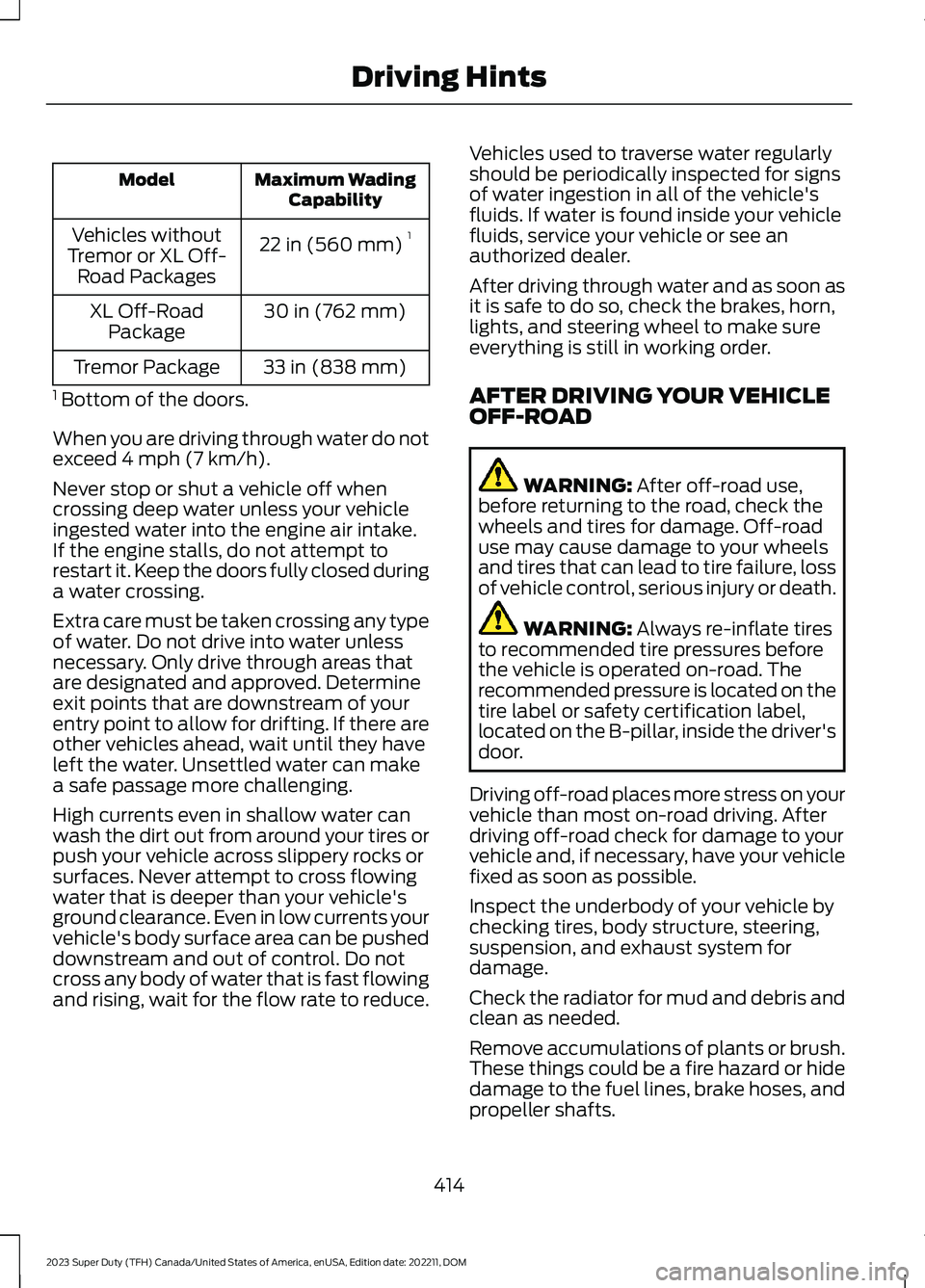
Maximum WadingCapabilityModel
22 in (560 mm)1Vehicles withoutTremor or XL Off-Road Packages
30 in (762 mm)XL Off-RoadPackage
33 in (838 mm)Tremor Package
1 Bottom of the doors.
When you are driving through water do notexceed 4 mph (7 km/h).
Never stop or shut a vehicle off whencrossing deep water unless your vehicleingested water into the engine air intake.If the engine stalls, do not attempt torestart it. Keep the doors fully closed duringa water crossing.
Extra care must be taken crossing any typeof water. Do not drive into water unlessnecessary. Only drive through areas thatare designated and approved. Determineexit points that are downstream of yourentry point to allow for drifting. If there areother vehicles ahead, wait until they haveleft the water. Unsettled water can makea safe passage more challenging.
High currents even in shallow water canwash the dirt out from around your tires orpush your vehicle across slippery rocks orsurfaces. Never attempt to cross flowingwater that is deeper than your vehicle'sground clearance. Even in low currents yourvehicle's body surface area can be pusheddownstream and out of control. Do notcross any body of water that is fast flowingand rising, wait for the flow rate to reduce.
Vehicles used to traverse water regularlyshould be periodically inspected for signsof water ingestion in all of the vehicle'sfluids. If water is found inside your vehiclefluids, service your vehicle or see anauthorized dealer.
After driving through water and as soon asit is safe to do so, check the brakes, horn,lights, and steering wheel to make sureeverything is still in working order.
AFTER DRIVING YOUR VEHICLEOFF-ROAD
WARNING: After off-road use,before returning to the road, check thewheels and tires for damage. Off-roaduse may cause damage to your wheelsand tires that can lead to tire failure, lossof vehicle control, serious injury or death.
WARNING: Always re-inflate tiresto recommended tire pressures beforethe vehicle is operated on-road. Therecommended pressure is located on thetire label or safety certification label,located on the B-pillar, inside the driver'sdoor.
Driving off-road places more stress on yourvehicle than most on-road driving. Afterdriving off-road check for damage to yourvehicle and, if necessary, have your vehiclefixed as soon as possible.
Inspect the underbody of your vehicle bychecking tires, body structure, steering,suspension, and exhaust system fordamage.
Check the radiator for mud and debris andclean as needed.
Remove accumulations of plants or brush.These things could be a fire hazard or hidedamage to the fuel lines, brake hoses, andpropeller shafts.
414
2023 Super Duty (TFH) Canada/United States of America, enUSA, Edition date: 202211, DOMDriving Hints
Page 420 of 738
DRIVING ON SNOW AND ICE
WARNING: If you are driving inslippery conditions that require tirechains or cables, then it is critical thatyou drive cautiously. Keep speeds down,allow for longer stopping distances andavoid aggressive steering to reduce thechances of a loss of vehicle controlwhich can lead to serious injury or death.If the rear end of your vehicle slides whilecornering, steer in the direction of theslide until you regain control of yourvehicle.
On ice and snow, you should drive moreslowly than usual. Your vehicle has a fourwheel anti-lock brake system, do not pumpthe brake pedal. See Anti-Lock BrakingSystem Limitations (page 249).
BREAKING-IN
Your vehicle requires a break-in period. Forthe first 1,000 mi (1,600 km), avoid drivingat high speeds, heavy braking, aggressiveshifting or using your vehicle to tow. Duringthis time, your vehicle may exhibit someunusual driving characteristics.
DRIVING ECONOMICALLY
The following helps to improve fuelconsumption:
•Drive smoothly, accelerate gently andanticipate the road ahead to avoidheavy braking.
•Regularly check your tire pressures andmake sure that they are inflated to thecorrect pressure.
•Follow the recommended maintenanceschedule and carry out therecommended checks.
•Plan your journey and check the trafficbefore you set off. It is more efficientto combine errands into a single tripwhenever possible.
•Avoid idling the engine in cold weatheror for extended periods. Start theengine only when you are ready to setoff.
•Do not carry unnecessary weight in yourvehicle as extra weight wastes fuel.
•Do not add unnecessary accessoriesto the exterior of your vehicle, forexample running boards. If you use aroof rack, remember to fold it down orremove it when not in use.
•Do not shift into neutral when you arebraking or when your vehicle is slowingdown.
•Shut all windows when driving at highspeeds.
•Switch off all electric systems whennot in use, for example air conditioning.Make sure that you unplug anyaccessories from the auxiliary powerpoints when not in use.
DRIVING IN SPECIAL
CONDITIONS
DRIVING THROUGH MUD ANDWATER
WARNING: Do not spin the wheelsat over 34 mph (55 km/h). The tires mayfail and injure a passenger or bystander.
416
2023 Super Duty (TFH) Canada/United States of America, enUSA, Edition date: 202211, DOMDriving Hints
Page 422 of 738
SNOW PLOWING
PRECAUTIONS
WARNING: Modifying or addingequipment to the front of your vehiclecould affect the performance of theairbag system, increasing the risk ofinjury. This includes the hood, bumpersystem, frame, front body structure, towhooks, hood pins, push bar andsnowplows.
WARNING: Do not attempt toservice, repair, or modify thesupplementary restraint system orassociated components. Failure tofollow this instruction could result inpersonal injury or death.
WARNING: All occupants of yourvehicle, including the driver, shouldalways properly wear their seatbelts,even when an airbag supplementalrestraint system is provided. Failure toproperly wear your seatbelt couldseriously increase the risk of injury ordeath.
WARNING: Do not spin the wheelsat over 34 mph (55 km/h). The tires mayfail and injure a passenger or bystander.
Note:Look for an alterer’s label on yourvehicle from the snowplow installercertifying that the installation meets allapplicable Federal Motor Vehicle SafetyStandards (FMVSS).
Note:Federal and some local regulationsrequire additional exterior lamps forsnowplow-equipped vehicles. Contact anauthorized dealer for additional information.
Note:Do not remove or defeat the trippingmechanisms designed into the snowremoval equipment by its manufacturer.Doing so could cause damage to yourvehicle and the snow removal equipmentas well as possible airbag deployment.
OPERATING YOUR VEHICLE
WITH A SNOWPLOW
Weight limits and guidelines for selectingand installing the snowplow are in the FordTruck Body Builders Layout Book. Foradditional information, visitwww.fordbbas.com.
A typical snowplow installation affects thefollowing:
•Front gross axle weight rating. SeeWhat Is the Gross Axle WeightRating (page 352).
•Gross vehicle weight rating. See WhatIs the Gross Vehicle Weight Rating(page 352).
•Braking and steering.
•Front wheel toe. See the FordWorkshop Manual.
•Headlight aim. See Adjusting theHeadlamps (page 460).
•Tire air pressure. See Information onthe Tire Sidewall (page 479).
Note:Do not exceed the front gross axleweight rating or gross vehicle weight rating.
Note:Your vehicle may require rear ballastweight for proper braking and steering.
Your vehicle has a driver and passengerairbag supplemental restraint system. Thesupplemental restraint system activatesin certain frontal and offset frontalcollisions when the vehicle sustainssufficient longitudinal deceleration.
418
2023 Super Duty (TFH) Canada/United States of America, enUSA, Edition date: 202211, DOMSnow Plowing - Vehicles With: Snow Plow Mode (If Equipped)
Page 429 of 738
We recommend the use of a wheel lift anddollies or flatbed equipment to tow yourvehicle. Vehicle damage could occur iftowed incorrectly, or by any other means.
Front-wheel and rear-wheel drive vehiclesmust have their designated drive wheelsoff the ground regardless of towingdirection. Use tow dollies to preventdamage to the transmission.
All-wheel or four-wheel drive vehiclesrequire that all wheels be off the groundusing a wheel lift and dollies or flatbedequipment. This prevents damage to thetransmission and drive system.
Note:You need to switch on the ignition tounlock the steering.
Note:Make sure you check the steeringcolumn before towing. It could lock if thebattery is dead.
FAIL-SAFE COOLING
WHAT IS FAIL-SAFE COOLING
Fail-safe cooling allows you to temporarilydrive your vehicle before any incrementalcomponent damage occurs due tooverheating.
The fail-safe distance depends on outsidetemperature, vehicle load and terrain.
HOW DOES FAIL-SAFE COOLINGWORK
If the engine reaches a presetover-temperature condition, the engineautomatically switches to alternatingcylinder operation. Each disabled cylinderacts as an air pump and cools the engine.
When this occurs, your vehicle stilloperates, however:
•Engine power is limited.
•The air conditioning system turns off.
Continued operation increases the enginetemperature, causing the engine tocompletely shut down. Your steering andbraking effort increases in this situation.
When the engine temperature cools, youcan re-start the engine.
Note:Have your vehicle checked as soonas possible to minimize engine damage.
DRIVING WHEN FAIL-SAFE MODEIS ACTIVATED
WARNING: Fail-safe mode is foruse during emergencies only. Operateyour vehicle in fail-safe mode only aslong as necessary to bring your vehicleto rest in a safe location and seekimmediate repairs. When in fail-safemode, your vehicle will have limitedpower, will not be able to maintainhigh-speed operation, and maycompletely shut down without warning,potentially losing engine power, powersteering assist, and power brake assist,which may increase the possibility of acrash resulting in serious injury.
WARNING: Do not remove thecoolant reservoir cap when the engine ison or the cooling system is hot. Wait 10minutes for the cooling system to cooldown. Cover the coolant reservoir capwith a thick cloth to prevent thepossibility of scalding and slowly removethe cap. Failure to follow this instructioncould result in personal injury.
Continued operation increases the enginetemperature, causing the engine tocompletely shut down. Your steering andbraking effort increases in this situation.
When the engine temperature cools, youcan re-start the engine. Have your vehiclechecked as soon as possible to minimizeengine damage.
425
2023 Super Duty (TFH) Canada/United States of America, enUSA, Edition date: 202211, DOMCrash and Breakdown Information
Page 431 of 738
TOWING YOUR VEHICLE
PRECAUTIONS
Use the following guidelines when towingyour vehicle. Failure to follow thisinstruction could result in vehicle damagenot covered by the vehicle warranty.
Note:Make sure you properly secure yourvehicle to the tow vehicle.
Note:If you are unsure of the vehicle’sconfiguration, contact an authorized dealer.
RECREATIONALLY TOWING
YOUR VEHICLE - 4X4
WARNING: Do not disconnect thebattery when recreationally towing yourvehicle. This prevents the transfer casefrom shifting properly and could causethe vehicle to roll, even if thetransmission is in park (P).
WARNING: Placing the transfercase in its neutral position could causeyour vehicle to freely roll. Make sure youpress and hold the brake pedal and thevehicle is in a secure, safe position whenyou place the transfer case in its neutralposition.
Follow these guidelines if you have a needfor recreational towing. An example ofrecreational towing would be towing yourvehicle behind a motorhome. Theseguidelines are to make sure that you donot damage the transmission.
You can only tow your vehicle with allwheels on the ground by placing thetransfer case in its neutral position andengaging the recreational tow feature.Perform the following steps afterpositioning your vehicle behind the towvehicle and properly securing themtogether.
Note:Put your climate control system inrecirculated air mode to prevent exhaustfumes from entering your vehicle.
Note:Failure to put the transfer case in itsneutral position can damage vehiclecomponents.
Note: You can check the towing status atany time by opening the driver door orturning the ignition to the accessory or onposition.Neutral Tow Enabled LeaveTransmission in Neutral appears in theinstrument cluster display to confirm youcan recreationally tow your vehicle.
Note:If your vehicle has an anti-theftalarm, make sure you switch perimetersensing on when towing. See Setting theAlarm Security Level (page 104).
Switching Neutral Tow On
1.Place your vehicle in accessory modeby pressing the push button ignitionswitch once without pressing the brakepedal or by turning the ignition key tothe on position.
2.Press and hold the brake pedal.
3.Press the 2H button on the four-wheeldrive mode control.
4.Shift the transmission into neutral (N).
5.Using the instrument cluster controlson the steering wheel, select Settings.
6.Select Neutral Tow.
7.Press and hold the OK button until aconfirmation message appears in theinformation display.
427
2023 Super Duty (TFH) Canada/United States of America, enUSA, Edition date: 202211, DOMTowing Your Vehicle