steering FORD SUPER DUTY 2023 Owners Manual
[x] Cancel search | Manufacturer: FORD, Model Year: 2023, Model line: SUPER DUTY, Model: FORD SUPER DUTY 2023Pages: 738, PDF Size: 18.49 MB
Page 492 of 738
cause steering, suspension, axle, transfercase or power transfer unit failure.Follow the recommended tire inflationpressures found on the SafetyCompliance Certification label, or theTire Label on the B-Pillar or the edge ofthe driver door. Failure to follow thisinstruction could result in loss of vehiclecontrol, vehicle rollover, or personal injuryor death.
Note:Do not use snow chains on vehicleswith LT275/65R20 or LT 285/75R18 sizedtires.
Note:The suspension insulation andbumpers will help prevent vehicle damage.Do not remove these components from yourvehicle when using snow tires and chains.
The tires on your vehicle have all-weathertreads to provide traction in rain and snow.However, in some climates, you may needto use snow tires and cables. If you needto use cables, we recommend that you usesteel wheels of the same size andspecification, as cables may chipaluminum wheels.
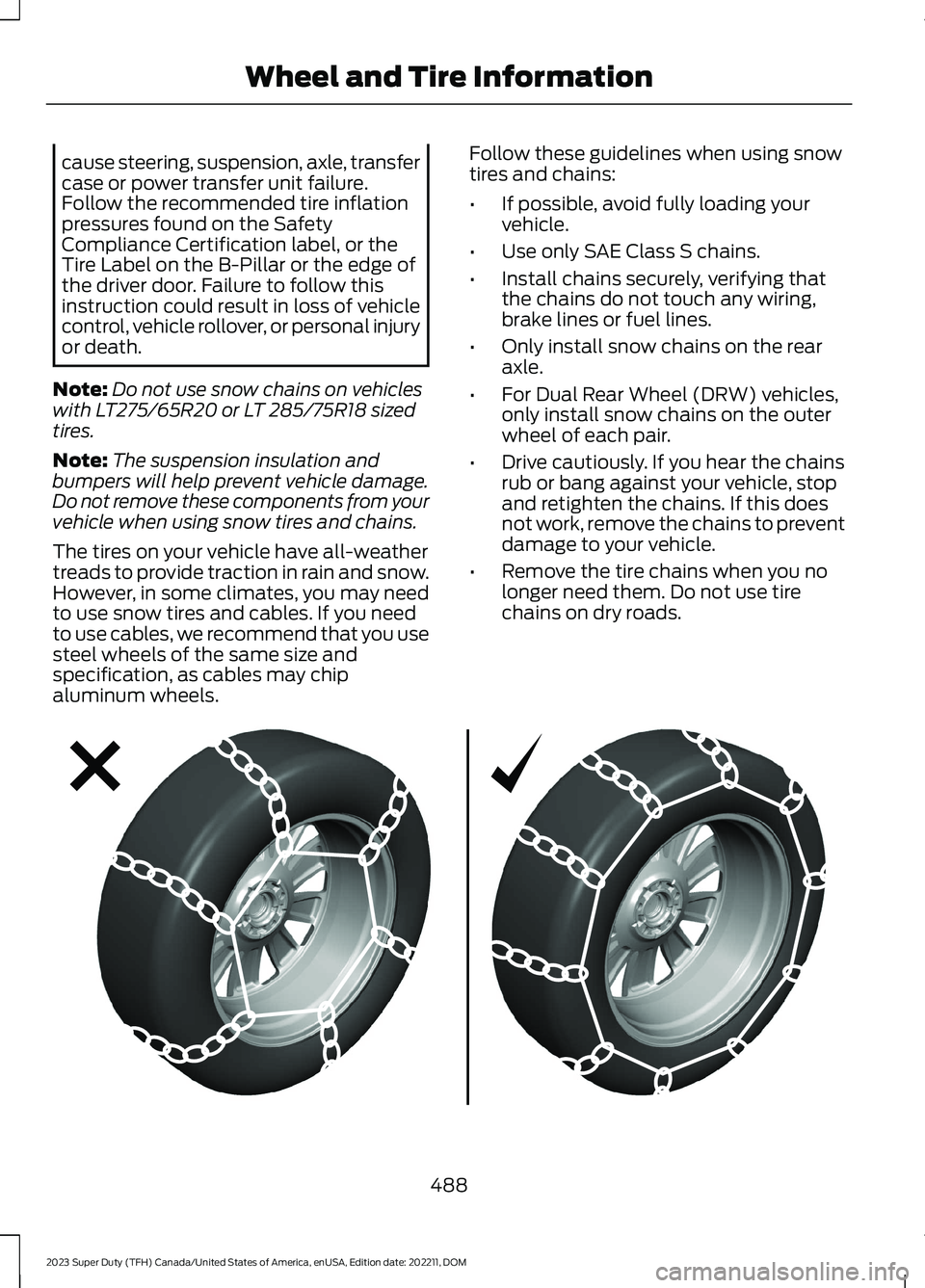
Follow these guidelines when using snowtires and chains:
•If possible, avoid fully loading yourvehicle.
•Use only SAE Class S chains.
•Install chains securely, verifying thatthe chains do not touch any wiring,brake lines or fuel lines.
•Only install snow chains on the rearaxle.
•For Dual Rear Wheel (DRW) vehicles,only install snow chains on the outerwheel of each pair.
•Drive cautiously. If you hear the chainsrub or bang against your vehicle, stopand retighten the chains. If this doesnot work, remove the chains to preventdamage to your vehicle.
•Remove the tire chains when you nolonger need them. Do not use tirechains on dry roads.
488
2023 Super Duty (TFH) Canada/United States of America, enUSA, Edition date: 202211, DOMWheel and Tire InformationE292547
Page 495 of 738
![FORD SUPER DUTY 2023 Owners Manual 1. Make sure the tires are cool,meaning they are not hot fromdriving even a mile.
Note:If you are checking tirepressure when the tire is hot, (forexample, driven more than 1 mile[1.6 kilometers]), nev](/img/11/58820/w960_58820-494.png "FORD SUPER DUTY 2023 Owners Manual 1. Make sure the tires are cool,meaning they are not hot fromdriving even a mile.
Note:If you are checking tirepressure when the tire is hot, (forexample, driven more than 1 mile[1.6 kilometers]), nev")
1. Make sure the tires are cool,meaning they are not hot fromdriving even a mile.
Note:If you are checking tirepressure when the tire is hot, (forexample, driven more than 1 mile[1.6 kilometers]), never bleed orreduce air pressure. The tires arehot from driving and it is normal forpressures to increase aboverecommended cold pressures. Ahot tire at or below recommendedcold inflation pressure could besignificantly under-inflated.
2. Remove the cap from the valveon one tire, then firmly press thetire gauge onto the valve andmeasure the pressure.
3. Add enough air to reach therecommended air pressure.
Note:If you overfill the tire, releaseair by pressing on the metal stemin the center of the valve. Thenrecheck the pressure with your tiregauge.
4. Replace the valve cap.
5. Repeat this procedure for eachtire, including the spare.
Note:Some spare tires operate ata higher inflation pressure than theother tires. For T type mini-sparetires, (see the Dissimilar sparewheel and tire assemblyinformation for a description. Storeand maintain at 60 psi(4.15 bar)60 psi (4.15 bar). Forfull-size and dissimilar spare tires,see the Dissimilar spare wheel andtire assembly information for adescription. Store and maintain atthe higher of the front and rearinflation pressure as shown on theSafety Compliance CertificationLabel or Tire Label.
Note:Do not reduce tire pressureto change the ride characteristicsof the vehicle. If you do notmaintain the inflation pressure atthe levels specified by Ford, yourvehicle may experience a conditionknown as shimmy. Shimmy is asevere vibration and oscillation inthe steering wheel after the vehicletravels over a bump or dip in theroad that does not dampen out byitself. Shimmy may result fromsignificant under-inflation of thetires, improper tires (load range,size, or type), or vehiclemodifications such as lift-kits. Inthe event that your vehicleexperiences shimmy, you shouldslowly reduce speed by either liftingoff the accelerator pedal or lightlyapplying the brakes. The shimmywill cease as the vehicle speeddecreases.
491
2023 Super Duty (TFH) Canada/United States of America, enUSA, Edition date: 202211, DOMTire Care
Page 501 of 738
FOLLOW THESE MOUNTINGRECOMMENDATIONS
Tire changing can be dangerousand must be done byprofessionally trained personsusing proper tools andprocedures as specified by theUS Tire ManufacturersAssociation (USTMA). Singleor dual assemblies must becompletely deflated beforedemounting.
Your tires should be mounted onwheels of correct size and typeand which are in good, cleancondition. Wheels that are bent,chipped, rusted (steel wheels) orcorroded (alloy wheels) maycause tire damage. The inside ofthe tire must be free from foreignmaterial. Have your retailer checkthe wheels before mounting newtires. Mismatched tires and rimscan explode during mounting.Also, mismatched tires and rimscan result in dangerous tire failureon the road. If a tire is mounted byerror on the wrong-sized rim, donot remount it on the proper rim -scrap it. It may have beendamaged internally (which is notexternally visible) by having beendangerously stretched and couldfail on the highway.
Old valves may leak. When newtubeless tires are mounted,have new valves of the correcttype installed. Tubeless tiresmust only be mounted onwheels designed for tubelesstires i.e., wheels which havesafety humps or ledges.
It is recommended that you haveyour tires and wheels balanced.Tires and wheels, which are notbalanced, may cause steeringdifficulties, a bumpy ride, andirregular tire wear.
Be sure that all your valveshave suitable valve caps. Thevalve cap is the primary sealagainst air loss.
TEMPORARY SPARE TIRES
When using any temporary sparetire, be sure to follow the vehiclemanufacturer’s instructions.
REMEMBER... TO AVOIDDAMAGE TO YOUR TIRES ANDPOSSIBLE ACCIDENT:
•CHECK TIRE PRESSURE ATLEAST ONCE EACH MONTHWHEN TIRES ARE COLD ANDBEFORE LONG TRIPS.
•DO NOTUNDERINFLATE/OVERINFLATE.
•DO NOT OVERLOAD.
•DRIVE AT MODERATESPEEDS, OBSERVE LEGALLIMITS.
497
2023 Super Duty (TFH) Canada/United States of America, enUSA, Edition date: 202211, DOMTire Care
Page 513 of 738
CHANGING A FLAT TIRE
If you get a flat tire when driving, do notapply the brake heavily. Instead, graduallydecrease your speed. Hold the steeringwheel firmly and slowly move to a safeplace on the side of the road.
Have a flat serviced by an authorizeddealer to prevent damage to the systemsensors. See Tire Pressure MonitoringSystem Precautions (page 502).Replacethe spare tire with a road tire as soon aspossible. During repairing or replacing theflat tire, have the authorized dealer inspectthe system sensor for damage.
Note:The use of tire sealant may damageyour tire pressure monitoring system andshould only be used in roadsideemergencies.
Note:The tire pressure monitoring systemindicator light illuminates when the sparetire is in use. To restore the full function ofthe monitoring system, all road wheelsequipped with tire pressure monitoringsensors must be mounted on this vehicle.
Dissimilar Spare Wheel and TireAssembly Information
WARNING: Failure to follow theseguidelines could result in an increasedrisk of loss of vehicle control, injury ordeath.
If you have a dissimilar spare wheel andtire, then it is intended for temporary useonly. This means that if you need to use it,you should replace it as soon as possiblewith a road wheel and tire assembly thatis the same size and type as the road tiresand wheels that were originally providedby Ford. If the dissimilar spare tire or wheelis damaged, it should be replaced ratherthan repaired.
A dissimilar spare wheel and tire assemblyis defined as a spare wheel and tireassembly that is different in brand, size orappearance from the road tires andwheels.
Full-size dissimilar spare
When driving with the full-size dissimilarspare wheel and tire assembly, do not:
•Exceed 70 mph (113 km/h).
•Use more than one dissimilar sparewheel and tire assembly at a time.
•Use snow chains on the end of thevehicle with the dissimilar spare wheeland tire assembly.
•Engage any four-wheel drive mode.See Four-Wheel Drive Limitations(page 239).
When driving with the full-size dissimilarspare wheel and tire assembly, 4WDfunctionality may be limited. You mayexperience the following:
•Additional noise from the transfer caseor other drive components.
•Difficulty shifting out of a mechanicallylocked 4WD mode.
When driving with the full-size dissimilarspare wheel and tire assembly, it isrecommended that you do not:
•Engage 4WD High or 4WD Low, ifequipped, other than to get your vehicleunstuck. .
The usage of a full-size dissimilar sparewheel and tire assembly can lead toimpairment of the following:
•Handling, stability and brakingperformance.
•Comfort and noise.
•Ground clearance and parking at curbs.
•Winter weather driving capability.
•Wet weather driving capability.
•Four-wheel drive capability.
509
2023 Super Duty (TFH) Canada/United States of America, enUSA, Edition date: 202211, DOMChanging a Road Wheel (If Equipped)
Page 550 of 738
Materials
SpecificationName
EST-M2C118-AMotorcraft® Additive Friction Modifier(U.S.)Motorcraft® Additive Friction Modifier / Additifmodificateur de friction Motorcraft®(Canada)XL-3(U.S.)CXL-3(Canada)
WSL-M2C192-AMotorcraft® SAE 75W-140 Synthetic Rear AxleLubricant(U.S.)Motorcraft® SAE 75W-140 Synthetic Rear AxleLubricant / Lubrifiant synthétique pour pont arrièreSAE 75W-140 Motorcraft®(Canada)XY-75W140-QL(U.S.)CXY-75W140-1L(Canada)
HYDRAULIC POWER
STEERING FLUID CAPACITY
AND SPECIFICATION
Use fluid that meets the definedspecification.
If you do not use fluid that meets thedefined specification, it could result in:
•Component damage that your vehiclewarranty does not cover.
•Reduced vehicle performance.
Capacities
QuantityVariant
Fill as required.All.
Materials
SpecificationName
WSS-M2C938-AMERCON® LV,Motorcraft® MERCON® LV Automatic TransmissionFluid(U.S.)Motorcraft® MERCON® LV Automatic TransmissionFluid / Huile pour boîte automatique MERCON® LVMotorcraft®(Canada)XT-10-QLVC(U.S.)CXT-10-LV6(Canada)
546
2023 Super Duty (TFH) Canada/United States of America, enUSA, Edition date: 202211, DOMCapacities and Specifications
Page 558 of 738
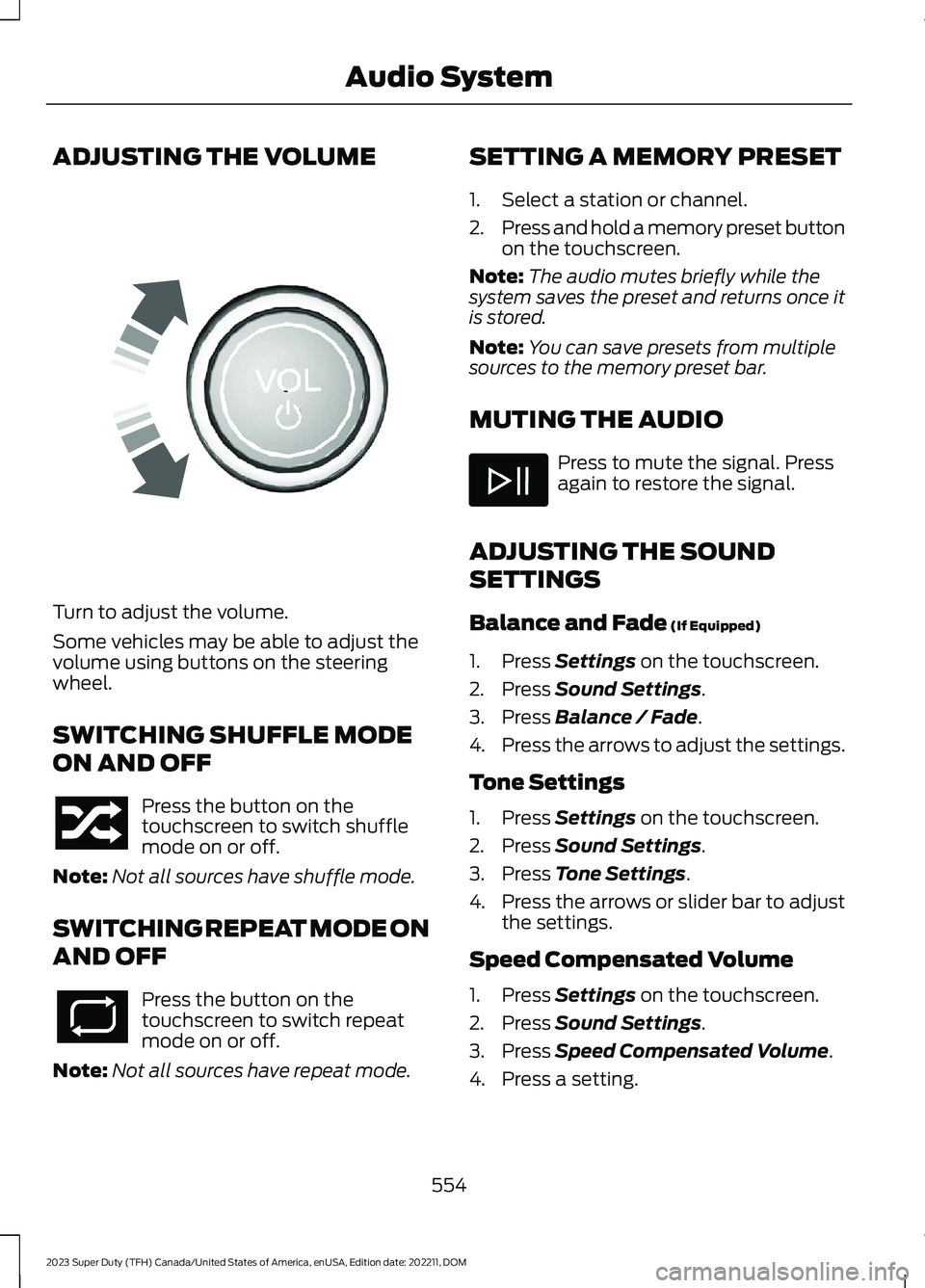
ADJUSTING THE VOLUME
Turn to adjust the volume.
Some vehicles may be able to adjust thevolume using buttons on the steeringwheel.
SWITCHING SHUFFLE MODE
ON AND OFF
Press the button on thetouchscreen to switch shufflemode on or off.
Note:Not all sources have shuffle mode.
SWITCHING REPEAT MODE ON
AND OFF
Press the button on thetouchscreen to switch repeatmode on or off.
Note:Not all sources have repeat mode.
SETTING A MEMORY PRESET
1.Select a station or channel.
2.Press and hold a memory preset buttonon the touchscreen.
Note:The audio mutes briefly while thesystem saves the preset and returns once itis stored.
Note:You can save presets from multiplesources to the memory preset bar.
MUTING THE AUDIO
Press to mute the signal. Pressagain to restore the signal.
ADJUSTING THE SOUND
SETTINGS
Balance and Fade (If Equipped)
1.Press Settings on the touchscreen.
2.Press Sound Settings.
3.Press Balance / Fade.
4.Press the arrows to adjust the settings.
Tone Settings
1.Press Settings on the touchscreen.
2.Press Sound Settings.
3.Press Tone Settings.
4.Press the arrows or slider bar to adjustthe settings.
Speed Compensated Volume
1.Press Settings on the touchscreen.
2.Press Sound Settings.
3.Press Speed Compensated Volume.
4.Press a setting.
554
2023 Super Duty (TFH) Canada/United States of America, enUSA, Edition date: 202211, DOMAudio SystemE248939
Page 568 of 738
Vehicle Software Update
See Software Update Indicators (page583).
Wireless Accessory Charger
Wireless accessory chargeractive.
FEATURE BAR
The feature bar is located on the bottomof the display and allows you to accessvehicle features.
Press to use the radio, a USB, amedia player or a Bluetooth®device.
Press to make calls and accessthe phonebook on your cellphone.
Press to use the navigationsystem.
Press to replace this button witha shortcut to a feature or setting.
Press to search for and usecompatible apps on your iOS orAndroid device.
Press to adjust system settings.
Press to view features.
Note:The icon may be different dependingon your vehicle.
INFORMATION ON DEMAND
SCREEN
The information on demand screendisplays cards on the side of the displayand allows you to see information fromdifferent features.
Press the button to view the nextcard.
Press the button to view theprevious card.
Press the button to viewavailable cards.
On some screens, you can swipe a cardtoward the center of the screen to movethe content into the main screen.
REBOOTING THE CENTER
DISPLAY
You can reboot the center display usingthe controls on the steering wheel.
1.Simultaneously press and hold theseek forward and audio system powerbutton for 10 seconds.
CENTER DISPLAY OVERVIEW
VIDEOS
SYNC® 4 — Super Duty® Basic Interactions
564
2023 Super Duty (TFH) Canada/United States of America, enUSA, Edition date: 202211, DOMCenter Display OverviewE353214 E100027 E358432 E353220 E280315 E353210 E335299 E335300 E347104 E353212 E353211 E353209
Page 569 of 738
FORD ASSISTANT
USING FORD ASSISTANT
The digital assistant allows you to controlvehicle features using conversationalrequests.
To begin a voice interaction using the wakeword, say the selected wake word, thensay your command.
Press the voice interactionbutton on the steering wheel. Atone sounds before you can sayyour command.
Note:You may need to enable yourvehicle's modem to use certain voicecommands. See Enabling and Disablingthe Modem (page 548).
Note:When you are not driving, additionalcommands are available by using popularchat applications. Use FordPass to setup aconversation with your Ford assistant.
Voice Command Examples
To see examples of what voice commandsyou can use with different features:
Press the button on thetouchscreen.
1.Press Ford Assistant.
2.Press Voice Command Help.
3.Select a feature.
FORD ASSISTANT SETTINGS
To access the settings menu:
Press the button on thetouchscreen.
1.Press Ford Assistant.
From the settings menu you can do thefollowing:
•Switch listen for wake word on or off.
•Set the preferred wake word.
•Switch advance mode on or off.
•Switch phone confirmation on or off.
•Switch the commands list on or off.
•View the commands help menu.
Press the button next to a menuoption for more information.
FORD ASSISTANT – FREQUENTLYASKED QUESTIONS
Why does the system notunderstand what I am saying?
•You are speaking too soon. When usingthe button of the steering wheel, waitfor the tone before you speak.
Why does the system notunderstand the name of a track orartist?
•Bluetooth® does not support voicecommands.Connect your device to aUSB port.
•You are not saying the name exactlyas it appears on your device. Say thename of the track or artist exactly as itappears on your device. Spell out anyabbreviations in the name.
•The system does not recognize somespecial characters contained in thename of a song or artist, for example*, - or +. Rename the files on yourdevice or use the touchscreen to selectand play the track.
565
2023 Super Duty (TFH) Canada/United States of America, enUSA, Edition date: 202211, DOMVoice InteractionE142599 E280315 E280315 E366956
Page 571 of 738
WHAT IS ALEXA BUILT-IN
Allows you to use Alexa in your vehicle forauto specific use cases on the road andgives you access to an ever evolvingnumber of skills that help to make your lifemore productive, entertaining, andconnected while using your vehicle.
ALEXA BUILT-IN
REQUIREMENTS
To use Alexa, all of the following mustoccur:
•Your vehicle modem is enabled.
•You are logged into an existing Amazonaccount.
•Vehicle location services are enabled.
•Vehicle connectivity and vehicle datasharing is enabled.
SIGNING INTO YOUR
ACCOUNT
Press the button in the statusbar and follow the on-screenprompts.
To sign in using the settings menu:
1.Press Settings on the touchscreen.
2.Press Amazon Alexa.
3.Press Get Started.
4.Sign into your account by eitherscanning the QR code or entering theon-screen code into the Amazonwebsite.
5.Once logged in, follow the on-screenprompts.
6.When complete, the vehicle informsyou that Alexa is ready to be used inthe vehicle.
Signing Out of Your Account
1.Press Settings on the touchscreen.
2.Press Amazon Alexa.
3.Press Sign Out.
USING ALEXA BUILT-IN
To use Alexa, say “Alexa” or press the voiceinteraction button on the steering wheeland then say “Alexa” to invoke Alexa tostart listening.
Note:If the wake word is not enabled, youcan only use the voice interaction button.
You can use Alexa for the following andmore:
•Entertainment.
•Hands-free calling.
•Traffic and navigation.
•Vehicle controls.
•Smart home device control.
•Weather and news information.
ALEXA BUILT-IN SETTINGS
Enabling the Wake Word
1.Press Settings on the touchscreen.
2.Press Amazon Alexa.
3.Switch Listen for Wake Word on or off.
Note:If the wake word is not enabled, youcan only use the voice interaction button.
Contact List
Displays a list of connected phones andcontact sharing status for each phone.
To change the contact sharing status:
1.Press Settings on the touchscreen.
2.Press Amazon Alexa.
3.Press Contact List.
567
2023 Super Duty (TFH) Canada/United States of America, enUSA, Edition date: 202211, DOMAlexa Built-InE368039
Page 575 of 738
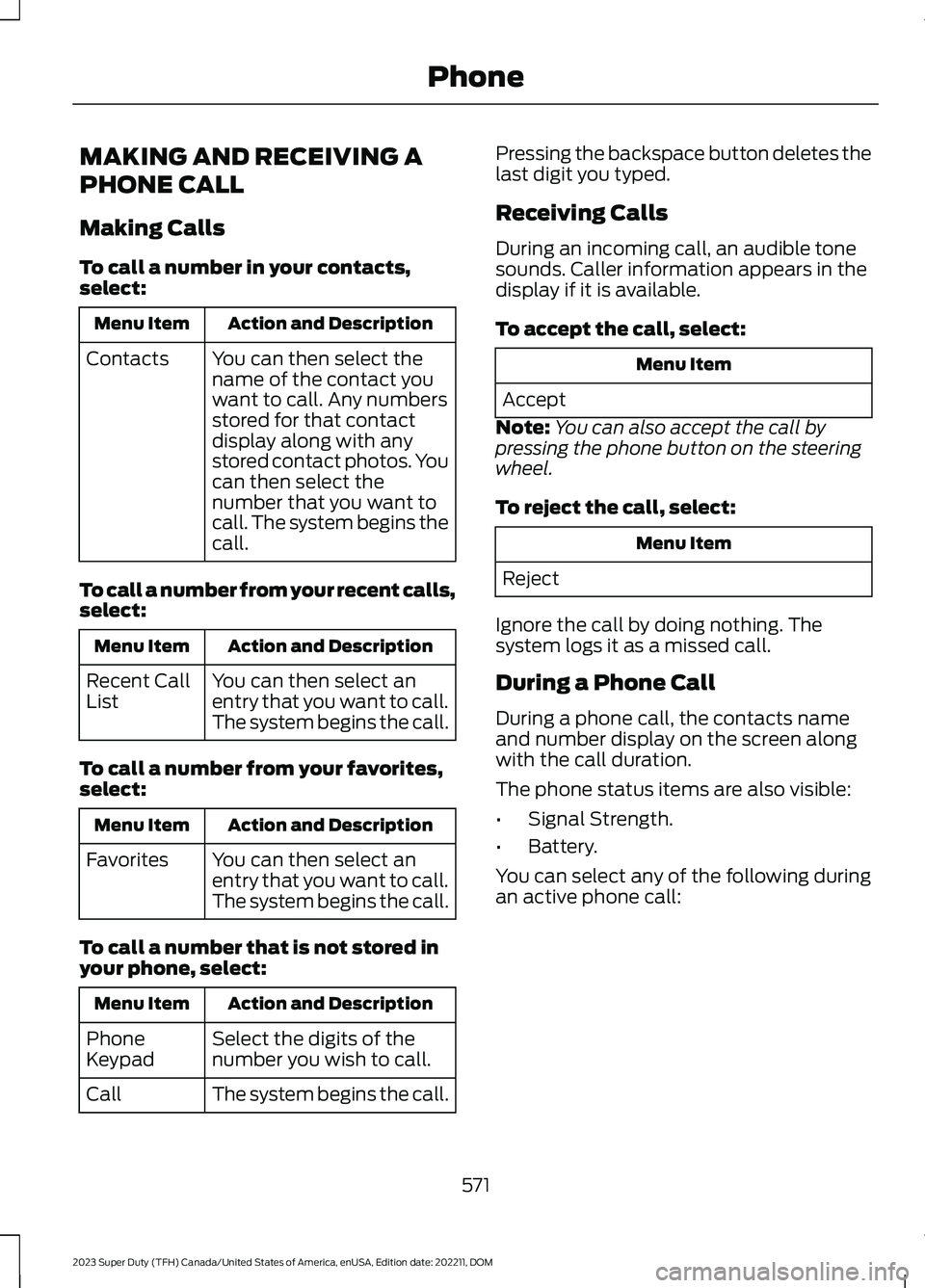
MAKING AND RECEIVING A
PHONE CALL
Making Calls
To call a number in your contacts,select:
Action and DescriptionMenu Item
You can then select thename of the contact youwant to call. Any numbersstored for that contactdisplay along with anystored contact photos. Youcan then select thenumber that you want tocall. The system begins thecall.
Contacts
To call a number from your recent calls,select:
Action and DescriptionMenu Item
You can then select anentry that you want to call.The system begins the call.
Recent CallList
To call a number from your favorites,select:
Action and DescriptionMenu Item
You can then select anentry that you want to call.The system begins the call.
Favorites
To call a number that is not stored inyour phone, select:
Action and DescriptionMenu Item
Select the digits of thenumber you wish to call.PhoneKeypad
The system begins the call.Call
Pressing the backspace button deletes thelast digit you typed.
Receiving Calls
During an incoming call, an audible tonesounds. Caller information appears in thedisplay if it is available.
To accept the call, select:
Menu Item
Accept
Note:You can also accept the call bypressing the phone button on the steeringwheel.
To reject the call, select:
Menu Item
Reject
Ignore the call by doing nothing. Thesystem logs it as a missed call.
During a Phone Call
During a phone call, the contacts nameand number display on the screen alongwith the call duration.
The phone status items are also visible:
•Signal Strength.
•Battery.
You can select any of the following duringan active phone call:
571
2023 Super Duty (TFH) Canada/United States of America, enUSA, Edition date: 202211, DOMPhone