wheel FORD SUPER DUTY 2023 Owners Manual
[x] Cancel search | Manufacturer: FORD, Model Year: 2023, Model line: SUPER DUTY, Model: FORD SUPER DUTY 2023Pages: 738, PDF Size: 18.49 MB
Page 405 of 738
WHAT IS TRAILER REVERSE
GUIDANCE
Trailer reverse guidance provides viewsand graphics on the touchscreen to helpyou steer your vehicle when you backup atrailer.
HOW DOES TRAILER REVERSE
GUIDANCE WORK
Trailer reverse guidance uses a sticker orsensor attached to the trailer to detect thetrailer angle relative to the towing vehicleand provides instructions, graphics andcamera views on the touchscreen.
TRAILER REVERSE GUIDANCE
PRECAUTIONS
WARNING: Driving while distractedcan result in loss of vehicle control, crashand injury. We strongly recommend thatyou use extreme caution when using anydevice that may take your focus off theroad. Your primary responsibility is thesafe operation of your vehicle. Werecommend against the use of anyhand-held device while driving andencourage the use of voice-operatedsystems when possible. Make sure youare aware of all applicable local lawsthat may affect the use of electronicdevices while driving.
WARNING: This system is an extradriving aid. It does not replace yourattention and judgment, or the need toapply the brakes. This system does NOTautomatically brake your vehicle. If youfail to press the brake pedal whennecessary, you may collide with anothervehicle.
Note:The system is not a substitute forsafe driving practices. Always be aware ofyour vehicle and trailer combination, andthe surrounding environment.
Note:The system does not detect orprevent your vehicle or trailer from makingcontact with obstacles in the surroundingenvironment.
Note:The front end of your vehicle swingsout when changing the direction of thetrailer.
Note:In certain conditions, the trailer couldturn faster or the trailer angle could increasemore than anticipated. Always monitor theclearance between the trailer and vehicleand the surroundings.
SETTING UP TRAILER
REVERSE GUIDANCE FOR A
CONVENTIONAL TRAILER
CONFIGURING THE TRAILER
You must configure a trailer in the systemto use trailer reverse guidance. This is aone-time setup process and the trailerinformation is saved in the system for thenext time you use that trailer.
The system only works with conventionaltrailers. It does not work with other typesincluding fifth-wheel and gooseneck. Thefollowing illustration shows examples ofconventional trailers on the left-hand side.
Note:Trailer reverse guidance cameraviews are available with no trailer setup.However, complete functionality includinggraphics and automatic view switching isenabled by setup. Setup is required toenable trailer backup assistance.
401
2023 Super Duty (TFH) Canada/United States of America, enUSA, Edition date: 202211, DOMTrailer Reverse Guidance (If Equipped)
Page 408 of 738
Note:If your vehicle came with a trailersensor kit, the vehicle will receive an updatethat allows the system to operate with asensor or sticker. If your vehicle did not comewith a trailer sensor kit, your vehicle can besetup using either method, but you need toseparately purchase the trailer sensor kitfrom your authorized dealer. Once yourvehicle is enabled for sticker setup, thedefault setup for new trailers requiresplacement of the sticker. To setup a trailerwith a sensor, install the sensor on the trailerand plug the connector into the connectorin your bumper prior to configuring thetrailer. Trailers that were set up with asensor still require the sensor to function.To change a trailer to use the sticker, deletethe trailer in the system and repeat thetrailer setup with the sticker.
CALIBRATING THE SYSTEM
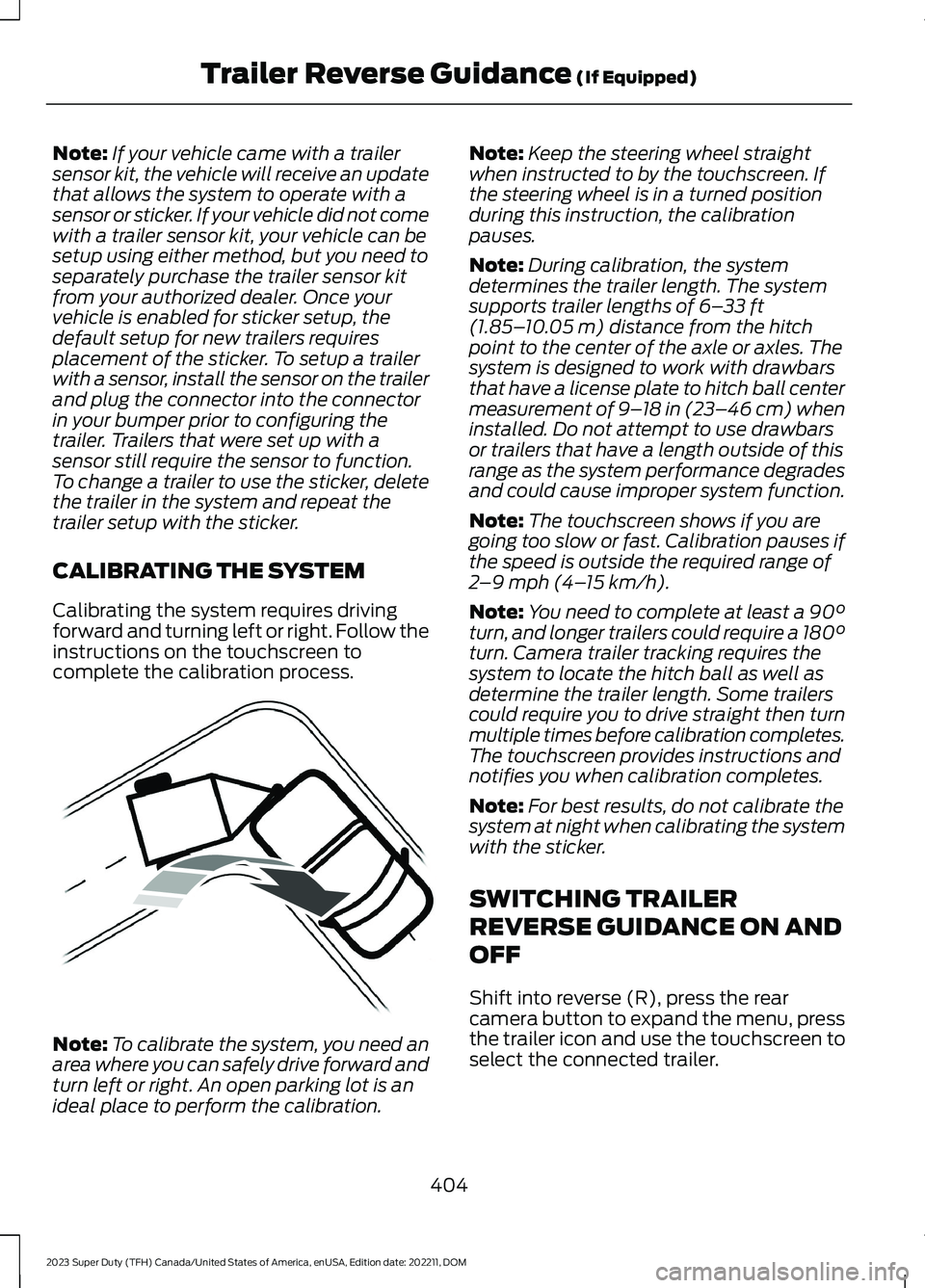
Calibrating the system requires drivingforward and turning left or right. Follow theinstructions on the touchscreen tocomplete the calibration process.
Note:To calibrate the system, you need anarea where you can safely drive forward andturn left or right. An open parking lot is anideal place to perform the calibration.
Note:Keep the steering wheel straightwhen instructed to by the touchscreen. Ifthe steering wheel is in a turned positionduring this instruction, the calibrationpauses.
Note:During calibration, the systemdetermines the trailer length. The systemsupports trailer lengths of 6–33 ft(1.85–10.05 m) distance from the hitchpoint to the center of the axle or axles. Thesystem is designed to work with drawbarsthat have a license plate to hitch ball centermeasurement of 9–18 in (23–46 cm) wheninstalled. Do not attempt to use drawbarsor trailers that have a length outside of thisrange as the system performance degradesand could cause improper system function.
Note:The touchscreen shows if you aregoing too slow or fast. Calibration pauses ifthe speed is outside the required range of2–9 mph (4–15 km/h).
Note:You need to complete at least a 90°turn, and longer trailers could require a 180°turn. Camera trailer tracking requires thesystem to locate the hitch ball as well asdetermine the trailer length. Some trailerscould require you to drive straight then turnmultiple times before calibration completes.The touchscreen provides instructions andnotifies you when calibration completes.
Note:For best results, do not calibrate thesystem at night when calibrating the systemwith the sticker.
SWITCHING TRAILER
REVERSE GUIDANCE ON AND
OFF
Shift into reverse (R), press the rearcamera button to expand the menu, pressthe trailer icon and use the touchscreen toselect the connected trailer.
404
2023 Super Duty (TFH) Canada/United States of America, enUSA, Edition date: 202211, DOMTrailer Reverse Guidance (If Equipped)E352329
Page 409 of 738
Note:If the trailer was connected just priorto turning the system on, you may need todrive forward to initialize the system. Followthe instructions on the touchscreen toactivate the system.
USING TRAILER REVERSE
GUIDANCE VIEWS
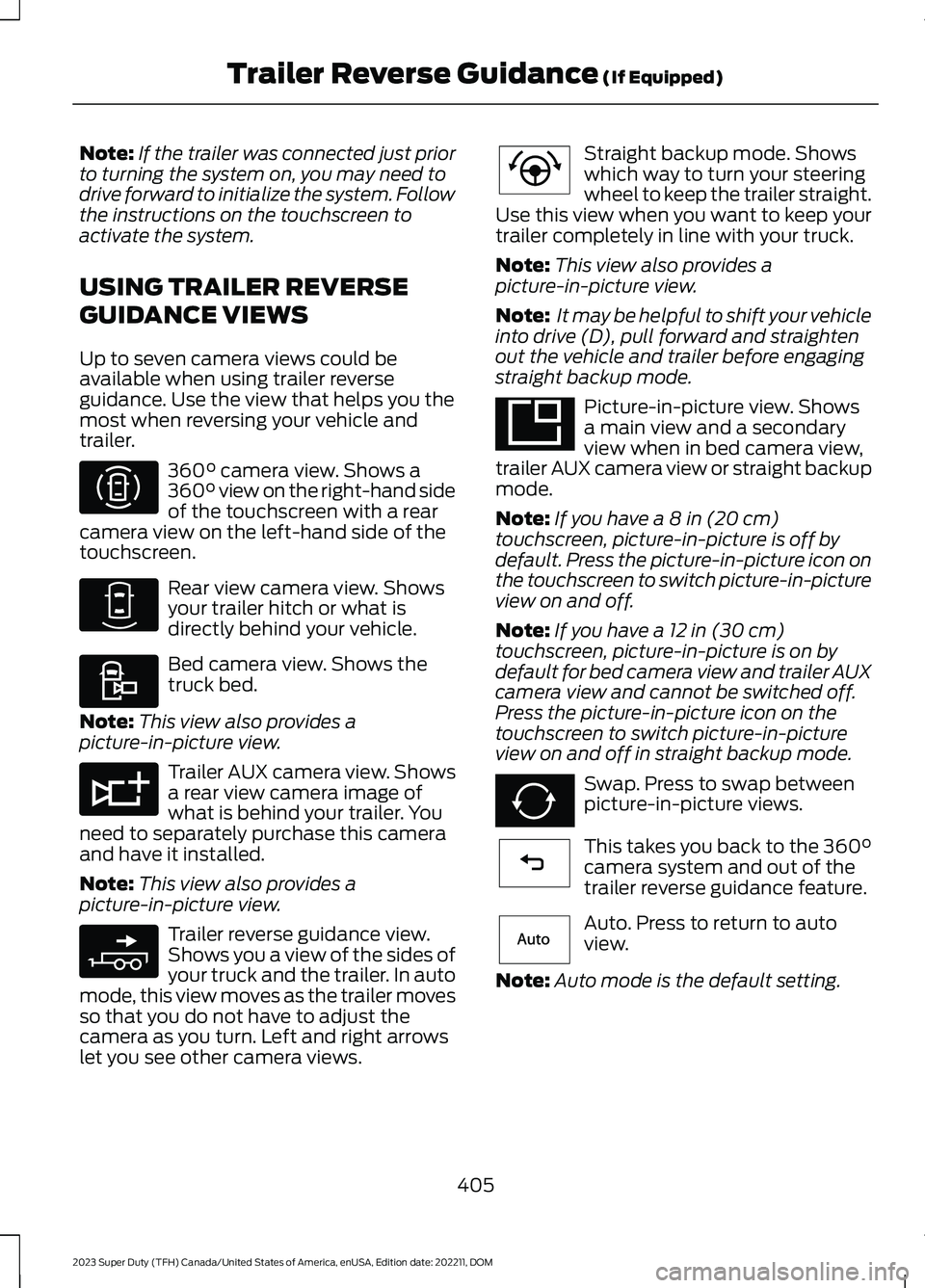
Up to seven camera views could beavailable when using trailer reverseguidance. Use the view that helps you themost when reversing your vehicle andtrailer.
360° camera view. Shows a360° view on the right-hand sideof the touchscreen with a rearcamera view on the left-hand side of thetouchscreen.
Rear view camera view. Showsyour trailer hitch or what isdirectly behind your vehicle.
Bed camera view. Shows thetruck bed.
Note:This view also provides apicture-in-picture view.
Trailer AUX camera view. Showsa rear view camera image ofwhat is behind your trailer. Youneed to separately purchase this cameraand have it installed.
Note:This view also provides apicture-in-picture view.
Trailer reverse guidance view.Shows you a view of the sides ofyour truck and the trailer. In automode, this view moves as the trailer movesso that you do not have to adjust thecamera as you turn. Left and right arrowslet you see other camera views.
Straight backup mode. Showswhich way to turn your steeringwheel to keep the trailer straight.Use this view when you want to keep yourtrailer completely in line with your truck.
Note:This view also provides apicture-in-picture view.
Note: It may be helpful to shift your vehicleinto drive (D), pull forward and straightenout the vehicle and trailer before engagingstraight backup mode.
Picture-in-picture view. Showsa main view and a secondaryview when in bed camera view,trailer AUX camera view or straight backupmode.
Note:If you have a 8 in (20 cm)touchscreen, picture-in-picture is off bydefault. Press the picture-in-picture icon onthe touchscreen to switch picture-in-pictureview on and off.
Note:If you have a 12 in (30 cm)touchscreen, picture-in-picture is on bydefault for bed camera view and trailer AUXcamera view and cannot be switched off.Press the picture-in-picture icon on thetouchscreen to switch picture-in-pictureview on and off in straight backup mode.
Swap. Press to swap betweenpicture-in-picture views.
This takes you back to the 360°camera system and out of thetrailer reverse guidance feature.
Auto. Press to return to autoview.
Note:Auto mode is the default setting.
405
2023 Super Duty (TFH) Canada/United States of America, enUSA, Edition date: 202211, DOMTrailer Reverse Guidance (If Equipped)E310996 E310967 E310995 E311776 E310965 E224484 E351663 E351662 E224486 E315644
Page 410 of 738
Hitch Angle Graphic
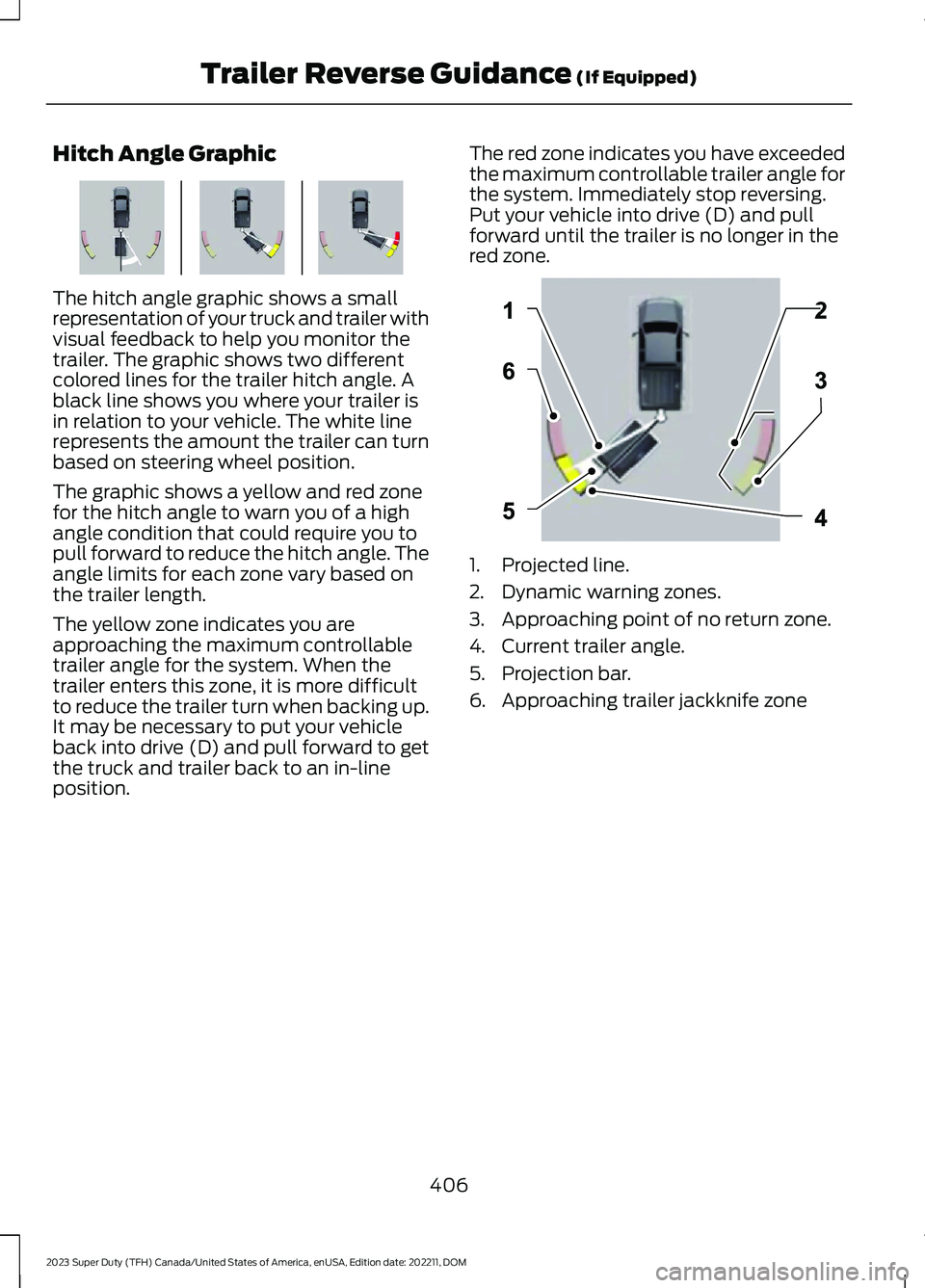
The hitch angle graphic shows a smallrepresentation of your truck and trailer withvisual feedback to help you monitor thetrailer. The graphic shows two differentcolored lines for the trailer hitch angle. Ablack line shows you where your trailer isin relation to your vehicle. The white linerepresents the amount the trailer can turnbased on steering wheel position.
The graphic shows a yellow and red zonefor the hitch angle to warn you of a highangle condition that could require you topull forward to reduce the hitch angle. Theangle limits for each zone vary based onthe trailer length.
The yellow zone indicates you areapproaching the maximum controllabletrailer angle for the system. When thetrailer enters this zone, it is more difficultto reduce the trailer turn when backing up.It may be necessary to put your vehicleback into drive (D) and pull forward to getthe truck and trailer back to an in-lineposition.
The red zone indicates you have exceededthe maximum controllable trailer angle forthe system. Immediately stop reversing.Put your vehicle into drive (D) and pullforward until the trailer is no longer in thered zone.
1.Projected line.
2.Dynamic warning zones.
3.Approaching point of no return zone.
4.Current trailer angle.
5.Projection bar.
6.Approaching trailer jackknife zone
406
2023 Super Duty (TFH) Canada/United States of America, enUSA, Edition date: 202211, DOMTrailer Reverse Guidance (If Equipped)E384785 E384786
Page 413 of 738
TRAILER REVERSE GUIDANCE –FREQUENTLY ASKED QUESTIONS
Why does the trailer not reversestraight?
Verify the sensor is correctly installed.Other factors such as the hitchconnection, road camber, road slopeand trailer suspension could influencehow straight the system can reversethe trailer when the control knob is notturned. You can compensate for thetrailer drifting to the right or left byslowly turning the knob until the traileris following your desired path and thenholding the knob in that position.
Why does the system not detect asensor?
There could be an issue with theconnection, the wiring harness couldbe damaged, you could have multiplesensors connected or the sensor couldbe incorrectly installed. Check that the12-way connector is fully inserted intothe 12-way socket. The red rubber sealis not visible when the connector isfully inserted. Also check that thewiring harness sensor connection isfully inserted at the trailer sensor, andcheck for damaged wiring betweenthe 12-way connector and the trailersensor. Also, check that the sensor isinstalled on a vertical surface with thearrows pointing straight up.
What does it mean if the systemremains on one message for anextended time during calibration whensetting up the system with the sticker?
The camera could need to be cleaned,the sticker could be blocked, thedrawbar could be outside the allowedrange of 4–19 in (10–48 cm) or youcould need to move to a different areato change the lighting and background.Verify the sticker is in the properlocation. See Applying the TrailerReverse Aid Sticker (page 403). Youcan move to a different area or changethe direction you are driving or setupthe system at a different time of day.Some trailers are not compatible withthe sticker and camera system. If theissue persists with the sticker setup,you may choose to setup the trailerwith a sensor.
What does it mean if the system pausesduring calibration?
There could be steering input or trailermovement during the straight driveportion of the calibration process.
What does it mean if the systemremains on one message for anextended time during calibration whensetting up the system with the sensor?
The sensor could be incorrectlyinstalled, the trailer length could beoutside the allowed range or the roadsurface could be too rough or bumpy.
What does it mean if the systemdisplays hold steering steady duringturn?
Part of the calibration process for thesticker setup requires a steady turn. Ifyou are continually moving thesteering wheel during the turn, thisdelays the calibration process. Toenable the calibration process, holdthe steering wheel at the sameposition when turning.
409
2023 Super Duty (TFH) Canada/United States of America, enUSA, Edition date: 202211, DOMTrailer Reverse Guidance (If Equipped)
Page 415 of 738
What does it mean when the systemtells you to take control of the steeringwheel?
The system is no longer steering thevehicle and you must take oversteering. There are four reasons thesystem could display this message.The first reason the system coulddisplay this message is that you havetouched the steering wheel when thesystem is steering. The second reasonthe system could display this messageis that you have exceeded themaximum speed for the feature. Thethird reason the system could displaythis message is that the trailer is notdetected. The final reason the systemcould display this message is that aninternal condition for system operationis not met that requires your vehicle toreturn to manual control of thesteering.
How do I use a sticker if I havepreviously setup a trailer with thesensor?
Disconnect the sensor wiring and adda new trailer to the system and followthe instructions for setup with asticker. See Applying the TrailerReverse Aid Sticker (page 403). Ifyour vehicle does not support thesticker option, the touchscreeninstructs you to install the sensoragain.
What if I want to use a sensor for thetrailer instead of a sticker?
Install the sensor and connect thesensor wiring before adding the newtrailer to the system. You mustconnect the sensor before you add thetrailer. If your vehicle did not come witha sensor, you can purchase one fromyour authorized dealer.
What does it mean if the system doesnot detect a trailer that is setup with asticker?
The system requires a clear view of thesticker placed on the trailer. You mustkeep the camera lens and sticker cleanfor the system to correctly operate. Ifthe system cannot initially detect thetrailer, it could be necessary for you tochange the lighting conditions bymoving your vehicle and trailer orwaiting until the conditions change.See Applying the Trailer ReverseAid Sticker (page 403). Some trailersare not compatible with the stickerand camera system. If the systemconsistently does not detect the trailerwith the sticker setup, you may chooseto setup the trailer with a sensor.
Note:The system is designed to be usedwith the same trailer connection every timeyou choose the trailer from the touchscreen.When using a different drawbar or adifferent pin hole on drawbars with morethan one, connecting the drawbar to yourvehicle affects the trailer position and youmay need to repeat the trailer setup andcalibration process.
411
2023 Super Duty (TFH) Canada/United States of America, enUSA, Edition date: 202211, DOMTrailer Reverse Guidance (If Equipped)
Page 416 of 738
OFF-ROAD DRIVING
WHAT IS OFF-ROAD DRIVING
Off-road driving is driving your vehicle onunsurfaced roads or trails, made from dirt,rocks, sand and mud.
BASIC OFF-ROAD DRIVINGTECHNIQUES
Off-road Driving Hints
Before taking your vehicle off-roading, abasic vehicle inspection should be done tomake sure that the vehicle is in top workingcondition. It is always recommended thatat least two vehicles are used whileoff-roading. The buddy system helps makesure that help is close at hand should avehicle become stuck or damaged. It is alsowise to take supplies such as a first aid kit,supply of water, tow strap, cell or satellitephone with you any time an off-roadexcursion is planned.
1.Grip the steering wheel with thumbson the outside of the rim. This willreduce the risk of injury due to abruptsteering wheel motions that occurwhen negotiating rough terrain.
2.Throttle, brake and steering inputsshould be made in a smooth andcontrolled manner. Sudden inputs tothe controls can cause loss of tractionor upset the vehicle, especially whileon loose terrain or while crossingobstacles such as rocks or logs.
3.Look ahead on your route notingupcoming obstacles, or any otherfactors which may indicate a changein available traction, and adjust thevehicle speed and route accordingly.
4.When driving off-road, if the front orrear suspension is bottoming outand/or excessive contact with theskid-plates is encountered, reducevehicle speed to avoid potentialdamage to the vehicle.
5.When with other vehicles, it isrecommended that communication isused, and the lead vehicle notify othervehicles of obstacles that could causepotential vehicle damage.
6.Always keep available groundclearance in mind and pick a route thatminimizes the risk of catching theunderside of the vehicle on an obstacle.
7.When negotiating low speed obstacles,applying light brake pressure inconjunction with the throttle will helpprevent the vehicle from jerking andwill allow you to negotiate the obstaclein a more controlled manner. Using 4Lwill also help with this.
8.Off-roading requires a high degree ofconcentration. Even if your local lawdoes not prohibit alcohol use whiledriving off-road, Ford stronglyrecommends against drinking if youplan to off-road.
Crossing Obstacles
•Review the path ahead beforeattempting to cross any obstacle. It isbest if the obstacle is reviewed fromoutside the vehicle so that there is agood understanding of terrain conditionboth in front of and behind theobstacle.
•Approach obstacles slowly.
412
2023 Super Duty (TFH) Canada/United States of America, enUSA, Edition date: 202211, DOMDriving Hints
Page 417 of 738
•If a large obstacle such as a rockcannot be avoided, choose a path thatplaces the rock directly under the tirerather than the undercarriage of thevehicle. This will help prevent damageto the vehicle.
•Ditches and washouts should becrossed at a 45° angle, allowing eachwheel to independently cross theobstacle.
Hill Climbing
WARNING: Extreme care shouldbe used when steering the vehicle inreverse down a slope so as not to causethe vehicle to swerve out of control.
•Always attempt to climb a steep hillalong the fall line of the slope and notdiagonally.
•If the vehicle is unable to make it upthe hill, DO NOT attempt to turn backdown the slope. Place the vehicle inlow range and slowly back down inreverse.
•When descending a steep slope, selectlow gear and engage hill descentcontrol. Use the throttle and brakepedals to control your descent speed.
Note:Hill descent control is functional inreverse and should be used in this situation.
DRIVING THROUGH WATERLIMITATIONS
WARNING: Do not attempt tocross a deep, fast flowing body of water.Failure to follow this instruction couldresult in the loss of control of yourvehicle, personal injury or death.
Determine the depth and speed of thecurrent before attempting a water crossing.As the water depth increases, reduce yourvehicle speed to avoid potential vehicledamage.
The key to a safe crossing is the waterdepth, current and bottom of the water'scondition. On soft bottoms, the vehiclesinks in, effectively increasing the waterlevel on the vehicle. Make sure to considerthis when determining the depth of water.Be aware that obstacles and debris maybe beneath the water’s surface.
Note:Cross flowing water at an angleheading slightly upstream.
Note:Tread lightly and avoid damage tothe environment.
Drive slowly when crossing water. Startvery slowly when entering, then buildmomentum. Proceed with a constant slowspeed lightly pressing on the accelerator.Ease off the accelerator as you reach theother side to diminish the front wave. Applythe accelerator slowly and as necessaryto climb out of the other side.
Note:Do not try to accelerate through thewater crossing.
When driving too fast in water or throughdeep water, the engine, transmission,transfer case, axles, electrical componentsor vehicle interior could ingest water.Muddy waters can reduce the coolingsystem effectiveness by depositing debrisinto the radiator. Water can causepermanent damage that may not becovered by your vehicle warranty. Seebelow for your vehicle’s capabilities.
413
2023 Super Duty (TFH) Canada/United States of America, enUSA, Edition date: 202211, DOMDriving Hints
Page 418 of 738
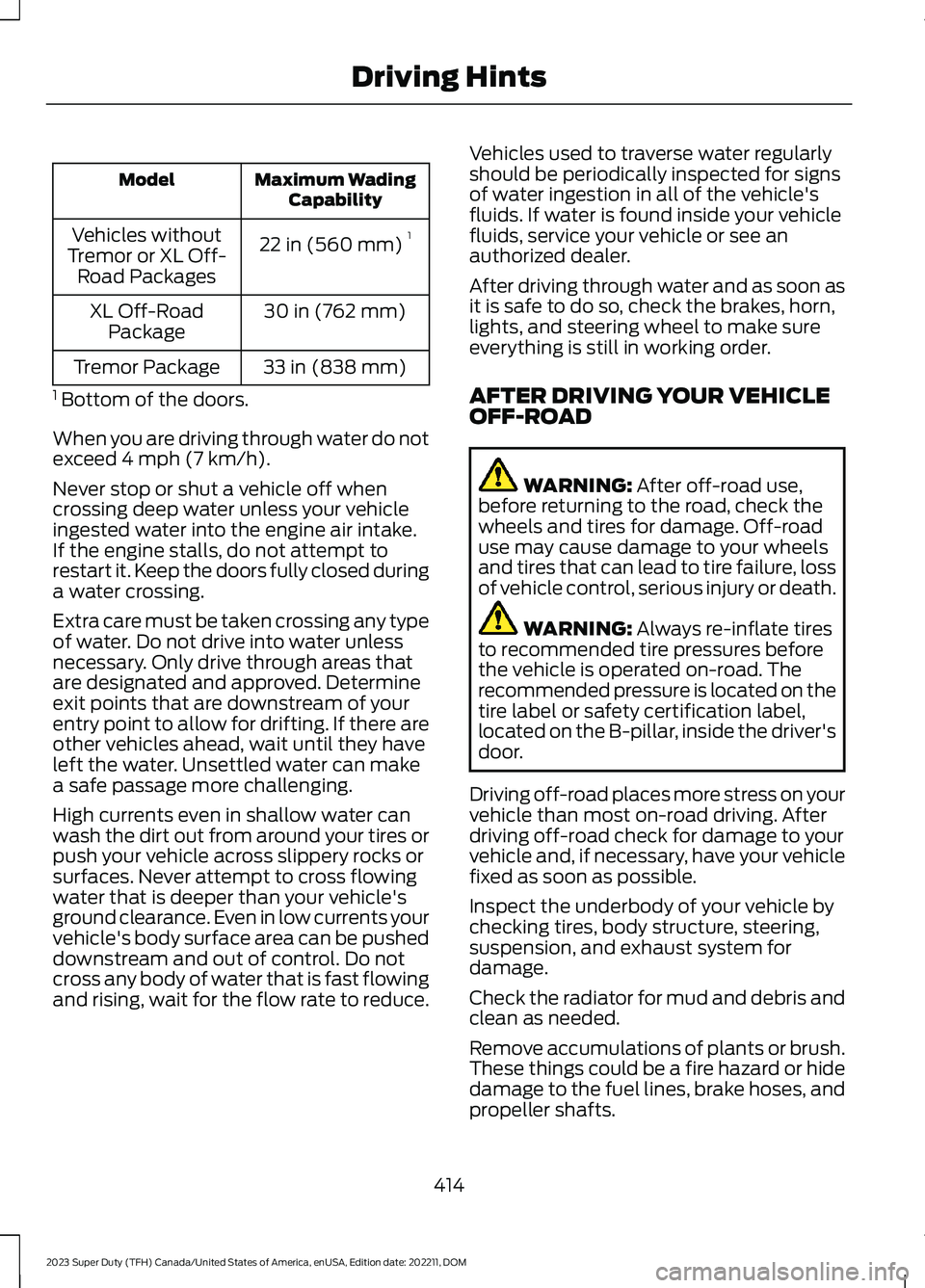
Maximum WadingCapabilityModel
22 in (560 mm)1Vehicles withoutTremor or XL Off-Road Packages
30 in (762 mm)XL Off-RoadPackage
33 in (838 mm)Tremor Package
1 Bottom of the doors.
When you are driving through water do notexceed 4 mph (7 km/h).
Never stop or shut a vehicle off whencrossing deep water unless your vehicleingested water into the engine air intake.If the engine stalls, do not attempt torestart it. Keep the doors fully closed duringa water crossing.
Extra care must be taken crossing any typeof water. Do not drive into water unlessnecessary. Only drive through areas thatare designated and approved. Determineexit points that are downstream of yourentry point to allow for drifting. If there areother vehicles ahead, wait until they haveleft the water. Unsettled water can makea safe passage more challenging.
High currents even in shallow water canwash the dirt out from around your tires orpush your vehicle across slippery rocks orsurfaces. Never attempt to cross flowingwater that is deeper than your vehicle'sground clearance. Even in low currents yourvehicle's body surface area can be pusheddownstream and out of control. Do notcross any body of water that is fast flowingand rising, wait for the flow rate to reduce.
Vehicles used to traverse water regularlyshould be periodically inspected for signsof water ingestion in all of the vehicle'sfluids. If water is found inside your vehiclefluids, service your vehicle or see anauthorized dealer.
After driving through water and as soon asit is safe to do so, check the brakes, horn,lights, and steering wheel to make sureeverything is still in working order.
AFTER DRIVING YOUR VEHICLEOFF-ROAD
WARNING: After off-road use,before returning to the road, check thewheels and tires for damage. Off-roaduse may cause damage to your wheelsand tires that can lead to tire failure, lossof vehicle control, serious injury or death.
WARNING: Always re-inflate tiresto recommended tire pressures beforethe vehicle is operated on-road. Therecommended pressure is located on thetire label or safety certification label,located on the B-pillar, inside the driver'sdoor.
Driving off-road places more stress on yourvehicle than most on-road driving. Afterdriving off-road check for damage to yourvehicle and, if necessary, have your vehiclefixed as soon as possible.
Inspect the underbody of your vehicle bychecking tires, body structure, steering,suspension, and exhaust system fordamage.
Check the radiator for mud and debris andclean as needed.
Remove accumulations of plants or brush.These things could be a fire hazard or hidedamage to the fuel lines, brake hoses, andpropeller shafts.
414
2023 Super Duty (TFH) Canada/United States of America, enUSA, Edition date: 202211, DOMDriving Hints
Page 419 of 738
After extended operation in mud, sand,water, or similar dirty conditions, inspectthe underbody and clean your vehicle assoon as possible.
If you experience unusual vibration afterdriving in mud, slush or similar conditions,check the wheels for impacted material.Impacted material can cause vibrationswhile driving and wheel imbalance.Remove the material to resolve theproblem.
COLD WEATHER
PRECAUTIONS - 6.7L DIESEL
Winter Grill Cover (If Equipped)
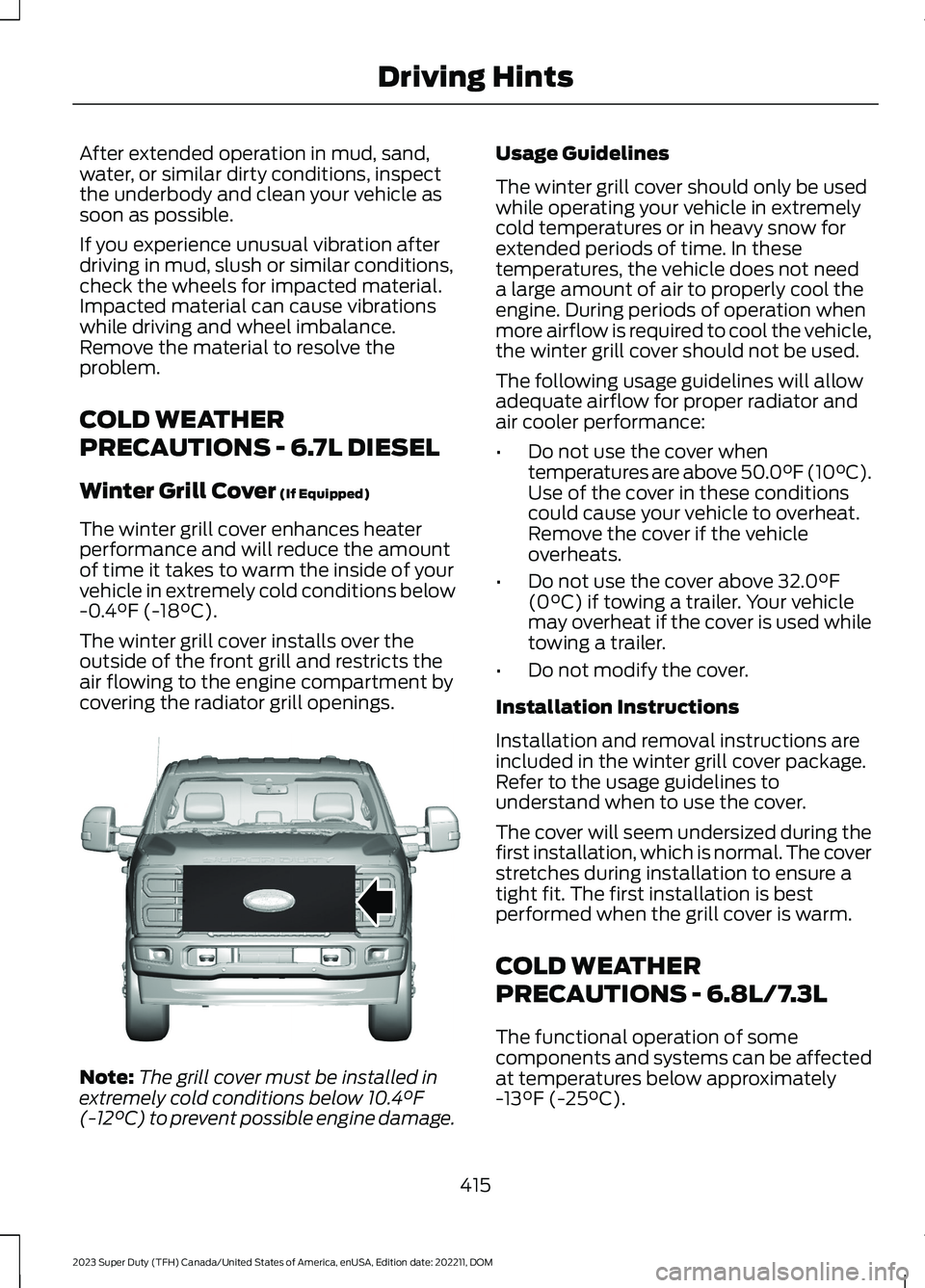
The winter grill cover enhances heaterperformance and will reduce the amountof time it takes to warm the inside of yourvehicle in extremely cold conditions below-0.4°F (-18°C).
The winter grill cover installs over theoutside of the front grill and restricts theair flowing to the engine compartment bycovering the radiator grill openings.
Note:The grill cover must be installed inextremely cold conditions below 10.4°F(-12°C) to prevent possible engine damage.
Usage Guidelines
The winter grill cover should only be usedwhile operating your vehicle in extremelycold temperatures or in heavy snow forextended periods of time. In thesetemperatures, the vehicle does not needa large amount of air to properly cool theengine. During periods of operation whenmore airflow is required to cool the vehicle,the winter grill cover should not be used.
The following usage guidelines will allowadequate airflow for proper radiator andair cooler performance:
•Do not use the cover whentemperatures are above 50.0°F (10°C).Use of the cover in these conditionscould cause your vehicle to overheat.Remove the cover if the vehicleoverheats.
•Do not use the cover above 32.0°F(0°C) if towing a trailer. Your vehiclemay overheat if the cover is used whiletowing a trailer.
•Do not modify the cover.
Installation Instructions
Installation and removal instructions areincluded in the winter grill cover package.Refer to the usage guidelines tounderstand when to use the cover.
The cover will seem undersized during thefirst installation, which is normal. The coverstretches during installation to ensure atight fit. The first installation is bestperformed when the grill cover is warm.
COLD WEATHER
PRECAUTIONS - 6.8L/7.3L
The functional operation of somecomponents and systems can be affectedat temperatures below approximately-13°F (-25°C).
415
2023 Super Duty (TFH) Canada/United States of America, enUSA, Edition date: 202211, DOMDriving HintsE391665