steering wheel FORD SUPER DUTY 2023 Owners Manual
[x] Cancel search | Manufacturer: FORD, Model Year: 2023, Model line: SUPER DUTY, Model: FORD SUPER DUTY 2023Pages: 738, PDF Size: 18.49 MB
Page 5 of 738
Contacting Us
Contacting Us..................................................19
Introduction
About This Publication.................................21
Using This Publication.................................22
Symbols Glossary
Symbols Used on Your Vehicle................23
Data Privacy
Data Privacy....................................................26
Service Data.....................................................27
Event Data........................................................27
Settings Data..................................................28
Connected Vehicle Data.............................28
Mobile Device Data.......................................29
Emergency Call System Data...................29
Environment
Protecting the Environment.....................30
Visual Search
Steering Wheel................................................31
Instrument Panel...........................................32
Vehicle Interior................................................33
Front Exterior..................................................34
Rear Exterior....................................................35
Child Safety
Child Safety Precautions............................36
Child Restraint Anchor Points...................37
Child Restraints..............................................39
Installing Child Restraints..........................40
Booster Seats.................................................47
Child Safety Locks - Crew Cab/SuperCab.....................................................49
Seatbelts
Seatbelt Precautions...................................50
Fastening and Unfastening the Seatbelts............................................................................51
Sensitive Locking Mode..............................52
Automatic Locking Mode...........................52
Adjusting the Seatbelts DuringPregnancy....................................................53
Adjusting the Seatbelt Height..................53
Adjusting the Seatbelt Length.................54
Seatbelt Reminder.......................................54
Checking the Seatbelts..............................56
Seatbelt Extensions.....................................56
Airbags
How Do the Front Airbags Work..............57
How Do the Side Airbags Work................57
How Does the Safety Canopy™ Work..........................................................................58
Airbag Precautions.......................................59
Switching the Passenger Airbag On andOff..................................................................60
Properly Adjusting the Driver and FrontPassenger Seats.......................................64
Children and Airbags...................................64
Crash Sensors and Airbag Indicator......65
Disposing of Airbags....................................66
911 Assist
What Is 911 Assist..........................................67
How Does 911 Assist Work.........................67
Emergency Call Requirements.................67
Emergency Call Limitations......................68
911 Assist Videos...........................................68
Keys and Remote Controls
Remote Control Limitations.....................69
Using the Remote Control.........................69
Using the Key Cards.....................................69
Using Digital Key.............................................71
1
2023 Super Duty (TFH) Canada/United States of America, enUSA, Edition date: 202211, DOMTable of Contents
Page 7 of 738
Tailgate Step.................................................100
Tailgate – Troubleshooting.......................101
Tailgate Videos.............................................102
Security
Passive Anti-Theft System......................103
Anti-Theft Alarm System.........................103
Anti-Theft Alarm System Settings.......104
Security – Troubleshooting.....................105
Power Running Boards
Power Running Board Precautions.......107
Power Running Board Settings..............107
Power Running Boards –Troubleshooting......................................108
Power Running Boards Videos..............108
Steering Wheel
Adjusting the Steering Wheel - VehiclesWith: Manual Adjustable SteeringColumn.......................................................109
Adjusting the Steering Wheel - VehiclesWith: Power Adjustable SteeringColumn.......................................................109
Resetting the Stopping Position -Vehicles With: Power AdjustableSteering Column.......................................110
Horn...................................................................110
Switching the Heated Steering WheelOn and Off....................................................111
Steering Wheel Videos................................111
Adjustable Pedals
Adjusting the Pedals....................................112
Wipers and Washers
Wipers...............................................................113
Autowipers......................................................113
Checking the Wiper Blades.......................114
Replacing the Front Wiper Blades.........114
Washers...........................................................114
Wipers and Washers Videos.....................115
Wipers and Washers – Troubleshooting..........................................................................115
Exterior Lighting
Exterior Lighting Control.............................117
Headlamps......................................................117
Headlamps – Troubleshooting................117
Autolamps......................................................118
Exterior Lamps..............................................118
Exterior Zone Lighting.................................121
Automatic High Beam Control...............122
Automatic High Beam Control –Troubleshooting.......................................124
Adaptive Front Lighting.............................124
Exterior Lighting Videos.............................125
Interior Lighting
Switching All of the Interior Lamps Onand Off........................................................126
Switching the Front Interior Lamps Onand Off........................................................126
Switching the Rear Interior Lamps Onand Off........................................................126
Interior Lamp Function..............................126
Adjusting the Instrument Panel LightingBrightness...................................................127
Ambient Lighting..........................................127
Interior Lighting – Troubleshooting.......127
Windows
Opening and Closing the Windows......128
Global Opening............................................128
Window Bounce-Back...............................129
Locking the Rear Window Controls......129
Opening and Closing the SlidingWindows.....................................................129
Windows Videos..........................................130
Interior Mirror
Interior Mirror Precautions.........................131
3
2023 Super Duty (TFH) Canada/United States of America, enUSA, Edition date: 202211, DOMTable of Contents
Page 19 of 738
Wheel and Tire Information
Locating the Tire label..............................478
Department of Transportation UniformTire Quality Grades................................478
Information on the Tire Sidewall..........479
Glossary of Tire Terminology.................484
Tire Replacement Requirements.........485
Using Snow Chains....................................487
Tire Care
Checking the Tire Pressures..................490
Inflating the Tires.......................................490
Inspecting the Tire for Wear...................494
Inspecting the Tire for Damage............494
Inspecting the Wheel Valve Stems......498
Tire Rotation................................................498
Tire Pressure MonitoringSystem
What Is the Tire Pressure MonitoringSystem........................................................501
Tire Pressure Monitoring SystemOverview.....................................................501
Tire Pressure Monitoring SystemPrecautions..............................................502
Tire Pressure Monitoring SystemLimitations................................................502
Viewing the Tire Pressures.....................503
Resetting Tire Pressure MonitoringSystem.......................................................503
Tire Pressure Monitoring System –Troubleshooting.....................................506
Tire Pressure Monitoring System Videos.......................................................................508
Changing a Road Wheel
Changing a Flat Tire..................................509
Wheel Nuts....................................................519
Capacities and Specifications
Engine Specifications - 6.7L Diesel......520
Engine Specifications - 6.8L, Gasoline.........................................................................521
Engine Specifications - 7.3L, Gasoline........................................................................522
Motorcraft Parts - 6.7L Diesel................523
Motorcraft Parts - 6.8L, Gasoline.........524
Motorcraft Parts - 7.3L, Gasoline..........525
Engine Oil Capacity and Specification -6.7L Diesel.................................................526
Engine Oil Capacity and Specification -6.8L, Gasoline..........................................528
Engine Oil Capacity and Specification -7.3L, Gasoline...........................................530
Cooling System Capacity andSpecification - 6.7L Diesel...................532
Cooling System Capacity andSpecification - 6.8L, Gasoline............533
Cooling System Capacity andSpecification - 7.3L, Gasoline.............534
Fuel Tank Capacity - Diesel....................534
Fuel Tank Capacity - Gasoline...............535
Air Conditioning System Capacity andSpecification............................................536
Washer Fluid Specification.....................536
Diesel Exhaust Fluid Capacity andSpecification.............................................537
Automatic Transmission Fluid Capacityand Specification - Diesel...................538
Automatic Transmission Fluid Capacityand Specification - Gasoline.............538
Brake Fluid Specification.........................539
Transfer Case Fluid Capacity andSpecification............................................540
Front Axle Fluid Capacity andSpecification............................................540
Rear Axle Fluid Capacity andSpecification............................................542
Hydraulic Power Steering Fluid Capacityand Specification...................................546
15
2023 Super Duty (TFH) Canada/United States of America, enUSA, Edition date: 202211, DOMTable of Contents
Page 31 of 738
SERVICE DATA
Service data recorders in your vehicle arecapable of collecting and storingdiagnostic information about your vehicle.This potentially includes information aboutthe performance or status of varioussystems and modules in the vehicle, suchas engine, throttle, steering or brakesystems. In order to properly diagnose andservice your vehicle, Ford Motor Company(Ford of Canada in Canada), and serviceand repair facilities may access or shareamong them vehicle diagnosticinformation received through a directconnection to your vehicle whendiagnosing or servicing your vehicle.Additionally, Ford Motor Company (Fordof Canada, in Canada) may, wherepermitted by law, use vehicle diagnosticinformation for vehicle improvement orwith other information we may have aboutyou, for example, your contact information,to offer you products or services that mayinterest you. Data may be provided to ourservice providers such as part suppliersthat may help diagnose malfunctions, andwho are similarly obligated to protect data.We retain this data only as long asnecessary to perform these functions or tocomply with law. We may provideinformation where required in response toofficial requests to law enforcement orother government authorities or thirdparties acting with lawful authority or courtorder, and such information may be usedin legal proceedings. For U.S. only (ifequipped), if you choose to use connectedapps and services, you consent that certaindiagnostic information may also beaccessed electronically by Ford MotorCompany and Ford authorized servicefacilities, and that the diagnosticinformation may be used to provideservices to you, personalizing yourexperience, troubleshoot, and to improveproducts and services and offer youproducts and services that may interest
you, where permitted by law. For Canadaonly, for more information, please reviewthe Ford of Canada privacy policy atwww.ford.ca, including our U.S. datastorage and use of service providers inother jurisdictions who may be subject tolegal requirements in Canada, the UnitedStates and other countries applicable tothem, for example, lawful requirements todisclose personal information togovernmental authorities in thosecountries.
EVENT DATA
This vehicle is equipped with an event datarecorder. The main purpose of an eventdata recorder is to record, in certain crashor near crash-like situations, such as anairbag deployment or hitting a roadobstacle; this data will assist inunderstanding how a vehicle’s systemsperformed. The event data recorder isdesigned to record data related to vehicledynamics and safety systems for a shortperiod of time, typically 30 seconds or less.
The event data recorder in this vehicle isdesigned to record such data as:
•How various systems in your vehiclewere operating.
•Whether or not the driver andpassenger seatbelts werebuckled/fastened.
•How far (if at all) the driver wasdepressing the accelerator and/or thebrake pedal.
•How fast the vehicle was traveling.
•Where the driver was positioning thesteering wheel.
This data can help provide a betterunderstanding of the circumstances inwhich crashes and injuries occur.
27
2023 Super Duty (TFH) Canada/United States of America, enUSA, Edition date: 202211, DOMData Privacy
Page 32 of 738
Note:Event data recorder data is recordedby your vehicle only if a non-trivial crashsituation occurs; no data is recorded by theevent data recorder under normal drivingconditions and no personal data orinformation (for example name, gender,age, and crash location) is recorded.However, parties, such as law enforcement,could combine the event data recorder datawith the type of personally identifying dataroutinely acquired during a crashinvestigation.
To read data recorded by an event datarecorder, special equipment is required,and access to the vehicle or the event datarecorder is needed. In addition to thevehicle manufacturer, other parties, suchas law enforcement, that have such specialequipment, can read the information if theyhave access to the vehicle or the eventdata recorder.
SETTINGS DATA
Your vehicle has electronic control unitsthat have the ability to store data basedon your personalized settings. The data isstored locally in the vehicle or on devicesthat you connect to it, for example, a USBdrive or digital music player. You can deletesome of this data and also choose whetherto share it through the services to whichyou subscribe.
Comfort and Convenience Data
Data recorded includes, for example:
•Seat and steering wheel position.
•Climate control settings.
•Radio presets.
Entertainment Data
Data recorded includes, for example:
•Music, videos or album art.
•Contacts and corresponding addressbook entries.
•Navigation destinations.
CONNECTED VEHICLE DATA
The modem has a SIM. Themodem was enabled when yourvehicle was built and periodicallysends messages to stay connected to thecell phone network, receive automaticsoftware updates and send vehicle-relatedinformation to us, for example diagnosticinformation. These messages couldinclude information that identifies yourvehicle, the SIM and the electronic serialnumber of the modem. Cell phone networkservice providers could have access toadditional information, for example cellphone network tower identification. Foradditional information about our privacypolicy, visit www.FordConnected.com orrefer to your local Ford website.
Note:The modem continues to send thisinformation unless you disable the modemor stop the modem from sharing vehicledata by changing the modem settings. SeeConnected Vehicle (page 548).
Note:The service can be unavailable orinterrupted for a number of reasons, forexample environmental or topographicalconditions and data plan coverage.
Note:To find out if your vehicle has amodem, visit www.FordConnected.com.
28
2023 Super Duty (TFH) Canada/United States of America, enUSA, Edition date: 202211, DOMData Privacy
Page 35 of 738
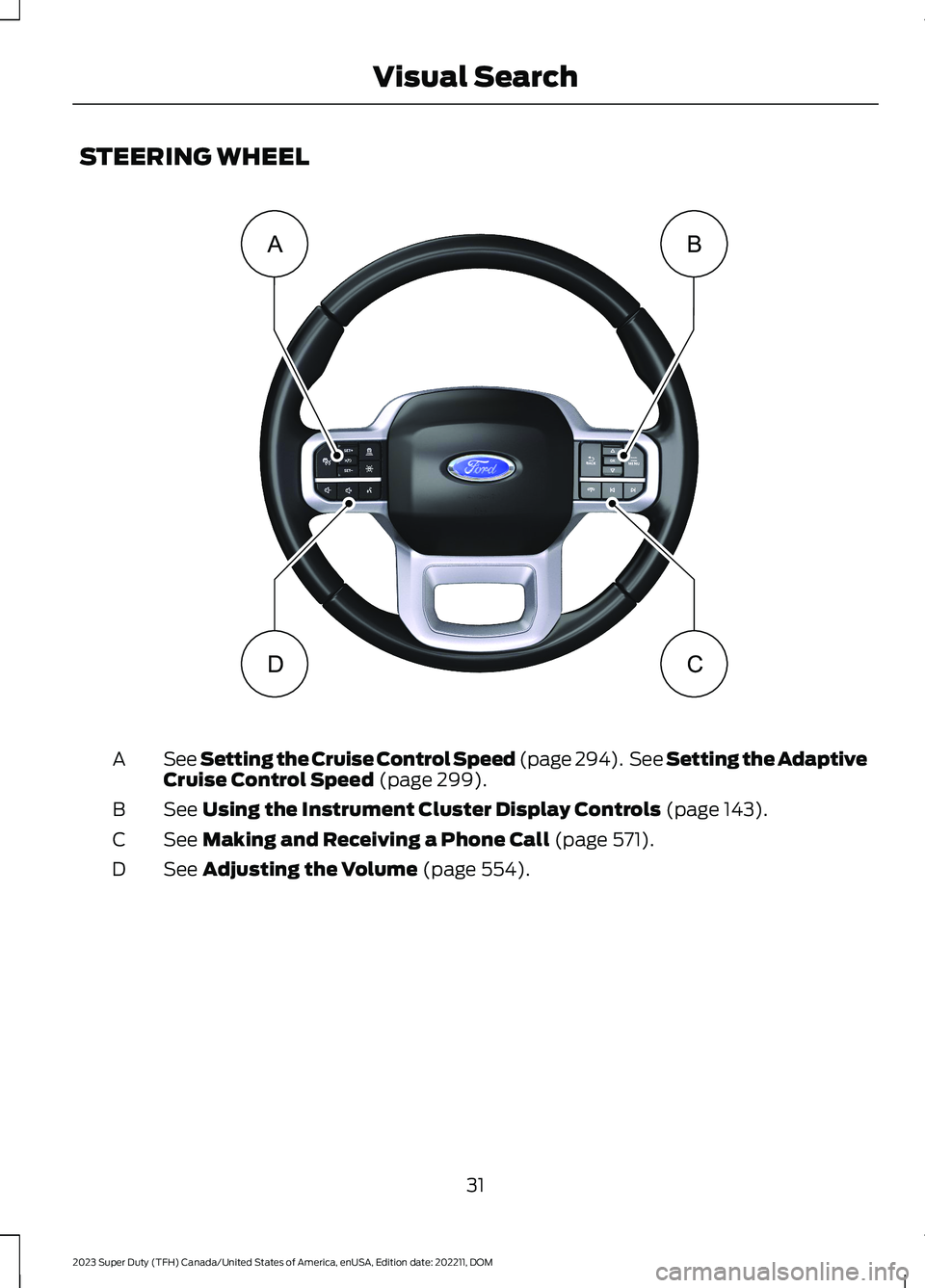
STEERING WHEEL
See Setting the Cruise Control Speed (page 294). See Setting the AdaptiveCruise Control Speed (page 299).A
See Using the Instrument Cluster Display Controls (page 143).B
See Making and Receiving a Phone Call (page 571).C
See Adjusting the Volume (page 554).D
31
2023 Super Duty (TFH) Canada/United States of America, enUSA, Edition date: 202211, DOMVisual SearchBADC E374894
Page 63 of 738
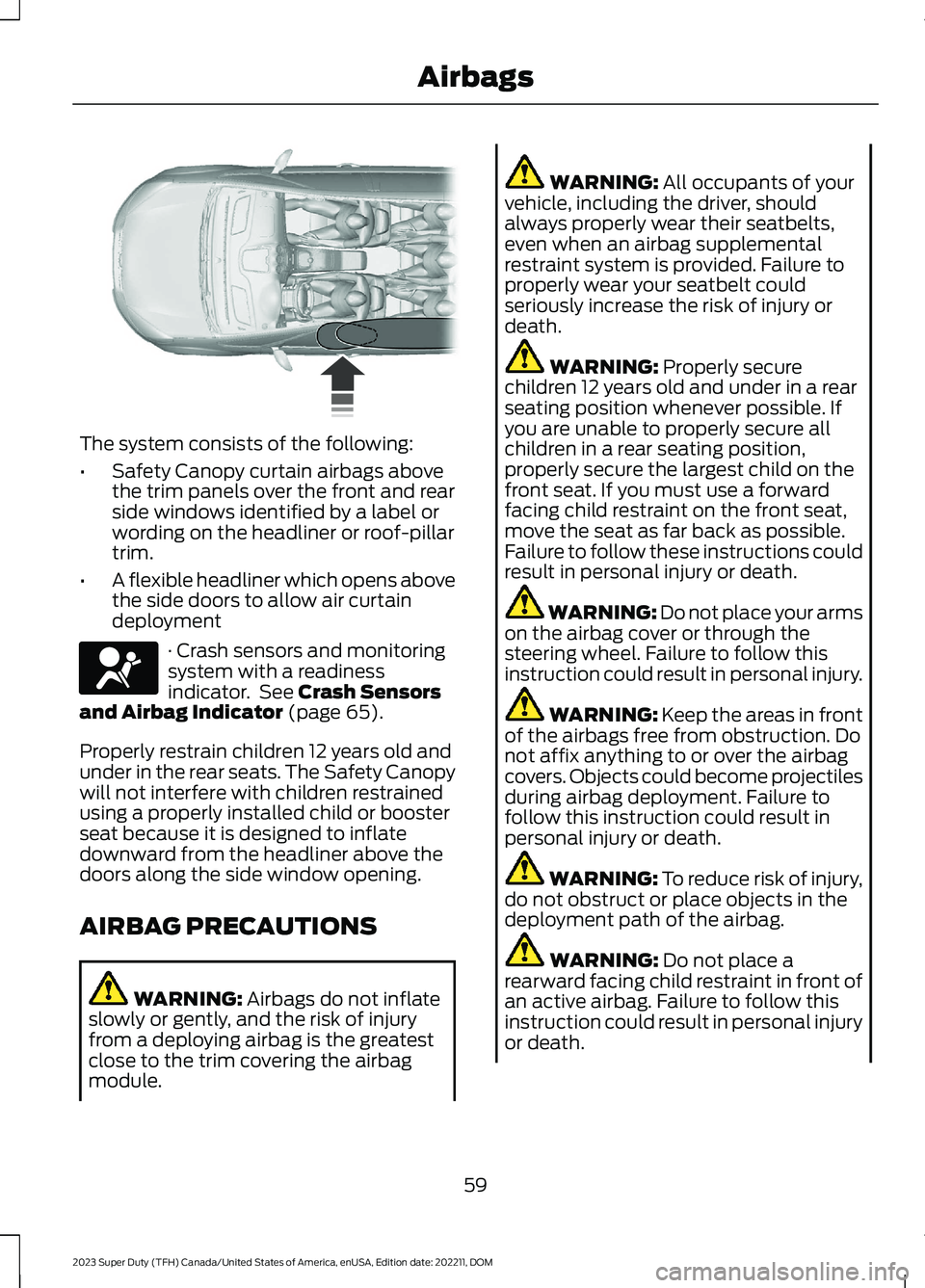
The system consists of the following:
•Safety Canopy curtain airbags abovethe trim panels over the front and rearside windows identified by a label orwording on the headliner or roof-pillartrim.
•A flexible headliner which opens abovethe side doors to allow air curtaindeployment
· Crash sensors and monitoringsystem with a readinessindicator. See Crash Sensorsand Airbag Indicator (page 65).
Properly restrain children 12 years old andunder in the rear seats. The Safety Canopywill not interfere with children restrainedusing a properly installed child or boosterseat because it is designed to inflatedownward from the headliner above thedoors along the side window opening.
AIRBAG PRECAUTIONS
WARNING: Airbags do not inflateslowly or gently, and the risk of injuryfrom a deploying airbag is the greatestclose to the trim covering the airbagmodule.
WARNING: All occupants of yourvehicle, including the driver, shouldalways properly wear their seatbelts,even when an airbag supplementalrestraint system is provided. Failure toproperly wear your seatbelt couldseriously increase the risk of injury ordeath.
WARNING: Properly securechildren 12 years old and under in a rearseating position whenever possible. Ifyou are unable to properly secure allchildren in a rear seating position,properly secure the largest child on thefront seat. If you must use a forwardfacing child restraint on the front seat,move the seat as far back as possible.Failure to follow these instructions couldresult in personal injury or death.
WARNING: Do not place your armson the airbag cover or through thesteering wheel. Failure to follow thisinstruction could result in personal injury.
WARNING: Keep the areas in frontof the airbags free from obstruction. Donot affix anything to or over the airbagcovers. Objects could become projectilesduring airbag deployment. Failure tofollow this instruction could result inpersonal injury or death.
WARNING: To reduce risk of injury,do not obstruct or place objects in thedeployment path of the airbag.
WARNING: Do not place arearward facing child restraint in front ofan active airbag. Failure to follow thisinstruction could result in personal injuryor death.
59
2023 Super Duty (TFH) Canada/United States of America, enUSA, Edition date: 202211, DOMAirbags E75004 E67017
Page 71 of 738
WHAT IS 911 ASSIST
911 Assist is a SYNC system feature thatcan call for help.
For more information, visitwww.owner.ford.com.
HOW DOES 911 ASSIST WORK
If a crash deploys an airbag, excluding kneeairbags and rear inflatable seatbelts, oractivates the fuel pump shut-off, yourvehicle may be able to contact emergencyservices by dialing 911 through a paired andconnected Bluetooth® enabled phone.
Not all crashes deploy an airbag or activatethe fuel pump shut-off. If a connected cellphone sustains damage or loses itsconnection to SYNC during a crash, SYNCsearches for and tries to connect to apreviously paired cell phone. SYNC thenattempts to call the emergency services.
Before making the call:
•SYNC provides about 10 seconds tocancel the call. If you fail to cancel thecall, SYNC attempts to dial 911.
•SYNC says the following, or a similarmessage: SYNC will attempt to call 911,to cancel the call, press Cancel on yourscreen or press and hold the phonebutton on your steering wheel.
If you do not cancel the call and SYNCmakes a successful call a pre-recordedmessage plays for the 911 operator. Theoccupants in your vehicle are able to talkwith the operator. Be prepared to provideyour name, phone number and locationimmediately because not all 911 systemsare capable of receiving this informationelectronically.
During an emergency call the systemtransmits vehicle data to the emergencyservice.
EMERGENCY CALL
REQUIREMENTS
WARNING: Do not wait for 911Assist to make an emergency call if youcan do it yourself. Dial emergencyservices immediately to avoid delayedresponse time which could increase therisk of serious injury or death after acrash. If you do not hear 911 Assist withinfive seconds of the crash, the system orphone may be damaged ornon-functional.
WARNING: Always place yourphone in a secure location in your vehicleso it does not become a projectile or getdamaged in a crash. Failure to do so maycause serious injury to someone ordamage the phone which could prevent911 Assist from working properly.
WARNING: Unless the 911 Assistsetting is set on before a crash, thesystem will not dial for help which coulddelay response time, potentiallyincreasing the risk of serious injury ordeath after a crash.
•SYNC is powered and working properlyat the time of the incident andthroughout feature activation and use.
•The 911 Assist feature must be set onbefore the incident.
•You must pair and connect aBluetooth® enabled and compatiblecell phone to SYNC.
•A connected Bluetooth® enabledphone must have the ability to makeand maintain an outgoing call at thetime of the incident.
67
2023 Super Duty (TFH) Canada/United States of America, enUSA, Edition date: 202211, DOM911 Assist
Page 86 of 738
AUTOUNLOCK
WHAT IS AUTOUNLOCK
Autounlock is a feature that centrallyunlocks the vehicle doors when yourvehicle comes to a stop and you open thedriver door.
AUTOUNLOCK REQUIREMENTS
Autounlock unlocks all the doors after:
1.The vehicle speed exceeds 12 mph(20 km/h).
2.Your vehicle comes to a stop.
3.You open the driver door.
Note:Autounlock operates for only 10minutes after the ignition is switched off.
SWITCHING AUTOUNLOCK ONAND OFF
1.Using the instrument cluster displaycontrols on the steering wheel, selectSettings.
2.Select Vehicle Settings.
3.Switch Autounlock on or off.
AUTOLOCK
WHAT IS AUTOLOCK
Autolock is a locking feature that centrallylocks your vehicle doors when driving.
AUTOLOCK REQUIREMENTS
Autolock locks all the doors after:
1.All doors are closed and the ignition ison.
2.Your vehicle speed exceeds 12 mph(20 km/h).
Autolock repeats if:
1.Your vehicle is stopped.
2.Any door is opened and closed again.
3.Your vehicle speed exceeds 12 mph(20 km/h).
MISLOCK
WHAT IS MISLOCK
Mislock is a locking feature that warns youif your vehicle has not locked.
MISLOCK LIMITATIONS
When you press the lock button once, theturn signals do not flash if:
•Any door or the tailgate is open.
•The hood is open.
If you switch mislock off, the horn does notsound if you press the lock button on theremote control when a door is open.
SWITCHING MISLOCK ON ANDOFF
1.Using the instrument cluster displaycontrols on the steering wheel, selectSettings.
2.Select Vehicle Settings.
3.Switch Mislock Chirp on or off.
DOORS AND LOCKS AUDIBLE
WARNINGS
Door Ajar Audible Warning
Sounds when any front door is not fullyclosed and your vehicle is moving.
82
2023 Super Duty (TFH) Canada/United States of America, enUSA, Edition date: 202211, DOMDoors and Locks
Page 105 of 738
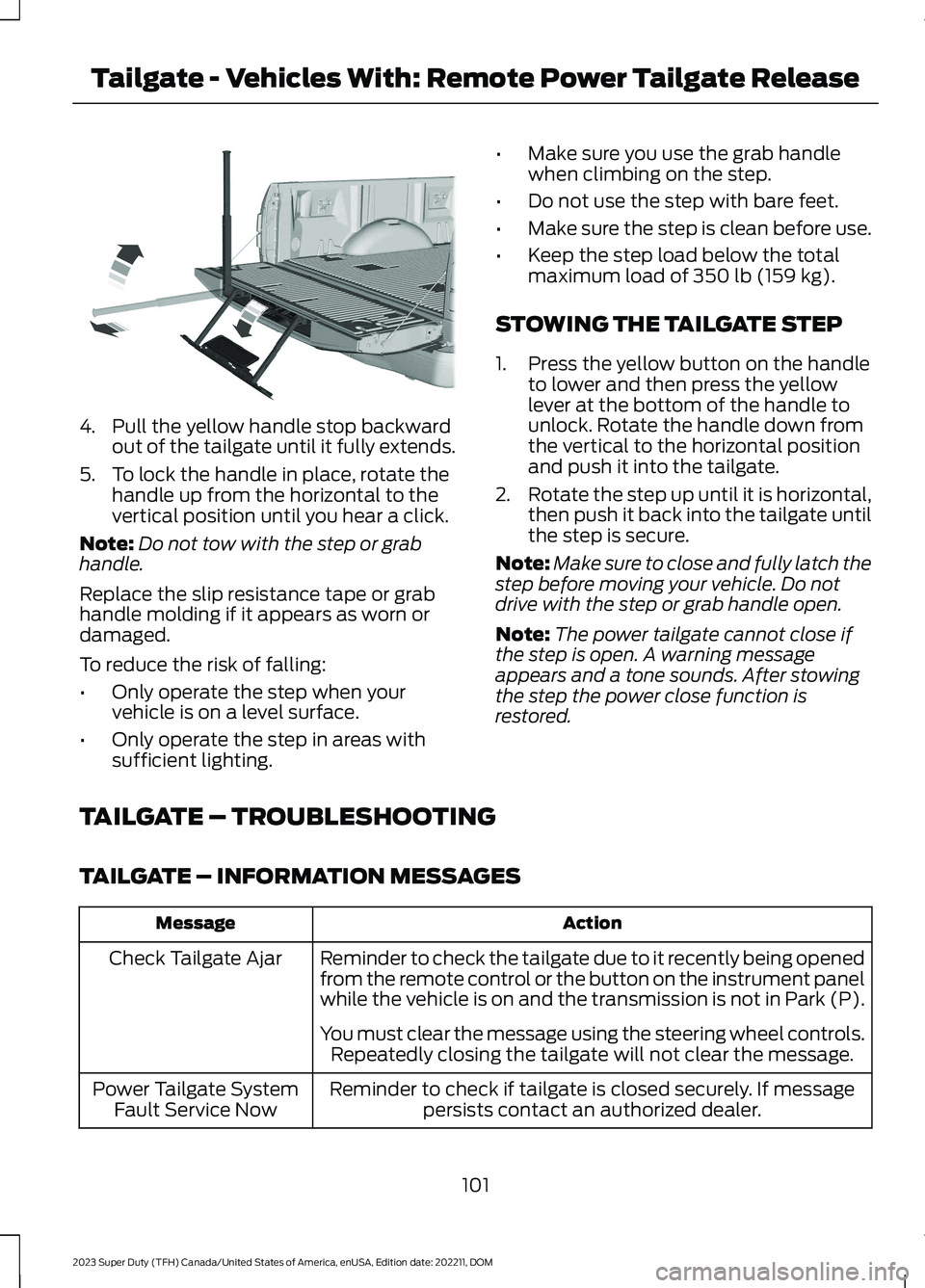
4.Pull the yellow handle stop backwardout of the tailgate until it fully extends.
5.To lock the handle in place, rotate thehandle up from the horizontal to thevertical position until you hear a click.
Note:Do not tow with the step or grabhandle.
Replace the slip resistance tape or grabhandle molding if it appears as worn ordamaged.
To reduce the risk of falling:
•Only operate the step when yourvehicle is on a level surface.
•Only operate the step in areas withsufficient lighting.
•Make sure you use the grab handlewhen climbing on the step.
•Do not use the step with bare feet.
•Make sure the step is clean before use.
•Keep the step load below the totalmaximum load of 350 lb (159 kg).
STOWING THE TAILGATE STEP
1.Press the yellow button on the handleto lower and then press the yellowlever at the bottom of the handle tounlock. Rotate the handle down fromthe vertical to the horizontal positionand push it into the tailgate.
2.Rotate the step up until it is horizontal,then push it back into the tailgate untilthe step is secure.
Note:Make sure to close and fully latch thestep before moving your vehicle. Do notdrive with the step or grab handle open.
Note:The power tailgate cannot close ifthe step is open. A warning messageappears and a tone sounds. After stowingthe step the power close function isrestored.
TAILGATE – TROUBLESHOOTING
TAILGATE – INFORMATION MESSAGES
ActionMessage
Reminder to check the tailgate due to it recently being openedfrom the remote control or the button on the instrument panelwhile the vehicle is on and the transmission is not in Park (P).
Check Tailgate Ajar
You must clear the message using the steering wheel controls.Repeatedly closing the tailgate will not clear the message.
Reminder to check if tailgate is closed securely. If messagepersists contact an authorized dealer.Power Tailgate SystemFault Service Now
101
2023 Super Duty (TFH) Canada/United States of America, enUSA, Edition date: 202211, DOMTailgate - Vehicles With: Remote Power Tailgate ReleaseE189557