lock FORD SUPER DUTY 2023 Owners Manual
[x] Cancel search | Manufacturer: FORD, Model Year: 2023, Model line: SUPER DUTY, Model: FORD SUPER DUTY 2023Pages: 738, PDF Size: 18.49 MB
Page 376 of 738
WHAT IS THE INTEGRATED
TRAILER BRAKE CONTROLLER
The trailer brake controller assists insmooth and effective trailer braking basedon the towing vehicle’s brake pressure.
INTEGRATED TRAILER BRAKE
CONTROLLER PRECAUTIONS
WARNING: Use the integratedtrailer brake controller to properly adjustthe trailer brakes and check allconnections before towing a trailer.Failure to follow this instruction couldresult in the loss of control of yourvehicle, personal injury or death.
•Only use the manual control lever forproper adjustment of the gain duringtrailer setup. Misuse, such asapplication during trailer sway, couldcause instability of trailer or towvehicle.
•Avoid towing in adverse weatherconditions. The trailer brake controllerdoes not provide anti-lock control ofthe trailer wheels. Trailer wheels canlock up on slippery surfaces, resultingin reduced stability of trailer and towvehicle.
•The trailer brake controller is only afactory-installed or dealer-installeditem. Ford is not responsible forwarranty or performance of thecontroller due to misuse or customerinstallation.
Note:Do not attempt removal of the trailerbrake controller without consulting theWorkshop Manual. Damage to the unit mayresult.
Note:Make sure to set the integrated trailerbrake controller gain to 0 if you are using anaftermarket trailer brake controller.
USING THE INTEGRATED
TRAILER BRAKE CONTROLLER
1.Make sure the trailer brakes are in goodworking condition, functioning normallyand properly adjusted. See your trailerdealer if necessary.
Note:An authorized dealer can diagnosethe trailer brake controller to determineexactly which trailer fault has occurred. Yourvehicle warranty does not cover issues withyour trailer.
2.Hook up the trailer and make theelectrical connections according to thetrailer manufacturer's instructions.
Note:Select default mode if the trailer hassurge brakes, or no brakes at all. The systemhas no effect on the braking performanceof the trailer in either of these cases.
Note:If a trailer is connected by a four-pinconnector, the trailer braking function willnot be supported.
3.When you plug in a trailer with electricor electric-over-hydraulic brakes, amessage confirming connectionappears in the information display.
4.Use the gain adjustment to find thedesired starting point. A gain setting of6.0 is a good starting point for heavierloads.
Note:Use the following steps to adjust thegain setting whenever road, weather andtrailer, or vehicle loading conditions, changefrom when you initially set the gain.
5.In a traffic-free environment, tow thetrailer on a dry, level surface andsqueeze the manual control levercompletely.
372
2023 Super Duty (TFH) Canada/United States of America, enUSA, Edition date: 202211, DOMIntegrated Trailer Brake Controller
Page 377 of 738
6.If the trailer wheels lock up, indicatedby squealing tires, reduce the gainsetting. If the trailer wheels turn freely,increase the gain setting. Repeat Steps5 and 6 until the gain setting is at apoint just below trailer wheel lock-up.If towing a heavier trailer, trailer wheellock-up may not be attainable evenwith the maximum gain setting of 10.
Note:Only perform this procedure atspeeds of approximately 20–25 mph(30–40 km/h).
Note:The trailer brake controller reducesoutput at vehicle speeds below 11 mph(18 km/h) so that trailer and vehicle brakingis not jerky or harsh. This feature is onlyavailable when applying the brakes usingyour vehicle's brake pedal, not thecontroller.
Note:Your vehicle's brake system and thetrailer brake system work independently ofeach other. Changing the gain setting on thecontroller does not affect the operation ofyour vehicle's brakes whether you attach atrailer or not.
Note:With the proper electrical connection,pressing your vehicle brake pedal or usingthe manual control lever illuminates bothtrailer and vehicle brake lamps.
Note:When you switch the engine off, thecontroller output is disabled and the displayand module shut down. The controllermodule and display turn on when you switchthe ignition on.
Note:Trailer braking is suspended duringstop/start events to minimize battery draw.
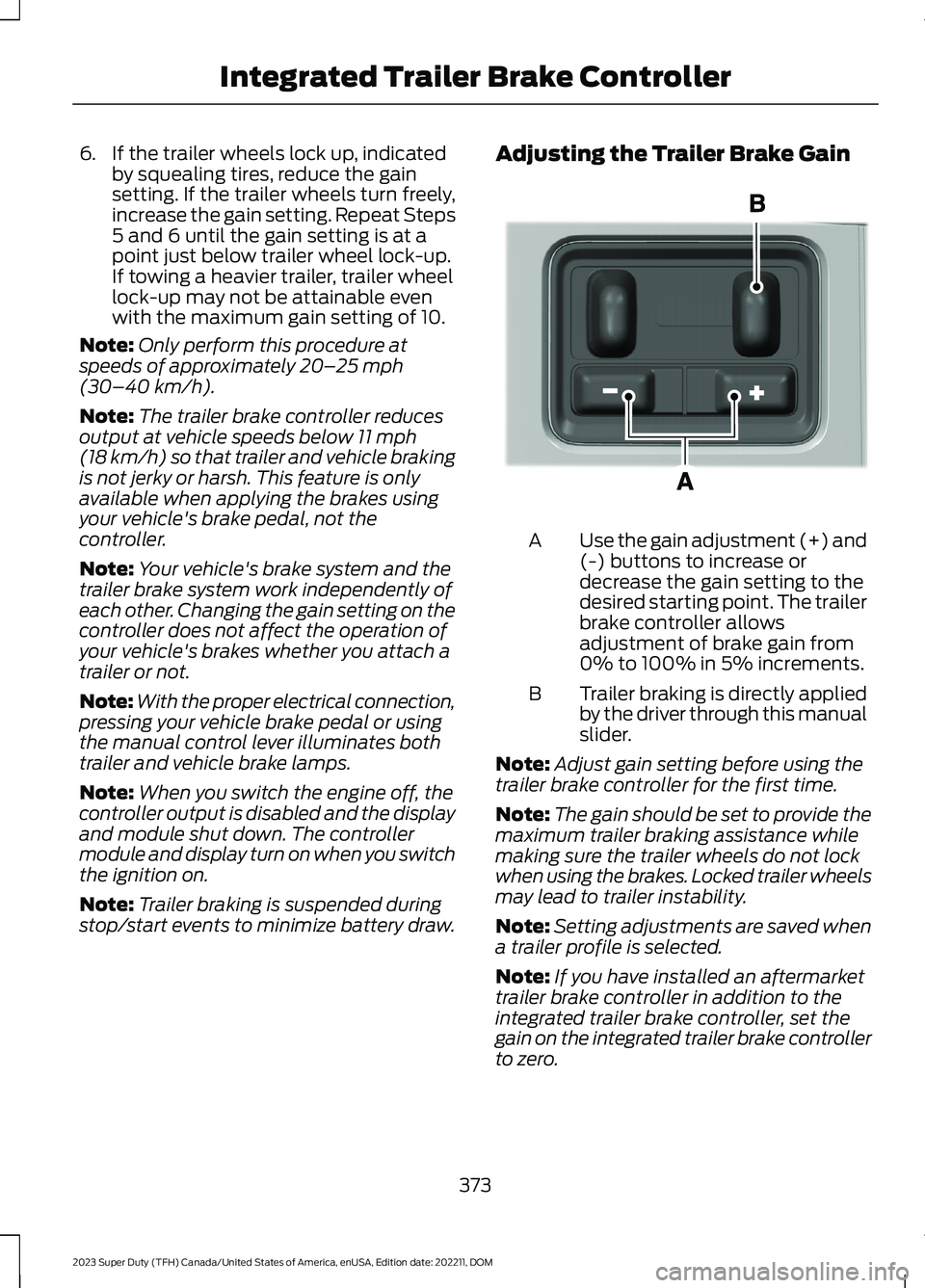
Adjusting the Trailer Brake Gain
Use the gain adjustment (+) and(-) buttons to increase ordecrease the gain setting to thedesired starting point. The trailerbrake controller allowsadjustment of brake gain from0% to 100% in 5% increments.
A
Trailer braking is directly appliedby the driver through this manualslider.
B
Note:Adjust gain setting before using thetrailer brake controller for the first time.
Note:The gain should be set to provide themaximum trailer braking assistance whilemaking sure the trailer wheels do not lockwhen using the brakes. Locked trailer wheelsmay lead to trailer instability.
Note:Setting adjustments are saved whena trailer profile is selected.
Note:If you have installed an aftermarkettrailer brake controller in addition to theintegrated trailer brake controller, set thegain on the integrated trailer brake controllerto zero.
373
2023 Super Duty (TFH) Canada/United States of America, enUSA, Edition date: 202211, DOMIntegrated Trailer Brake ControllerE333154
Page 382 of 738
WHAT IS TRAILER HITCHING
ASSISTANCE
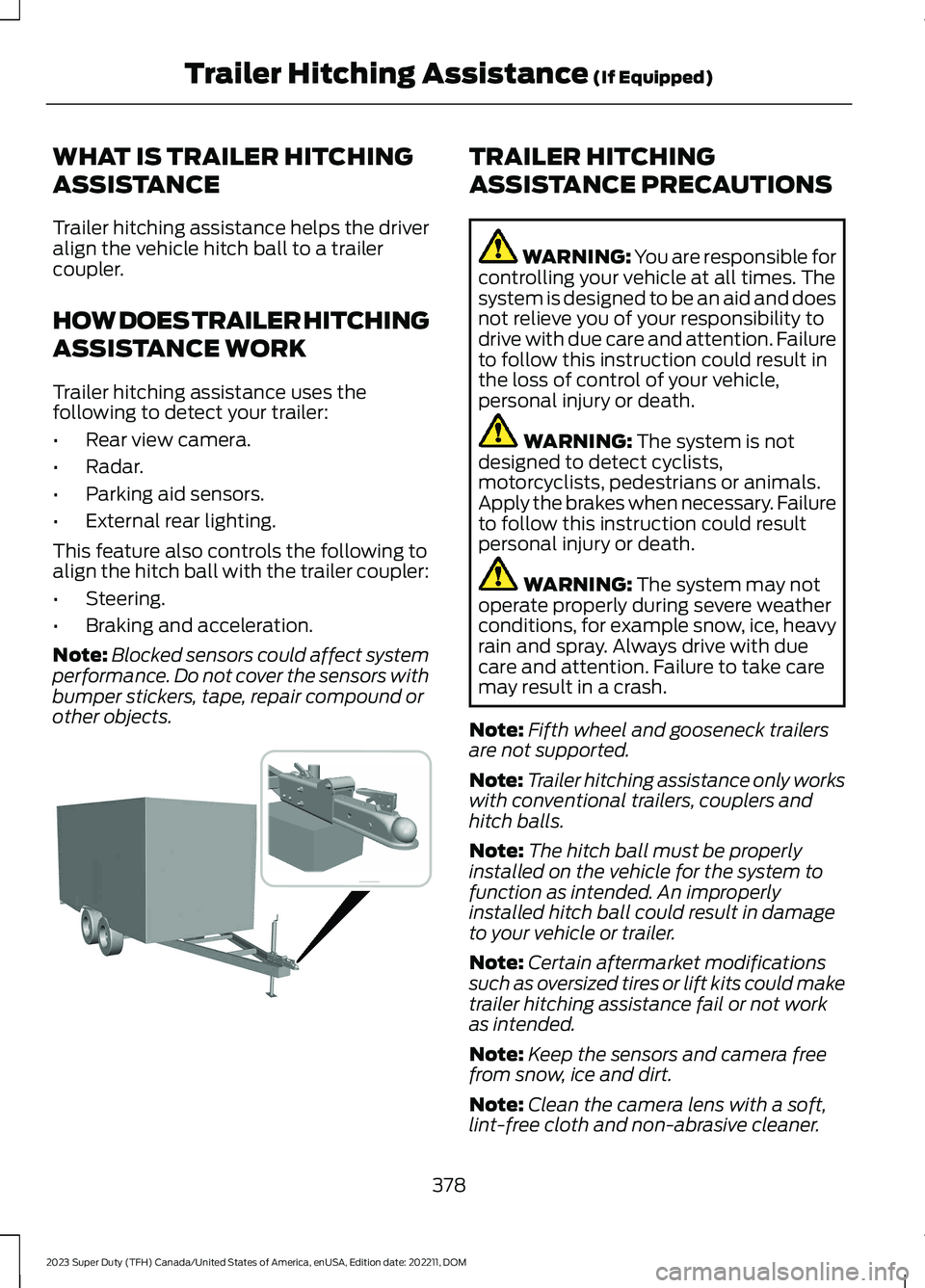
Trailer hitching assistance helps the driveralign the vehicle hitch ball to a trailercoupler.
HOW DOES TRAILER HITCHING
ASSISTANCE WORK
Trailer hitching assistance uses thefollowing to detect your trailer:
•Rear view camera.
•Radar.
•Parking aid sensors.
•External rear lighting.
This feature also controls the following toalign the hitch ball with the trailer coupler:
•Steering.
•Braking and acceleration.
Note:Blocked sensors could affect systemperformance. Do not cover the sensors withbumper stickers, tape, repair compound orother objects.
TRAILER HITCHING
ASSISTANCE PRECAUTIONS
WARNING: You are responsible forcontrolling your vehicle at all times. Thesystem is designed to be an aid and doesnot relieve you of your responsibility todrive with due care and attention. Failureto follow this instruction could result inthe loss of control of your vehicle,personal injury or death.
WARNING: The system is notdesigned to detect cyclists,motorcyclists, pedestrians or animals.Apply the brakes when necessary. Failureto follow this instruction could resultpersonal injury or death.
WARNING: The system may notoperate properly during severe weatherconditions, for example snow, ice, heavyrain and spray. Always drive with duecare and attention. Failure to take caremay result in a crash.
Note:Fifth wheel and gooseneck trailersare not supported.
Note:Trailer hitching assistance only workswith conventional trailers, couplers andhitch balls.
Note:The hitch ball must be properlyinstalled on the vehicle for the system tofunction as intended. An improperlyinstalled hitch ball could result in damageto your vehicle or trailer.
Note:Certain aftermarket modificationssuch as oversized tires or lift kits could maketrailer hitching assistance fail or not workas intended.
Note:Keep the sensors and camera freefrom snow, ice and dirt.
Note:Clean the camera lens with a soft,lint-free cloth and non-abrasive cleaner.
378
2023 Super Duty (TFH) Canada/United States of America, enUSA, Edition date: 202211, DOMTrailer Hitching Assistance (If Equipped) E383821
Page 383 of 738
TRAILER HITCHING
ASSISTANCE LIMITATIONS
The system could not function or couldfunction with reduced performance duringthe following:
•When using trailer hitching assistancein tall grass and weeds.
•When safety chains, cables or wiringare dangling near the coupler.
•When using trailer hitching assistanceon slippery surfaces.
•When using hitches that raise the hitchball more than 4 in (10 cm), lower thehitch ball by more than 6 in (16 cm) orextend the hitch ball away from thevehicle more than 12 in (30 cm).
•When using hitches that are lower than10 in (25 cm) off the ground.
•When using objects taller than 8 in(20 cm), such as large blocks, underthe jack stand.
•When you park the trailer on surfacesthat are similar in color to the trailercoupler and hitch ball.
•A black coupler or hitch ball over adark asphalt surface.
•A light color coupler or hitch ballover a light concrete surface.
•When there are low or no light sources,such as at night.
For additional information, please refer tothe Ford Support Website.
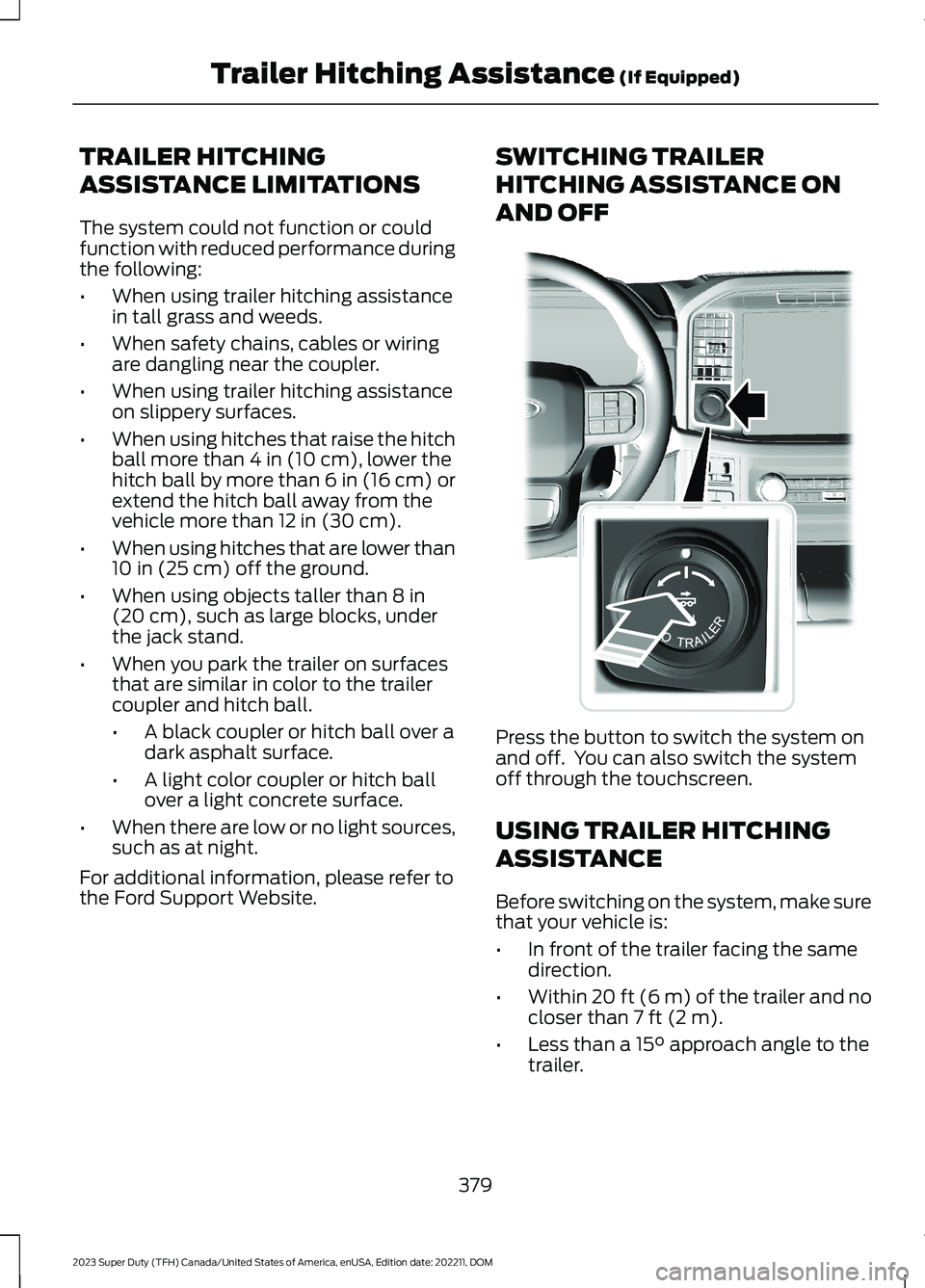
SWITCHING TRAILER
HITCHING ASSISTANCE ON
AND OFF
Press the button to switch the system onand off. You can also switch the systemoff through the touchscreen.
USING TRAILER HITCHING
ASSISTANCE
Before switching on the system, make surethat your vehicle is:
•In front of the trailer facing the samedirection.
•Within 20 ft (6 m) of the trailer and nocloser than 7 ft (2 m).
•Less than a 15° approach angle to thetrailer.
379
2023 Super Duty (TFH) Canada/United States of America, enUSA, Edition date: 202211, DOMTrailer Hitching Assistance (If Equipped)E310335
Page 396 of 738
Note:Keep the steering wheel straightwhen instructed to by the instrument clusterdisplay and touchscreen. If the steeringwheel is in a turned position during thisinstruction, the calibration pauses.
Note:During calibration, the systemdetermines the trailer length. The systemsupports trailer lengths of 10–39 ft(3–11.94 m) distance from the hitch pointto the center of the axle or axles.
Note:The instrument cluster displays andtouchscreen shows if you are going too slowor fast. Calibration pauses if the speed isoutside the required range of 2–16 mph(4–25 km/h).
Note:You need to complete at least a 90°turn, and longer trailers could require a 180°turn.
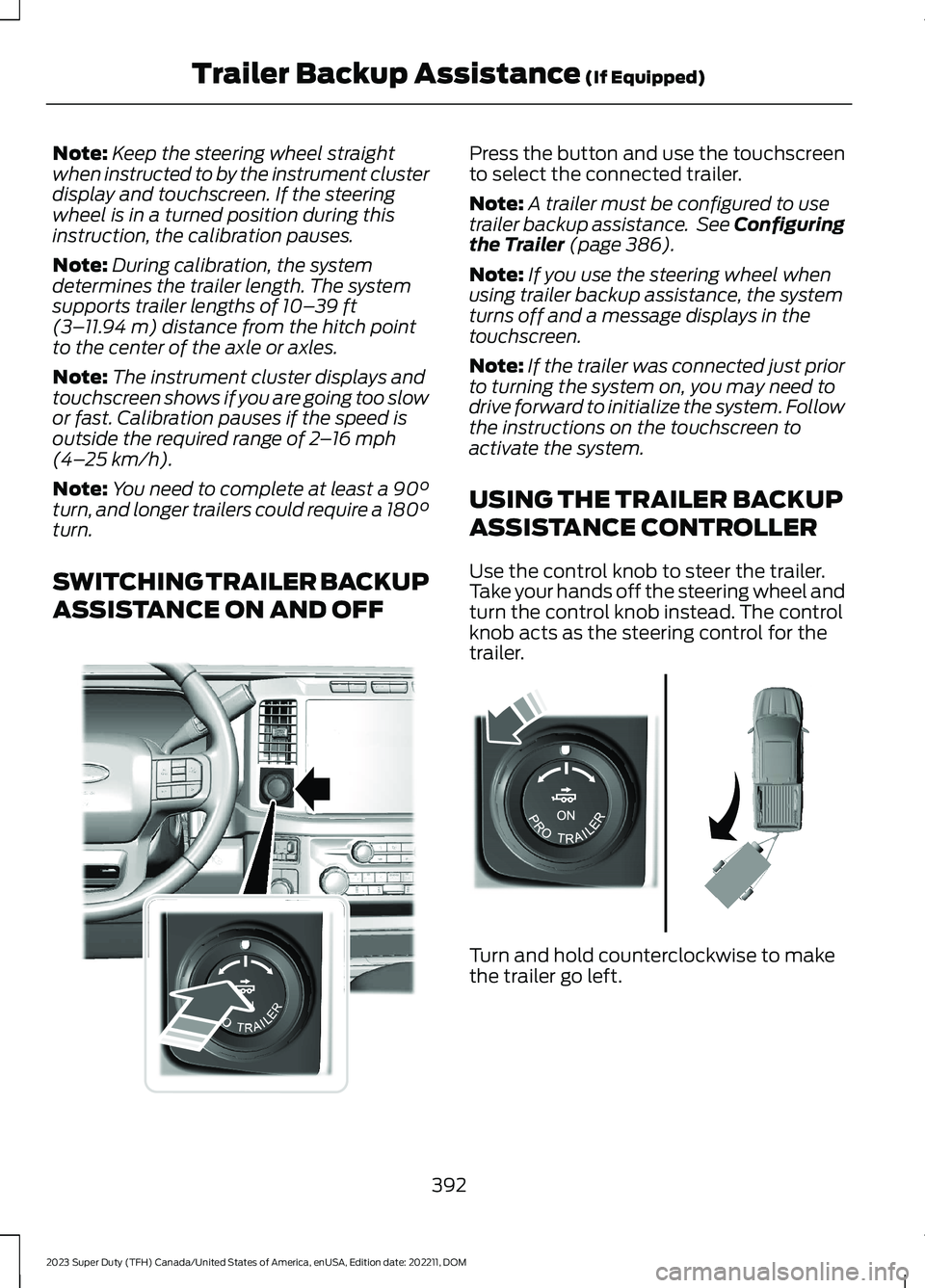
SWITCHING TRAILER BACKUP
ASSISTANCE ON AND OFF
Press the button and use the touchscreento select the connected trailer.
Note:A trailer must be configured to usetrailer backup assistance. See Configuringthe Trailer (page 386).
Note:If you use the steering wheel whenusing trailer backup assistance, the systemturns off and a message displays in thetouchscreen.
Note:If the trailer was connected just priorto turning the system on, you may need todrive forward to initialize the system. Followthe instructions on the touchscreen toactivate the system.
USING THE TRAILER BACKUP
ASSISTANCE CONTROLLER
Use the control knob to steer the trailer.Take your hands off the steering wheel andturn the control knob instead. The controlknob acts as the steering control for thetrailer.
Turn and hold counterclockwise to makethe trailer go left.
392
2023 Super Duty (TFH) Canada/United States of America, enUSA, Edition date: 202211, DOMTrailer Backup Assistance (If Equipped)E373857 E313025
Page 397 of 738
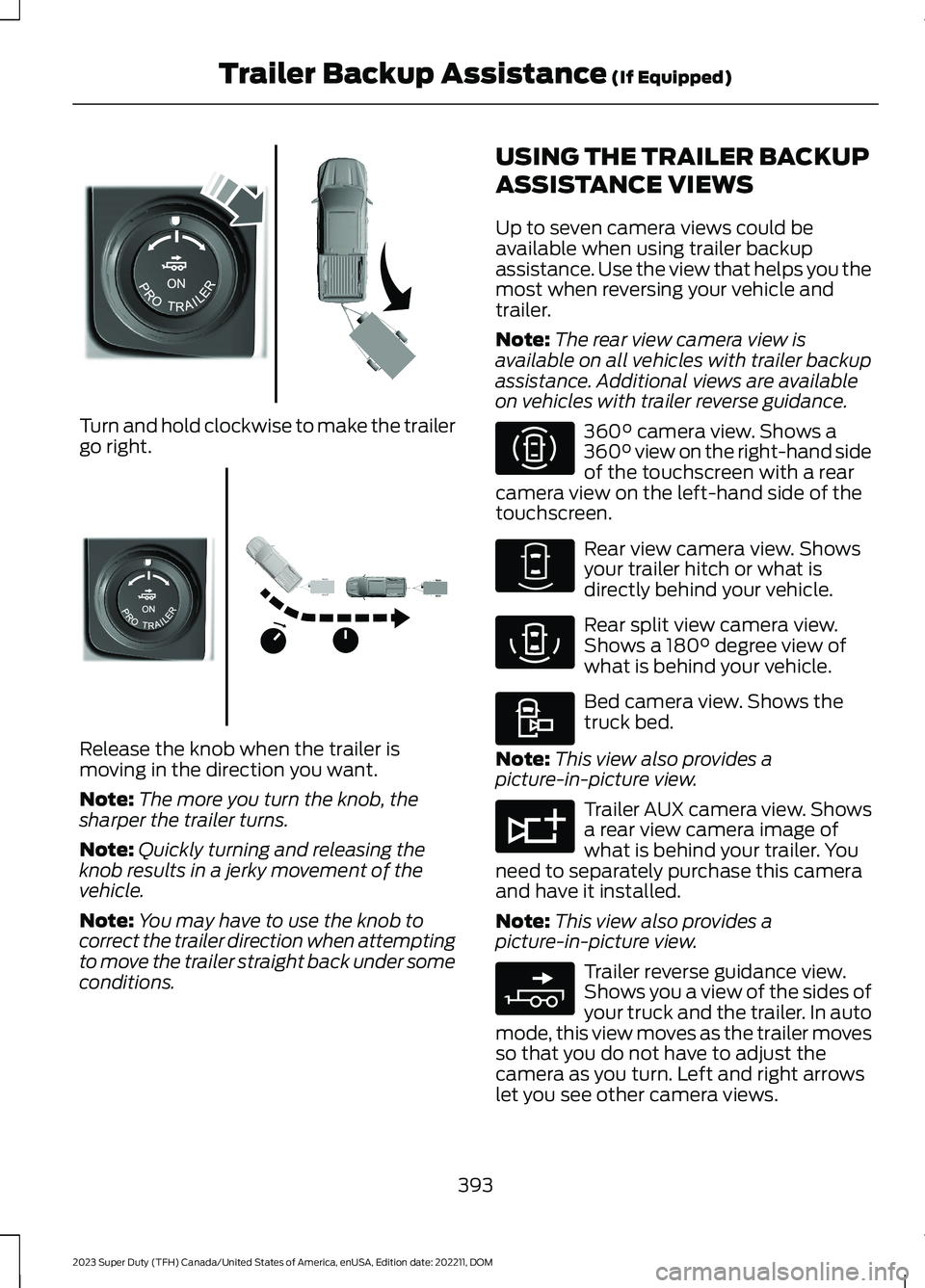
Turn and hold clockwise to make the trailergo right.
Release the knob when the trailer ismoving in the direction you want.
Note:The more you turn the knob, thesharper the trailer turns.
Note:Quickly turning and releasing theknob results in a jerky movement of thevehicle.
Note:You may have to use the knob tocorrect the trailer direction when attemptingto move the trailer straight back under someconditions.
USING THE TRAILER BACKUP
ASSISTANCE VIEWS
Up to seven camera views could beavailable when using trailer backupassistance. Use the view that helps you themost when reversing your vehicle andtrailer.
Note:The rear view camera view isavailable on all vehicles with trailer backupassistance. Additional views are availableon vehicles with trailer reverse guidance.
360° camera view. Shows a360° view on the right-hand sideof the touchscreen with a rearcamera view on the left-hand side of thetouchscreen.
Rear view camera view. Showsyour trailer hitch or what isdirectly behind your vehicle.
Rear split view camera view.Shows a 180° degree view ofwhat is behind your vehicle.
Bed camera view. Shows thetruck bed.
Note:This view also provides apicture-in-picture view.
Trailer AUX camera view. Showsa rear view camera image ofwhat is behind your trailer. Youneed to separately purchase this cameraand have it installed.
Note:This view also provides apicture-in-picture view.
Trailer reverse guidance view.Shows you a view of the sides ofyour truck and the trailer. In automode, this view moves as the trailer movesso that you do not have to adjust thecamera as you turn. Left and right arrowslet you see other camera views.
393
2023 Super Duty (TFH) Canada/United States of America, enUSA, Edition date: 202211, DOMTrailer Backup Assistance (If Equipped)E313026 E313027 E310996 E310967 E310974 E310995 E311776 E310965
Page 402 of 738
TRAILER BACKUP ASSISTANCE– FREQUENTLY ASKEDQUESTIONS
Why does the trailer not reversestraight?
Verify the sensor is correctly installed.Other factors such as the hitchconnection, road camber, road slopeand trailer suspension could influencehow straight the system can reversethe trailer when the control knob is notturned. You can compensate for thetrailer drifting to the right or left byslowly turning the knob until the traileris following your desired path and thenholding the knob in that position.
Why does the system not detect asensor?
There could be an issue with theconnection, the wiring harness couldbe damaged, you could have multiplesensors connected or the sensor couldbe incorrectly installed. Check that the12-way connector is fully inserted intothe 12-way socket. The red rubber sealis not visible when the connector isfully inserted. Also check that thewiring harness sensor connection isfully inserted at the trailer sensor, andcheck for damaged wiring betweenthe 12-way connector and the trailersensor. Also, check that the sensor isinstalled on a vertical surface with thearrows pointing straight up.
What does it mean if the systemremains on one message for anextended time during calibration whensetting up the system with the sticker?
The camera could need to be cleaned,the sticker could be blocked, thedrawbar could be outside the allowedrange of 4–19 in (10–48 cm) or youcould need to move to a different areato change the lighting and background.Verify the sticker is in the properlocation. See Applying the TrailerReversing Aid Sticker (page 388).You can move to a different area orchange the direction you are driving orsetup the system at a different timeof day. Some trailers are notcompatible with the sticker andcamera system. If the issue persistswith the sticker setup, you may chooseto setup the trailer with a sensor.
What does it mean if the system pausesduring calibration?
There could be steering input or trailermovement during the straight driveportion of the calibration process.
What does it mean if the systemremains on one message for anextended time during calibration whensetting up the system with the sensor?
The sensor could be incorrectlyinstalled, the trailer length could beoutside the allowed range or the roadsurface could be too rough or bumpy.
What does it mean if the systemdisplays hold steering steady duringturn?
Part of the calibration process for thesticker setup requires a steady turn. Ifyou are continually moving thesteering wheel during the turn, thisdelays the calibration process. Toenable the calibration process, holdthe steering wheel at the sameposition when turning.
398
2023 Super Duty (TFH) Canada/United States of America, enUSA, Edition date: 202211, DOMTrailer Backup Assistance (If Equipped)
Page 413 of 738
TRAILER REVERSE GUIDANCE –FREQUENTLY ASKED QUESTIONS
Why does the trailer not reversestraight?
Verify the sensor is correctly installed.Other factors such as the hitchconnection, road camber, road slopeand trailer suspension could influencehow straight the system can reversethe trailer when the control knob is notturned. You can compensate for thetrailer drifting to the right or left byslowly turning the knob until the traileris following your desired path and thenholding the knob in that position.
Why does the system not detect asensor?
There could be an issue with theconnection, the wiring harness couldbe damaged, you could have multiplesensors connected or the sensor couldbe incorrectly installed. Check that the12-way connector is fully inserted intothe 12-way socket. The red rubber sealis not visible when the connector isfully inserted. Also check that thewiring harness sensor connection isfully inserted at the trailer sensor, andcheck for damaged wiring betweenthe 12-way connector and the trailersensor. Also, check that the sensor isinstalled on a vertical surface with thearrows pointing straight up.
What does it mean if the systemremains on one message for anextended time during calibration whensetting up the system with the sticker?
The camera could need to be cleaned,the sticker could be blocked, thedrawbar could be outside the allowedrange of 4–19 in (10–48 cm) or youcould need to move to a different areato change the lighting and background.Verify the sticker is in the properlocation. See Applying the TrailerReverse Aid Sticker (page 403). Youcan move to a different area or changethe direction you are driving or setupthe system at a different time of day.Some trailers are not compatible withthe sticker and camera system. If theissue persists with the sticker setup,you may choose to setup the trailerwith a sensor.
What does it mean if the system pausesduring calibration?
There could be steering input or trailermovement during the straight driveportion of the calibration process.
What does it mean if the systemremains on one message for anextended time during calibration whensetting up the system with the sensor?
The sensor could be incorrectlyinstalled, the trailer length could beoutside the allowed range or the roadsurface could be too rough or bumpy.
What does it mean if the systemdisplays hold steering steady duringturn?
Part of the calibration process for thesticker setup requires a steady turn. Ifyou are continually moving thesteering wheel during the turn, thisdelays the calibration process. Toenable the calibration process, holdthe steering wheel at the sameposition when turning.
409
2023 Super Duty (TFH) Canada/United States of America, enUSA, Edition date: 202211, DOMTrailer Reverse Guidance (If Equipped)
Page 420 of 738
DRIVING ON SNOW AND ICE
WARNING: If you are driving inslippery conditions that require tirechains or cables, then it is critical thatyou drive cautiously. Keep speeds down,allow for longer stopping distances andavoid aggressive steering to reduce thechances of a loss of vehicle controlwhich can lead to serious injury or death.If the rear end of your vehicle slides whilecornering, steer in the direction of theslide until you regain control of yourvehicle.
On ice and snow, you should drive moreslowly than usual. Your vehicle has a fourwheel anti-lock brake system, do not pumpthe brake pedal. See Anti-Lock BrakingSystem Limitations (page 249).
BREAKING-IN
Your vehicle requires a break-in period. Forthe first 1,000 mi (1,600 km), avoid drivingat high speeds, heavy braking, aggressiveshifting or using your vehicle to tow. Duringthis time, your vehicle may exhibit someunusual driving characteristics.
DRIVING ECONOMICALLY
The following helps to improve fuelconsumption:
•Drive smoothly, accelerate gently andanticipate the road ahead to avoidheavy braking.
•Regularly check your tire pressures andmake sure that they are inflated to thecorrect pressure.
•Follow the recommended maintenanceschedule and carry out therecommended checks.
•Plan your journey and check the trafficbefore you set off. It is more efficientto combine errands into a single tripwhenever possible.
•Avoid idling the engine in cold weatheror for extended periods. Start theengine only when you are ready to setoff.
•Do not carry unnecessary weight in yourvehicle as extra weight wastes fuel.
•Do not add unnecessary accessoriesto the exterior of your vehicle, forexample running boards. If you use aroof rack, remember to fold it down orremove it when not in use.
•Do not shift into neutral when you arebraking or when your vehicle is slowingdown.
•Shut all windows when driving at highspeeds.
•Switch off all electric systems whennot in use, for example air conditioning.Make sure that you unplug anyaccessories from the auxiliary powerpoints when not in use.
DRIVING IN SPECIAL
CONDITIONS
DRIVING THROUGH MUD ANDWATER
WARNING: Do not spin the wheelsat over 34 mph (55 km/h). The tires mayfail and injure a passenger or bystander.
416
2023 Super Duty (TFH) Canada/United States of America, enUSA, Edition date: 202211, DOMDriving Hints
Page 421 of 738
Mud
Be cautious of sudden changes in vehiclespeed or direction when you are driving inmud. Even all-wheel drive and four-wheeldrive vehicles can lose traction in mud. Ifyour vehicle slides, steer in the direction ofthe slide until you regain control of yourvehicle. After driving through mud, cleanoff residue stuck to rotating driveshaftsand tires. Excess residue can cause animbalance that could damage drivecomponents.
Water
If you must drive though deep water, driveslowly. The water could limit traction orbrake capability. See Driving ThroughWater Limitations (page 413).
FLOOR MATS
WARNING: Use a floor matdesigned to fit the footwell of yourvehicle that does not obstruct the pedalarea. Failure to follow this instructioncould result in the loss of control of yourvehicle, personal injury or death.
WARNING: Pedals that cannotmove freely can cause loss of vehiclecontrol and increase the risk of seriouspersonal injury.
WARNING: Secure the floor matto both retention devices so that itcannot slip out of position and interferewith the pedals. Failure to follow thisinstruction could result in the loss ofcontrol of your vehicle, personal injury ordeath.
WARNING: Do not place additionalfloor mats or any other covering on topof the original floor mats. This couldresult in the floor mat interfering with theoperation of the pedals. Failure to followthis instruction could result in the loss ofcontrol of your vehicle, personal injury ordeath.
WARNING: Always make sure thatobjects cannot fall into the driver footwell while your vehicle is moving. Objectsthat are loose can become trappedunder the pedals causing a loss ofvehicle control.
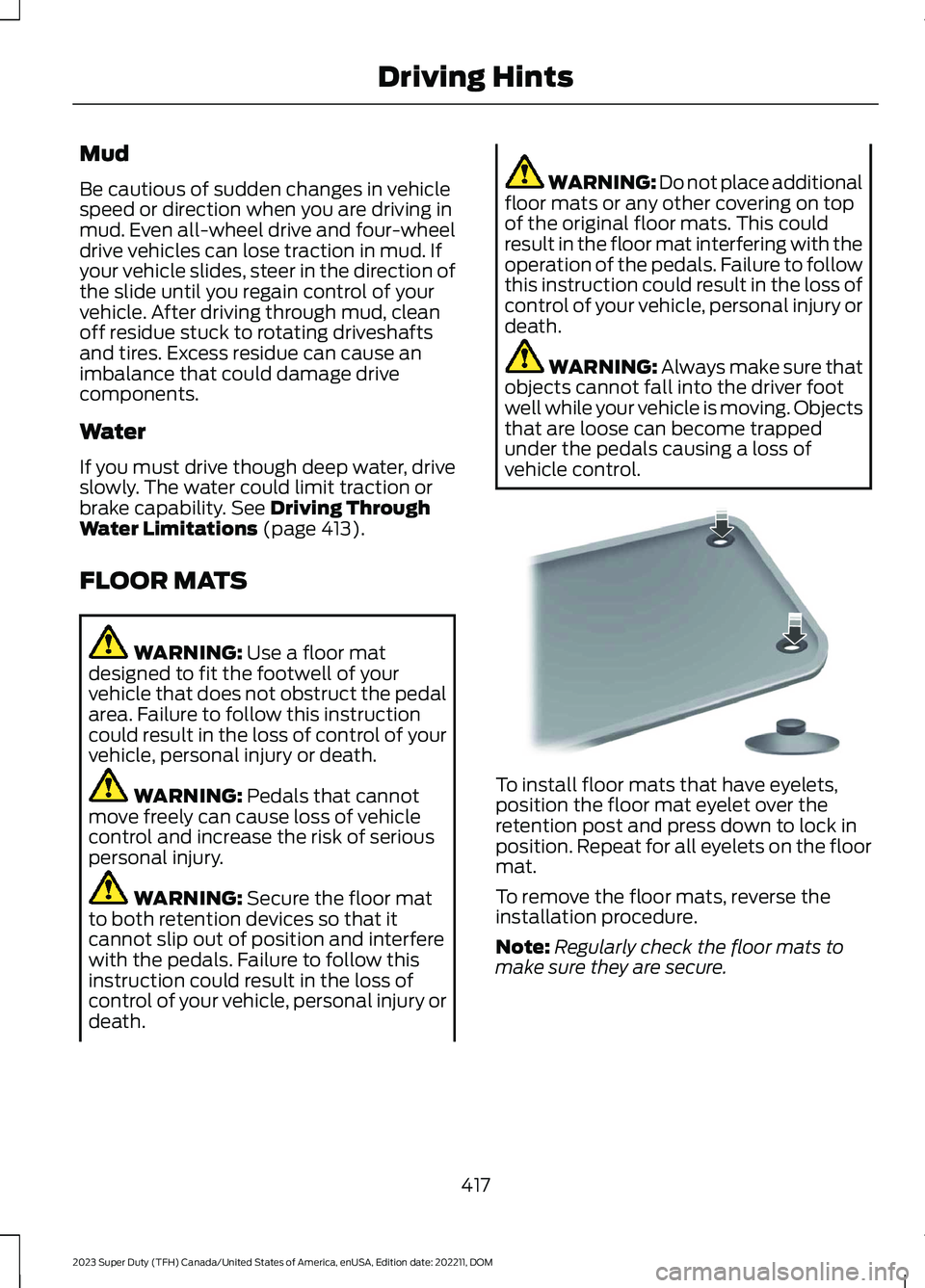
To install floor mats that have eyelets,position the floor mat eyelet over theretention post and press down to lock inposition. Repeat for all eyelets on the floormat.
To remove the floor mats, reverse theinstallation procedure.
Note:Regularly check the floor mats tomake sure they are secure.
417
2023 Super Duty (TFH) Canada/United States of America, enUSA, Edition date: 202211, DOMDriving HintsE142666