lock FORD SUPER DUTY 2023 Owners Manual
[x] Cancel search | Manufacturer: FORD, Model Year: 2023, Model line: SUPER DUTY, Model: FORD SUPER DUTY 2023Pages: 738, PDF Size: 18.49 MB
Page 340 of 738
Cross Traffic Alert Limitationswith a Trailer Attached
The system remains on when you attacha trailer in vehicles with blind spotinformation system with trailer tow underthe following conditions:
•You connect a trailer.
•The trailer is a bike rack or cargo rackwith a maximum length of 3 ft (1 m).
•You set the trailer length to 3 ft (1 m)in the instrument cluster display.
Note:The system may not correctly operatewhen towing a trailer. For vehicles with anapproved trailer tow module and tow bar,the system turns off when you attach atrailer. For vehicles with an aftermarkettrailer tow module or tow bar, werecommend that you switch the system offwhen you attach a trailer.
SWITCHING CROSS TRAFFIC
ALERT ON AND OFF
To switch cross traffic alert on or off usethe touchscreen.
1.Press Features on the touchscreen.
2.Press Driver Assistance.
3.Switch Cross Traffic Alert on or off.
Note:The system switches on every timeyou switch the ignition on. To permanentlyswitch the system off, contact an authorizeddealer.
SWITCHING CROSS TRAFFIC
ALERT ON AND OFF
To switch the system on or off, use theinstrument cluster display:
1.Select Driver Assist.
2.Select Cross Traffic Alert.
3.Switch the feature on or off.
Note:The system switches on every timeyou switch the ignition on. To permanentlyswitch the system off, contact an authorizeddealer.
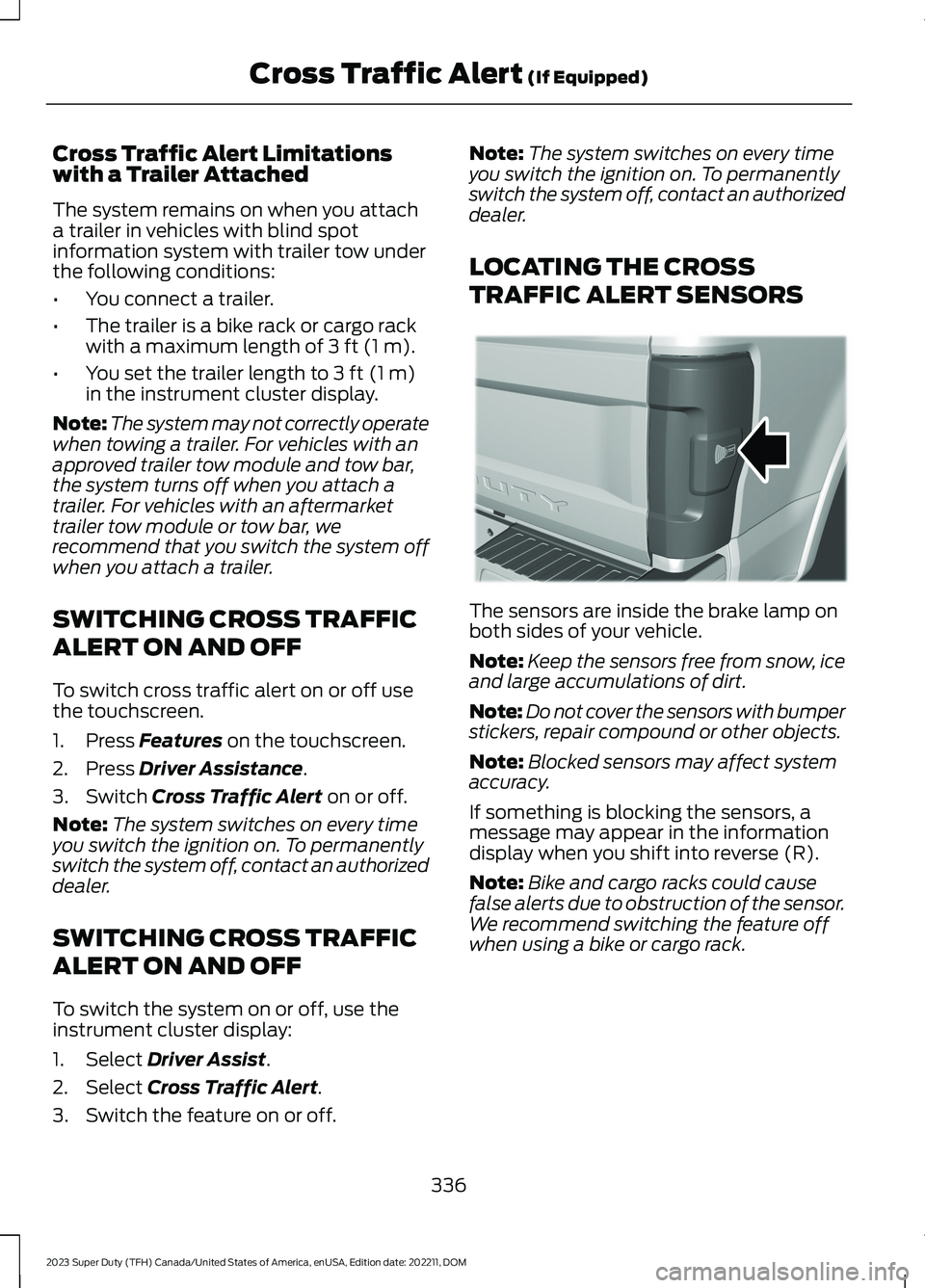
LOCATING THE CROSS
TRAFFIC ALERT SENSORS
The sensors are inside the brake lamp onboth sides of your vehicle.
Note:Keep the sensors free from snow, iceand large accumulations of dirt.
Note:Do not cover the sensors with bumperstickers, repair compound or other objects.
Note:Blocked sensors may affect systemaccuracy.
If something is blocking the sensors, amessage may appear in the informationdisplay when you shift into reverse (R).
Note:Bike and cargo racks could causefalse alerts due to obstruction of the sensor.We recommend switching the feature offwhen using a bike or cargo rack.
336
2023 Super Duty (TFH) Canada/United States of America, enUSA, Edition date: 202211, DOMCross Traffic Alert (If Equipped)E231384
Page 341 of 738
CROSS TRAFFIC ALERT
INDICATORS
When the cross traffic alertdetects an approaching vehicle,a tone sounds, a warning lampilluminates in the relevant exterior mirrorand arrows appear in the informationdisplay to show which side the vehicle isapproaching from.
If the system malfunctions, a warning lampilluminates in the instrument cluster anda message appears in the instrumentcluster display. Have your vehicle checkedas soon as possible.
Note:If arrows do not display, a messageappears in the instrument cluster display.
Note:In some conditions, the system couldalert you, even when there is nothing in thedetection zone, for example a vehiclepassing further away from your vehicle.
CROSS TRAFFIC ALERT – TROUBLESHOOTING
CROSS TRAFFIC ALERT – INFORMATION MESSAGES
ActionMessage
Displays instead of indication arrows whenthe system detects a vehicle. Check forapproaching traffic.
Cross Traffic Alert
Indicates blocked cross traffic alert systemsensors. Clean the sensors. If the messagecontinues to appear, have your vehiclechecked as soon as possible.
Cross Traffic Not Available Sensor BlockedSee Manual
The system has malfunctioned. Have yourvehicle checked as soon as possible.Cross Traffic System Fault
Displays if you attach a trailer to yourvehicle.Cross Traffic Alert Deactivated TrailerAttached
Note:When connecting a trailer, the systemmay detect the trailer and turn the systemOFF. If the system does not turn OFFautomatically, switch the cross traffic alertsystem OFF manually.
337
2023 Super Duty (TFH) Canada/United States of America, enUSA, Edition date: 202211, DOMCross Traffic Alert (If Equipped)E268294
Page 344 of 738
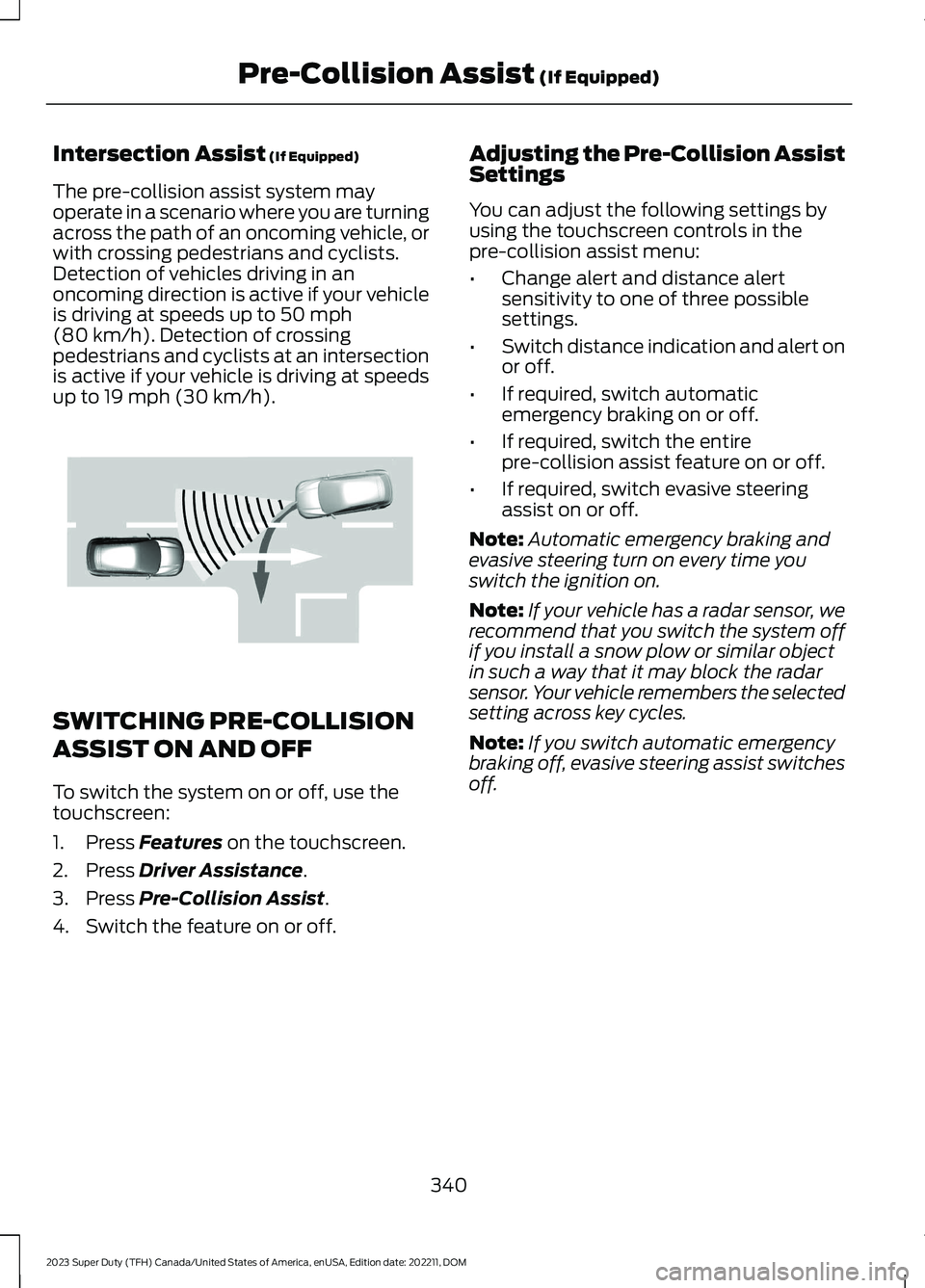
Intersection Assist (If Equipped)
The pre-collision assist system mayoperate in a scenario where you are turningacross the path of an oncoming vehicle, orwith crossing pedestrians and cyclists.Detection of vehicles driving in anoncoming direction is active if your vehicleis driving at speeds up to 50 mph(80 km/h). Detection of crossingpedestrians and cyclists at an intersectionis active if your vehicle is driving at speedsup to 19 mph (30 km/h).
SWITCHING PRE-COLLISION
ASSIST ON AND OFF
To switch the system on or off, use thetouchscreen:
1.Press Features on the touchscreen.
2.Press Driver Assistance.
3.Press Pre-Collision Assist.
4.Switch the feature on or off.
Adjusting the Pre-Collision AssistSettings
You can adjust the following settings byusing the touchscreen controls in thepre-collision assist menu:
•Change alert and distance alertsensitivity to one of three possiblesettings.
•Switch distance indication and alert onor off.
•If required, switch automaticemergency braking on or off.
•If required, switch the entirepre-collision assist feature on or off.
•If required, switch evasive steeringassist on or off.
Note:Automatic emergency braking andevasive steering turn on every time youswitch the ignition on.
Note:If your vehicle has a radar sensor, werecommend that you switch the system offif you install a snow plow or similar objectin such a way that it may block the radarsensor. Your vehicle remembers the selectedsetting across key cycles.
Note:If you switch automatic emergencybraking off, evasive steering assist switchesoff.
340
2023 Super Duty (TFH) Canada/United States of America, enUSA, Edition date: 202211, DOMPre-Collision Assist (If Equipped)E309750
Page 345 of 738
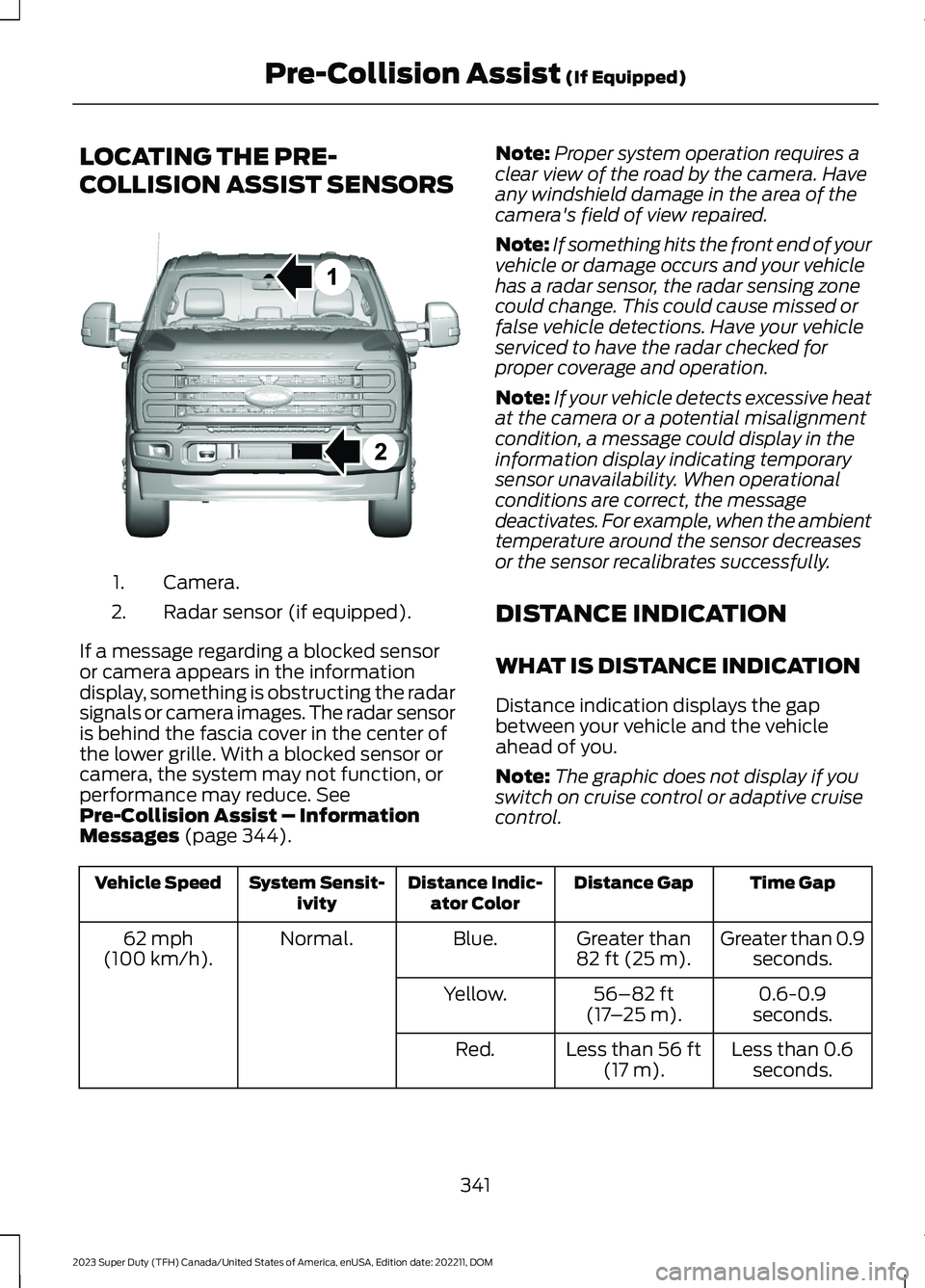
LOCATING THE PRE-
COLLISION ASSIST SENSORS
Camera.1.
Radar sensor (if equipped).2.
If a message regarding a blocked sensoror camera appears in the informationdisplay, something is obstructing the radarsignals or camera images. The radar sensoris behind the fascia cover in the center ofthe lower grille. With a blocked sensor orcamera, the system may not function, orperformance may reduce. SeePre-Collision Assist – InformationMessages (page 344).
Note:Proper system operation requires aclear view of the road by the camera. Haveany windshield damage in the area of thecamera's field of view repaired.
Note:If something hits the front end of yourvehicle or damage occurs and your vehiclehas a radar sensor, the radar sensing zonecould change. This could cause missed orfalse vehicle detections. Have your vehicleserviced to have the radar checked forproper coverage and operation.
Note:If your vehicle detects excessive heatat the camera or a potential misalignmentcondition, a message could display in theinformation display indicating temporarysensor unavailability. When operationalconditions are correct, the messagedeactivates. For example, when the ambienttemperature around the sensor decreasesor the sensor recalibrates successfully.
DISTANCE INDICATION
WHAT IS DISTANCE INDICATION
Distance indication displays the gapbetween your vehicle and the vehicleahead of you.
Note:The graphic does not display if youswitch on cruise control or adaptive cruisecontrol.
Time GapDistance GapDistance Indic-ator ColorSystem Sensit-ivityVehicle Speed
Greater than 0.9seconds.Greater than82 ft (25 m).Blue.Normal.62 mph(100 km/h).
0.6-0.9seconds.56–82 ft(17–25 m).Yellow.
Less than 0.6seconds.Less than 56 ft(17 m).Red.
341
2023 Super Duty (TFH) Canada/United States of America, enUSA, Edition date: 202211, DOMPre-Collision Assist (If Equipped)E390505
Page 348 of 738
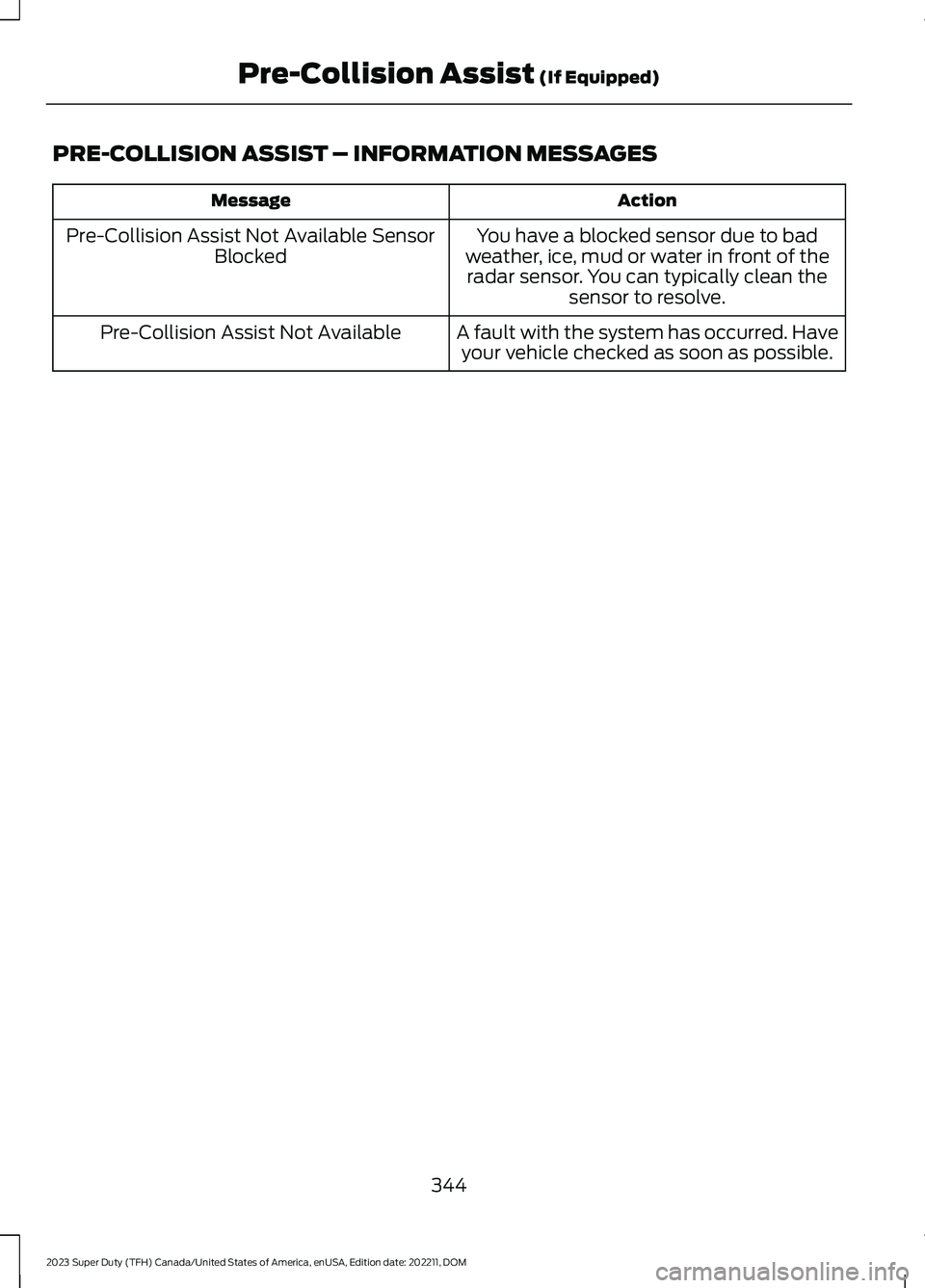
PRE-COLLISION ASSIST – INFORMATION MESSAGES
ActionMessage
You have a blocked sensor due to badweather, ice, mud or water in front of theradar sensor. You can typically clean thesensor to resolve.
Pre-Collision Assist Not Available SensorBlocked
A fault with the system has occurred. Haveyour vehicle checked as soon as possible.Pre-Collision Assist Not Available
344
2023 Super Duty (TFH) Canada/United States of America, enUSA, Edition date: 202211, DOMPre-Collision Assist (If Equipped)
Page 350 of 738
WHAT IS DRIVER ALERT
Driver alert alerts you if it determines thatyou are becoming drowsy or if your drivingdeteriorates.
HOW DOES DRIVER ALERT
WORK
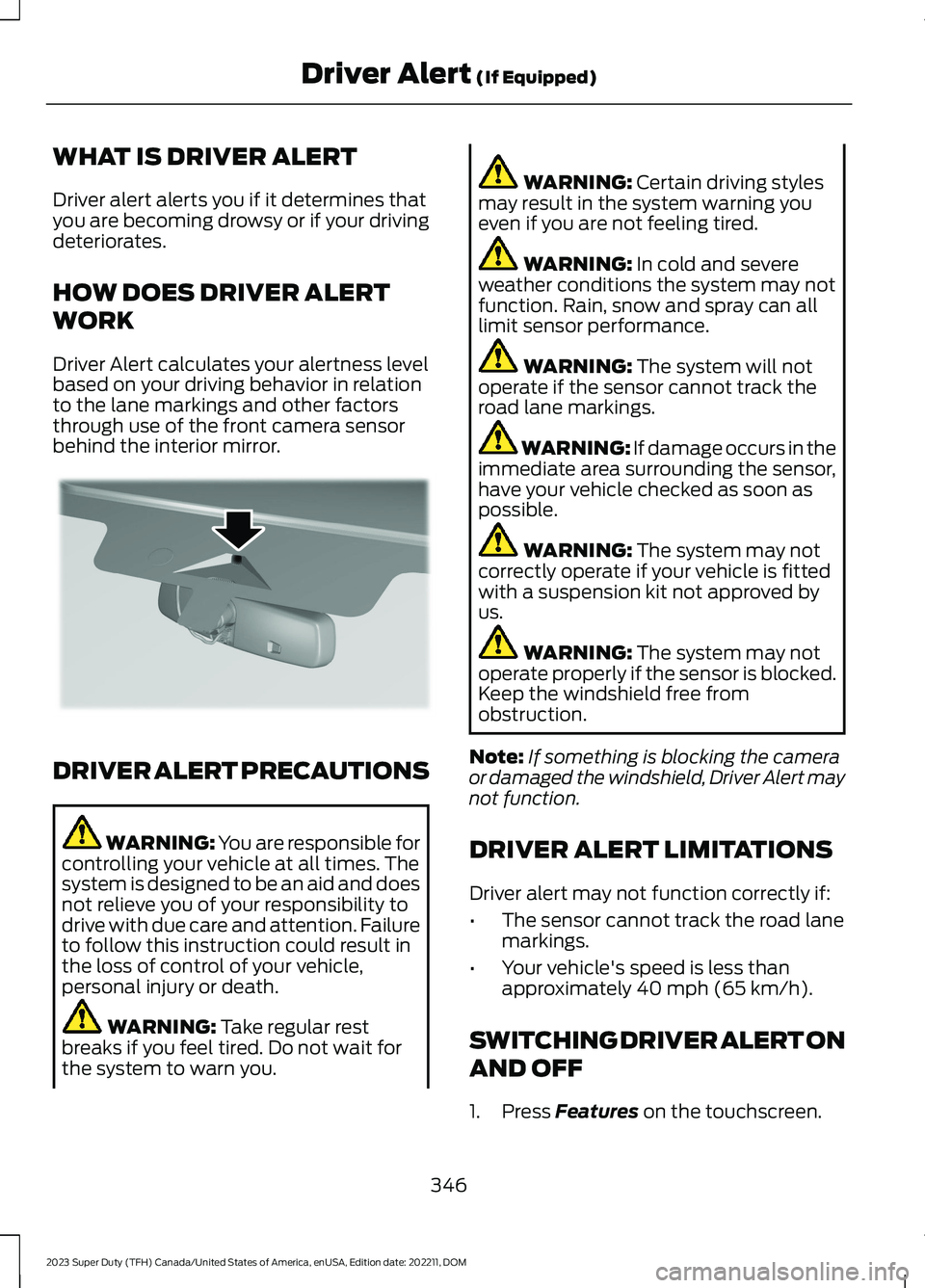
Driver Alert calculates your alertness levelbased on your driving behavior in relationto the lane markings and other factorsthrough use of the front camera sensorbehind the interior mirror.
DRIVER ALERT PRECAUTIONS
WARNING: You are responsible forcontrolling your vehicle at all times. Thesystem is designed to be an aid and doesnot relieve you of your responsibility todrive with due care and attention. Failureto follow this instruction could result inthe loss of control of your vehicle,personal injury or death.
WARNING: Take regular restbreaks if you feel tired. Do not wait forthe system to warn you.
WARNING: Certain driving stylesmay result in the system warning youeven if you are not feeling tired.
WARNING: In cold and severeweather conditions the system may notfunction. Rain, snow and spray can alllimit sensor performance.
WARNING: The system will notoperate if the sensor cannot track theroad lane markings.
WARNING: If damage occurs in theimmediate area surrounding the sensor,have your vehicle checked as soon aspossible.
WARNING: The system may notcorrectly operate if your vehicle is fittedwith a suspension kit not approved byus.
WARNING: The system may notoperate properly if the sensor is blocked.Keep the windshield free fromobstruction.
Note:If something is blocking the cameraor damaged the windshield, Driver Alert maynot function.
DRIVER ALERT LIMITATIONS
Driver alert may not function correctly if:
•The sensor cannot track the road lanemarkings.
•Your vehicle's speed is less thanapproximately 40 mph (65 km/h).
SWITCHING DRIVER ALERT ON
AND OFF
1.Press Features on the touchscreen.
346
2023 Super Duty (TFH) Canada/United States of America, enUSA, Edition date: 202211, DOMDriver Alert (If Equipped)E309385
Page 352 of 738
WHAT IS SPEED SIGN
RECOGNITION
Speed sign recognition detects speed limitsigns to inform you of the current speedlimit. Detected speed signs appear in theinstrument cluster display.
HOW DOES SPEED SIGN
RECOGNITION WORK
Speed sign recognition uses a sensorbehind the interior mirror to detect speedsigns.
If your vehicle has speed sign recognitionwith navigation, stored speed sign datamay influence the indicated speed limitvalue.
SPEED SIGN RECOGNITION
PRECAUTIONS
WARNING: You are responsible forcontrolling your vehicle at all times. Thesystem is designed to be an aid and doesnot relieve you of your responsibility todrive with due care and attention. Failureto follow this instruction could result inthe loss of control of your vehicle,personal injury or death.
WARNING: In cold and severeweather conditions the system may notfunction. Rain, snow and spray can alllimit sensor performance.
WARNING: The system may notoperate properly if the sensor is blocked.Keep the windshield free fromobstruction.
Note:Do not carry out windshield repairsin the immediate area surrounding thesensor.
Note:If your vehicle has a suspension kitnot approved by Ford, the system may notcorrectly function.
Note:The system may not detect all speedsigns and may incorrectly read signs.
Note:Always fit our original parts whenreplacing headlamp bulbs. Other bulbs mayreduce system performance.
SPEED SIGN RECOGNITION
LIMITATIONS
Speed sign recognition may not operatecorrectly due to:
•Outdated map data.
•Incorrect recognition of speed limits bythe sensor of signs on parallel roads orexit ramps.
•Missed recognition of faded, dirty, ordistorted signs.
SPEED SIGN RECOGNITION
INDICATORS
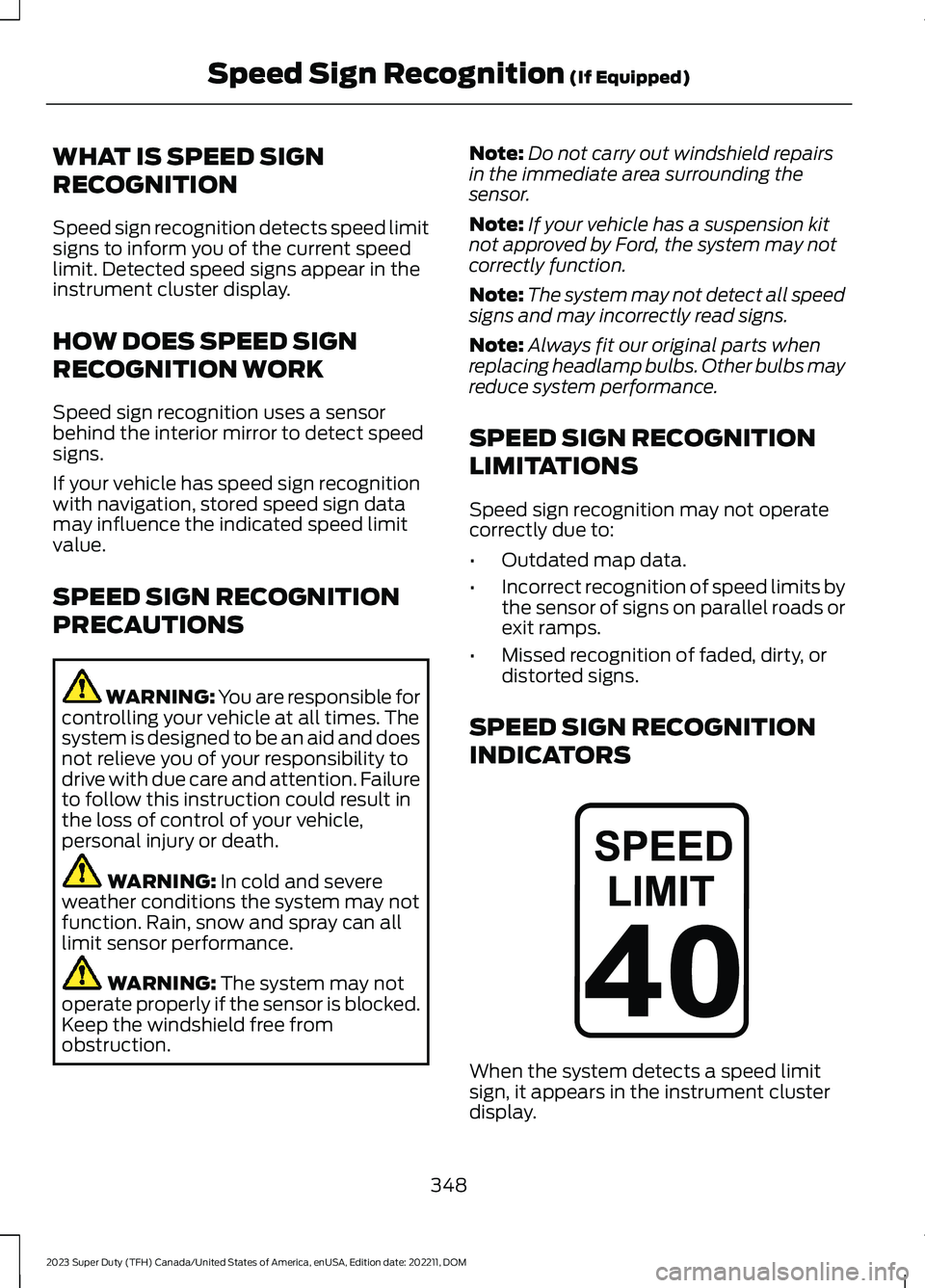
When the system detects a speed limitsign, it appears in the instrument clusterdisplay.
348
2023 Super Duty (TFH) Canada/United States of America, enUSA, Edition date: 202211, DOMSpeed Sign Recognition (If Equipped)E317824
Page 361 of 738
INSTALLING AND REMOVING THEPICKUP BED TIE-DOWN CLEATS
Installing the Cleats
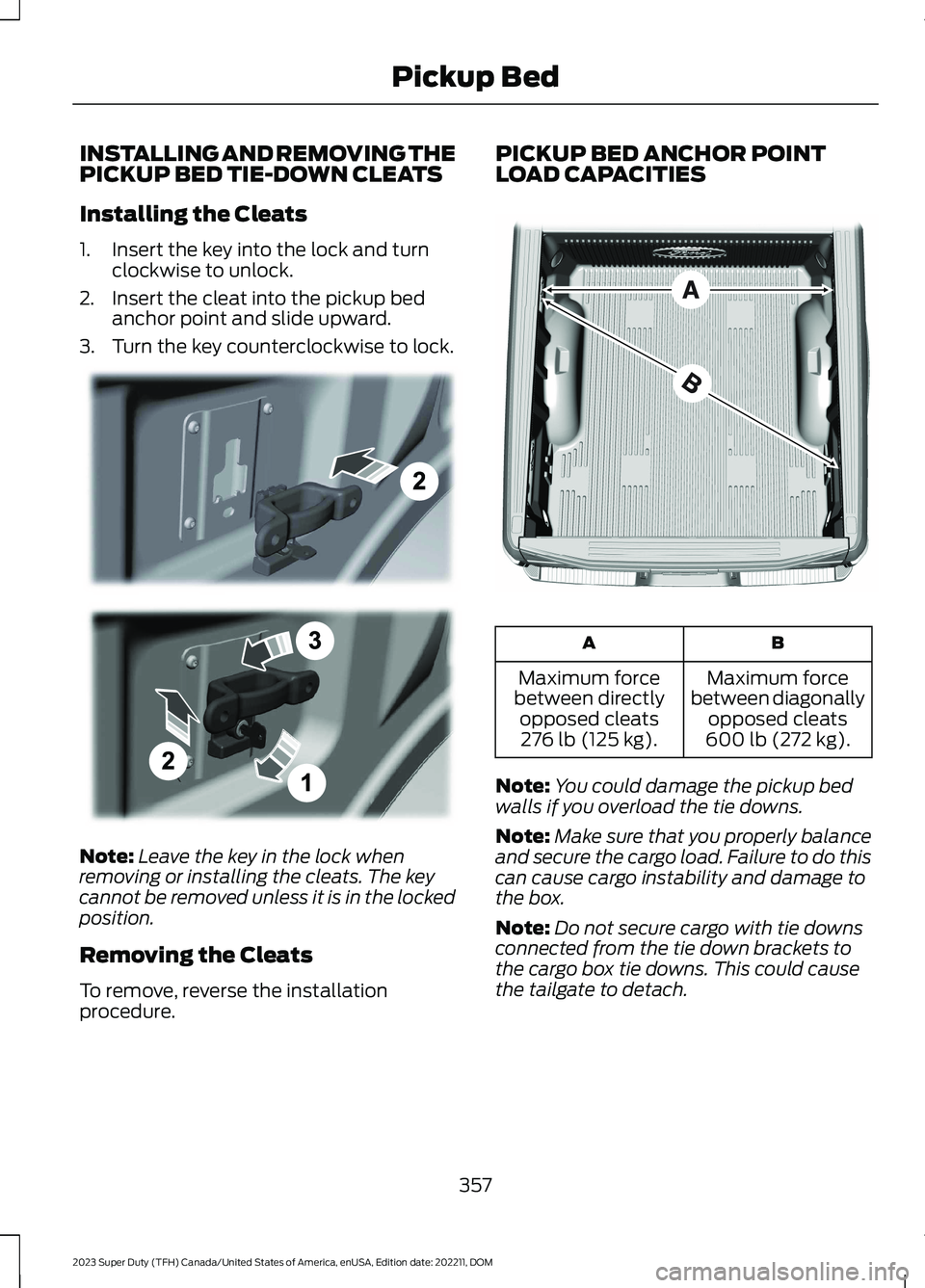
1.Insert the key into the lock and turnclockwise to unlock.
2.Insert the cleat into the pickup bedanchor point and slide upward.
3.Turn the key counterclockwise to lock.
Note:Leave the key in the lock whenremoving or installing the cleats. The keycannot be removed unless it is in the lockedposition.
Removing the Cleats
To remove, reverse the installationprocedure.
PICKUP BED ANCHOR POINTLOAD CAPACITIES
BA
Maximum forcebetween diagonallyopposed cleats600 lb (272 kg).
Maximum forcebetween directlyopposed cleats276 lb (125 kg).
Note:You could damage the pickup bedwalls if you overload the tie downs.
Note:Make sure that you properly balanceand secure the cargo load. Failure to do thiscan cause cargo instability and damage tothe box.
Note:Do not secure cargo with tie downsconnected from the tie down brackets tothe cargo box tie downs. This could causethe tailgate to detach.
357
2023 Super Duty (TFH) Canada/United States of America, enUSA, Edition date: 202211, DOMPickup BedE327575 E327576
Page 369 of 738
TOWING A TRAILER
PRECAUTIONS
WARNING: Do not exceedthe GVWR or the GAWRspecified on the certificationlabel.
WARNING: Towing trailersbeyond the maximumrecommended gross trailerweight exceeds the limit of yourvehicle and could result in enginedamage, transmission damage,structural damage, loss ofvehicle control, vehicle rolloverand personal injury.
WARNING: Do not exceedthe lowest rating capacity foryour vehicle or trailer hitch.Overloading your vehicle ortrailer hitch can impair yourvehicle stability and handling.Failure to follow this instructioncould result in the loss of controlof your vehicle, personal injury ordeath.
WARNING: Make sure thatthe vertical load on the tow ballis between the minimum andmaximum recommended weightat all times. Failure to follow thisinstruction could result in theloss of control of your vehicle,personal injury or death.
WARNING: Do not cut,drill, weld or modify the trailerhitch. Modifying the trailer hitchcould reduce the hitch rating.
WARNING: The anti-lockbrake system does not controlthe trailer brakes.
TRAILER BRAKE
PRECAUTIONS
WARNING: Do not connect atrailer's hydraulic brake system directlyto your vehicle's brake system. Yourvehicle may not have enough brakingpower and your chances of having acollision greatly increase.
WARNING: Do not tow a trailerfitted with electric trailer brakes unlessyour vehicle is fitted with a compatibleaftermarket electronic trailer brakecontroller. Failure to follow thisinstruction could result in the loss ofcontrol of your vehicle, personal injury ordeath. For additional information andassistance, we recommend that youcontact an authorized dealer.
Electric brakes and manual, automatic orsurge-type trailer brakes are safe if youinstall them properly and adjust them tothe manufacturer's specifications. Thetrailer brakes must meet local and federalregulations.
The rating for the tow vehicle's brakingsystem operation is at the gross vehicleweight rating, not the gross combinedweight rating.
365
2023 Super Duty (TFH) Canada/United States of America, enUSA, Edition date: 202211, DOMTowing a Trailer
Page 373 of 738
WHAT IS THE MAXIMUM LOADEDTRAILER WEIGHT
The maximum loaded trailerweight is the highest possibleweight of a fully loaded trailer thevehicle can tow.
CALCULATING THE MAXIMUMLOADED TRAILER WEIGHT FORYOUR VEHICLE
1.Start with the gross combinedweight rating for your vehiclemodel and axle ratio.
2.Subtract all of the followingthat apply to your vehicle:
•Vehicle curb weight.
•Hitch hardware weight, forexample a draw bar, ball, locksor weight distributing hardware.
•Driver weight.
•Passenger weight.
•Payload, cargo and luggageweight.
•Aftermarket equipment weight.
This equals the maximum loadedtrailer weight for this combination.
Note:The trailer tongue load isconsidered part of the payload foryour vehicle. Reduce the totalpayload by the final trailer tongueweight.
Note:Consult an authorized dealerto determine the maximum trailerweight allowed for your vehicle ifyou are not sure.
369
2023 Super Duty (TFH) Canada/United States of America, enUSA, Edition date: 202211, DOMTowing a Trailer