center console FORD SUPER DUTY 2023 User Guide
[x] Cancel search | Manufacturer: FORD, Model Year: 2023, Model line: SUPER DUTY, Model: FORD SUPER DUTY 2023Pages: 738, PDF Size: 18.49 MB
Page 192 of 738
Grounding Type
Neutral Floating
The neutral of the inverter generator isisolated from system ground.
Note:If additional grounding measures arerequired, consult with a qualified electrician.
LOCATING THE OUTLETS
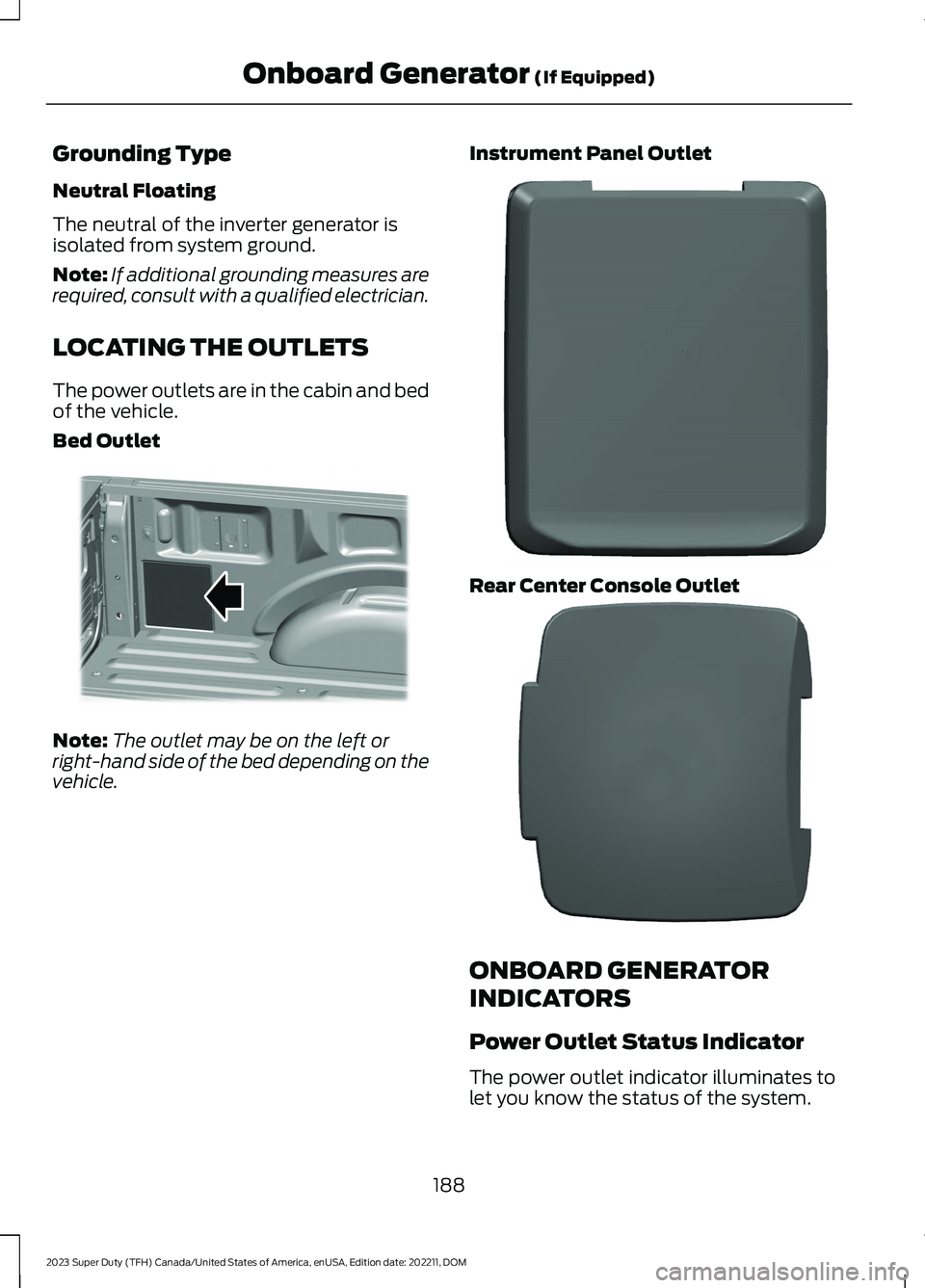
The power outlets are in the cabin and bedof the vehicle.
Bed Outlet
Note:The outlet may be on the left orright-hand side of the bed depending on thevehicle.
Instrument Panel Outlet
Rear Center Console Outlet
ONBOARD GENERATOR
INDICATORS
Power Outlet Status Indicator
The power outlet indicator illuminates tolet you know the status of the system.
188
2023 Super Duty (TFH) Canada/United States of America, enUSA, Edition date: 202211, DOMOnboard Generator (If Equipped)E369445 E337927 E337926
Page 197 of 738
USING THE CENTER CONSOLE
WORK SURFACE
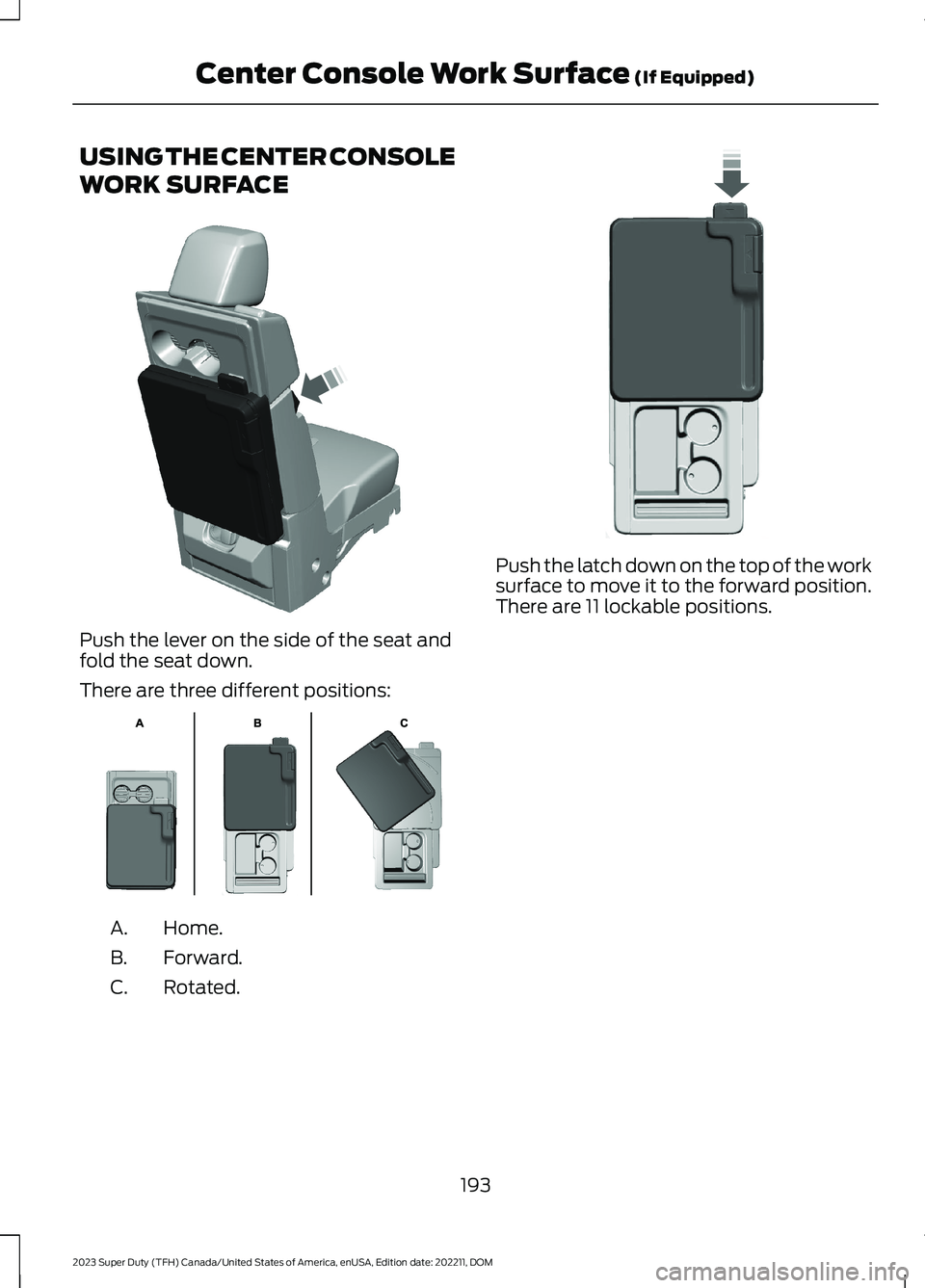
Push the lever on the side of the seat andfold the seat down.
There are three different positions:
Home.A.
Forward.B.
Rotated.C.
Push the latch down on the top of the worksurface to move it to the forward position.There are 11 lockable positions.
193
2023 Super Duty (TFH) Canada/United States of America, enUSA, Edition date: 202211, DOMCenter Console Work Surface (If Equipped)E313248 E312215 E327628
Page 198 of 738
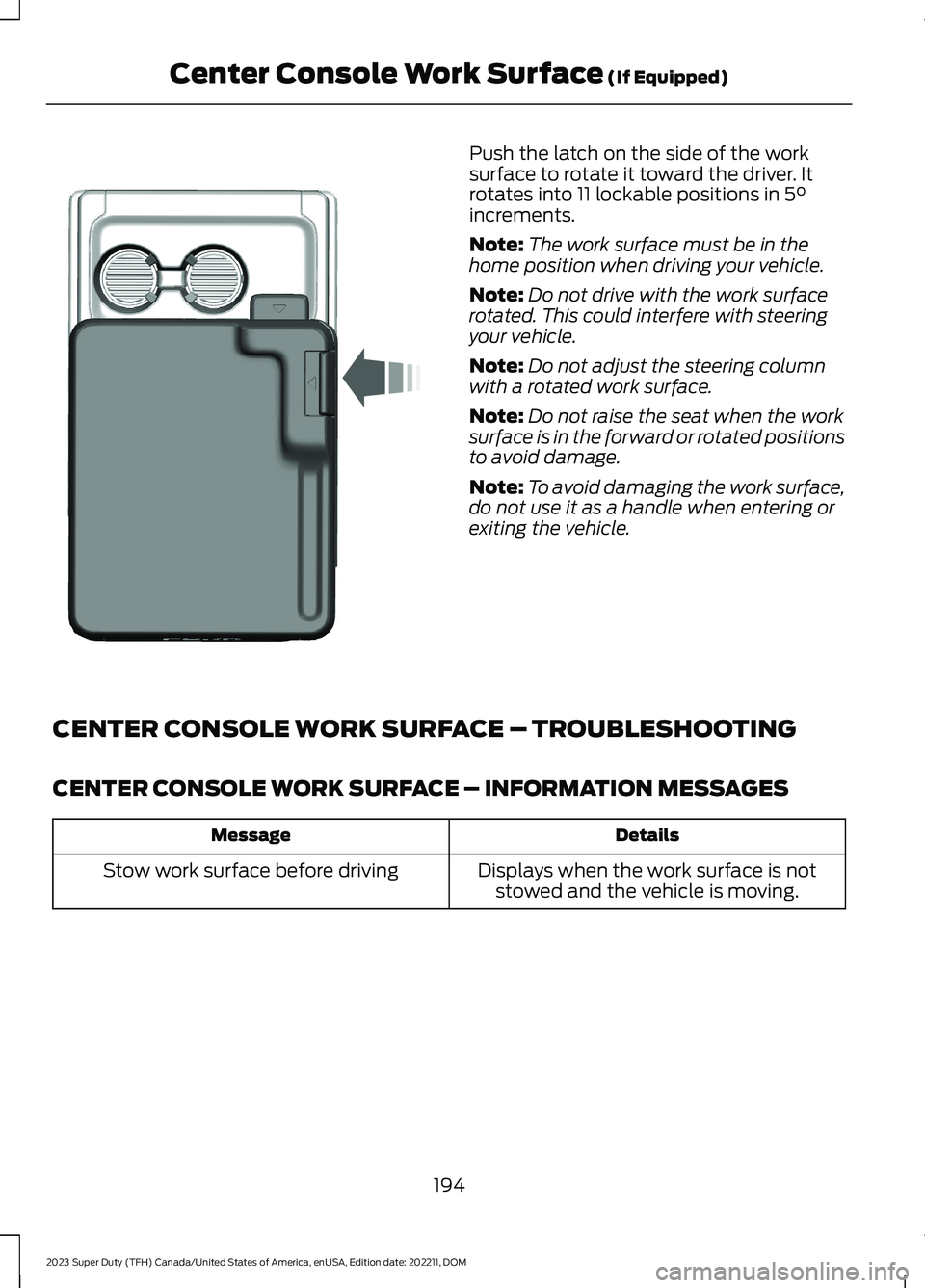
Push the latch on the side of the worksurface to rotate it toward the driver. Itrotates into 11 lockable positions in 5°increments.
Note:The work surface must be in thehome position when driving your vehicle.
Note:Do not drive with the work surfacerotated. This could interfere with steeringyour vehicle.
Note:Do not adjust the steering columnwith a rotated work surface.
Note:Do not raise the seat when the worksurface is in the forward or rotated positionsto avoid damage.
Note:To avoid damaging the work surface,do not use it as a handle when entering orexiting the vehicle.
CENTER CONSOLE WORK SURFACE – TROUBLESHOOTING
CENTER CONSOLE WORK SURFACE – INFORMATION MESSAGES
DetailsMessage
Displays when the work surface is notstowed and the vehicle is moving.Stow work surface before driving
194
2023 Super Duty (TFH) Canada/United States of America, enUSA, Edition date: 202211, DOMCenter Console Work Surface (If Equipped)E331800
Page 199 of 738
WHAT IS THE WIRELESS
ACCESSORY CHARGER
The wireless accessory charger allows youto charge one compatible Qi wirelesscharging device on the charging area.
WIRELESS ACCESSORY
CHARGER PRECAUTIONS
WARNING: Wireless chargingdevices can affect the operation ofimplanted medical devices, includingcardiac pacemakers. If you have anyimplanted medical devices, werecommend that you consult with yourphysician.
WARNING: Remove all metalobjects like coins and keys from thecharging surface and remove any metalobjects attached to your mobile phonebefore placing the device on the chargingsurface. Some mobile devices or casesmay attract metal objects. Metal objectson the charging surface or attached tothe phone may become hot whilecharging is active. If an object is left onor near the charging surface or attachedto the phone while the device is charging,let the objects cool before removing toprevent personal injury.
Keep the charging area clean and removeforeign objects prior to charging a device.
Do not place items with a magnetic stripor radio-frequency identification chip, forexample passports, parking tickets,transportation passes or credit cards, nearthe charging area when charging a device.Damage could occur to the magnetic stripor radio-frequency identification chip.
Do not place metal objects, for exampleremote controls, coins and candywrappers, on or near the charging areawhen charging a device. Metal objects mayheat up and degrade the chargingperformance, in addition to causinginterruptions in charging.
Charging could be interrupted, degraded,or could stop if any of the following occur:
•The system detects a foreign object.
•The device is misaligned on thecharging area.
•The device moves on the activecharging area when the vehicle is inmotion.
•The vehicle ambient temperature is toohigh.
•You attempt to charge a non-Qicompatible device on the wirelesscharger.
Note:During charging, the device and thecharger could heat up, this is normal. If thebattery gets hotter than usual, the devicemay stop charging.
LOCATING THE WIRELESS
ACCESSORY CHARGER
The charging area is in the centerconsole media bin below theinstrument panel.
CHARGING A WIRELESS
DEVICE
Place the device on the center of thecharging surface with the charging sidedown. The charging stops after your devicereaches a full charge.
You can use the charger when the vehicleis in accessory mode, when the vehicle isrunning, or when SYNC is on.
195
2023 Super Duty (TFH) Canada/United States of America, enUSA, Edition date: 202211, DOMWireless Accessory ChargerE297549
Page 202 of 738
CENTER CONSOLE
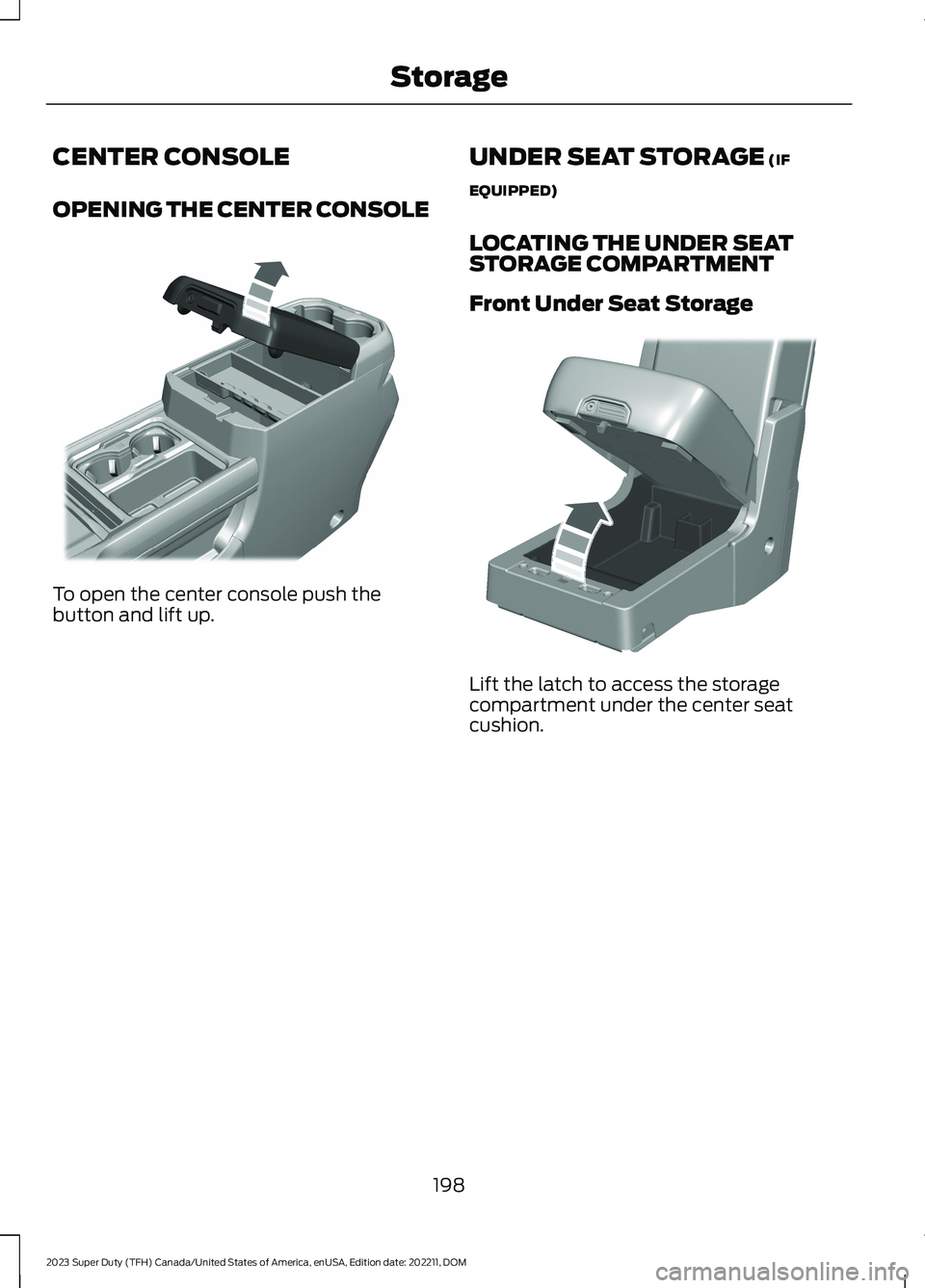
OPENING THE CENTER CONSOLE
To open the center console push thebutton and lift up.
UNDER SEAT STORAGE (IF
EQUIPPED)
LOCATING THE UNDER SEATSTORAGE COMPARTMENT
Front Under Seat Storage
Lift the latch to access the storagecompartment under the center seatcushion.
198
2023 Super Duty (TFH) Canada/United States of America, enUSA, Edition date: 202211, DOMStorageE390519 E390520
Page 213 of 738
ACCESSING THE PASSIVE KEY
BACKUP POSITION
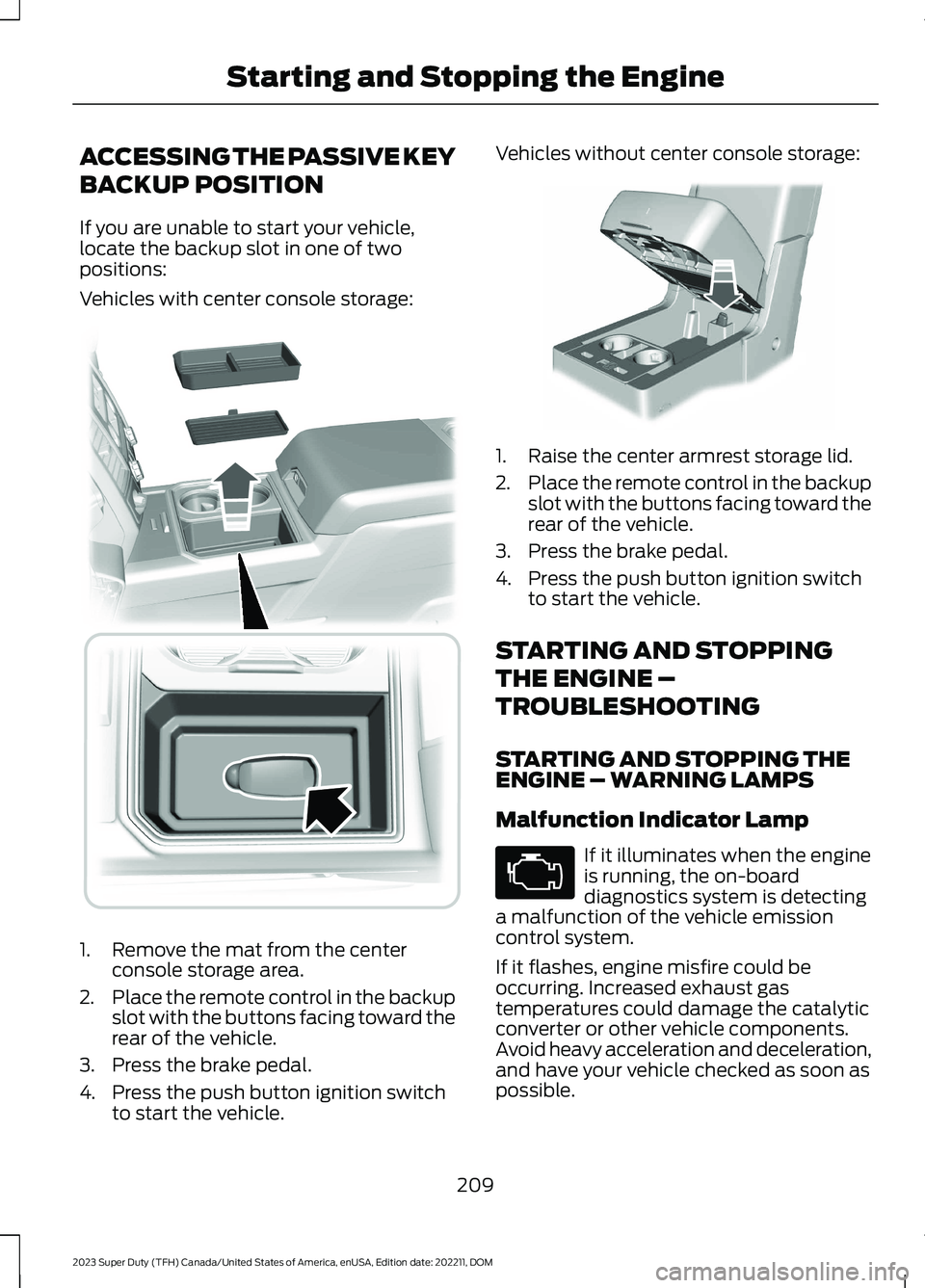
If you are unable to start your vehicle,locate the backup slot in one of twopositions:
Vehicles with center console storage:
1.Remove the mat from the centerconsole storage area.
2.Place the remote control in the backupslot with the buttons facing toward therear of the vehicle.
3.Press the brake pedal.
4.Press the push button ignition switchto start the vehicle.
Vehicles without center console storage:
1.Raise the center armrest storage lid.
2.Place the remote control in the backupslot with the buttons facing toward therear of the vehicle.
3.Press the brake pedal.
4.Press the push button ignition switchto start the vehicle.
STARTING AND STOPPING
THE ENGINE –
TROUBLESHOOTING
STARTING AND STOPPING THEENGINE – WARNING LAMPS
Malfunction Indicator Lamp
If it illuminates when the engineis running, the on-boarddiagnostics system is detectinga malfunction of the vehicle emissioncontrol system.
If it flashes, engine misfire could beoccurring. Increased exhaust gastemperatures could damage the catalyticconverter or other vehicle components.Avoid heavy acceleration and deceleration,and have your vehicle checked as soon aspossible.
209
2023 Super Duty (TFH) Canada/United States of America, enUSA, Edition date: 202211, DOMStarting and Stopping the Engine E226701 E269950 E67028
Page 315 of 738
WHAT IS DRIVE MODE
CONTROL
Your vehicle has various drive modes thatyou can select for different drivingconditions. Depending on the drive modethat you select, the system adjusts variousvehicle settings.
HOW DOES DRIVE MODE
CONTROL WORK
Drive mode control adjusts your vehicleconfiguration for each mode you select.
Changing the drive mode adjusts thesteering effort and feel of the steeringsystem.
The stability and traction control assistyour vehicle control in adverse conditionsor high-performance driving.
Throttle control enhances the powertrainresponse, transmission controls becomeoptimized with shift schedules, andfour-wheel drive settings are optimizedand tuned to each mode.
Changing the drive mode can engage ordisengage the electronic lockingdifferentials.
Changing the drive mode changes thefour-wheel drive mode to the defaultsetting for the selected drive mode.
Note:The system has diagnostic checksthat continuously monitor the system forproper operation. If a mode is unavailabledue to a system fault, the drive modesystem defaults to normal. When thesystem defaults to normal, the drivelinesettings remain the same as prior to thesystem fault.
Note:The system reverts to the normalmode each time you start your vehicle. Atstartup the system also displays a prompton the instrument cluster display that givesyou the option to return to the previouslyselected drive mode during the last ignitioncycle. If you select yes, the system returnsto the last selected drive mode and thedefault driveline settings associated withthat mode. If you select no, the systemremains in normal mode and the drivelinesettings remain the same as selected in theprior ignition cycle. If you do not select yesor no, the system stays in normal mode andthe driveline settings remain the same asselected in the prior ignition cycle.
SELECTING A DRIVE MODE
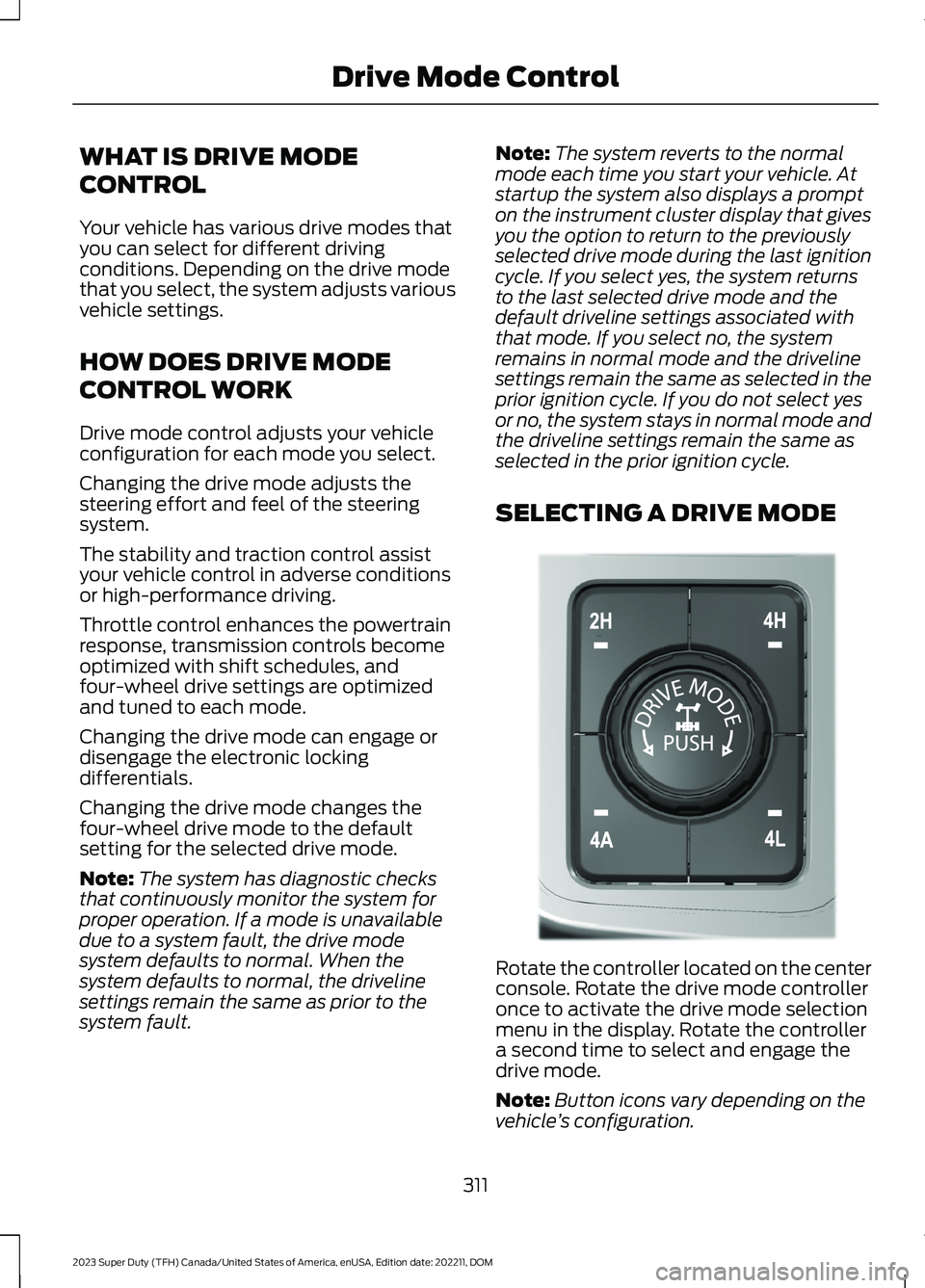
Rotate the controller located on the centerconsole. Rotate the drive mode controlleronce to activate the drive mode selectionmenu in the display. Rotate the controllera second time to select and engage thedrive mode.
Note:Button icons vary depending on thevehicle’s configuration.
311
2023 Super Duty (TFH) Canada/United States of America, enUSA, Edition date: 202211, DOMDrive Mode ControlE308146
Page 714 of 738
Blind Spot Information System With TrailerCoverage..........................................................328Blind Spot Information SystemIndicators.....................................................330Blind Spot Information SystemLimitations...................................................327Blind Spot Information SystemPrecautions..................................................327Blind Spot Information SystemRequirements.............................................327Blind Spot Information System –Troubleshooting.........................................331Blind Spot Information System –Information Messages.................................331Blind Spot Information SystemVideos............................................................331Blind Spot Information System WithTrailer Coverage.........................................328Blind Spot Information System With TrailerCoverage Limitations..................................328Selecting a Trailer..............................................330Setting a Trailer Length...................................329What Is Blind Spot Information System withTrailer Coverage.............................................328Bluetooth®.....................................................574Bonnet LockSee: Opening and Closing the Hood.........440Booster Seats...................................................47Brake Fluid Specification..........................250Brake Over Accelerator..............................249Brake Precautions.......................................249Brakes..............................................................249Anti-Lock Braking System..............................249Brakes – Troubleshooting..............................250Brakes – Troubleshooting........................250Brakes – Frequently AskedQuestions.........................................................252Brakes – Information Messages....................251Brakes – Warning Lamps...............................250Breaking-In.....................................................416
C
Calculating Payload....................................353Calculating the Load Limit.......................353Canceling the Set Speed...........................273Canceling the Set Speed Limit................316Capacities and Specifications................520
Catalytic Converter.....................................233Catalytic Converter –Troubleshooting............................................233Catalytic Converter Precautions............233Catalytic Converter –Troubleshooting........................................233Catalytic Converter – WarningLamps................................................................233Center Console..............................................198Opening the Center Console..........................198Center Console Work Surface.................193Center Console Work Surface –Troubleshooting.............................................194Center Console Work Surface –Troubleshooting.........................................194Center Console Work Surface – InformationMessages..........................................................194Center Display Limitations.......................563Center Display Overview..........................563Center Display Overview Videos...........564Center Display Precautions.....................563Changing a Flat Tire...................................509Changing a Road Wheel...........................509Changing the Fuel Filter - Diesel............453Changing the Fuel Filter -Gasoline.......................................................453Changing the Language.............................145Changing the Measurement Unit...........145Changing the Remote Control Battery -Vehicles With: Flip Key...............................74Changing the Remote Control Battery -Vehicles With: Push Button Start..........75Changing the Set Speed Limit................316Changing the Temperature Unit.............145Changing the Tire Pressure Unit.............145Changing the Vehicle Wi-Fi HotspotName or Password....................................551Charging a Device.........................................183Charging a Wireless Device......................195Checking the Brake Fluid..........................249Checking the Seatbelts...............................56Checking the Selective CatalyticReduction System Status.....................230Checking the Tire Pressures...................490Checking the Wiper Blades........................114Children and Airbags....................................64
710
2023 Super Duty (TFH) Canada/United States of America, enUSA, Edition date: 202211, DOMIndex
Page 730 of 738
Speedometer..................................................137Speed Sign RecognitionIndicators.....................................................348Speed Sign RecognitionLimitations..................................................348Speed Sign RecognitionPrecautions................................................348Speed Sign Recognition...........................348Speed Sign Recognition –Troubleshooting............................................349Speed Sign Recognition –Troubleshooting........................................349Speed Sign Recognition – Frequently AskedQuestions........................................................350Speed Sign Recognition – InformationMessages.........................................................349Stability Control Indicator.........................272Stability Control...........................................270Starter SwitchSee: Ignition Switch..........................................202Starting and Stopping the Engine –Precautions.................................................202Starting and Stopping the Engine.........202Automatic Engine Stop...................................208Engine Block Heater.........................................205Idle Timer..............................................................207Starting and Stopping the Engine –Troubleshooting............................................209Starting the Engine...........................................203Stopping the Engine.........................................206Starting and Stopping the Engine –Troubleshooting.......................................209Starting and Stopping the Engine –Frequently Asked Questions.......................211Starting and Stopping the Engine –Information Messages.................................210Starting and Stopping the Engine –Warning Lamps.............................................209Starting and Stopping the EngineVideos.............................................................213Starting the Engine.....................................203Restarting the Engine After Stoppingit..........................................................................205Starting a Diesel Engine..................................204Starting a Gasoline Engine............................203Status Bar......................................................563Steering...........................................................279Hydraulic Power Steering...............................279
Steering – Troubleshooting...........................280Steering – Troubleshooting....................280Steering – Information Messages................281Steering – Warning Indicators......................280Steering Wheel.................................................31Steering Wheel Videos.................................111Stopping the Engine..................................206Stopping the Engine When Your Vehicle isMoving..............................................................206Stopping the Engine When Your Vehicle isStationary........................................................206Storage.............................................................197Center Console....................................................198Cup Holders..........................................................197Glasses Holder....................................................201Glove Compartment..........................................197Under Seat Storage...........................................198Storing Your Vehicle....................................476SunroofSee: Moonroof.....................................................134Switching Adaptive Cruise Control Onand Off.........................................................299Switching Air Conditioning On andOff....................................................................152Switching All of the Interior Lamps Onand Off...........................................................126Switching Android Auto On andOff...................................................................576Switching Apple CarPlay On andOff...................................................................576Switching Auto Hold On and Off...........266Switching Climate Control On andOff....................................................................152Switching Cross Traffic Alert On andOff..................................................................336Switching Cross Traffic Braking On andOff..................................................................263Switching Cruise Control On andOff..................................................................294Switching Defrost On and Off.................152Switching Driver Alert On and Off........346Switching Easy Entry and Exit On andOff....................................................................90Switching Exit Warning On andOff...................................................................333Switching Four-Wheel Drive On andOff..................................................................240
726
2023 Super Duty (TFH) Canada/United States of America, enUSA, Edition date: 202211, DOMIndex
Page 733 of 738
Trailer Lighting Check................................363Trailer Reverse GuidancePrecautions.................................................401Trailer Reverse Guidance...........................401Setting Up Trailer Reverse Guidance for aConventional Trailer.....................................401Trailer Reverse Guidance –Troubleshooting............................................407Trailer Reverse Guidance –Troubleshooting........................................407Trailer Reverse Guidance – FrequentlyAsked Questions..........................................409Trailer Reverse Guidance – InformationMessages.........................................................407Trailer Sway Control Precautions...........377Trailer Sway Control....................................377Trailer Sway Control Videos.....................377Trailer Towing Hints....................................366Trailer Towing Navigation..........................581Trail Turn Assist Indicators........................275Trail Turn Assist Limitations.....................275Trail Turn Assist Precautions...................275Trail Turn Assist.............................................275Trail Turn Assist – Troubleshooting............276Trail Turn Assist –Troubleshooting........................................276Trail Turn Assist – Frequently AskedQuestions.........................................................276Trail Turn Assist – InformationMessages.........................................................276Transfer Case Fluid Capacity andSpecification...............................................242Transmission Fluid TemperatureGauge.............................................................138Transporting the Vehicle...........................424Trip Computer................................................146Trip Data..........................................................146Turbo Boost Gauge......................................138
U
Under Hood Fuse Box...............................430Accessing the Under Hood Fuse Box........430Identifying the Fuses in the Under HoodFuse Box............................................................431Locating the Under Hood Fuse Box...........430Under Hood Overview - 6.7L Diesel......441
Under Hood Overview - 6.8L,Gasoline.......................................................442Under Hood Overview - 7.3L,Gasoline.......................................................443Under Seat Storage.....................................198Locating the Under Seat StorageCompartment.................................................198USB Ports........................................................183USB Ports Videos.........................................184Using Alexa Built-In.....................................567Using a Slide-In Camper...........................352Using Auto Hold...........................................266Using Digital Key..............................................71Using Keyless Entry.......................................85Using Onboard Scales...............................384Using Progressive RangeSelection......................................................236Using Smart Hitch.......................................382Using Snow Chains.....................................487Using the Center Console WorkSurface..........................................................193Using the Diesel Engine ExhaustBrake.............................................................256Using the Instrument Cluster DisplayControls.........................................................143Using the Integrated Trailer BrakeController......................................................372Using the Key Cards......................................69Using the Keyless Entry Keypad...............88Using the Remote Control..........................69Using the Trailer Backup AssistanceController.....................................................392Using the Trailer Backup AssistanceViews.............................................................393Using This Publication..................................22Using Trailer Hitching Assistance..........379Using Trailer Reverse GuidanceViews............................................................405
V
Vehicle Care..................................................469Cleaning the Exterior........................................470Cleaning the Interior..........................................472Vehicle Care Videos....................................475Vehicle Identification Number................547Locating the Vehicle IdentificationNumber.............................................................547
729
2023 Super Duty (TFH) Canada/United States of America, enUSA, Edition date: 202211, DOMIndex