headlamp FORD SUPER DUTY 2023 User Guide
[x] Cancel search | Manufacturer: FORD, Model Year: 2023, Model line: SUPER DUTY, Model: FORD SUPER DUTY 2023Pages: 738, PDF Size: 18.49 MB
Page 145 of 738
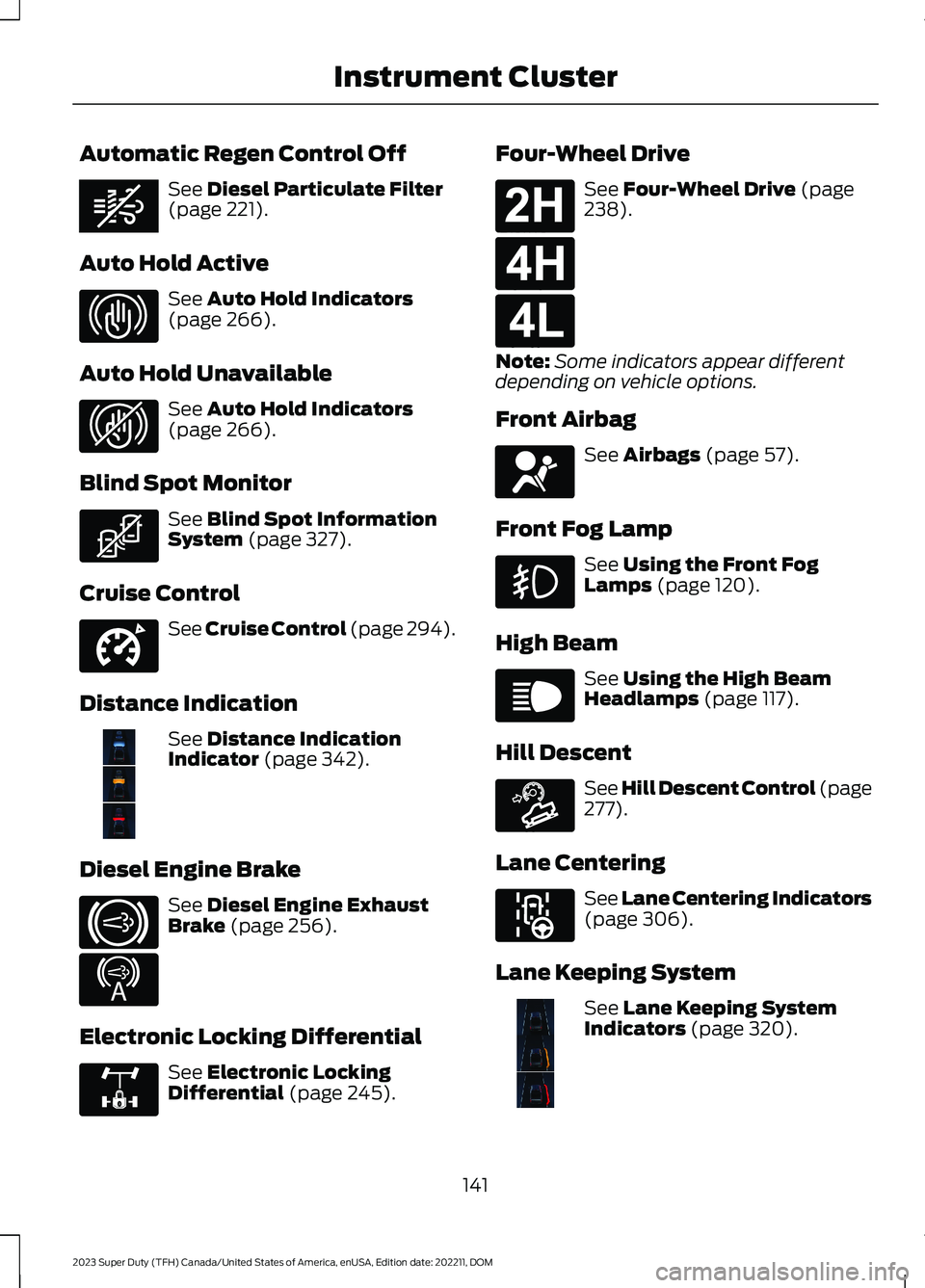
Automatic Regen Control Off
See Diesel Particulate Filter(page 221).
Auto Hold Active
See Auto Hold Indicators(page 266).
Auto Hold Unavailable
See Auto Hold Indicators(page 266).
Blind Spot Monitor
See Blind Spot InformationSystem (page 327).
Cruise Control
See Cruise Control (page 294).
Distance Indication
See Distance IndicationIndicator (page 342).
Diesel Engine Brake
See Diesel Engine ExhaustBrake (page 256).
Electronic Locking Differential
See Electronic LockingDifferential (page 245).
Four-Wheel Drive
See Four-Wheel Drive (page238).
Note:Some indicators appear differentdepending on vehicle options.
Front Airbag
See Airbags (page 57).
Front Fog Lamp
See Using the Front FogLamps (page 120).
High Beam
See Using the High BeamHeadlamps (page 117).
Hill Descent
See Hill Descent Control (page277).
Lane Centering
See Lane Centering Indicators(page 306).
Lane Keeping System
See Lane Keeping SystemIndicators (page 320).
141
2023 Super Duty (TFH) Canada/United States of America, enUSA, Edition date: 202211, DOMInstrument ClusterE362285 E323448 E323449 E323542 E332905 E381968 E171217 E234452 E325779 E181778 E181779 E181780 E67017 E67019 E163171 E297977 E382218
Page 207 of 738
Switching the Ignition On
Turn the key to position II. All electricalcircuits and accessories are operationaland the warning lamps and indicatorsilluminate.
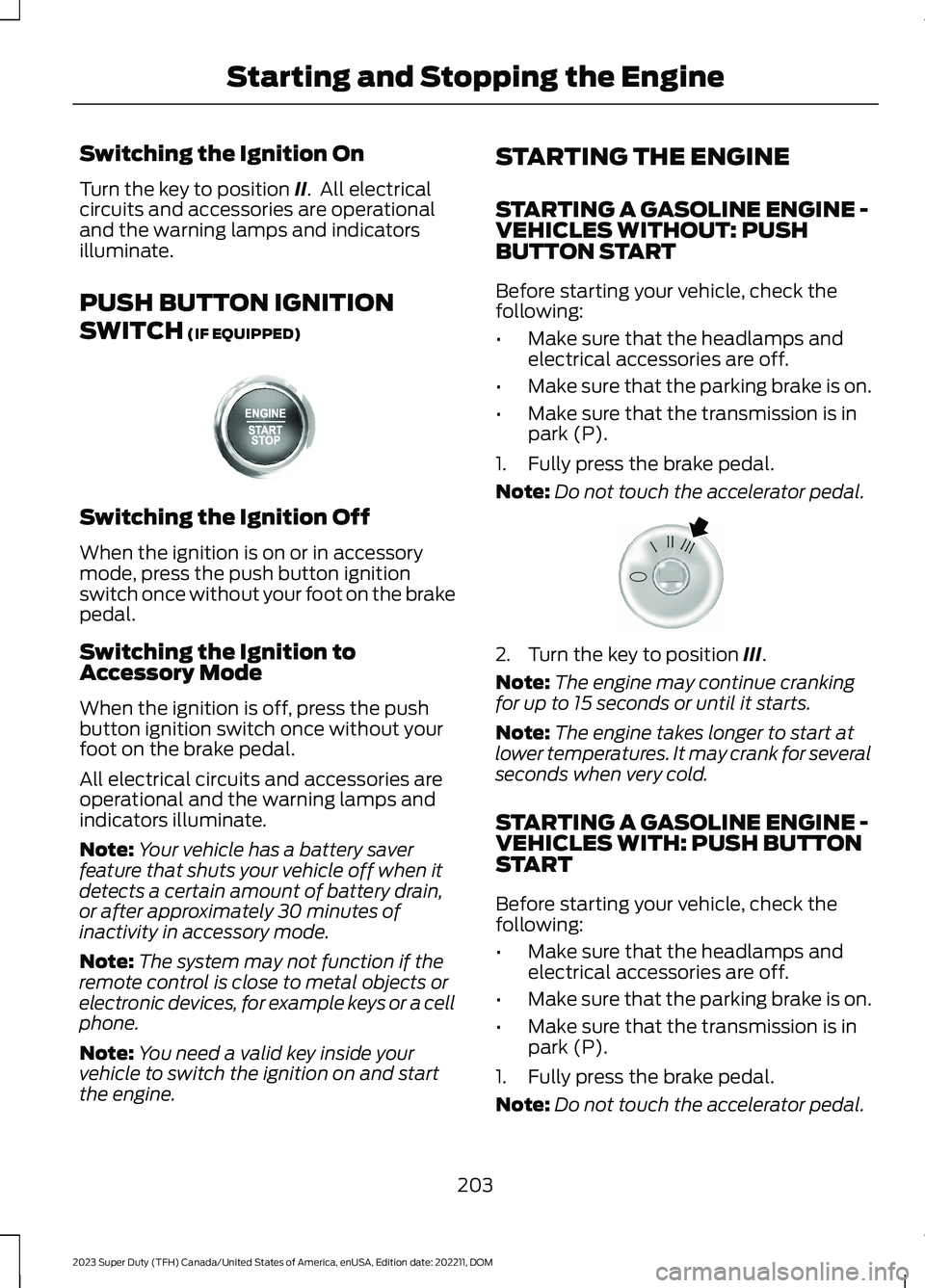
PUSH BUTTON IGNITION
SWITCH (IF EQUIPPED)
Switching the Ignition Off
When the ignition is on or in accessorymode, press the push button ignitionswitch once without your foot on the brakepedal.
Switching the Ignition toAccessory Mode
When the ignition is off, press the pushbutton ignition switch once without yourfoot on the brake pedal.
All electrical circuits and accessories areoperational and the warning lamps andindicators illuminate.
Note:Your vehicle has a battery saverfeature that shuts your vehicle off when itdetects a certain amount of battery drain,or after approximately 30 minutes ofinactivity in accessory mode.
Note:The system may not function if theremote control is close to metal objects orelectronic devices, for example keys or a cellphone.
Note:You need a valid key inside yourvehicle to switch the ignition on and startthe engine.
STARTING THE ENGINE
STARTING A GASOLINE ENGINE -VEHICLES WITHOUT: PUSHBUTTON START
Before starting your vehicle, check thefollowing:
•Make sure that the headlamps andelectrical accessories are off.
•Make sure that the parking brake is on.
•Make sure that the transmission is inpark (P).
1.Fully press the brake pedal.
Note:Do not touch the accelerator pedal.
2.Turn the key to position III.
Note:The engine may continue crankingfor up to 15 seconds or until it starts.
Note:The engine takes longer to start atlower temperatures. It may crank for severalseconds when very cold.
STARTING A GASOLINE ENGINE -VEHICLES WITH: PUSH BUTTONSTART
Before starting your vehicle, check thefollowing:
•Make sure that the headlamps andelectrical accessories are off.
•Make sure that the parking brake is on.
•Make sure that the transmission is inpark (P).
1.Fully press the brake pedal.
Note:Do not touch the accelerator pedal.
203
2023 Super Duty (TFH) Canada/United States of America, enUSA, Edition date: 202211, DOMStarting and Stopping the EngineE357998 E322354
Page 208 of 738
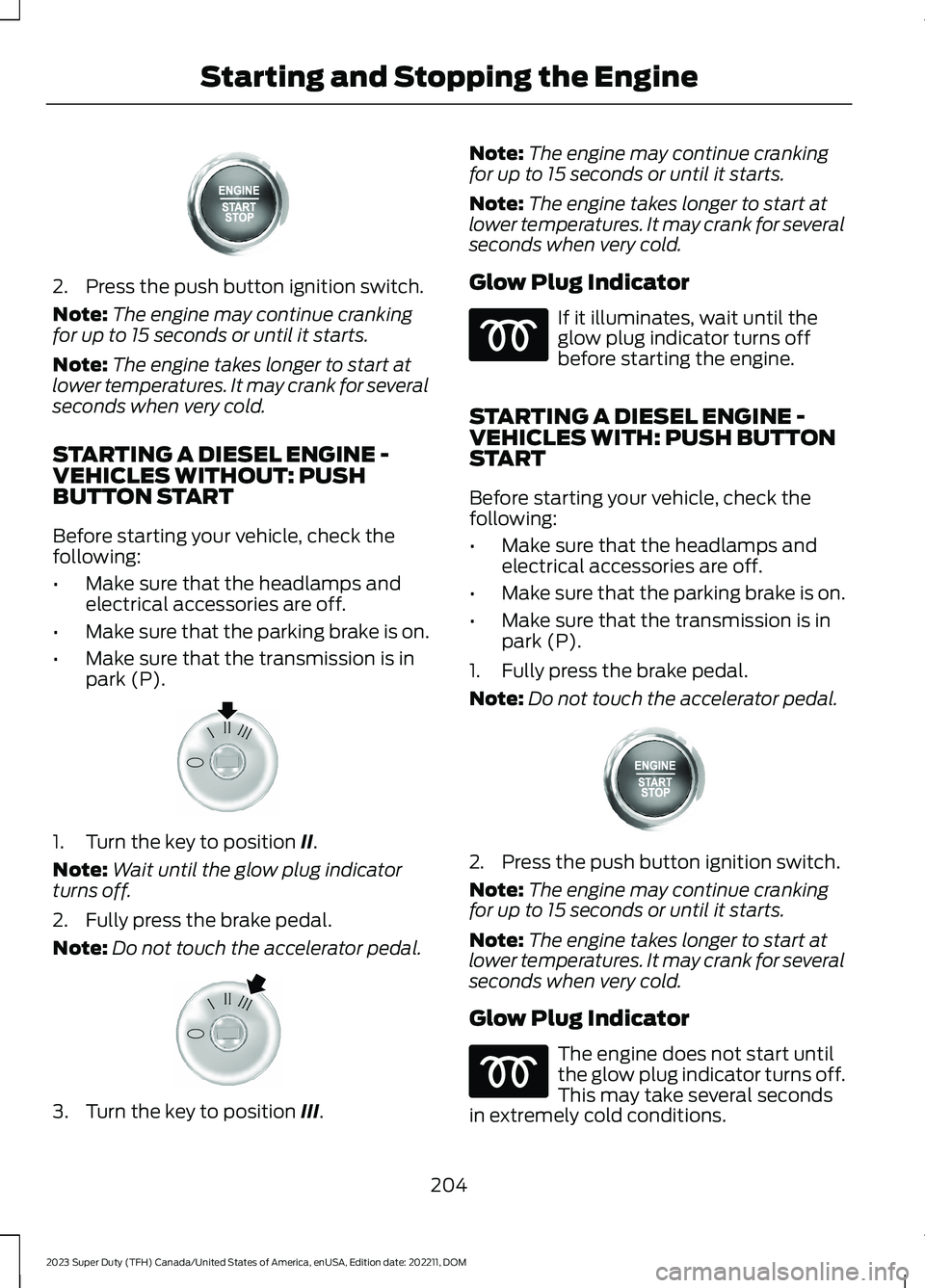
2.Press the push button ignition switch.
Note:The engine may continue crankingfor up to 15 seconds or until it starts.
Note:The engine takes longer to start atlower temperatures. It may crank for severalseconds when very cold.
STARTING A DIESEL ENGINE -VEHICLES WITHOUT: PUSHBUTTON START
Before starting your vehicle, check thefollowing:
•Make sure that the headlamps andelectrical accessories are off.
•Make sure that the parking brake is on.
•Make sure that the transmission is inpark (P).
1.Turn the key to position II.
Note:Wait until the glow plug indicatorturns off.
2.Fully press the brake pedal.
Note:Do not touch the accelerator pedal.
3.Turn the key to position III.
Note:The engine may continue crankingfor up to 15 seconds or until it starts.
Note:The engine takes longer to start atlower temperatures. It may crank for severalseconds when very cold.
Glow Plug Indicator
If it illuminates, wait until theglow plug indicator turns offbefore starting the engine.
STARTING A DIESEL ENGINE -VEHICLES WITH: PUSH BUTTONSTART
Before starting your vehicle, check thefollowing:
•Make sure that the headlamps andelectrical accessories are off.
•Make sure that the parking brake is on.
•Make sure that the transmission is inpark (P).
1.Fully press the brake pedal.
Note:Do not touch the accelerator pedal.
2.Press the push button ignition switch.
Note:The engine may continue crankingfor up to 15 seconds or until it starts.
Note:The engine takes longer to start atlower temperatures. It may crank for severalseconds when very cold.
Glow Plug Indicator
The engine does not start untilthe glow plug indicator turns off.This may take several secondsin extremely cold conditions.
204
2023 Super Duty (TFH) Canada/United States of America, enUSA, Edition date: 202211, DOMStarting and Stopping the EngineE357998 E322357 E322354 E357998
Page 352 of 738
WHAT IS SPEED SIGN
RECOGNITION
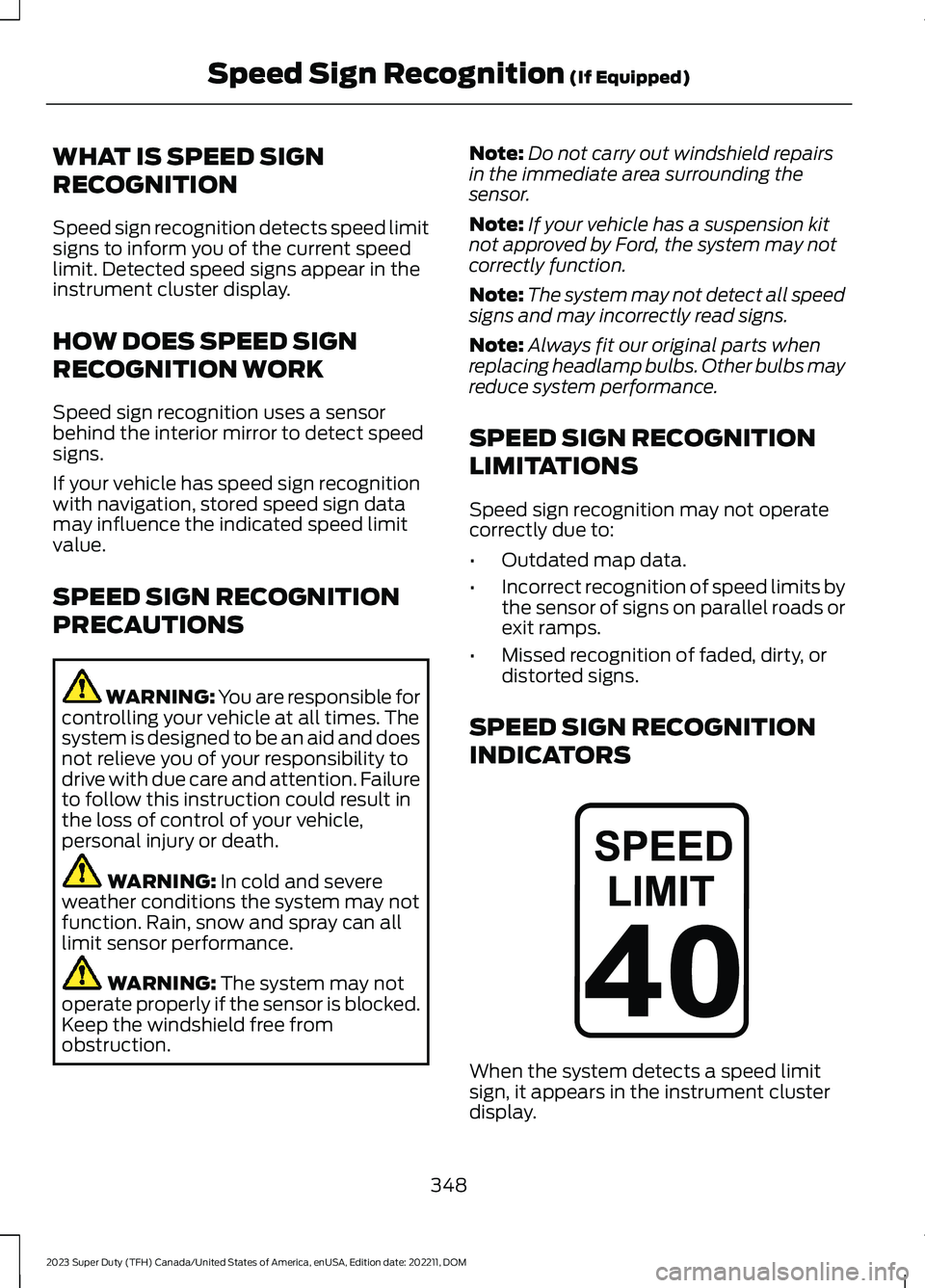
Speed sign recognition detects speed limitsigns to inform you of the current speedlimit. Detected speed signs appear in theinstrument cluster display.
HOW DOES SPEED SIGN
RECOGNITION WORK
Speed sign recognition uses a sensorbehind the interior mirror to detect speedsigns.
If your vehicle has speed sign recognitionwith navigation, stored speed sign datamay influence the indicated speed limitvalue.
SPEED SIGN RECOGNITION
PRECAUTIONS
WARNING: You are responsible forcontrolling your vehicle at all times. Thesystem is designed to be an aid and doesnot relieve you of your responsibility todrive with due care and attention. Failureto follow this instruction could result inthe loss of control of your vehicle,personal injury or death.
WARNING: In cold and severeweather conditions the system may notfunction. Rain, snow and spray can alllimit sensor performance.
WARNING: The system may notoperate properly if the sensor is blocked.Keep the windshield free fromobstruction.
Note:Do not carry out windshield repairsin the immediate area surrounding thesensor.
Note:If your vehicle has a suspension kitnot approved by Ford, the system may notcorrectly function.
Note:The system may not detect all speedsigns and may incorrectly read signs.
Note:Always fit our original parts whenreplacing headlamp bulbs. Other bulbs mayreduce system performance.
SPEED SIGN RECOGNITION
LIMITATIONS
Speed sign recognition may not operatecorrectly due to:
•Outdated map data.
•Incorrect recognition of speed limits bythe sensor of signs on parallel roads orexit ramps.
•Missed recognition of faded, dirty, ordistorted signs.
SPEED SIGN RECOGNITION
INDICATORS
When the system detects a speed limitsign, it appears in the instrument clusterdisplay.
348
2023 Super Duty (TFH) Canada/United States of America, enUSA, Edition date: 202211, DOMSpeed Sign Recognition (If Equipped)E317824
Page 422 of 738
SNOW PLOWING
PRECAUTIONS
WARNING: Modifying or addingequipment to the front of your vehiclecould affect the performance of theairbag system, increasing the risk ofinjury. This includes the hood, bumpersystem, frame, front body structure, towhooks, hood pins, push bar andsnowplows.
WARNING: Do not attempt toservice, repair, or modify thesupplementary restraint system orassociated components. Failure tofollow this instruction could result inpersonal injury or death.
WARNING: All occupants of yourvehicle, including the driver, shouldalways properly wear their seatbelts,even when an airbag supplementalrestraint system is provided. Failure toproperly wear your seatbelt couldseriously increase the risk of injury ordeath.
WARNING: Do not spin the wheelsat over 34 mph (55 km/h). The tires mayfail and injure a passenger or bystander.
Note:Look for an alterer’s label on yourvehicle from the snowplow installercertifying that the installation meets allapplicable Federal Motor Vehicle SafetyStandards (FMVSS).
Note:Federal and some local regulationsrequire additional exterior lamps forsnowplow-equipped vehicles. Contact anauthorized dealer for additional information.
Note:Do not remove or defeat the trippingmechanisms designed into the snowremoval equipment by its manufacturer.Doing so could cause damage to yourvehicle and the snow removal equipmentas well as possible airbag deployment.
OPERATING YOUR VEHICLE
WITH A SNOWPLOW
Weight limits and guidelines for selectingand installing the snowplow are in the FordTruck Body Builders Layout Book. Foradditional information, visitwww.fordbbas.com.
A typical snowplow installation affects thefollowing:
•Front gross axle weight rating. SeeWhat Is the Gross Axle WeightRating (page 352).
•Gross vehicle weight rating. See WhatIs the Gross Vehicle Weight Rating(page 352).
•Braking and steering.
•Front wheel toe. See the FordWorkshop Manual.
•Headlight aim. See Adjusting theHeadlamps (page 460).
•Tire air pressure. See Information onthe Tire Sidewall (page 479).
Note:Do not exceed the front gross axleweight rating or gross vehicle weight rating.
Note:Your vehicle may require rear ballastweight for proper braking and steering.
Your vehicle has a driver and passengerairbag supplemental restraint system. Thesupplemental restraint system activatesin certain frontal and offset frontalcollisions when the vehicle sustainssufficient longitudinal deceleration.
418
2023 Super Duty (TFH) Canada/United States of America, enUSA, Edition date: 202211, DOMSnow Plowing - Vehicles With: Snow Plow Mode (If Equipped)
Page 426 of 738
JUMP STARTING THE VEHICLE
Connecting the Jumper Cables
WARNING: Do not connect thenegative jumper cable to any other partof your vehicle. Use the ground point.
Note:If you are using a jump pack orbooster box, follow the manufacturer'sinstructions.
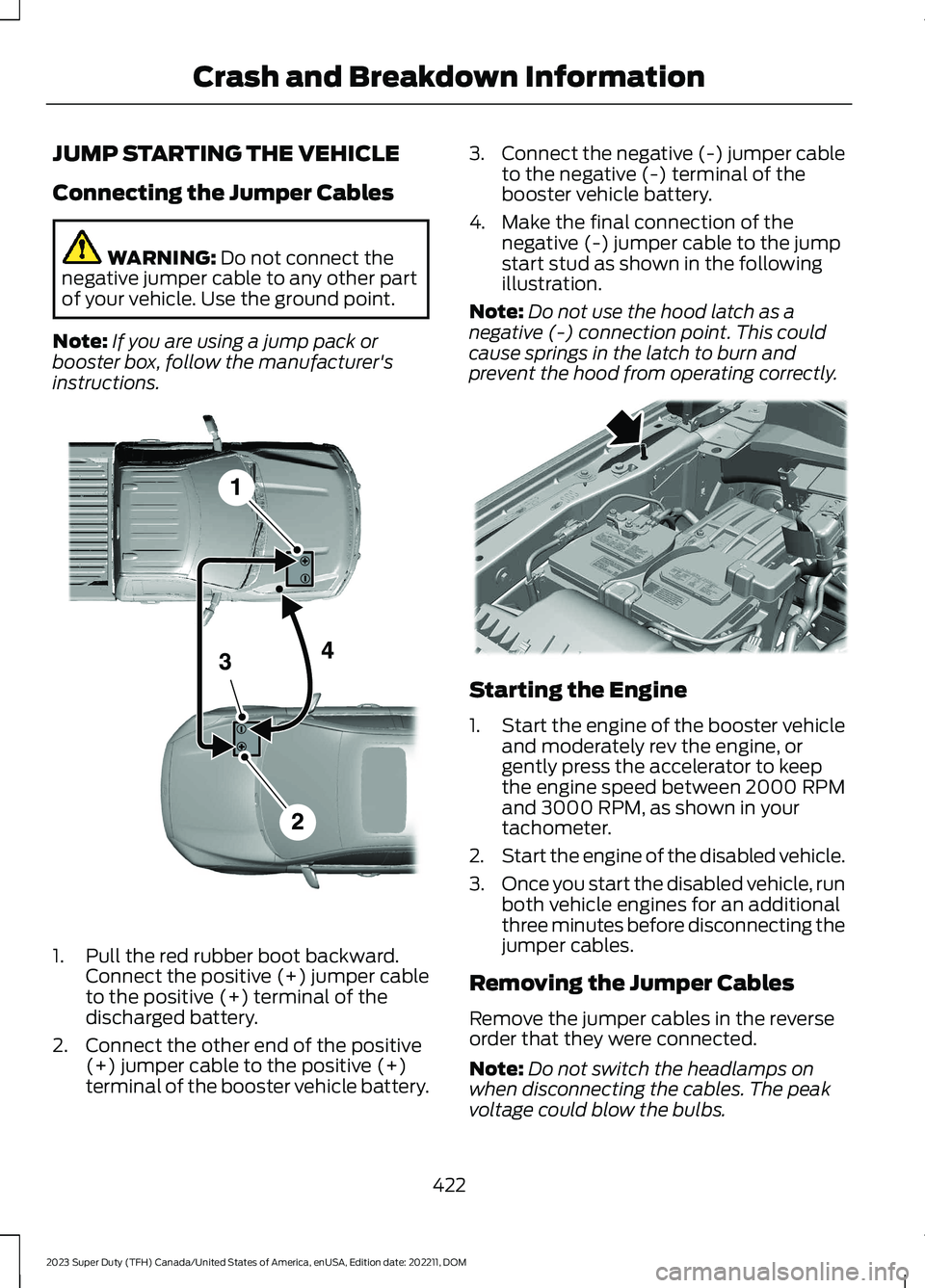
1.Pull the red rubber boot backward.Connect the positive (+) jumper cableto the positive (+) terminal of thedischarged battery.
2.Connect the other end of the positive(+) jumper cable to the positive (+)terminal of the booster vehicle battery.
3.Connect the negative (-) jumper cableto the negative (-) terminal of thebooster vehicle battery.
4.Make the final connection of thenegative (-) jumper cable to the jumpstart stud as shown in the followingillustration.
Note:Do not use the hood latch as anegative (-) connection point. This couldcause springs in the latch to burn andprevent the hood from operating correctly.
Starting the Engine
1.Start the engine of the booster vehicleand moderately rev the engine, orgently press the accelerator to keepthe engine speed between 2000 RPMand 3000 RPM, as shown in yourtachometer.
2.Start the engine of the disabled vehicle.
3.Once you start the disabled vehicle, runboth vehicle engines for an additionalthree minutes before disconnecting thejumper cables.
Removing the Jumper Cables
Remove the jumper cables in the reverseorder that they were connected.
Note:Do not switch the headlamps onwhen disconnecting the cables. The peakvoltage could blow the bulbs.
422
2023 Super Duty (TFH) Canada/United States of America, enUSA, Edition date: 202211, DOMCrash and Breakdown InformationE380338 E379874
Page 438 of 738
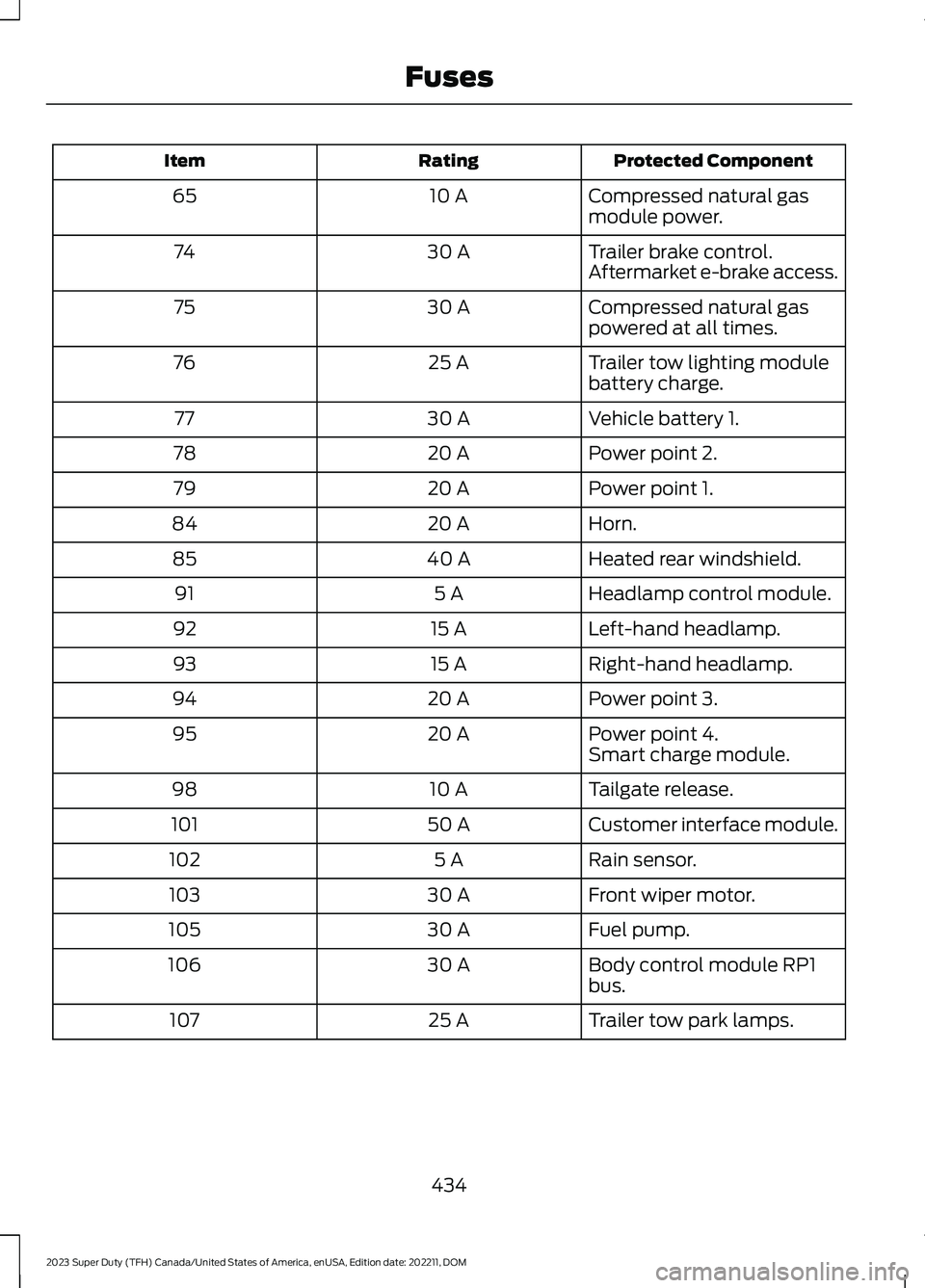
Protected ComponentRatingItem
Compressed natural gasmodule power.10 A65
Trailer brake control.30 A74Aftermarket e-brake access.
Compressed natural gaspowered at all times.30 A75
Trailer tow lighting modulebattery charge.25 A76
Vehicle battery 1.30 A77
Power point 2.20 A78
Power point 1.20 A79
Horn.20 A84
Heated rear windshield.40 A85
Headlamp control module.5 A91
Left-hand headlamp.15 A92
Right-hand headlamp.15 A93
Power point 3.20 A94
Power point 4.20 A95Smart charge module.
Tailgate release.10 A98
Customer interface module.50 A101
Rain sensor.5 A102
Front wiper motor.30 A103
Fuel pump.30 A105
Body control module RP1bus.30 A106
Trailer tow park lamps.25 A107
434
2023 Super Duty (TFH) Canada/United States of America, enUSA, Edition date: 202211, DOMFuses
Page 442 of 738
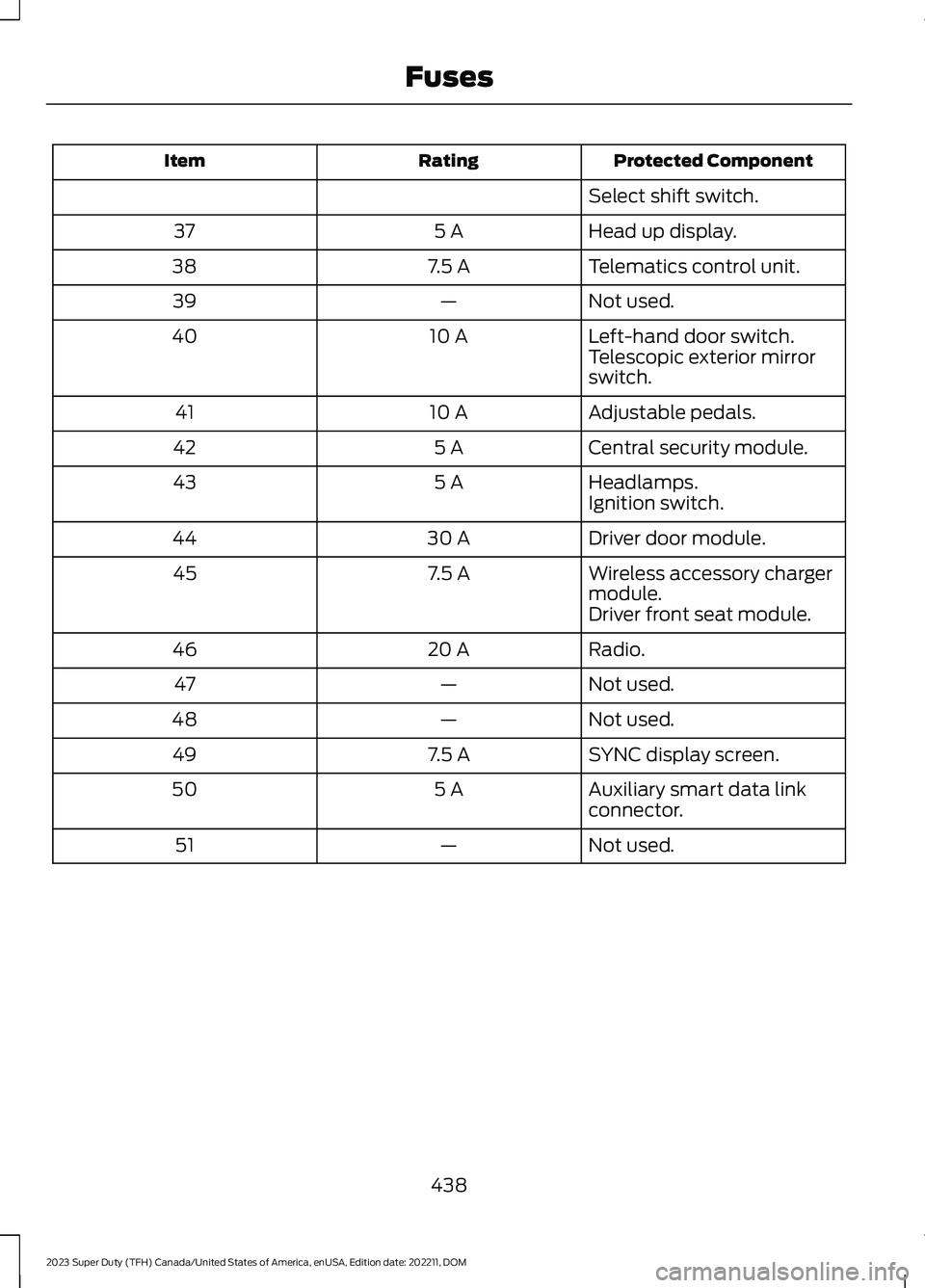
Protected ComponentRatingItem
Select shift switch.
Head up display.5 A37
Telematics control unit.7.5 A38
Not used.—39
Left-hand door switch.10 A40Telescopic exterior mirrorswitch.
Adjustable pedals.10 A41
Central security module.5 A42
Headlamps.5 A43Ignition switch.
Driver door module.30 A44
Wireless accessory chargermodule.7.5 A45
Driver front seat module.
Radio.20 A46
Not used.—47
Not used.—48
SYNC display screen.7.5 A49
Auxiliary smart data linkconnector.5 A50
Not used.—51
438
2023 Super Duty (TFH) Canada/United States of America, enUSA, Edition date: 202211, DOMFuses
Page 462 of 738
If you disconnect or replace the batteryand your vehicle has an automatictransmission, it must relearn its adaptivestrategy. Because of this, the transmissionmay shift firmly when first driven. This isnormal operation while the transmissionfully updates its operation to optimumshift feel.
Removing the Battery
1.Apply the parking brake and switch theignition off.
2.Switch all electrical equipment off, forexample lights and radio.
3.Wait a minimum of two minutes beforedisconnecting the battery.
Note:The engine management system hasa power hold function and remains poweredfor a period of time after you switch theignition off. This is to allow diagnostic andadaptive tables to be stored. Disconnectingthe battery without waiting can causedamage not covered by the vehicleWarranty.
4.Disconnect and isolate the negativebattery cable terminal.
5.Disconnect and isolate the positivebattery cable terminal.
6.Remove the battery securing clamp.
7.Remove the battery.
If you disconnect or replace the vehiclebattery, you must reset the followingfeatures:
•Window bounce-back. See WindowBounce-Back (page 129).
•Clock Settings.
•Pre-set radio stations.
Replacing the Battery
Note:Before reconnecting the battery,make sure the ignition remains switched off.
You must replace the battery with one ofexactly the same specification.
To install, reverse the removal procedure.
Note:Make sure that you correctly installthe battery terminal covers, battery coverand battery cable terminals.
RESETTING THE BATTERYSENSOR
When you install a new battery, reset thebattery sensor by doing the following:
1.Switch the ignition on, and leave theengine off.
Note:Complete Steps 2 and 3 within 10seconds.
2.Flash the high beam headlamps fivetimes, ending with the high beams off.
3.Press and release the brake pedal threetimes.
The battery warning lamp flashes threetimes to confirm that the reset issuccessful.
RECYCLING AND DISPOSING OFTHE 12V BATTERY
Make sure that you dispose ofold batteries in anenvironmentally friendly way.Seek advice from your local authorityabout recycling old batteries.
458
2023 Super Duty (TFH) Canada/United States of America, enUSA, Edition date: 202211, DOMMaintenanceE107998
Page 464 of 738
ADJUSTING THE HEADLAMPS
Vertical Aim Adjustment
The headlamps on your vehicle areproperly aimed at the assembly plant. Ifyour vehicle has been in an accident, haveyour vehicle checked as soon as possible.
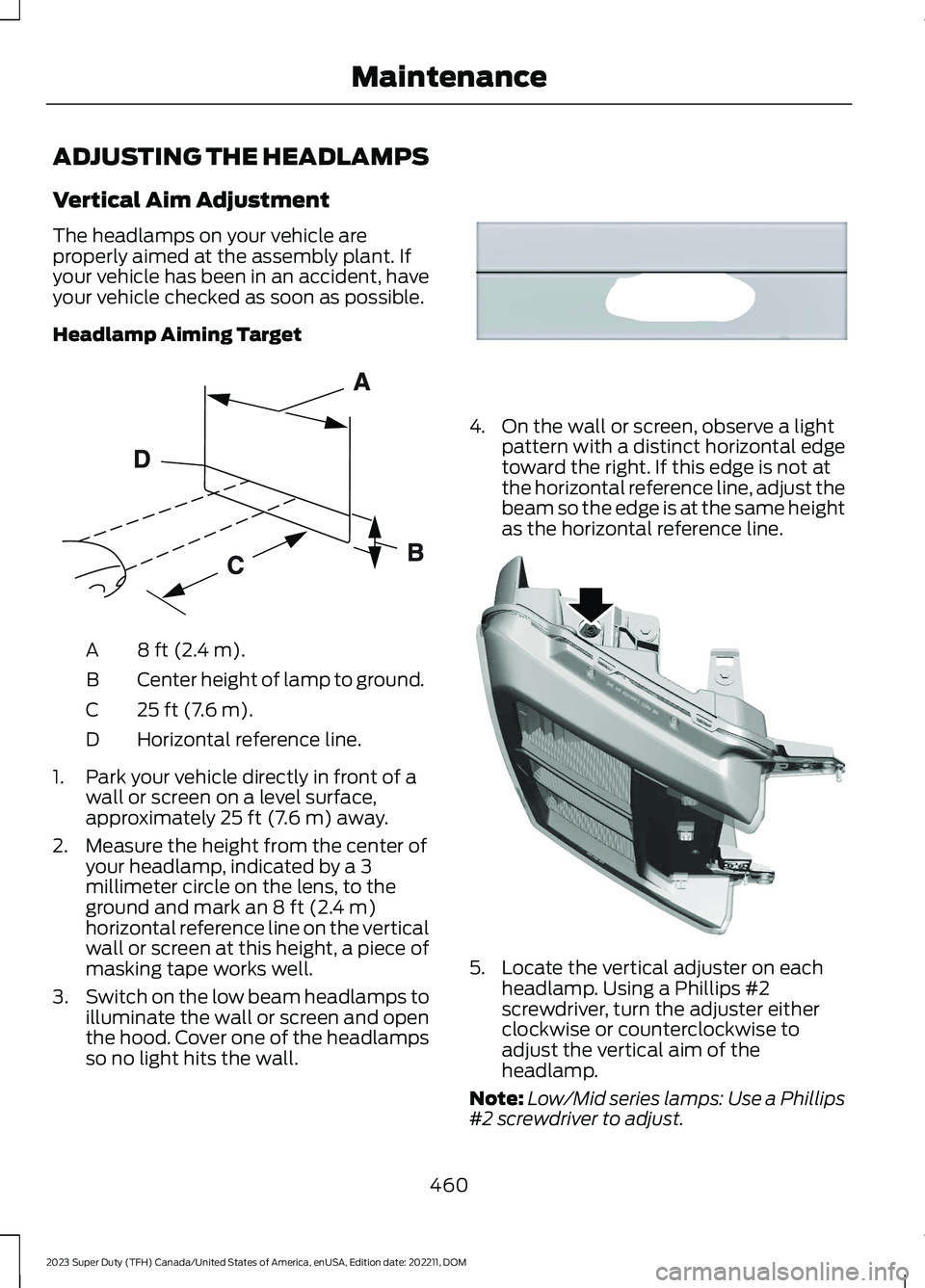
Headlamp Aiming Target
8 ft (2.4 m).A
Center height of lamp to ground.B
25 ft (7.6 m).C
Horizontal reference line.D
1.Park your vehicle directly in front of awall or screen on a level surface,approximately 25 ft (7.6 m) away.
2.Measure the height from the center ofyour headlamp, indicated by a 3millimeter circle on the lens, to theground and mark an 8 ft (2.4 m)horizontal reference line on the verticalwall or screen at this height, a piece ofmasking tape works well.
3.Switch on the low beam headlamps toilluminate the wall or screen and openthe hood. Cover one of the headlampsso no light hits the wall.
4.On the wall or screen, observe a lightpattern with a distinct horizontal edgetoward the right. If this edge is not atthe horizontal reference line, adjust thebeam so the edge is at the same heightas the horizontal reference line.
5.Locate the vertical adjuster on eachheadlamp. Using a Phillips #2screwdriver, turn the adjuster eitherclockwise or counterclockwise toadjust the vertical aim of theheadlamp.
Note:Low/Mid series lamps: Use a Phillips#2 screwdriver to adjust.
460
2023 Super Duty (TFH) Canada/United States of America, enUSA, Edition date: 202211, DOMMaintenanceE142592 E167358 E386873