headlamp FORD SUPER DUTY 2023 Owners Manual
[x] Cancel search | Manufacturer: FORD, Model Year: 2023, Model line: SUPER DUTY, Model: FORD SUPER DUTY 2023Pages: 738, PDF Size: 18.49 MB
Page 7 of 738
Tailgate Step.................................................100
Tailgate – Troubleshooting.......................101
Tailgate Videos.............................................102
Security
Passive Anti-Theft System......................103
Anti-Theft Alarm System.........................103
Anti-Theft Alarm System Settings.......104
Security – Troubleshooting.....................105
Power Running Boards
Power Running Board Precautions.......107
Power Running Board Settings..............107
Power Running Boards –Troubleshooting......................................108
Power Running Boards Videos..............108
Steering Wheel
Adjusting the Steering Wheel - VehiclesWith: Manual Adjustable SteeringColumn.......................................................109
Adjusting the Steering Wheel - VehiclesWith: Power Adjustable SteeringColumn.......................................................109
Resetting the Stopping Position -Vehicles With: Power AdjustableSteering Column.......................................110
Horn...................................................................110
Switching the Heated Steering WheelOn and Off....................................................111
Steering Wheel Videos................................111
Adjustable Pedals
Adjusting the Pedals....................................112
Wipers and Washers
Wipers...............................................................113
Autowipers......................................................113
Checking the Wiper Blades.......................114
Replacing the Front Wiper Blades.........114
Washers...........................................................114
Wipers and Washers Videos.....................115
Wipers and Washers – Troubleshooting..........................................................................115
Exterior Lighting
Exterior Lighting Control.............................117
Headlamps......................................................117
Headlamps – Troubleshooting................117
Autolamps......................................................118
Exterior Lamps..............................................118
Exterior Zone Lighting.................................121
Automatic High Beam Control...............122
Automatic High Beam Control –Troubleshooting.......................................124
Adaptive Front Lighting.............................124
Exterior Lighting Videos.............................125
Interior Lighting
Switching All of the Interior Lamps Onand Off........................................................126
Switching the Front Interior Lamps Onand Off........................................................126
Switching the Rear Interior Lamps Onand Off........................................................126
Interior Lamp Function..............................126
Adjusting the Instrument Panel LightingBrightness...................................................127
Ambient Lighting..........................................127
Interior Lighting – Troubleshooting.......127
Windows
Opening and Closing the Windows......128
Global Opening............................................128
Window Bounce-Back...............................129
Locking the Rear Window Controls......129
Opening and Closing the SlidingWindows.....................................................129
Windows Videos..........................................130
Interior Mirror
Interior Mirror Precautions.........................131
3
2023 Super Duty (TFH) Canada/United States of America, enUSA, Edition date: 202211, DOMTable of Contents
Page 18 of 738
Operating Your Vehicle With aSnowplow..................................................418
Crash and BreakdownInformation
Roadside Assistance................................420
Switching the Hazard Flashers On andOff.................................................................421
Jump Starting the Vehicle........................421
Post-Crash Alert System.........................423
Automatic Crash Shutoff.........................423
Recovery Towing.........................................423
Transporting the Vehicle..........................424
Fail-Safe Cooling........................................425
Towing Your Vehicle
Towing Your Vehicle Precautions..........427
Recreationally Towing Your Vehicle -4x4................................................................427
Recreationally Towing Your Vehicle - 4x2........................................................................429
Emergency Towing....................................429
Towing Your Vehicle – Troubleshooting........................................................................429
Fuses
Fuse Precautions........................................430
Under Hood Fuse Box..............................430
Interior Fuse Box.........................................435
Identifying Fuse Types..............................439
Fuses – Troubleshooting.........................439
Maintenance
Maintenance Precautions......................440
Opening and Closing the Hood............440
Under Hood Overview - 6.7L Diesel......441
Under Hood Overview - 6.8L, Gasoline........................................................................442
Under Hood Overview - 7.3L, Gasoline........................................................................443
Engine Oil......................................................444
Engine Air Filter...........................................445
Draining the Fuel Filter Water Trap......447
Coolant..........................................................450
Changing the Fuel Filter - Diesel...........453
Changing the Fuel Filter - Gasoline......453
Drive Belt Routing Overview - 6.7L Diesel,Vehicles With: 110-120V 2kW PickupBed Power Outlet/Dual Generators........................................................................453
Drive Belt Routing Overview - 6.7L Diesel,Vehicles With: Dual Generators........454
Drive Belt Routing Overview - 6.7L Diesel,Vehicles With: Single Generator.......454
Drive Belt Routing Overview - 6.8L,Gasoline, Vehicles With: DualGenerators................................................454
Drive Belt Routing Overview - 6.8L,Gasoline, Vehicles With: SingleGenerator..................................................455
Drive Belt Routing Overview - 7.3L,Gasoline, Vehicles With: DualGenerators................................................455
Drive Belt Routing Overview - 7.3L,Gasoline, Vehicles With: SingleGenerator..................................................456
12V Battery....................................................456
12V Battery – Troubleshooting..............459
Adjusting the Headlamps.......................460
Exterior Bulbs................................................461
Interior Bulbs...............................................468
Vehicle Care
Cleaning Products.....................................469
Cleaning the Exterior.................................470
Cleaning the Interior...................................472
Repairing Minor Paint Damage.............474
Waxing Your Vehicle..................................475
Vehicle Care Videos...................................475
Storing Your Vehicle
Preparing Your Vehicle for Storage......476
Removing Your Vehicle From Storage.........................................................................477
14
2023 Super Duty (TFH) Canada/United States of America, enUSA, Edition date: 202211, DOMTable of Contents
Page 28 of 738
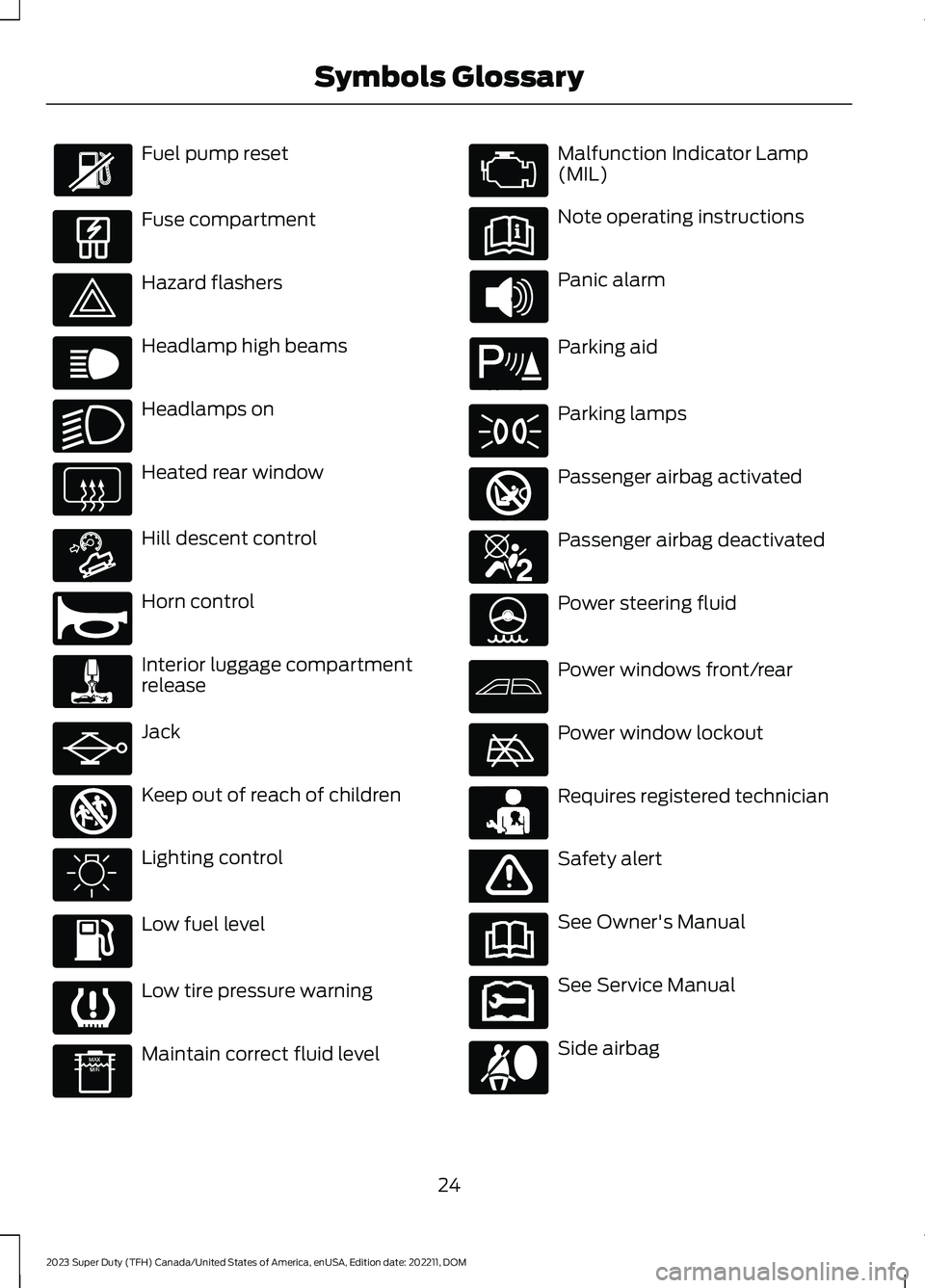
Fuel pump reset
Fuse compartment
Hazard flashers
Headlamp high beams
Headlamps on
Heated rear window
Hill descent control
Horn control
Interior luggage compartmentrelease
Jack
Keep out of reach of children
Lighting control
Low fuel level
Low tire pressure warning
Maintain correct fluid level
Malfunction Indicator Lamp(MIL)
Note operating instructions
Panic alarm
Parking aid
Parking lamps
Passenger airbag activated
Passenger airbag deactivated
Power steering fluid
Power windows front/rear
Power window lockout
Requires registered technician
Safety alert
See Owner's Manual
See Service Manual
Side airbag
24
2023 Super Duty (TFH) Canada/United States of America, enUSA, Edition date: 202211, DOMSymbols Glossary E139214 E75790 E67019 E270968 E163171 E270945 E139231 E161353 E139232 E139229 E67028 E72343 E139213 E71341 E270849 E270850 E139216 E139225 E231159 E65963 E72021 E231158
Page 30 of 738
WARNING: Do not connectwireless plug-in devices to the data linkconnector. Unauthorized third partiescould gain access to vehicle data andimpair the performance of safety relatedsystems. Only allow repair facilities thatfollow our service and repair instructionsto connect their equipment to the datalink connector.
We respect your privacy and arecommitted to protecting it. Theinformation contained in this publicationwas correct at the time of release, but astechnology rapidly changes, werecommend that you visit the local Fordwebsite for the latest information.
Your vehicle has electronic control unitsthat have data recording functionality andthe ability to permanently or temporarilystore data. This data could includeinformation on the condition and status ofyour vehicle, vehicle maintenancerequirements, events and malfunctions.The types of data that can be recorded aredescribed in this section. Some of the datarecorded is stored in event logs or errorlogs.
Note:Error logs are reset following a serviceor repair.
Note:We may provide information inresponse to requests from law enforcement,other government authorities and thirdparties acting with lawful authority orthrough a legal process. Such informationcould be used by them in legal proceedings.
Data recorded includes, for example:
•Operating states of systemcomponents, for example fuel level,tire pressure and battery charge level.
•Vehicle and component status, forexample wheel speed, deceleration,lateral acceleration and seatbeltstatus.
•Events or errors in essential systems,for example headlamps and brakes.
•System responses to driving situations,for example airbag deployment andstability control.
•Environmental conditions, for exampletemperature.
Some of this data, when used incombination with other information, forexample an accident report, damage to avehicle or eyewitness statements, couldbe associated with a specific person.
Services That We Provide
If you use our services, we collect and usedata, for example account information,vehicle location and driving characteristics,that could identify you. We transmit thisdata through a dedicated, protectedconnection. We only collect and use datato enable your use of our services to whichyou have subscribed, with your consent orwhere permitted by law. For additionalinformation, see the terms and conditionsof the services to which you havesubscribed.
For additional information about ourprivacy policy, refer to the local Fordwebsite.
Services That Third PartiesProvide
We recommend that you review the termsand conditions and data privacyinformation for any services equipped withyour vehicle or to which you subscribe. Wetake no responsibility for services that thirdparties provide.
Where equipped, SiriusXM with 360L coulduse the modem. To disable, turn off theSiriusXM with 360L or Vehicle Connectivitysetting. See Enabling and Disabling theModem (page 548).
26
2023 Super Duty (TFH) Canada/United States of America, enUSA, Edition date: 202211, DOMData Privacy
Page 121 of 738
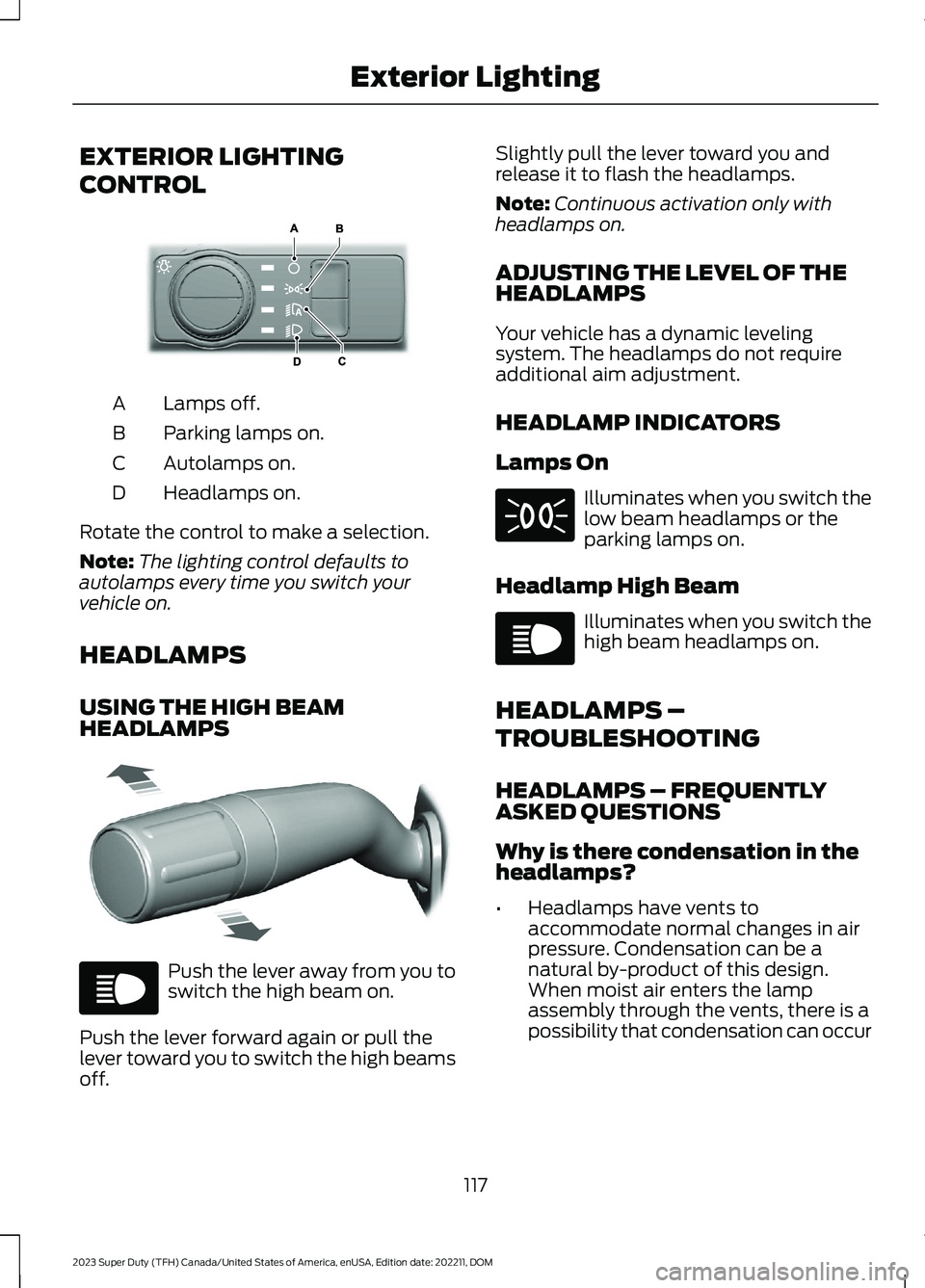
EXTERIOR LIGHTING
CONTROL
Lamps off.A
Parking lamps on.B
Autolamps on.C
Headlamps on.D
Rotate the control to make a selection.
Note:The lighting control defaults toautolamps every time you switch yourvehicle on.
HEADLAMPS
USING THE HIGH BEAMHEADLAMPS
Push the lever away from you toswitch the high beam on.
Push the lever forward again or pull thelever toward you to switch the high beamsoff.
Slightly pull the lever toward you andrelease it to flash the headlamps.
Note:Continuous activation only withheadlamps on.
ADJUSTING THE LEVEL OF THEHEADLAMPS
Your vehicle has a dynamic levelingsystem. The headlamps do not requireadditional aim adjustment.
HEADLAMP INDICATORS
Lamps On
Illuminates when you switch thelow beam headlamps or theparking lamps on.
Headlamp High Beam
Illuminates when you switch thehigh beam headlamps on.
HEADLAMPS –
TROUBLESHOOTING
HEADLAMPS – FREQUENTLYASKED QUESTIONS
Why is there condensation in theheadlamps?
•Headlamps have vents toaccommodate normal changes in airpressure. Condensation can be anatural by-product of this design.When moist air enters the lampassembly through the vents, there is apossibility that condensation can occur
117
2023 Super Duty (TFH) Canada/United States of America, enUSA, Edition date: 202211, DOMExterior LightingE327629 E327570 E67019 E71341 E67019
Page 122 of 738
when the temperature is cold. Whennormal condensation occurs, a finemist can form on the interior of thelens. The fine mist eventually clearsand exits through the vents duringnormal operation.
How much condensation isacceptable?
•The presence of a fine mist, forexample no streaks, drip marks or largedroplets. A fine mist covers less than50% of the lens.
How long does it take for theacceptable condensation to clear?
•Clearing time can take as long as 48hours under dry weather conditions.
How much condensation isunacceptable?
•A water puddle inside the lamp.Streaks, drip marks or large dropletspresent on the interior of the lens.
What should I do if unacceptablecondensation is present?
•Have your vehicle checked as soon aspossible.
Why do my headlamps turn offwhen I have them switched onwhen I switch my vehicle off?
•The battery saver turns the headlampsoff after a short period of time after youswitch your vehicle off.
AUTOLAMPS
WHAT ARE AUTOLAMPS
WARNING: The system does notrelieve you of your responsibility to drivewith due care and attention. You mayneed to override the system if it does notturn the headlamps on in low visibilityconditions, for example daytime fog.
Autolamps turn the headlamps on in lowlight situations or when the windshieldwipers operate.
AUTOLAMP SETTINGS
1.Press Settings on the touchscreen.
2.Press Vehicle Settings.
3.Press Lighting.
4.Press Autolamp Delay.
5.Press a setting.
EXTERIOR LAMPS
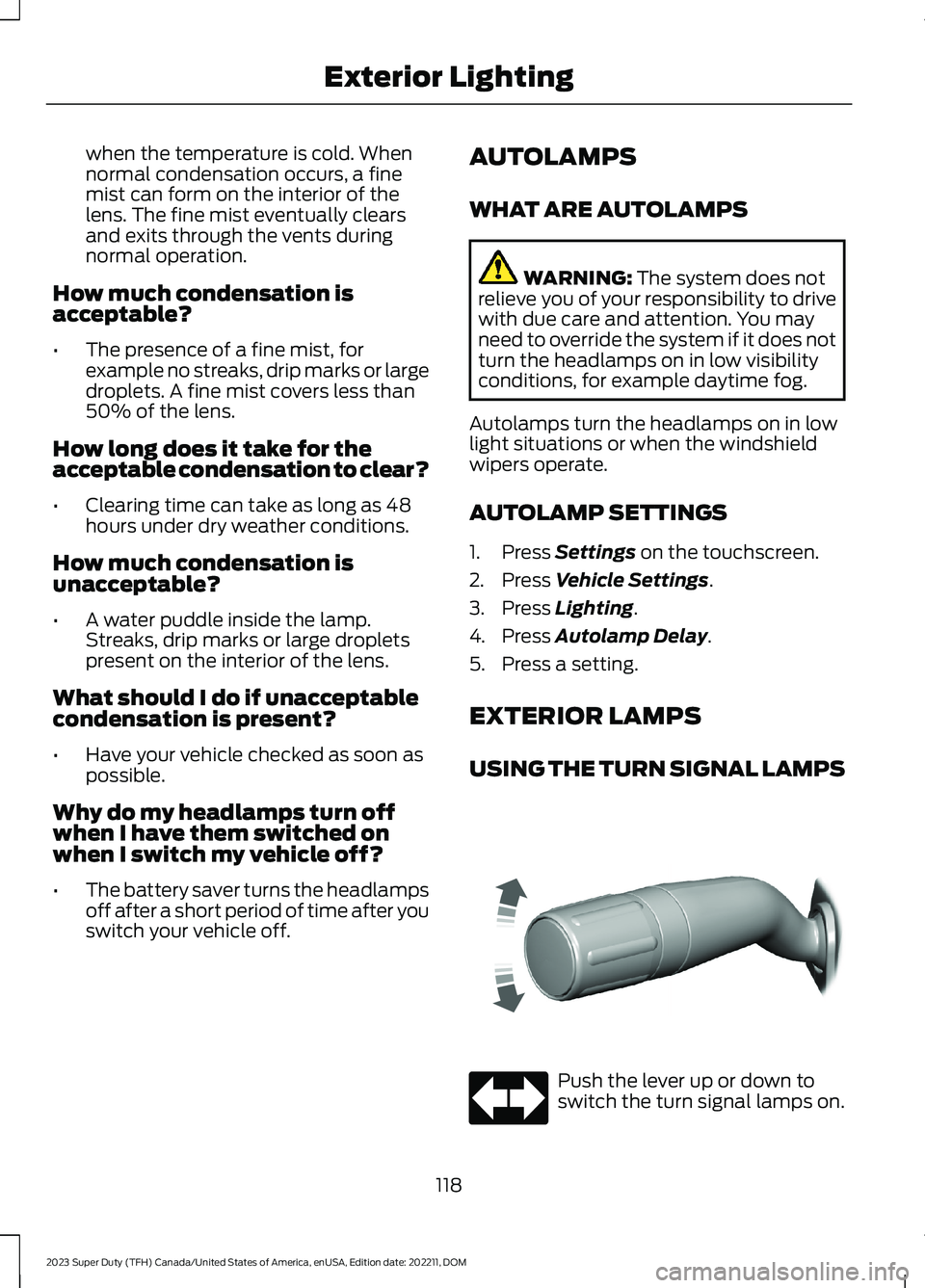
USING THE TURN SIGNAL LAMPS
Push the lever up or down toswitch the turn signal lamps on.
118
2023 Super Duty (TFH) Canada/United States of America, enUSA, Edition date: 202211, DOMExterior LightingE311431 E67018
Page 123 of 738
Set the lever to the middle position toswitch the turn signal lamps off.
Note:Tap the lever up or down to make theturn signal lamps flash three times.
Turn Signal Lamp Indicator
It flashes when you switch theturn signal lamps on.
Note:An increase in the rate of flashingwarns of a failed turn signal lamp.
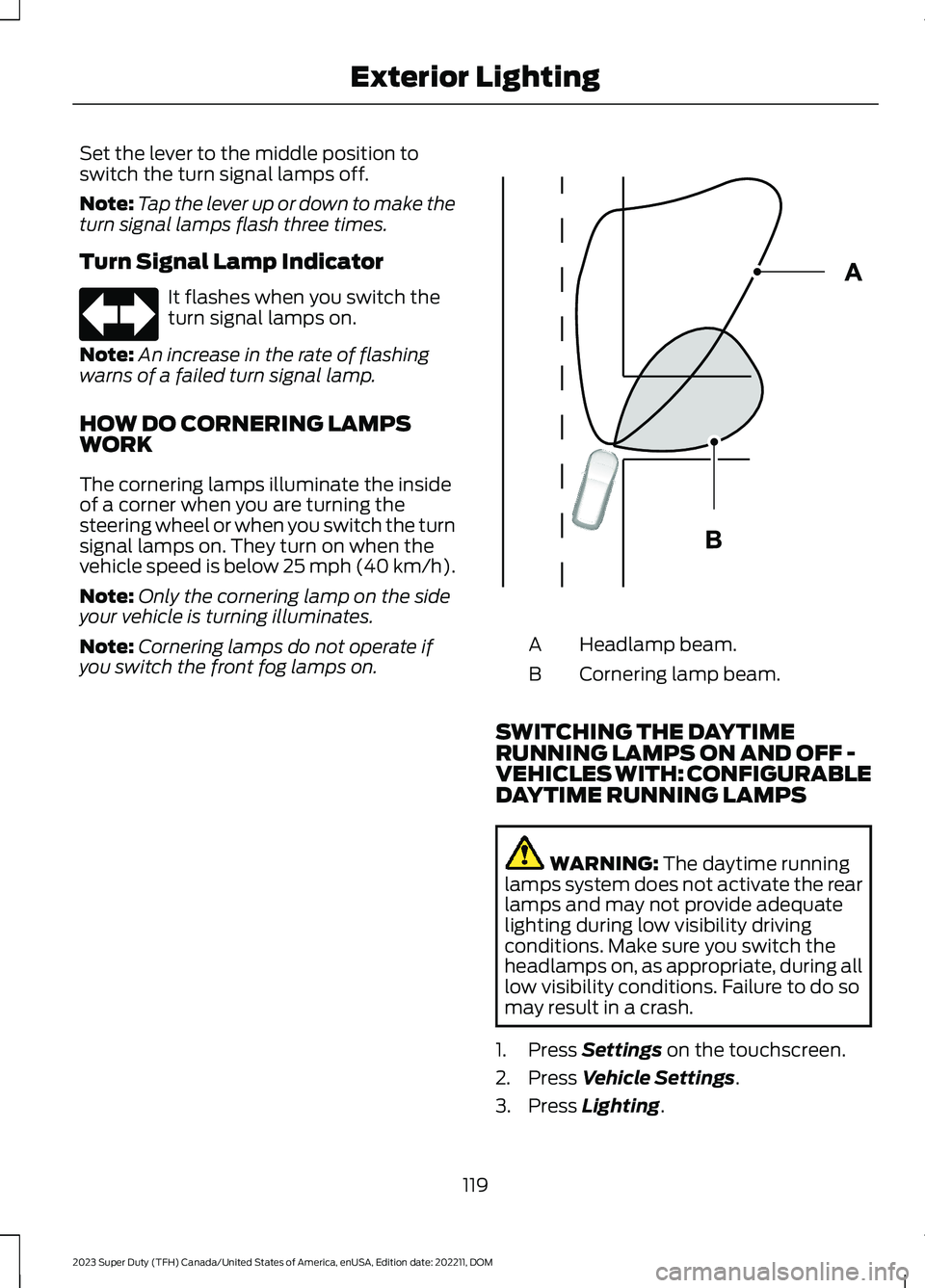
HOW DO CORNERING LAMPSWORK
The cornering lamps illuminate the insideof a corner when you are turning thesteering wheel or when you switch the turnsignal lamps on. They turn on when thevehicle speed is below 25 mph (40 km/h).
Note:Only the cornering lamp on the sideyour vehicle is turning illuminates.
Note:Cornering lamps do not operate ifyou switch the front fog lamps on.Headlamp beam.A
Cornering lamp beam.B
SWITCHING THE DAYTIMERUNNING LAMPS ON AND OFF -VEHICLES WITH: CONFIGURABLEDAYTIME RUNNING LAMPS
WARNING: The daytime runninglamps system does not activate the rearlamps and may not provide adequatelighting during low visibility drivingconditions. Make sure you switch theheadlamps on, as appropriate, during alllow visibility conditions. Failure to do somay result in a crash.
1.Press Settings on the touchscreen.
2.Press Vehicle Settings.
3.Press Lighting.
119
2023 Super Duty (TFH) Canada/United States of America, enUSA, Edition date: 202211, DOMExterior LightingE67018 E327599
Page 124 of 738
4.Switch Daytime Running Lights on oroff.
The daytime running lamps turn on whenall of the following occur:
•You switch the system on.
•You switch your vehicle on.
•The transmission is not in park (P) forvehicles with automatic transmissionsor you release the parking brake forvehicles with manual transmissions.
•The lighting control is in the autolampsposition.
•The headlamps are off.
Note:Other lighting control positions donot turn on the daytime running lamps.
SWITCHING THE DAYTIMERUNNING LAMPS ON AND OFF -VEHICLES WITH: DAYTIMERUNNING LAMPS (DRL)
WARNING: The daytime runninglamps system does not activate the rearlamps and may not provide adequatelighting during low visibility drivingconditions. Make sure you switch theheadlamps on, as appropriate, during alllow visibility conditions. Failure to do somay result in a crash.
Daytime running lamps are always onunless you switch on the headlamps oryour vehicle is in park (P).
USING THE FRONT FOG LAMPS (If
Equipped)
To switch the lamps on or off:
1.Set the lighting control to the parkinglamps, headlamps or autolampsposition.
Note:When the lighting control is in theautolamps position, you cannot switch thefog lamps on unless the low beamheadlamps are on.
2.
Press the button on thelighting control to switch the front foglamps on or off.
Note:Only switch the front fog lamps onduring reduced visibility.
Note:The brightness of the daytime runninglamps may decrease when the front foglamps are switched on.
Note:The front fog lamps lights switch offautomatically when high beams areactivated.
Front Fog Lamps Indicator
It illuminates when you switchthe front fog lamps on.
SWITCHING THE CARGO LAMPSON (If Equipped)
Press the button in the lightingcontrol or in the rear cargo box.
SWITCHING THE SPOT LAMPS ONAND OFF (If Equipped)
The spot lamp buttons are near the lightingcontrol.
Press the button to switch on theleft-hand spot lamp.
Press the button to switch on theright-hand spot lamp.
Move the position of the exterior mirrorsto adjust the aim.
120
2023 Super Duty (TFH) Canada/United States of America, enUSA, Edition date: 202211, DOMExterior Lighting E189587 E340436 E340437
Page 126 of 738
EXTERIOR ZONE LIGHTINGSETTINGS
1.Press Features on the touchscreen.
2.Press Zone Lighting.
3.Press the settings menu in the upperright-hand corner.
4.Press a setting.
Enable Autolamp Override
This setting allows your vehicle to overridethe autolamps when using zone lighting.
When you access zone lighting for the firsttime, you can choose this setting. You canchange this setting at any time.
Include Reverse Lamps
This setting turns the reverse lamps onwhen you switch the rear lighting zone on.
Switch this setting off if you have a backupalarm installed to prevent the reverselamps from turning on and sounding thealarm when using zone lighting.
AUTOMATIC HIGH BEAM
CONTROL (IF EQUIPPED)
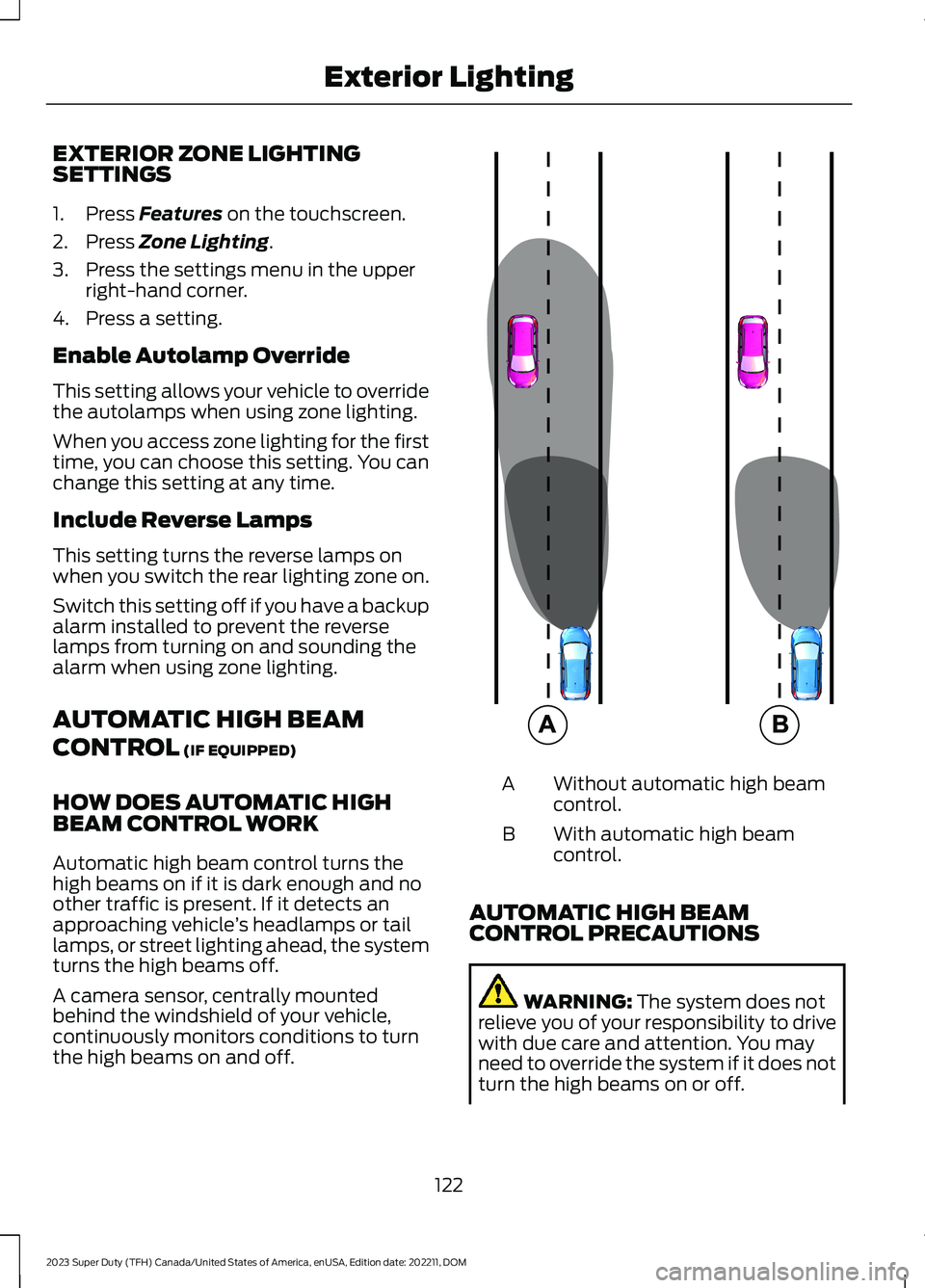
HOW DOES AUTOMATIC HIGHBEAM CONTROL WORK
Automatic high beam control turns thehigh beams on if it is dark enough and noother traffic is present. If it detects anapproaching vehicle’s headlamps or taillamps, or street lighting ahead, the systemturns the high beams off.
A camera sensor, centrally mountedbehind the windshield of your vehicle,continuously monitors conditions to turnthe high beams on and off.
Without automatic high beamcontrol.A
With automatic high beamcontrol.B
AUTOMATIC HIGH BEAMCONTROL PRECAUTIONS
WARNING: The system does notrelieve you of your responsibility to drivewith due care and attention. You mayneed to override the system if it does notturn the high beams on or off.
122
2023 Super Duty (TFH) Canada/United States of America, enUSA, Edition date: 202211, DOMExterior Lighting E327596
Page 127 of 738
WARNING: The system may notswitch the high beams off if the lights ofoncoming vehicles are hidden byobstacles, for example guard rails.
WARNING: You may need tooverride the system when approachingother road users.
WARNING: In situations with poorvisibility, such as fog, heavy rain or otherinclement weather, you may need tooverride or completely switch off thesystem.
AUTOMATIC HIGH BEAMCONTROL REQUIREMENTS
The system turns the high beams on if allof the following occur:
•You switch the system on.
•You set the lighting control to theautolamps position.
•The ambient light level is low enoughthat you require high beams.
•There is no traffic in front of yourvehicle.
•The vehicle speed is greater thanapproximately 25 mph (40 km/h).
AUTOMATIC HIGH BEAMCONTROL LIMITATIONS
The system turns the high beams off if anyof the following occur:
•You switch the system off.
•You set the lighting control to anyposition except autolamps.
•The ambient light level is high enoughthat you do not require high beams.
•The system detects an approachingvehicle's headlamps or a leadingvehicle's tail lamps.
•The system detects severe rain, snowor fog.
•The system detects street lighting.
•The camera has reduced visibility.
•The vehicle speed falls belowapproximately 19 mph (30 km/h).
SWITCHING AUTOMATIC HIGHBEAM CONTROL ON AND OFF
1.Using the instrument cluster controlson the steering wheel, select Settings.
2.Select Vehicle.
3.Select Lighting.
4.Switch Auto High Beam on or off.
AUTOMATIC HIGH BEAMCONTROL INDICATORS
Illuminates to confirm when thesystem is ready to assist.
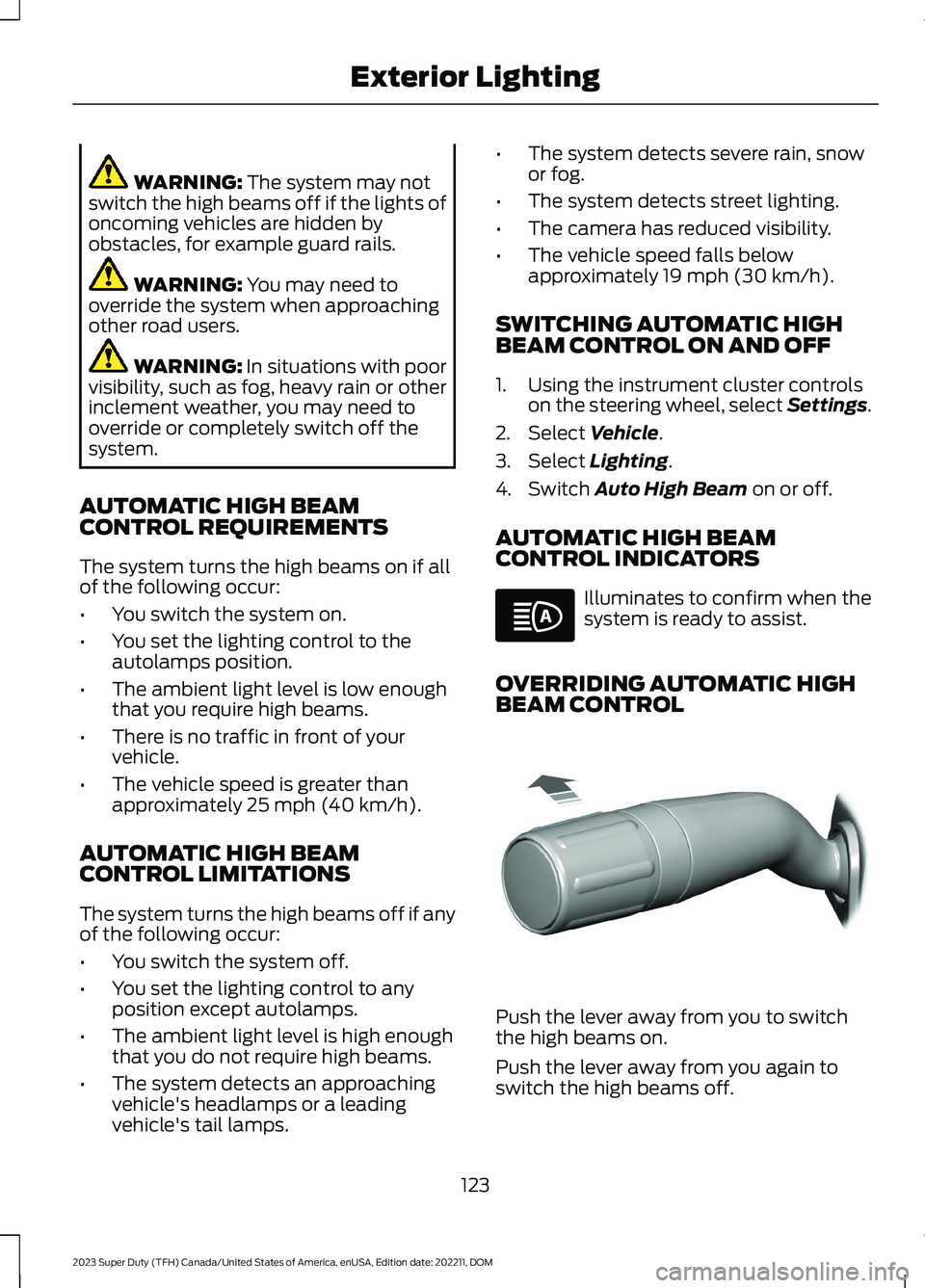
OVERRIDING AUTOMATIC HIGHBEAM CONTROL
Push the lever away from you to switchthe high beams on.
Push the lever away from you again toswitch the high beams off.
123
2023 Super Duty (TFH) Canada/United States of America, enUSA, Edition date: 202211, DOMExterior LightingE146105 E308790