steering FORD SUPER DUTY 2023 User Guide
[x] Cancel search | Manufacturer: FORD, Model Year: 2023, Model line: SUPER DUTY, Model: FORD SUPER DUTY 2023Pages: 738, PDF Size: 18.49 MB
Page 69 of 738
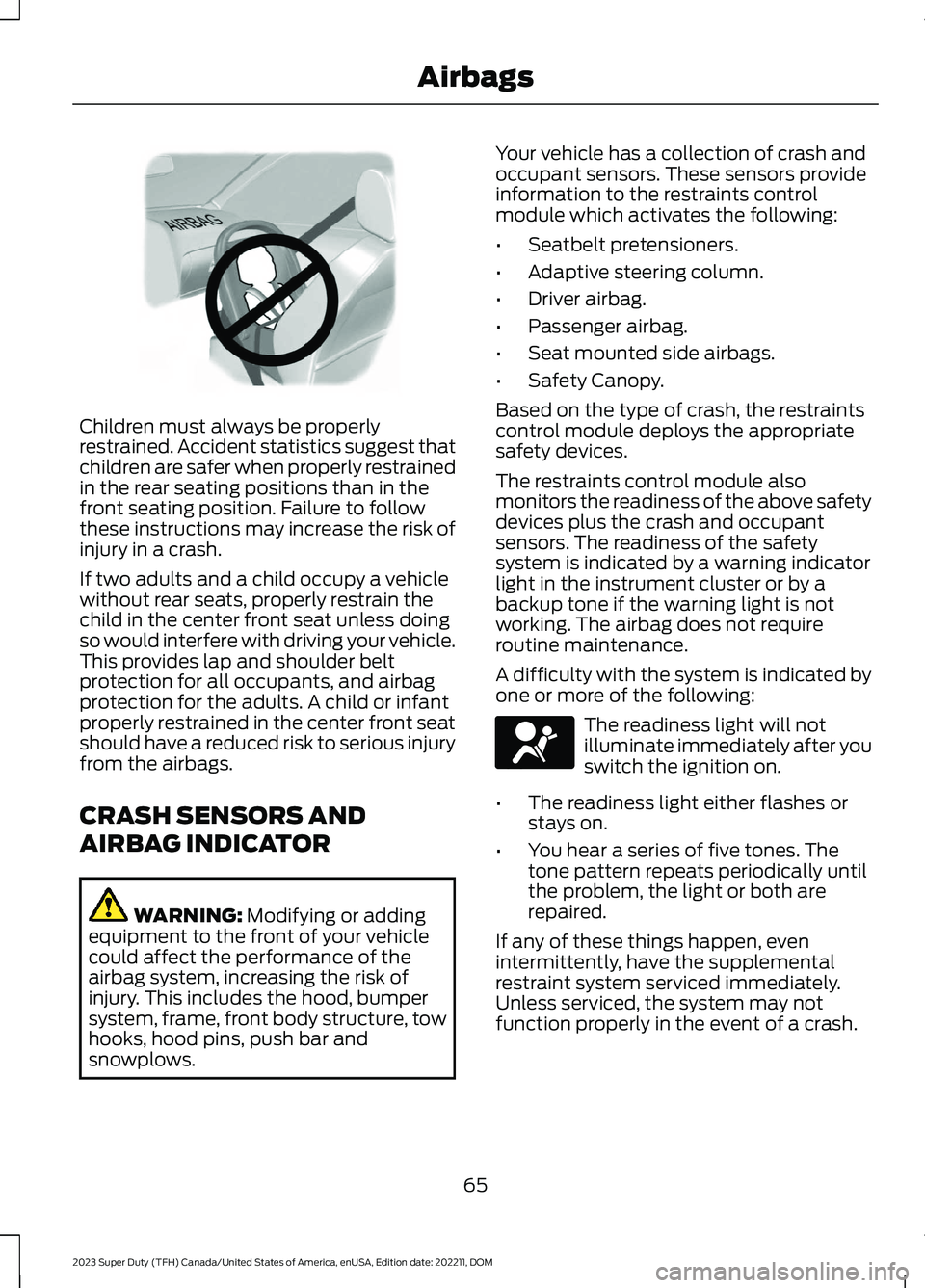
Children must always be properlyrestrained. Accident statistics suggest thatchildren are safer when properly restrainedin the rear seating positions than in thefront seating position. Failure to followthese instructions may increase the risk ofinjury in a crash.
If two adults and a child occupy a vehiclewithout rear seats, properly restrain thechild in the center front seat unless doingso would interfere with driving your vehicle.This provides lap and shoulder beltprotection for all occupants, and airbagprotection for the adults. A child or infantproperly restrained in the center front seatshould have a reduced risk to serious injuryfrom the airbags.
CRASH SENSORS AND
AIRBAG INDICATOR
WARNING: Modifying or addingequipment to the front of your vehiclecould affect the performance of theairbag system, increasing the risk ofinjury. This includes the hood, bumpersystem, frame, front body structure, towhooks, hood pins, push bar andsnowplows.
Your vehicle has a collection of crash andoccupant sensors. These sensors provideinformation to the restraints controlmodule which activates the following:
•Seatbelt pretensioners.
•Adaptive steering column.
•Driver airbag.
•Passenger airbag.
•Seat mounted side airbags.
•Safety Canopy.
Based on the type of crash, the restraintscontrol module deploys the appropriatesafety devices.
The restraints control module alsomonitors the readiness of the above safetydevices plus the crash and occupantsensors. The readiness of the safetysystem is indicated by a warning indicatorlight in the instrument cluster or by abackup tone if the warning light is notworking. The airbag does not requireroutine maintenance.
A difficulty with the system is indicated byone or more of the following:
The readiness light will notilluminate immediately after youswitch the ignition on.
•The readiness light either flashes orstays on.
•You hear a series of five tones. Thetone pattern repeats periodically untilthe problem, the light or both arerepaired.
If any of these things happen, evenintermittently, have the supplementalrestraint system serviced immediately.Unless serviced, the system may notfunction properly in the event of a crash.
65
2023 Super Duty (TFH) Canada/United States of America, enUSA, Edition date: 202211, DOMAirbagsE142846 E67017
Page 70 of 738
The fact that the seatbelt pretensionersor front airbags did not activate for bothfront seat occupants in a crash does notmean that something is wrong with thesystem. Rather, it means the restraintscontrol module determined the accidentconditions (crash severity, seatbelt usage)were not appropriate to activate thesesafety devices.
•The front airbags activate only infrontal and near-frontal crashes. Frontairbags may activate in rollovers, sideimpacts or rear impacts if the crashcauses sufficient frontal deceleration.
•The adaptive steering column activatesonly in frontal and near-frontal crashes.It may activate in rollovers, sideimpacts or rear impacts if the crashcauses sufficient frontal deceleration.
•The seatbelt pretensioners activate infrontal, near-frontal and side crashes,and in rollovers.
•The side airbags inflate in certain sideimpact crashes or rollover events. Sideairbags may activate in other types ofcrashes if the vehicle experiencessufficient sideways motion ordeformation.
•The Safety Canopy inflates in certainside impact crashes or rollover events.The Safety Canopy may activate inother types of crashes if the vehicleexperiences sufficient sideways motionor deformation, or a certain likelihoodof rollover.
DISPOSING OF AIRBAGS
Contact your authorized dealer as soon aspossible. Airbags must be disposed of byqualified personnel.
66
2023 Super Duty (TFH) Canada/United States of America, enUSA, Edition date: 202211, DOMAirbags
Page 71 of 738
WHAT IS 911 ASSIST
911 Assist is a SYNC system feature thatcan call for help.
For more information, visitwww.owner.ford.com.
HOW DOES 911 ASSIST WORK
If a crash deploys an airbag, excluding kneeairbags and rear inflatable seatbelts, oractivates the fuel pump shut-off, yourvehicle may be able to contact emergencyservices by dialing 911 through a paired andconnected Bluetooth® enabled phone.
Not all crashes deploy an airbag or activatethe fuel pump shut-off. If a connected cellphone sustains damage or loses itsconnection to SYNC during a crash, SYNCsearches for and tries to connect to apreviously paired cell phone. SYNC thenattempts to call the emergency services.
Before making the call:
•SYNC provides about 10 seconds tocancel the call. If you fail to cancel thecall, SYNC attempts to dial 911.
•SYNC says the following, or a similarmessage: SYNC will attempt to call 911,to cancel the call, press Cancel on yourscreen or press and hold the phonebutton on your steering wheel.
If you do not cancel the call and SYNCmakes a successful call a pre-recordedmessage plays for the 911 operator. Theoccupants in your vehicle are able to talkwith the operator. Be prepared to provideyour name, phone number and locationimmediately because not all 911 systemsare capable of receiving this informationelectronically.
During an emergency call the systemtransmits vehicle data to the emergencyservice.
EMERGENCY CALL
REQUIREMENTS
WARNING: Do not wait for 911Assist to make an emergency call if youcan do it yourself. Dial emergencyservices immediately to avoid delayedresponse time which could increase therisk of serious injury or death after acrash. If you do not hear 911 Assist withinfive seconds of the crash, the system orphone may be damaged ornon-functional.
WARNING: Always place yourphone in a secure location in your vehicleso it does not become a projectile or getdamaged in a crash. Failure to do so maycause serious injury to someone ordamage the phone which could prevent911 Assist from working properly.
WARNING: Unless the 911 Assistsetting is set on before a crash, thesystem will not dial for help which coulddelay response time, potentiallyincreasing the risk of serious injury ordeath after a crash.
•SYNC is powered and working properlyat the time of the incident andthroughout feature activation and use.
•The 911 Assist feature must be set onbefore the incident.
•You must pair and connect aBluetooth® enabled and compatiblecell phone to SYNC.
•A connected Bluetooth® enabledphone must have the ability to makeand maintain an outgoing call at thetime of the incident.
67
2023 Super Duty (TFH) Canada/United States of America, enUSA, Edition date: 202211, DOM911 Assist
Page 86 of 738
AUTOUNLOCK
WHAT IS AUTOUNLOCK
Autounlock is a feature that centrallyunlocks the vehicle doors when yourvehicle comes to a stop and you open thedriver door.
AUTOUNLOCK REQUIREMENTS
Autounlock unlocks all the doors after:
1.The vehicle speed exceeds 12 mph(20 km/h).
2.Your vehicle comes to a stop.
3.You open the driver door.
Note:Autounlock operates for only 10minutes after the ignition is switched off.
SWITCHING AUTOUNLOCK ONAND OFF
1.Using the instrument cluster displaycontrols on the steering wheel, selectSettings.
2.Select Vehicle Settings.
3.Switch Autounlock on or off.
AUTOLOCK
WHAT IS AUTOLOCK
Autolock is a locking feature that centrallylocks your vehicle doors when driving.
AUTOLOCK REQUIREMENTS
Autolock locks all the doors after:
1.All doors are closed and the ignition ison.
2.Your vehicle speed exceeds 12 mph(20 km/h).
Autolock repeats if:
1.Your vehicle is stopped.
2.Any door is opened and closed again.
3.Your vehicle speed exceeds 12 mph(20 km/h).
MISLOCK
WHAT IS MISLOCK
Mislock is a locking feature that warns youif your vehicle has not locked.
MISLOCK LIMITATIONS
When you press the lock button once, theturn signals do not flash if:
•Any door or the tailgate is open.
•The hood is open.
If you switch mislock off, the horn does notsound if you press the lock button on theremote control when a door is open.
SWITCHING MISLOCK ON ANDOFF
1.Using the instrument cluster displaycontrols on the steering wheel, selectSettings.
2.Select Vehicle Settings.
3.Switch Mislock Chirp on or off.
DOORS AND LOCKS AUDIBLE
WARNINGS
Door Ajar Audible Warning
Sounds when any front door is not fullyclosed and your vehicle is moving.
82
2023 Super Duty (TFH) Canada/United States of America, enUSA, Edition date: 202211, DOMDoors and Locks
Page 94 of 738
HOW DOES EASY ENTRY AND
EXIT WORK
Easy entry and exit moves the driver seatrearward up to 2 in (5 cm) and the steeringcolumn up when you switch the ignitionoff. The driver seat and steering columnreturn to their previous positions when youswitch the ignition on.
Note:Depending on your vehicle, thecolumn may move up and in.
SWITCHING EASY ENTRY AND
EXIT ON AND OFF
1.Press Settings on the touchscreen.
2.Press Vehicle.
3.Select Easy Entry/Exit.
If you press any adjustment or memorybutton when in easy exit mode, the systemcancels the operation.
90
2023 Super Duty (TFH) Canada/United States of America, enUSA, Edition date: 202211, DOMEasy Entry and Exit (If Equipped)
Page 105 of 738
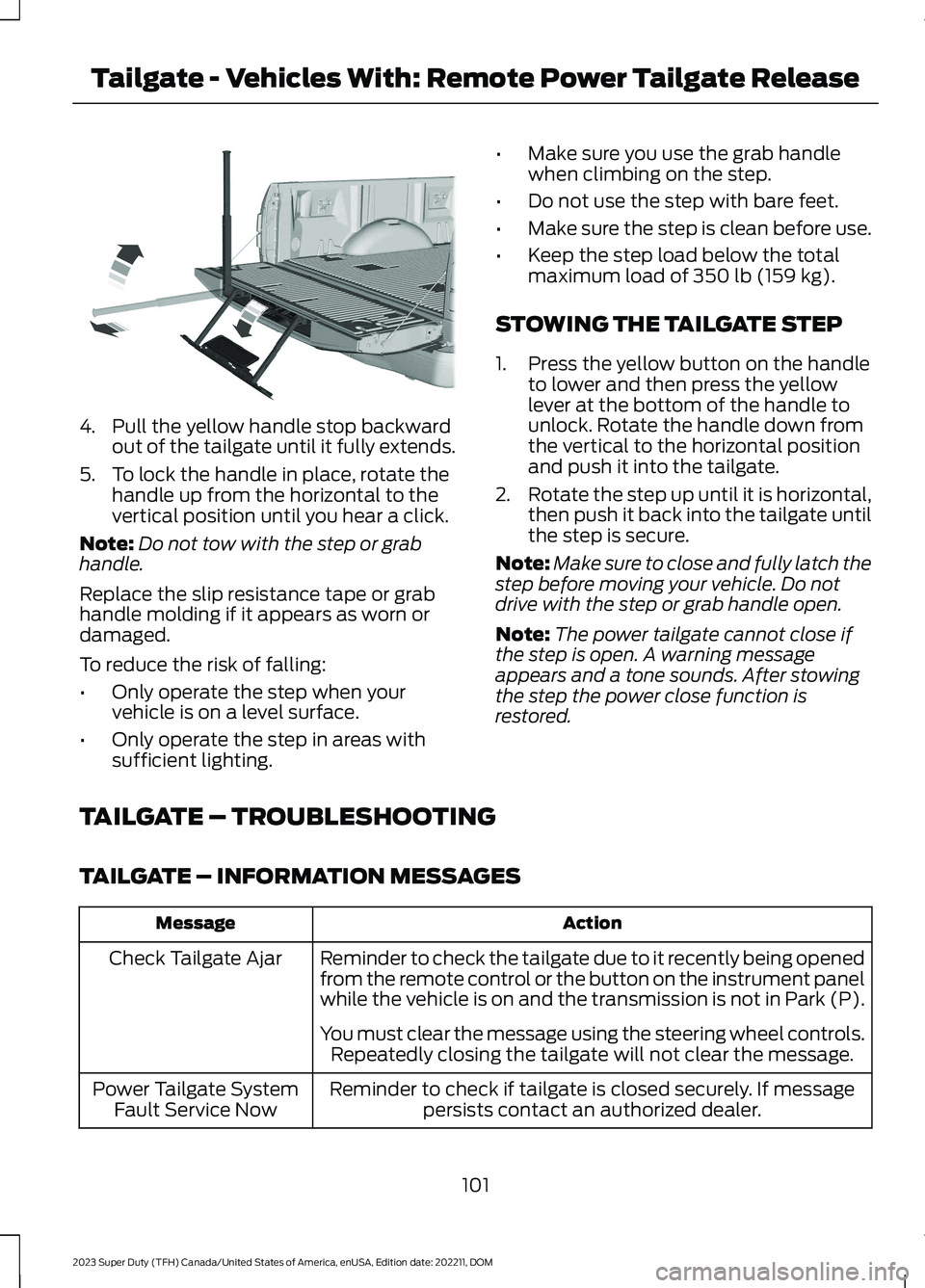
4.Pull the yellow handle stop backwardout of the tailgate until it fully extends.
5.To lock the handle in place, rotate thehandle up from the horizontal to thevertical position until you hear a click.
Note:Do not tow with the step or grabhandle.
Replace the slip resistance tape or grabhandle molding if it appears as worn ordamaged.
To reduce the risk of falling:
•Only operate the step when yourvehicle is on a level surface.
•Only operate the step in areas withsufficient lighting.
•Make sure you use the grab handlewhen climbing on the step.
•Do not use the step with bare feet.
•Make sure the step is clean before use.
•Keep the step load below the totalmaximum load of 350 lb (159 kg).
STOWING THE TAILGATE STEP
1.Press the yellow button on the handleto lower and then press the yellowlever at the bottom of the handle tounlock. Rotate the handle down fromthe vertical to the horizontal positionand push it into the tailgate.
2.Rotate the step up until it is horizontal,then push it back into the tailgate untilthe step is secure.
Note:Make sure to close and fully latch thestep before moving your vehicle. Do notdrive with the step or grab handle open.
Note:The power tailgate cannot close ifthe step is open. A warning messageappears and a tone sounds. After stowingthe step the power close function isrestored.
TAILGATE – TROUBLESHOOTING
TAILGATE – INFORMATION MESSAGES
ActionMessage
Reminder to check the tailgate due to it recently being openedfrom the remote control or the button on the instrument panelwhile the vehicle is on and the transmission is not in Park (P).
Check Tailgate Ajar
You must clear the message using the steering wheel controls.Repeatedly closing the tailgate will not clear the message.
Reminder to check if tailgate is closed securely. If messagepersists contact an authorized dealer.Power Tailgate SystemFault Service Now
101
2023 Super Duty (TFH) Canada/United States of America, enUSA, Edition date: 202211, DOMTailgate - Vehicles With: Remote Power Tailgate ReleaseE189557
Page 113 of 738
ADJUSTING THE STEERING
WHEEL - VEHICLES WITH:
MANUAL ADJUSTABLE
STEERING COLUMN
WARNING: Do not adjust thesteering wheel when your vehicle ismoving.
Note: Make sure that you are sitting in thecorrect position. See Sitting in the CorrectPosition (page 161).
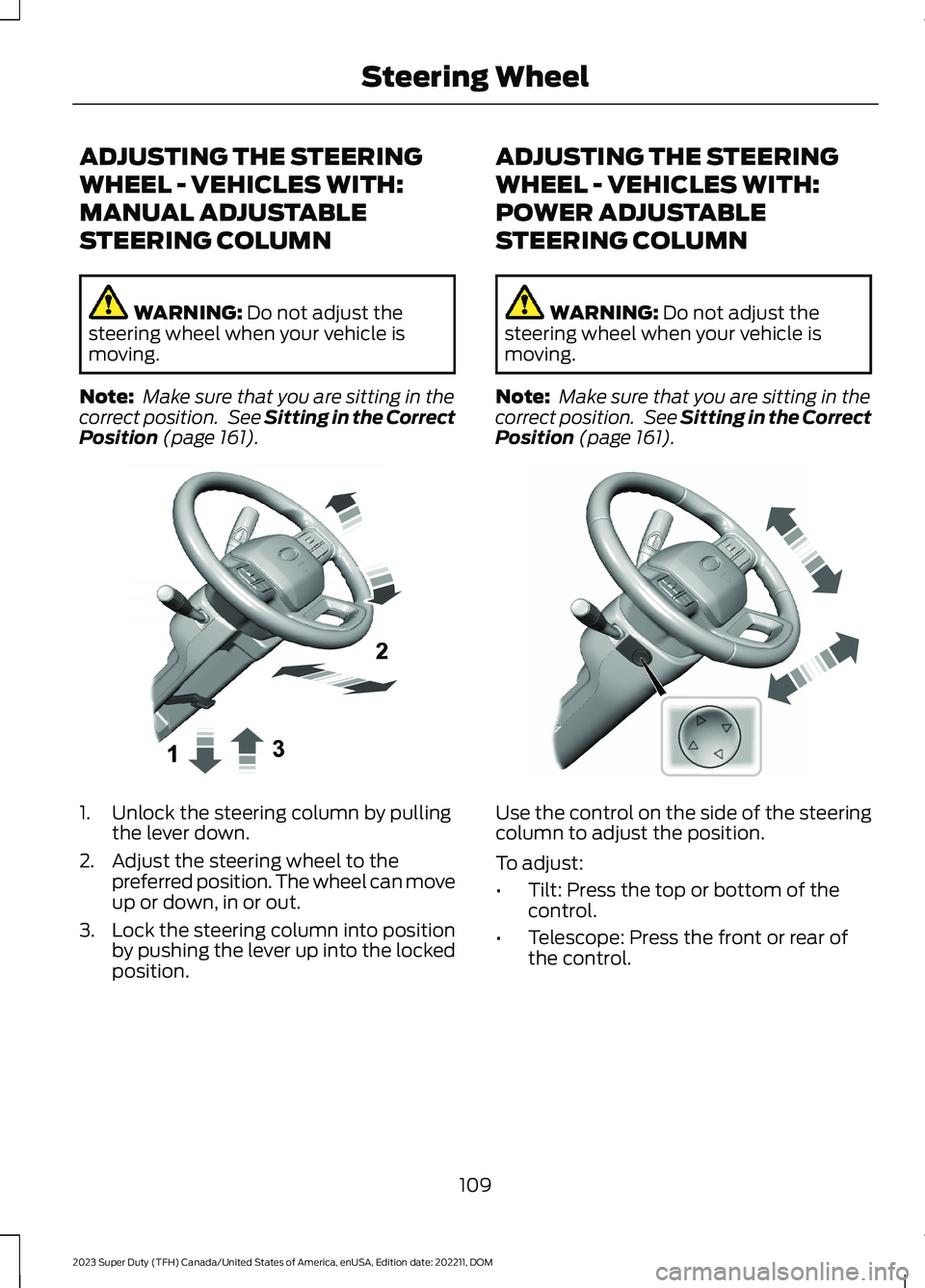
1.Unlock the steering column by pullingthe lever down.
2.Adjust the steering wheel to thepreferred position. The wheel can moveup or down, in or out.
3.Lock the steering column into positionby pushing the lever up into the lockedposition.
ADJUSTING THE STEERING
WHEEL - VEHICLES WITH:
POWER ADJUSTABLE
STEERING COLUMN
WARNING: Do not adjust thesteering wheel when your vehicle ismoving.
Note: Make sure that you are sitting in thecorrect position. See Sitting in the CorrectPosition (page 161).
Use the control on the side of the steeringcolumn to adjust the position.
To adjust:
•Tilt: Press the top or bottom of thecontrol.
•Telescope: Press the front or rear ofthe control.
109
2023 Super Duty (TFH) Canada/United States of America, enUSA, Edition date: 202211, DOMSteering WheelE383968 E383969
Page 114 of 738
End of Travel Position
The steering column sets a stoppingposition just short of the end of the columnposition to prevent damage to the steeringcolumn. A new stopping position sets ifthe steering column encounters an objectwhen tilting or telescoping.
To reset the steering column to its normalstopping position:
1.Confirm there is nothing obstructingthe motion of the steering column.
2.Press and hold the steering columncontrol until the steering column stopsmoving.
3.Press the steering column controlagain.
Note:The steering column may begin tomove again.
4.When the steering column stops,continue holding the control for a fewseconds.
5.Repeat for each direction as necessary.
A new stopping position sets. The nexttime you tilt or telescope the steeringcolumn, it stops just short of the end of thecolumn position.
Memory Feature (If Equipped)
You can save and recall the steeringcolumn position with the memoryfunction. See Memory Function (page177).
Pressing the adjustment control during amemory recall cancels the operation.
Easy Entry and Exit Feature
The column moves up when you switchthe ignition off. Switch the ignition on toreturn the system to its previous settings.You can switch this feature on or off in theinstrument cluster display.
Note: If you press any adjustment ormemory button when in easy exit mode, thesystem cancels the operation.
Note:Depending on your vehicle, thecolumn may move up and in.
RESETTING THE STOPPING
POSITION - VEHICLES WITH:
POWER ADJUSTABLE
STEERING COLUMN
Note:The steering wheel stops when itdetects an obstruction. This sets a newstopping position.
To reset the steering column to its normalstopping position:
1.Confirm there is nothing obstructingthe motion of the steering column.
2.Press and hold the steering columncontrol until the steering column stopsmoving.
3.Press the steering column controlagain.
Note:The steering column may start tomove again.
4.When the steering column stops,continue holding the control for a fewseconds.
5.Repeat for each direction, as necessary.
HORN
Press on the center of thesteering wheel near the horn iconto activate the horn.
110
2023 Super Duty (TFH) Canada/United States of America, enUSA, Edition date: 202211, DOMSteering WheelE270945
Page 115 of 738
SWITCHING THE HEATED
STEERING WHEEL ON AND OFF
(IF EQUIPPED)
To activate the heated steeringwheel, press the button on theclimate control unit.
On some vehicles, an indicator on thebutton illuminates when the heatedsteering wheel is on.
Note:A sensor regulates the temperatureof the steering wheel.
STEERING WHEEL VIDEOS
Adjusting the Steering Wheel Video Link
111
2023 Super Duty (TFH) Canada/United States of America, enUSA, Edition date: 202211, DOMSteering WheelE256621
Page 116 of 738
ADJUSTING THE PEDALS
WARNING: Do not use the pedaladjustment controls when the vehicle ismoving. Failure to follow this instructioncould result in personal injury or death.
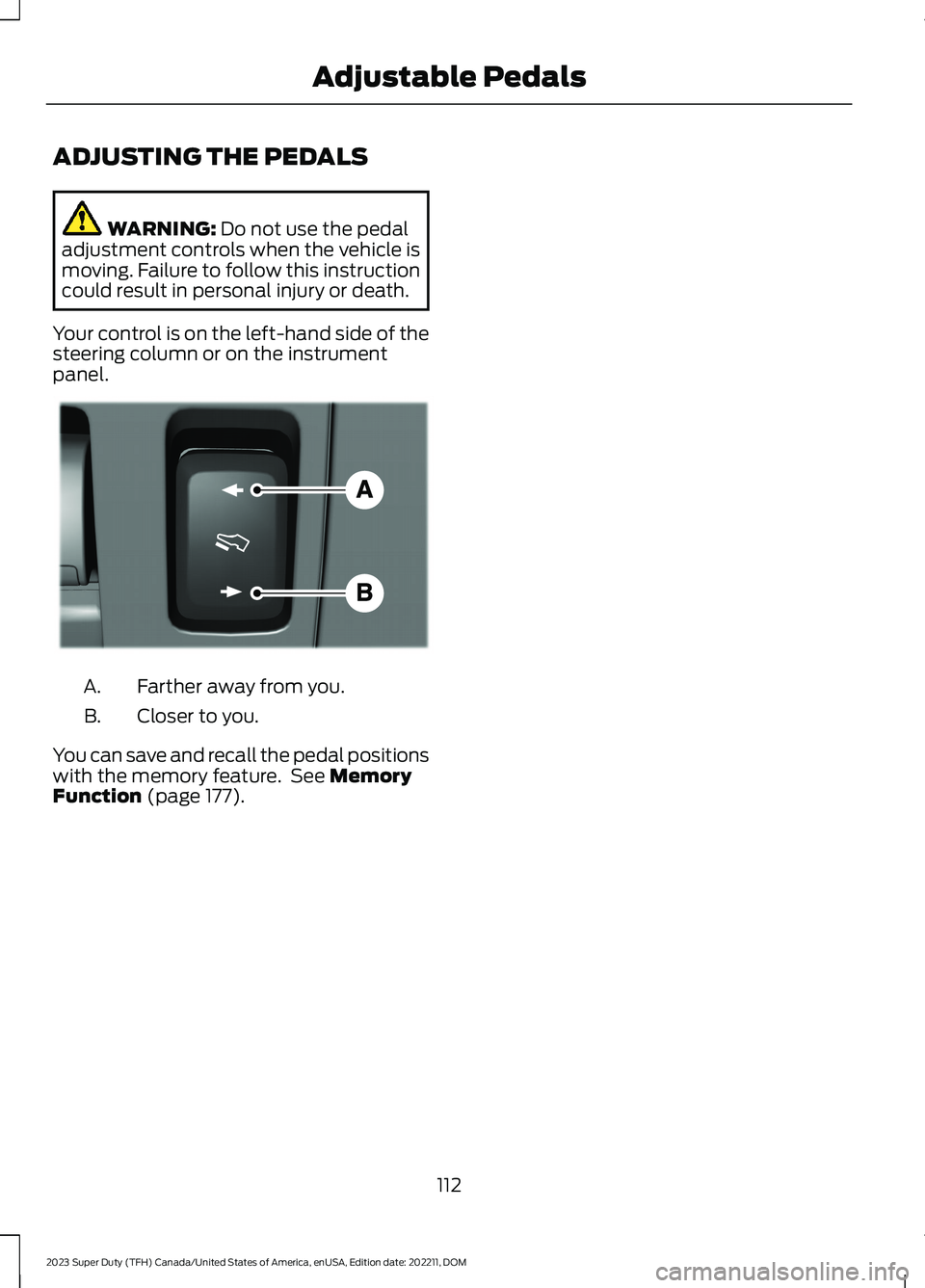
Your control is on the left-hand side of thesteering column or on the instrumentpanel.
Farther away from you.A.
Closer to you.B.
You can save and recall the pedal positionswith the memory feature. See MemoryFunction (page 177).
112
2023 Super Duty (TFH) Canada/United States of America, enUSA, Edition date: 202211, DOMAdjustable PedalsE176213