suspension FORD SUPER DUTY 2023 User Guide
[x] Cancel search | Manufacturer: FORD, Model Year: 2023, Model line: SUPER DUTY, Model: FORD SUPER DUTY 2023Pages: 738, PDF Size: 18.49 MB
Page 386 of 738
WHAT IS SMART HITCH
Smart hitch shows how balanced theweight is from the trailer onto the vehicle'shitch and front axle.
HOW DOES SMART HITCH
WORK
Smart hitch uses sensors mounted to thesuspension to calculate the tongue weightof the connected trailer.
SMART HITCH LIMITATIONS
You cannot use the system if any of thefollowing occur:
•The wheels are not pointed straightahead.
•Your vehicle is not in park (P).
•Your vehicle is not on a level surface.
•The tire pressures are below therecommended levels.
•Your vehicle is off.
USING SMART HITCH
1.Press Features on the touchscreen.
2.Press Smart Hitch.
Note:You can also access smart hitchusing the FordPass app.
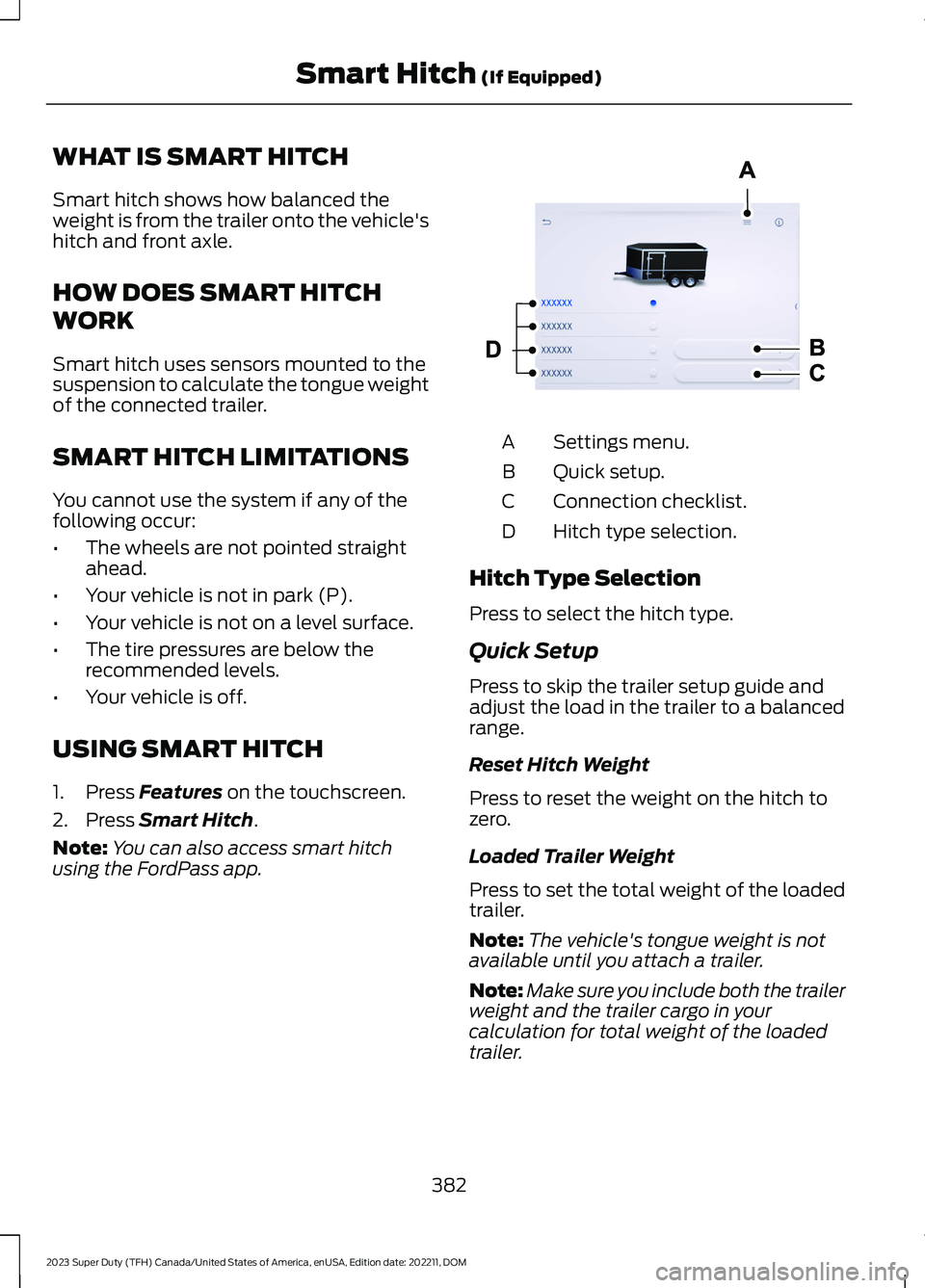
Settings menu.A
Quick setup.B
Connection checklist.C
Hitch type selection.D
Hitch Type Selection
Press to select the hitch type.
Quick Setup
Press to skip the trailer setup guide andadjust the load in the trailer to a balancedrange.
Reset Hitch Weight
Press to reset the weight on the hitch tozero.
Loaded Trailer Weight
Press to set the total weight of the loadedtrailer.
Note:The vehicle's tongue weight is notavailable until you attach a trailer.
Note:Make sure you include both the trailerweight and the trailer cargo in yourcalculation for total weight of the loadedtrailer.
382
2023 Super Duty (TFH) Canada/United States of America, enUSA, Edition date: 202211, DOMSmart Hitch (If Equipped) E390704
Page 388 of 738
WHAT IS ONBOARD SCALES
Onboard scales provides the estimatedpayload of your vehicle and warns whenyour vehicle is overloaded.
HOW DOES ONBOARD SCALES
WORK
Onboard scales uses sensors mounted tothe suspension to calculate the vehicle'spayload.
ONBOARD SCALES
LIMITATIONS
You cannot use the system if any of thefollowing occur:
•The wheels are not pointed straightahead.
•Your vehicle is not in park (P).
•Your vehicle is not on a level surface.
•The tire pressures are below therecommended levels.
•Your vehicle is off.
USING ONBOARD SCALES
1.Press Features on the touchscreen.
2.Press Onboard Scales.
Note:You can also access onboard scalesusing the FordPass app.
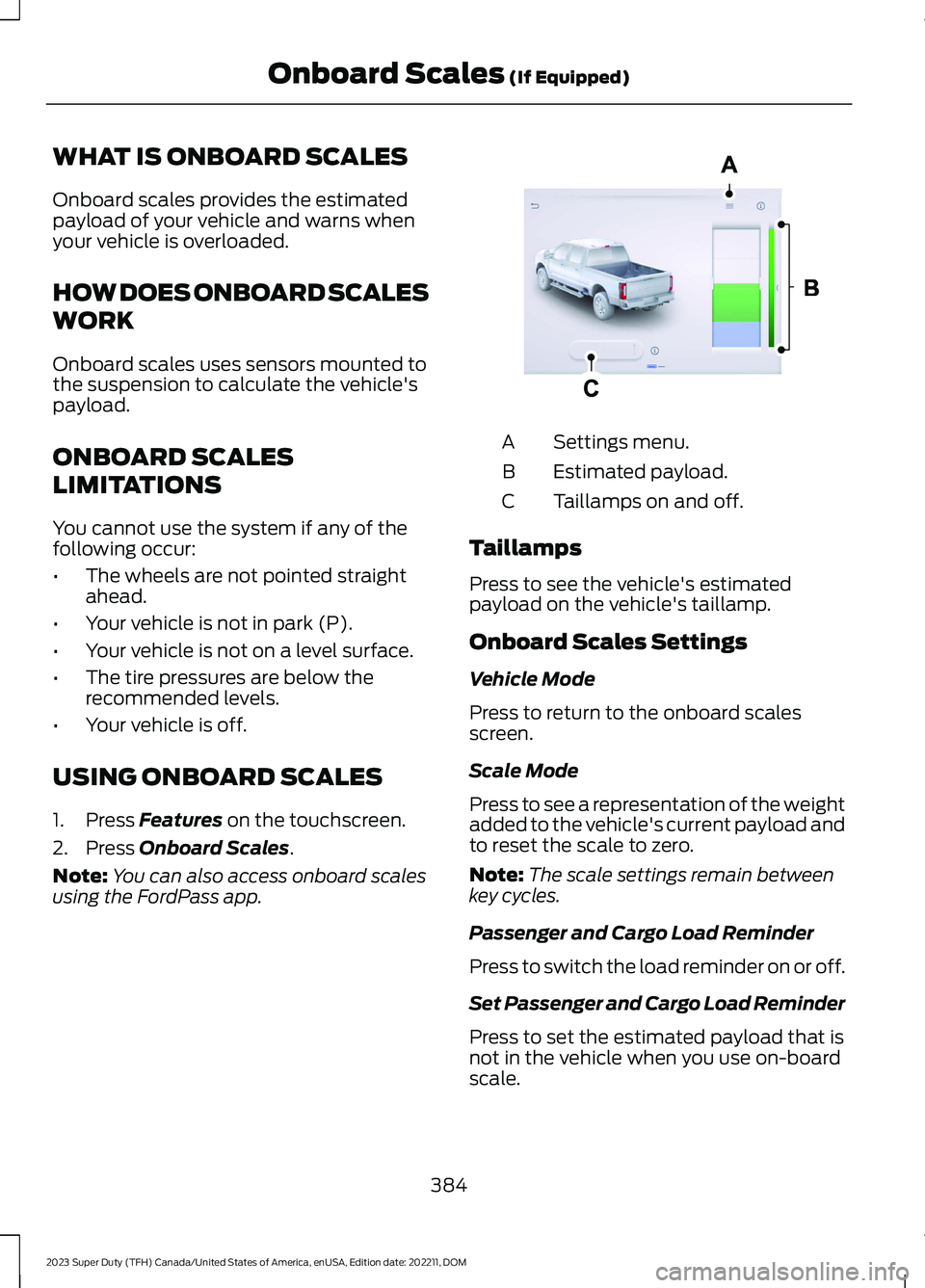
Settings menu.A
Estimated payload.B
Taillamps on and off.C
Taillamps
Press to see the vehicle's estimatedpayload on the vehicle's taillamp.
Onboard Scales Settings
Vehicle Mode
Press to return to the onboard scalesscreen.
Scale Mode
Press to see a representation of the weightadded to the vehicle's current payload andto reset the scale to zero.
Note:The scale settings remain betweenkey cycles.
Passenger and Cargo Load Reminder
Press to switch the load reminder on or off.
Set Passenger and Cargo Load Reminder
Press to set the estimated payload that isnot in the vehicle when you use on-boardscale.
384
2023 Super Duty (TFH) Canada/United States of America, enUSA, Edition date: 202211, DOMOnboard Scales (If Equipped)E390703
Page 402 of 738
TRAILER BACKUP ASSISTANCE– FREQUENTLY ASKEDQUESTIONS
Why does the trailer not reversestraight?
Verify the sensor is correctly installed.Other factors such as the hitchconnection, road camber, road slopeand trailer suspension could influencehow straight the system can reversethe trailer when the control knob is notturned. You can compensate for thetrailer drifting to the right or left byslowly turning the knob until the traileris following your desired path and thenholding the knob in that position.
Why does the system not detect asensor?
There could be an issue with theconnection, the wiring harness couldbe damaged, you could have multiplesensors connected or the sensor couldbe incorrectly installed. Check that the12-way connector is fully inserted intothe 12-way socket. The red rubber sealis not visible when the connector isfully inserted. Also check that thewiring harness sensor connection isfully inserted at the trailer sensor, andcheck for damaged wiring betweenthe 12-way connector and the trailersensor. Also, check that the sensor isinstalled on a vertical surface with thearrows pointing straight up.
What does it mean if the systemremains on one message for anextended time during calibration whensetting up the system with the sticker?
The camera could need to be cleaned,the sticker could be blocked, thedrawbar could be outside the allowedrange of 4–19 in (10–48 cm) or youcould need to move to a different areato change the lighting and background.Verify the sticker is in the properlocation. See Applying the TrailerReversing Aid Sticker (page 388).You can move to a different area orchange the direction you are driving orsetup the system at a different timeof day. Some trailers are notcompatible with the sticker andcamera system. If the issue persistswith the sticker setup, you may chooseto setup the trailer with a sensor.
What does it mean if the system pausesduring calibration?
There could be steering input or trailermovement during the straight driveportion of the calibration process.
What does it mean if the systemremains on one message for anextended time during calibration whensetting up the system with the sensor?
The sensor could be incorrectlyinstalled, the trailer length could beoutside the allowed range or the roadsurface could be too rough or bumpy.
What does it mean if the systemdisplays hold steering steady duringturn?
Part of the calibration process for thesticker setup requires a steady turn. Ifyou are continually moving thesteering wheel during the turn, thisdelays the calibration process. Toenable the calibration process, holdthe steering wheel at the sameposition when turning.
398
2023 Super Duty (TFH) Canada/United States of America, enUSA, Edition date: 202211, DOMTrailer Backup Assistance (If Equipped)
Page 413 of 738
TRAILER REVERSE GUIDANCE –FREQUENTLY ASKED QUESTIONS
Why does the trailer not reversestraight?
Verify the sensor is correctly installed.Other factors such as the hitchconnection, road camber, road slopeand trailer suspension could influencehow straight the system can reversethe trailer when the control knob is notturned. You can compensate for thetrailer drifting to the right or left byslowly turning the knob until the traileris following your desired path and thenholding the knob in that position.
Why does the system not detect asensor?
There could be an issue with theconnection, the wiring harness couldbe damaged, you could have multiplesensors connected or the sensor couldbe incorrectly installed. Check that the12-way connector is fully inserted intothe 12-way socket. The red rubber sealis not visible when the connector isfully inserted. Also check that thewiring harness sensor connection isfully inserted at the trailer sensor, andcheck for damaged wiring betweenthe 12-way connector and the trailersensor. Also, check that the sensor isinstalled on a vertical surface with thearrows pointing straight up.
What does it mean if the systemremains on one message for anextended time during calibration whensetting up the system with the sticker?
The camera could need to be cleaned,the sticker could be blocked, thedrawbar could be outside the allowedrange of 4–19 in (10–48 cm) or youcould need to move to a different areato change the lighting and background.Verify the sticker is in the properlocation. See Applying the TrailerReverse Aid Sticker (page 403). Youcan move to a different area or changethe direction you are driving or setupthe system at a different time of day.Some trailers are not compatible withthe sticker and camera system. If theissue persists with the sticker setup,you may choose to setup the trailerwith a sensor.
What does it mean if the system pausesduring calibration?
There could be steering input or trailermovement during the straight driveportion of the calibration process.
What does it mean if the systemremains on one message for anextended time during calibration whensetting up the system with the sensor?
The sensor could be incorrectlyinstalled, the trailer length could beoutside the allowed range or the roadsurface could be too rough or bumpy.
What does it mean if the systemdisplays hold steering steady duringturn?
Part of the calibration process for thesticker setup requires a steady turn. Ifyou are continually moving thesteering wheel during the turn, thisdelays the calibration process. Toenable the calibration process, holdthe steering wheel at the sameposition when turning.
409
2023 Super Duty (TFH) Canada/United States of America, enUSA, Edition date: 202211, DOMTrailer Reverse Guidance (If Equipped)
Page 416 of 738
OFF-ROAD DRIVING
WHAT IS OFF-ROAD DRIVING
Off-road driving is driving your vehicle onunsurfaced roads or trails, made from dirt,rocks, sand and mud.
BASIC OFF-ROAD DRIVINGTECHNIQUES
Off-road Driving Hints
Before taking your vehicle off-roading, abasic vehicle inspection should be done tomake sure that the vehicle is in top workingcondition. It is always recommended thatat least two vehicles are used whileoff-roading. The buddy system helps makesure that help is close at hand should avehicle become stuck or damaged. It is alsowise to take supplies such as a first aid kit,supply of water, tow strap, cell or satellitephone with you any time an off-roadexcursion is planned.
1.Grip the steering wheel with thumbson the outside of the rim. This willreduce the risk of injury due to abruptsteering wheel motions that occurwhen negotiating rough terrain.
2.Throttle, brake and steering inputsshould be made in a smooth andcontrolled manner. Sudden inputs tothe controls can cause loss of tractionor upset the vehicle, especially whileon loose terrain or while crossingobstacles such as rocks or logs.
3.Look ahead on your route notingupcoming obstacles, or any otherfactors which may indicate a changein available traction, and adjust thevehicle speed and route accordingly.
4.When driving off-road, if the front orrear suspension is bottoming outand/or excessive contact with theskid-plates is encountered, reducevehicle speed to avoid potentialdamage to the vehicle.
5.When with other vehicles, it isrecommended that communication isused, and the lead vehicle notify othervehicles of obstacles that could causepotential vehicle damage.
6.Always keep available groundclearance in mind and pick a route thatminimizes the risk of catching theunderside of the vehicle on an obstacle.
7.When negotiating low speed obstacles,applying light brake pressure inconjunction with the throttle will helpprevent the vehicle from jerking andwill allow you to negotiate the obstaclein a more controlled manner. Using 4Lwill also help with this.
8.Off-roading requires a high degree ofconcentration. Even if your local lawdoes not prohibit alcohol use whiledriving off-road, Ford stronglyrecommends against drinking if youplan to off-road.
Crossing Obstacles
•Review the path ahead beforeattempting to cross any obstacle. It isbest if the obstacle is reviewed fromoutside the vehicle so that there is agood understanding of terrain conditionboth in front of and behind theobstacle.
•Approach obstacles slowly.
412
2023 Super Duty (TFH) Canada/United States of America, enUSA, Edition date: 202211, DOMDriving Hints
Page 418 of 738
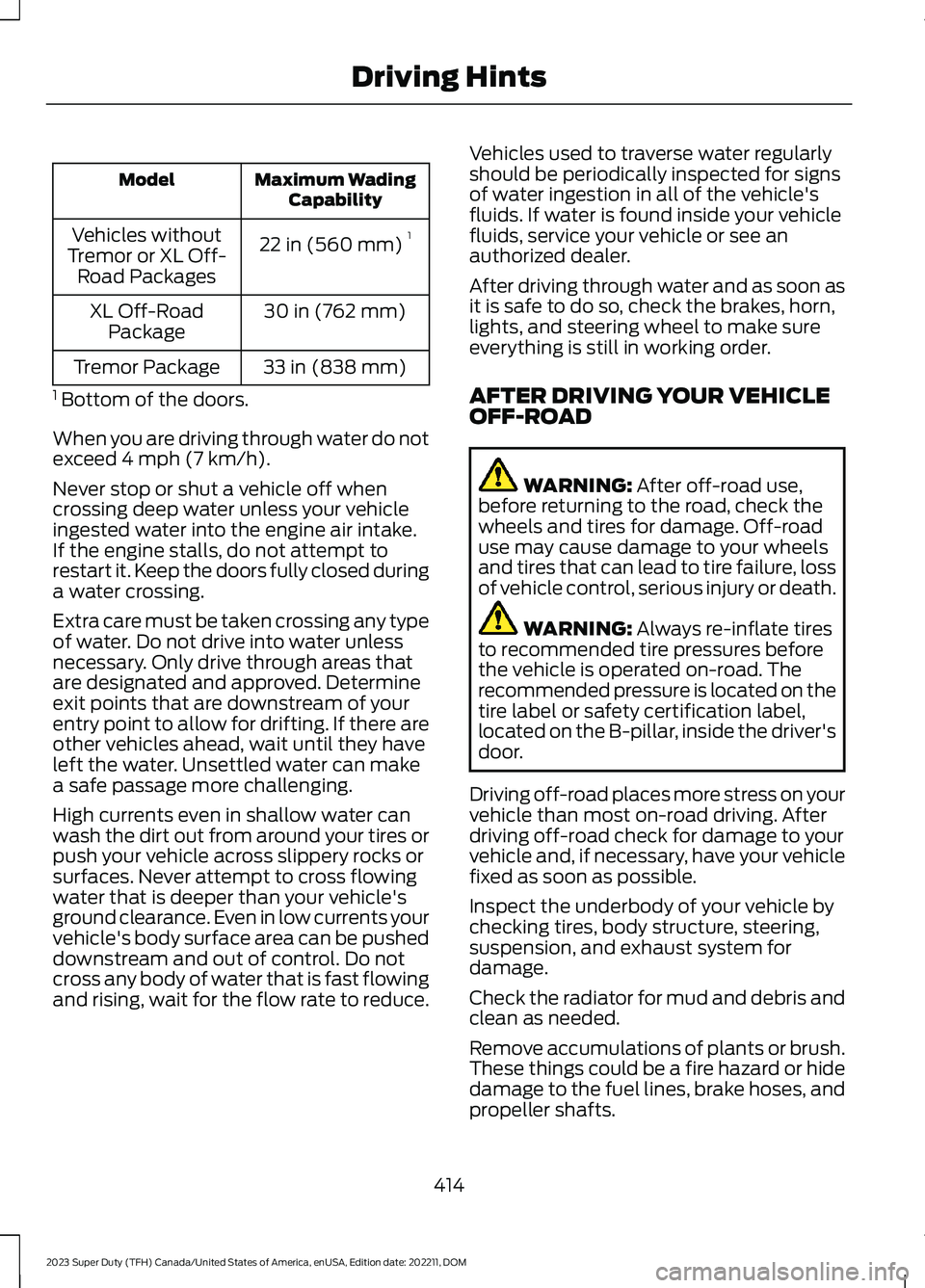
Maximum WadingCapabilityModel
22 in (560 mm)1Vehicles withoutTremor or XL Off-Road Packages
30 in (762 mm)XL Off-RoadPackage
33 in (838 mm)Tremor Package
1 Bottom of the doors.
When you are driving through water do notexceed 4 mph (7 km/h).
Never stop or shut a vehicle off whencrossing deep water unless your vehicleingested water into the engine air intake.If the engine stalls, do not attempt torestart it. Keep the doors fully closed duringa water crossing.
Extra care must be taken crossing any typeof water. Do not drive into water unlessnecessary. Only drive through areas thatare designated and approved. Determineexit points that are downstream of yourentry point to allow for drifting. If there areother vehicles ahead, wait until they haveleft the water. Unsettled water can makea safe passage more challenging.
High currents even in shallow water canwash the dirt out from around your tires orpush your vehicle across slippery rocks orsurfaces. Never attempt to cross flowingwater that is deeper than your vehicle'sground clearance. Even in low currents yourvehicle's body surface area can be pusheddownstream and out of control. Do notcross any body of water that is fast flowingand rising, wait for the flow rate to reduce.
Vehicles used to traverse water regularlyshould be periodically inspected for signsof water ingestion in all of the vehicle'sfluids. If water is found inside your vehiclefluids, service your vehicle or see anauthorized dealer.
After driving through water and as soon asit is safe to do so, check the brakes, horn,lights, and steering wheel to make sureeverything is still in working order.
AFTER DRIVING YOUR VEHICLEOFF-ROAD
WARNING: After off-road use,before returning to the road, check thewheels and tires for damage. Off-roaduse may cause damage to your wheelsand tires that can lead to tire failure, lossof vehicle control, serious injury or death.
WARNING: Always re-inflate tiresto recommended tire pressures beforethe vehicle is operated on-road. Therecommended pressure is located on thetire label or safety certification label,located on the B-pillar, inside the driver'sdoor.
Driving off-road places more stress on yourvehicle than most on-road driving. Afterdriving off-road check for damage to yourvehicle and, if necessary, have your vehiclefixed as soon as possible.
Inspect the underbody of your vehicle bychecking tires, body structure, steering,suspension, and exhaust system fordamage.
Check the radiator for mud and debris andclean as needed.
Remove accumulations of plants or brush.These things could be a fire hazard or hidedamage to the fuel lines, brake hoses, andpropeller shafts.
414
2023 Super Duty (TFH) Canada/United States of America, enUSA, Edition date: 202211, DOMDriving Hints
Page 476 of 738
Rear suspension components may requireregular cleaning with a power washer or athorough rinse with a strong stream ofwater if the vehicle is operated in dusty ormuddy environments. Rear leaf springs orother suspension components may emitsqueaking or popping noises whileoperating the vehicle if particles, such asdirt, rocks, or other debris, are present inthe components.
CLEANING THE EXHAUST
WARNING: Do not modify orremove the exhaust tailpipe. Blockedholes may result in increased exhaustgas temperatures, vehicle damage,property damage or personal injury.
WARNING: Failure to keep theholes in the exhaust tailpipe clean andfree of debris or foreign material mayresult in blocked holes. Blocked holesmay result in increased exhaust gastemperatures, vehicle damage, propertydamage or personal injury.
WARNING: The normal operatingtemperature of the exhaust system isvery high. Never work around or attemptto repair any part of the exhaust systemuntil it has cooled. Use special care whenworking around the diesel oxidationcatalytic converter or the dieselparticulate filter. The diesel oxidationcatalytic converter and the dieselparticulate filter heat up to very hightemperatures after only a short periodof engine operation and remain hot afteryou switch the engine off.
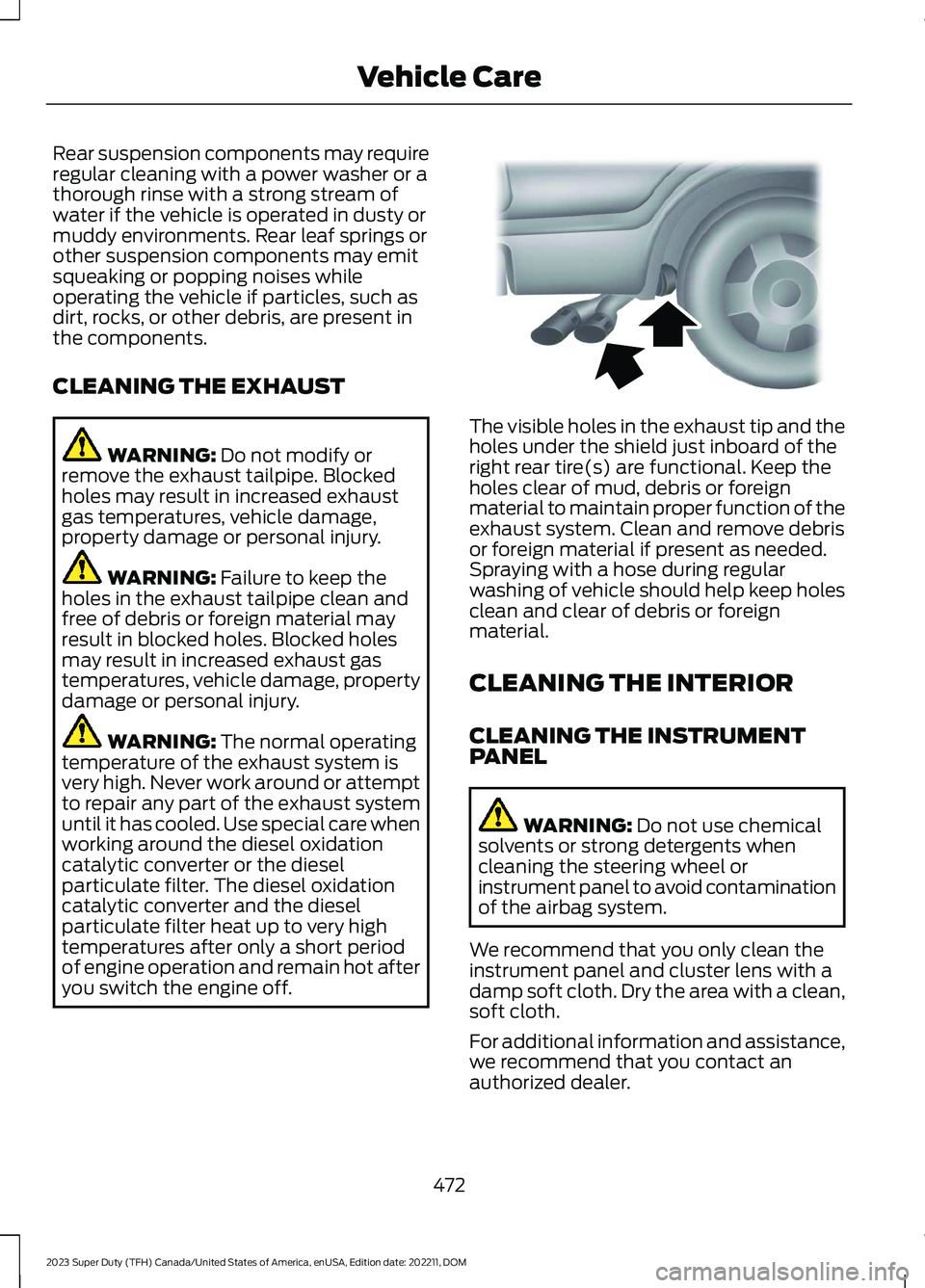
The visible holes in the exhaust tip and theholes under the shield just inboard of theright rear tire(s) are functional. Keep theholes clear of mud, debris or foreignmaterial to maintain proper function of theexhaust system. Clean and remove debrisor foreign material if present as needed.Spraying with a hose during regularwashing of vehicle should help keep holesclean and clear of debris or foreignmaterial.
CLEANING THE INTERIOR
CLEANING THE INSTRUMENTPANEL
WARNING: Do not use chemicalsolvents or strong detergents whencleaning the steering wheel orinstrument panel to avoid contaminationof the airbag system.
We recommend that you only clean theinstrument panel and cluster lens with adamp soft cloth. Dry the area with a clean,soft cloth.
For additional information and assistance,we recommend that you contact anauthorized dealer.
472
2023 Super Duty (TFH) Canada/United States of America, enUSA, Edition date: 202211, DOMVehicle CareE163380
Page 492 of 738
cause steering, suspension, axle, transfercase or power transfer unit failure.Follow the recommended tire inflationpressures found on the SafetyCompliance Certification label, or theTire Label on the B-Pillar or the edge ofthe driver door. Failure to follow thisinstruction could result in loss of vehiclecontrol, vehicle rollover, or personal injuryor death.
Note:Do not use snow chains on vehicleswith LT275/65R20 or LT 285/75R18 sizedtires.
Note:The suspension insulation andbumpers will help prevent vehicle damage.Do not remove these components from yourvehicle when using snow tires and chains.
The tires on your vehicle have all-weathertreads to provide traction in rain and snow.However, in some climates, you may needto use snow tires and cables. If you needto use cables, we recommend that you usesteel wheels of the same size andspecification, as cables may chipaluminum wheels.
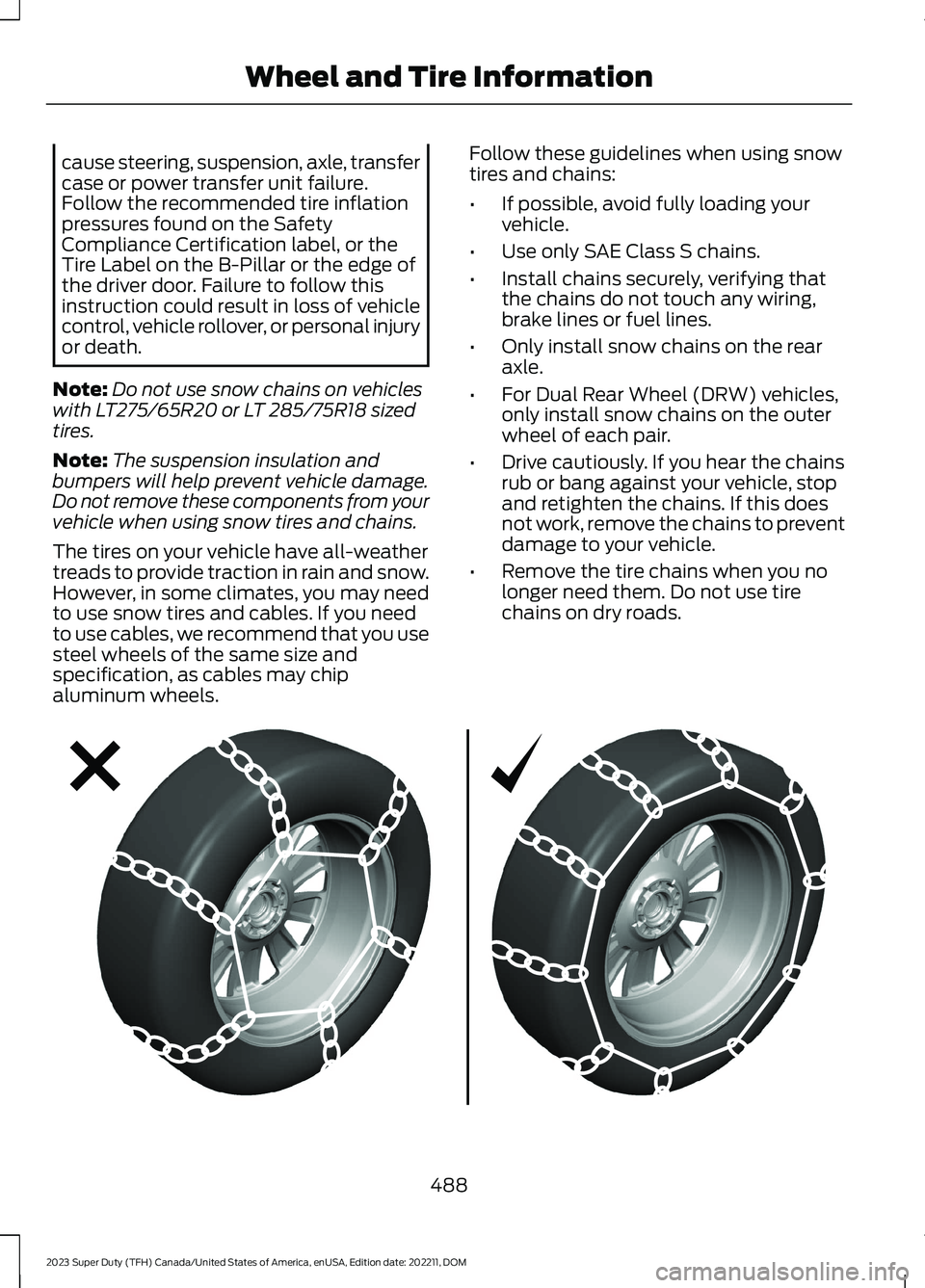
Follow these guidelines when using snowtires and chains:
•If possible, avoid fully loading yourvehicle.
•Use only SAE Class S chains.
•Install chains securely, verifying thatthe chains do not touch any wiring,brake lines or fuel lines.
•Only install snow chains on the rearaxle.
•For Dual Rear Wheel (DRW) vehicles,only install snow chains on the outerwheel of each pair.
•Drive cautiously. If you hear the chainsrub or bang against your vehicle, stopand retighten the chains. If this doesnot work, remove the chains to preventdamage to your vehicle.
•Remove the tire chains when you nolonger need them. Do not use tirechains on dry roads.
488
2023 Super Duty (TFH) Canada/United States of America, enUSA, Edition date: 202211, DOMWheel and Tire InformationE292547
Page 493 of 738
Use snow chains that fit against thesidewall of the tire to prevent the chainsfrom touching the wheel rims orsuspension. Refer to the previousillustration.
If you have any questions regarding snowchains, please contact your authorizeddealer.
489
2023 Super Duty (TFH) Canada/United States of America, enUSA, Edition date: 202211, DOMWheel and Tire Information
Page 561 of 738
Depending on the station quality, you couldhear a slight sound change when thestation changes between analog anddigital audio.
You cannot access a saved HD station ifyour vehicle is outside the station’sreception area.
SWITCHING DIGITAL RADIORECEPTION ON AND OFF
1.Press Settings on the touchscreen.
2.Press Radio Settings.
3.Switch AM HD Radio or FM HD Radioon or off.
DIGITAL RADIO INDICATORS
HD Radio Indicator
The indicator appears when HD Radio ison and you tune to a station broadcastingHD Radio technology.
The color of the indicator changes toindicate the system status.
Gray indicates the system is acquiring adigital station.
Orange indicates digital audio is playing.
Multicast Indicator
The multicast indicator appears if thecurrent station is broadcasting multipledigital broadcasts. The highlightednumbers indicate additional digitalchannels available.
Note:For stations that have more than oneHD multicast, the HD indicator and radiotext appears as a button. Press the buttonto cycle through all of the HD stations onthat specific frequency.
SATELLITE RADIO
WHAT IS SATELLITE RADIO
Your factory-installed SiriusXM radiosystem includes a limited subscriptionterm, which begins on the date of sale orlease of your vehicle. See an authorizeddealer for availability.
For additional information about extendedsubscription terms, visit www.SiriusXM.comin the United States,www.SiriusXM.ca inCanada, or call SiriusXM at1-888-539-7474.
Note:SiriusXM reserves the unrestrictedright to change, rearrange, add or deleteprogramming including canceling, movingor adding particular channels, and its prices,at any time, with or without notice to you.Neither SiriusXM and its affiliates nor FordMotor Company and its affiliates will beliable to you or any third party for any suchmodification, suspension or termination.
SATELLITE RADIO LIMITATIONS
For optimal reception performance, keepthe antenna clear of snow and ice build-upand keep luggage and other material asfar away from the antenna as possible.Placing luggage over the antenna mayreduce performance. Factory-installed andaftermarket vehicle structures including,but not limited to, roof racks and soft toproofs in a partially open position couldreduce reception performance.
557
2023 Super Duty (TFH) Canada/United States of America, enUSA, Edition date: 202211, DOMAudio SystemE142616