instrument panel FORD SUPER DUTY 2023 Owner's Manual
[x] Cancel search | Manufacturer: FORD, Model Year: 2023, Model line: SUPER DUTY, Model: FORD SUPER DUTY 2023Pages: 738, PDF Size: 18.49 MB
Page 192 of 738
Grounding Type
Neutral Floating
The neutral of the inverter generator isisolated from system ground.
Note:If additional grounding measures arerequired, consult with a qualified electrician.
LOCATING THE OUTLETS
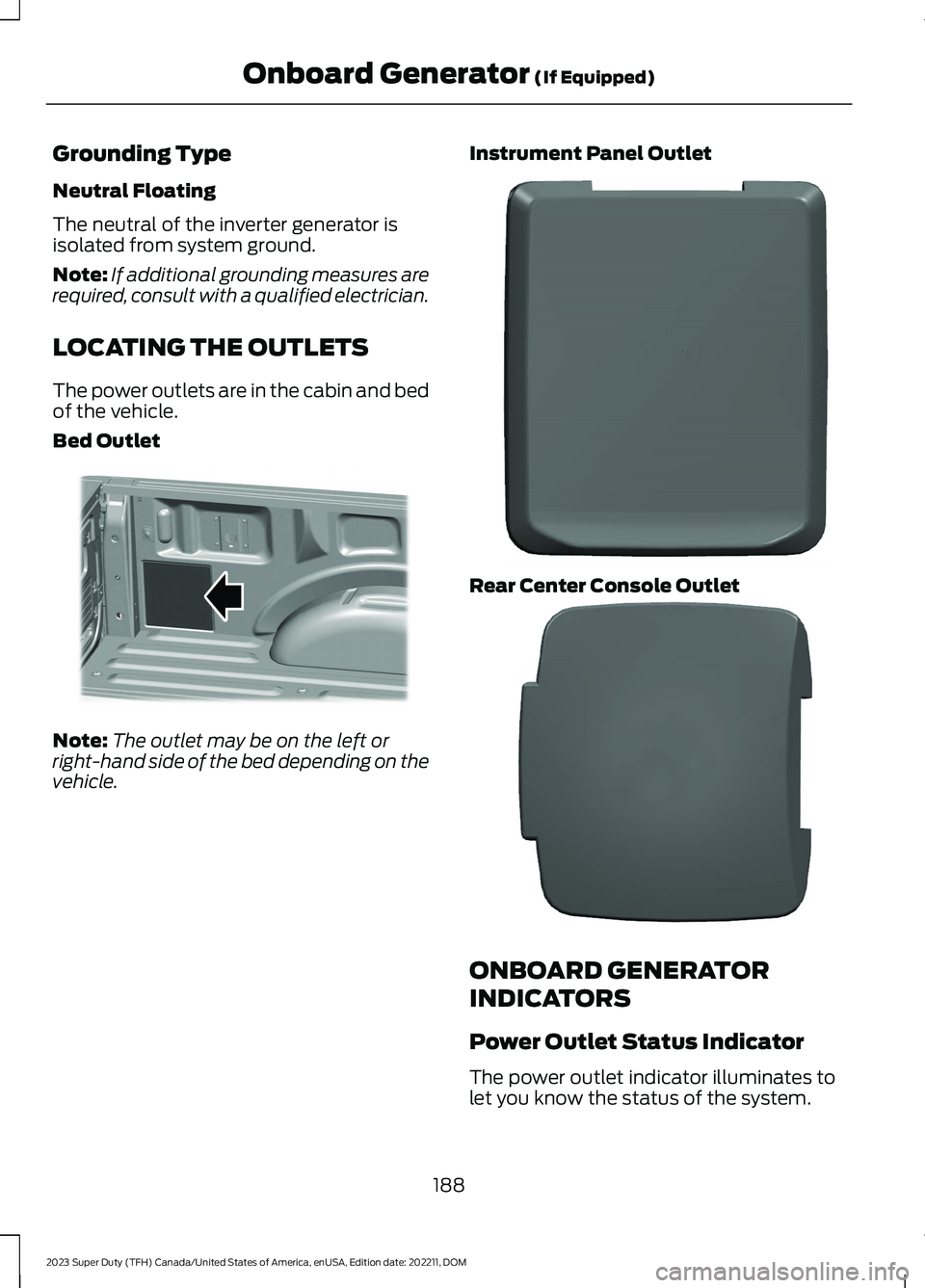
The power outlets are in the cabin and bedof the vehicle.
Bed Outlet
Note:The outlet may be on the left orright-hand side of the bed depending on thevehicle.
Instrument Panel Outlet
Rear Center Console Outlet
ONBOARD GENERATOR
INDICATORS
Power Outlet Status Indicator
The power outlet indicator illuminates tolet you know the status of the system.
188
2023 Super Duty (TFH) Canada/United States of America, enUSA, Edition date: 202211, DOMOnboard Generator (If Equipped)E369445 E337927 E337926
Page 194 of 738
WHAT IS UTILITY IDLE MODE
Utility idle mode allows you to remove thekey from the ignition and keep the vehicleand bed power point running.
SWITCHING UTILITY IDLE
MODE ON AND OFF
Switching Utility Idle On
1.Start the vehicle. See Starting andStopping the Engine (page 202).
2.Press Features on the touchscreen.
3.Press Pro Power Onboard.
4.Press Generator Mode.
5.Press Utility Idle.
6.Turn the key to position 0.
7.Remove the key from the ignition.
Switching Utility Idle Off using theKey
1.Insert the key into the ignition.
2.Turn the key to position III.
Switching Utility Idle Off using theCenter Display Screen
1.Start the vehicle. See Starting andStopping the Engine (page 202).
2.Press Features on the touchscreen.
3.Press Pro Power Onboard.
4.Press Generator Mode.
5.Press Utility Idle.
6.Press Turn Vehicle Off.
WHAT IS GENERATOR MODE
Generator mode uses the vehicle engineto increase power to the bed power outletsup to the rating listed on the power outletlabel.
SWITCHING GENERATOR
MODE ON AND OFF
Using the Center Display Screen
1.Start the vehicle. See Starting andStopping the Engine (page 202).
2.Press Features on the touchscreen.
3.Press Pro Power Onboard.
4.Press Generator Mode.
Using the Instrument Panel
Press the button to switchbetween off, convenience mode,and generator mode.
RESETTING GROUND FAULT
DETECTION
After disconnecting all electrical loads theground fault can be reset using theswitches on the power point, on theinstrument panel or on the touchscreen.
Use the controls on the touchscreen to testthe ground fault detection circuit.
190
2023 Super Duty (TFH) Canada/United States of America, enUSA, Edition date: 202211, DOMOnboard Generator (If Equipped)E311311
Page 199 of 738
WHAT IS THE WIRELESS
ACCESSORY CHARGER
The wireless accessory charger allows youto charge one compatible Qi wirelesscharging device on the charging area.
WIRELESS ACCESSORY
CHARGER PRECAUTIONS
WARNING: Wireless chargingdevices can affect the operation ofimplanted medical devices, includingcardiac pacemakers. If you have anyimplanted medical devices, werecommend that you consult with yourphysician.
WARNING: Remove all metalobjects like coins and keys from thecharging surface and remove any metalobjects attached to your mobile phonebefore placing the device on the chargingsurface. Some mobile devices or casesmay attract metal objects. Metal objectson the charging surface or attached tothe phone may become hot whilecharging is active. If an object is left onor near the charging surface or attachedto the phone while the device is charging,let the objects cool before removing toprevent personal injury.
Keep the charging area clean and removeforeign objects prior to charging a device.
Do not place items with a magnetic stripor radio-frequency identification chip, forexample passports, parking tickets,transportation passes or credit cards, nearthe charging area when charging a device.Damage could occur to the magnetic stripor radio-frequency identification chip.
Do not place metal objects, for exampleremote controls, coins and candywrappers, on or near the charging areawhen charging a device. Metal objects mayheat up and degrade the chargingperformance, in addition to causinginterruptions in charging.
Charging could be interrupted, degraded,or could stop if any of the following occur:
•The system detects a foreign object.
•The device is misaligned on thecharging area.
•The device moves on the activecharging area when the vehicle is inmotion.
•The vehicle ambient temperature is toohigh.
•You attempt to charge a non-Qicompatible device on the wirelesscharger.
Note:During charging, the device and thecharger could heat up, this is normal. If thebattery gets hotter than usual, the devicemay stop charging.
LOCATING THE WIRELESS
ACCESSORY CHARGER
The charging area is in the centerconsole media bin below theinstrument panel.
CHARGING A WIRELESS
DEVICE
Place the device on the center of thecharging surface with the charging sidedown. The charging stops after your devicereaches a full charge.
You can use the charger when the vehicleis in accessory mode, when the vehicle isrunning, or when SYNC is on.
195
2023 Super Duty (TFH) Canada/United States of America, enUSA, Edition date: 202211, DOMWireless Accessory ChargerE297549
Page 201 of 738
CUP HOLDERS
CUP HOLDER PRECAUTIONS
WARNING: Use caution whenstowing items or hot drinks in the cupholders. Items could become loose orspill during hard braking, acceleration orcrashes. Failure to follow this instructioncould result in personal injury.
GLOVE COMPARTMENT
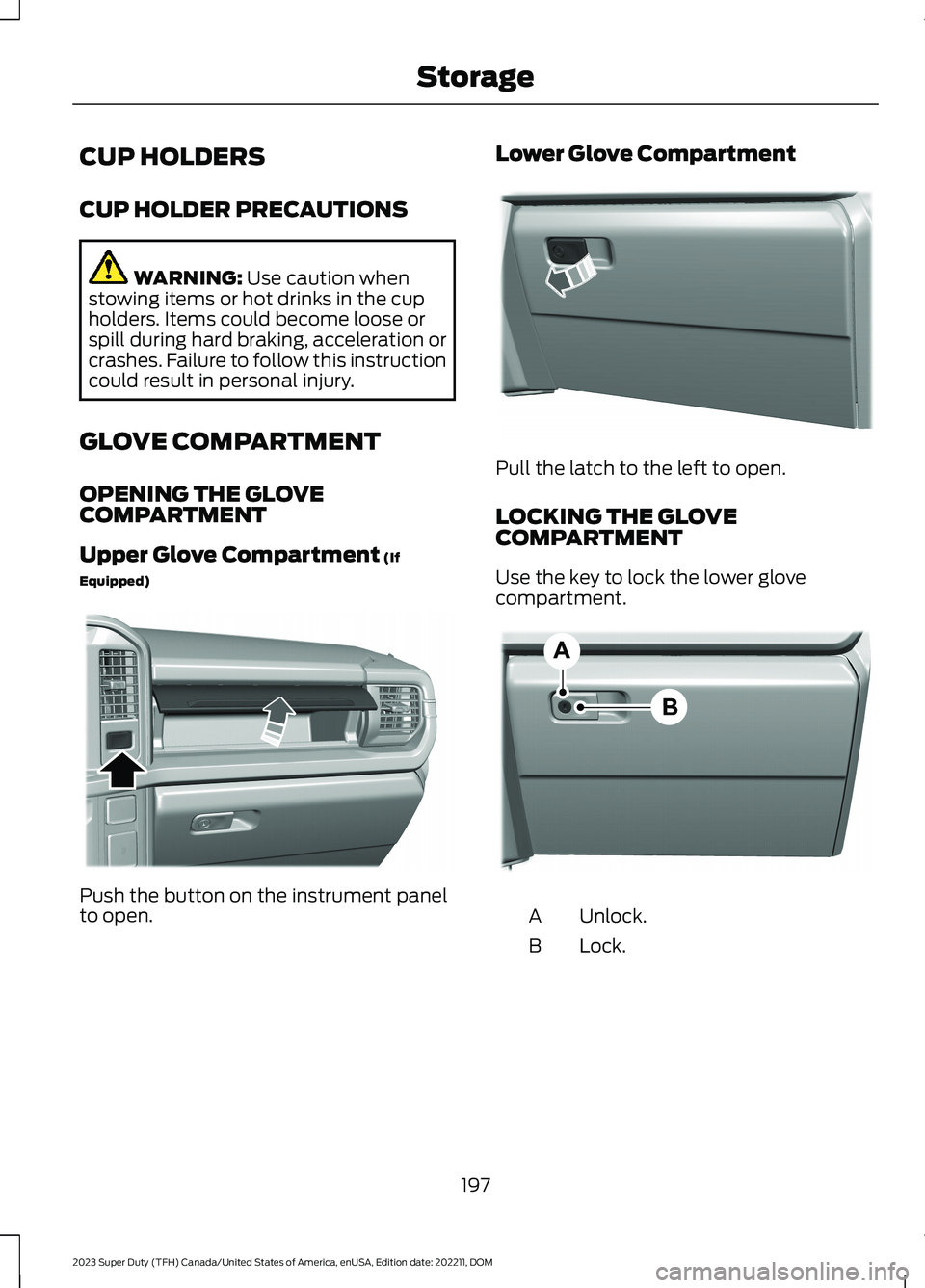
OPENING THE GLOVECOMPARTMENT
Upper Glove Compartment (If
Equipped)
Push the button on the instrument panelto open.
Lower Glove Compartment
Pull the latch to the left to open.
LOCKING THE GLOVECOMPARTMENT
Use the key to lock the lower glovecompartment.
Unlock.A
Lock.B
197
2023 Super Duty (TFH) Canada/United States of America, enUSA, Edition date: 202211, DOMStorageE380778 E380779 E385980
Page 242 of 738
HOW DOES FOUR-WHEEL
DRIVE WORK
Using the Electronic Shift On theFly System (If Equipped)
This four-wheel drive system utilizes a2-speed Electronic Shift On the Fly (ESOF)transfer case which is also known as apart-time system. This system offers thedriver two-wheel drive high, four-wheeldrive high, and four-wheel drive low asavailable modes of operation. When youselect either four-wheel drive high orfour-wheel drive low, the system providesmechanically locked four-wheel drivepower to both the front and rear wheelsfor use in off-road or slippery conditionssuch as deep snow, sand or mud. Whenyou select four-wheel drive low, the systemprovides additional gearing for increasedtorque multiplication for conditions likedeep sand, steep slopes, or pulling heavyobjects. Additionally, the system is capableof recreational flat towing by putting thetransfer case into a neutral position. SeeRecreationally Towing Your Vehicle(page 427).
There is further information available ondriving in unique driving conditions. SeeOff-Road Driving (page 412).
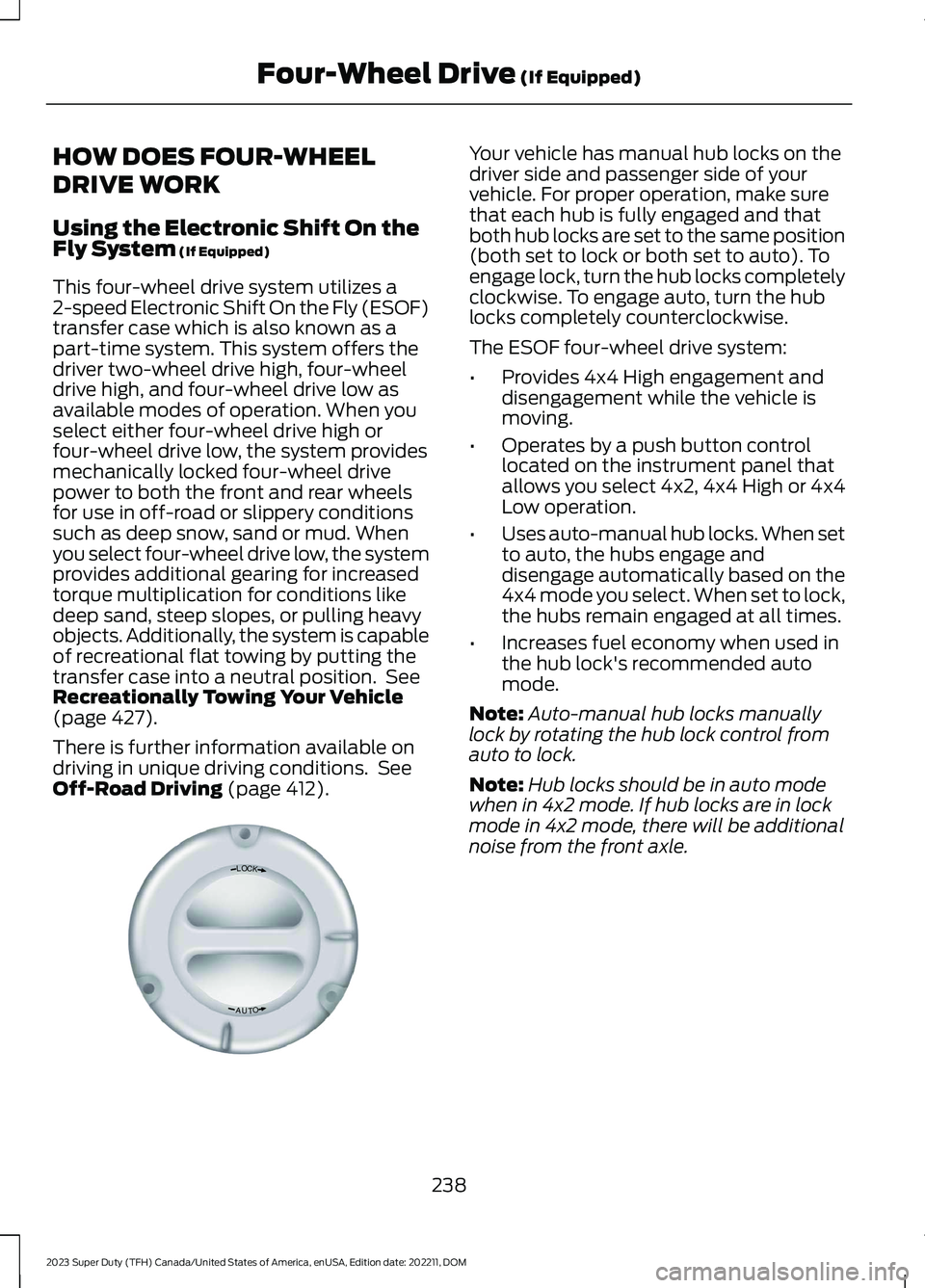
Your vehicle has manual hub locks on thedriver side and passenger side of yourvehicle. For proper operation, make surethat each hub is fully engaged and thatboth hub locks are set to the same position(both set to lock or both set to auto). Toengage lock, turn the hub locks completelyclockwise. To engage auto, turn the hublocks completely counterclockwise.
The ESOF four-wheel drive system:
•Provides 4x4 High engagement anddisengagement while the vehicle ismoving.
•Operates by a push button controllocated on the instrument panel thatallows you select 4x2, 4x4 High or 4x4Low operation.
•Uses auto-manual hub locks. When setto auto, the hubs engage anddisengage automatically based on the4x4 mode you select. When set to lock,the hubs remain engaged at all times.
•Increases fuel economy when used inthe hub lock's recommended automode.
Note:Auto-manual hub locks manuallylock by rotating the hub lock control fromauto to lock.
Note:Hub locks should be in auto modewhen in 4x2 mode. If hub locks are in lockmode in 4x2 mode, there will be additionalnoise from the front axle.
238
2023 Super Duty (TFH) Canada/United States of America, enUSA, Edition date: 202211, DOMFour-Wheel Drive (If Equipped)LOCKOTUAE339076
Page 245 of 738
SELECTING A FOUR-WHEEL
DRIVE MODE
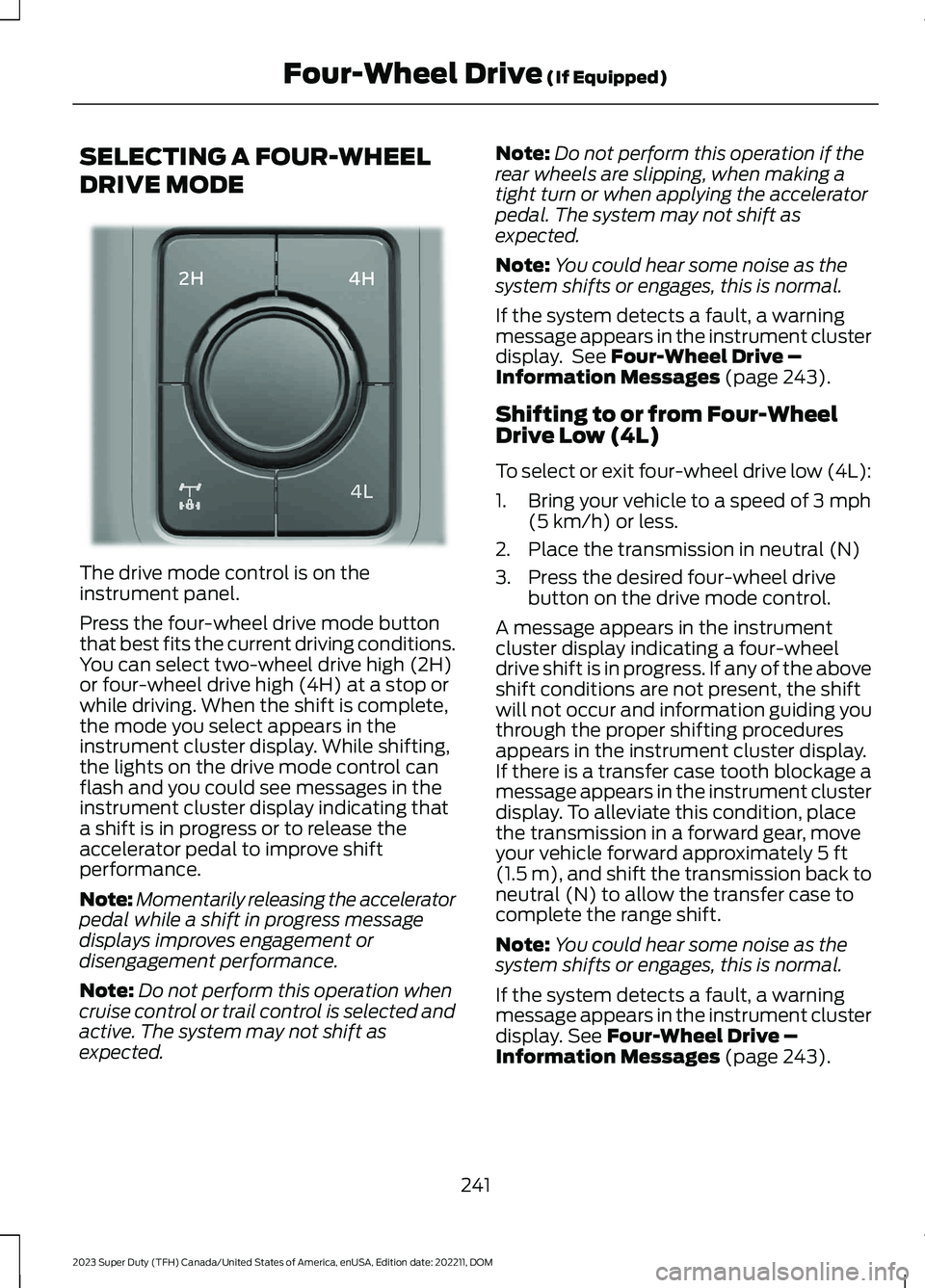
The drive mode control is on theinstrument panel.
Press the four-wheel drive mode buttonthat best fits the current driving conditions.You can select two-wheel drive high (2H)or four-wheel drive high (4H) at a stop orwhile driving. When the shift is complete,the mode you select appears in theinstrument cluster display. While shifting,the lights on the drive mode control canflash and you could see messages in theinstrument cluster display indicating thata shift is in progress or to release theaccelerator pedal to improve shiftperformance.
Note:Momentarily releasing the acceleratorpedal while a shift in progress messagedisplays improves engagement ordisengagement performance.
Note:Do not perform this operation whencruise control or trail control is selected andactive. The system may not shift asexpected.
Note:Do not perform this operation if therear wheels are slipping, when making atight turn or when applying the acceleratorpedal. The system may not shift asexpected.
Note:You could hear some noise as thesystem shifts or engages, this is normal.
If the system detects a fault, a warningmessage appears in the instrument clusterdisplay. See Four-Wheel Drive –Information Messages (page 243).
Shifting to or from Four-WheelDrive Low (4L)
To select or exit four-wheel drive low (4L):
1.Bring your vehicle to a speed of 3 mph(5 km/h) or less.
2.Place the transmission in neutral (N)
3.Press the desired four-wheel drivebutton on the drive mode control.
A message appears in the instrumentcluster display indicating a four-wheeldrive shift is in progress. If any of the aboveshift conditions are not present, the shiftwill not occur and information guiding youthrough the proper shifting proceduresappears in the instrument cluster display.If there is a transfer case tooth blockage amessage appears in the instrument clusterdisplay. To alleviate this condition, placethe transmission in a forward gear, moveyour vehicle forward approximately 5 ft(1.5 m), and shift the transmission back toneutral (N) to allow the transfer case tocomplete the range shift.
Note:You could hear some noise as thesystem shifts or engages, this is normal.
If the system detects a fault, a warningmessage appears in the instrument clusterdisplay. See Four-Wheel Drive –Information Messages (page 243).
241
2023 Super Duty (TFH) Canada/United States of America, enUSA, Edition date: 202211, DOMFour-Wheel Drive (If Equipped)E383456
Page 257 of 738
WHAT IS THE ELECTRIC
PARKING BRAKE
The electric parking brake is used to holdyour vehicle on slopes and flat roads.
APPLYING THE ELECTRIC
PARKING BRAKE
WARNING: Apply the parkingbrake, shift into park (P), switch theignition off and remove the key beforeyou leave your vehicle. Failure to followthis instruction could result in personalinjury or death.
WARNING: If you drive extendeddistances with the parking brake applied,you could cause damage to the brakesystem.
WARNING: The electric parkingbrake does not operate if the vehiclebattery has run out of charge.
The switch is on the lower partof the instrument panel.
Pull the switch up to apply the electricparking brake. The red warning lampflashes, then steadily illuminates when theparking brake is applied.
Note:You can apply the electric parkingbrake when the ignition is off.
Note:The electric parking brake couldautomatically apply when park (P) isselected. See Park (P) (page 234).
APPLYING THE ELECTRIC
PARKING BRAKE IN AN
EMERGENCY
You can use the electric parking brake toslow or stop your vehicle in an emergency.
Pull the switch up and hold it.
The red warning lamp illuminates, a tonesounds and the stoplamps turn on whenyou use the electric parking brake in anemergency.
The electric parking brake continues toslow your vehicle down unless you releasethe switch.
Note:Do not apply the electric parkingbrake when your vehicle is moving, exceptin an emergency. If you repeatedly use theelectric parking brake to slow or stop yourvehicle, you could cause damage to thebrake system.
MANUALLY RELEASING THE
ELECTRIC PARKING BRAKE
1.Switch the ignition on.
2.Press and hold the brake pedal.
3.Push the switch down.
The red warning lamp turns off.
Pulling Away on a Hill When Towing aTrailer
1.Press and hold the brake pedal.
2.Pull the switch upward and hold it.
3.Shift into gear.
4.Press the accelerator pedal until enginehas developed sufficient torque toprevent your vehicle from rolling downthe hill.
5.Release the switch and pull away in anormal manner.
253
2023 Super Duty (TFH) Canada/United States of America, enUSA, Edition date: 202211, DOMElectric Parking BrakeE267156
Page 272 of 738
WHAT IS TRACTION CONTROL
The traction control system helps to avoiddrive wheel spin and loss of traction.
HOW DOES TRACTION
CONTROL WORK
If your wheels begin to spin, the loss oftraction can compromise steering controland stability of the vehicle. The tractioncontrol system applies the brakes toindividual wheels and when needed,reduces engine power at the same time toincrease traction.
SWITCHING TRACTION
CONTROL ON AND OFF
WARNING: Operating your vehiclewith the traction control disabled couldlead to an increased risk of loss of vehiclecontrol, vehicle rollover, personal injuryand death.
The traction control system turns on eachtime you switch the ignition on.
The button for the stability and tractioncontrol system is on the instrument panel.
Press and release the button to switchtraction control off. The stability controlsystem remains fully active, to switch it off,press and hold the button for a fewseconds, then release.
When you switch traction control off, amessage and an illuminated icon appearon the instrument cluster.
Press the switch again to turn the tractioncontrol system back on to normaloperation.
If your vehicle is stuck in mud or snow,switching traction control off may bebeneficial as this allows the wheels to spin.
TRACTION CONTROL
INDICATOR
Stability and Traction ControlIndicator
If the indicator does notilluminate when you switch theignition on, or remains on whenthe engine is running, this indicates amalfunction. Have your vehicle checkedby an authorized dealer as soon aspossible.
The traction control off indicatorilluminates when you switch thetraction control system off, orwhen an alternative stability control modeis selected that requires the tractioncontrol off depending on the drive modeselected.
268
2023 Super Duty (TFH) Canada/United States of America, enUSA, Edition date: 202211, DOMTraction ControlE327252 E138639 E130458
Page 281 of 738
WHAT IS HILL DESCENT
CONTROL
Hill descent control allows the driver to setand maintain vehicle speed whiledescending steep slopes in various surfaceconditions.
HOW DOES HILL DESCENT
CONTROL WORK
Hill descent control can maintain vehiclespeeds on downhill slopes between2–20 mph (3–32 km/h). Above 20 mph(32 km/h), the system remains on but thedescent speed cannot be set ormaintained.
Note:The system does not function below2 mph (3 km/h).
The system requires a cool down intervalafter a period of sustained use. Hill descentcontrol provides a warning in the messagecenter when the system is about todisengage for cooling. At this time,manually apply the brakes as needed tomaintain descent speed.
Note:The amount of time that the systemcan remain active before cooling varies withconditions.
HILL DESCENT CONTROL
PRECAUTIONS
WARNING: The system does notcontrol speed in low traction conditionsor extremely steep slopes. The systemis designed to be an aid and does notrelieve you of your responsibility to drivewith due care and attention. Failure tofollow this instruction could result inpersonal injury.
WARNING: The system does notreplace the parking brake. When youleave your vehicle, always apply theparking brake.
SWITCHING HILL DESCENT
CONTROL ON AND OFF
Press the button on theinstrument panel. A lightilluminates and a tone soundswhen the system is active.
SETTING THE HILL DESCENT
SPEED
To increase or decrease the descent speed,press the accelerator or brake pedal, or usethe SET + and SET - buttons on thesteering wheel. Once you reach thepreferred speed remove your feet from thepedals.
HILL DESCENT CONTROL
INDICATOR
Illuminates when you switch hilldescent control on.
277
2023 Super Duty (TFH) Canada/United States of America, enUSA, Edition date: 202211, DOMHill Descent Control (If Equipped)E163171 E163171
Page 390 of 738
WHAT IS TRAILER BACKUP
ASSISTANCE
Trailer backup assistance utilizes thecontrol knob on the instrument panel tohelp you steer a trailer. Turn the controlknob in the direction you want the trailerto go and the system steers the vehicle.
HOW DOES TRAILER BACKUP
ASSISTANCE WORK
Trailer backup assistance uses a sticker orsensor attached to the trailer to detect thetrailer angle relative to the towing vehicleand provides instructions, graphics andcamera views on the touchscreen.
TRAILER BACKUP
ASSISTANCE PRECAUTIONS
WARNING: Driving while distractedcan result in loss of vehicle control, crashand injury. We strongly recommend thatyou use extreme caution when using anydevice that may take your focus off theroad. Your primary responsibility is thesafe operation of your vehicle. Werecommend against the use of anyhand-held device while driving andencourage the use of voice-operatedsystems when possible. Make sure youare aware of all applicable local lawsthat may affect the use of electronicdevices while driving.
WARNING: This system is an extradriving aid. It does not replace yourattention and judgment, or the need toapply the brakes. This system does NOTautomatically brake your vehicle. If youfail to press the brake pedal whennecessary, you may collide with anothervehicle.
Note:The system is not a substitute forsafe driving practices. Always be aware ofyour vehicle and trailer combination, andthe surrounding environment.
Note:The system does not detect orprevent your vehicle or trailer from makingcontact with obstacles in the surroundingenvironment.
Note:The front end of your vehicle swingsout when changing the direction of thetrailer.
Note:In certain conditions, the trailer couldturn faster or the trailer angle could increasemore than anticipated. Always monitor theclearance between the trailer and vehicleand the surroundings.
SETTING UP THE TRAILER
BACKUP ASSISTANCE FOR A
CONVENTIONAL TRAILER
CONFIGURING THE TRAILER
You must configure a trailer in the systemto use trailer backup assistance. This is aone-time setup process and the trailerinformation is saved in the system for thenext time you use that trailer.
The following illustration shows examplesof conventional trailers.
386
2023 Super Duty (TFH) Canada/United States of America, enUSA, Edition date: 202211, DOMTrailer Backup Assistance (If Equipped)