instrument panel FORD SUPER DUTY 2023 Owner's Guide
[x] Cancel search | Manufacturer: FORD, Model Year: 2023, Model line: SUPER DUTY, Model: FORD SUPER DUTY 2023Pages: 738, PDF Size: 18.49 MB
Page 425 of 738
The service is available 24 hours a day,seven days a week.
This program is separate from the NewVehicle Limited Warranty, but the coverageis concurrent with the powertrain coverageperiod of your vehicle. Canadian roadsidecoverage and benefits may differ from theU.S. coverage.
If you require more information, please callus in Canada at 1-800-665-2006, or visitour website at www.ford.ca.
SWITCHING THE HAZARD
FLASHERS ON AND OFF
The hazard flasher button is onthe instrument panel. Press thebutton to switch the hazardflashers on if your vehicle is creating asafety hazard for other road users.
When you switch the hazard flashers on,all front and rear direction indicators flash.
Note:The hazard flashers operate whenthe ignition is in any position, or if the key isnot in the ignition. The battery loses chargeand could have insufficient power to restartyour vehicle.
Press the button again to switch them off.
JUMP STARTING THE VEHICLE
JUMP STARTING PRECAUTIONS
WARNING: Batteries normallyproduce explosive gases which cancause personal injury. Therefore, do notallow flames, sparks or lightedsubstances to come near the battery.When working near the battery, alwaysshield your face and protect your eyes.Always provide correct ventilation.
WARNING: Keep batteries out ofreach of children. Batteries containsulfuric acid. Avoid contact with skin,eyes or clothing. Shield your eyes whenworking near the battery to protectagainst possible splashing of acidsolution. In case of acid contact with skinor eyes, flush immediately with water fora minimum of 15 minutes and get promptmedical attention. If acid is swallowed,call a physician immediately.
WARNING: Use only adequatelysized cables with insulated clamps.
WARNING: Make sure that thecables are clear of any moving parts andfuel delivery system parts.
WARNING: Connect batteries withonly the same nominal voltage.
WARNING: If the engine is runningwhile the hood is open, stay clear ofmoving engine components. Failure tofollow this warning could result in seriouspersonal injury or death.
Do not attempt to push-start an automatictransmission vehicle. This could causetransmission damage.
Do not disconnect the battery of thedisabled vehicle. This could damage yourvehicle's electrical system.
PREPARING THE VEHICLE
Use only a 12 volt supply to start yourvehicle.
Park the booster vehicle close to the hoodof the disabled vehicle, making sure thetwo vehicles do not touch.
421
2023 Super Duty (TFH) Canada/United States of America, enUSA, Edition date: 202211, DOMCrash and Breakdown InformationE75790
Page 444 of 738
MAINTENANCE PRECAUTIONS
Service your vehicle regularly to helpmaintain its roadworthiness and resalevalue. There is a large network ofauthorized dealers that are there to helpyou with their professional servicingexpertise. We believe that their speciallytrained technicians are best qualified toservice your vehicle properly and expertly.They are supported by a wide range ofhighly specialized tools developedspecifically for servicing your vehicle.
If your vehicle requires professional service,an authorized dealer can provide thenecessary parts and service. Check yourwarranty information to find out whichparts and services are covered.
Use only recommended fuels, lubricants,fluids and service parts conforming tospecifications. See Capacities andSpecifications (page 520).
•Do not work on a hot engine.
•Make sure that nothing gets caught inmoving parts.
•Do not work on a vehicle with theengine running in an enclosed space,unless you are sure you have enoughventilation.
•Keep all open flames and other burningmaterial, such as cigarettes, away fromthe battery and all fuel related parts.
•Set the parking brake, shift thetransmission to park (P) and block thewheels.
OPENING AND CLOSING THE
HOOD
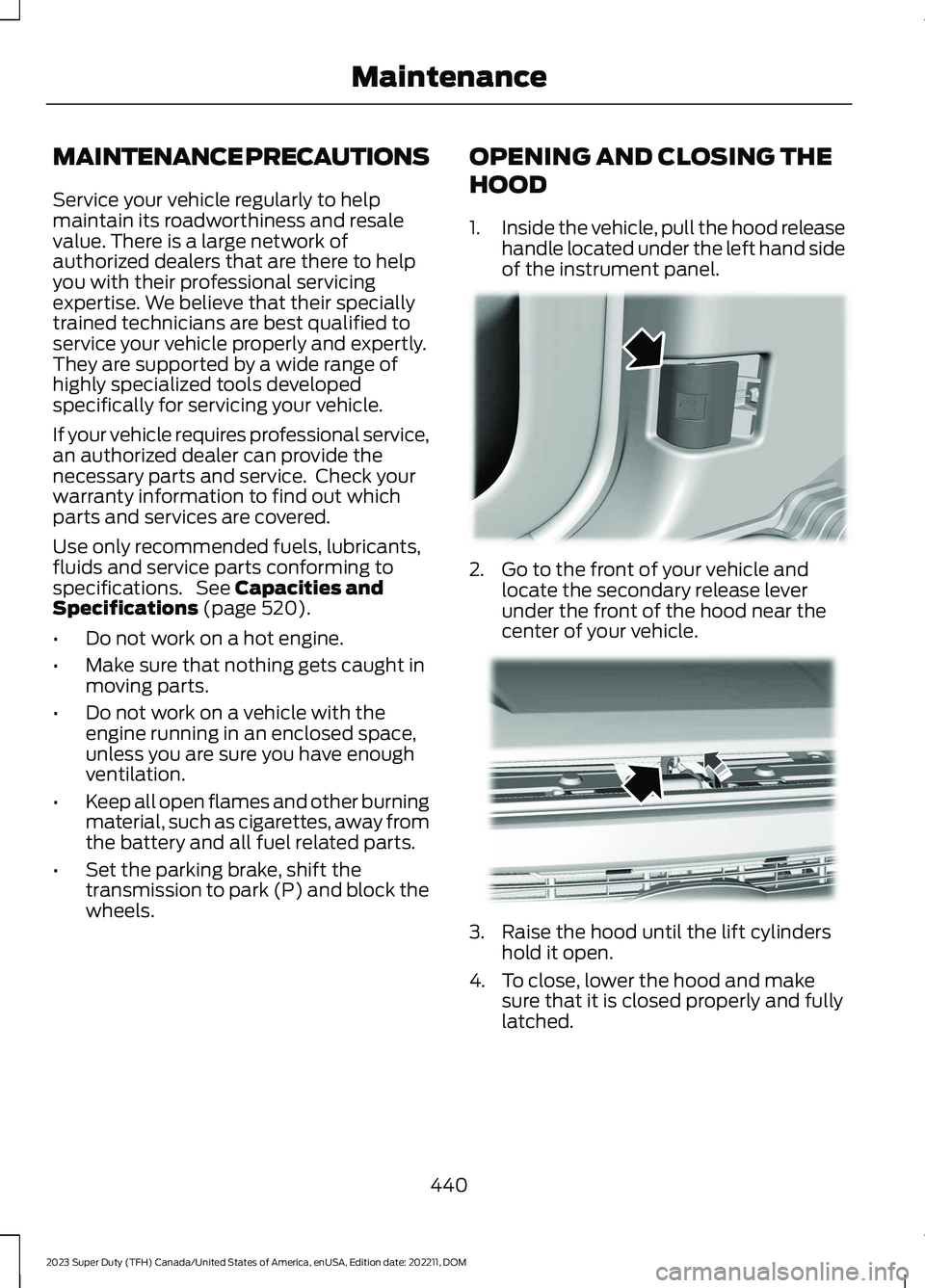
1.Inside the vehicle, pull the hood releasehandle located under the left hand sideof the instrument panel.
2.Go to the front of your vehicle andlocate the secondary release leverunder the front of the hood near thecenter of your vehicle.
3.Raise the hood until the lift cylindershold it open.
4.To close, lower the hood and makesure that it is closed properly and fullylatched.
440
2023 Super Duty (TFH) Canada/United States of America, enUSA, Edition date: 202211, DOMMaintenance E166491 E190266
Page 474 of 738
CLEANING THE EXTERIOR
CLEANING THE EXTERIORPRECAUTIONS
Immediately remove fuel spillages, additiveresiduals, bird droppings, insect depositsand road tar. These may cause damage toyour vehicle’s paintwork or trim over time.Remove any exterior accessories, forexample antennas, before entering a carwash.
CLEANING HEADLAMPS ANDREAR LAMPS
We recommend that you only use cold orlukewarm water containing car shampooto clean the headlamps and the rearlamps.
Do not scrape the lamps.
Do not wipe lamps when they are dry.
CLEANING WINDOWS AND WIPERBLADES
To clean the windshield and wiper blades:
•Clean the windshield with anon-abrasive glass cleaner.
Note:When cleaning the interior of thewindshield, avoid getting any glass cleaneron the instrument panel or door panels.Wipe any glass cleaner off these surfacesimmediately.
•Clean the wiper blades with washerfluid or water applied with a softsponge or cloth.
Note: Do not use razor blades or othersharp objects to clean or remove decalsfrom the inside of the heated rear window.This can cause damage not covered by thevehicle Warranty.
CLEANING CHROME, ALUMINIUMOR STAINLESS STEEL
We recommend that you only use a carshampoo, a soft cloth and water onbumpers and other chrome, aluminium orstainless steel parts.
Note:For additional information andassistance, we recommend that you contactan authorized dealer.
Note:Rinse the area well after cleaning.
Note:Do not use abrasive materials, forexample steel wool or plastic pads, as theycan scratch these surfaces.
Note:Do not use chrome cleaner, metalcleaner or polish on wheels or wheel covers.
CLEANING WHEELS
Only use a recommended wheel and tirecleaner to clean the wheels weekly. Foradditional information and assistance,contact an authorized dealer.
1.Use a sponge to remove heavydeposits of dirt and brake dust.
2.Rinse well after cleaning.
Note:Do not apply a cleaning chemical towarm or hot wheel rims and covers.
If you intend on parking your vehicle for anextended period after cleaning the wheelswith a wheel cleaner, drive your vehicle fora few minutes before parking your vehicle.This reduces the risk of corrosion of thebrake discs, brake pads and linings.
Do not clean the wheels when they are hot.
Note: Some car washes could damagewheel rims and covers.
Note: Using non-recommended cleaners,harsh cleaning products, chrome wheelcleaners or abrasive materials coulddamage wheel rims and covers.
470
2023 Super Duty (TFH) Canada/United States of America, enUSA, Edition date: 202211, DOMVehicle Care
Page 476 of 738
Rear suspension components may requireregular cleaning with a power washer or athorough rinse with a strong stream ofwater if the vehicle is operated in dusty ormuddy environments. Rear leaf springs orother suspension components may emitsqueaking or popping noises whileoperating the vehicle if particles, such asdirt, rocks, or other debris, are present inthe components.
CLEANING THE EXHAUST
WARNING: Do not modify orremove the exhaust tailpipe. Blockedholes may result in increased exhaustgas temperatures, vehicle damage,property damage or personal injury.
WARNING: Failure to keep theholes in the exhaust tailpipe clean andfree of debris or foreign material mayresult in blocked holes. Blocked holesmay result in increased exhaust gastemperatures, vehicle damage, propertydamage or personal injury.
WARNING: The normal operatingtemperature of the exhaust system isvery high. Never work around or attemptto repair any part of the exhaust systemuntil it has cooled. Use special care whenworking around the diesel oxidationcatalytic converter or the dieselparticulate filter. The diesel oxidationcatalytic converter and the dieselparticulate filter heat up to very hightemperatures after only a short periodof engine operation and remain hot afteryou switch the engine off.
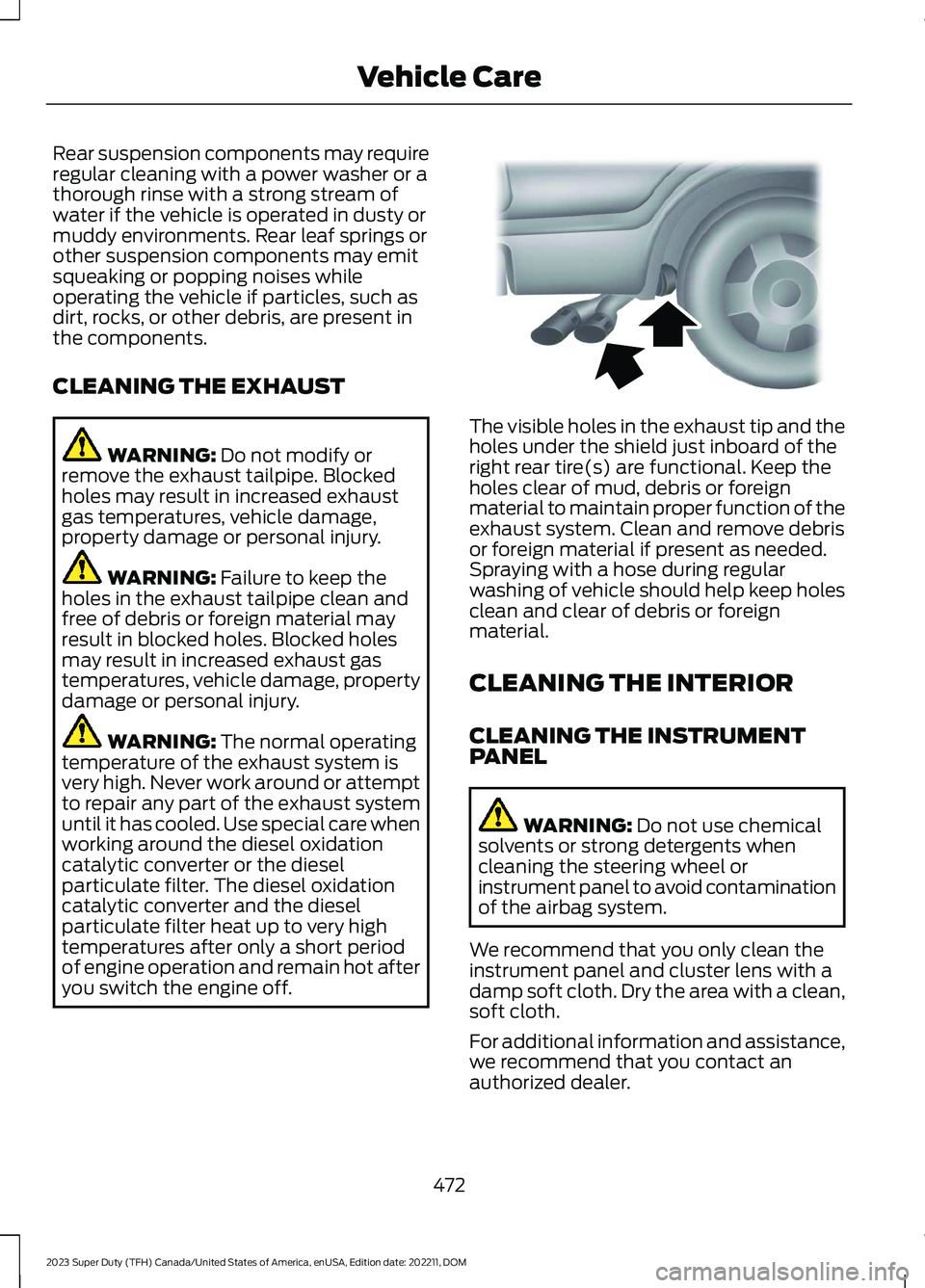
The visible holes in the exhaust tip and theholes under the shield just inboard of theright rear tire(s) are functional. Keep theholes clear of mud, debris or foreignmaterial to maintain proper function of theexhaust system. Clean and remove debrisor foreign material if present as needed.Spraying with a hose during regularwashing of vehicle should help keep holesclean and clear of debris or foreignmaterial.
CLEANING THE INTERIOR
CLEANING THE INSTRUMENTPANEL
WARNING: Do not use chemicalsolvents or strong detergents whencleaning the steering wheel orinstrument panel to avoid contaminationof the airbag system.
We recommend that you only clean theinstrument panel and cluster lens with adamp soft cloth. Dry the area with a clean,soft cloth.
For additional information and assistance,we recommend that you contact anauthorized dealer.
472
2023 Super Duty (TFH) Canada/United States of America, enUSA, Edition date: 202211, DOMVehicle CareE163380
Page 477 of 738
Note:Avoid cleaners or polishes thatincrease the gloss of the upper portion ofthe instrument panel. The dull finish in thisarea helps protect you from undesirablewindshield reflection.
CLEANING PLASTIC
We recommend that you only use a mildsoap and water solution on a soft cloth.Dry the area with a clean, soft cloth.
CLEANING DISPLAYS ANDSCREENS
We recommend that you only use amicrofiber cloth in a circular motion toclean off the fingerprint or dust.
If dirt or fingerprints are still on the screen,apply a small amount of alcohol to thecloth and try to clean it again.
Note:Do not pour or spray alcohol onto thetouchscreen.
Note: Do not use detergent or any type ofsolvent to clean the touchscreen.
CLEANING FABRIC
WARNING: On vehicles equippedwith seat-mounted airbags, do not usechemical solvents or strong detergents.Such products could contaminate theside airbag system and affectperformance of the side airbag in a crash.
We recommend that you only clean fabricin the following way:
1.Remove dust and loose dirt with avacuum cleaner.
2.Wipe the surface with a soft, dampcloth and a mild soap and watersolution. Dry the area with a clean, softcloth.
3.For additional information andassistance, we recommend that youcontact an authorized dealer.
For heavy stains, spot clean the area. If aring forms on the fabric, clean the entirearea immediately, but do not oversaturateor the ring could set.
CLEANING LEATHER
WARNING: On vehicles equippedwith seat-mounted airbags, do not usechemical solvents or strong detergents.Such products could contaminate theside airbag system and affectperformance of the side airbag in a crash.
We recommend that you only clean theleather surfaces in the following way:
1.Remove dust and loose dirt with avacuum cleaner.
2.Wipe the surface with a soft, dampcloth and a mild soap and watersolution. Dry the area with a clean, softcloth.
3.Make sure the leather is dry, then applya small amount of conditioner to aclean, dry cloth.
4.Rub the conditioner into the leatheruntil it disappears. Allow theconditioner to dry, then repeat theprocess for the entire interior. If a filmappears, wipe it off with a dry, cleancloth.
5.For additional information andassistance, we recommend that youcontact an authorized dealer.
473
2023 Super Duty (TFH) Canada/United States of America, enUSA, Edition date: 202211, DOMVehicle Care
Page 551 of 738
VEHICLE IDENTIFICATION
NUMBER
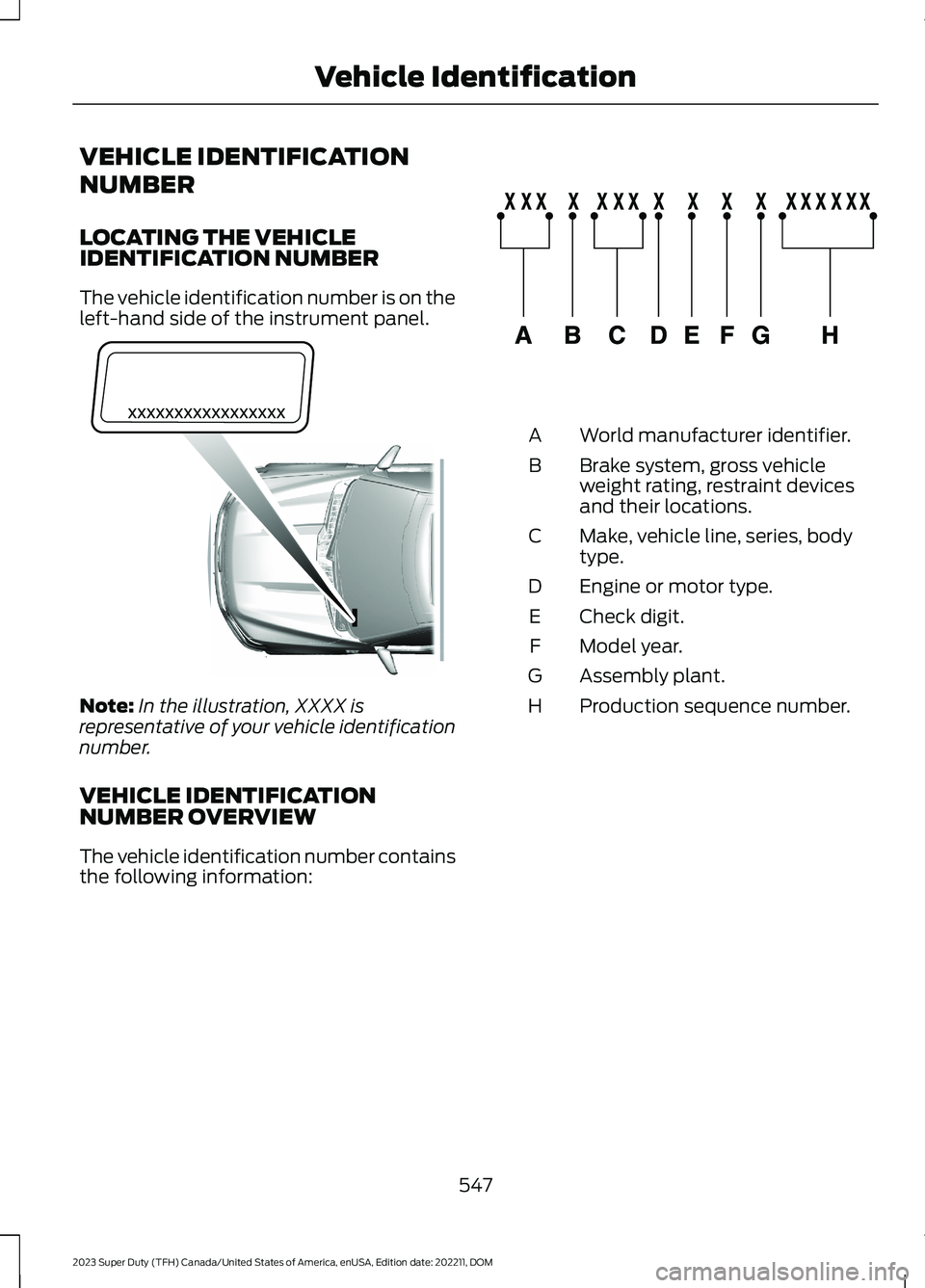
LOCATING THE VEHICLEIDENTIFICATION NUMBER
The vehicle identification number is on theleft-hand side of the instrument panel.
Note:In the illustration, XXXX isrepresentative of your vehicle identificationnumber.
VEHICLE IDENTIFICATIONNUMBER OVERVIEW
The vehicle identification number containsthe following information:
World manufacturer identifier.A
Brake system, gross vehicleweight rating, restraint devicesand their locations.
B
Make, vehicle line, series, bodytype.C
Engine or motor type.D
Check digit.E
Model year.F
Assembly plant.G
Production sequence number.H
547
2023 Super Duty (TFH) Canada/United States of America, enUSA, Edition date: 202211, DOMVehicle IdentificationE311767 E142477
Page 711 of 738
1
12V Battery.....................................................45612V Battery Precautions..................................456Battery Management SystemLimitations.......................................................457Changing the 12V Battery...............................457How Does the Battery ManagementSystem Work...................................................457Recycling and Disposing of the 12VBattery..............................................................458Resetting the Battery Sensor........................458What Is the Battery ManagementSystem..............................................................45712V Battery – Troubleshooting...............45912V Battery – Information Messages.........45912V Battery – Warning Lamps......................459
3
360 Degree Camera...................................290360 Degree Camera Settings.......................292360 Degree Camera Guide Lines...........291360 Degree Camera Precautions.........290360 Degree Camera Settings.................292Switching the 360 Degree Camera On andOff.......................................................................292Switching the 360 Degree CameraView...................................................................292
4
4WDSee: Four-Wheel Drive.....................................238
9
911 Assist............................................................67911 Assist Videos............................................68
A
A/CSee: Climate Control - Vehicles With:Automatic Temperature Control..............152See: Climate Control - Vehicles With: ManualTemperature Control....................................156About This Publication..................................21
ABSSee: Brakes..........................................................249Accessing Apps.............................................575Accessing Navigation.................................579Accessing the Passive Key BackupPosition........................................................209Accessing the Trip Computer - VehiclesWith: 12 Inch Screen.................................146Accessing the Trip Computer - VehiclesWith: 8 Inch Screen..................................146Accessories....................................................585Adaptive Cruise Control............................296Adaptive Cruise Control –Troubleshooting...........................................309Lane Centering...................................................303Predictive Speed Assist..................................306Predictive Speed Assist –Troubleshooting...........................................308Adaptive Cruise Control AutomaticCancellation...............................................299Adaptive Cruise Control Indicators.......303Adaptive Cruise ControlLimitations...................................................297Adaptive Cruise ControlPrecautions.................................................296Adaptive Cruise Control –Troubleshooting.......................................309Adaptive Cruise Control – InformationMessages........................................................309Adaptive Cruise Control Videos..............310Adaptive Front Lighting..............................124How Does Adaptive Front LightingWork....................................................................124Switching Adaptive Front Lighting On andOff........................................................................125Adjustable Pedals..........................................112Adjusting the Exterior Mirrors...................132Adjusting the Headlamps........................460Adjusting the Instrument Panel LightingBrightness.....................................................127Adjusting the Integrated Trailer BrakeController Mode.........................................374Adjusting the Map.......................................579Changing the Format of the Map................579Zooming the Map In and Out........................579Adjusting the Pedals.....................................112Adjusting the Seatbelt Height...................53Adjusting the Seatbelt Length..................54
707
2023 Super Duty (TFH) Canada/United States of America, enUSA, Edition date: 202211, DOMIndex
Page 715 of 738
Child Restraint Anchor Points....................37Locating the Child Restraint Lower AnchorPoints...................................................................37Locating the Child Restraint Top TetherAnchor Points...................................................38What Are the Child Restraint AnchorPoints...................................................................37Child Restraints...............................................39Child Restraint Position Information............39Child Restraints Recommendation...............40Child Safety......................................................36Child Restraint Anchor Points..........................37Child Restraints.....................................................39Installing Child Restraints.................................40Child Safety Locks - Crew Cab/SuperCab.......................................................49Child Safety Precautions.............................36Cleaning Products......................................469Cleaning the Exterior..................................470Cleaning Camera Lenses andSensors..............................................................471Cleaning Chrome, Aluminium or StainlessSteel...................................................................470Cleaning Headlamps and RearLamps...............................................................470Cleaning Stripes or Graphics..........................471Cleaning the Engine Compartment.............471Cleaning the Exhaust........................................472Cleaning the Exterior Precautions...............470Cleaning the Underbody..................................471Cleaning Wheels................................................470Cleaning Windows and WiperBlades...............................................................470Cleaning the Interior....................................472Cleaning Carpets and Floor Mats................474Cleaning Displays and Screens.....................473Cleaning Fabric...................................................473Cleaning Leather................................................473Cleaning Moonroof Tracks..............................474Cleaning Plastic..................................................473Cleaning Seatbelts............................................474Cleaning the Instrument Panel.....................472Cleaning Vinyl......................................................474Climate Control.............................................152Auto Mode.............................................................154Climate Control Hints.................................154Climate Control Videos..............................155
Closing the Tailgate......................................94Closing the Tailgate From Inside YourVehicle.................................................................94Closing the Tailgate From Outside YourVehicle.................................................................94Closing the Tailgate Using the RemoteControl................................................................95Cold Weather Precautions - 6.7LDiesel..............................................................415Cold Weather Precautions - 6.8L/7.3L..................................................................415Connected Navigation...............................579Connected Vehicle......................................548Connected Vehicle –Troubleshooting............................................549Connecting the Vehicle to a MobileNetwork...........................................................548Connected Vehicle Data..............................28Connected Vehicle Limitations..............548Connected Vehicle Requirements........548Connected Vehicle –Troubleshooting........................................549Connected Vehicle – Frequently AskedQuestions........................................................549Connected Vehicle Videos.......................550Connecting a Bluetooth® Device..........574Connecting a Trailer.....................................361Connecting a Trailer –Troubleshooting............................................364Hitches...................................................................359Connecting a Trailer Precautions..........359Connecting a Trailer –Troubleshooting........................................364Connecting a Trailer – InformationMessages.........................................................364Connecting a Trailer Videos....................364Connecting the Vehicle to a MobileNetwork.......................................................548Connecting FordPass to the Modem.........548Enabling and Disabling the Modem...........548What Is the Modem..........................................548Connecting the Vehicle to a Wi-FiNetwork.......................................................548Connecting Your Phone............................569Contacting Us...................................................19Coolant...........................................................450Adding Coolant..................................................450Changing the Coolant.......................................451
711
2023 Super Duty (TFH) Canada/United States of America, enUSA, Edition date: 202211, DOMIndex
Page 722 of 738
How Does the Selective CatalyticReduction System Work........................226How Does the Speed Limiter Work.......316How Does Traction Control Work.........268How Does Trailer Backup AssistanceWork..............................................................386How Does Trailer Hitching AssistanceWork...............................................................378How Does Trailer Reverse GuidanceWork...............................................................401How Does Trailer Sway ControlWork...............................................................377How Do Personal Profiles Work..............577How Do the Front Airbags Work...............57How Do the Side Airbags Work.................57Hydraulic Power Steering Fluid Capacityand Specification.....................................546Hydraulic Power Steering.........................279Checking the Hydraulic Power SteeringFluid...................................................................280Hydraulic Power Steering Guidelines.........279Locating the Hydraulic Power Steering FluidReservoir..........................................................280
I
Icon GlossarySee: Symbols Glossary.......................................23IconsSee: Symbols Glossary.......................................23Identifying Fuse Types...............................439Identifying the Audio Unit........................553Identifying the Auxiliary SwitchWiring............................................................587Identifying the Climate ControlUnit..................................................................152Idle Timer........................................................207How Does Idle Timer Work.............................207Idle Timer Precautions....................................208Idle Timer Settings...........................................208What is Idle Timer..............................................207Ignition Switch..............................................202Inflating the Tires........................................490Information On Demand Screen...........564Information on the Tire Sidewall...........479Inspecting the Tire for Damage.............494Inspecting the Tire for Wear....................494
Inspecting the Wheel ValveStems...........................................................498Installing Child Restraints..........................40Attaching the Front Seat Tether Strap........45Attaching the Rear Seat Tether Strap..........46Combining the Seatbelt and Lower Anchorsfor Attaching Child Restraints....................45Installing a Child Restraint in a CenterSeat......................................................................44Using Lower Anchors and Tethers forChildren...............................................................44Using Seatbelts....................................................40Using Tether Straps.............................................45Instrument Cluster Display.......................143Instrument Cluster Display Main Menu -Vehicles With: 12 Inch Screen...............144Instrument Cluster Display Main Menu -Vehicles With: 8 Inch Screen.................143Instrument Cluster Indicators..................140Instrument Cluster.......................................136Fuel Gauge.............................................................137Instrument Cluster Overview - VehiclesWith: 12 Inch Screen..................................137Instrument Cluster Overview - VehiclesWith: 8 Inch Screen...................................136Instrument Cluster WarningLamps............................................................139Instrument Panel............................................32Integrated Trailer Brake Controller.........372Integrated Trailer Brake Controller –Troubleshooting.............................................375Integrated Trailer Brake ControllerPrecautions..................................................372Integrated Trailer Brake Controller –Troubleshooting........................................375Integrated Trailer Brake Controller –Frequently Asked Questions.....................376Integrated Trailer Brake Controller –Information Messages.................................375Integrated Trailer Brake ControllerVideos............................................................376Intentionally Exceeding the Set SpeedLimit................................................................316Interior Air Quality........................................160Interior Bulbs................................................468Interior Bulb Specification Chart.................468Interior Fuse Box..........................................435Accessing the Interior Fuse Box...................435
718
2023 Super Duty (TFH) Canada/United States of America, enUSA, Edition date: 202211, DOMIndex