lock FORD SUPER DUTY 2023 Owner's Manual
[x] Cancel search | Manufacturer: FORD, Model Year: 2023, Model line: SUPER DUTY, Model: FORD SUPER DUTY 2023Pages: 738, PDF Size: 18.49 MB
Page 73 of 738
REMOTE CONTROL
LIMITATIONS
WARNING: Changes ormodifications not expressively approvedby the party responsible for compliancecould void the user's authority to operatethe equipment. The term "IC:" before theradio certification number only signifiesthat Industry Canada technicalspecifications were met.
This device complies with Part 15 of theFCC Rules and with Industry Canadalicense-exempt RSS standard(s).Operation is subject to the following twoconditions: (1) This device may not causeharmful interference, and (2) This devicemust accept any interference received,including interference that may causeundesired operation.
Make sure a valid remote control is within3 ft (1 m) from the front door handles andrear of vehicle.
The system may not function if:
•The remote control remains stationaryfor about a minute.
•The vehicle battery has no charge.
•The remote control battery has nocharge.
•There is interference causing issueswith the remote control frequencies.
•The remote control is too close tometal objects or electronic devices, forexample keys or a cell phone.
USING THE REMOTE CONTROL
Use your remote control to access variousvehicle systems.
Note:The buttons on your remote may varydepending on the vehicle region or options.
Unlock
Press the button to unlock alldoors. See Unlocking andLocking the Doors Using theRemote Control (page 81).
Lock
Press the button to lock alldoors. See Unlocking andLocking the Doors Using theRemote Control (page 81).
Remote Start (If Equipped)
Press the button to remote start.See What Is Remote Start(page 149).
Tailgate (If Equipped)
Press the button to open thetailgate. See Opening theTailgate Using the RemoteControl (page 99).
Panic Alarm (If Equipped)
Press the button to sound thepanic alarm. See Sounding thePanic Alarm (page 74).
USING THE KEY CARDS
Allows you to unlock and start your vehiclewith a compatible key card using near fieldcommunication technology, the sametechnology that powers tap-to-pay cardand mobile device payments. Your vehiclehas key readers that recognize the keycards. Tap your key card on a key readerjust like you would tap a card at a paymentterminal.
69
2023 Super Duty (TFH) Canada/United States of America, enUSA, Edition date: 202211, DOMKeys and Remote ControlsE138629 E138623 E138625 E191530 E138624
Page 74 of 738
Note:Do not leave a key card in hightemperatures. This can damage the keycard, causing it to no longer function.
Locking and Unlocking YourVehicle
Tap your key card on the exteriorkey reader, over the keyless entrykeypad, to lock or unlock thedriver door. If your vehicle is locked and youtap your key card on the key reader, yourvehicle unlocks. If your vehicle is unlockedand you tap your key card on the keyreader, your vehicle locks. See Locatingthe Key Readers (page 73).
Note:The key reader only works when usedin close proximity with a compatible keycard. The key reader may not function if youhold the key card more than 1.6 in (4 cm)away.
Note:Hold your key card over the exteriorkey reader for a few seconds to lock orunlock all doors.
Note:Only Ford issued key cards arecompatible with your vehicle.
Starting Your Vehicle
Using the Exterior Key Reader
You can start your vehicle without havingto tap your key card on the interior keyreader if you press the ignition switchwithin 60 seconds of unlocking yourvehicle using the exterior key reader.
1.Tap your key card on the exterior keyreader, over the keyless entry keypad,to unlock your vehicle. See Locatingthe Key Readers (page 73).
2.Enter your vehicle.
3.Fully press the brake pedal.
4.Press the push button ignition switch.See Starting and Stopping theEngine (page 202).
Using the Interior Key Reader
1.Tap your key card on the key reader. Atone sounds from your vehicle whenthe key reader recognizes the key card.See Locating the Key Readers (page73).
2.Fully press the brake pedal.
3.Press the push button ignition switch.See Starting and Stopping theEngine (page 202).
Adding and Deleting Key Cards
Your vehicle comes with two near fieldcommunication-enabled key cards,referred to as factory key cards.
You can purchase additional key cards andadd them to your vehicle at any time.These are considered user key cards andare not the same as factory key cards.Contact an authorized dealer to purchaseuser key cards.
Note:A single key card can be associatedwith multiple vehicles.
Note:You cannot add or delete factory keycards. Only authorized service technicianscan add or delete factory key cards.
Note:Make sure you install FordPass onyour mobile device and activate FordPassConnect on your vehicle.
Adding a Key Card
1.Start your vehicle with any key.
2.Press Settings on the touchscreen.
3.Press Vehicle.
4.Press Keys.
5.Press Add Key Card.
6.Follow the prompts on thetouchscreen.
70
2023 Super Duty (TFH) Canada/United States of America, enUSA, Edition date: 202211, DOMKeys and Remote ControlsE368487
Page 75 of 738
Deleting a Key Card
1.Start your vehicle with any key exceptthe key you want to delete.
2.Press Settings on the touchscreen.
3.Press Vehicle.
4.Press Keys.
5.Press the trash can icon next to the keyyou want to delete.
6.Follow the prompts on thetouchscreen.
Deleting All User Key Cards
1.Start your vehicle with a factory key.
2.Perform a system reset. SeePerforming a System Reset (page584).
Note:If you have created digital keys, thereset deletes those as well.
USING DIGITAL KEY (IF EQUIPPED)
Digital key allows you to unlock and startyour vehicle with a compatible smartphoneor smartwatch. Devices set up as digitalkeys communicate with key readers in yourvehicle using near field communicationtechnology, the same technology thatpowers tap-to-pay card and mobile devicepayments. Tap your device on a key readerjust like you would tap your device at apayment terminal.
Limitations
•The key reader only recognizes a digitalkey when your device with a digital keyis within 1.6 in (4 cm) of the key reader.A digital key may not be recognized ifthe device is more than 1.6 in (4 cm)away from the key reader.
•Near field communication must beenabled on your device.
•You can still use your device to lock,unlock and start your vehicle for aperiod of time after your device'sbattery has been depleted. Check withyour device's manufacturer for detailson how to operate your digital key onlow power.
•You can enable additionalauthentication for your digital key onyour device. When enabled, your devicerequires authentication each time anaction is requested, such as unlockingthe doors or starting your vehicle. Whenyou enable additional authenticationon your device, you cannot use yourdevice when the battery is depleted.
Setting Up Digital Key
There are two types of digital keys: theowner key and shared keys. There can onlybe one owner key per vehicle. Make sureyou setup the first digital key on yourdevice, also known as the owner phone.By default, the first digital key you set upbecomes the owner key.
You can set up a digital key through theFordPass app.
1.In the FordPass app, select yourvehicle.
2.Select Set Up Digital Key and followthe instructions in FordPass.
Note:You need two factory keys in yourvehicle to complete the setup of a digitalkey. Factory keys are the keys that camewith your vehicle.
Changing the Owner Phone
You can change the owner phone throughthe FordPass app.
1.In the FordPass app, select yourvehicle.
2.Select Change Owner Phone andfollow the instructions in FordPass.
71
2023 Super Duty (TFH) Canada/United States of America, enUSA, Edition date: 202211, DOMKeys and Remote Controls
Page 76 of 738
Note:You need two factory keys in yourvehicle to complete the setup of a digitalkey. Factory keys are the keys that camewith your vehicle.
Sharing a Digital Key
You can share keys to other users from theowner phone by using Apple Wallet orGoogle Wallet.
Note:Check with your device'smanufacturer for the latest information onsharing a key.
Deleting a Digital Key
Deleting Your Own Digital Key
You can delete your digital key from yourown device by using Apple Wallet orGoogle Wallet.
Note:Check with your device'smanufacturer for the latest information ondeleting a key.
Deleting a Shared Key Remotely
You can delete a shared key remotely fromthe owner phone by using Apple Wallet orGoogle Wallet.
Note:Check with your device'smanufacturer for the latest information ondeleting a key.
Deleting All Digital Keys
1.Start your vehicle with a factory key.
Note:A factory key is a key that came withyour vehicle.
2.Perform a system reset. SeePerforming a System Reset (page584).
Note:If you have added user key cards toyour vehicle, the reset deletes those as well.
Locking and Unlocking YourVehicle
Tap your device on the exteriorkey reader, over the keyless entrykeypad, to lock or unlock thedriver door. See Locating the KeyReaders (page 73).
If your vehicle is locked and you tap yourdevice on the key reader, your vehicleunlocks. If your vehicle is unlocked and youtap your device on the key reader, yourvehicle locks.
Note:Hold your device over the exterior keyreader for a few seconds to lock or unlockall doors.
Starting Your Vehicle
Using the Exterior Key Reader
You can start your vehicle without havingto tap your device on the interior key readerif you press the ignition switch within 60seconds of unlocking your vehicle usingthe exterior key reader.
1.
Tap your key card or digitalkey on the key reader, over the keylessentry keypad. See Locating the KeyReaders (page 73).
2.Enter your vehicle.
3.Fully press the brake pedal.
4.Press the push button ignition switch.See Starting and Stopping theEngine (page 202).
Using the Interior Key Reader
1.Fully press the brake pedal.
72
2023 Super Duty (TFH) Canada/United States of America, enUSA, Edition date: 202211, DOMKeys and Remote ControlsE368487 E368487
Page 77 of 738
2.
Tap your key card or digitalkey on the key reader. A tone soundsfrom your vehicle when the device isrecognized. See Locating the KeyReaders (page 73).
3.Press the push button ignition switch.See Starting and Stopping theEngine (page 202).
Frequently Asked Questions
My device's battery is dead, why can Inot use it to unlock or start my vehicle?
•Your device's battery has beendepleted for too long or you haveadditional authentication enabled onyour device. For additional backupsecurity, carry a key card with you.
LOCATING THE KEY READERS
The exterior key reader is inside the keylessentry keypad.
The interior key reader is on theinstrument panel, below thepush button ignition switch.
OPENING AND CLOSING THE
FLIP KEY
Opening Your Flip Key
Press the round button on the remotecontrol to extend the flip key.
Note:Inspect the key blade for debris.Periodically clean with a brush.
Closing Your Flip Key
Press and hold the round button on theremote control to fold the key blade whennot in use.
73
2023 Super Duty (TFH) Canada/United States of America, enUSA, Edition date: 202211, DOMKeys and Remote ControlsE368487 E368488 E368487 E191532 E191532
Page 78 of 738
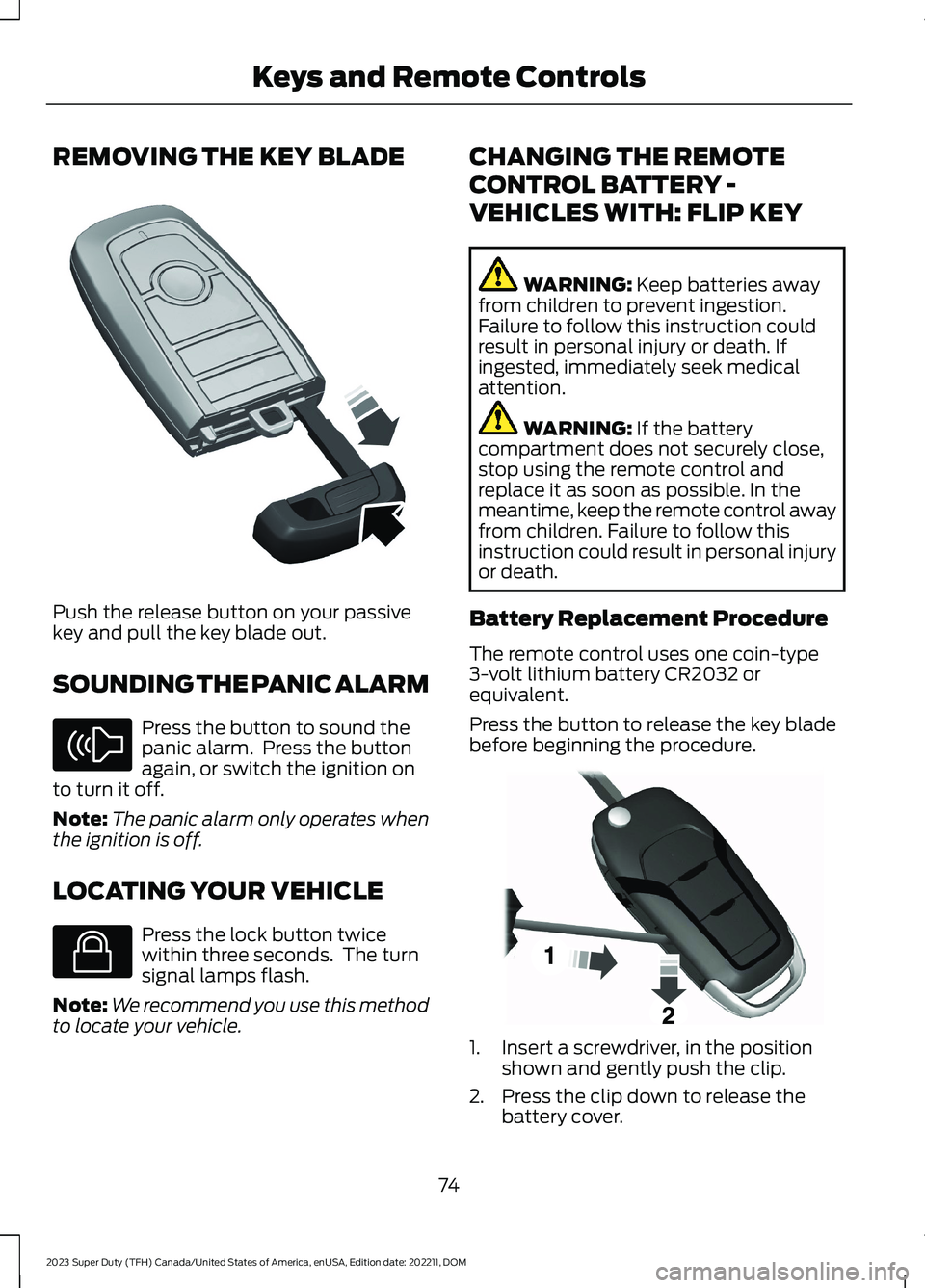
REMOVING THE KEY BLADE
Push the release button on your passivekey and pull the key blade out.
SOUNDING THE PANIC ALARM
Press the button to sound thepanic alarm. Press the buttonagain, or switch the ignition onto turn it off.
Note:The panic alarm only operates whenthe ignition is off.
LOCATING YOUR VEHICLE
Press the lock button twicewithin three seconds. The turnsignal lamps flash.
Note:We recommend you use this methodto locate your vehicle.
CHANGING THE REMOTE
CONTROL BATTERY -
VEHICLES WITH: FLIP KEY
WARNING: Keep batteries awayfrom children to prevent ingestion.Failure to follow this instruction couldresult in personal injury or death. Ifingested, immediately seek medicalattention.
WARNING: If the batterycompartment does not securely close,stop using the remote control andreplace it as soon as possible. In themeantime, keep the remote control awayfrom children. Failure to follow thisinstruction could result in personal injuryor death.
Battery Replacement Procedure
The remote control uses one coin-type3-volt lithium battery CR2032 orequivalent.
Press the button to release the key bladebefore beginning the procedure.
1.Insert a screwdriver, in the positionshown and gently push the clip.
2.Press the clip down to release thebattery cover.
74
2023 Super Duty (TFH) Canada/United States of America, enUSA, Edition date: 202211, DOMKeys and Remote ControlsE322866 E138624 E138623 E191533
Page 82 of 738
2.Switch the ignition from off to on. Keepthe ignition on for at least threeseconds, but no more than 10 seconds.
3.Switch the ignition off and remove thefirst coded key from the ignition.
4.After three seconds but within 10seconds of switching the ignition off,insert the second previously coded keyinto the ignition.
5.Switch the ignition from off to on. Keepthe ignition on for at least threeseconds, but no more than 10 seconds.
6.Switch the ignition off and remove thesecond previously programmed codedkey from the ignition.
7.After three seconds but within 10seconds of switching the ignition offand removing the previouslyprogrammed coded key, insert the newun–programmed key into the ignition.
8.Switch the ignition from off to on. Keepthe ignition on for at least six secondsuntil you hear the door locks cycle.
9.Remove the newly programmed codedkey from the ignition.
The key starts the engine if programmingis successful. You can operate the keylessremote entry system with the new remotecontrol with integrated key.
If programming was not successful, wait20 seconds and repeat Steps 1 through 8.If you are still unsuccessful, take yourvehicle to an authorized dealer.
Note:You can program a maximum of sixcoded remote controls to your vehicle.
PROGRAMMING THE REMOTE
CONTROL - VEHICLES WITH:
PUSH BUTTON START
General Information
You must have two previouslyprogrammed remote controls inside yourvehicle and the new unprogrammedremote controls readily accessible. Contactan authorized dealer to have the spareremote control programmed if twopreviously programmed remotes are notavailable. Make sure that your vehicle isoff before beginning this procedure. Makesure that you close all the doors beforebeginning and that they remain closedthroughout the procedure. Perform allsteps within 30 seconds of starting thesequence. Stop and wait for at least oneminute before starting again if you performany steps out of sequence.
Read and understand the entire procedurebefore you begin.
Note:You can program a maximum of fourremote controls to your vehicle.
Note:If your programmed remote controlsare lost or stolen and you do not have anextra coded remote, you need to have yourvehicle towed to an authorized dealer. Storean extra programmed remote away fromyour vehicle in a safe place to help preventany inconvenience. Contact an authorizeddealer to purchase additional spare orreplacement remotes.
Steps for Programming Your SpareRemote Control
Note:Your vehicle is equipped with one ofthe following center consoles.
78
2023 Super Duty (TFH) Canada/United States of America, enUSA, Edition date: 202211, DOMKeys and Remote Controls
Page 85 of 738
OPERATING THE DOORS
FROM OUTSIDE YOUR
VEHICLE
UNLOCKING AND LOCKING THEDOORS USING THE REMOTECONTROL
You can only use the remote control whenyour vehicle is stationary.
Unlocking the Doors
Press the button to unlock alldoors. One long flash of the turnsignal lamps confirms that yourvehicle has unlocked.
Locking the Doors
Press the button to lock alldoors. One short flash of theturn signal lamps confirms thatyour vehicle has locked.
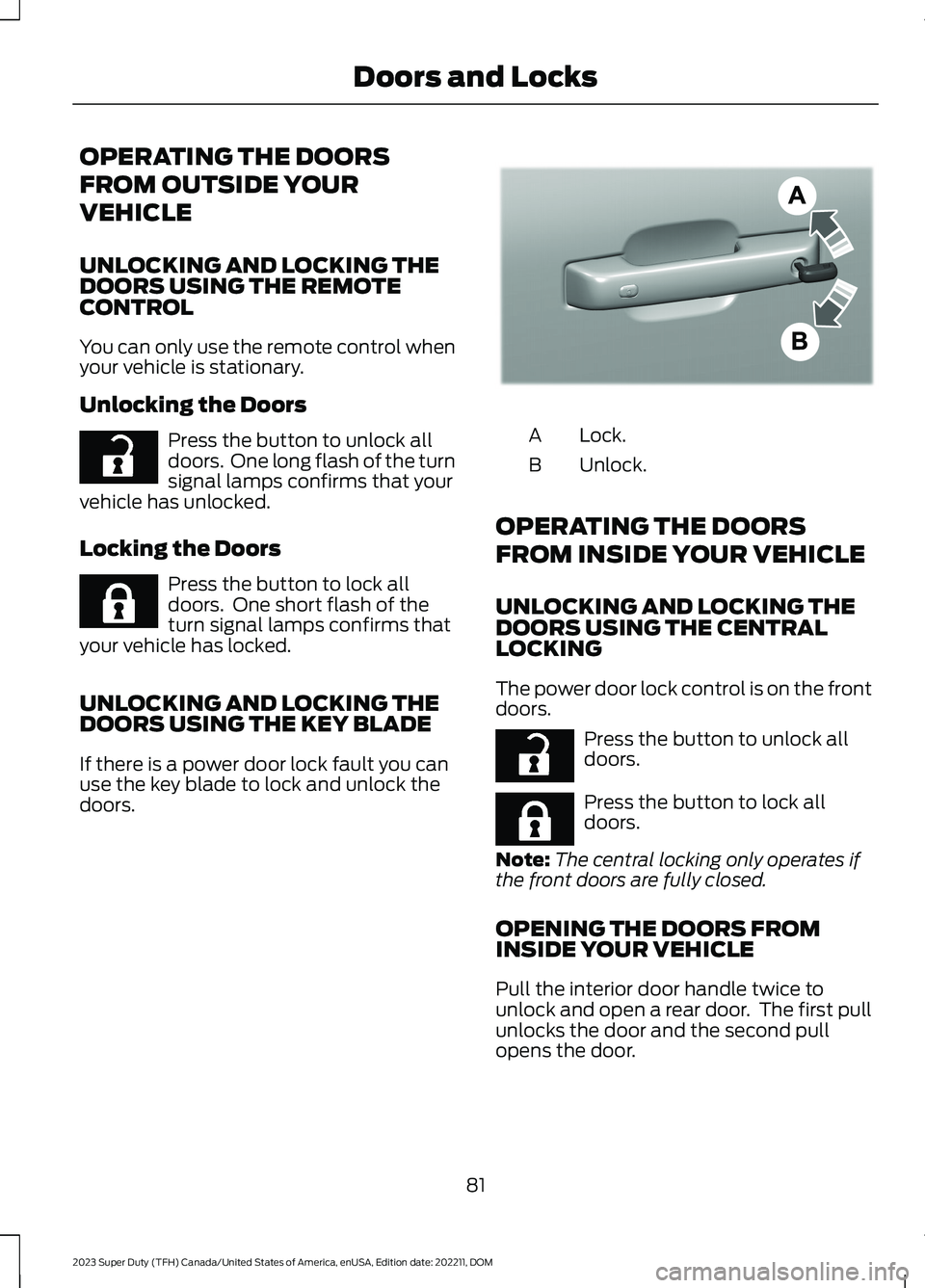
UNLOCKING AND LOCKING THEDOORS USING THE KEY BLADE
If there is a power door lock fault you canuse the key blade to lock and unlock thedoors.
Lock.A
Unlock.B
OPERATING THE DOORS
FROM INSIDE YOUR VEHICLE
UNLOCKING AND LOCKING THEDOORS USING THE CENTRALLOCKING
The power door lock control is on the frontdoors.
Press the button to unlock alldoors.
Press the button to lock alldoors.
Note:The central locking only operates ifthe front doors are fully closed.
OPENING THE DOORS FROMINSIDE YOUR VEHICLE
Pull the interior door handle twice tounlock and open a rear door. The first pullunlocks the door and the second pullopens the door.
81
2023 Super Duty (TFH) Canada/United States of America, enUSA, Edition date: 202211, DOMDoors and LocksE267112 E267111 E333745 E267112 E267111
Page 86 of 738
AUTOUNLOCK
WHAT IS AUTOUNLOCK
Autounlock is a feature that centrallyunlocks the vehicle doors when yourvehicle comes to a stop and you open thedriver door.
AUTOUNLOCK REQUIREMENTS
Autounlock unlocks all the doors after:
1.The vehicle speed exceeds 12 mph(20 km/h).
2.Your vehicle comes to a stop.
3.You open the driver door.
Note:Autounlock operates for only 10minutes after the ignition is switched off.
SWITCHING AUTOUNLOCK ONAND OFF
1.Using the instrument cluster displaycontrols on the steering wheel, selectSettings.
2.Select Vehicle Settings.
3.Switch Autounlock on or off.
AUTOLOCK
WHAT IS AUTOLOCK
Autolock is a locking feature that centrallylocks your vehicle doors when driving.
AUTOLOCK REQUIREMENTS
Autolock locks all the doors after:
1.All doors are closed and the ignition ison.
2.Your vehicle speed exceeds 12 mph(20 km/h).
Autolock repeats if:
1.Your vehicle is stopped.
2.Any door is opened and closed again.
3.Your vehicle speed exceeds 12 mph(20 km/h).
MISLOCK
WHAT IS MISLOCK
Mislock is a locking feature that warns youif your vehicle has not locked.
MISLOCK LIMITATIONS
When you press the lock button once, theturn signals do not flash if:
•Any door or the tailgate is open.
•The hood is open.
If you switch mislock off, the horn does notsound if you press the lock button on theremote control when a door is open.
SWITCHING MISLOCK ON ANDOFF
1.Using the instrument cluster displaycontrols on the steering wheel, selectSettings.
2.Select Vehicle Settings.
3.Switch Mislock Chirp on or off.
DOORS AND LOCKS AUDIBLE
WARNINGS
Door Ajar Audible Warning
Sounds when any front door is not fullyclosed and your vehicle is moving.
82
2023 Super Duty (TFH) Canada/United States of America, enUSA, Edition date: 202211, DOMDoors and Locks
Page 87 of 738
DOORS AND LOCKS –
TROUBLESHOOTING
DOORS AND LOCKS – WARNINGLAMPS
Door Ajar Warning Lamp
Illuminates when you switch theignition on and remains on if anydoor or the hood is open.
DOORS AND LOCKS – INFORMATION MESSAGES
ActionMessage
Displays if a door is open. Fully close the door.Driver Door Ajar
Passenger Door Ajar
Rear Left Door Ajar
Rear Right Door Ajar
Displays if a hood is open. Fully close the hood.Hood Ajar
83
2023 Super Duty (TFH) Canada/United States of America, enUSA, Edition date: 202211, DOMDoors and LocksE249859