transmission FORD SUPER DUTY 2023 Owner's Manual
[x] Cancel search | Manufacturer: FORD, Model Year: 2023, Model line: SUPER DUTY, Model: FORD SUPER DUTY 2023Pages: 738, PDF Size: 18.49 MB
Page 239 of 738
MANUAL (M)
In manual (M) you can select a specificgear. See Manually Shifting Gears (page235).
Note:We recommend using this mode fordriving on hilly or mountainous roads orwhen towing a trailer. See Towing a Trailer(page 365).
SHIFTING YOUR VEHICLE INTO
GEAR
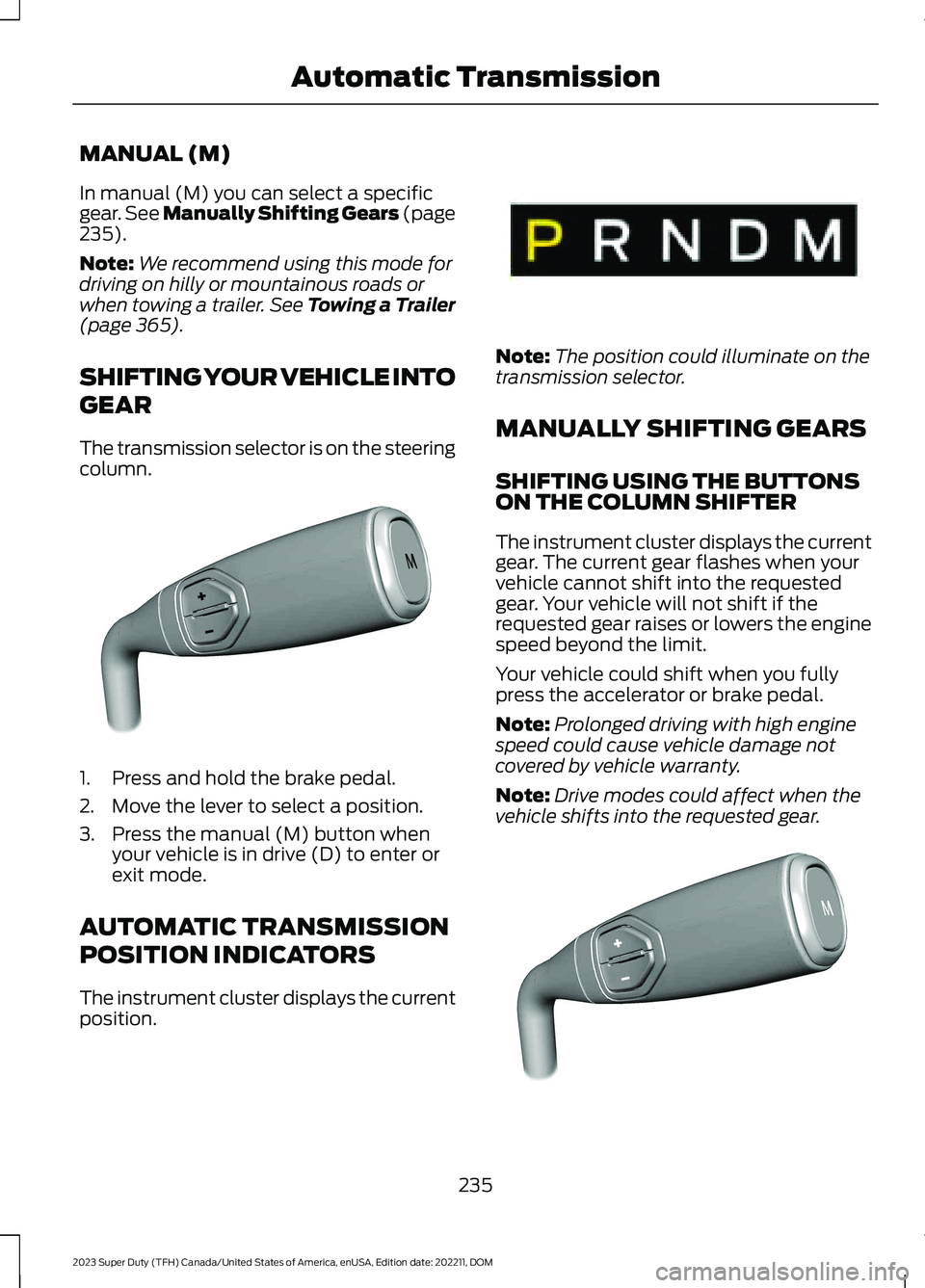
The transmission selector is on the steeringcolumn.
1.Press and hold the brake pedal.
2.Move the lever to select a position.
3.Press the manual (M) button whenyour vehicle is in drive (D) to enter orexit mode.
AUTOMATIC TRANSMISSION
POSITION INDICATORS
The instrument cluster displays the currentposition.
Note:The position could illuminate on thetransmission selector.
MANUALLY SHIFTING GEARS
SHIFTING USING THE BUTTONSON THE COLUMN SHIFTER
The instrument cluster displays the currentgear. The current gear flashes when yourvehicle cannot shift into the requestedgear. Your vehicle will not shift if therequested gear raises or lowers the enginespeed beyond the limit.
Your vehicle could shift when you fullypress the accelerator or brake pedal.
Note:Prolonged driving with high enginespeed could cause vehicle damage notcovered by vehicle warranty.
Note:Drive modes could affect when thevehicle shifts into the requested gear.
235
2023 Super Duty (TFH) Canada/United States of America, enUSA, Edition date: 202211, DOMAutomatic TransmissionE371381 E341776 E372904
Page 240 of 738
Manually Shifting Gears in Manual(M)
Use this feature to select a specific gear.
Note:We recommend using this feature forengine braking, driving on hilly ormountainous roads, or when towing a trailer.See Towing a Trailer (page 365).
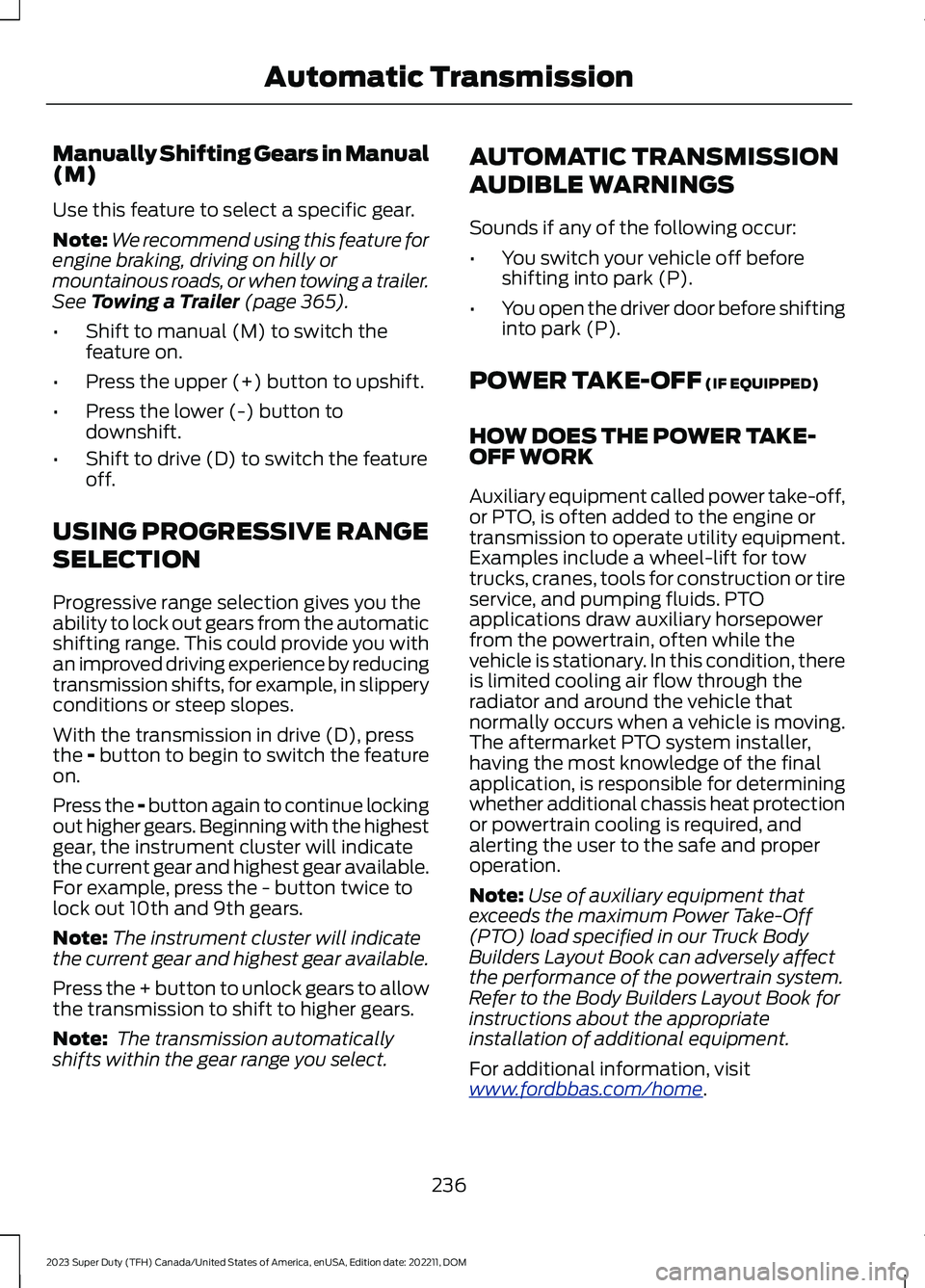
•Shift to manual (M) to switch thefeature on.
•Press the upper (+) button to upshift.
•Press the lower (-) button todownshift.
•Shift to drive (D) to switch the featureoff.
USING PROGRESSIVE RANGE
SELECTION
Progressive range selection gives you theability to lock out gears from the automaticshifting range. This could provide you withan improved driving experience by reducingtransmission shifts, for example, in slipperyconditions or steep slopes.
With the transmission in drive (D), pressthe - button to begin to switch the featureon.
Press the - button again to continue lockingout higher gears. Beginning with the highestgear, the instrument cluster will indicatethe current gear and highest gear available.For example, press the - button twice tolock out 10th and 9th gears.
Note:The instrument cluster will indicatethe current gear and highest gear available.
Press the + button to unlock gears to allowthe transmission to shift to higher gears.
Note: The transmission automaticallyshifts within the gear range you select.
AUTOMATIC TRANSMISSION
AUDIBLE WARNINGS
Sounds if any of the following occur:
•You switch your vehicle off beforeshifting into park (P).
•You open the driver door before shiftinginto park (P).
POWER TAKE-OFF (IF EQUIPPED)
HOW DOES THE POWER TAKE-OFF WORK
Auxiliary equipment called power take-off,or PTO, is often added to the engine ortransmission to operate utility equipment.Examples include a wheel-lift for towtrucks, cranes, tools for construction or tireservice, and pumping fluids. PTOapplications draw auxiliary horsepowerfrom the powertrain, often while thevehicle is stationary. In this condition, thereis limited cooling air flow through theradiator and around the vehicle thatnormally occurs when a vehicle is moving.The aftermarket PTO system installer,having the most knowledge of the finalapplication, is responsible for determiningwhether additional chassis heat protectionor powertrain cooling is required, andalerting the user to the safe and properoperation.
Note:Use of auxiliary equipment thatexceeds the maximum Power Take-Off(PTO) load specified in our Truck BodyBuilders Layout Book can adversely affectthe performance of the powertrain system.Refer to the Body Builders Layout Book forinstructions about the appropriateinstallation of additional equipment.
For additional information, visitwww.fordbbas.com/home.
236
2023 Super Duty (TFH) Canada/United States of America, enUSA, Edition date: 202211, DOMAutomatic Transmission
Page 241 of 738
WHAT IS THE SPLIT SHAFTCAPABILITY
The split shaft capability feature allowsyou to install an aftermarket split shaftgearbox in your vehicle's driveline and runone or two power takeoffs on the gearbox.The output of the transmission or transfercase connects directly with the split shaftgearbox and allows the engine to powerthe power takeoff, when the engine isrunning and the split shaft software isenabled.
This feature is approved as a stationarypower source, within the limits andoperating guidelines detailed in our TruckBody Builders Layout Book. For additionalinformation, visitwww.fordbbas.com/home.
237
2023 Super Duty (TFH) Canada/United States of America, enUSA, Edition date: 202211, DOMAutomatic Transmission
Page 243 of 738
FOUR-WHEEL DRIVE
PRECAUTIONS
WARNING: Vehicles with a highercenter of gravity (utility and four-wheeldrive vehicles) handle differently thanvehicles with a lower center of gravity(passenger cars). Avoid sharp turns,excessive speed and abrupt steering inthese vehicles. Failure to drive cautiouslyincreases the risk of losing control of yourvehicle, vehicle rollover, personal injuryand death.
WARNING: Do not becomeoverconfident in the ability of four-wheeldrive vehicles. Although a four-wheeldrive vehicle may accelerate better thana two-wheel drive vehicle in low tractionsituations, it won't stop any faster thantwo-wheel drive vehicles. Always driveat a safe speed.
Truck and utility vehicles can differ fromsome other vehicles. Your vehicle could behigher to allow it to travel over roughterrain without getting stuck or damagingunderbody components. The differencesthat make your vehicle so versatile alsomake it handle differently than an ordinarypassenger car. Always maintain steeringwheel control, especially in rough terrain.Since sudden changes in terrain can resultin abrupt steering wheel motion, make sureyou grip the steering wheel from theoutside. Do not grip the spokes. Drivecautiously to avoid vehicle damage fromconcealed objects such as rocks andstumps. Drive slower in strong crosswindswhich can affect the normal steeringcharacteristics of your vehicle. Beextremely careful when driving onpavement made slippery by loose sand,water, gravel, snow or ice.
Note:Your vehicle may come with a frontair dam that can become damaged (due toreduced ground clearance) when taking yourvehicle off-road. This air dam can be takenoff by removing 15 bolts.
Parking
WARNING: If the parking brake isfully released, but the brake warninglamp remains illuminated, the brakesmay not be working properly. Have yourvehicle checked as soon as possible.
WARNING: Apply the parkingbrake, shift into park (P), switch theignition off and remove the key beforeyou leave your vehicle. Failure to followthis instruction could result in personalinjury or death.
On some four-wheel drive vehicles, whenthe transfer case is in the neutral (N)position, the engine and transmissiondisconnects from the rest of the driveline.Therefore, your vehicle is free to roll evenif the automatic transmission is in park (P).Do not leave the vehicle unattended withthe transfer case in the neutral (N)position. Always set the parking brake fullyand turn off the ignition when leaving yourvehicle.
FOUR-WHEEL DRIVE
LIMITATIONS
Do not use four-wheel drive high orfour-wheel drive low mode on dry, hardsurface roads. Doing so can produceexcessive noise, increase tire wear and candamage drive components. Four-wheeldrive high or four-wheel drive low modesare intended for consistently slippery orloose surfaces. Use of four low mode onthese surfaces could produce some noise,such as occasional clunks, but should not
239
2023 Super Duty (TFH) Canada/United States of America, enUSA, Edition date: 202211, DOMFour-Wheel Drive (If Equipped)
Page 244 of 738
damage drive components. Whentransitioning from consistently loose orslippery surfaces, be sure the four-wheeldrive system is not mechanically blockedonce on dry, hard surface roads intwo-wheel drive high.
Operating Four-Wheel Drive witha Spare or Worn Tires
Your four-wheel drive system is notintended to provide full function with tiresthat have different levels of wear or witha dissimilar spare tire. Incorrect use offour-wheel drive with such tires can causesystem damage.
If there is a difference in the level of wearamong tires on the vehicle or if you installa dissimilar spare tire on the vehicle, do notuse 4WD High or 4WD Low (if equipped)other than to get your vehicle unstuck.After getting your vehicle unstuck, shift to2H by performing the following steps:
1.Come to a stop on a flat, horizontalsurface
2.Shift the transmission to park (P) forautomatic transmissions and neutral(N) for manual transmissions.
3.Switch to two-wheel drive mode.
4.Shift the transmission to reverse (R).
5.Shift the transmission to drive (D) forautomatic transmissions and to firstgear for manual transmissions. Thisensures the transfer case system is nottrapped in place.
Mechanical Shift Blocking
On four-wheel drive vehicles with amechanically locked four-wheel drive highmode, the transfer case distributes torqueto the front wheels by mechanicallyinterlocking the front and rear driveshaftstogether. Various external factors affectshifting performance of this type of systemincluding, but not limited to:
•Vehicle acceleration.
•Dissimilar tire sizes.
•Steering input.
If the system detects a mechanical shiftblockage at speed after you selecttwo-wheel drive high, the message "4x4Unable to Disengage See Manual", coulddisplay momentarily. If this messagedisplays, one or more of the followingactions can relieve the mechanical shiftblock:
•Momentary acceleration.
•Momentary braking.
•Bringing the vehicle to a stop.
•Shifting the transmission to neutral andback to drive.
•Shifting the transmission to reverseand back to drive.
•Driving the vehicle around a tight turnat a slow speed.
SWITCHING FOUR-WHEEL
DRIVE ON AND OFF
A vehicle that comes with four-wheel drive,when selected, has the ability to use allfour wheels to power itself. This increasestraction, which may enable you to safelydrive over terrain and road conditions thata conventional two-wheel drive vehiclecannot.
On some four-wheel drive models, theinitial shift from two-wheel drive tofour-wheel drive while the vehicle ismoving can cause a momentary clunk andratcheting sound. These sounds are normalas the front drivetrain comes up to speedand are not cause for concern.
240
2023 Super Duty (TFH) Canada/United States of America, enUSA, Edition date: 202211, DOMFour-Wheel Drive (If Equipped)
Page 245 of 738
SELECTING A FOUR-WHEEL
DRIVE MODE
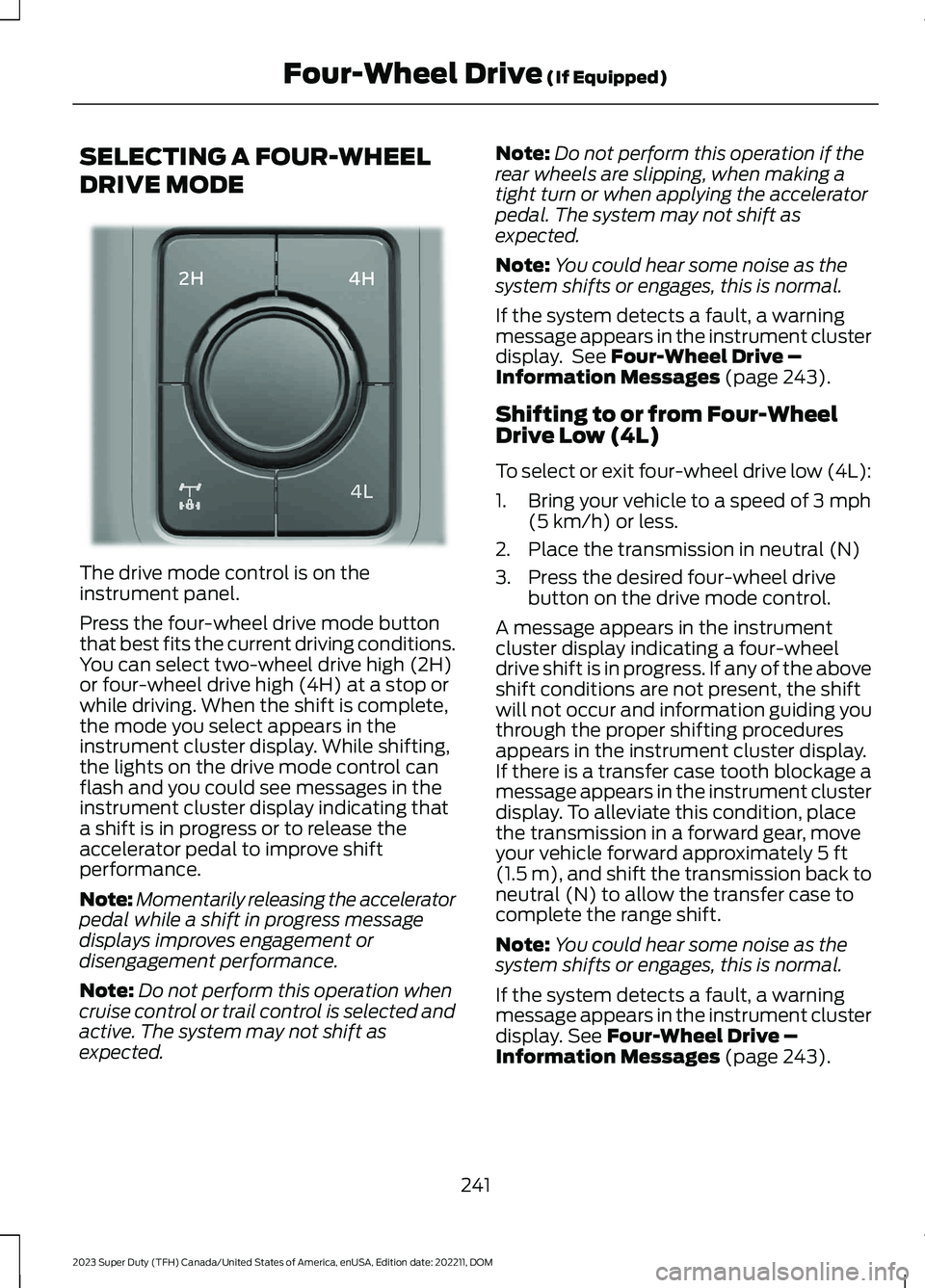
The drive mode control is on theinstrument panel.
Press the four-wheel drive mode buttonthat best fits the current driving conditions.You can select two-wheel drive high (2H)or four-wheel drive high (4H) at a stop orwhile driving. When the shift is complete,the mode you select appears in theinstrument cluster display. While shifting,the lights on the drive mode control canflash and you could see messages in theinstrument cluster display indicating thata shift is in progress or to release theaccelerator pedal to improve shiftperformance.
Note:Momentarily releasing the acceleratorpedal while a shift in progress messagedisplays improves engagement ordisengagement performance.
Note:Do not perform this operation whencruise control or trail control is selected andactive. The system may not shift asexpected.
Note:Do not perform this operation if therear wheels are slipping, when making atight turn or when applying the acceleratorpedal. The system may not shift asexpected.
Note:You could hear some noise as thesystem shifts or engages, this is normal.
If the system detects a fault, a warningmessage appears in the instrument clusterdisplay. See Four-Wheel Drive –Information Messages (page 243).
Shifting to or from Four-WheelDrive Low (4L)
To select or exit four-wheel drive low (4L):
1.Bring your vehicle to a speed of 3 mph(5 km/h) or less.
2.Place the transmission in neutral (N)
3.Press the desired four-wheel drivebutton on the drive mode control.
A message appears in the instrumentcluster display indicating a four-wheeldrive shift is in progress. If any of the aboveshift conditions are not present, the shiftwill not occur and information guiding youthrough the proper shifting proceduresappears in the instrument cluster display.If there is a transfer case tooth blockage amessage appears in the instrument clusterdisplay. To alleviate this condition, placethe transmission in a forward gear, moveyour vehicle forward approximately 5 ft(1.5 m), and shift the transmission back toneutral (N) to allow the transfer case tocomplete the range shift.
Note:You could hear some noise as thesystem shifts or engages, this is normal.
If the system detects a fault, a warningmessage appears in the instrument clusterdisplay. See Four-Wheel Drive –Information Messages (page 243).
241
2023 Super Duty (TFH) Canada/United States of America, enUSA, Edition date: 202211, DOMFour-Wheel Drive (If Equipped)E383456
Page 247 of 738
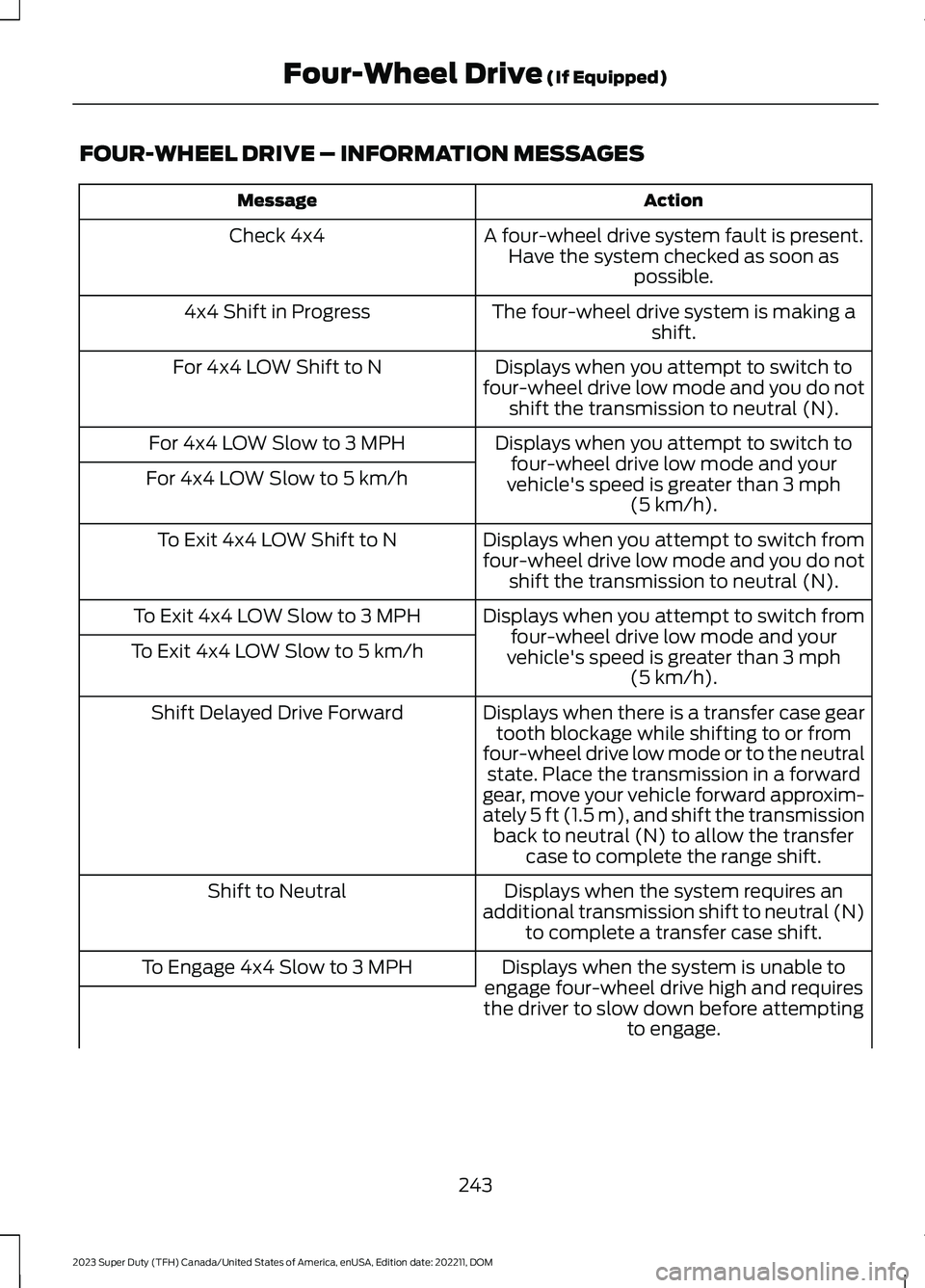
FOUR-WHEEL DRIVE – INFORMATION MESSAGES
ActionMessage
A four-wheel drive system fault is present.Have the system checked as soon aspossible.
Check 4x4
The four-wheel drive system is making ashift.4x4 Shift in Progress
Displays when you attempt to switch tofour-wheel drive low mode and you do notshift the transmission to neutral (N).
For 4x4 LOW Shift to N
Displays when you attempt to switch tofour-wheel drive low mode and yourvehicle's speed is greater than 3 mph(5 km/h).
For 4x4 LOW Slow to 3 MPH
For 4x4 LOW Slow to 5 km/h
Displays when you attempt to switch fromfour-wheel drive low mode and you do notshift the transmission to neutral (N).
To Exit 4x4 LOW Shift to N
Displays when you attempt to switch fromfour-wheel drive low mode and yourvehicle's speed is greater than 3 mph(5 km/h).
To Exit 4x4 LOW Slow to 3 MPH
To Exit 4x4 LOW Slow to 5 km/h
Displays when there is a transfer case geartooth blockage while shifting to or fromfour-wheel drive low mode or to the neutralstate. Place the transmission in a forwardgear, move your vehicle forward approxim-ately 5 ft (1.5 m), and shift the transmissionback to neutral (N) to allow the transfercase to complete the range shift.
Shift Delayed Drive Forward
Displays when the system requires anadditional transmission shift to neutral (N)to complete a transfer case shift.
Shift to Neutral
Displays when the system is unable toengage four-wheel drive high and requiresthe driver to slow down before attemptingto engage.
To Engage 4x4 Slow to 3 MPH
243
2023 Super Duty (TFH) Canada/United States of America, enUSA, Edition date: 202211, DOMFour-Wheel Drive (If Equipped)
Page 253 of 738
BRAKE PRECAUTIONS
Wet brakes result in reduced brakingefficiency. Gently press the brake pedal afew times when leaving a car wash ordriving from standing water to dry thebrakes.
Note:Depending on applicable laws andregulations in the country where your vehiclewas originally built, the stoplamps couldflash during heavy braking. The hazardwarning flashers could also turn on whenyour vehicle comes to a stop.
ANTI-LOCK BRAKING SYSTEM
ANTI-LOCK BRAKING SYSTEMLIMITATIONS
The anti-lock braking system does noteliminate the risk of crash when:
•You drive too closely to the vehicle infront of you.
•Your vehicle is hydroplaning.
•You take corners too fast.
•The road surface is poor.
Note: If the system activates, the brakepedal could pulse and travel further.Maintain pressure on the brake pedal.
BRAKE OVER ACCELERATOR
In the event the accelerator pedalbecomes stuck or entrapped, apply steadyand firm pressure to the brake pedal toslow the vehicle and reduce engine power.If you experience this condition, apply thebrakes and bring your vehicle to a safestop. Move the transmission to park (P),switch the engine off and apply the parkingbrake. Inspect the accelerator pedal forany interference. If none are found and thecondition persists, have your vehicle towedto the nearest authorized dealer.
LOCATING THE BRAKE FLUID
RESERVOIR
See Under Hood Overview (page 441).
CHECKING THE BRAKE FLUID
WARNING: Do not use any fluidother than the recommended brake fluidas this will reduce brake efficiency. Useof incorrect fluid could result in the lossof vehicle control, serious personal injuryor death.
WARNING: Only use brake fluidfrom a sealed container. Contaminationwith dirt, water, petroleum products orother materials may result in brakesystem damage or failure. Failure toadhere to this warning could result in theloss of vehicle control, serious personalinjury or death.
WARNING: Do not allow the fluidto touch your skin or eyes. If thishappens, rinse the affected areasimmediately with plenty of water andcontact your physician.
WARNING: The brake systemcould be affected if the brake fluid levelis below the MIN mark or above the MAXmark on the brake fluid reservoir.
249
2023 Super Duty (TFH) Canada/United States of America, enUSA, Edition date: 202211, DOMBrakes
Page 260 of 738
DIESEL ENGINE EXHAUST
BRAKE – PRECAUTIONS
WARNING: Do not use tow/haulwhen the road surface is slippery. Failureto follow this instruction could result inthe loss of control of your vehicle.
WARNING: Do not use dieselengine exhaust braking when the roadsurface is slippery. Failure to follow thisinstruction could result in the loss ofcontrol of your vehicle.
USING THE DIESEL ENGINE
EXHAUST BRAKE
This feature increases engine braking athigher engine speeds to provide bettergrade descent control with less brake andtransmission wear and tear.
Note:Use this when driving downhill andcarrying heavy loads or trailering.
Benefits of engine braking are:
•Lower brake temperature.
•Reduced brake fade.
•Longer brake life.
•Improved driving and trailering control.
Press the button on the switchbank next to the audio unit toswitch the system on or off.
There are two engine brake modes, manualand automatic.
The following conditions must be met touse exhaust brake:
•Your vehicle is in a forward gear.
•The engine speed is above 1300 RPM.
•Your foot is off the accelerator.
You can use this feature with tow/haul orprogressive range selection to providefurther increased engine braking. Thetransmission upshifts to prevent the enginefrom entering the red zone on thetachometer.
Manual Engine Braking
1.Press the button to switch on manualengine braking.
2.Release the accelerator pedal tomaximize engine braking.
3.Apply the brakes. The transmissiondownshifts to lower gears.
Note:The engine braking feature onlyfunctions when you release the accelerator.
Note:You can shift the transmission tolower gears with progressive range selectionor manual shifting independent of pressingthe brakes.
Note:You can also use manual enginebraking with cruise control to improve gradedescent control.
Note:If your vehicle has adaptive cruisecontrol, the speed control system uses theselected engine brake mode, transmissiongears, and brakes to maintain the set speedand distance to the vehicle being followed.
Automatic Engine Braking
1.Press the button twice to switch onautomatic engine braking.
2.Release the accelerator or brake pedal.The system remembers your vehiclespeed.
256
2023 Super Duty (TFH) Canada/United States of America, enUSA, Edition date: 202211, DOMDiesel Engine Exhaust BrakeE171217
Page 261 of 738
Note:This feature offers smoother, lessaggressive engine braking during downhilldescents. It may not apply braking if thevehicle speed is not increasing, although itapplies full engine braking force whenneeded to prevent acceleration. The systemautomatically activates the engine brakeand, if necessary, downshifts thetransmission to lower gears to not exceedyour vehicle's set speed when the brake oraccelerator were last released.
DIESEL ENGINE EXHAUST
BRAKE INDICATORS
DIESEL ENGINE EXHAUST
BRAKE GAUGE
Displays the diesel engine exhaust brakepower in the form of a percentage. A fullfill or 100% represents the total dieselengine exhaust brake power available.
The gauge displays zero to 100%depending on the engine brake powerprovided by the system.
Note:When the diesel engine exhaust brakeis switched off, the gauge displays zero.
Accessing the Diesel EngineExhaust Brake Gauge
You can access the diesel engine exhaustbrake gauge in the instrument cluster usingthe instrument cluster display control onthe steering wheel:
•Press the menu button.
•Select Gauges.
•Select Diesel Gauges.
DIESEL ENGINE EXHAUST
BRAKE – TROUBLESHOOTING
DIESEL ENGINE EXHAUST BRAKE– WARNING LAMPS
•Illuminates when this feature isswitched on and the system isoperating properly.
•Flashes when the engine brake isdisabled due to a fault.
•Does not illuminate when the switchor indicator is faulty.
You can switch the system on at any time.The braking system becomes active oncethe braking conditions are met.
DIESEL ENGINE EXHAUST
BRAKE VIDEOS
Diesel Engine Exhaust Braking Video Link
257
2023 Super Duty (TFH) Canada/United States of America, enUSA, Edition date: 202211, DOMDiesel Engine Exhaust BrakeE171217 E234452