seats FORD SUPER DUTY 2023 Service Manual
[x] Cancel search | Manufacturer: FORD, Model Year: 2023, Model line: SUPER DUTY, Model: FORD SUPER DUTY 2023Pages: 738, PDF Size: 18.49 MB
Page 234 of 738
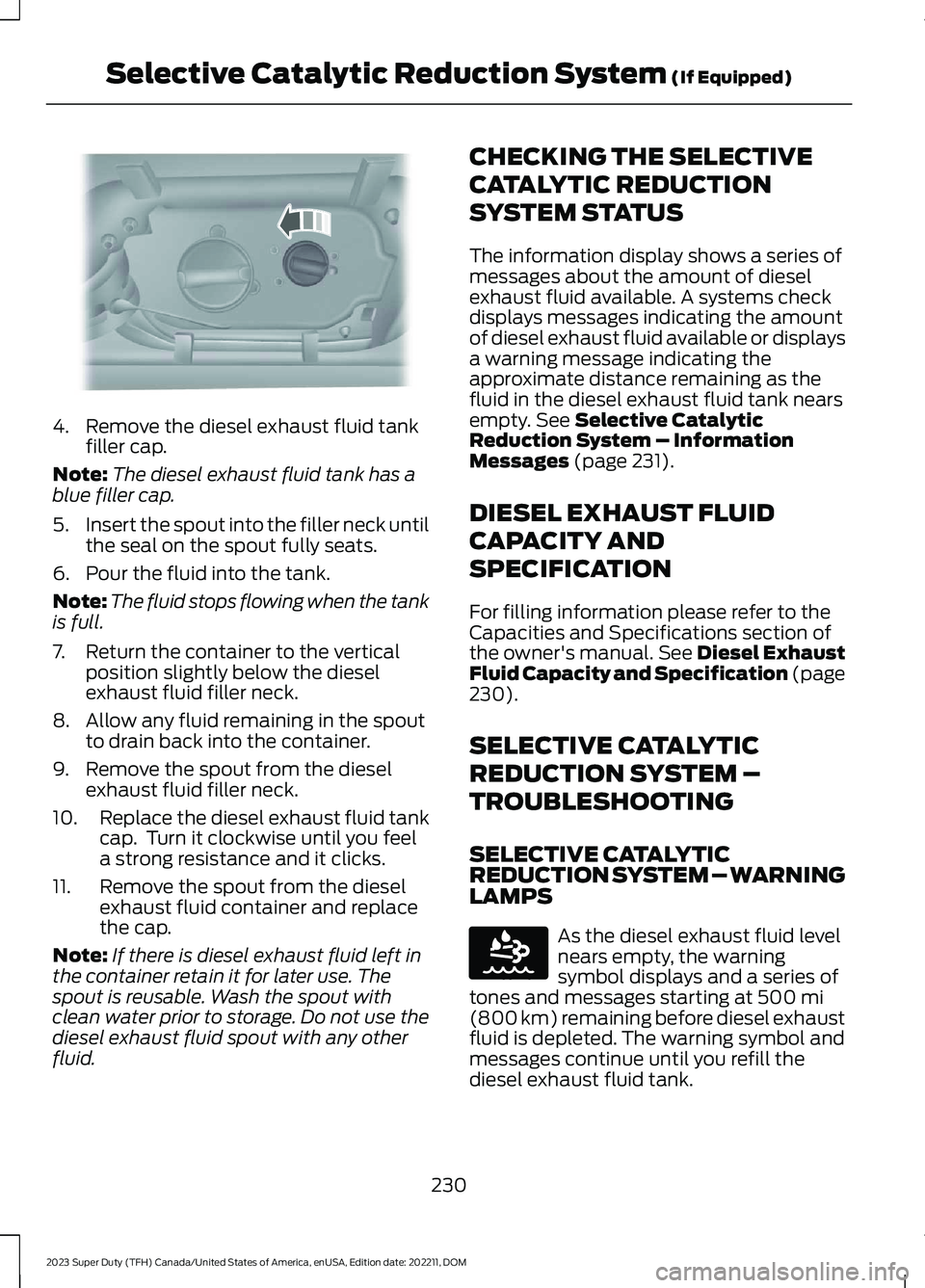
4.Remove the diesel exhaust fluid tankfiller cap.
Note:The diesel exhaust fluid tank has ablue filler cap.
5.Insert the spout into the filler neck untilthe seal on the spout fully seats.
6.Pour the fluid into the tank.
Note:The fluid stops flowing when the tankis full.
7.Return the container to the verticalposition slightly below the dieselexhaust fluid filler neck.
8.Allow any fluid remaining in the spoutto drain back into the container.
9.Remove the spout from the dieselexhaust fluid filler neck.
10.Replace the diesel exhaust fluid tankcap. Turn it clockwise until you feela strong resistance and it clicks.
11.Remove the spout from the dieselexhaust fluid container and replacethe cap.
Note:If there is diesel exhaust fluid left inthe container retain it for later use. Thespout is reusable. Wash the spout withclean water prior to storage. Do not use thediesel exhaust fluid spout with any otherfluid.
CHECKING THE SELECTIVE
CATALYTIC REDUCTION
SYSTEM STATUS
The information display shows a series ofmessages about the amount of dieselexhaust fluid available. A systems checkdisplays messages indicating the amountof diesel exhaust fluid available or displaysa warning message indicating theapproximate distance remaining as thefluid in the diesel exhaust fluid tank nearsempty. See Selective CatalyticReduction System – InformationMessages (page 231).
DIESEL EXHAUST FLUID
CAPACITY AND
SPECIFICATION
For filling information please refer to theCapacities and Specifications section ofthe owner's manual. See Diesel ExhaustFluid Capacity and Specification (page230).
SELECTIVE CATALYTIC
REDUCTION SYSTEM –
TROUBLESHOOTING
SELECTIVE CATALYTICREDUCTION SYSTEM – WARNINGLAMPS
As the diesel exhaust fluid levelnears empty, the warningsymbol displays and a series oftones and messages starting at 500 mi(800 km) remaining before diesel exhaustfluid is depleted. The warning symbol andmessages continue until you refill thediesel exhaust fluid tank.
230
2023 Super Duty (TFH) Canada/United States of America, enUSA, Edition date: 202211, DOMSelective Catalytic Reduction System (If Equipped)E328788 E163176
Page 360 of 738
PICKUP BED PRECAUTIONS
WARNING: Do not allow people oranimals in truck beds that havemodifications, such as bed covers orslide-in campers, when the engine isrunning. Exhaust fumes are toxic. Failureto follow this instruction could result inpersonal injury or death.
WARNING: It is extremelydangerous to ride in a cargo area, insideor outside of a vehicle. In a crash, peopleriding in these areas are more likely to beseriously injured or killed. Do not allowpeople to ride in any area of your vehiclethat is not equipped with seats andseatbelts. Make sure everyone in yourvehicle is in a seat and properly using aseatbelt. Failure to follow this warningcould result in serious personal injury ordeath.
PICKUP BED ANCHOR POINTS
PICKUP BED ANCHOR POINTPRECAUTIONS
WARNING: Always properly securecargo to prevent shifting cargo or cargofalling from the vehicle. Failure to do socould result in compromised vehiclestability and serious personal injury tovehicle occupants or others.
WARNING: The appropriateloading capacity of your vehicle can belimited either by volume capacity (howmuch space is available) or by payloadcapacity (how much weight the vehicleshould carry). Once you have reached
the maximum payload of your vehicle,do not add more cargo, even if there isspace available. Overloading orimproperly loading your vehicle cancontribute to loss of vehicle control andvehicle rollover.
WARNING: Do not use the loadretaining fixtures for towing. Failure tofollow this instruction could result inpersonal injury.
WARNING: Do not exceed themaximum load rating of the loadretaining fixtures. Failure to follow thisinstruction could result in personal injury.
WARNING: Check the loadretaining fixtures for damage beforeusing them. Failure to follow thisinstruction could result in personal injury.
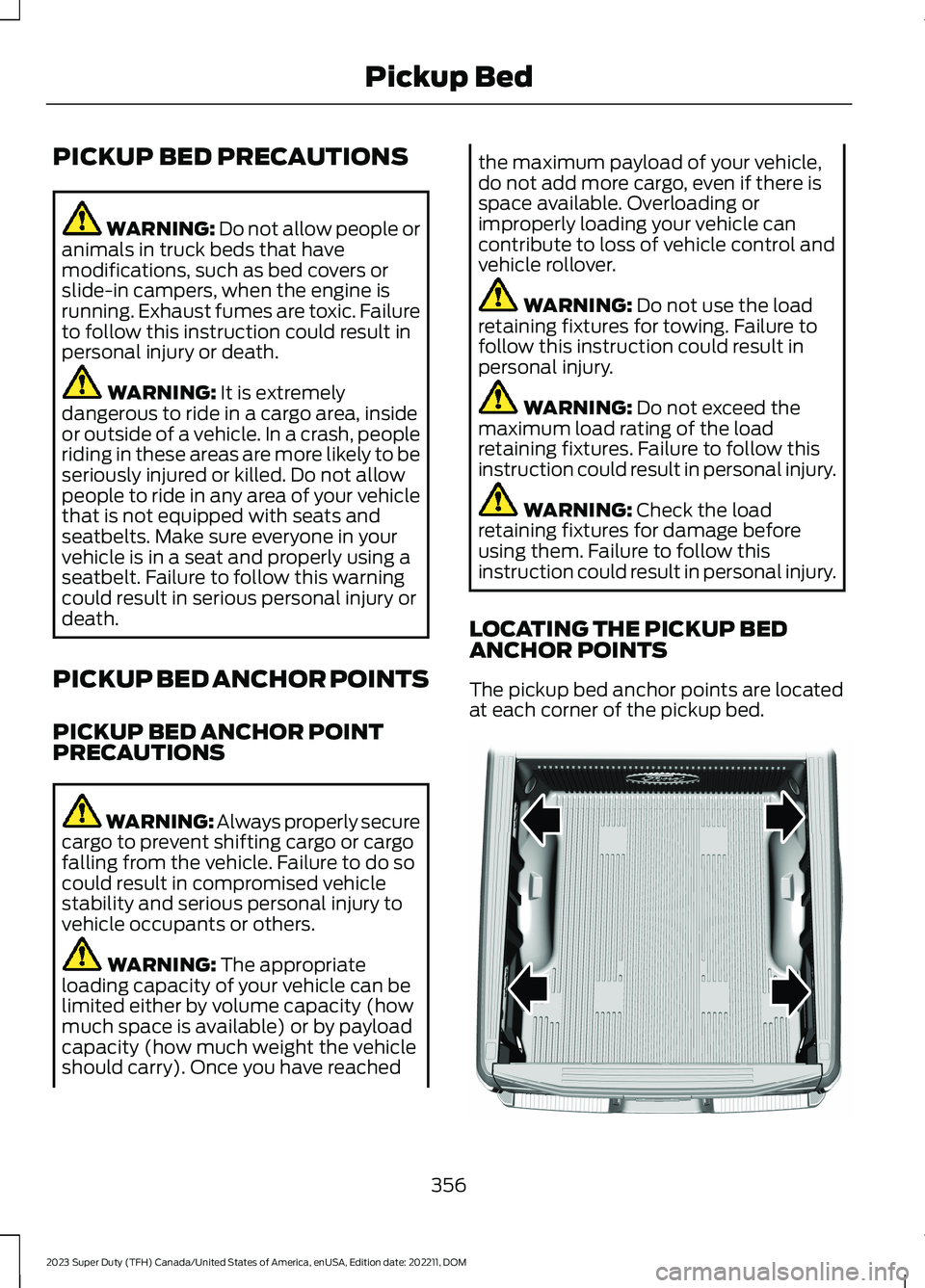
LOCATING THE PICKUP BEDANCHOR POINTS
The pickup bed anchor points are locatedat each corner of the pickup bed.
356
2023 Super Duty (TFH) Canada/United States of America, enUSA, Edition date: 202211, DOMPickup BedE327579
Page 436 of 738
Protected ComponentRatingItem
Body control module RP2bus.30 A15
Trailer tow backup lamps.10 A21
Four-wheel drive system.10 A22
Vehicle power 1.20 A23
Vehicle power 2 (gas).20 A24
Vehicle power 2 (diesel).10 A
Vehicle power 3 (gas).15 A25
Vehicle power 3 (diesel).10 A
Vehicle power 4.20 A26
Vehicle power 5 (gas).10 A27
Vehicle power 5 (diesel).20 A
Diesel exhaust fluid tankheater.15 A29
Diesel exhaust fluid lineheater.15 A30
Glow plug and dosingmodule.15 A31
Rear heated seats.20 A34
Climate controlled seatmodule.30 A36
24 V alternator.5 A37
Powertrain control module.10 A38Transmission controlmodule.
Anti-lock brake system.10 A39
Electronic power assiststeering.10 A40
Blind spot informationsystem.10 A41
432
2023 Super Duty (TFH) Canada/United States of America, enUSA, Edition date: 202211, DOMFuses
Page 440 of 738
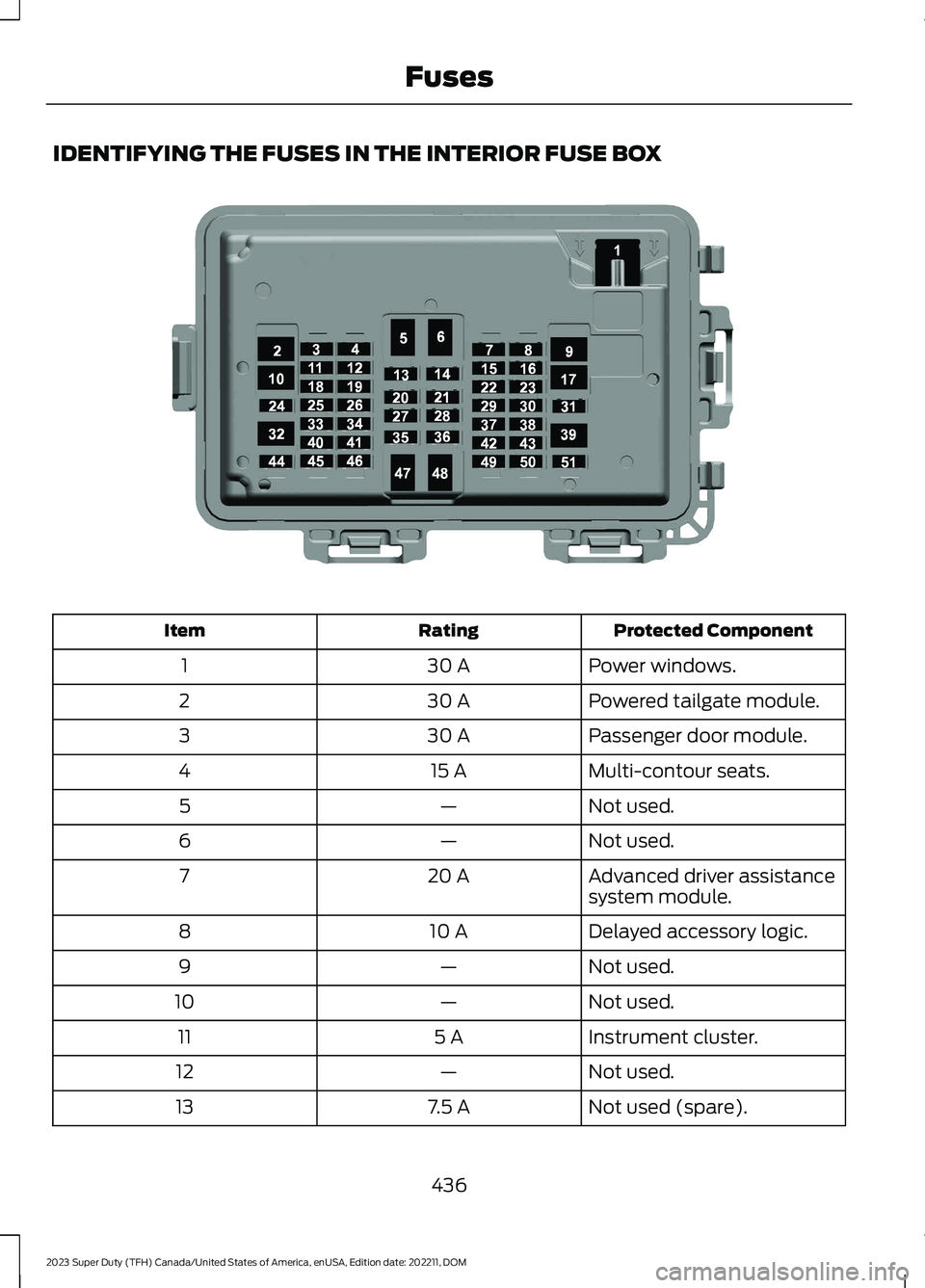
IDENTIFYING THE FUSES IN THE INTERIOR FUSE BOX
Protected ComponentRatingItem
Power windows.30 A1
Powered tailgate module.30 A2
Passenger door module.30 A3
Multi-contour seats.15 A4
Not used.—5
Not used.—6
Advanced driver assistancesystem module.20 A7
Delayed accessory logic.10 A8
Not used.—9
Not used.—10
Instrument cluster.5 A11
Not used.—12
Not used (spare).7.5 A13
436
2023 Super Duty (TFH) Canada/United States of America, enUSA, Edition date: 202211, DOMFusesE373518
Page 441 of 738
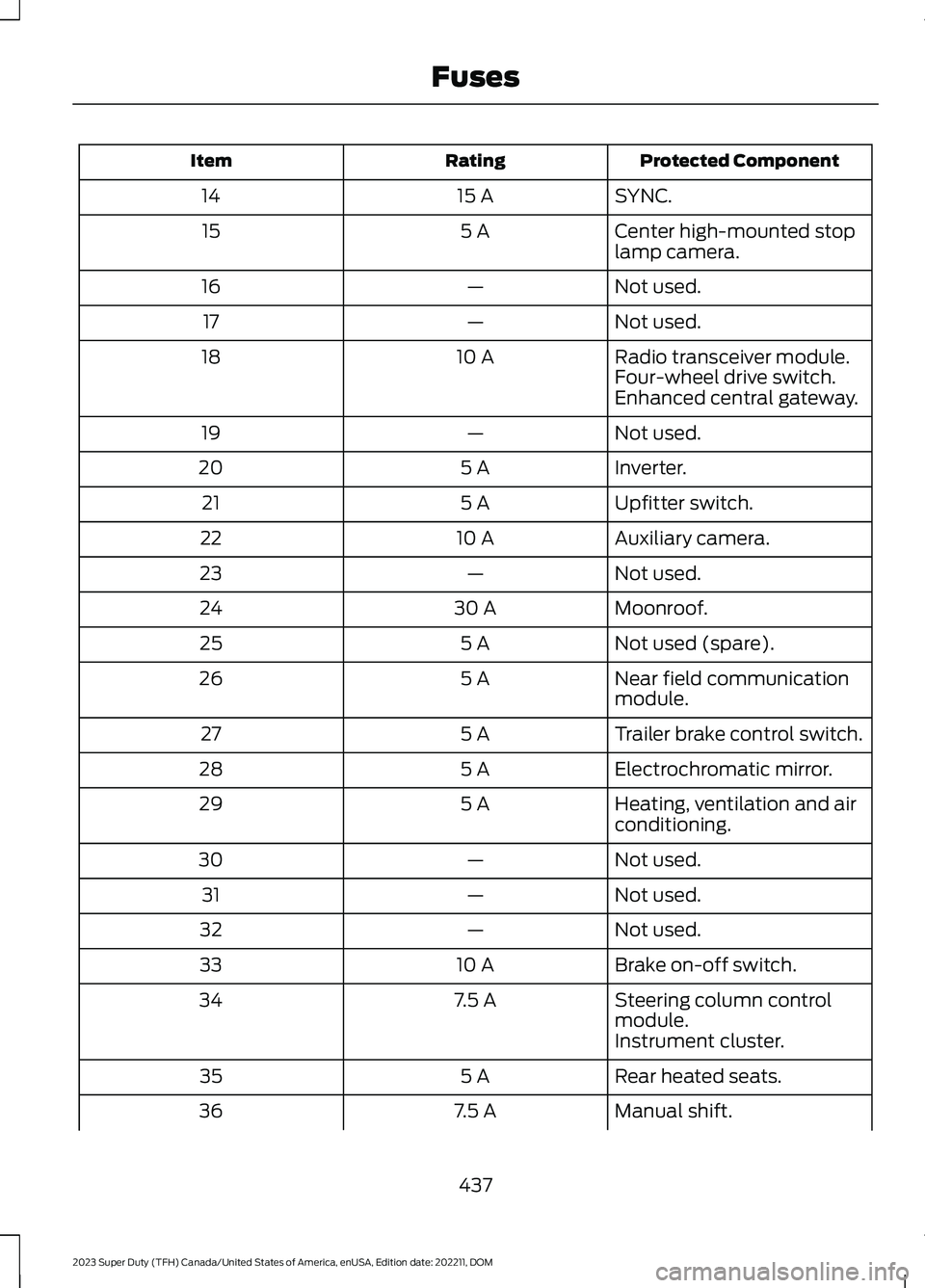
Protected ComponentRatingItem
SYNC.15 A14
Center high-mounted stoplamp camera.5 A15
Not used.—16
Not used.—17
Radio transceiver module.10 A18Four-wheel drive switch.Enhanced central gateway.
Not used.—19
Inverter.5 A20
Upfitter switch.5 A21
Auxiliary camera.10 A22
Not used.—23
Moonroof.30 A24
Not used (spare).5 A25
Near field communicationmodule.5 A26
Trailer brake control switch.5 A27
Electrochromatic mirror.5 A28
Heating, ventilation and airconditioning.5 A29
Not used.—30
Not used.—31
Not used.—32
Brake on-off switch.10 A33
Steering column controlmodule.7.5 A34
Instrument cluster.
Rear heated seats.5 A35
Manual shift.7.5 A36
437
2023 Super Duty (TFH) Canada/United States of America, enUSA, Edition date: 202211, DOMFuses
Page 461 of 738
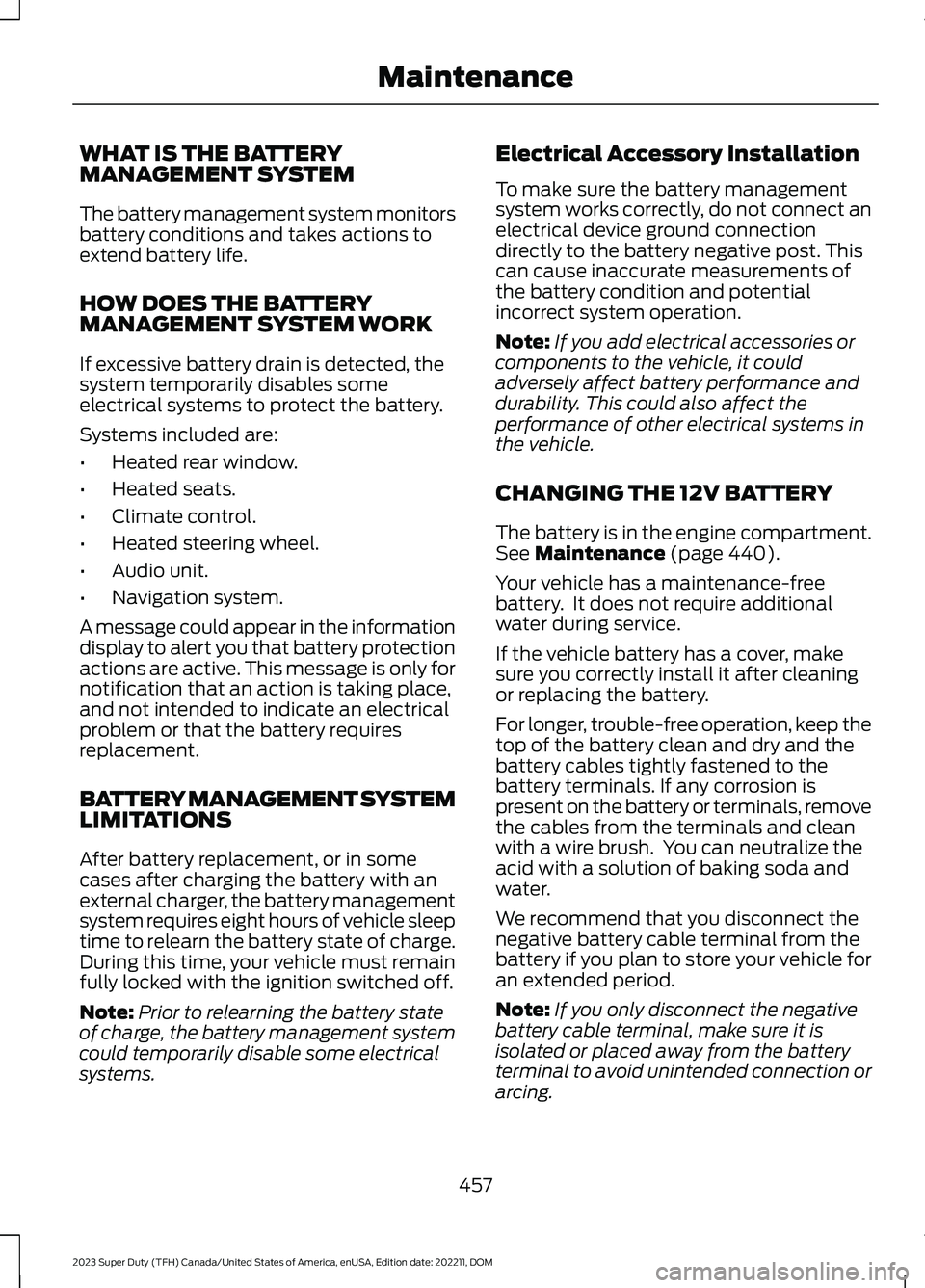
WHAT IS THE BATTERYMANAGEMENT SYSTEM
The battery management system monitorsbattery conditions and takes actions toextend battery life.
HOW DOES THE BATTERYMANAGEMENT SYSTEM WORK
If excessive battery drain is detected, thesystem temporarily disables someelectrical systems to protect the battery.
Systems included are:
•Heated rear window.
•Heated seats.
•Climate control.
•Heated steering wheel.
•Audio unit.
•Navigation system.
A message could appear in the informationdisplay to alert you that battery protectionactions are active. This message is only fornotification that an action is taking place,and not intended to indicate an electricalproblem or that the battery requiresreplacement.
BATTERY MANAGEMENT SYSTEMLIMITATIONS
After battery replacement, or in somecases after charging the battery with anexternal charger, the battery managementsystem requires eight hours of vehicle sleeptime to relearn the battery state of charge.During this time, your vehicle must remainfully locked with the ignition switched off.
Note:Prior to relearning the battery stateof charge, the battery management systemcould temporarily disable some electricalsystems.
Electrical Accessory Installation
To make sure the battery managementsystem works correctly, do not connect anelectrical device ground connectiondirectly to the battery negative post. Thiscan cause inaccurate measurements ofthe battery condition and potentialincorrect system operation.
Note:If you add electrical accessories orcomponents to the vehicle, it couldadversely affect battery performance anddurability. This could also affect theperformance of other electrical systems inthe vehicle.
CHANGING THE 12V BATTERY
The battery is in the engine compartment.See Maintenance (page 440).
Your vehicle has a maintenance-freebattery. It does not require additionalwater during service.
If the vehicle battery has a cover, makesure you correctly install it after cleaningor replacing the battery.
For longer, trouble-free operation, keep thetop of the battery clean and dry and thebattery cables tightly fastened to thebattery terminals. If any corrosion ispresent on the battery or terminals, removethe cables from the terminals and cleanwith a wire brush. You can neutralize theacid with a solution of baking soda andwater.
We recommend that you disconnect thenegative battery cable terminal from thebattery if you plan to store your vehicle foran extended period.
Note:If you only disconnect the negativebattery cable terminal, make sure it isisolated or placed away from the batteryterminal to avoid unintended connection orarcing.
457
2023 Super Duty (TFH) Canada/United States of America, enUSA, Edition date: 202211, DOMMaintenance
Page 522 of 738
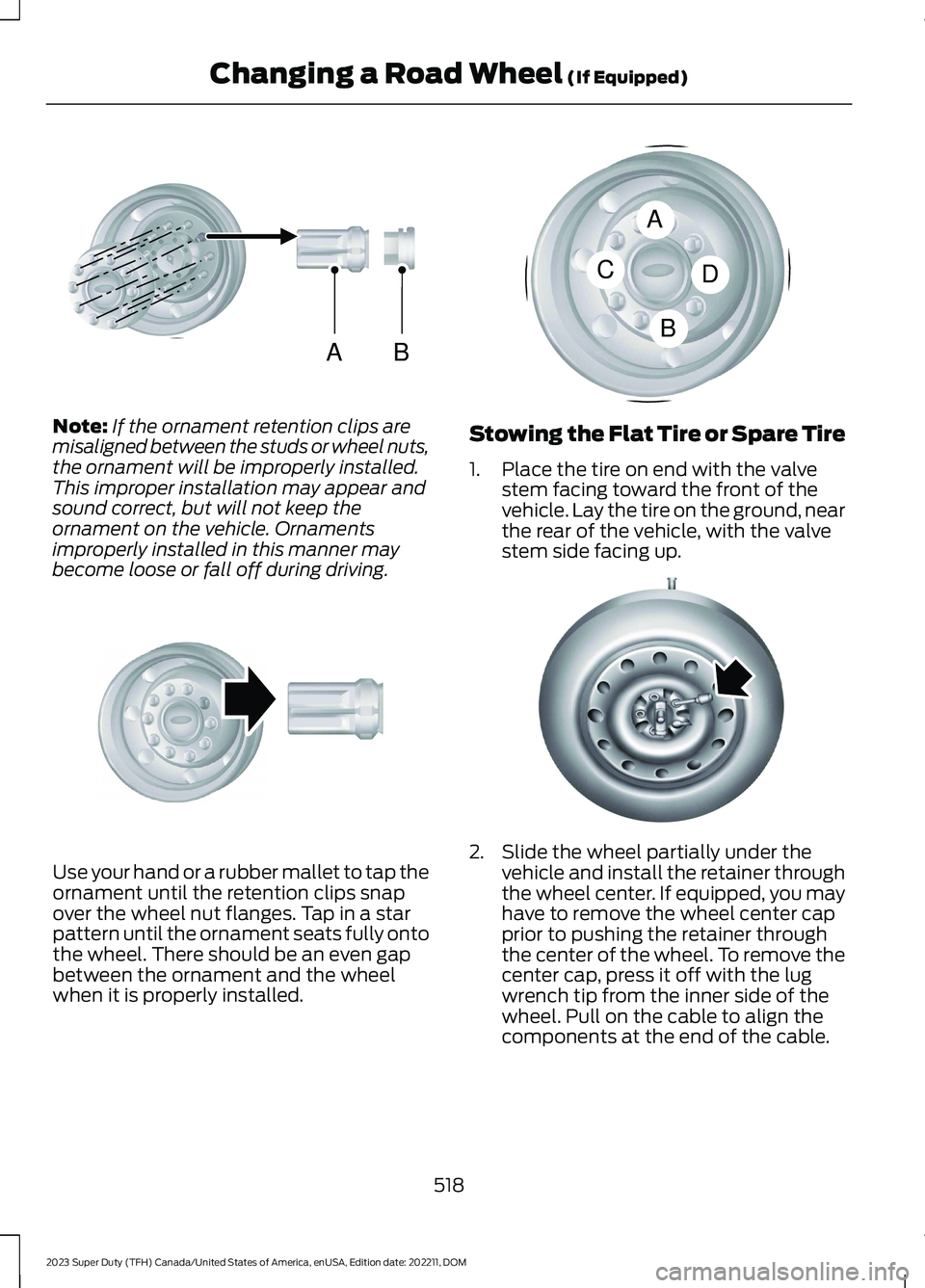
Note:If the ornament retention clips aremisaligned between the studs or wheel nuts,the ornament will be improperly installed.This improper installation may appear andsound correct, but will not keep theornament on the vehicle. Ornamentsimproperly installed in this manner maybecome loose or fall off during driving.
Use your hand or a rubber mallet to tap theornament until the retention clips snapover the wheel nut flanges. Tap in a starpattern until the ornament seats fully ontothe wheel. There should be an even gapbetween the ornament and the wheelwhen it is properly installed.
Stowing the Flat Tire or Spare Tire
1.Place the tire on end with the valvestem facing toward the front of thevehicle. Lay the tire on the ground, nearthe rear of the vehicle, with the valvestem side facing up.
2.Slide the wheel partially under thevehicle and install the retainer throughthe wheel center. If equipped, you mayhave to remove the wheel center capprior to pushing the retainer throughthe center of the wheel. To remove thecenter cap, press it off with the lugwrench tip from the inner side of thewheel. Pull on the cable to align thecomponents at the end of the cable.
518
2023 Super Duty (TFH) Canada/United States of America, enUSA, Edition date: 202211, DOMChanging a Road Wheel (If Equipped)ABE162822 E162823 ACBDE162824 E162800
Page 581 of 738
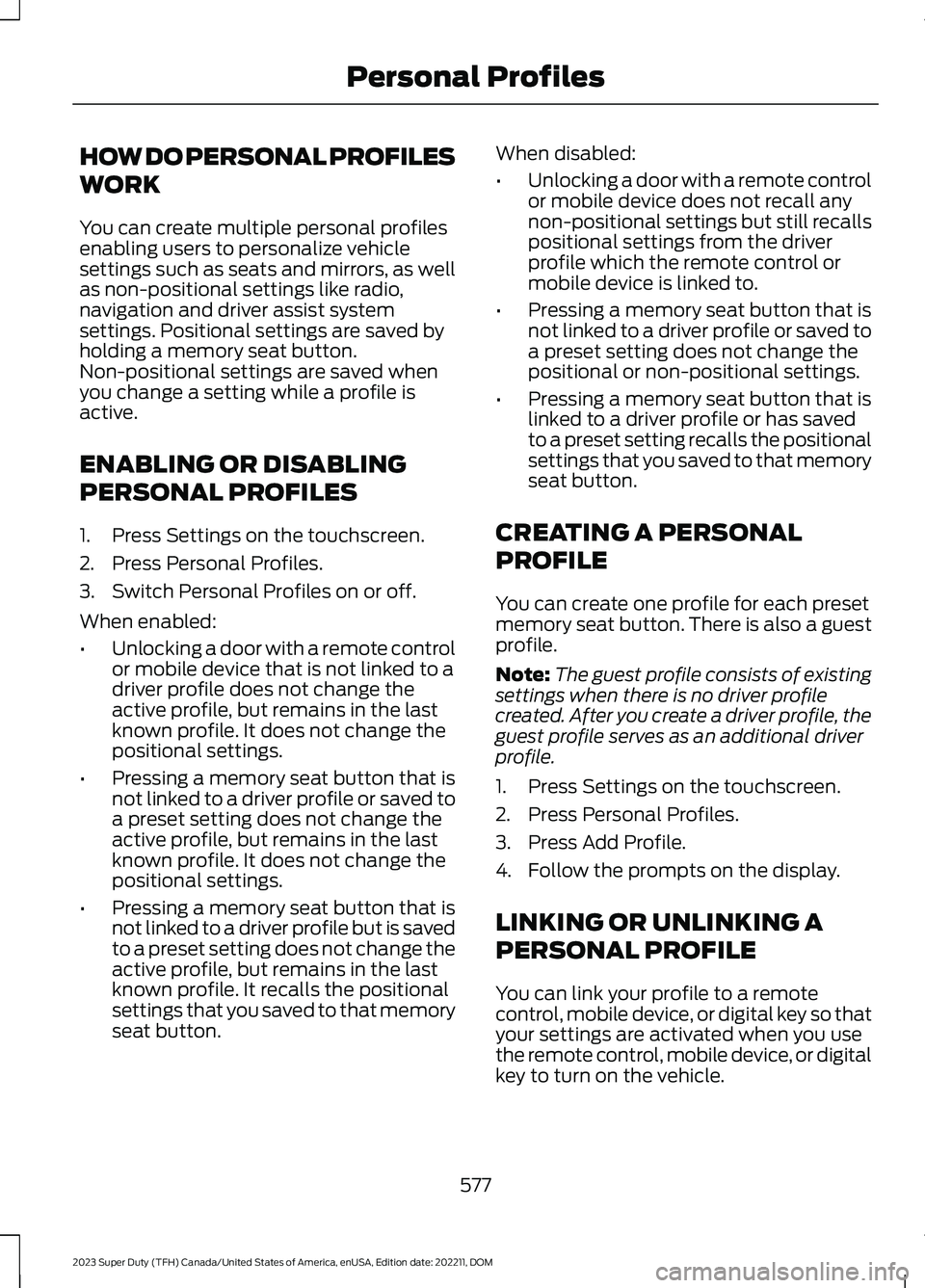
HOW DO PERSONAL PROFILES
WORK
You can create multiple personal profilesenabling users to personalize vehiclesettings such as seats and mirrors, as wellas non-positional settings like radio,navigation and driver assist systemsettings. Positional settings are saved byholding a memory seat button.Non-positional settings are saved whenyou change a setting while a profile isactive.
ENABLING OR DISABLING
PERSONAL PROFILES
1.Press Settings on the touchscreen.
2.Press Personal Profiles.
3.Switch Personal Profiles on or off.
When enabled:
•Unlocking a door with a remote controlor mobile device that is not linked to adriver profile does not change theactive profile, but remains in the lastknown profile. It does not change thepositional settings.
•Pressing a memory seat button that isnot linked to a driver profile or saved toa preset setting does not change theactive profile, but remains in the lastknown profile. It does not change thepositional settings.
•Pressing a memory seat button that isnot linked to a driver profile but is savedto a preset setting does not change theactive profile, but remains in the lastknown profile. It recalls the positionalsettings that you saved to that memoryseat button.
When disabled:
•Unlocking a door with a remote controlor mobile device does not recall anynon-positional settings but still recallspositional settings from the driverprofile which the remote control ormobile device is linked to.
•Pressing a memory seat button that isnot linked to a driver profile or saved toa preset setting does not change thepositional or non-positional settings.
•Pressing a memory seat button that islinked to a driver profile or has savedto a preset setting recalls the positionalsettings that you saved to that memoryseat button.
CREATING A PERSONAL
PROFILE
You can create one profile for each presetmemory seat button. There is also a guestprofile.
Note:The guest profile consists of existingsettings when there is no driver profilecreated. After you create a driver profile, theguest profile serves as an additional driverprofile.
1.Press Settings on the touchscreen.
2.Press Personal Profiles.
3.Press Add Profile.
4.Follow the prompts on the display.
LINKING OR UNLINKING A
PERSONAL PROFILE
You can link your profile to a remotecontrol, mobile device, or digital key so thatyour settings are activated when you usethe remote control, mobile device, or digitalkey to turn on the vehicle.
577
2023 Super Duty (TFH) Canada/United States of America, enUSA, Edition date: 202211, DOMPersonal Profiles
Page 714 of 738
Blind Spot Information System With TrailerCoverage..........................................................328Blind Spot Information SystemIndicators.....................................................330Blind Spot Information SystemLimitations...................................................327Blind Spot Information SystemPrecautions..................................................327Blind Spot Information SystemRequirements.............................................327Blind Spot Information System –Troubleshooting.........................................331Blind Spot Information System –Information Messages.................................331Blind Spot Information SystemVideos............................................................331Blind Spot Information System WithTrailer Coverage.........................................328Blind Spot Information System With TrailerCoverage Limitations..................................328Selecting a Trailer..............................................330Setting a Trailer Length...................................329What Is Blind Spot Information System withTrailer Coverage.............................................328Bluetooth®.....................................................574Bonnet LockSee: Opening and Closing the Hood.........440Booster Seats...................................................47Brake Fluid Specification..........................250Brake Over Accelerator..............................249Brake Precautions.......................................249Brakes..............................................................249Anti-Lock Braking System..............................249Brakes – Troubleshooting..............................250Brakes – Troubleshooting........................250Brakes – Frequently AskedQuestions.........................................................252Brakes – Information Messages....................251Brakes – Warning Lamps...............................250Breaking-In.....................................................416
C
Calculating Payload....................................353Calculating the Load Limit.......................353Canceling the Set Speed...........................273Canceling the Set Speed Limit................316Capacities and Specifications................520
Catalytic Converter.....................................233Catalytic Converter –Troubleshooting............................................233Catalytic Converter Precautions............233Catalytic Converter –Troubleshooting........................................233Catalytic Converter – WarningLamps................................................................233Center Console..............................................198Opening the Center Console..........................198Center Console Work Surface.................193Center Console Work Surface –Troubleshooting.............................................194Center Console Work Surface –Troubleshooting.........................................194Center Console Work Surface – InformationMessages..........................................................194Center Display Limitations.......................563Center Display Overview..........................563Center Display Overview Videos...........564Center Display Precautions.....................563Changing a Flat Tire...................................509Changing a Road Wheel...........................509Changing the Fuel Filter - Diesel............453Changing the Fuel Filter -Gasoline.......................................................453Changing the Language.............................145Changing the Measurement Unit...........145Changing the Remote Control Battery -Vehicles With: Flip Key...............................74Changing the Remote Control Battery -Vehicles With: Push Button Start..........75Changing the Set Speed Limit................316Changing the Temperature Unit.............145Changing the Tire Pressure Unit.............145Changing the Vehicle Wi-Fi HotspotName or Password....................................551Charging a Device.........................................183Charging a Wireless Device......................195Checking the Brake Fluid..........................249Checking the Seatbelts...............................56Checking the Selective CatalyticReduction System Status.....................230Checking the Tire Pressures...................490Checking the Wiper Blades........................114Children and Airbags....................................64
710
2023 Super Duty (TFH) Canada/United States of America, enUSA, Edition date: 202211, DOMIndex
Page 720 of 738
Four-Wheel Drive........................................238Four-Wheel Drive Modes................................242Four-Wheel Drive – Troubleshooting.........242Four-Wheel Drive Indicators....................242Four-Wheel Drive Limitations.................239Four-Wheel Drive Modes..........................242Four-Wheel Drive High.....................................242Four-Wheel Drive Low.....................................242Two-Wheel Drive High.....................................242Four-Wheel Drive Precautions...............239Four-Wheel Drive –Troubleshooting........................................242Four-Wheel Drive – InformationMessages.........................................................243Four-Wheel Drive – Warning Lamps..........242Four Wheels Down TowSee: Recreationally Towing Your Vehicle -4x2......................................................................429See: Recreationally Towing Your Vehicle -4x4......................................................................427Front Axle Fluid Capacity andSpecification..............................................540Front Exterior...................................................34Front Parking Aid.........................................284Front Parking Aid Audible Warnings..........284Front Parking Aid Limitations.......................284Locating the Front Parking AidSensors.............................................................284What is the Front Parking Aid.......................284Front Seat Precautions...............................161Front Seats.......................................................161Heated Seats.......................................................168Manual Seats.......................................................162Massage Seats.....................................................167Power Seats.........................................................164Ventilated Seats.................................................169Front Seats Videos......................................169Fuel and Refueling.......................................214Fuel and Refueling –Troubleshooting............................................220Fuel Quality...........................................................214Refueling................................................................218Running Out of Fuel...........................................217Fuel and Refueling Precautions..............214Fuel and Refueling –Troubleshooting........................................220Fuel and Refueling – InformationMessages.........................................................220
Fuel and Refueling – WarningLamps...............................................................220Fuel Gauge.......................................................137Fuel Gauge Limitations....................................138Locating the Fuel Filler Door..........................138What Is Distance to Empty.............................138What Is the Fuel Gauge....................................137What Is the Low Fuel Reminder....................138Fuel Quality.....................................................214Selecting the Correct Fuel...............................214Selecting the Correct Fuel for ColdWeather.............................................................215Fuel Tank Capacity - Diesel.....................534Fuel Tank Capacity.....................................220Fuel Tank Capacity - Gasoline................535Fuse Precautions.........................................430Fuses................................................................430Fuses – Troubleshooting................................439Interior Fuse Box................................................435Under Hood Fuse Box......................................430Fuses – Troubleshooting..........................439Fuses – Frequently Asked Questions........439
G
Garage Door Opener AdditionalAssistance....................................................182Garage Door Opener....................................179Garage Door Opener Introduction..........179Garage Door Opener Precautions andFrequencies..................................................179General Maintenance Information -Diesel..............................................................591General Maintenance Information -Gasoline.......................................................594Glasses Holder..............................................201Locating the Glasses Holder..........................201Global Opening.............................................128Switching Global Opening On andOff........................................................................129Using Global Opening.......................................128What Is Global Opening...................................128Glossary of Tire Terminology..................484Glove Compartment....................................197Locking the Glove Compartment.................197Opening the Glove Compartment................197
716
2023 Super Duty (TFH) Canada/United States of America, enUSA, Edition date: 202211, DOMIndex