battery FORD SUPER DUTY 2023 Owners Manual
[x] Cancel search | Manufacturer: FORD, Model Year: 2023, Model line: SUPER DUTY, Model: FORD SUPER DUTY 2023Pages: 738, PDF Size: 18.49 MB
Page 3 of 738
The information contained in this publication was correct at the time of release. In the interest of continuousdevelopment, we reserve the right to change specifications, design or equipment at any time withoutnotice or obligation. No part of this publication may be reproduced, transmitted, stored in a retrievalsystem or translated into any language in any form by any means without our written permission. Errorsand omissions excepted.© Ford Motor Company 2022
All rights reserved.Part Number: -202211-20221205180757
California Proposition 65
WARNING: Operating, servicing and maintaining a passenger vehicle or off-highway motor vehiclecan expose you to chemicals including engine exhaust, carbon monoxide, phthalates, and lead, whichare known to the State of California to cause cancer and birth defects or other reproductive harm. Tominimize exposure, avoid breathing exhaust, do not idle the engine except as necessary, service yourvehicle in a well-ventilated area and wear gloves or wash your hands frequently when servicing yourvehicle. For more information go to www.P65Warnings.ca.gov/passenger-vehicle.
WARNING: Battery posts, terminals and
related accessories contain lead and lead
compounds, chemicals known to the State of
California to cause cancer and reproductive harm.
Wash your hands after handling.
Page 6 of 738
Locating the Key Readers...........................73
Opening and Closing the Flip Key...........73
Removing the Key Blade.............................74
Sounding the Panic Alarm.........................74
Locating Your Vehicle...................................74
Changing the Remote Control Battery -Vehicles With: Flip Key............................74
Changing the Remote Control Battery -Vehicles With: Push Button Start........75
Replacing a Lost Key or Remote Control...........................................................................77
Programming the Remote Control -Vehicles With: Flip Key.............................77
Programming the Remote Control -Vehicles With: Push Button Start.......78
Keys and Remote Controls –Troubleshooting........................................80
Doors and Locks
Operating the Doors From Outside YourVehicle............................................................81
Operating the Doors From Inside YourVehicle............................................................81
Autounlock......................................................82
Autolock...........................................................82
Mislock..............................................................82
Doors and Locks Audible Warnings.......82
Doors and Locks – Troubleshooting..........................................................................83
Keyless Entry
Keyless Entry Limitations...........................85
Keyless Entry Settings.................................85
Using Keyless Entry......................................85
Keyless Entry – Troubleshooting............86
Keyless Entry Videos...................................86
Keyless Entry Keypad
What Is the Keyless Entry Keypad..........87
Keyless Entry Keypad Limitations...........87
Locating the Keyless Entry Keypad........87
Keyless Entry Keypad Master AccessCode...............................................................87
Keyless Entry Keypad Personal AccessCodes............................................................88
Using the Keyless Entry Keypad..............88
Keyless Entry Keypad – Troubleshooting..........................................................................89
Keyless Entry Keypad Videos...................89
Easy Entry and Exit
How Does Easy Entry and Exit Work..........................................................................90
Switching Easy Entry and Exit On andOff..................................................................90
Tailgate - Vehicles With:Manual Tailgate
Tailgate Precautions.....................................91
Opening the Tailgate....................................91
Removing and Installing the Tailgate...........................................................................91
Tailgate Step...................................................92
Tailgate Videos...............................................93
Tailgate - Vehicles With:Power Tailgate
Tailgate Precautions....................................94
Opening the Tailgate...................................94
Closing the Tailgate.....................................94
Removing and Installing the Tailgate..........................................................................95
Tailgate Step...................................................96
Tailgate – Troubleshooting........................97
Tailgate Videos..............................................98
Tailgate - Vehicles With:Remote Power TailgateRelease
Tailgate Precautions....................................99
Opening the Tailgate...................................99
Removing and Installing the Tailgate..........................................................................99
2
2023 Super Duty (TFH) Canada/United States of America, enUSA, Edition date: 202211, DOMTable of Contents
Page 12 of 738
Four-Wheel Drive Precautions..............239
Four-Wheel Drive Limitations................239
Switching Four-Wheel Drive On and Off........................................................................240
Selecting a Four-Wheel Drive Mode.....241
Four-Wheel Drive Modes.........................242
Four-Wheel Drive Indicators...................242
Transfer Case Fluid Capacity andSpecification............................................242
Four-Wheel Drive – Troubleshooting........................................................................242
Electronic Locking Differential
What Is the Electronic LockingDifferential................................................245
How Does the Electronic LockingDifferential Work.....................................245
Electronic Locking DifferentialPrecautions...............................................245
Switching the Electronic LockingDifferential On and Off - 4x4.............245
Switching the Electronic LockingDifferential On and Off - 4x2..............247
Electronic Locking Differential Indicators........................................................................247
Electronic Locking Differential –Troubleshooting.....................................248
Brakes
Brake Precautions......................................249
Anti-Lock Braking System......................249
Brake Over Accelerator.............................249
Locating the Brake Fluid Reservoir......249
Checking the Brake Fluid.........................249
Brake Fluid Specification.........................250
Brakes – Troubleshooting.......................250
Electric Parking Brake
What Is the Electric Parking Brake.......253
Applying the Electric Parking Brake......253
Applying the Electric Parking Brake in anEmergency................................................253
Manually Releasing the Electric ParkingBrake............................................................253
Automatically Releasing the ElectricParking Brake...........................................254
Electric Parking Brake Audible Warning........................................................................254
Releasing the Electric Parking Brake ifthe Vehicle Battery Has Run Out ofCharge........................................................254
Electric Parking Brake – Troubleshooting........................................................................254
Diesel Engine Exhaust Brake
Diesel Engine Exhaust Brake –Precautions...............................................256
Using the Diesel Engine Exhaust Brake........................................................................256
Diesel Engine Exhaust Brake Indicators........................................................................257
Diesel Engine Exhaust Brake Gauge.....257
Diesel Engine Exhaust Brake –Troubleshooting......................................257
Diesel Engine Exhaust Brake Videos........................................................................257
Reverse Brake Assist
What Is Reverse Brake Assist.................258
How Does Reverse Brake Assist Work........................................................................258
Reverse Brake Assist Precautions........258
Switching Reverse Brake Assist On andOff................................................................259
Overriding Reverse Brake Assist...........259
Reverse Brake Assist Indicators............259
Reverse Brake Assist – Troubleshooting.......................................................................260
Cross Traffic Braking
What Is Cross Traffic Braking.................262
8
2023 Super Duty (TFH) Canada/United States of America, enUSA, Edition date: 202211, DOMTable of Contents
Page 18 of 738
Operating Your Vehicle With aSnowplow..................................................418
Crash and BreakdownInformation
Roadside Assistance................................420
Switching the Hazard Flashers On andOff.................................................................421
Jump Starting the Vehicle........................421
Post-Crash Alert System.........................423
Automatic Crash Shutoff.........................423
Recovery Towing.........................................423
Transporting the Vehicle..........................424
Fail-Safe Cooling........................................425
Towing Your Vehicle
Towing Your Vehicle Precautions..........427
Recreationally Towing Your Vehicle -4x4................................................................427
Recreationally Towing Your Vehicle - 4x2........................................................................429
Emergency Towing....................................429
Towing Your Vehicle – Troubleshooting........................................................................429
Fuses
Fuse Precautions........................................430
Under Hood Fuse Box..............................430
Interior Fuse Box.........................................435
Identifying Fuse Types..............................439
Fuses – Troubleshooting.........................439
Maintenance
Maintenance Precautions......................440
Opening and Closing the Hood............440
Under Hood Overview - 6.7L Diesel......441
Under Hood Overview - 6.8L, Gasoline........................................................................442
Under Hood Overview - 7.3L, Gasoline........................................................................443
Engine Oil......................................................444
Engine Air Filter...........................................445
Draining the Fuel Filter Water Trap......447
Coolant..........................................................450
Changing the Fuel Filter - Diesel...........453
Changing the Fuel Filter - Gasoline......453
Drive Belt Routing Overview - 6.7L Diesel,Vehicles With: 110-120V 2kW PickupBed Power Outlet/Dual Generators........................................................................453
Drive Belt Routing Overview - 6.7L Diesel,Vehicles With: Dual Generators........454
Drive Belt Routing Overview - 6.7L Diesel,Vehicles With: Single Generator.......454
Drive Belt Routing Overview - 6.8L,Gasoline, Vehicles With: DualGenerators................................................454
Drive Belt Routing Overview - 6.8L,Gasoline, Vehicles With: SingleGenerator..................................................455
Drive Belt Routing Overview - 7.3L,Gasoline, Vehicles With: DualGenerators................................................455
Drive Belt Routing Overview - 7.3L,Gasoline, Vehicles With: SingleGenerator..................................................456
12V Battery....................................................456
12V Battery – Troubleshooting..............459
Adjusting the Headlamps.......................460
Exterior Bulbs................................................461
Interior Bulbs...............................................468
Vehicle Care
Cleaning Products.....................................469
Cleaning the Exterior.................................470
Cleaning the Interior...................................472
Repairing Minor Paint Damage.............474
Waxing Your Vehicle..................................475
Vehicle Care Videos...................................475
Storing Your Vehicle
Preparing Your Vehicle for Storage......476
Removing Your Vehicle From Storage.........................................................................477
14
2023 Super Duty (TFH) Canada/United States of America, enUSA, Edition date: 202211, DOMTable of Contents
Page 27 of 738
SYMBOLS USED ON YOUR
VEHICLE
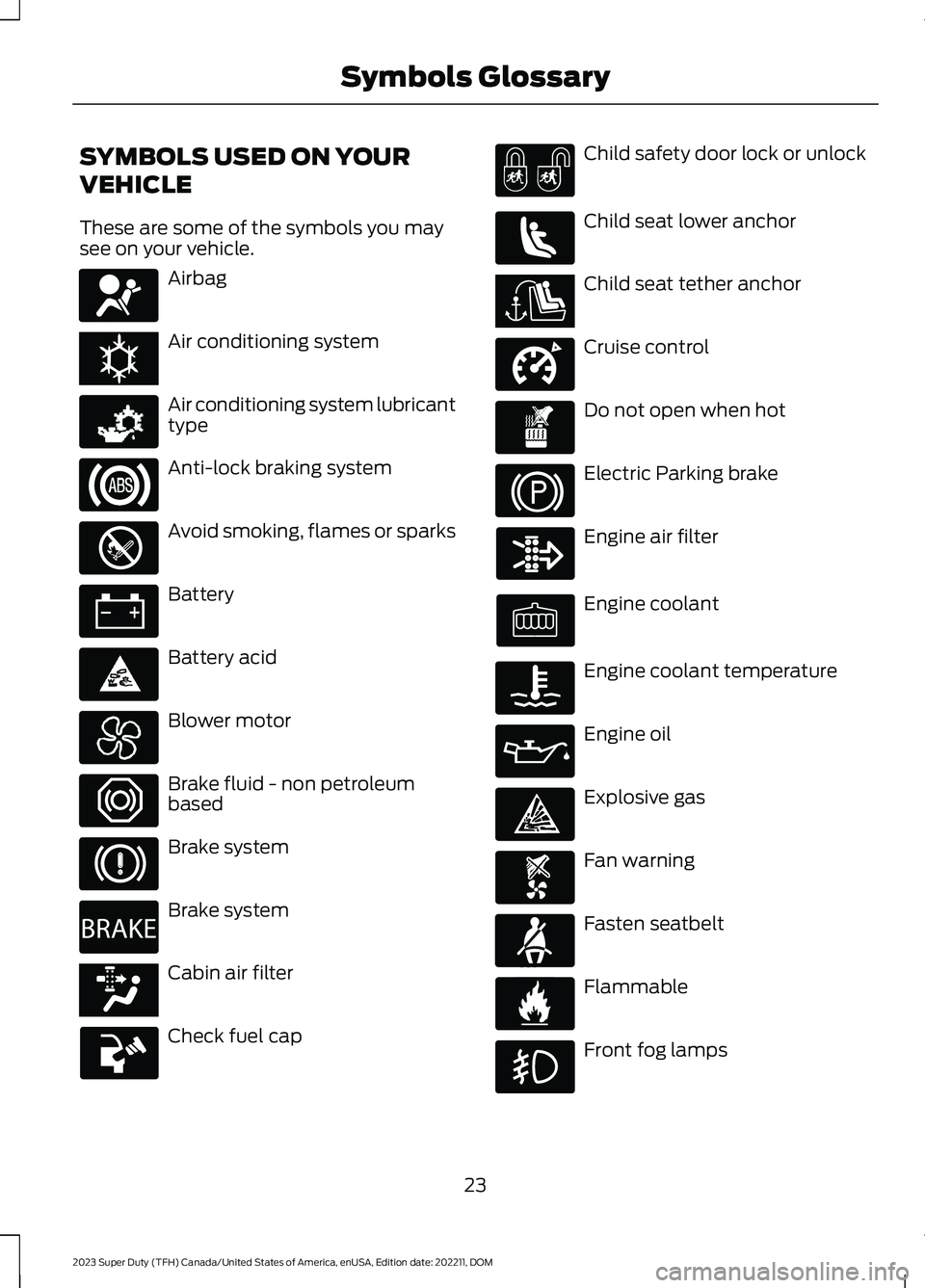
These are some of the symbols you maysee on your vehicle.
Airbag
Air conditioning system
Air conditioning system lubricanttype
Anti-lock braking system
Avoid smoking, flames or sparks
Battery
Battery acid
Blower motor
Brake fluid - non petroleumbased
Brake system
Brake system
Cabin air filter
Check fuel cap
Child safety door lock or unlock
Child seat lower anchor
Child seat tether anchor
Cruise control
Do not open when hot
Electric Parking brake
Engine air filter
Engine coolant
Engine coolant temperature
Engine oil
Explosive gas
Fan warning
Fasten seatbelt
Flammable
Front fog lamps
23
2023 Super Duty (TFH) Canada/United States of America, enUSA, Edition date: 202211, DOMSymbols GlossaryE67017 E162384 E231157 E67020 E139220 E67021 E139227 E139209 E67024 E270480 E139223 E139211 E141128 E332905 E139219 E139212 E103308 E67022 E139221 E139228 E71880 E231160
Page 30 of 738
WARNING: Do not connectwireless plug-in devices to the data linkconnector. Unauthorized third partiescould gain access to vehicle data andimpair the performance of safety relatedsystems. Only allow repair facilities thatfollow our service and repair instructionsto connect their equipment to the datalink connector.
We respect your privacy and arecommitted to protecting it. Theinformation contained in this publicationwas correct at the time of release, but astechnology rapidly changes, werecommend that you visit the local Fordwebsite for the latest information.
Your vehicle has electronic control unitsthat have data recording functionality andthe ability to permanently or temporarilystore data. This data could includeinformation on the condition and status ofyour vehicle, vehicle maintenancerequirements, events and malfunctions.The types of data that can be recorded aredescribed in this section. Some of the datarecorded is stored in event logs or errorlogs.
Note:Error logs are reset following a serviceor repair.
Note:We may provide information inresponse to requests from law enforcement,other government authorities and thirdparties acting with lawful authority orthrough a legal process. Such informationcould be used by them in legal proceedings.
Data recorded includes, for example:
•Operating states of systemcomponents, for example fuel level,tire pressure and battery charge level.
•Vehicle and component status, forexample wheel speed, deceleration,lateral acceleration and seatbeltstatus.
•Events or errors in essential systems,for example headlamps and brakes.
•System responses to driving situations,for example airbag deployment andstability control.
•Environmental conditions, for exampletemperature.
Some of this data, when used incombination with other information, forexample an accident report, damage to avehicle or eyewitness statements, couldbe associated with a specific person.
Services That We Provide
If you use our services, we collect and usedata, for example account information,vehicle location and driving characteristics,that could identify you. We transmit thisdata through a dedicated, protectedconnection. We only collect and use datato enable your use of our services to whichyou have subscribed, with your consent orwhere permitted by law. For additionalinformation, see the terms and conditionsof the services to which you havesubscribed.
For additional information about ourprivacy policy, refer to the local Fordwebsite.
Services That Third PartiesProvide
We recommend that you review the termsand conditions and data privacyinformation for any services equipped withyour vehicle or to which you subscribe. Wetake no responsibility for services that thirdparties provide.
Where equipped, SiriusXM with 360L coulduse the modem. To disable, turn off theSiriusXM with 360L or Vehicle Connectivitysetting. See Enabling and Disabling theModem (page 548).
26
2023 Super Duty (TFH) Canada/United States of America, enUSA, Edition date: 202211, DOMData Privacy
Page 72 of 738
•A connected Bluetooth® enabledphone must have adequate networkcoverage, battery power and signalstrength.
•The vehicle must have battery powerand be located in the U.S., Canada orin a territory in which 911 is theemergency number.
Note:If any user sets 911 Assist to on or off,that setting applies for all paired phones. If911 Assist is off and the phone connectedto SYNC, an icon displays on the status bar.
Note:Every phone operates differently.While SYNC 911 Assist works with mostcellular phones, some may have troubleusing this feature.
EMERGENCY CALL
LIMITATIONS
The SYNC 911 Assist feature only operatesin the U.S., Canada or in a territory in which911 is the emergency number. The followingare limitations of this feature:
•Your cellular phone or 911 Assisthardware sustains damage in a crash.
•The vehicle's battery or the SYNCsystem has no power.
•The phone(s) thrown from your vehicleare the ones paired and connected tothe system.
911 ASSIST VIDEOS
911 Assist Video Link
68
2023 Super Duty (TFH) Canada/United States of America, enUSA, Edition date: 202211, DOM911 Assist
Page 73 of 738
REMOTE CONTROL
LIMITATIONS
WARNING: Changes ormodifications not expressively approvedby the party responsible for compliancecould void the user's authority to operatethe equipment. The term "IC:" before theradio certification number only signifiesthat Industry Canada technicalspecifications were met.
This device complies with Part 15 of theFCC Rules and with Industry Canadalicense-exempt RSS standard(s).Operation is subject to the following twoconditions: (1) This device may not causeharmful interference, and (2) This devicemust accept any interference received,including interference that may causeundesired operation.
Make sure a valid remote control is within3 ft (1 m) from the front door handles andrear of vehicle.
The system may not function if:
•The remote control remains stationaryfor about a minute.
•The vehicle battery has no charge.
•The remote control battery has nocharge.
•There is interference causing issueswith the remote control frequencies.
•The remote control is too close tometal objects or electronic devices, forexample keys or a cell phone.
USING THE REMOTE CONTROL
Use your remote control to access variousvehicle systems.
Note:The buttons on your remote may varydepending on the vehicle region or options.
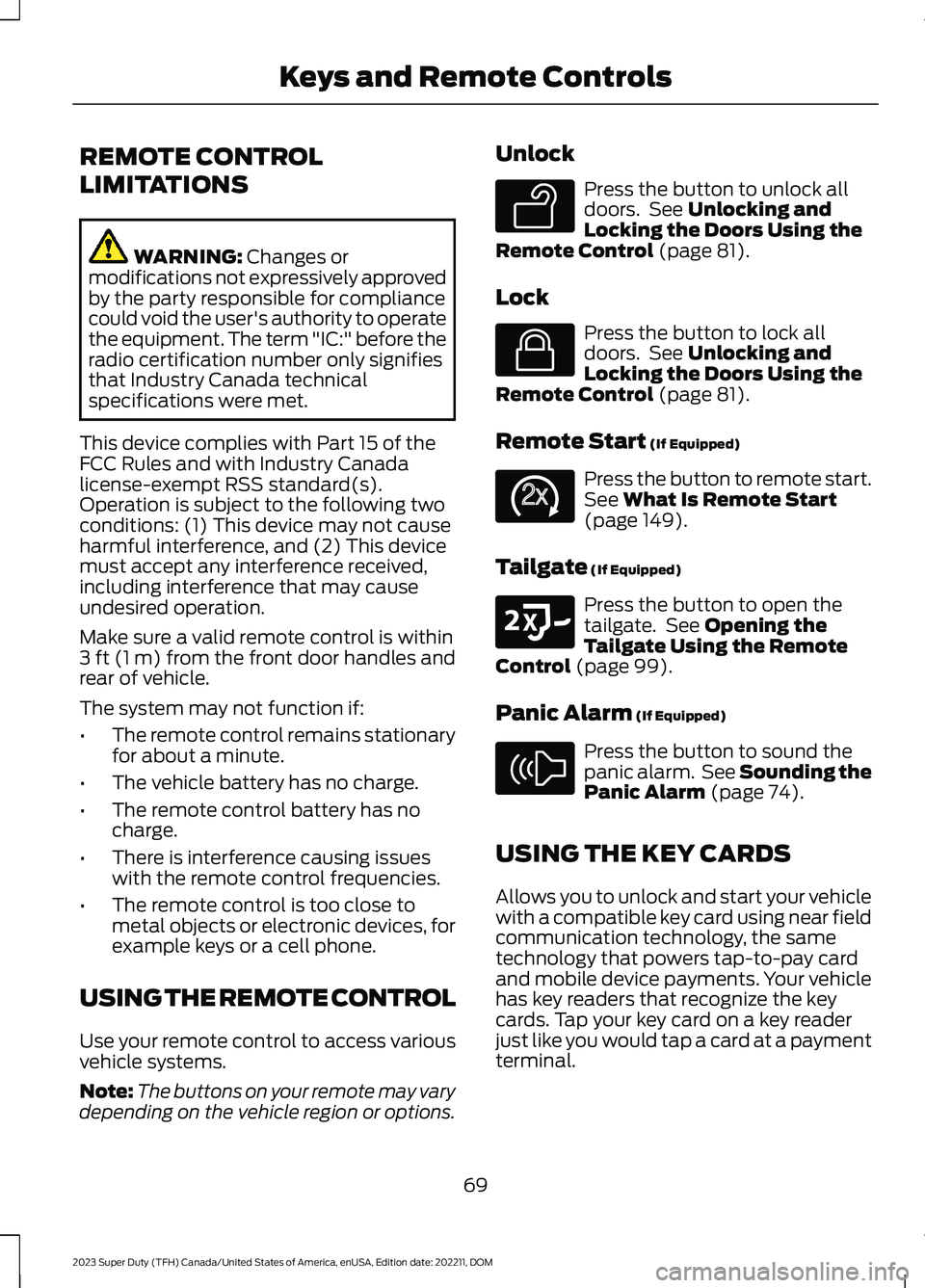
Unlock
Press the button to unlock alldoors. See Unlocking andLocking the Doors Using theRemote Control (page 81).
Lock
Press the button to lock alldoors. See Unlocking andLocking the Doors Using theRemote Control (page 81).
Remote Start (If Equipped)
Press the button to remote start.See What Is Remote Start(page 149).
Tailgate (If Equipped)
Press the button to open thetailgate. See Opening theTailgate Using the RemoteControl (page 99).
Panic Alarm (If Equipped)
Press the button to sound thepanic alarm. See Sounding thePanic Alarm (page 74).
USING THE KEY CARDS
Allows you to unlock and start your vehiclewith a compatible key card using near fieldcommunication technology, the sametechnology that powers tap-to-pay cardand mobile device payments. Your vehiclehas key readers that recognize the keycards. Tap your key card on a key readerjust like you would tap a card at a paymentterminal.
69
2023 Super Duty (TFH) Canada/United States of America, enUSA, Edition date: 202211, DOMKeys and Remote ControlsE138629 E138623 E138625 E191530 E138624
Page 75 of 738
Deleting a Key Card
1.Start your vehicle with any key exceptthe key you want to delete.
2.Press Settings on the touchscreen.
3.Press Vehicle.
4.Press Keys.
5.Press the trash can icon next to the keyyou want to delete.
6.Follow the prompts on thetouchscreen.
Deleting All User Key Cards
1.Start your vehicle with a factory key.
2.Perform a system reset. SeePerforming a System Reset (page584).
Note:If you have created digital keys, thereset deletes those as well.
USING DIGITAL KEY (IF EQUIPPED)
Digital key allows you to unlock and startyour vehicle with a compatible smartphoneor smartwatch. Devices set up as digitalkeys communicate with key readers in yourvehicle using near field communicationtechnology, the same technology thatpowers tap-to-pay card and mobile devicepayments. Tap your device on a key readerjust like you would tap your device at apayment terminal.
Limitations
•The key reader only recognizes a digitalkey when your device with a digital keyis within 1.6 in (4 cm) of the key reader.A digital key may not be recognized ifthe device is more than 1.6 in (4 cm)away from the key reader.
•Near field communication must beenabled on your device.
•You can still use your device to lock,unlock and start your vehicle for aperiod of time after your device'sbattery has been depleted. Check withyour device's manufacturer for detailson how to operate your digital key onlow power.
•You can enable additionalauthentication for your digital key onyour device. When enabled, your devicerequires authentication each time anaction is requested, such as unlockingthe doors or starting your vehicle. Whenyou enable additional authenticationon your device, you cannot use yourdevice when the battery is depleted.
Setting Up Digital Key
There are two types of digital keys: theowner key and shared keys. There can onlybe one owner key per vehicle. Make sureyou setup the first digital key on yourdevice, also known as the owner phone.By default, the first digital key you set upbecomes the owner key.
You can set up a digital key through theFordPass app.
1.In the FordPass app, select yourvehicle.
2.Select Set Up Digital Key and followthe instructions in FordPass.
Note:You need two factory keys in yourvehicle to complete the setup of a digitalkey. Factory keys are the keys that camewith your vehicle.
Changing the Owner Phone
You can change the owner phone throughthe FordPass app.
1.In the FordPass app, select yourvehicle.
2.Select Change Owner Phone andfollow the instructions in FordPass.
71
2023 Super Duty (TFH) Canada/United States of America, enUSA, Edition date: 202211, DOMKeys and Remote Controls
Page 77 of 738
2.
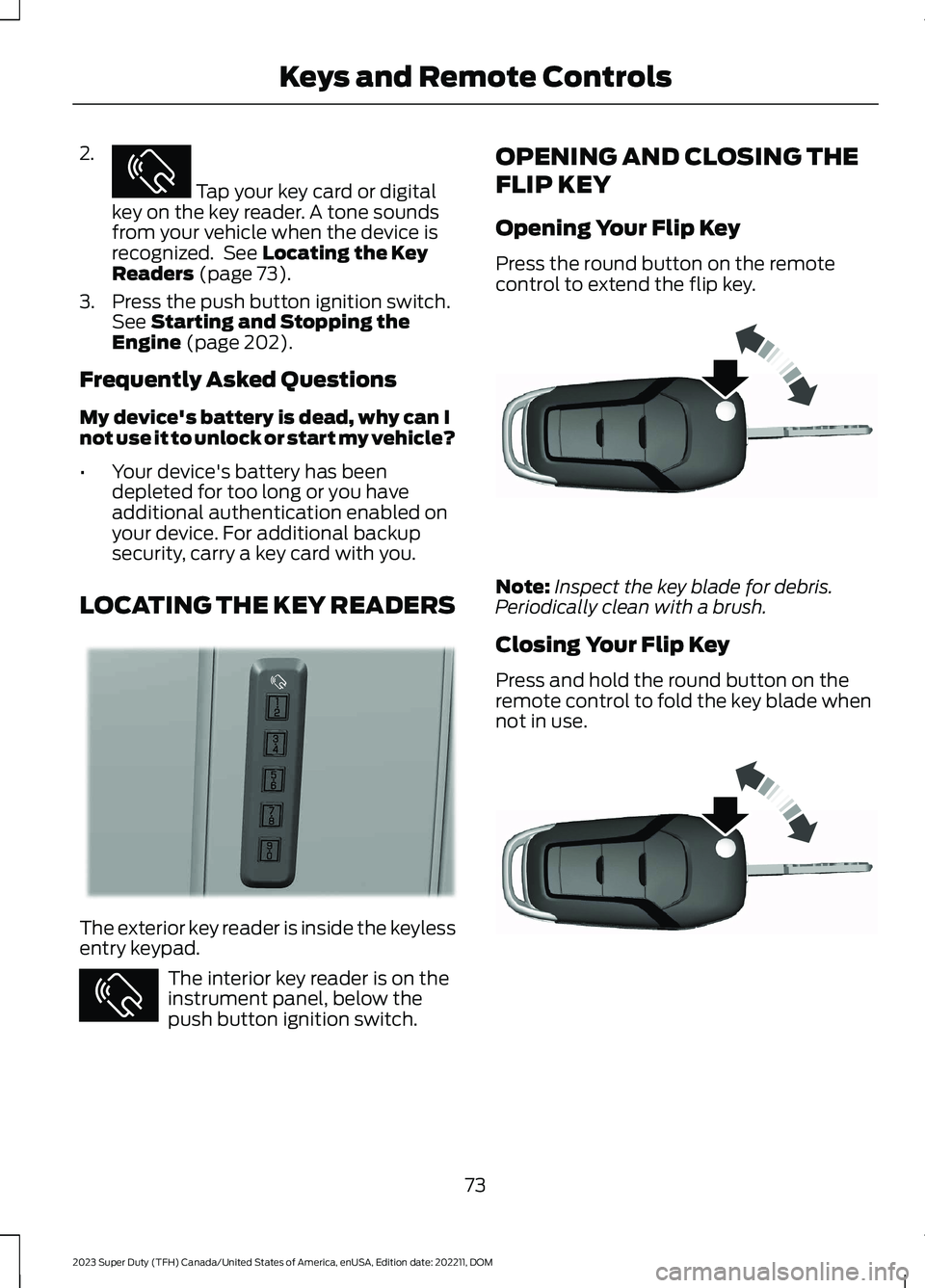
Tap your key card or digitalkey on the key reader. A tone soundsfrom your vehicle when the device isrecognized. See Locating the KeyReaders (page 73).
3.Press the push button ignition switch.See Starting and Stopping theEngine (page 202).
Frequently Asked Questions
My device's battery is dead, why can Inot use it to unlock or start my vehicle?
•Your device's battery has beendepleted for too long or you haveadditional authentication enabled onyour device. For additional backupsecurity, carry a key card with you.
LOCATING THE KEY READERS
The exterior key reader is inside the keylessentry keypad.
The interior key reader is on theinstrument panel, below thepush button ignition switch.
OPENING AND CLOSING THE
FLIP KEY
Opening Your Flip Key
Press the round button on the remotecontrol to extend the flip key.
Note:Inspect the key blade for debris.Periodically clean with a brush.
Closing Your Flip Key
Press and hold the round button on theremote control to fold the key blade whennot in use.
73
2023 Super Duty (TFH) Canada/United States of America, enUSA, Edition date: 202211, DOMKeys and Remote ControlsE368487 E368488 E368487 E191532 E191532