key FORD SUPER DUTY 2023 Workshop Manual
[x] Cancel search | Manufacturer: FORD, Model Year: 2023, Model line: SUPER DUTY, Model: FORD SUPER DUTY 2023Pages: 738, PDF Size: 18.49 MB
Page 216 of 738
Why can I not start the engine?
•If you cannot start the engine, do thefollowing:
1.Fully press the brake pedal or theclutch pedal.
Note:Make sure that the parking brake isapplied.
Note:Make sure that the transmission is inpark (P) or neutral (N).
2.Press the push button ignition switchuntil the engine starts.
Why does the system not detect apassive key?
•If the system does not detect a passivekey and you are unable to start theengine, insert the passive key into thebackup position and press the pushbutton ignition switch to start theengine. See Accessing the PassiveKey Backup Position (page 209).
STARTING AND STOPPING THEENGINE – FREQUENTLY ASKEDQUESTIONS - GASOLINE,VEHICLES WITHOUT: PUSHBUTTON START
Why is the engine idle speed highwhen I am starting the engine?
•The speed at which the engine idlesimmediately after starting is optimizedto minimize vehicle emissions andmaximize cabin comfort and fueleconomy.
Why does the engine not crank?
•You can only attempt to start theengine for a limited amount of timebefore the starting system temporarilydisables. If you exceed the starting timelimit, a message may appear and youcannot attempt to start the engine forat least 15 minutes.
Why do I experience differentdriving characteristics?
•If you disconnect the battery, yourvehicle may exhibit some unusualdriving characteristics forapproximately 5 mi (8 km) after youreconnect it. This is because the enginemanagement system must realignitself with the engine. You candisregard any unusual drivingcharacteristics during this period.
Why can I not start the engine?
If you cannot start the engine after 3attempts, wait 10 seconds and do thefollowing:
1.Fully press the brake pedal or theclutch pedal.
Note:Make sure that the parking brake isapplied.
Note:Make sure that the transmission is inpark (P) or neutral (N).
2.Fully press the accelerator pedal andhold it there.
3.Turn the key to position III and waituntil the engine stops cranking.
4.Release the accelerator pedal.
5.Turn the key to position III.
212
2023 Super Duty (TFH) Canada/United States of America, enUSA, Edition date: 202211, DOMStarting and Stopping the EngineE357998 E322354
Page 217 of 738
STARTING AND STOPPING THEENGINE – FREQUENTLY ASKEDQUESTIONS - GASOLINE,VEHICLES WITH: PUSH BUTTONSTART
Why is the engine speed high whenI am starting the engine?
•The speed at which the engine idlesimmediately after starting is optimizedto minimize vehicle emissions andmaximize cabin comfort and fueleconomy.
Why does the engine not crank?
•You can only attempt to start theengine for a limited amount of timebefore the starting system temporarilydisables. If you exceed the starting timelimit, a message may appear and youcannot attempt to start the engine forat least 15 minutes.
Why do I experience differentdriving characteristics?
•If you disconnect the battery, yourvehicle may exhibit some unusualdriving characteristics forapproximately 5.0 mi (8 km) after youreconnect it. This is because the enginemanagement system must realignitself with the engine. You candisregard any unusual drivingcharacteristics during this period.
Why can I not start the engine?
If you cannot start the engine after 3attempts, wait 10 seconds and do thefollowing:
1.Fully press the brake pedal or theclutch pedal.
Note:Make sure that the parking brake isapplied.
Note:Make sure that the transmission is inpark (P) or neutral (N).
2.Fully press the accelerator pedal andhold it there.
3.Press the push button ignition switch.
Note:The engine cranks for a short periodof time and then it stops.
4.Release the accelerator pedal.
5.Press the push button ignition switch.
Why does the system not detect apassive key?
•If the system does not detect a passivekey and you are unable to start theengine, insert the passive key into thebackup position and press the pushbutton ignition switch to start theengine. See Accessing the PassiveKey Backup Position (page 209).
STARTING AND STOPPING
THE ENGINE VIDEOS
Push-Button Start: F-Series Diesel
213
2023 Super Duty (TFH) Canada/United States of America, enUSA, Edition date: 202211, DOMStarting and Stopping the EngineE357998
Page 238 of 738
AUTOMATIC TRANSMISSION
PRECAUTIONS
WARNING: Apply the parkingbrake, shift into park (P), switch theignition off and remove the key beforeyou leave your vehicle. Failure to followthis instruction could result in personalinjury or death.
WARNING: When your vehicle isstationary, keep the brake pedal fullypressed when shifting gears. Failure tofollow this instruction could result inpersonal injury, death or propertydamage.
WARNING: Do not apply the brakepedal and accelerator pedalsimultaneously. Applying both pedalssimultaneously for more than a fewseconds will limit engine performance,which may result in difficulty maintainingspeed in traffic and could lead to seriousinjury.
AUTOMATIC TRANSMISSION
POSITIONS
PARK (P)
WARNING: Shift into park (P) onlywhen your vehicle is stationary.
In park (P) power is not transmitted to thedriven wheels.
Note:A tone sounds if you attempt to exityour vehicle without the vehicle in park (P).
Note:Your vehicle may not shift out of park(P) if the 12 V battery has run out of charge.
Note:Your vehicle may not shift out of park(P) if a fuse is blown.
Note:Your vehicle may not shift out of park(P) unless the key or remote control is insideyour vehicle.
Note:The electronic parking brake couldapply when you power your vehicle on withthe selector in park (P).
Note:The electronic parking brake couldapply if you shift to park (P) without fullypressing the brake pedal.
Note:The electronic parking brake couldapply if you shift to park (P) on a slope.
Note:Do not manually release the parkingbrake when the selector is in park (P). SeeAutomatically Releasing the ElectricParking Brake (page 254).
REVERSE (R)
WARNING: Shift into reverse (R)only when your vehicle is stationary.
In reverse (R) power is transmitted to thedriven wheels.
NEUTRAL (N)
WARNING: In neutral (N) yourvehicle is free to roll.
In neutral (N) power is not transmitted tothe driven wheels.
DRIVE (D)
In drive (D) power is transmitted to thedriven wheels.
234
2023 Super Duty (TFH) Canada/United States of America, enUSA, Edition date: 202211, DOMAutomatic Transmission
Page 243 of 738
FOUR-WHEEL DRIVE
PRECAUTIONS
WARNING: Vehicles with a highercenter of gravity (utility and four-wheeldrive vehicles) handle differently thanvehicles with a lower center of gravity(passenger cars). Avoid sharp turns,excessive speed and abrupt steering inthese vehicles. Failure to drive cautiouslyincreases the risk of losing control of yourvehicle, vehicle rollover, personal injuryand death.
WARNING: Do not becomeoverconfident in the ability of four-wheeldrive vehicles. Although a four-wheeldrive vehicle may accelerate better thana two-wheel drive vehicle in low tractionsituations, it won't stop any faster thantwo-wheel drive vehicles. Always driveat a safe speed.
Truck and utility vehicles can differ fromsome other vehicles. Your vehicle could behigher to allow it to travel over roughterrain without getting stuck or damagingunderbody components. The differencesthat make your vehicle so versatile alsomake it handle differently than an ordinarypassenger car. Always maintain steeringwheel control, especially in rough terrain.Since sudden changes in terrain can resultin abrupt steering wheel motion, make sureyou grip the steering wheel from theoutside. Do not grip the spokes. Drivecautiously to avoid vehicle damage fromconcealed objects such as rocks andstumps. Drive slower in strong crosswindswhich can affect the normal steeringcharacteristics of your vehicle. Beextremely careful when driving onpavement made slippery by loose sand,water, gravel, snow or ice.
Note:Your vehicle may come with a frontair dam that can become damaged (due toreduced ground clearance) when taking yourvehicle off-road. This air dam can be takenoff by removing 15 bolts.
Parking
WARNING: If the parking brake isfully released, but the brake warninglamp remains illuminated, the brakesmay not be working properly. Have yourvehicle checked as soon as possible.
WARNING: Apply the parkingbrake, shift into park (P), switch theignition off and remove the key beforeyou leave your vehicle. Failure to followthis instruction could result in personalinjury or death.
On some four-wheel drive vehicles, whenthe transfer case is in the neutral (N)position, the engine and transmissiondisconnects from the rest of the driveline.Therefore, your vehicle is free to roll evenif the automatic transmission is in park (P).Do not leave the vehicle unattended withthe transfer case in the neutral (N)position. Always set the parking brake fullyand turn off the ignition when leaving yourvehicle.
FOUR-WHEEL DRIVE
LIMITATIONS
Do not use four-wheel drive high orfour-wheel drive low mode on dry, hardsurface roads. Doing so can produceexcessive noise, increase tire wear and candamage drive components. Four-wheeldrive high or four-wheel drive low modesare intended for consistently slippery orloose surfaces. Use of four low mode onthese surfaces could produce some noise,such as occasional clunks, but should not
239
2023 Super Duty (TFH) Canada/United States of America, enUSA, Edition date: 202211, DOMFour-Wheel Drive (If Equipped)
Page 257 of 738
WHAT IS THE ELECTRIC
PARKING BRAKE
The electric parking brake is used to holdyour vehicle on slopes and flat roads.
APPLYING THE ELECTRIC
PARKING BRAKE
WARNING: Apply the parkingbrake, shift into park (P), switch theignition off and remove the key beforeyou leave your vehicle. Failure to followthis instruction could result in personalinjury or death.
WARNING: If you drive extendeddistances with the parking brake applied,you could cause damage to the brakesystem.
WARNING: The electric parkingbrake does not operate if the vehiclebattery has run out of charge.
The switch is on the lower partof the instrument panel.
Pull the switch up to apply the electricparking brake. The red warning lampflashes, then steadily illuminates when theparking brake is applied.
Note:You can apply the electric parkingbrake when the ignition is off.
Note:The electric parking brake couldautomatically apply when park (P) isselected. See Park (P) (page 234).
APPLYING THE ELECTRIC
PARKING BRAKE IN AN
EMERGENCY
You can use the electric parking brake toslow or stop your vehicle in an emergency.
Pull the switch up and hold it.
The red warning lamp illuminates, a tonesounds and the stoplamps turn on whenyou use the electric parking brake in anemergency.
The electric parking brake continues toslow your vehicle down unless you releasethe switch.
Note:Do not apply the electric parkingbrake when your vehicle is moving, exceptin an emergency. If you repeatedly use theelectric parking brake to slow or stop yourvehicle, you could cause damage to thebrake system.
MANUALLY RELEASING THE
ELECTRIC PARKING BRAKE
1.Switch the ignition on.
2.Press and hold the brake pedal.
3.Push the switch down.
The red warning lamp turns off.
Pulling Away on a Hill When Towing aTrailer
1.Press and hold the brake pedal.
2.Pull the switch upward and hold it.
3.Shift into gear.
4.Press the accelerator pedal until enginehas developed sufficient torque toprevent your vehicle from rolling downthe hill.
5.Release the switch and pull away in anormal manner.
253
2023 Super Duty (TFH) Canada/United States of America, enUSA, Edition date: 202211, DOMElectric Parking BrakeE267156
Page 309 of 738
The indicator appears in the instrumentcluster display. When the system is on, thecolor of the indicator changes to indicatethe system status.
You can override the system at any timeby steering your vehicle.
Note:The correct requirements must bemet before you can switch the system on.See Lane Centering Requirements (page304).
Enabling and Disabling LaneCentering
1.Press Features on the touchscreen.
2.Press Driver Assistance.
3.Press Cruise Control.
4.Press Lane Centering Assist.
LANE CENTERING ALERTS
You must keep your hands on the steeringwheel at all times.
When the system is active and detects nosteering activity for a period of time, thesystem alerts you to put your hands on thesteering wheel. If you do not reactappropriately to the warnings the adaptivecruise control with lane centering systemcancels and slows your vehicle down toidle speeds while maintaining steeringcontrol. See Lane Centering AutomaticCancellation (page 305).
The system also alerts you if your vehiclecrosses lane line markings withoutdetected steering activity.
Note:The system could detect a light gripor light touch on the steering wheel ashands-off driving.
LANE CENTERING AUTOMATICCANCELLATION
When an external condition cancels thesystem, and your hands are on the steeringwheel, a tone sounds and a messageappears in the instrument cluster display.
When an external condition cancels thesystem, and your hands are not on thesteering wheel, the system immediatelyalerts you to take control of the vehicle. Ifthis alert is ignored, the system slows thevehicle while maintaining steeringassistance when lane markings areavailable. When no lane markings areavailable, the vehicle comes to a stop.
If your vehicle starts to slowdown after system cancellation,you must take full control of thevehicle. To re-enable adaptive cruisecontrol with lane centering aftercancellation, press and release the resumebutton.
Automatic cancellation can also occur if:
•The lane becomes too wide or narrow.
•The system cannot detect valid lanemarkings.
•Lane markings cross over one another.
•The curve of the road is too sharp.
Note:If your vehicle slows down due to yourinactivity twice within a key cycle, thesystem disables. To reset the system, whenthe vehicle is stationary, return the gearselector to park (P) and turn the vehicle off.Then, restart the vehicle with your foot onthe brake pedal.
LANE CENTERING MANUALCANCELLATION
When you perform the following actions,adaptive cruise control with lane centeringwill cancel:
305
2023 Super Duty (TFH) Canada/United States of America, enUSA, Edition date: 202211, DOMAdaptive Cruise Control (If Equipped)E308130
Page 344 of 738
Intersection Assist (If Equipped)
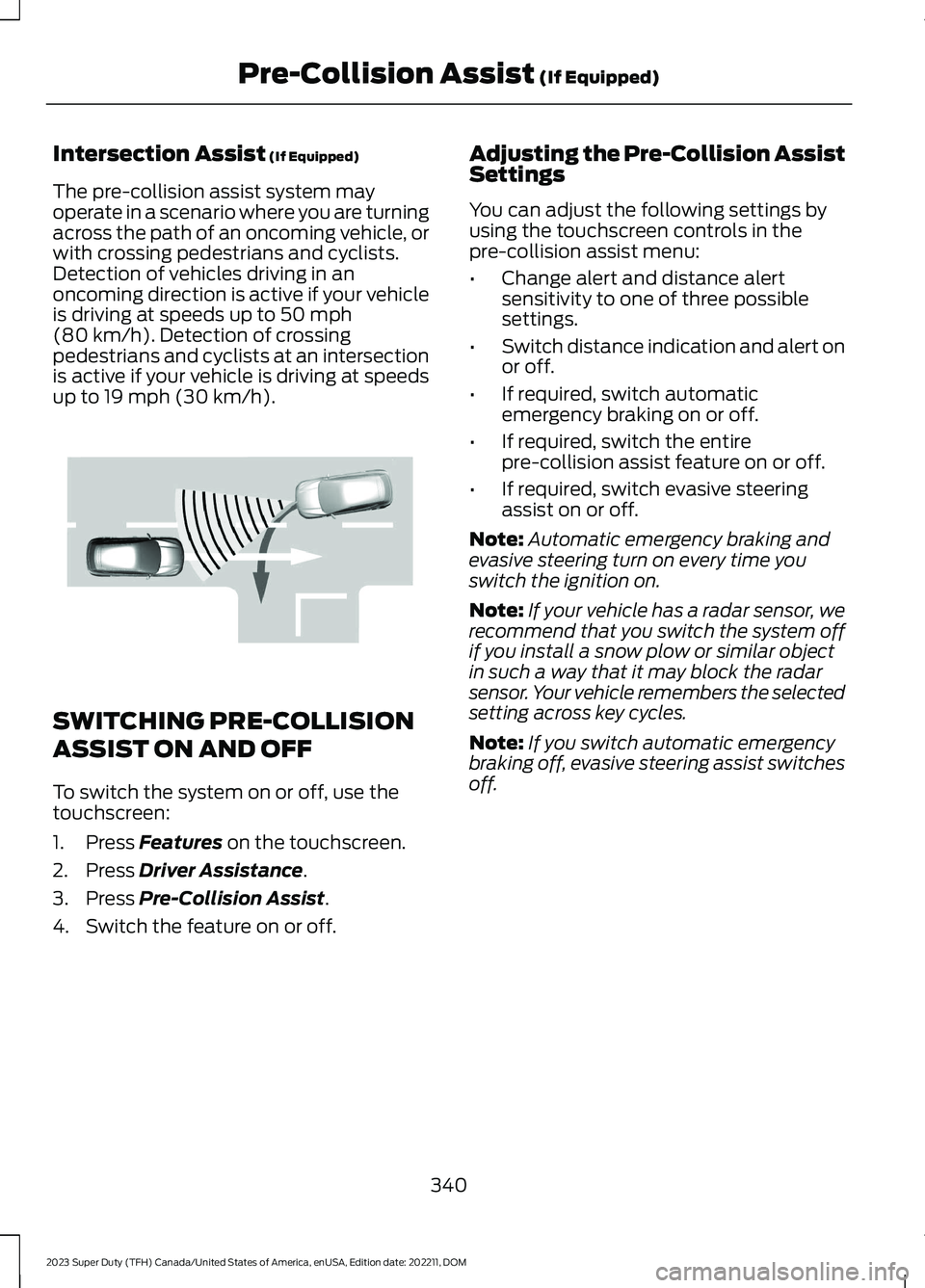
The pre-collision assist system mayoperate in a scenario where you are turningacross the path of an oncoming vehicle, orwith crossing pedestrians and cyclists.Detection of vehicles driving in anoncoming direction is active if your vehicleis driving at speeds up to 50 mph(80 km/h). Detection of crossingpedestrians and cyclists at an intersectionis active if your vehicle is driving at speedsup to 19 mph (30 km/h).
SWITCHING PRE-COLLISION
ASSIST ON AND OFF
To switch the system on or off, use thetouchscreen:
1.Press Features on the touchscreen.
2.Press Driver Assistance.
3.Press Pre-Collision Assist.
4.Switch the feature on or off.
Adjusting the Pre-Collision AssistSettings
You can adjust the following settings byusing the touchscreen controls in thepre-collision assist menu:
•Change alert and distance alertsensitivity to one of three possiblesettings.
•Switch distance indication and alert onor off.
•If required, switch automaticemergency braking on or off.
•If required, switch the entirepre-collision assist feature on or off.
•If required, switch evasive steeringassist on or off.
Note:Automatic emergency braking andevasive steering turn on every time youswitch the ignition on.
Note:If your vehicle has a radar sensor, werecommend that you switch the system offif you install a snow plow or similar objectin such a way that it may block the radarsensor. Your vehicle remembers the selectedsetting across key cycles.
Note:If you switch automatic emergencybraking off, evasive steering assist switchesoff.
340
2023 Super Duty (TFH) Canada/United States of America, enUSA, Edition date: 202211, DOMPre-Collision Assist (If Equipped)E309750
Page 361 of 738
INSTALLING AND REMOVING THEPICKUP BED TIE-DOWN CLEATS
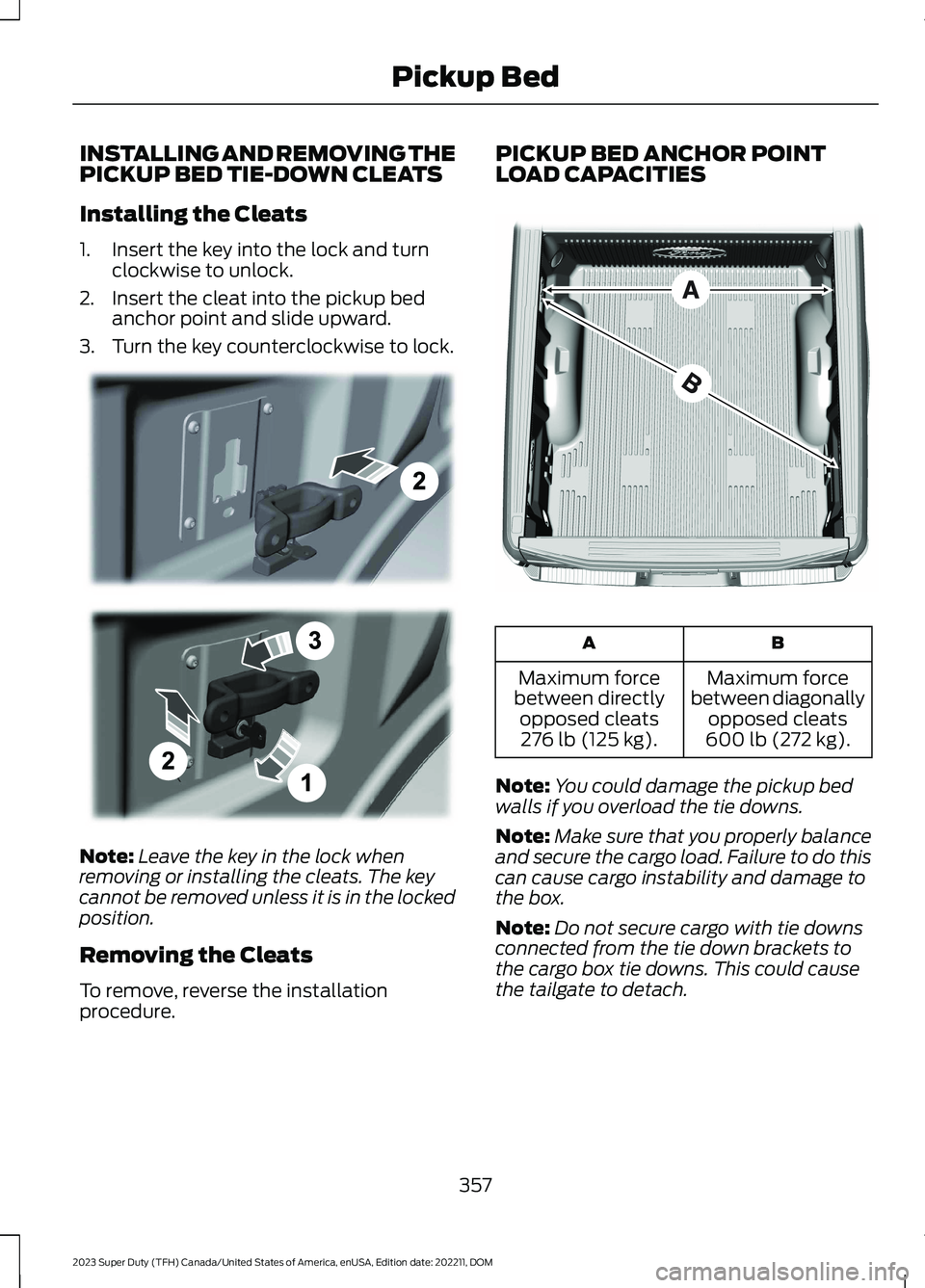
Installing the Cleats
1.Insert the key into the lock and turnclockwise to unlock.
2.Insert the cleat into the pickup bedanchor point and slide upward.
3.Turn the key counterclockwise to lock.
Note:Leave the key in the lock whenremoving or installing the cleats. The keycannot be removed unless it is in the lockedposition.
Removing the Cleats
To remove, reverse the installationprocedure.
PICKUP BED ANCHOR POINTLOAD CAPACITIES
BA
Maximum forcebetween diagonallyopposed cleats600 lb (272 kg).
Maximum forcebetween directlyopposed cleats276 lb (125 kg).
Note:You could damage the pickup bedwalls if you overload the tie downs.
Note:Make sure that you properly balanceand secure the cargo load. Failure to do thiscan cause cargo instability and damage tothe box.
Note:Do not secure cargo with tie downsconnected from the tie down brackets tothe cargo box tie downs. This could causethe tailgate to detach.
357
2023 Super Duty (TFH) Canada/United States of America, enUSA, Edition date: 202211, DOMPickup BedE327575 E327576
Page 388 of 738
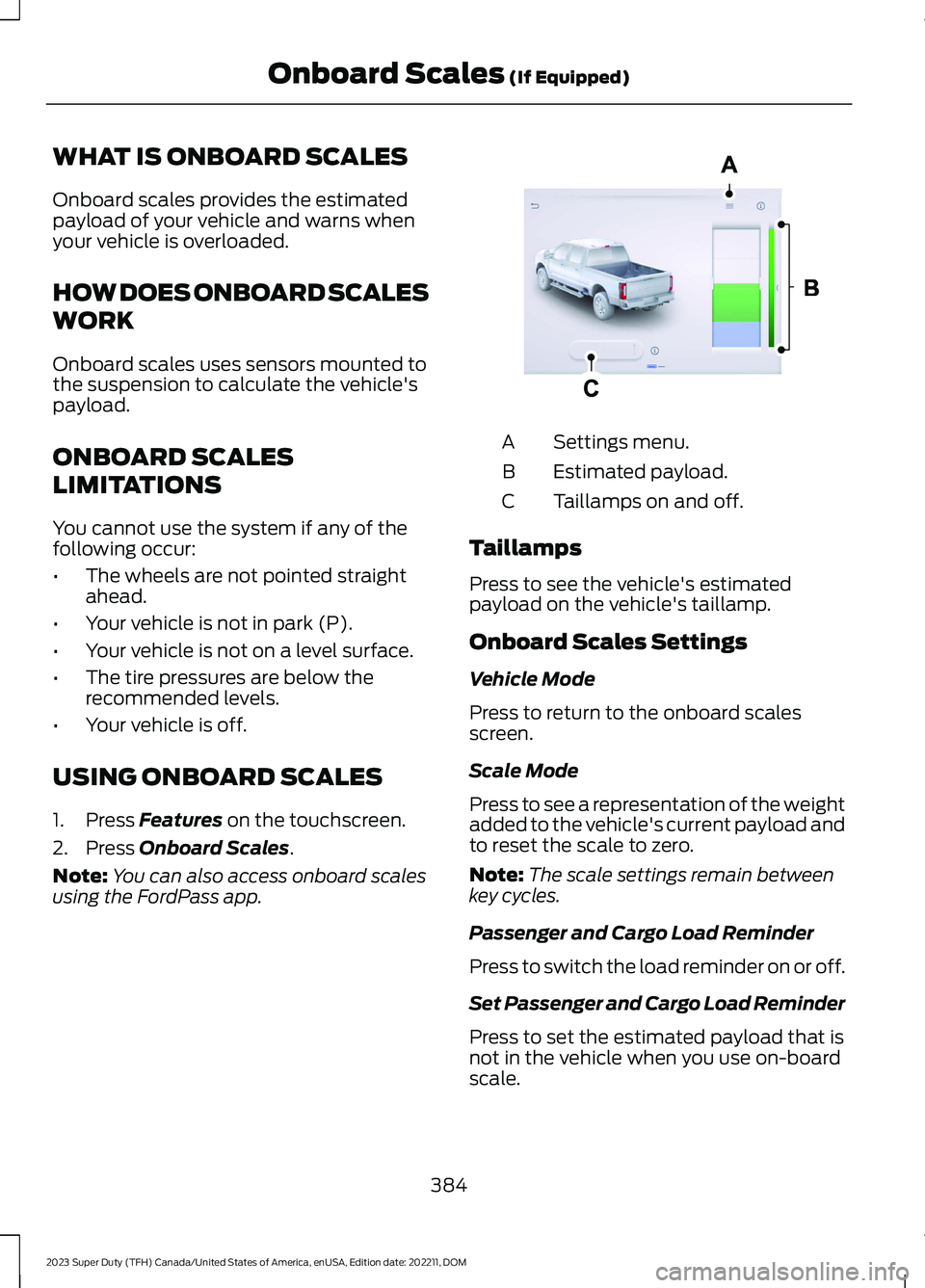
WHAT IS ONBOARD SCALES
Onboard scales provides the estimatedpayload of your vehicle and warns whenyour vehicle is overloaded.
HOW DOES ONBOARD SCALES
WORK
Onboard scales uses sensors mounted tothe suspension to calculate the vehicle'spayload.
ONBOARD SCALES
LIMITATIONS
You cannot use the system if any of thefollowing occur:
•The wheels are not pointed straightahead.
•Your vehicle is not in park (P).
•Your vehicle is not on a level surface.
•The tire pressures are below therecommended levels.
•Your vehicle is off.
USING ONBOARD SCALES
1.Press Features on the touchscreen.
2.Press Onboard Scales.
Note:You can also access onboard scalesusing the FordPass app.
Settings menu.A
Estimated payload.B
Taillamps on and off.C
Taillamps
Press to see the vehicle's estimatedpayload on the vehicle's taillamp.
Onboard Scales Settings
Vehicle Mode
Press to return to the onboard scalesscreen.
Scale Mode
Press to see a representation of the weightadded to the vehicle's current payload andto reset the scale to zero.
Note:The scale settings remain betweenkey cycles.
Passenger and Cargo Load Reminder
Press to switch the load reminder on or off.
Set Passenger and Cargo Load Reminder
Press to set the estimated payload that isnot in the vehicle when you use on-boardscale.
384
2023 Super Duty (TFH) Canada/United States of America, enUSA, Edition date: 202211, DOMOnboard Scales (If Equipped)E390703
Page 403 of 738
What does it mean if the systemdisplays that it is not available?
There could be a sub-system that thesystem uses that is not correctlyoperating or there could be a batteryvoltage issue. If the system continuesto display it is not available, visit yourauthorized dealer to have your vehiclechecked.
What does it mean if the systemdisplays that driving is required toinitialize steering?
The steering system needs to learninternal parameters to fully turn on thefeature. Drive your vehicle straightforward above 25 mph (40 km/h) forapproximately 5 minutes. This couldalso occur when your vehicle is new,there is a battery voltage issue or if thesteering system has been serviced.
What does it mean if the system doesnot detect a trailer when configuredwith a sensor?
Verify that the sensor is properlyconnected. See Trailer SensorInstallation (page 388). Repeatcalibration on a different route if youhave verified sensor installation.
What does it mean if the systemrequires you to pull forward toinitialize?
This occurs when the vehicle has notmoved during the current key cycleafter you connect and select the trailerin the touchscreen or you operate thesystem at speeds below 1 mph(1 km/h) for an extended period oftime. Drive forward above 2 mph(3 km/h) and the system indicateswhen it initializes.
What does it mean if the trailer is at itsmaximum angle or the systemdeactivated by trailer angle?
You are at the maximum controllabletrailer angle for the system. Place yourvehicle in drive (D) and pull forward toget the truck and trailer back to anin-line position. If this messageconsistently displays, this couldindicate the sensor is incorrectlyinstalled, the trailer needs to berecalibrated or the drawbar or thetrailer dimensions are outside of thesupported range. The system isdesigned to work with drawbars thathave a license plate to hitch ball centermeasurement of 9–18 in (23–46 cm)when installed. The system is designedto work with trailers that have a hitchpoint to center of the axle or axlesmeasurement of 6–33 ft(1.85–10.05 m). Do not attempt to usedrawbars or trailers that have a lengthoutside of this range as the systemperformance degrades and couldcause improper system function.Check that the correct trailer isselected in the touchscreen. Verify thesensor is installed according to theinstructions included in the sensor kitand check that the drawbar and thetrailer dimensions are within theallowed range. Then, delete the trailerfrom the system and repeat the setupprocess to calibrate the trailer.
399
2023 Super Duty (TFH) Canada/United States of America, enUSA, Edition date: 202211, DOMTrailer Backup Assistance (If Equipped)