key FORD SUPER DUTY 2023 Manual PDF
[x] Cancel search | Manufacturer: FORD, Model Year: 2023, Model line: SUPER DUTY, Model: FORD SUPER DUTY 2023Pages: 738, PDF Size: 18.49 MB
Page 516 of 738
6.Use the ignition key to open the lock atthe rear bumper.
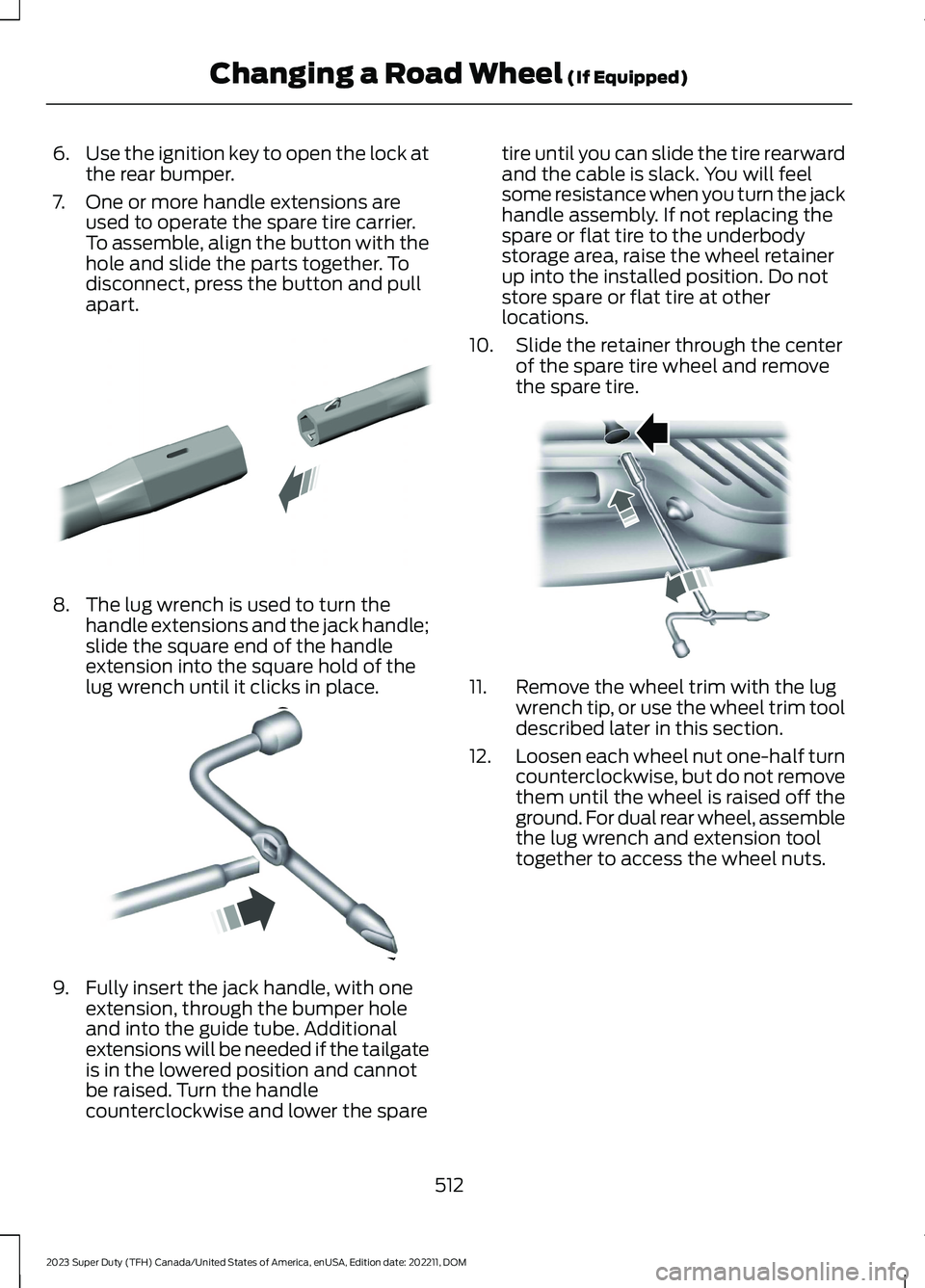
7.One or more handle extensions areused to operate the spare tire carrier.To assemble, align the button with thehole and slide the parts together. Todisconnect, press the button and pullapart.
8.The lug wrench is used to turn thehandle extensions and the jack handle;slide the square end of the handleextension into the square hold of thelug wrench until it clicks in place.
9.Fully insert the jack handle, with oneextension, through the bumper holeand into the guide tube. Additionalextensions will be needed if the tailgateis in the lowered position and cannotbe raised. Turn the handlecounterclockwise and lower the spare
tire until you can slide the tire rearwardand the cable is slack. You will feelsome resistance when you turn the jackhandle assembly. If not replacing thespare or flat tire to the underbodystorage area, raise the wheel retainerup into the installed position. Do notstore spare or flat tire at otherlocations.
10.Slide the retainer through the centerof the spare tire wheel and removethe spare tire.
11.Remove the wheel trim with the lugwrench tip, or use the wheel trim tooldescribed later in this section.
12.Loosen each wheel nut one-half turncounterclockwise, but do not removethem until the wheel is raised off theground. For dual rear wheel, assemblethe lug wrench and extension tooltogether to access the wheel nuts.
512
2023 Super Duty (TFH) Canada/United States of America, enUSA, Edition date: 202211, DOMChanging a Road Wheel (If Equipped)E308882 E162796 E310417
Page 573 of 738
PHONE PRECAUTIONS
WARNING: Driving while distractedcan result in loss of vehicle control, crashand injury. We strongly recommend thatyou use extreme caution when using anydevice that may take your focus off theroad. Your primary responsibility is thesafe operation of your vehicle. Werecommend against the use of anyhand-held device while driving andencourage the use of voice-operatedsystems when possible. Make sure youare aware of all applicable local lawsthat may affect the use of electronicdevices while driving.
CONNECTING YOUR PHONE
Go to the settings menu on your device andswitch Bluetooth® on.
Press the phone option on thefeature bar.
1.Press Add Phone.
Note:A prompt alerts you to search for yourvehicle on your cell phone.
2.Select your vehicle on your cell phone.
Note:A number appears on your cell phoneand on the touchscreen.
3.Confirm the number on your cell phonematches the number on thetouchscreen.
Note:The touchscreen indicates that youhave successfully paired your cell phone.
4.Approve phonebook download requeston your cell phone.
PHONE MENU
This menu becomes available after pairinga phone.
Recent Call List
Display and select an entry from a list ofprevious calls.
Contacts
Display a smart search form to look up yourcontacts. Use the List button toalphabetically sort your contacts.
Favorites
Display the list of favorite contacts thatare set up on your phone.
Messaging
Displays the list of text messages to read,listen to, or respond to.
Email
Displays the list of emails to read, listen to,or respond to.
Phone List
Display the list of paired or connecteddevices that you can select.
Note:Up to 12 devices can be stored.
Do Not Disturb
Reject incoming calls and switch ring tonesand alerts off.
Phone Keypad
Directly dial a number.
569
2023 Super Duty (TFH) Canada/United States of America, enUSA, Edition date: 202211, DOMPhone
Page 575 of 738
MAKING AND RECEIVING A
PHONE CALL
Making Calls
To call a number in your contacts,select:
Action and DescriptionMenu Item
You can then select thename of the contact youwant to call. Any numbersstored for that contactdisplay along with anystored contact photos. Youcan then select thenumber that you want tocall. The system begins thecall.
Contacts
To call a number from your recent calls,select:
Action and DescriptionMenu Item
You can then select anentry that you want to call.The system begins the call.
Recent CallList
To call a number from your favorites,select:
Action and DescriptionMenu Item
You can then select anentry that you want to call.The system begins the call.
Favorites
To call a number that is not stored inyour phone, select:
Action and DescriptionMenu Item
Select the digits of thenumber you wish to call.PhoneKeypad
The system begins the call.Call
Pressing the backspace button deletes thelast digit you typed.
Receiving Calls
During an incoming call, an audible tonesounds. Caller information appears in thedisplay if it is available.
To accept the call, select:
Menu Item
Accept
Note:You can also accept the call bypressing the phone button on the steeringwheel.
To reject the call, select:
Menu Item
Reject
Ignore the call by doing nothing. Thesystem logs it as a missed call.
During a Phone Call
During a phone call, the contacts nameand number display on the screen alongwith the call duration.
The phone status items are also visible:
•Signal Strength.
•Battery.
You can select any of the following duringan active phone call:
571
2023 Super Duty (TFH) Canada/United States of America, enUSA, Edition date: 202211, DOMPhone
Page 576 of 738
Item
Immediately end aphone call. You canalso press thebutton on thesteering wheel.
End Call
Press this to accessthe phone keypad.Keypad
Item
MuteYou can switch themicrophone off sothe caller does nothear you.
Transfer the phonecall audio to thecell phone or backto the touchscreen.
Privacy
SENDING AND RECEIVING A TEXT MESSAGE
DescriptionMenu Item
Hear the text message.Hear It
View the text message.View
Call the sender.Call
Reply to the text message with a standard text message.Reply
572
2023 Super Duty (TFH) Canada/United States of America, enUSA, Edition date: 202211, DOMPhone
Page 581 of 738
HOW DO PERSONAL PROFILES
WORK
You can create multiple personal profilesenabling users to personalize vehiclesettings such as seats and mirrors, as wellas non-positional settings like radio,navigation and driver assist systemsettings. Positional settings are saved byholding a memory seat button.Non-positional settings are saved whenyou change a setting while a profile isactive.
ENABLING OR DISABLING
PERSONAL PROFILES
1.Press Settings on the touchscreen.
2.Press Personal Profiles.
3.Switch Personal Profiles on or off.
When enabled:
•Unlocking a door with a remote controlor mobile device that is not linked to adriver profile does not change theactive profile, but remains in the lastknown profile. It does not change thepositional settings.
•Pressing a memory seat button that isnot linked to a driver profile or saved toa preset setting does not change theactive profile, but remains in the lastknown profile. It does not change thepositional settings.
•Pressing a memory seat button that isnot linked to a driver profile but is savedto a preset setting does not change theactive profile, but remains in the lastknown profile. It recalls the positionalsettings that you saved to that memoryseat button.
When disabled:
•Unlocking a door with a remote controlor mobile device does not recall anynon-positional settings but still recallspositional settings from the driverprofile which the remote control ormobile device is linked to.
•Pressing a memory seat button that isnot linked to a driver profile or saved toa preset setting does not change thepositional or non-positional settings.
•Pressing a memory seat button that islinked to a driver profile or has savedto a preset setting recalls the positionalsettings that you saved to that memoryseat button.
CREATING A PERSONAL
PROFILE
You can create one profile for each presetmemory seat button. There is also a guestprofile.
Note:The guest profile consists of existingsettings when there is no driver profilecreated. After you create a driver profile, theguest profile serves as an additional driverprofile.
1.Press Settings on the touchscreen.
2.Press Personal Profiles.
3.Press Add Profile.
4.Follow the prompts on the display.
LINKING OR UNLINKING A
PERSONAL PROFILE
You can link your profile to a remotecontrol, mobile device, or digital key so thatyour settings are activated when you usethe remote control, mobile device, or digitalkey to turn on the vehicle.
577
2023 Super Duty (TFH) Canada/United States of America, enUSA, Edition date: 202211, DOMPersonal Profiles
Page 582 of 738
Remote Control
You can save preset memory positions forup to three remote controls by assigning aremote control to a personal profile.
1.Press Settings on the touchscreen.
2.Press Personal Profiles.
3.Select the profile to link or unlink.
Note:You cannot link a remote control toa guest profile.
4.Select the remote control to link orunlink.
5.Follow the instructions on thetouchscreen.
Note:If more than one linked remotecontrol is in range, the memory functionmoves to the settings of the first key toinitiate a memory recall.
Mobile Device
1.Press Settings on the touchscreen.
2.Press Personal Profiles.
3.Select the profile to link or unlink.
Note:You cannot link a mobile device to aguest profile.
4.Select the mobile device to link orunlink.
Note:The mobile device must be in yourvehicle, and previously set up as a remotecontrol for your vehicle.
5.Follow the instructions on thetouchscreen.
Note:If more than one linked mobile deviceis in range, the memory function moves tothe settings of the first mobile device toinitiate a memory recall.
Digital Key
1.Press Settings on the touchscreen.
2.Press Personal Profiles.
3.Select the profile to link or unlink.
Note:You cannot link a remote control toa guest profile.
4.Press Digital Key.
5.Select the digital key to link or unlink.
6.Follow the instructions on thetouchscreen.
Note:If more than one linked digital key isin range, the memory function moves to thesettings of the first key to initiate a memoryrecall.
SELECTING A PERSONAL
PROFILE
You can select a profile using thetouchscreen or the preset button youselected when you created your profile.
If you use a linked device, such as a remotecontrol or mobile device, the active profileis set to the linked profile.
To change the active profile:
1.Press Settings on the touchscreen.
2.Press Personal Profiles.
3.Select the profile to use.
4.Press Make Profile Active.
DELETING A PERSONAL
PROFILE
1.Press Settings on the touchscreen.
2.Press Personal Profiles.
3.Select the profile to delete.
4.Press Delete Profile.
578
2023 Super Duty (TFH) Canada/United States of America, enUSA, Edition date: 202211, DOMPersonal Profiles
Page 584 of 738
2.Enter your destination using thekeyboard.
3.Press Search.
4.Select a destination from the list.
5.Press Start to begin navigation.
SETTING A DESTINATION USINGTHE MAP SCREEN
Press and hold on the map to place a pinat that location. Information about thelocation of the pin appears on the screen.
Press the button to beginnavigation to the pin.
SETTING A DESTINATION USINGA PREDICTIVE DESTINATION
Press the predicted destination card onthe screen to navigate to it. These appearwhen the navigation system has learnedyour driving habits.
SETTING A DESTINATION USINGA RECENT DESTINATION
Press the button.
Press a destination from the list.
Note:You can also use the search buttonto view recent destinations.
SETTING A DESTINATION USINGA SAVED DESTINATION
Press the star icon next when viewinglocation details to save the location.
Press the button.
Press a destination from the list.
Note:You can also use the search buttonto view saved destinations.
SETTING A DESTINATION USINGA POINT OF INTEREST
Press a point of interest icon on the map.Information about the location of the pointof interest appears on the screen.
Press the button to beginnavigation to the point ofinterest.
Note:You can also use the search buttonto view points of interest.
WAYPOINTS
ADDING A WAYPOINT
Press the Add Waypoint buttonwhen in an active navigationsession.
1.Enter your waypoint on the keyboard.
2.Press Search.
3.Select a waypoint from the list.
4.Press Add to Trip.
EDITING WAYPOINTS
1.Press the waypoint you would like toedit.
2.Select an option to reorder or deletethe waypoint.
ROUTE GUIDANCE
ADJUSTING THE GUIDANCEPROMPT VOLUME
Turn the volume control when a guidanceprompt plays to adjust the volume.
580
2023 Super Duty (TFH) Canada/United States of America, enUSA, Edition date: 202211, DOMNavigation (If Equipped)E328844 E358714 E353215 E328844 E328843
Page 586 of 738
This introduces new features and providesupdates to the vehicle's software systems.Make sure to switch Automatic Updateson, set a recurring update schedule andconnect your vehicle to Wi-Fi. Updatescould take longer when not connected toWi-Fi or could not download at all. SeeConnecting the Vehicle to a Wi-FiNetwork (page 548).
Your vehicle may be able to receivedrivable software updates, non-drivablesoftware updates or both. Drivablesoftware updates happen during normalvehicle usage and require limited inputfrom you. You are notified on yourtouchscreen and connected device priorto a non-drivable update.
Most non-drivable updates complete inless than 30 minutes, although someupdates could take up to a few hours.
You are notified of vehicle software updatestatus on to the top left of touchscreen.You can also see the notifications in yourconnected device. See Software UpdateIndicators (page 583).
Vehicle Software UpdateRequirements
Non-drivable software updates do notinstall if any of the following occur:
•Your vehicle is running.
•Your vehicle is switched on.
•Your vehicle is not parked.
•The 12 V battery charge is too low.
•The hazard indicators are switched on.
•The alarm is sounding.
•The doors are open.
•The parking lamps are switched on.
•You are pressing the brake pedal.
•An emergency call is in process.
•Your vehicle is in limp home mode.
Vehicle Software UpdateLimitations
Once you begin a non-drivable softwareupdate, you cannot:
•Cancel the update.
•Enter your vehicle unless you have akey blade.
•You can open the doors using themechanical latch if child locks arenot on.
•Use the remote control to lock, unlockor start your vehicle.
•Drive your vehicle.
•Charge your vehicle.
•Charging resumes once the updatecompletes.
SOFTWARE UPDATE
SETTINGS
To access the Software Updates menu:
1.Press Settings on the touchscreen.
2.Press Software Updates.
You can do the following in the SoftwareUpdates menu:
•Switch Automatic Updates on and off.
•Schedule and install software updates.
•View software update details.
Press the button next to a menuoption for more information.
Switching Automatic Updates Onand Off
Your vehicle may come with AutomaticUpdates switched on. To make sure yourvehicle always has the latest software,which could include security or otherenhancements, we do not recommendswitching Automatic Updates off.
582
2023 Super Duty (TFH) Canada/United States of America, enUSA, Edition date: 202211, DOMVehicle Software UpdatesE366956
Page 640 of 738
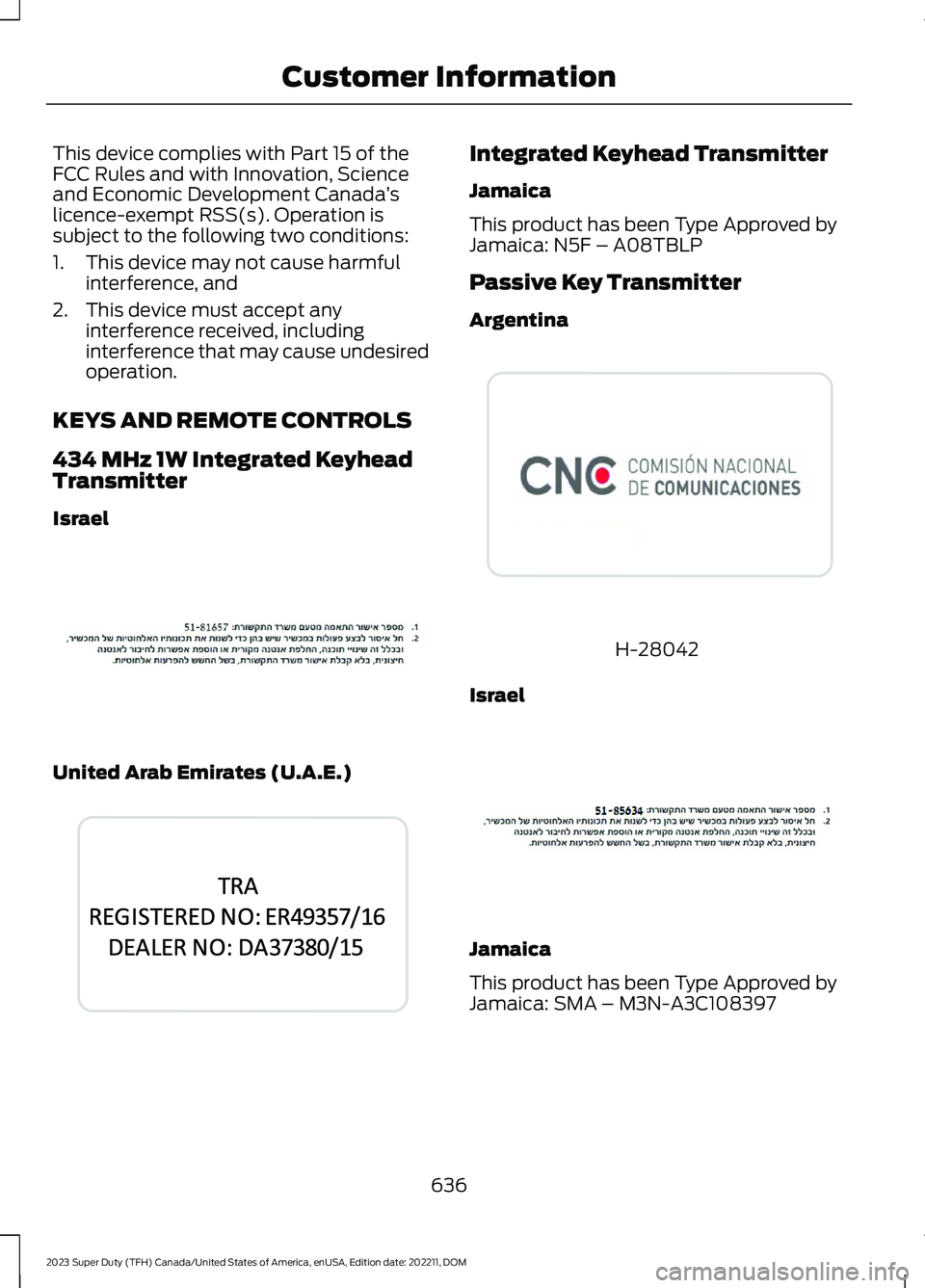
This device complies with Part 15 of theFCC Rules and with Innovation, Scienceand Economic Development Canada’slicence-exempt RSS(s). Operation issubject to the following two conditions:
1.This device may not cause harmfulinterference, and
2.This device must accept anyinterference received, includinginterference that may cause undesiredoperation.
KEYS AND REMOTE CONTROLS
434 MHz 1W Integrated KeyheadTransmitter
Israel
United Arab Emirates (U.A.E.)
Integrated Keyhead Transmitter
Jamaica
This product has been Type Approved byJamaica: N5F – A08TBLP
Passive Key Transmitter
Argentina
H-28042
Israel
Jamaica
This product has been Type Approved byJamaica: SMA – M3N-A3C108397
636
2023 Super Duty (TFH) Canada/United States of America, enUSA, Edition date: 202211, DOMCustomer InformationE392457 E344043 E380327 E392456
Page 711 of 738
1
12V Battery.....................................................45612V Battery Precautions..................................456Battery Management SystemLimitations.......................................................457Changing the 12V Battery...............................457How Does the Battery ManagementSystem Work...................................................457Recycling and Disposing of the 12VBattery..............................................................458Resetting the Battery Sensor........................458What Is the Battery ManagementSystem..............................................................45712V Battery – Troubleshooting...............45912V Battery – Information Messages.........45912V Battery – Warning Lamps......................459
3
360 Degree Camera...................................290360 Degree Camera Settings.......................292360 Degree Camera Guide Lines...........291360 Degree Camera Precautions.........290360 Degree Camera Settings.................292Switching the 360 Degree Camera On andOff.......................................................................292Switching the 360 Degree CameraView...................................................................292
4
4WDSee: Four-Wheel Drive.....................................238
9
911 Assist............................................................67911 Assist Videos............................................68
A
A/CSee: Climate Control - Vehicles With:Automatic Temperature Control..............152See: Climate Control - Vehicles With: ManualTemperature Control....................................156About This Publication..................................21
ABSSee: Brakes..........................................................249Accessing Apps.............................................575Accessing Navigation.................................579Accessing the Passive Key BackupPosition........................................................209Accessing the Trip Computer - VehiclesWith: 12 Inch Screen.................................146Accessing the Trip Computer - VehiclesWith: 8 Inch Screen..................................146Accessories....................................................585Adaptive Cruise Control............................296Adaptive Cruise Control –Troubleshooting...........................................309Lane Centering...................................................303Predictive Speed Assist..................................306Predictive Speed Assist –Troubleshooting...........................................308Adaptive Cruise Control AutomaticCancellation...............................................299Adaptive Cruise Control Indicators.......303Adaptive Cruise ControlLimitations...................................................297Adaptive Cruise ControlPrecautions.................................................296Adaptive Cruise Control –Troubleshooting.......................................309Adaptive Cruise Control – InformationMessages........................................................309Adaptive Cruise Control Videos..............310Adaptive Front Lighting..............................124How Does Adaptive Front LightingWork....................................................................124Switching Adaptive Front Lighting On andOff........................................................................125Adjustable Pedals..........................................112Adjusting the Exterior Mirrors...................132Adjusting the Headlamps........................460Adjusting the Instrument Panel LightingBrightness.....................................................127Adjusting the Integrated Trailer BrakeController Mode.........................................374Adjusting the Map.......................................579Changing the Format of the Map................579Zooming the Map In and Out........................579Adjusting the Pedals.....................................112Adjusting the Seatbelt Height...................53Adjusting the Seatbelt Length..................54
707
2023 Super Duty (TFH) Canada/United States of America, enUSA, Edition date: 202211, DOMIndex