ECO mode FORD SUPER DUTY 2023 Manual PDF
[x] Cancel search | Manufacturer: FORD, Model Year: 2023, Model line: SUPER DUTY, Model: FORD SUPER DUTY 2023Pages: 738, PDF Size: 18.49 MB
Page 456 of 738
MANAGING THE COOLANTTEMPERATURE
If you tow a trailer with your vehicle, theengine may temporarily reach a highertemperature during severe operatingconditions, for example ascending a longor steep grade in high ambienttemperatures.
At this time, you may notice the coolanttemperature gauge moves toward the redzone and a message may appear in theinformation display.
WARNING: To reduce the risk ofcrash and injury, be prepared that thevehicle speed may reduce and thevehicle may not be able to acceleratewith full power until the coolanttemperature reduces.
WARNING: If you continue to driveyour vehicle when the engine isoverheating, the engine could stopwithout warning. Failure to follow thisinstruction could result in the loss ofcontrol of your vehicle.
You may notice a reduction in vehiclespeed caused by reduced engine power inorder to manage the engine coolanttemperature. Your vehicle may enter thismode if certain high-temperature andhigh-load conditions take place. Theamount of speed reduction depends onvehicle loading, grade and outsidetemperature. If this occurs, there is noneed to stop your vehicle. You cancontinue to drive. See Fail-Safe Cooling(page 425).
The air conditioning may automaticallyturn on and off during severe operatingconditions to protect the engine fromoverheating. When the coolanttemperature decreases to the normaloperating temperature, the air conditioningturns on.
If the coolant temperature gauge movesfully into the red zone, or if the coolanttemperature warning or service enginesoon messages appear in your informationdisplay, do the following:
1.Stop your vehicle as soon as it is safeto do so. Fully apply the parking brake,shift into park (P) or neutral (N).
2.Leave the engine running until thecoolant temperature gauge needlereturns to the normal position. If thetemperature does not drop afterseveral minutes, follow the remainingsteps.
3.Switch the engine off and wait for it tocool. Check the coolant level.
4.If the coolant level is at or below theminimum mark, add prediluted coolantimmediately.
5.If the coolant level is normal, restartthe engine and continue.
COOLANT – WARNING LAMPS
If the engine begins to overheat,the coolant temperature gaugemoves toward the red zone.
A warning lamp illuminates anda message may appear in theinformation display.
452
2023 Super Duty (TFH) Canada/United States of America, enUSA, Edition date: 202211, DOMMaintenanceE103308 E67028
Page 501 of 738
FOLLOW THESE MOUNTINGRECOMMENDATIONS
Tire changing can be dangerousand must be done byprofessionally trained personsusing proper tools andprocedures as specified by theUS Tire ManufacturersAssociation (USTMA). Singleor dual assemblies must becompletely deflated beforedemounting.
Your tires should be mounted onwheels of correct size and typeand which are in good, cleancondition. Wheels that are bent,chipped, rusted (steel wheels) orcorroded (alloy wheels) maycause tire damage. The inside ofthe tire must be free from foreignmaterial. Have your retailer checkthe wheels before mounting newtires. Mismatched tires and rimscan explode during mounting.Also, mismatched tires and rimscan result in dangerous tire failureon the road. If a tire is mounted byerror on the wrong-sized rim, donot remount it on the proper rim -scrap it. It may have beendamaged internally (which is notexternally visible) by having beendangerously stretched and couldfail on the highway.
Old valves may leak. When newtubeless tires are mounted,have new valves of the correcttype installed. Tubeless tiresmust only be mounted onwheels designed for tubelesstires i.e., wheels which havesafety humps or ledges.
It is recommended that you haveyour tires and wheels balanced.Tires and wheels, which are notbalanced, may cause steeringdifficulties, a bumpy ride, andirregular tire wear.
Be sure that all your valveshave suitable valve caps. Thevalve cap is the primary sealagainst air loss.
TEMPORARY SPARE TIRES
When using any temporary sparetire, be sure to follow the vehiclemanufacturer’s instructions.
REMEMBER... TO AVOIDDAMAGE TO YOUR TIRES ANDPOSSIBLE ACCIDENT:
•CHECK TIRE PRESSURE ATLEAST ONCE EACH MONTHWHEN TIRES ARE COLD ANDBEFORE LONG TRIPS.
•DO NOTUNDERINFLATE/OVERINFLATE.
•DO NOT OVERLOAD.
•DRIVE AT MODERATESPEEDS, OBSERVE LEGALLIMITS.
497
2023 Super Duty (TFH) Canada/United States of America, enUSA, Edition date: 202211, DOMTire Care
Page 507 of 738
VIEWING THE TIRE
PRESSURES
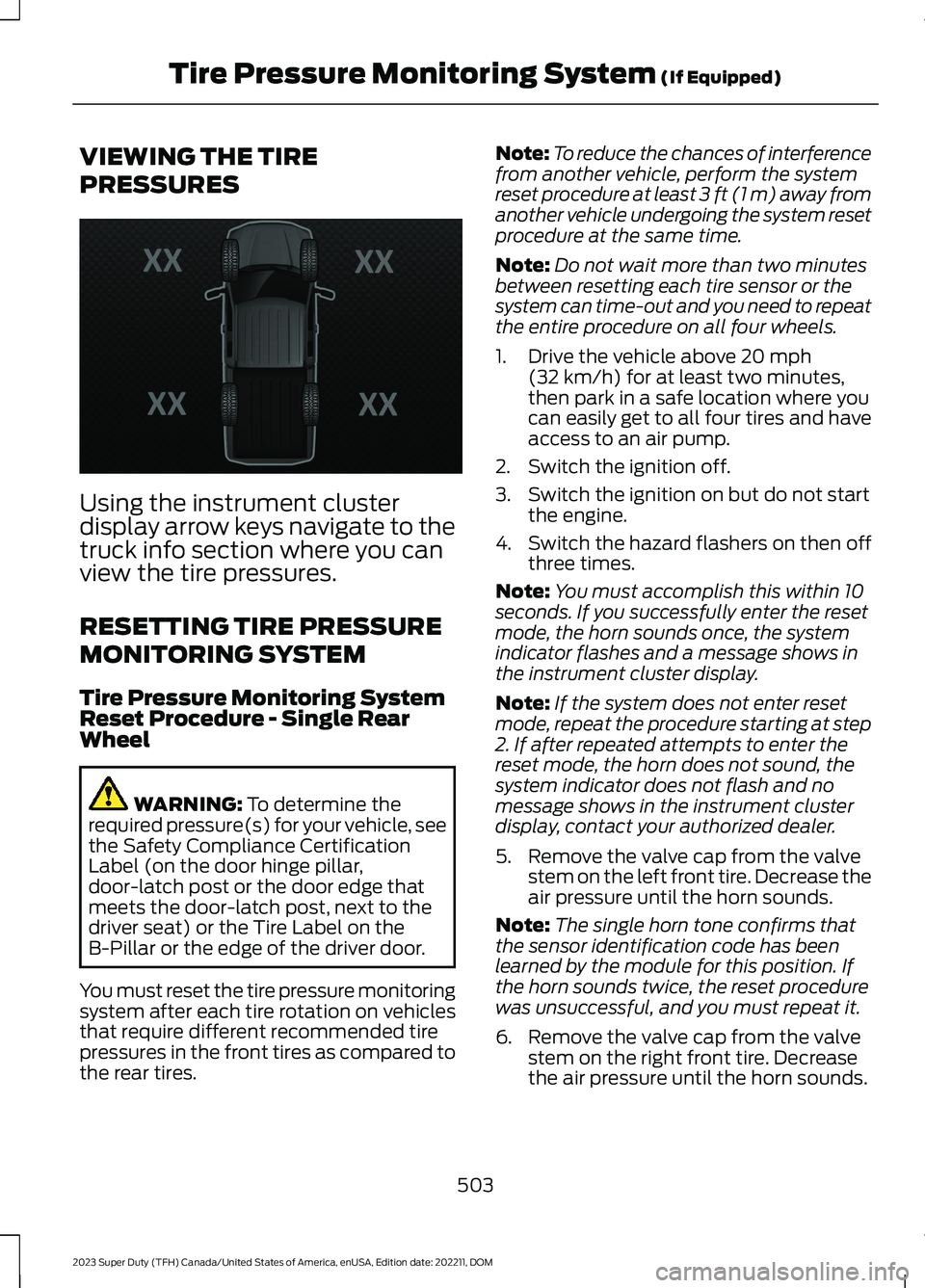
Using the instrument clusterdisplay arrow keys navigate to thetruck info section where you canview the tire pressures.
RESETTING TIRE PRESSURE
MONITORING SYSTEM
Tire Pressure Monitoring SystemReset Procedure - Single RearWheel
WARNING: To determine therequired pressure(s) for your vehicle, seethe Safety Compliance CertificationLabel (on the door hinge pillar,door-latch post or the door edge thatmeets the door-latch post, next to thedriver seat) or the Tire Label on theB-Pillar or the edge of the driver door.
You must reset the tire pressure monitoringsystem after each tire rotation on vehiclesthat require different recommended tirepressures in the front tires as compared tothe rear tires.
Note:To reduce the chances of interferencefrom another vehicle, perform the systemreset procedure at least 3 ft (1 m) away fromanother vehicle undergoing the system resetprocedure at the same time.
Note:Do not wait more than two minutesbetween resetting each tire sensor or thesystem can time-out and you need to repeatthe entire procedure on all four wheels.
1.Drive the vehicle above 20 mph(32 km/h) for at least two minutes,then park in a safe location where youcan easily get to all four tires and haveaccess to an air pump.
2.Switch the ignition off.
3.Switch the ignition on but do not startthe engine.
4.Switch the hazard flashers on then offthree times.
Note:You must accomplish this within 10seconds. If you successfully enter the resetmode, the horn sounds once, the systemindicator flashes and a message shows inthe instrument cluster display.
Note:If the system does not enter resetmode, repeat the procedure starting at step2. If after repeated attempts to enter thereset mode, the horn does not sound, thesystem indicator does not flash and nomessage shows in the instrument clusterdisplay, contact your authorized dealer.
5.Remove the valve cap from the valvestem on the left front tire. Decrease theair pressure until the horn sounds.
Note:The single horn tone confirms thatthe sensor identification code has beenlearned by the module for this position. Ifthe horn sounds twice, the reset procedurewas unsuccessful, and you must repeat it.
6.Remove the valve cap from the valvestem on the right front tire. Decreasethe air pressure until the horn sounds.
503
2023 Super Duty (TFH) Canada/United States of America, enUSA, Edition date: 202211, DOMTire Pressure Monitoring System (If Equipped)E224333
Page 508 of 738
7.Repeat the previous step on the rightrear tire and then on the left rear tire.
8.Switch the ignition off.
Note:If the horn sounds twice again afterswitching the ignition off, and repeating theprocedure, contact your authorized dealerand have your vehicle checked as soon aspossible.
9.Set all four tires to the recommendedair pressure as indicated on the SafetyCompliance Certification Label.
Tire Pressure Monitoring SystemReset Procedure - Dual Rear Wheel
For further information seeUnderstanding Your Tire PressureMonitoring System and refer to DualRear Wheel, earlier in this section.
Read the entire procedure beforeattempting.
1.Drive the vehicle above 20 mph(32 km/h) for at least two minutes,then park in a safe location where youcan easily get to all six tires and haveaccess to an air pump.
2.Place the ignition in the off position andkeep the key in the ignition.
3.Cycle the ignition to the on positionwith the engine off.
4.Turn the hazard flashers on then offthree times. You must accomplish thiswithin 10 seconds. If you successfullyenter the reset mode, the horn soundsonce, the system indicator flashes anda message shows in the instrumentcluster display. If this does not occur,repeat the procedure starting at step2. If after repeated attempts to enterthe reset mode, the horn does notsound, the system indicator does notflash and no message shows in theinstrument cluster display, contact yourauthorized dealer as soon as possible.
5.Train the tire pressure monitoringsystem sensors in the tires using thefollowing system reset sequencestarting with the left front tire in thefollowing order: Left front - driver sidefront tire, Right front - passenger sidefront tire, Right outer rear -passengerside rear outer tire, Right inner rear -passenger side rear inner tire, Left outerrear - driver side rear outer tire, Leftinner rear - driver side rear inner tire.
6.Remove the valve cap from the valvestem on the left front tire. Decrease theair pressure until the horn sounds.
Note:The single horn chirp confirms thatthe sensor identification code has beenlearned by the module for this position. If adouble horn is heard, the reset procedurewas unsuccessful, and you must repeat it.
7.Remove the valve cap from the valvestem on the right front tire. Decreasethe air pressure until the horn sounds.
8.Remove the valve cap from the valvestem on the right outer rear tire.Decrease the air pressure until the hornsounds.
9.Remove the valve cap from the valvestem on the right inner rear tire.Decrease the air pressure until the hornsounds.
10.Remove the valve cap from the valvestem on the left outer rear tire.Decrease the air pressure until thehorn sounds.
11.Remove the valve cap from the valvestem on the left inner rear tire.Decrease the air pressure until thehorn sounds. Training is completeafter the horn sounds for the last tiretrained, the system indicator stopsflashing, and a message is shown inthe instrument cluster display.
504
2023 Super Duty (TFH) Canada/United States of America, enUSA, Edition date: 202211, DOMTire Pressure Monitoring System (If Equipped)
Page 513 of 738
CHANGING A FLAT TIRE
If you get a flat tire when driving, do notapply the brake heavily. Instead, graduallydecrease your speed. Hold the steeringwheel firmly and slowly move to a safeplace on the side of the road.
Have a flat serviced by an authorizeddealer to prevent damage to the systemsensors. See Tire Pressure MonitoringSystem Precautions (page 502).Replacethe spare tire with a road tire as soon aspossible. During repairing or replacing theflat tire, have the authorized dealer inspectthe system sensor for damage.
Note:The use of tire sealant may damageyour tire pressure monitoring system andshould only be used in roadsideemergencies.
Note:The tire pressure monitoring systemindicator light illuminates when the sparetire is in use. To restore the full function ofthe monitoring system, all road wheelsequipped with tire pressure monitoringsensors must be mounted on this vehicle.
Dissimilar Spare Wheel and TireAssembly Information
WARNING: Failure to follow theseguidelines could result in an increasedrisk of loss of vehicle control, injury ordeath.
If you have a dissimilar spare wheel andtire, then it is intended for temporary useonly. This means that if you need to use it,you should replace it as soon as possiblewith a road wheel and tire assembly thatis the same size and type as the road tiresand wheels that were originally providedby Ford. If the dissimilar spare tire or wheelis damaged, it should be replaced ratherthan repaired.
A dissimilar spare wheel and tire assemblyis defined as a spare wheel and tireassembly that is different in brand, size orappearance from the road tires andwheels.
Full-size dissimilar spare
When driving with the full-size dissimilarspare wheel and tire assembly, do not:
•Exceed 70 mph (113 km/h).
•Use more than one dissimilar sparewheel and tire assembly at a time.
•Use snow chains on the end of thevehicle with the dissimilar spare wheeland tire assembly.
•Engage any four-wheel drive mode.See Four-Wheel Drive Limitations(page 239).
When driving with the full-size dissimilarspare wheel and tire assembly, 4WDfunctionality may be limited. You mayexperience the following:
•Additional noise from the transfer caseor other drive components.
•Difficulty shifting out of a mechanicallylocked 4WD mode.
When driving with the full-size dissimilarspare wheel and tire assembly, it isrecommended that you do not:
•Engage 4WD High or 4WD Low, ifequipped, other than to get your vehicleunstuck. .
The usage of a full-size dissimilar sparewheel and tire assembly can lead toimpairment of the following:
•Handling, stability and brakingperformance.
•Comfort and noise.
•Ground clearance and parking at curbs.
•Winter weather driving capability.
•Wet weather driving capability.
•Four-wheel drive capability.
509
2023 Super Duty (TFH) Canada/United States of America, enUSA, Edition date: 202211, DOMChanging a Road Wheel (If Equipped)
Page 553 of 738
CONNECTED VEHICLE –
TROUBLESHOOTING
CONNECTED VEHICLE –FREQUENTLY ASKED QUESTIONS- VEHICLES WITH: MODEM
Why can I not confirm theconnection of my FordPassaccount to the modem?
•The modem is not enabled. Switchvehicle connectivity on.
•The network signal is weak. Move yourvehicle closer to a place where thenetwork signal is not obstructed.
CONNECTED VEHICLE –FREQUENTLY ASKED QUESTIONS- VEHICLES WITH: SYNC 4
Why can I not confirm theconnection of my FordPassaccount to the modem?
•The modem is not enabled. Switchvehicle connectivity on.
•The network signal is weak. Move yourvehicle closer to a place where thenetwork signal is not obstructed.
Why can I not connect to a Wi-Finetwork?
•You entered the wrong networkpassword. Enter the correct password.
•The network signal is weak. Move yourvehicle closer to the Wi-Fi router or toa place where the network signal is notobstructed.
•There are multiple access points inrange with the same network name.Choose a unique name for yournetwork. Do not use the default nameunless it contains a unique identifier,for example as part of the MACaddress.
Why does the Wi-Fi connectiondisconnect after successfulconnection?
•The network signal is weak. Move yourvehicle closer to the Wi-Fi router or toa place where the network signal is notobstructed.
What can I do if I am close to a Wi-Fi router but the network signalstrength is weak?
•If your vehicle has a heated windshield,position your vehicle so that thewindshield is not facing the Wi-Firouter.
•If your vehicle has metallic tinting onthe windows but not on the windshield,position your vehicle so that thewindshield is facing the Wi-Fi router oropen the windows that are facing therouter.
•If your vehicle has metallic tinting onthe windows and the windshield, openthe windows that are facing the router.
•If your vehicle is in a garage and youhave the garage door closed, open thegarage door as it could block the signal.
549
2023 Super Duty (TFH) Canada/United States of America, enUSA, Edition date: 202211, DOMConnected Vehicle
Page 569 of 738
FORD ASSISTANT
USING FORD ASSISTANT
The digital assistant allows you to controlvehicle features using conversationalrequests.
To begin a voice interaction using the wakeword, say the selected wake word, thensay your command.
Press the voice interactionbutton on the steering wheel. Atone sounds before you can sayyour command.
Note:You may need to enable yourvehicle's modem to use certain voicecommands. See Enabling and Disablingthe Modem (page 548).
Note:When you are not driving, additionalcommands are available by using popularchat applications. Use FordPass to setup aconversation with your Ford assistant.
Voice Command Examples
To see examples of what voice commandsyou can use with different features:
Press the button on thetouchscreen.
1.Press Ford Assistant.
2.Press Voice Command Help.
3.Select a feature.
FORD ASSISTANT SETTINGS
To access the settings menu:
Press the button on thetouchscreen.
1.Press Ford Assistant.
From the settings menu you can do thefollowing:
•Switch listen for wake word on or off.
•Set the preferred wake word.
•Switch advance mode on or off.
•Switch phone confirmation on or off.
•Switch the commands list on or off.
•View the commands help menu.
Press the button next to a menuoption for more information.
FORD ASSISTANT – FREQUENTLYASKED QUESTIONS
Why does the system notunderstand what I am saying?
•You are speaking too soon. When usingthe button of the steering wheel, waitfor the tone before you speak.
Why does the system notunderstand the name of a track orartist?
•Bluetooth® does not support voicecommands.Connect your device to aUSB port.
•You are not saying the name exactlyas it appears on your device. Say thename of the track or artist exactly as itappears on your device. Spell out anyabbreviations in the name.
•The system does not recognize somespecial characters contained in thename of a song or artist, for example*, - or +. Rename the files on yourdevice or use the touchscreen to selectand play the track.
565
2023 Super Duty (TFH) Canada/United States of America, enUSA, Edition date: 202211, DOMVoice InteractionE142599 E280315 E280315 E366956
Page 586 of 738
This introduces new features and providesupdates to the vehicle's software systems.Make sure to switch Automatic Updateson, set a recurring update schedule andconnect your vehicle to Wi-Fi. Updatescould take longer when not connected toWi-Fi or could not download at all. SeeConnecting the Vehicle to a Wi-FiNetwork (page 548).
Your vehicle may be able to receivedrivable software updates, non-drivablesoftware updates or both. Drivablesoftware updates happen during normalvehicle usage and require limited inputfrom you. You are notified on yourtouchscreen and connected device priorto a non-drivable update.
Most non-drivable updates complete inless than 30 minutes, although someupdates could take up to a few hours.
You are notified of vehicle software updatestatus on to the top left of touchscreen.You can also see the notifications in yourconnected device. See Software UpdateIndicators (page 583).
Vehicle Software UpdateRequirements
Non-drivable software updates do notinstall if any of the following occur:
•Your vehicle is running.
•Your vehicle is switched on.
•Your vehicle is not parked.
•The 12 V battery charge is too low.
•The hazard indicators are switched on.
•The alarm is sounding.
•The doors are open.
•The parking lamps are switched on.
•You are pressing the brake pedal.
•An emergency call is in process.
•Your vehicle is in limp home mode.
Vehicle Software UpdateLimitations
Once you begin a non-drivable softwareupdate, you cannot:
•Cancel the update.
•Enter your vehicle unless you have akey blade.
•You can open the doors using themechanical latch if child locks arenot on.
•Use the remote control to lock, unlockor start your vehicle.
•Drive your vehicle.
•Charge your vehicle.
•Charging resumes once the updatecompletes.
SOFTWARE UPDATE
SETTINGS
To access the Software Updates menu:
1.Press Settings on the touchscreen.
2.Press Software Updates.
You can do the following in the SoftwareUpdates menu:
•Switch Automatic Updates on and off.
•Schedule and install software updates.
•View software update details.
Press the button next to a menuoption for more information.
Switching Automatic Updates Onand Off
Your vehicle may come with AutomaticUpdates switched on. To make sure yourvehicle always has the latest software,which could include security or otherenhancements, we do not recommendswitching Automatic Updates off.
582
2023 Super Duty (TFH) Canada/United States of America, enUSA, Edition date: 202211, DOMVehicle Software UpdatesE366956
Page 601 of 738
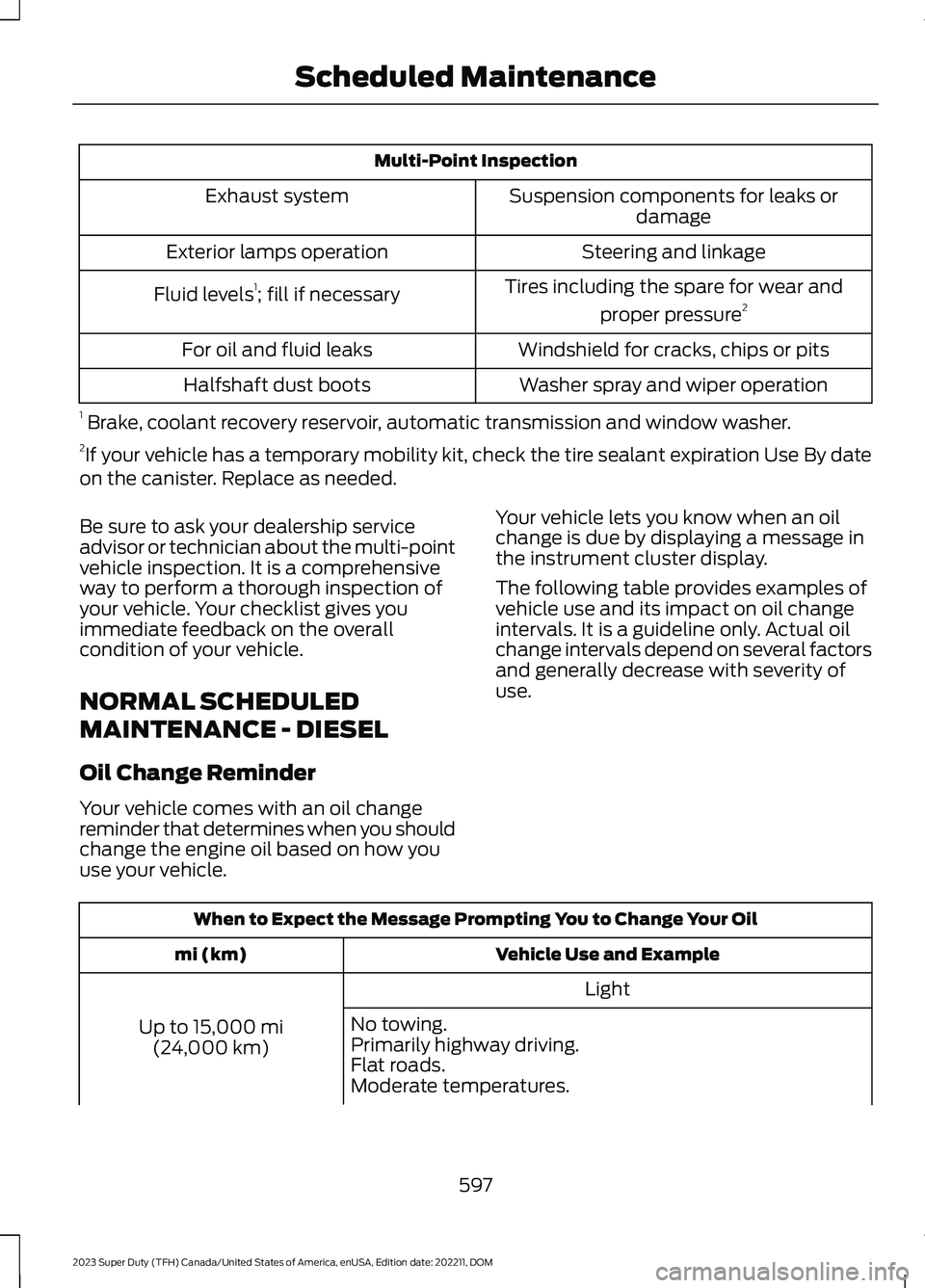
Multi-Point Inspection
Suspension components for leaks ordamageExhaust system
Steering and linkageExterior lamps operation
Tires including the spare for wear and
proper pressure2Fluid levels1; fill if necessary
Windshield for cracks, chips or pitsFor oil and fluid leaks
Washer spray and wiper operationHalfshaft dust boots
1 Brake, coolant recovery reservoir, automatic transmission and window washer.2If your vehicle has a temporary mobility kit, check the tire sealant expiration Use By dateon the canister. Replace as needed.
Be sure to ask your dealership serviceadvisor or technician about the multi-pointvehicle inspection. It is a comprehensiveway to perform a thorough inspection ofyour vehicle. Your checklist gives youimmediate feedback on the overallcondition of your vehicle.
NORMAL SCHEDULED
MAINTENANCE - DIESEL
Oil Change Reminder
Your vehicle comes with an oil changereminder that determines when you shouldchange the engine oil based on how youuse your vehicle.
Your vehicle lets you know when an oilchange is due by displaying a message inthe instrument cluster display.
The following table provides examples ofvehicle use and its impact on oil changeintervals. It is a guideline only. Actual oilchange intervals depend on several factorsand generally decrease with severity ofuse.
When to Expect the Message Prompting You to Change Your Oil
Vehicle Use and Examplemi (km)
Light
Up to 15,000 mi(24,000 km)
No towing.Primarily highway driving.Flat roads.Moderate temperatures.
597
2023 Super Duty (TFH) Canada/United States of America, enUSA, Edition date: 202211, DOMScheduled Maintenance
Page 602 of 738
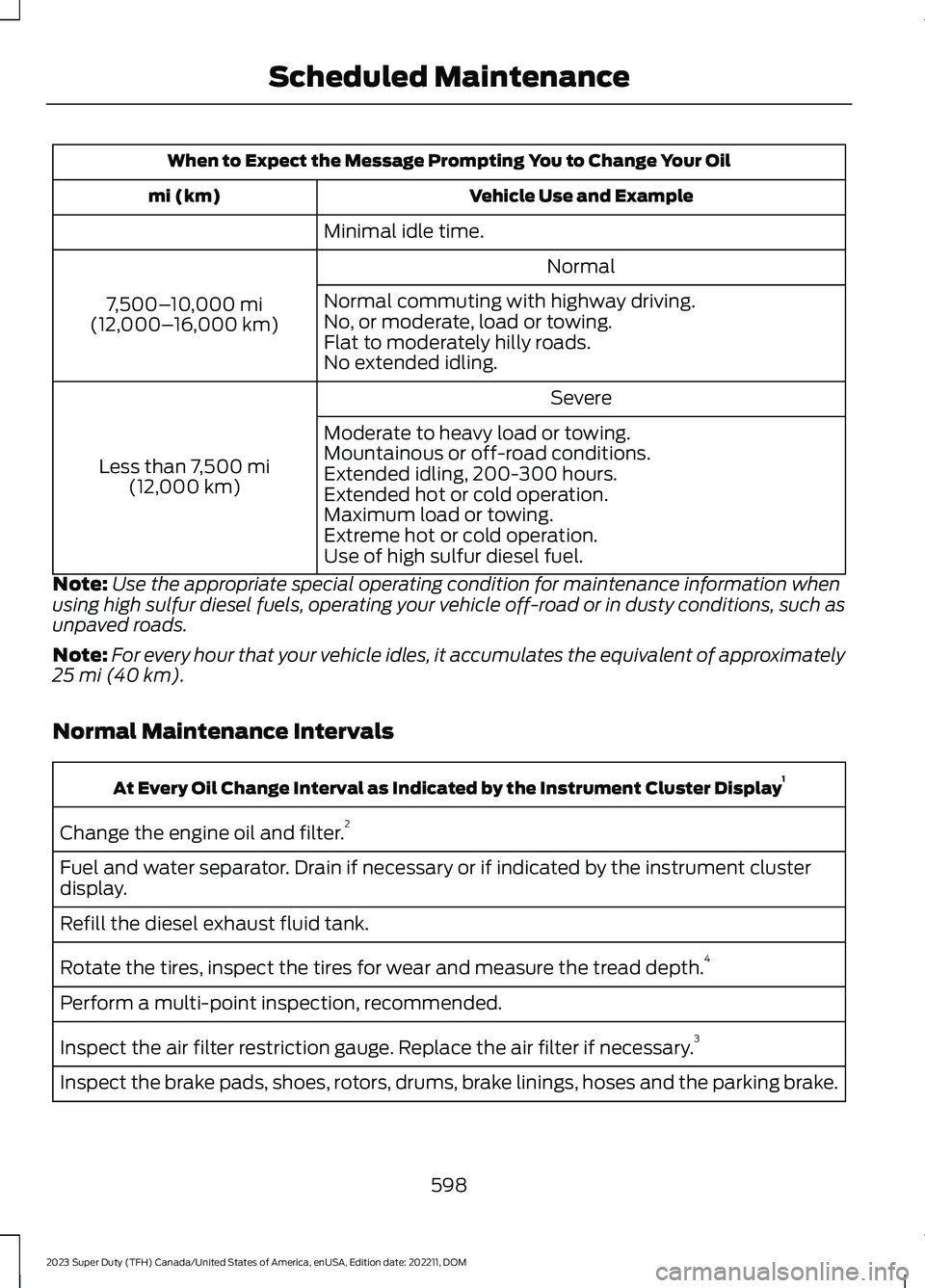
When to Expect the Message Prompting You to Change Your Oil
Vehicle Use and Examplemi (km)
Minimal idle time.
Normal
7,500–10,000 mi(12,000–16,000 km)
Normal commuting with highway driving.No, or moderate, load or towing.Flat to moderately hilly roads.No extended idling.
Severe
Less than 7,500 mi(12,000 km)
Moderate to heavy load or towing.Mountainous or off-road conditions.Extended idling, 200-300 hours.Extended hot or cold operation.Maximum load or towing.Extreme hot or cold operation.Use of high sulfur diesel fuel.
Note:Use the appropriate special operating condition for maintenance information whenusing high sulfur diesel fuels, operating your vehicle off-road or in dusty conditions, such asunpaved roads.
Note:For every hour that your vehicle idles, it accumulates the equivalent of approximately25 mi (40 km).
Normal Maintenance Intervals
At Every Oil Change Interval as Indicated by the Instrument Cluster Display1
Change the engine oil and filter.2
Fuel and water separator. Drain if necessary or if indicated by the instrument clusterdisplay.
Refill the diesel exhaust fluid tank.
Rotate the tires, inspect the tires for wear and measure the tread depth.4
Perform a multi-point inspection, recommended.
Inspect the air filter restriction gauge. Replace the air filter if necessary.3
Inspect the brake pads, shoes, rotors, drums, brake linings, hoses and the parking brake.
598
2023 Super Duty (TFH) Canada/United States of America, enUSA, Edition date: 202211, DOMScheduled Maintenance