battery FORD SUPER DUTY 2023 Manual PDF
[x] Cancel search | Manufacturer: FORD, Model Year: 2023, Model line: SUPER DUTY, Model: FORD SUPER DUTY 2023Pages: 738, PDF Size: 18.49 MB
Page 586 of 738
This introduces new features and providesupdates to the vehicle's software systems.Make sure to switch Automatic Updateson, set a recurring update schedule andconnect your vehicle to Wi-Fi. Updatescould take longer when not connected toWi-Fi or could not download at all. SeeConnecting the Vehicle to a Wi-FiNetwork (page 548).
Your vehicle may be able to receivedrivable software updates, non-drivablesoftware updates or both. Drivablesoftware updates happen during normalvehicle usage and require limited inputfrom you. You are notified on yourtouchscreen and connected device priorto a non-drivable update.
Most non-drivable updates complete inless than 30 minutes, although someupdates could take up to a few hours.
You are notified of vehicle software updatestatus on to the top left of touchscreen.You can also see the notifications in yourconnected device. See Software UpdateIndicators (page 583).
Vehicle Software UpdateRequirements
Non-drivable software updates do notinstall if any of the following occur:
•Your vehicle is running.
•Your vehicle is switched on.
•Your vehicle is not parked.
•The 12 V battery charge is too low.
•The hazard indicators are switched on.
•The alarm is sounding.
•The doors are open.
•The parking lamps are switched on.
•You are pressing the brake pedal.
•An emergency call is in process.
•Your vehicle is in limp home mode.
Vehicle Software UpdateLimitations
Once you begin a non-drivable softwareupdate, you cannot:
•Cancel the update.
•Enter your vehicle unless you have akey blade.
•You can open the doors using themechanical latch if child locks arenot on.
•Use the remote control to lock, unlockor start your vehicle.
•Drive your vehicle.
•Charge your vehicle.
•Charging resumes once the updatecompletes.
SOFTWARE UPDATE
SETTINGS
To access the Software Updates menu:
1.Press Settings on the touchscreen.
2.Press Software Updates.
You can do the following in the SoftwareUpdates menu:
•Switch Automatic Updates on and off.
•Schedule and install software updates.
•View software update details.
Press the button next to a menuoption for more information.
Switching Automatic Updates Onand Off
Your vehicle may come with AutomaticUpdates switched on. To make sure yourvehicle always has the latest software,which could include security or otherenhancements, we do not recommendswitching Automatic Updates off.
582
2023 Super Duty (TFH) Canada/United States of America, enUSA, Edition date: 202211, DOMVehicle Software UpdatesE366956
Page 589 of 738
For a complete listing of the accessoriesthat are available for your vehicle, pleasecontact your authorized dealer or visit theonline store web site:
Web Address (United States)
www.Accessories.Ford.com
Web Address (Canada)
www.Accessories.Ford.ca
We will repair or replace any properlyauthorized dealer-installed Ford OriginalAccessory found to be defective infactory-supplied materials or workmanshipduring the warranty period, as well as anycomponent damaged by the defectiveaccessories.
We will warrant your Ford OriginalAccessory through the warranty thatprovides the greatest benefit:
•24 months, unlimited mileage.
•The remainder of your new vehiclelimited warranty.
Contact an authorized dealer for detailsand a copy of the warranty.
Ford Licensed Accessories are theaccessory manufacturer's designs. Themanufacturer develops and thereforewarrants Ford Licensed Accessories, anddoes not design or test these accessoriesto Ford Motor Company engineeringrequirements. Contact an authorized Forddealer for the manufacturer’s limitedwarranty details, and request a copy of theFord Licensed Accessories product limitedwarranty from the accessory manufacturer.
For maximum vehicle performance, keepthe following information in mind whenadding accessories or equipment to yourvehicle:
•When adding accessories, equipment,passengers and luggage to yourvehicle, do not exceed the total weightcapacity of the vehicle or of the frontor rear axle (GVWR or GAWR asindicated on the Safety ComplianceCertification label). Ask an authorizeddealer for specific weight information.
•The Federal CommunicationsCommission (FCC) and CanadianRadio TelecommunicationsCommission (CRTC) regulate the useof mobile communications systemsthat are equipped with radiotransmitters, for example two-wayradios, telephones and theft alarms.Any such equipment installed in yourvehicle should comply with FederalCommunications Commission (FCC)and Canadian RadioTelecommunications Commission(CRTC) regulations and should beinstalled only by an authorized dealer.
•An authorized dealer needs to installmobile communications systems.Improper installation may harm theoperation of your vehicle, particularlyif the manufacturer did not design themobile communication systemspecifically for automotive use.
•If you or an authorized Ford dealer addany non-Ford electrical or electronicaccessories or components to yourvehicle, you may adversely affectbattery performance and durability. Inaddition, you may also adversely affectthe performance of other electricalsystems in the vehicle.
585
2023 Super Duty (TFH) Canada/United States of America, enUSA, Edition date: 202211, DOMAccessories
Page 590 of 738
LOCATING THE AUXILIARY
SWITCHES
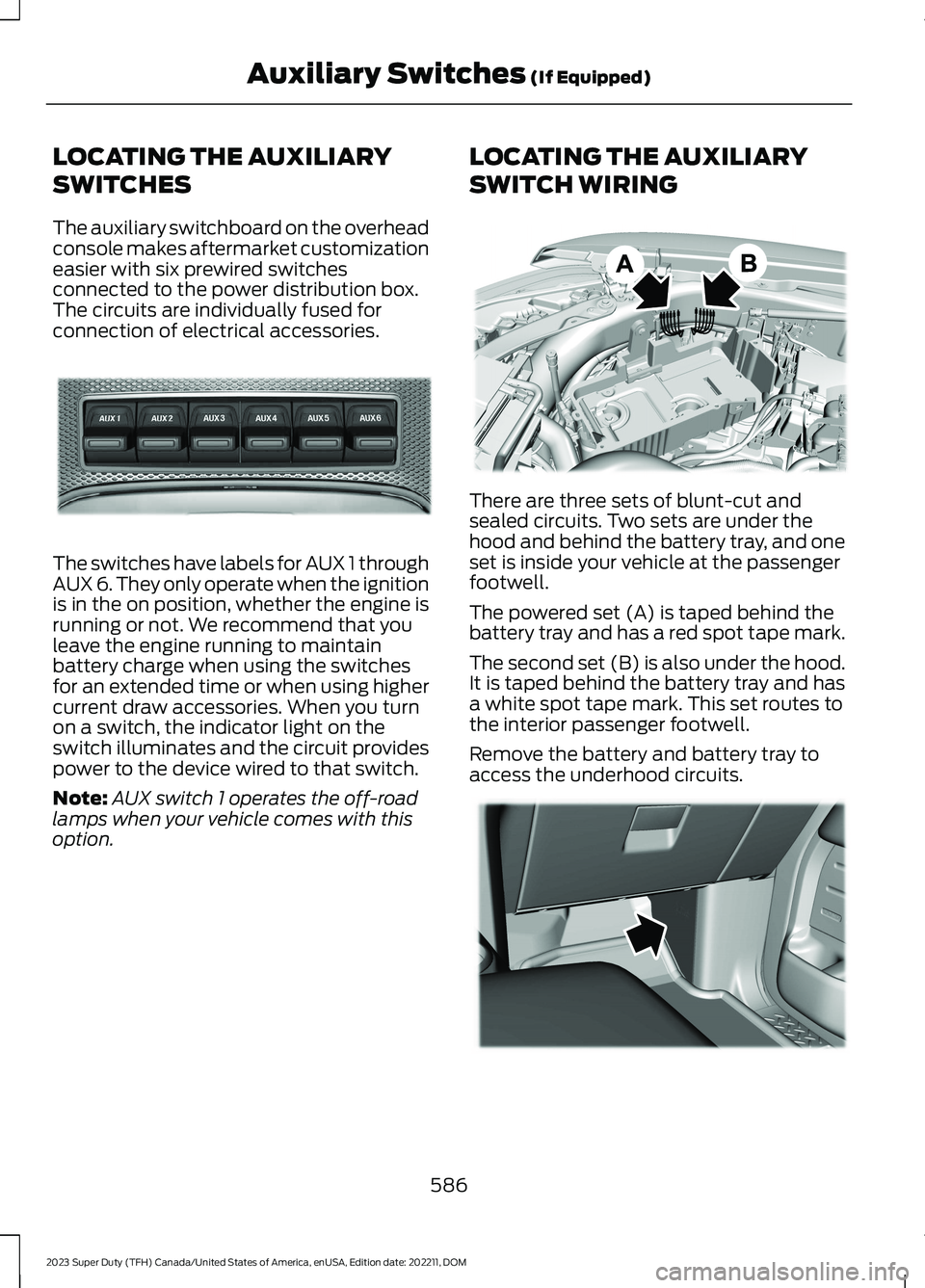
The auxiliary switchboard on the overheadconsole makes aftermarket customizationeasier with six prewired switchesconnected to the power distribution box.The circuits are individually fused forconnection of electrical accessories.
The switches have labels for AUX 1 throughAUX 6. They only operate when the ignitionis in the on position, whether the engine isrunning or not. We recommend that youleave the engine running to maintainbattery charge when using the switchesfor an extended time or when using highercurrent draw accessories. When you turnon a switch, the indicator light on theswitch illuminates and the circuit providespower to the device wired to that switch.
Note:AUX switch 1 operates the off-roadlamps when your vehicle comes with thisoption.
LOCATING THE AUXILIARY
SWITCH WIRING
There are three sets of blunt-cut andsealed circuits. Two sets are under thehood and behind the battery tray, and oneset is inside your vehicle at the passengerfootwell.
The powered set (A) is taped behind thebattery tray and has a red spot tape mark.
The second set (B) is also under the hood.It is taped behind the battery tray and hasa white spot tape mark. This set routes tothe interior passenger footwell.
Remove the battery and battery tray toaccess the underhood circuits.
586
2023 Super Duty (TFH) Canada/United States of America, enUSA, Edition date: 202211, DOMAuxiliary Switches (If Equipped)E220728 E347548 E347399
Page 591 of 738
The interior set is taped on a wire harnessby the passenger side footwell. This set isthe other end of the circuits taped behindthe battery tray, with a white spot tapemark.
Remove the fuse panel access door in thekick panel to access the wires. If you do notsee them, you may need to pull themdown.
See Fuses (page 430). See your authorizeddealer for service.
Circuits from the under hood fuse box (A)are powered. All other circuits (B-E) arenot connected at either end.
Additional information on fuse and relaylocations is available. See Fuses (page430). See your authorized dealer for service.
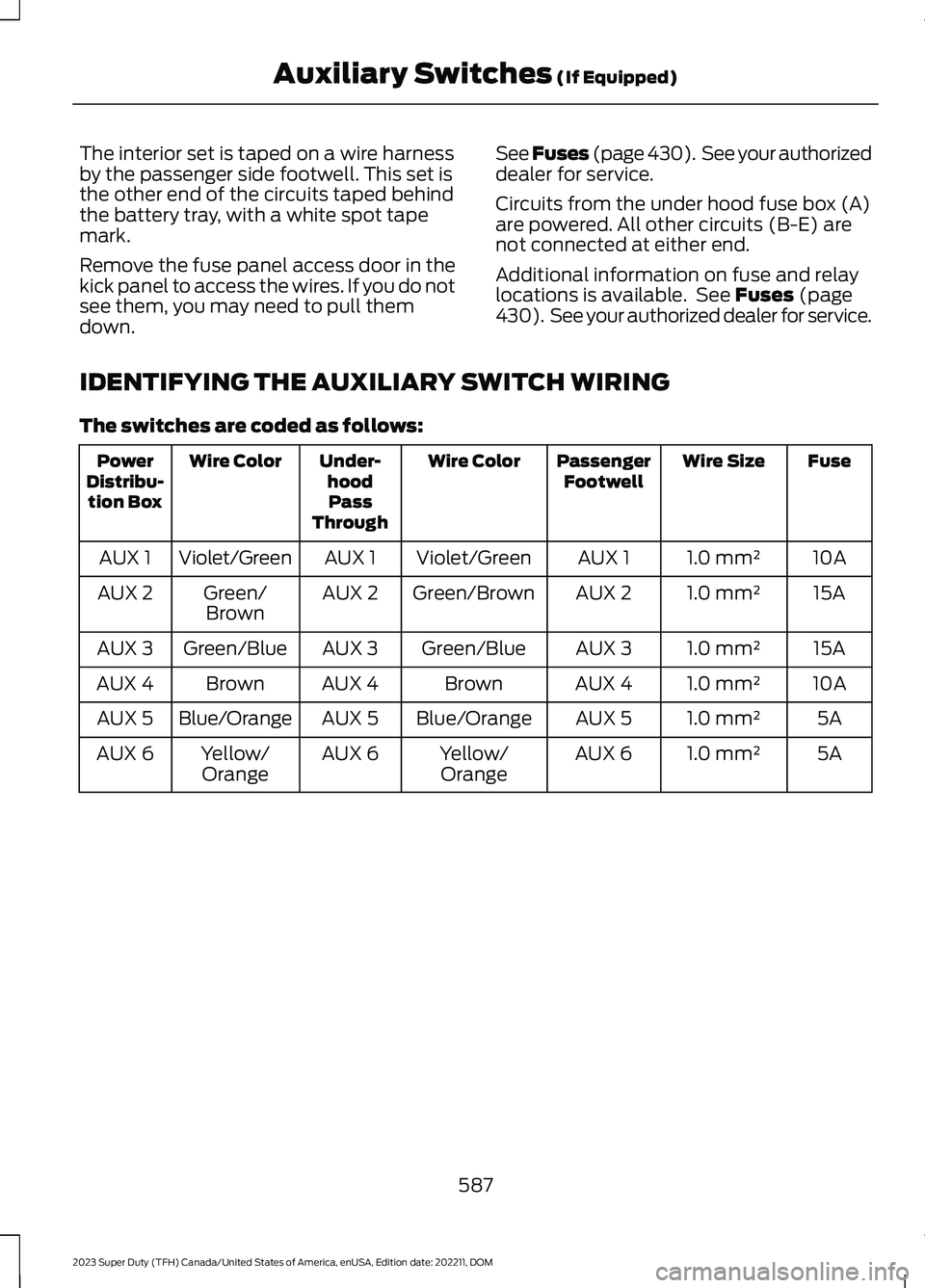
IDENTIFYING THE AUXILIARY SWITCH WIRING
The switches are coded as follows:
FuseWire SizePassengerFootwellWire ColorUnder-hoodPassThrough
Wire ColorPowerDistribu-tion Box
10A1.0 mm²AUX 1Violet/GreenAUX 1Violet/GreenAUX 1
15A1.0 mm²AUX 2Green/BrownAUX 2Green/BrownAUX 2
15A1.0 mm²AUX 3Green/BlueAUX 3Green/BlueAUX 3
10A1.0 mm²AUX 4BrownAUX 4BrownAUX 4
5A1.0 mm²AUX 5Blue/OrangeAUX 5Blue/OrangeAUX 5
5A1.0 mm²AUX 6Yellow/OrangeAUX 6Yellow/OrangeAUX 6
587
2023 Super Duty (TFH) Canada/United States of America, enUSA, Edition date: 202211, DOMAuxiliary Switches (If Equipped)
Page 593 of 738
WHAT IS FORD PROTECT
Protect yourself from the rising cost ofvehicle repairs with a Ford Protectextended service plan.
Ford Protect Extended ServicePlans - United States Only
Ford Protect extended service plans meanpeace of mind. Extended service plans arebacked by Ford Motor Company, andprovide more protection beyond the NewVehicle Limited Warranty coverage. Whenyou visit your Ford Dealer, insist on the FordProtect extended service plan.
Ford Protect Can Quickly Pay for Itself
One trip to the service center could easilyexceed the price of your Ford Protectextended service plan. With the FordProtect extended service plan, youminimize your risk for unexpected repairbills and rising repair costs.
Up to 1,000+ Covered VehicleComponents
There are four mechanical Ford Protectextended service plans with different levelsof coverage. Ask your authorized dealer fordetails.
1.PremiumCARE - Our mostcomprehensive coverage. With over1,000 covered components, this planis so complete it is probably easier tolist what is not covered.
2.ExtraCARE - Covers 113 components,and includes many high-tech items.
3.BaseCARE - Covers 84 components.
4.PowertrainCARE - Covers 29 criticalcomponents.
Ford Protect extended service plans arehonored by all authorized Ford dealers inthe United States, Canada and Mexico.
That means you get:
•Reliable, quality service at any Ford orLincoln dealership.
•Repairs performed by factory trainedtechnicians, using genuine parts.
Rental Car Reimbursement
First Day Rental Benefit
If you bring your car into your dealer forservice, we will give you a rental vehicle touse for the day.
Extended Rental Benefits
If your vehicle is kept overnight for coveredrepairs, you are eligible for rental carcoverage, warranty repairs, and fieldservice actions.
Roadside Assistance
Exclusive 24/7 roadside assistance,including:
•Towing, flat-tire change and batteryjump starts.
•Out of fuel and lock-out assistance.
•Travel expense reimbursement forlodging, meals and rental car.
•Assistance for taxi, shuttle, rental carcoverage or other transportation.
Transferable Coverage
If you sell your vehicle before your FordProtect extended service plan coverageexpires, you can transfer any remainingcoverage to the new owner. This shouldgive you and your potential buyer peace ofmind.
589
2023 Super Duty (TFH) Canada/United States of America, enUSA, Edition date: 202211, DOMFord Protect
Page 596 of 738
We strongly recommend only using ourgenuine or our authorized re-manufacturedreplacement parts engineered for yourvehicle.
Additives and Chemicals
We do not recommend using chemicals oradditives not approved by us as part ofyour vehicle’s normal maintenance. Pleaseconsult your warranty information.
Oils, Fluids and Flushing
In many cases, fluid discoloration is anormal operating characteristic and, byitself, does not necessarily indicate aconcern or that the fluid needs to bechanged. Have discolored fluids that alsoshow signs of overheating or foreignmaterial contamination checkedimmediately.
Make sure to change the vehicle’s oils andfluids at the specified intervals or inconjunction with a repair. Flushing is aviable way to change fluid for many vehiclesub-systems during scheduledmaintenance. It is critical that systems areflushed only with new fluid that is the sameas that required to fill and operate thesystem or using our approved flushingchemical.
Owner Checks and Services
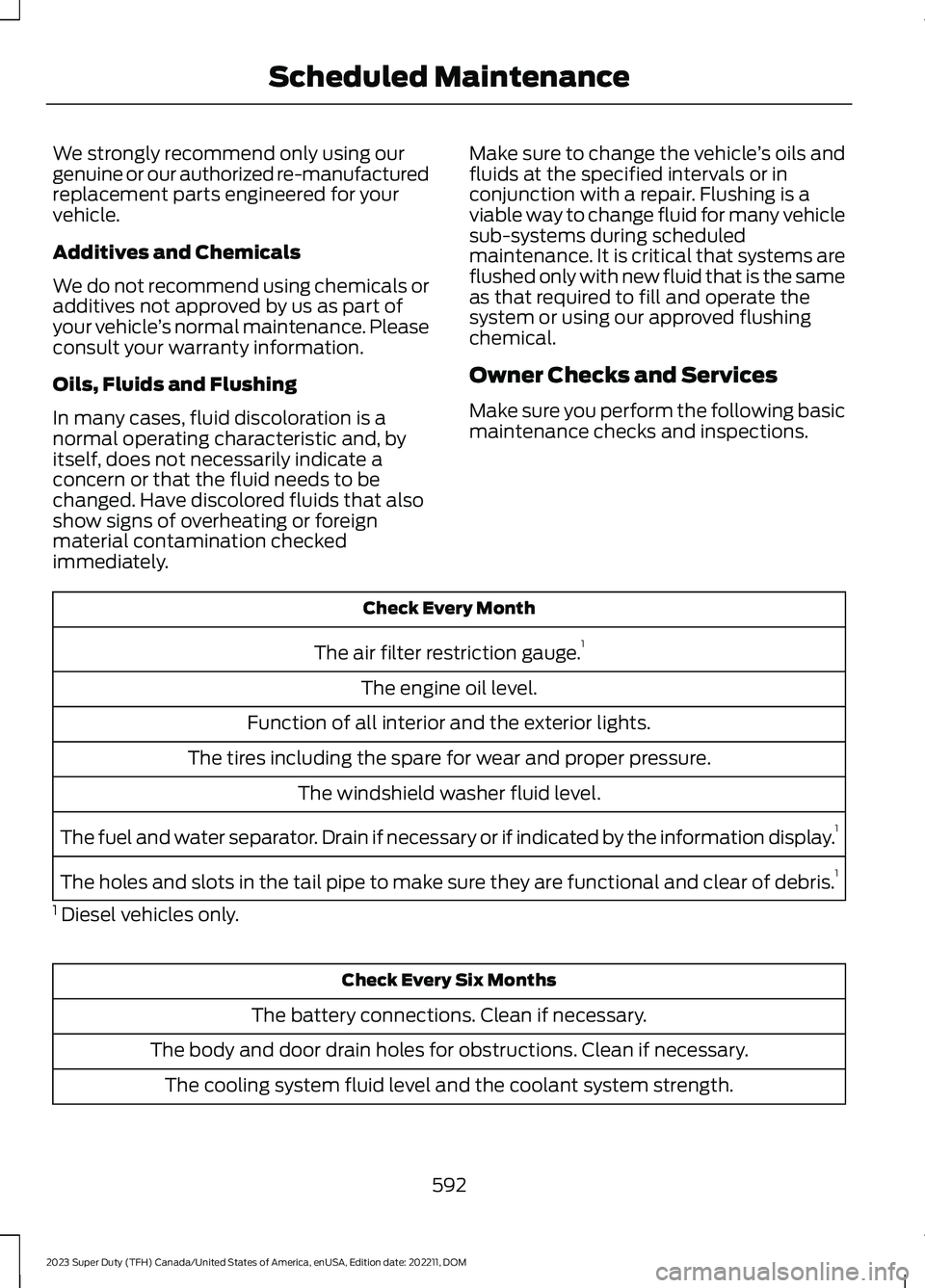
Make sure you perform the following basicmaintenance checks and inspections.
Check Every Month
The air filter restriction gauge.1
The engine oil level.
Function of all interior and the exterior lights.
The tires including the spare for wear and proper pressure.
The windshield washer fluid level.
The fuel and water separator. Drain if necessary or if indicated by the information display.1
The holes and slots in the tail pipe to make sure they are functional and clear of debris.1
1 Diesel vehicles only.
Check Every Six Months
The battery connections. Clean if necessary.
The body and door drain holes for obstructions. Clean if necessary.
The cooling system fluid level and the coolant system strength.
592
2023 Super Duty (TFH) Canada/United States of America, enUSA, Edition date: 202211, DOMScheduled Maintenance
Page 597 of 738
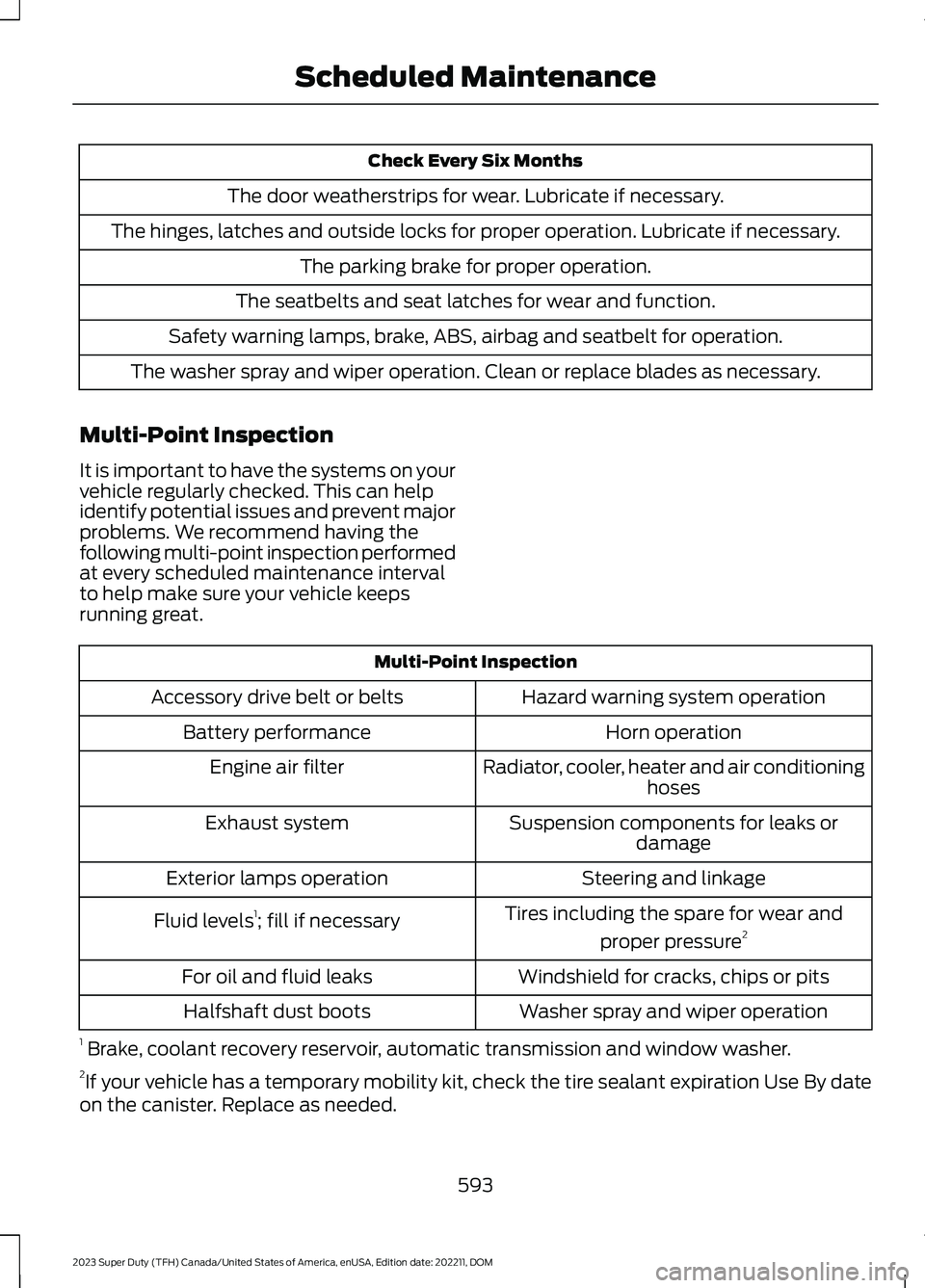
Check Every Six Months
The door weatherstrips for wear. Lubricate if necessary.
The hinges, latches and outside locks for proper operation. Lubricate if necessary.
The parking brake for proper operation.
The seatbelts and seat latches for wear and function.
Safety warning lamps, brake, ABS, airbag and seatbelt for operation.
The washer spray and wiper operation. Clean or replace blades as necessary.
Multi-Point Inspection
It is important to have the systems on yourvehicle regularly checked. This can helpidentify potential issues and prevent majorproblems. We recommend having thefollowing multi-point inspection performedat every scheduled maintenance intervalto help make sure your vehicle keepsrunning great.
Multi-Point Inspection
Hazard warning system operationAccessory drive belt or belts
Horn operationBattery performance
Radiator, cooler, heater and air conditioninghosesEngine air filter
Suspension components for leaks ordamageExhaust system
Steering and linkageExterior lamps operation
Tires including the spare for wear and
proper pressure2Fluid levels1; fill if necessary
Windshield for cracks, chips or pitsFor oil and fluid leaks
Washer spray and wiper operationHalfshaft dust boots
1 Brake, coolant recovery reservoir, automatic transmission and window washer.2If your vehicle has a temporary mobility kit, check the tire sealant expiration Use By dateon the canister. Replace as needed.
593
2023 Super Duty (TFH) Canada/United States of America, enUSA, Edition date: 202211, DOMScheduled Maintenance
Page 600 of 738
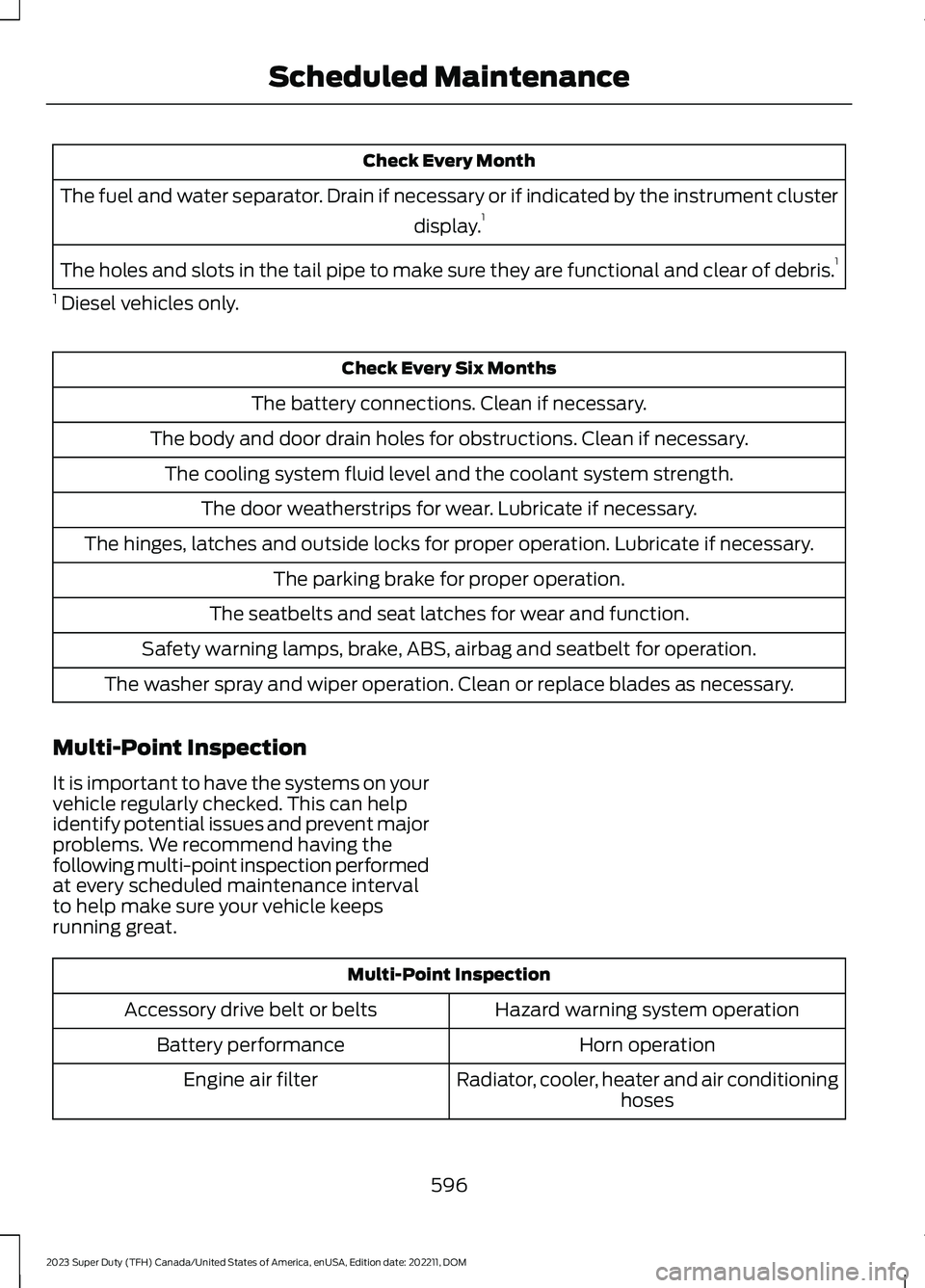
Check Every Month
The fuel and water separator. Drain if necessary or if indicated by the instrument cluster
display.1
The holes and slots in the tail pipe to make sure they are functional and clear of debris.1
1 Diesel vehicles only.
Check Every Six Months
The battery connections. Clean if necessary.
The body and door drain holes for obstructions. Clean if necessary.
The cooling system fluid level and the coolant system strength.
The door weatherstrips for wear. Lubricate if necessary.
The hinges, latches and outside locks for proper operation. Lubricate if necessary.
The parking brake for proper operation.
The seatbelts and seat latches for wear and function.
Safety warning lamps, brake, ABS, airbag and seatbelt for operation.
The washer spray and wiper operation. Clean or replace blades as necessary.
Multi-Point Inspection
It is important to have the systems on yourvehicle regularly checked. This can helpidentify potential issues and prevent majorproblems. We recommend having thefollowing multi-point inspection performedat every scheduled maintenance intervalto help make sure your vehicle keepsrunning great.
Multi-Point Inspection
Hazard warning system operationAccessory drive belt or belts
Horn operationBattery performance
Radiator, cooler, heater and air conditioninghosesEngine air filter
596
2023 Super Duty (TFH) Canada/United States of America, enUSA, Edition date: 202211, DOMScheduled Maintenance
Page 711 of 738
1
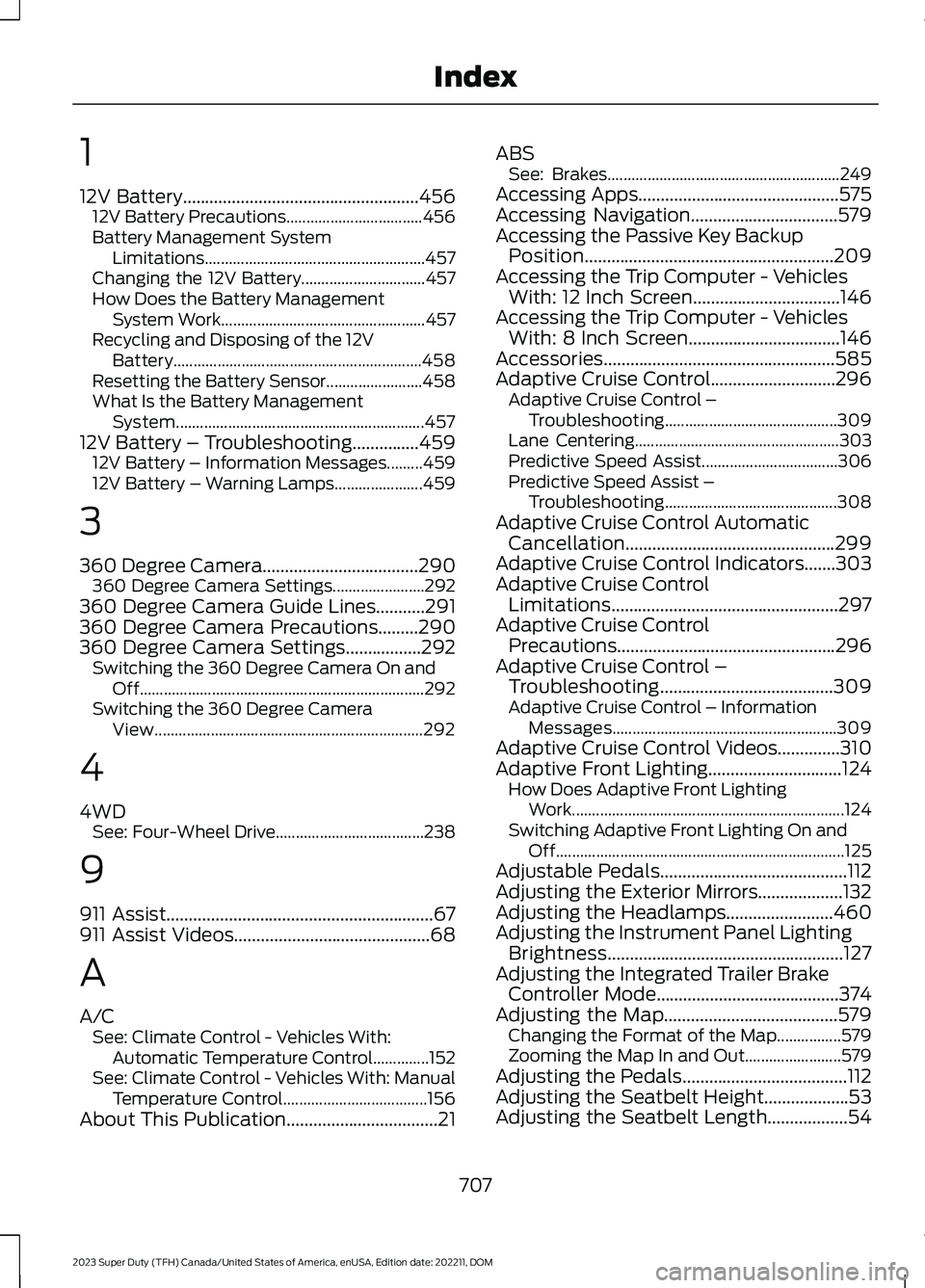
12V Battery.....................................................45612V Battery Precautions..................................456Battery Management SystemLimitations.......................................................457Changing the 12V Battery...............................457How Does the Battery ManagementSystem Work...................................................457Recycling and Disposing of the 12VBattery..............................................................458Resetting the Battery Sensor........................458What Is the Battery ManagementSystem..............................................................45712V Battery – Troubleshooting...............45912V Battery – Information Messages.........45912V Battery – Warning Lamps......................459
3
360 Degree Camera...................................290360 Degree Camera Settings.......................292360 Degree Camera Guide Lines...........291360 Degree Camera Precautions.........290360 Degree Camera Settings.................292Switching the 360 Degree Camera On andOff.......................................................................292Switching the 360 Degree CameraView...................................................................292
4
4WDSee: Four-Wheel Drive.....................................238
9
911 Assist............................................................67911 Assist Videos............................................68
A
A/CSee: Climate Control - Vehicles With:Automatic Temperature Control..............152See: Climate Control - Vehicles With: ManualTemperature Control....................................156About This Publication..................................21
ABSSee: Brakes..........................................................249Accessing Apps.............................................575Accessing Navigation.................................579Accessing the Passive Key BackupPosition........................................................209Accessing the Trip Computer - VehiclesWith: 12 Inch Screen.................................146Accessing the Trip Computer - VehiclesWith: 8 Inch Screen..................................146Accessories....................................................585Adaptive Cruise Control............................296Adaptive Cruise Control –Troubleshooting...........................................309Lane Centering...................................................303Predictive Speed Assist..................................306Predictive Speed Assist –Troubleshooting...........................................308Adaptive Cruise Control AutomaticCancellation...............................................299Adaptive Cruise Control Indicators.......303Adaptive Cruise ControlLimitations...................................................297Adaptive Cruise ControlPrecautions.................................................296Adaptive Cruise Control –Troubleshooting.......................................309Adaptive Cruise Control – InformationMessages........................................................309Adaptive Cruise Control Videos..............310Adaptive Front Lighting..............................124How Does Adaptive Front LightingWork....................................................................124Switching Adaptive Front Lighting On andOff........................................................................125Adjustable Pedals..........................................112Adjusting the Exterior Mirrors...................132Adjusting the Headlamps........................460Adjusting the Instrument Panel LightingBrightness.....................................................127Adjusting the Integrated Trailer BrakeController Mode.........................................374Adjusting the Map.......................................579Changing the Format of the Map................579Zooming the Map In and Out........................579Adjusting the Pedals.....................................112Adjusting the Seatbelt Height...................53Adjusting the Seatbelt Length..................54
707
2023 Super Duty (TFH) Canada/United States of America, enUSA, Edition date: 202211, DOMIndex
Page 712 of 738
Adjusting the Seatbelts DuringPregnancy......................................................53Adjusting the Sound Settings.................554Adjusting the Steering Wheel - VehiclesWith: Manual Adjustable SteeringColumn..........................................................109Adjusting the Steering Wheel - VehiclesWith: Power Adjustable SteeringColumn..........................................................109Adjusting the Volume................................554Aid Mode..........................................................319How Does Aid Mode Work..............................319What Is Aid Mode...............................................319Airbag Precautions........................................59Airbags................................................................57Air ConditioningSee: Climate Control - Vehicles With:Automatic Temperature Control..............152See: Climate Control - Vehicles With: ManualTemperature Control....................................156Air Conditioning System Capacity andSpecification..............................................536Alert and Aid Mode......................................319How Does Alert and Aid Mode Work...........319What Is Alert and Aid Mode............................319Alert Mode.......................................................318Adjusting the Steering Wheel VibrationIntensity.............................................................319How Does Alert Mode Work...........................318What Is Alert Mode............................................318Alexa Built-In.................................................567Alexa Built-In Requirements....................567Alexa Built-In Settings...............................567AM/FM Radio................................................555AM/FM Radio Limitations..............................555Selecting a Radio Station...............................555Ambient Lighting...........................................127Adjusting Ambient Lighting.............................127Switching Ambient Lighting On andOff........................................................................127Anti-Lock Braking System........................249Anti-Lock Braking SystemLimitations......................................................249Anti-Theft Alarm System..........................103Arming the Anti-Theft Alarm System........104Disarming the Anti-Theft AlarmSystem..............................................................104
How Does the Anti-Theft Alarm SystemWork...................................................................103What Are the Inclination Sensors................104What Are the Interior Sensors.......................103What Is the Anti-Theft AlarmSystem...............................................................103What Is the Battery Backup Alarm..............104What Is the Perimeter Alarm.........................103Anti-Theft Alarm System Settings........104Setting the Alarm Security Level..................104Switching Ask on Exit On and Off................104What are the Alarm Security Levels...........104What Is Ask on Exit............................................104Appendices....................................................703Applying the Electric ParkingBrake..............................................................253Applying the Electric Parking Brake in anEmergency...................................................253App Precautions...........................................575App Requirements.......................................575Apps..................................................................575Audio System................................................553AM/FM Radio......................................................555Audio System – Troubleshooting................559Digital Radio........................................................556Satellite Radio.....................................................557Audio System Precautions.......................553Audio System – Troubleshooting.........559Audio System – InformationMessages.........................................................559Auto-Dimming Interior Mirror....................131Auto-Dimming Interior MirrorLimitations.........................................................131What Is the Auto-Dimming InteriorMirror....................................................................131Auto Hold.......................................................266Auto Hold Indicators..................................266Autolamps.......................................................118Autolamp Settings..............................................118What Are Autolamps.........................................118Autolock............................................................82Autolock Requirements.....................................82What Is Autolock..................................................82Automatically Releasing the ElectricParking Brake.............................................254Automatic Crash Shutoff..........................423Automatic Crash ShutoffPrecautions.....................................................423
708
2023 Super Duty (TFH) Canada/United States of America, enUSA, Edition date: 202211, DOMIndex