trailer FORD SUPER DUTY 2023 Manual PDF
[x] Cancel search | Manufacturer: FORD, Model Year: 2023, Model line: SUPER DUTY, Model: FORD SUPER DUTY 2023Pages: 738, PDF Size: 18.49 MB
Page 383 of 738
TRAILER HITCHING
ASSISTANCE LIMITATIONS
The system could not function or couldfunction with reduced performance duringthe following:
•When using trailer hitching assistancein tall grass and weeds.
•When safety chains, cables or wiringare dangling near the coupler.
•When using trailer hitching assistanceon slippery surfaces.
•When using hitches that raise the hitchball more than 4 in (10 cm), lower thehitch ball by more than 6 in (16 cm) orextend the hitch ball away from thevehicle more than 12 in (30 cm).
•When using hitches that are lower than10 in (25 cm) off the ground.
•When using objects taller than 8 in(20 cm), such as large blocks, underthe jack stand.
•When you park the trailer on surfacesthat are similar in color to the trailercoupler and hitch ball.
•A black coupler or hitch ball over adark asphalt surface.
•A light color coupler or hitch ballover a light concrete surface.
•When there are low or no light sources,such as at night.
For additional information, please refer tothe Ford Support Website.
SWITCHING TRAILER
HITCHING ASSISTANCE ON
AND OFF
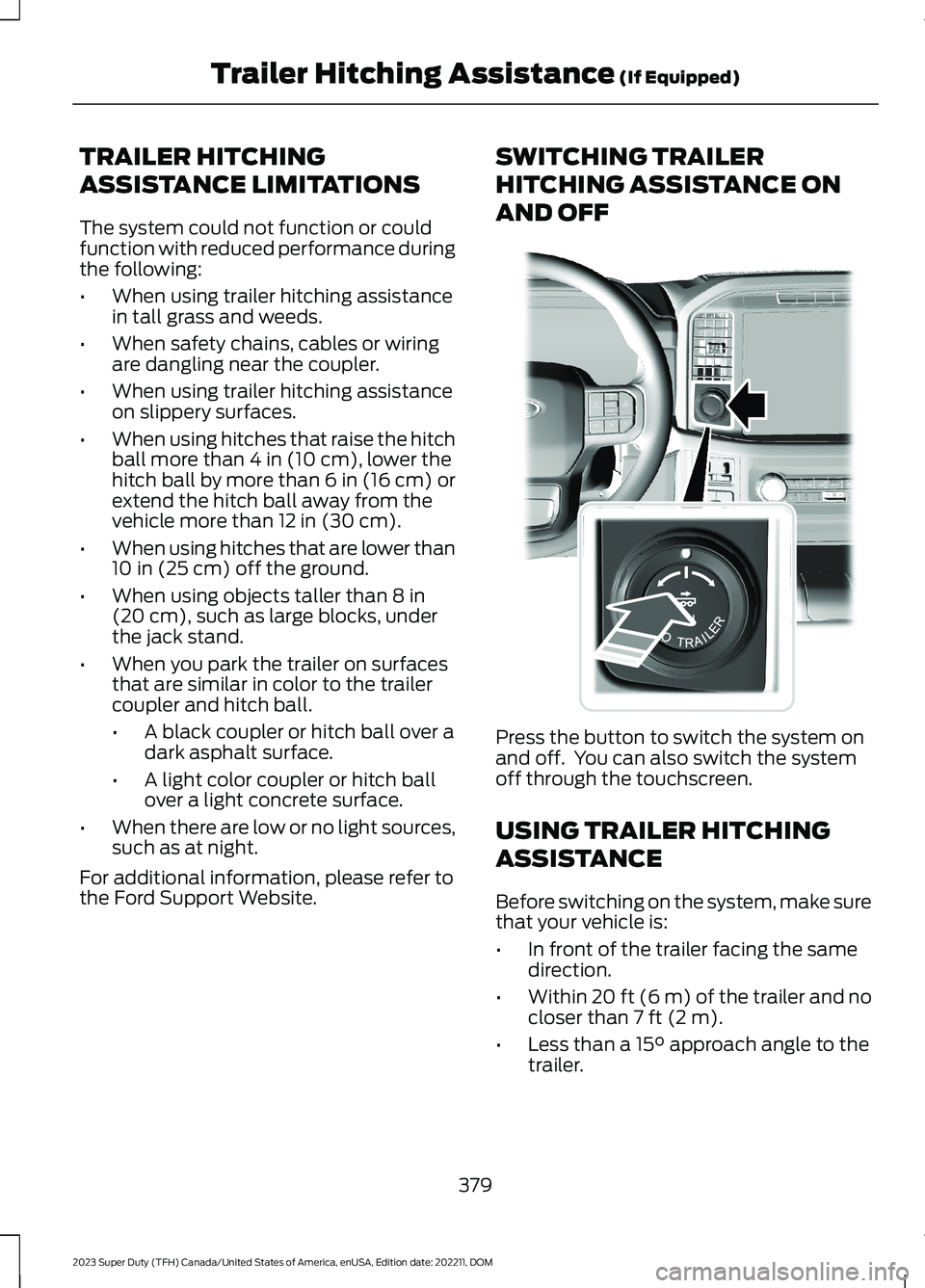
Press the button to switch the system onand off. You can also switch the systemoff through the touchscreen.
USING TRAILER HITCHING
ASSISTANCE
Before switching on the system, make surethat your vehicle is:
•In front of the trailer facing the samedirection.
•Within 20 ft (6 m) of the trailer and nocloser than 7 ft (2 m).
•Less than a 15° approach angle to thetrailer.
379
2023 Super Duty (TFH) Canada/United States of America, enUSA, Edition date: 202211, DOMTrailer Hitching Assistance (If Equipped)E310335
Page 384 of 738
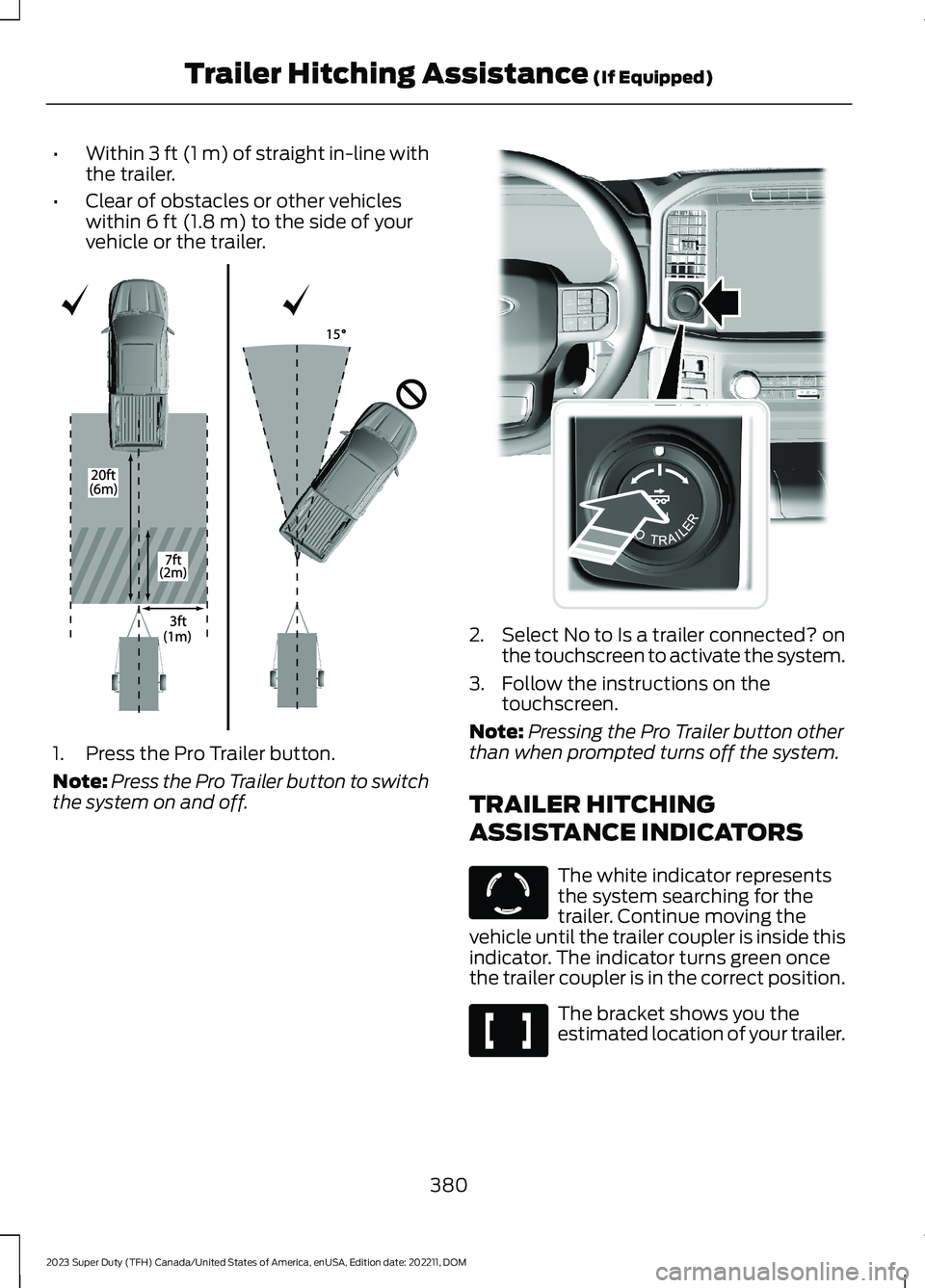
•Within 3 ft (1 m) of straight in-line withthe trailer.
•Clear of obstacles or other vehicleswithin 6 ft (1.8 m) to the side of yourvehicle or the trailer.
1.Press the Pro Trailer button.
Note:Press the Pro Trailer button to switchthe system on and off.
2.Select No to Is a trailer connected? onthe touchscreen to activate the system.
3.Follow the instructions on thetouchscreen.
Note:Pressing the Pro Trailer button otherthan when prompted turns off the system.
TRAILER HITCHING
ASSISTANCE INDICATORS
The white indicator representsthe system searching for thetrailer. Continue moving thevehicle until the trailer coupler is inside thisindicator. The indicator turns green oncethe trailer coupler is in the correct position.
The bracket shows you theestimated location of your trailer.
380
2023 Super Duty (TFH) Canada/United States of America, enUSA, Edition date: 202211, DOMTrailer Hitching Assistance (If Equipped)E348940 E310335 E317892 E317891
Page 385 of 738
The yellow indicator representsthat you have positioned yourvehicle too close to the trailerand you need to pull away from the traileruntil the indicator turns green.
Trailer Hitching AssistanceAudible Indicators
The system chimes as part of normaloperation to alert the driver that an actionneeds to be taken or an event has beencompleted.
381
2023 Super Duty (TFH) Canada/United States of America, enUSA, Edition date: 202211, DOMTrailer Hitching Assistance (If Equipped)E317893
Page 386 of 738
WHAT IS SMART HITCH
Smart hitch shows how balanced theweight is from the trailer onto the vehicle'shitch and front axle.
HOW DOES SMART HITCH
WORK
Smart hitch uses sensors mounted to thesuspension to calculate the tongue weightof the connected trailer.
SMART HITCH LIMITATIONS
You cannot use the system if any of thefollowing occur:
•The wheels are not pointed straightahead.
•Your vehicle is not in park (P).
•Your vehicle is not on a level surface.
•The tire pressures are below therecommended levels.
•Your vehicle is off.
USING SMART HITCH
1.Press Features on the touchscreen.
2.Press Smart Hitch.
Note:You can also access smart hitchusing the FordPass app.
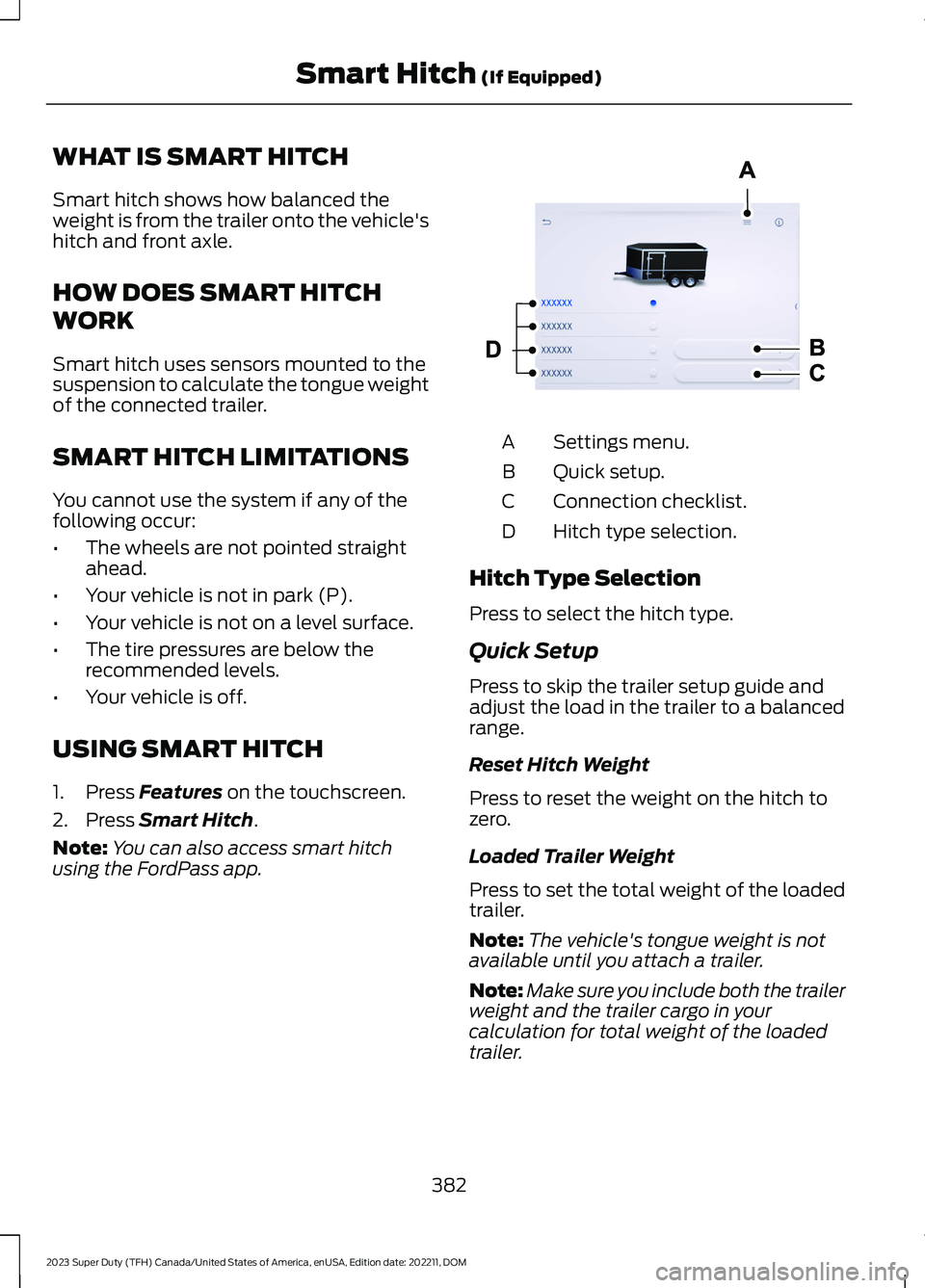
Settings menu.A
Quick setup.B
Connection checklist.C
Hitch type selection.D
Hitch Type Selection
Press to select the hitch type.
Quick Setup
Press to skip the trailer setup guide andadjust the load in the trailer to a balancedrange.
Reset Hitch Weight
Press to reset the weight on the hitch tozero.
Loaded Trailer Weight
Press to set the total weight of the loadedtrailer.
Note:The vehicle's tongue weight is notavailable until you attach a trailer.
Note:Make sure you include both the trailerweight and the trailer cargo in yourcalculation for total weight of the loadedtrailer.
382
2023 Super Duty (TFH) Canada/United States of America, enUSA, Edition date: 202211, DOMSmart Hitch (If Equipped) E390704
Page 387 of 738
Tail Lamps
Press to see the hitch load balance on thevehicle’s tail lamps.
Connection Checklist
Press to go through the trailer setup guideand adjust the load in the trailer to abalanced range.
Reset Hitch Weight
Press to reset the weight on the hitch tozero.
Loaded Trailer Weight
Press to set the total weight of the loadedtrailer.
Note:The vehicle's tongue weight is notavailable until you attach a trailer.
Note:Make sure you include both the trailerweight and the trailer cargo in yourcalculation for total weight of the loadedtrailer.
Tail Lamps
Press to see the hitch load balance on thevehicle’s tail lamps.
Smart Hitch Settings
Measurement Units
Press to change measurement unitsbetween pounds and kilograms.
383
2023 Super Duty (TFH) Canada/United States of America, enUSA, Edition date: 202211, DOMSmart Hitch (If Equipped)
Page 390 of 738
WHAT IS TRAILER BACKUP
ASSISTANCE
Trailer backup assistance utilizes thecontrol knob on the instrument panel tohelp you steer a trailer. Turn the controlknob in the direction you want the trailerto go and the system steers the vehicle.
HOW DOES TRAILER BACKUP
ASSISTANCE WORK
Trailer backup assistance uses a sticker orsensor attached to the trailer to detect thetrailer angle relative to the towing vehicleand provides instructions, graphics andcamera views on the touchscreen.
TRAILER BACKUP
ASSISTANCE PRECAUTIONS
WARNING: Driving while distractedcan result in loss of vehicle control, crashand injury. We strongly recommend thatyou use extreme caution when using anydevice that may take your focus off theroad. Your primary responsibility is thesafe operation of your vehicle. Werecommend against the use of anyhand-held device while driving andencourage the use of voice-operatedsystems when possible. Make sure youare aware of all applicable local lawsthat may affect the use of electronicdevices while driving.
WARNING: This system is an extradriving aid. It does not replace yourattention and judgment, or the need toapply the brakes. This system does NOTautomatically brake your vehicle. If youfail to press the brake pedal whennecessary, you may collide with anothervehicle.
Note:The system is not a substitute forsafe driving practices. Always be aware ofyour vehicle and trailer combination, andthe surrounding environment.
Note:The system does not detect orprevent your vehicle or trailer from makingcontact with obstacles in the surroundingenvironment.
Note:The front end of your vehicle swingsout when changing the direction of thetrailer.
Note:In certain conditions, the trailer couldturn faster or the trailer angle could increasemore than anticipated. Always monitor theclearance between the trailer and vehicleand the surroundings.
SETTING UP THE TRAILER
BACKUP ASSISTANCE FOR A
CONVENTIONAL TRAILER
CONFIGURING THE TRAILER
You must configure a trailer in the systemto use trailer backup assistance. This is aone-time setup process and the trailerinformation is saved in the system for thenext time you use that trailer.
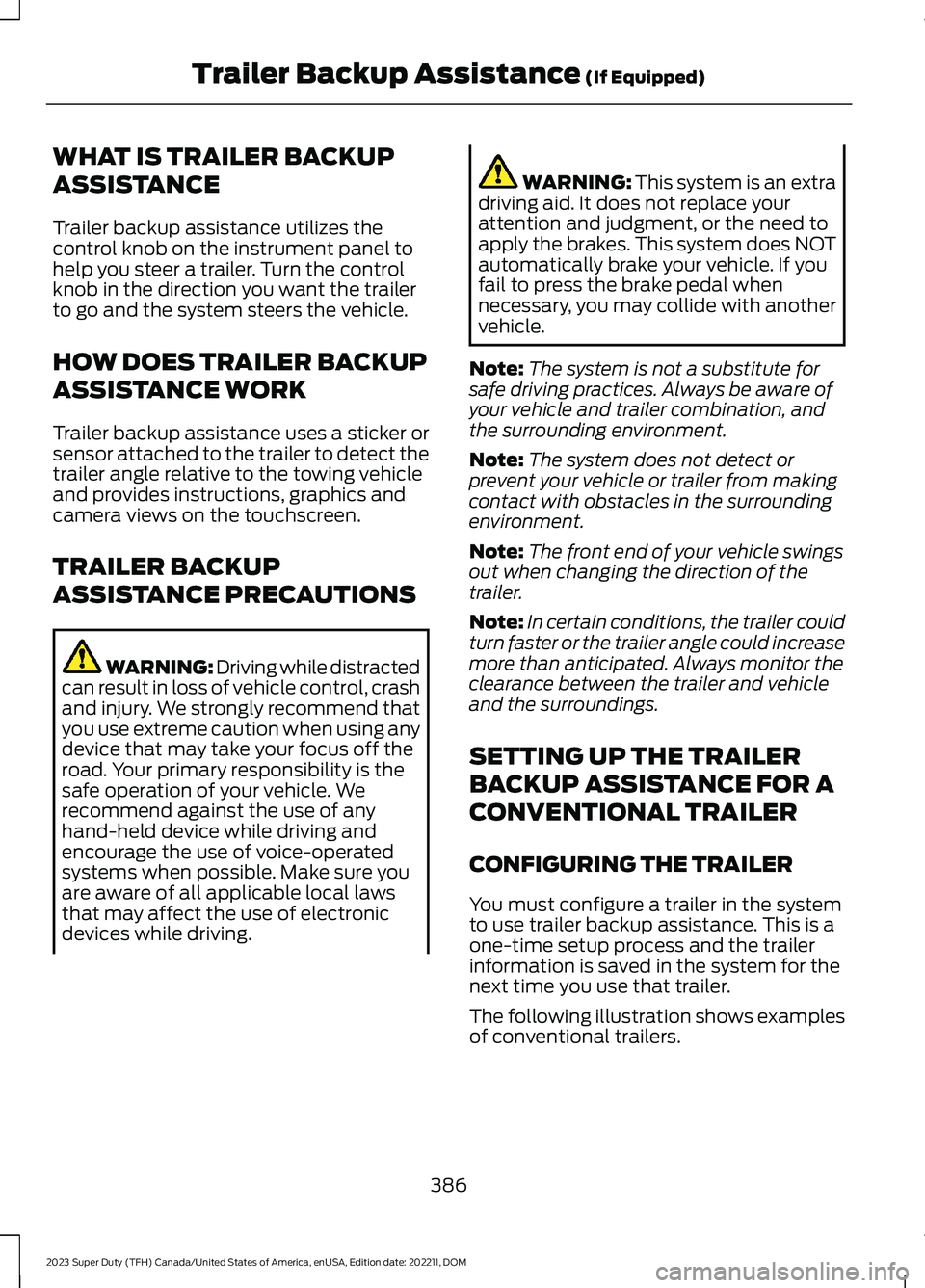
The following illustration shows examplesof conventional trailers.
386
2023 Super Duty (TFH) Canada/United States of America, enUSA, Edition date: 202211, DOMTrailer Backup Assistance (If Equipped)
Page 391 of 738
Positioning the Trailer
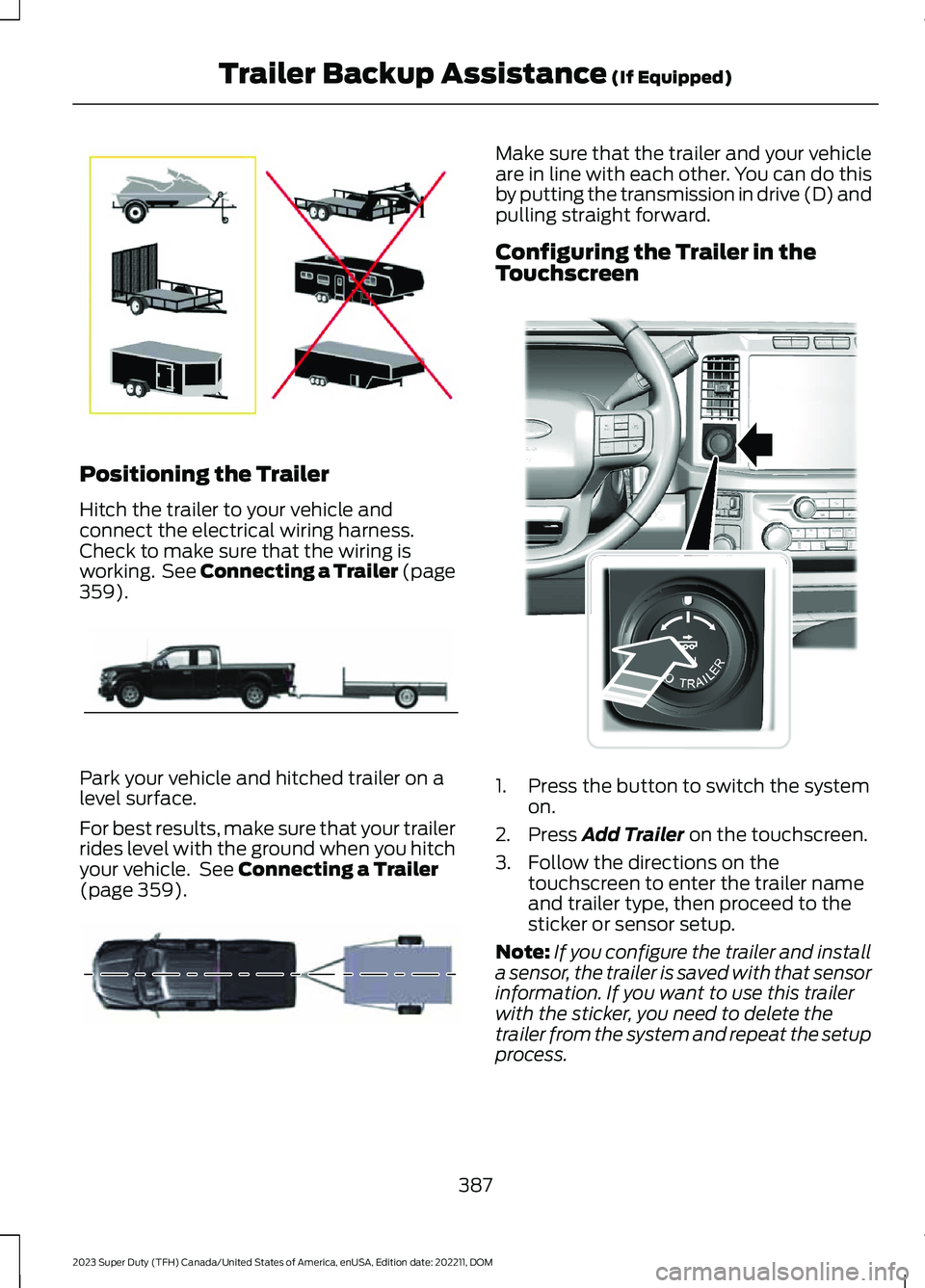
Hitch the trailer to your vehicle andconnect the electrical wiring harness.Check to make sure that the wiring isworking. See Connecting a Trailer (page359).
Park your vehicle and hitched trailer on alevel surface.
For best results, make sure that your trailerrides level with the ground when you hitchyour vehicle. See Connecting a Trailer(page 359).
Make sure that the trailer and your vehicleare in line with each other. You can do thisby putting the transmission in drive (D) andpulling straight forward.
Configuring the Trailer in theTouchscreen
1.Press the button to switch the systemon.
2.Press Add Trailer on the touchscreen.
3.Follow the directions on thetouchscreen to enter the trailer nameand trailer type, then proceed to thesticker or sensor setup.
Note:If you configure the trailer and installa sensor, the trailer is saved with that sensorinformation. If you want to use this trailerwith the sticker, you need to delete thetrailer from the system and repeat the setupprocess.
387
2023 Super Duty (TFH) Canada/United States of America, enUSA, Edition date: 202211, DOMTrailer Backup Assistance (If Equipped)E209766 E209759 E209760 E373857
Page 392 of 738
Note:Your vehicle has two options for thetrailer reversing aid setup. If your vehiclecame with a trailer sensor kit or if a messagedisplays to install a sensor, follow the sensorinstallation instructions. See Trailer SensorInstallation (page 388). If your vehicle didnot come with a trailer sensor kit, follow thesticker installation instructions. SeeApplying the Trailer Reversing Aid Sticker(page 388).
APPLYING THE TRAILERREVERSING AID STICKER
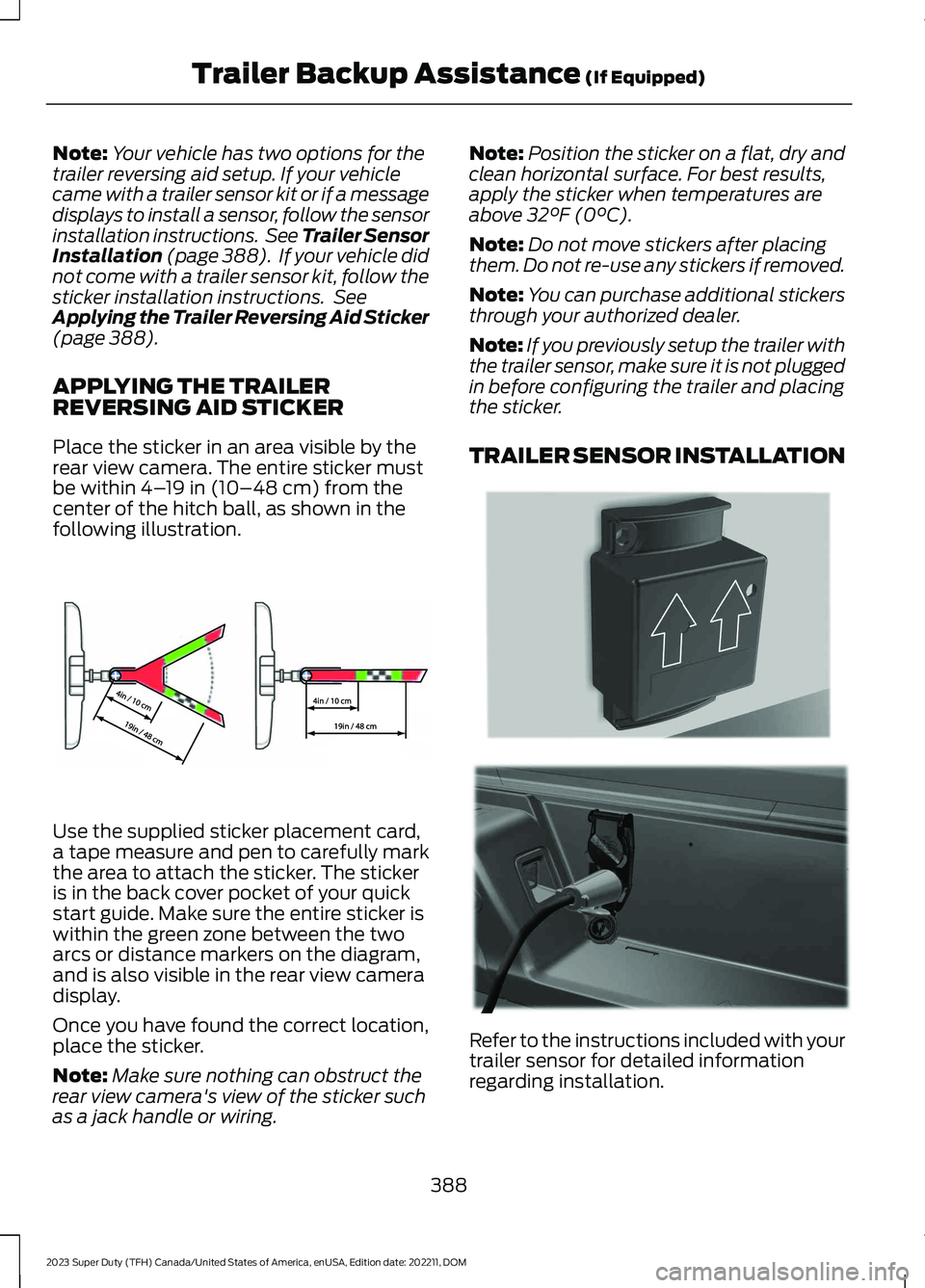
Place the sticker in an area visible by therear view camera. The entire sticker mustbe within 4–19 in (10–48 cm) from thecenter of the hitch ball, as shown in thefollowing illustration.
Use the supplied sticker placement card,a tape measure and pen to carefully markthe area to attach the sticker. The stickeris in the back cover pocket of your quickstart guide. Make sure the entire sticker iswithin the green zone between the twoarcs or distance markers on the diagram,and is also visible in the rear view cameradisplay.
Once you have found the correct location,place the sticker.
Note:Make sure nothing can obstruct therear view camera's view of the sticker suchas a jack handle or wiring.
Note:Position the sticker on a flat, dry andclean horizontal surface. For best results,apply the sticker when temperatures areabove 32°F (0°C).
Note:Do not move stickers after placingthem. Do not re-use any stickers if removed.
Note:You can purchase additional stickersthrough your authorized dealer.
Note:If you previously setup the trailer withthe trailer sensor, make sure it is not pluggedin before configuring the trailer and placingthe sticker.
TRAILER SENSOR INSTALLATION
Refer to the instructions included with yourtrailer sensor for detailed informationregarding installation.
388
2023 Super Duty (TFH) Canada/United States of America, enUSA, Edition date: 202211, DOMTrailer Backup Assistance (If Equipped)E333148 E315959 E335221
Page 393 of 738
Note:Make sure the arrows on the sensorhousing are facing up. Mount the sensor toa vertical part of the trailer that pivots whenyou turn your vehicle. Do not mount to astationary surface such as the truck side ofthe trailer hitch.
CALIBRATING THE SYSTEM
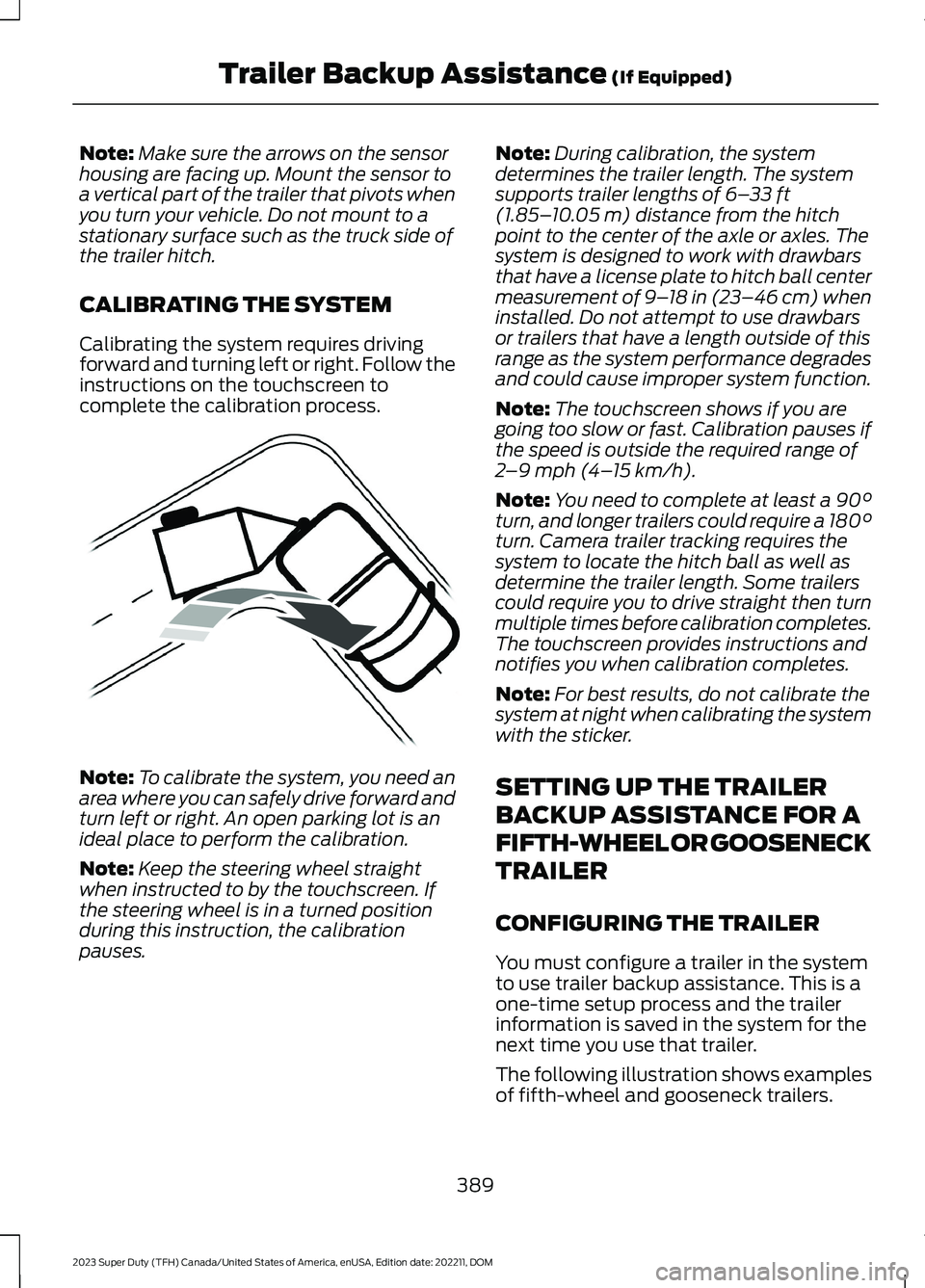
Calibrating the system requires drivingforward and turning left or right. Follow theinstructions on the touchscreen tocomplete the calibration process.
Note:To calibrate the system, you need anarea where you can safely drive forward andturn left or right. An open parking lot is anideal place to perform the calibration.
Note:Keep the steering wheel straightwhen instructed to by the touchscreen. Ifthe steering wheel is in a turned positionduring this instruction, the calibrationpauses.
Note:During calibration, the systemdetermines the trailer length. The systemsupports trailer lengths of 6–33 ft(1.85–10.05 m) distance from the hitchpoint to the center of the axle or axles. Thesystem is designed to work with drawbarsthat have a license plate to hitch ball centermeasurement of 9–18 in (23–46 cm) wheninstalled. Do not attempt to use drawbarsor trailers that have a length outside of thisrange as the system performance degradesand could cause improper system function.
Note:The touchscreen shows if you aregoing too slow or fast. Calibration pauses ifthe speed is outside the required range of2–9 mph (4–15 km/h).
Note:You need to complete at least a 90°turn, and longer trailers could require a 180°turn. Camera trailer tracking requires thesystem to locate the hitch ball as well asdetermine the trailer length. Some trailerscould require you to drive straight then turnmultiple times before calibration completes.The touchscreen provides instructions andnotifies you when calibration completes.
Note:For best results, do not calibrate thesystem at night when calibrating the systemwith the sticker.
SETTING UP THE TRAILER
BACKUP ASSISTANCE FOR A
FIFTH-WHEEL OR GOOSENECK
TRAILER
CONFIGURING THE TRAILER
You must configure a trailer in the systemto use trailer backup assistance. This is aone-time setup process and the trailerinformation is saved in the system for thenext time you use that trailer.
The following illustration shows examplesof fifth-wheel and gooseneck trailers.
389
2023 Super Duty (TFH) Canada/United States of America, enUSA, Edition date: 202211, DOMTrailer Backup Assistance (If Equipped)E352329
Page 394 of 738
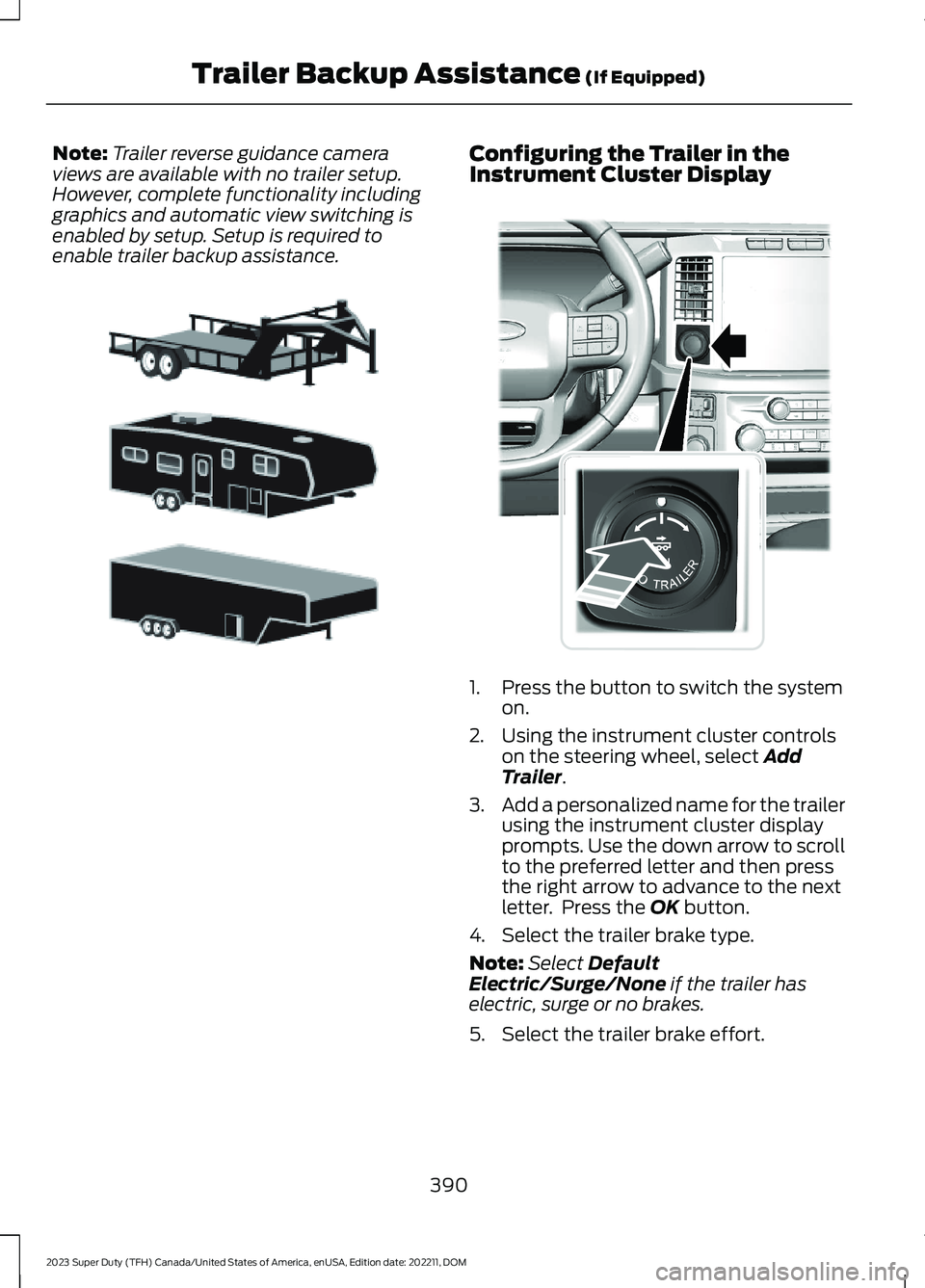
Note:Trailer reverse guidance cameraviews are available with no trailer setup.However, complete functionality includinggraphics and automatic view switching isenabled by setup. Setup is required toenable trailer backup assistance.
Configuring the Trailer in theInstrument Cluster Display
1.Press the button to switch the systemon.
2.Using the instrument cluster controlson the steering wheel, select AddTrailer.
3.Add a personalized name for the trailerusing the instrument cluster displayprompts. Use the down arrow to scrollto the preferred letter and then pressthe right arrow to advance to the nextletter. Press the OK button.
4.Select the trailer brake type.
Note:Select DefaultElectric/Surge/None if the trailer haselectric, surge or no brakes.
5.Select the trailer brake effort.
390
2023 Super Duty (TFH) Canada/United States of America, enUSA, Edition date: 202211, DOMTrailer Backup Assistance (If Equipped)E311877 E373857