trailer FORD SUPER DUTY 2023 Manual Online
[x] Cancel search | Manufacturer: FORD, Model Year: 2023, Model line: SUPER DUTY, Model: FORD SUPER DUTY 2023Pages: 738, PDF Size: 18.49 MB
Page 395 of 738
Note:The default value is Low and is therecommended setting for most trailers.Select a different setting if your trailer'sbrakes require more initial voltage, or youprefer more aggressive trailer braking.
6.Select the trailer type.
Note:The system could prompt you tosetup Trailer Blind Spot before continuingthe setup process.
7.Select whether you want to add thefeature.
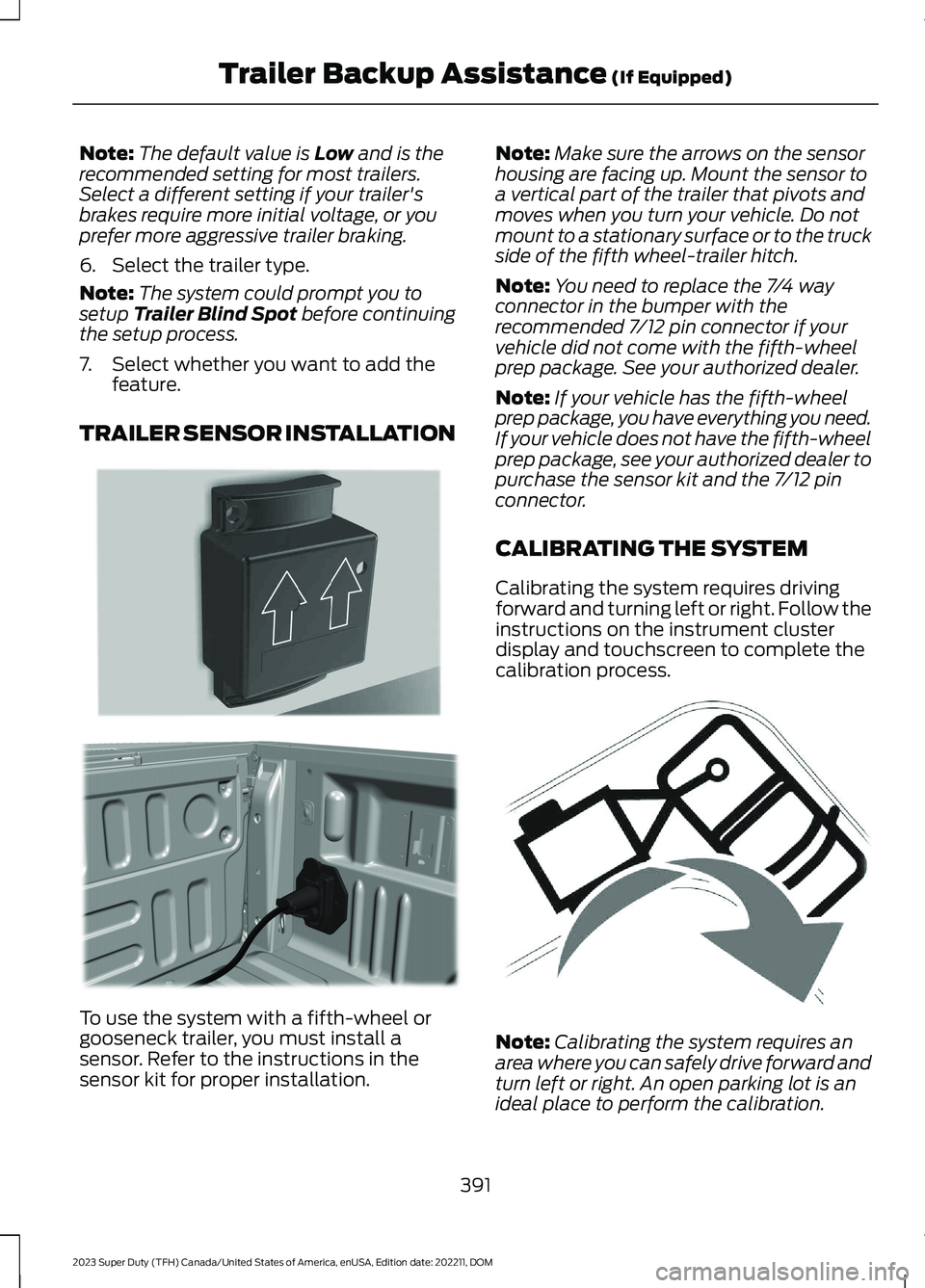
TRAILER SENSOR INSTALLATION
To use the system with a fifth-wheel orgooseneck trailer, you must install asensor. Refer to the instructions in thesensor kit for proper installation.
Note:Make sure the arrows on the sensorhousing are facing up. Mount the sensor toa vertical part of the trailer that pivots andmoves when you turn your vehicle. Do notmount to a stationary surface or to the truckside of the fifth wheel-trailer hitch.
Note:You need to replace the 7/4 wayconnector in the bumper with therecommended 7/12 pin connector if yourvehicle did not come with the fifth-wheelprep package. See your authorized dealer.
Note:If your vehicle has the fifth-wheelprep package, you have everything you need.If your vehicle does not have the fifth-wheelprep package, see your authorized dealer topurchase the sensor kit and the 7/12 pinconnector.
CALIBRATING THE SYSTEM
Calibrating the system requires drivingforward and turning left or right. Follow theinstructions on the instrument clusterdisplay and touchscreen to complete thecalibration process.
Note:Calibrating the system requires anarea where you can safely drive forward andturn left or right. An open parking lot is anideal place to perform the calibration.
391
2023 Super Duty (TFH) Canada/United States of America, enUSA, Edition date: 202211, DOMTrailer Backup Assistance (If Equipped)E315959 E316145 E346605
Page 396 of 738
Note:Keep the steering wheel straightwhen instructed to by the instrument clusterdisplay and touchscreen. If the steeringwheel is in a turned position during thisinstruction, the calibration pauses.
Note:During calibration, the systemdetermines the trailer length. The systemsupports trailer lengths of 10–39 ft(3–11.94 m) distance from the hitch pointto the center of the axle or axles.
Note:The instrument cluster displays andtouchscreen shows if you are going too slowor fast. Calibration pauses if the speed isoutside the required range of 2–16 mph(4–25 km/h).
Note:You need to complete at least a 90°turn, and longer trailers could require a 180°turn.
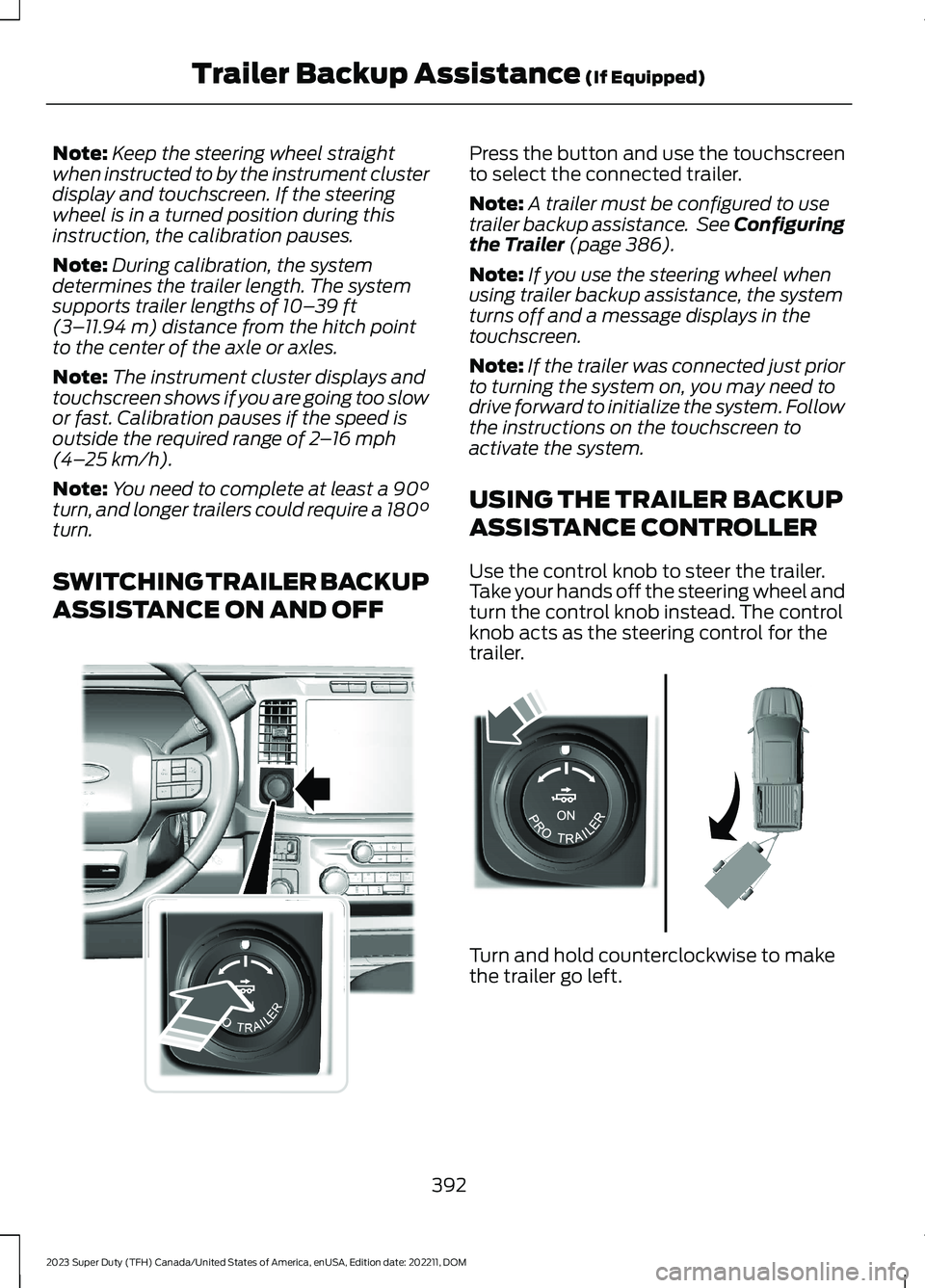
SWITCHING TRAILER BACKUP
ASSISTANCE ON AND OFF
Press the button and use the touchscreento select the connected trailer.
Note:A trailer must be configured to usetrailer backup assistance. See Configuringthe Trailer (page 386).
Note:If you use the steering wheel whenusing trailer backup assistance, the systemturns off and a message displays in thetouchscreen.
Note:If the trailer was connected just priorto turning the system on, you may need todrive forward to initialize the system. Followthe instructions on the touchscreen toactivate the system.
USING THE TRAILER BACKUP
ASSISTANCE CONTROLLER
Use the control knob to steer the trailer.Take your hands off the steering wheel andturn the control knob instead. The controlknob acts as the steering control for thetrailer.
Turn and hold counterclockwise to makethe trailer go left.
392
2023 Super Duty (TFH) Canada/United States of America, enUSA, Edition date: 202211, DOMTrailer Backup Assistance (If Equipped)E373857 E313025
Page 397 of 738
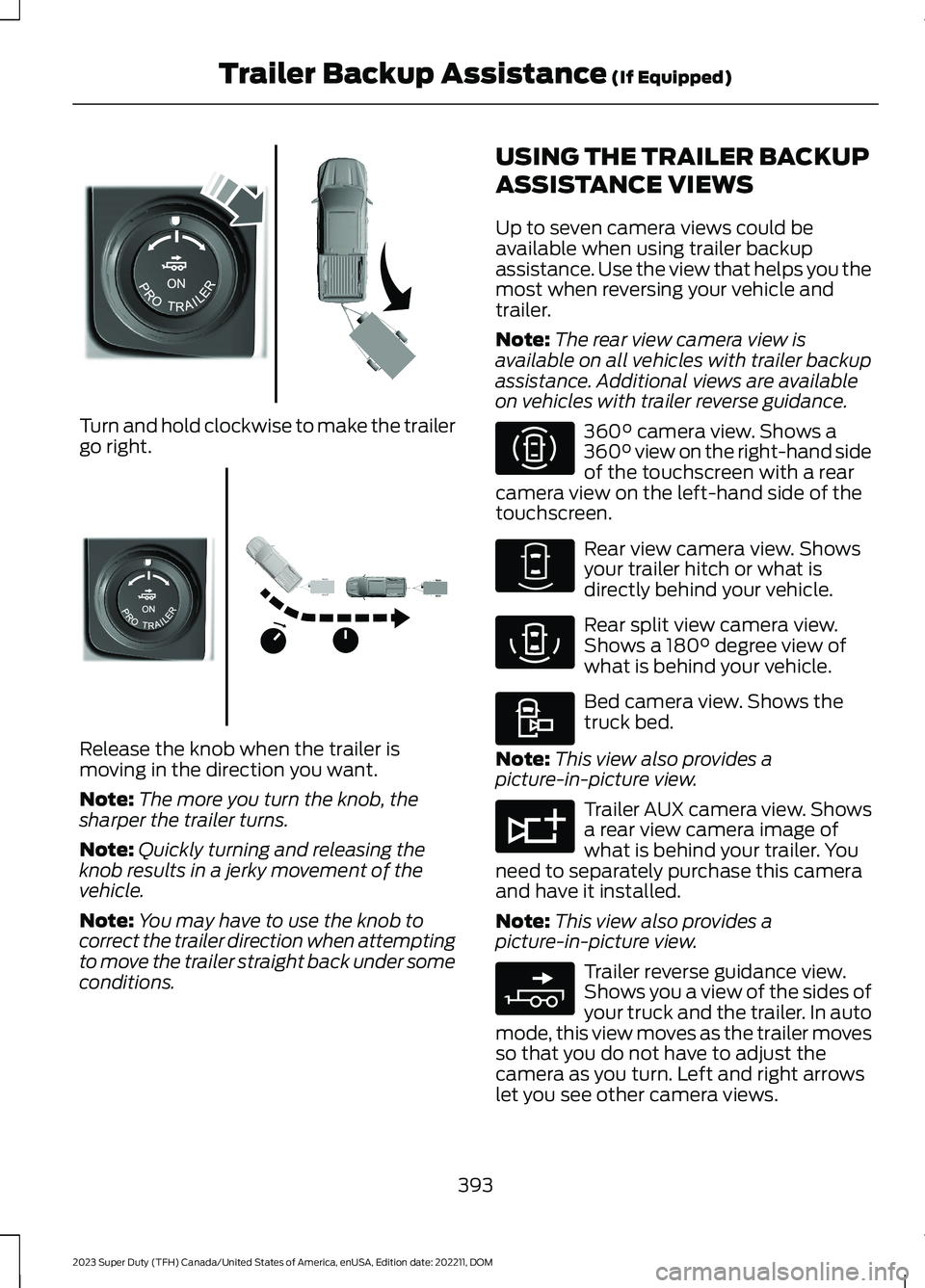
Turn and hold clockwise to make the trailergo right.
Release the knob when the trailer ismoving in the direction you want.
Note:The more you turn the knob, thesharper the trailer turns.
Note:Quickly turning and releasing theknob results in a jerky movement of thevehicle.
Note:You may have to use the knob tocorrect the trailer direction when attemptingto move the trailer straight back under someconditions.
USING THE TRAILER BACKUP
ASSISTANCE VIEWS
Up to seven camera views could beavailable when using trailer backupassistance. Use the view that helps you themost when reversing your vehicle andtrailer.
Note:The rear view camera view isavailable on all vehicles with trailer backupassistance. Additional views are availableon vehicles with trailer reverse guidance.
360° camera view. Shows a360° view on the right-hand sideof the touchscreen with a rearcamera view on the left-hand side of thetouchscreen.
Rear view camera view. Showsyour trailer hitch or what isdirectly behind your vehicle.
Rear split view camera view.Shows a 180° degree view ofwhat is behind your vehicle.
Bed camera view. Shows thetruck bed.
Note:This view also provides apicture-in-picture view.
Trailer AUX camera view. Showsa rear view camera image ofwhat is behind your trailer. Youneed to separately purchase this cameraand have it installed.
Note:This view also provides apicture-in-picture view.
Trailer reverse guidance view.Shows you a view of the sides ofyour truck and the trailer. In automode, this view moves as the trailer movesso that you do not have to adjust thecamera as you turn. Left and right arrowslet you see other camera views.
393
2023 Super Duty (TFH) Canada/United States of America, enUSA, Edition date: 202211, DOMTrailer Backup Assistance (If Equipped)E313026 E313027 E310996 E310967 E310974 E310995 E311776 E310965
Page 398 of 738
Picture-in-picture view. Showsa main view and a secondaryview when in bed camera viewor trailer AUX camera view.
Note:If you have a 8 in (20 cm)touchscreen, picture-in-picture is off bydefault. Press the picture-in-picture icon onthe touchscreen to switch picture-in-pictureview on and off.
Note:If you have a 12 in (30 cm)touchscreen, picture-in-picture is on bydefault and you cannot switch it off.
Swap. Press to swap betweenpicture-in-picture views.
Auto. Press to return to autoview.
Note:Auto is the default setting.
Hitch Angle Graphic
The hitch angle graphic shows a smallrepresentation of your truck and trailer withvisual feedback to help you monitor thetrailer. The graphic shows two differentcolored lines for the trailer hitch angle. Ablack line shows you where your trailer isin relation to your vehicle. The white linerepresents the amount the trailer can turnbased on knob input.
The graphic shows a yellow and red zonefor the hitch angle to warn you of a highangle condition that could require you topull forward to reduce the hitch angle. Theangle limits for each zone vary based onthe trailer length.
The yellow zone indicates you areapproaching the maximum controllabletrailer angle for the system. When thetrailer enters this zone, it is more difficultto reduce the trailer turn when backing up.It may be necessary to put your vehicleback into drive (D) and pull forward to getthe truck and trailer back to an in-lineposition.
The red zone indicates you have exceededthe maximum controllable trailer angle forthe system. Immediately stop reversing.Put your vehicle into drive (D) and pullforward until the trailer is no longer in thered zone.
Setting the Trailer Angle Limit
1.Press Features on the touchscreen.
2.Press Towing.
3.Press Manage trailers.
4.Press Pro Trailer Backup Assist.
5.Press Trailer Angle Limit.
6.Press a setting.
Normal Control Angle
Default setting. This provides a balancedlimit that returns from a turn to straightbacking with minimal change to the trailerdirection.
Max Control Angle
Increases the trailer angle limit close to themaximum controllable angle to allowsharper turns but also causes more changein the trailer direction when straighteningout from a turn.
394
2023 Super Duty (TFH) Canada/United States of America, enUSA, Edition date: 202211, DOMTrailer Backup Assistance (If Equipped)E351663 E351662 E315644
Page 399 of 738
TRAILER BACKUP ASSISTANCE – TROUBLESHOOTING
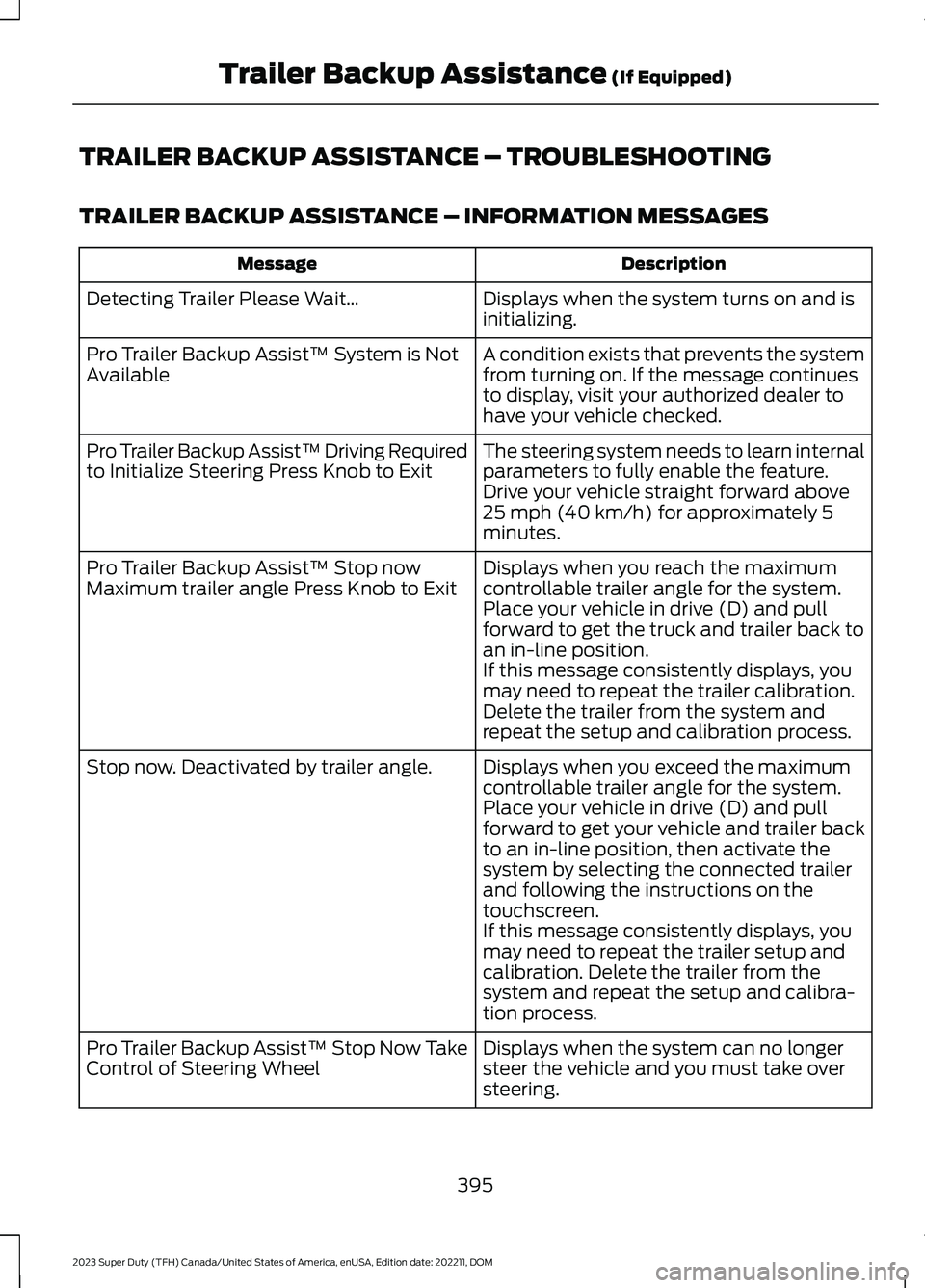
TRAILER BACKUP ASSISTANCE – INFORMATION MESSAGES
DescriptionMessage
Displays when the system turns on and isinitializing.Detecting Trailer Please Wait…
A condition exists that prevents the systemfrom turning on. If the message continuesto display, visit your authorized dealer tohave your vehicle checked.
Pro Trailer Backup Assist™ System is NotAvailable
The steering system needs to learn internalparameters to fully enable the feature.Drive your vehicle straight forward above25 mph (40 km/h) for approximately 5minutes.
Pro Trailer Backup Assist™ Driving Requiredto Initialize Steering Press Knob to Exit
Displays when you reach the maximumcontrollable trailer angle for the system.Place your vehicle in drive (D) and pullforward to get the truck and trailer back toan in-line position.
Pro Trailer Backup Assist™ Stop nowMaximum trailer angle Press Knob to Exit
If this message consistently displays, youmay need to repeat the trailer calibration.Delete the trailer from the system andrepeat the setup and calibration process.
Displays when you exceed the maximumcontrollable trailer angle for the system.Place your vehicle in drive (D) and pullforward to get your vehicle and trailer backto an in-line position, then activate thesystem by selecting the connected trailerand following the instructions on thetouchscreen.
Stop now. Deactivated by trailer angle.
If this message consistently displays, youmay need to repeat the trailer setup andcalibration. Delete the trailer from thesystem and repeat the setup and calibra-tion process.
Displays when the system can no longersteer the vehicle and you must take oversteering.
Pro Trailer Backup Assist™ Stop Now TakeControl of Steering Wheel
395
2023 Super Duty (TFH) Canada/United States of America, enUSA, Edition date: 202211, DOMTrailer Backup Assistance (If Equipped)
Page 400 of 738
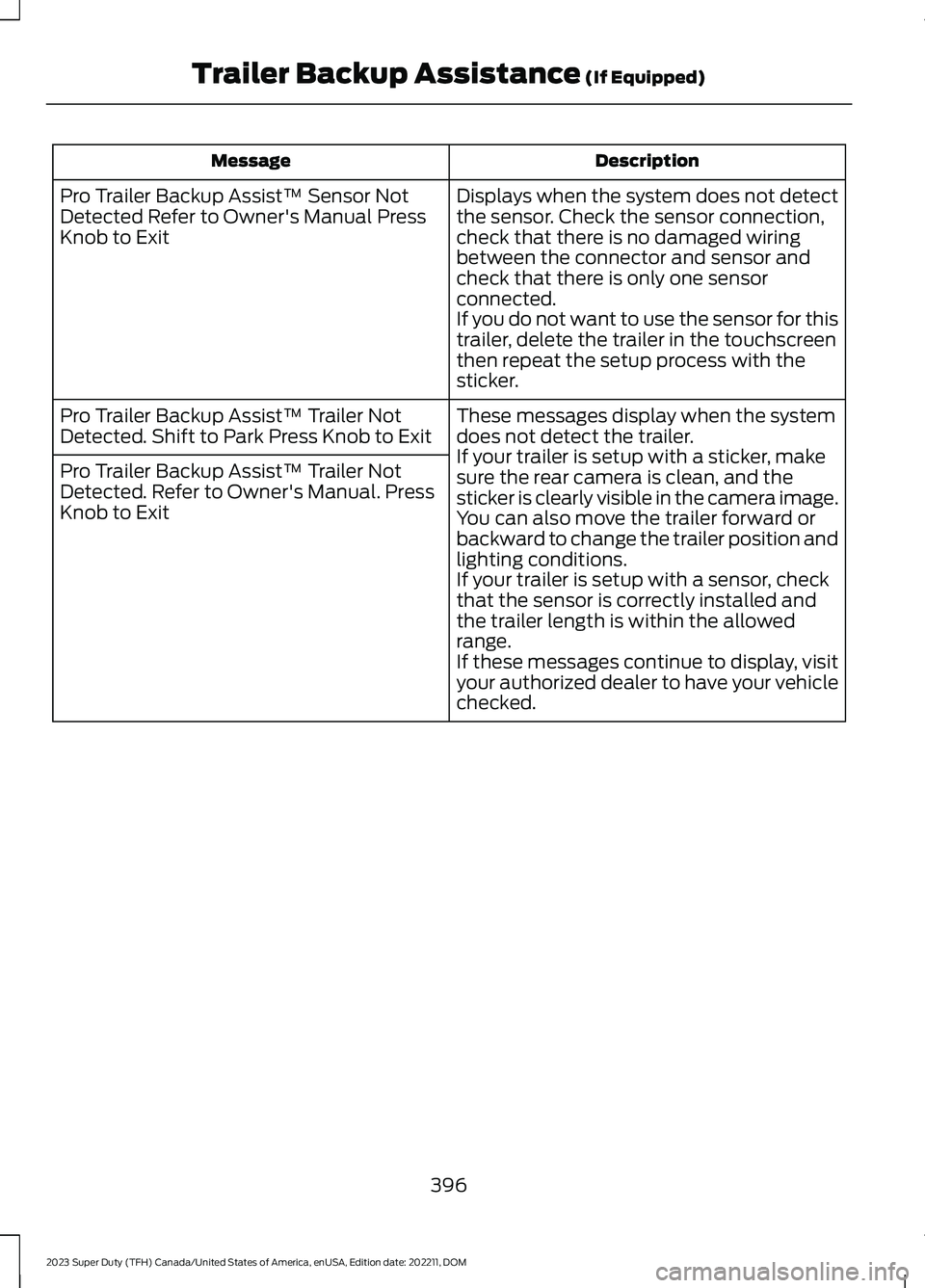
DescriptionMessage
Displays when the system does not detectthe sensor. Check the sensor connection,check that there is no damaged wiringbetween the connector and sensor andcheck that there is only one sensorconnected.If you do not want to use the sensor for thistrailer, delete the trailer in the touchscreenthen repeat the setup process with thesticker.
Pro Trailer Backup Assist™ Sensor NotDetected Refer to Owner's Manual PressKnob to Exit
These messages display when the systemdoes not detect the trailer.If your trailer is setup with a sticker, makesure the rear camera is clean, and thesticker is clearly visible in the camera image.You can also move the trailer forward orbackward to change the trailer position andlighting conditions.If your trailer is setup with a sensor, checkthat the sensor is correctly installed andthe trailer length is within the allowedrange.If these messages continue to display, visityour authorized dealer to have your vehiclechecked.
Pro Trailer Backup Assist™ Trailer NotDetected. Shift to Park Press Knob to Exit
Pro Trailer Backup Assist™ Trailer NotDetected. Refer to Owner's Manual. PressKnob to Exit
396
2023 Super Duty (TFH) Canada/United States of America, enUSA, Edition date: 202211, DOMTrailer Backup Assistance (If Equipped)
Page 401 of 738
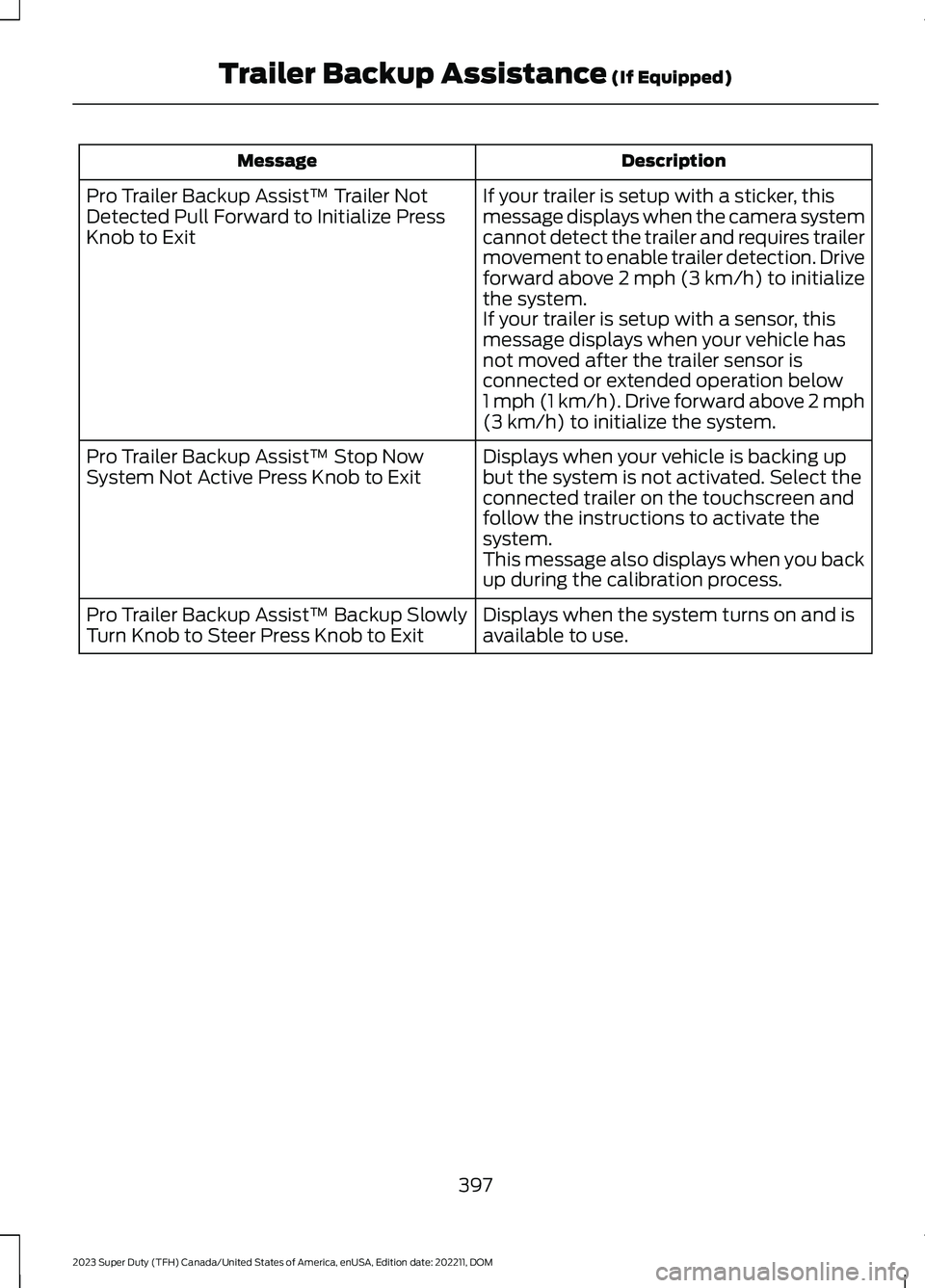
DescriptionMessage
If your trailer is setup with a sticker, thismessage displays when the camera systemcannot detect the trailer and requires trailermovement to enable trailer detection. Driveforward above 2 mph (3 km/h) to initializethe system.If your trailer is setup with a sensor, thismessage displays when your vehicle hasnot moved after the trailer sensor isconnected or extended operation below1 mph (1 km/h). Drive forward above 2 mph(3 km/h) to initialize the system.
Pro Trailer Backup Assist™ Trailer NotDetected Pull Forward to Initialize PressKnob to Exit
Displays when your vehicle is backing upbut the system is not activated. Select theconnected trailer on the touchscreen andfollow the instructions to activate thesystem.This message also displays when you backup during the calibration process.
Pro Trailer Backup Assist™ Stop NowSystem Not Active Press Knob to Exit
Displays when the system turns on and isavailable to use.Pro Trailer Backup Assist™ Backup SlowlyTurn Knob to Steer Press Knob to Exit
397
2023 Super Duty (TFH) Canada/United States of America, enUSA, Edition date: 202211, DOMTrailer Backup Assistance (If Equipped)
Page 402 of 738
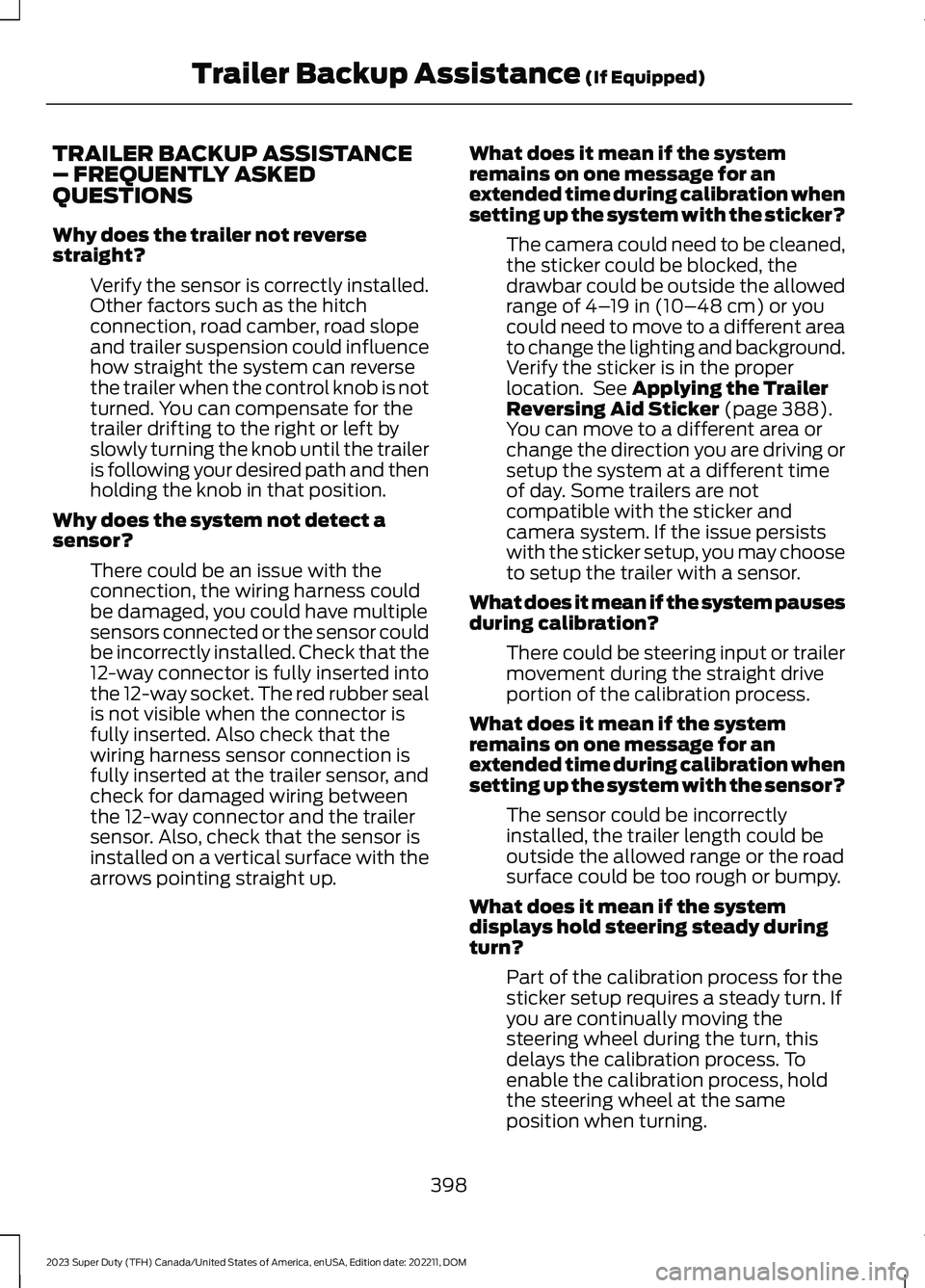
TRAILER BACKUP ASSISTANCE– FREQUENTLY ASKEDQUESTIONS
Why does the trailer not reversestraight?
Verify the sensor is correctly installed.Other factors such as the hitchconnection, road camber, road slopeand trailer suspension could influencehow straight the system can reversethe trailer when the control knob is notturned. You can compensate for thetrailer drifting to the right or left byslowly turning the knob until the traileris following your desired path and thenholding the knob in that position.
Why does the system not detect asensor?
There could be an issue with theconnection, the wiring harness couldbe damaged, you could have multiplesensors connected or the sensor couldbe incorrectly installed. Check that the12-way connector is fully inserted intothe 12-way socket. The red rubber sealis not visible when the connector isfully inserted. Also check that thewiring harness sensor connection isfully inserted at the trailer sensor, andcheck for damaged wiring betweenthe 12-way connector and the trailersensor. Also, check that the sensor isinstalled on a vertical surface with thearrows pointing straight up.
What does it mean if the systemremains on one message for anextended time during calibration whensetting up the system with the sticker?
The camera could need to be cleaned,the sticker could be blocked, thedrawbar could be outside the allowedrange of 4–19 in (10–48 cm) or youcould need to move to a different areato change the lighting and background.Verify the sticker is in the properlocation. See Applying the TrailerReversing Aid Sticker (page 388).You can move to a different area orchange the direction you are driving orsetup the system at a different timeof day. Some trailers are notcompatible with the sticker andcamera system. If the issue persistswith the sticker setup, you may chooseto setup the trailer with a sensor.
What does it mean if the system pausesduring calibration?
There could be steering input or trailermovement during the straight driveportion of the calibration process.
What does it mean if the systemremains on one message for anextended time during calibration whensetting up the system with the sensor?
The sensor could be incorrectlyinstalled, the trailer length could beoutside the allowed range or the roadsurface could be too rough or bumpy.
What does it mean if the systemdisplays hold steering steady duringturn?
Part of the calibration process for thesticker setup requires a steady turn. Ifyou are continually moving thesteering wheel during the turn, thisdelays the calibration process. Toenable the calibration process, holdthe steering wheel at the sameposition when turning.
398
2023 Super Duty (TFH) Canada/United States of America, enUSA, Edition date: 202211, DOMTrailer Backup Assistance (If Equipped)
Page 403 of 738
What does it mean if the systemdisplays that it is not available?
There could be a sub-system that thesystem uses that is not correctlyoperating or there could be a batteryvoltage issue. If the system continuesto display it is not available, visit yourauthorized dealer to have your vehiclechecked.
What does it mean if the systemdisplays that driving is required toinitialize steering?
The steering system needs to learninternal parameters to fully turn on thefeature. Drive your vehicle straightforward above 25 mph (40 km/h) forapproximately 5 minutes. This couldalso occur when your vehicle is new,there is a battery voltage issue or if thesteering system has been serviced.
What does it mean if the system doesnot detect a trailer when configuredwith a sensor?
Verify that the sensor is properlyconnected. See Trailer SensorInstallation (page 388). Repeatcalibration on a different route if youhave verified sensor installation.
What does it mean if the systemrequires you to pull forward toinitialize?
This occurs when the vehicle has notmoved during the current key cycleafter you connect and select the trailerin the touchscreen or you operate thesystem at speeds below 1 mph(1 km/h) for an extended period oftime. Drive forward above 2 mph(3 km/h) and the system indicateswhen it initializes.
What does it mean if the trailer is at itsmaximum angle or the systemdeactivated by trailer angle?
You are at the maximum controllabletrailer angle for the system. Place yourvehicle in drive (D) and pull forward toget the truck and trailer back to anin-line position. If this messageconsistently displays, this couldindicate the sensor is incorrectlyinstalled, the trailer needs to berecalibrated or the drawbar or thetrailer dimensions are outside of thesupported range. The system isdesigned to work with drawbars thathave a license plate to hitch ball centermeasurement of 9–18 in (23–46 cm)when installed. The system is designedto work with trailers that have a hitchpoint to center of the axle or axlesmeasurement of 6–33 ft(1.85–10.05 m). Do not attempt to usedrawbars or trailers that have a lengthoutside of this range as the systemperformance degrades and couldcause improper system function.Check that the correct trailer isselected in the touchscreen. Verify thesensor is installed according to theinstructions included in the sensor kitand check that the drawbar and thetrailer dimensions are within theallowed range. Then, delete the trailerfrom the system and repeat the setupprocess to calibrate the trailer.
399
2023 Super Duty (TFH) Canada/United States of America, enUSA, Edition date: 202211, DOMTrailer Backup Assistance (If Equipped)
Page 404 of 738
What does it mean when the systemtells you to take control of the steeringwheel?
The system is no longer steering thevehicle and you must take oversteering. There are four reasons thesystem could display this message.The first reason the system coulddisplay this message is that you havetouched the steering wheel when thesystem is steering. The second reasonthe system could display this messageis that you have exceeded themaximum speed for the feature. Thethird reason the system could displaythis message is that the trailer is notdetected. The final reason the systemcould display this message is that aninternal condition for system operationis not met that requires your vehicle toreturn to manual control of thesteering.
How do I use a sticker if I havepreviously setup a trailer with thesensor?
Disconnect the sensor wiring and adda new trailer to the system and followthe instructions for setup with asticker. See Applying the TrailerReversing Aid Sticker (page 388). Ifyour vehicle does not support thesticker option, the touchscreeninstructs you to install the sensoragain.
What if I want to use a sensor for thetrailer instead of a sticker?
Install the sensor and connect thesensor wiring before adding the newtrailer to the system. You mustconnect the sensor before you add thetrailer. If your vehicle did not come witha sensor, you can purchase one fromyour authorized dealer.
What does it mean if the system doesnot detect a trailer that is setup with asticker?
The system requires a clear view of thesticker placed on the trailer. You mustkeep the camera lens and sticker cleanfor the system to correctly operate. Ifthe system cannot initially detect thetrailer, it could be necessary for you tochange the lighting conditions bymoving your vehicle and trailer orwaiting until the conditions change.See Applying the Trailer ReversingAid Sticker (page 388). Some trailersare not compatible with the stickerand camera system. If the systemconsistently does not detect the trailerwith the sticker setup, you may chooseto setup the trailer with a sensor.
Note:The system is designed to be usedwith the same trailer connection every timeyou choose the trailer from the touchscreen.When using a different drawbar or adifferent pin hole on drawbars with morethan one, connecting the drawbar to yourvehicle affects the trailer position and youmay need to repeat the trailer setup andcalibration process.
400
2023 Super Duty (TFH) Canada/United States of America, enUSA, Edition date: 202211, DOMTrailer Backup Assistance (If Equipped)