power steering FORD SUPER DUTY 2023 Owners Manual
[x] Cancel search | Manufacturer: FORD, Model Year: 2023, Model line: SUPER DUTY, Model: FORD SUPER DUTY 2023Pages: 738, PDF Size: 18.49 MB
Page 7 of 738
Tailgate Step.................................................100
Tailgate – Troubleshooting.......................101
Tailgate Videos.............................................102
Security
Passive Anti-Theft System......................103
Anti-Theft Alarm System.........................103
Anti-Theft Alarm System Settings.......104
Security – Troubleshooting.....................105
Power Running Boards
Power Running Board Precautions.......107
Power Running Board Settings..............107
Power Running Boards –Troubleshooting......................................108
Power Running Boards Videos..............108
Steering Wheel
Adjusting the Steering Wheel - VehiclesWith: Manual Adjustable SteeringColumn.......................................................109
Adjusting the Steering Wheel - VehiclesWith: Power Adjustable SteeringColumn.......................................................109
Resetting the Stopping Position -Vehicles With: Power AdjustableSteering Column.......................................110
Horn...................................................................110
Switching the Heated Steering WheelOn and Off....................................................111
Steering Wheel Videos................................111
Adjustable Pedals
Adjusting the Pedals....................................112
Wipers and Washers
Wipers...............................................................113
Autowipers......................................................113
Checking the Wiper Blades.......................114
Replacing the Front Wiper Blades.........114
Washers...........................................................114
Wipers and Washers Videos.....................115
Wipers and Washers – Troubleshooting..........................................................................115
Exterior Lighting
Exterior Lighting Control.............................117
Headlamps......................................................117
Headlamps – Troubleshooting................117
Autolamps......................................................118
Exterior Lamps..............................................118
Exterior Zone Lighting.................................121
Automatic High Beam Control...............122
Automatic High Beam Control –Troubleshooting.......................................124
Adaptive Front Lighting.............................124
Exterior Lighting Videos.............................125
Interior Lighting
Switching All of the Interior Lamps Onand Off........................................................126
Switching the Front Interior Lamps Onand Off........................................................126
Switching the Rear Interior Lamps Onand Off........................................................126
Interior Lamp Function..............................126
Adjusting the Instrument Panel LightingBrightness...................................................127
Ambient Lighting..........................................127
Interior Lighting – Troubleshooting.......127
Windows
Opening and Closing the Windows......128
Global Opening............................................128
Window Bounce-Back...............................129
Locking the Rear Window Controls......129
Opening and Closing the SlidingWindows.....................................................129
Windows Videos..........................................130
Interior Mirror
Interior Mirror Precautions.........................131
3
2023 Super Duty (TFH) Canada/United States of America, enUSA, Edition date: 202211, DOMTable of Contents
Page 13 of 738
How Does Cross Traffic Braking Work........................................................................262
Cross Traffic Braking Precautions........262
Switching Cross Traffic Braking On andOff................................................................263
Overriding Cross Traffic Braking............263
Cross Traffic Braking Indicators............263
Cross Traffic Braking – Troubleshooting........................................................................263
Hill Start Assist
What Is Hill Start Assist...........................265
How Does Hill Start Assist Work..........265
Hill Start Assist Precautions...................265
Switching Hill Start Assist On and Off........................................................................265
Hill Start Assist – Troubleshooting......265
Hill Start Assist Videos.............................265
Auto Hold
How Does Auto Hold Work.....................266
Switching Auto Hold On and Off..........266
Using Auto Hold..........................................266
Auto Hold Indicators.................................266
Traction Control
What Is Traction Control.........................268
How Does Traction Control Work........268
Switching Traction Control On and Off........................................................................268
Traction Control Indicator.......................268
Traction Control – Troubleshooting.....269
Stability Control
How Does Stability Control Work.........270
Switching Stability Control On and Off..........................................................................271
Stability Control Indicator........................272
Trail Control
What Is Trail Control..................................273
Trail Control Limitations...........................273
Switching Trail Control On and Off......273
Setting the Trail Control Speed.............273
Canceling the Set Speed..........................273
Trail Control Indicators..............................274
Trail Control – Troubleshooting.............274
Trail Turn Assist
What Is Trail Turn Assist...........................275
Trail Turn Assist Precautions..................275
Trail Turn Assist Limitations....................275
Switching Trail Turn Assist On and Off........................................................................275
Trail Turn Assist Indicators.......................275
Trail Turn Assist – Troubleshooting......276
Hill Descent Control
What Is Hill Descent Control...................277
How Does Hill Descent Control Work.........................................................................277
Hill Descent Control Precautions..........277
Switching Hill Descent Control On andOff.................................................................277
Setting the Hill Descent Speed..............277
Hill Descent Control Indicator.................277
Hill Descent Control – Troubleshooting........................................................................278
Hill Descent Control Videos....................278
Steering
Hydraulic Power Steering........................279
Steering – Troubleshooting...................280
Parking Aids
Parking Aid Precautions...........................282
Switching Parking Aid On and Off -Vehicles With: Front Parking Aid......282
Switching Parking Aid On and Off -Vehicles With: Rear Parking Aid........283
Rear Parking Aid..........................................283
Front Parking Aid........................................284
9
2023 Super Duty (TFH) Canada/United States of America, enUSA, Edition date: 202211, DOMTable of Contents
Page 19 of 738
Wheel and Tire Information
Locating the Tire label..............................478
Department of Transportation UniformTire Quality Grades................................478
Information on the Tire Sidewall..........479
Glossary of Tire Terminology.................484
Tire Replacement Requirements.........485
Using Snow Chains....................................487
Tire Care
Checking the Tire Pressures..................490
Inflating the Tires.......................................490
Inspecting the Tire for Wear...................494
Inspecting the Tire for Damage............494
Inspecting the Wheel Valve Stems......498
Tire Rotation................................................498
Tire Pressure MonitoringSystem
What Is the Tire Pressure MonitoringSystem........................................................501
Tire Pressure Monitoring SystemOverview.....................................................501
Tire Pressure Monitoring SystemPrecautions..............................................502
Tire Pressure Monitoring SystemLimitations................................................502
Viewing the Tire Pressures.....................503
Resetting Tire Pressure MonitoringSystem.......................................................503
Tire Pressure Monitoring System –Troubleshooting.....................................506
Tire Pressure Monitoring System Videos.......................................................................508
Changing a Road Wheel
Changing a Flat Tire..................................509
Wheel Nuts....................................................519
Capacities and Specifications
Engine Specifications - 6.7L Diesel......520
Engine Specifications - 6.8L, Gasoline.........................................................................521
Engine Specifications - 7.3L, Gasoline........................................................................522
Motorcraft Parts - 6.7L Diesel................523
Motorcraft Parts - 6.8L, Gasoline.........524
Motorcraft Parts - 7.3L, Gasoline..........525
Engine Oil Capacity and Specification -6.7L Diesel.................................................526
Engine Oil Capacity and Specification -6.8L, Gasoline..........................................528
Engine Oil Capacity and Specification -7.3L, Gasoline...........................................530
Cooling System Capacity andSpecification - 6.7L Diesel...................532
Cooling System Capacity andSpecification - 6.8L, Gasoline............533
Cooling System Capacity andSpecification - 7.3L, Gasoline.............534
Fuel Tank Capacity - Diesel....................534
Fuel Tank Capacity - Gasoline...............535
Air Conditioning System Capacity andSpecification............................................536
Washer Fluid Specification.....................536
Diesel Exhaust Fluid Capacity andSpecification.............................................537
Automatic Transmission Fluid Capacityand Specification - Diesel...................538
Automatic Transmission Fluid Capacityand Specification - Gasoline.............538
Brake Fluid Specification.........................539
Transfer Case Fluid Capacity andSpecification............................................540
Front Axle Fluid Capacity andSpecification............................................540
Rear Axle Fluid Capacity andSpecification............................................542
Hydraulic Power Steering Fluid Capacityand Specification...................................546
15
2023 Super Duty (TFH) Canada/United States of America, enUSA, Edition date: 202211, DOMTable of Contents
Page 28 of 738
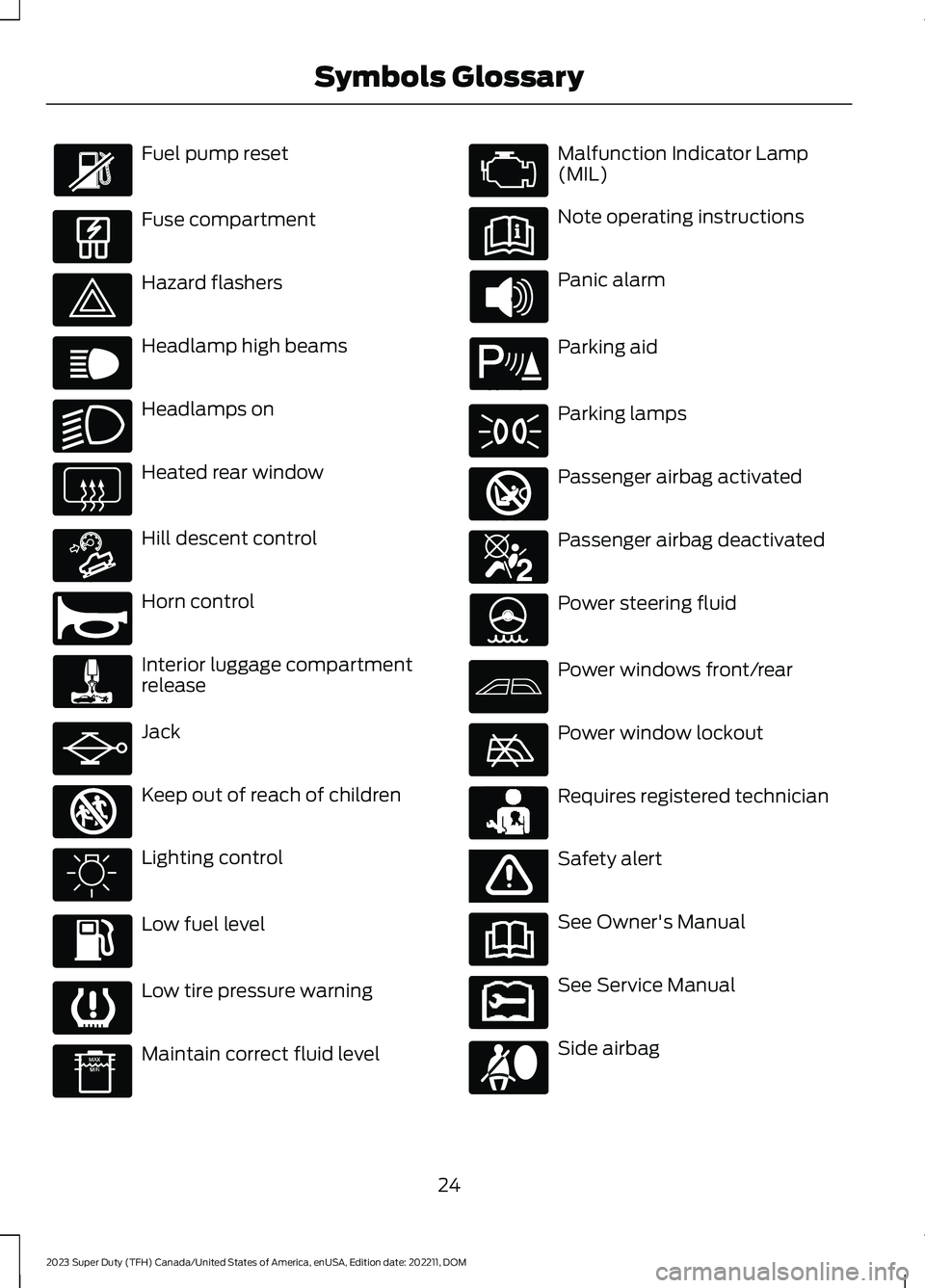
Fuel pump reset
Fuse compartment
Hazard flashers
Headlamp high beams
Headlamps on
Heated rear window
Hill descent control
Horn control
Interior luggage compartmentrelease
Jack
Keep out of reach of children
Lighting control
Low fuel level
Low tire pressure warning
Maintain correct fluid level
Malfunction Indicator Lamp(MIL)
Note operating instructions
Panic alarm
Parking aid
Parking lamps
Passenger airbag activated
Passenger airbag deactivated
Power steering fluid
Power windows front/rear
Power window lockout
Requires registered technician
Safety alert
See Owner's Manual
See Service Manual
Side airbag
24
2023 Super Duty (TFH) Canada/United States of America, enUSA, Edition date: 202211, DOMSymbols Glossary E139214 E75790 E67019 E270968 E163171 E270945 E139231 E161353 E139232 E139229 E67028 E72343 E139213 E71341 E270849 E270850 E139216 E139225 E231159 E65963 E72021 E231158
Page 71 of 738
WHAT IS 911 ASSIST
911 Assist is a SYNC system feature thatcan call for help.
For more information, visitwww.owner.ford.com.
HOW DOES 911 ASSIST WORK
If a crash deploys an airbag, excluding kneeairbags and rear inflatable seatbelts, oractivates the fuel pump shut-off, yourvehicle may be able to contact emergencyservices by dialing 911 through a paired andconnected Bluetooth® enabled phone.
Not all crashes deploy an airbag or activatethe fuel pump shut-off. If a connected cellphone sustains damage or loses itsconnection to SYNC during a crash, SYNCsearches for and tries to connect to apreviously paired cell phone. SYNC thenattempts to call the emergency services.
Before making the call:
•SYNC provides about 10 seconds tocancel the call. If you fail to cancel thecall, SYNC attempts to dial 911.
•SYNC says the following, or a similarmessage: SYNC will attempt to call 911,to cancel the call, press Cancel on yourscreen or press and hold the phonebutton on your steering wheel.
If you do not cancel the call and SYNCmakes a successful call a pre-recordedmessage plays for the 911 operator. Theoccupants in your vehicle are able to talkwith the operator. Be prepared to provideyour name, phone number and locationimmediately because not all 911 systemsare capable of receiving this informationelectronically.
During an emergency call the systemtransmits vehicle data to the emergencyservice.
EMERGENCY CALL
REQUIREMENTS
WARNING: Do not wait for 911Assist to make an emergency call if youcan do it yourself. Dial emergencyservices immediately to avoid delayedresponse time which could increase therisk of serious injury or death after acrash. If you do not hear 911 Assist withinfive seconds of the crash, the system orphone may be damaged ornon-functional.
WARNING: Always place yourphone in a secure location in your vehicleso it does not become a projectile or getdamaged in a crash. Failure to do so maycause serious injury to someone ordamage the phone which could prevent911 Assist from working properly.
WARNING: Unless the 911 Assistsetting is set on before a crash, thesystem will not dial for help which coulddelay response time, potentiallyincreasing the risk of serious injury ordeath after a crash.
•SYNC is powered and working properlyat the time of the incident andthroughout feature activation and use.
•The 911 Assist feature must be set onbefore the incident.
•You must pair and connect aBluetooth® enabled and compatiblecell phone to SYNC.
•A connected Bluetooth® enabledphone must have the ability to makeand maintain an outgoing call at thetime of the incident.
67
2023 Super Duty (TFH) Canada/United States of America, enUSA, Edition date: 202211, DOM911 Assist
Page 105 of 738
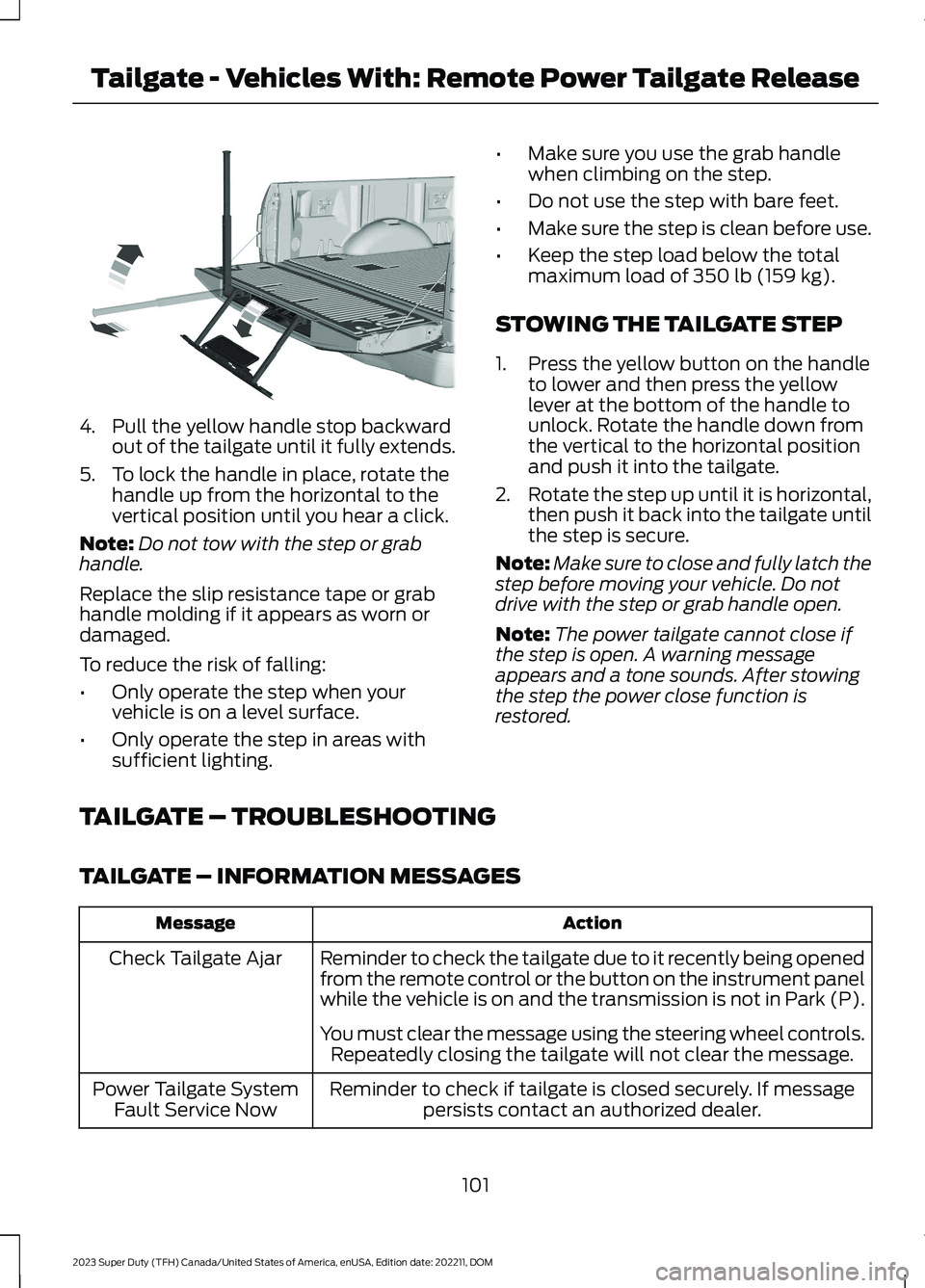
4.Pull the yellow handle stop backwardout of the tailgate until it fully extends.
5.To lock the handle in place, rotate thehandle up from the horizontal to thevertical position until you hear a click.
Note:Do not tow with the step or grabhandle.
Replace the slip resistance tape or grabhandle molding if it appears as worn ordamaged.
To reduce the risk of falling:
•Only operate the step when yourvehicle is on a level surface.
•Only operate the step in areas withsufficient lighting.
•Make sure you use the grab handlewhen climbing on the step.
•Do not use the step with bare feet.
•Make sure the step is clean before use.
•Keep the step load below the totalmaximum load of 350 lb (159 kg).
STOWING THE TAILGATE STEP
1.Press the yellow button on the handleto lower and then press the yellowlever at the bottom of the handle tounlock. Rotate the handle down fromthe vertical to the horizontal positionand push it into the tailgate.
2.Rotate the step up until it is horizontal,then push it back into the tailgate untilthe step is secure.
Note:Make sure to close and fully latch thestep before moving your vehicle. Do notdrive with the step or grab handle open.
Note:The power tailgate cannot close ifthe step is open. A warning messageappears and a tone sounds. After stowingthe step the power close function isrestored.
TAILGATE – TROUBLESHOOTING
TAILGATE – INFORMATION MESSAGES
ActionMessage
Reminder to check the tailgate due to it recently being openedfrom the remote control or the button on the instrument panelwhile the vehicle is on and the transmission is not in Park (P).
Check Tailgate Ajar
You must clear the message using the steering wheel controls.Repeatedly closing the tailgate will not clear the message.
Reminder to check if tailgate is closed securely. If messagepersists contact an authorized dealer.Power Tailgate SystemFault Service Now
101
2023 Super Duty (TFH) Canada/United States of America, enUSA, Edition date: 202211, DOMTailgate - Vehicles With: Remote Power Tailgate ReleaseE189557
Page 113 of 738
ADJUSTING THE STEERING
WHEEL - VEHICLES WITH:
MANUAL ADJUSTABLE
STEERING COLUMN
WARNING: Do not adjust thesteering wheel when your vehicle ismoving.
Note: Make sure that you are sitting in thecorrect position. See Sitting in the CorrectPosition (page 161).
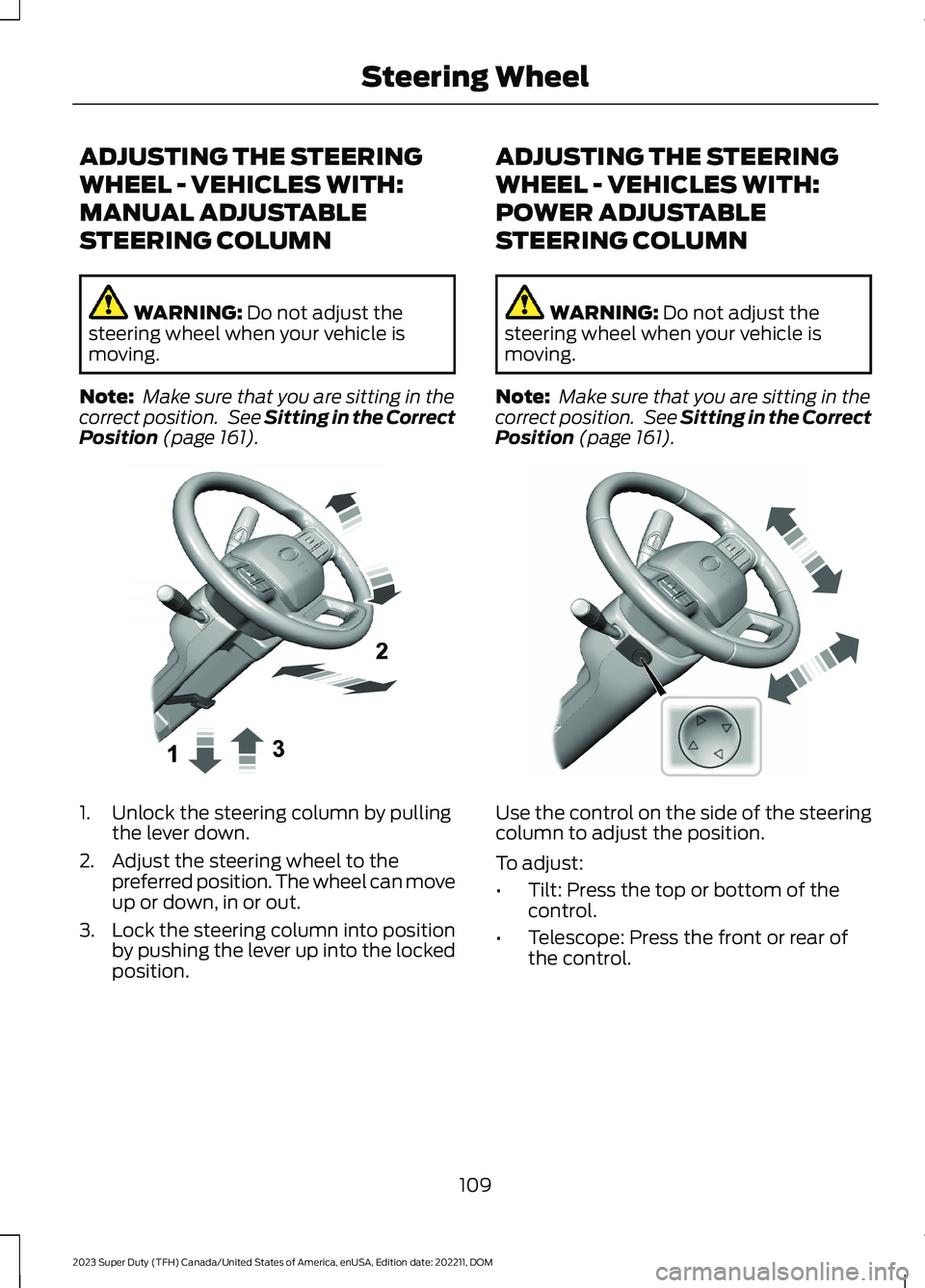
1.Unlock the steering column by pullingthe lever down.
2.Adjust the steering wheel to thepreferred position. The wheel can moveup or down, in or out.
3.Lock the steering column into positionby pushing the lever up into the lockedposition.
ADJUSTING THE STEERING
WHEEL - VEHICLES WITH:
POWER ADJUSTABLE
STEERING COLUMN
WARNING: Do not adjust thesteering wheel when your vehicle ismoving.
Note: Make sure that you are sitting in thecorrect position. See Sitting in the CorrectPosition (page 161).
Use the control on the side of the steeringcolumn to adjust the position.
To adjust:
•Tilt: Press the top or bottom of thecontrol.
•Telescope: Press the front or rear ofthe control.
109
2023 Super Duty (TFH) Canada/United States of America, enUSA, Edition date: 202211, DOMSteering WheelE383968 E383969
Page 114 of 738
End of Travel Position
The steering column sets a stoppingposition just short of the end of the columnposition to prevent damage to the steeringcolumn. A new stopping position sets ifthe steering column encounters an objectwhen tilting or telescoping.
To reset the steering column to its normalstopping position:
1.Confirm there is nothing obstructingthe motion of the steering column.
2.Press and hold the steering columncontrol until the steering column stopsmoving.
3.Press the steering column controlagain.
Note:The steering column may begin tomove again.
4.When the steering column stops,continue holding the control for a fewseconds.
5.Repeat for each direction as necessary.
A new stopping position sets. The nexttime you tilt or telescope the steeringcolumn, it stops just short of the end of thecolumn position.
Memory Feature (If Equipped)
You can save and recall the steeringcolumn position with the memoryfunction. See Memory Function (page177).
Pressing the adjustment control during amemory recall cancels the operation.
Easy Entry and Exit Feature
The column moves up when you switchthe ignition off. Switch the ignition on toreturn the system to its previous settings.You can switch this feature on or off in theinstrument cluster display.
Note: If you press any adjustment ormemory button when in easy exit mode, thesystem cancels the operation.
Note:Depending on your vehicle, thecolumn may move up and in.
RESETTING THE STOPPING
POSITION - VEHICLES WITH:
POWER ADJUSTABLE
STEERING COLUMN
Note:The steering wheel stops when itdetects an obstruction. This sets a newstopping position.
To reset the steering column to its normalstopping position:
1.Confirm there is nothing obstructingthe motion of the steering column.
2.Press and hold the steering columncontrol until the steering column stopsmoving.
3.Press the steering column controlagain.
Note:The steering column may start tomove again.
4.When the steering column stops,continue holding the control for a fewseconds.
5.Repeat for each direction, as necessary.
HORN
Press on the center of thesteering wheel near the horn iconto activate the horn.
110
2023 Super Duty (TFH) Canada/United States of America, enUSA, Edition date: 202211, DOMSteering WheelE270945
Page 133 of 738
SWITCHING GLOBAL OPENING ONAND OFF
1.Using the information display controlson the steering wheel, select Settings.
2.Select Vehicle.
3.Select Windows.
4.Switch Remote Open on or off.
WINDOW BOUNCE-BACK
WHAT IS WINDOW BOUNCE-BACK
The window stops and reverses if it detectsan obstruction when closing.
OVERRIDING WINDOW BOUNCE-BACK
WARNING: If you overridebounce-back, the window does notreverse if it detects an obstacle. Takecare when closing the windows to avoidpersonal injury or damage to yourvehicle.
1.Close the window until it reaches thepoint of resistance and let it reverse.
2.Lift and hold the window control switchwithin two seconds to overridebounce-back and close the window.Bounce-back is now disabled and youcan close the window manually.
Note:The window goes past the point ofresistance and you can fully close it.
Note:If the window does not close, haveyour vehicle checked as soon as possible.
LOCKING THE REAR WINDOW
CONTROLS
Press the window control switchto lock or unlock the rear windowcontrols. It illuminates when youlock the rear window controls.
OPENING AND CLOSING THE
SLIDING WINDOWS (IF EQUIPPED)
WARNING: When closing thepower windows, verify they are free ofobstruction and make sure that childrenand pets are not in the proximity of thewindow openings.
WARNING: Do not leave childrenunattended in your vehicle and do notlet them play with the power windows.Failure to follow this instruction couldresult in personal injury.
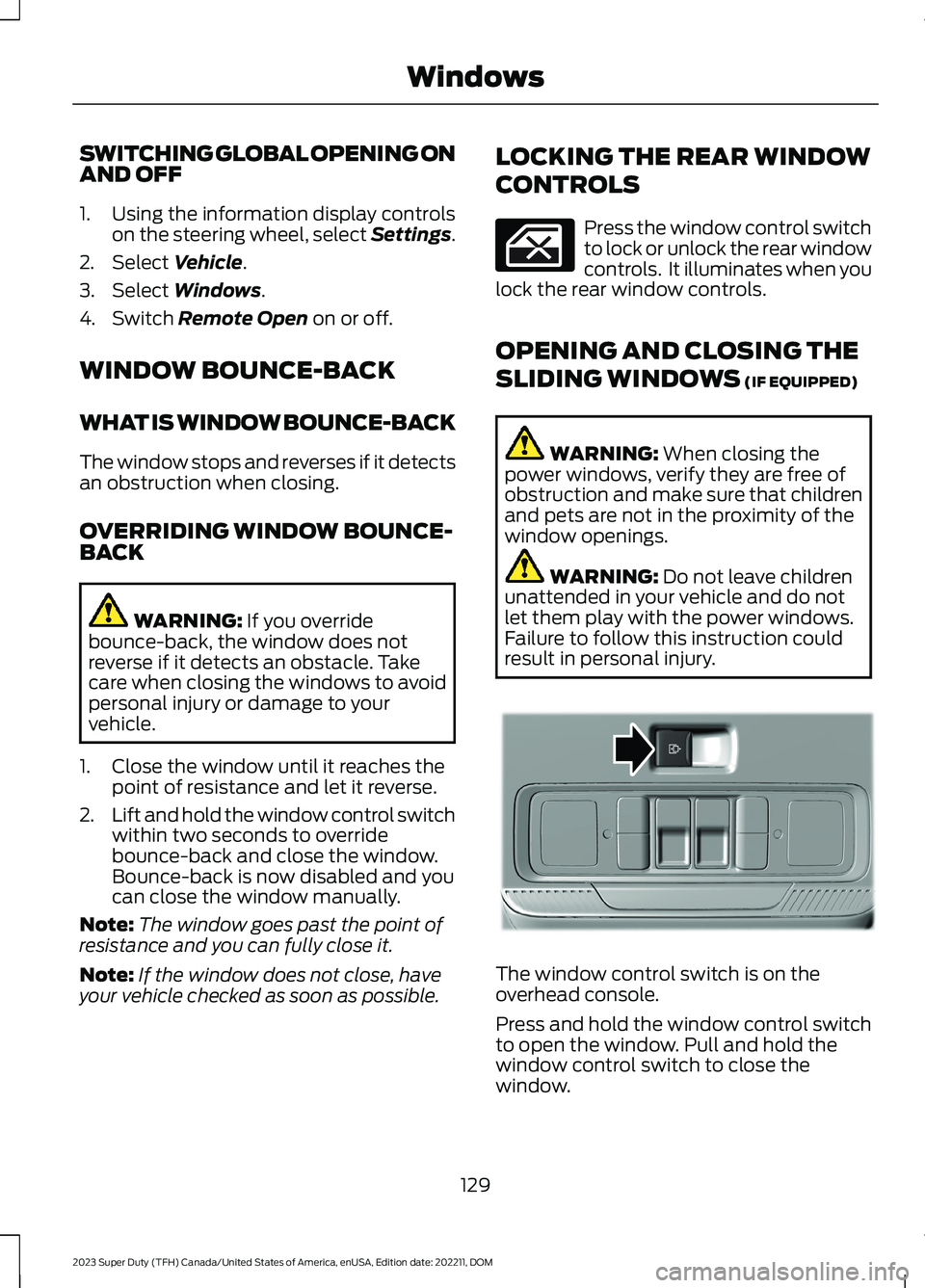
The window control switch is on theoverhead console.
Press and hold the window control switchto open the window. Pull and hold thewindow control switch to close thewindow.
129
2023 Super Duty (TFH) Canada/United States of America, enUSA, Edition date: 202211, DOMWindows E311430
Page 181 of 738
WHAT IS THE MEMORY
FUNCTION
The memory function recalls the positionof these features:
•Driver seat.
•Power mirrors.
•Optional power steering column.
•Optional power adjustable pedals.
MEMORY FUNCTION
PRECAUTIONS
WARNING: Before activating thememory seat, make sure that the areaimmediately surrounding the seat is clearof obstructions and that all occupantsare clear of moving parts.
WARNING: Do not use the memoryfunction when your vehicle is moving.
LOCATING THE MEMORY
FUNCTION BUTTONS
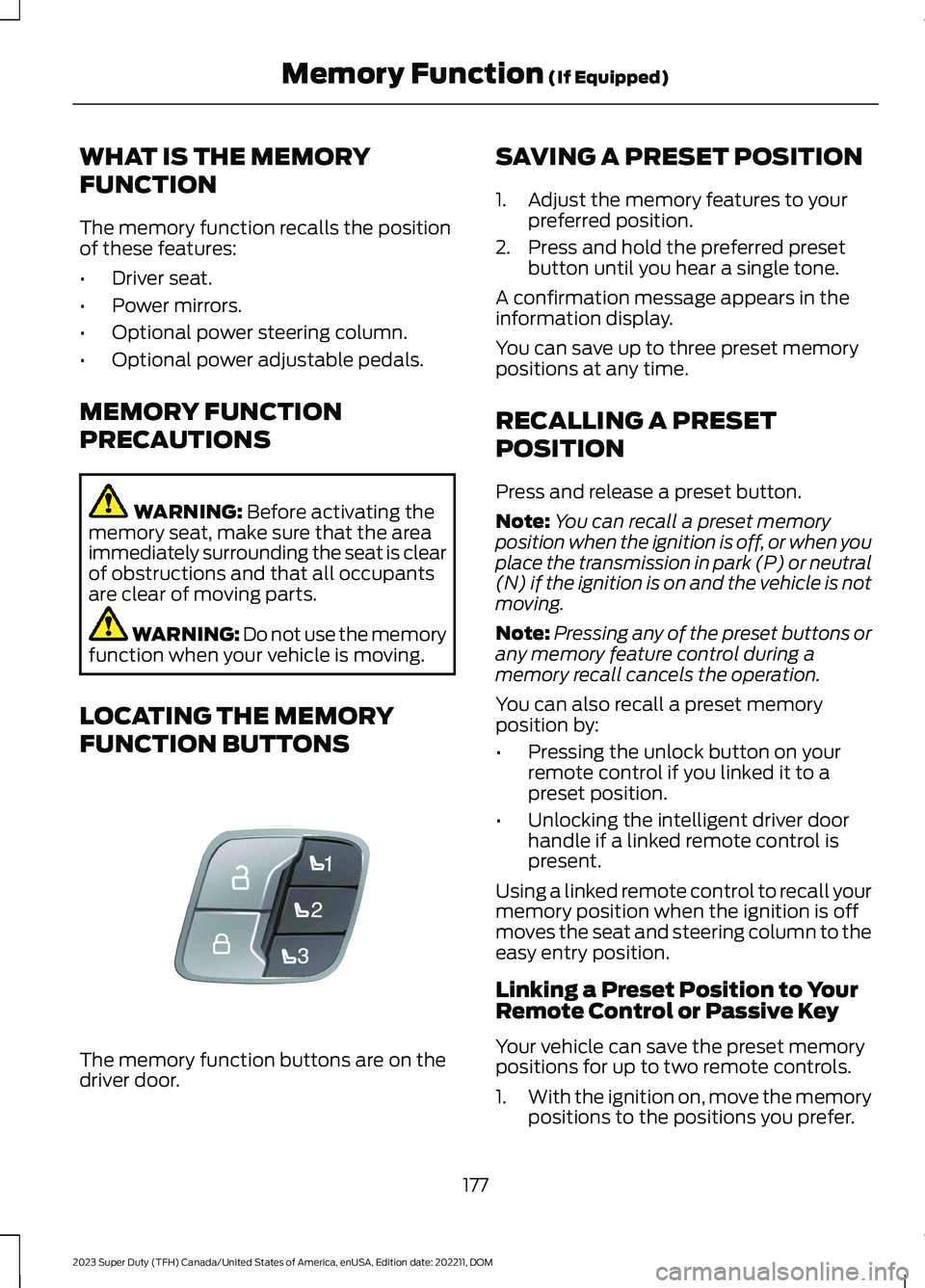
The memory function buttons are on thedriver door.
SAVING A PRESET POSITION
1.Adjust the memory features to yourpreferred position.
2.Press and hold the preferred presetbutton until you hear a single tone.
A confirmation message appears in theinformation display.
You can save up to three preset memorypositions at any time.
RECALLING A PRESET
POSITION
Press and release a preset button.
Note:You can recall a preset memoryposition when the ignition is off, or when youplace the transmission in park (P) or neutral(N) if the ignition is on and the vehicle is notmoving.
Note:Pressing any of the preset buttons orany memory feature control during amemory recall cancels the operation.
You can also recall a preset memoryposition by:
•Pressing the unlock button on yourremote control if you linked it to apreset position.
•Unlocking the intelligent driver doorhandle if a linked remote control ispresent.
Using a linked remote control to recall yourmemory position when the ignition is offmoves the seat and steering column to theeasy entry position.
Linking a Preset Position to YourRemote Control or Passive Key
Your vehicle can save the preset memorypositions for up to two remote controls.
1.With the ignition on, move the memorypositions to the positions you prefer.
177
2023 Super Duty (TFH) Canada/United States of America, enUSA, Edition date: 202211, DOMMemory Function (If Equipped)E307868