tire pressure reset FORD SUPER DUTY 2023 Owners Manual
[x] Cancel search | Manufacturer: FORD, Model Year: 2023, Model line: SUPER DUTY, Model: FORD SUPER DUTY 2023Pages: 738, PDF Size: 18.49 MB
Page 8 of 738
Manually Dimming the Interior Mirror..........................................................................131
Auto-Dimming Interior Mirror...................131
Exterior Mirrors
Adjusting the Exterior Mirrors..................132
Folding the Exterior Mirrors - VehiclesWith: Manual Folding Mirrors..............132
Folding the Exterior Mirrors - VehiclesWith: Power Folding Mirrors................132
Extending the Exterior Mirrors.................133
Exterior Mirrors Videos...............................133
Moonroof
Opening and Closing the Sunshade......134
Opening and Closing the Moonroof......134
Venting the Moonroof................................135
Moonroof Bounce-Back............................135
Moonroof Videos.........................................135
Instrument Cluster
Instrument Cluster Overview - VehiclesWith: 8 Inch Screen................................136
Instrument Cluster Overview - VehiclesWith: 12 Inch Screen................................137
Tachometer....................................................137
Speedometer.................................................137
Fuel Gauge......................................................137
Engine Coolant Temperature Gauge.........................................................................138
Engine Oil Pressure Gauge.......................138
Engine Oil Temperature Gauge..............138
Transmission Fluid Temperature Gauge.........................................................................138
Turbo Boost Gauge.....................................138
Diesel Exhaust Fluid Gauge.....................138
What Are the Instrument ClusterWarning Lamps........................................139
Instrument Cluster Warning Lamps......139
What Are the Instrument ClusterIndicators...................................................140
Instrument Cluster Indicators.................140
Instrument Cluster Display
Using the Instrument Cluster DisplayControls.......................................................143
Instrument Cluster Display Main Menu -Vehicles With: 8 Inch Screen...............143
Instrument Cluster Display Main Menu -Vehicles With: 12 Inch Screen.............144
Customizing the Instrument ClusterDisplay - Vehicles With: 8 Inch Screen.........................................................................144
Customizing the Instrument ClusterDisplay - Vehicles With: 12 Inch Screen.........................................................................144
Personalized Settings
Changing the Language............................145
Changing the Measurement Unit..........145
Changing the Temperature Unit............145
Changing the Tire Pressure Unit............145
Trip Computer
Accessing the Trip Computer - VehiclesWith: 8 Inch Screen................................146
Accessing the Trip Computer - VehiclesWith: 12 Inch Screen...............................146
Resetting the Trip Computer..................146
Trip Data.........................................................146
Head Up Display
What Is the Head Up Display..................147
Switching the Head Up Display On andOff..................................................................147
Head Up Display Settings.........................147
Head Up Display – Troubleshooting.........................................................................148
Remote Start
What Is Remote Start................................149
Remote Start Precautions.......................149
Remote Start Limitations........................149
4
2023 Super Duty (TFH) Canada/United States of America, enUSA, Edition date: 202211, DOMTable of Contents
Page 19 of 738
Wheel and Tire Information
Locating the Tire label..............................478
Department of Transportation UniformTire Quality Grades................................478
Information on the Tire Sidewall..........479
Glossary of Tire Terminology.................484
Tire Replacement Requirements.........485
Using Snow Chains....................................487
Tire Care
Checking the Tire Pressures..................490
Inflating the Tires.......................................490
Inspecting the Tire for Wear...................494
Inspecting the Tire for Damage............494
Inspecting the Wheel Valve Stems......498
Tire Rotation................................................498
Tire Pressure MonitoringSystem
What Is the Tire Pressure MonitoringSystem........................................................501
Tire Pressure Monitoring SystemOverview.....................................................501
Tire Pressure Monitoring SystemPrecautions..............................................502
Tire Pressure Monitoring SystemLimitations................................................502
Viewing the Tire Pressures.....................503
Resetting Tire Pressure MonitoringSystem.......................................................503
Tire Pressure Monitoring System –Troubleshooting.....................................506
Tire Pressure Monitoring System Videos.......................................................................508
Changing a Road Wheel
Changing a Flat Tire..................................509
Wheel Nuts....................................................519
Capacities and Specifications
Engine Specifications - 6.7L Diesel......520
Engine Specifications - 6.8L, Gasoline.........................................................................521
Engine Specifications - 7.3L, Gasoline........................................................................522
Motorcraft Parts - 6.7L Diesel................523
Motorcraft Parts - 6.8L, Gasoline.........524
Motorcraft Parts - 7.3L, Gasoline..........525
Engine Oil Capacity and Specification -6.7L Diesel.................................................526
Engine Oil Capacity and Specification -6.8L, Gasoline..........................................528
Engine Oil Capacity and Specification -7.3L, Gasoline...........................................530
Cooling System Capacity andSpecification - 6.7L Diesel...................532
Cooling System Capacity andSpecification - 6.8L, Gasoline............533
Cooling System Capacity andSpecification - 7.3L, Gasoline.............534
Fuel Tank Capacity - Diesel....................534
Fuel Tank Capacity - Gasoline...............535
Air Conditioning System Capacity andSpecification............................................536
Washer Fluid Specification.....................536
Diesel Exhaust Fluid Capacity andSpecification.............................................537
Automatic Transmission Fluid Capacityand Specification - Diesel...................538
Automatic Transmission Fluid Capacityand Specification - Gasoline.............538
Brake Fluid Specification.........................539
Transfer Case Fluid Capacity andSpecification............................................540
Front Axle Fluid Capacity andSpecification............................................540
Rear Axle Fluid Capacity andSpecification............................................542
Hydraulic Power Steering Fluid Capacityand Specification...................................546
15
2023 Super Duty (TFH) Canada/United States of America, enUSA, Edition date: 202211, DOMTable of Contents
Page 28 of 738
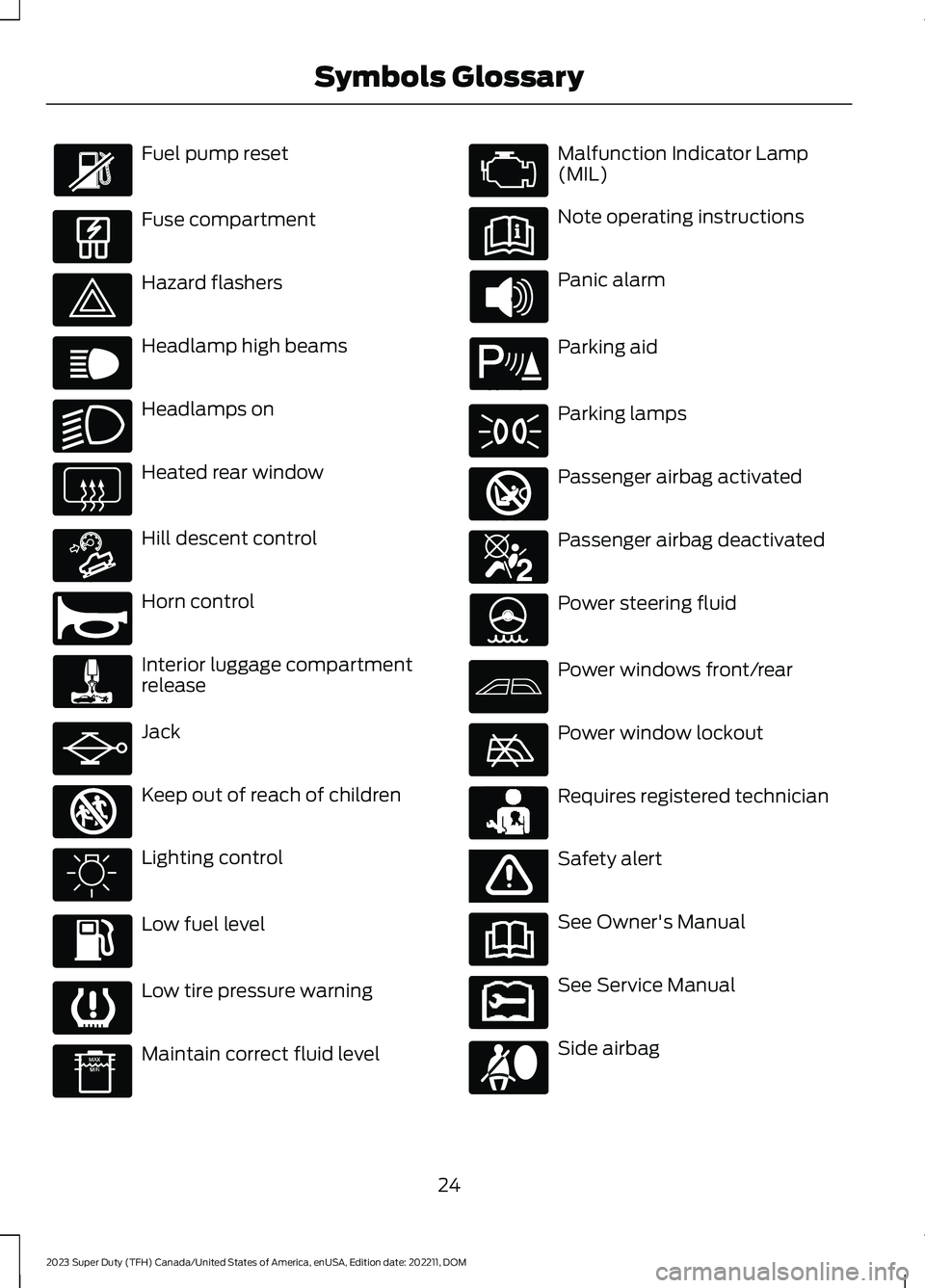
Fuel pump reset
Fuse compartment
Hazard flashers
Headlamp high beams
Headlamps on
Heated rear window
Hill descent control
Horn control
Interior luggage compartmentrelease
Jack
Keep out of reach of children
Lighting control
Low fuel level
Low tire pressure warning
Maintain correct fluid level
Malfunction Indicator Lamp(MIL)
Note operating instructions
Panic alarm
Parking aid
Parking lamps
Passenger airbag activated
Passenger airbag deactivated
Power steering fluid
Power windows front/rear
Power window lockout
Requires registered technician
Safety alert
See Owner's Manual
See Service Manual
Side airbag
24
2023 Super Duty (TFH) Canada/United States of America, enUSA, Edition date: 202211, DOMSymbols Glossary E139214 E75790 E67019 E270968 E163171 E270945 E139231 E161353 E139232 E139229 E67028 E72343 E139213 E71341 E270849 E270850 E139216 E139225 E231159 E65963 E72021 E231158
Page 30 of 738
WARNING: Do not connectwireless plug-in devices to the data linkconnector. Unauthorized third partiescould gain access to vehicle data andimpair the performance of safety relatedsystems. Only allow repair facilities thatfollow our service and repair instructionsto connect their equipment to the datalink connector.
We respect your privacy and arecommitted to protecting it. Theinformation contained in this publicationwas correct at the time of release, but astechnology rapidly changes, werecommend that you visit the local Fordwebsite for the latest information.
Your vehicle has electronic control unitsthat have data recording functionality andthe ability to permanently or temporarilystore data. This data could includeinformation on the condition and status ofyour vehicle, vehicle maintenancerequirements, events and malfunctions.The types of data that can be recorded aredescribed in this section. Some of the datarecorded is stored in event logs or errorlogs.
Note:Error logs are reset following a serviceor repair.
Note:We may provide information inresponse to requests from law enforcement,other government authorities and thirdparties acting with lawful authority orthrough a legal process. Such informationcould be used by them in legal proceedings.
Data recorded includes, for example:
•Operating states of systemcomponents, for example fuel level,tire pressure and battery charge level.
•Vehicle and component status, forexample wheel speed, deceleration,lateral acceleration and seatbeltstatus.
•Events or errors in essential systems,for example headlamps and brakes.
•System responses to driving situations,for example airbag deployment andstability control.
•Environmental conditions, for exampletemperature.
Some of this data, when used incombination with other information, forexample an accident report, damage to avehicle or eyewitness statements, couldbe associated with a specific person.
Services That We Provide
If you use our services, we collect and usedata, for example account information,vehicle location and driving characteristics,that could identify you. We transmit thisdata through a dedicated, protectedconnection. We only collect and use datato enable your use of our services to whichyou have subscribed, with your consent orwhere permitted by law. For additionalinformation, see the terms and conditionsof the services to which you havesubscribed.
For additional information about ourprivacy policy, refer to the local Fordwebsite.
Services That Third PartiesProvide
We recommend that you review the termsand conditions and data privacyinformation for any services equipped withyour vehicle or to which you subscribe. Wetake no responsibility for services that thirdparties provide.
Where equipped, SiriusXM with 360L coulduse the modem. To disable, turn off theSiriusXM with 360L or Vehicle Connectivitysetting. See Enabling and Disabling theModem (page 548).
26
2023 Super Duty (TFH) Canada/United States of America, enUSA, Edition date: 202211, DOMData Privacy
Page 386 of 738
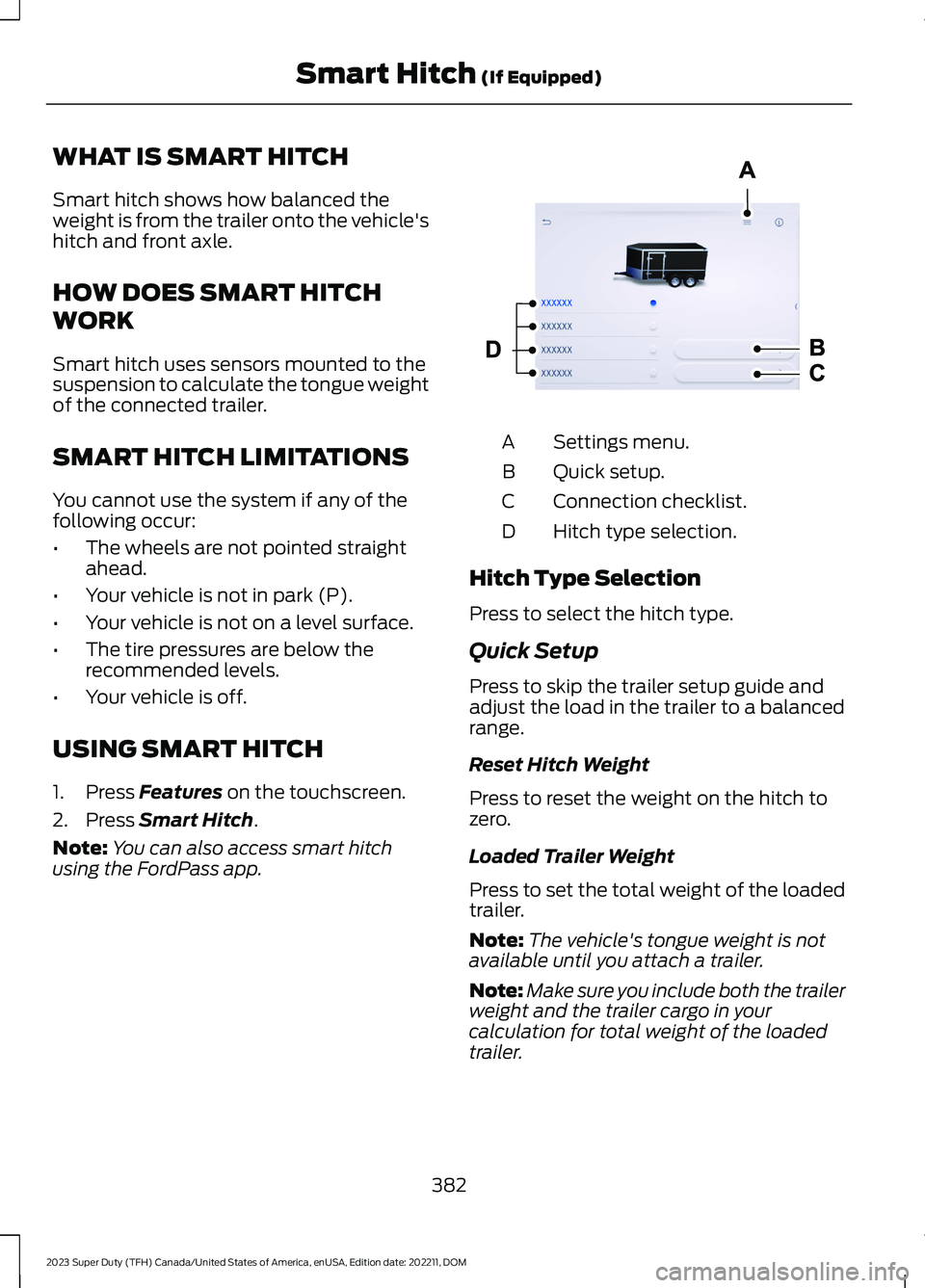
WHAT IS SMART HITCH
Smart hitch shows how balanced theweight is from the trailer onto the vehicle'shitch and front axle.
HOW DOES SMART HITCH
WORK
Smart hitch uses sensors mounted to thesuspension to calculate the tongue weightof the connected trailer.
SMART HITCH LIMITATIONS
You cannot use the system if any of thefollowing occur:
•The wheels are not pointed straightahead.
•Your vehicle is not in park (P).
•Your vehicle is not on a level surface.
•The tire pressures are below therecommended levels.
•Your vehicle is off.
USING SMART HITCH
1.Press Features on the touchscreen.
2.Press Smart Hitch.
Note:You can also access smart hitchusing the FordPass app.
Settings menu.A
Quick setup.B
Connection checklist.C
Hitch type selection.D
Hitch Type Selection
Press to select the hitch type.
Quick Setup
Press to skip the trailer setup guide andadjust the load in the trailer to a balancedrange.
Reset Hitch Weight
Press to reset the weight on the hitch tozero.
Loaded Trailer Weight
Press to set the total weight of the loadedtrailer.
Note:The vehicle's tongue weight is notavailable until you attach a trailer.
Note:Make sure you include both the trailerweight and the trailer cargo in yourcalculation for total weight of the loadedtrailer.
382
2023 Super Duty (TFH) Canada/United States of America, enUSA, Edition date: 202211, DOMSmart Hitch (If Equipped) E390704
Page 388 of 738
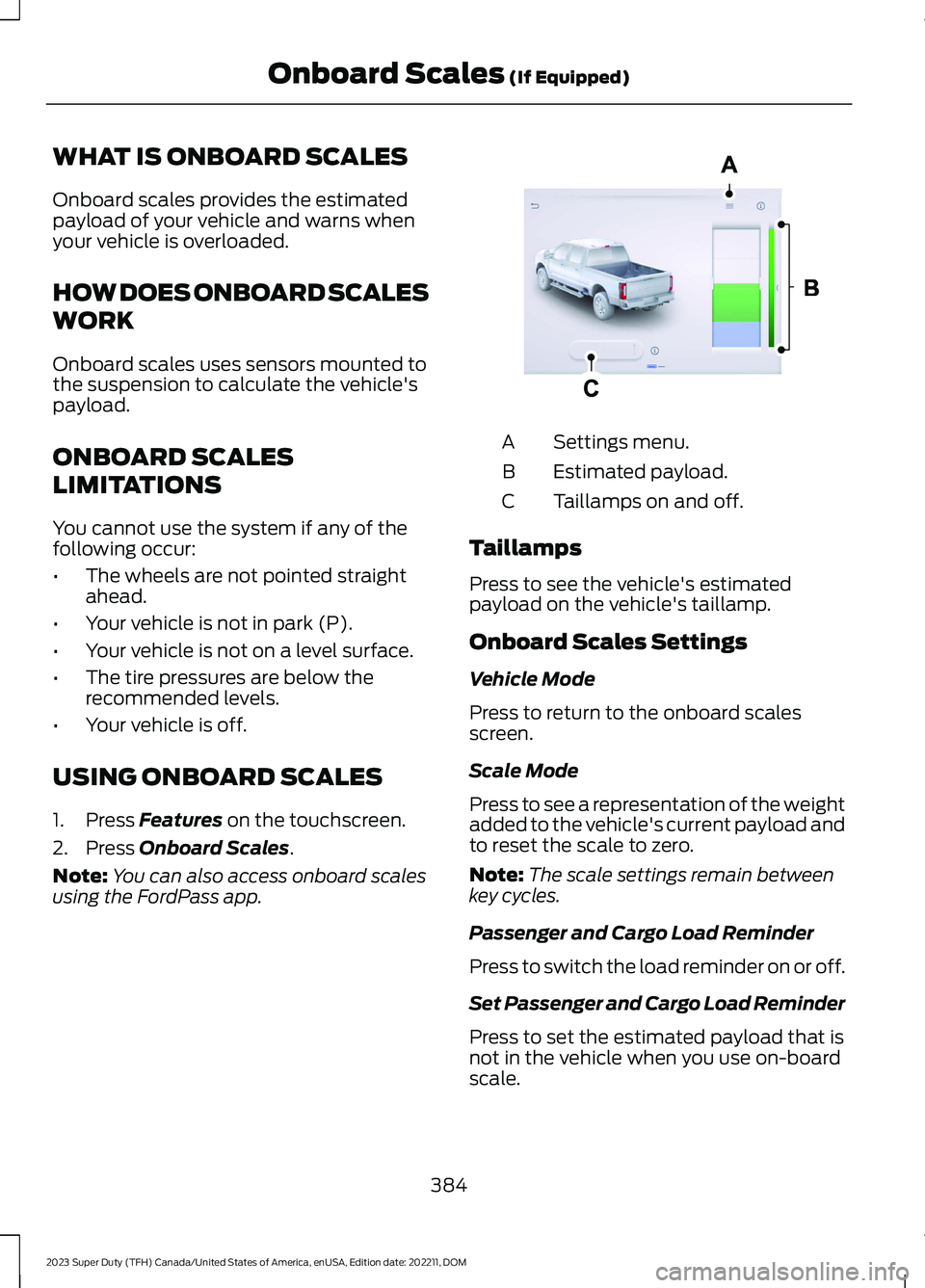
WHAT IS ONBOARD SCALES
Onboard scales provides the estimatedpayload of your vehicle and warns whenyour vehicle is overloaded.
HOW DOES ONBOARD SCALES
WORK
Onboard scales uses sensors mounted tothe suspension to calculate the vehicle'spayload.
ONBOARD SCALES
LIMITATIONS
You cannot use the system if any of thefollowing occur:
•The wheels are not pointed straightahead.
•Your vehicle is not in park (P).
•Your vehicle is not on a level surface.
•The tire pressures are below therecommended levels.
•Your vehicle is off.
USING ONBOARD SCALES
1.Press Features on the touchscreen.
2.Press Onboard Scales.
Note:You can also access onboard scalesusing the FordPass app.
Settings menu.A
Estimated payload.B
Taillamps on and off.C
Taillamps
Press to see the vehicle's estimatedpayload on the vehicle's taillamp.
Onboard Scales Settings
Vehicle Mode
Press to return to the onboard scalesscreen.
Scale Mode
Press to see a representation of the weightadded to the vehicle's current payload andto reset the scale to zero.
Note:The scale settings remain betweenkey cycles.
Passenger and Cargo Load Reminder
Press to switch the load reminder on or off.
Set Passenger and Cargo Load Reminder
Press to set the estimated payload that isnot in the vehicle when you use on-boardscale.
384
2023 Super Duty (TFH) Canada/United States of America, enUSA, Edition date: 202211, DOMOnboard Scales (If Equipped)E390703
Page 481 of 738
Tires
•Maintain recommended air pressure.
•To minimize flat spots on the tires,inflate all four tires to therecommended cold pressures listed onthe Safety Compliance Certificationlabel or Tire Label affixed to yourvehicle. When the vehicle is taken outof storage, reset the tire pressures asnecessary to the recommended levelslisted on the Safety ComplianceCertification label or Tire Label affixedto your vehicle.
Note:If you store your vehicle in a locationwith low ambient temperatures, follow theinstructions for care of summer tires.
Brakes
Make sure the brakes and parking brakefully release.
Note:If you intend on parking your vehiclefor an extended period after cleaning thewheels with a wheel cleaner, drive yourvehicle for a few minutes before doing so toreduce the risk of increased corrosion of thebrake discs, brake pads and linings.
REMOVING YOUR VEHICLE
FROM STORAGE
When your vehicle is ready to come out ofstorage, do the following:
•We recommend that you change theengine oil before you use your vehicleagain.
•Wash your vehicle to remove any dirtor grease film build-up on windowsurfaces.
•Check windshield wipers for anydeterioration.
•Check the underhood for any foreignmaterials such as mice or squirrelnests.
•Check the exhaust for any foreignmaterials.
•Check tire pressures and set tireinflation per the Tire Label.
•Check brake pedal operation. Corrodedbrake rotors could cause brake noise.Drive your vehicle and gently apply andrelease the brakes repeatedly over a10-minute drive to reduce the corrosionfrom the brakes.
•Check fluid levels (including coolant,oil and gas) to make sure there are noleaks, and fluids are at recommendedlevels.
•If you remove the battery, clean thebattery cable ends and check fordamage.
Contact an authorized dealer if you haveany concerns or issues.
477
2023 Super Duty (TFH) Canada/United States of America, enUSA, Edition date: 202211, DOMStoring Your Vehicle
Page 503 of 738
perform the system resetprocedure after tire rotation. Ifyou do not reset the system, itmay not provide a low tirepressure warning whennecessary.
Rotating your tires at therecommended interval will helpyour tires wear more evenly,providing better tire performanceand longer tire life.
Note:If your tires show any unevenwear have the alignment checkedby an authorized dealer beforerotating tires.
Note:If you have a dissimilar sparewheel and tire assembly, it isintended for temporary use onlyand should not be used in a tirerotation.
Note:After having your tiresrotated, inflation pressure must bechecked and adjusted to thevehicle requirements.
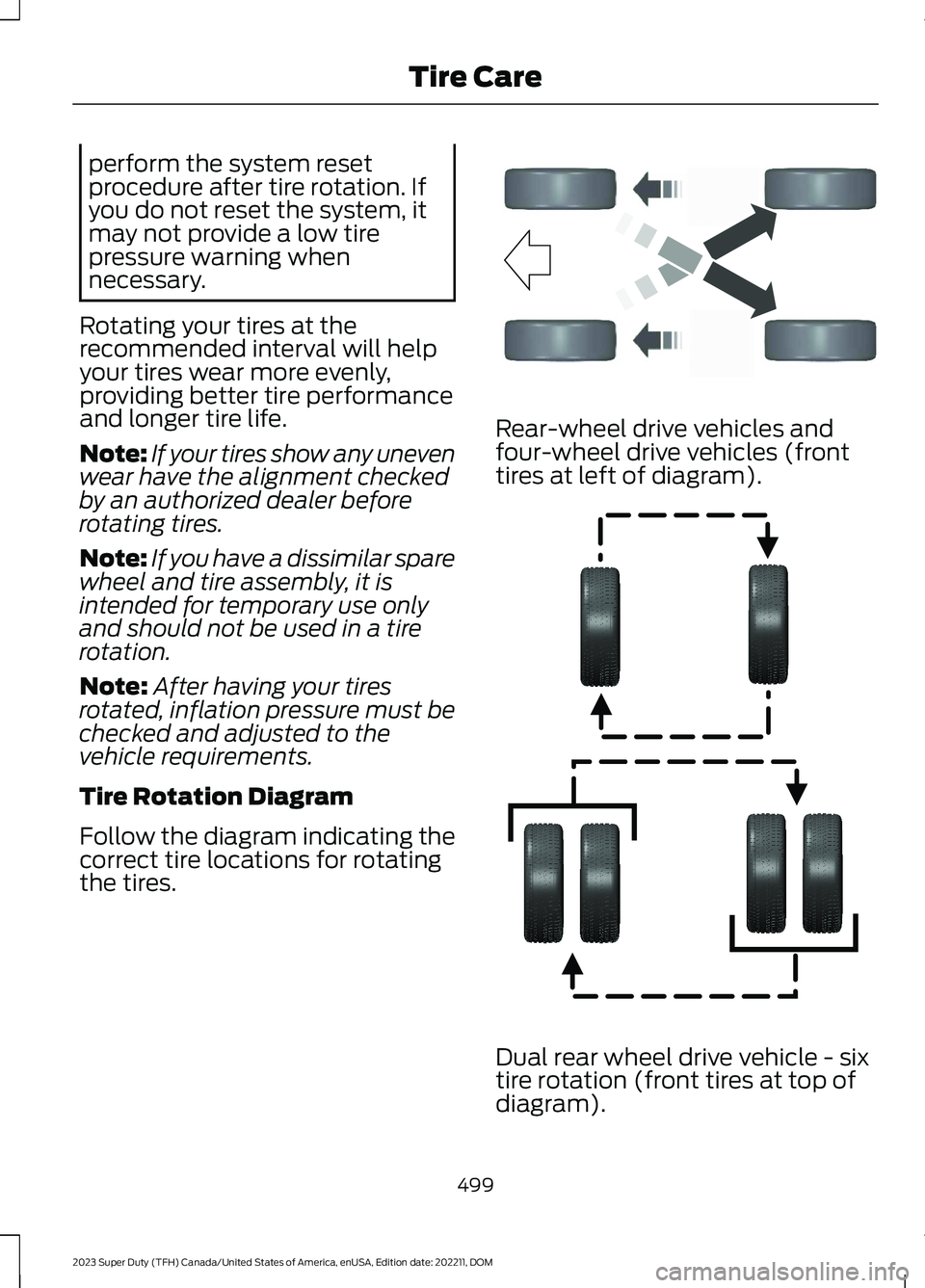
Tire Rotation Diagram
Follow the diagram indicating thecorrect tire locations for rotatingthe tires.
Rear-wheel drive vehicles andfour-wheel drive vehicles (fronttires at left of diagram).
Dual rear wheel drive vehicle - six
tire rotation (front tires at top ofdiagram).
499
2023 Super Duty (TFH) Canada/United States of America, enUSA, Edition date: 202211, DOMTire CareE142548 E166988
Page 507 of 738
VIEWING THE TIRE
PRESSURES
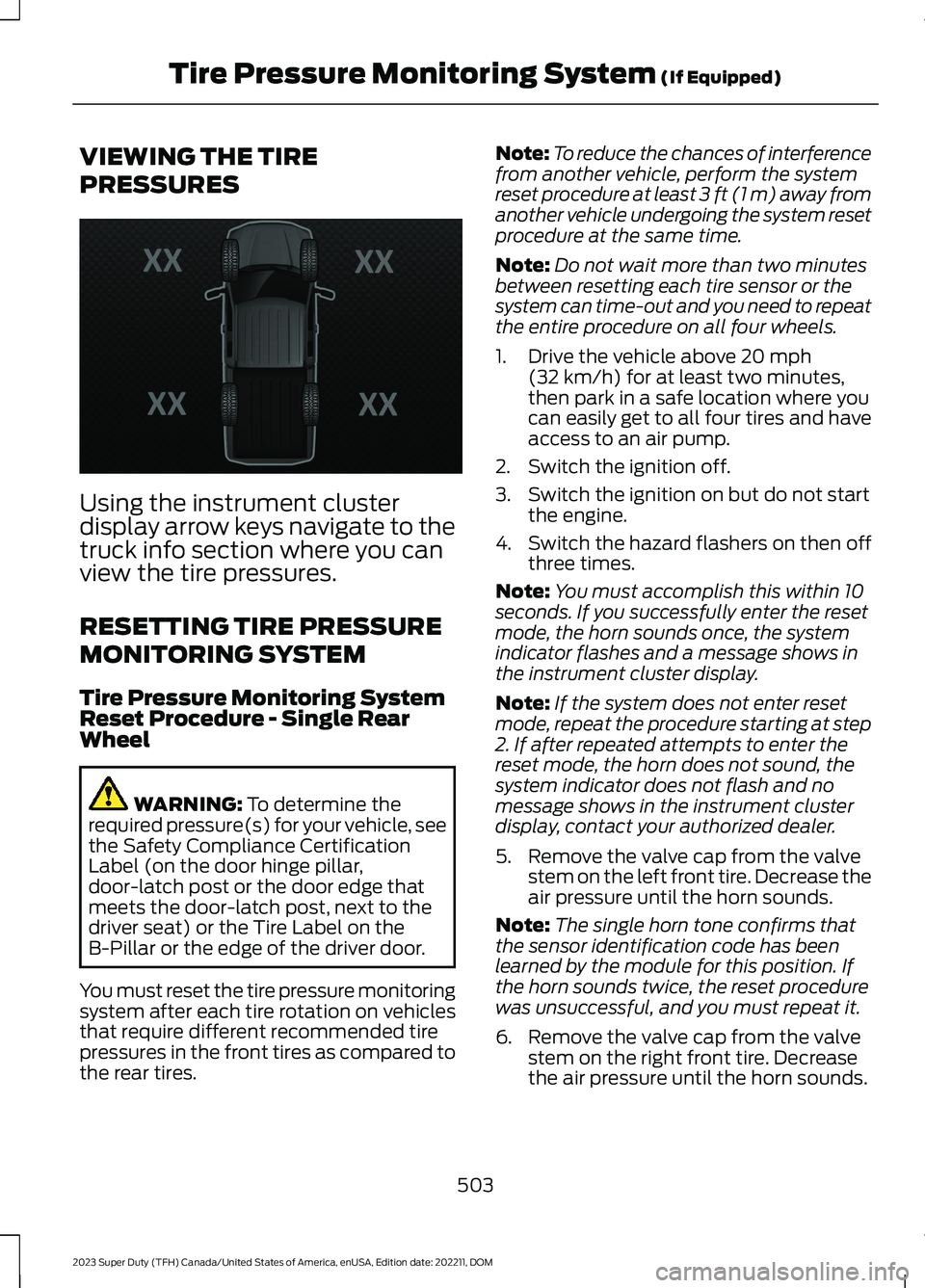
Using the instrument clusterdisplay arrow keys navigate to thetruck info section where you canview the tire pressures.
RESETTING TIRE PRESSURE
MONITORING SYSTEM
Tire Pressure Monitoring SystemReset Procedure - Single RearWheel
WARNING: To determine therequired pressure(s) for your vehicle, seethe Safety Compliance CertificationLabel (on the door hinge pillar,door-latch post or the door edge thatmeets the door-latch post, next to thedriver seat) or the Tire Label on theB-Pillar or the edge of the driver door.
You must reset the tire pressure monitoringsystem after each tire rotation on vehiclesthat require different recommended tirepressures in the front tires as compared tothe rear tires.
Note:To reduce the chances of interferencefrom another vehicle, perform the systemreset procedure at least 3 ft (1 m) away fromanother vehicle undergoing the system resetprocedure at the same time.
Note:Do not wait more than two minutesbetween resetting each tire sensor or thesystem can time-out and you need to repeatthe entire procedure on all four wheels.
1.Drive the vehicle above 20 mph(32 km/h) for at least two minutes,then park in a safe location where youcan easily get to all four tires and haveaccess to an air pump.
2.Switch the ignition off.
3.Switch the ignition on but do not startthe engine.
4.Switch the hazard flashers on then offthree times.
Note:You must accomplish this within 10seconds. If you successfully enter the resetmode, the horn sounds once, the systemindicator flashes and a message shows inthe instrument cluster display.
Note:If the system does not enter resetmode, repeat the procedure starting at step2. If after repeated attempts to enter thereset mode, the horn does not sound, thesystem indicator does not flash and nomessage shows in the instrument clusterdisplay, contact your authorized dealer.
5.Remove the valve cap from the valvestem on the left front tire. Decrease theair pressure until the horn sounds.
Note:The single horn tone confirms thatthe sensor identification code has beenlearned by the module for this position. Ifthe horn sounds twice, the reset procedurewas unsuccessful, and you must repeat it.
6.Remove the valve cap from the valvestem on the right front tire. Decreasethe air pressure until the horn sounds.
503
2023 Super Duty (TFH) Canada/United States of America, enUSA, Edition date: 202211, DOMTire Pressure Monitoring System (If Equipped)E224333
Page 508 of 738
7.Repeat the previous step on the rightrear tire and then on the left rear tire.
8.Switch the ignition off.
Note:If the horn sounds twice again afterswitching the ignition off, and repeating theprocedure, contact your authorized dealerand have your vehicle checked as soon aspossible.
9.Set all four tires to the recommendedair pressure as indicated on the SafetyCompliance Certification Label.
Tire Pressure Monitoring SystemReset Procedure - Dual Rear Wheel
For further information seeUnderstanding Your Tire PressureMonitoring System and refer to DualRear Wheel, earlier in this section.
Read the entire procedure beforeattempting.
1.Drive the vehicle above 20 mph(32 km/h) for at least two minutes,then park in a safe location where youcan easily get to all six tires and haveaccess to an air pump.
2.Place the ignition in the off position andkeep the key in the ignition.
3.Cycle the ignition to the on positionwith the engine off.
4.Turn the hazard flashers on then offthree times. You must accomplish thiswithin 10 seconds. If you successfullyenter the reset mode, the horn soundsonce, the system indicator flashes anda message shows in the instrumentcluster display. If this does not occur,repeat the procedure starting at step2. If after repeated attempts to enterthe reset mode, the horn does notsound, the system indicator does notflash and no message shows in theinstrument cluster display, contact yourauthorized dealer as soon as possible.
5.Train the tire pressure monitoringsystem sensors in the tires using thefollowing system reset sequencestarting with the left front tire in thefollowing order: Left front - driver sidefront tire, Right front - passenger sidefront tire, Right outer rear -passengerside rear outer tire, Right inner rear -passenger side rear inner tire, Left outerrear - driver side rear outer tire, Leftinner rear - driver side rear inner tire.
6.Remove the valve cap from the valvestem on the left front tire. Decrease theair pressure until the horn sounds.
Note:The single horn chirp confirms thatthe sensor identification code has beenlearned by the module for this position. If adouble horn is heard, the reset procedurewas unsuccessful, and you must repeat it.
7.Remove the valve cap from the valvestem on the right front tire. Decreasethe air pressure until the horn sounds.
8.Remove the valve cap from the valvestem on the right outer rear tire.Decrease the air pressure until the hornsounds.
9.Remove the valve cap from the valvestem on the right inner rear tire.Decrease the air pressure until the hornsounds.
10.Remove the valve cap from the valvestem on the left outer rear tire.Decrease the air pressure until thehorn sounds.
11.Remove the valve cap from the valvestem on the left inner rear tire.Decrease the air pressure until thehorn sounds. Training is completeafter the horn sounds for the last tiretrained, the system indicator stopsflashing, and a message is shown inthe instrument cluster display.
504
2023 Super Duty (TFH) Canada/United States of America, enUSA, Edition date: 202211, DOMTire Pressure Monitoring System (If Equipped)