mirror FORD TAURUS 2015 6.G Owner's Manual
[x] Cancel search | Manufacturer: FORD, Model Year: 2015, Model line: TAURUS, Model: FORD TAURUS 2015 6.GPages: 558, PDF Size: 4.42 MB
Page 225 of 558
LANE KEEPING SYSTEM (IF EQUIPPED)
WARNING:The system is designed to aid the driver. It is not
intended to replace the driver’s attention and judgment. The
driver is still responsible to drive with due care and attention.
The system detects unintentional drifting toward the outside of the lane
and alerts and/or aids the driver to stay in the lane through the steering
system and instrument cluster display. The system automatically detects
and tracks the road lane markings using a camera that is mounted
behind the interior rear view mirror.
Note: The system works above 40 mph (64 km/h).
Note: The system works as long as one lane marking can be detected by
the camera.
Note: If the camera is blocked or if the windshield is damaged, the
system may not function.
Note: When Aid mode is on and the system detects no driver steering
activity for a short period after system activation, the system alerts the
driver to keep their hands on the steering wheel. The system may detect
a light touch or grip on the steering wheel as hands-off driving.
Switching the System On and Off
Press the button located on the center console to switch the
system on or off.
Note: The system on/off setting is stored until it is manual changed,
unless a MyKey® is detected. If a MyKey® is detected, the system is
defaulted to on and the mode is set to Alert.
Note: If a MyKey® is detected, pressing the button will not affect the
on/off status of the system. Only the Mode and Intensity settings can be
changed when a MyKey® is present.
System Settings
The system has one standard feature setting and one optional setting
menu available. To view or adjust the settings, refer to the Information
Displays chapter. The last-known selection for each of these settings is
stored by the system. You do not need to readjust your settings each
time you turn on the system.
Mode: This setting allows you to enable one of the system features.
224 Driving Aids
2015 Taurus
Owners Guide gf, 1st Printing, April 2014
USA(fus)
Page 229 of 558
BLIND SPOT INFORMATION SYSTEM (BLIS®) WITH CROSS
TRAFFIC ALERT (CTA) (IF EQUIPPED)
WARNING:To help avoid injuries, NEVER use the BLIS® as a
replacement for using the interior and exterior mirrors and
looking over your shoulder before changing lanes. BLIS® is not a
replacement for careful driving.
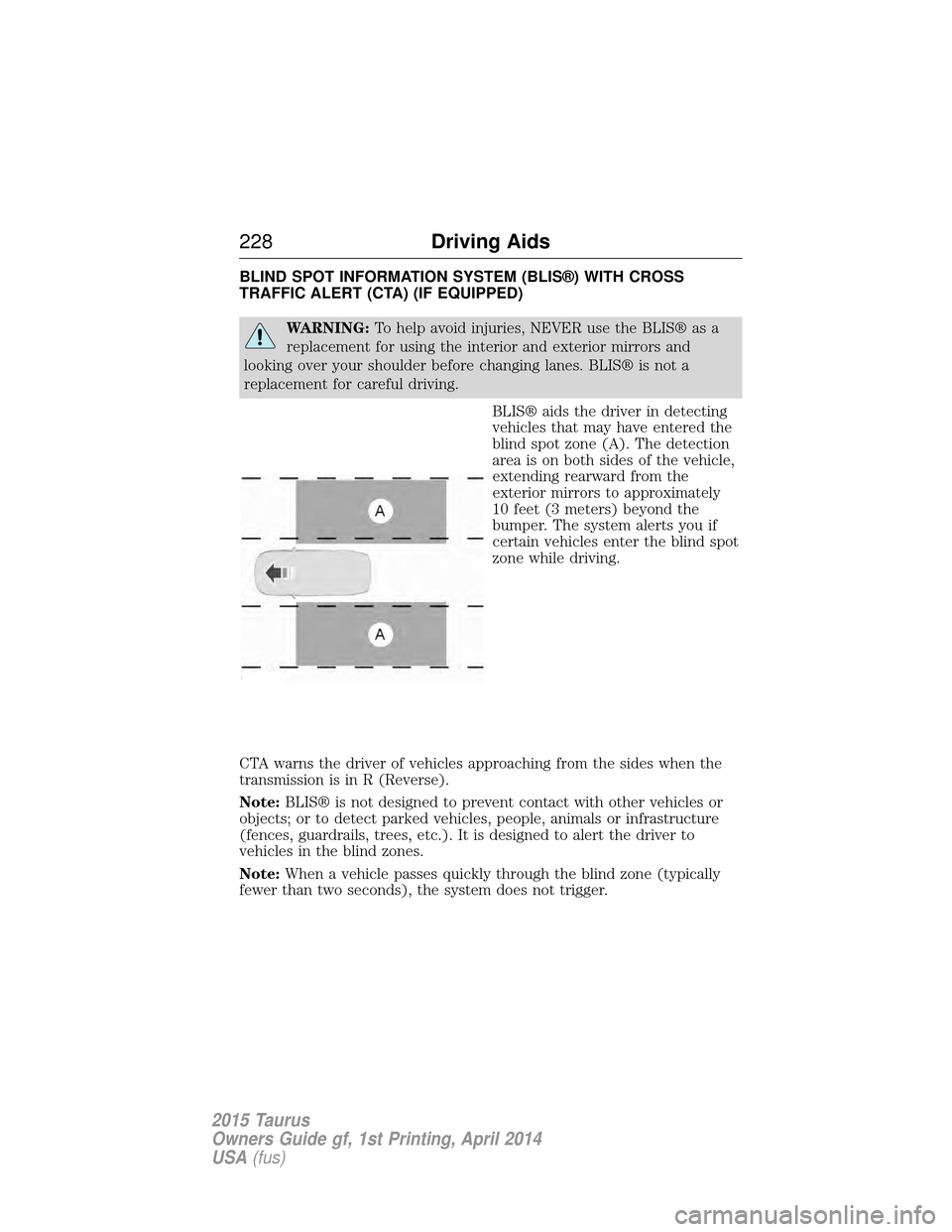
BLIS® aids the driver in detecting
vehicles that may have entered the
blind spot zone (A). The detection
area is on both sides of the vehicle,
extending rearward from the
exterior mirrors to approximately
10 feet (3 meters) beyond the
bumper. The system alerts you if
certain vehicles enter the blind spot
zone while driving.
CTA warns the driver of vehicles approaching from the sides when the
transmission is in R (Reverse).
Note: BLIS® is not designed to prevent contact with other vehicles or
objects; or to detect parked vehicles, people, animals or infrastructure
(fences, guardrails, trees, etc.). It is designed to alert the driver to
vehicles in the blind zones.
Note: When a vehicle passes quickly through the blind zone (typically
fewer than two seconds), the system does not trigger.
228 Driving Aids
2015 Taurus
Owners Guide gf, 1st Printing, April 2014
USA(fus)
Page 230 of 558
Using the Systems
BLIS® turns on when the engine is started and the vehicle is driven
forward above 3 mph (5 km/h); it remains on while the transmission is in
D (Drive) or N (Neutral). If shifted out of D (Drive) or N (Neutral), the
system enters CTA mode. Once shifted back into D (Drive), BLIS® turns
back on when the vehicle is driven above 3 mph (5 km/h).
Note:BLIS® does not function in R (Reverse) or P (Park) or provide
any additional warning when a turn signal is on.
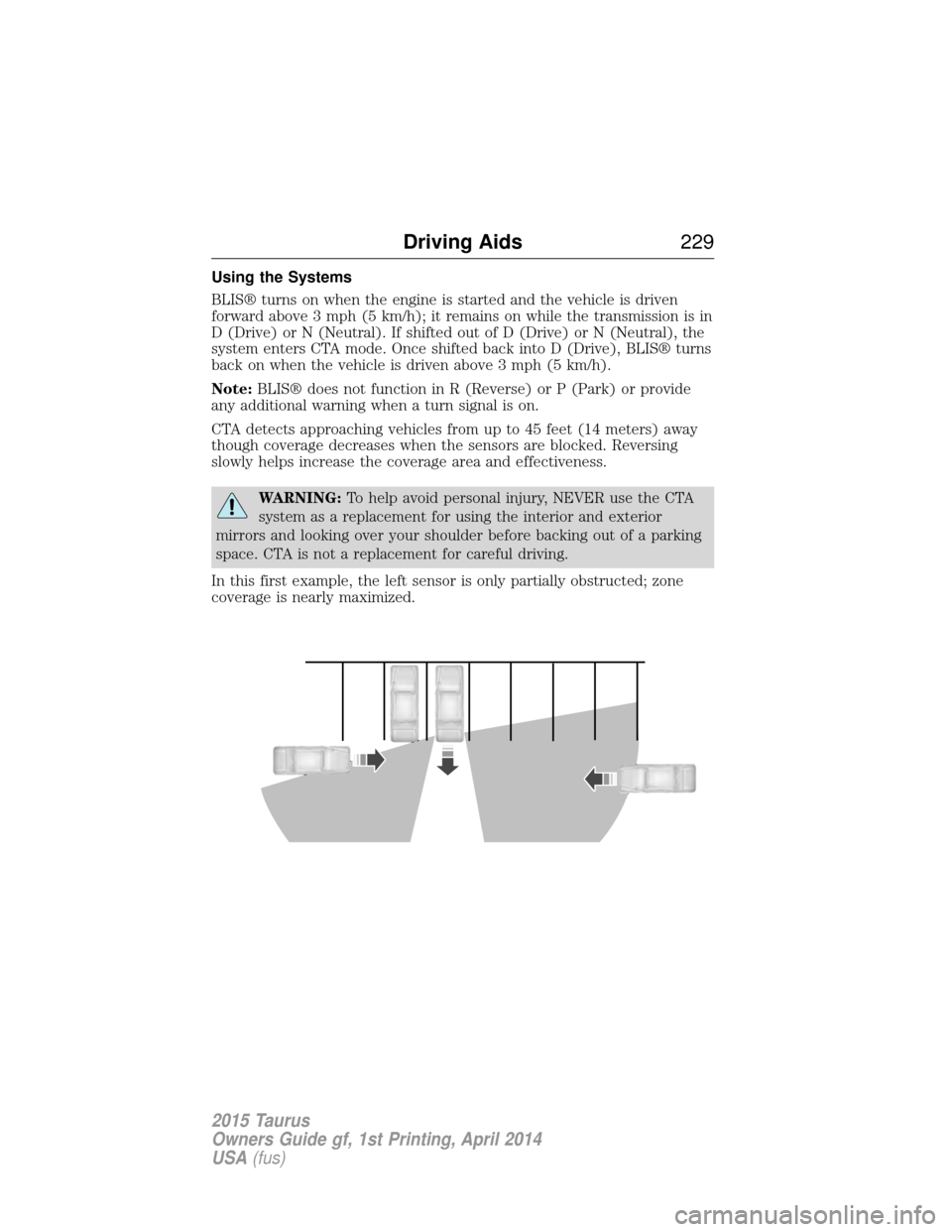
CTA detects approaching vehicles from up to 45 feet (14 meters) away
though coverage decreases when the sensors are blocked. Reversing
slowly helps increase the coverage area and effectiveness.
WARNING: To help avoid personal injury, NEVER use the CTA
system as a replacement for using the interior and exterior
mirrors and looking over your shoulder before backing out of a parking
space. CTA is not a replacement for careful driving.
In this first example, the left sensor is only partially obstructed; zone
coverage is nearly maximized.
Driving Aids 229
2015 Taurus
Owners Guide gf, 1st Printing, April 2014
USA(fus)
Page 231 of 558
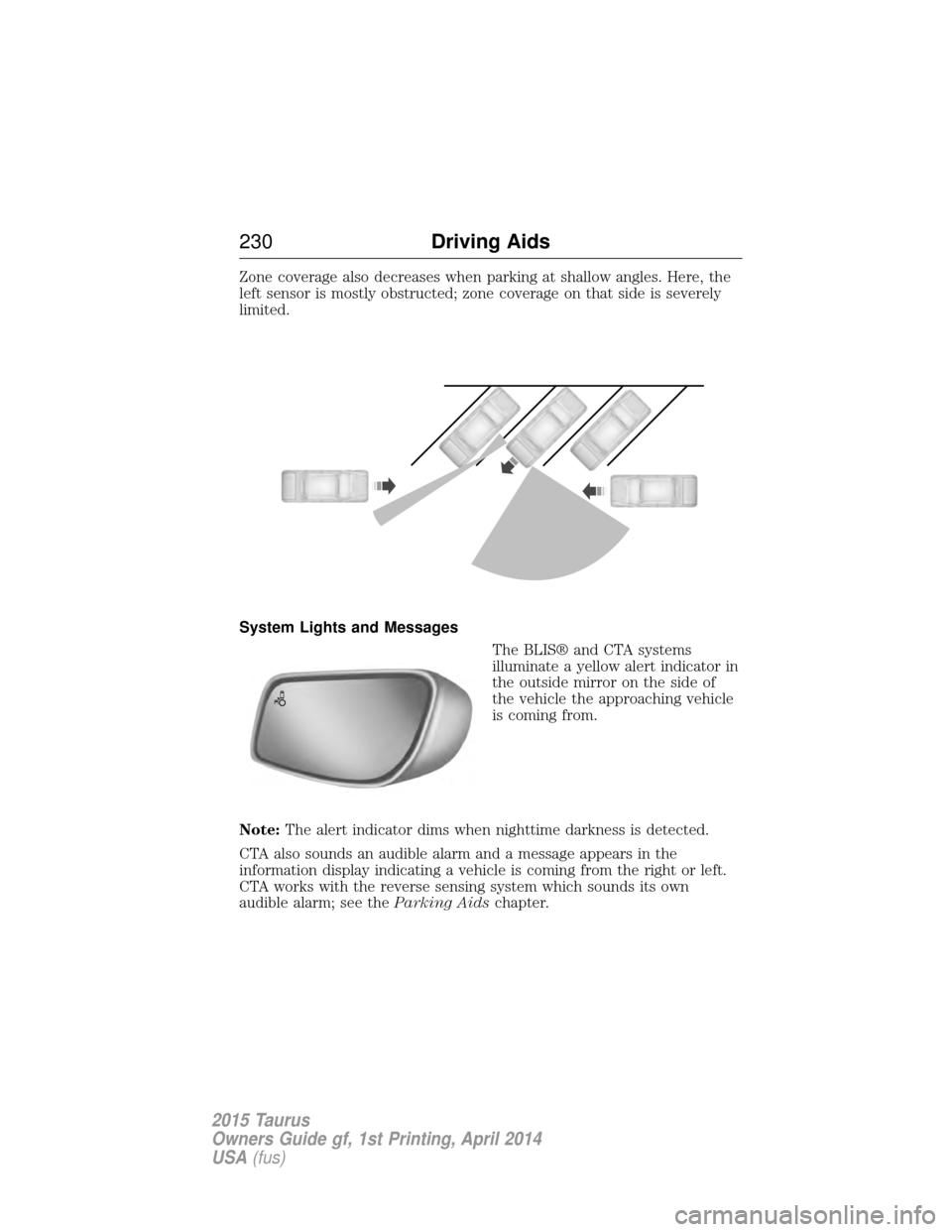
Zone coverage also decreases when parking at shallow angles. Here, the
left sensor is mostly obstructed; zone coverage on that side is severely
limited.
System Lights and MessagesThe BLIS® and CTA systems
illuminate a yellow alert indicator in
the outside mirror on the side of
the vehicle the approaching vehicle
is coming from.
Note: The alert indicator dims when nighttime darkness is detected.
CTA also sounds an audible alarm and a message appears in the
information display indicating a vehicle is coming from the right or left.
CTA works with the reverse sensing system which sounds its own
audible alarm; see the Parking Aidschapter.
230 Driving Aids
2015 Taurus
Owners Guide gf, 1st Printing, April 2014
USA(fus)
Page 232 of 558
System Sensors
WARNING:Just prior to the system recognizing a blocked
condition and alerting the driver, the number of missed objects
will increase. To help avoid injuries, NEVER use the BLIS® as a
replacement for using the side and rear view mirrors and looking over
your shoulder before changing lanes. BLIS® is not a replacement for
careful driving.
Note: It is possible to get a blockage warning with no blockage present;
this is rare and known as a false blockage warning. A false blocked
condition either self-corrects or clears after a key cycle.
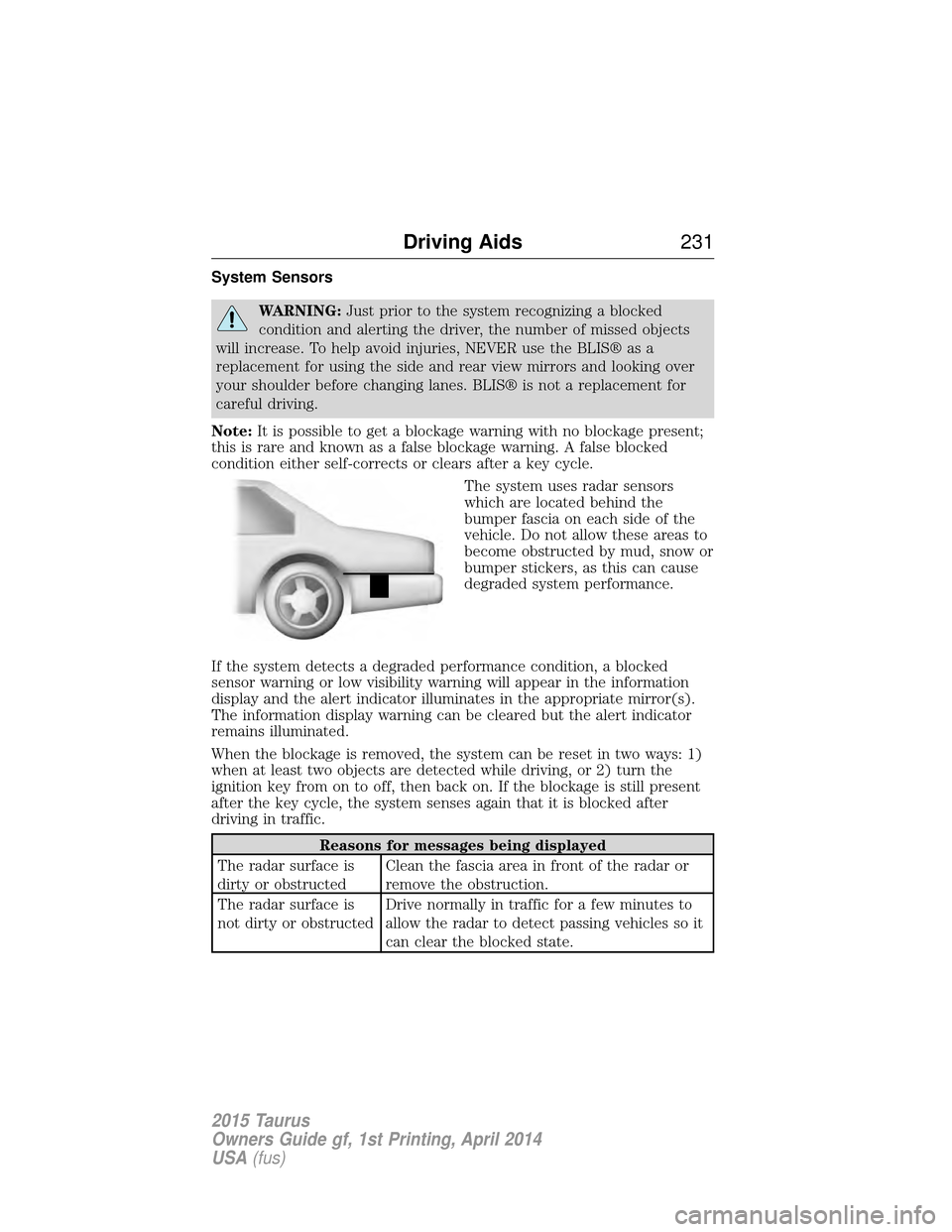
The system uses radar sensors
which are located behind the
bumper fascia on each side of the
vehicle. Do not allow these areas to
become obstructed by mud, snow or
bumper stickers, as this can cause
degraded system performance.
If the system detects a degraded performance condition, a blocked
sensor warning or low visibility warning will appear in the information
display and the alert indicator illuminates in the appropriate mirror(s).
The information display warning can be cleared but the alert indicator
remains illuminated.
When the blockage is removed, the system can be reset in two ways: 1)
when at least two objects are detected while driving, or 2) turn the
ignition key from on to off, then back on. If the blockage is still present
after the key cycle, the system senses again that it is blocked after
driving in traffic.
Reasons for messages being displayed
The radar surface is
dirty or obstructed Clean the fascia area in front of the radar or
remove the obstruction.
The radar surface is
not dirty or obstructed Drive normally in traffic for a few minutes to
allow the radar to detect passing vehicles so it
can clear the blocked state.
Driving Aids
231
2015 Taurus
Owners Guide gf, 1st Printing, April 2014
USA(fus)
Page 275 of 558
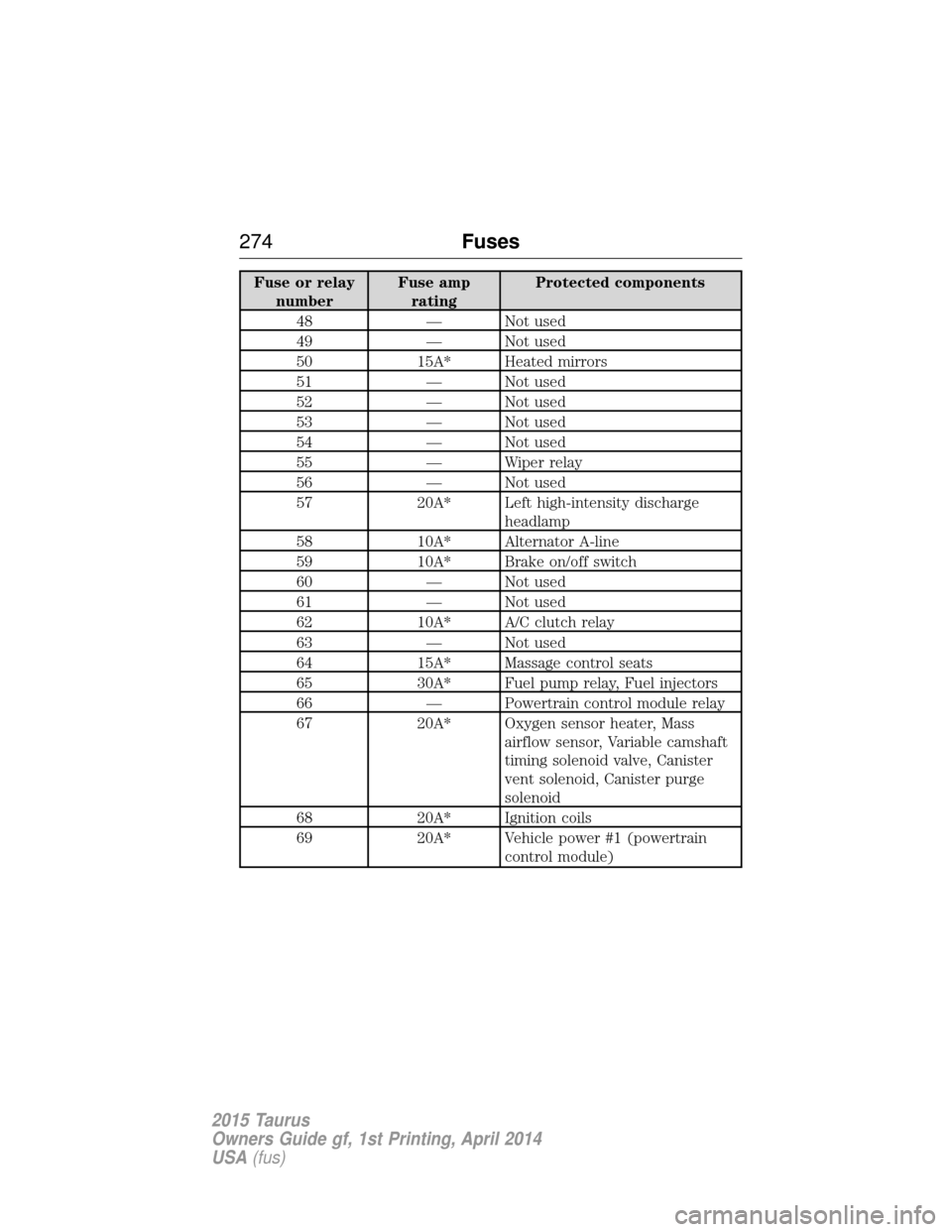
Fuse or relaynumber Fuse amp
rating Protected components
48 — Not used
49 — Not used
50 15A* Heated mirrors
51 — Not used
52 — Not used
53 — Not used
54 — Not used
55 — Wiper relay
56 — Not used
57 20A* Left high-intensity discharge
headlamp
58 10A* Alternator A-line
59 10A* Brake on/off switch
60 — Not used
61 — Not used
62 10A* A/C clutch relay
63 — Not used
64 15A* Massage control seats
65 30A* Fuel pump relay, Fuel injectors
66 — Powertrain control module relay
67 20A* Oxygen sensor heater, Mass
airflow sensor, Variable camshaft
timing solenoid valve, Canister
vent solenoid, Canister purge
solenoid
68 20A* Ignition coils
69 20A* Vehicle power #1 (powertrain
control module)
274 Fuses
2015 Taurus
Owners Guide gf, 1st Printing, April 2014
USA(fus)
Page 280 of 558
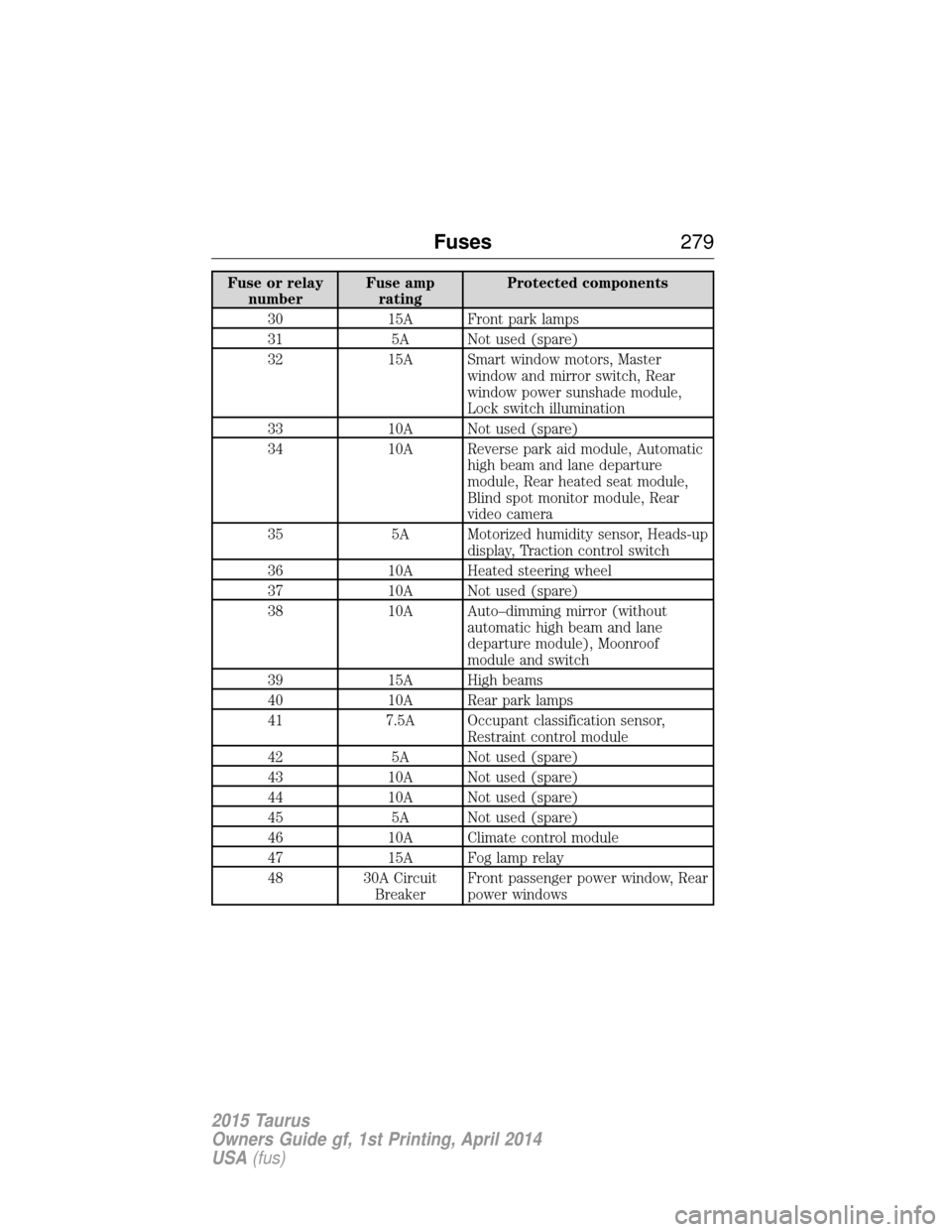
Fuse or relaynumber Fuse amp
rating Protected components
30 15A Front park lamps
31 5A Not used (spare)
32 15A Smart window motors, Master window and mirror switch, Rear
window power sunshade module,
Lock switch illumination
33 10A Not used (spare)
34 10A Reverse park aid module, Automatic high beam and lane departure
module, Rear heated seat module,
Blind spot monitor module, Rear
video camera
35 5A Motorized humidity sensor, Heads-up display, Traction control switch
36 10A Heated steering wheel
37 10A Not used (spare)
38 10A Auto–dimming mirror (without automatic high beam and lane
departure module), Moonroof
module and switch
39 15A High beams
40 10A Rear park lamps
41 7.5A Occupant classification sensor, Restraint control module
42 5A Not used (spare)
43 10A Not used (spare)
44 10A Not used (spare)
45 5A Not used (spare)
46 10A Climate control module
47 15A Fog lamp relay
48 30A Circuit BreakerFront passenger power window, Rear
power windows
Fuses
279
2015 Taurus
Owners Guide gf, 1st Printing, April 2014
USA(fus)
Page 312 of 558
WAXING
Regular waxing is necessary to protect the paint on your car from the
elements. We recommend that you wash and wax the painted surface
once or twice a year.
When washing and waxing, park your vehicle in a shaded area out of
direct sunlight. Always wash your vehicle before applying wax.
•Use a quality wax that does not contain abrasives.
• Follow the manufacturer’s instructions to apply and remove the wax.
• Apply a small amount of wax in a back-and-forth motion, not in
circles.
• Do not allow wax to come in contact with any non-body (low-gloss
black) colored trim. The wax discolors or stains the parts over time,
such as:
• Bumpers
• Grained door handles
• Side mouldings
• Mirror housings
• Windshield cowl area.
• Do not apply wax to glass areas.
• After waxing, your car’s paint should feel smooth, and be free of
streaks and smudges.
REPAIRING MINOR PAINT DAMAGE
Your authorized dealer has touch-up paint to match your vehicle’s color.
Take your color code (printed on a sticker in the driver’s door jamb) to
an authorized dealer to make sure you get the correct color.
• Before repairing minor paint damage, use a cleaner such as Motorcraft
Bug and Tar Remover to remove particles such as bird droppings, tree
sap, insect deposits, tar spots, road salt and industrial fallout before
repairing paint chips.
• Always read the instructions before using the products.
CLEANING THE ENGINE
Engines are more efficient when they are clean because grease and dirt
buildup keep the engine warmer than normal.
When washing:
• Take care when using a power washer to clean the engine. The
high-pressure fluid could penetrate the sealed parts and cause
damage.
• Do not spray a hot engine with cold water to avoid cracking the
engine block or other engine components.
Vehicle Care 311
2015 Taurus
Owners Guide gf, 1st Printing, April 2014
USA(fus)
Page 367 of 558
ACCESSORIES
For a complete listing of the accessories that are available for your
vehicle, please contact an authorized dealer or visit our online store at
www.Accessories.Ford.com (United States only).
Ford Motor Company will repair or replace any properly authorized
dealer-installed Ford Genuine Accessory found to be defective in
factory-supplied materials or workmanship during the warranty period, as
well as any component damaged by the defective accessories.
Ford Motor Company will warrant your accessory through the warranty
that provides the greatest benefit:
•24 months, unlimited mileage.
• The remainder of your new vehicle limited warranty.
Contact an authorized dealer for details and a copy of the warranty.
Exterior style
• Hood deflector
• Moon roof deflector
• Rear spoiler
• Chrome mirror caps
• Side window deflector
• Splash guards
Interior style
• All-weather floor mats
• Electrochromic auto-dimming rearview mirror
• Carpeted floor mats
• Sport pedals
• Ambient lighting
• Rear seat entertainment*
Lifestyle
• Ash cup / smoker’s package
• Cargo organization and management
• Cargo net
366 Accessories
2015 Taurus
Owners Guide gf, 1st Printing, April 2014
USA(fus)
Page 432 of 558
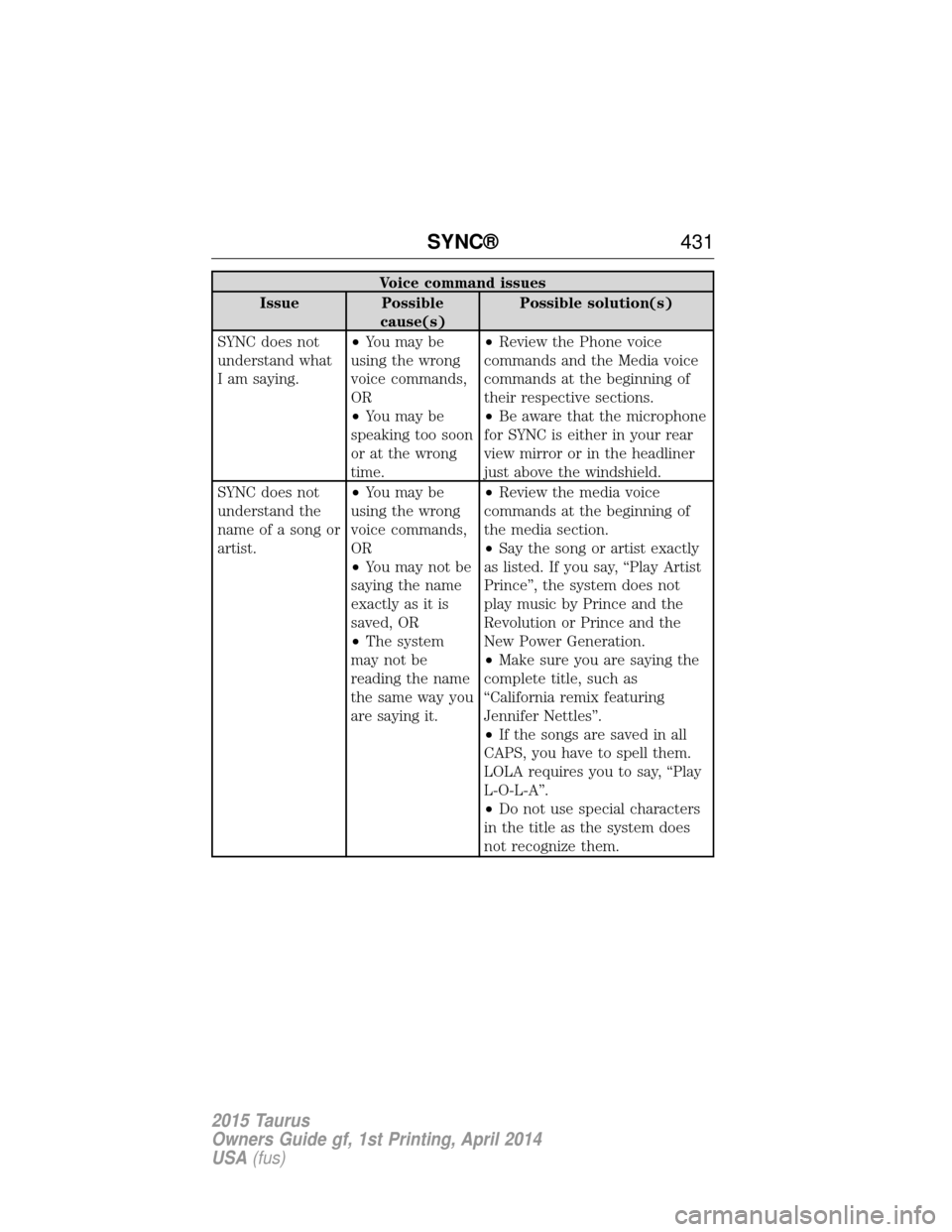
Voice command issues
Issue Possible cause(s) Possible solution(s)
SYNC does not
understand what
I am saying. •
You may be
using the wrong
voice commands,
OR
• You may be
speaking too soon
or at the wrong
time. •
Review the Phone voice
commands and the Media voice
commands at the beginning of
their respective sections.
• Be aware that the microphone
for SYNC is either in your rear
view mirror or in the headliner
just above the windshield.
SYNC does not
understand the
name of a song or
artist. •
You may be
using the wrong
voice commands,
OR
• You may not be
saying the name
exactly as it is
saved, OR
• The system
may not be
reading the name
the same way you
are saying it. •
Review the media voice
commands at the beginning of
the media section.
• Say the song or artist exactly
as listed. If you say, “Play Artist
Prince”, the system does not
play music by Prince and the
Revolution or Prince and the
New Power Generation.
• Make sure you are saying the
complete title, such as
“California remix featuring
Jennifer Nettles”.
• If the songs are saved in all
CAPS, you have to spell them.
LOLA requires you to say, “Play
L-O-L-A”.
• Do not use special characters
in the title as the system does
not recognize them.
SYNC® 431
2015 Taurus
Owners Guide gf, 1st Printing, April 2014
USA(fus)