tow FORD TAURUS 2015 6.G Owner's Manual
[x] Cancel search | Manufacturer: FORD, Model Year: 2015, Model line: TAURUS, Model: FORD TAURUS 2015 6.GPages: 558, PDF Size: 4.42 MB
Page 163 of 558
CENTER CONSOLE
Stow items in the cupholder carefully as items may become loose during
hard braking, acceleration or collisions, including hot drinks which may
spill.
Note:The appearance and features of the center console may be
different than shown based on your vehicle’s option level.
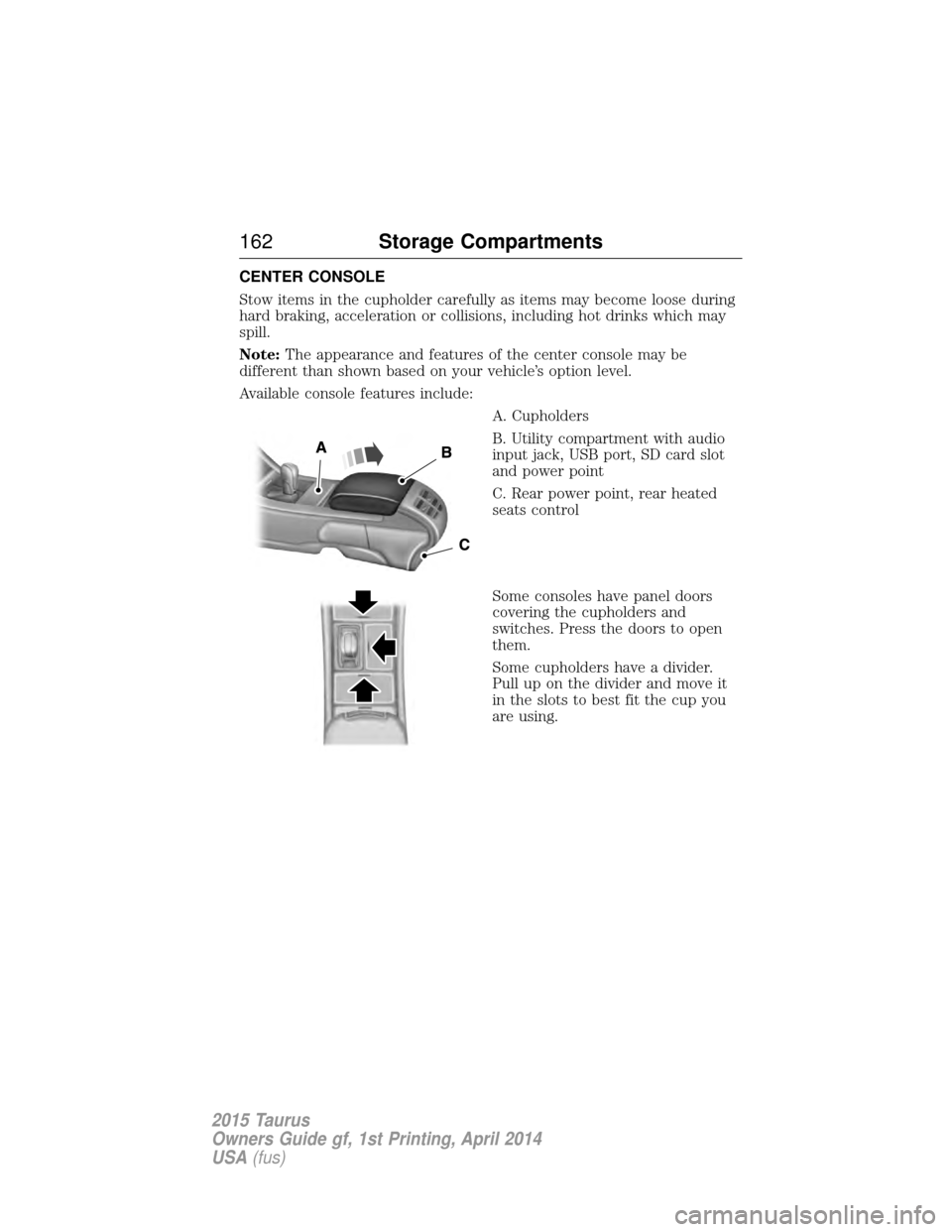
Available console features include:
A. Cupholders
B. Utility compartment with audio
input jack, USB port, SD card slot
and power point
C. Rear power point, rear heated
seats control
Some consoles have panel doors
covering the cupholders and
switches. Press the doors to open
them.
Some cupholders have a divider.
Pull up on the divider and move it
in the slots to best fit the cup you
are using.
162Storage Compartments
2015 Taurus
Owners Guide gf, 1st Printing, April 2014
USA(fus)
Page 172 of 558
•Make sure that when in operation, the extension cord plug and the
heater cord plug connections are free and clear of water. This could
cause an electric shock or fire.
• Make sure your vehicle is parked in a clean area, clear of
combustibles.
• Make sure the heater, heater cord and extension cord are firmly
connected.
• Check for heat anywhere in the electrical hookup once the system has
been operating for approximately 30 minutes.
• Make sure the system is unplugged and properly stowed before driving
your vehicle. Make sure the protective cover seals the prongs of the
block heater cord plug when not in use.
• Keep plug terminals clean and free of dirt and corrosion.
• Make sure the heater system is checked for proper operation before
winter.
Using the Engine Block Heater
Make sure the receptacle terminals are clean and dry before use. To
clean them, use a dry cloth.
The heater uses 0.4 to 1.0 kilowatt-hours of energy per hour of use. The
system does not have a thermostat. It achieves maximum temperature
after approximately three hours of operation. Using the heater longer
than three hours does not improve system performance and
unnecessarily uses electricity.
Starting and Stopping the Engine 171
2015 Taurus
Owners Guide gf, 1st Printing, April 2014
USA(fus)
Page 175 of 558
Choosing the Right Fuel With a Flex Fuel Vehicle (If Equipped)
Use only UNLEADED gasoline or UNLEADED gasoline blended with a
maximum of 85% ethanol (E-85) in your Flex Fuel Vehicle (FFV). If
your vehicle is flex fuel capable, it will have a yellow bezel placed over
the fuel fill inlet.
Do not use:
•Fuels containing more than 85% ethanol or E-100 fuel.
• Fuels containing methanol.
• Fuels containing metallic based additives, including manganese-based
compounds.
• Fuels containing the octane booster additive, methylcyclopentadienyl
manganese tricarbonyl (MMT).
• Leaded-fuel (The use of leaded fuel is prohibited by law).
Use of any fuel other than recommended fuel can cause powertrain
damage, impair the emission control system or cause loss of vehicle
performance. Any damage to a vehicle that is caused by use of fuel not
recommended will not be covered under warranty.
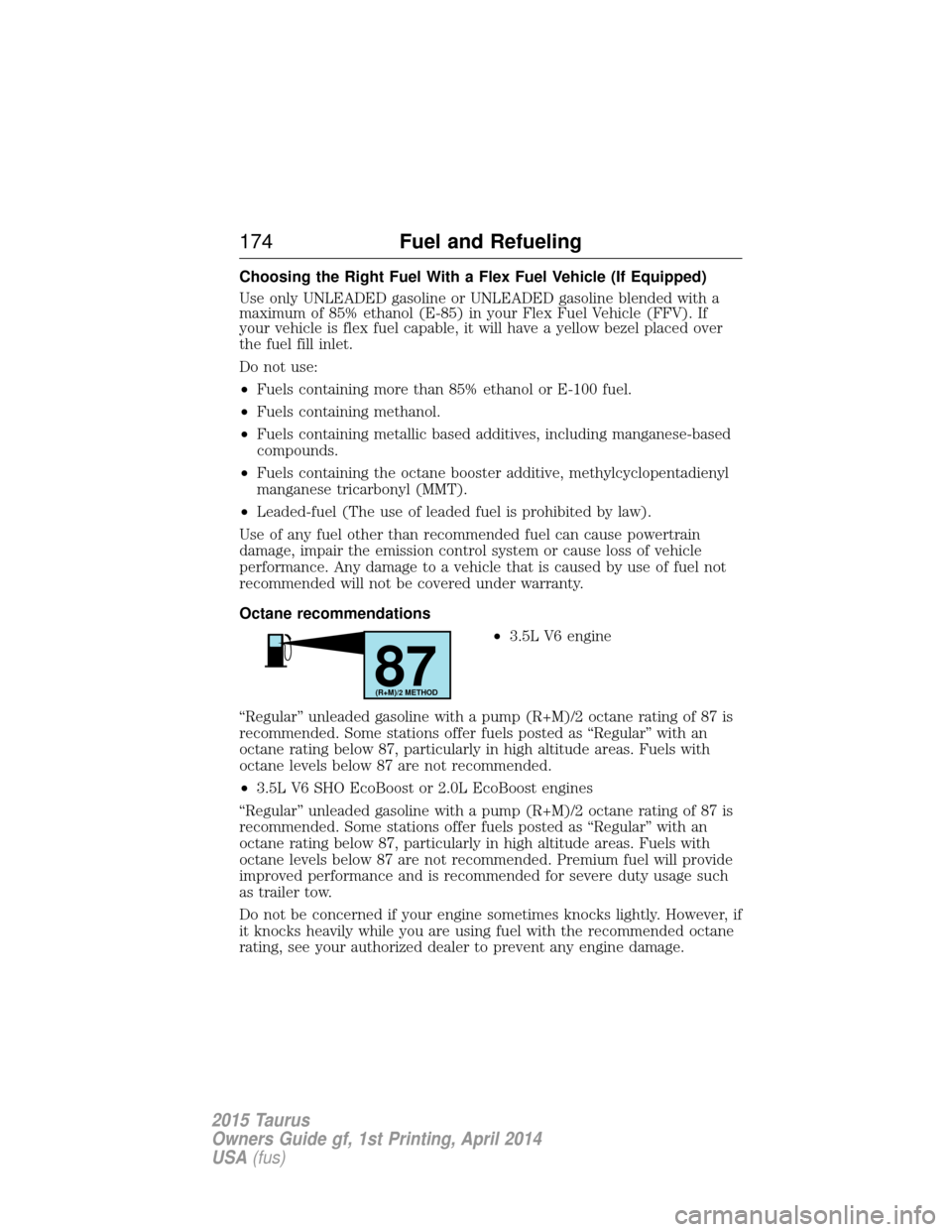
Octane recommendations •3.5L V6 engine
“Regular” unleaded gasoline with a pump (R+M)/2 octane rating of 87 is
recommended. Some stations offer fuels posted as “Regular” with an
octane rating below 87, particularly in high altitude areas. Fuels with
octane levels below 87 are not recommended.
• 3.5L V6 SHO EcoBoost or 2.0L EcoBoost engines
“Regular” unleaded gasoline with a pump (R+M)/2 octane rating of 87 is
recommended. Some stations offer fuels posted as “Regular” with an
octane rating below 87, particularly in high altitude areas. Fuels with
octane levels below 87 are not recommended. Premium fuel will provide
improved performance and is recommended for severe duty usage such
as trailer tow.
Do not be concerned if your engine sometimes knocks lightly. However, if
it knocks heavily while you are using fuel with the recommended octane
rating, see your authorized dealer to prevent any engine damage.
87(R+M)/2 METHOD
174 Fuel and Refueling
2015 Taurus
Owners Guide gf, 1st Printing, April 2014
USA(fus)
Page 196 of 558
GENERAL INFORMATION
Note:Occasional brake noise is normal. If a metal-to-metal, continuous
grinding or continuous squeal sound is present, the brake linings may be
worn out. Have them inspected by an authorized dealer. If your vehicle
has continuous vibration or shudder in the steering wheel while braking,
have your vehicle inspected by an authorized dealer.
Note: Brake dust may accumulate on the wheels, even under normal
driving conditions. Some dust is inevitable as the brakes wear and does
not contribute to brake noise. See the Vehicle Carechapter for wheel
cleaning instructions.
See theInstrument Cluster chapter for information on the
brake system warning light.
Wet brakes result in reduced braking efficiency. Gently press the brake
pedal a few times when driving from a car wash or standing water to dry
the brakes.
Brake Over Accelerator
In the event the accelerator pedal becomes stuck or entrapped, apply
steady and firm pressure to the brake pedal to slow your vehicle and
reduce engine power. If you experience this condition, apply the brakes
and bring your vehicle to a safe stop. Turn the engine off, shift to park
(P) and apply the parking brake. Inspect the accelerator pedal and the
area around it for any items or debris that may be obstructing its
movement. If none are found and the condition persists, have your
vehicle towed to the nearest authorized dealer.
Brake Assist
Brake assist detects when you brake heavily by measuring the rate at
which you press the brake pedal. It provides maximum braking efficiency
as long as you press the pedal. Brake assist can reduce stopping
distances in critical situations.
Brakes 195
2015 Taurus
Owners Guide gf, 1st Printing, April 2014
USA(fus)
Page 203 of 558
If a fault is present in the system, a warning message appears in the
information display and does not allow the driver to switch the faulted
system on.
Note:If your vehicle is equipped with MyKey®, it is possible to prevent
turning the sensing system off. Refer to the MyKey®chapter.
Using the Rear Sensing System
The rear sensors are only active when the transmission is in R.Asthe
vehicle moves closer to the obstacle, the rate of the audible warning
increases. When the obstacle is fewer than 12 inches (30 centimeters)
away, the warning sounds continuously. If a stationary or receding object
is detected farther than 12 inches (30 centimeters) from the side of the
vehicle, the tone sounds for only three seconds. Once the system detects
an object approaching, the warning sounds again.
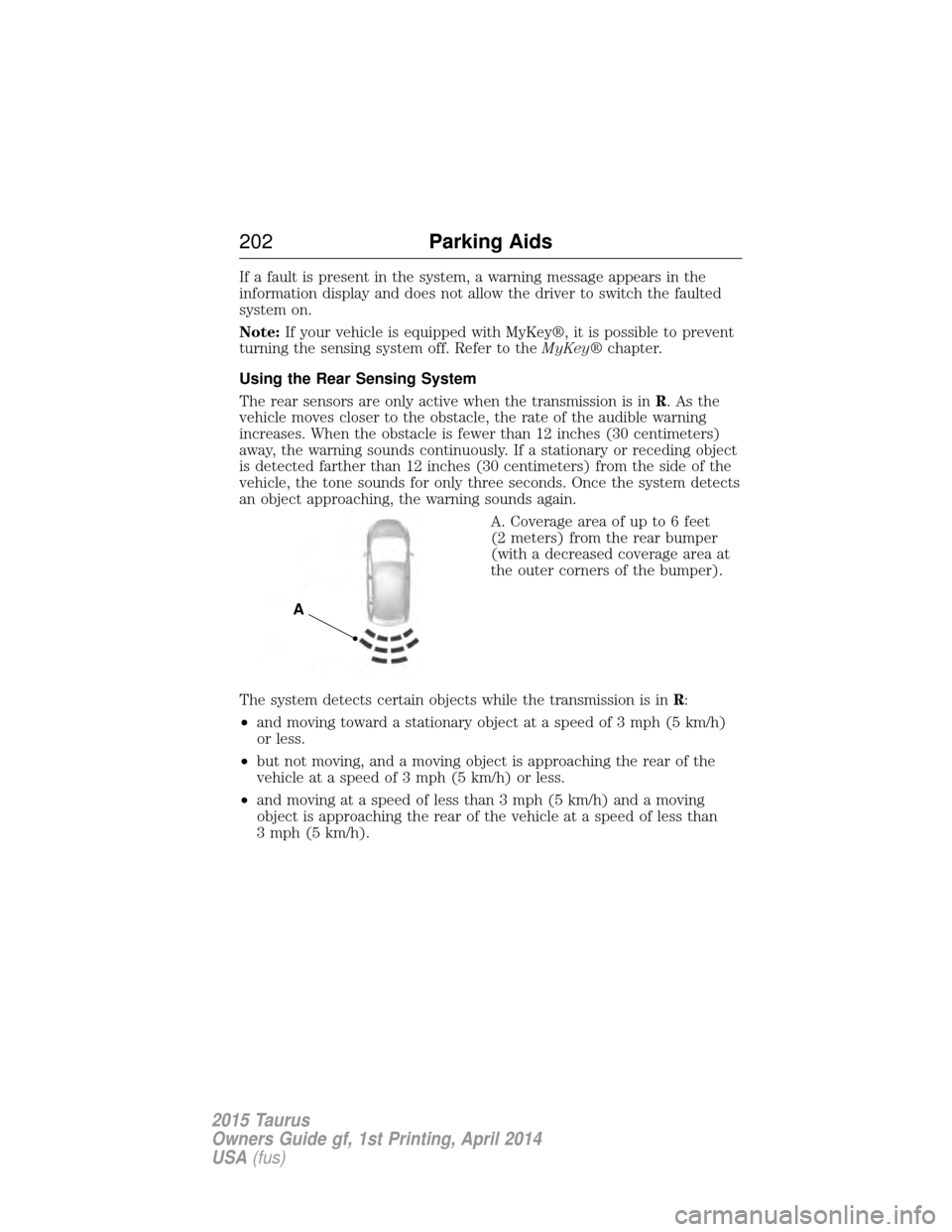
A. Coverage area of up to 6 feet
(2 meters) from the rear bumper
(with a decreased coverage area at
the outer corners of the bumper).
The system detects certain objects while the transmission is in R:
• and moving toward a stationary object at a speed of 3 mph (5 km/h)
or less.
• but not moving, and a moving object is approaching the rear of the
vehicle at a speed of 3 mph (5 km/h) or less.
• and moving at a speed of less than 3 mph (5 km/h) and a moving
object is approaching the rear of the vehicle at a speed of less than
3 mph (5 km/h).
A
202 Parking Aids
2015 Taurus
Owners Guide gf, 1st Printing, April 2014
USA(fus)
Page 204 of 558
ACTIVE PARK ASSIST (IF EQUIPPED)
WARNING:This system is designed to be a supplementary park
aid. It may not work in all conditions and is not intended to
replace the driver’s attention and judgment. The driver is responsible
for avoiding hazards and maintaining a safe distance and speed, even
when the system is in use.
Note: The driver is always responsible for controlling the vehicle,
supervising the system and intervening if required.
The system detects an available parallel parking space and automatically
steers the vehicle into the space (hands-free) while you control the
accelerator, gearshift and brakes. The system visually and/or audibly
instructs the driver to park the vehicle.
The system may not function correctly if something passes between the
front bumper and the parking space (i.e. a pedestrian or cyclist) or if the
edge of the neighboring parked vehicle is high from the ground (i.e. a
bus, tow truck or flatbed truck).
Note: The sensors may not detect objects in heavy rain or other
conditions that cause disruptive reflections.
Note: The sensors may not detect objects with surfaces that absorb
ultrasonic waves.
Note: After a tire change the system will go through a relearning
procedure. During this time the system performance may deteriorate.
The system should not be used if:
• a foreign object (i.e. bike rack or trailer) is attached to the front or
rear of the vehicle or at another location close to the sensors.
• an overhanging object (i.e. surfboard) is attached to the roof.
• the front bumper or side sensors are damaged (i.e. in a collision) or
obstructed by a foreign object (i.e. front bumper cover).
• a mini-spare tire is in use.
Parking Aids 203
2015 Taurus
Owners Guide gf, 1st Printing, April 2014
USA(fus)
Page 210 of 558
Using the Rear View Camera System
The rear view camera system displays what is behind your vehicle when
you place the transmission inR. The system uses fixed guidelines which
show the actual path the vehicle is moving in while reversing in a
straight line. This can be helpful when backing into a parking space or
aligning the vehicle with another object behind the vehicle.
Note: Do not use the camera system if the trunk is ajar.
Note: If the image comes on while the transmission is not in R, have the
system inspected by your authorized dealer.
Note: When towing, the camera only sees what is being towed behind
the vehicle. This might not provide adequate coverage as it usually
provides in normal operation and some objects might not be seen. In
some vehicles, the guidelines may disappear once the trailer tow
connector is engaged.
Note: The camera may not operate correctly under the following
conditions:
• Nighttime or dark areas if one or both reverse lamps are not
operating.
• The camera’s view is obstructed by mud, water or debris. Clean the
lens with a soft, lint-free cloth and non-abrasive cleaner.
• The rear of the vehicle is hit or damaged, causing the camera to
become misaligned.
Parking Aids 209
2015 Taurus
Owners Guide gf, 1st Printing, April 2014
USA(fus)
Page 211 of 558
Guidelines and the Centerline
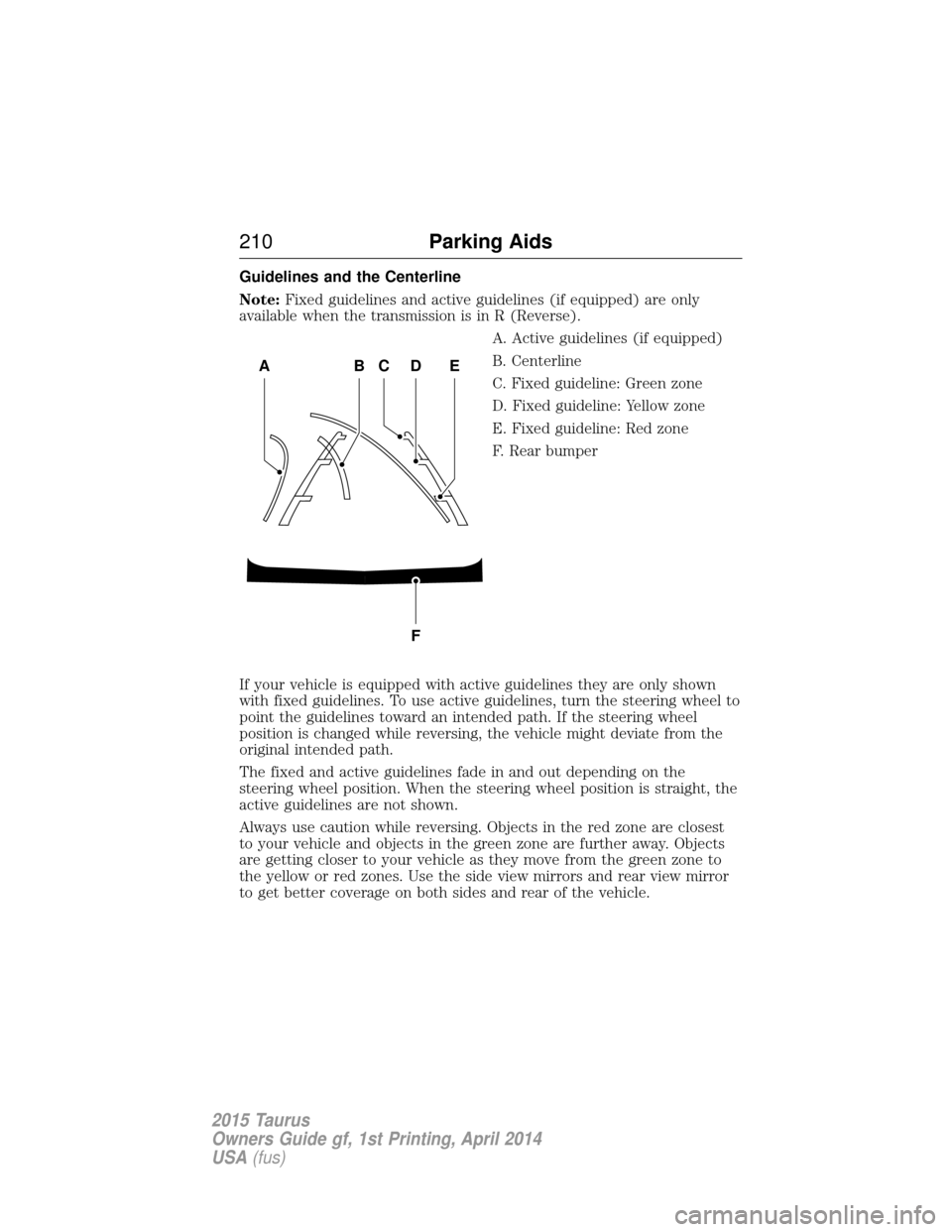
Note:Fixed guidelines and active guidelines (if equipped) are only
available when the transmission is in R (Reverse).
A. Active guidelines (if equipped)
B. Centerline
C. Fixed guideline: Green zone
D. Fixed guideline: Yellow zone
E. Fixed guideline: Red zone
F. Rear bumper
If your vehicle is equipped with active guidelines they are only shown
with fixed guidelines. To use active guidelines, turn the steering wheel to
point the guidelines toward an intended path. If the steering wheel
position is changed while reversing, the vehicle might deviate from the
original intended path.
The fixed and active guidelines fade in and out depending on the
steering wheel position. When the steering wheel position is straight, the
active guidelines are not shown.
Always use caution while reversing. Objects in the red zone are closest
to your vehicle and objects in the green zone are further away. Objects
are getting closer to your vehicle as they move from the green zone to
the yellow or red zones. Use the side view mirrors and rear view mirror
to get better coverage on both sides and rear of the vehicle.
ABCD
F
E
210 Parking Aids
2015 Taurus
Owners Guide gf, 1st Printing, April 2014
USA(fus)
Page 221 of 558
Blocked Sensor
WARNING:Do not use ACC when towing a trailer with brake
controls. Aftermarket trailer brakes will not function properly
when ACC is activated because the brakes are electronically controlled.
Failing to do so may result in loss of vehicle control, which could result
in serious injury.
WARNING: Do not use tires sizes other than those
recommended because this can affect the normal operation of
ACC. Failing to do so may result in a loss of vehicle control, which
could result in serious injury.
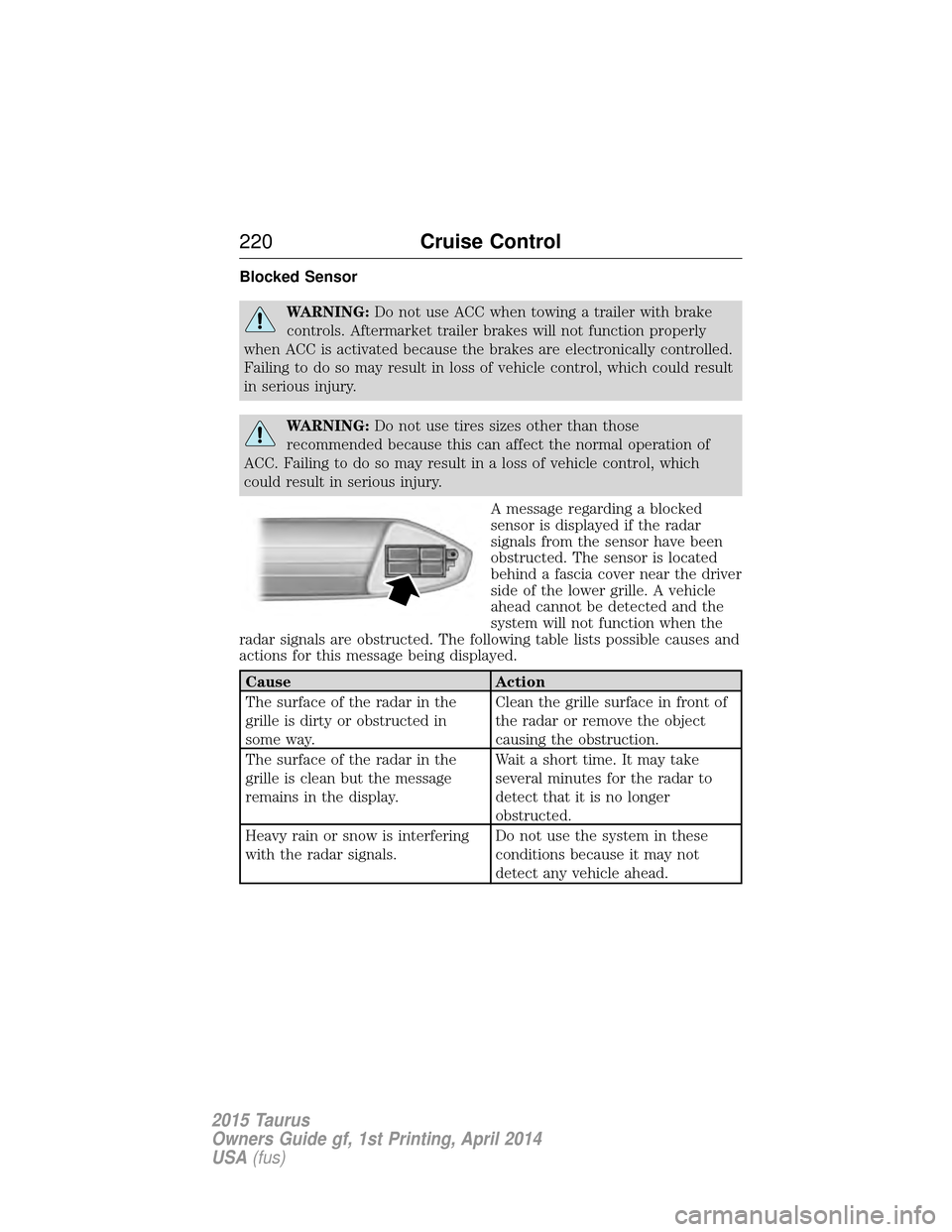
A message regarding a blocked
sensor is displayed if the radar
signals from the sensor have been
obstructed. The sensor is located
behind a fascia cover near the driver
side of the lower grille. A vehicle
ahead cannot be detected and the
system will not function when the
radar signals are obstructed. The following table lists possible causes and
actions for this message being displayed.
Cause Action
The surface of the radar in the
grille is dirty or obstructed in
some way. Clean the grille surface in front of
the radar or remove the object
causing the obstruction.
The surface of the radar in the
grille is clean but the message
remains in the display. Wait a short time. It may take
several minutes for the radar to
detect that it is no longer
obstructed.
Heavy rain or snow is interfering
with the radar signals. Do not use the system in these
conditions because it may not
detect any vehicle ahead.
220
Cruise Control
2015 Taurus
Owners Guide gf, 1st Printing, April 2014
USA(fus)
Page 225 of 558
LANE KEEPING SYSTEM (IF EQUIPPED)
WARNING:The system is designed to aid the driver. It is not
intended to replace the driver’s attention and judgment. The
driver is still responsible to drive with due care and attention.
The system detects unintentional drifting toward the outside of the lane
and alerts and/or aids the driver to stay in the lane through the steering
system and instrument cluster display. The system automatically detects
and tracks the road lane markings using a camera that is mounted
behind the interior rear view mirror.
Note: The system works above 40 mph (64 km/h).
Note: The system works as long as one lane marking can be detected by
the camera.
Note: If the camera is blocked or if the windshield is damaged, the
system may not function.
Note: When Aid mode is on and the system detects no driver steering
activity for a short period after system activation, the system alerts the
driver to keep their hands on the steering wheel. The system may detect
a light touch or grip on the steering wheel as hands-off driving.
Switching the System On and Off
Press the button located on the center console to switch the
system on or off.
Note: The system on/off setting is stored until it is manual changed,
unless a MyKey® is detected. If a MyKey® is detected, the system is
defaulted to on and the mode is set to Alert.
Note: If a MyKey® is detected, pressing the button will not affect the
on/off status of the system. Only the Mode and Intensity settings can be
changed when a MyKey® is present.
System Settings
The system has one standard feature setting and one optional setting
menu available. To view or adjust the settings, refer to the Information
Displays chapter. The last-known selection for each of these settings is
stored by the system. You do not need to readjust your settings each
time you turn on the system.
Mode: This setting allows you to enable one of the system features.
224 Driving Aids
2015 Taurus
Owners Guide gf, 1st Printing, April 2014
USA(fus)