tow FORD TAURUS 2015 6.G Repair Manual
[x] Cancel search | Manufacturer: FORD, Model Year: 2015, Model line: TAURUS, Model: FORD TAURUS 2015 6.GPages: 558, PDF Size: 4.42 MB
Page 415 of 558
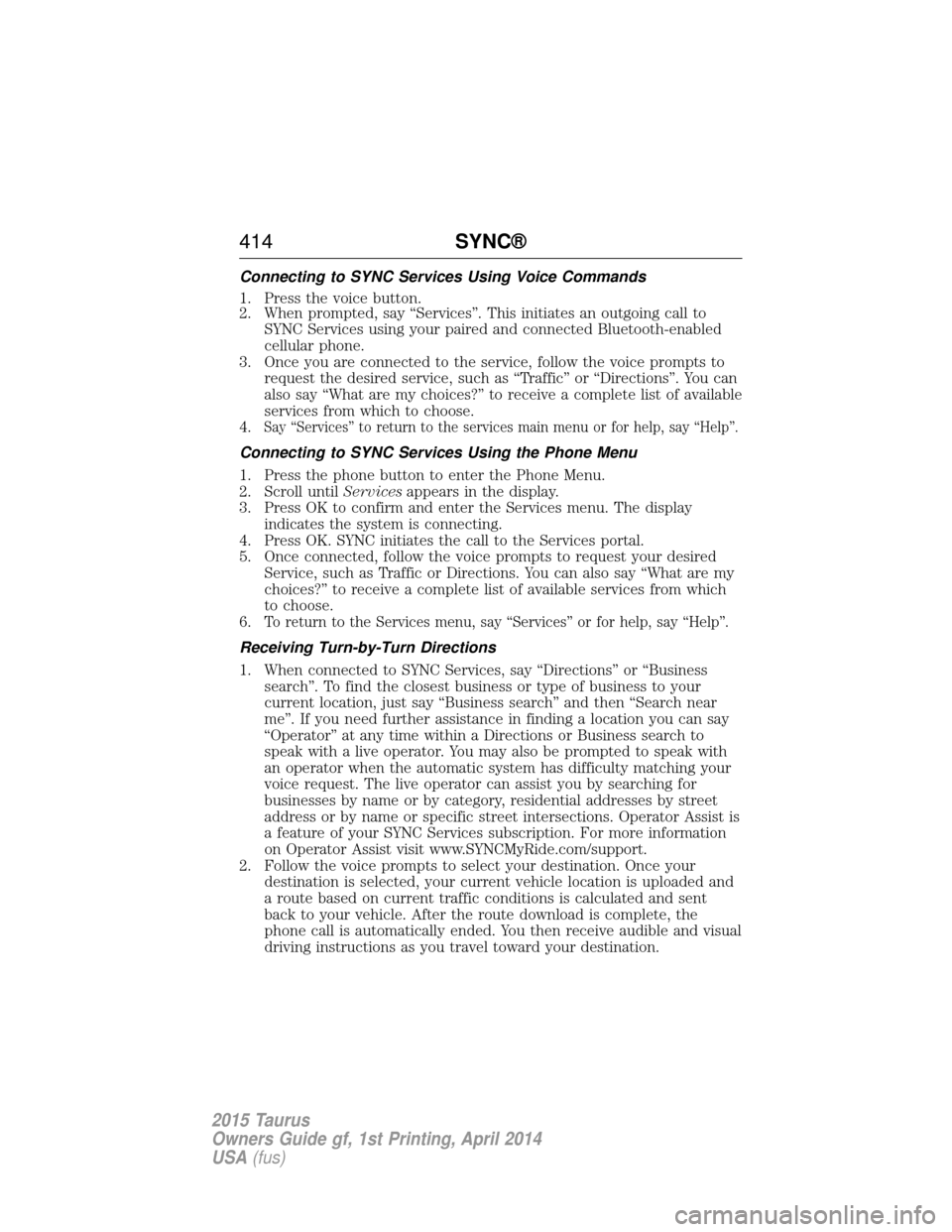
Connecting to SYNC Services Using Voice Commands
1. Press the voice button.
2. When prompted, say “Services”. This initiates an outgoing call toSYNC Services using your paired and connected Bluetooth-enabled
cellular phone.
3. Once you are connected to the service, follow the voice prompts to request the desired service, such as “Traffic” or “Directions”. You can
also say “What are my choices?” to receive a complete list of available
services from which to choose.
4.
Say “Services” to return to the services main menu or for help, say “Help”.
Connecting to SYNC Services Using the Phone Menu
1. Press the phone button to enter the Phone Menu.
2. Scroll until Servicesappears in the display.
3. Press OK to confirm and enter the Services menu. The display indicates the system is connecting.
4. Press OK. SYNC initiates the call to the Services portal.
5. Once connected, follow the voice prompts to request your desired Service, such as Traffic or Directions. You can also say “What are my
choices?” to receive a complete list of available services from which
to choose.
6.
To return to the Services menu, say “Services” or for help, say “Help”.
Receiving Turn-by-Turn Directions
1. When connected to SYNC Services, say “Directions” or “Business search”. To find the closest business or type of business to your
current location, just say “Business search” and then “Search near
me”. If you need further assistance in finding a location you can say
“Operator” at any time within a Directions or Business search to
speak with a live operator. You may also be prompted to speak with
an operator when the automatic system has difficulty matching your
voice request. The live operator can assist you by searching for
businesses by name or by category, residential addresses by street
address or by name or specific street intersections. Operator Assist is
a feature of your SYNC Services subscription. For more information
on Operator Assist visit www.SYNCMyRide.com/support.
2. Follow the voice prompts to select your destination. Once your destination is selected, your current vehicle location is uploaded and
a route based on current traffic conditions is calculated and sent
back to your vehicle. After the route download is complete, the
phone call is automatically ended. You then receive audible and visual
driving instructions as you travel toward your destination.
414 SYNC®
2015 Taurus
Owners Guide gf, 1st Printing, April 2014
USA(fus)
Page 459 of 558
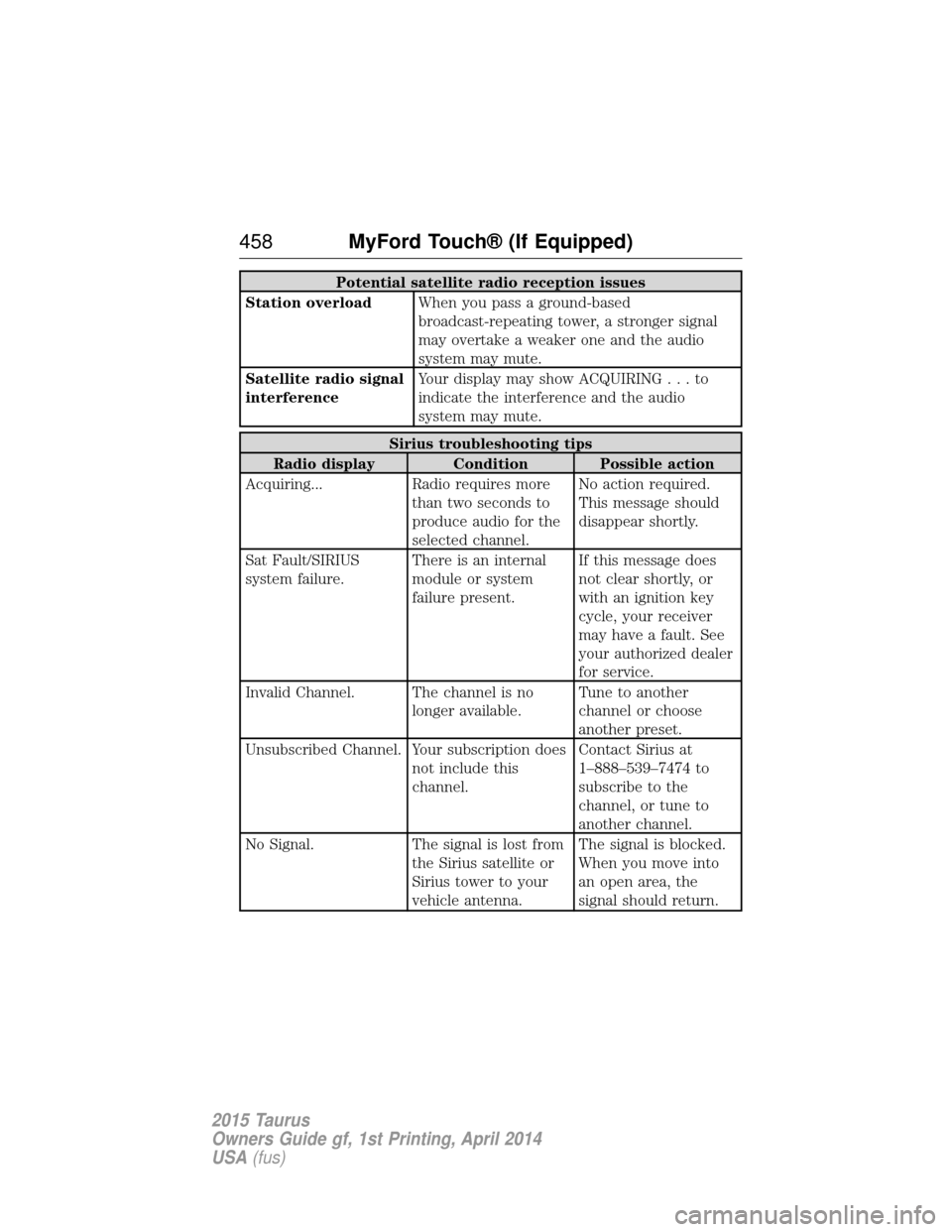
Potential satellite radio reception issues
Station overload When you pass a ground-based
broadcast-repeating tower, a stronger signal
may overtake a weaker one and the audio
system may mute.
Satellite radio signal
interference Your display may show ACQUIRIN
G...to
indicate the interference and the audio
system may mute.
Sirius troubleshooting tips
Radio display Condition Possible action
Acquiring... Radio requires more than two seconds to
produce audio for the
selected channel.No action required.
This message should
disappear shortly.
Sat Fault/SIRIUS
system failure. There is an internal
module or system
failure present.If this message does
not clear shortly, or
with an ignition key
cycle, your receiver
may have a fault. See
your authorized dealer
for service.
Invalid Channel. The channel is no longer available.Tune to another
channel or choose
another preset.
Unsubscribed Channel. Your subscription does not include this
channel.Contact Sirius at
1–888–539–7474 to
subscribe to the
channel, or tune to
another channel.
No Signal. The signal is lost from the Sirius satellite or
Sirius tower to your
vehicle antenna.The signal is blocked.
When you move into
an open area, the
signal should return.
458
MyFord Touch® (If Equipped)
2015 Taurus
Owners Guide gf, 1st Printing, April 2014
USA(fus)
Page 509 of 558
Avoid Areas
Avoid Areasallows you to choose areas which you want the system to
avoid when calculating a route for you.
Press Addto program an entry. Once you make a selection, the system
tries to avoid the area(s) if possible for all routes. To delete a selection,
choose the listing on the screen. When the screen changes to Avoid
Areas Edit, you can press Deleteat the bottom right of the screen.
Map Mode
Press the green bar in the upper right area of the touchscreen to view
map mode. Map mode shows advanced viewing comprised of both 2D
city maps as well as 3D landmarks (when available).
2D city maps show detailed outlines of buildings, visible land use and
land elements and detailed railway infrastructure for the most essential
cities around the globe. These maps also contain features, such as town
blocks, building footprints, and railways.
3D landmarks appear as clear, visible objects that are typically
recognizable and have a certain tourist value. The 3D landmarks appear
in 3D map mode only. Coverage varies, and improves with updated map
releases.
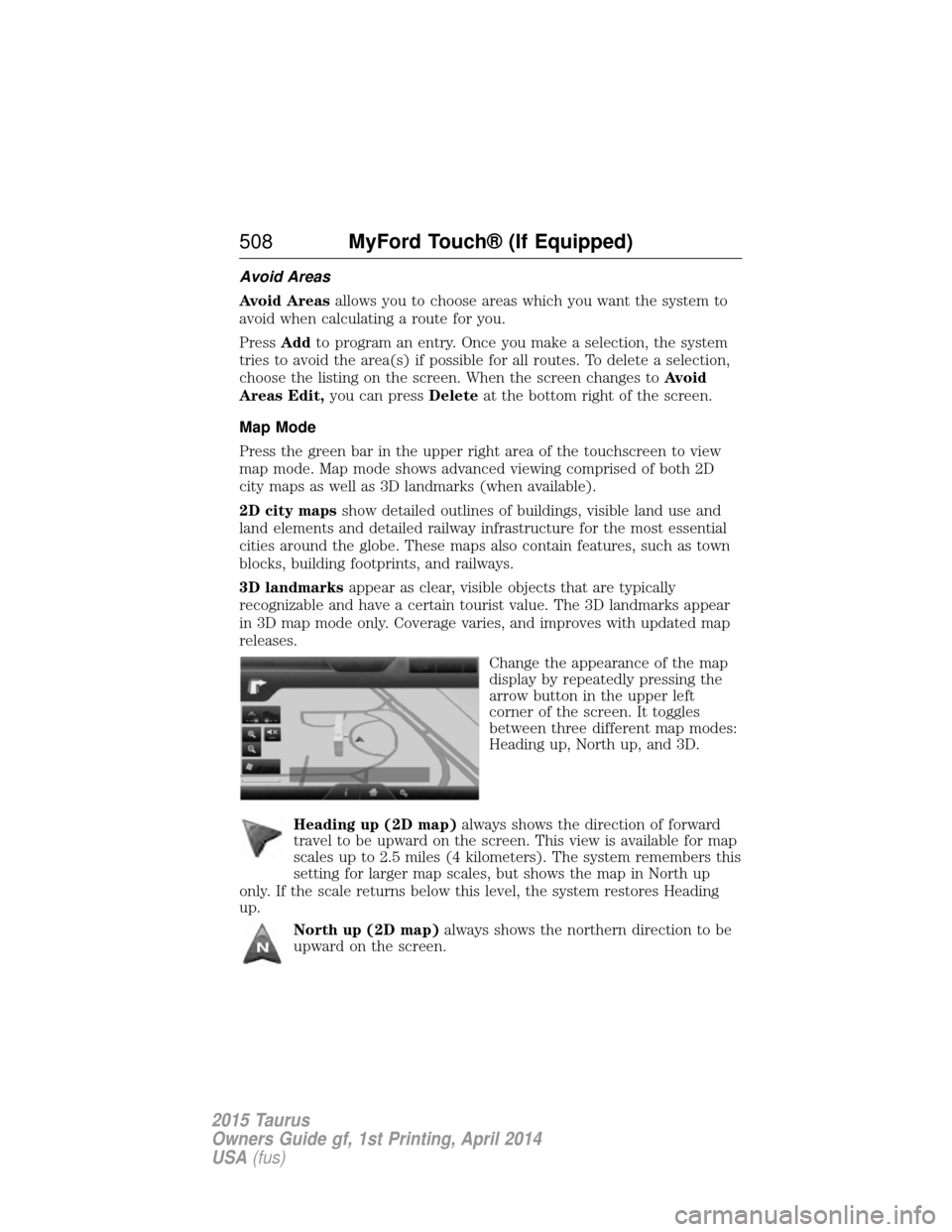
Change the appearance of the map
display by repeatedly pressing the
arrow button in the upper left
corner of the screen. It toggles
between three different map modes:
Heading up, North up, and 3D.
Heading up (2D map) always shows the direction of forward
travel to be upward on the screen. This view is available for map
scales up to 2.5 miles (4 kilometers). The system remembers this
setting for larger map scales, but shows the map in North up
only. If the scale returns below this level, the system restores Heading
up.
North up (2D map) always shows the northern direction to be
upward on the screen.
508 MyFord Touch® (If Equipped)
2015 Taurus
Owners Guide gf, 1st Printing, April 2014
USA(fus)
Page 514 of 558
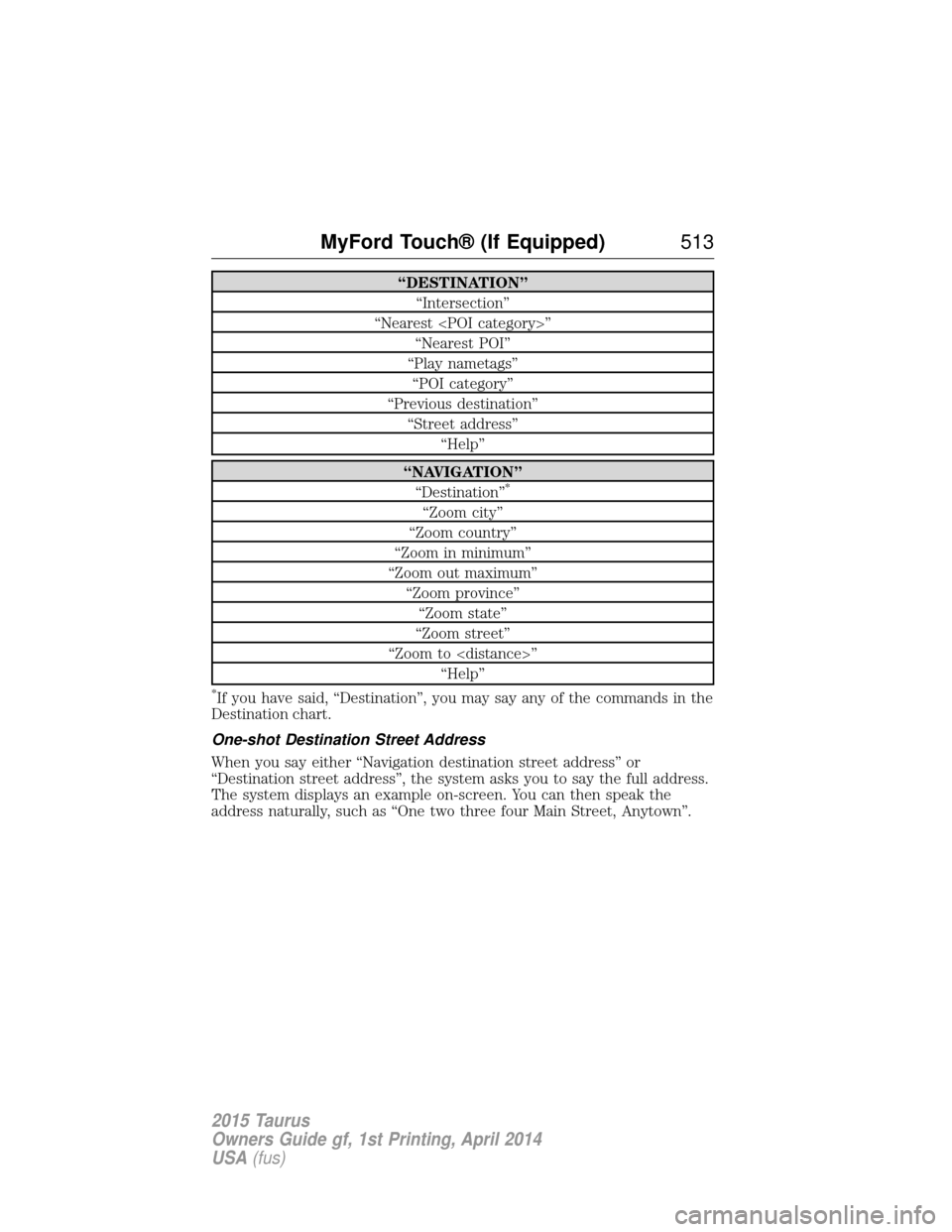
“DESTINATION”“Intersection”
“Nearest
“Play nametags” “POI category”
“Previous destination” “Street address” “Help”
“NAVIGATION”“Destination”*
“Zoom city”
“Zoom country”
“Zoom in minimum”
“Zoom out maximum” “Zoom province”“Zoom state”
“Zoom street”
“Zoom to
*If you have said, “Destination”, you may say any of the commands in the
Destination chart.
One-shot Destination Street Address
When you say either “Navigation destination street address” or
“Destination street address”, the system asks you to say the full address.
The system displays an example on-screen. You can then speak the
address naturally, such as “One two three four Main Street, Anytown”.
MyFord Touch® (If Equipped) 513
2015 Taurus
Owners Guide gf, 1st Printing, April 2014
USA(fus)
Page 539 of 558
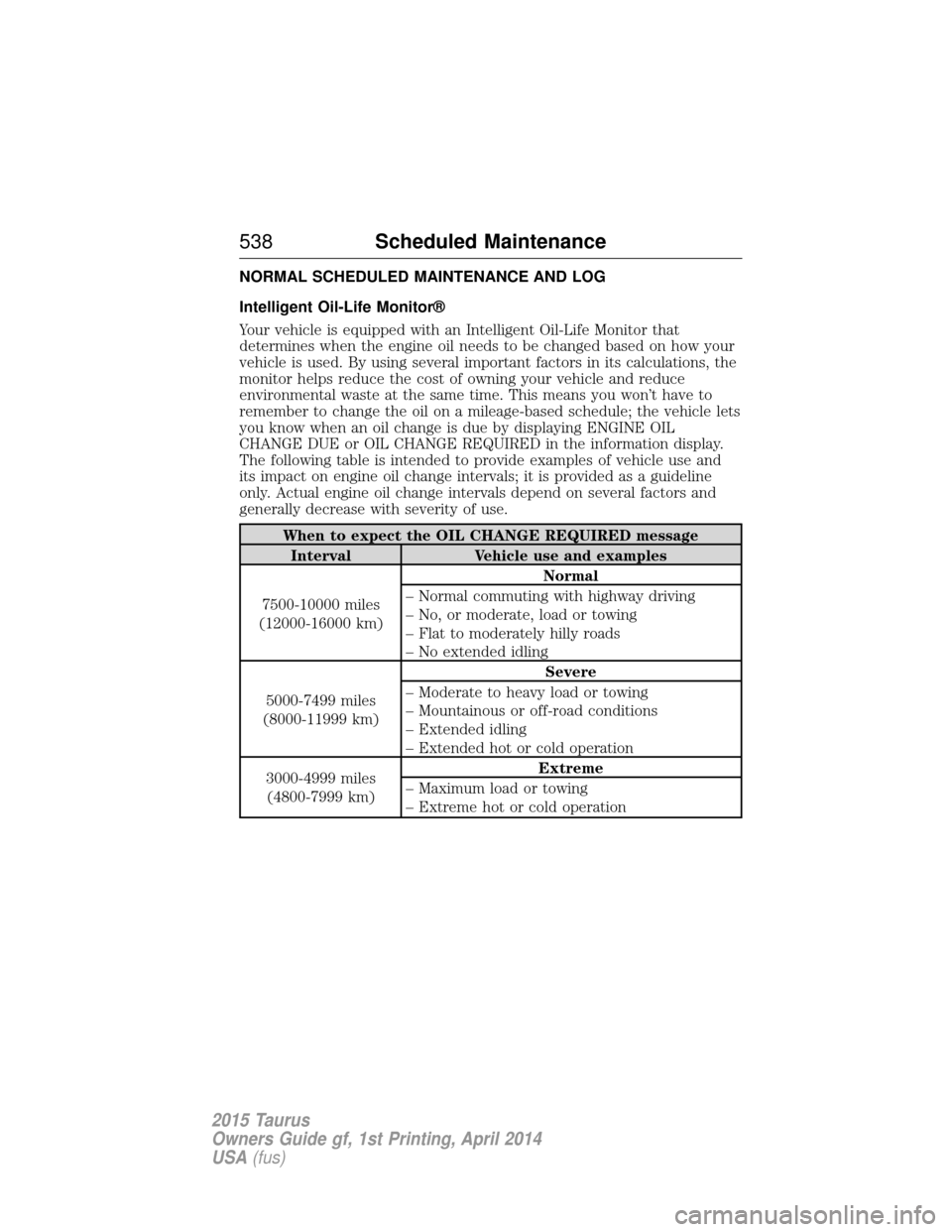
NORMAL SCHEDULED MAINTENANCE AND LOG
Intelligent Oil-Life Monitor®
Your vehicle is equipped with an Intelligent Oil-Life Monitor that
determines when the engine oil needs to be changed based on how your
vehicle is used. By using several important factors in its calculations, the
monitor helps reduce the cost of owning your vehicle and reduce
environmental waste at the same time. This means you won’t have to
remember to change the oil on a mileage-based schedule; the vehicle lets
you know when an oil change is due by displaying ENGINE OIL
CHANGE DUE or OIL CHANGE REQUIRED in the information display.
The following table is intended to provide examples of vehicle use and
its impact on engine oil change intervals; it is provided as a guideline
only. Actual engine oil change intervals depend on several factors and
generally decrease with severity of use.
When to expect the OIL CHANGE REQUIRED messageInterval Vehicle use and examples
7500-10000 miles
(12000-16000 km) Normal
– Normal commuting with highway driving
– No, or moderate, load or towing
– Flat to moderately hilly roads
– No extended idling
5000-7499 miles
(8000-11999 km) Severe
– Moderate to heavy load or towing
– Mountainous or off-road conditions
– Extended idling
– Extended hot or cold operation
3000-4999 miles (4800-7999 km) Extreme
– Maximum load or towing
– Extreme hot or cold operation
538 Scheduled Maintenance
2015 Taurus
Owners Guide gf, 1st Printing, April 2014
USA(fus)
Page 545 of 558
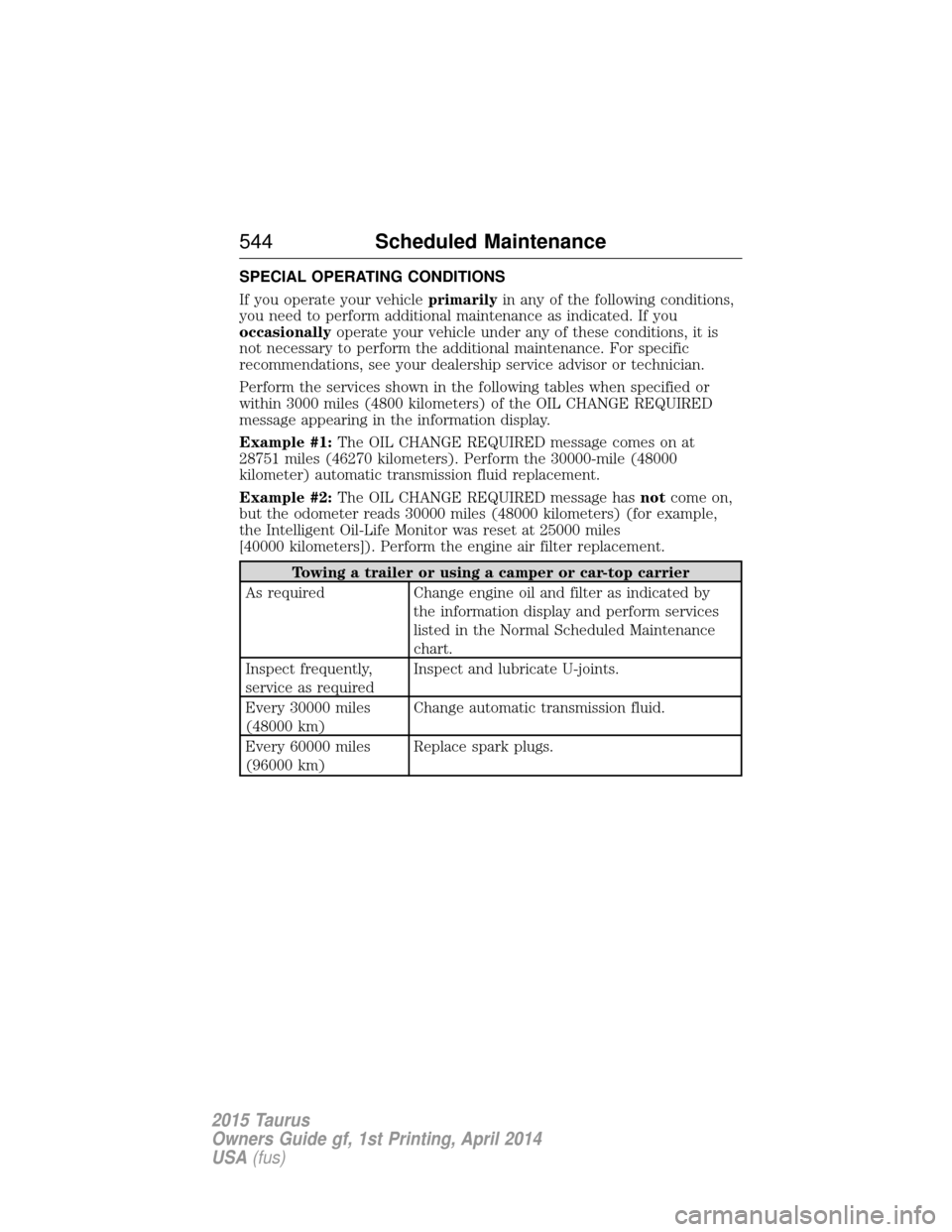
SPECIAL OPERATING CONDITIONS
If you operate your vehicleprimarilyin any of the following conditions,
you need to perform additional maintenance as indicated. If you
occasionally operate your vehicle under any of these conditions, it is
not necessary to perform the additional maintenance. For specific
recommendations, see your dealership service advisor or technician.
Perform the services shown in the following tables when specified or
within 3000 miles (4800 kilometers) of the OIL CHANGE REQUIRED
message appearing in the information display.
Example #1: The OIL CHANGE REQUIRED message comes on at
28751 miles (46270 kilometers). Perform the 30000-mile (48000
kilometer) automatic transmission fluid replacement.
Example #2: The OIL CHANGE REQUIRED message has notcome on,
but the odometer reads 30000 miles (48000 kilometers) (for example,
the Intelligent Oil-Life Monitor was reset at 25000 miles
[40000 kilometers]). Perform the engine air filter replacement.
Towing a trailer or using a camper or car-top carrier
As required Change engine oil and filter as indicated by the information display and perform services
listed in the Normal Scheduled Maintenance
chart.
Inspect frequently,
service as required Inspect and lubricate U-joints.
Every 30000 miles
(48000 km) Change automatic transmission fluid.
Every 60000 miles
(96000 km) Replace spark plugs.
544
Scheduled Maintenance
2015 Taurus
Owners Guide gf, 1st Printing, April 2014
USA(fus)
Page 557 of 558
Setting a destination by
voice ...........................................503
Settings ......................................487
Setting the clock ...............373, 487
Side air curtain ...........................52
Side-curtain airbags system .......52
SIRIUS® satellite radio ....373, 454
SIRIUS satellite radio voice
commands .................................456
SIRIUS Travel Link ...................479
SIRIUS Travel Link voice
commands .................................481
SOS Post Crash Alert .................44
Spark plugs,
specifications .....................356, 363
Specification chart,
lubricants ...................................358
Stability system .........................199
Starting your vehicle ................166jump starting ..........................260
push button start system .......165
Steering wheel ............................81 controls ......................................83
tilting .........................................81
Sunshade ...................................101
Sun visor ....................................100
Supplemental Restraint System
(SRS) (see airbags) ....................45
Supported media file types ......464
Supported player, media
formats and metadata
information ................................464
SYNC® customer
support ..............................390, 438
SYNC® Services ................413, 475 System settings .........................490
T
Temperature control
(see Climate control) ......130–131,
133, 135, 499
Temporary mobility kit .............345
Text messaging .................401, 471
Text messaging (sending,
downloading, deleting) .....401, 403
Tilt steering wheel ......................81
Tires ...........................318–319, 339 alignment ................................332
care ..........................................318
changing ..........................339, 341
checking the pressure ............328
inflating ...................................326
label .........................................325
replacing ..................................330
rotating ....................................333
safety practices .......................332
sidewall information ...............321
snow tires and chains ............334
spare tire .................................339
Temporary mobility kit ..........345
terminology .............................319
tire grades ...............................319
treadwear ........................318, 328
Touchscreen features
(climate) ....................................499
Towing .......................247, 251–252 recreational towing .................252
trailer towing ..........................247
wrecker ....................................251
Traction control ........................197
Traffic, Directions and
Information ................................413
Traffic preferences ...................506
556 Index
2015 Taurus
Owners Guide gf, 1st Printing, April 2014
USA(fus)
Page 558 of 558
Transaxlefluid, refill capacities ..............358
lubricant specifications ..........358
Transmission brake-shift interlock (BSI) ....186
fluid, checking and adding
(automatic) .....................292–293
Trunk .....................................75–76 remote release ..........................69
Turn signal ..................................94
U
USB port ....................387–388, 461
Using privacy mode ..................398
V
Vehicle health report ........411, 485
Vehicle Identification Number
(VIN) ..........................................364
Vehicle loading ..........................239 Ventilating your vehicle ...........170
Voice commands in media
mode ..........................................417
Voice commands in phone
mode ..........................................395
Voice recognition ......................442
W
Warning lights (see Lights) .....105
Washer fluid ..............................297
Water, Driving through .............255
Windows
power .........................................96
Windshield washer fluid and
wipers ..........................................87 checking and adding fluid .....297
replacing wiper blades ...........301
Wrecker towing .........................251
Index 557
2015 Taurus
Owners Guide gf, 1st Printing, April 2014
USA(fus)