reset FORD TAURUS 2015 6.G Workshop Manual
[x] Cancel search | Manufacturer: FORD, Model Year: 2015, Model line: TAURUS, Model: FORD TAURUS 2015 6.GPages: 558, PDF Size: 4.42 MB
Page 454 of 558
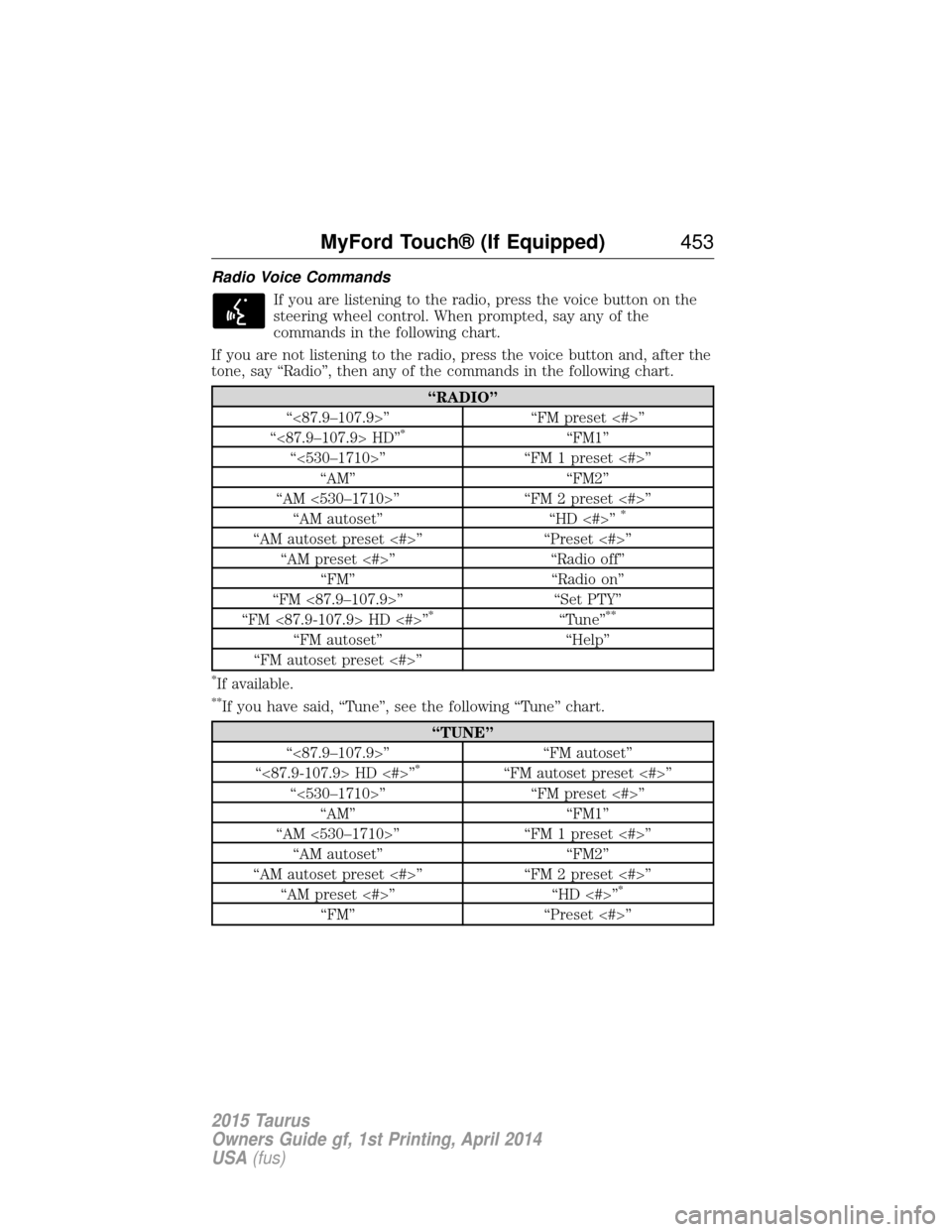
Radio Voice CommandsIf you are listening to the radio, press the voice button on the
steering wheel control. When prompted, say any of the
commands in the following chart.
If you are not listening to the radio, press the voice button and, after the
tone, say “Radio”, then any of the commands in the following chart.
“RADIO”
“<87.9–107.9>” “FM preset <#>”
“<87.9–107.9> HD”
*“FM1”
“<530–1710>” “FM 1 preset <#>” “AM” “FM2”
“AM <530–1710>” “FM 2 preset <#>” “AM autoset” “HD <#>”
*
“AM autoset preset <#>” “Preset <#>”
“AM preset <#>” “Radio off”
“FM” “Radio on”
“FM <87.9–107.9>” “Set PTY”
“FM <87.9-107.9> HD <#>”
*“Tune”**
“FM autoset” “Help”
“FM autoset preset <#>”
*If available.
**If you have said, “Tune”, see the following “Tune” chart.
“TUNE”
“<87.9–107.9>” “FM autoset”
“<87.9-107.9> HD <#>”
*“FM autoset preset <#>”
“<530–1710>” “FM preset <#>” “AM” “FM1”
“AM <530–1710>” “FM 1 preset <#>” “AM autoset” “FM2”
“AM autoset preset <#>” “FM 2 preset <#>” “AM preset <#>” “HD <#>”
*
“FM” “Preset <#>”
MyFord Touch® (If Equipped) 453
2015 Taurus
Owners Guide gf, 1st Printing, April 2014
USA(fus)
Page 455 of 558
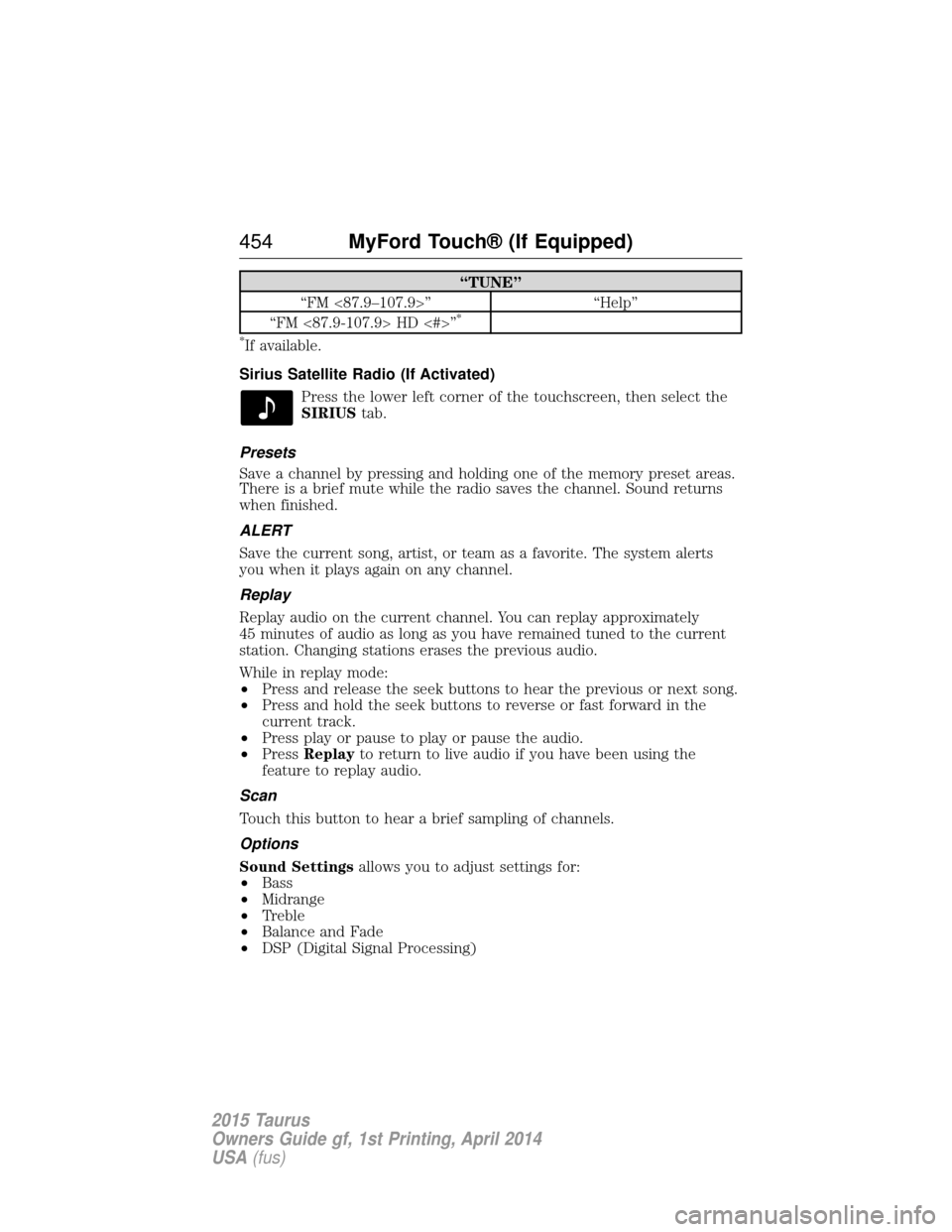
“TUNE”
“FM <87.9–107.9>” “Help”
“FM <87.9-107.9> HD <#>”
*
*
If available.
Sirius Satellite Radio (If Activated) Press the lower left corner of the touchscreen, then select the
SIRIUStab.
Presets
Save a channel by pressing and holding one of the memory preset areas.
There is a brief mute while the radio saves the channel. Sound returns
when finished.
ALERT
Save the current song, artist, or team as a favorite. The system alerts
you when it plays again on any channel.
Replay
Replay audio on the current channel. You can replay approximately
45 minutes of audio as long as you have remained tuned to the current
station. Changing stations erases the previous audio.
While in replay mode:
• Press and release the seek buttons to hear the previous or next song.
• Press and hold the seek buttons to reverse or fast forward in the
current track.
• Press play or pause to play or pause the audio.
• Press Replay to return to live audio if you have been using the
feature to replay audio.
Scan
Touch this button to hear a brief sampling of channels.
Options
Sound Settings allows you to adjust settings for:
• Bass
• Midrange
• Treble
• Balance and Fade
• DSP (Digital Signal Processing)
454 MyFord Touch® (If Equipped)
2015 Taurus
Owners Guide gf, 1st Printing, April 2014
USA(fus)
Page 456 of 558
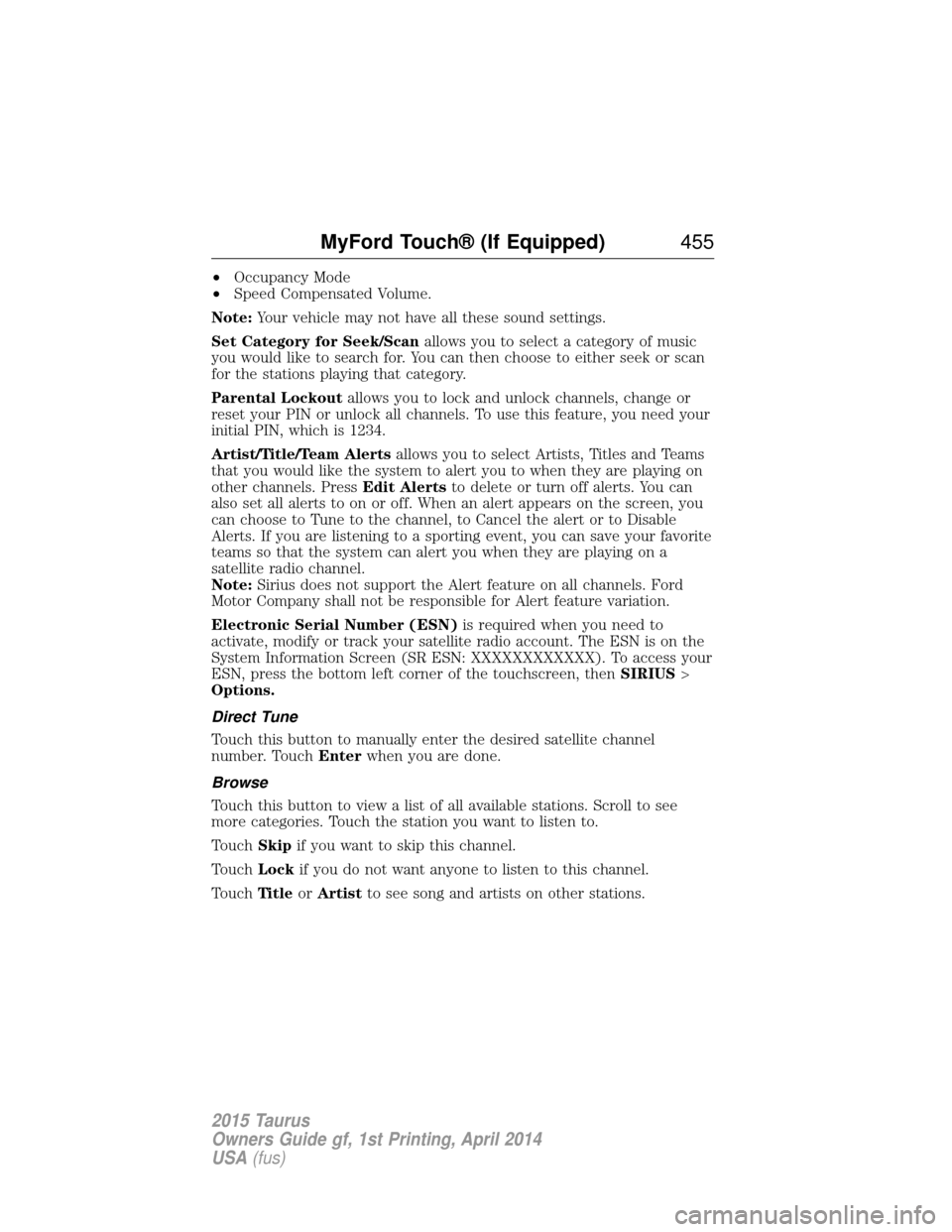
•Occupancy Mode
• Speed Compensated Volume.
Note: Your vehicle may not have all these sound settings.
Set Category for Seek/Scan allows you to select a category of music
you would like to search for. You can then choose to either seek or scan
for the stations playing that category.
Parental Lockout allows you to lock and unlock channels, change or
reset your PIN or unlock all channels. To use this feature, you need your
initial PIN, which is 1234.
Artist/Title/Team Alerts allows you to select Artists, Titles and Teams
that you would like the system to alert you to when they are playing on
other channels. Press Edit Alertsto delete or turn off alerts. You can
also set all alerts to on or off. When an alert appears on the screen, you
can choose to Tune to the channel, to Cancel the alert or to Disable
Alerts. If you are listening to a sporting event, you can save your favorite
teams so that the system can alert you when they are playing on a
satellite radio channel.
Note: Sirius does not support the Alert feature on all channels. Ford
Motor Company shall not be responsible for Alert feature variation.
Electronic Serial Number (ESN) is required when you need to
activate, modify or track your satellite radio account. The ESN is on the
System Information Screen (SR ESN: XXXXXXXXXXXX). To access your
ESN, press the bottom left corner of the touchscreen, then SIRIUS>
Options.
Direct Tune
Touch this button to manually enter the desired satellite channel
number. Touch Enterwhen you are done.
Browse
Touch this button to view a list of all available stations. Scroll to see
more categories. Touch the station you want to listen to.
Touch Skipif you want to skip this channel.
Touch Lockif you do not want anyone to listen to this channel.
Touch Ti t l eorArtist to see song and artists on other stations.
MyFord Touch® (If Equipped) 455
2015 Taurus
Owners Guide gf, 1st Printing, April 2014
USA(fus)
Page 457 of 558
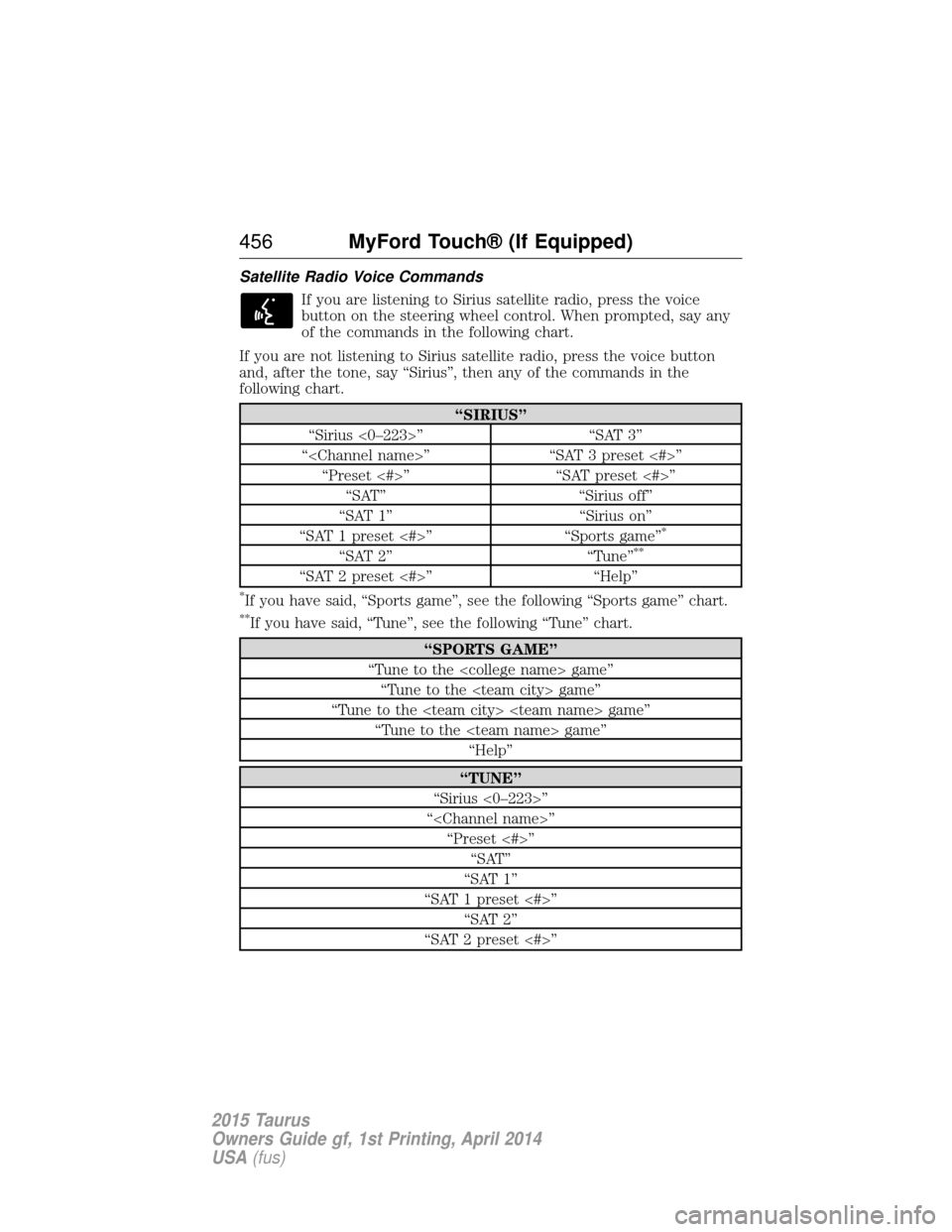
Satellite Radio Voice CommandsIf you are listening to Sirius satellite radio, press the voice
button on the steering wheel control. When prompted, say any
of the commands in the following chart.
If you are not listening to Sirius satellite radio, press the voice button
and, after the tone, say “Sirius”, then any of the commands in the
following chart.
“SIRIUS”
“Sirius <0–223>” “SAT 3”
“
“SAT 1” “Sirius on”
“SAT 1 preset <#>” “Sports game”
*
“SAT 2” “Tune”**
“SAT 2 preset <#>” “Help”
*If you have said, “Sports game”, see the following “Sports game” chart.
**If you have said, “Tune”, see the following “Tune” chart.
“SPORTS GAME”
“Tune to the
“Tune to the
“TUNE”
“Sirius <0–223>”
“
“SAT 1”
“SAT 1 preset <#>” “SAT 2”
“SAT 2 preset <#>”
456 MyFord Touch® (If Equipped)
2015 Taurus
Owners Guide gf, 1st Printing, April 2014
USA(fus)
Page 458 of 558
“TUNE”“SAT 3”
“SAT 3 preset <#>” “Help”
Sirius Satellite Radio Information
Note: Sirius reserves the unrestricted right to change, rearrange, add or
delete programming including canceling, moving or adding particular
channels, and its prices, at any time, with or without notice to you. Ford
Motor Company shall not be responsible for any such programming
changes.
Note: This receiver includes the eCos real-time operating system. eCos
is published under the eCos License.
Sirius satellite radio is a
subscription-based satellite radio
service that broadcasts a variety of
music, sports, news, weather, traffic
and entertainment programming.
Your factory-installed Sirius satellite
radio system includes hardware and
a limited subscription term that begins on the date of sale or lease of
your vehicle. See your authorized dealer for availability.
For more information on extended subscription terms (a service fee is
required), the online media player and a list of Sirius satellite radio
channels, and other features, please visit www.siriusxm.com in the
United States, www.sirius.ca in Canada, or call Sirius at 1-888-539-7474.
Potential satellite radio reception issues
Antenna
obstructions For optimal reception performance, keep the
antenna clear of snow and ice build-up and
keep luggage and other materials as far away
from the antenna as possible.
Terrain Hills, mountains, tall buildings, bridges,
tunnels, freeway overpasses, parking garages,
dense tree foliage and thunderstorms can
interfere with your reception.
MyFord Touch® (If Equipped) 457
2015 Taurus
Owners Guide gf, 1st Printing, April 2014
USA(fus)
Page 459 of 558
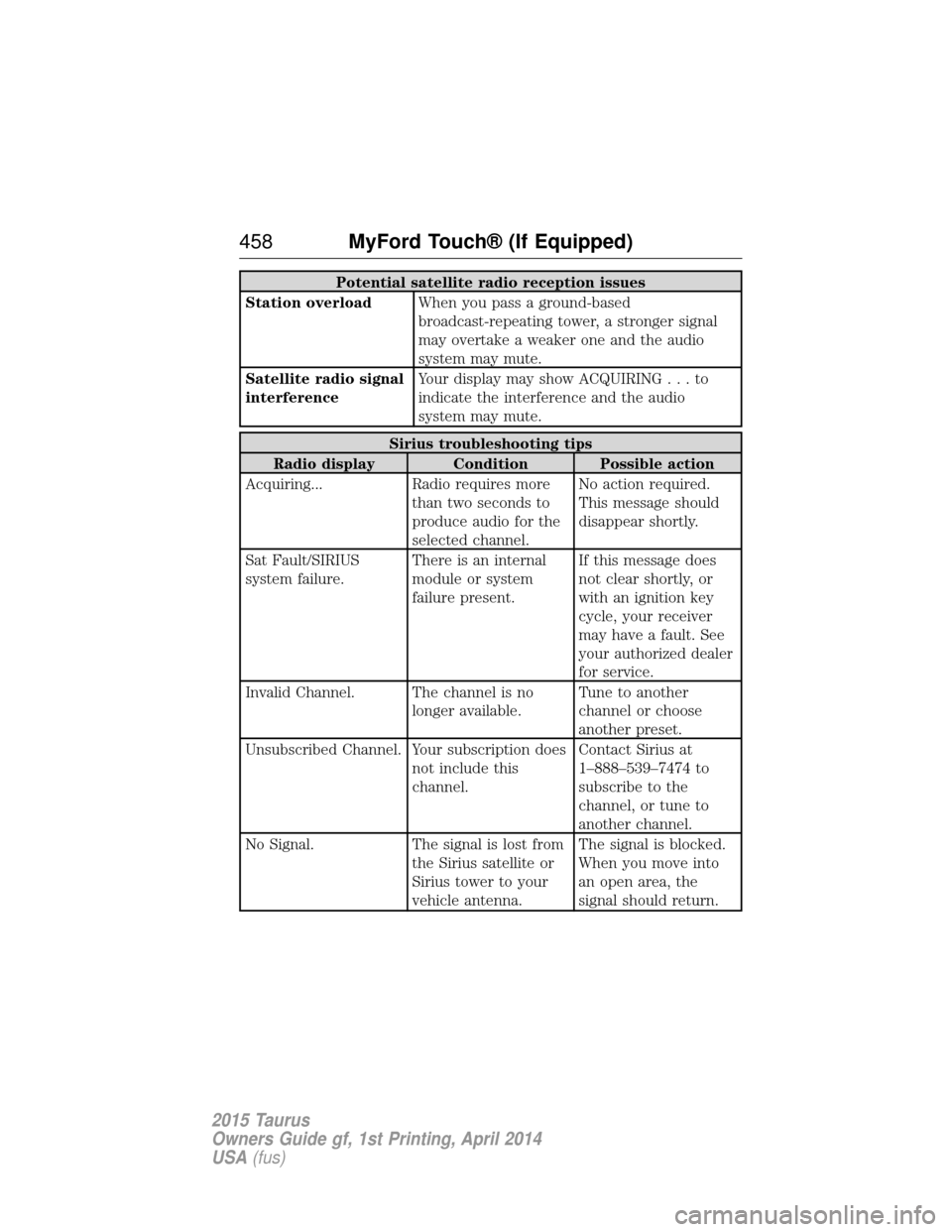
Potential satellite radio reception issues
Station overload When you pass a ground-based
broadcast-repeating tower, a stronger signal
may overtake a weaker one and the audio
system may mute.
Satellite radio signal
interference Your display may show ACQUIRIN
G...to
indicate the interference and the audio
system may mute.
Sirius troubleshooting tips
Radio display Condition Possible action
Acquiring... Radio requires more than two seconds to
produce audio for the
selected channel.No action required.
This message should
disappear shortly.
Sat Fault/SIRIUS
system failure. There is an internal
module or system
failure present.If this message does
not clear shortly, or
with an ignition key
cycle, your receiver
may have a fault. See
your authorized dealer
for service.
Invalid Channel. The channel is no longer available.Tune to another
channel or choose
another preset.
Unsubscribed Channel. Your subscription does not include this
channel.Contact Sirius at
1–888–539–7474 to
subscribe to the
channel, or tune to
another channel.
No Signal. The signal is lost from the Sirius satellite or
Sirius tower to your
vehicle antenna.The signal is blocked.
When you move into
an open area, the
signal should return.
458
MyFord Touch® (If Equipped)
2015 Taurus
Owners Guide gf, 1st Printing, April 2014
USA(fus)
Page 491 of 558

Door Keypad Code
To change the keypad code for your keyless entry keypad system:
1. Press the Settings icon >Vehicle>Door Keypad Code.
2. Enter your current factory code, then, when prompted, enter your new code.
Camera Settings
This menu allows you to access settings for your rear view camera.
Press the Settings icon > Vehicle>Camera Settings, then select from
the following settings:
• Enhanced Park Aids.
• Rear Camera Delay.
Enable Valet Mode
Valet mode allows you to lock the system. No information is accessible
until the system is unlocked with the correct PIN.
1. Press the Settings icon > Vehicle>Enable Valet Mode.
2. Enter a four-digit pin twice, as prompted.
After you press Continue, the system locks until you enter the PIN again.
Note: If the system locks, and you need to reset the PIN, enter 3681 and
the system unlocks.
Settings
Access and adjust system settings, voice features, as well as phone,
navigation and wireless settings.
System
Press the Settings icon > Settings>System, then select from
the following:
System
Language Select to have the touchscreen display in
English, Spanish or French.
Distance Select to display units in kilometers or miles.
Temperature Select to display units in Celsius or
Fahrenheit.
System Prompt
Volume Adjust the volume of voice prompts from the
system.
Touch Screen Button
Beep Select to have the system beep to confirm
choices made through the touchscreen.
490
MyFord Touch® (If Equipped)
2015 Taurus
Owners Guide gf, 1st Printing, April 2014
USA(fus)
Page 492 of 558
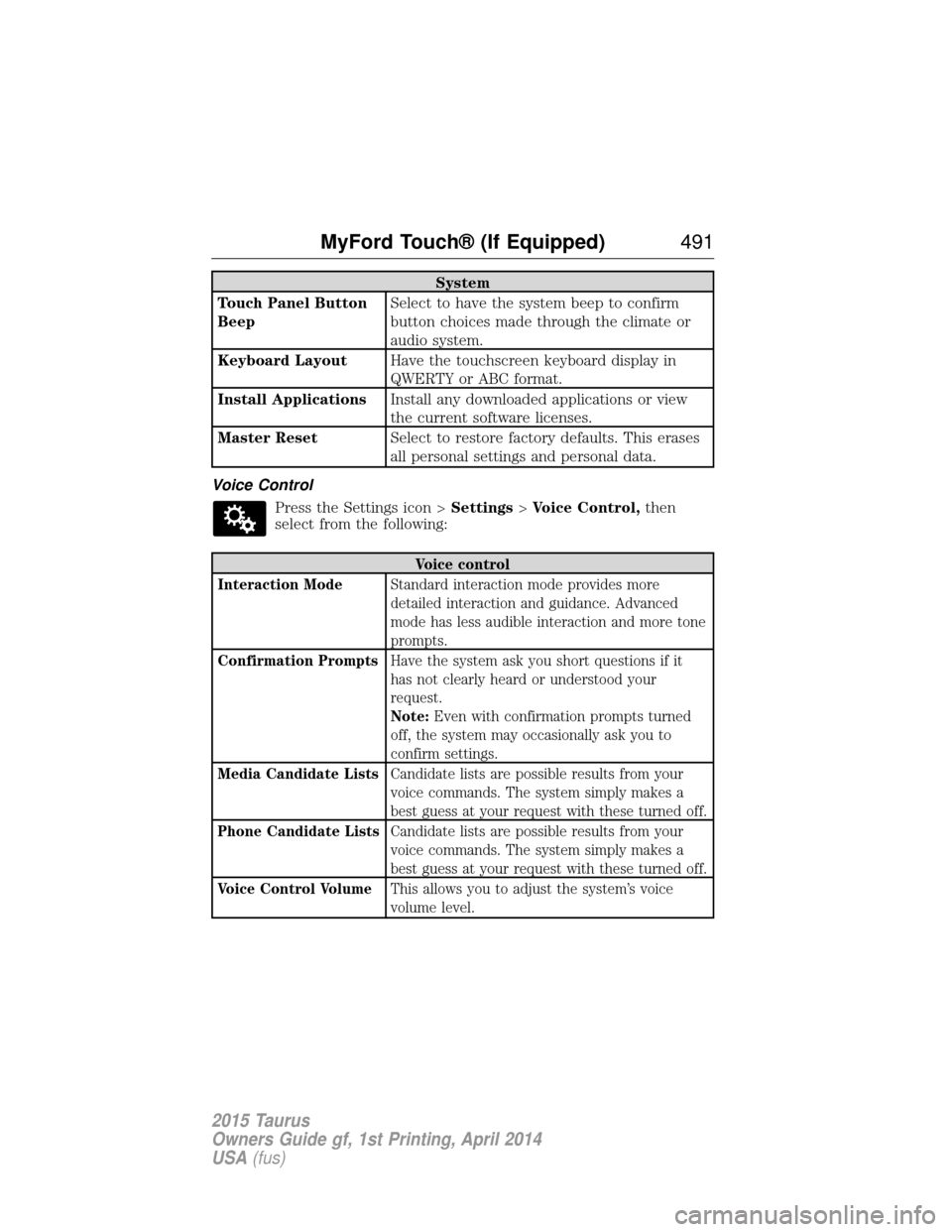
System
Touch Panel Button
Beep Select to have the system beep to confirm
button choices made through the climate or
audio system.
Keyboard Layout Have the touchscreen keyboard display in
QWERTY or ABC format.
Install Applications Install any downloaded applications or view
the current software licenses.
Master Reset Select to restore factory defaults. This erases
all personal settings and personal data.
Voice Control Press the Settings icon > Settings>Voice Control, then
select from the following:
Voice control
Interaction Mode Standard interaction mode provides more
detailed interaction and guidance. Advanced
mode has less audible interaction and more tone
prompts.
Confirmation Prompts Have the system ask you short questions if it
has not clearly heard or understood your
request.
Note:Even with confirmation prompts turned
off, the system may occasionally ask you to
confirm settings.
Media Candidate Lists Candidate lists are possible results from your
voice commands. The system simply makes a
best guess at your request with these turned off.
Phone Candidate Lists Candidate lists are possible results from your
voice commands. The system simply makes a
best guess at your request with these turned off.
Voice Control Volume This allows you to adjust the system’s voice
volume level.
MyFord Touch® (If Equipped) 491
2015 Taurus
Owners Guide gf, 1st Printing, April 2014
USA(fus)
Page 502 of 558
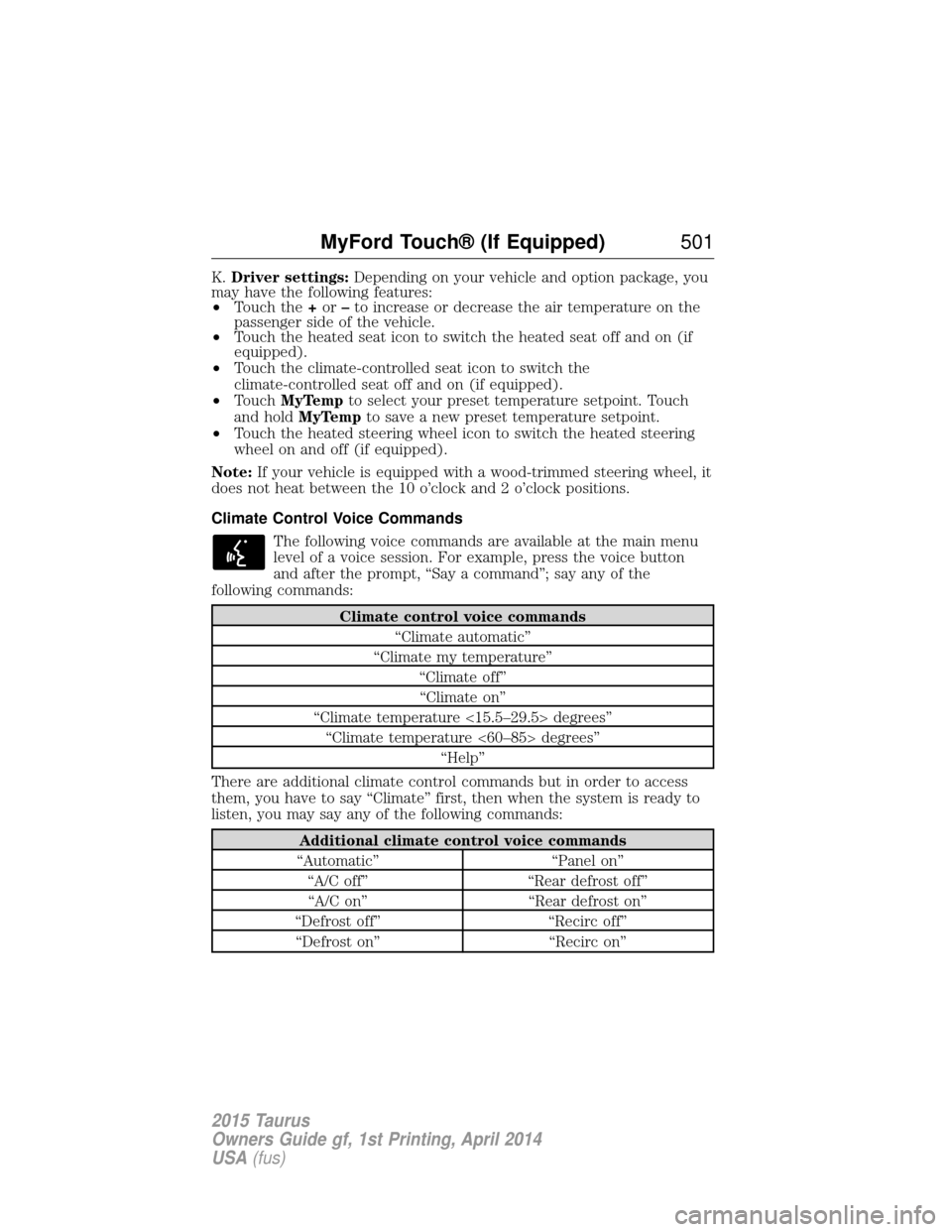
K.Driver settings: Depending on your vehicle and option package, you
may have the following features:
• Touch the +or –to increase or decrease the air temperature on the
passenger side of the vehicle.
• Touch the heated seat icon to switch the heated seat off and on (if
equipped).
• Touch the climate-controlled seat icon to switch the
climate-controlled seat off and on (if equipped).
• Touch MyTemp to select your preset temperature setpoint. Touch
and hold MyTemp to save a new preset temperature setpoint.
• Touch the heated steering wheel icon to switch the heated steering
wheel on and off (if equipped).
Note: If your vehicle is equipped with a wood-trimmed steering wheel, it
does not heat between the 10 o’clock and 2 o’clock positions.
Climate Control Voice Commands
The following voice commands are available at the main menu
level of a voice session. For example, press the voice button
and after the prompt, “Say a command”; say any of the
following commands:
Climate control voice commands
“Climate automatic”
“Climate my temperature” “Climate off”“Climate on”
“Climate temperature <15.5–29.5> degrees” “Climate temperature <60–85> degrees” “Help”
There are additional climate control commands but in order to access
them, you have to say “Climate” first, then when the system is ready to
listen, you may say any of the following commands:
Additional climate control voice commands
“Automatic” “Panel on” “A/C off” “Rear defrost off”“A/C on” “Rear defrost on”
“Defrost off” “Recirc off” “Defrost on” “Recirc on”
MyFord Touch® (If Equipped) 501
2015 Taurus
Owners Guide gf, 1st Printing, April 2014
USA(fus)
Page 535 of 558
Protecting Your Investment
Maintenance is an investment that will pay dividends in the form of
improved reliability, durability and resale value. To maintain the proper
performance of your vehicle and its emission control systems, it is
imperative that scheduled maintenance be completed at the designated
intervals.
Your vehicle is equipped with the Intelligent Oil-Life Monitor (IOLM)
system which displays a message in the information display at the proper
oil change service interval; this interval may be up to one year or
10000 miles (16000 kilometers). When ENGINE OIL CHANGE DUE or
OIL CHANGE REQUIRED appears in the information display, it is time
for an oil change; the oil change must be done within two weeks or
500 miles (800 kilometers) of the ENGINE OIL CHANGE DUE or OIL
CHANGE REQUIRED message appearing. The Intelligent Oil-Life Monitor
must be reset after each oil change; see theInformation Displays
chapter.
If your information display is prematurely reset or becomes inoperative,
you should perform the oil change interval at six months or 5000 miles
(8000 kilometers) from your last oil change. Never exceed one year or
10000 miles (16000 kilometers) between oil change intervals.
Your vehicle is very sophisticated and built with multiple, complex,
performance systems. Every manufacturer develops these systems using
different specifications and performance features. That is why it is
important to rely upon your dealership to properly diagnose and repair
your vehicle.
Ford Motor Company has recommended maintenance intervals for
various parts and component systems based upon engineering testing.
Ford Motor Company relies upon this testing to determine the most
appropriate mileage for replacement of oils and fluids to protect your
vehicle at the lowest overall cost to you and recommends against
maintenance schedules that deviate from the scheduled maintenance
information.
Ford strongly recommends the use of only genuine Ford, Motorcraft or
Ford-authorized remanufactured replacement parts because they are
engineered for your vehicle.
Additives and Chemicals
Ford Motor Company recommended additives and chemicals are listed in
the owner manual and in the Ford Workshop Manual. Additional
chemicals or additives not approved by Ford Motor Company are not
recommended as part of normal maintenance. Please consult your
warranty information.
534 Scheduled Maintenance
2015 Taurus
Owners Guide gf, 1st Printing, April 2014
USA(fus)