phone FORD TAURUS 2017 Owners Manual
[x] Cancel search | Manufacturer: FORD, Model Year: 2017, Model line: TAURUS, Model: FORD TAURUS 2017Pages: 504, PDF Size: 5.84 MB
Page 441 of 504
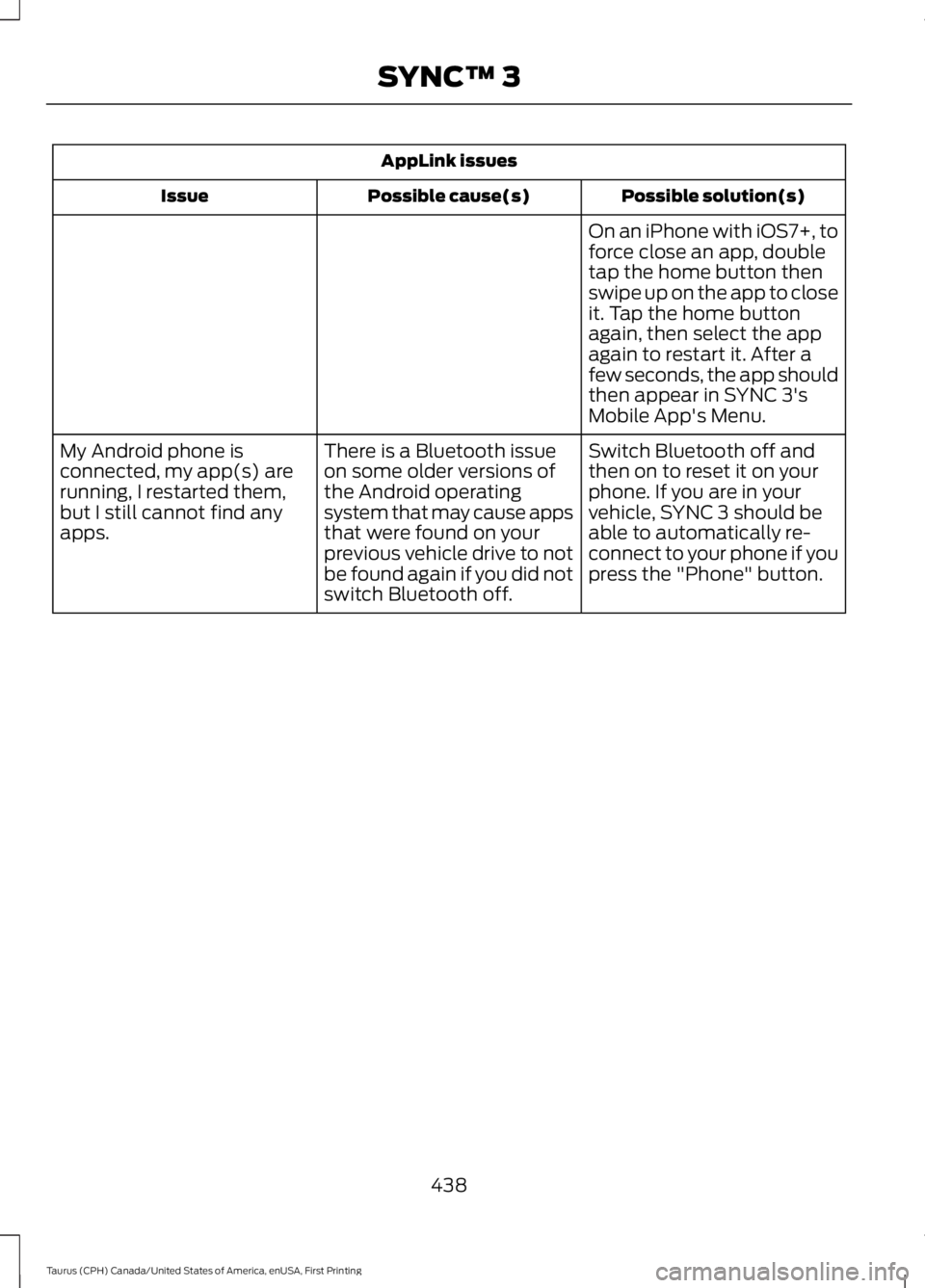
AppLink issues
Possible solution(s)Possible cause(s)Issue
On an iPhone with iOS7+, toforce close an app, doubletap the home button thenswipe up on the app to closeit. Tap the home buttonagain, then select the appagain to restart it. After afew seconds, the app shouldthen appear in SYNC 3'sMobile App's Menu.
Switch Bluetooth off andthen on to reset it on yourphone. If you are in yourvehicle, SYNC 3 should beable to automatically re-connect to your phone if youpress the "Phone" button.
There is a Bluetooth issueon some older versions ofthe Android operatingsystem that may cause appsthat were found on yourprevious vehicle drive to notbe found again if you did notswitch Bluetooth off.
My Android phone isconnected, my app(s) arerunning, I restarted them,but I still cannot find anyapps.
438
Taurus (CPH) Canada/United States of America, enUSA, First Printing
SYNC™ 3
Page 442 of 504
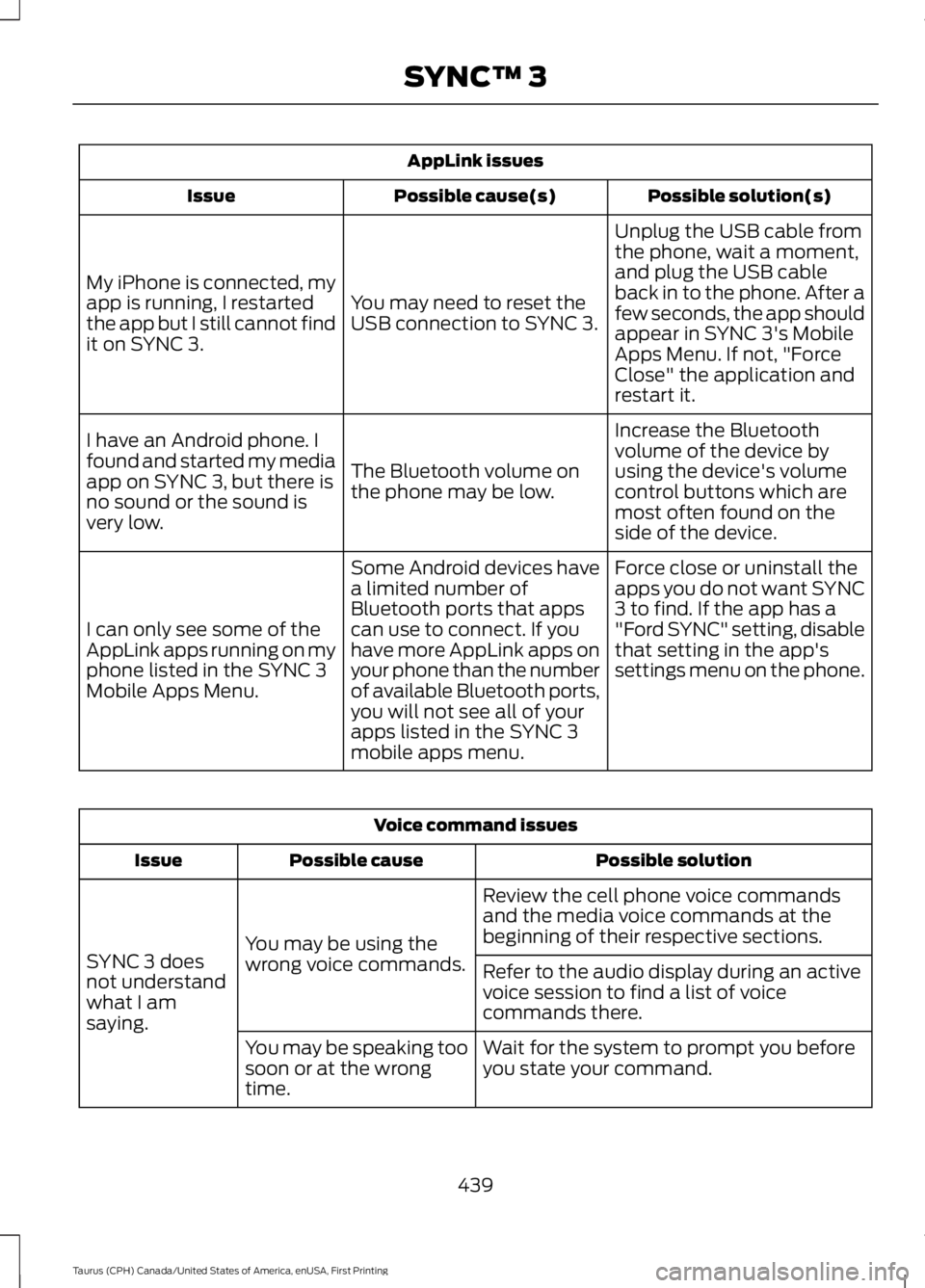
AppLink issues
Possible solution(s)Possible cause(s)Issue
Unplug the USB cable fromthe phone, wait a moment,and plug the USB cableback in to the phone. After afew seconds, the app shouldappear in SYNC 3's MobileApps Menu. If not, "ForceClose" the application andrestart it.
You may need to reset theUSB connection to SYNC 3.
My iPhone is connected, myapp is running, I restartedthe app but I still cannot findit on SYNC 3.
Increase the Bluetoothvolume of the device byusing the device's volumecontrol buttons which aremost often found on theside of the device.
The Bluetooth volume onthe phone may be low.
I have an Android phone. Ifound and started my mediaapp on SYNC 3, but there isno sound or the sound isvery low.
Force close or uninstall theapps you do not want SYNC3 to find. If the app has a"Ford SYNC" setting, disablethat setting in the app'ssettings menu on the phone.
Some Android devices havea limited number ofBluetooth ports that appscan use to connect. If youhave more AppLink apps onyour phone than the numberof available Bluetooth ports,you will not see all of yourapps listed in the SYNC 3mobile apps menu.
I can only see some of theAppLink apps running on myphone listed in the SYNC 3Mobile Apps Menu.
Voice command issues
Possible solutionPossible causeIssue
Review the cell phone voice commandsand the media voice commands at thebeginning of their respective sections.You may be using thewrong voice commands.SYNC 3 doesnot understandwhat I amsaying.
Refer to the audio display during an activevoice session to find a list of voicecommands there.
Wait for the system to prompt you beforeyou state your command.You may be speaking toosoon or at the wrongtime.
439
Taurus (CPH) Canada/United States of America, enUSA, First Printing
SYNC™ 3
Page 443 of 504
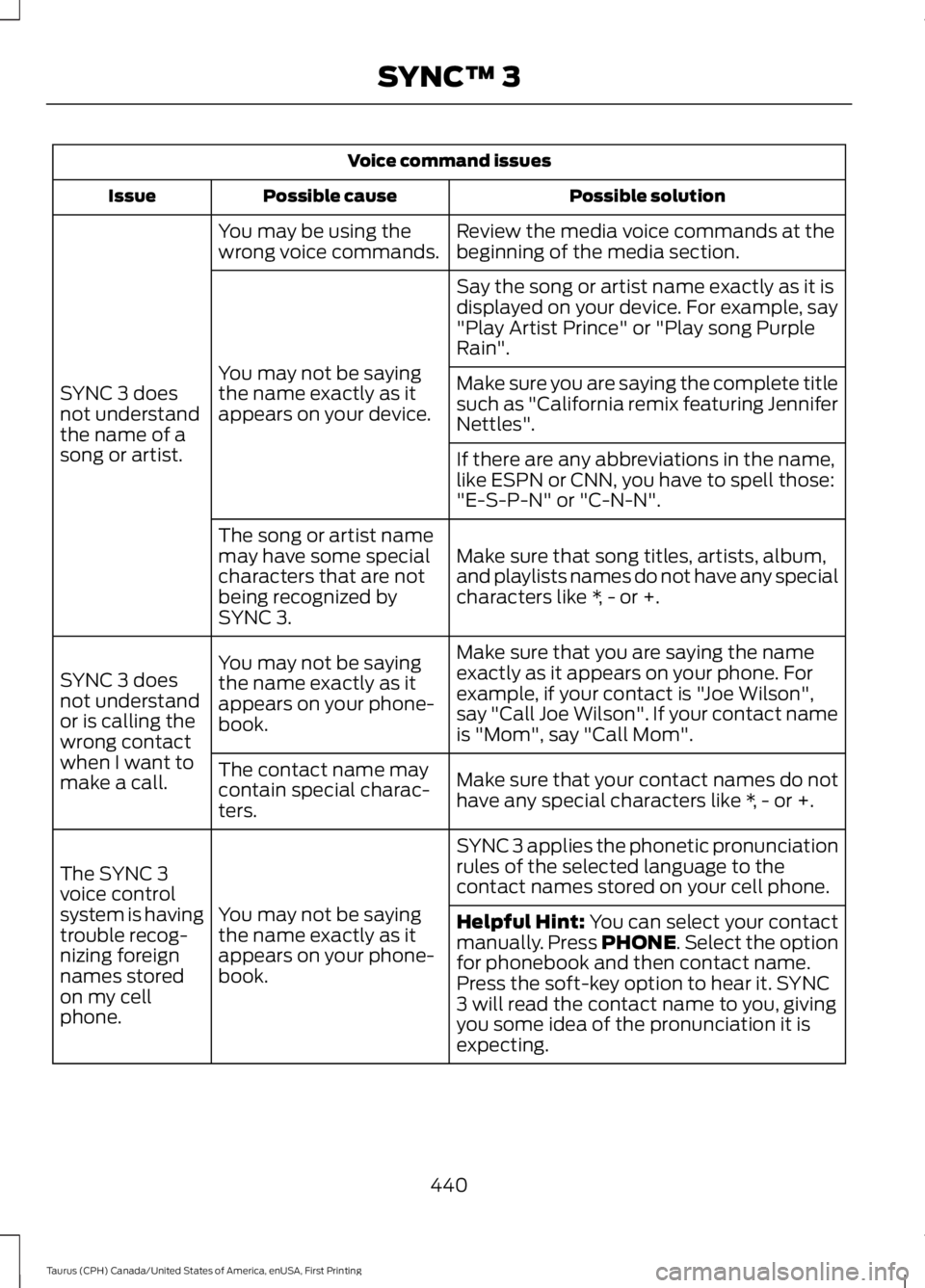
Voice command issues
Possible solutionPossible causeIssue
Review the media voice commands at thebeginning of the media section.You may be using thewrong voice commands.
SYNC 3 doesnot understandthe name of asong or artist.
Say the song or artist name exactly as it isdisplayed on your device. For example, say"Play Artist Prince" or "Play song PurpleRain".
You may not be sayingthe name exactly as itappears on your device.
Make sure you are saying the complete titlesuch as "California remix featuring JenniferNettles".
If there are any abbreviations in the name,like ESPN or CNN, you have to spell those:"E-S-P-N" or "C-N-N".
Make sure that song titles, artists, album,and playlists names do not have any specialcharacters like *, - or +.
The song or artist namemay have some specialcharacters that are notbeing recognized bySYNC 3.
Make sure that you are saying the nameexactly as it appears on your phone. Forexample, if your contact is "Joe Wilson",say "Call Joe Wilson". If your contact nameis "Mom", say "Call Mom".
You may not be sayingthe name exactly as itappears on your phone-book.
SYNC 3 doesnot understandor is calling thewrong contactwhen I want tomake a call.Make sure that your contact names do nothave any special characters like *, - or +.
The contact name maycontain special charac-ters.
SYNC 3 applies the phonetic pronunciationrules of the selected language to thecontact names stored on your cell phone.
You may not be sayingthe name exactly as itappears on your phone-book.
The SYNC 3voice controlsystem is havingtrouble recog-nizing foreignnames storedon my cellphone.
Helpful Hint: You can select your contactmanually. Press PHONE. Select the optionfor phonebook and then contact name.Press the soft-key option to hear it. SYNC3 will read the contact name to you, givingyou some idea of the pronunciation it isexpecting.
440
Taurus (CPH) Canada/United States of America, enUSA, First Printing
SYNC™ 3
Page 444 of 504
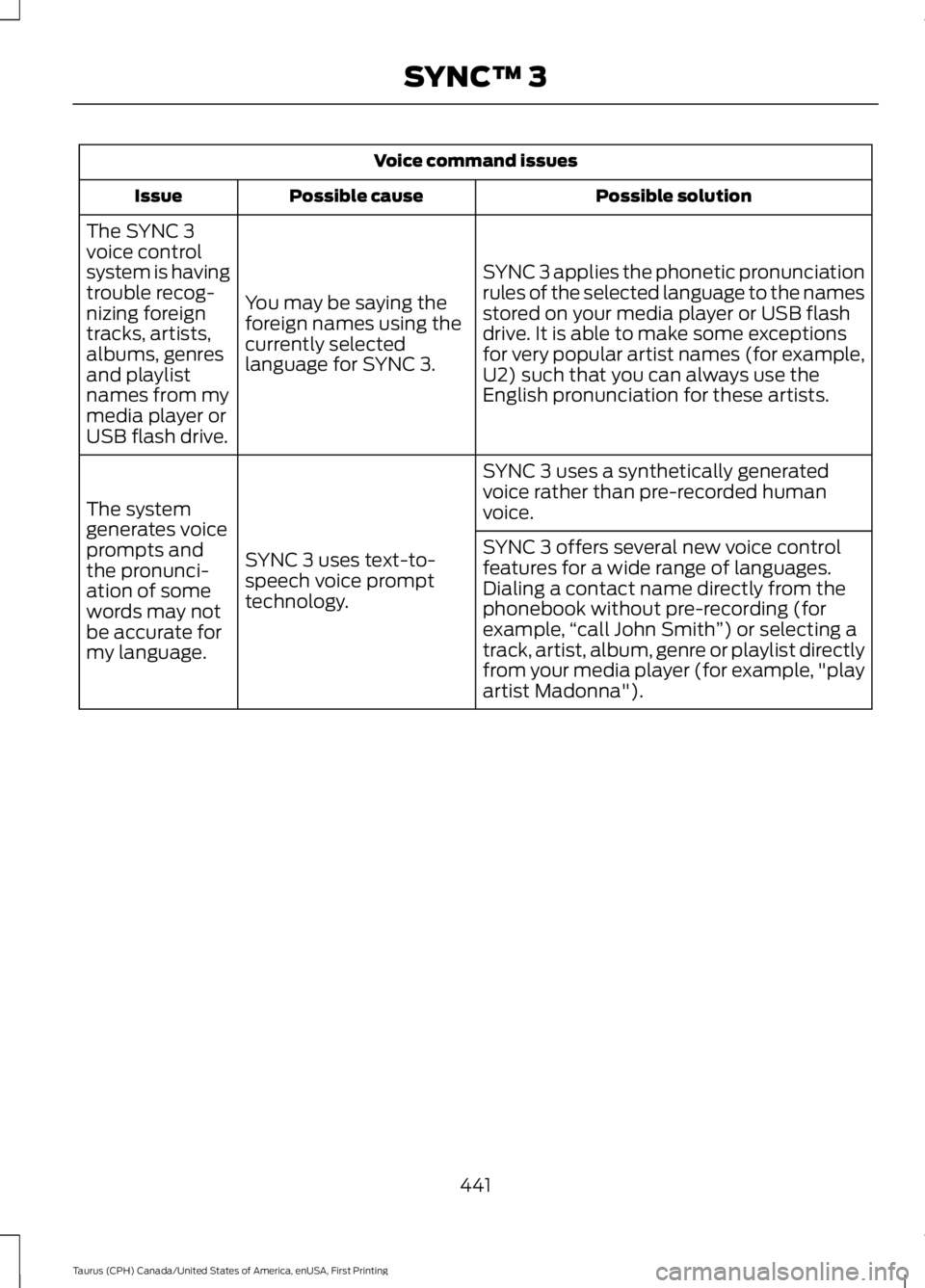
Voice command issues
Possible solutionPossible causeIssue
SYNC 3 applies the phonetic pronunciationrules of the selected language to the namesstored on your media player or USB flashdrive. It is able to make some exceptionsfor very popular artist names (for example,U2) such that you can always use theEnglish pronunciation for these artists.
You may be saying theforeign names using thecurrently selectedlanguage for SYNC 3.
The SYNC 3voice controlsystem is havingtrouble recog-nizing foreigntracks, artists,albums, genresand playlistnames from mymedia player orUSB flash drive.
SYNC 3 uses a synthetically generatedvoice rather than pre-recorded humanvoice.
SYNC 3 uses text-to-speech voice prompttechnology.
The systemgenerates voiceprompts andthe pronunci-ation of somewords may notbe accurate formy language.
SYNC 3 offers several new voice controlfeatures for a wide range of languages.Dialing a contact name directly from thephonebook without pre-recording (forexample,“call John Smith”) or selecting atrack, artist, album, genre or playlist directlyfrom your media player (for example, "playartist Madonna").
441
Taurus (CPH) Canada/United States of America, enUSA, First Printing
SYNC™ 3
Page 445 of 504
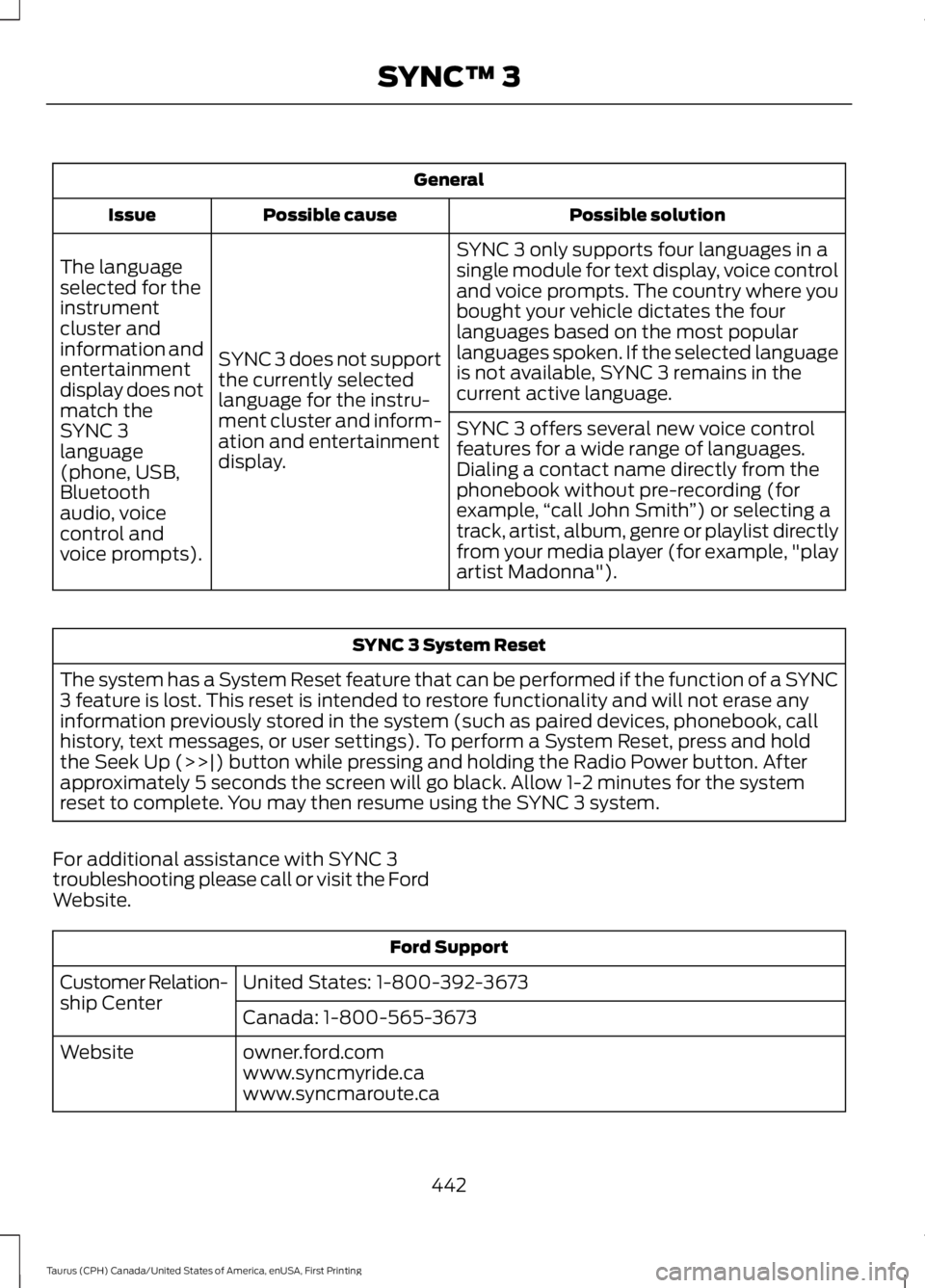
General
Possible solutionPossible causeIssue
SYNC 3 only supports four languages in asingle module for text display, voice controland voice prompts. The country where youbought your vehicle dictates the fourlanguages based on the most popularlanguages spoken. If the selected languageis not available, SYNC 3 remains in thecurrent active language.
SYNC 3 does not supportthe currently selectedlanguage for the instru-ment cluster and inform-ation and entertainmentdisplay.
The languageselected for theinstrumentcluster andinformation andentertainmentdisplay does notmatch theSYNC 3SYNC 3 offers several new voice controlfeatures for a wide range of languages.Dialing a contact name directly from thephonebook without pre-recording (forexample,“call John Smith”) or selecting atrack, artist, album, genre or playlist directlyfrom your media player (for example, "playartist Madonna").
language(phone, USB,Bluetoothaudio, voicecontrol andvoice prompts).
SYNC 3 System Reset
The system has a System Reset feature that can be performed if the function of a SYNC3 feature is lost. This reset is intended to restore functionality and will not erase anyinformation previously stored in the system (such as paired devices, phonebook, callhistory, text messages, or user settings). To perform a System Reset, press and holdthe Seek Up (>>|) button while pressing and holding the Radio Power button. Afterapproximately 5 seconds the screen will go black. Allow 1-2 minutes for the systemreset to complete. You may then resume using the SYNC 3 system.
For additional assistance with SYNC 3troubleshooting please call or visit the FordWebsite.
Ford Support
United States: 1-800-392-3673Customer Relation-ship CenterCanada: 1-800-565-3673
owner.ford.comWebsitewww.syncmyride.cawww.syncmaroute.ca
442
Taurus (CPH) Canada/United States of America, enUSA, First Printing
SYNC™ 3
Page 447 of 504
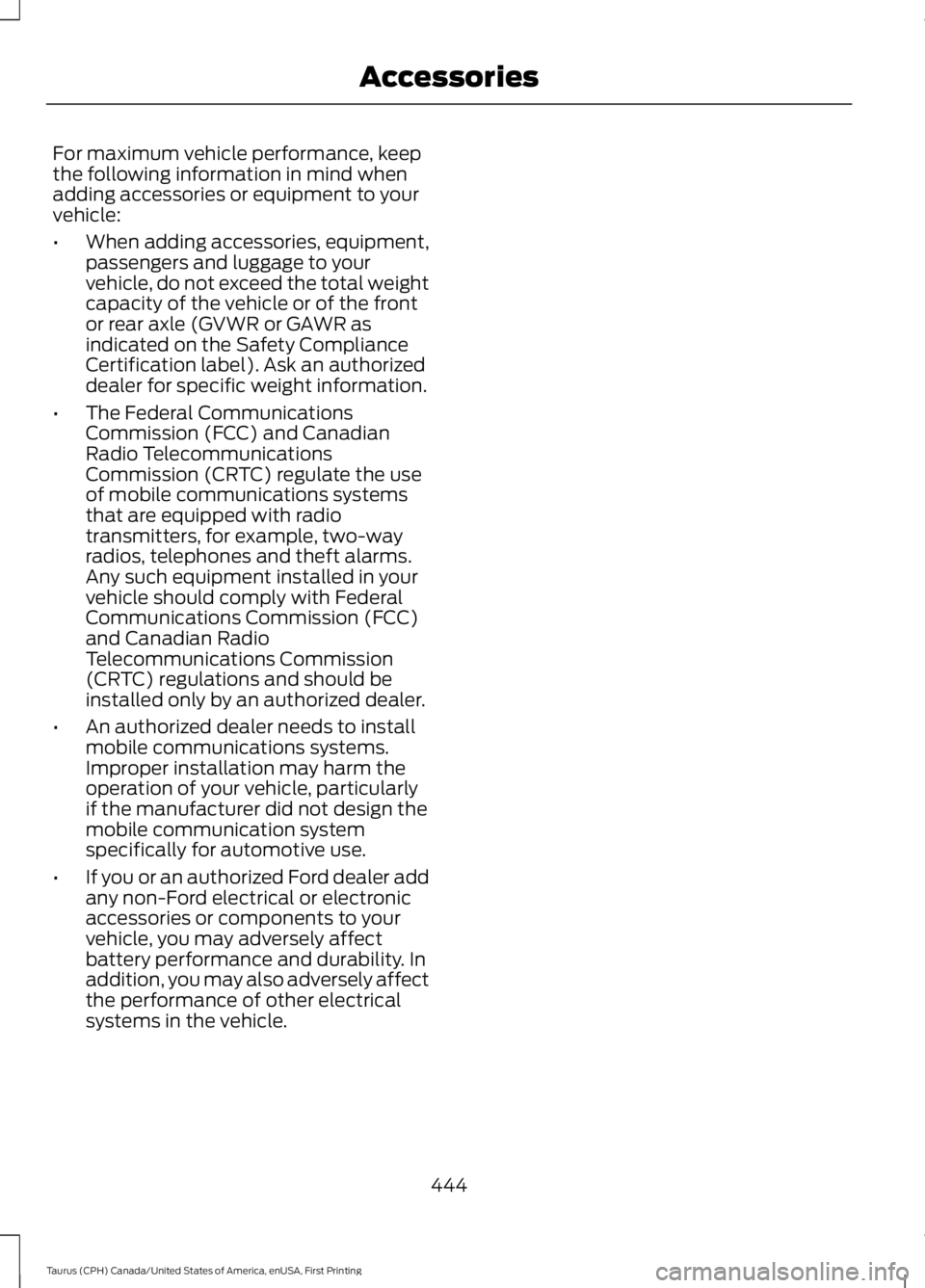
For maximum vehicle performance, keepthe following information in mind whenadding accessories or equipment to yourvehicle:
•When adding accessories, equipment,passengers and luggage to yourvehicle, do not exceed the total weightcapacity of the vehicle or of the frontor rear axle (GVWR or GAWR asindicated on the Safety ComplianceCertification label). Ask an authorizeddealer for specific weight information.
•The Federal CommunicationsCommission (FCC) and CanadianRadio TelecommunicationsCommission (CRTC) regulate the useof mobile communications systemsthat are equipped with radiotransmitters, for example, two-wayradios, telephones and theft alarms.Any such equipment installed in yourvehicle should comply with FederalCommunications Commission (FCC)and Canadian RadioTelecommunications Commission(CRTC) regulations and should beinstalled only by an authorized dealer.
•An authorized dealer needs to installmobile communications systems.Improper installation may harm theoperation of your vehicle, particularlyif the manufacturer did not design themobile communication systemspecifically for automotive use.
•If you or an authorized Ford dealer addany non-Ford electrical or electronicaccessories or components to yourvehicle, you may adversely affectbattery performance and durability. Inaddition, you may also adversely affectthe performance of other electricalsystems in the vehicle.
444
Taurus (CPH) Canada/United States of America, enUSA, First Printing
Accessories
Page 480 of 504
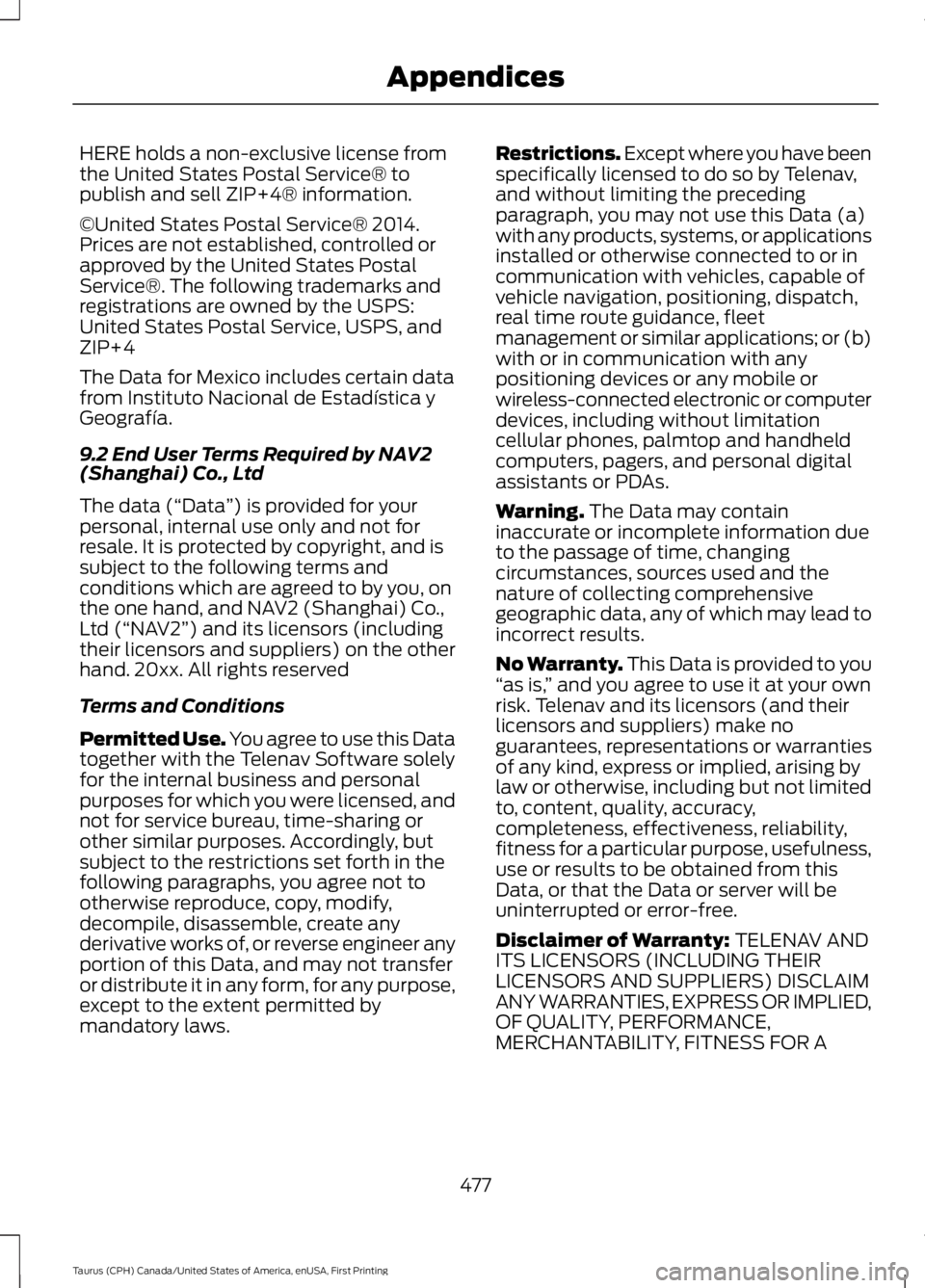
HERE holds a non-exclusive license fromthe United States Postal Service® topublish and sell ZIP+4® information.
©United States Postal Service® 2014.Prices are not established, controlled orapproved by the United States PostalService®. The following trademarks andregistrations are owned by the USPS:United States Postal Service, USPS, andZIP+4
The Data for Mexico includes certain datafrom Instituto Nacional de Estadística yGeografía.
9.2 End User Terms Required by NAV2(Shanghai) Co., Ltd
The data (“Data”) is provided for yourpersonal, internal use only and not forresale. It is protected by copyright, and issubject to the following terms andconditions which are agreed to by you, onthe one hand, and NAV2 (Shanghai) Co.,Ltd (“NAV2”) and its licensors (includingtheir licensors and suppliers) on the otherhand. 20xx. All rights reserved
Terms and Conditions
Permitted Use. You agree to use this Datatogether with the Telenav Software solelyfor the internal business and personalpurposes for which you were licensed, andnot for service bureau, time-sharing orother similar purposes. Accordingly, butsubject to the restrictions set forth in thefollowing paragraphs, you agree not tootherwise reproduce, copy, modify,decompile, disassemble, create anyderivative works of, or reverse engineer anyportion of this Data, and may not transferor distribute it in any form, for any purpose,except to the extent permitted bymandatory laws.
Restrictions. Except where you have beenspecifically licensed to do so by Telenav,and without limiting the precedingparagraph, you may not use this Data (a)with any products, systems, or applicationsinstalled or otherwise connected to or incommunication with vehicles, capable ofvehicle navigation, positioning, dispatch,real time route guidance, fleetmanagement or similar applications; or (b)with or in communication with anypositioning devices or any mobile orwireless-connected electronic or computerdevices, including without limitationcellular phones, palmtop and handheldcomputers, pagers, and personal digitalassistants or PDAs.
Warning. The Data may containinaccurate or incomplete information dueto the passage of time, changingcircumstances, sources used and thenature of collecting comprehensivegeographic data, any of which may lead toincorrect results.
No Warranty. This Data is provided to you“as is,” and you agree to use it at your ownrisk. Telenav and its licensors (and theirlicensors and suppliers) make noguarantees, representations or warrantiesof any kind, express or implied, arising bylaw or otherwise, including but not limitedto, content, quality, accuracy,completeness, effectiveness, reliability,fitness for a particular purpose, usefulness,use or results to be obtained from thisData, or that the Data or server will beuninterrupted or error-free.
Disclaimer of Warranty: TELENAV ANDITS LICENSORS (INCLUDING THEIRLICENSORS AND SUPPLIERS) DISCLAIMANY WARRANTIES, EXPRESS OR IMPLIED,OF QUALITY, PERFORMANCE,MERCHANTABILITY, FITNESS FOR A
477
Taurus (CPH) Canada/United States of America, enUSA, First Printing
Appendices
Page 487 of 504
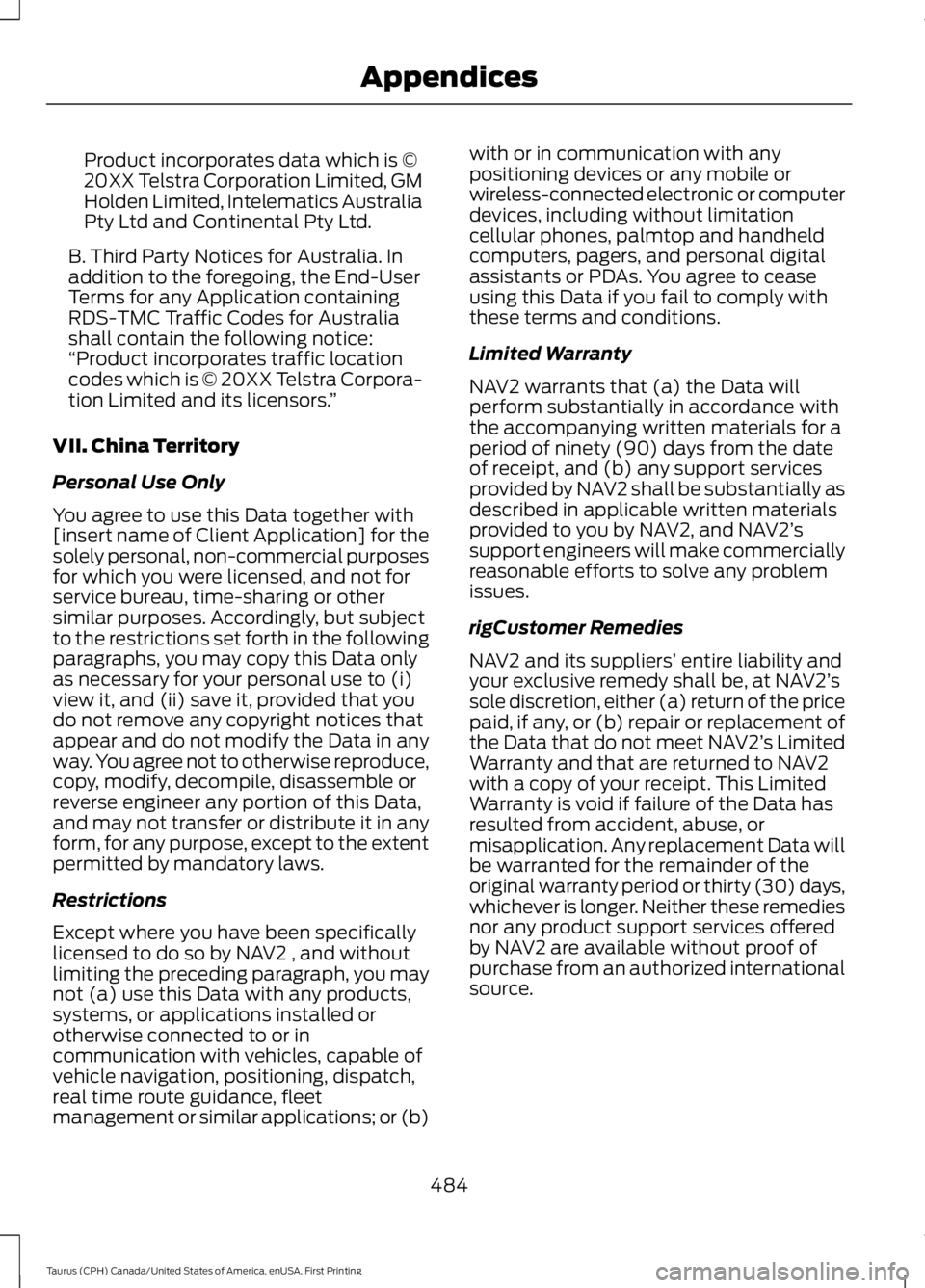
Product incorporates data which is ©20XX Telstra Corporation Limited, GMHolden Limited, Intelematics AustraliaPty Ltd and Continental Pty Ltd.
B. Third Party Notices for Australia. Inaddition to the foregoing, the End-UserTerms for any Application containingRDS-TMC Traffic Codes for Australiashall contain the following notice:“Product incorporates traffic locationcodes which is © 20XX Telstra Corpora-tion Limited and its licensors.”
VII. China Territory
Personal Use Only
You agree to use this Data together with[insert name of Client Application] for thesolely personal, non-commercial purposesfor which you were licensed, and not forservice bureau, time-sharing or othersimilar purposes. Accordingly, but subjectto the restrictions set forth in the followingparagraphs, you may copy this Data onlyas necessary for your personal use to (i)view it, and (ii) save it, provided that youdo not remove any copyright notices thatappear and do not modify the Data in anyway. You agree not to otherwise reproduce,copy, modify, decompile, disassemble orreverse engineer any portion of this Data,and may not transfer or distribute it in anyform, for any purpose, except to the extentpermitted by mandatory laws.
Restrictions
Except where you have been specificallylicensed to do so by NAV2 , and withoutlimiting the preceding paragraph, you maynot (a) use this Data with any products,systems, or applications installed orotherwise connected to or incommunication with vehicles, capable ofvehicle navigation, positioning, dispatch,real time route guidance, fleetmanagement or similar applications; or (b)
with or in communication with anypositioning devices or any mobile orwireless-connected electronic or computerdevices, including without limitationcellular phones, palmtop and handheldcomputers, pagers, and personal digitalassistants or PDAs. You agree to ceaseusing this Data if you fail to comply withthese terms and conditions.
Limited Warranty
NAV2 warrants that (a) the Data willperform substantially in accordance withthe accompanying written materials for aperiod of ninety (90) days from the dateof receipt, and (b) any support servicesprovided by NAV2 shall be substantially asdescribed in applicable written materialsprovided to you by NAV2, and NAV2’ssupport engineers will make commerciallyreasonable efforts to solve any problemissues.
rigCustomer Remedies
NAV2 and its suppliers’ entire liability andyour exclusive remedy shall be, at NAV2’ssole discretion, either (a) return of the pricepaid, if any, or (b) repair or replacement ofthe Data that do not meet NAV2’s LimitedWarranty and that are returned to NAV2with a copy of your receipt. This LimitedWarranty is void if failure of the Data hasresulted from accident, abuse, ormisapplication. Any replacement Data willbe warranted for the remainder of theoriginal warranty period or thirty (30) days,whichever is longer. Neither these remediesnor any product support services offeredby NAV2 are available without proof ofpurchase from an authorized internationalsource.
484
Taurus (CPH) Canada/United States of America, enUSA, First Printing
Appendices
Page 500 of 504
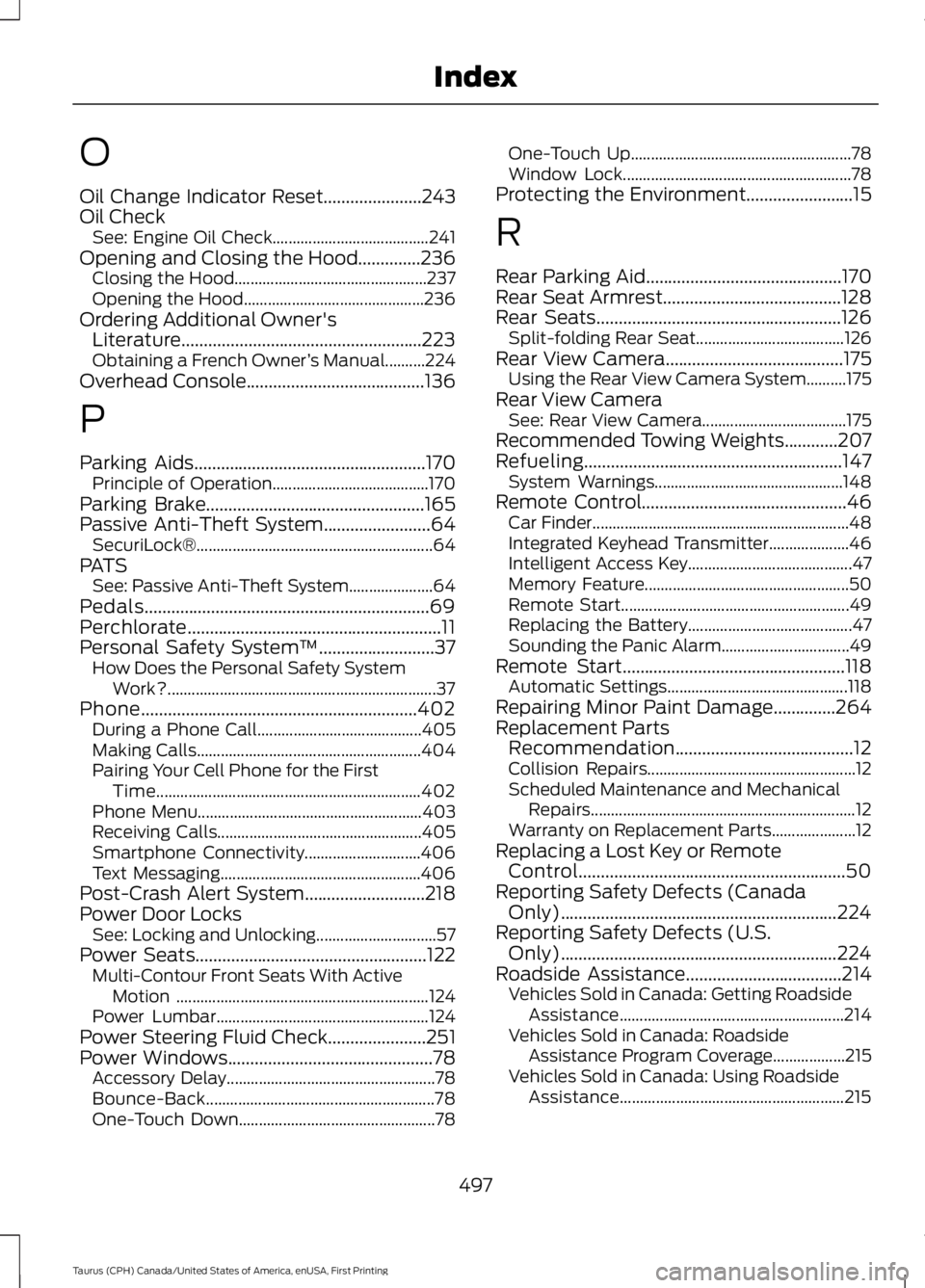
O
Oil Change Indicator Reset......................243Oil CheckSee: Engine Oil Check.......................................241Opening and Closing the Hood..............236Closing the Hood................................................237Opening the Hood.............................................236Ordering Additional Owner'sLiterature......................................................223Obtaining a French Owner’s Manual..........224Overhead Console........................................136
P
Parking Aids....................................................170Principle of Operation.......................................170Parking Brake.................................................165Passive Anti-Theft System........................64SecuriLock®...........................................................64PATSSee: Passive Anti-Theft System.....................64Pedals................................................................69Perchlorate.........................................................11Personal Safety System™..........................37How Does the Personal Safety SystemWork?...................................................................37Phone..............................................................402During a Phone Call.........................................405Making Calls........................................................404Pairing Your Cell Phone for the FirstTime..................................................................402Phone Menu........................................................403Receiving Calls...................................................405Smartphone Connectivity.............................406Text Messaging..................................................406Post-Crash Alert System...........................218Power Door LocksSee: Locking and Unlocking..............................57Power Seats....................................................122Multi-Contour Front Seats With ActiveMotion ...............................................................124Power Lumbar.....................................................124Power Steering Fluid Check......................251Power Windows..............................................78Accessory Delay....................................................78Bounce-Back.........................................................78One-Touch Down.................................................78
One-Touch Up.......................................................78Window Lock.........................................................78Protecting the Environment........................15
R
Rear Parking Aid............................................170Rear Seat Armrest........................................128Rear Seats.......................................................126Split-folding Rear Seat.....................................126Rear View Camera........................................175Using the Rear View Camera System..........175Rear View CameraSee: Rear View Camera....................................175Recommended Towing Weights............207Refueling..........................................................147System Warnings...............................................148Remote Control..............................................46Car Finder................................................................48Integrated Keyhead Transmitter....................46Intelligent Access Key.........................................47Memory Feature...................................................50Remote Start.........................................................49Replacing the Battery.........................................47Sounding the Panic Alarm................................49Remote Start..................................................118Automatic Settings.............................................118Repairing Minor Paint Damage..............264Replacement PartsRecommendation........................................12Collision Repairs....................................................12Scheduled Maintenance and MechanicalRepairs..................................................................12Warranty on Replacement Parts.....................12Replacing a Lost Key or RemoteControl............................................................50Reporting Safety Defects (CanadaOnly)..............................................................224Reporting Safety Defects (U.S.Only)..............................................................224Roadside Assistance...................................214Vehicles Sold in Canada: Getting RoadsideAssistance........................................................214Vehicles Sold in Canada: RoadsideAssistance Program Coverage..................215Vehicles Sold in Canada: Using RoadsideAssistance........................................................215
497
Taurus (CPH) Canada/United States of America, enUSA, First Printing
Index
Page 501 of 504
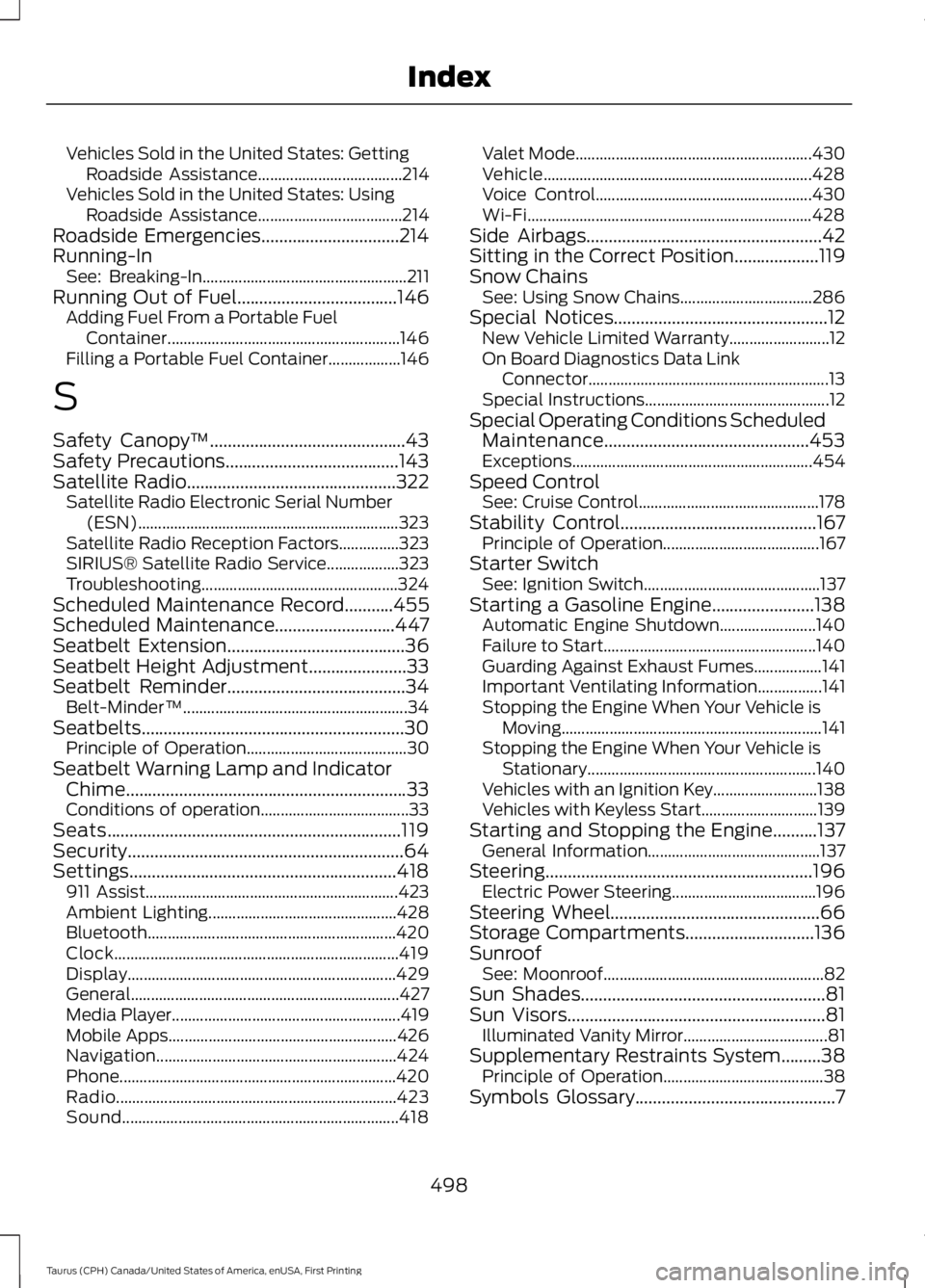
Vehicles Sold in the United States: GettingRoadside Assistance....................................214Vehicles Sold in the United States: UsingRoadside Assistance....................................214Roadside Emergencies...............................214Running-InSee: Breaking-In...................................................211Running Out of Fuel....................................146Adding Fuel From a Portable FuelContainer..........................................................146Filling a Portable Fuel Container..................146
S
Safety Canopy™............................................43Safety Precautions.......................................143Satellite Radio...............................................322Satellite Radio Electronic Serial Number(ESN).................................................................323Satellite Radio Reception Factors...............323SIRIUS® Satellite Radio Service..................323Troubleshooting.................................................324Scheduled Maintenance Record...........455Scheduled Maintenance...........................447Seatbelt Extension........................................36Seatbelt Height Adjustment......................33Seatbelt Reminder........................................34Belt-Minder™........................................................34Seatbelts...........................................................30Principle of Operation........................................30Seatbelt Warning Lamp and IndicatorChime...............................................................33Conditions of operation.....................................33Seats..................................................................119Security..............................................................64Settings............................................................418911 Assist...............................................................423Ambient Lighting...............................................428Bluetooth..............................................................420Clock.......................................................................419Display...................................................................429General...................................................................427Media Player.........................................................419Mobile Apps.........................................................426Navigation............................................................424Phone.....................................................................420Radio......................................................................423Sound.....................................................................418
Valet Mode...........................................................430Vehicle...................................................................428Voice Control......................................................430Wi-Fi.......................................................................428Side Airbags.....................................................42Sitting in the Correct Position...................119Snow ChainsSee: Using Snow Chains.................................286Special Notices................................................12New Vehicle Limited Warranty.........................12On Board Diagnostics Data LinkConnector............................................................13Special Instructions..............................................12Special Operating Conditions ScheduledMaintenance..............................................453Exceptions............................................................454Speed ControlSee: Cruise Control.............................................178Stability Control............................................167Principle of Operation.......................................167Starter SwitchSee: Ignition Switch............................................137Starting a Gasoline Engine.......................138Automatic Engine Shutdown........................140Failure to Start.....................................................140Guarding Against Exhaust Fumes.................141Important Ventilating Information................141Stopping the Engine When Your Vehicle isMoving.................................................................141Stopping the Engine When Your Vehicle isStationary.........................................................140Vehicles with an Ignition Key..........................138Vehicles with Keyless Start.............................139Starting and Stopping the Engine..........137General Information...........................................137Steering............................................................196Electric Power Steering....................................196Steering Wheel...............................................66Storage Compartments.............................136SunroofSee: Moonroof.......................................................82Sun Shades.......................................................81Sun Visors..........................................................81Illuminated Vanity Mirror....................................81Supplementary Restraints System.........38Principle of Operation........................................38Symbols Glossary.............................................7
498
Taurus (CPH) Canada/United States of America, enUSA, First Printing
Index