display FORD TAURUS 2017 Owners Manual
[x] Cancel search | Manufacturer: FORD, Model Year: 2017, Model line: TAURUS, Model: FORD TAURUS 2017Pages: 504, PDF Size: 5.84 MB
Page 340 of 504
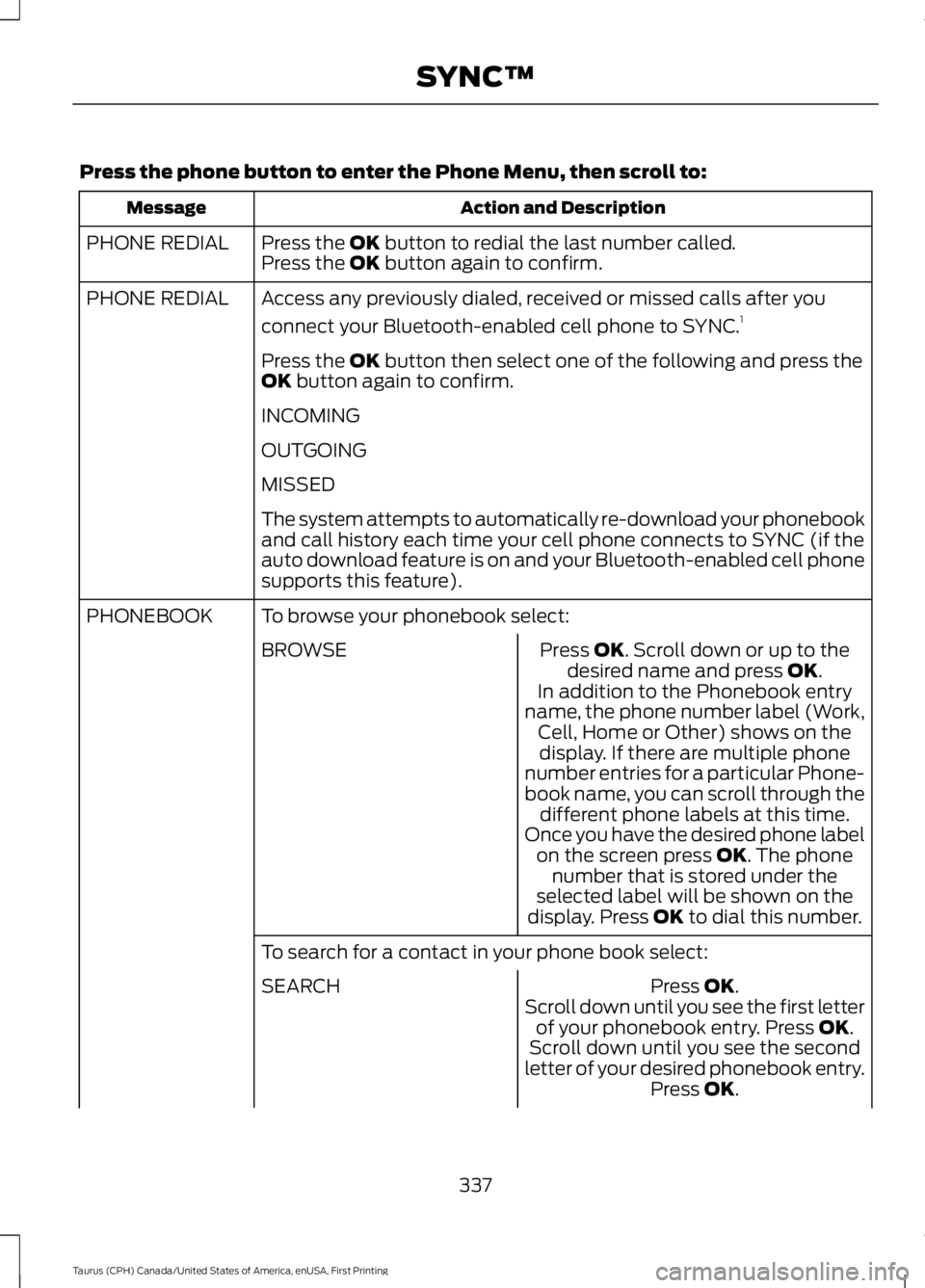
Press the phone button to enter the Phone Menu, then scroll to:
Action and DescriptionMessage
Press the OK button to redial the last number called.PHONE REDIALPress the OK button again to confirm.
Access any previously dialed, received or missed calls after you
connect your Bluetooth-enabled cell phone to SYNC.1PHONE REDIAL
Press the OK button then select one of the following and press theOK button again to confirm.
INCOMING
OUTGOING
MISSED
The system attempts to automatically re-download your phonebookand call history each time your cell phone connects to SYNC (if theauto download feature is on and your Bluetooth-enabled cell phonesupports this feature).
To browse your phonebook select:PHONEBOOK
Press OK. Scroll down or up to thedesired name and press OK.BROWSE
In addition to the Phonebook entryname, the phone number label (Work,Cell, Home or Other) shows on thedisplay. If there are multiple phonenumber entries for a particular Phone-book name, you can scroll through thedifferent phone labels at this time.Once you have the desired phone labelon the screen press OK. The phonenumber that is stored under theselected label will be shown on thedisplay. Press OK to dial this number.
To search for a contact in your phone book select:
Press OK.SEARCHScroll down until you see the first letterof your phonebook entry. Press OK.Scroll down until you see the secondletter of your desired phonebook entry.Press OK.
337
Taurus (CPH) Canada/United States of America, enUSA, First Printing
SYNC™
Page 341 of 504
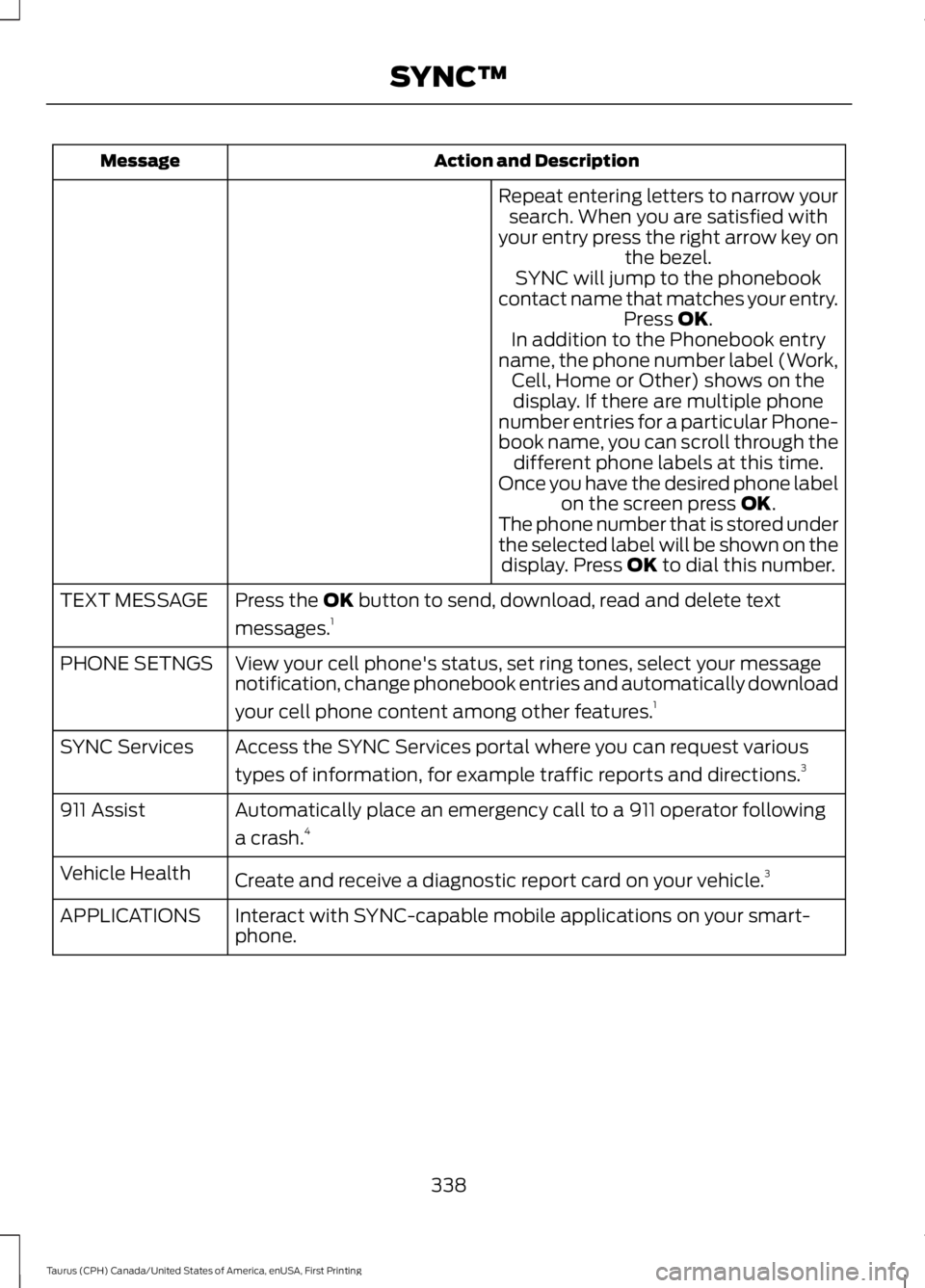
Action and DescriptionMessage
Repeat entering letters to narrow yoursearch. When you are satisfied withyour entry press the right arrow key onthe bezel.SYNC will jump to the phonebookcontact name that matches your entry.Press OK.In addition to the Phonebook entryname, the phone number label (Work,Cell, Home or Other) shows on thedisplay. If there are multiple phonenumber entries for a particular Phone-book name, you can scroll through thedifferent phone labels at this time.Once you have the desired phone labelon the screen press OK.The phone number that is stored underthe selected label will be shown on thedisplay. Press OK to dial this number.
Press the OK button to send, download, read and delete text
messages.1TEXT MESSAGE
View your cell phone's status, set ring tones, select your messagenotification, change phonebook entries and automatically download
your cell phone content among other features.1
PHONE SETNGS
Access the SYNC Services portal where you can request various
types of information, for example traffic reports and directions.3SYNC Services
Automatically place an emergency call to a 911 operator following
a crash.4911 Assist
Create and receive a diagnostic report card on your vehicle.3Vehicle Health
Interact with SYNC-capable mobile applications on your smart-phone.APPLICATIONS
338
Taurus (CPH) Canada/United States of America, enUSA, First Printing
SYNC™
Page 342 of 504
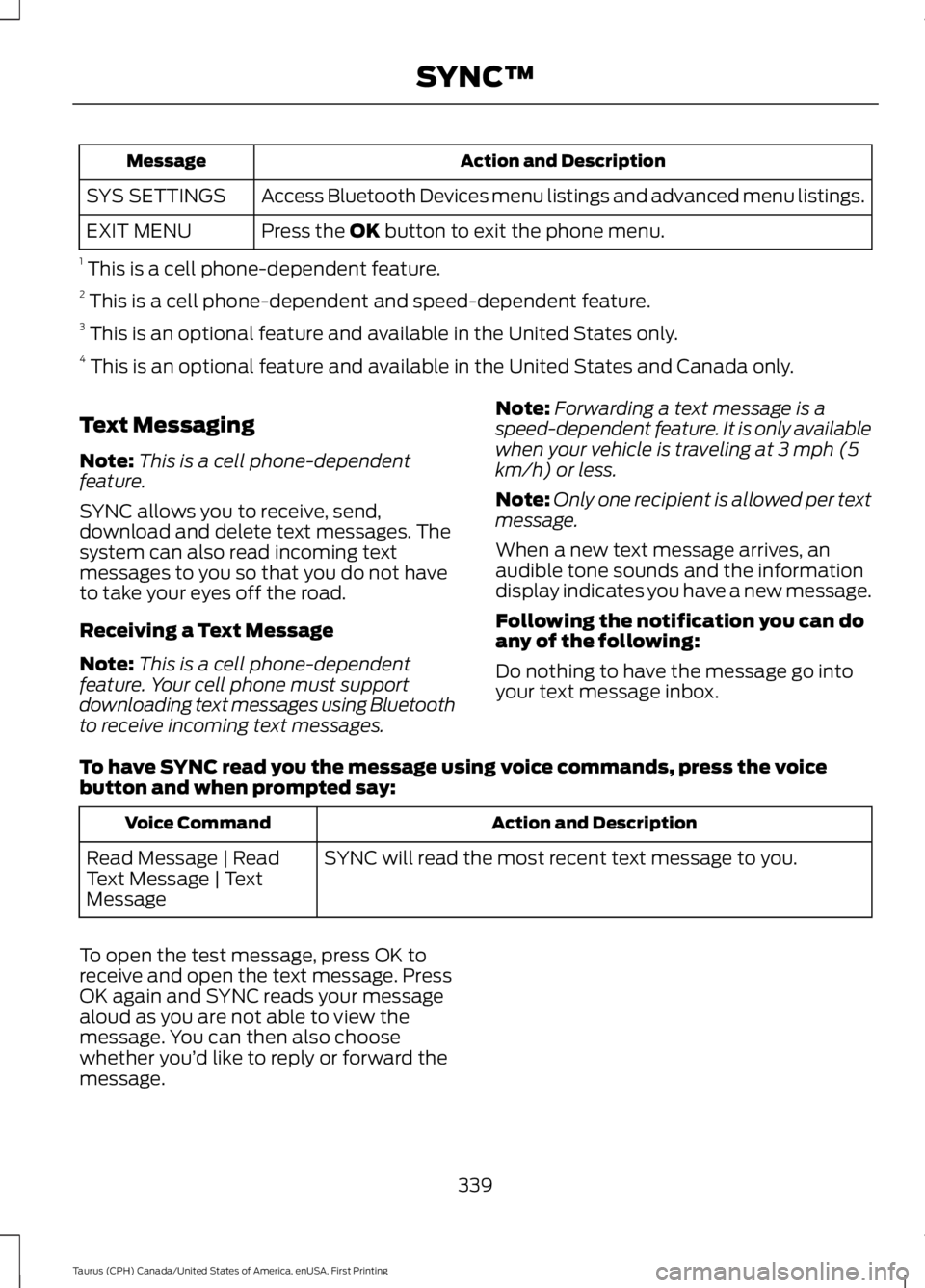
Action and DescriptionMessage
Access Bluetooth Devices menu listings and advanced menu listings.SYS SETTINGS
Press the OK button to exit the phone menu.EXIT MENU
1 This is a cell phone-dependent feature.2 This is a cell phone-dependent and speed-dependent feature.3 This is an optional feature and available in the United States only.4 This is an optional feature and available in the United States and Canada only.
Text Messaging
Note:This is a cell phone-dependentfeature.
SYNC allows you to receive, send,download and delete text messages. Thesystem can also read incoming textmessages to you so that you do not haveto take your eyes off the road.
Receiving a Text Message
Note:This is a cell phone-dependentfeature. Your cell phone must supportdownloading text messages using Bluetoothto receive incoming text messages.
Note:Forwarding a text message is aspeed-dependent feature. It is only availablewhen your vehicle is traveling at 3 mph (5km/h) or less.
Note:Only one recipient is allowed per textmessage.
When a new text message arrives, anaudible tone sounds and the informationdisplay indicates you have a new message.
Following the notification you can doany of the following:
Do nothing to have the message go intoyour text message inbox.
To have SYNC read you the message using voice commands, press the voicebutton and when prompted say:
Action and DescriptionVoice Command
SYNC will read the most recent text message to you.Read Message | ReadText Message | TextMessage
To open the test message, press OK toreceive and open the text message. PressOK again and SYNC reads your messagealoud as you are not able to view themessage. You can then also choosewhether you’d like to reply or forward themessage.
339
Taurus (CPH) Canada/United States of America, enUSA, First Printing
SYNC™
Page 344 of 504
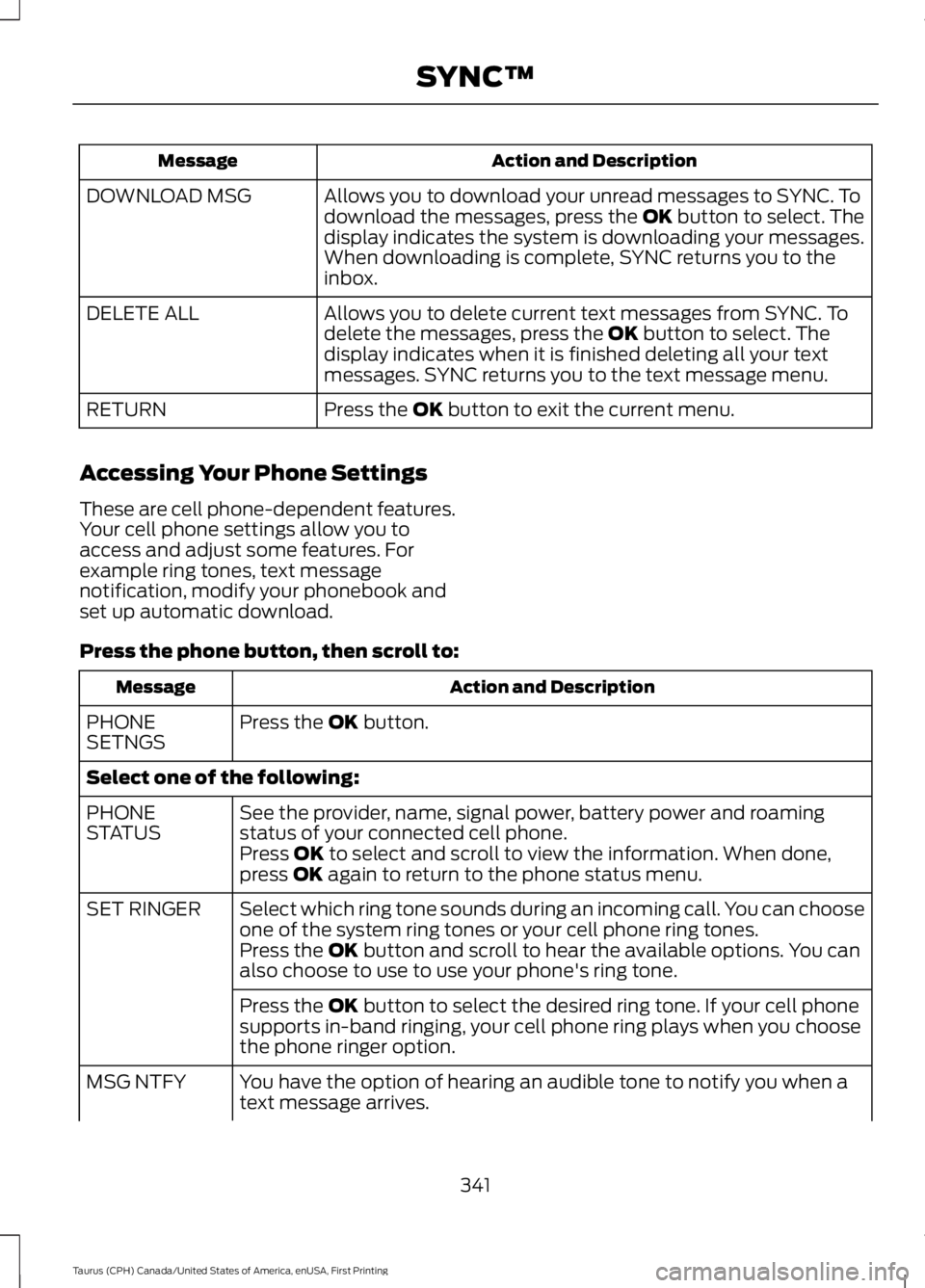
Action and DescriptionMessage
Allows you to download your unread messages to SYNC. Todownload the messages, press the OK button to select. Thedisplay indicates the system is downloading your messages.When downloading is complete, SYNC returns you to theinbox.
DOWNLOAD MSG
Allows you to delete current text messages from SYNC. Todelete the messages, press the OK button to select. Thedisplay indicates when it is finished deleting all your textmessages. SYNC returns you to the text message menu.
DELETE ALL
Press the OK button to exit the current menu.RETURN
Accessing Your Phone Settings
These are cell phone-dependent features.Your cell phone settings allow you toaccess and adjust some features. Forexample ring tones, text messagenotification, modify your phonebook andset up automatic download.
Press the phone button, then scroll to:
Action and DescriptionMessage
Press the OK button.PHONESETNGS
Select one of the following:
See the provider, name, signal power, battery power and roamingstatus of your connected cell phone.PHONESTATUSPress OK to select and scroll to view the information. When done,press OK again to return to the phone status menu.
Select which ring tone sounds during an incoming call. You can chooseone of the system ring tones or your cell phone ring tones.SET RINGER
Press the OK button and scroll to hear the available options. You canalso choose to use to use your phone's ring tone.
Press the OK button to select the desired ring tone. If your cell phonesupports in-band ringing, your cell phone ring plays when you choosethe phone ringer option.
You have the option of hearing an audible tone to notify you when atext message arrives.MSG NTFY
341
Taurus (CPH) Canada/United States of America, enUSA, First Printing
SYNC™
Page 345 of 504
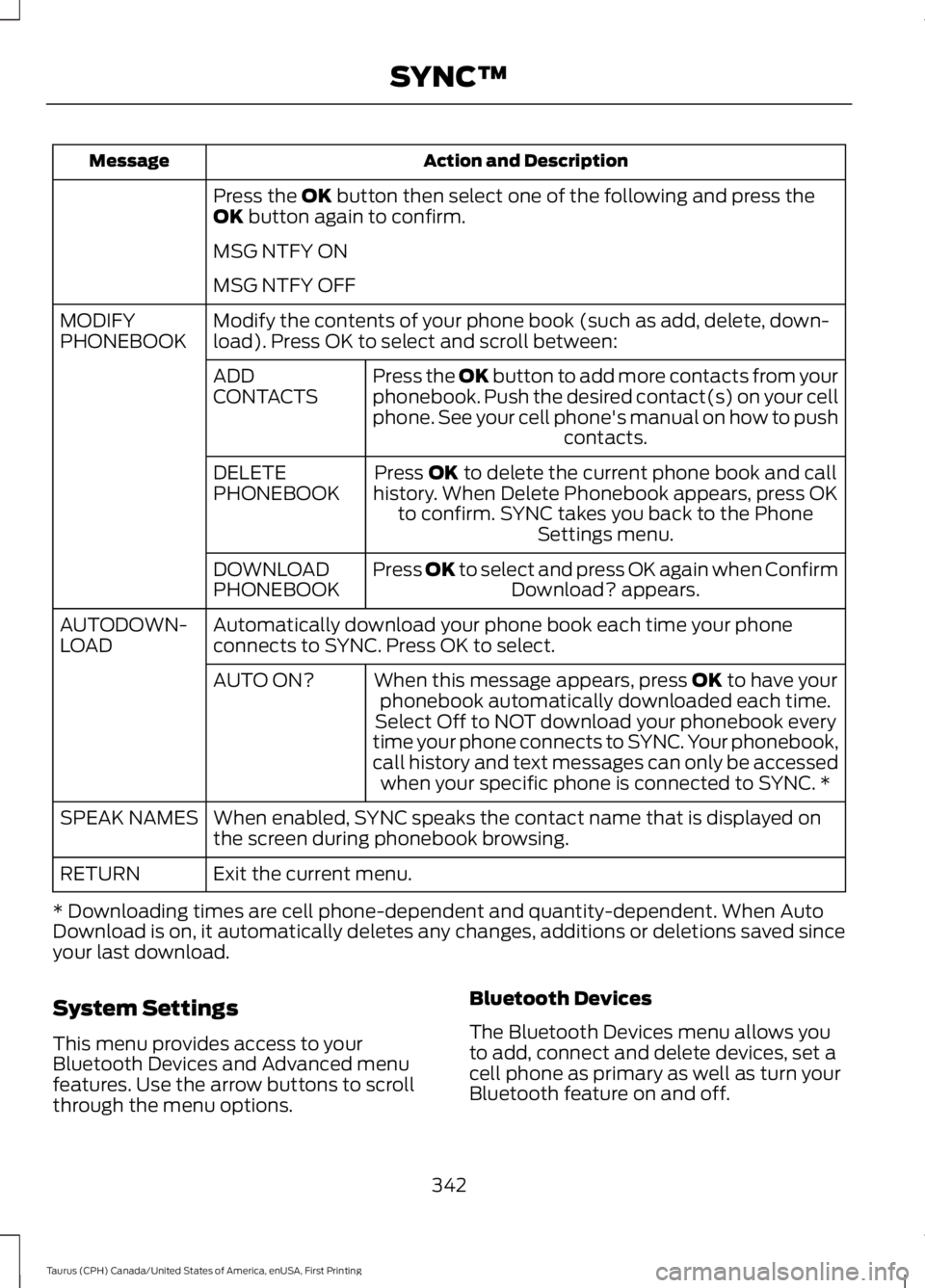
Action and DescriptionMessage
Press the OK button then select one of the following and press theOK button again to confirm.
MSG NTFY ON
MSG NTFY OFF
Modify the contents of your phone book (such as add, delete, down-load). Press OK to select and scroll between:MODIFYPHONEBOOK
Press the OK button to add more contacts from yourphonebook. Push the desired contact(s) on your cellphone. See your cell phone's manual on how to pushcontacts.
ADDCONTACTS
Press OK to delete the current phone book and callhistory. When Delete Phonebook appears, press OKto confirm. SYNC takes you back to the PhoneSettings menu.
DELETEPHONEBOOK
Press OK to select and press OK again when ConfirmDownload? appears.DOWNLOADPHONEBOOK
Automatically download your phone book each time your phoneconnects to SYNC. Press OK to select.AUTODOWN-LOAD
When this message appears, press OK to have yourphonebook automatically downloaded each time.AUTO ON?
Select Off to NOT download your phonebook everytime your phone connects to SYNC. Your phonebook,call history and text messages can only be accessedwhen your specific phone is connected to SYNC. *
When enabled, SYNC speaks the contact name that is displayed onthe screen during phonebook browsing.SPEAK NAMES
Exit the current menu.RETURN
* Downloading times are cell phone-dependent and quantity-dependent. When AutoDownload is on, it automatically deletes any changes, additions or deletions saved sinceyour last download.
System Settings
This menu provides access to yourBluetooth Devices and Advanced menufeatures. Use the arrow buttons to scrollthrough the menu options.
Bluetooth Devices
The Bluetooth Devices menu allows youto add, connect and delete devices, set acell phone as primary as well as turn yourBluetooth feature on and off.
342
Taurus (CPH) Canada/United States of America, enUSA, First Printing
SYNC™
Page 347 of 504
Advanced
The Advanced menu allows you to access
and set prompts, languages, defaults,perform a master reset, install anapplication and view system information.
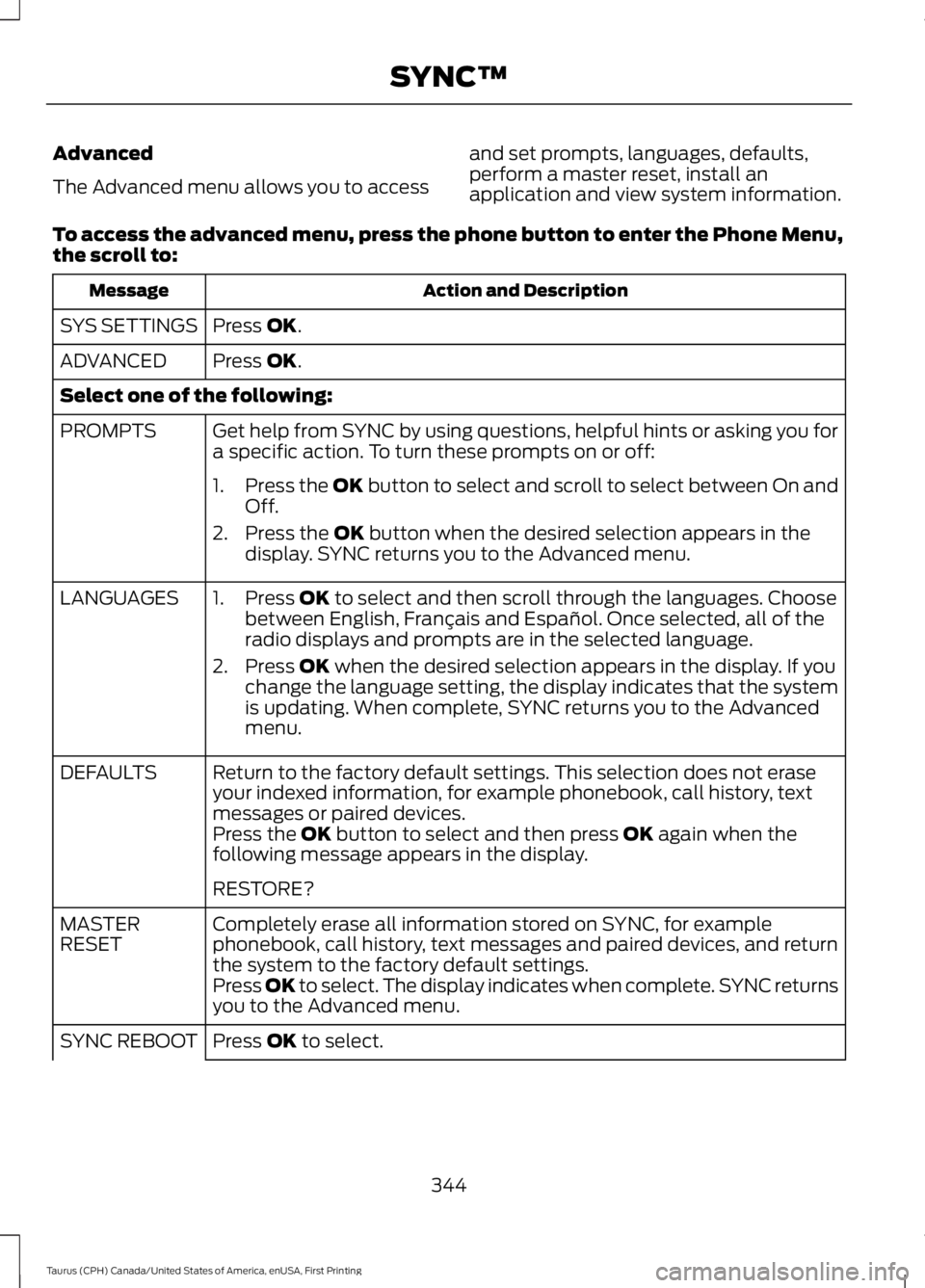
To access the advanced menu, press the phone button to enter the Phone Menu,the scroll to:
Action and DescriptionMessage
Press OK.SYS SETTINGS
Press OK.ADVANCED
Select one of the following:
Get help from SYNC by using questions, helpful hints or asking you fora specific action. To turn these prompts on or off:PROMPTS
1.Press the OK button to select and scroll to select between On andOff.
2. Press the OK button when the desired selection appears in thedisplay. SYNC returns you to the Advanced menu.
1. Press OK to select and then scroll through the languages. Choosebetween English, Français and Español. Once selected, all of theradio displays and prompts are in the selected language.
2. Press OK when the desired selection appears in the display. If youchange the language setting, the display indicates that the systemis updating. When complete, SYNC returns you to the Advancedmenu.
LANGUAGES
Return to the factory default settings. This selection does not eraseyour indexed information, for example phonebook, call history, textmessages or paired devices.
DEFAULTS
Press the OK button to select and then press OK again when thefollowing message appears in the display.
RESTORE?
Completely erase all information stored on SYNC, for examplephonebook, call history, text messages and paired devices, and returnthe system to the factory default settings.
MASTERRESET
Press OK to select. The display indicates when complete. SYNC returnsyou to the Advanced menu.
Press OK to select.SYNC REBOOT
344
Taurus (CPH) Canada/United States of America, enUSA, First Printing
SYNC™
Page 349 of 504
Note:If any user turns 911 Assist on or off,that setting applies for all paired phones. If911 Assist is turned off, either a voicemessage plays or a display message (oricon) comes on (or both) when your vehicleis started after a previously paired phoneconnects.
Note:Every phone operates differently.While SYNC 911 Assist works with mostcellular phones, some may have troubleusing this feature.
If a crash deploys an airbag (excludingknee airbags and rear inflatable safetybelts [if equipped]) or activates the fuelpump shut-off, your SYNC-equippedvehicle may be able to contact emergencyservices by dialing 911 through a paired andconnected Bluetooth-enabled phone. Youcan learn more about the 911 Assistfeature, visit www.SYNCMyRide.com,www.SYNCMyRide.ca orwww.syncmaroute.ca.
See Supplementary Restraints System(page 38). Important information aboutairbag deployment is in this chapter.
See Roadside Emergencies (page 214).Important information about the fuel pumpshut-off is in this chapter.
Switching 911 Assist On or Off
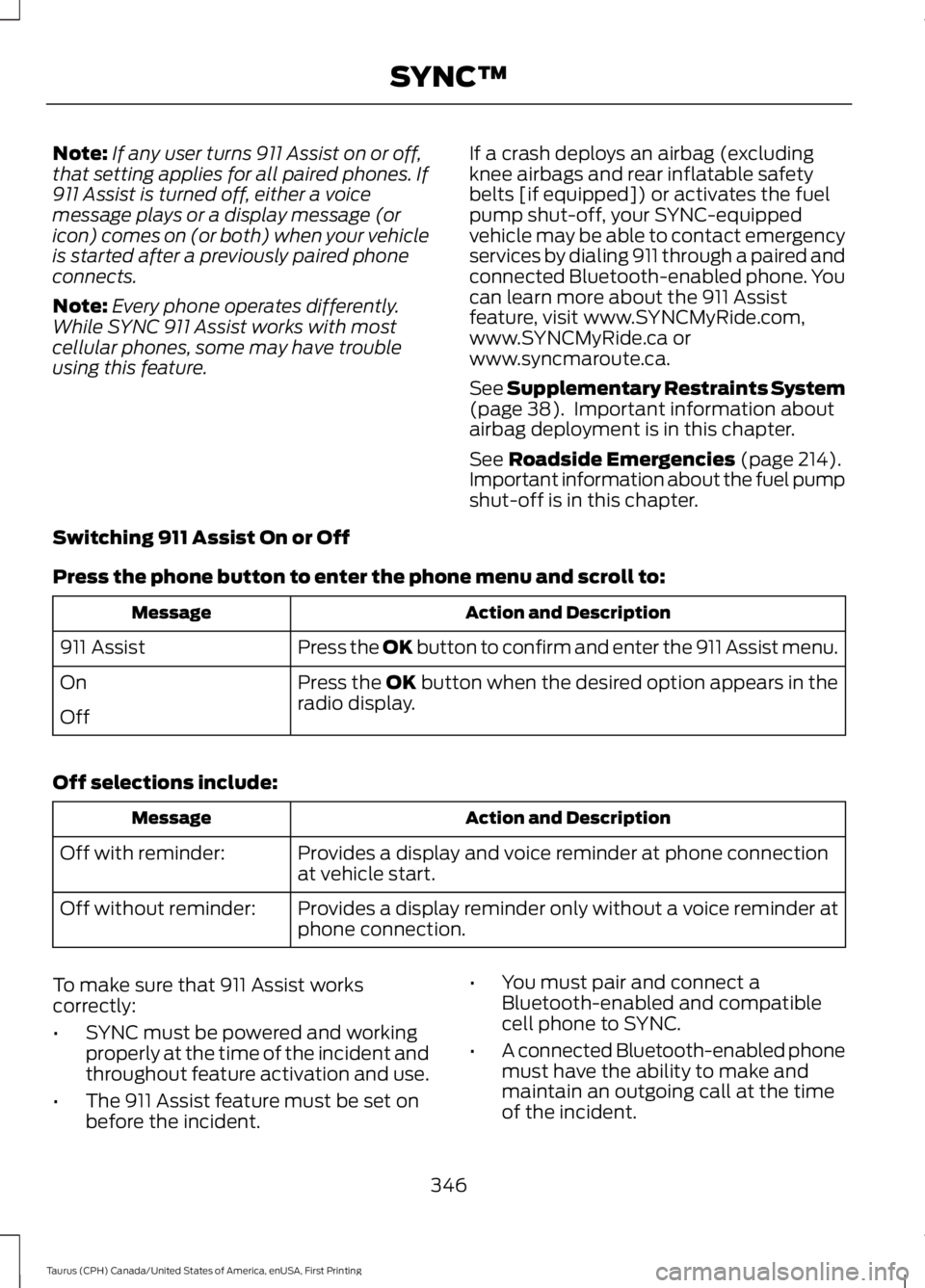
Press the phone button to enter the phone menu and scroll to:
Action and DescriptionMessage
Press the OK button to confirm and enter the 911 Assist menu.911 Assist
Press the OK button when the desired option appears in theradio display.On
Off
Off selections include:
Action and DescriptionMessage
Provides a display and voice reminder at phone connectionat vehicle start.Off with reminder:
Provides a display reminder only without a voice reminder atphone connection.Off without reminder:
To make sure that 911 Assist workscorrectly:
•SYNC must be powered and workingproperly at the time of the incident andthroughout feature activation and use.
•The 911 Assist feature must be set onbefore the incident.
•You must pair and connect aBluetooth-enabled and compatiblecell phone to SYNC.
•A connected Bluetooth-enabled phonemust have the ability to make andmaintain an outgoing call at the timeof the incident.
346
Taurus (CPH) Canada/United States of America, enUSA, First Printing
SYNC™
Page 350 of 504
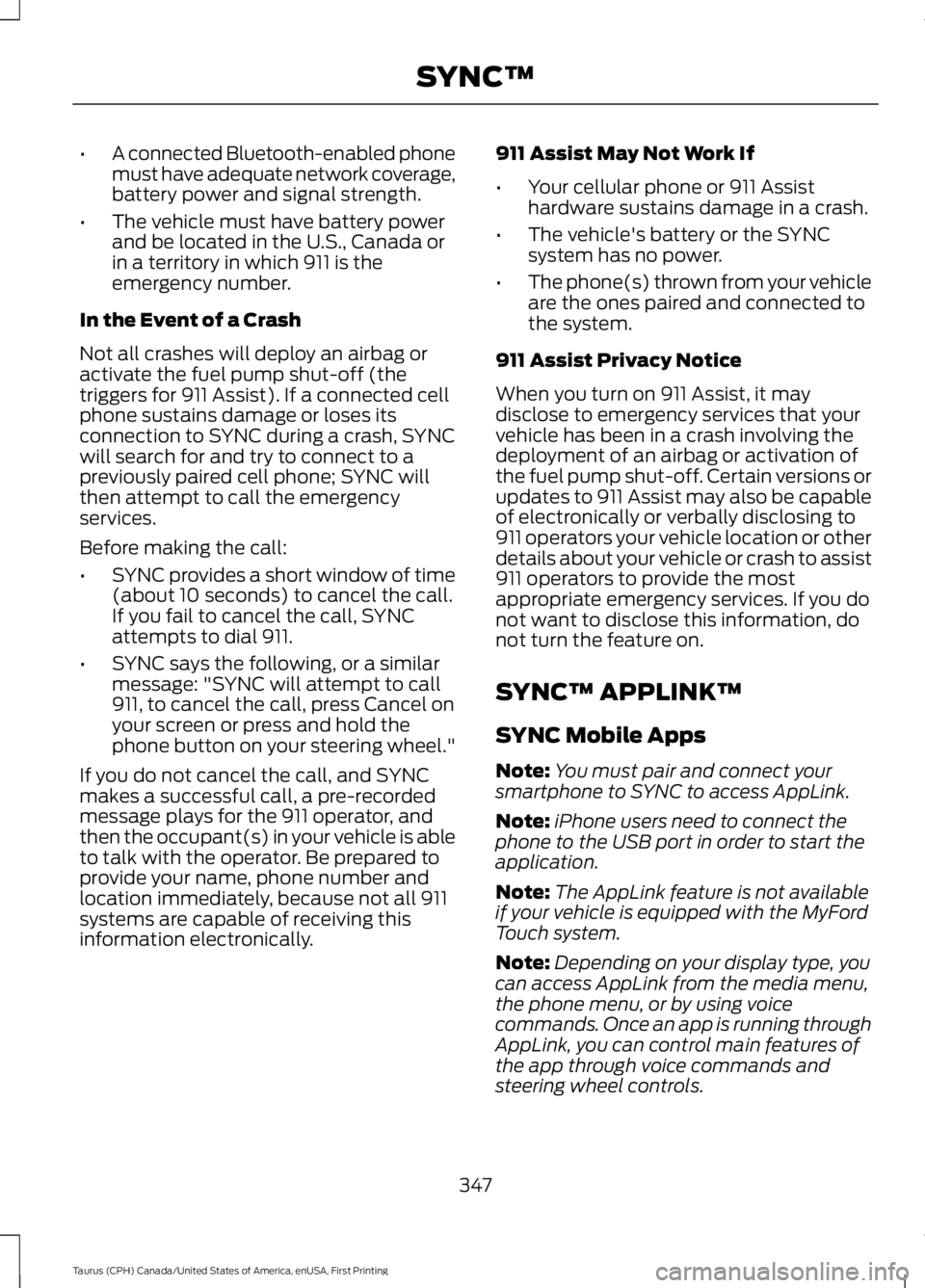
•A connected Bluetooth-enabled phonemust have adequate network coverage,battery power and signal strength.
•The vehicle must have battery powerand be located in the U.S., Canada orin a territory in which 911 is theemergency number.
In the Event of a Crash
Not all crashes will deploy an airbag oractivate the fuel pump shut-off (thetriggers for 911 Assist). If a connected cellphone sustains damage or loses itsconnection to SYNC during a crash, SYNCwill search for and try to connect to apreviously paired cell phone; SYNC willthen attempt to call the emergencyservices.
Before making the call:
•SYNC provides a short window of time(about 10 seconds) to cancel the call.If you fail to cancel the call, SYNCattempts to dial 911.
•SYNC says the following, or a similarmessage: "SYNC will attempt to call911, to cancel the call, press Cancel onyour screen or press and hold thephone button on your steering wheel."
If you do not cancel the call, and SYNCmakes a successful call, a pre-recordedmessage plays for the 911 operator, andthen the occupant(s) in your vehicle is ableto talk with the operator. Be prepared toprovide your name, phone number andlocation immediately, because not all 911systems are capable of receiving thisinformation electronically.
911 Assist May Not Work If
•Your cellular phone or 911 Assisthardware sustains damage in a crash.
•The vehicle's battery or the SYNCsystem has no power.
•The phone(s) thrown from your vehicleare the ones paired and connected tothe system.
911 Assist Privacy Notice
When you turn on 911 Assist, it maydisclose to emergency services that yourvehicle has been in a crash involving thedeployment of an airbag or activation ofthe fuel pump shut-off. Certain versions orupdates to 911 Assist may also be capableof electronically or verbally disclosing to911 operators your vehicle location or otherdetails about your vehicle or crash to assist911 operators to provide the mostappropriate emergency services. If you donot want to disclose this information, donot turn the feature on.
SYNC™ APPLINK™
SYNC Mobile Apps
Note:You must pair and connect yoursmartphone to SYNC to access AppLink.
Note:iPhone users need to connect thephone to the USB port in order to start theapplication.
Note:The AppLink feature is not availableif your vehicle is equipped with the MyFordTouch system.
Note:Depending on your display type, youcan access AppLink from the media menu,the phone menu, or by using voicecommands. Once an app is running throughAppLink, you can control main features ofthe app through voice commands andsteering wheel controls.
347
Taurus (CPH) Canada/United States of America, enUSA, First Printing
SYNC™
Page 351 of 504
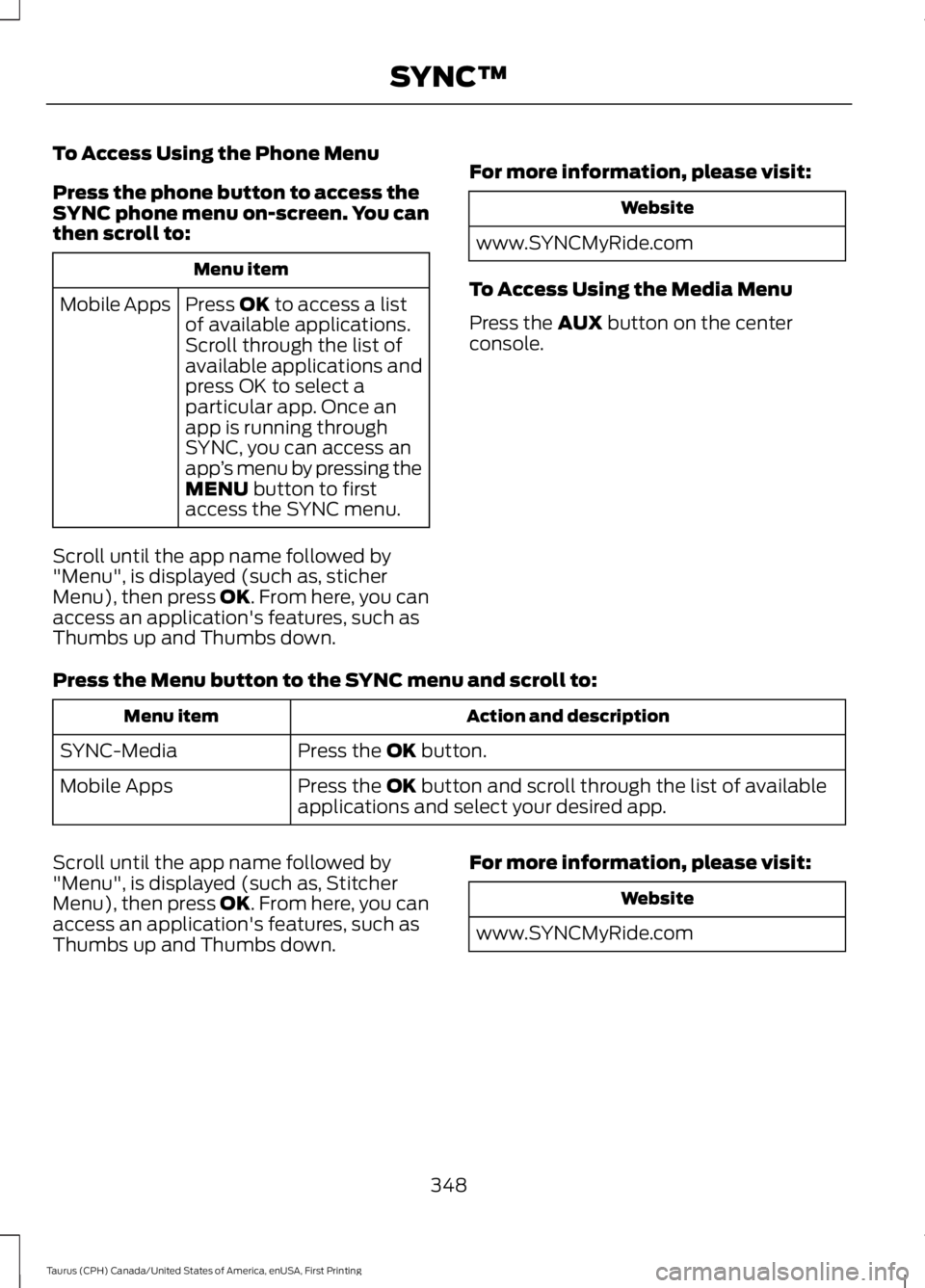
To Access Using the Phone Menu
Press the phone button to access theSYNC phone menu on-screen. You canthen scroll to:
Menu item
Press OK to access a listof available applications.Mobile Apps
Scroll through the list ofavailable applications andpress OK to select aparticular app. Once anapp is running throughSYNC, you can access anapp’s menu by pressing theMENU button to firstaccess the SYNC menu.
Scroll until the app name followed by"Menu", is displayed (such as, sticherMenu), then press OK. From here, you canaccess an application's features, such asThumbs up and Thumbs down.
For more information, please visit:
Website
www.SYNCMyRide.com
To Access Using the Media Menu
Press the AUX button on the centerconsole.
Press the Menu button to the SYNC menu and scroll to:
Action and descriptionMenu item
Press the OK button.SYNC-Media
Press the OK button and scroll through the list of availableapplications and select your desired app.Mobile Apps
Scroll until the app name followed by"Menu", is displayed (such as, StitcherMenu), then press OK. From here, you canaccess an application's features, such asThumbs up and Thumbs down.
For more information, please visit:
Website
www.SYNCMyRide.com
348
Taurus (CPH) Canada/United States of America, enUSA, First Printing
SYNC™
Page 353 of 504
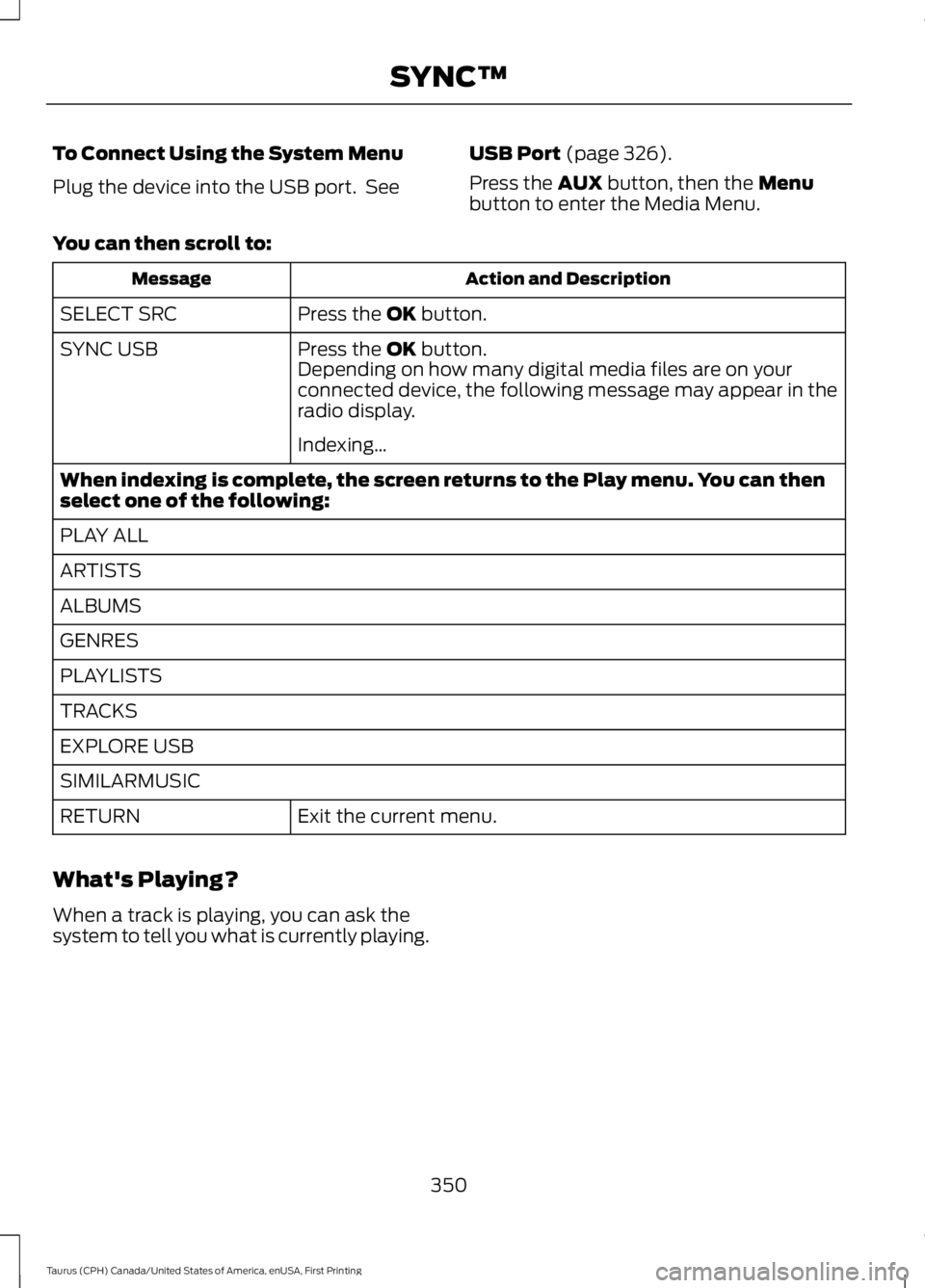
To Connect Using the System Menu
Plug the device into the USB port. See
USB Port (page 326).
Press the AUX button, then the Menubutton to enter the Media Menu.
You can then scroll to:
Action and DescriptionMessage
Press the OK button.SELECT SRC
Press the OK button.SYNC USBDepending on how many digital media files are on yourconnected device, the following message may appear in theradio display.
Indexing…
When indexing is complete, the screen returns to the Play menu. You can thenselect one of the following:
PLAY ALL
ARTISTS
ALBUMS
GENRES
PLAYLISTS
TRACKS
EXPLORE USB
SIMILARMUSIC
Exit the current menu.RETURN
What's Playing?
When a track is playing, you can ask thesystem to tell you what is currently playing.
350
Taurus (CPH) Canada/United States of America, enUSA, First Printing
SYNC™