ignition FORD TAURUS 2017 Workshop Manual
[x] Cancel search | Manufacturer: FORD, Model Year: 2017, Model line: TAURUS, Model: FORD TAURUS 2017Pages: 504, PDF Size: 5.84 MB
Page 161 of 504
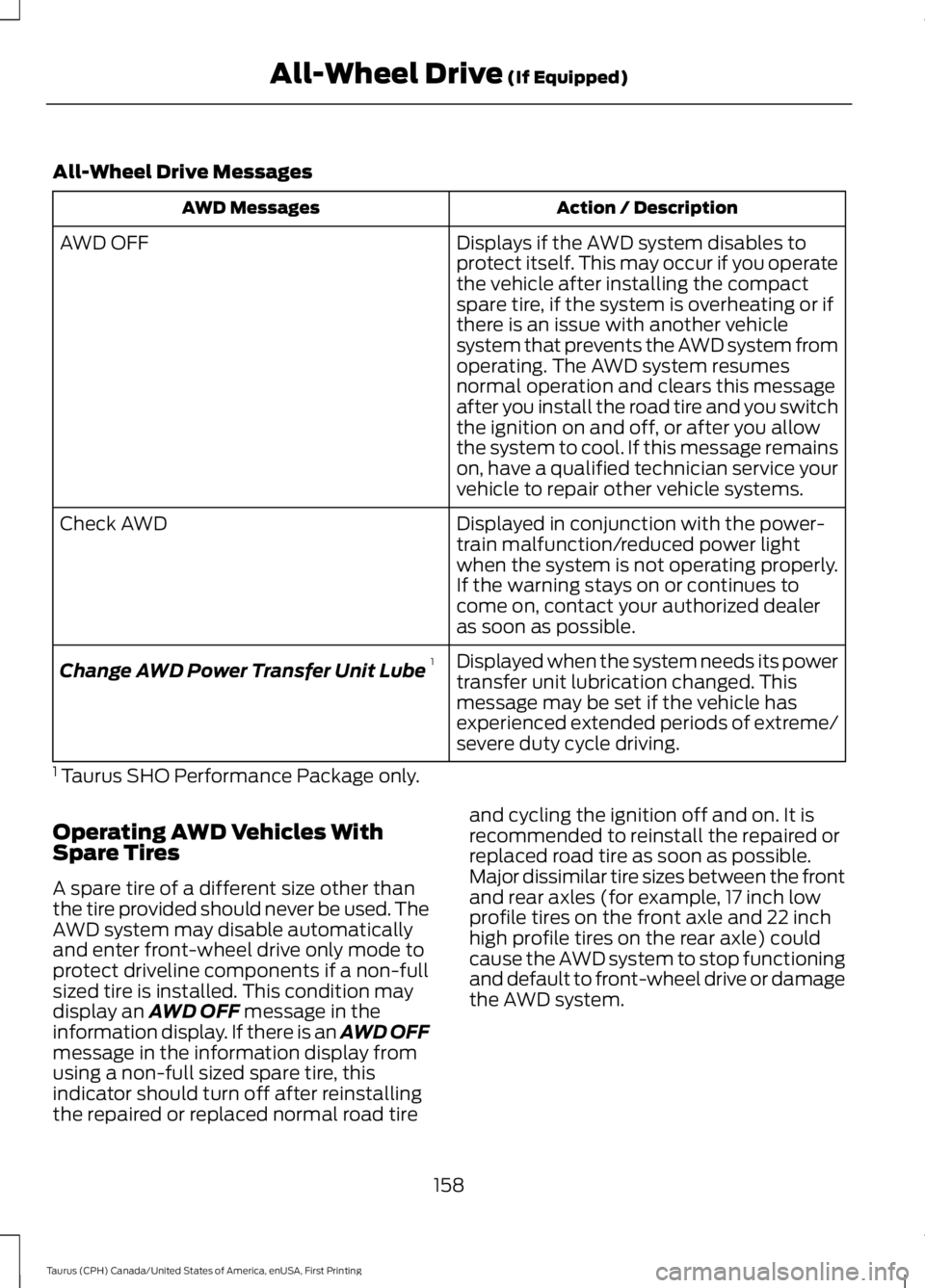
All-Wheel Drive Messages
Action / DescriptionAWD Messages
Displays if the AWD system disables toprotect itself. This may occur if you operatethe vehicle after installing the compactspare tire, if the system is overheating or ifthere is an issue with another vehiclesystem that prevents the AWD system from
AWD OFF
operating. The AWD system resumesnormal operation and clears this messageafter you install the road tire and you switchthe ignition on and off, or after you allowthe system to cool. If this message remainson, have a qualified technician service yourvehicle to repair other vehicle systems.
Displayed in conjunction with the power-train malfunction/reduced power lightwhen the system is not operating properly.If the warning stays on or continues tocome on, contact your authorized dealeras soon as possible.
Check AWD
Displayed when the system needs its powertransfer unit lubrication changed. Thismessage may be set if the vehicle hasexperienced extended periods of extreme/severe duty cycle driving.
Change AWD Power Transfer Unit Lube1
1 Taurus SHO Performance Package only.
Operating AWD Vehicles WithSpare Tires
A spare tire of a different size other thanthe tire provided should never be used. TheAWD system may disable automaticallyand enter front-wheel drive only mode toprotect driveline components if a non-fullsized tire is installed. This condition maydisplay an AWD OFF message in theinformation display. If there is an AWD OFFmessage in the information display fromusing a non-full sized spare tire, thisindicator should turn off after reinstallingthe repaired or replaced normal road tire
and cycling the ignition off and on. It isrecommended to reinstall the repaired orreplaced road tire as soon as possible.Major dissimilar tire sizes between the frontand rear axles (for example, 17 inch lowprofile tires on the front axle and 22 inchhigh profile tires on the rear axle) couldcause the AWD system to stop functioningand default to front-wheel drive or damagethe AWD system.
158
Taurus (CPH) Canada/United States of America, enUSA, First Printing
All-Wheel Drive (If Equipped)
Page 163 of 504
If Your Vehicle Goes Off the Edge of thePavement
•If your vehicle goes off the edge of thepavement, slow down, but avoid severebrake application, ease the vehicleback onto the pavement only afterreducing your speed. Do not turn thesteering wheel too sharply whilereturning to the road surface.
•It may be safer to stay on the apron orshoulder of the road and slow downgradually before returning to thepavement. You may lose control if youdo not slow down or if you turn thesteering wheel too sharply or abruptly.
•It often may be less risky to strike smallobjects, such as highway reflectors,with minor damage to your vehiclerather than attempt a sudden return tothe pavement which could cause thevehicle to slide sideways out of controlor rollover. Remember, your safety andthe safety of others should be yourprimary concern.
If Your Vehicle Gets Stuck
WARNINGS
Always fully apply the parking brakeand make sure you shift into park (P).Switch the ignition off and removethe key whenever you leave your vehicle.
If the parking brake is fully released,but the brake warning lamp remainsilluminated, the brakes may not beworking properly. Have your vehiclechecked as soon as possible.
Do not spin the wheels at over34 mph (55 km/h). The tires may failand injure a passenger or bystander.
Note:Do not rock the vehicle if the engineis not at normal operating temperature ordamage to the transmission may occur.
Note:Do not rock the vehicle for more thana few minutes or damage to thetransmission and tires may occur or theengine may overheat.
If your vehicle gets stuck in mud or snow itmay be rocked out by shifting betweenforward and reverse gears, stoppingbetween shifts, in a steady pattern. Presslightly on the accelerator in each gear.
If your vehicle is equipped withAdvanceTrac® with Roll StabilityControl™, it may be beneficial todisengage the AdvanceTrac® with RollStability Control™ system whileattempting to rock the vehicle.
Emergency Maneuvers
•In an unavoidable emergency situationwhere a sudden sharp turn must bemade, remember to avoid"over-driving" your vehicle (that is, turnthe steering wheel only as rapidly andas far as required to avoid theemergency). Excessive steering willresult in less vehicle control, not more.Additionally, smooth variations of theaccelerator and/or brake pedalpressure should be utilized if changesin vehicle speed are called for. Avoidabrupt steering, acceleration or brakingwhich could result in an increased riskof loss of vehicle control, vehiclerollover and/or personal injury. Use allavailable road surface to return thevehicle to a safe direction of travel.
•In the event of an emergency stop,avoid skidding the tires and do notattempt any sharp steering wheelmovements.
•If the vehicle goes from one type ofsurface to another (that is, fromconcrete to gravel) there will be achange in the way the vehicle respondsto a maneuver (steering, accelerationor braking). Again, avoid these abruptinputs.
160
Taurus (CPH) Canada/United States of America, enUSA, First Printing
All-Wheel Drive (If Equipped)
Page 164 of 504
Sand
Most of the time traction control improvestire traction by managing wheel slipthrough Brake, Engine, and AWDcalibrations. However, during low speeddriving, disabling traction control in deepsand can help keep the wheels moving tomaintain vehicle momentum.
When driving over sand, try to keep all fourwheels on the most solid area of the trail.Avoid reducing the tire pressures but shiftto a lower gear and drive steadily throughthe terrain. Apply the accelerator slowlyand avoid spinning the wheels.
Do not drive your vehicle in deep sand foran extended period of time. This couldcause the AWD system to overheat anddefault to front-wheel drive. If this occurs,an AWD OFF message displays in theinformation display. To resume normalAWD function as soon as possible, stopthe vehicle in a safe location and stop theengine for at least 10 minutes. After theengine has been restarted and the AWDsystem has adequately cooled, the AWDOFF message turns off and normal AWDfunction returns. In the event the engine isnot stopped, the AWD OFF message turnsoff when the system cools and normalAWD function returns.
When driving at slow speeds in deep sandunder high outside temperatures, use L(Low) gear when possible. L (Low) gearoperation will maximize the engine andtransmission cooling capability.
Under severe operating conditions, the A/Cmay cycle on and off to protectoverheating of the engine.
Avoid excessive speed because vehiclemomentum can work against you andcause the vehicle to become stuck to thepoint that assistance may be required fromanother vehicle. Remember, you may beable to back out the way you came if youproceed with caution.
Mud and Water
If you must drive through high water, driveslowly. Traction or brake capability maybe limited.
When driving through water, determine thedepth; avoid water higher than the bottomof the wheel rims (for cars) or the bottomof the hubs (for trucks) (if possible) andproceed slowly. If the ignition system getswet, the vehicle may stall.
Once through water, always try the brakes.Wet brakes do not stop the vehicle aseffectively as dry brakes. Drying can beimproved by moving your vehicle slowlywhile applying light pressure on the brakepedal.
Be cautious of sudden changes in vehiclespeed or direction when you are driving inmud. Even AWD vehicles can lose tractionin slick mud. As when you are driving oversand, apply the accelerator slowly andavoid spinning your wheels. If the vehicledoes slide, steer in the direction of the slideuntil you regain control of the vehicle.
After driving through mud, clean off residuestuck to rotating driveshafts and tires.Excess mud stuck on tires and rotatingdriveshafts causes an imbalance thatcould damage drive components.
Note:Driving through deep water maydamage the transmission.
If the front or rear axle is submerged inwater, have the power transfer unit (PTU)or rear axle serviced by an authorizeddealer.
161
Taurus (CPH) Canada/United States of America, enUSA, First Printing
All-Wheel Drive (If Equipped)E143950
Page 167 of 504
GENERAL INFORMATION
Note:Occasional brake noise is normal. Ifa metal-to-metal, continuous grinding orcontinuous squeal sound is present, thebrake linings may be worn-out. Have thesystem checked by an authorized dealer. Ifyour vehicle has continuous vibration orshudder in the steering wheel while braking,have it checked by an authorized dealer.
Note:Brake dust may accumulate on thewheels, even under normal drivingconditions. Some dust is inevitable as thebrakes wear and does not contribute tobrake noise. See Cleaning the Wheels(page 264).
Note:Depending on applicable laws andregulations in the country for which yourvehicle was originally built, your brake lampsmay flash during heavy braking. Followingthis, your hazard lights may also flash whenyour vehicle comes to a stop.
See Warning Lamps andIndicators (page 85).
Wet brakes result in reduced brakingefficiency. Gently press the brake pedal afew times when driving from a car wash orstanding water to dry the brakes.
Brake Over Accelerator
In the event the accelerator pedalbecomes stuck or entrapped, apply steadyand firm pressure to the brake pedal toslow the vehicle and reduce engine power.If you experience this condition, apply thebrakes and bring your vehicle to a safestop. Move the transmission to park (P),switch the engine off and apply the parkingbrake. Inspect the accelerator pedal forany interference. If none are found and thecondition persists, have your vehicle towedto the nearest authorized dealer.
Brake Assist
Brake assist detects when you brakerapidly by measuring the rate at which youpress the brake pedal. It providesmaximum braking efficiency as long as youpress the pedal, and can reduce stoppingdistances in critical situations.
Anti-lock Brake System
This system helps you maintain steeringcontrol during emergency stops by keepingthe brakes from locking.
This lamp momentarilyilluminates when you turn theignition on. If the light does notilluminate during start up, remains on orflashes, the system may be disabled. Havethe system checked by an authorizeddealer. If the anti-lock brake system isdisabled, normal braking is still effective.
If the brake warning lampilluminates when you release theparking brake, have the systemchecked by an authorized dealer.
HINTS ON DRIVING WITH
ANTI-LOCK BRAKES
Note:When the system is operating, thebrake pedal may pulse and may travelfurther. Maintain pressure on the brakepedal. You may also hear a noise from thesystem. This is normal.
The anti-lock braking system will noteliminate the risks when:
•You drive too closely to the vehicle infront of you.
•Your vehicle is hydroplaning.
•You take corners too fast.
•The road surface is poor.
164
Taurus (CPH) Canada/United States of America, enUSA, First Printing
BrakesE144522 E144522
Page 169 of 504
PRINCIPLE OF OPERATION
The traction control system helps avoiddrive wheel spin and loss of traction.
If your vehicle begins to slide, the systemapplies the brakes to individual wheelsand, when needed, reduces engine powerat the same time. If the wheels spin whenaccelerating on slippery or loose surfaces,the system reduces engine power in orderto increase traction.
USING TRACTION CONTROL
WARNING
The stability and traction controllight illuminates steadily if thesystem detects a failure. Make sureyou did not manually disable the tractioncontrol system using the informationdisplay controls or the switch. If thestability control and traction control lightis still illuminating steadily, have thesystem serviced by an authorized dealerimmediately. Operating your vehicle withthe traction control disabled could lead toan increased risk of loss of vehicle control,vehicle rollover, personal injury and death.
The system automatically turns on eachtime you switch the ignition on.
If your vehicle is stuck in mud or snow,switching traction control off may bebeneficial as this allows the wheels to spin.
Note:When you switch traction control off,stability control remains fully active.
Switching the System Off
When you switch the system off or on, amessage appears in the informationdisplay showing system status.
You can switch the system off by eitherusing the information display controls orthe switch.
Using the Information DisplayControls
You can switch this feature off or on in theinformation display. See GeneralInformation (page 89).
Using a Switch (If Equipped)
Use the traction control switch on theinstrument panel to switch the system offor on.
The switch illuminates when tractioncontrol is off.
System Indicator Lights andMessages
The stability and traction controllight:
•Temporarily illuminates on enginestart-up.
•Flashes when a driving conditionactivates either of the systems.
•Illuminates if a problem occurs in eitherof the systems.
The stability and traction controloff light temporarily illuminateson engine start-up and stays onwhen you switch the traction controlsystem off.
166
Taurus (CPH) Canada/United States of America, enUSA, First Printing
Traction ControlE138639 E130458
Page 170 of 504
PRINCIPLE OF OPERATION
WARNINGS
Vehicle modifications involvingbraking system, aftermarket roofracks, suspension, steering system,tire construction and wheel and tire sizemay change the handling characteristicsof your vehicle and may adversely affectthe performance of the electronic stabilitycontrol system. In addition, installing anystereo loudspeakers may interfere withand adversely affect the electronic stabilitycontrol system. Install any aftermarketstereo loudspeaker as far as possible fromthe front center console, the tunnel, andthe front seats in order to minimize the riskof interfering with the electronic stabilitycontrol sensors. Reducing theeffectiveness of the electronic stabilitycontrol system could lead to an increasedrisk of loss of vehicle control, vehiclerollover, personal injury and death.
Remember that even advancedtechnology cannot defy the laws ofphysics. It’s always possible to losecontrol of a vehicle due to inappropriatedriver input for the conditions. Aggressivedriving on any road condition can causeyou to lose control of your vehicleincreasing the risk of personal injury orproperty damage. Activation of theelectronic stability control system is anindication that at least some of the tireshave exceeded their ability to grip the road;this could reduce the operator’s ability tocontrol the vehicle potentially resulting ina loss of vehicle control, vehicle rollover,personal injury and death. If your electronicstability control system activates, SLOWDOWN.
The system automatically turns on eachtime you switch the ignition on.
If a fault occurs in either the stabilitycontrol or the traction control system, youmay experience the following conditions:
•The stability and traction control lightilluminates steadily.
•The stability control and tractioncontrol systems do not enhance yourvehicle's ability to maintain traction ofthe wheels.
If a driving condition activates either thestability control or the traction controlsystem you may experience the followingconditions:
•The stability and traction control lightflashes.
•Your vehicle slows down.
•Reduced engine power.
•A vibration in the brake pedal.
•The brake pedal is stiffer than usual.
•If the driving condition is severe andyour foot is not on the brake, the brakepedal may move as the system applieshigher brake force.
The stability control system has severalfeatures built into it to help you maintaincontrol of your vehicle:
Electronic Stability Control
The system enhances your vehicle’s abilityto prevent skids or lateral slides byapplying brakes to one or more of thewheels individually and, if necessary,reducing engine power.
Traction Control
The system enhances your vehicle’s abilityto maintain traction of the wheels bydetecting and controlling wheel spin. SeeUsing Traction Control (page 166).
167
Taurus (CPH) Canada/United States of America, enUSA, First Printing
Stability Control
Page 171 of 504
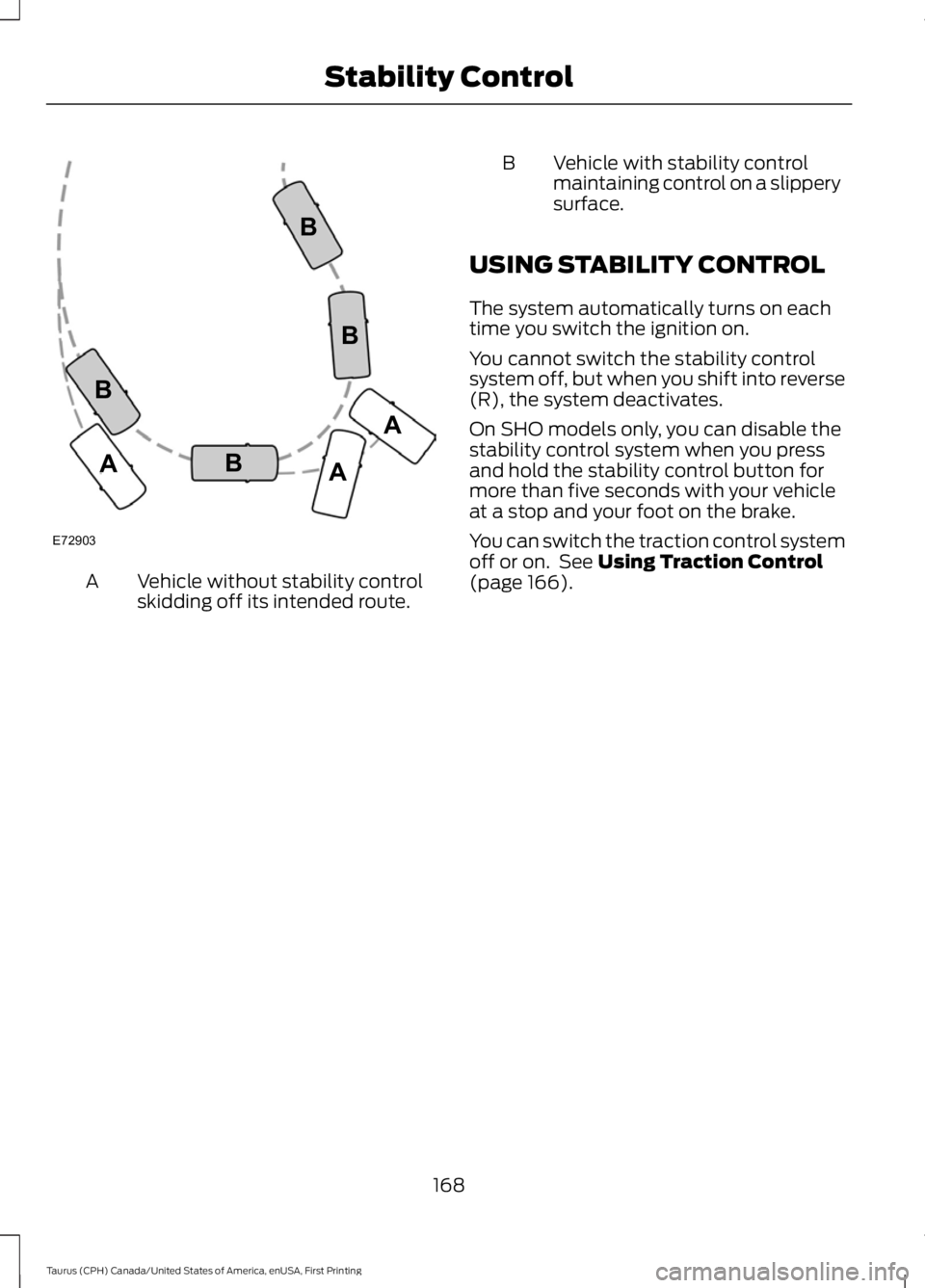
Vehicle without stability controlskidding off its intended route.A
B Vehicle with stability controlmaintaining control on a slipperysurface.
USING STABILITY CONTROL
The system automatically turns on eachtime you switch the ignition on.
You cannot switch the stability controlsystem off, but when you shift into reverse(R), the system deactivates.
On SHO models only, you can disable thestability control system when you pressand hold the stability control button formore than five seconds with your vehicleat a stop and your foot on the brake.
You can switch the traction control systemoff or on. See Using Traction Control(page 166).
168
Taurus (CPH) Canada/United States of America, enUSA, First Printing
Stability ControlE72903A
AA
B
BB
B
Page 173 of 504
PRINCIPLE OF OPERATION
WARNINGS
To help avoid personal injury, pleaseread and understand the limitationsof the system as contained in thissection. Sensing is only an aid for some(generally large and fixed) objects whenmoving on a flat surface at parking speeds.Certain objects with surfaces that absorbultrasonic waves, surrounding vehicle'sparking aid systems, traffic controlsystems, fluorescent lamps, inclementweather, air brakes, and external motorsand fans may also affect the function ofthe sensing system; this may includereduced performance or a false activation.
To help avoid personal injury, alwaysuse caution when in reverse (R) andwhen using the sensing system.
This system is not designed toprevent contact with small or movingobjects. The system is designed toprovide a warning to assist the driver indetecting large stationary objects to avoiddamaging your vehicle. The system maynot detect smaller objects, particularlythose close to the ground.
Certain add-on devices such as largetrailer hitches, bike or surfboard racksand any device that may block thenormal detection zone of the system, maycreate false beeps.
Note:Keep the sensors, located on thebumper or fascia, free from snow, ice andlarge accumulations of dirt. If the sensorsare covered, the system’s accuracy can beaffected. Do not clean the sensors withsharp objects.
Note:If your vehicle sustains damage tothe bumper or fascia, leaving it misalignedor bent, the sensing zone may be alteredcausing inaccurate measurement ofobstacles or false alarms.
Note:The sensing system cannot be turnedoff when a MyKey is present. See Principleof Operation (page 51).
Note:If you attach certain add-on devicessuch as a trailer or bike rack, the rear sensingsystem may detect that add-on device andtherefore provide warnings. It is suggestedthat you disable the rear sensing systemwhen you attach an add-on device to yourvehicle to prevent these warnings.
The sensing system warns the driver ofobstacles within a certain range of yourvehicle. The system turns on automaticallywhenever you switch the ignition on.
You can turn the system on oroff by pressing the parking aidbutton. If your vehicle does nothave a parking aid button, the system canbe switched off through the informationdisplay menu or from the pop-up messagethat appears once you shift thetransmission into reverse (R). See GeneralInformation (page 89).
If a fault is present in the system, a warningmessage appears in the informationdisplay. See Information Messages(page 98).
REAR PARKING AID
The rear sensors are only active when thetransmission is in reverse (R). As yourvehicle moves closer to the obstacle, therate of the audible warning increases.When the obstacle is less than 12 in(30 cm) away, the warning soundscontinuously. If the system detects astationary or receding object farther than12 in (30 cm) from the corners of thebumper, the tone sounds for only threeseconds. Once the system detects anobject approaching, the warning soundsagain.
170
Taurus (CPH) Canada/United States of America, enUSA, First Printing
Parking AidsE139213
Page 182 of 504
Switching Cruise Control Off
Press and release OFF when the system isin stand by mode or switch the ignition off.
Note:You erase the set speed when youswitch the system off.
USING ADAPTIVE CRUISE
CONTROL (If Equipped)
WARNINGS
Always pay close attention tochanging road conditions when usingadaptive cruise control. The systemdoes not replace attentive driving. Failingto pay attention to the road may result ina crash, serious injury or death.
Adaptive cruise control may notdetect stationary or slow movingvehicles below 6 mph (10 km/h).
Do not use adaptive cruise controlon winding roads, in heavy traffic orwhen the road surface is slippery.This could result in loss of vehicle control,serious injury or death.
Do not use adaptive cruise controlwhen towing a trailer that has trailerbrakes. The auto-brake componentof the adaptive cruise control system doesnot operate the trailer brakes. Usingadaptive cruise control when towing atrailer that has trailer brakes may result inthe loss of vehicle control, which couldresult in serious injury.
Adaptive cruise control is not a crashwarning or avoidance system.
Adaptive cruise control does notdetect pedestrians or objects in theroad.
Adaptive cruise control does notdetect oncoming vehicles in thesame lane.
WARNINGS
Do not use the system in poorvisibility, for example fog, heavy rain,spray or snow.
Do not use the adaptive cruisecontrol when entering or leaving ahighway, on roads with intersectionsor roundabouts or non-vehicular traffic orroads that are winding, slippery, unpaved,or steep slopes.
Do not use tire sizes other than thoserecommended because this canaffect the normal operation of thesystem. Failure to do so may result in a lossof vehicle control, which could result inserious injury.
Note:It is your responsibility to stay alert,drive safely and be in control of the vehicleat all times.
The system adjusts your speed to maintaina proper distance between you and thevehicle in front of you in the same lane. Youcan select from one of four gap settings.
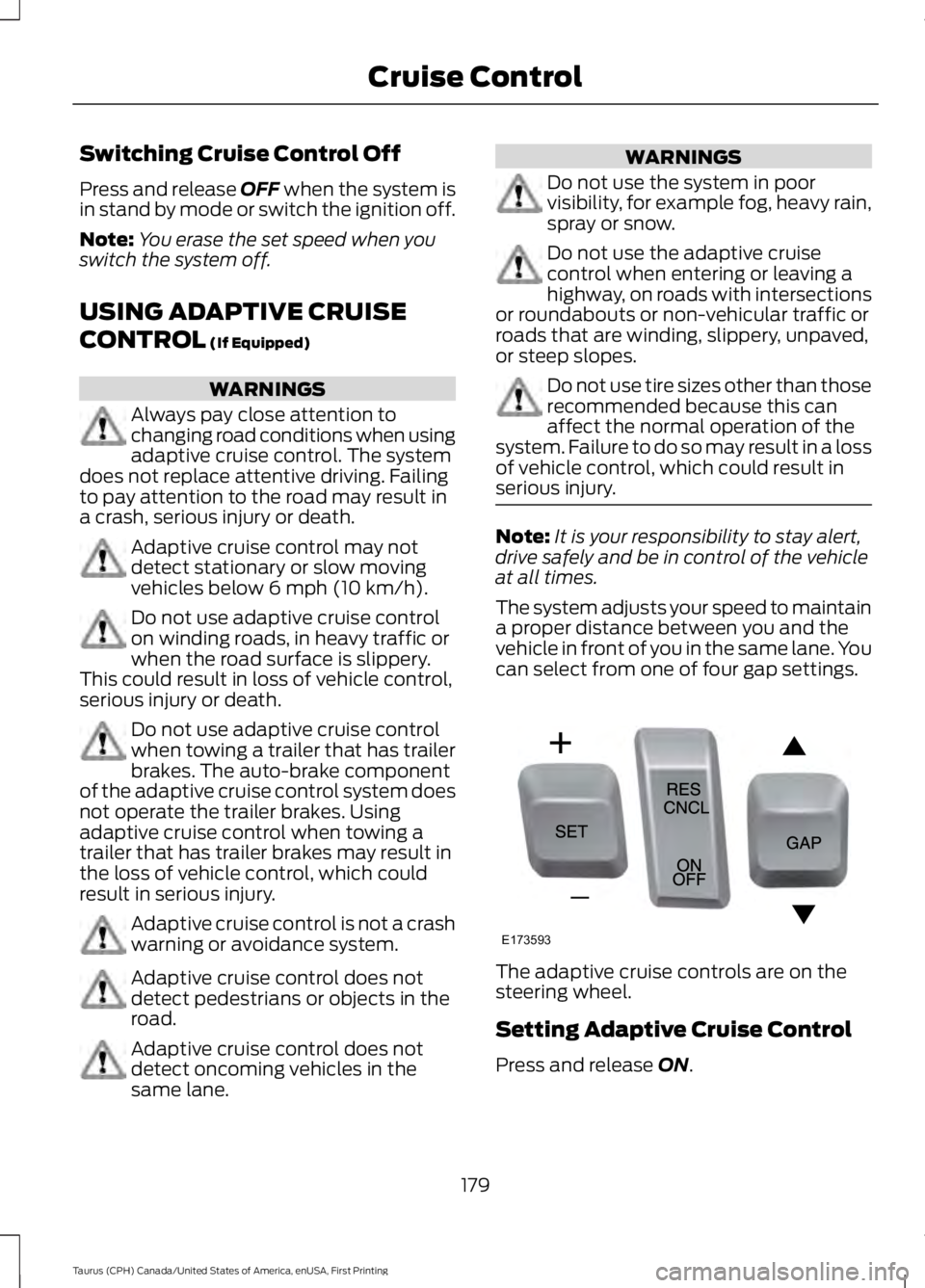
The adaptive cruise controls are on thesteering wheel.
Setting Adaptive Cruise Control
Press and release ON.
179
Taurus (CPH) Canada/United States of America, enUSA, First Printing
Cruise ControlE173593
Page 186 of 504
Switching the System Off
Note:The set speed memory erases whenyou switch off the system.
Press and release OFF or turn off theignition.
Detection Issues
WARNING
On rare occasions, detection issuescan occur due to the roadinfrastructures, for example bridges,tunnels and safety barriers. In these cases,the system may brake late orunexpectedly. At all times, you areresponsible for controlling your vehicle,supervising the system and intervening, ifrequired.
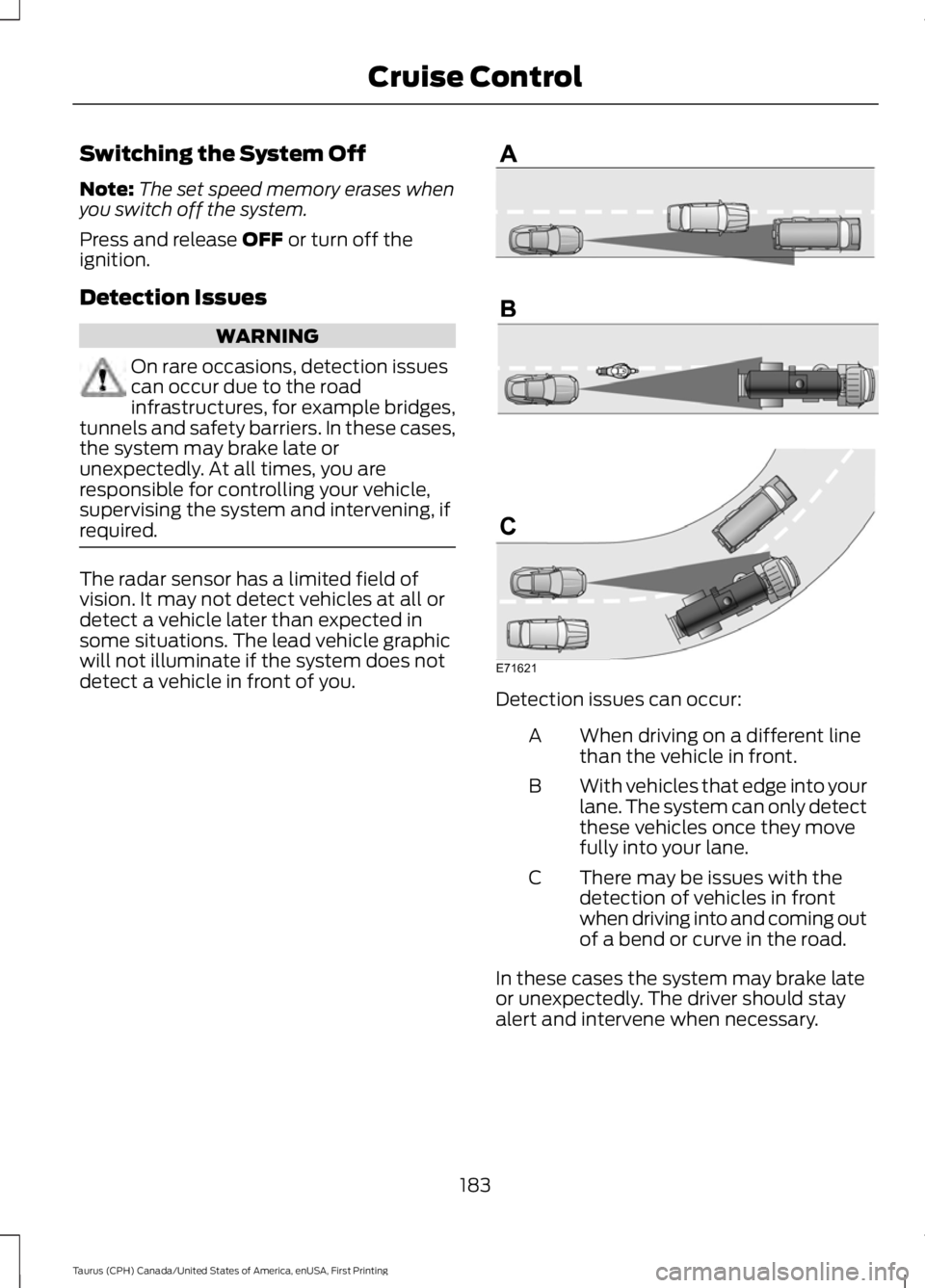
The radar sensor has a limited field ofvision. It may not detect vehicles at all ordetect a vehicle later than expected insome situations. The lead vehicle graphicwill not illuminate if the system does notdetect a vehicle in front of you.Detection issues can occur:
When driving on a different linethan the vehicle in front.A
With vehicles that edge into yourlane. The system can only detectthese vehicles once they movefully into your lane.
B
There may be issues with thedetection of vehicles in frontwhen driving into and coming outof a bend or curve in the road.
C
In these cases the system may brake lateor unexpectedly. The driver should stayalert and intervene when necessary.
183
Taurus (CPH) Canada/United States of America, enUSA, First Printing
Cruise ControlE71621