ignition FORD TAURUS 2017 Repair Manual
[x] Cancel search | Manufacturer: FORD, Model Year: 2017, Model line: TAURUS, Model: FORD TAURUS 2017Pages: 504, PDF Size: 5.84 MB
Page 189 of 504
DRIVER ALERT (If Equipped)
PRINCIPLE OF OPERATION
WARNINGS
The system is designed to aid thedriver. It is not intended to replaceyour attention and judgment. You arestill responsible to drive with due care andattention.
At all times, you are responsible forcontrolling your vehicle, supervisingthe system and intervening, ifrequired. Failure to take care may result inthe loss of control of your vehicle, seriouspersonal injury or death.
The system may not function if thesensor is blocked.
Take regular rest breaks if you feeltired. Do not wait for the system towarn you.
Certain driving styles may result inthe system warning you even if youare not feeling tired.
In cold and severe weatherconditions the system may notfunction. Rain, snow and spray canall limit sensor performance.
The system will not operate if thesensor cannot track the road lanemarkings.
If damage occurs in the immediatearea surrounding the sensor, haveyour vehicle checked as soon aspossible.
The system may not correctlyoperate if your vehicle is fitted witha suspension kit not approved by us.
Note:Keep the windshield free fromobstructions for example bird droppings,insects and snow or ice.
Note:If the camera is blocked or if thewindshield is damaged, the system may notfunction.
Note:The system will store the on or offsetting in the information display menuthrough ignition cycles.
Note:If enabled in the menu, the systemwill be active at speeds above 40 mph(64 km/h). When below the activationspeed, the information display will informthe driver that the system is unavailable.
The system automatically monitors yourdriving behavior using various inputsincluding the front camera sensor.
If the system detects that your drivingalertness is reduced below a certainthreshold, the system will alert you usinga chime and a message in the clusterdisplay.
USING DRIVER ALERT
Switching the System On and Off
Switch the system on or off using theinformation display. See GeneralInformation (page 89).
When activated, the system will monitoryour alertness level based upon yourdriving behavior in relation to the lanemarkings, and other factors.
System Warnings
Note:The system will not issue warningsbelow approximately 40 mph (64 km/h).
The warning system has two stages. Atfirst, the system issues a temporarywarning that you need to take a rest. Thismessage will only appear for a short time.If the system detects further reduction indriving alertness, it may issue anotherwarning that will remain in the informationdisplay for a longer time. You can press OKon the steering wheel control to clear thewarning.
186
Taurus (CPH) Canada/United States of America, enUSA, First Printing
Driving Aids
Page 190 of 504
System Display
When active the system will runautomatically in the background and onlyissue a warning if required. You can viewthe status at any time using theinformation display. See GeneralInformation (page 89).
The alertness level is shown by six stepsin a colored bar.
The current assessment of your alertnessis within a typical range.
The current assessment of your alertnessindicates that you should rest as soon assafely possible.
The status bar will travel from left to rightas the calculated alertness leveldecreases. As the rest icon is approachedthe color turns from green to yellow to red.
The yellow position indicates the firstwarning is active and the red positionindicates the second warning is active.
Note:If you have recently received awarning; you should consider resting, evenif the current assessment is within thetypical range.
Note:If the camera sensor cannot track theroad lane markings or if your vehicle speeddrops below approximately 40 mph(64 km/h), the alertness level will changeto grey for a short time and the informationdisplay will inform you that the system isunavailable.
Resetting the System
You can reset the system by either:
•Switching the ignition off and on.
•Stopping the vehicle and then openingand closing the driver’s door.
LANE KEEPING SYSTEM (If
Equipped)
WARNINGS
The system is designed to aid thedriver. It is not intended to replaceyour attention and judgment. You arestill responsible to drive with due care andattention.
At all times, you are responsible forcontrolling your vehicle, supervisingthe system and intervening, ifrequired. Failure to take care may result inthe loss of control of your vehicle, seriouspersonal injury or death.
The system is designed to aid thedriver. It is not intended to replaceyour attention and judgment. You arestill responsible to drive with due care andattention.
In cold and severe weatherconditions the system may notfunction. Rain, snow and spray canall limit sensor performance.
If damage occurs in the immediatearea surrounding the sensor, haveyour vehicle checked as soon aspossible.
187
Taurus (CPH) Canada/United States of America, enUSA, First Printing
Driving AidsE131358 E131359
Page 196 of 504
A "blocked" condition can be cleared intwo ways:
•After the blockage in front of thesensors is removed or therainfall/snowfall rate decreases orstops, drive for a few minutes in trafficto allow the sensors to detect passingvehicles.
•By cycling the ignition from ON to OFFand then back ON.
Note:When towing a trailer, the sensorsmay detect the trailer thus causing a falsealert. It may be desirable to turn the BlindSpot Information System off if the falsealerts become annoying.
System Errors
If the system senses a problem with theleft or right sensor, the telltale willilluminate and a message will appear inthe information display. See InformationMessages (page 98).
System Limitations
The system does have its limitations;situations such as severe weatherconditions or debris build-up on the sensormay limit vehicle detection.
The following are other situations that maylimit the system:
•Certain maneuvering of vehiclesentering and exiting the blind zone.
•Vehicles passing through the blind zoneat very fast rates.
•When several vehicles forming aconvoy pass through the blind zone.
Switching the System Off and On
You can temporarily switch the Blind SpotInformation System off in the informationdisplay. See General Information (page89). When the Blind Spot InformationSystem switches off, you will not receivealerts and the information display showsa system off message. The telltale in thecluster also illuminates. When you switchthe Blind Spot Information System on oroff, the alert indicators flash twice.
Note:The system switches back on everytime you start your vehicle.
You can also have the Blind SpotInformation System switched offpermanently at an authorized dealer. Onceswitched off permanently, the system canonly be switched back on at an authorizeddealer.
CROSS TRAFFIC ALERT (If
Equipped)
WARNING
Never use the Cross Traffic Alertsystem as a replacement for usingthe interior and exterior mirrors andlooking over your shoulder before backingout of a parking space. Cross Traffic Alertis not a replacement for careful driving.
Cross Traffic Alert is designed to warn youof vehicles approaching from the sideswhen the transmission is in reverse (R).
Using the System
Cross Traffic Alert turns on when you startthe engine and you shift into reverse (R).Once shifted out of reverse (R), CrossTraffic Alert turns off.
Note:Cross Traffic Alert only functionswhile your transmission is in reverse (R).
193
Taurus (CPH) Canada/United States of America, enUSA, First Printing
Driving Aids
Page 199 of 504
False Alerts
Note:When towing a trailer, the sensorsmay detect the trailer thus causing a falsealert. It may be desirable to turn the BlindSpot Information System off if the falsealerts become annoying.
There may be certain instances when thereis a false alert by the Cross Traffic Alertsystem that illuminates the alert indicatorwith no vehicle in the coverage zone. Someamount of false alerts are normal; they aretemporary and self-correct.
System Errors
If Cross Traffic Alert senses a problem withthe left or right sensor a message willappear in the information display. SeeInformation Messages (page 98).
Switching the System Off and On
You can temporarily switch Cross TrafficAlert off in the information display. SeeInformation Messages (page 98). Whenyou switch Cross Traffic Alert off, you willnot receive alerts and the informationdisplay will display a system off message.
Note:The Cross Traffic Alert switches onwhenever the ignition is switched on andready to provide appropriate alerts whenthe transmission is in reverse (R). CrossTraffic Alert will not remember the lastselected on or off setting.
You can also have Cross Traffic Alertswitched off permanently at an authorizeddealer. Once switched off permanently,the system can only be switched back onat an authorized dealer.
STEERING
Electric Power Steering
WARNINGS
The electric power steering systemhas diagnostic checks thatcontinuously monitor the system. Ifa fault is detected, a message displays inthe information display. Stop your vehicleas soon as it is safe to do so. Switch theignition off. After at least 10 seconds,switch the ignition on and watch theinformation display for a steering systemwarning message. If a steering systemwarning message returns, have the systemchecked by an authorized dealer.
If the system detects an error, youmay not feel a difference in thesteering, however a serious conditionmay exist. Obtain immediate service froman authorized dealer, failure to do so mayresult in loss of steering control.
Your vehicle has an electric power steeringsystem. There is no fluid reservoir. Nomaintenance is required.
If your vehicle loses electrical power whileyou are driving, electric power steeringassistance is lost. The steering system stilloperates and you can steer your vehiclemanually. Manually steering your vehiclerequires more effort.
Extreme continuous steering may increasethe effort required for you to steer yourvehicle. This increased effort preventsoverheating and permanent damage tothe steering system. You do not lose theability to steer your vehicle manually.Typical steering and driving maneuversallow the system to cool and return tonormal operation.
196
Taurus (CPH) Canada/United States of America, enUSA, First Printing
Driving Aids
Page 218 of 504
This program is separate from the NewVehicle Limited Warranty, but the coverageis concurrent with the powertrain coverageperiod of your vehicle.
Canadian customers who require roadsideassistance, call 1-800-665-2006.
Vehicles Sold in Canada: UsingRoadside Assistance
Complete the roadside assistanceidentification card and place it in yourwallet for quick reference.
In Canada, this card is found in theWarranty Guide in the glove compartmentof your vehicle.
Vehicles Sold in Canada: RoadsideAssistance Program Coverage
The service is available 24 hours a day,seven days a week.
Canadian roadside coverage and benefitsmay differ from the U.S. coverage.
For complete program coverage detailsyou may contact your dealer, you can callus in Canada at 1-800-665-2006, or visitour website at www.ford.ca.
HAZARD WARNING FLASHERS
Note:If used when the vehicle is notrunning, the battery will lose charge. Theremay be insufficient power to restart yourvehicle.
The hazard warning button islocated on the instrument panel.Use it when your vehicle iscreating a safety hazard for othermotorists.
•Press the button to turn on the hazardwarning function, and the front andrear direction indicators will flash.
•Press the button again to turn themoff.
FUEL SHUTOFF
WARNING
Failure to inspect and, if necessary,repair fuel leaks after a collision mayincrease the risk of fire and seriousinjury. Ford Motor Company recommendsthat the fuel system be inspected by anauthorized dealer after any collision.
In the event of a moderate to severecollision, this vehicle includes a fuel pumpshutoff feature that stops the flow of fuelto the engine. Not every impact will causea shutoff.
Should your vehicle shut off after acollision, you may restart your vehicle. Forvehicles equipped with a key system:
1. Switch off the ignition.
2. Switch on the ignition.
3. Repeat Steps 1 and 2 to re-enable thefuel pump.
For vehicles equipped with a push buttonstart system:
1. Press the START/STOP button toswitch off the ignition.
2. Press the brake pedal and press theSTART/STOP button to switch on theignition.
3.Remove your foot from the brake pedaland press the START/STOP buttonto switch off the ignition.
4. You can either attempt to start theengine by pressing the brake pedal andthe START/STOP button, or switchon the ignition only by pressing theSTART/STOP button withoutpressing the brake pedal. Both waysre-enable the fuel system.
215
Taurus (CPH) Canada/United States of America, enUSA, First Printing
Roadside Emergencies
Page 232 of 504
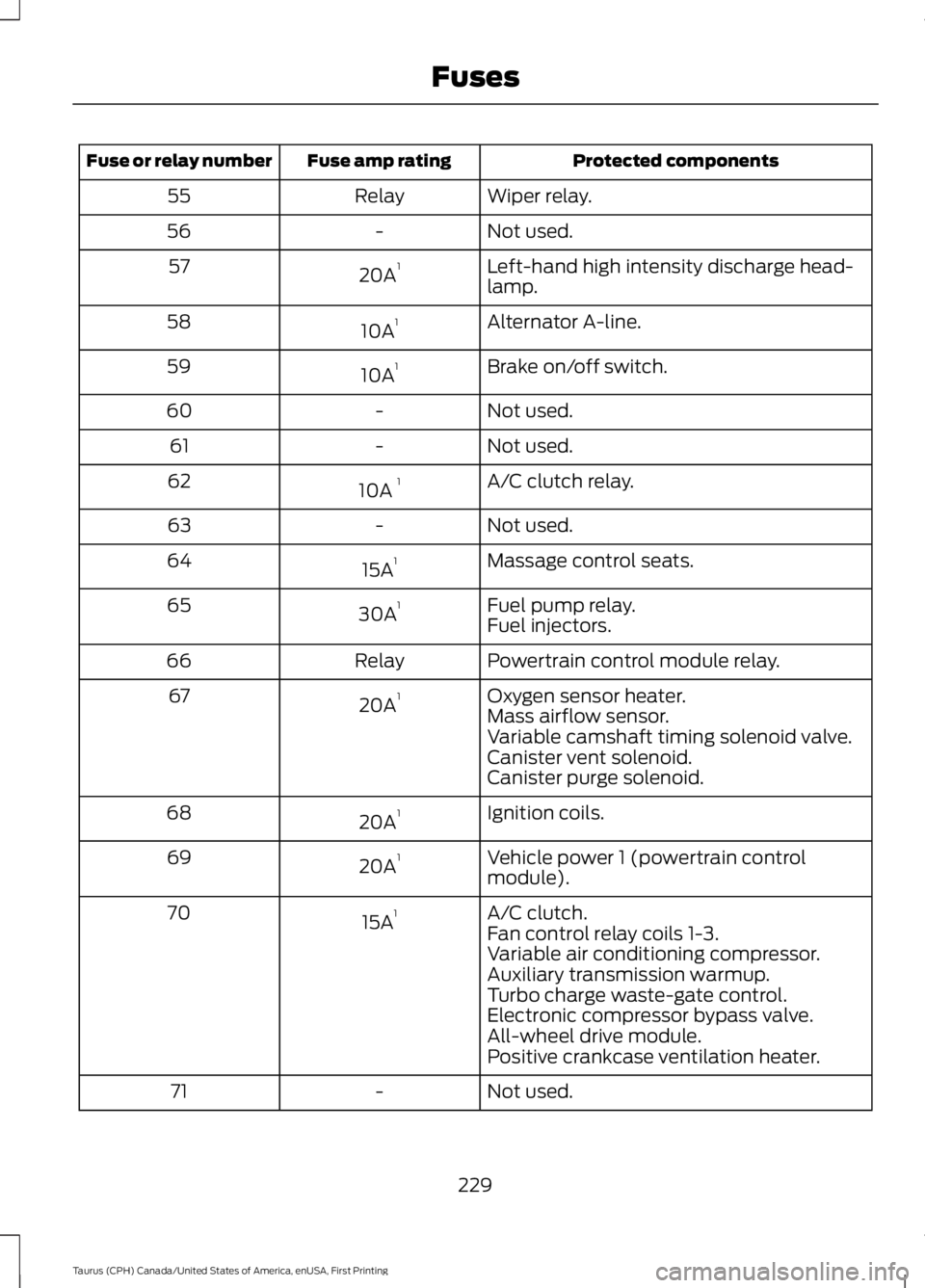
Protected componentsFuse amp ratingFuse or relay number
Wiper relay.Relay55
Not used.-56
Left-hand high intensity discharge head-lamp.20A157
Alternator A-line.10A158
Brake on/off switch.10A159
Not used.-60
Not used.-61
A/C clutch relay.10A 162
Not used.-63
Massage control seats.15A164
Fuel pump relay.30A165Fuel injectors.
Powertrain control module relay.Relay66
Oxygen sensor heater.20A167Mass airflow sensor.Variable camshaft timing solenoid valve.Canister vent solenoid.Canister purge solenoid.
Ignition coils.20A168
Vehicle power 1 (powertrain controlmodule).20A169
A/C clutch.15A170Fan control relay coils 1-3.Variable air conditioning compressor.Auxiliary transmission warmup.Turbo charge waste-gate control.Electronic compressor bypass valve.All-wheel drive module.Positive crankcase ventilation heater.
Not used.-71
229
Taurus (CPH) Canada/United States of America, enUSA, First Printing
Fuses
Page 236 of 504
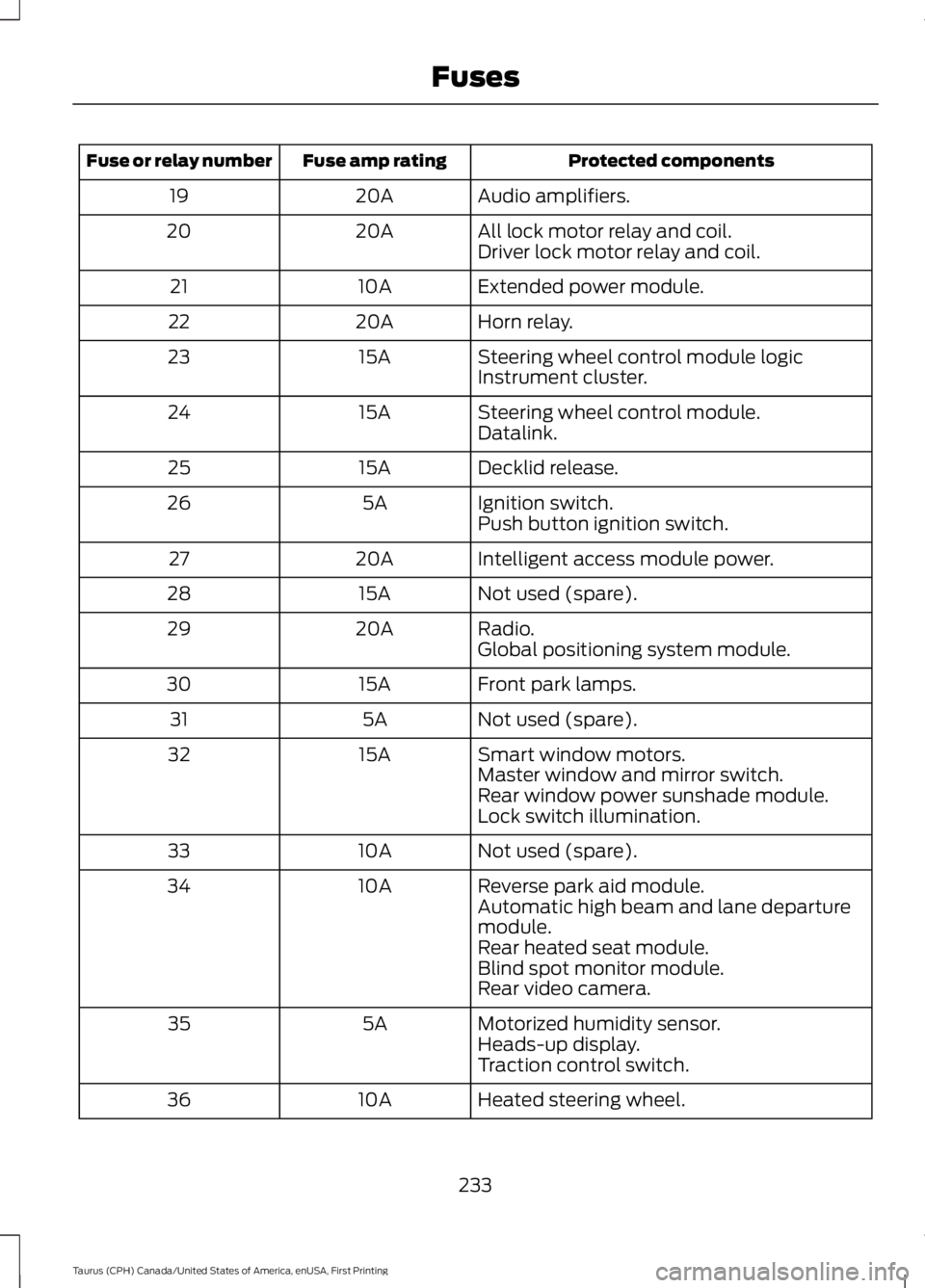
Protected componentsFuse amp ratingFuse or relay number
Audio amplifiers.20A19
All lock motor relay and coil.20A20Driver lock motor relay and coil.
Extended power module.10A21
Horn relay.20A22
Steering wheel control module logic15A23Instrument cluster.
Steering wheel control module.15A24Datalink.
Decklid release.15A25
Ignition switch.5A26Push button ignition switch.
Intelligent access module power.20A27
Not used (spare).15A28
Radio.20A29Global positioning system module.
Front park lamps.15A30
Not used (spare).5A31
Smart window motors.15A32Master window and mirror switch.Rear window power sunshade module.Lock switch illumination.
Not used (spare).10A33
Reverse park aid module.10A34Automatic high beam and lane departuremodule.Rear heated seat module.Blind spot monitor module.Rear video camera.
Motorized humidity sensor.5A35Heads-up display.Traction control switch.
Heated steering wheel.10A36
233
Taurus (CPH) Canada/United States of America, enUSA, First Printing
Fuses
Page 257 of 504
After battery replacement, or in somecases after charging the battery with anexternal charger, the battery managementsystem requires eight hours of vehicle sleeptime to relearn the battery state of charge.During this time your vehicle must remainfully locked with the ignition switched off.
Note:Prior to relearning the battery stateof charge, the battery management systemmay temporarily disable some electricalsystems.
Electrical Accessory Installation
To make sure the battery managementsystem works correctly, do not connect anelectrical device ground connectiondirectly to the battery negative post. Thiscan cause inaccurate measurements ofthe battery condition and potentialincorrect system operation.
Note:If you add electrical accessories orcomponents to the vehicle, it may adverselyaffect battery performance and durability.This may also affect the performance ofother electrical systems in the vehicle.
CHECKING THE WIPER
BLADES
Run the tip of your fingers over the edge ofthe blade to check for roughness.
Clean the wiper blades with washer fluidor water applied with a soft sponge orcloth.
CHANGING THE WIPER
BLADES
Replace the wiper blades at least annuallyfor optimum performance.
You can improve poor wiper quality bycleaning the wiper blades and thewindshield. See Cleaning the Windowsand Wiper Blades (page 262).
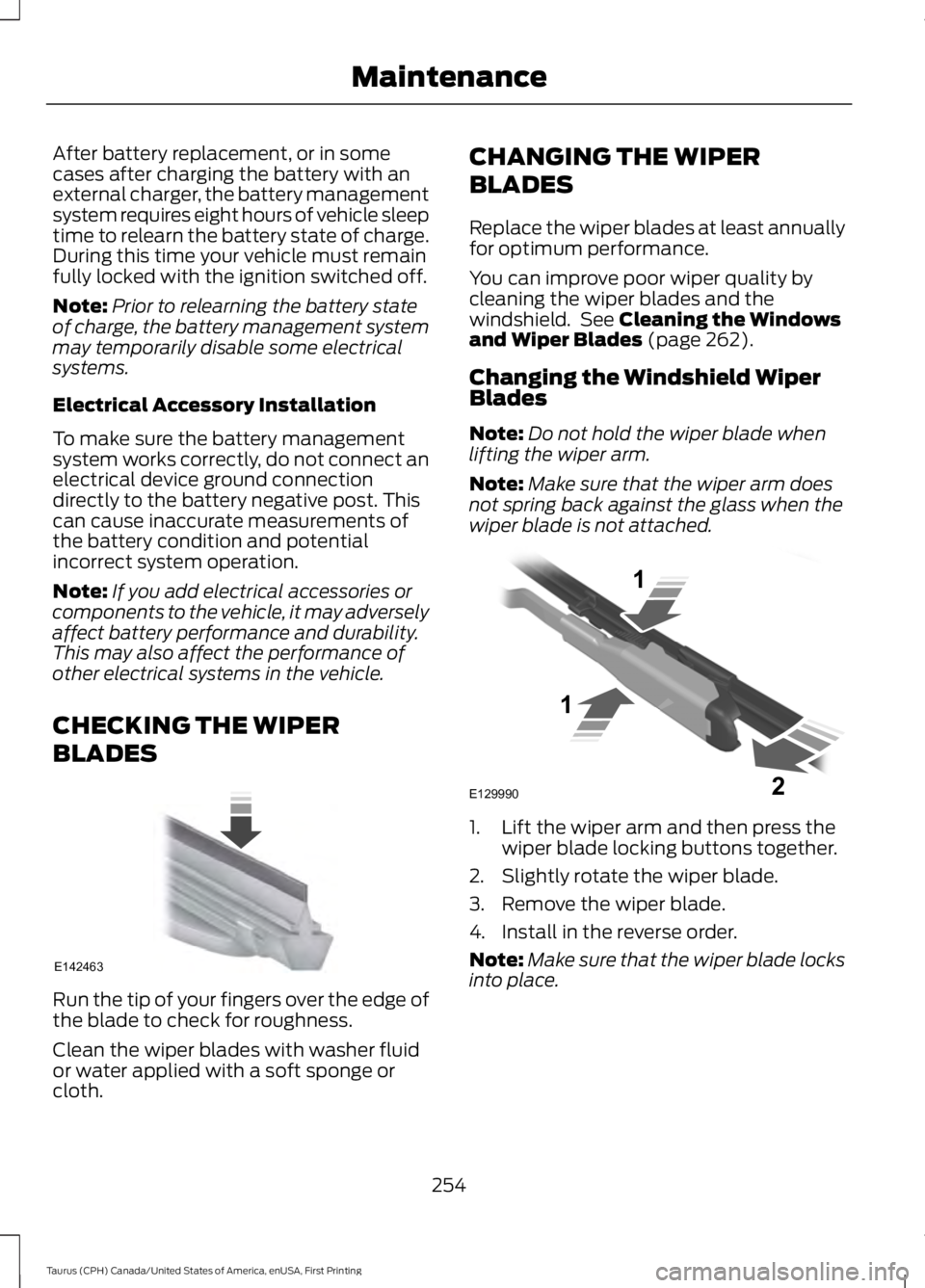
Changing the Windshield WiperBlades
Note:Do not hold the wiper blade whenlifting the wiper arm.
Note:Make sure that the wiper arm doesnot spring back against the glass when thewiper blade is not attached.
1. Lift the wiper arm and then press thewiper blade locking buttons together.
2. Slightly rotate the wiper blade.
3. Remove the wiper blade.
4. Install in the reverse order.
Note:Make sure that the wiper blade locksinto place.
254
Taurus (CPH) Canada/United States of America, enUSA, First Printing
MaintenanceE142463 E129990
1
1 2
Page 259 of 504
5. Locate the vertical adjuster on eachheadlamp. Use a Phillips #2screwdriver to turn the adjuster eitherclockwise or counterclockwise toadjust the vertical aim of theheadlamp. The horizontal edge of thebrighter light should touch thehorizontal reference line.
6.Repeat Steps 3 through 7 to adjust theother headlamp.
7.Close the hood and turn off the lamps.
Horizontal Aim Adjustment
Horizontal aim is not required for thisvehicle and is not adjustable.
CHANGING A BULB
WARNINGS
Bulbs can become hot. Let the bulbcool down before removing it. Failureto do so could result in personalinjury.
Switch the lamps and the ignition off.Failure to follow this warning couldresult in serious personal injury.
Use the correct specification bulb. SeeBulb Specification Chart (page 257).
Install in the reverse order unless otherwisestated.
High-Intensity DischargeHeadlamps
These lamps operate at a high voltage. Seean authorized dealer if they fail.
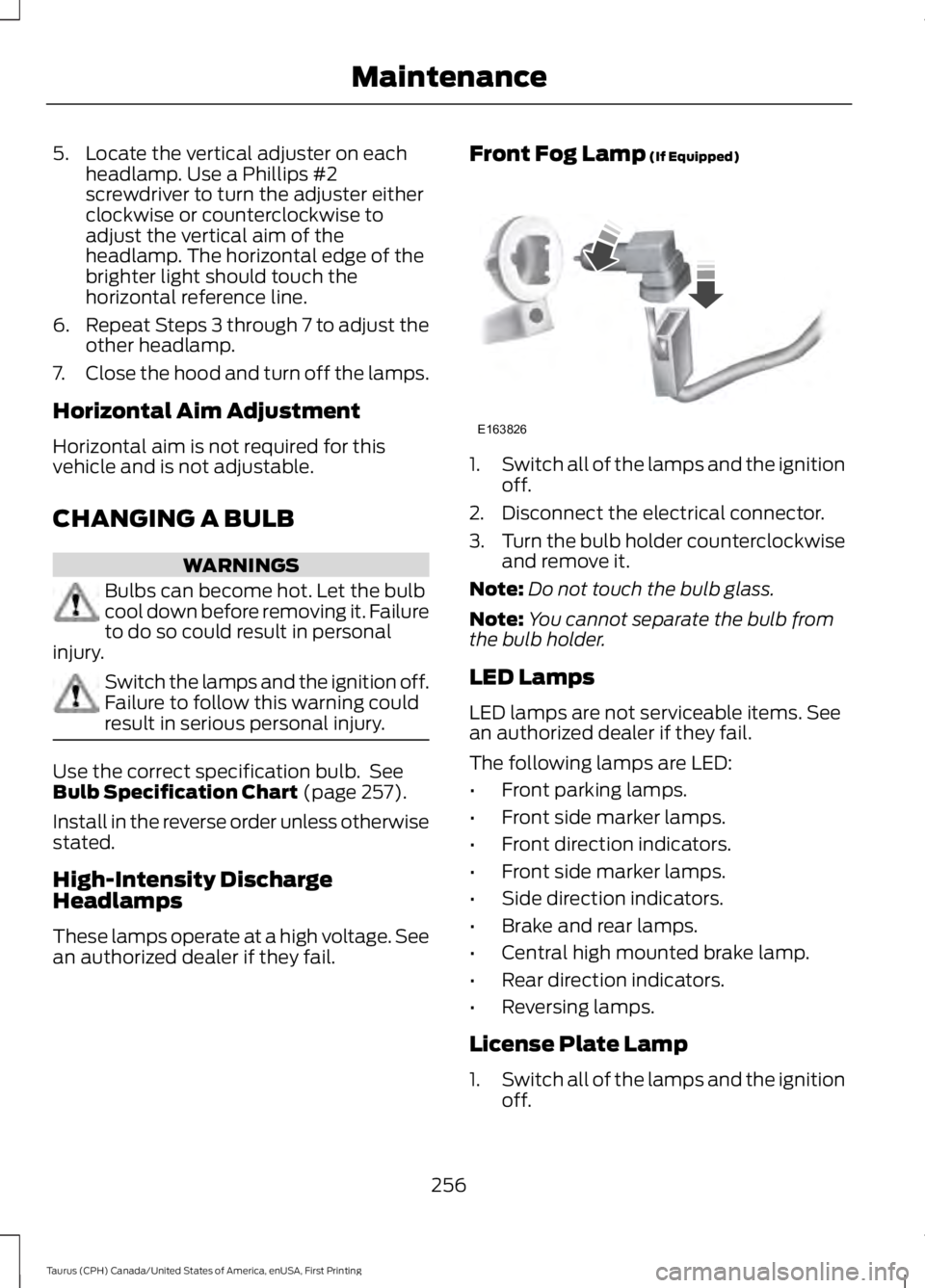
Front Fog Lamp (If Equipped)
1.Switch all of the lamps and the ignitionoff.
2. Disconnect the electrical connector.
3.Turn the bulb holder counterclockwiseand remove it.
Note:Do not touch the bulb glass.
Note:You cannot separate the bulb fromthe bulb holder.
LED Lamps
LED lamps are not serviceable items. Seean authorized dealer if they fail.
The following lamps are LED:
•Front parking lamps.
•Front side marker lamps.
•Front direction indicators.
•Front side marker lamps.
•Side direction indicators.
•Brake and rear lamps.
•Central high mounted brake lamp.
•Rear direction indicators.
•Reversing lamps.
License Plate Lamp
1.Switch all of the lamps and the ignitionoff.
256
Taurus (CPH) Canada/United States of America, enUSA, First Printing
MaintenanceE163826
Page 262 of 504
CHANGING THE ENGINE AIR
FILTER
WARNING
Do not start the engine with the aircleaner removed. This can causedamage not covered by the vehicleWarranty and can result in serious injury.
When changing the air filter element, useonly the air filter element listed. SeeCapacities and Specifications (page297).
For vehicles with EcoBoost engines, whenservicing the air cleaner, it is important thatno foreign material enters the air inductionsystem. The engine and turbocharger aresusceptible to damage from even smallparticles.
Change the air filter element at the correctinterval. See Scheduled Maintenance(page 447).
Note: Failure to use the correct air filterelement may result in severe enginedamage. Resulting component damagemay not be covered by the vehicle Warranty.
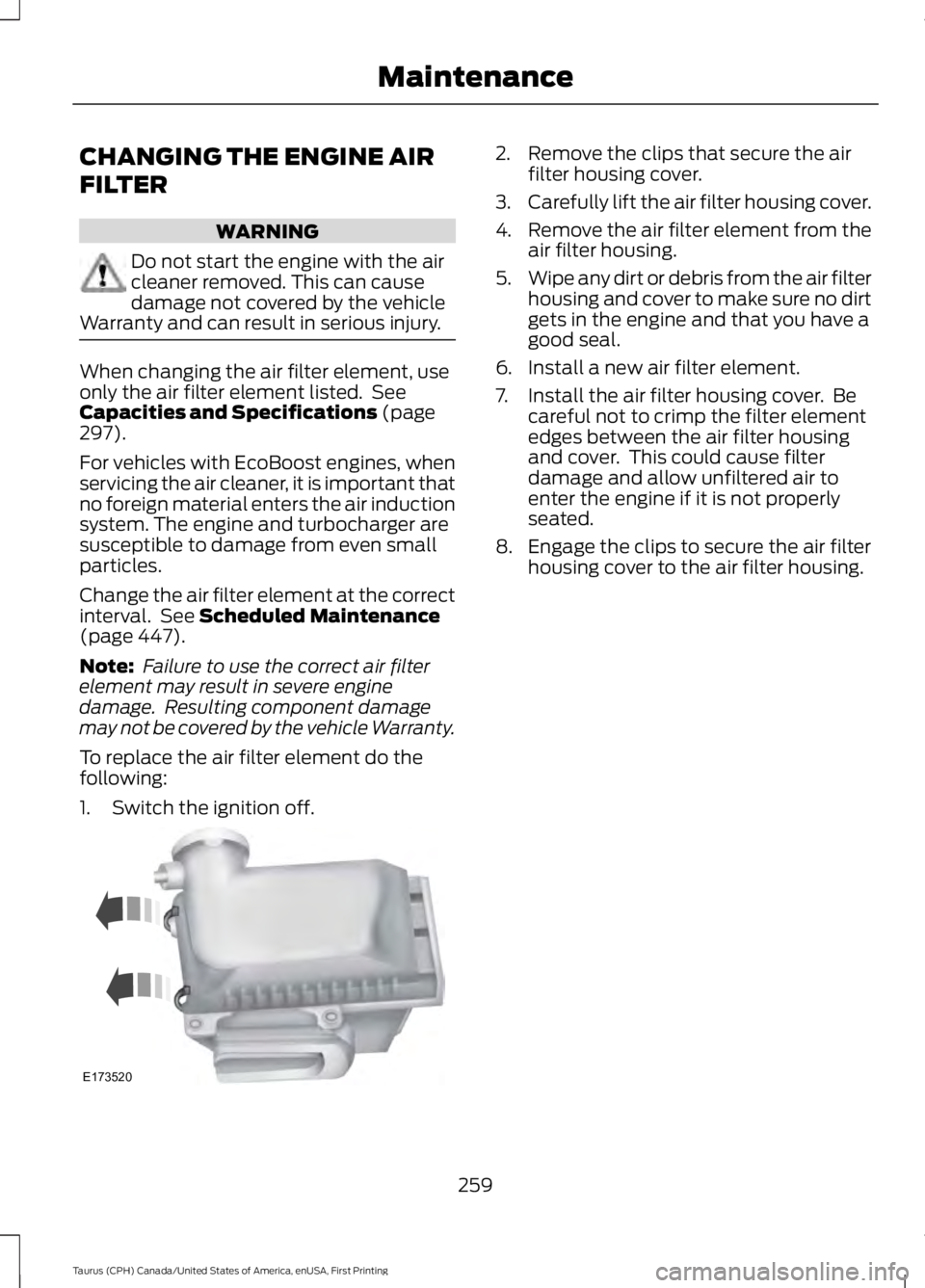
To replace the air filter element do thefollowing:
1. Switch the ignition off.
2. Remove the clips that secure the airfilter housing cover.
3.Carefully lift the air filter housing cover.
4.Remove the air filter element from theair filter housing.
5.Wipe any dirt or debris from the air filterhousing and cover to make sure no dirtgets in the engine and that you have agood seal.
6. Install a new air filter element.
7. Install the air filter housing cover. Becareful not to crimp the filter elementedges between the air filter housingand cover. This could cause filterdamage and allow unfiltered air toenter the engine if it is not properlyseated.
8. Engage the clips to secure the air filterhousing cover to the air filter housing.
259
Taurus (CPH) Canada/United States of America, enUSA, First Printing
MaintenanceE173520