warning FORD TRANSIT 2015 5.G Owners Manual
[x] Cancel search | Manufacturer: FORD, Model Year: 2015, Model line: TRANSIT, Model: FORD TRANSIT 2015 5.GPages: 461, PDF Size: 5.82 MB
Page 177 of 461
•
Reduce the use of air conditioning and
heat.
• Avoid using speed control in hilly
terrain.
• Do not rest your foot on the brake
pedal while driving.
• Avoid carrying unnecessary weight
(approximately 1 mpg [0.4
kilometers/liter] is lost for every 400
lbs [180 kilograms] of weight carried).
• Avoid adding particular accessories to
your vehicle (e.g. bug deflectors,
rollbars/light bars, running boards, ski
racks).
• Avoid driving with the wheels out of
alignment.
COLD WEATHER
PRECAUTIONS
The functional operation of some
components and systems can be affected
at temperatures below -13°F (-25°C).
DRIVING THROUGH WATER WARNINGS
Drive through water in an emergency
only and not as part of normal
driving.
Engine damage can occur if water
enters the air filter.
In an emergency, you can drive your vehicle
through water to a maximum depth of 8
inches (200 millimeters) and at a
maximum speed of 6 mph (10 km/h). You
must take extra care when driving through
flowing water. When driving in water, maintain a low
speed and do not stop your vehicle. After
driving through water and as soon as it is
safe to do so:
•
Depress the brake pedal lightly to
check that the brakes are functioning
correctly.
• Check that the horn works.
• Check that your vehicle's lamps are
fully operational.
• Check the power assistance
of the steering system.
FLOOR MATS WARNINGS
Always use floor mats that are
designed to fit the foot well of your
vehicle. Only use floor mats that
leave the pedal area unobstructed. Only
use floor mats that are firmly secured to
retention posts so that they cannot slip out
of position and interfere with the pedals
or impair safe operation of your vehicle in
other ways. Pedals that cannot move freely can
cause loss of vehicle control and
increase the risk of serious personal
injury. Always make sure that the floor
mats are properly attached to the
retention posts in the carpet that are
supplied with your vehicle. Floor mats must
be properly secured to both retention posts
to make sure mats do not shift out of
position. Never place floor mats or any other
covering in the vehicle foot well that
cannot be properly secured to
prevent them from moving and interfering
with the pedals or the ability to control the
vehicle.
174 Transit (TTH) Canada/United States of America, enUSA, Edition date: 03/2014 Driving Hints
Page 178 of 461
WARNINGS
Never place floor mats or any other
covering on top of already installed
floor mats. Floor mats should always
rest on top of vehicle carpeting surface and
not another floor mat or other covering.
Additional floor mats or any other covering
will reduce the pedal clearance and
potentially interfere with pedal operation. Check attachment of floor mats on
a regular basis. Always properly
reinstall and secure floor mats that
have been removed for cleaning or
replacement. Always make sure that objects
cannot fall into the driver foot well
while the vehicle is moving. Objects
that are loose can become trapped under
the pedals causing a loss of vehicle control. Failure to properly follow floor mat
installation or attachment
instructions can potentially cause
interference with pedal operation causing
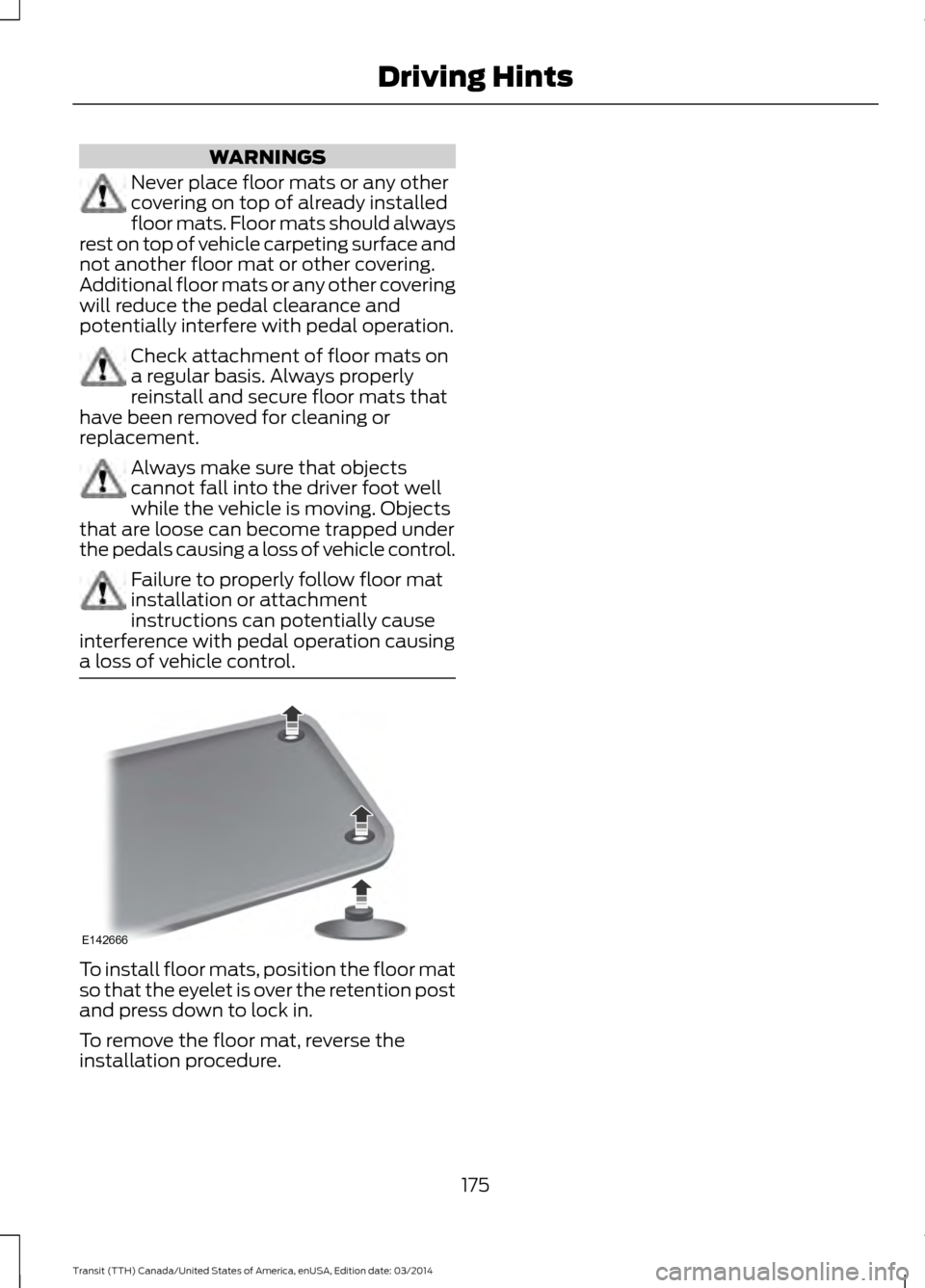
a loss of vehicle control. To install floor mats, position the floor mat
so that the eyelet is over the retention post
and press down to lock in.
To remove the floor mat, reverse the
installation procedure.
175Transit (TTH) Canada/United States of America, enUSA, Edition date: 03/2014 Driving HintsE142666
Page 180 of 461
Canadian roadside coverage and benefits
may differ from the U.S. coverage. If you
require more information, please refer to
the coverage section of your warranty
guide, call us in Canada at
1-800-665-2006, or visit our website at
www.ford.ca.
Sykes Assistance Services Corporation
administers the Roadside Assistance
program. You must receive covered
services in Canada or the continental
United States. Coverage extends to
vehicles that use public, non-seasonal,
annually traveled roadways. Roadside
Assistance coverage does not extend to
vehicles involved in cross-country driving,
logging, autocross and any other form of
off-road use. Well maintained roads and
surfaces help ensure safe travel for the
supplier, and allow their representatives
to perform service as per the standard
operating procedures.
In Remote Locations
If our supplier cannot take your vehicle by
road to the nearest authorized dealership,
transportation by rail or water may be
necessary. The program covers a tow to
the dock or rail terminal and also to the
dealership at the end of the trip.
For rail or water transportation, however,
contact your authorized dealer to confirm
if you are eligible for additional coverage
before you authorize or pay for the service.
Call the Ford Roadside Assistance at
1-800-665-2006 for additional
information.
HAZARD WARNING FLASHERS The hazard warning button is located on
the instrument panel. Switch the hazard
warning flashers on when your vehicle is
creating a safety hazard.
Press the button to switch the hazard
warning flashers on. The front and rear
direction indicators will flash.
Press the button again to switch the
hazard warning flashers off.
Note:
Prolonged use of the hazard warning
flashers will cause the battery to run out of
charge. There may be insufficient power to
restart the engine.
FUEL SHUTOFF WARNING
Failure to inspect and, if necessary,
repair fuel leaks after a collision may
increase the risk of fire and serious
injury. Ford Motor Company recommends
that the fuel system be inspected by an
authorized dealer after any collision. In the event of a moderate to severe
collision, this vehicle includes a fuel pump
shutoff feature that stops the flow of fuel
to the engine. Not every impact will cause
a shutoff.
Should your vehicle shut off after a
collision, you may restart your vehicle. For
vehicles equipped with a key system:
1. Switch off the ignition.
2. Switch on the ignition.
3. Repeat Steps 1 and 2 to re-enable the
fuel pump.
Note: When you try to restart your vehicle
after a fuel shutoff, the vehicle makes sure
that various systems are safe to restart.
Once your vehicle determines that the
systems are safe, then the vehicle will allow
you to restart.
177 Transit (TTH) Canada/United States of America, enUSA, Edition date: 03/2014 Roadside EmergenciesE71943
Page 181 of 461
Note:
In the event that your vehicle does
not restart after your third attempt, contact
an authorized dealer.
JUMP STARTING THE VEHICLE WARNINGS
The gases around the battery can
explode if exposed to flames, sparks
or lit cigarettes. An explosion could
result in personal injury or vehicle damage. Batteries contain sulfuric acid which
can burn skin, eyes and clothing, if
contacted.
Use only an adequate-sized cable
with insulated clamps.
Preparing Your Vehicle
Note:
Do not attempt to push-start your
automatic transmission vehicle. Automatic
transmissions do not have push-start
capability. Attempting to push-start a
vehicle with an automatic transmission may
cause transmission damage.
Note: Use only a 12-volt supply to start your
vehicle.
Note: Do not disconnect the battery of the
disabled vehicle as this could damage the
vehicle's electrical system.
Park the booster vehicle close to the hood
of the disabled vehicle, making sure the
two vehicles do not touch, and switch off
all accessories.
Your vehicle has a positive (+) access
terminal and a negative (-) grounding
connection point that you can access
under the hood, even though the actual
battery is under the driver seat. You can
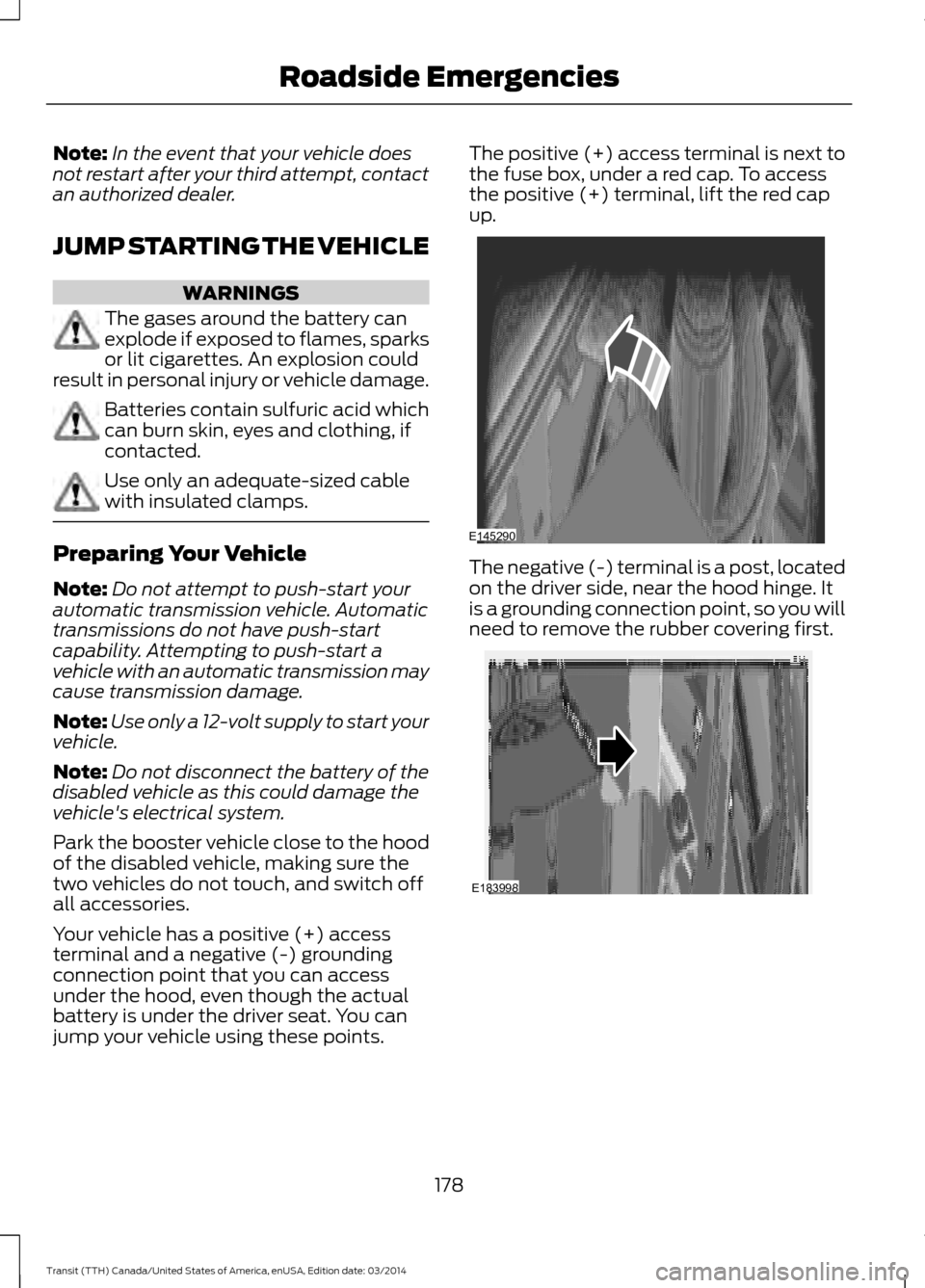
jump your vehicle using these points. The positive (+) access terminal is next to
the fuse box, under a red cap. To access
the positive (+) terminal, lift the red cap
up.
The negative (-) terminal is a post, located
on the driver side, near the hood hinge. It
is a grounding connection point, so you will
need to remove the rubber covering first.
178
Transit (TTH) Canada/United States of America, enUSA, Edition date: 03/2014 Roadside EmergenciesE145290 E183998
Page 182 of 461
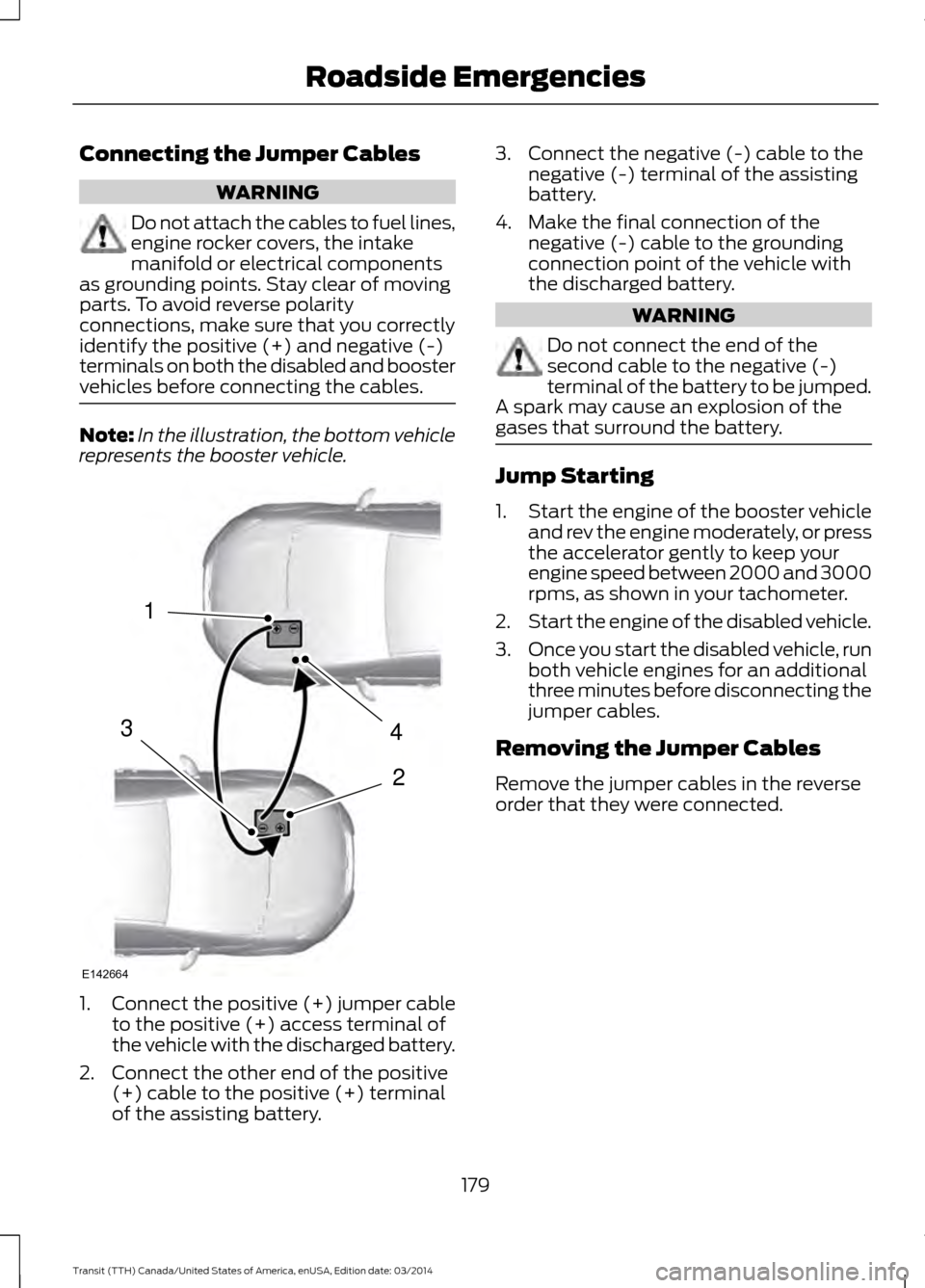
Connecting the Jumper Cables
WARNING
Do not attach the cables to fuel lines,
engine rocker covers, the intake
manifold or electrical components
as grounding points. Stay clear of moving
parts. To avoid reverse polarity
connections, make sure that you correctly
identify the positive (+) and negative (-)
terminals on both the disabled and booster
vehicles before connecting the cables. Note:
In the illustration, the bottom vehicle
represents the booster vehicle. 1.
Connect the positive (+) jumper cable
to the positive (+) access terminal of
the vehicle with the discharged battery.
2. Connect the other end of the positive (+) cable to the positive (+) terminal
of the assisting battery. 3. Connect the negative (-) cable to the
negative (-) terminal of the assisting
battery.
4. Make the final connection of the negative (-) cable to the grounding
connection point of the vehicle with
the discharged battery. WARNING
Do not connect the end of the
second cable to the negative (-)
terminal of the battery to be jumped.
A spark may cause an explosion of the
gases that surround the battery. Jump Starting
1.
Start the engine of the booster vehicle
and rev the engine moderately, or press
the accelerator gently to keep your
engine speed between 2000 and 3000
rpms, as shown in your tachometer.
2. Start the engine of the disabled vehicle.
3. Once you start the disabled vehicle, run
both vehicle engines for an additional
three minutes before disconnecting the
jumper cables.
Removing the Jumper Cables
Remove the jumper cables in the reverse
order that they were connected.
179 Transit (TTH) Canada/United States of America, enUSA, Edition date: 03/2014 Roadside Emergencies4
2
1
3
E142664
Page 201 of 461
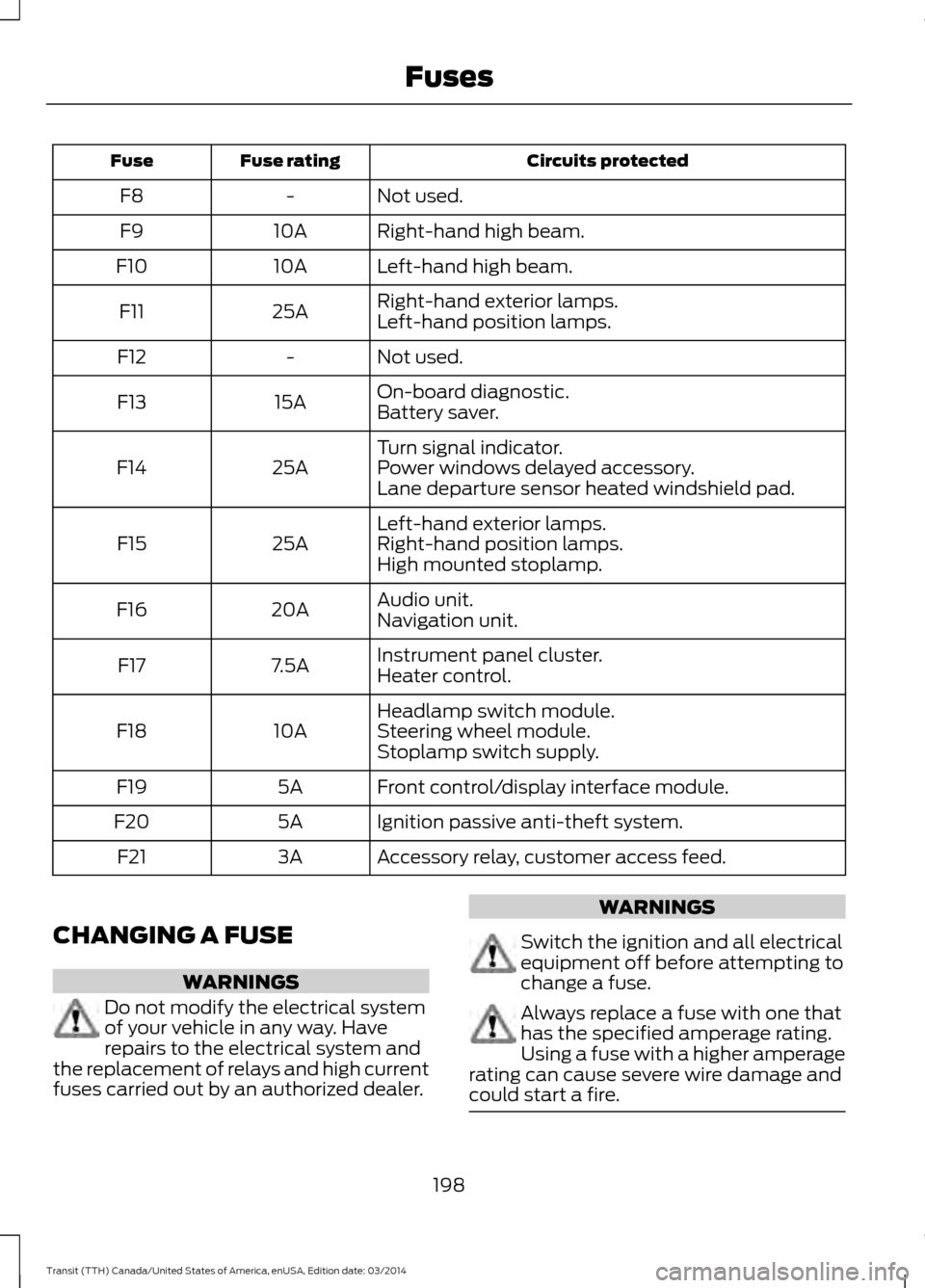
Circuits protected
Fuse rating
Fuse
Not used.
-
F8
Right-hand high beam.
10A
F9
Left-hand high beam.
10A
F10
Right-hand exterior lamps.
25A
F11
Left-hand position lamps.
Not used.
-
F12
On-board diagnostic.
15A
F13
Battery saver.
Turn signal indicator.
25A
F14 Power windows delayed accessory.
Lane departure sensor heated windshield pad.
Left-hand exterior lamps.
25A
F15 Right-hand position lamps.
High mounted stoplamp.
Audio unit.
20A
F16
Navigation unit.
Instrument panel cluster.
7.5A
F17
Heater control.
Headlamp switch module.
10A
F18 Steering wheel module.
Stoplamp switch supply.
Front control/display interface module.
5A
F19
Ignition passive anti-theft system.
5A
F20
Accessory relay, customer access feed.
3A
F21
CHANGING A FUSE WARNINGS
Do not modify the electrical system
of your vehicle in any way. Have
repairs to the electrical system and
the replacement of relays and high current
fuses carried out by an authorized dealer. WARNINGS
Switch the ignition and all electrical
equipment off before attempting to
change a fuse.
Always replace a fuse with one that
has the specified amperage rating.
Using a fuse with a higher amperage
rating can cause severe wire damage and
could start a fire. 198
Transit (TTH) Canada/United States of America, enUSA, Edition date: 03/2014 Fuses
Page 203 of 461
GENERAL INFORMATION
Have your vehicle serviced regularly to help
maintain its roadworthiness and resale
value. There is a large network of Ford
authorized dealers that are there to help
you with their professional servicing
expertise. We believe that their specially
trained technicians are best qualified to
service your vehicle properly and expertly.
They are supported by a wide range of
highly specialized tools developed
specifically for servicing your vehicle.
To help you service your vehicle, we
provide scheduled maintenance
information which makes tracking routine
service easy. See Scheduled
Maintenance (page 433).
If your vehicle requires professional service,
your authorized dealer can provide the
necessary parts and service. Check your
warranty information to find out which
parts and services are covered.
Use only recommended fuels, lubricants,
fluids and service parts conforming to
specifications. Motorcraft® parts are
designed and built to provide the best
performance in your vehicle.
Precautions
• Do not work on a hot engine.
• Make sure that nothing gets caught in
moving parts.
• Do not work on a vehicle with the
engine running in an enclosed space,
unless you are sure you have enough
ventilation.
• Keep all open flames and other burning
material (such as cigarettes) away
from the battery and all fuel related
parts. Working with the Engine Off
1. Set the parking brake and shift to
P
(Park).
2. Turn off the engine and remove the key
(if equipped).
3. Block the wheels.
Working with the Engine On WARNING
To reduce the risk of vehicle damage
and/or personal burn injuries, do not
start your engine with the air cleaner
removed and do not remove it while the
engine is running. 1. Set the parking brake and shift to
P
(Park).
2. Block the wheels
OPENING AND CLOSING THE
HOOD
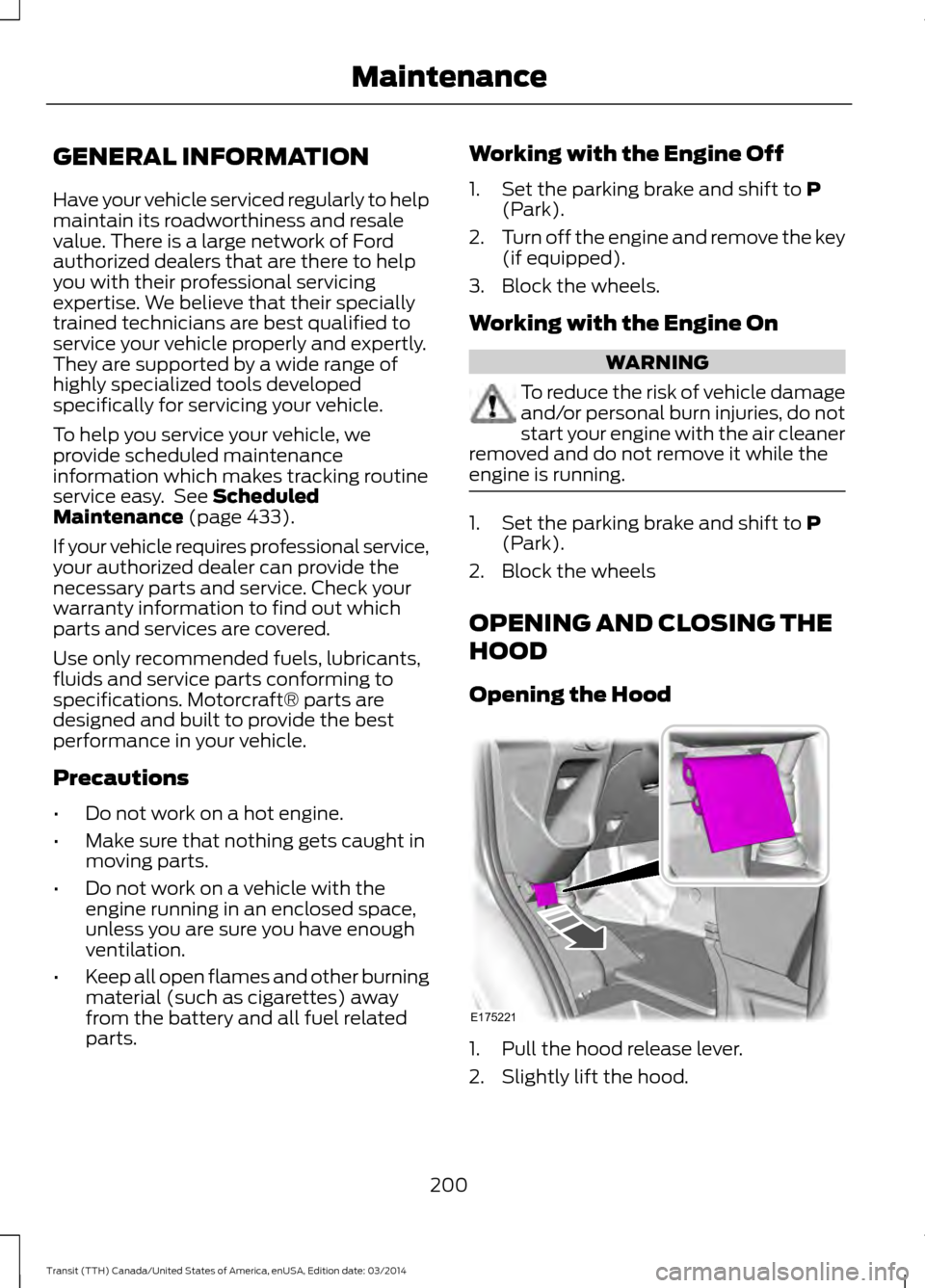
Opening the Hood 1. Pull the hood release lever.
2. Slightly lift the hood.
200 Transit (TTH) Canada/United States of America, enUSA, Edition date: 03/2014 MaintenanceE175221
Page 208 of 461
Adding Engine Oil
WARNINGS
Only add oil when the engine is cold.
If the engine is hot, wait 10 minutes
for the engine to cool down.
Do not remove the filler cap when
the engine is running.
1. Remove the engine oil filler cap.
2. Add engine oil that meets Ford
specifications. See Capacities and
Specifications (page 265).
3. Replace the engine oil filler cap. Turn it until you feel a strong resistance.
Note: Do not add oil further than the
maximum mark. Oil levels above the
maximum mark may cause engine damage.
Note: Soak up any spillage with an
absorbent cloth immediately.
CHANGING THE ENGINE OIL
AND OIL FILTER WARNINGS
Prolonged and repeated skin contact
with mineral oil will result in the
removal of natural fats from the skin,
leading to dryness, irritation and dermatitis.
In addition, used engine oil contains
potentially harmful contaminants, which
may cause skin cancer. If skin contact
occurs, wash the area thoroughly with
soap or skin cleanser and water
immediately. Do not dispose of engine oils or oil
filters in the household refuse or the
public sewage system. Use an
authorized waste disposal facility. Do not remove the oil pan drain plug
when the engine is running. WARNINGS
Do not remove the oil filter when the
engine is running.
1.
Remove the oil pan drain plug and wait
for the oil to drain into a suitable
container.
2. Renew the oil filter.
3. Reinstall the oil pan drain plug.
4. Refill the engine with new oil that meets Ford specifications. See
Capacities and Specifications (page
265).
Note: Do not add oil further than the
maximum mark. Oil levels above the
maximum mark may cause engine damage.
Note: Soak up any spillage with an
absorbent cloth immediately.
5. Reset the Intelligent Oil Life Monitor. See Resetting the Oil Life
Monitoring System.
Engine Lubrication for Severe
Service Operation
The following conditions define severe
service operation. The Intelligent Oil Life
Monitor will determine engine oil and oil
filter change intervals.
• Frequent or extended idling.
• Frequent low-speed operation at
25 mph (40 km/h) or less.
• Frequent severe dust condition
operation.
• Frequent off-road operation.
• Sustained ambient temperatures of
-9°F (-23°C)
or below.
• Sustained ambient temperatures of
100°F (38°C) or above.
• Sustained towing operation above
1000 mi (1,600 km).
205 Transit (TTH) Canada/United States of America, enUSA, Edition date: 03/2014 Maintenance
Page 209 of 461
•
Sustained high-speed driving at Gross
Vehicle Weight Rating (maximum
loaded weight for vehicle operation).
• Sustained use of diesel fuel other than
ultra-low sulfur diesel (ULSD). Resetting the Oil Life Monitoring
System The indicator lamp will
illuminate when the engine oil
and oil filter requires changing.
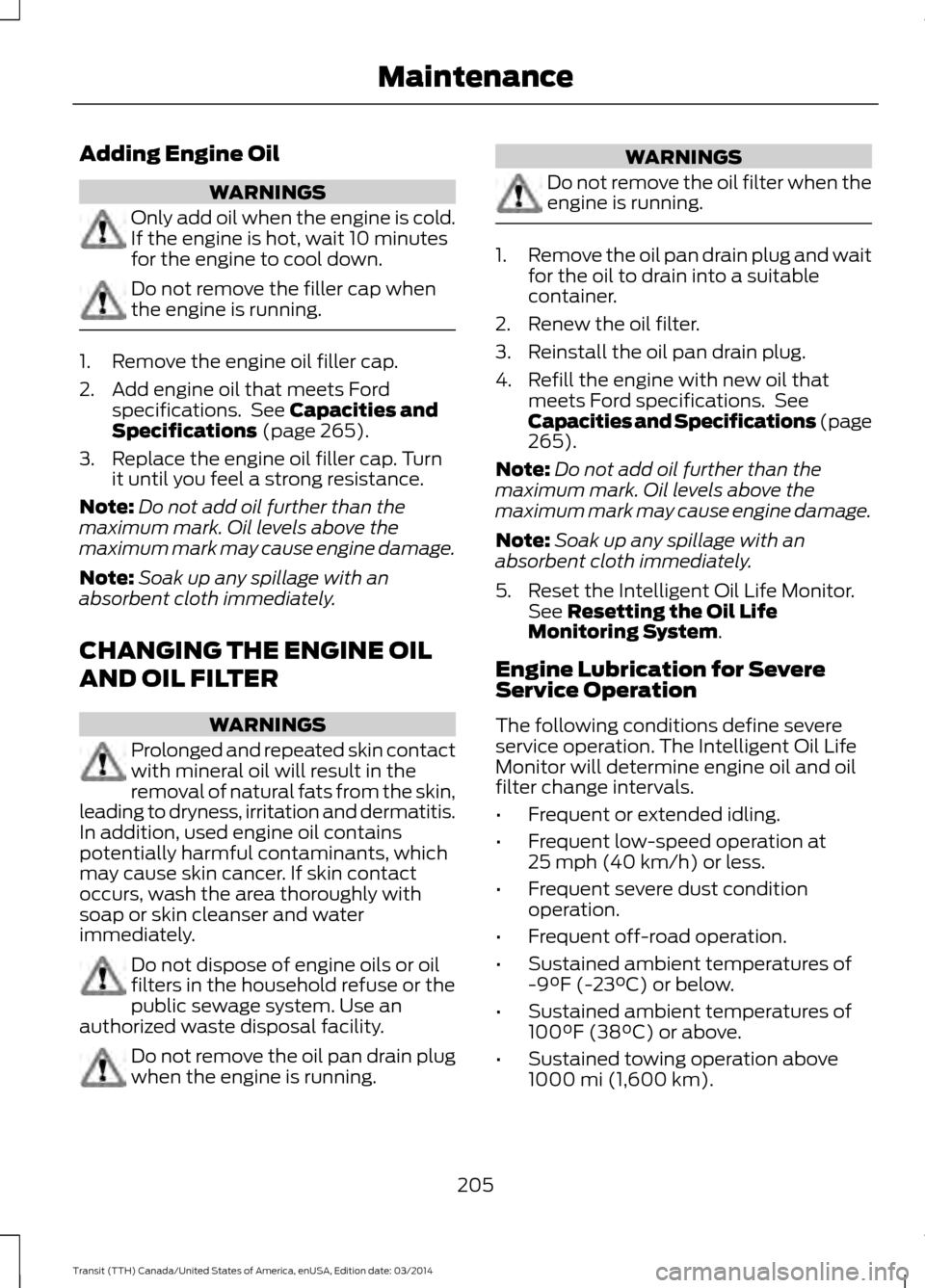
To reset the Oil Life Monitoring System, switch the ignition on, do not start the
engine and scroll to: Action and Description
Message
Fully press the accelerator and brake pedals. Keep both
pedals fully pressed.
Oil change required
The information display will show this message after a short
period of time.
Oil reset in prog.
The information display will show this message after a short
period of time.
Oil reset complete
Release the accelerator and brake pedals and switch the
ignition off.
ENGINE COOLANT CHECK
Checking the Engine Coolant
When the engine is cold, check the
concentration and level of the engine
coolant at the intervals listed in the
scheduled maintenance information. See
Scheduled Maintenance (page 433).
Note: Make sure that the level is between
the MIN and MAX marks on the coolant
reservoir.
Note: Coolant expands when it is hot. The
level may extend beyond the MAX mark.
Note: If the level is at the MIN mark, below
the MIN mark, or empty, add coolant
immediately. See
Adding Engine Coolant
in this chapter.
The coolant concentration should be
maintained within 48% to 50%, which
equates to a freeze point between -29.2°F
(-34°C)
and -34.5°F (-37°C). Note:
For best results, coolant
concentration should be tested with a
refractometer, for example Robinair®
coolant and battery refractometer 75240.
We do not recommend the use of
hydrometers or coolant test strips for
measuring coolant concentrations.
Note: Automotive fluids are not
interchangeable. Do not use engine coolant,
antifreeze or windshield washer fluid outside
of its specified function and vehicle location.
Adding Engine Coolant WARNINGS
Do not add engine coolant when the
engine is hot. Steam and scalding
liquids released from a hot cooling
system can burn you badly. Also, spilling
coolant on hot engine parts can burn you. Do not put engine coolant in the
windshield washer fluid reservoir. If
sprayed on the windshield, engine
coolant could make it difficult to see
through the windshield.
206 Transit (TTH) Canada/United States of America, enUSA, Edition date: 03/2014 Maintenance
Page 210 of 461
WARNINGS
Do not add coolant further than the
MAX mark.
To reduce the risk of personal injury,
make sure the engine is cool before
unscrewing the coolant pressure
relief cap. The cooling system is under
pressure; steam and hot liquid can come
out forcefully when the cap is loosened
slightly. Note:
Do not use stop leak pellets, cooling
system sealants or additives as they can
cause damage to the engine cooling or
heating systems. The vehicle warranty does
not cover this damage.
Note: During normal vehicle operation, the
engine coolant may change color from
orange to pink or light red. As long as the
engine coolant is clear and uncontaminated,
this color change does not indicate that the
engine coolant has degraded or that you
drain the engine coolant, flush the system
or replace the engine coolant. •
Do not mix different colors or types of
coolant in your vehicle. Make sure the
correct coolant is used. Mixing of
engine coolants may harm the engine ’s
cooling system. The use of incorrect
coolant may harm engine and cooling
system components and may void the
warranty. Use prediluted engine
coolant meeting the Ford specification.
See Capacities and Specifications
(page 265).
• In case of emergency, you can add a
large amount of water without engine
coolant in order to reach a vehicle
service location. In this instance, you
must have the cooling system drained,
chemically cleaned with Motorcraft
Premium Cooling System Flush, and
refilled with engine coolant as soon as
possible. Water alone (without engine
coolant) can cause engine damage, for
example corrosion, overheating or
freezing.
• Do not use alcohol, methanol, brine or
any engine coolants mixed with alcohol
or methanol antifreeze. Alcohol and
other liquids can cause engine damage,
for example overheating or freezing.
• Do not add extra inhibitors or additives
to the coolant. These can be harmful
and compromise the corrosion
protection of the engine coolant.
Unscrew the cap slowly. Any pressure will
escape as you unscrew the cap.
Whenever you add coolant, check the
coolant level in the coolant reservoir the
next few times you drive the vehicle. If
necessary, add enough prediluted engine
coolant to bring the coolant level to the
correct level.
Recycled Engine Coolant
We do not recommend the use of recycled
engine coolant since a Ford-approved
recycling process is not yet available.
207 Transit (TTH) Canada/United States of America, enUSA, Edition date: 03/2014 Maintenance