CD player FORD TRANSIT 2016 5.G User Guide
[x] Cancel search | Manufacturer: FORD, Model Year: 2016, Model line: TRANSIT, Model: FORD TRANSIT 2016 5.GPages: 411, PDF Size: 5.65 MB
Page 344 of 411
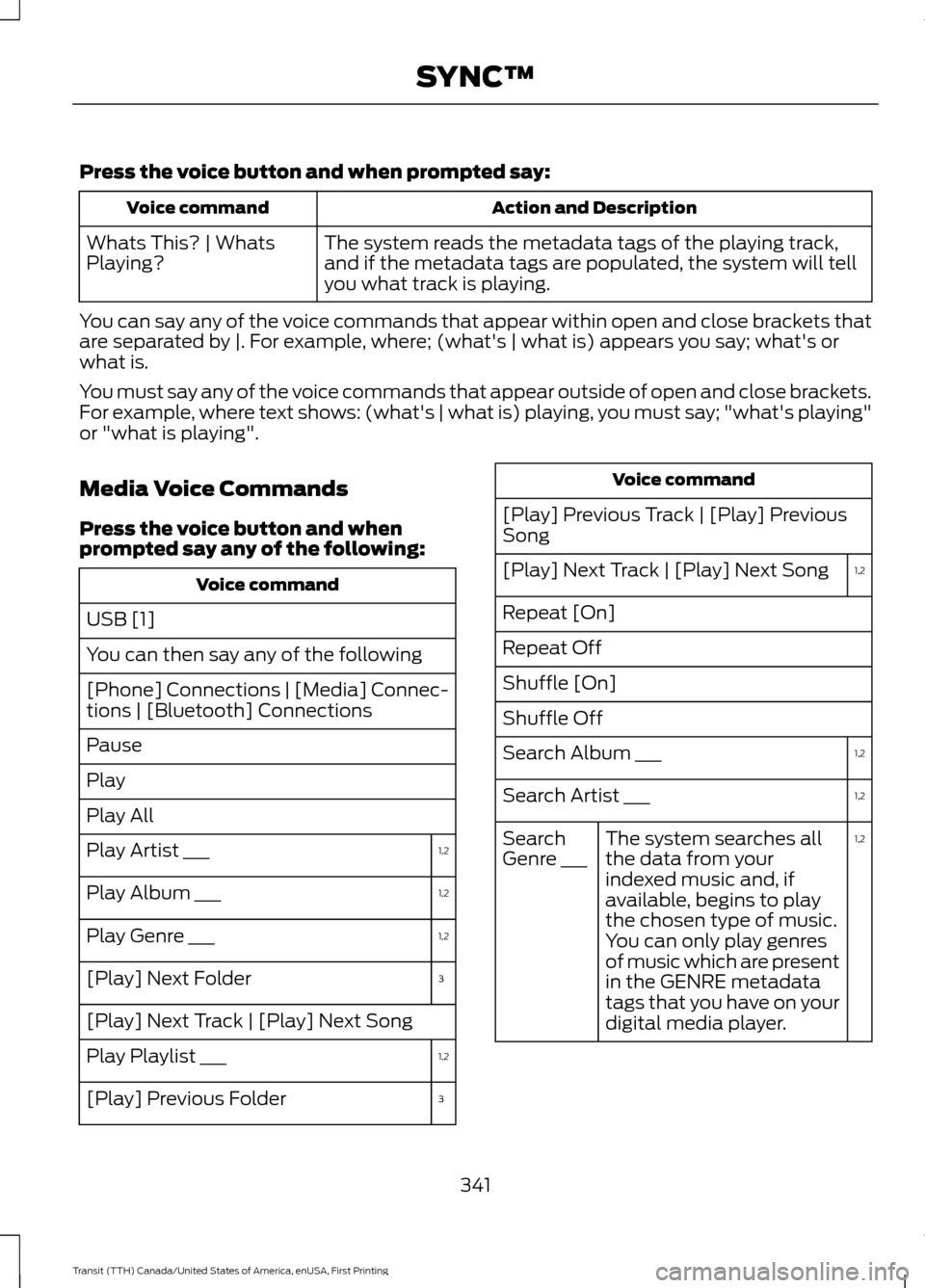
Press the voice button and when prompted say:
Action and Description
Voice command
The system reads the metadata tags of the playing track,
and if the metadata tags are populated, the system will tell
you what track is playing.
Whats This? | Whats
Playing?
You can say any of the voice commands that appear within open and close brackets that
are separated by |. For example, where; (what's | what is) appears you say; what's or
what is.
You must say any of the voice commands that appear outside of open and close brackets.
For example, where text shows: (what's | what is) playing, you must say; "what's playing"
or "what is playing".
Media Voice Commands
Press the voice button and when
prompted say any of the following: Voice command
USB [1]
You can then say any of the following
[Phone] Connections | [Media] Connec-
tions | [Bluetooth] Connections
Pause
Play
Play All 1,2
Play Artist ___
1,2
Play Album ___
1,2
Play Genre ___
3
[Play] Next Folder
[Play] Next Track | [Play] Next Song
1,2
Play Playlist ___
3
[Play] Previous Folder Voice command
[Play] Previous Track | [Play] Previous
Song 1,2
[Play] Next Track | [Play] Next Song
Repeat [On]
Repeat Off
Shuffle [On]
Shuffle Off
1,2
Search Album ___
1,2
Search Artist ___
1,2
The system searches all
the data from your
indexed music and, if
available, begins to play
the chosen type of music.
You can only play genres
of music which are present
in the GENRE metadata
tags that you have on your
digital media player.
Search
Genre ___
341
Transit (TTH) Canada/United States of America, enUSA, First Printing SYNC™
Page 346 of 411
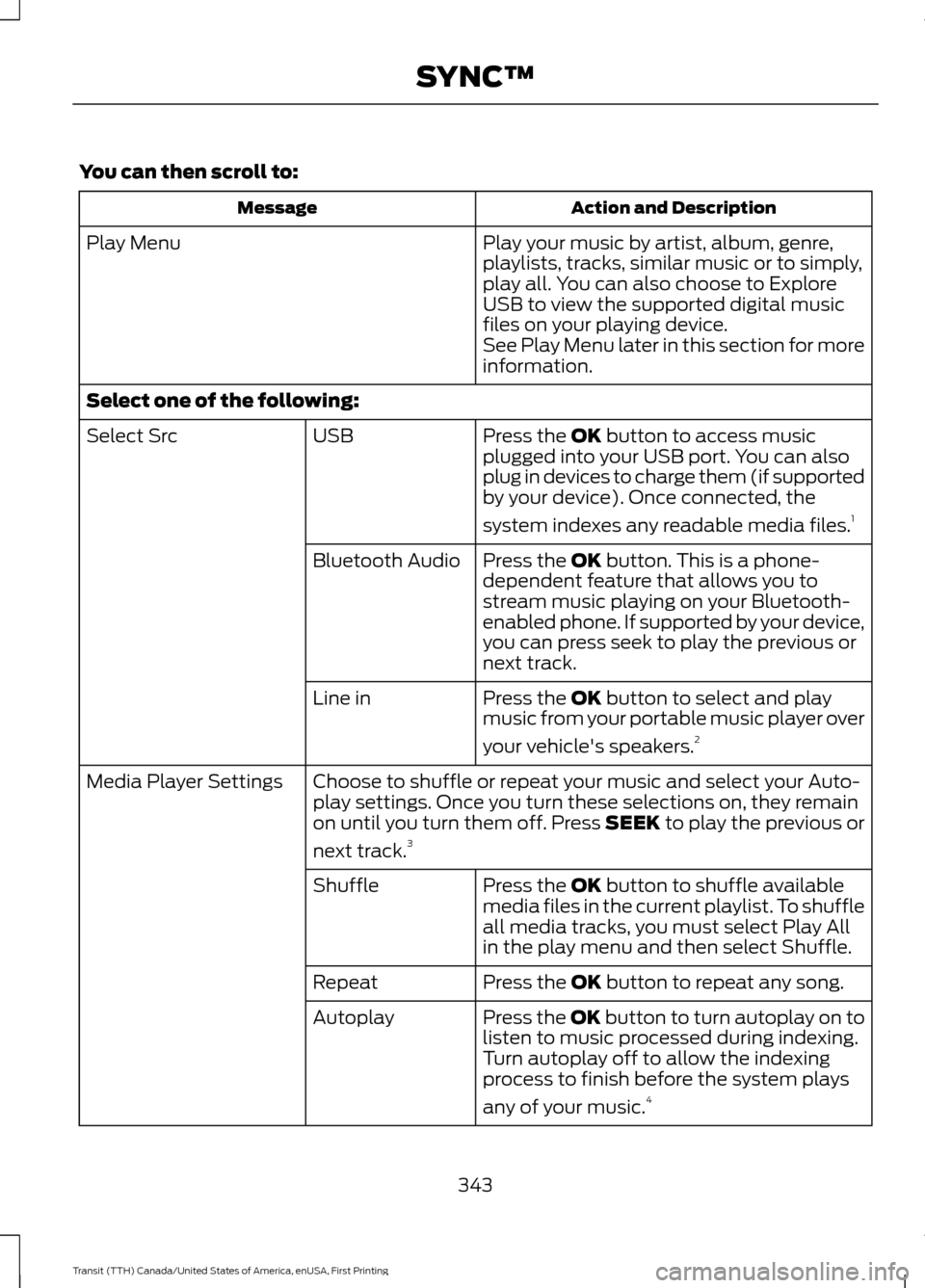
You can then scroll to:
Action and Description
Message
Play your music by artist, album, genre,
playlists, tracks, similar music or to simply,
play all. You can also choose to Explore
USB to view the supported digital music
files on your playing device.
Play Menu
See Play Menu later in this section for more
information.
Select one of the following: Press the OK button to access music
plugged into your USB port. You can also
plug in devices to charge them (if supported
by your device). Once connected, the
system indexes any readable media files. 1
USB
Select Src
Press the
OK button. This is a phone-
dependent feature that allows you to
stream music playing on your Bluetooth-
enabled phone. If supported by your device,
you can press seek to play the previous or
next track.
Bluetooth Audio
Press the
OK button to select and play
music from your portable music player over
your vehicle's speakers. 2
Line in
Choose to shuffle or repeat your music and select your Auto-
play settings. Once you turn these selections on, they remain
on until you turn them off. Press SEEK to play the previous or
next track.
3
Media Player Settings
Press the
OK button to shuffle available
media files in the current playlist. To shuffle
all media tracks, you must select Play All
in the play menu and then select Shuffle.
Shuffle
Press the
OK button to repeat any song.
Repeat
Press the OK button to turn autoplay on to
listen to music processed during indexing.
Turn autoplay off to allow the indexing
process to finish before the system plays
any of your music.4
Autoplay
343
Transit (TTH) Canada/United States of America, enUSA, First Printing SYNC™
Page 347 of 411
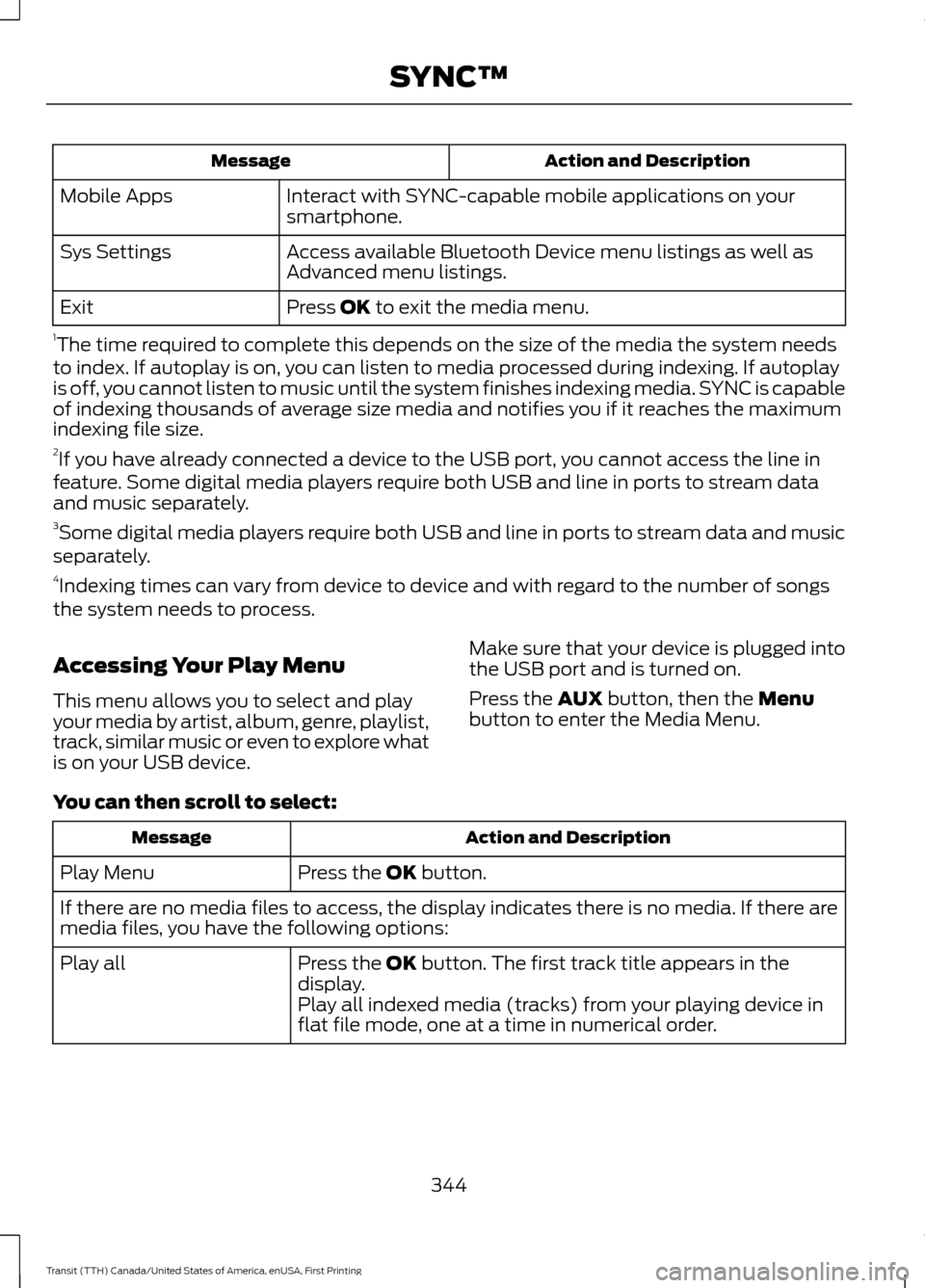
Action and Description
Message
Interact with SYNC-capable mobile applications on your
smartphone.
Mobile Apps
Access available Bluetooth Device menu listings as well as
Advanced menu listings.
Sys Settings
Press OK to exit the media menu.
Exit
1 The time required to complete this depends on the size of the media the system needs
to index. If autoplay is on, you can listen to media processed during indexing. If autoplay
is off, you cannot listen to music until the system finishes indexing media. SYNC is capable
of indexing thousands of average size media and notifies you if it reaches the maximum
indexing file size.
2 If you have already connected a device to the USB port, you cannot access the line in
feature. Some digital media players require both USB and line in ports to stream data
and music separately.
3 Some digital media players require both USB and line in ports to stream data and music
separately.
4 Indexing times can vary from device to device and with regard to the number of songs
the system needs to process.
Accessing Your Play Menu
This menu allows you to select and play
your media by artist, album, genre, playlist,
track, similar music or even to explore what
is on your USB device. Make sure that your device is plugged into
the USB port and is turned on.
Press the
AUX button, then the Menu
button to enter the Media Menu.
You can then scroll to select: Action and Description
Message
Press the
OK button.
Play Menu
If there are no media files to access, the display indicates there is no media. If there are
media files, you have the following options:
Press the
OK button. The first track title appears in the
display.
Play all
Play all indexed media (tracks) from your playing device in
flat file mode, one at a time in numerical order.
344
Transit (TTH) Canada/United States of America, enUSA, First Printing SYNC™
Page 410 of 411
Tires
See: Wheels and Tires...................................... 241
Towing a Trailer.............................................166
Load Placement................................................. 166
Towing the Vehicle on Four Wheels...........................................................176
Emergency Towing............................................. 176
Recreational Vehicle Towing ......................... 176
Towing
..............................................................166
Traction Control............................................143 Principle of Operation....................................... 143
Trailer Sway Control
.....................................167
Transmission Code Designation............280
Transmission..................................................136
Transmission See: Transmission.............................................. 136
Transporting the Vehicle............................175
Trip Computer
.................................................86
All Values................................................................ 86
Average Fuel Consumption............................. 86
Digital Speedometer.......................................... 86
Distance to Empty............................................... 86
Outside Air Temperature.................................. 86
Resetting the Trip Computer........................... 86
Trip Odometer....................................................... 86
Trip Timer................................................................ 86
U
Under Hood Overview - 3.2L Power Stroke Diesel.................................................211
Under Hood Overview - 3.5L..................209
Under Hood Overview - 3.7L....................210
USB Port.........................................................309
Using Cruise Control.....................................151 Switching Cruise Control Off.......................... 152
Switching Cruise Control On........................... 151
Using MyKey With Remote Start Systems..........................................................54
Using Snow Chains.....................................259
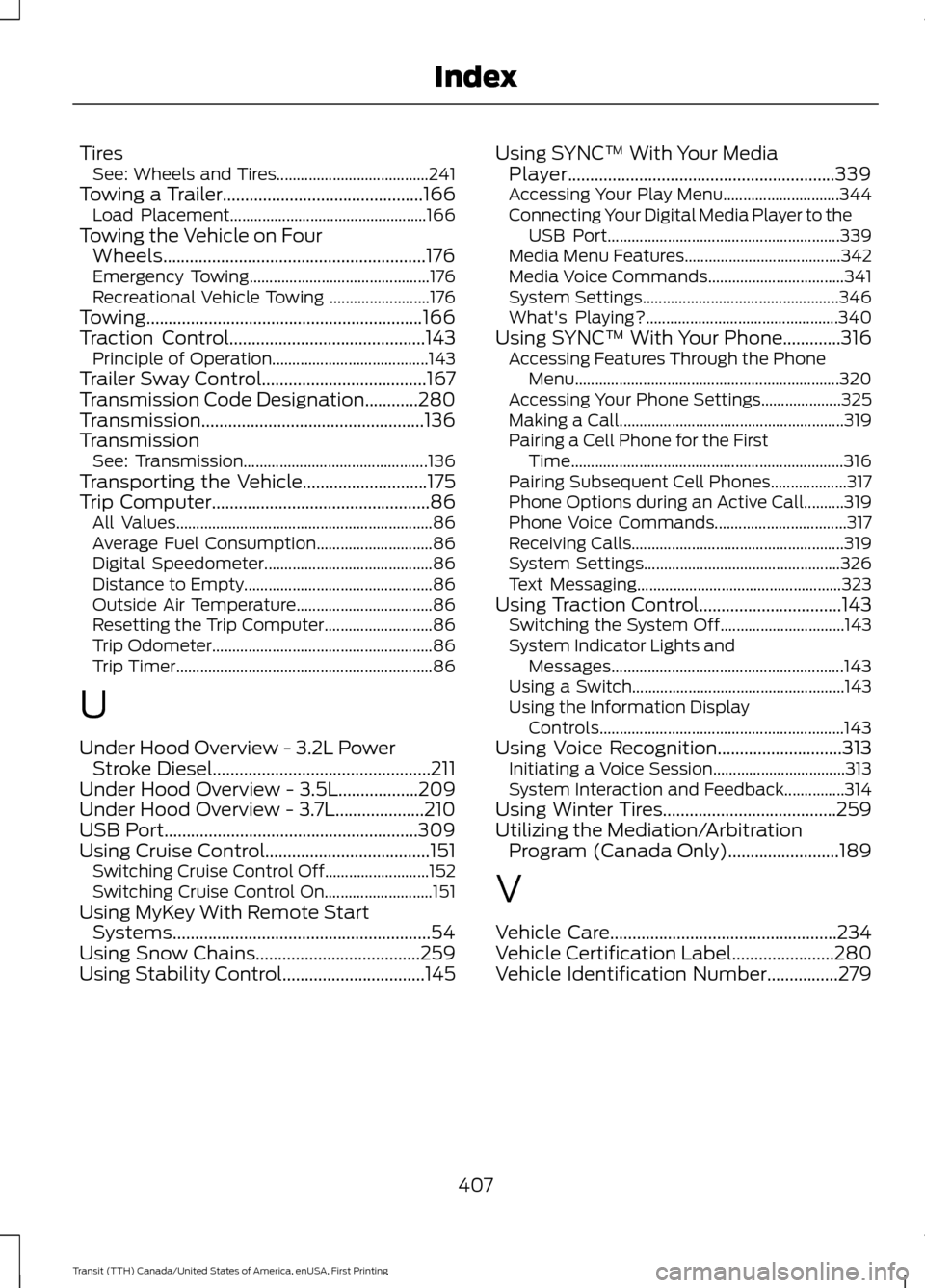
Using Stability Control................................145 Using SYNC™ With Your Media
Player............................................................339
Accessing Your Play Menu............................. 344
Connecting Your Digital Media Player to the USB Port.......................................................... 339
Media Menu Features....................................... 342
Media Voice Commands.................................. 341
System Settings................................................. 346
What's Playing?................................................ 340
Using SYNC™ With Your Phone.............316 Accessing Features Through the Phone
Menu.................................................................. 320
Accessing Your Phone Settings.................... 325
Making a Call........................................................ 319
Pairing a Cell Phone for the First Time.................................................................... 316
Pairing Subsequent Cell Phones................... 317
Phone Options during an Active Call..........319
Phone Voice Commands................................. 317
Receiving Calls..................................................... 319
System Settings................................................. 326
Text Messaging................................................... 323
Using Traction Control
................................143
Switching the System Off............................... 143
System Indicator Lights and Messages.......................................................... 143
Using a Switch..................................................... 143
Using the Information Display Controls............................................................. 143
Using Voice Recognition............................313 Initiating a Voice Session................................. 313
System Interaction and Feedback...............314
Using Winter Tires.......................................259
Utilizing the Mediation/Arbitration Program (Canada Only).........................189
V
Vehicle Care
...................................................234
Vehicle Certification Label.......................280
Vehicle Identification Number................279
407
Transit (TTH) Canada/United States of America, enUSA, First Printing Index