transmission FORD TRANSIT 2016 5.G User Guide
[x] Cancel search | Manufacturer: FORD, Model Year: 2016, Model line: TRANSIT, Model: FORD TRANSIT 2016 5.GPages: 411, PDF Size: 5.65 MB
Page 112 of 411
STARTING A GASOLINE
ENGINE
Before starting the engine check the
following:
•
Make sure all occupants have fastened
their safety belts.
• Make sure the headlamps and
electrical accessories are off.
• Make sure the parking brake is on.
• Make sure the transmission is in park
(P).
When you start the engine, the idle speed
increases, this helps to warm up the
engine. If the engine idle speed does not
slow down automatically, have your
vehicle checked by an authorized dealer.
Note: Do not touch the accelerator pedal.
1. Fully press the brake pedal.
2. Turn the key to the on position to switch the ignition on.
3. Turn the key to the start position to start your vehicle. Release the key
when the engine starts.
Note: You can only operate the starter for
a limited period of time, for example 10
seconds. The number of start attempts is
limited to approximately six. If you exceed
this limit, the system will not allow you to
try again until a period of time has elapsed,
for example 30 minutes.
Engine Idle Speed after Starting
The speed at which the engine idles
immediately after starting will adjust
automatically to minimize vehicle
emissions and maximize cabin comfort
and fuel economy. The idle speed will vary depending on
certain factors. These include vehicle
component and ambient temperatures as
well as electrical and climate system
demands.
Cold or Hot Engine
If the engine does not start within 10
seconds, wait for a short period and try
again.
If the engine does not start after three
attempts, wait 10 seconds and follow the
flooded engine procedure.
If you have difficulty starting the engine
when the temperature is below -13°F
(-25°C), press the accelerator pedal to the
mid-way point of its travel and try again.
Flooded Engine
1. Shift into park (P).
2. Fully depress the accelerator pedal and
hold it there.
3. Start the engine.
Note: If the engine does not start, repeat
the cold or hot engine procedure.
STARTING A DIESEL ENGINE WARNINGS
Do not use starting fluid, for example
ether, in the air intake system (see
air filter decal). Starting fluids could
cause immediate explosive damage to the
engine. Failure to follow this warning could
result in fire, serious personal injury or
death. Do not add gasoline, gasohol, alcohol
or Kerosene to diesel fuel. This action
creates a serious fire hazard and will
result in poor engine performance. Engine
damage caused by the use of incorrect fuel
is not covered by the vehicle warranty. 109
Transit (TTH) Canada/United States of America, enUSA, First Printing Starting and Stopping the Engine
Page 130 of 411
•
Fluid leaks.
• Strange odors.
• Excessive exhaust smoke.
• Loss of engine power.
Do not make any unauthorized changes to
your vehicle or engine. By law, vehicle
owners and anyone who manufactures,
repairs, services, sells, leases, trades
vehicles, or supervises a fleet of vehicles
are not permitted to intentionally remove
an emission control device or prevent it
from working. Information about your
vehicle ’s emission system is on the Vehicle
Emission Control Information Decal
located on or near the engine. This decal
also lists engine displacement.
Please see your warranty information for
complete details.
On-Board Diagnostics (OBD-II)
Your vehicle has an on-board diagnostics
system (OBD-II) that monitors the engine ’s
emission control system. This system
protects the environment by making sure
that your vehicle continues to meet
government emission standards. The
OBD-II system also assists an authorized
dealer in correctly servicing your vehicle. When the service engine soon
indicator illuminates, the OBD-II
system has detected a
malfunction. Temporary malfunctions may
cause the service engine soon indicator to
illuminate.
Examples of temporary malfunctions are:
• The vehicle has run out of fuel.
• Poor fuel quality or water in the fuel.
• The engine may misfire or run rough.
• The fuel filler door may not have been
closed correctly. See Refueling (page
122).
• Driving through deep water. The
electrical system may be wet. You can correct these temporary
malfunctions by filling the fuel tank with
good quality fuel, correctly closing the fuel
filler door or letting the electrical system
dry out. After three driving cycles without
these or any other temporary malfunctions
present, the service engine soon indicator
should not illuminate. A driving cycle
consists of a cold engine startup followed
by mixed city or highway driving. No
additional vehicle service is required.
If the service engine soon indicator remains
on, have your vehicle serviced at the first
available opportunity. Although some
malfunctions detected by the OBD-II may
not have symptoms that are apparent,
continued driving with the service engine
soon indicator on can result in increased
emissions, lower fuel economy, reduced
engine and transmission smoothness, and
lead to more costly repairs.
Readiness for
Inspection/Maintenance (I/M)
Testing
Some state/provincial and local
governments may have
Inspection/Maintenance (I/M) programs
to inspect the emission control equipment
on your vehicle. Failure to pass this
inspection could prevent you from getting
a vehicle registration.
If the service engine soon
indicator is on or the bulb does
not work, you may need to have
your vehicle serviced. See
On-Board
Diagnostics (OBD-II).
Your vehicle may not pass the I/M test if
the service engine soon indicator is on or
not working properly (bulb is burned out),
or if the OBD-II system has determined
that some of the emission control systems
have not been properly checked. In this
case, your vehicle is not ready for I/M
testing.
127
Transit (TTH) Canada/United States of America, enUSA, First Printing Fuel and Refueling
Page 131 of 411
If the vehicle engine or transmission has
just been serviced or the battery has
recently run out of charge or been
replaced, the OBD-II system may indicate
that your vehicle is not ready for I/M
testing. To determine if the vehicle is ready
for I/M testing, switch the ignition on for 15
seconds without cranking the engine. If the
service engine soon indicator flashes on
and off eight times, it means that your
vehicle is not ready for I/M testing; if the
service engine soon indicator illuminates
and remains on, it means that your vehicle
is ready for I/M testing.
The OBD-II system monitors the emission
control system during normal driving. A
complete check may take several days.
If your vehicle is not ready for I/M testing,
you may need to:
•
Drive on an expressway or highway for
a steady 15 minutes, followed by 20
minutes of stop-and-go driving with at
least four 30-second idle periods.
• Allow your vehicle to sit for at least
eight hours without starting the engine.
Then complete the above driving cycle.
The engine must warm up to its normal
operating temperature. Do not switch the
ignition off until the above driving cycle is
complete. If your vehicle is still not ready
for I/M testing, you will have to repeat the
above driving cycle.
Diesel Exhaust System: Oxidation
Catalyst And Diesel Particulate
Filter System
Your vehicle is fitted with a diesel
particulate filter. The diesel particulate
filter is an inline filter in the exhaust system
that reduces carbon emissions by trapping
exhaust particles before they reach the
tailpipe. The diesel particulate filter looks
similar to a traditional exhaust catalyst,
except it is larger, and is part of the exhaust
system under the vehicle. The filter couples to a diesel oxidation catalyst that reduces
the amount of harmful exhaust emitted
from the tailpipe. As soot gathers in the
system it begins to restrict the filter. The
soot that gathers inside the filter is cleaned
in two different ways, passive regeneration
and active regeneration. Both methods
occur automatically and require no actions
from the driver. During either one of these
regeneration methods, you may notice a
change in exhaust tone. At certain times,
the information display will display various
messages related to the diesel particulate
filter.
Diesel Particulate Filter Maintenance
Failure to carry out active or operator
commanded regeneration when advised
could result in a clogged diesel particulate
filter. If the diesel particulate filter fills
beyond the regeneration threshold, your
vehicle will disable the ability for active
and operator commanded regeneration.
This could result in irreversible damage to
the diesel particulate filter requiring
replacement that the Ford Warranty may
not cover. If your vehicle is not fitted with
operator commanded regeneration, check
with an authorized dealer for availability.
Passive Regeneration
During passive regeneration, the exhaust
system temperature and constituents
automatically clean the diesel particulate
filter, or reduce the soot level, by oxidizing
the soot. Cleaning occurs naturally during
normal engine operating conditions, at
varying levels depending on driving
conditions.
Active Regeneration
Once the diesel particulate filter is full of
exhaust particles, the engine control
module will command the exhaust system
to clean the diesel particulate filter through
a process called active regeneration. Active
regeneration requires the engine computer
128
Transit (TTH) Canada/United States of America, enUSA, First Printing Fuel and Refueling
Page 139 of 411
AUTOMATIC TRANSMISSION
WARNINGS
Always set the parking brake fully
and make sure you shift the gearshift
lever to park (P). Switch the ignition
off and remove the key whenever you leave
your vehicle. Do not apply the brake pedal and
accelerator pedal simultaneously.
Applying both pedals simultaneously
for more than three seconds will limit
engine rpm, which may result in difficulty
maintaining speed in traffic and could lead
to serious injury. Understanding the Gearshift Lever
Positions of the Automatic
Transmission
Tow/Haul button
T/H
ParkP
Reverse
R
Neutral
N
Drive
D
Manual shifting
M Manual upshift
+
Manual downshift
-
Tow/Haul (T/H) (If Equipped)
Tow/Haul delays transmission upshift to
reduce the frequency of transmission
shifting.
The system provides engine braking in all
forward gears when the gearshift lever is
in drive (D). Engine braking helps you to
slow and control your vehicle when
descending a grade.
Depending on trailer load and driving
conditions, the transmission may
downshift when descending a grade.
Downshifting will depend on the amount
of vehicle braking applied.
Switching Tow/Haul On and Off To activate tow/haul, press the
button on the gearshift lever
once. The TOW HAUL indicator
light will illuminate in the instrument
cluster.
To deactivate the tow haul feature and
return to normal driving mode, press the
button on the gearshift lever twice. The
tow haul indicator lamp will deactivate.
Tow haul will also deactivate when you
power down your vehicle.
Park (P) WARNINGS
Do not shift the gearshift lever to
park (P) when your vehicle is moving.
This can cause damage to the
transmission not covered by the vehicle
warranty, and can result in a crash or
serious injury.
136
Transit (TTH) Canada/United States of America, enUSA, First Printing TransmissionE175317 E161509
Page 140 of 411
WARNINGS
Apply the parking brake, shift the
gearshift lever to park (P) and switch
the ignition off before leaving your
vehicle. Make sure that the gearshift lever
fully latches into position. When the gearshift lever is in this position,
it will lock the transmission. The engine
does not transmit power to the driven
wheels. You can start the engine with the
gearshift lever in this position.
Note:
A warning tone will sound if you open
the driver door and you have not shifted the
gearshift lever to park (P).
Reverse (R) WARNINGS
Do not shift the gearshift lever to
reverse (R) when your vehicle is
moving. This can cause damage to
the transmission not covered by the vehicle
warranty, and can result in a crash or
serious injury. Always come to a complete stop
before shifting the gearshift lever out
of reverse (R).
Shift the gearshift lever to reverse (R) to
allow your vehicle to move backward.
Neutral (N)
When the gearshift lever is in this position,
the transmission does not lock. The engine
does not transmit power to the driven
wheels. You can start the engine with the
gearshift lever in this position.
Drive (D)
Shift the gearshift lever to drive (D) to
allow your vehicle to move forward and
shift automatically through the forward
gears. The transmission shifts to the appropriate
gear for optimum performance based on
ambient temperature, road gradient,
vehicle load and your input.
Note:
A shift will occur only when your
vehicle speed and the engine speed are
appropriate.
Note: You can temporarily override the
selected gear by pressing the + or - buttons
on the side of the gearshift lever.
Manual (M) WARNING
Do not hold the + or - buttons
permanently in. Shift the gearshift lever to manual (M) to
allow your vehicle to move forward and
allow you to shift manually through the
forward gears. Press the
+ or - buttons on
the side of the gearshift lever to shift
manually through the forward gears. The
instrument cluster will display the selected
gear, and a shift indicator arrow to assist
optimum shifting.
• Press the
+ button to upshift.
• Press the
- button to downshift.
You can skip gears by pressing a button
repeatedly at short intervals.
Upshift at the recommended shift
speeds according to the following
chart: Upshifts when accelerating (recom-
mended for best fuel economy)
Vehicle speed mph( km/h):
Upshift from:
15 (24)
1 - 2
25 (40)
2 - 3
40 (64)
3 - 4
137
Transit (TTH) Canada/United States of America, enUSA, First Printing Transmission
Page 141 of 411
Upshifts when accelerating (recom-
mended for best fuel economy)
Vehicle speed mph( km/h):
Upshift from:
45 (72)
4 - 5
50 (80)
5 - 6
Note: Engine damage may occur if you
maintain an excessive engine speed without
shifting.
Hints on Driving with an Automatic
Transmission WARNING
Do not idle the engine for long
periods in drive (D) with the brakes
applied.
Putting Your Vehicle in Gear
1. Start the engine.
2. Press the brake pedal.
3. Shift the gearshift lever to drive (D),
reverse (R) or manual (M).
4. Release the parking brake.
5. Release the brake pedal and press the
accelerator pedal.
Stopping Your Vehicle
1. Release the accelerator pedal and press the brake pedal.
2. Apply the parking brake.
3. Shift the gearshift lever to neutral (N) or park (P).
4. Switch the ignition off. If Your Vehicle Gets Stuck In Mud or
Snow
If your vehicle is stuck in mud or snow, shift
between drive (D) and reverse (R) pressing
lightly on the accelerator pedal in each
gear. Stop between shifts in a steady
pattern to rock your vehicle.
Note:
Do not rock your vehicle if the engine
is not at normal operating temperature,
damage to the transmission may occur.
Note: Do not rock your vehicle for more
than a minute, damage to the transmission
or tires may occur and the engine may
overheat.
Brake-Shift Interlock WARNINGS
Do not drive your vehicle until you
verify that the brake lamps are
working.
This procedure requires you to shift
the gearshift lever out of park (P)
causing your vehicle to roll. Make
sure you fully set the parking brake before
attempting to shift the gearshift lever out
of park (P). If you release the parking brake and
the brake warning lamp remains
illuminated, the brakes may not be
working correctly. The system has
detected a fault that requires service. Your vehicle has a brake-shift interlock
feature. This prevents you from shifting the
gearshift lever from the park (P) position,
unless the brake pedal is pressed.
In the event of an electrical malfunction,
or if the vehicle battery has run out of
charge, use the following procedure to shift
the gearshift lever from the park (P)
position.
1.
Apply the parking brake and switch the
ignition off.
138
Transit (TTH) Canada/United States of America, enUSA, First Printing Transmission
Page 142 of 411
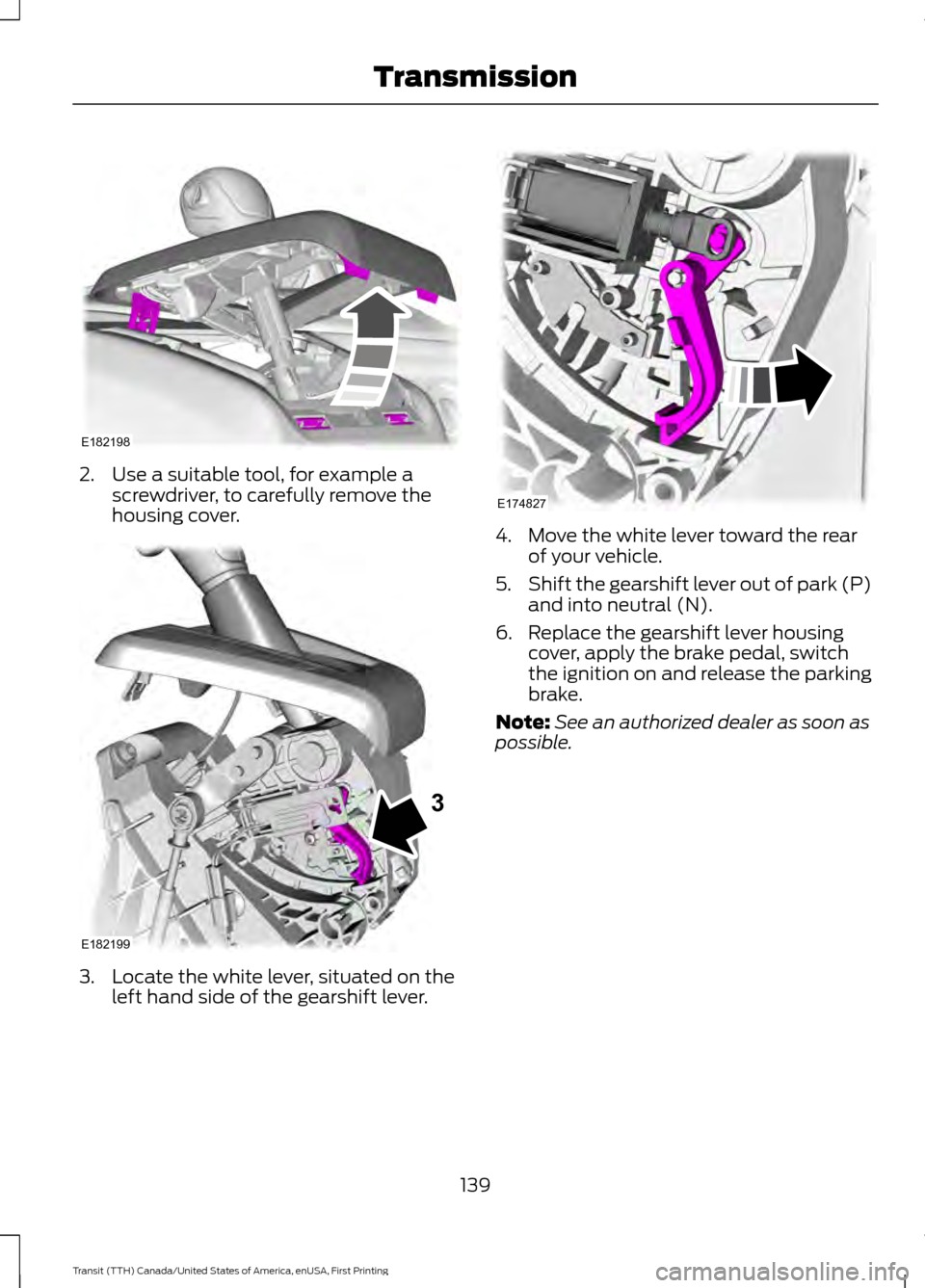
2. Use a suitable tool, for example a
screwdriver, to carefully remove the
housing cover. 3. Locate the white lever, situated on the
left hand side of the gearshift lever. 4. Move the white lever toward the rear
of your vehicle.
5. Shift the gearshift lever out of park (P)
and into neutral (N).
6. Replace the gearshift lever housing cover, apply the brake pedal, switch
the ignition on and release the parking
brake.
Note: See an authorized dealer as soon as
possible.
139
Transit (TTH) Canada/United States of America, enUSA, First Printing TransmissionE182198 E182199
3 E174827
Page 145 of 411
developed sufficient drive to prevent your
vehicle from rolling down the slope. This
is an advantage when pulling away on a
slope, for example from a car park ramp,
traffic lights or when reversing uphill into
a parking space.
Note:
The system will not operate if the
gearshift lever is in neutral or the parking
brake is applied.
Note: There is no warning light to indicate
the system is either on or off.
Using Hill Start Assist
1. Press the brake pedal to bring your vehicle to a complete standstill. Keep
the brake pedal pressed.
2. If the sensors detect that your vehicle is on a slope, the system will activate
automatically.
3. When you remove your foot from the brake pedal, your vehicle will remain
on the slope without rolling away for
approximately two to three seconds.
This hold time will automatically be
extended if you are in the process of
driving off.
4. Drive off in the normal manner. The system will release the brakes
automatically.
Note: When you remove your foot from the
brake pedal and press the pedal again when
the system is active, you will experience
significantly reduced brake pedal travel. This
is normal.
Switching the System On and Off
Vehicles with Manual Transmission
You can switch this feature on or off in the
information display. The system
remembers the last setting when you start
your vehicle. Vehicles with Automatic Transmission
You cannot turn the system on or off.
When you switch the ignition on, the
system automatically turns on.
142
Transit (TTH) Canada/United States of America, enUSA, First Printing Brakes
Page 152 of 411
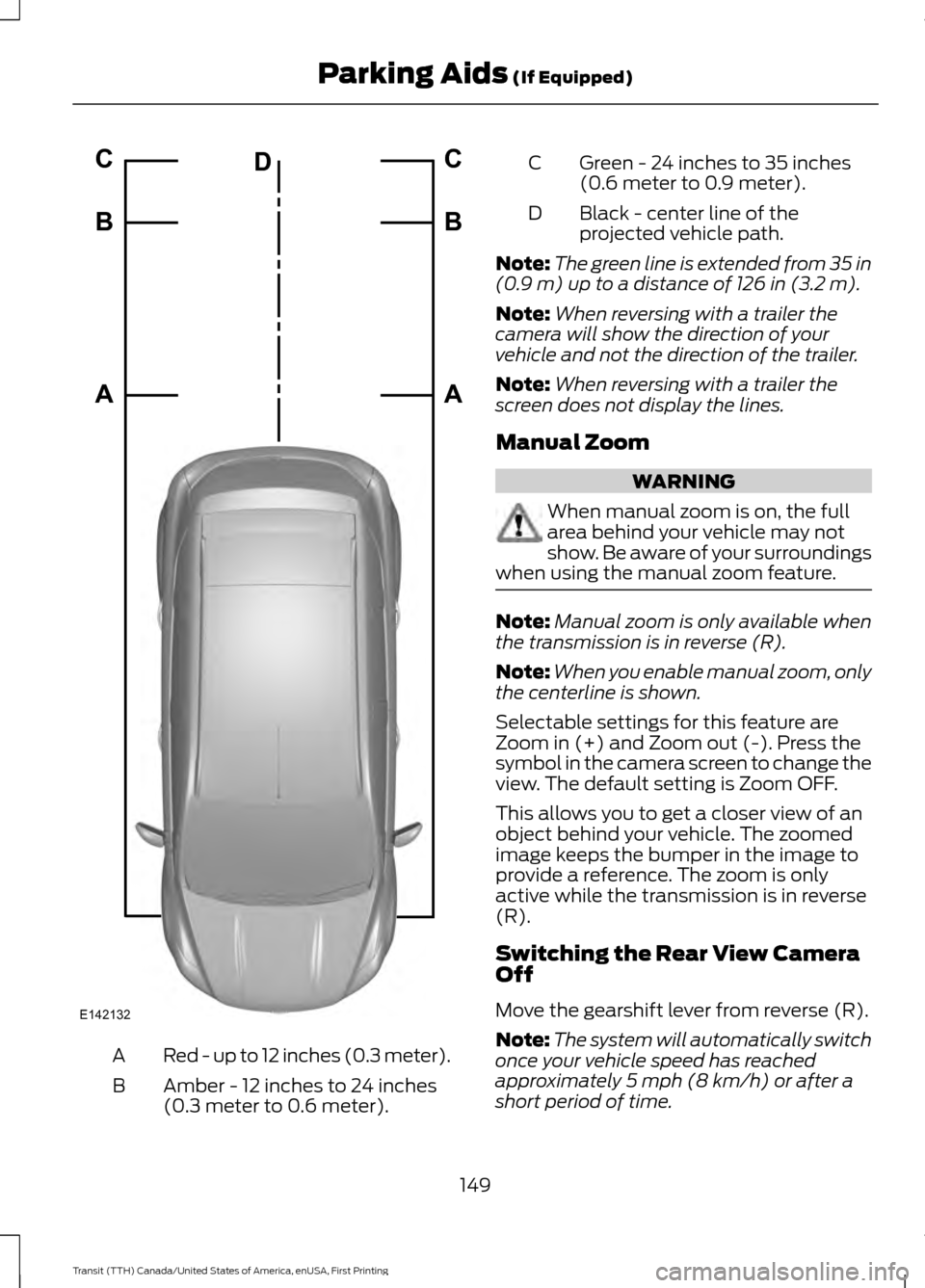
Red - up to 12 inches (0.3 meter).
A
Amber - 12 inches to 24 inches
(0.3 meter to 0.6 meter).
B Green - 24 inches to 35 inches
(0.6 meter to 0.9 meter).
C
Black - center line of the
projected vehicle path.
D
Note: The green line is extended from 35 in
(0.9 m) up to a distance of 126 in (3.2 m).
Note: When reversing with a trailer the
camera will show the direction of your
vehicle and not the direction of the trailer.
Note: When reversing with a trailer the
screen does not display the lines.
Manual Zoom WARNING
When manual zoom is on, the full
area behind your vehicle may not
show. Be aware of your surroundings
when using the manual zoom feature. Note:
Manual zoom is only available when
the transmission is in reverse (R).
Note: When you enable manual zoom, only
the centerline is shown.
Selectable settings for this feature are
Zoom in (+) and Zoom out (-). Press the
symbol in the camera screen to change the
view. The default setting is Zoom OFF.
This allows you to get a closer view of an
object behind your vehicle. The zoomed
image keeps the bumper in the image to
provide a reference. The zoom is only
active while the transmission is in reverse
(R).
Switching the Rear View Camera
Off
Move the gearshift lever from reverse (R).
Note: The system will automatically switch
once your vehicle speed has reached
approximately
5 mph (8 km/h) or after a
short period of time.
149
Transit (TTH) Canada/United States of America, enUSA, First Printing Parking Aids
(If Equipped)E142132A B C
A B C
D
Page 165 of 411
WARNING
Exceeding the Safety
Compliance Certification
Label vehicle weight rating limits
could result in substandard
vehicle handling or performance,
engine, transmission and/or
structural damage, serious
damage to the vehicle, loss of
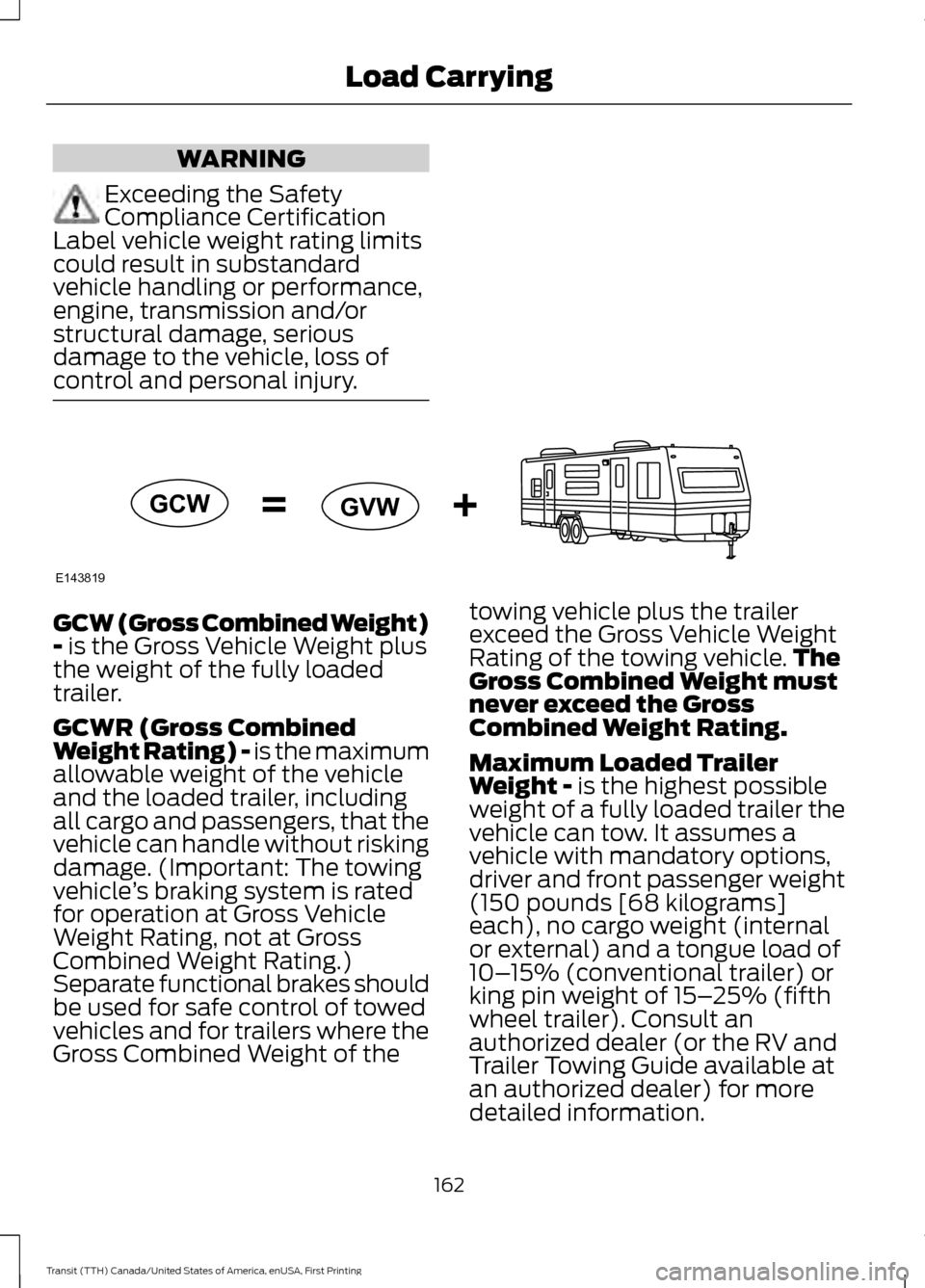
control and personal injury. GCW (Gross Combined Weight)
- is the Gross Vehicle Weight plus
the weight of the fully loaded
trailer.
GCWR (Gross Combined
Weight Rating) - is the maximum
allowable weight of the vehicle
and the loaded trailer, including
all cargo and passengers, that the
vehicle can handle without risking
damage. (Important: The towing
vehicle ’s braking system is rated
for operation at Gross Vehicle
Weight Rating, not at Gross
Combined Weight Rating.)
Separate functional brakes should
be used for safe control of towed
vehicles and for trailers where the
Gross Combined Weight of the towing vehicle plus the trailer
exceed the Gross Vehicle Weight
Rating of the towing vehicle.
The
Gross Combined Weight must
never exceed the Gross
Combined Weight Rating.
Maximum Loaded Trailer
Weight -
is the highest possible
weight of a fully loaded trailer the
vehicle can tow. It assumes a
vehicle with mandatory options,
driver and front passenger weight
(150 pounds [68 kilograms]
each), no cargo weight (internal
or external) and a tongue load of
10– 15% (conventional trailer) or
king pin weight of 15– 25% (fifth
wheel trailer). Consult an
authorized dealer (or the RV and
Trailer Towing Guide available at
an authorized dealer) for more
detailed information.
162
Transit (TTH) Canada/United States of America, enUSA, First Printing Load CarryingE143819GCW
GVW