fuel consumption FORD TRANSIT 2018 Owners Manual
[x] Cancel search | Manufacturer: FORD, Model Year: 2018, Model line: TRANSIT, Model: FORD TRANSIT 2018Pages: 521, PDF Size: 8.65 MB
Page 6 of 521
Refueling
.........................................................137
Fuel Consumption .......................................
139
Engine Emission Control
Emission Law .................................................
141
Catalytic Converter - 3.5L/3.7L ...............
142
Selective Catalytic Reductant System - 3.2L Diesel ..................................................
143
Diesel Particulate Filter - 3.2L Diesel ........................................................................\
.
145
Transmission
Automatic Transmission ............................
151
Tow/Haul ........................................................
154
Brakes
General Information ...................................
156
Hints on Driving With Anti-Lock Brakes ........................................................................\
.
156
Parking Brake - Vehicles With: Mechanical Parking Brake ....................
157
Parking Brake - Vehicles With: Push Down Parking Brake ................................
157
Hill Start Assist .............................................
158
Traction Control
Principle of Operation ...............................
160
Using Traction Control ..............................
160
Stability Control
Principle of Operation .................................
161
Using Stability Control ...............................
162
Parking Aids
Principle of Operation ................................
163
Parking Aid .....................................................
163
Rear View Camera ......................................
165
Cruise Control
Principle of Operation ...............................
168
Using Cruise Control ..................................
168Driving Aids
Speed Limiter
...............................................
169
Driver Alert .....................................................
169
Lane Keeping System ................................
170
Steering ............................................................
172
Load Carrying
Load Retaining Fixtures .............................
174
Load Limit .......................................................
174
Towing
Towing a Trailer ............................................
180
Trailer Sway Control ....................................
181
Recommended Towing Weights ............
181
Essential Towing Checks ..........................
183
Towing the Vehicle on Four Wheels ......
189
Driving Hints
Breaking-In ......................................................
191
Reduced Engine Performance .................
191
Economical Driving ......................................
191
Cold Weather Precautions ........................
191
Driving Through Water ...............................
192
Floor Mats .......................................................
192
Roadside Emergencies
Roadside Assistance ..................................
194
Hazard Flashers ...........................................
195
Emergency Exit .............................................
195
Fuel Shutoff ...................................................
195
Jump Starting the Vehicle ........................
196
Post-Crash Alert System ..........................
198
Transporting the Vehicle ..........................
198
Towing Points ...............................................
199
Customer Assistance
Getting the Services You Need ...............
201
In California (U.S. Only) ...........................
202
3
2018 Transit (TTH) Canada/United States of America, JK3J 19A321 AA enUSA, Edition date: 201705, Third-Printing- Table of Contents
Page 105 of 521
Settings
Off
Volume Limiter Clear MyKey
Clear MyKeys
System Check
All active warnings will display first if
applicable. The system check menu may
appear different based upon equipment
options and current vehicle status. Use the
up and down arrow buttons to scroll
through the list. See Information
Messages (page 103).
TRIP COMPUTER
Resetting the Trip Computer
Press and hold
OK on the current screen
to reset the respective trip, distance, time
and average fuel consumption information.
All Values
Indicates all the respective trip, distance,
time and average fuel consumption
information.
Average Fuel Consumption
Indicates the average fuel consumption
since the function was last reset. Distance to Empty
Indicates the approximate distance your
vehicle will travel on the fuel remaining in
the tank. Changes in driving pattern may
cause the value to vary.
Outside Air Temperature
Shows the outside air temperature.
Trip Odometer
Registers the distance traveled of
individual journeys.
Trip Timer
Registers the elapsed time of individual
journeys or the total time since the function
was last reset.
Digital Speedometer
Provides a digital display of the current
vehicle speed.
PERSONALIZED SETTINGS
Measure Units
You can choose personalized settings
using the information display control on
the steering wheel.
See Information
Displays (page 99).
102
2018 Transit (TTH) Canada/United States of America, JK3J 19A321 AA enUSA, Edition date: 201705, Third-Printing- Information Displays
Page 106 of 521
To swap between imperial and metric units, scroll to:
Action and Description
Message
Press the OK button.
Display
Choose your applicable setting. Press the
OK button.
Measure unit
Swapping between imperial and metric units will affect the
following displays:
•Average fuel consumption.
• Distance to empty.
• Odometer.
• Outside temperature units.
• Trip odometer.
• Digital Speedometer.
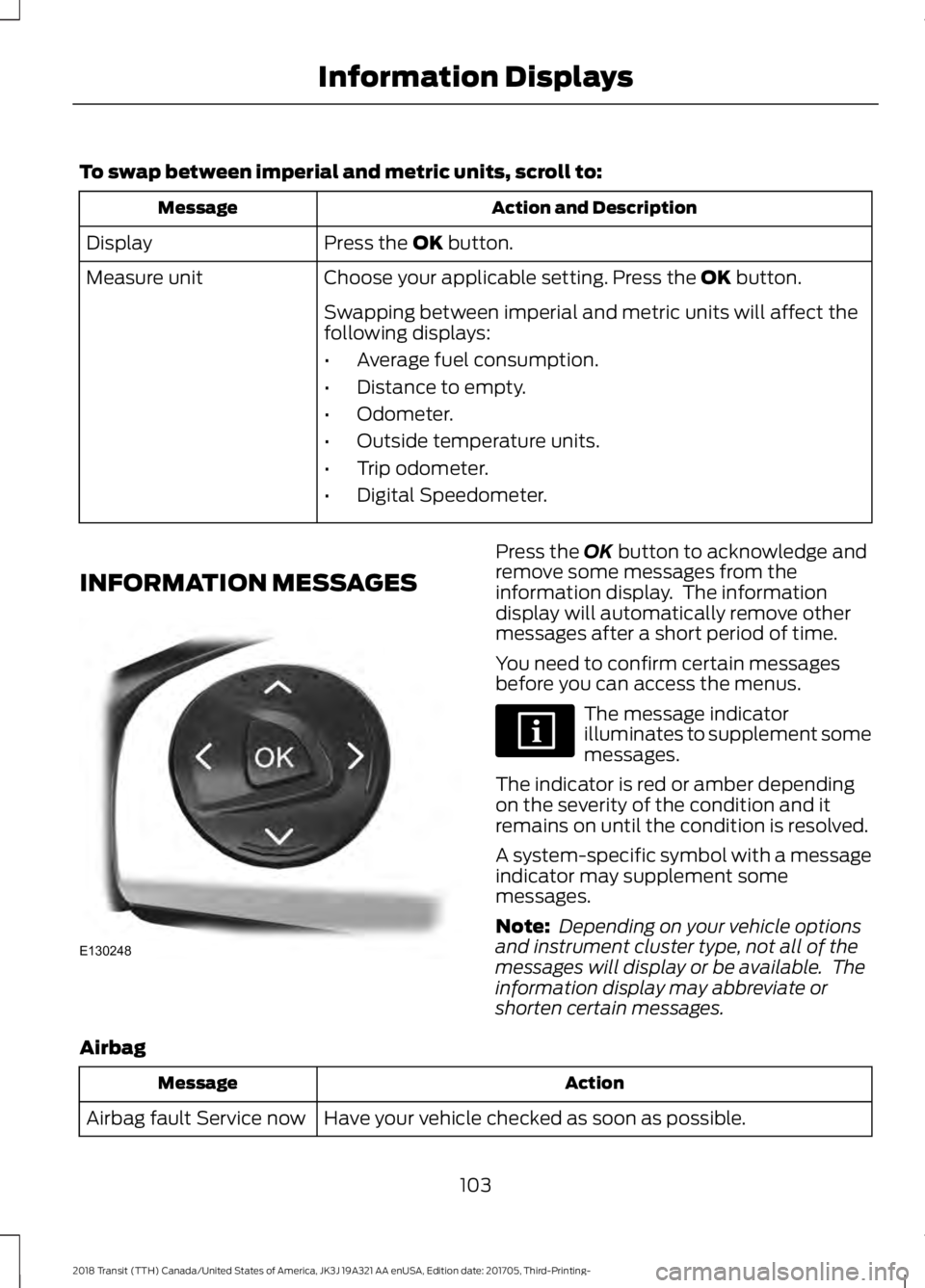
INFORMATION MESSAGES Press the
OK button to acknowledge and
remove some messages from the
information display. The information
display will automatically remove other
messages after a short period of time.
You need to confirm certain messages
before you can access the menus. The message indicator
illuminates to supplement some
messages.
The indicator is red or amber depending
on the severity of the condition and it
remains on until the condition is resolved.
A system-specific symbol with a message
indicator may supplement some
messages.
Note: Depending on your vehicle options
and instrument cluster type, not all of the
messages will display or be available. The
information display may abbreviate or
shorten certain messages.
Airbag Action
Message
Have your vehicle checked as soon as possible.
Airbag fault Service now
103
2018 Transit (TTH) Canada/United States of America, JK3J 19A321 AA enUSA, Edition date: 201705, Third-Printing- Information DisplaysE130248
Page 142 of 521
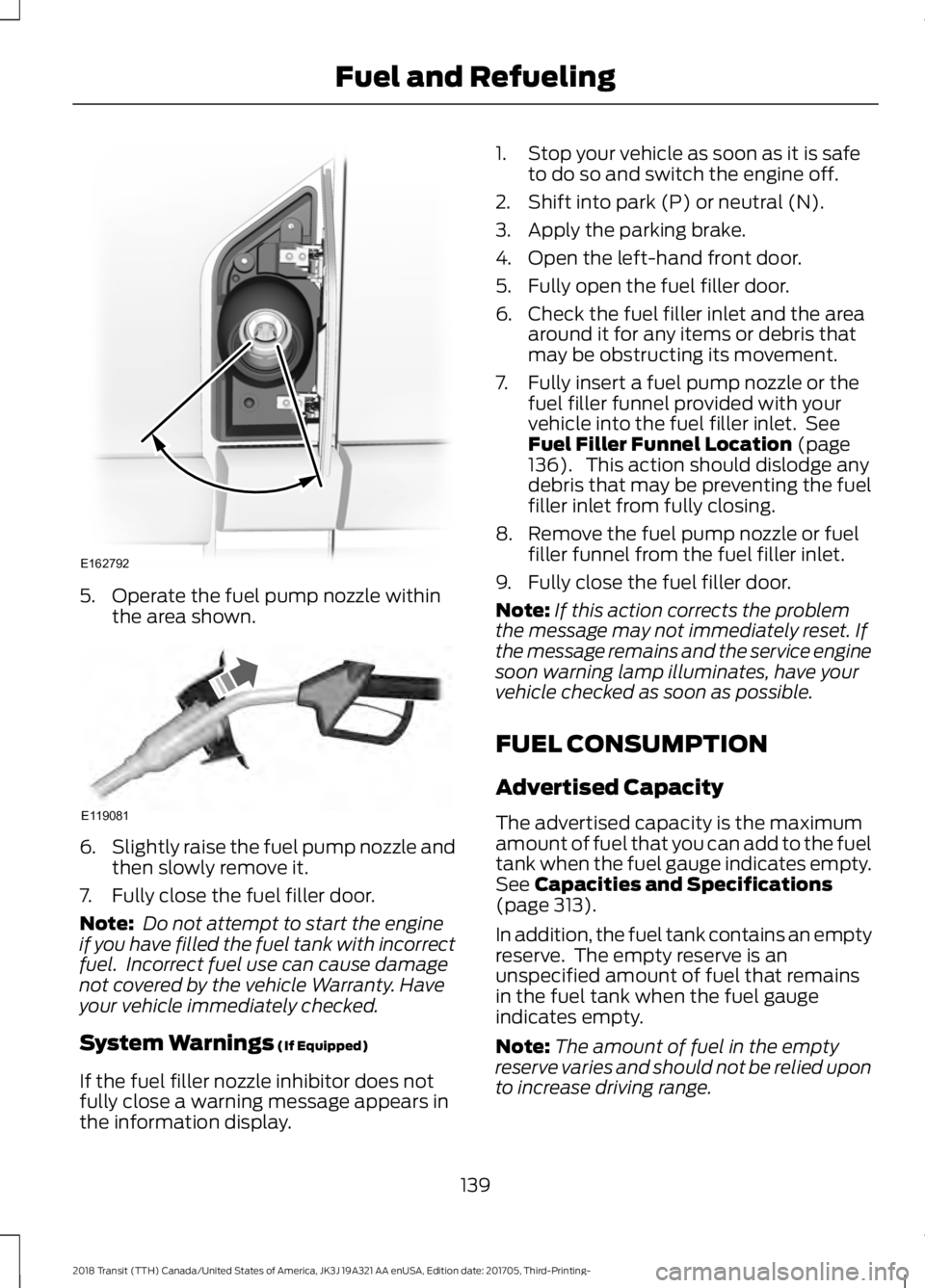
5. Operate the fuel pump nozzle within
the area shown. 6.
Slightly raise the fuel pump nozzle and
then slowly remove it.
7. Fully close the fuel filler door.
Note: Do not attempt to start the engine
if you have filled the fuel tank with incorrect
fuel. Incorrect fuel use can cause damage
not covered by the vehicle Warranty. Have
your vehicle immediately checked.
System Warnings (If Equipped)
If the fuel filler nozzle inhibitor does not
fully close a warning message appears in
the information display. 1. Stop your vehicle as soon as it is safe
to do so and switch the engine off.
2. Shift into park (P) or neutral (N).
3. Apply the parking brake.
4. Open the left-hand front door.
5. Fully open the fuel filler door.
6. Check the fuel filler inlet and the area around it for any items or debris that
may be obstructing its movement.
7. Fully insert a fuel pump nozzle or the fuel filler funnel provided with your
vehicle into the fuel filler inlet. See
Fuel Filler Funnel Location
(page
136). This action should dislodge any
debris that may be preventing the fuel
filler inlet from fully closing.
8. Remove the fuel pump nozzle or fuel filler funnel from the fuel filler inlet.
9. Fully close the fuel filler door.
Note: If this action corrects the problem
the message may not immediately reset. If
the message remains and the service engine
soon warning lamp illuminates, have your
vehicle checked as soon as possible.
FUEL CONSUMPTION
Advertised Capacity
The advertised capacity is the maximum
amount of fuel that you can add to the fuel
tank when the fuel gauge indicates empty.
See
Capacities and Specifications
(page 313).
In addition, the fuel tank contains an empty
reserve. The empty reserve is an
unspecified amount of fuel that remains
in the fuel tank when the fuel gauge
indicates empty.
Note: The amount of fuel in the empty
reserve varies and should not be relied upon
to increase driving range.
139
2018 Transit (TTH) Canada/United States of America, JK3J 19A321 AA enUSA, Edition date: 201705, Third-Printing- Fuel and RefuelingE162792 E119081
Page 143 of 521
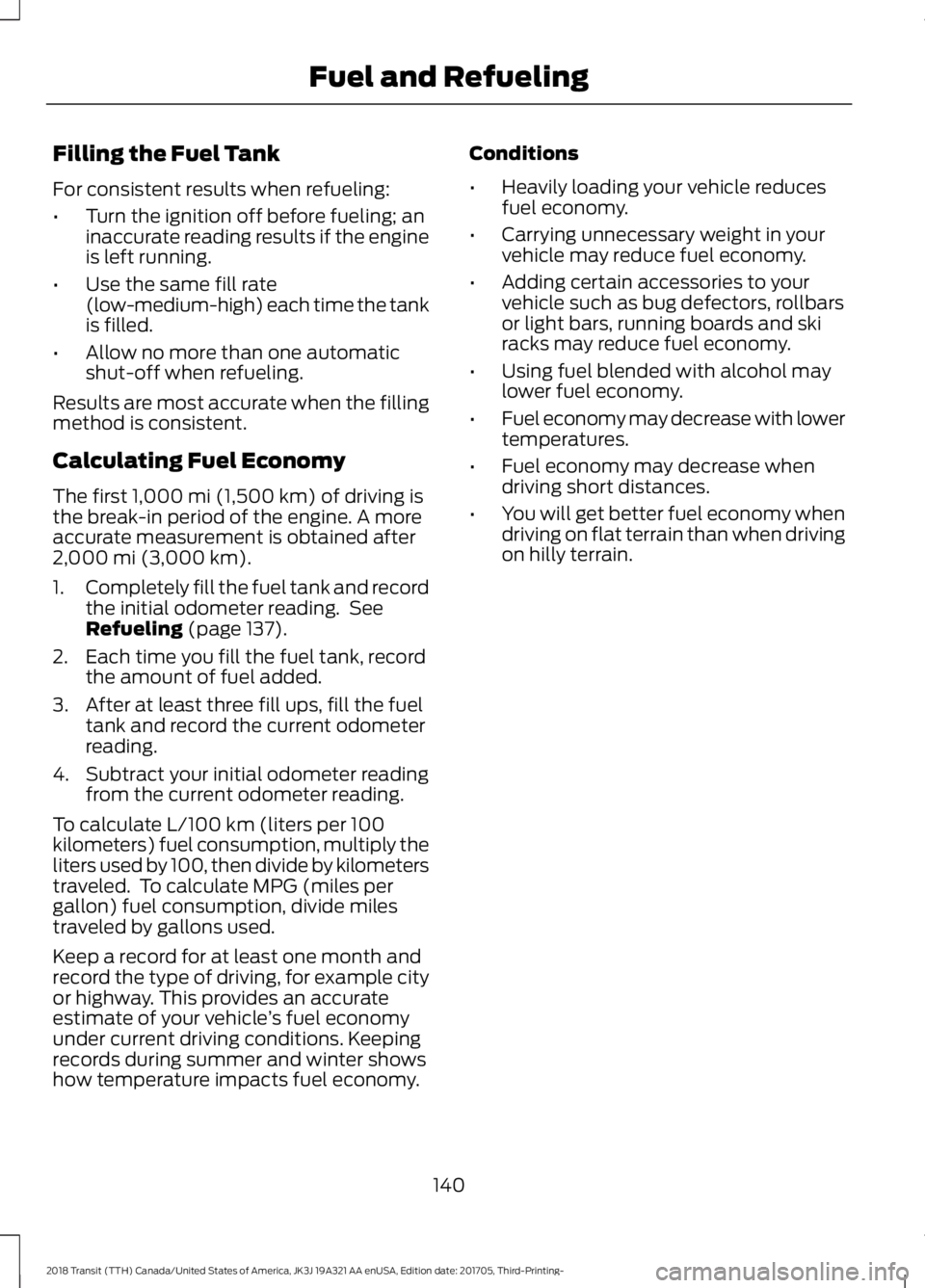
Filling the Fuel Tank
For consistent results when refueling:
•
Turn the ignition off before fueling; an
inaccurate reading results if the engine
is left running.
• Use the same fill rate
(low-medium-high) each time the tank
is filled.
• Allow no more than one automatic
shut-off when refueling.
Results are most accurate when the filling
method is consistent.
Calculating Fuel Economy
The first 1,000 mi (1,500 km) of driving is
the break-in period of the engine. A more
accurate measurement is obtained after
2,000 mi (3,000 km)
.
1. Completely fill the fuel tank and record
the initial odometer reading. See
Refueling
(page 137).
2. Each time you fill the fuel tank, record the amount of fuel added.
3. After at least three fill ups, fill the fuel tank and record the current odometer
reading.
4. Subtract your initial odometer reading from the current odometer reading.
To calculate L/100 km (liters per 100
kilometers) fuel consumption, multiply the
liters used by 100, then divide by kilometers
traveled. To calculate MPG (miles per
gallon) fuel consumption, divide miles
traveled by gallons used.
Keep a record for at least one month and
record the type of driving, for example city
or highway. This provides an accurate
estimate of your vehicle ’s fuel economy
under current driving conditions. Keeping
records during summer and winter shows
how temperature impacts fuel economy. Conditions
•
Heavily loading your vehicle reduces
fuel economy.
• Carrying unnecessary weight in your
vehicle may reduce fuel economy.
• Adding certain accessories to your
vehicle such as bug defectors, rollbars
or light bars, running boards and ski
racks may reduce fuel economy.
• Using fuel blended with alcohol may
lower fuel economy.
• Fuel economy may decrease with lower
temperatures.
• Fuel economy may decrease when
driving short distances.
• You will get better fuel economy when
driving on flat terrain than when driving
on hilly terrain.
140
2018 Transit (TTH) Canada/United States of America, JK3J 19A321 AA enUSA, Edition date: 201705, Third-Printing- Fuel and Refueling
Page 144 of 521
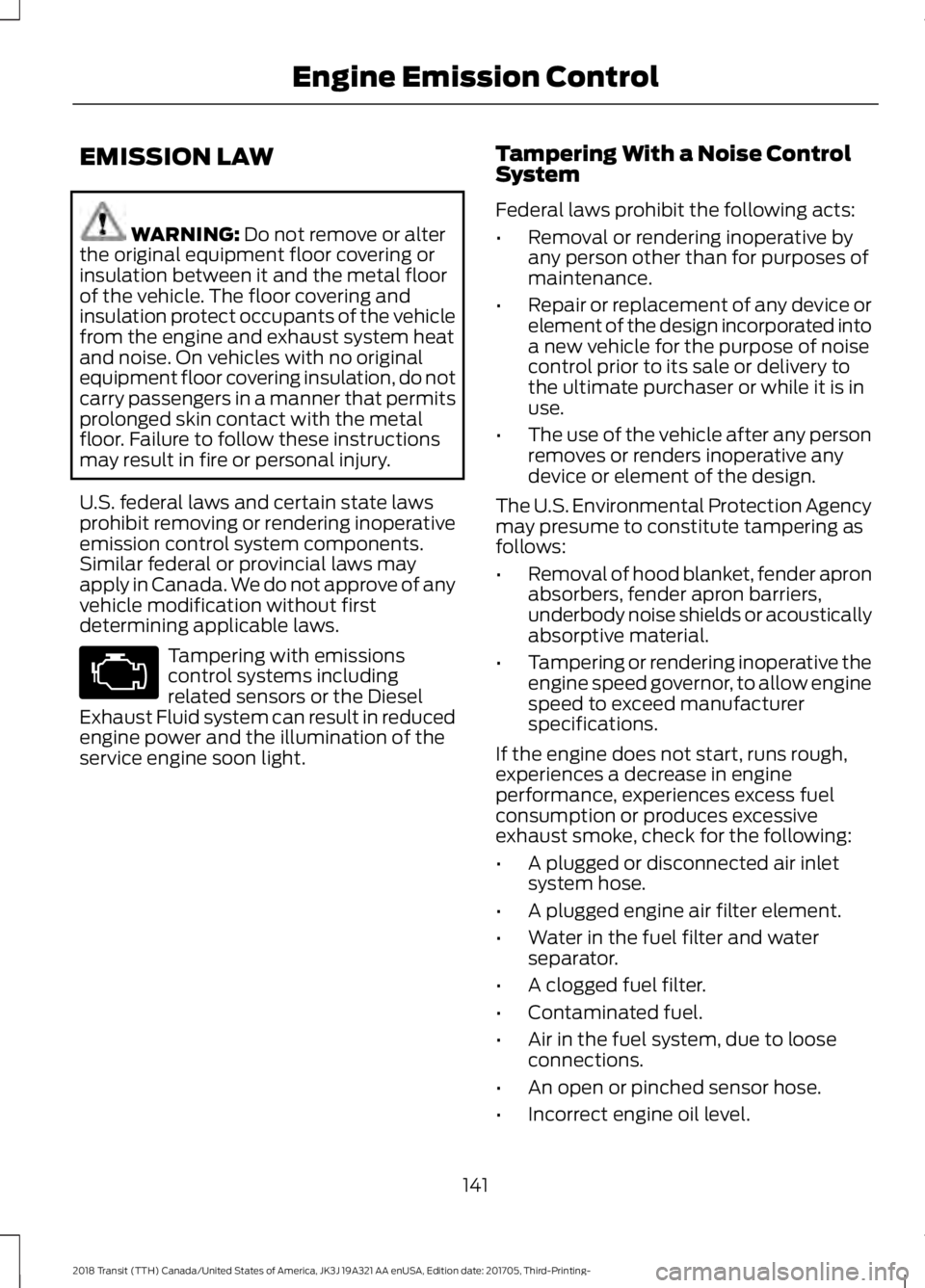
EMISSION LAW
WARNING: Do not remove or alter
the original equipment floor covering or
insulation between it and the metal floor
of the vehicle. The floor covering and
insulation protect occupants of the vehicle
from the engine and exhaust system heat
and noise. On vehicles with no original
equipment floor covering insulation, do not
carry passengers in a manner that permits
prolonged skin contact with the metal
floor. Failure to follow these instructions
may result in fire or personal injury.
U.S. federal laws and certain state laws
prohibit removing or rendering inoperative
emission control system components.
Similar federal or provincial laws may
apply in Canada. We do not approve of any
vehicle modification without first
determining applicable laws. Tampering with emissions
control systems including
related sensors or the Diesel
Exhaust Fluid system can result in reduced
engine power and the illumination of the
service engine soon light. Tampering With a Noise Control
System
Federal laws prohibit the following acts:
•
Removal or rendering inoperative by
any person other than for purposes of
maintenance.
• Repair or replacement of any device or
element of the design incorporated into
a new vehicle for the purpose of noise
control prior to its sale or delivery to
the ultimate purchaser or while it is in
use.
• The use of the vehicle after any person
removes or renders inoperative any
device or element of the design.
The U.S. Environmental Protection Agency
may presume to constitute tampering as
follows:
• Removal of hood blanket, fender apron
absorbers, fender apron barriers,
underbody noise shields or acoustically
absorptive material.
• Tampering or rendering inoperative the
engine speed governor, to allow engine
speed to exceed manufacturer
specifications.
If the engine does not start, runs rough,
experiences a decrease in engine
performance, experiences excess fuel
consumption or produces excessive
exhaust smoke, check for the following:
• A plugged or disconnected air inlet
system hose.
• A plugged engine air filter element.
• Water in the fuel filter and water
separator.
• A clogged fuel filter.
• Contaminated fuel.
• Air in the fuel system, due to loose
connections.
• An open or pinched sensor hose.
• Incorrect engine oil level.
141
2018 Transit (TTH) Canada/United States of America, JK3J 19A321 AA enUSA, Edition date: 201705, Third-Printing- Engine Emission Control
Page 194 of 521
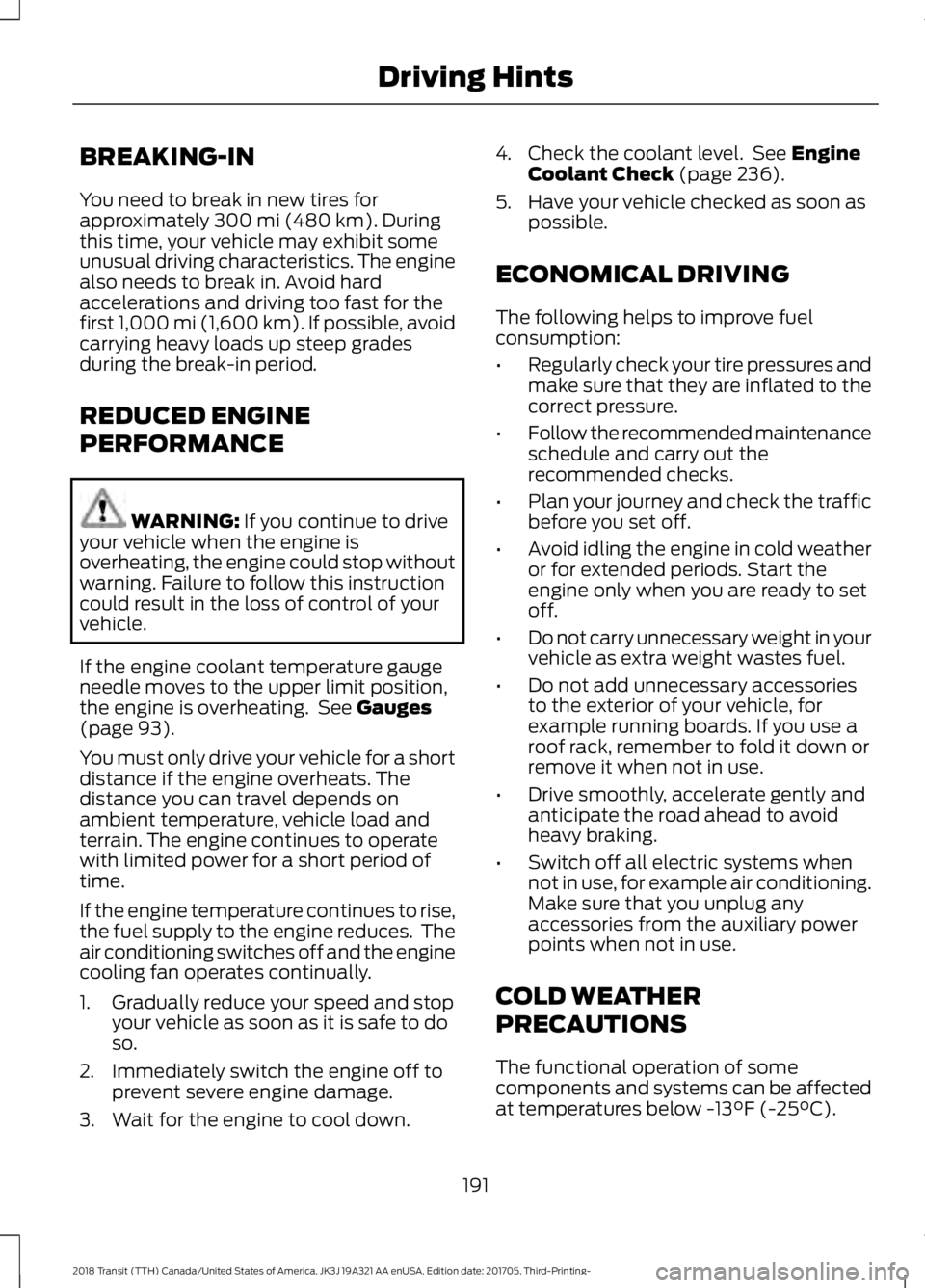
BREAKING-IN
You need to break in new tires for
approximately 300 mi (480 km). During
this time, your vehicle may exhibit some
unusual driving characteristics. The engine
also needs to break in. Avoid hard
accelerations and driving too fast for the
first 1,000 mi (1,600 km). If possible, avoid
carrying heavy loads up steep grades
during the break-in period.
REDUCED ENGINE
PERFORMANCE WARNING:
If you continue to drive
your vehicle when the engine is
overheating, the engine could stop without
warning. Failure to follow this instruction
could result in the loss of control of your
vehicle.
If the engine coolant temperature gauge
needle moves to the upper limit position,
the engine is overheating. See
Gauges
(page 93).
You must only drive your vehicle for a short
distance if the engine overheats. The
distance you can travel depends on
ambient temperature, vehicle load and
terrain. The engine continues to operate
with limited power for a short period of
time.
If the engine temperature continues to rise,
the fuel supply to the engine reduces. The
air conditioning switches off and the engine
cooling fan operates continually.
1. Gradually reduce your speed and stop your vehicle as soon as it is safe to do
so.
2. Immediately switch the engine off to prevent severe engine damage.
3. Wait for the engine to cool down. 4. Check the coolant level. See
Engine
Coolant Check (page 236).
5. Have your vehicle checked as soon as possible.
ECONOMICAL DRIVING
The following helps to improve fuel
consumption:
• Regularly check your tire pressures and
make sure that they are inflated to the
correct pressure.
• Follow the recommended maintenance
schedule and carry out the
recommended checks.
• Plan your journey and check the traffic
before you set off.
• Avoid idling the engine in cold weather
or for extended periods. Start the
engine only when you are ready to set
off.
• Do not carry unnecessary weight in your
vehicle as extra weight wastes fuel.
• Do not add unnecessary accessories
to the exterior of your vehicle, for
example running boards. If you use a
roof rack, remember to fold it down or
remove it when not in use.
• Drive smoothly, accelerate gently and
anticipate the road ahead to avoid
heavy braking.
• Switch off all electric systems when
not in use, for example air conditioning.
Make sure that you unplug any
accessories from the auxiliary power
points when not in use.
COLD WEATHER
PRECAUTIONS
The functional operation of some
components and systems can be affected
at temperatures below
-13°F (-25°C).
191
2018 Transit (TTH) Canada/United States of America, JK3J 19A321 AA enUSA, Edition date: 201705, Third-Printing- Driving Hints
Page 371 of 521
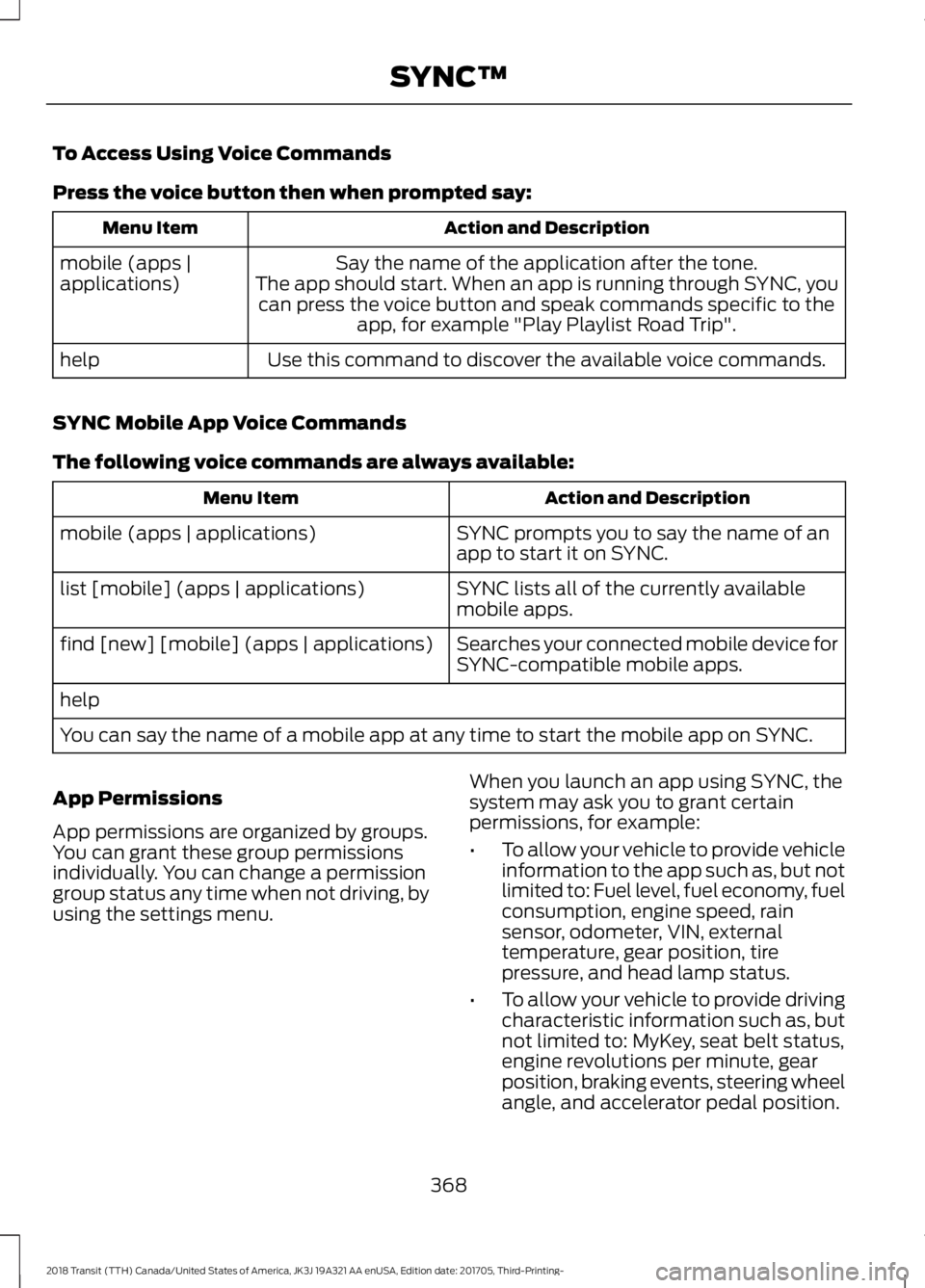
To Access Using Voice Commands
Press the voice button then when prompted say:
Action and Description
Menu Item
Say the name of the application after the tone.
The app should start. When an app is running through SYNC, you can press the voice button and speak commands specific to the app, for example "Play Playlist Road Trip".
mobile (apps |
applications)
Use this command to discover the available voice commands.
help
SYNC Mobile App Voice Commands
The following voice commands are always available: Action and Description
Menu Item
SYNC prompts you to say the name of an
app to start it on SYNC.
mobile (apps | applications)
SYNC lists all of the currently available
mobile apps.
list [mobile] (apps | applications)
Searches your connected mobile device for
SYNC-compatible mobile apps.
find [new] [mobile] (apps | applications)
help
You can say the name of a mobile app at any time to start the mobile app on SYNC.
App Permissions
App permissions are organized by groups.
You can grant these group permissions
individually. You can change a permission
group status any time when not driving, by
using the settings menu. When you launch an app using SYNC, the
system may ask you to grant certain
permissions, for example:
•
To allow your vehicle to provide vehicle
information to the app such as, but not
limited to: Fuel level, fuel economy, fuel
consumption, engine speed, rain
sensor, odometer, VIN, external
temperature, gear position, tire
pressure, and head lamp status.
• To allow your vehicle to provide driving
characteristic information such as, but
not limited to: MyKey, seat belt status,
engine revolutions per minute, gear
position, braking events, steering wheel
angle, and accelerator pedal position.
368
2018 Transit (TTH) Canada/United States of America, JK3J 19A321 AA enUSA, Edition date: 201705, Third-Printing- SYNC™
Page 512 of 521
Front Wiper Blades
See: Changing the Front Wiper Blades......246
Fuel and Refueling........................................131
Fuel Consumption........................................139
Advertised Capacity.......................................... 139
Calculating Fuel Economy.............................. 140
Filling the Fuel Tank.......................................... 140
Fuel Filler Funnel Location........................136
Fuel Filter - Gasoline..................................244
Fuel Quality - Diesel.....................................132 Biodiesel................................................................. 133
Diesel Fuel Additives ........................................ 134
Fuel Requirements - Choosing The Right Fuel: Vehicles Operated Where
Ultra-Low Sulfur Diesel Fuel Is Not
Required ........................................................... 132
Fuel Requirements - Choosing the Right Fuel: Vehicles Operated Where
Ultra-Low Sulfur Diesel Fuel is Required
(United States/Canada/Puerto Rico/U.S.
Virgin Islands and Other Locales)...........132
Fuel Quality - E85
.........................................135
Choosing the Right Fuel - Flex Fuel
Vehicles............................................................. 135
Switching Between E85 and Gasoline............................................................ 136
Fuel Quality - Gasoline...............................134 Choosing the Right Fuel................................... 134
Fuel Shutoff
....................................................195
Ignition Switch..................................................... 195
Fuse Box Locations....................................208 Body Control Module....................................... 208
Engine Compartment Fuse Box.................. 208
Passenger Compartment Fuse Box...........208
Pre-fuse Box....................................................... 208
Fuses................................................................208
Fuse Specification Chart - 3.2L Power Stroke Diesel..............................................208
Body Control Module........................................ 216
Engine Compartment Fuse Box.................. 209
Passenger Compartment Fuse Box.............212
Fuse Specification Chart - 3.5L Ecoboost™/3.7L.........................................217
Body Control Module........................................ 225
Engine Compartment Fuse Box.................... 218
Passenger Compartment Fuse Box.............221 G
Gauges...............................................................93
Engine Coolant Temperature Gauge............93
Fuel Gauge............................................................. 94
Information Display............................................. 93
Tripmeter Reset and Distance to Empty.................................................................. 94
Gearbox See: Transmission............................................... 151
General Information on Radio Frequencies...................................................59
General Maintenance Information.......459 Multi-point Inspection...................................... 461
Owner Checks and Services......................... 460
Protecting Your Investment.......................... 459
Why Maintain Your Vehicle?......................... 459
Why Maintain Your Vehicle at Your Dealership?..................................................... 459
Getting Assistance Outside the U.S. and Canada.........................................................204
Getting the Services You Need...............201 Away From Home............................................... 201
H
Handbrake See: Parking Brake - Vehicles With:
Mechanical Parking Brake.......................... 157
See: Parking Brake - Vehicles With: Push Down Parking Brake...................................... 157
Hazard Flashers............................................195
Headlamp Adjusting See: Adjusting the Headlamps..................... 247
Headlamp Removal See: Removing a Headlamp.......................... 248
Headrest See: Head Restraints.......................................... 113
Head Restraints..............................................113 Adjusting the Head Restraint.......................... 114
Installing the Head Restraint ......................... 114
Removing the Head Restraint......................... 114
Heated Seats
.................................................120
Heated Windows and Mirrors....................111 Heated Exterior Mirrors....................................... 111
Heated Rear Window.......................................... 111
Heating See: Climate Control......................................... 109
509
2018 Transit (TTH) Canada/United States of America, JK3J 19A321 AA enUSA, Edition date: 201705, Third-Printing- Index
Page 517 of 521
T
Technical Specifications
See: Capacities and Specifications............305
The Better Business Bureau (BBB) Auto Line Program (U.S. Only).......................203
Tire Care..........................................................269 Glossary of Tire Terminology.......................... 271
Inflating the Tires............................................... 278
Information About Uniform Tire Quality Grades.............................................................. 269
Information Contained on the Tire Sidewall............................................................ 272
Inspecting the Tires and Wheel Valve Stems................................................................. 281
Location of the Tire Label............................... 278
Tire Age.................................................................. 282
Tire and Wheel Alignment............................. 284
Tire Damage......................................................... 281
Tire Pressure Monitoring System.................283
Tire Replacement Requirements.................282
Tire Rotation........................................................ 285
Tire Safety Practices......................................... 283
Tire Wear................................................................ 281
United States Department of Transportation Tire Quality
Grades............................................................... 270
Tire Pressure Monitoring System...........287 Changing Tires With a Tire Pressure
Monitoring System....................................... 289
Tire Pressure Monitoring System Reset Procedure......................................................... 291
Understanding the Tire Pressure Monitoring System.............................................................. 289
Tires See: Wheels and Tires..................................... 268
Tow/Haul.........................................................154
Towing a Trailer.............................................180 Load Placement................................................. 180
Towing Points................................................199
Front Towing Point............................................. 199
Rear Towing Point.............................................. 199
Towing Eye Location........................................ 200
Towing the Vehicle on Four Wheels..........................................................189
Emergency Towing............................................ 189
Recreational Towing......................................... 190
Towing..............................................................180 Traction Control
............................................160
Principle of Operation...................................... 160
Trailer Sway Control.....................................181
Transmission Code Designation.............312
Transmission...................................................151
Transporting the Vehicle
...........................198
Trip Computer................................................102 All Values............................................................... 102
Average Fuel Consumption............................ 102
Digital Speedometer......................................... 102
Distance to Empty............................................. 102
Outside Air Temperature................................. 102
Resetting the Trip Computer.......................... 102
Trip Odometer..................................................... 102
Trip Timer.............................................................. 102
U
Under Hood Overview - 3.2L Power Stroke Diesel
..............................................230
Under Hood Overview - 3.5L Ecoboost™..................................................231
Under Hood Overview - 3.7L....................232
USB Port
..........................................................347
Using Cruise Control...................................168 Switching Cruise Control Off......................... 168
Switching Cruise Control On.......................... 168
Using MyKey With Remote Start Systems..........................................................68
Using Power Running Boards.....................77 Automatic Power Deploy................................... 77
Automatic Power Stow....................................... 77
Bounce-back.......................................................... 78
Enabling and Disabling...................................... 78
Manual Operation................................................ 78
Manual Power Deploy......................................... 77
Resetting the System.......................................... 79
Using Snow Chains
.....................................286
Using Stability Control................................162
Using SYNC™ With Your Media Player.............................................................370
Accessing Your USB Song Library................374
Bluetooth Devices and System Settings............................................................. 376
Connecting Your Digital Media Player to the USB Port........................................................... 370
Media Menu Features....................................... 373
Media Voice Commands.................................. 371
514
2018 Transit (TTH) Canada/United States of America, JK3J 19A321 AA enUSA, Edition date: 201705, Third-Printing- Index