ignition FORD TRANSIT 2021 Owner's Manual
[x] Cancel search | Manufacturer: FORD, Model Year: 2021, Model line: TRANSIT, Model: FORD TRANSIT 2021Pages: 509, PDF Size: 8.21 MB
Page 93 of 509
2.
Switch the ignition from off to on. Keep
the ignition on for at least three
seconds, but no more than 10 seconds.
3. Switch the ignition off and remove the
first correctly coded key from the
ignition.
4. After three seconds but within 10 seconds of switching the ignition off,
insert the second previously correctly
coded key into the ignition.
5. Switch the ignition from off to on. Keep
the ignition on for at least three
seconds, but no more than 10 seconds.
6. Switch the ignition off and remove the
second previously programmed
correctly coded key from the ignition.
7. After three seconds but within 10 seconds of switching the ignition off
and removing the previously
programmed correctly coded key,
insert the new unprogrammed key into
the ignition.
8. Switch the ignition from off to on. Keep
the ignition on for at least six seconds.
9. Remove the newly programmed correctly coded key from the ignition.
If the key has been successfully
programmed it will start the engine and
operate the remote entry system (if the
new key is an integrated keyhead
transmitter).
If the key was not successfully
programmed, wait 10 seconds and repeat
Steps 1 through 8. If you are still
unsuccessful, take your vehicle to an
authorized dealer.
Note: You can program a maximum of eight
coded keys to your vehicle. All eight can be
integrated keyhead transmitters. ANTI-THEFT ALARM -
VEHICLES WITHOUT: ANTI-
THEFT ALARM HORN WITH
INTEGRAL BATTERY
Alarm System
The perimeter alarm is a deterrent against
unauthorized access to your vehicle
through the doors, luggage compartment
and the hood.
Triggering the Alarm
Once armed, the alarm is triggered in any
of the following ways:
•
If someone opens a door, cargo area
or the hood without a valid key or
remote control.
• If you switch the ignition on without a
valid key.
If the alarm is triggered, the horn will sound
for 30 seconds and the hazard warning
flasher will flash for five minutes.
Any further attempts to perform one of the
above will trigger the alarm again.
Arming the Alarm
To arm the alarm, lock your vehicle. See
Doors and Locks (page 76).
Disarming the Alarm
Disarm and silence the alarm by unlocking
the doors with the key and switching the
ignition on with a correctly coded key or by
unlocking the doors or the cargo area with
the remote control.
90
2021 Transit (TTH) Canada/United States of America, MK3J 19A321 AA enUSA, Edition date: 202010, Second-Printing Security
Page 94 of 509
ANTI-THEFT ALARM -
VEHICLES WITH: ANTI-THEFT
ALARM HORN WITH INTEGRAL
BATTERY
Alarm System
Your vehicle may have one of the following
alarm systems:
•
Category one alarm with interior
sensors and battery back-up sounder.
• Perimeter alarm.
Perimeter Alarm
The perimeter alarm is a deterrent against
unauthorized access to your vehicle
through the doors and the hood.
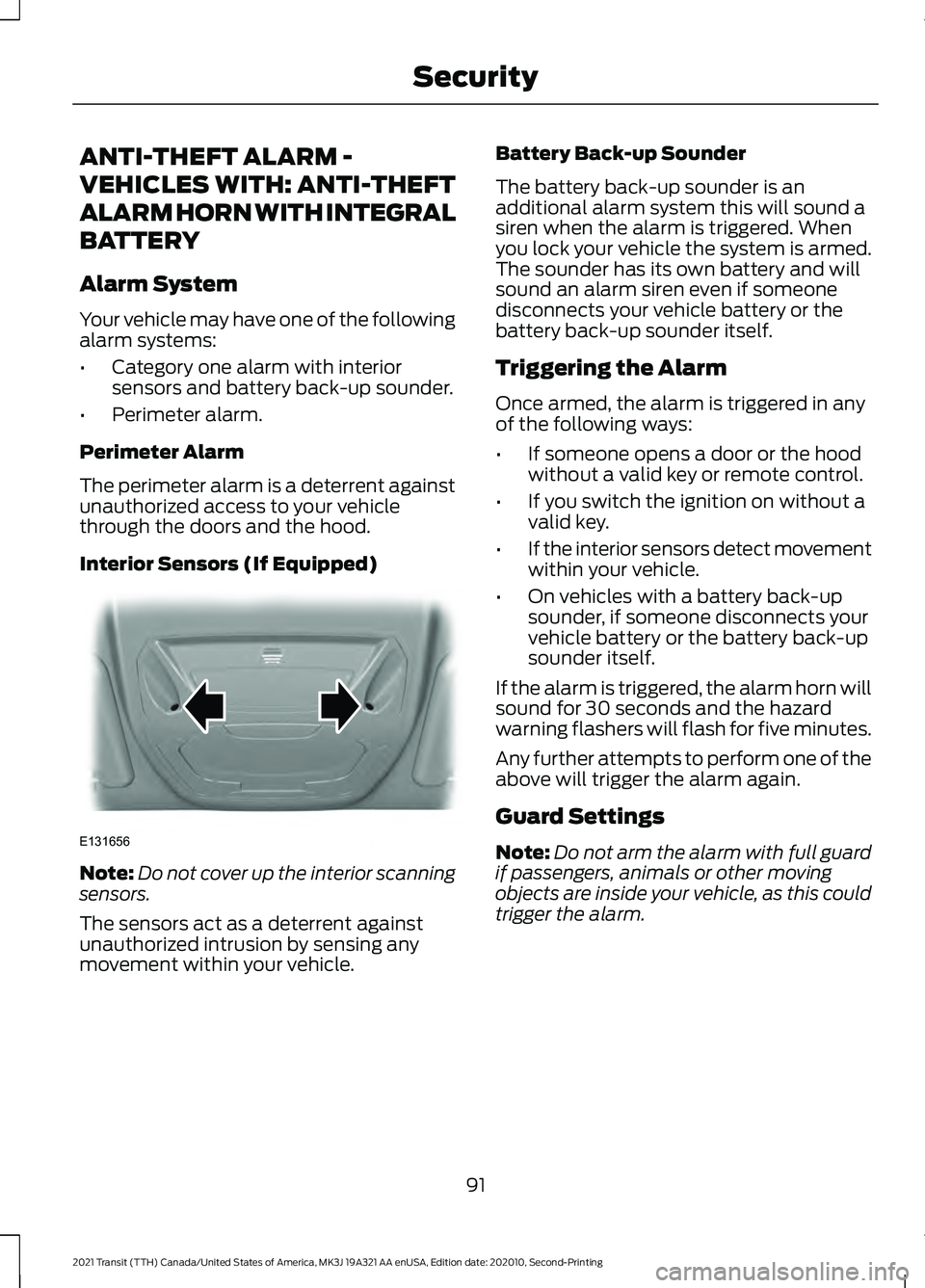
Interior Sensors (If Equipped) Note:
Do not cover up the interior scanning
sensors.
The sensors act as a deterrent against
unauthorized intrusion by sensing any
movement within your vehicle. Battery Back-up Sounder
The battery back-up sounder is an
additional alarm system this will sound a
siren when the alarm is triggered. When
you lock your vehicle the system is armed.
The sounder has its own battery and will
sound an alarm siren even if someone
disconnects your vehicle battery or the
battery back-up sounder itself.
Triggering the Alarm
Once armed, the alarm is triggered in any
of the following ways:
•
If someone opens a door or the hood
without a valid key or remote control.
• If you switch the ignition on without a
valid key.
• If the interior sensors detect movement
within your vehicle.
• On vehicles with a battery back-up
sounder, if someone disconnects your
vehicle battery or the battery back-up
sounder itself.
If the alarm is triggered, the alarm horn will
sound for 30 seconds and the hazard
warning flashers will flash for five minutes.
Any further attempts to perform one of the
above will trigger the alarm again.
Guard Settings
Note: Do not arm the alarm with full guard
if passengers, animals or other moving
objects are inside your vehicle, as this could
trigger the alarm.
91
2021 Transit (TTH) Canada/United States of America, MK3J 19A321 AA enUSA, Edition date: 202010, Second-Printing SecurityE131656
Page 95 of 509
Description
Message
The interior sensors are on when you arm the alarm.
Full guard
The interior sensors are off when you arm the alarm. You can
set the alarm to reduced guard for the current ignition cycle
only. The alarm will reset to full guard the next time you
switch the ignition on.
Reduced
You can set the information display to ask you each time
which level of guard you wish to set.
Ask on exit
A message appears in the information display each time you
switch the ignition off. If you wish to arm the alarm with
reduced guard, press the OK button when this message
appears. If you wish to arm the alarm with full guard, leave
your vehicle without pressing the
OK button.
Selecting Full or Reduced Guard
Note: Selecting reduced guard does not set
the alarm permanently to reduced guard. It
sets it to reduced guard only for the current
ignition cycle. If you regularly set the alarm
to reduced guard, select the option to ask
when you exit.
You can select full or reduced guard using
the information display. See Information
Displays
(page 115).
Arming the Alarm
To arm the alarm, lock your vehicle. See
Doors and Locks
(page 76).
Disarming the Alarm
Disarm and silence the alarm by unlocking
the doors and switching your vehicle on or
by unlocking the doors or the liftgate with
the remote control.
92
2021 Transit (TTH) Canada/United States of America, MK3J 19A321 AA enUSA, Edition date: 202010, Second-Printing Security
Page 97 of 509
Manual Power Deploy
To set the power running boards to the deployed position, use the information
display controls on the steering wheel to select the following:
Action
Message
Press the menu button.
Settings
Press the OK button.
Vehicle Settings
Press the
OK button.
Power Steps
Press the
OK button.
Out
Enabling and Disabling
To enable or disable the power running board feature, use the information display
controls on the steering wheel to select the following: Action and Description
Message
Press the menu button.
Settings
Press the
OK button.
Vehicle Settings
Press the
OK button.
Power Steps
Select one of the following:
Press the
OK button. When disabled the power running
boards move to the stowed position regardless of the door
position.
Off
Press the
OK button. When enabled the power running
boards move to the correct position based on the door posi-
tion.
Auto
When you switch the ignition on, the
system turns on.
Bounce-back
The running board will reverse direction
and move to the end of travel if it
encounters an object while moving. Manual Operation
If the power running board does not return
to the stowed position, you can manually
stow it.
94
2021 Transit (TTH) Canada/United States of America, MK3J 19A321 AA enUSA, Edition date: 202010, Second-Printing Power Running Boards
Page 99 of 509
ADJUSTING THE STEERING
WHEEL
WARNING: Do not adjust the
steering wheel when your vehicle is
moving.
Note: Make sure that you are sitting in the
correct position. See Sitting in the Correct
Position
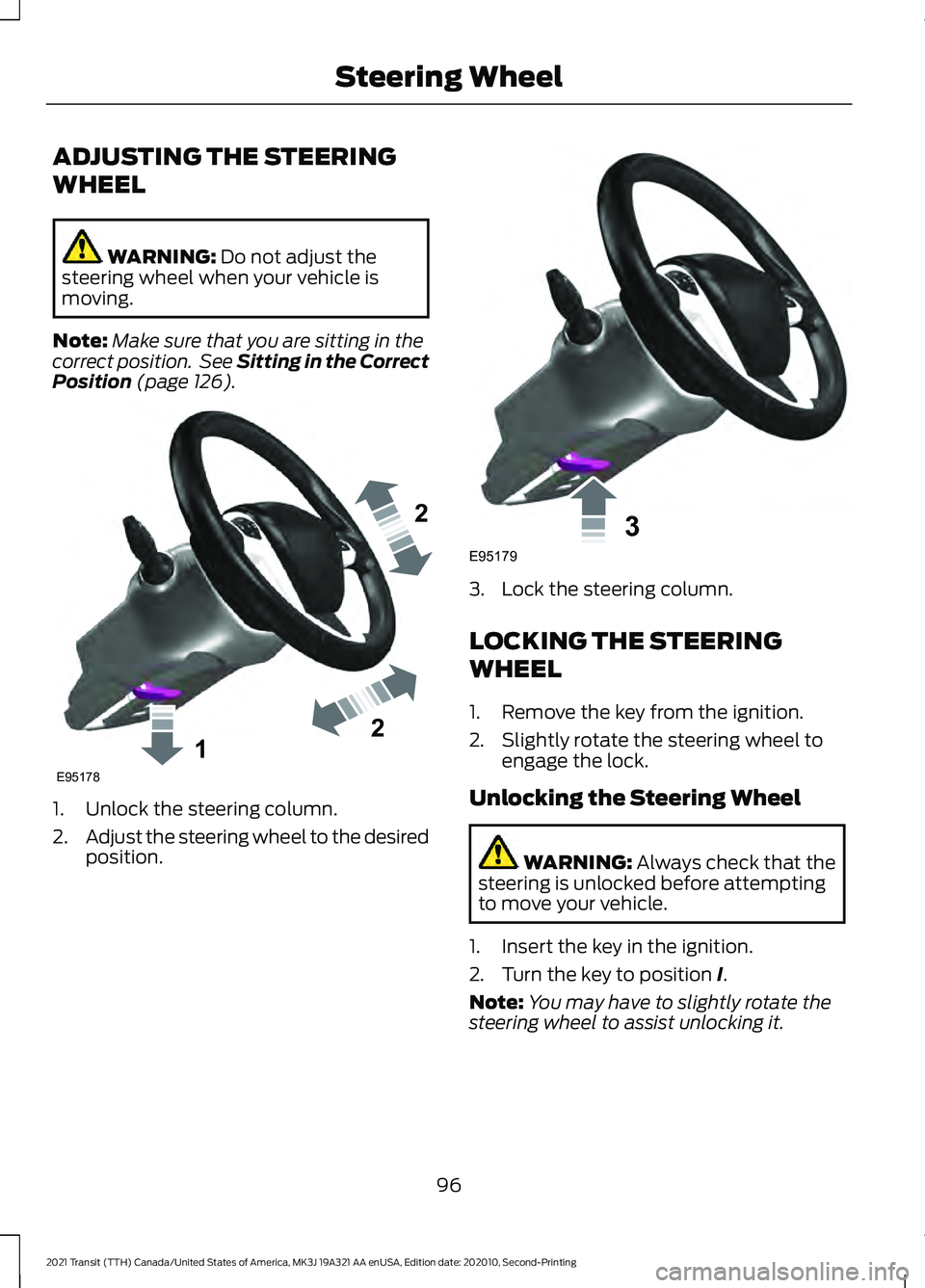
(page 126). 1. Unlock the steering column.
2.
Adjust the steering wheel to the desired
position. 3. Lock the steering column.
LOCKING THE STEERING
WHEEL
1. Remove the key from the ignition.
2. Slightly rotate the steering wheel to
engage the lock.
Unlocking the Steering Wheel WARNING:
Always check that the
steering is unlocked before attempting
to move your vehicle.
1. Insert the key in the ignition.
2. Turn the key to position
I.
Note: You may have to slightly rotate the
steering wheel to assist unlocking it.
96
2021 Transit (TTH) Canada/United States of America, MK3J 19A321 AA enUSA, Edition date: 202010, Second-Printing Steering Wheel122E95178 3E95179
Page 101 of 509
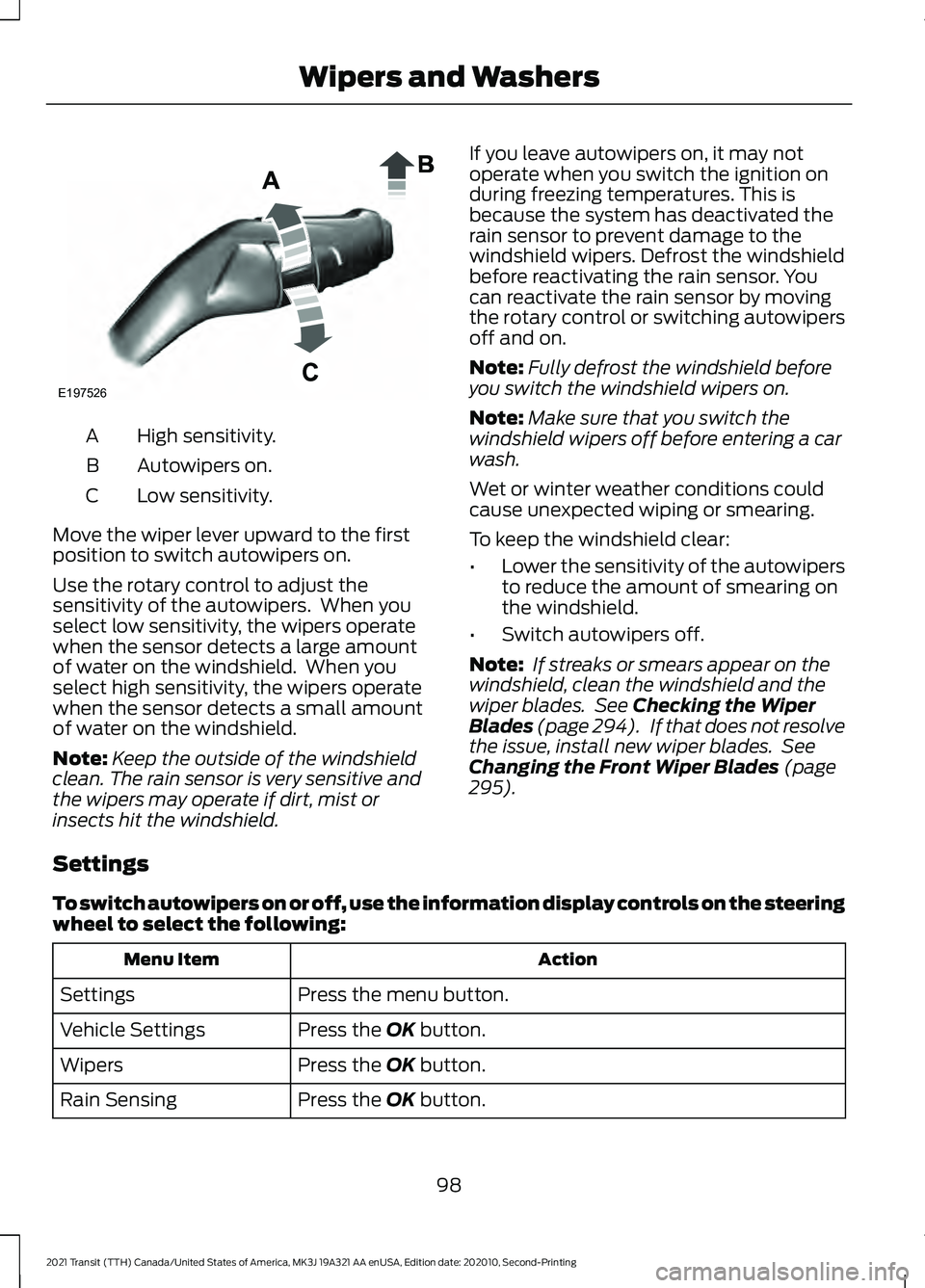
High sensitivity.
A
Autowipers on.
B
Low sensitivity.
C
Move the wiper lever upward to the first
position to switch autowipers on.
Use the rotary control to adjust the
sensitivity of the autowipers. When you
select low sensitivity, the wipers operate
when the sensor detects a large amount
of water on the windshield. When you
select high sensitivity, the wipers operate
when the sensor detects a small amount
of water on the windshield.
Note: Keep the outside of the windshield
clean. The rain sensor is very sensitive and
the wipers may operate if dirt, mist or
insects hit the windshield. If you leave autowipers on, it may not
operate when you switch the ignition on
during freezing temperatures. This is
because the system has deactivated the
rain sensor to prevent damage to the
windshield wipers. Defrost the windshield
before reactivating the rain sensor. You
can reactivate the rain sensor by moving
the rotary control or switching autowipers
off and on.
Note:
Fully defrost the windshield before
you switch the windshield wipers on.
Note: Make sure that you switch the
windshield wipers off before entering a car
wash.
Wet or winter weather conditions could
cause unexpected wiping or smearing.
To keep the windshield clear:
• Lower the sensitivity of the autowipers
to reduce the amount of smearing on
the windshield.
• Switch autowipers off.
Note: If streaks or smears appear on the
windshield, clean the windshield and the
wiper blades. See Checking the Wiper
Blades (page 294). If that does not resolve
the issue, install new wiper blades. See
Changing the Front Wiper Blades
(page
295).
Settings
To switch autowipers on or off, use the information display controls on the steering
wheel to select the following: Action
Menu Item
Press the menu button.
Settings
Press the
OK button.
Vehicle Settings
Press the
OK button.
Wipers
Press the
OK button.
Rain Sensing
98
2021 Transit (TTH) Canada/United States of America, MK3J 19A321 AA enUSA, Edition date: 202010, Second-Printing Wipers and WashersE197526
Page 103 of 509
GENERAL INFORMATION
Condensation in the Exterior Front
Lamps and Rear Lamps
Exterior front lamps and rear lamps have
vents to accommodate normal changes
in air pressure.
Condensation can be a natural by-product
of this design. When moist air enters the
lamp assembly through the vents, there is
a possibility that condensation can occur
when the temperature is cold. When
normal condensation occurs, a fine mist
can form on the interior of the lens. The
fine mist eventually clears and exits
through the vents during normal operation.
Clearing time may take as long as 48 hours
under dry weather conditions.
Examples of acceptable condensation are:
•
The presence of a fine mist (no streaks,
drip marks or large droplets).
• A fine mist covers less than 50% of the
lens.
Examples of unacceptable condensation
are:
• A water puddle inside the lamp.
• Streaks, drip marks or large droplets
present on the interior of the lens.
If you see any unacceptable condensation,
have your vehicle checked by an authorized
dealer. LIGHTING CONTROL
Lighting Control Positions
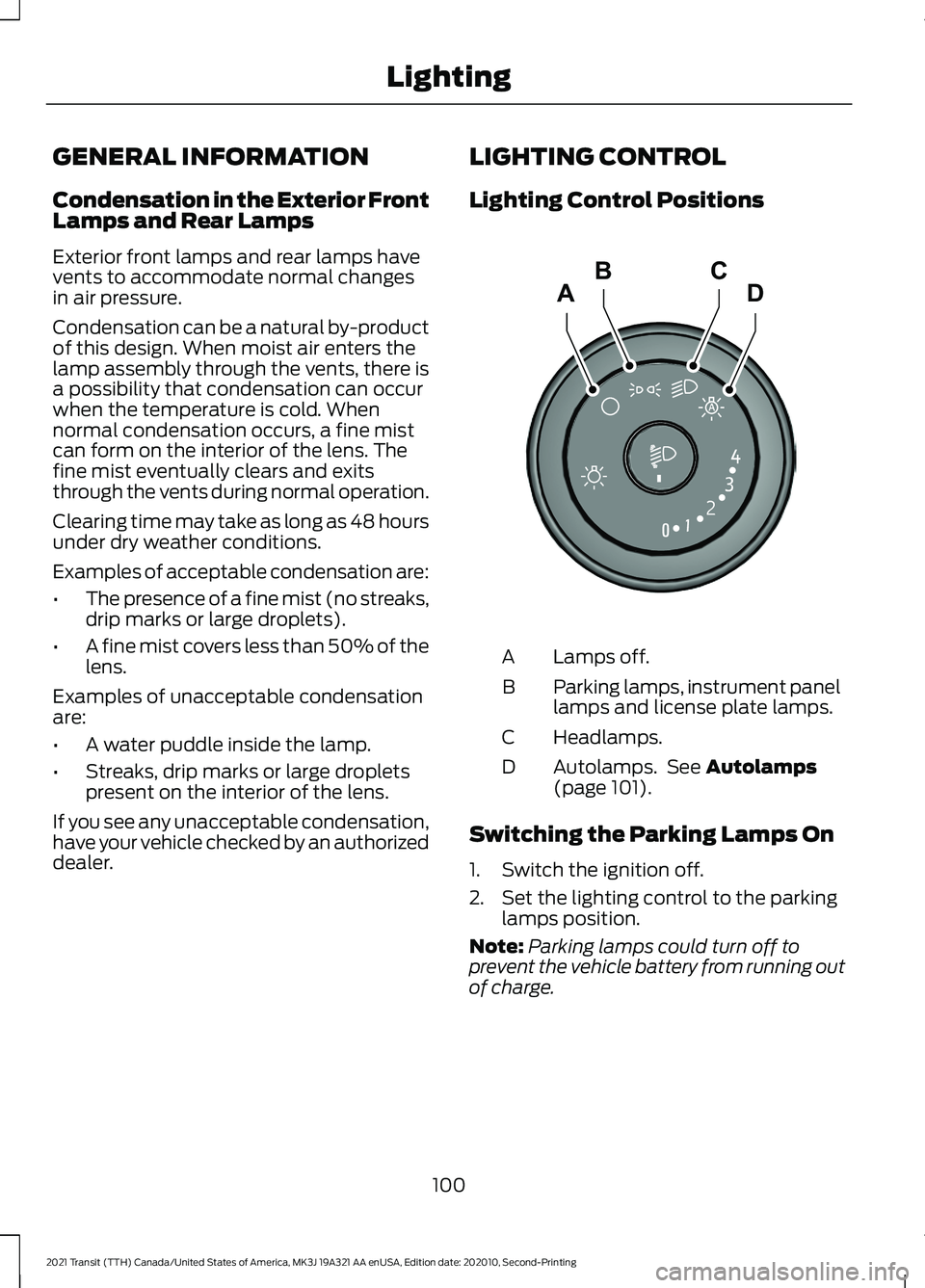
Lamps off.
A
Parking lamps, instrument panel
lamps and license plate lamps.
B
Headlamps.
C
Autolamps. See Autolamps
(page 101).
D
Switching the Parking Lamps On
1. Switch the ignition off.
2. Set the lighting control to the parking lamps position.
Note: Parking lamps could turn off to
prevent the vehicle battery from running out
of charge.
100
2021 Transit (TTH) Canada/United States of America, MK3J 19A321 AA enUSA, Edition date: 202010, Second-Printing LightingADCBE245649
Page 105 of 509
The headlamps remain on for a period of
time after you switch the ignition off. Use
the information display controls to adjust
the period of time that the headlamps
remain on.
Adjusting the Period of Time That
the Headlamps Remain On
1. Using the information display controls
on the steering wheel, select Settings.
2. Select Vehicle Settings.
3. Select
Lighting.
4. Select
Autolamp Delay.
5. Select a setting.
6. Press the
OK button.
INSTRUMENT LIGHTING
DIMMER
The instrument lighting dimmer buttons
are on the lighting control. Repeatedly press one of the
buttons to adjust the brightness.
DAYTIME RUNNING LAMPS
(IF
EQUIPPED) WARNING:
The daytime running
lamps system does not activate the rear
lamps and may not provide adequate
lighting during low visibility driving
conditions. Also, the autolamps switch
position may not activate the headlamps in all low visibility conditions, such as
daytime fog. Make sure the headlamps
are switched to auto or on, as
appropriate, during all low visibility
conditions. Failure to do so may result in
a crash.
Type 1 - Conventional (Non-
Configurable)
The daytime running lamps turn on when:
1. The ignition is switched to the on position.
2. The lighting control is in the off, parking
lamp or autolamps positions.
3. The headlamps are off.
Type 2 - Configurable
Switch the daytime running lamps on or
off using the information display controls.
See
Information Displays (page 115).
The daytime running lamps turn on when:
1. They are switched on in the information
display. See
Information Displays
(page 115).
2. The ignition is switched to the on position.
3. The lighting control is in the autolamps
position.
4. The headlamps are off.
The other lighting control switch positions
do not activate the daytime running lamps,
and you can use them to temporarily
override autolamp control.
When switched off in the information
display, the daytime running lamps are off
in all lighting control switch positions.
102
2021 Transit (TTH) Canada/United States of America, MK3J 19A321 AA enUSA, Edition date: 202010, Second-Printing LightingE291299 E291298
Page 108 of 509
Note:
The brightness of the daytime running
lamps may decrease when the front fog
lamps are switched on.
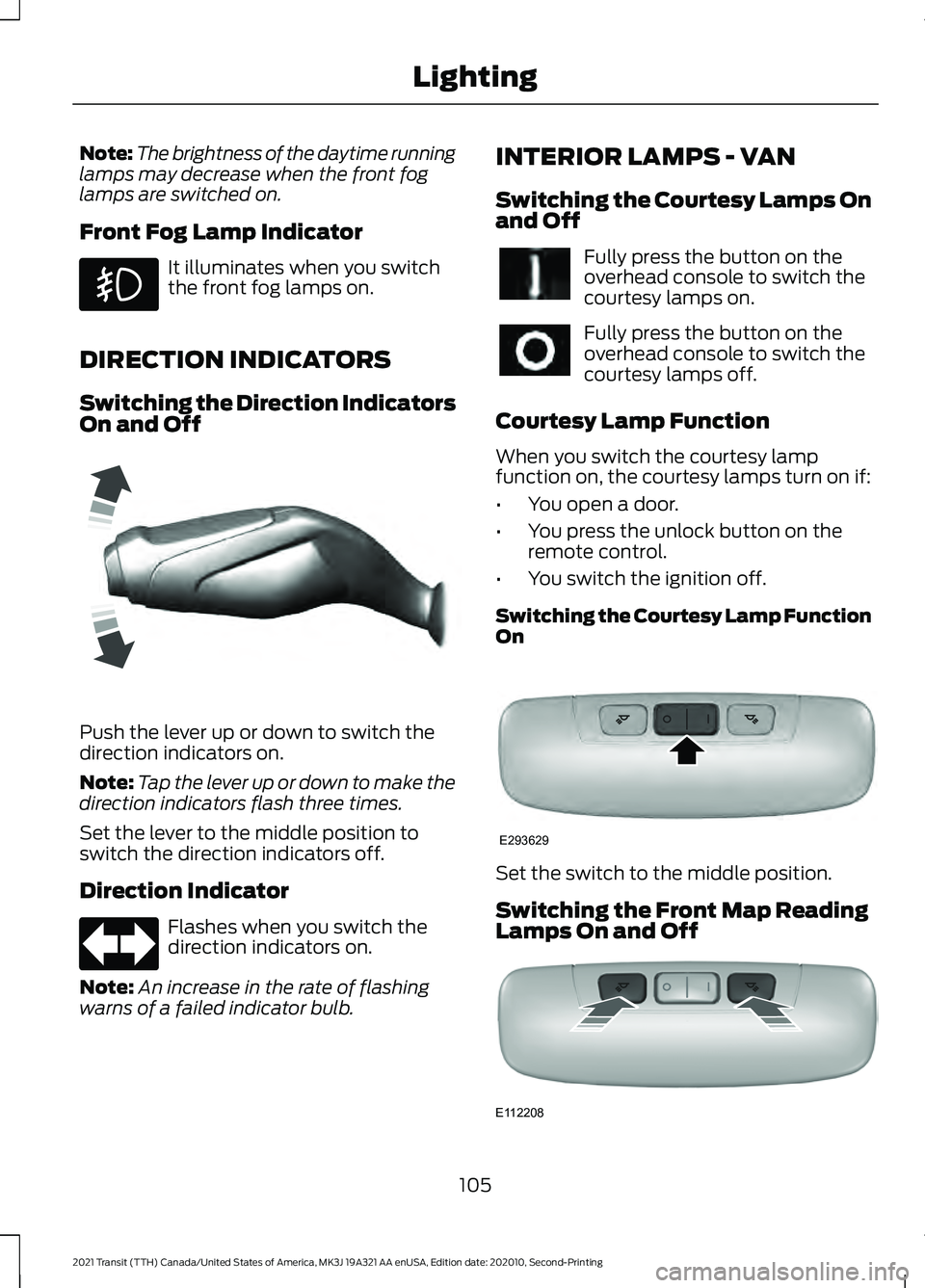
Front Fog Lamp Indicator It illuminates when you switch
the front fog lamps on.
DIRECTION INDICATORS
Switching the Direction Indicators
On and Off Push the lever up or down to switch the
direction indicators on.
Note:
Tap the lever up or down to make the
direction indicators flash three times.
Set the lever to the middle position to
switch the direction indicators off.
Direction Indicator Flashes when you switch the
direction indicators on.
Note: An increase in the rate of flashing
warns of a failed indicator bulb. INTERIOR LAMPS - VAN
Switching the Courtesy Lamps On
and Off Fully press the button on the
overhead console to switch the
courtesy lamps on.
Fully press the button on the
overhead console to switch the
courtesy lamps off.
Courtesy Lamp Function
When you switch the courtesy lamp
function on, the courtesy lamps turn on if:
• You open a door.
• You press the unlock button on the
remote control.
• You switch the ignition off.
Switching the Courtesy Lamp Function
On Set the switch to the middle position.
Switching the Front Map Reading
Lamps On and Off
105
2021 Transit (TTH) Canada/United States of America, MK3J 19A321 AA enUSA, Edition date: 202010, Second-Printing Lighting E162681 E293629 E112208
Page 109 of 509
CARGO LAMPS
Switching the Cargo Lamps Off
Press the button to switch the cargo lamps
off when a door is open.
Note:
The cargo lamps switch only
operates when the ignition is off.
The switch is inside the cargo area, behind
the left-hand rear door.
The cargo lamps turn off after a short
period of time to prevent the battery from
running out of charge.
Switching the Cargo Lamps On
Press the button to switch the cargo lamps
on.
If the cargo lamps turned off to prevent
the battery from running out of charge or
you switched them off by pressing the
button, reset the switch first.
Resetting the Switch
To reset the switch, do one of the
following:
• Lock or unlock a door.
• Open or close a front door.
• Switch the ignition on then off.
Press the button to switch the cargo lamps
on.
106
2021 Transit (TTH) Canada/United States of America, MK3J 19A321 AA enUSA, Edition date: 202010, Second-Printing Lighting