reset FORD TRANSIT CONNECT 2013 1.G User Guide
[x] Cancel search | Manufacturer: FORD, Model Year: 2013, Model line: TRANSIT CONNECT, Model: FORD TRANSIT CONNECT 2013 1.GPages: 321, PDF Size: 4.5 MB
Page 228 of 321

Tire Rotation
WARNING:If the tire label shows different tire pressures for
the front and rear tires and the vehicle is equipped with a tire
pressure monitoring system, then the settings for the system sensors
need to be updated. Always perform the system reset procedure after
tire rotation. If the system is not reset, it may not provide a low tire
pressure warning when necessary. See the TPMS reset procedure in
this chapter.
Note:If your tires show uneven wear ask an authorized dealer to check
for and correct any wheel misalignment, tire imbalance or mechanical
problem involved before tire rotation.
Note:Your vehicle may be equipped with a dissimilar spare tire and
wheel assembly. A dissimilar spare tire and wheel assembly is defined as
a spare tire or wheel that is different in brand, size or appearance from
the road tires and wheels. If you have a dissimilar spare tire/wheel it is
intended for temporary use only and should not be used in a tire
rotation.
Note:After having your tires rotated, inflation pressure must be checked
and adjusted to the vehicle requirements.
Rotating your tires at the recommended interval (as indicated in your
scheduled maintenance) will help your tires wear more evenly, providing
better tire performance and longer tire life.
•Front-wheel drive vehicles
(front tires at left of diagram)
Sometimes irregular tire wear can be corrected by rotating the tires.
Wheels and Tires227
2013 Transit Connect(tst)
Owners Guide gf, 2nd Printing, November 2012
USA(fus)
Page 234 of 321
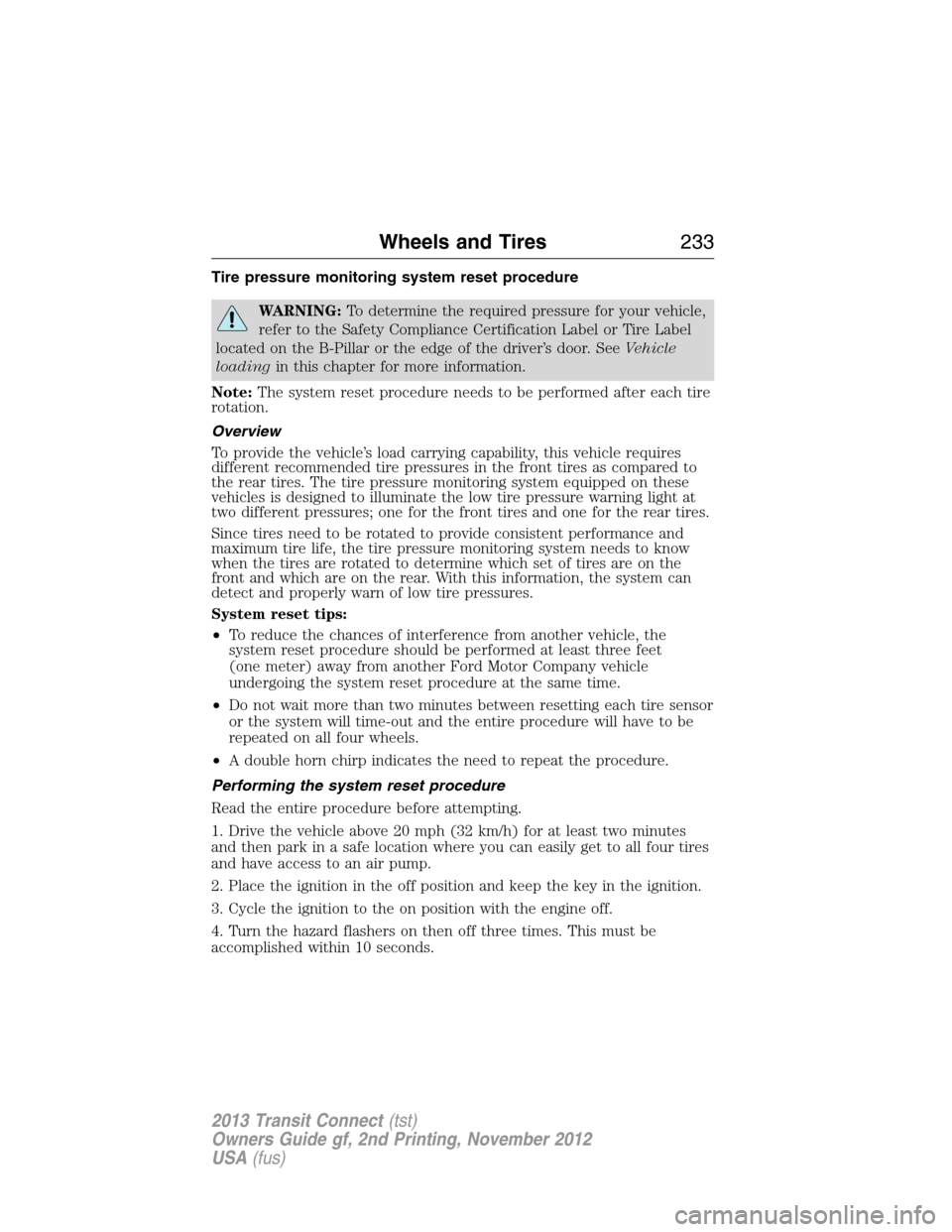
Tire pressure monitoring system reset procedure
WARNING:To determine the required pressure for your vehicle,
refer to the Safety Compliance Certification Label or Tire Label
located on the B-Pillar or the edge of the driver’s door. SeeVehicle
loadingin this chapter for more information.
Note:The system reset procedure needs to be performed after each tire
rotation.
Overview
To provide the vehicle’s load carrying capability, this vehicle requires
different recommended tire pressures in the front tires as compared to
the rear tires. The tire pressure monitoring system equipped on these
vehicles is designed to illuminate the low tire pressure warning light at
two different pressures; one for the front tires and one for the rear tires.
Since tires need to be rotated to provide consistent performance and
maximum tire life, the tire pressure monitoring system needs to know
when the tires are rotated to determine which set of tires are on the
front and which are on the rear. With this information, the system can
detect and properly warn of low tire pressures.
System reset tips:
•To reduce the chances of interference from another vehicle, the
system reset procedure should be performed at least three feet
(one meter) away from another Ford Motor Company vehicle
undergoing the system reset procedure at the same time.
•Do not wait more than two minutes between resetting each tire sensor
or the system will time-out and the entire procedure will have to be
repeated on all four wheels.
•A double horn chirp indicates the need to repeat the procedure.
Performing the system reset procedure
Read the entire procedure before attempting.
1. Drive the vehicle above 20 mph (32 km/h) for at least two minutes
and then park in a safe location where you can easily get to all four tires
and have access to an air pump.
2. Place the ignition in the off position and keep the key in the ignition.
3. Cycle the ignition to the on position with the engine off.
4. Turn the hazard flashers on then off three times. This must be
accomplished within 10 seconds.
Wheels and Tires233
2013 Transit Connect(tst)
Owners Guide gf, 2nd Printing, November 2012
USA(fus)
Page 235 of 321
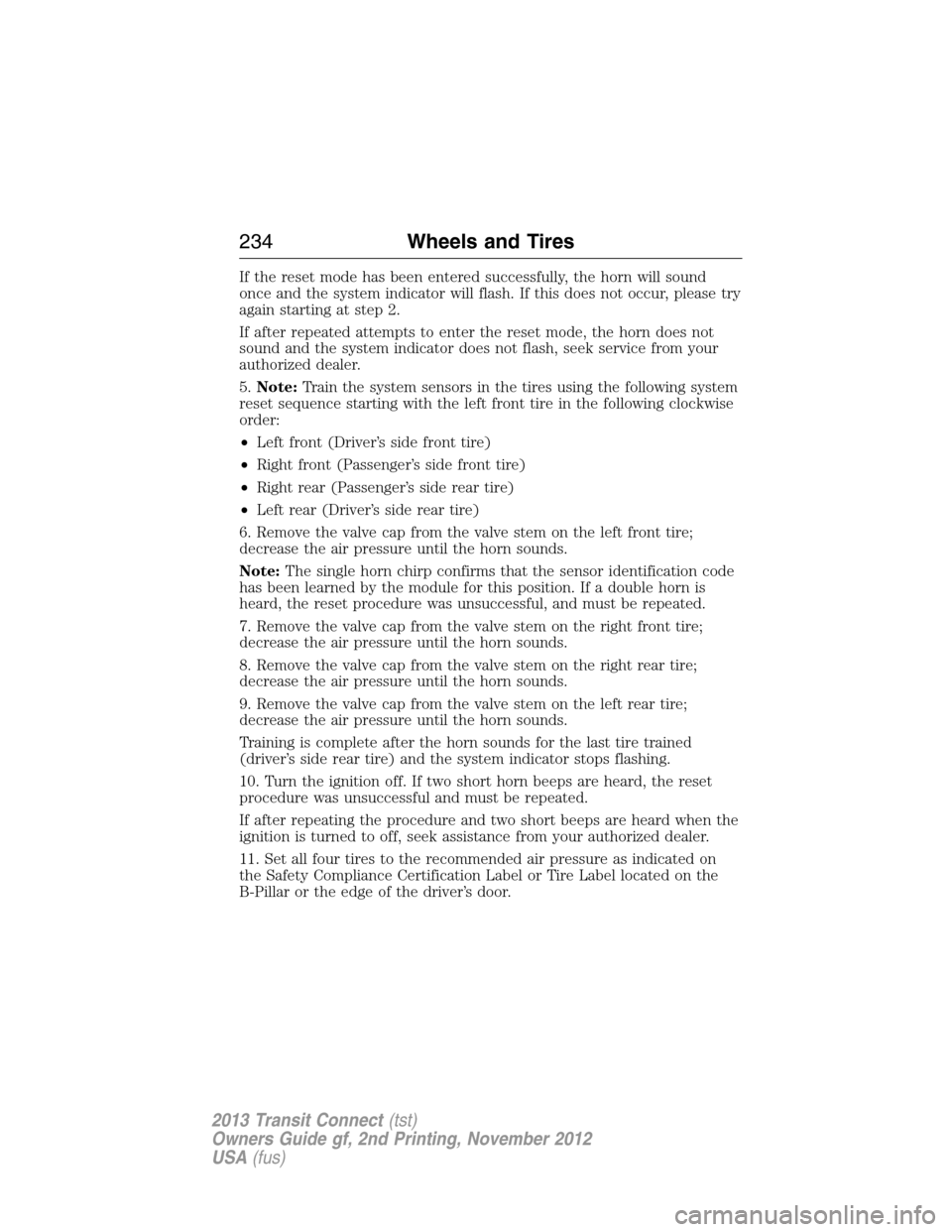
If the reset mode has been entered successfully, the horn will sound
once and the system indicator will flash. If this does not occur, please try
again starting at step 2.
If after repeated attempts to enter the reset mode, the horn does not
sound and the system indicator does not flash, seek service from your
authorized dealer.
5.Note:Train the system sensors in the tires using the following system
reset sequence starting with the left front tire in the following clockwise
order:
•Left front (Driver’s side front tire)
•Right front (Passenger’s side front tire)
•Right rear (Passenger’s side rear tire)
•Left rear (Driver’s side rear tire)
6. Remove the valve cap from the valve stem on the left front tire;
decrease the air pressure until the horn sounds.
Note:The single horn chirp confirms that the sensor identification code
has been learned by the module for this position. If a double horn is
heard, the reset procedure was unsuccessful, and must be repeated.
7. Remove the valve cap from the valve stem on the right front tire;
decrease the air pressure until the horn sounds.
8. Remove the valve cap from the valve stem on the right rear tire;
decrease the air pressure until the horn sounds.
9. Remove the valve cap from the valve stem on the left rear tire;
decrease the air pressure until the horn sounds.
Training is complete after the horn sounds for the last tire trained
(driver’s side rear tire) and the system indicator stops flashing.
10. Turn the ignition off. If two short horn beeps are heard, the reset
procedure was unsuccessful and must be repeated.
If after repeating the procedure and two short beeps are heard when the
ignition is turned to off, seek assistance from your authorized dealer.
11. Set all four tires to the recommended air pressure as indicated on
the Safety Compliance Certification Label or Tire Label located on the
B-Pillar or the edge of the driver’s door.
234Wheels and Tires
2013 Transit Connect(tst)
Owners Guide gf, 2nd Printing, November 2012
USA(fus)
Page 273 of 321
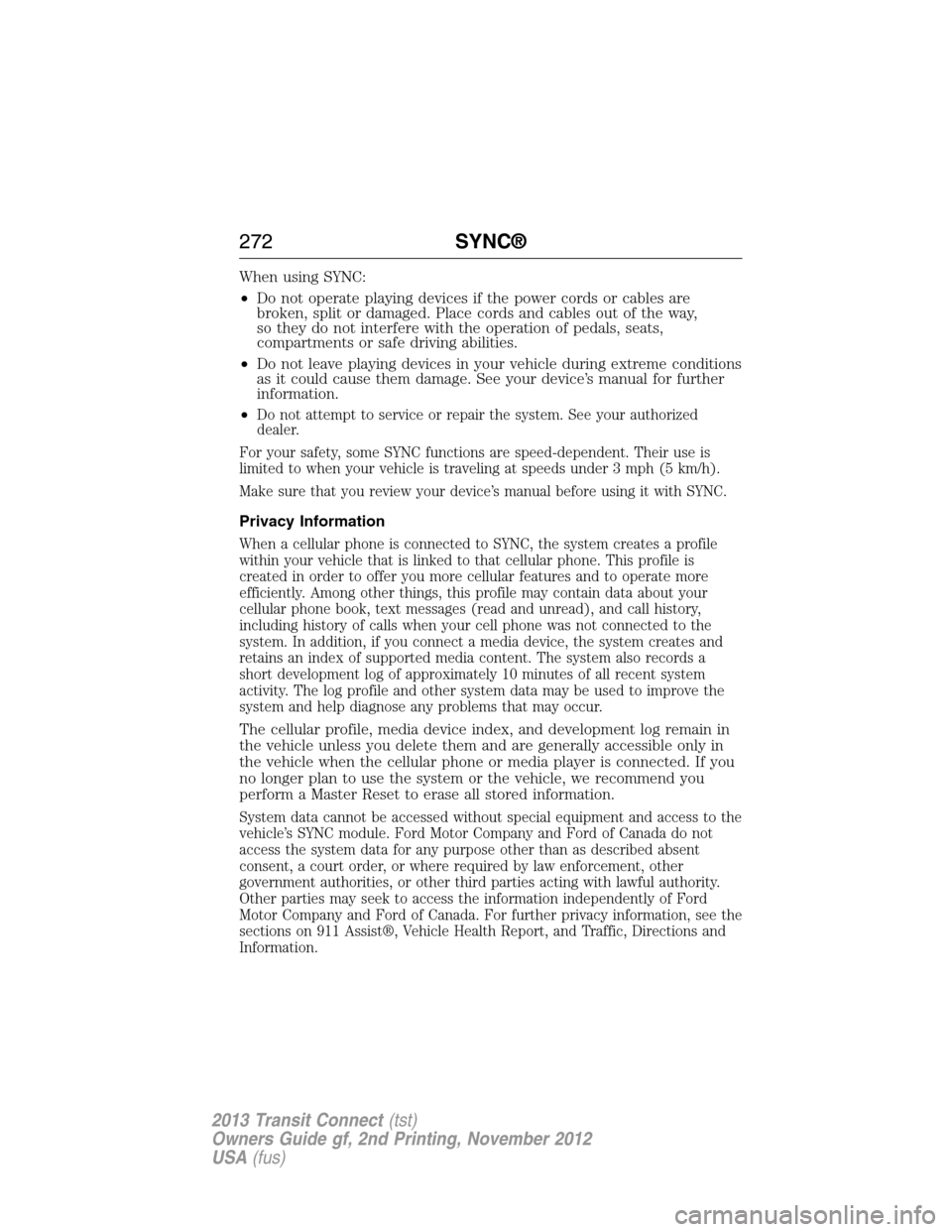
When using SYNC:
•Do not operate playing devices if the power cords or cables are
broken, split or damaged. Place cords and cables out of the way,
so they do not interfere with the operation of pedals, seats,
compartments or safe driving abilities.
•Do not leave playing devices in your vehicle during extreme conditions
as it could cause them damage. See your device’s manual for further
information.
•
Do not attempt to service or repair the system. See your authorized
dealer.
For your safety, some SYNC functions are speed-dependent. Their use is
limited to when your vehicle is traveling at speeds under 3 mph (5 km/h).
Make sure that you review your device’s manual before using it with SYNC.
Privacy Information
When a cellular phone is connected to SYNC, the system creates a profile
within your vehicle that is linked to that cellular phone. This profile is
created in order to offer you more cellular features and to operate more
efficiently. Among other things, this profile may contain data about your
cellular phone book, text messages (read and unread), and call history,
including history of calls when your cell phone was not connected to the
system. In addition, if you connect a media device, the system creates and
retains an index of supported media content. The system also records a
short development log of approximately 10 minutes of all recent system
activity. The log profile and other system data may be used to improve the
system and help diagnose any problems that may occur.
The cellular profile, media device index, and development log remain in
the vehicle unless you delete them and are generally accessible only in
the vehicle when the cellular phone or media player is connected. If you
no longer plan to use the system or the vehicle, we recommend you
perform a Master Reset to erase all stored information.
System data cannot be accessed without special equipment and access to the
vehicle’s SYNC module. Ford Motor Company and Ford of Canada do not
access the system data for any purpose other than as described absent
consent, a court order, or where required by law enforcement, other
government authorities, or other third parties acting with lawful authority.
Other parties may seek to access the information independently of Ford
Motor Company and Ford of Canada. For further privacy information, see the
sections on 911 Assist®, Vehicle Health Report, and Traffic, Directions and
Information.
272SYNC®
2013 Transit Connect(tst)
Owners Guide gf, 2nd Printing, November 2012
USA(fus)
Page 282 of 321
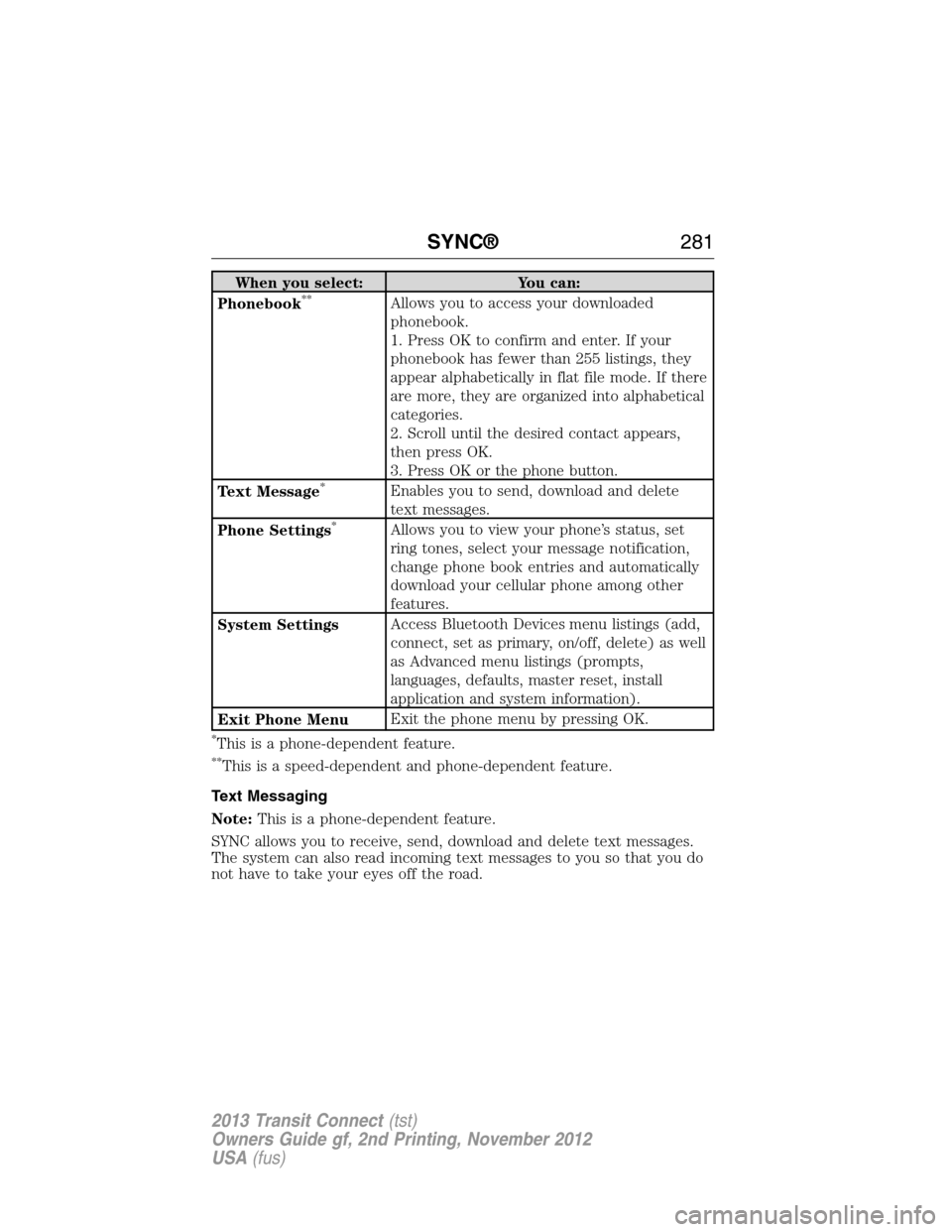
When you select: You can:
Phonebook**Allows you to access your downloaded
phonebook.
1. Press OK to confirm and enter. If your
phonebook has fewer than 255 listings, they
appear alphabetically in flat file mode. If there
are more, they are organized into alphabetical
categories.
2. Scroll until the desired contact appears,
then press OK.
3. Press OK or the phone button.
Text Message
*Enables you to send, download and delete
text messages.
Phone Settings
*Allows you to view your phone’s status, set
ring tones, select your message notification,
change phone book entries and automatically
download your cellular phone among other
features.
System SettingsAccess Bluetooth Devices menu listings (add,
connect, set as primary, on/off, delete) as well
as Advanced menu listings (prompts,
languages, defaults, master reset, install
application and system information).
Exit Phone MenuExit the phone menu by pressing OK.
*This is a phone-dependent feature.
**This is a speed-dependent and phone-dependent feature.
Text Messaging
Note:This is a phone-dependent feature.
SYNC allows you to receive, send, download and delete text messages.
The system can also read incoming text messages to you so that you do
not have to take your eyes off the road.
SYNC®281
2013 Transit Connect(tst)
Owners Guide gf, 2nd Printing, November 2012
USA(fus)
Page 287 of 321
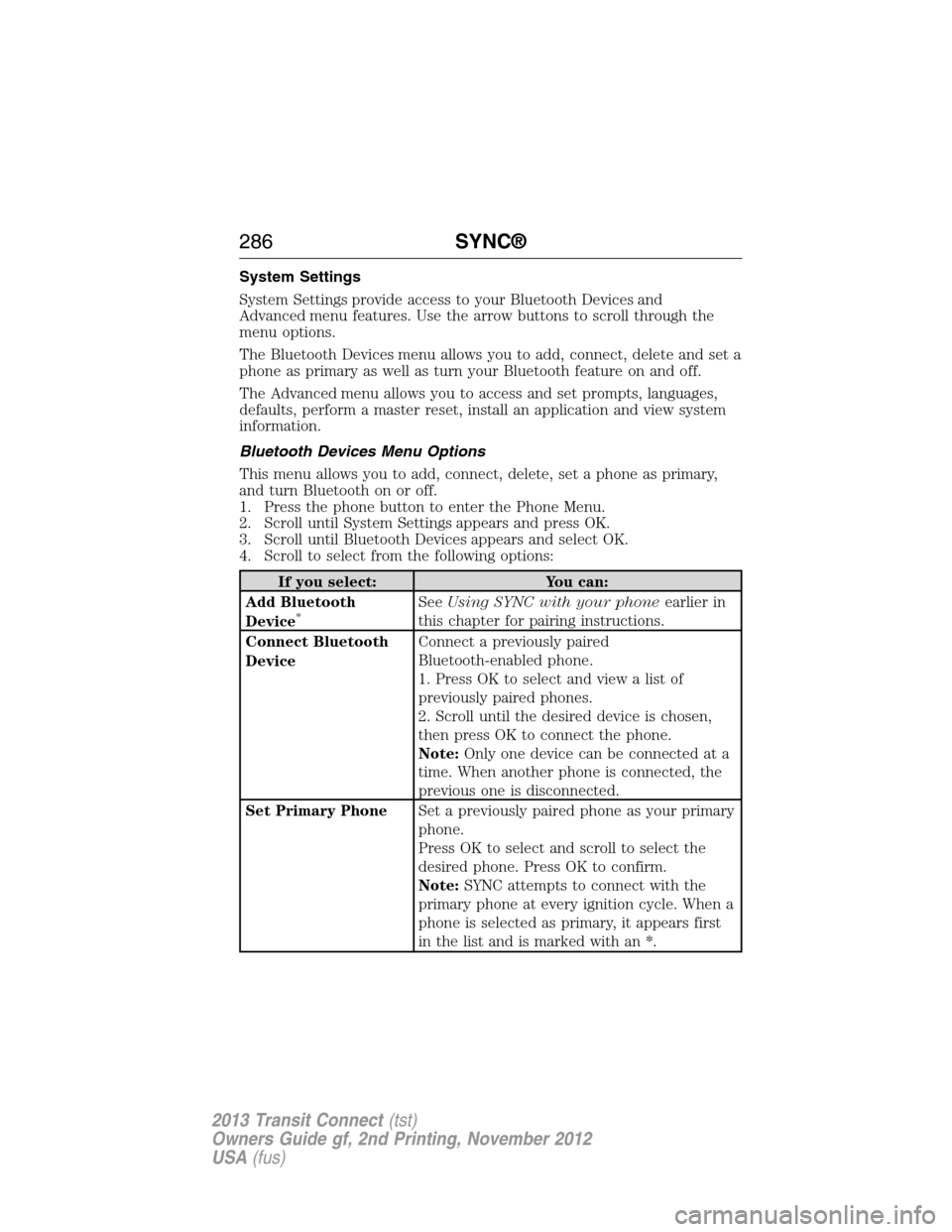
System Settings
System Settings provide access to your Bluetooth Devices and
Advanced menu features. Use the arrow buttons to scroll through the
menu options.
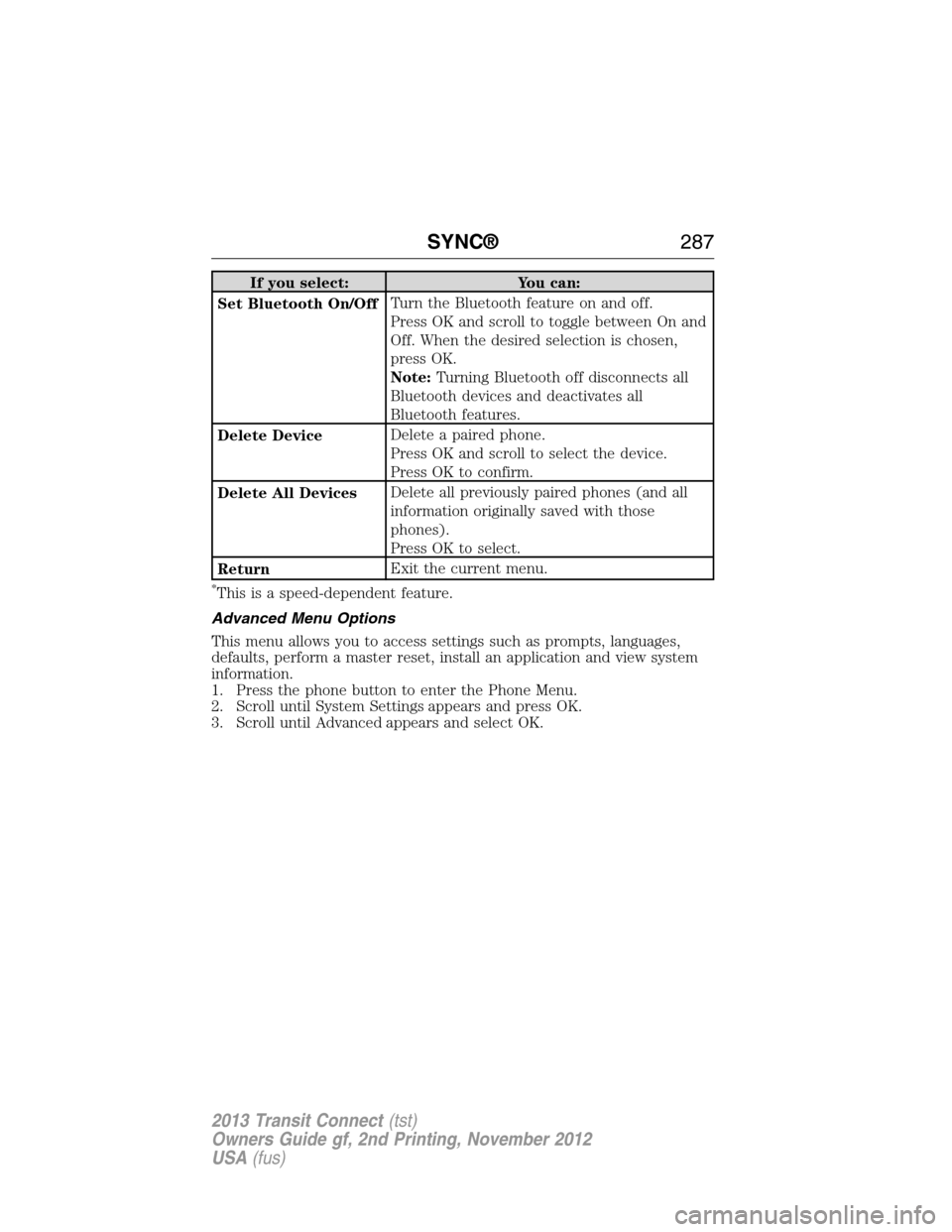
The Bluetooth Devices menu allows you to add, connect, delete and set a
phone as primary as well as turn your Bluetooth feature on and off.
The Advanced menu allows you to access and set prompts, languages,
defaults, perform a master reset, install an application and view system
information.
Bluetooth Devices Menu Options
This menu allows you to add, connect, delete, set a phone as primary,
and turn Bluetooth on or off.
1. Press the phone button to enter the Phone Menu.
2. Scroll until System Settings appears and press OK.
3. Scroll until Bluetooth Devices appears and select OK.
4. Scroll to select from the following options:
If you select: You can:
Add Bluetooth
Device
*SeeUsing SYNC with your phoneearlier in
this chapter for pairing instructions.
Connect Bluetooth
DeviceConnect a previously paired
Bluetooth-enabled phone.
1. Press OK to select and view a list of
previously paired phones.
2. Scroll until the desired device is chosen,
then press OK to connect the phone.
Note:Only one device can be connected at a
time. When another phone is connected, the
previous one is disconnected.
Set Primary PhoneSet a previously paired phone as your primary
phone.
Press OK to select and scroll to select the
desired phone. Press OK to confirm.
Note:SYNC attempts to connect with the
primary phone at every ignition cycle. When a
phone is selected as primary, it appears first
in the list and is marked with an *.
286SYNC®
2013 Transit Connect(tst)
Owners Guide gf, 2nd Printing, November 2012
USA(fus)
Page 288 of 321
If you select: You can:
Set Bluetooth On/OffTurn the Bluetooth feature on and off.
Press OK and scroll to toggle between On and
Off. When the desired selection is chosen,
press OK.
Note:Turning Bluetooth off disconnects all
Bluetooth devices and deactivates all
Bluetooth features.
Delete DeviceDelete a paired phone.
Press OK and scroll to select the device.
Press OK to confirm.
Delete All DevicesDelete all previously paired phones (and all
information originally saved with those
phones).
Press OK to select.
ReturnExit the current menu.
*This is a speed-dependent feature.
Advanced Menu Options
This menu allows you to access settings such as prompts, languages,
defaults, perform a master reset, install an application and view system
information.
1. Press the phone button to enter the Phone Menu.
2. Scroll until System Settings appears and press OK.
3. Scroll until Advanced appears and select OK.
SYNC®287
2013 Transit Connect(tst)
Owners Guide gf, 2nd Printing, November 2012
USA(fus)
Page 289 of 321
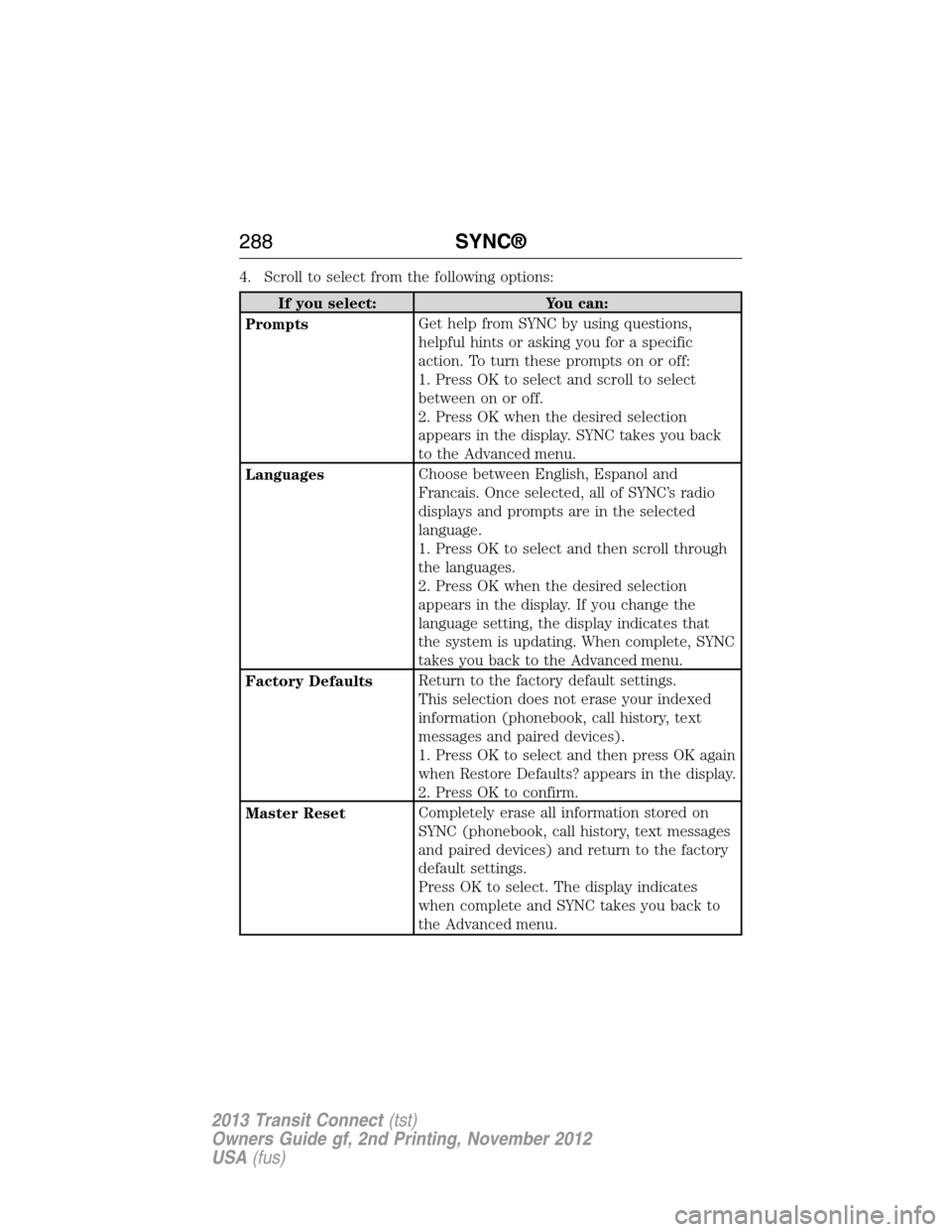
4. Scroll to select from the following options:
If you select: You can:
PromptsGet help from SYNC by using questions,
helpful hints or asking you for a specific
action. To turn these prompts on or off:
1. Press OK to select and scroll to select
between on or off.
2. Press OK when the desired selection
appears in the display. SYNC takes you back
to the Advanced menu.
LanguagesChoose between English, Espanol and
Francais. Once selected, all of SYNC’s radio
displays and prompts are in the selected
language.
1. Press OK to select and then scroll through
the languages.
2. Press OK when the desired selection
appears in the display. If you change the
language setting, the display indicates that
the system is updating. When complete, SYNC
takes you back to the Advanced menu.
Factory DefaultsReturn to the factory default settings.
This selection does not erase your indexed
information (phonebook, call history, text
messages and paired devices).
1. Press OK to select and then press OK again
when Restore Defaults? appears in the display.
2. Press OK to confirm.
Master ResetCompletely erase all information stored on
SYNC (phonebook, call history, text messages
and paired devices) and return to the factory
default settings.
Press OK to select. The display indicates
when complete and SYNC takes you back to
the Advanced menu.
288SYNC®
2013 Transit Connect(tst)
Owners Guide gf, 2nd Printing, November 2012
USA(fus)
Page 296 of 321
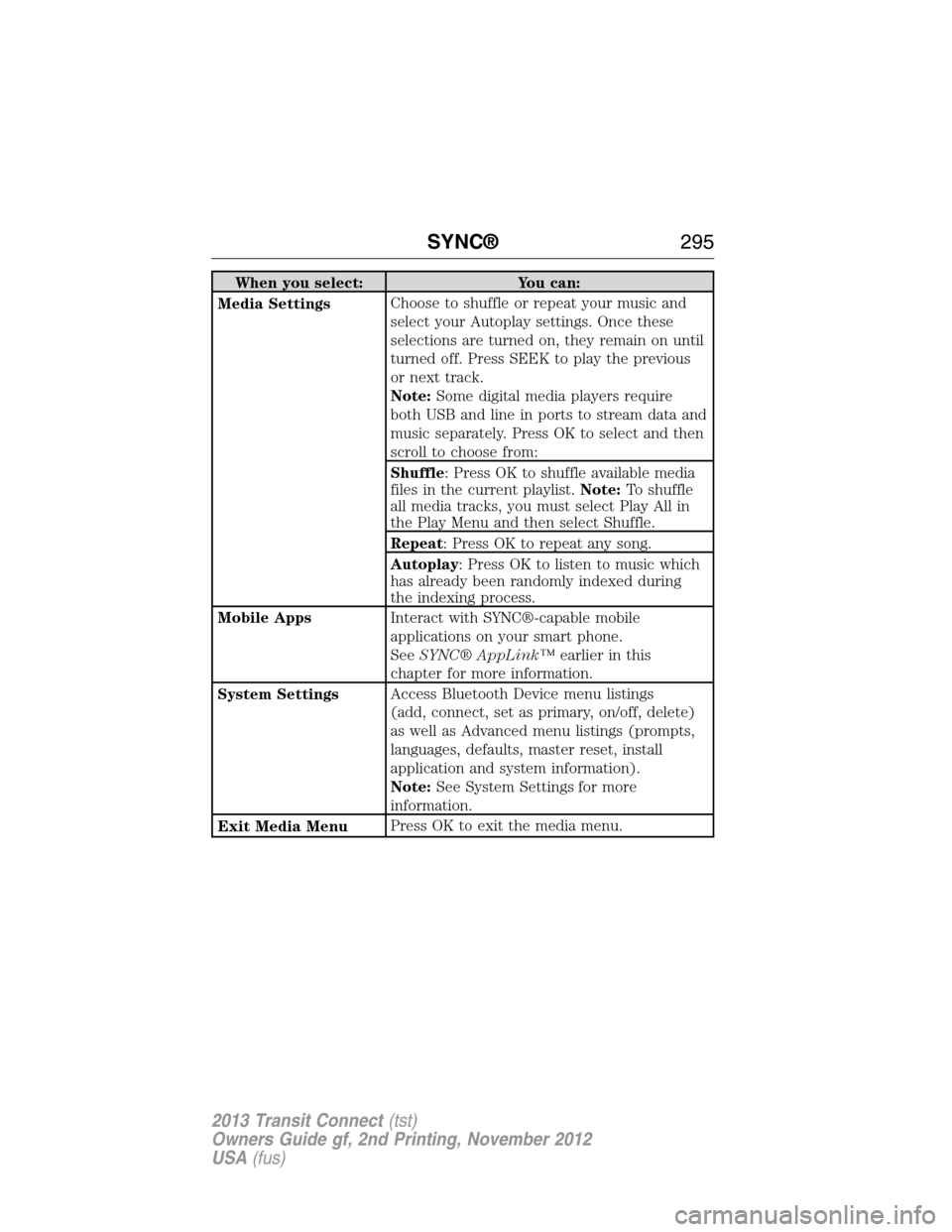
When you select: You can:
Media SettingsChoose to shuffle or repeat your music and
select your Autoplay settings. Once these
selections are turned on, they remain on until
turned off. Press SEEK to play the previous
or next track.
Note:Some digital media players require
both USB and line in ports to stream data and
music separately. Press OK to select and then
scroll to choose from:
Shuffle: Press OK to shuffle available media
files in the current playlist.Note:To shuffle
all media tracks, you must select Play All in
the Play Menu and then select Shuffle.
Repeat: Press OK to repeat any song.
Autoplay: Press OK to listen to music which
has already been randomly indexed during
the indexing process.
Mobile AppsInteract with SYNC®-capable mobile
applications on your smart phone.
SeeSYNC® AppLink™earlier in this
chapter for more information.
System SettingsAccess Bluetooth Device menu listings
(add, connect, set as primary, on/off, delete)
as well as Advanced menu listings (prompts,
languages, defaults, master reset, install
application and system information).
Note:See System Settings for more
information.
Exit Media MenuPress OK to exit the media menu.
SYNC®295
2013 Transit Connect(tst)
Owners Guide gf, 2nd Printing, November 2012
USA(fus)
Page 299 of 321
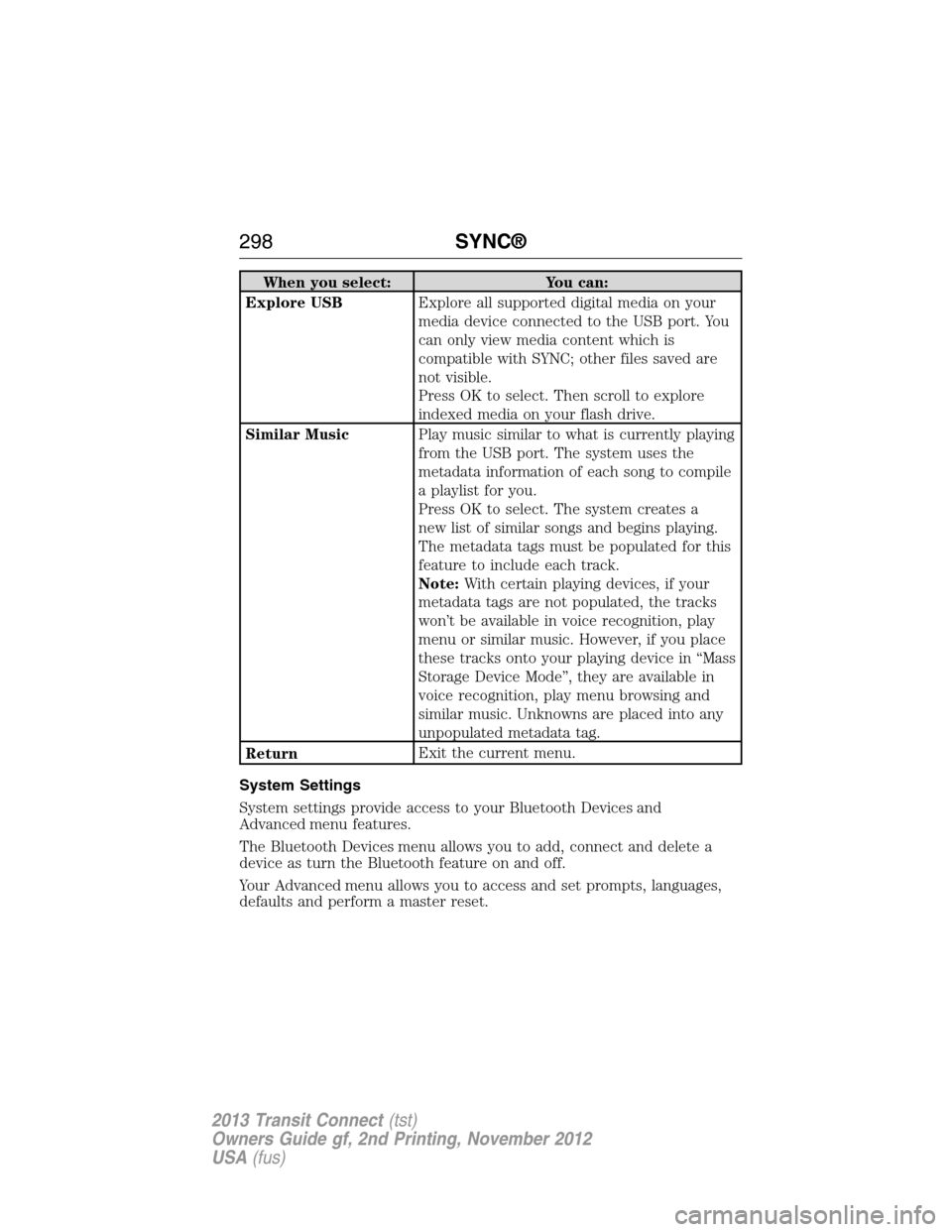
When you select: You can:
Explore USBExplore all supported digital media on your
media device connected to the USB port. You
can only view media content which is
compatible with SYNC; other files saved are
not visible.
Press OK to select. Then scroll to explore
indexed media on your flash drive.
Similar MusicPlay music similar to what is currently playing
from the USB port. The system uses the
metadata information of each song to compile
a playlist for you.
Press OK to select. The system creates a
new list of similar songs and begins playing.
The metadata tags must be populated for this
feature to include each track.
Note:With certain playing devices, if your
metadata tags are not populated, the tracks
won’t be available in voice recognition, play
menu or similar music. However, if you place
these tracks onto your playing device in “Mass
Storage Device Mode”, they are available in
voice recognition, play menu browsing and
similar music. Unknowns are placed into any
unpopulated metadata tag.
ReturnExit the current menu.
System Settings
System settings provide access to your Bluetooth Devices and
Advanced menu features.
The Bluetooth Devices menu allows you to add, connect and delete a
device as turn the Bluetooth feature on and off.
Your Advanced menu allows you to access and set prompts, languages,
defaults and perform a master reset.
298SYNC®
2013 Transit Connect(tst)
Owners Guide gf, 2nd Printing, November 2012
USA(fus)