ignition FORD TRANSIT CONNECT 2014 2.G Repair Manual
[x] Cancel search | Manufacturer: FORD, Model Year: 2014, Model line: TRANSIT CONNECT, Model: FORD TRANSIT CONNECT 2014 2.GPages: 411, PDF Size: 6.62 MB
Page 268 of 411
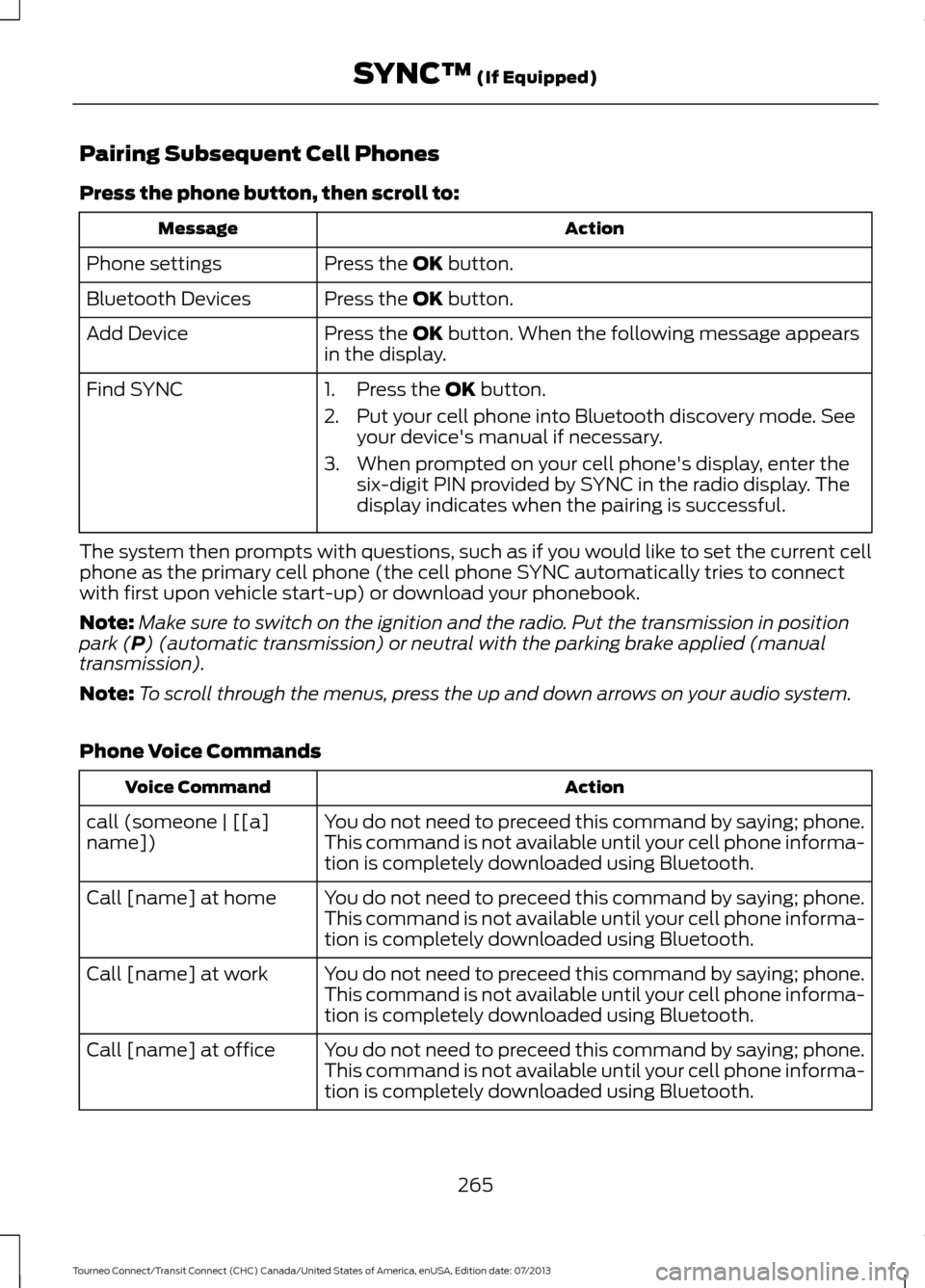
Pairing Subsequent Cell Phones
Press the phone button, then scroll to:
Action
Message
Press the OK button.
Phone settings
Press the
OK button.
Bluetooth Devices
Press the
OK button. When the following message appears
in the display.
Add Device
Find SYNC
1. Press the
OK button.
2. Put your cell phone into Bluetooth discovery mode. See your device's manual if necessary.
3. When prompted on your cell phone's display, enter the six-digit PIN provided by SYNC in the radio display. The
display indicates when the pairing is successful.
The system then prompts with questions, such as if you would like to set the current cell
phone as the primary cell phone (the cell phone SYNC automatically tries to connect
with first upon vehicle start-up) or download your phonebook.
Note: Make sure to switch on the ignition and the radio. Put the transmission in position
park (
P) (automatic transmission) or neutral with the parking brake applied (manual
transmission).
Note: To scroll through the menus, press the up and down arrows on your audio system.
Phone Voice Commands Action
Voice Command
You do not need to preceed this command by saying; phone.
call (someone | [[a]
name]) This command is not available until your cell phone informa-
tion is completely downloaded using Bluetooth.
You do not need to preceed this command by saying; phone.
Call [name] at home
This command is not available until your cell phone informa-
tion is completely downloaded using Bluetooth.
You do not need to preceed this command by saying; phone.
Call [name] at work
This command is not available until your cell phone informa-
tion is completely downloaded using Bluetooth.
You do not need to preceed this command by saying; phone.
Call [name] at office
This command is not available until your cell phone informa-
tion is completely downloaded using Bluetooth.
265
Tourneo Connect/Transit Connect (CHC) Canada/United States of America, enUSA, Edition date: 07/2013 SYNC™
(If Equipped)
Page 279 of 411
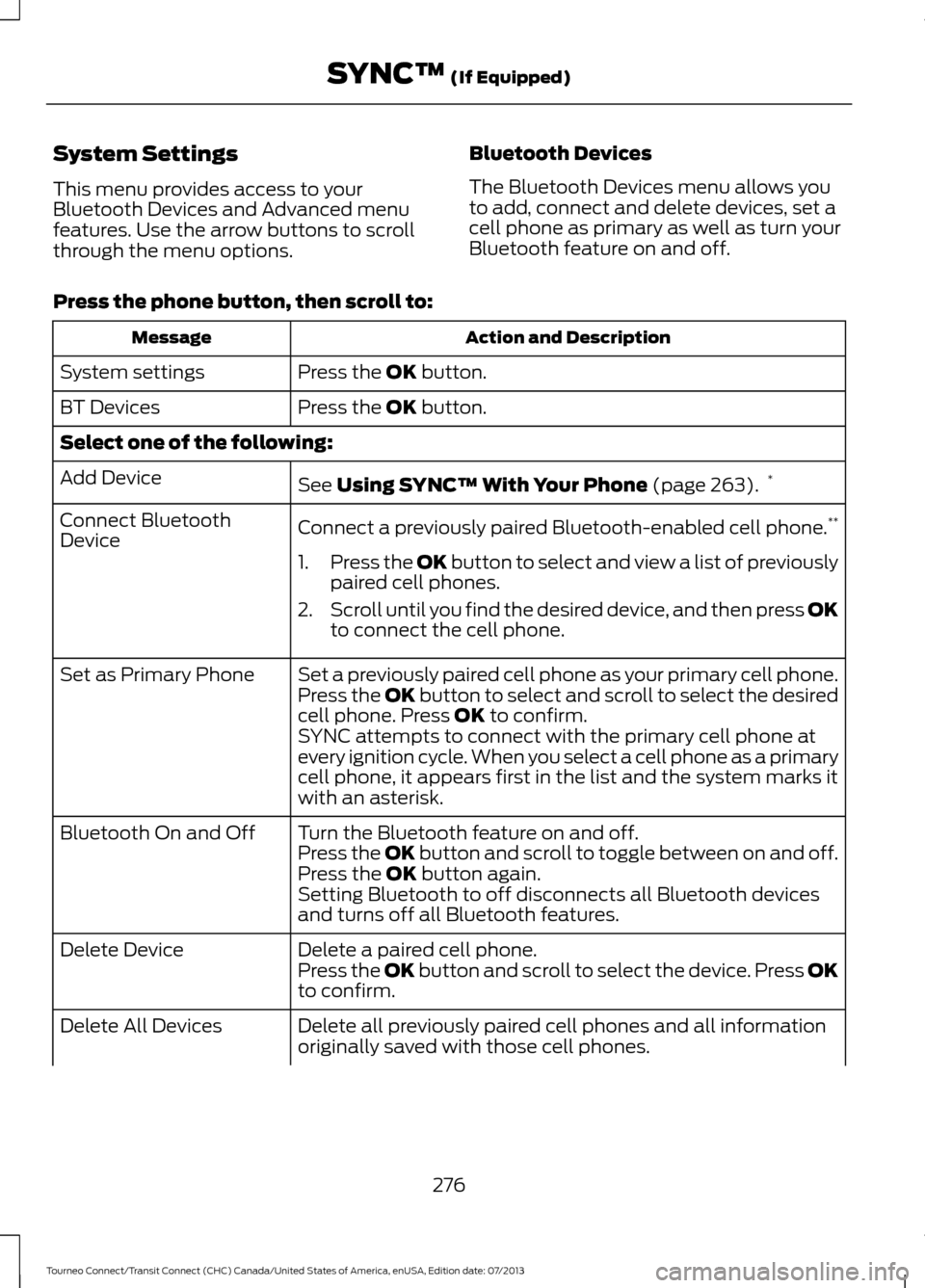
System Settings
This menu provides access to your
Bluetooth Devices and Advanced menu
features. Use the arrow buttons to scroll
through the menu options.
Bluetooth Devices
The Bluetooth Devices menu allows you
to add, connect and delete devices, set a
cell phone as primary as well as turn your
Bluetooth feature on and off.
Press the phone button, then scroll to: Action and Description
Message
Press the OK button.
System settings
Press the
OK button.
BT Devices
Select one of the following:
See
Using SYNC™ With Your Phone (page 263).*
Add Device
Connect a previously paired Bluetooth-enabled cell phone. **
Connect Bluetooth
Device
1.Press the OK button to select and view a list of previously
paired cell phones.
2. Scroll until you find the desired device, and then press OK
to connect the cell phone.
Set a previously paired cell phone as your primary cell phone.
Set as Primary Phone
Press the OK button to select and scroll to select the desired
cell phone. Press
OK to confirm.
SYNC attempts to connect with the primary cell phone at
every ignition cycle. When you select a cell phone as a primary
cell phone, it appears first in the list and the system marks it
with an asterisk.
Turn the Bluetooth feature on and off.
Bluetooth On and Off
Press the OK button and scroll to toggle between on and off.
Press the
OK button again.
Setting Bluetooth to off disconnects all Bluetooth devices
and turns off all Bluetooth features.
Delete a paired cell phone.
Delete Device
Press the OK button and scroll to select the device. Press OK
to confirm.
Delete all previously paired cell phones and all information
originally saved with those cell phones.
Delete All Devices
276
Tourneo Connect/Transit Connect (CHC) Canada/United States of America, enUSA, Edition date: 07/2013 SYNC™
(If Equipped)
Page 306 of 411
GENERAL INFORMATION WARNING
Driving while distracted can result in
loss of vehicle control, crash and
injury. We strongly recommend that
you use extreme caution when using any
device that may take your focus off the
road. Your primary responsibility is the safe
operation of your vehicle. We recommend
against the use of any hand-held device
while driving and encourage the use of
voice-operated systems when possible.
Make sure you are aware of all applicable
local laws that may affect the use of
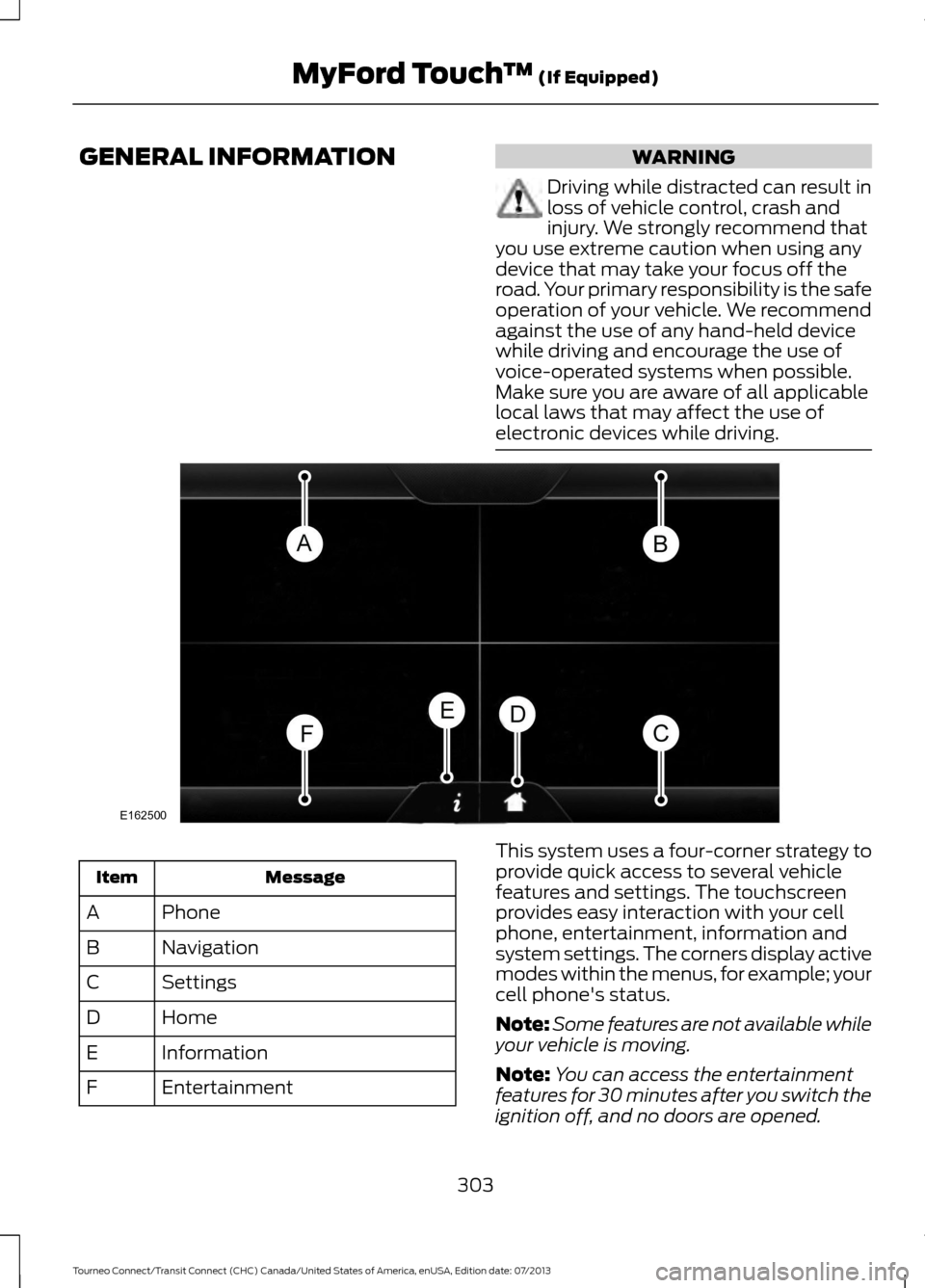
electronic devices while driving. Message
Item
Phone
A
Navigation
B
Settings
C
Home
D
Information
E
Entertainment
F This system uses a four-corner strategy to
provide quick access to several vehicle
features and settings. The touchscreen
provides easy interaction with your cell
phone, entertainment, information and
system settings. The corners display active
modes within the menus, for example; your
cell phone's status.
Note:
Some features are not available while
your vehicle is moving.
Note: You can access the entertainment
features for 30 minutes after you switch the
ignition off, and no doors are opened.
303
Tourneo Connect/Transit Connect (CHC) Canada/United States of America, enUSA, Edition date: 07/2013 MyFord Touch
™ (If Equipped)E162500
Page 319 of 411
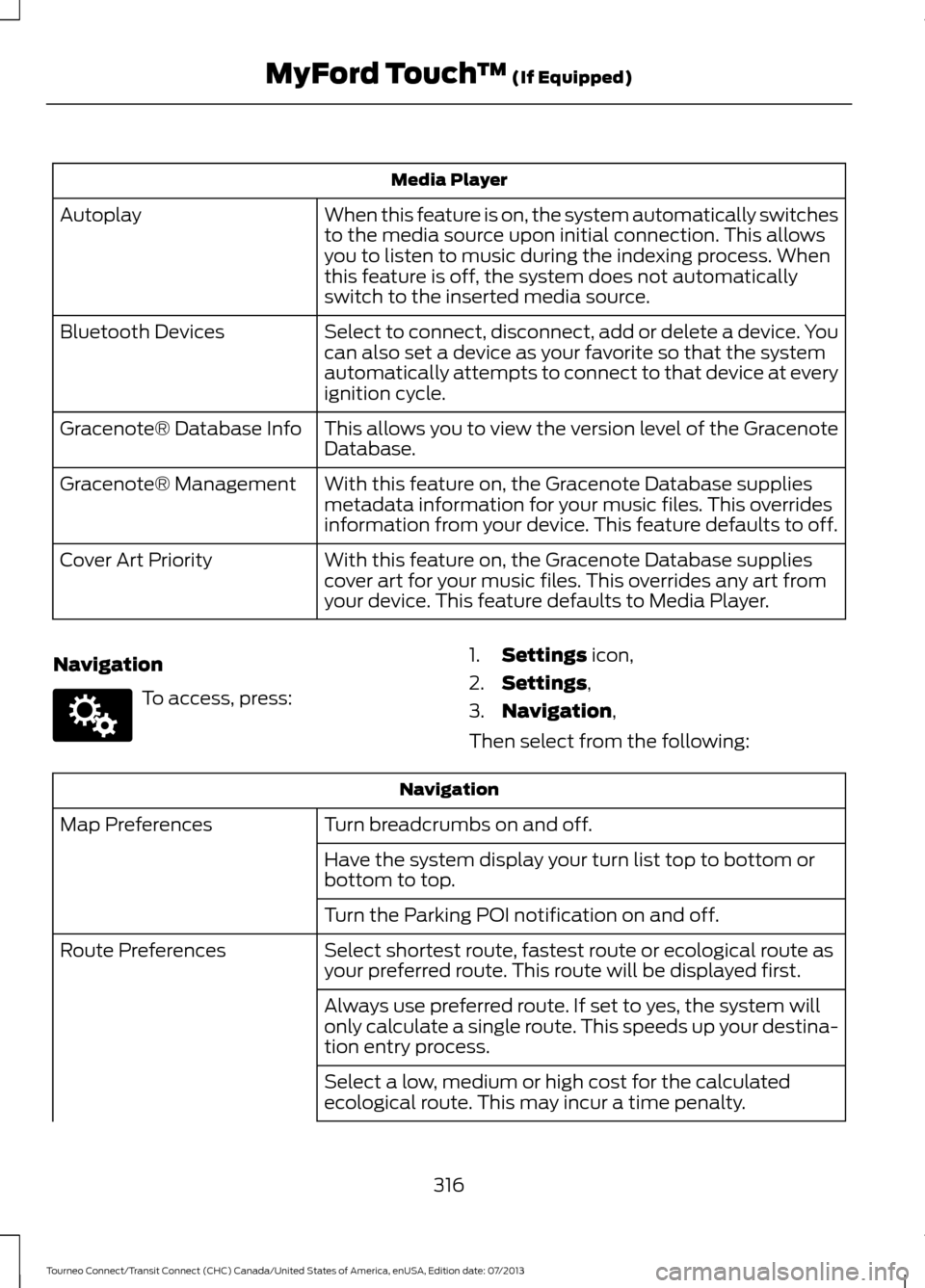
Media Player
When this feature is on, the system automatically switches
to the media source upon initial connection. This allows
you to listen to music during the indexing process. When
this feature is off, the system does not automatically
switch to the inserted media source.
Autoplay
Select to connect, disconnect, add or delete a device. You
can also set a device as your favorite so that the system
automatically attempts to connect to that device at every
ignition cycle.
Bluetooth Devices
This allows you to view the version level of the Gracenote
Database.
Gracenote® Database Info
With this feature on, the Gracenote Database supplies
metadata information for your music files. This overrides
information from your device. This feature defaults to off.
Gracenote® Management
With this feature on, the Gracenote Database supplies
cover art for your music files. This overrides any art from
your device. This feature defaults to Media Player.
Cover Art Priority
Navigation To access, press:
1.
Settings icon,
2. Settings
,
3. Navigation
,
Then select from the following: Navigation
Turn breadcrumbs on and off.
Map Preferences
Have the system display your turn list top to bottom or
bottom to top.
Turn the Parking POI notification on and off.
Select shortest route, fastest route or ecological route as
your preferred route. This route will be displayed first.
Route Preferences
Always use preferred route. If set to yes, the system will
only calculate a single route. This speeds up your destina-
tion entry process.
Select a low, medium or high cost for the calculated
ecological route. This may incur a time penalty.
316
Tourneo Connect/Transit Connect (CHC) Canada/United States of America, enUSA, Edition date: 07/2013 MyFord Touch
™
(If Equipped)E142607
Page 343 of 411
•
Dialing a number.
• Redialing.
• Call waiting notification.
• Caller ID.
Other features, such as text messaging
using Bluetooth and automatic phonebook
download, are cell phone-dependent
features. To check your cell phone ’s
compatibility, see your cell phone ’s user
manual and visit www.SYNCMyRide.com,
www.SYNCMyRide.ca or
www.syncmaroute.ca. Pairing Your Cell Phone for the
First Time WARNING
Driving while distracted can result in
loss of vehicle control, crash and
injury. We strongly recommend that
you use extreme caution when using any
device that may take your focus off the
road. Your primary responsibility is the safe
operation of your vehicle. We recommend
against the use of any handheld device
while driving and encourage the use of
voice-operated systems when possible.
Make sure you are aware of all applicable
local laws that may affect the use of
electronic devices while driving. The first thing you must do to use the
phone features of SYNC is to pair your
Bluetooth-enabled cell phone with SYNC.
This allows you to use your cell phone in a
hands-free manner.
Note:
Put the transmission in position P.
Turn on your vehicle ignition and the radio.
Touch the upper left corner of the touchscreen: Action and Description
Message
Add phone Follow the on-screen instructions.
Find SYNC
Make sure that Bluetooth is set to On
and that your cell phone
is in the correct mode. See your cell phone ’s manual if
necessary.
Select
SYNC and a six-digit PIN appears on your device.
If you are prompted to enter a PIN on your device, it does not
support Secure Simple Pairing. To pair, enter the PIN
displayed on the touchscreen. Skip the next step.
When prompted on your cell phone ’s display, confirm that
the PIN provided by SYNC matches the PIN displayed on your
cell phone.
The display indicates when the pairing is successful.
SYNC may prompt you with more cell phone options. For
more information on your cell phone's capability, see your
cell phone's manual and visit the website.
340
Tourneo Connect/Transit Connect (CHC) Canada/United States of America, enUSA, Edition date: 07/2013 MyFord Touch
™
(If Equipped)
Page 344 of 411
Pairing Subsequent Cell Phones
Note:
Move the gearshift lever to park (P).
Switch your vehicle ignition and the radio
on. Make sure that Bluetooth is set to
On and
that your cell phone is in the correct mode.
See your device's manual if necessary.
To pair a subsequent cell phone, select: Action and Description
Message
Phone
Settings
BT Devices Select
SYNC and a six-digit PIN appears on your device.
Add Device
If you are prompted to enter a PIN on your device, it does not
support Secure Simple Pairing. To pair, enter the PIN
displayed on the touchscreen. Skip the next step.
When prompted on your cell phone ’s display, confirm that
the PIN provided by SYNC matches the PIN displayed on your
cell phone.
The display indicates when the pairing is successful.
SYNC may prompt you with more cell phone options. For
more information on your cell phone's capability, see your
cell phone's manual and visit the website.
Making Calls Press the voice button and when
prompted say:
Voice command
Call
dial [[a] number] To end the call or exit phone
mode, press and hold the phone
button. Receiving Calls
During an incoming call, an audible tone
sounds. Call information appears in the
display if it is available. To accept the call, select:
Message
Accept
Note: You can also accept the call by
pressing the phone button on the steering
wheel. 341
Tourneo Connect/Transit Connect (CHC) Canada/United States of America, enUSA, Edition date: 07/2013 MyFord Touch
™
(If Equipped)E142599
Page 402 of 411
A
A/C
See: Climate Control.......................................... 88
About This Manual...........................................7
ABS See: Brakes............................................................ 122
ABS driving hints See: Hints on Driving With Anti-Lock
Brakes................................................................. 122
Accessories....................................................365 Exterior style........................................................ 365
Interior style......................................................... 365
Lifestyle................................................................. 365
Peace of mind..................................................... 365
Accessories See: Replacement Parts
Recommendation............................................. 11
Adjusting the Headlamps.........................188 Horizontal Aim Adjustment............................ 189
Vertical Aim Adjustment................................. 188
Adjusting the Steering Wheel
....................55
Airbag Disposal..............................................40
Air Conditioning See: Climate Control.......................................... 88
Air Vents
............................................................88
Center Air Vents.................................................... 88
Side Air Vents........................................................ 89
Alarm See: Anti-Theft Alarm........................................ 54
Anti-Theft Alarm
............................................54
Alarm System........................................................ 54
Arming the Alarm................................................. 54
Disarming the Alarm........................................... 54
Triggering the Alarm............................................ 54
Appendices....................................................367
Audible Warnings and Indicators
.............75
Automatic Transmission Warning
Chime................................................................... 76
Headlamps On Warning Chime...................... 75
Key in Ignition Warning Chime......................... 75
Parking Brake On Warning Chime.................. 75
Audio Control
...................................................55
Audio Input Jack...........................................256
Audio System
................................................242
General Information.......................................... 242
Audio Troubleshooting
...............................257 Audio Unit - Vehicles With: AM/FM/CD/
SYNC/Satellite Radio
.............................249
Audio Unit - Vehicles With: AM/FM/CD/ SYNC..............................................................247
Audio Unit - Vehicles With: AM/ FM...................................................................243
AUX Button.......................................................... 246
Clock Button........................................................ 245
Frequency Band Buttons................................ 245
Menu Button........................................................ 246
Sound Button...................................................... 245
Station Preset Buttons.................................... 245
Station Tuning Buttons................................... 245
Audio Unit - Vehicles With: Premium AM/FM/CD..................................................246
Autolamps........................................................62
Automatic Climate Control
.........................91
Mono Mode............................................................ 92
Switching Mono Mode Back On..................... 92
Switching Mono Mode Off................................ 92
Temperature Control.......................................... 92
Automatic Transmission
.............................119
Brake-Shift Interlock......................................... 120
If Your Vehicle Gets Stuck In Mud or Snow.................................................................... 121
SelectShift Automatic® Transmission.................................................... 119
Understanding the Positions of Your Automatic Transmission.............................. 119
Automatic Transmission Fluid Check.............................................................184
Autowipers.......................................................58
Auxiliary Power Points...............................106 12 Volt DC Power Point..................................... 106
B
Bonnet Lock See: Opening and Closing the Hood............177
Booster Seats
..................................................20
Types of Booster Seats....................................... 21
Brake Fluid Check.........................................184
Brakes................................................................122 General Information........................................... 122
Breaking-In......................................................152
Bulb Specification Chart...........................194
399
Tourneo Connect/Transit Connect (CHC) Canada/United States of America, enUSA, Edition date: 07/2013 Index
Page 405 of 411
Fuse Specification Chart............................167
Engine Compartment Fuse Box.................... 167
Load Compartment Fuse Box........................ 173
Passenger Compartment Fuse Box..............171
G
Gauges................................................................72 Engine Coolant Temperature Gauge.............72
Fuel Gauge.............................................................. 73
Information Display.............................................. 72
General Information on Radio Frequencies....................................................41
General Maintenance Information.......384
Multi-Point Inspection..................................... 386
Owner Checks and Services.......................... 385
Protecting Your Investment.......................... 384
Why Maintain Your Vehicle?......................... 384
Why Maintain Your Vehicle at Your Dealership?..................................................... 384
Getting Assistance Outside the U.S. and Canada..........................................................163
Getting the Services You Need...............160 Away From Home.............................................. 160
Global Opening and Closing
......................69
Closing the Windows.......................................... 69
Opening the Windows....................................... 69
H
Handbrake See: Parking Brake.............................................. 122
Hazard Warning Flashers..........................156
Headlamp Exit Delay....................................63
Head Restraints..............................................96 Adjusting the Head Restraint........................... 97
Heated Seats
.................................................104
Heated Windows and Mirrors...................94 Heated Exterior Mirrors...................................... 95
Heated Rear Window......................................... 95
Heated Windshield.............................................. 95
Heating See: Climate Control.......................................... 88
Hill Start Assist..............................................123 Using Hill Start Assist........................................ 123Hints on Controlling the Interior
Climate............................................................92
Cooling the Interior Quickly.............................. 93
General Hints......................................................... 92
Heating the Interior Quickly.............................. 93
Maximum Cooling Performance in Instrument Panel or Instrument Panel
and Footwell Positions................................. 93
Recommended Settings for Cooling ...........93
Recommended Settings for Heating............93
Side Window Defogging in Cold Weather.............................................................. 93
Vehicle Stationary for Extended Periods During Extreme High Ambient
Temperatures................................................... 93
Hints on Driving With Anti-Lock Brakes.............................................................122
Hood Lock See: Opening and Closing the Hood............177
I
Ignition Switch
..............................................109
In California (U.S. Only)..............................161
Information Display Control.......................57
Information Displays
......................................77
General Information............................................. 77
Information....................................................346 911 Assist............................................................... 353
Alerts...................................................................... 352
Calendar................................................................ 352
Sirius Travel Link................................................ 350
SYNC Services (If Equipped, United States Only).................................................................. 347
Vehicle Health Report...................................... 355
Information Messages
..................................82
Installing Child Seats.....................................14 Child Seats............................................................... 14
Using Lap and Shoulder Belts.......................... 15
Using Lower Anchors and Tethers for Children (LATCH).............................................. 17
Using Tether Straps.............................................. 19
Instrument Cluster
.........................................72
Instrument Lighting Dimmer.....................63
402
Tourneo Connect/Transit Connect (CHC) Canada/United States of America, enUSA, Edition date: 07/2013 Index
Page 408 of 411
Rear View Camera.......................................130
Switching the Rear View Camera Off..........131
Switching the Rear View Camera On.........130
Using the Display................................................ 130
Vehicles With Parking Aid................................. 131
Rear View Camera See: Rear View Camera................................... 130
Rear Window Wiper and Washers...........59 Rear Window Washer........................................ 60
Rear Window Wiper............................................ 59
Recommended Towing Weights............145 Calculating the Maximum Loaded Trailer
Weight............................................................... 146
Reduced Engine Performance.................152
Refueling...........................................................114 Easy Fuel ™ Capless Fuel System.................115
Remote Control...............................................41 Car Finder................................................................ 42
Integrated Keyhead Transmitter...................... 41
Programming a New Remote Control...........41
Replacing the Battery......................................... 42
Reprogramming the Unlocking Function............................................................... 41
Repairing Minor Paint Damage
..............206
Replacement Parts Recommendation.........................................11
Collision Repairs..................................................... 11
Scheduled Maintenance and Mechanical Repairs................................................................... 11
Warranty on Replacement Parts..................... 12
Replacing a Lost Key or Remote Control.............................................................42
Reporting Safety Defects (Canada Only)...............................................................165
Reporting Safety Defects (U.S. Only)..............................................................164
Roadside Assistance
...................................155
Vehicles Sold in Canada: Getting Roadside
Assistance........................................................ 155
Vehicles Sold in Canada: Using Roadside Assistance........................................................ 155
Vehicles Sold in the United States: Getting Roadside Assistance.................................... 155
Vehicles Sold in the United States: Using Roadside Assistance.................................... 155
Roadside Emergencies...............................155
Roof Racks and Load Carriers
.................136
Maximum Load Weights.................................. 136Running-In
See: Breaking-In.................................................. 152
Running Out of Fuel......................................113 Refilling With a Portable Fuel
Container........................................................... 113
S
Safety Belt Height Adjustment.................28
Safety Belt Minder
.........................................29
Belt-Minder™........................................................ 29
Safety Belts......................................................25 Principle of Operation......................................... 25
Safety Belt Warning Lamp and Indicator Chime
..............................................................29
Conditions of operation..................................... 29
Safety Canopy ™
............................................38
Safety Precautions........................................112
Satellite Radio..............................................253
Satellite Radio Electronic Serial Number
(ESN)................................................................ 254
Satellite Radio Reception Factors...............254
SIRIUS® Satellite Radio Service.................. 254
Troubleshooting................................................. 255
Scheduled Maintenance Record
...........392
Scheduled Maintenance..........................384
Seats...................................................................96
Security..............................................................53
Settings.............................................................311 Clock........................................................................\
312
Display..................................................................... 312
Settings.................................................................. 314
Sound...................................................................... 313
Vehicle..................................................................... 313
Sitting in the Correct Position...................96
Snow Chains See: Using Snow Chains................................. 225
Special Notices................................................12 New Vehicle Limited Warranty......................... 12
Special Instructions.............................................. 12
Special Operating Conditions Scheduled Maintenance..............................................390
Speed Control See: Cruise Control............................................. 132
Stability Control............................................125 Principle of Operation....................................... 125
Starter Switch See: Ignition Switch........................................... 109
405
Tourneo Connect/Transit Connect (CHC) Canada/United States of America, enUSA, Edition date: 07/2013 Index