lock FORD TRANSIT CONNECT 2015 2.G Owner's Guide
[x] Cancel search | Manufacturer: FORD, Model Year: 2015, Model line: TRANSIT CONNECT, Model: FORD TRANSIT CONNECT 2015 2.GPages: 428, PDF Size: 6.27 MB
Page 80 of 428
INTERIOR MIRROR
WARNING
Do not adjust the mirror when your
vehicle is moving.
Note:
Do not clean the housing or glass of
any mirror with harsh abrasives, fuel or other
petroleum or ammonia-based cleaning
products.
You can adjust the interior mirror to your
preference. Some mirrors also have a
second pivot point. This lets you move the
mirror head up or down and from side to
side.
Pull the tab below the mirror toward you
to reduce glare at night.
Auto-Dimming Mirror (If Equipped)
Note: Do not block the sensors on the front
and back of the mirror. Mirror performance
may be affected. A rear center passenger or
raised rear center head restraint may also
block light from reaching the sensor.
The mirror will dim automatically to reduce
glare when bright lights are detected from
behind your vehicle. It will automatically
return to normal reflection when you select
reverse gear to make sure you have a clear
view when backing up.
SUN SHADES - VEHICLES
WITH: PANORAMIC ROOF
PANEL WARNINGS
Do not let children play with the sun
shade or leave them unattended in
the vehicle. They may seriously hurt
themselves. WARNINGS
When closing the sun shade, you
should verify that it is free of
obstructions and make sure that
children and pets are not in the proximity
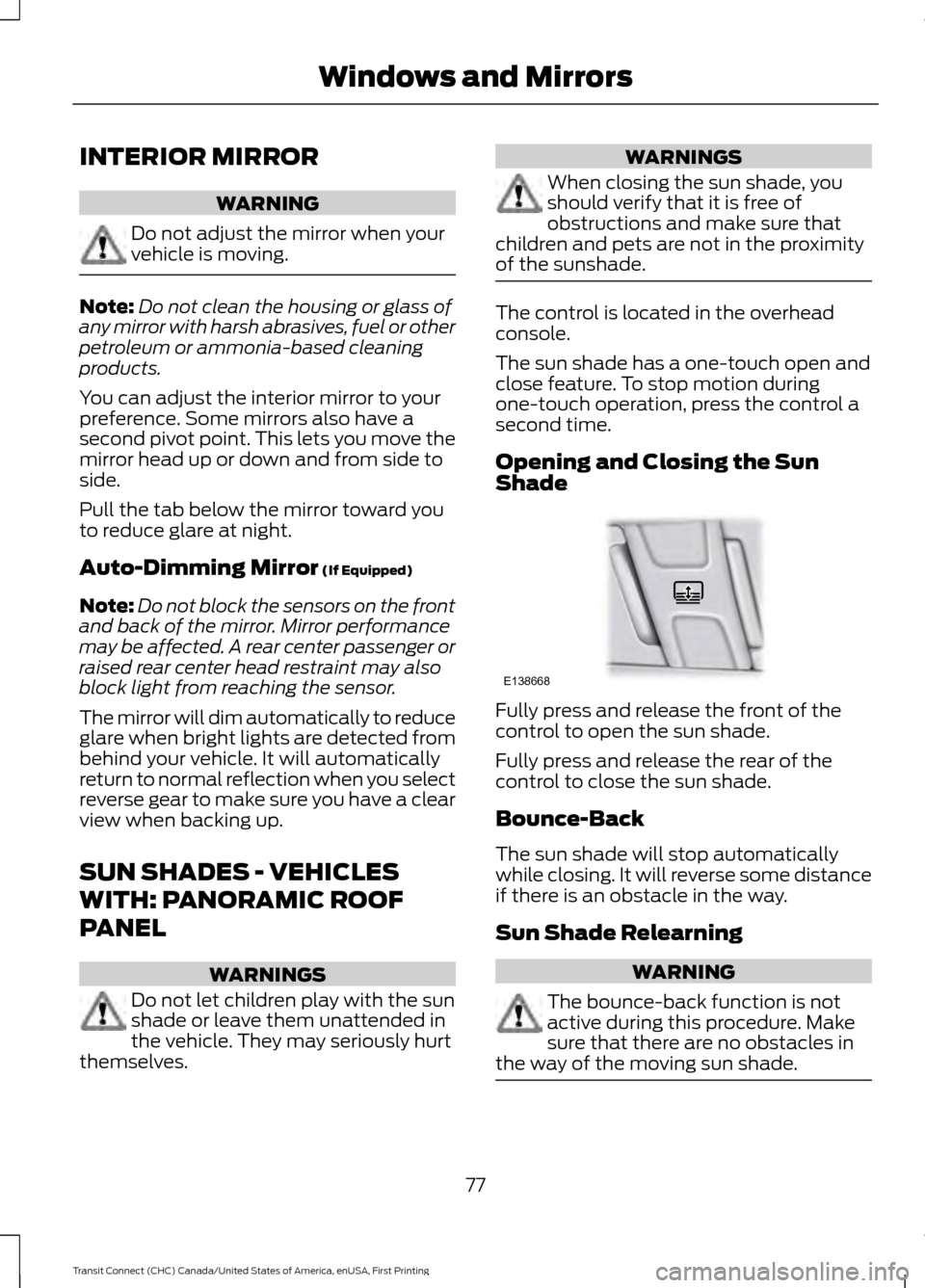
of the sunshade. The control is located in the overhead
console.
The sun shade has a one-touch open and
close feature. To stop motion during
one-touch operation, press the control a
second time.
Opening and Closing the Sun
Shade
Fully press and release the front of the
control to open the sun shade.
Fully press and release the rear of the
control to close the sun shade.
Bounce-Back
The sun shade will stop automatically
while closing. It will reverse some distance
if there is an obstacle in the way.
Sun Shade Relearning
WARNING
The bounce-back function is not
active during this procedure. Make
sure that there are no obstacles in
the way of the moving sun shade. 77
Transit Connect (CHC) Canada/United States of America, enUSA, First Printing Windows and MirrorsE138668
Page 83 of 428
If the needle enters the red section, the
engine is overheating. Stop the engine,
switch the ignition off and determine the
cause once the engine has cooled down.
See Engine Coolant Check (page 190).
Note: Do not restart the engine until the
cause of overheating has been resolved.
Fuel Gauge
Switch the ignition on. The fuel gauge will
indicate approximately how much remains
in the fuel tank. The fuel gauge may vary
slightly when your vehicle is moving or on
a gradient. The arrow adjacent to the fuel
pump symbol indicates on which side of
the vehicle the fuel filler door is located.
WARNING LAMPS AND
INDICATORS
The following warning lamps and
indicators will alert you to a vehicle
condition that may become serious. Some
lamps will illuminate when you start your
vehicle to make sure they work. If any
lamps remain on after starting your vehicle,
refer to the respective system warning
lamp for further information.
Note: Some warning indicators appear in
the information display and function the
same as a warning lamp but do not display
when you start your vehicle.
Airbag - Front If it fails to illuminate when you
start your vehicle, continues to
flash or remains on, it indicates
a malfunction. Have the system checked
by your authorized dealer. Anti-Lock Braking System If it illuminates when you are
driving, this indicates a
malfunction. You will continue
to have the normal braking system
(without ABS) unless the brake system
warning lamp is also illuminated. Have the
system checked by your authorized dealer.
Battery If it illuminates while driving, it
indicates a malfunction. Switch
off all unnecessary electrical
equipment and have the system checked
by your authorized dealer immediately.
Brake System It will illuminate when you
engage the parking brake with
the ignition on.
If it illuminates when you are driving, check
that the parking brake is not engaged. If
the parking brake is not engaged, this
indicates low brake fluid level or a brake
system malfunction. Have the system
checked immediately by your authorized
dealer. WARNING
Driving your vehicle with the warning
lamp on is dangerous. A significant
decrease in braking performance
may occur. It will take you longer to stop
your vehicle. Have your vehicle checked by
your authorized dealer immediately. Driving
extended distances with the parking brake
engaged can cause brake failure and the
risk of personal injury. Cruise Control
(If Equipped)
It will illuminate when you switch
this feature on. See
Using
Cruise Control (page 139).
80
Transit Connect (CHC) Canada/United States of America, enUSA, First Printing Instrument Cluster E138644 E71340
Page 88 of 428
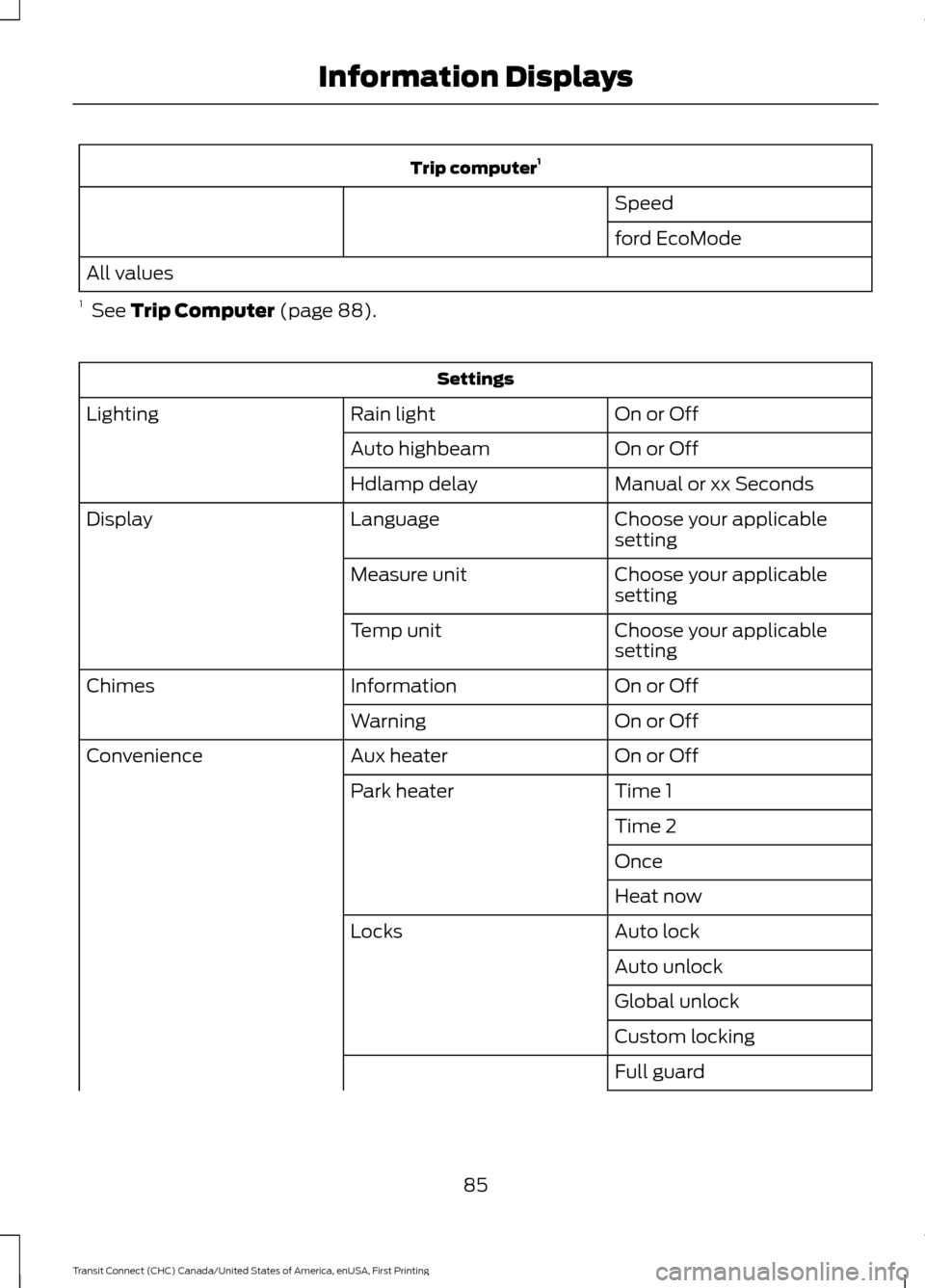
Trip computer
1
Speed
ford EcoMode
All values
1 See Trip Computer (page 88). Settings
On or Off
Rain light
Lighting
On or Off
Auto highbeam
Manual or xx Seconds
Hdlamp delay
Choose your applicable
setting
Language
Display
Choose your applicable
setting
Measure unit
Choose your applicable
setting
Temp unit
On or Off
Information
Chimes
On or Off
Warning
On or Off
Aux heater
Convenience
Time 1
Park heater
Time 2
Once
Heat now
Auto lock
Locks
Auto unlock
Global unlock
Custom locking
Full guard
85
Transit Connect (CHC) Canada/United States of America, enUSA, First Printing Information Displays
Page 90 of 428
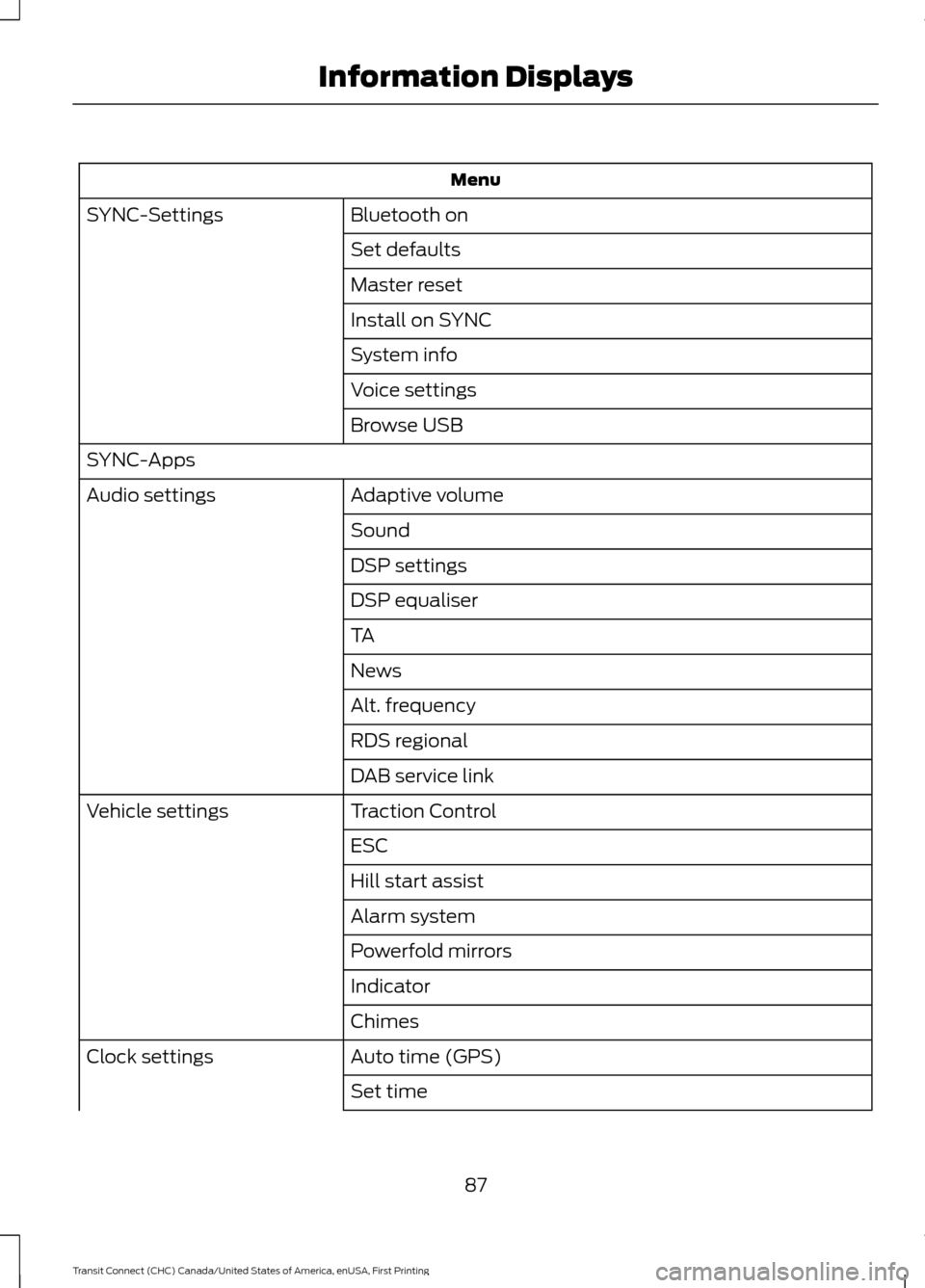
Menu
Bluetooth on
SYNC-Settings
Set defaults
Master reset
Install on SYNC
System info
Voice settings
Browse USB
SYNC-Apps Adaptive volume
Audio settings
Sound
DSP settings
DSP equaliser
TA
News
Alt. frequency
RDS regional
DAB service link
Traction Control
Vehicle settings
ESC
Hill start assist
Alarm system
Powerfold mirrors
Indicator
Chimes
Auto time (GPS)
Clock settings
Set time
87
Transit Connect (CHC) Canada/United States of America, enUSA, First Printing Information Displays
Page 91 of 428
Menu
Set date
Set time zone
Summer time
24-hour mode
CLOCK
Type 1
To adjust the clock, switch the ignition on
and press buttons H or M on the
information and entertainment display as
necessary.
Type 2
Note: Use the information display to adjust
the clock. See (page 84).
TRIP COMPUTER
Resetting the Trip Computer
Press and hold
OK on the current screen
to reset the respective trip, distance, time
and average fuel information.
Trip Odometer
Registers the distance traveled of
individual journeys.
Distance to Empty
Indicates the approximate distance your
vehicle will travel on the fuel remaining in
the tank. Changes in driving pattern may
cause the value to vary.
Average Fuel
Indicates the average fuel consumption
since the function was last reset. Digital Speedometer
The speed your vehicle is traveling at will
display as a digital number.
PERSONALIZED SETTINGS
Measure Units
To swap between imperial and metric
units, scroll to this display and press the
OK
button.
Swapping between imperial and metric
units will affect the following displays:
• Distance to empty.
• Average fuel consumption.
• Instantaneous fuel consumption.
• Average speed.
Switching Chimes Off
The following chimes can be switched off:
• Warning messages.
• Information messages.
88
Transit Connect (CHC) Canada/United States of America, enUSA, First Printing Information Displays
Page 107 of 428
Note:
Adjust the seat backrest to an upright
driving position before adjusting the head
restraint. Adjust the head restraint so that
the top of it is level with the top of your head
and as far forward as possible. Make sure
that you remain comfortable. If you are
extremely tall, adjust the head restraint to
its highest position.
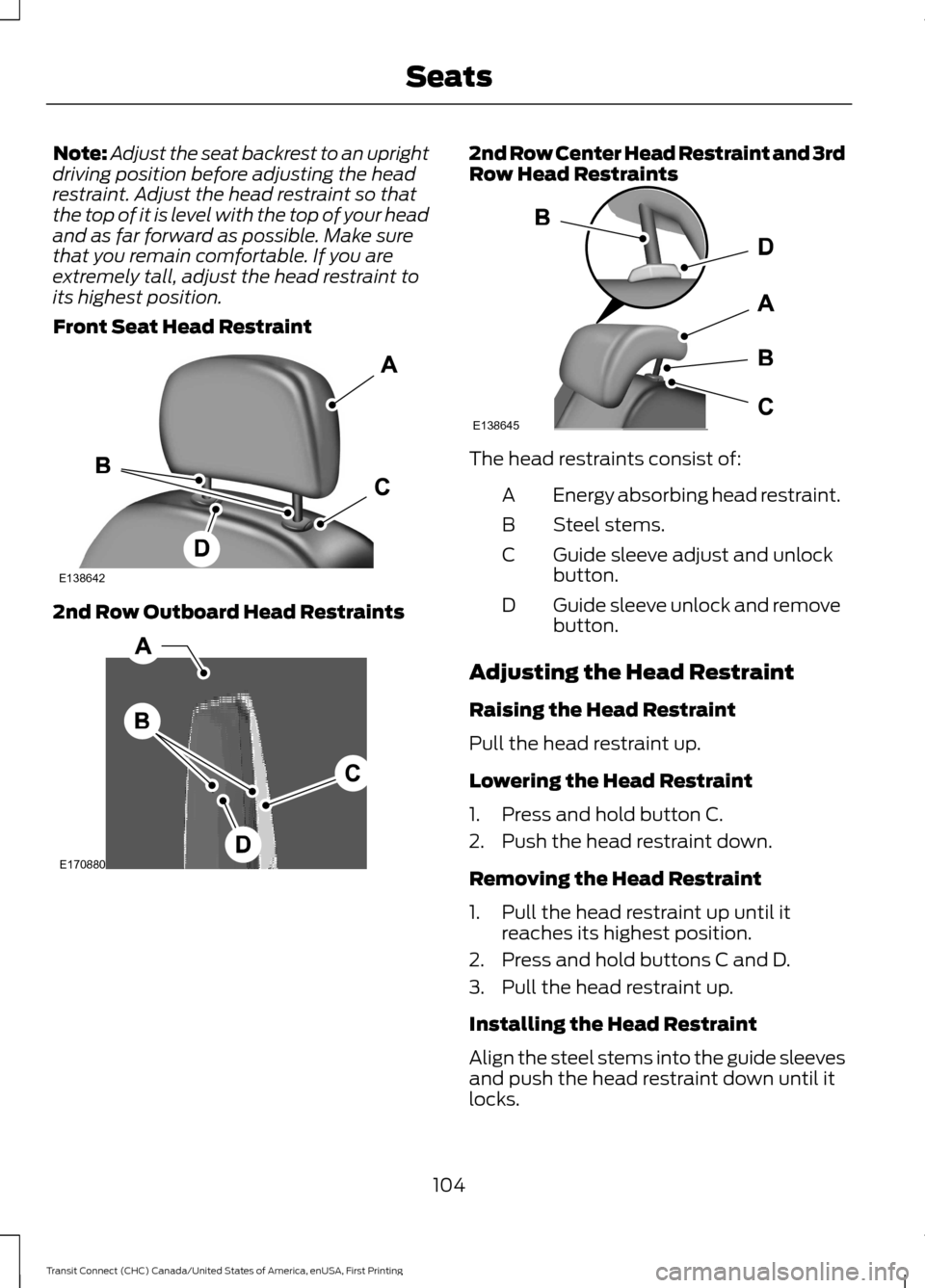
Front Seat Head Restraint 2nd Row Outboard Head Restraints 2nd Row Center Head Restraint and 3rd
Row Head Restraints
The head restraints consist of:
Energy absorbing head restraint.
A
Steel stems.
B
Guide sleeve adjust and unlock
button.
C
Guide sleeve unlock and remove
button.
D
Adjusting the Head Restraint
Raising the Head Restraint
Pull the head restraint up.
Lowering the Head Restraint
1. Press and hold button C.
2. Push the head restraint down.
Removing the Head Restraint
1. Pull the head restraint up until it reaches its highest position.
2. Press and hold buttons C and D.
3. Pull the head restraint up.
Installing the Head Restraint
Align the steel stems into the guide sleeves
and push the head restraint down until it
locks.
104
Transit Connect (CHC) Canada/United States of America, enUSA, First Printing SeatsE138642 E170880 E138645
Page 111 of 428
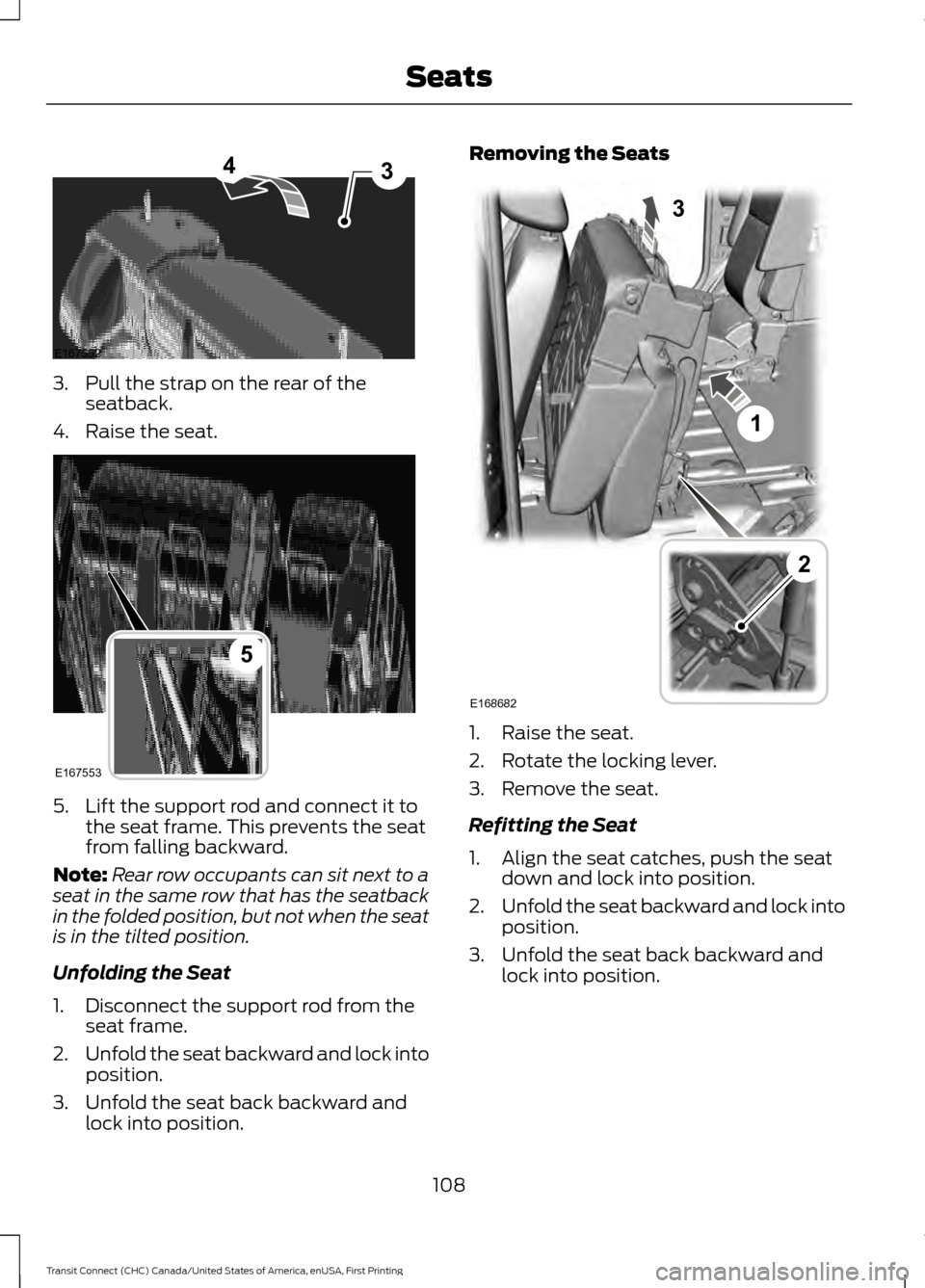
3. Pull the strap on the rear of the
seatback.
4. Raise the seat. 5. Lift the support rod and connect it to
the seat frame. This prevents the seat
from falling backward.
Note: Rear row occupants can sit next to a
seat in the same row that has the seatback
in the folded position, but not when the seat
is in the tilted position.
Unfolding the Seat
1. Disconnect the support rod from the seat frame.
2. Unfold the seat backward and lock into
position.
3. Unfold the seat back backward and lock into position. Removing the Seats
1. Raise the seat.
2. Rotate the locking lever.
3. Remove the seat.
Refitting the Seat
1. Align the seat catches, push the seat
down and lock into position.
2. Unfold the seat backward and lock into
position.
3. Unfold the seat back backward and lock into position.
108
Transit Connect (CHC) Canada/United States of America, enUSA, First Printing SeatsE167552
43 E167553
5 E168682
1
3
2
Page 112 of 428
Vehicles With Seven Seats
Second Row Seats
Folding the Seat Flat
Note:
Fully lower the head restraint when
folding the seats. See Head Restraints
(page 103).
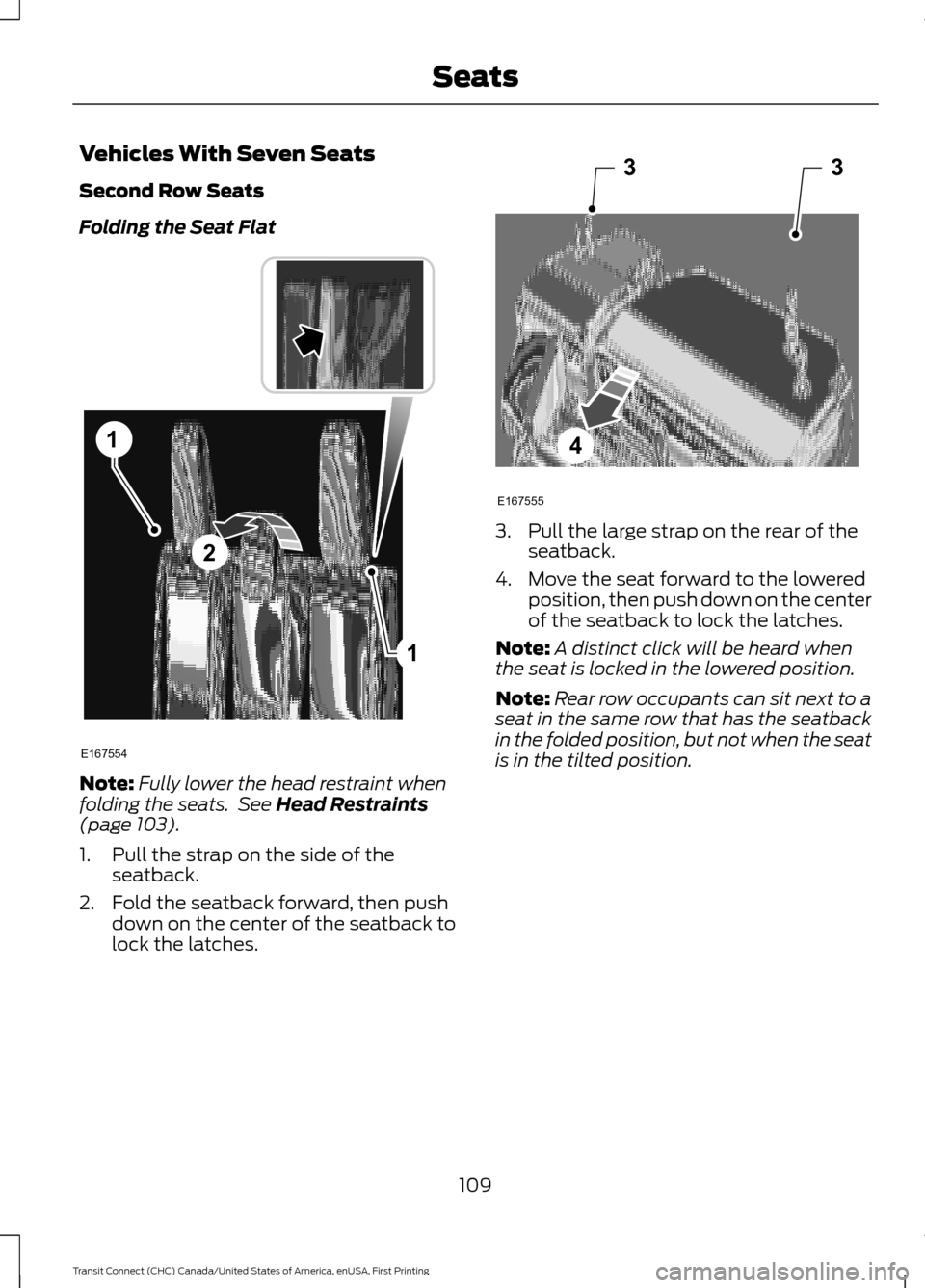
1. Pull the strap on the side of the seatback.
2. Fold the seatback forward, then push down on the center of the seatback to
lock the latches. 3. Pull the large strap on the rear of the
seatback.
4. Move the seat forward to the lowered position, then push down on the center
of the seatback to lock the latches.
Note: A distinct click will be heard when
the seat is locked in the lowered position.
Note: Rear row occupants can sit next to a
seat in the same row that has the seatback
in the folded position, but not when the seat
is in the tilted position.
109
Transit Connect (CHC) Canada/United States of America, enUSA, First Printing Seats1
1
2
E167554 33
4
E167555
Page 113 of 428
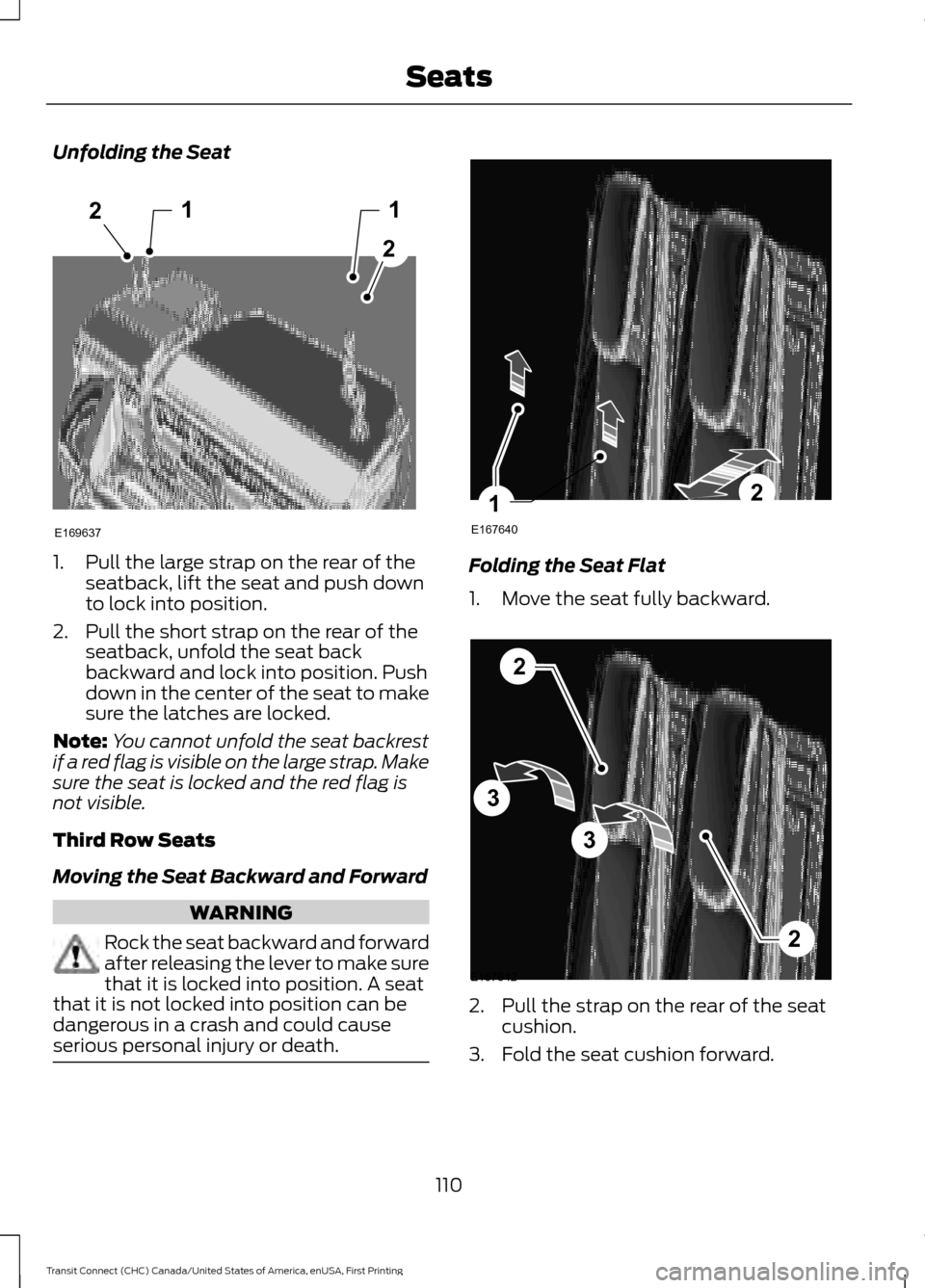
Unfolding the Seat
1. Pull the large strap on the rear of the
seatback, lift the seat and push down
to lock into position.
2. Pull the short strap on the rear of the seatback, unfold the seat back
backward and lock into position. Push
down in the center of the seat to make
sure the latches are locked.
Note: You cannot unfold the seat backrest
if a red flag is visible on the large strap. Make
sure the seat is locked and the red flag is
not visible.
Third Row Seats
Moving the Seat Backward and Forward WARNING
Rock the seat backward and forward
after releasing the lever to make sure
that it is locked into position. A seat
that it is not locked into position can be
dangerous in a crash and could cause
serious personal injury or death. Folding the Seat Flat
1. Move the seat fully backward.
2. Pull the strap on the rear of the seat
cushion.
3. Fold the seat cushion forward.
110
Transit Connect (CHC) Canada/United States of America, enUSA, First Printing Seats12
2
1
E169637 E167640
21 E167642
2
3
3
2
Page 114 of 428
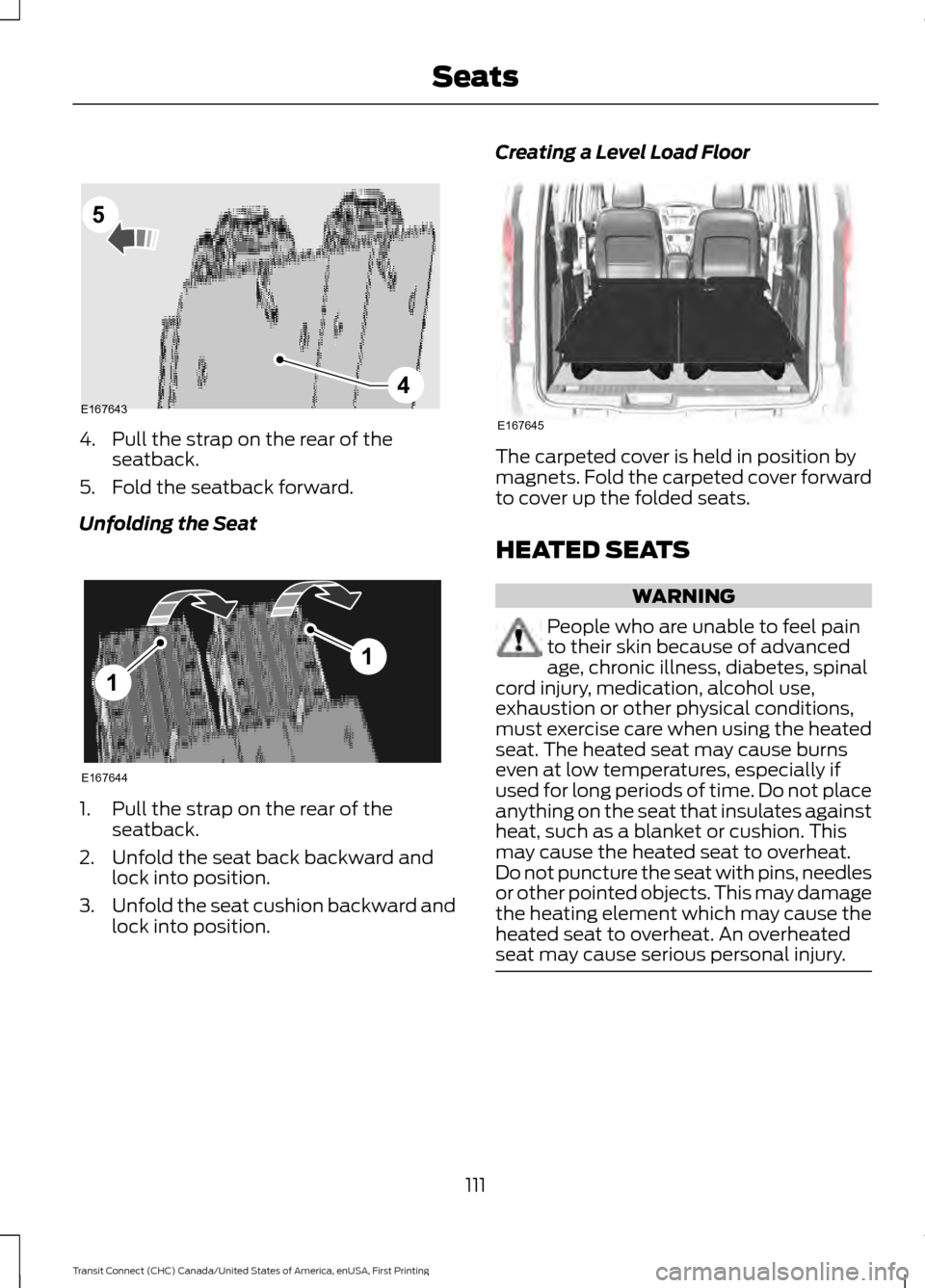
4. Pull the strap on the rear of the
seatback.
5. Fold the seatback forward.
Unfolding the Seat 1. Pull the strap on the rear of the
seatback.
2. Unfold the seat back backward and lock into position.
3. Unfold the seat cushion backward and
lock into position. Creating a Level Load Floor
The carpeted cover is held in position by
magnets. Fold the carpeted cover forward
to cover up the folded seats.
HEATED SEATS
WARNING
People who are unable to feel pain
to their skin because of advanced
age, chronic illness, diabetes, spinal
cord injury, medication, alcohol use,
exhaustion or other physical conditions,
must exercise care when using the heated
seat. The heated seat may cause burns
even at low temperatures, especially if
used for long periods of time. Do not place
anything on the seat that insulates against
heat, such as a blanket or cushion. This
may cause the heated seat to overheat.
Do not puncture the seat with pins, needles
or other pointed objects. This may damage
the heating element which may cause the
heated seat to overheat. An overheated
seat may cause serious personal injury. 111
Transit Connect (CHC) Canada/United States of America, enUSA, First Printing SeatsE1676434
5 E167644
1
1 E167645