phone FORD TRANSIT CONNECT 2015 2.G Repair Manual
[x] Cancel search | Manufacturer: FORD, Model Year: 2015, Model line: TRANSIT CONNECT, Model: FORD TRANSIT CONNECT 2015 2.GPages: 428, PDF Size: 6.27 MB
Page 322 of 428
Helpful Hints
•
Make sure the interior of your vehicle is
as quiet as possible. Wind noise from
open windows and road vibrations may
prevent the system from correctly
recognizing spoken voice commands.
• After pressing the voice command icon,
wait until after the tone sounds and
Listening appears before saying a voice
command. Any voice command spoken
prior to this does not register with the
system.
• Speak naturally, without long pauses
between words.
• At any time, you can interrupt the
system while it is speaking by pressing
the voice command icon.
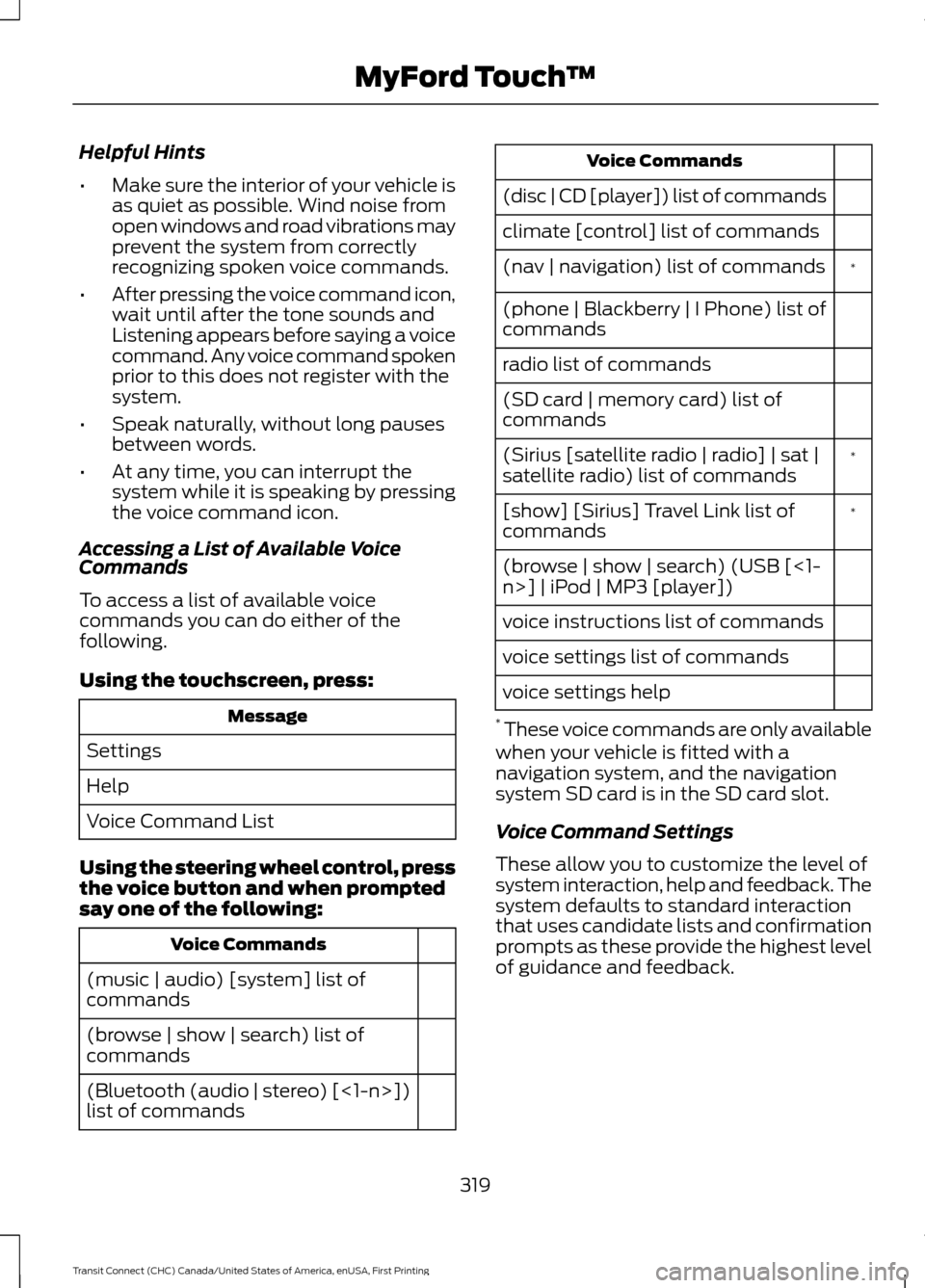
Accessing a List of Available Voice
Commands
To access a list of available voice
commands you can do either of the
following.
Using the touchscreen, press: Message
Settings
Help
Voice Command List
Using the steering wheel control, press
the voice button and when prompted
say one of the following: Voice Commands
(music | audio) [system] list of
commands
(browse | show | search) list of
commands
(Bluetooth (audio | stereo) [<1-n>])
list of commands Voice Commands
(disc | CD [player]) list of commands
climate [control] list of commands *
(nav | navigation) list of commands
(phone | Blackberry | I Phone) list of
commands
radio list of commands
(SD card | memory card) list of
commands
*
(Sirius [satellite radio | radio] | sat |
satellite radio) list of commands
*
[show] [Sirius] Travel Link list of
commands
(browse | show | search) (USB [<1-
n>] | iPod | MP3 [player])
voice instructions list of commands
voice settings list of commands
voice settings help
* These voice commands are only available
when your vehicle is fitted with a
navigation system, and the navigation
system SD card is in the SD card slot.
Voice Command Settings
These allow you to customize the level of
system interaction, help and feedback. The
system defaults to standard interaction
that uses candidate lists and confirmation
prompts as these provide the highest level
of guidance and feedback.
319
Transit Connect (CHC) Canada/United States of America, enUSA, First Printing MyFord Touch
™
Page 323 of 428
•
Interaction Mode: Novice mode
provides detailed interaction and
guidance. Advanced mode has less
audible interaction and more tone
prompts.
• Confirmation Prompts:
The system
uses these short questions to confirm
your voice command. If turned off, the
system simply makes a best guess as
to what you requested. The system
may still occasionally ask you to
confirm a voice command.
• Phone and Media Candidate Lists:
Candidate lists are lists of possible
results from your voice commands. The
system creates these lists when it has
the same confidence level of several
options based on your voice command.
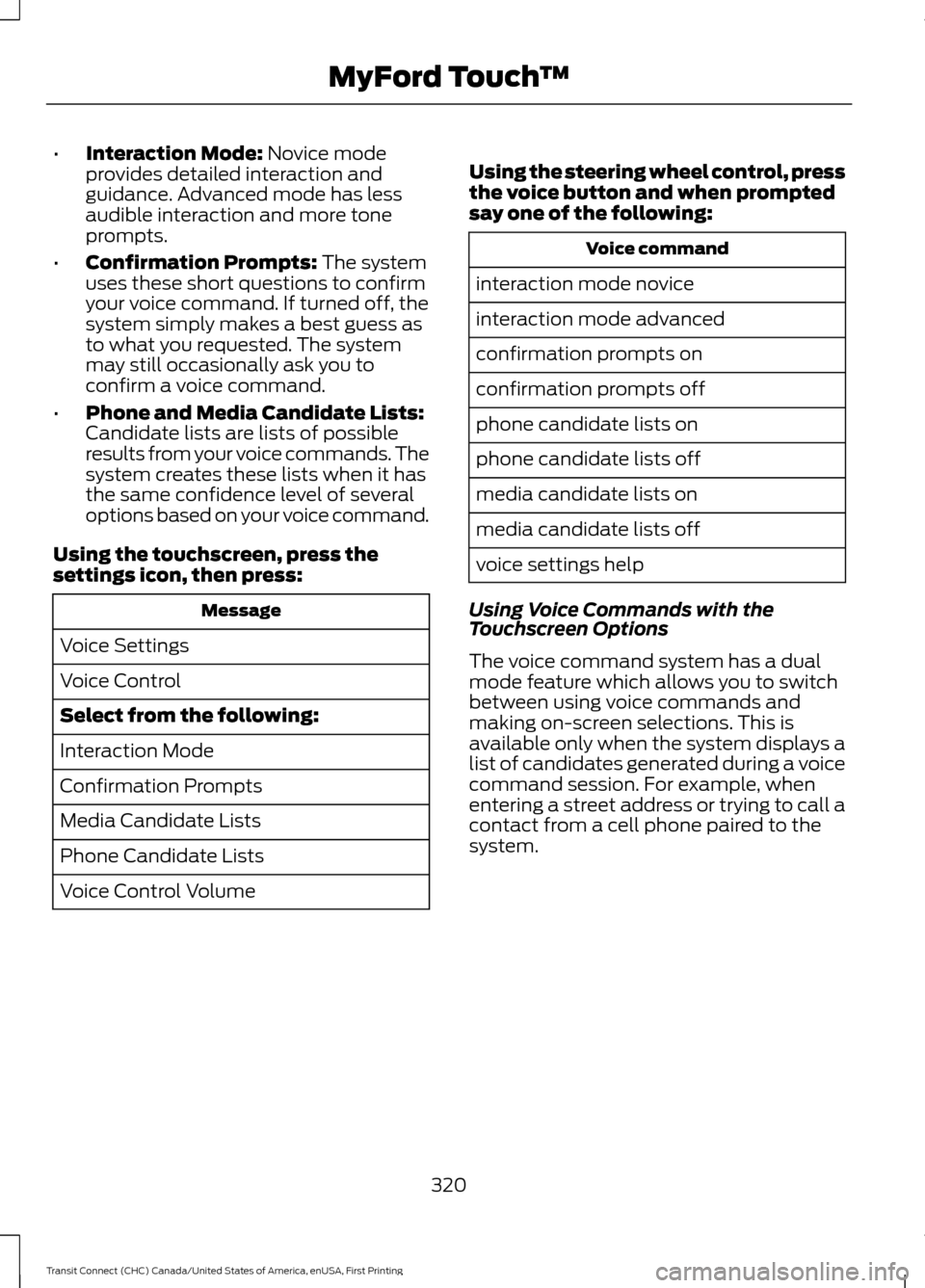
Using the touchscreen, press the
settings icon, then press: Message
Voice Settings
Voice Control
Select from the following:
Interaction Mode
Confirmation Prompts
Media Candidate Lists
Phone Candidate Lists
Voice Control Volume Using the steering wheel control, press
the voice button and when prompted
say one of the following: Voice command
interaction mode novice
interaction mode advanced
confirmation prompts on
confirmation prompts off
phone candidate lists on
phone candidate lists off
media candidate lists on
media candidate lists off
voice settings help
Using Voice Commands with the
Touchscreen Options
The voice command system has a dual
mode feature which allows you to switch
between using voice commands and
making on-screen selections. This is
available only when the system displays a
list of candidates generated during a voice
command session. For example, when
entering a street address or trying to call a
contact from a cell phone paired to the
system.
320
Transit Connect (CHC) Canada/United States of America, enUSA, First Printing MyFord Touch
™
Page 328 of 428
Action and Description
Message
Enhanced Park Aids
Rear Camera Delay
You can find more information on the rear view camera system in another chapter. See
Parking Aids (page 134).
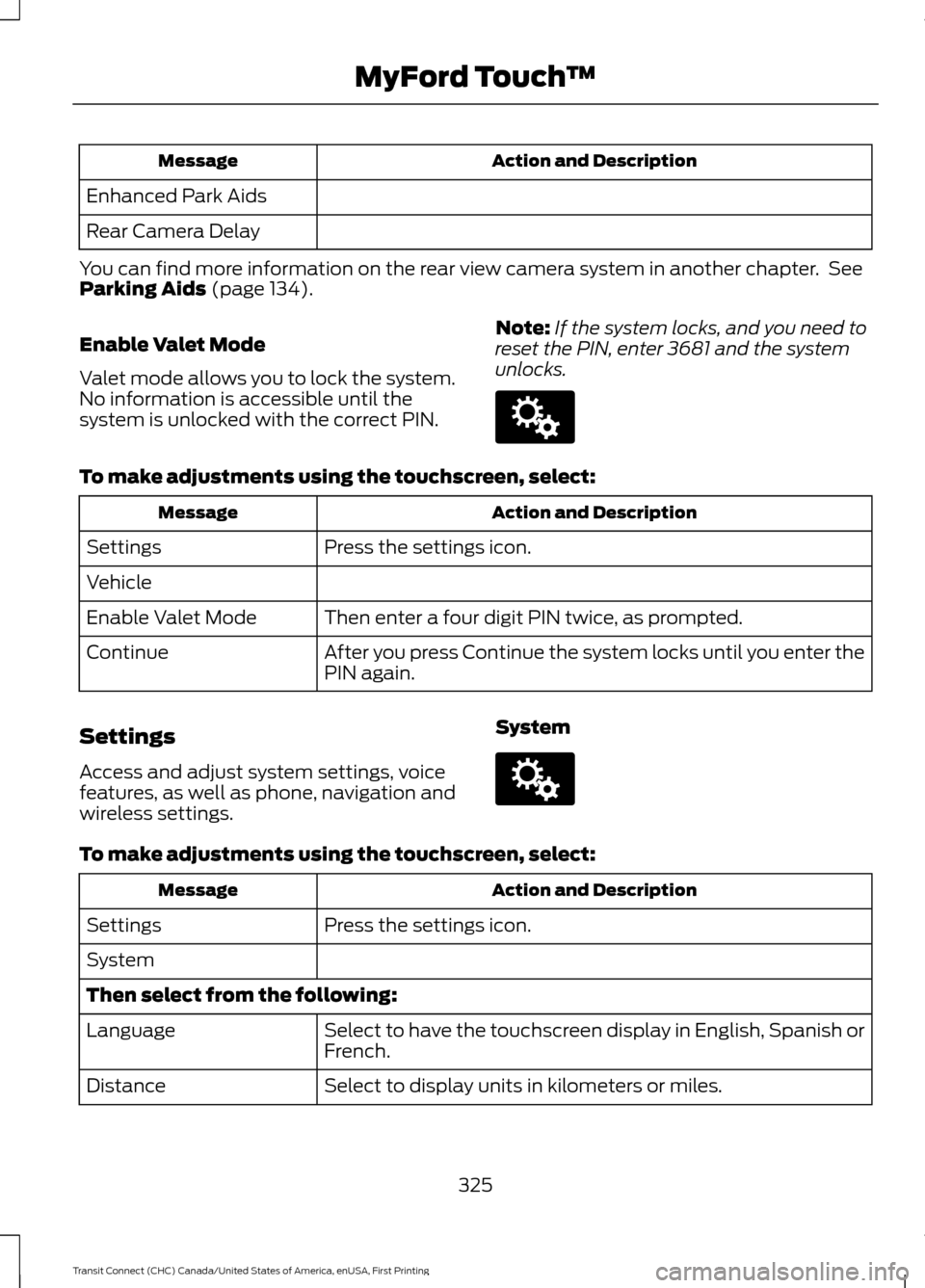
Enable Valet Mode
Valet mode allows you to lock the system.
No information is accessible until the
system is unlocked with the correct PIN. Note:
If the system locks, and you need to
reset the PIN, enter 3681 and the system
unlocks. To make adjustments using the touchscreen, select:
Action and Description
Message
Press the settings icon.
Settings
Vehicle
Then enter a four digit PIN twice, as prompted.
Enable Valet Mode
After you press Continue the system locks until you enter the
PIN again.
Continue
Settings
Access and adjust system settings, voice
features, as well as phone, navigation and
wireless settings. SystemTo make adjustments using the touchscreen, select:
Action and Description
Message
Press the settings icon.
Settings
System
Then select from the following:
Select to have the touchscreen display in English, Spanish or
French.
Language
Select to display units in kilometers or miles.
Distance
325
Transit Connect (CHC) Canada/United States of America, enUSA, First Printing MyFord Touch
™E142607 E142607
Page 330 of 428
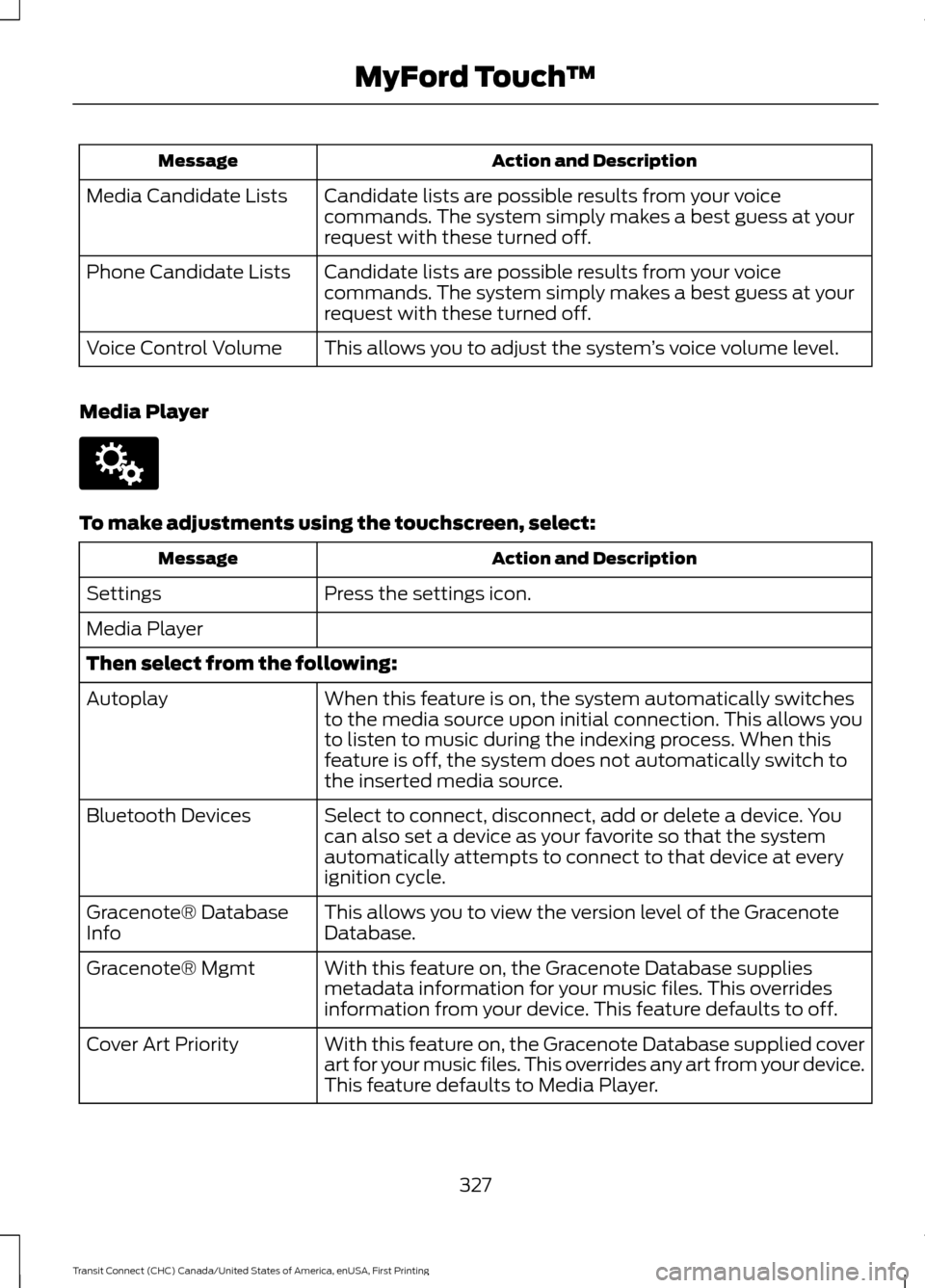
Action and Description
Message
Candidate lists are possible results from your voice
commands. The system simply makes a best guess at your
request with these turned off.
Media Candidate Lists
Candidate lists are possible results from your voice
commands. The system simply makes a best guess at your
request with these turned off.
Phone Candidate Lists
This allows you to adjust the system ’s voice volume level.
Voice Control Volume
Media Player To make adjustments using the touchscreen, select:
Action and Description
Message
Press the settings icon.
Settings
Media Player
Then select from the following:
When this feature is on, the system automatically switches
to the media source upon initial connection. This allows you
to listen to music during the indexing process. When this
feature is off, the system does not automatically switch to
the inserted media source.
Autoplay
Select to connect, disconnect, add or delete a device. You
can also set a device as your favorite so that the system
automatically attempts to connect to that device at every
ignition cycle.
Bluetooth Devices
This allows you to view the version level of the Gracenote
Database.
Gracenote® Database
Info
With this feature on, the Gracenote Database supplies
metadata information for your music files. This overrides
information from your device. This feature defaults to off.
Gracenote® Mgmt
With this feature on, the Gracenote Database supplied cover
art for your music files. This overrides any art from your device.
This feature defaults to Media Player.
Cover Art Priority
327
Transit Connect (CHC) Canada/United States of America, enUSA, First Printing MyFord Touch
™E142607
Page 332 of 428
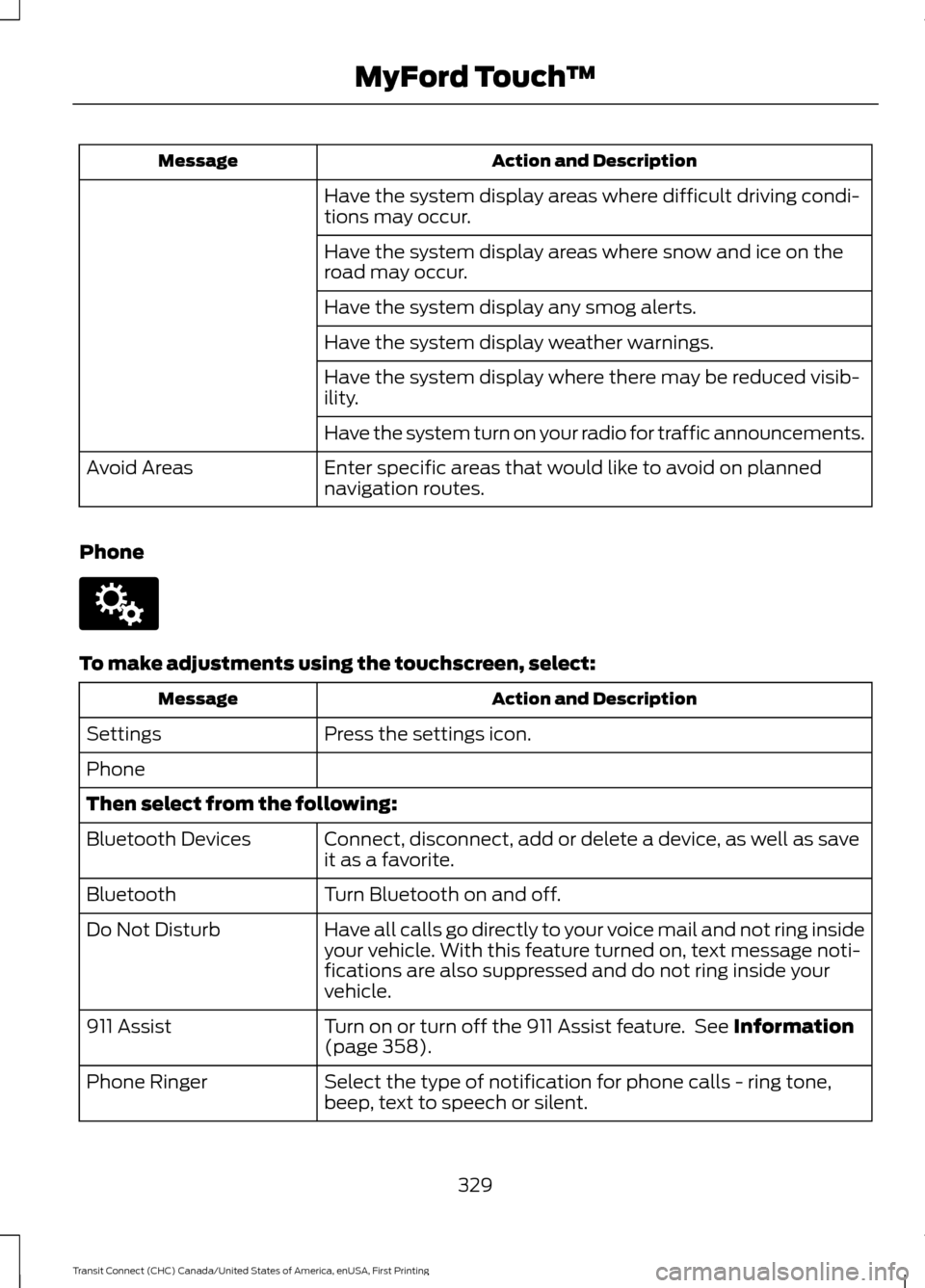
Action and Description
Message
Have the system display areas where difficult driving condi-
tions may occur.
Have the system display areas where snow and ice on the
road may occur.
Have the system display any smog alerts.
Have the system display weather warnings.
Have the system display where there may be reduced visib-
ility.
Have the system turn on your radio for traffic announcements.
Enter specific areas that would like to avoid on planned
navigation routes.
Avoid Areas
Phone To make adjustments using the touchscreen, select:
Action and Description
Message
Press the settings icon.
Settings
Phone
Then select from the following:
Connect, disconnect, add or delete a device, as well as save
it as a favorite.
Bluetooth Devices
Turn Bluetooth on and off.
Bluetooth
Have all calls go directly to your voice mail and not ring inside
your vehicle. With this feature turned on, text message noti-
fications are also suppressed and do not ring inside your
vehicle.
Do Not Disturb
Turn on or turn off the 911 Assist feature. See Information
(page 358).
911 Assist
Select the type of notification for phone calls - ring tone,
beep, text to speech or silent.
Phone Ringer
329
Transit Connect (CHC) Canada/United States of America, enUSA, First Printing MyFord Touch
™E142607
Page 333 of 428
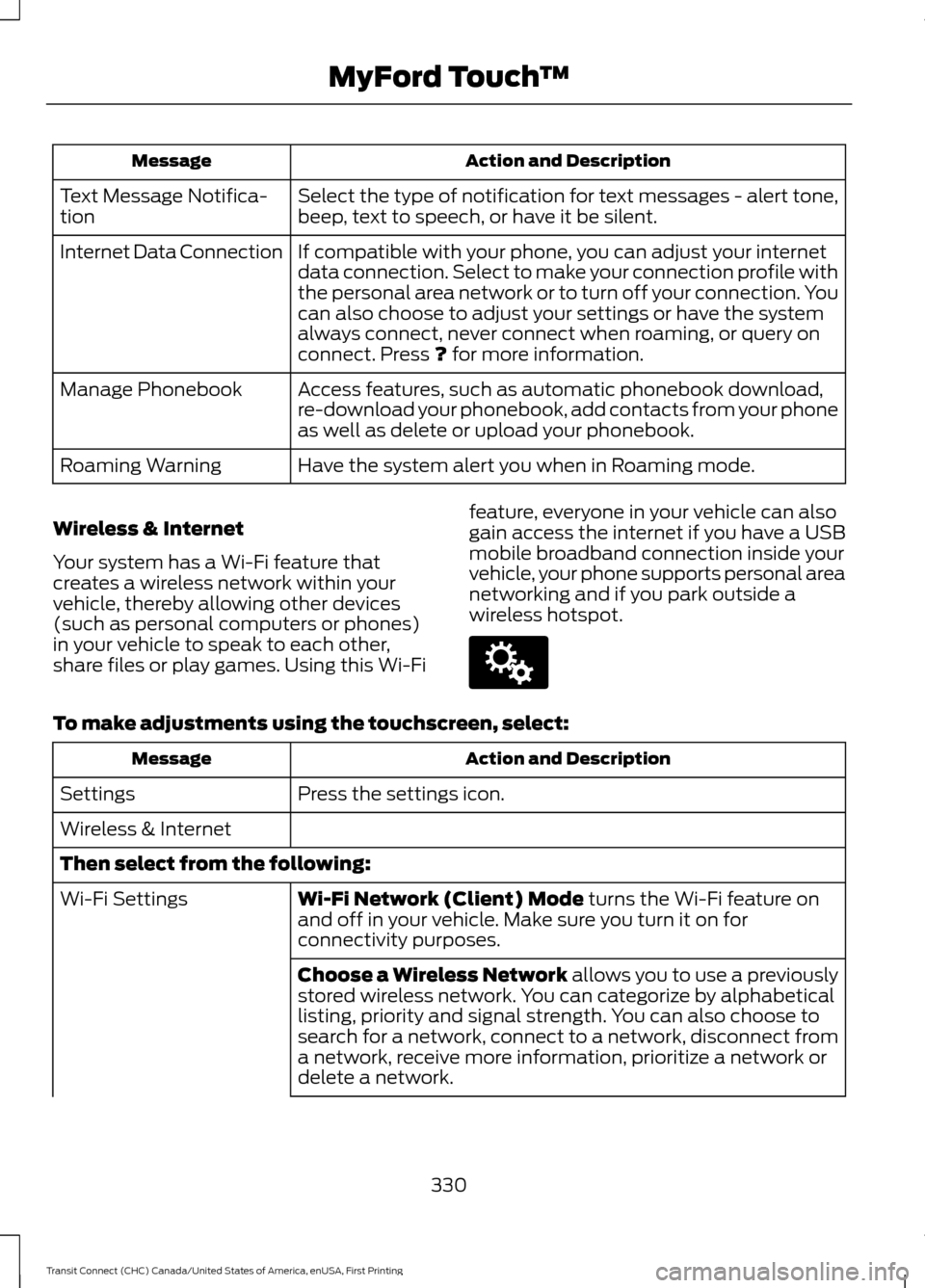
Action and Description
Message
Select the type of notification for text messages - alert tone,
beep, text to speech, or have it be silent.
Text Message Notifica-
tion
If compatible with your phone, you can adjust your internet
data connection. Select to make your connection profile with
the personal area network or to turn off your connection. You
can also choose to adjust your settings or have the system
always connect, never connect when roaming, or query on
connect. Press ? for more information.
Internet Data Connection
Access features, such as automatic phonebook download,
re-download your phonebook, add contacts from your phone
as well as delete or upload your phonebook.
Manage Phonebook
Have the system alert you when in Roaming mode.
Roaming Warning
Wireless & Internet
Your system has a Wi-Fi feature that
creates a wireless network within your
vehicle, thereby allowing other devices
(such as personal computers or phones)
in your vehicle to speak to each other,
share files or play games. Using this Wi-Fi feature, everyone in your vehicle can also
gain access the internet if you have a USB
mobile broadband connection inside your
vehicle, your phone supports personal area
networking and if you park outside a
wireless hotspot.To make adjustments using the touchscreen, select:
Action and Description
Message
Press the settings icon.
Settings
Wireless & Internet
Then select from the following:
Wi-Fi Network (Client) Mode
turns the Wi-Fi feature on
and off in your vehicle. Make sure you turn it on for
connectivity purposes.
Wi-Fi Settings
Choose a Wireless Network allows you to use a previously
stored wireless network. You can categorize by alphabetical
listing, priority and signal strength. You can also choose to
search for a network, connect to a network, disconnect from
a network, receive more information, prioritize a network or
delete a network.
330
Transit Connect (CHC) Canada/United States of America, enUSA, First Printing MyFord Touch
™E142607
Page 334 of 428
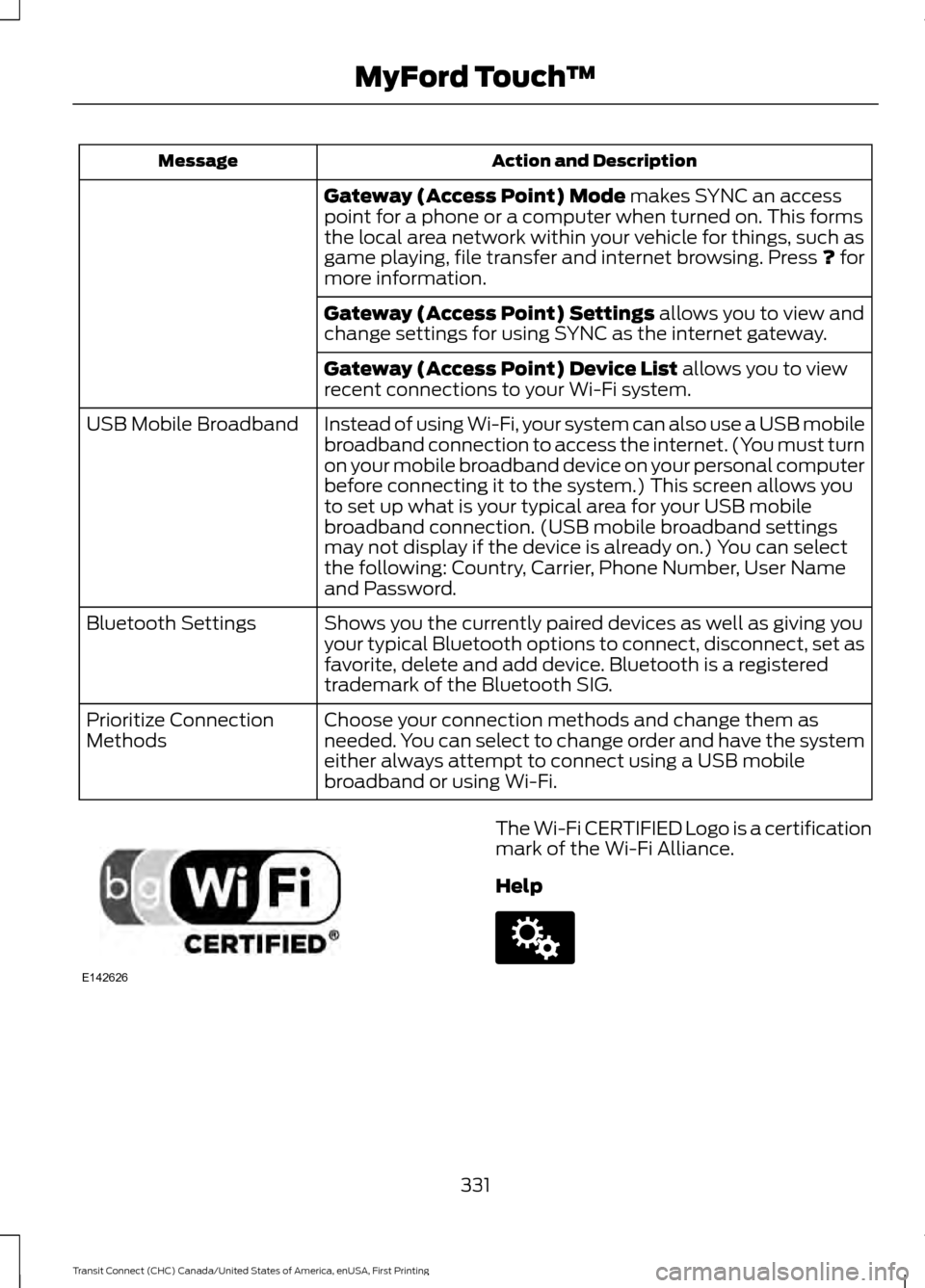
Action and Description
Message
Gateway (Access Point) Mode makes SYNC an access
point for a phone or a computer when turned on. This forms
the local area network within your vehicle for things, such as
game playing, file transfer and internet browsing. Press
? for
more information.
Gateway (Access Point) Settings
allows you to view and
change settings for using SYNC as the internet gateway.
Gateway (Access Point) Device List
allows you to view
recent connections to your Wi-Fi system.
Instead of using Wi-Fi, your system can also use a USB mobile
broadband connection to access the internet. (You must turn
on your mobile broadband device on your personal computer
before connecting it to the system.) This screen allows you
to set up what is your typical area for your USB mobile
broadband connection. (USB mobile broadband settings
may not display if the device is already on.) You can select
the following: Country, Carrier, Phone Number, User Name
and Password.
USB Mobile Broadband
Shows you the currently paired devices as well as giving you
your typical Bluetooth options to connect, disconnect, set as
favorite, delete and add device. Bluetooth is a registered
trademark of the Bluetooth SIG.
Bluetooth Settings
Choose your connection methods and change them as
needed. You can select to change order and have the system
either always attempt to connect using a USB mobile
broadband or using Wi-Fi.
Prioritize Connection
Methods The Wi-Fi CERTIFIED Logo is a certification
mark of the Wi-Fi Alliance.
Help
331
Transit Connect (CHC) Canada/United States of America, enUSA, First Printing MyFord Touch
™E142626 E142607
Page 335 of 428
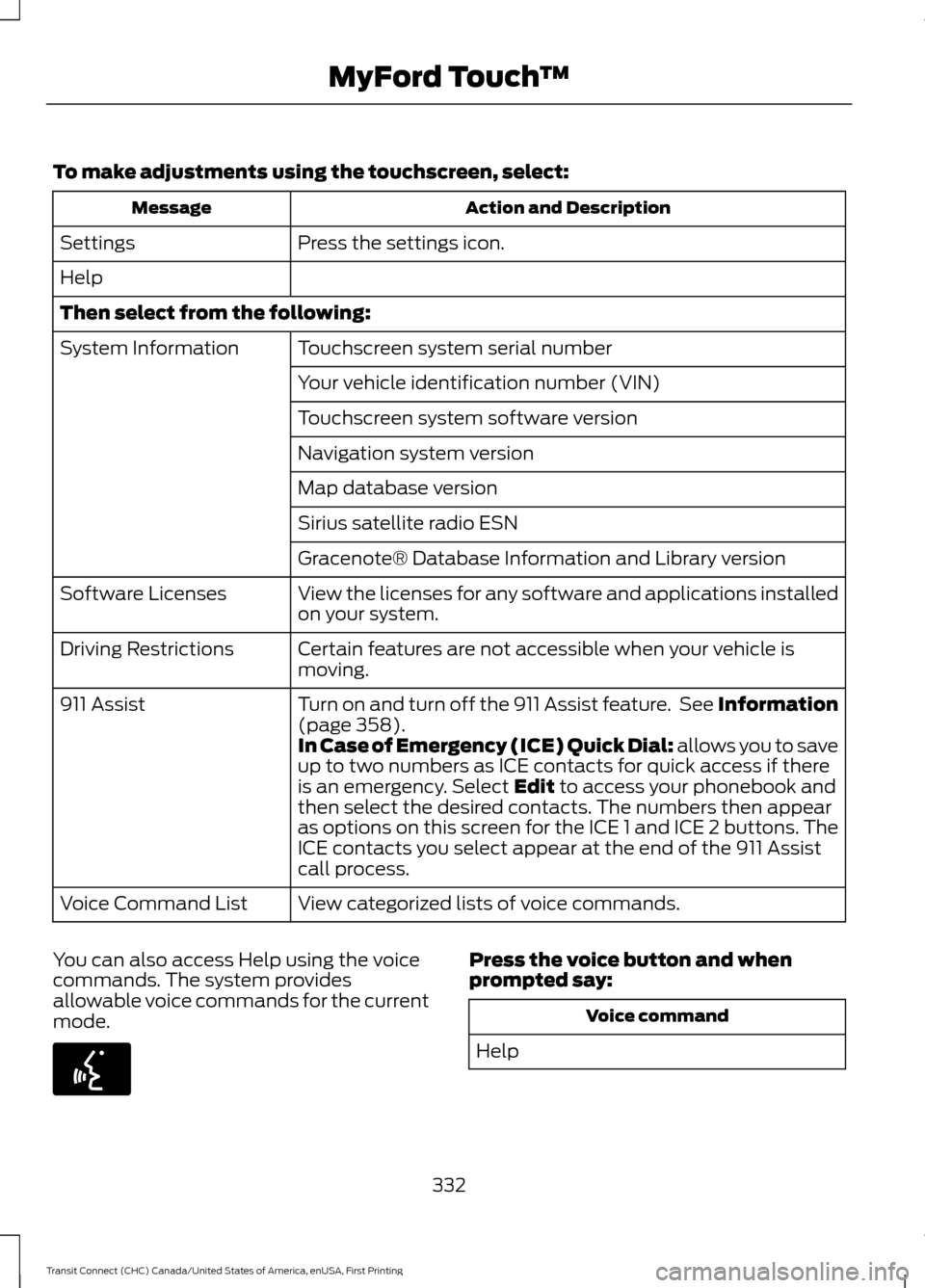
To make adjustments using the touchscreen, select:
Action and Description
Message
Press the settings icon.
Settings
Help
Then select from the following:
Touchscreen system serial number
System Information
Your vehicle identification number (VIN)
Touchscreen system software version
Navigation system version
Map database version
Sirius satellite radio ESN
Gracenote® Database Information and Library version
View the licenses for any software and applications installed
on your system.
Software Licenses
Certain features are not accessible when your vehicle is
moving.
Driving Restrictions
Turn on and turn off the 911 Assist feature. See Information
(page 358).
911 Assist
In Case of Emergency (ICE) Quick Dial: allows you to save
up to two numbers as ICE contacts for quick access if there
is an emergency. Select
Edit to access your phonebook and
then select the desired contacts. The numbers then appear
as options on this screen for the ICE 1 and ICE 2 buttons. The
ICE contacts you select appear at the end of the 911 Assist
call process.
View categorized lists of voice commands.
Voice Command List
You can also access Help using the voice
commands. The system provides
allowable voice commands for the current
mode. Press the voice button and when
prompted say:
Voice command
Help
332
Transit Connect (CHC) Canada/United States of America, enUSA, First Printing MyFord Touch
™E142599
Page 353 of 428
Voice command
*
(browse | search| show) video
playlist
Video Podcast playlist name
| Music Video playlist name>
(browse | search| show) video
podcast
Video Podcast Episode name
| Music Video Song name>
Help
* These commands are only available in
USB mode and are device-dependent.
Supported Media Players, Formats
and Metadata Information
SYNC is capable of hosting nearly any
digital media player, including iPod,
Zune ™, plays from device players, and
most USB drives. Supported audio formats
include MP3, WMA, WAV and AAC.
It is also able to organize your indexed
media from your playing device by
metadata tags. Metadata tags, which are
descriptive software identifiers embedded
in the media files, provide information
about the file.
If your indexed media files contain no
information embedded in these metadata
tags, SYNC may classify the empty
metadata tags as unknown. Bluetooth Audio
The system allows you to stream audio
over your vehicle's speakers from your
connected, Bluetooth-enabled cell phone. To access, press the lower left corner
on the touchscreen, then select:
Message
BT Stereo
Bluetooth Audio Voice Commands Press the voice button and when
prompted say:
Voice command
[play] next track
play
pause
[play] previous track
350
Transit Connect (CHC) Canada/United States of America, enUSA, First Printing MyFord Touch
™E142611 E142599
Page 354 of 428
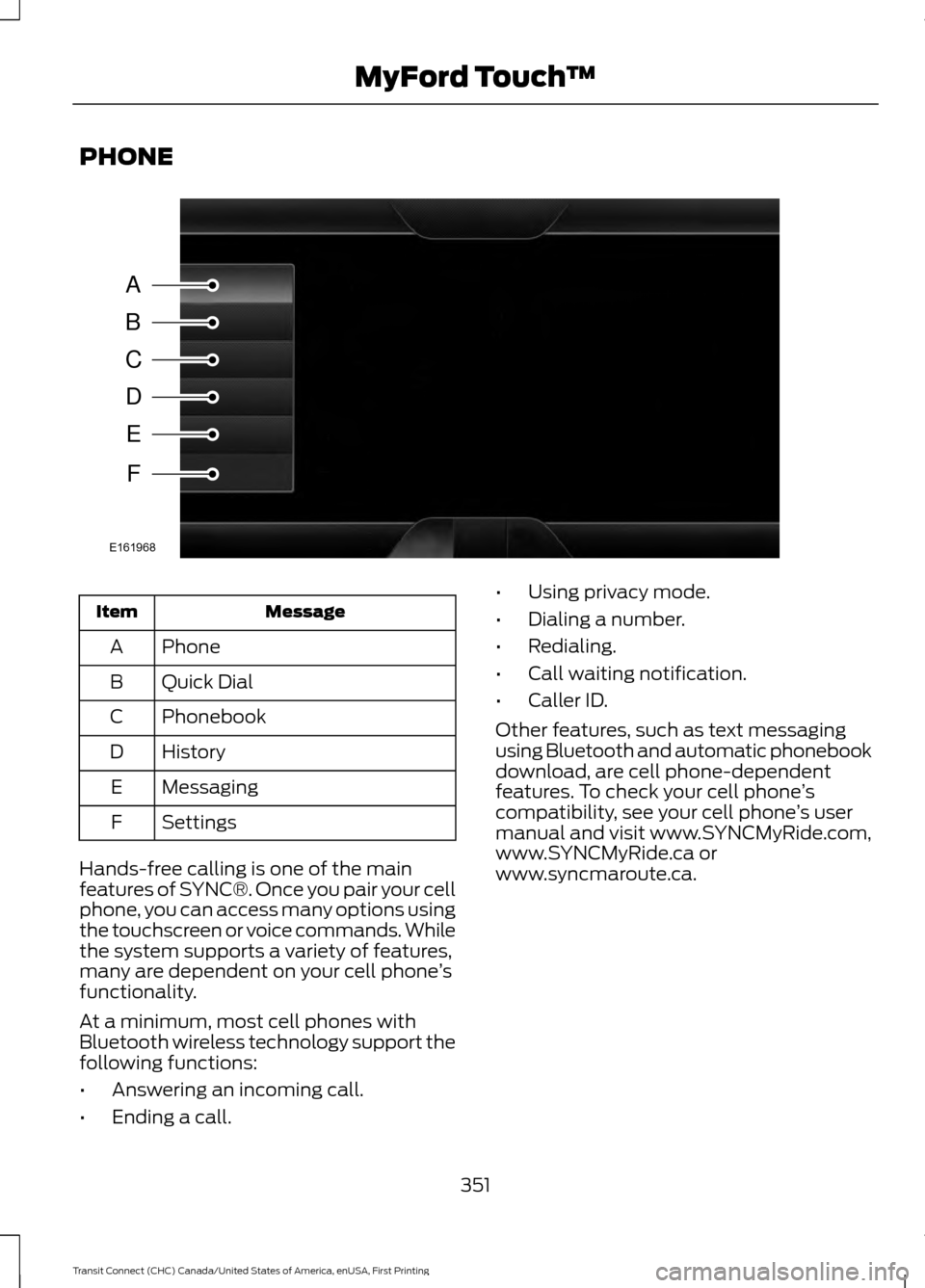
PHONE
Message
Item
Phone
A
Quick Dial
B
Phonebook
C
History
D
Messaging
E
Settings
F
Hands-free calling is one of the main
features of SYNC®. Once you pair your cell
phone, you can access many options using
the touchscreen or voice commands. While
the system supports a variety of features,
many are dependent on your cell phone ’s
functionality.
At a minimum, most cell phones with
Bluetooth wireless technology support the
following functions:
• Answering an incoming call.
• Ending a call. •
Using privacy mode.
• Dialing a number.
• Redialing.
• Call waiting notification.
• Caller ID.
Other features, such as text messaging
using Bluetooth and automatic phonebook
download, are cell phone-dependent
features. To check your cell phone ’s
compatibility, see your cell phone ’s user
manual and visit www.SYNCMyRide.com,
www.SYNCMyRide.ca or
www.syncmaroute.ca.
351
Transit Connect (CHC) Canada/United States of America, enUSA, First Printing MyFord Touch
™A
B
C
D
E
F
E161968